Tag: apps

  • Temporarily free Android and iOS apps

    Temporarily free Android and iOS apps

    Please note that we have not done our customary in-depth assessments of every app this time around as you get ready to explore our fantastic selections.

    Just a quick reminder that although some applications are free to download, they can have optional in-app purchases or ads. Have fun with what you find!

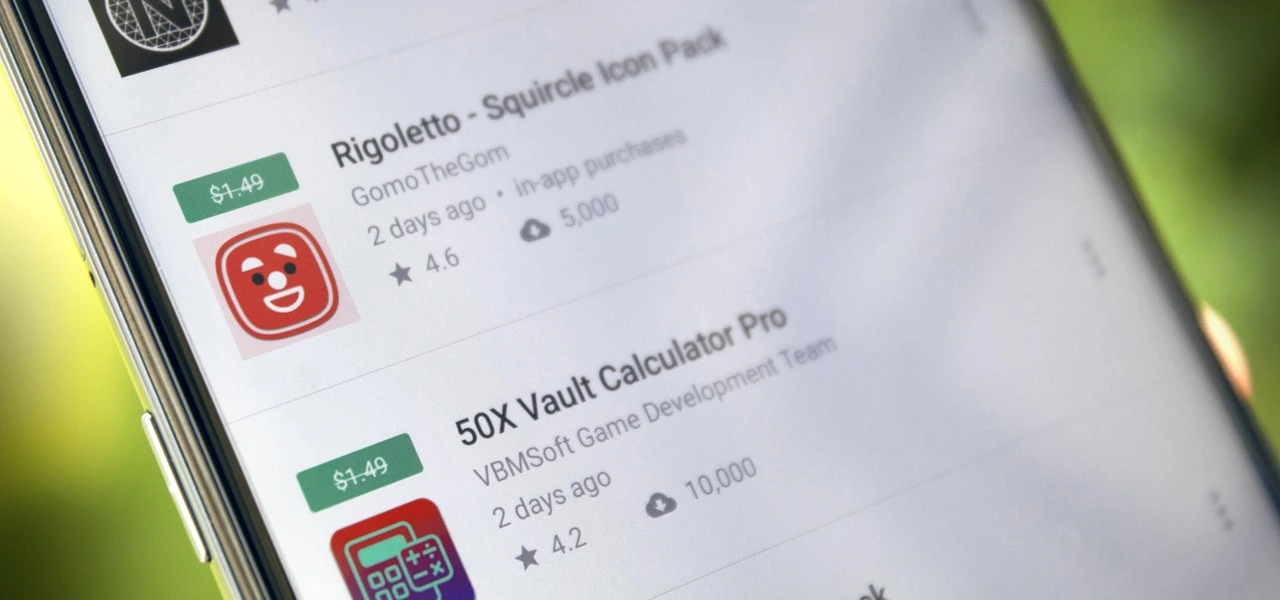
    Even if you do not immediately require an app, download it if you find one that interests you. If you do this, it will be marked as “purchased,” thus even if you take it off your smartphone shortly after, it will be in your app library forever.

    Android Apps and Games Available for Free–Limited Time Offer

    Top Free Android Apps for Productivity and Lifestyle

    • Volume Scheduler ($0.99): Want to silent your phone at different times? Why not let this app get the job done for you?
    • Bright LED Flashlight Pro ($2.99): Not happy with your default flashlight app? This should help you get sorted out.
    • Cartogram Map Live Wallpaper ($3.00): Here is a unique wallpaper app that shows your live location!
    • Touch Lock ($0.99): Disable your touchscreen while you are listening to music or watching videos.
    • Resume Builder CV Maker ($4.99): Create CVs on the fly wherever you are with this app.

    Free Android Games

    iOS Apps and Games Available for Free–Limited Time Offer

    Top Free iOS Apps for Productivity and Lifestyle

    • Step Out! Smart Alarm Clock ($1.99): Can’t find enough motivation to get out of bed even when the alarm rings? This app will irritate you enough to wake up.
    • Mavis Camera ($5.99): A camera app that offers more flexibility when it comes to shooting photos and recording videos.
    • Attendance ($9.99): Are you a stickler for attendance for all your classes? This app is perfect for you then.
    • Slow Eats for Weight Loss ($2.99): Lose weight by eating slowly Sign me up!

    Free Games for the iPhone and iPad

    • Warlords Classic Strategy ($4.99): The classic PC/Amiga game, now in your hands for all you strategy fans out there!
    • Thrones War ($0.99): A strategy game that involves ancient civilizations, requiring your strategic acumen to emerge victorious.
    • BoBo World: Princess Salon ($4.99): A beauty room game designed for budding beauticians!
    • Eyka ($0.99): A relaxing puzzle game that requires you to harmonize all colors.
    • Egyptian Senet ($2.99): See how life in the Egyptian afterlife will be in this game!

    As of the date of publication, the deals were active. Please share any expired deals you come across in the comments section below. We advise you to review the app’s details in the Play Store or App Store before downloading any of the aforementioned apps. This is crucial as some of these free apps can have unique features or drawbacks of their own.
  • For a limited time these premium apss are free

    For a limited time these premium apss are free

    There are practically countless apps available in the two app shops, the Play Store and the App Store. While some of these apps are free, some need a fee. However, many users are unaware that many paid apps can also be temporarily made free as part of a special deal. We have compiled a list of some of the most intriguing free apps accessible right now.

    Free pro apps (Android)

    • QR / Barcode Scanner PRO ($6.49) – Without a good QR code scanner, you’ll quickly fall into the quishing trap and have to fear for your savings. This top-rated scanner shows you URLs even before it calls them up. This way, fraudulent links can be unmasked at an early stage (4.8 stars, 13,300 ratings)
    • DJ Mixer, DJ Music Remix Pro ($10.99) – This app simulates an actual mixing console. At least, as far as this is possible on a smartphone. If you’ve ever asked yourself how good a DJ you would be, this app can give you the answer (4.1 stars, 350 ratings)
    • My Medicine Pro ($2.79) – Medication can be complicated. Especially if you have to take several of them, this app does the work for you and ensures that you don’t have to remember all the information, symptoms, dosages, and instructions. But beware: Since the application is an unknown medical tool, we recommend that you first pay close attention to whether the app actually works as it should (3.7 stars, 214 ratings).
    • Simple Photo Widget ($0.69) – This app comes without a complicated user interface and countless functions. The functional principle is as simple as it is good: the tool creates a widget with your pictures on the start screen. That’s it (4.1 stars, 1,060 ratings)

    Free premium apps (iOS)

    • Sky Master – pixel shooter ($0.99) – Anyone who appreciates pixel games and is generally nostalgic will have fun with this game. It’s not particularly good, but at least the visuals are convincing. Ideal to pass the boredom in between (5.0 stars, 1 rating)
    • BG Remover AI ($0.99) – Just a few clicks are all it takes to crop the people in your pictures. That’s the promise of the developers behind this app. Although the term AI or AI in this case was probably integrated into the product name primarily for marketing reasons. (5.0 stars, 1 rating)
    • Currency – Simple Converter ($0.99) – Anyone who occasionally leaves European borders needs an app like this. It allows you to convert currencies quickly and easily. Thanks to a minimalist interface, just a few clicks are enough to get an answer (4.5 stars, 207 ratings)
    • Queen Rules ($2.99) – This puzzle game is the ideal way to pass the time. The aim is to position your soldiers so that they can defeat the evil witch’s soldiers. There are also interesting level designs and clay figures (4.8 stars, 111 ratings)

    At the time this post was published, all of the apps we are showcasing here were free to download. Regretfully, developers frequently fail to indicate the duration of these offers. Therefore, do not hesitate to download an app if you enjoy it.

    However, you should always check the app page in the store before downloading a free program. Because there are occasionally unnoticed obstacles that you should be mindful of.

  • Grab these temporarily free Android and iOS apps before they’re gone!

    Grab these temporarily free Android and iOS apps before they’re gone!

    When something is free, who does not love a good deal? To increase awareness and downloads, app makers give away their premium apps and games for a short period of time every week. This gives people the ideal chance to obtain top-notch software without having to pay a thing. Both the iOS and Android platforms offer something for everyone, from work tools to captivating games.

    We have compiled a list of some of the top temporarily free apps that are currently accessible. Keep in mind that these deals will not be there for long, so take advantage of them now! Downloading them ensures they remain in your library indefinitely, even after you uninstall them, even if you do not need them right away. Have fun downloading!

    temporarily free Android and iOS apps

    Limited-Time Free Android Apps and Games

    Must-Have Free Android Apps for Productivity and Lifestyle

    • Offline Password Manager ($0.99): A straightforward app that securely stores your passwords without unnecessary features.
    • QR/Barcode Scanner PRO ($5.99): An application designed for scanning, reading, and generating QR codes and barcodes.​
    • Simple Photo Widget ($0.75): An Android widget that allows you to display photos from your gallery directly on your home screen, enabling personalized customization of your device.​

    Free Android games

    Free iOS Games and Apps—for a Limited Time

    Top Free iOS Apps for Productivity and Lifestyle

    • Art Space: Artwork Preview App ($37.99): This app enables artists to display and present their works in a virtual gallery, providing an impressive preview of their art.​
    • Network Usage Monitor ($10.99): Network Usage Monitor provides a detailed analysis of network connections on your device and helps monitor data and bandwidth usage.​
    • Resume Designer 3 ($4.29): This app allows you to create professionally designed resumes that can be customized to fit the needs of the job.​

    Free games for the iPhone and iPad

    • Warlords Classic Strategy ($5.99): An engaging strategy game where you lead armies and defeat opponents in tactical battles. 
    • Mr. Traffic ($2.99): A game that challenges you to navigate traffic and avoid accidents while driving various vehicles.​
    • Bloom Sort ($14.99): A relaxing puzzle game where you arrange colorful flowers in the correct order.​
    • Neolysium ($2.99): An innovative, futuristic adventure game that immerses you in a mysterious world full of puzzles and discoveries.​

    While exploring new apps can be exciting, it’s essential to prioritize your safety and protect your personal data. Always download apps from trusted sources like the Google Play Store or Apple App Store, as these platforms have rigorous security measures in place to vet applications. Avoid third-party stores or unknown websites, as they often host apps that may contain malware or spyware.

    Before installing any app, take a moment to review its permissions. Be cautious if an app requests access to features or data unrelated to its functionality, such as a calculator app asking for location or microphone access. Additionally, check user reviews and verify the developer’s credibility to ensure the app is legitimate and secure.

    By following these precautions, you can enjoy the benefits of mobile apps without compromising your privacy or device security. Stay vigilant and download wisely!

  • Temporarily free Apps for Android and iOS

    Temporarily free Apps for Android and iOS

    This week, we are excited to present our carefully curated selection of essential free apps that you will not want to miss! Our hardworking staff has searched the Google Play Store and the Apple App Store for some hidden gems that are normally available for purchase but are now free for users on both iOS and Android devices.

    If you find an app that piques your interest, even if you don’t need it right away, go ahead and download it. Doing so will mark it as “purchased,” ensuring it remains in your app library indefinitely—regardless of whether you remove it from your device soon after.

    android and Ios apps

    Android Apps and Games Available for Free–Limited Time Offer

    Top Free Android Apps for Productivity and Lifestyle

    • AppLock Pro ($4.49): Choose different styles to lock your apps without being limited to what the app offers itself for a greater amount of flexibility.
    • Sound Meter & Noise Detector ($2.99): An app that claims to be able to detect the sound and noise level in the vicinity.
    • Fake Call Screen ($0.99): Ever been in a tight spot socially and need to be bailed out? This app simulates a fake call for you to get out of a tough situation.
    • Dark Screen Filter ($0.99): If you use your phone late into the night, perhaps dark mode is not enough, but having this dark screen filter might help ease the strain on your eyes.
    • PhotoApp ($6.49): An AI photo app that allows you to edit and modify images at your whims and fancy.

    Free Android Games

    • Non Stop Balloons Shooter ($3.99): Shoot down balloons as they continue to keep on coming at you!
    • Puzzle Words Pro ($1.49): A word search game with three modes to choose from to keep things happening.
    • Theme Park Simulator ($0.99): Enjoy running a theme park wherever you go with this cute little app. 
    • Live or Die Survival Pro ($0.49): The end of the world is coming, and you need to do your very best to remain alive with your wits.
    • Defense Zone 3 Ultra HD ($2.99): A tower defense game with amazing graphics that is set in a futuristic war setting.

    iOS Apps and Games Available for Free–Limited Time Offer

    Top Free iOS Apps for Productivity and Lifestyle

    • weather+ ($0.99): Want to know what the weather is like outside? Find out in this app before you head out.
    • Outfit Outdoor Fitness ($2.99): Let the app inform you on what you need to wear before you head out for your exercise.
    • Light Filter ($3.99): Want to take the perfect photo? Make sure the surrounding lighting is right with this app.
    • Feelly ($1.99): A personal mood tracker that helps you keep tabs on how you are feeling, perfect fro those who want to figure themselves out.
    • Bookends ($10.99): Do you do a lot of writing and research that needs referencing? Guess this reference management app will come in handy.

    Free Games for the iPhone and iPad

    • Cooking Game for Kids ($5.99): Think your kid will be the next Gordon Ramsay? Why not let them have a go at a cooking game and see if they have the chops to do so?
    • Catennacio Football Manager ($2.99): If you think you are able to do better than the real-life football managers, then give this game a go!
    • My City: Star Horse Stable ($3.99): Learn the ropes of taking care of a pony without incurring actual cost on a virtual platform.
    • Pirate Drops 2 ($4.99): A Match-3 game that takes on a pirate theme which will surely offer a refreshing experience.
    • Cuppy Ball ($0.99): Hopefully you’ll be able to place the cup at the right place for the ball to fall into.

    We advise you to review the app’s details in the Play Store or App Store before downloading any of the aforementioned apps. This is crucial as some of these free apps can have unique features or drawbacks of their own.
    While making sure your data is safe and secure, you are free to browse the wide range of free apps available for both iOS and Android smartphones.

  • Will Google Wallet work offline? Absolutely – how it works

    Will Google Wallet work offline? Absolutely – how it works

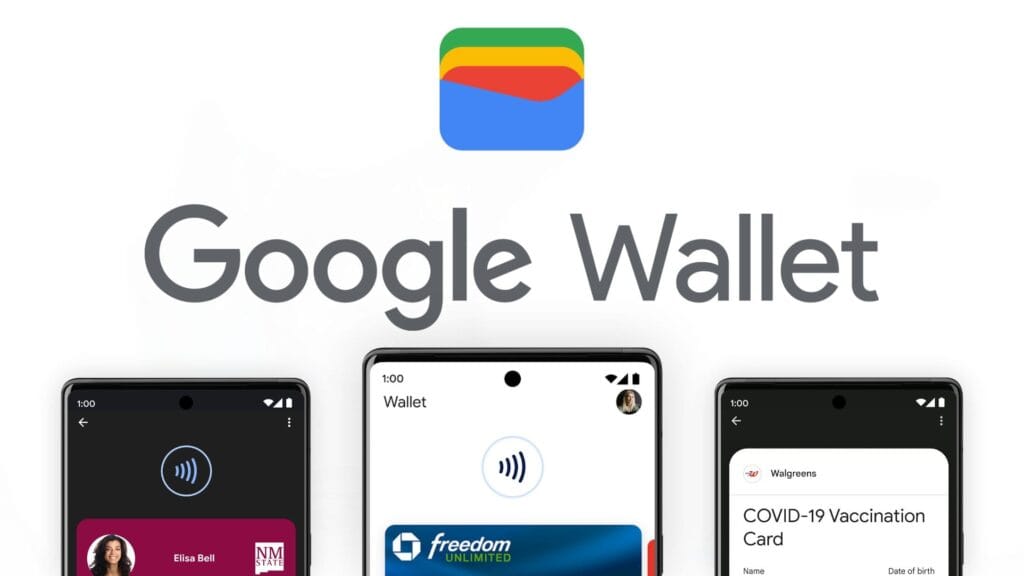
    Google Wallet is a straightforward and safe mobile wallet that can easily store anything from concert tickets to credit cards. However, what occurs if you are not within range of Wi-Fi or if your mobile data is unavailable? Is it still usable?

    If you do not want to carry around a heavy physical wallet, Google Wallet can be rather useful. However, once we are out and about, we have no control over mobile signals or data connectivity. Therefore, it makes sense to be concerned about Google Wallet not working when there is no data connection.

    Even if your phone or smartwatch loses data connectivity, most of its functionality will keep working. For example, you can use your bank card to make contactless payments even when your smartphone is turned off. However, you cannot add a new bank card.

    Similarly, other cards and passes, such as boarding passes, event tickets, loyalty cards, digital IDs, and gift cards, do not usually include an online component for frequent use. If they are retrieved via an online service, you may require internet access to add them. Otherwise, they do not require a data connection to operate.

    Digital IDs, corporate badges, car keys, health insurance cards, and hotel keys can also work offline.

    However, if you are offline, Google Wallet will be unable to retrieve the most recent information about your stored cards and passes, such as loyalty point balances or updated flight timings.

    google wallet logo

    Google Wallet

    Safety starts with understanding how developers collect and share your data. Data privacy and security practices may vary based on your use, region, and age. The developer provided this information and may update it over time.

    google wallet payments

    How does Google Wallet work offline?

    As previously stated, many of the cards and passes you save in Google Wallet do not have an active online component. As a result, utilizing these cards does not require the app to connect to the internet. However, payment cards work slightly differently.

    When you add a bank card to Google Wallet, the app downloads a few one-time tokens from your card issuer, which effectively represent your payment card. When you pay with a contactless terminal, these codes are safely kept on your device and communicated to them. The terminal handles all the heavy lifting. It utilizes the token to communicate with the bank server and finish the transaction. So, you do not require the internet to pay using NFC because just the encrypted one-time code is transferred. This also protects the entire process from man-in-the-middle assaults.

    However, if you frequently utilize contactless payments without taking your phone or smartwatch online, your one-use tokens may run out. In such a case, you will be unable to make further payments. So, if you want to continue using contactless payment without complications, make sure your smartphone is not offline for an extended period of time. Whenever your phone is online, Google Wallet refreshes its supply of one-time tokens for later usage.

    Google Wallet normally saves a certain number of one-time tokens, which varies by card issuer. The number might range from roughly five to ten. Some card issuers may not support the offline payment option.

    It may be better to go offline in poor network areas.

    Although Google Wallet functions properly when connected to a stable internet connection, it may suffer with unstable data connections. So, if you see empty grey boxes while attempting to access the various cards or passes in your Google Wallet, your phone is most certainly experiencing connectivity troubles. The program attempts to connect to the internet to affirm the validity and other details of your inserted cards, but is unable to do so due to internet connectivity issues.

    In these situations, it is best to turn off mobile data and Wi-Fi. This way, you will be able to access all of the app’s offline functions, including its main function, contactless payments. Once you have turned off mobile data and Wi-Fi, you can view and use your stored cards. This is especially useful in locations with inadequate networks.

    Google Wallet is an useful and flexible tool for Android users. It has quickly become the preferred place for all of your cards, IDs, tickets, and passes.

  • Limited time offer! Temporarly free apps for Android and iOS

    Limited time offer! Temporarly free apps for Android and iOS

    Google and Apple’s app marketplaces, the Play Store and the App Store, include an almost limitless amount of apps. Some of these apps are free, while others cost money. However, many users are unaware that many paid programs are briefly offered for free as part of a special deal. We have compiled a list of the most fascinating apps now accessible for free.

    google pixel apps

    For Android

    • Netzsignal Pro: Wi-Fi & 5G ($0.49): If you want to find out more about your network signal, you can’t go past this app. Not only does it offer outstanding and numerous ratings, but also a clear user interface with many practical functions.
    • Illuminance -Lux Pro ($0.49): This light intensity meter is almost as popular. The app uses your smartphone’s sensors to display the illuminance in the Si unit lux. Users can create separate rooms and analyze the respective lighting conditions.
    • Voice Calculator Pro ($9.99): Calculator apps are a dime a dozen. However, this application stands out from the crowd because it allows you to open several calculation windows at the same time. This means you can start a new calculation without having to delete the old one.
    • Who Uses My Wi-Fi Pro ($0.49): If you don’t know exactly which devices are connected to your Wi-Fi, you should definitely download this app. Not only can you analyze your connected devices, but you can also find devices that have connected to your Wi-Fi.

    For iOS

    • 1Contacts Pro ($0.99): This app gives you full control and, above all, a complete overview of your contacts. Duplicate contacts can also be tracked down and merged if necessary. But beware: If you use this app, you give an additional third-party provider access to your contact data.
    • Queen Rules ($2.99): If you don’t like tower defense games, you can pass the time with this puzzle game. To win, you have to place your soldiers in such a way that they defeat the enemy troops. The app also offers interesting level designs and clay figures.
    • No Wi-Fi Mini Games ($0.99): The name says it all. Downloading the application provides you with access to over 50 exciting and nostalgic mini-games. An Internet connection is not required. The developers have also dispensed with advertising.
    • Aqueduct 101 ($2.99): A creative puzzle game in which you build aqueducts and make water flow. Real fun for puzzle fans and a great way to pass the time.

    Some businesses use innovative techniques to capitalize on your personal information in the rapidly evolving mobile application landscape. But do not worry, computer lovers; we have gathered crucial recommendations to help you protect your valuable data. It is critical that you exercise caution when granting rights to the apps you select to install.

  • Limited-time free apps: discover the best free Android & iOS Games and Apps today!

    Limited-time free apps: discover the best free Android & iOS Games and Apps today!

    Freebies are great, especially when it comes to high-end apps and games. Developers give away paid programs and games every day as part of promotions; if you are quick, you can get your hands on these treasures for nothing. You will not want to miss the newest temporarily free iOS and Android applications and games that we have compiled in this blog. There is something for everyone here, from productivity enhancers to addictive games, so let us get started before the offers expire!

    These time-limited deals are an excellent opportunity to try out new games and applications without having to pay a dime. With these offers, you can try out a creative tool, increase your productivity, or play games without taking any chances. Additionally, even when the campaign is over, you can retain them once you have claimed them. But act quickly—these deals are only available today and will disappear tomorrow! Let us find out what is currently for sale.

    Android apps and games that are free for a limited time

    Android apps for productivity and lifestyle

    • PhotoApp AI ($6.49): You can call this a highly useful photo editor to modify your photos on your phone.
    • Touch Lock ($0.99): This app ensures that your screen remains locked, doing away with accidental touches.
    • Volume Scheduler: Auto Silent ($0.99): Want to make sure your phone is silent at a certain time? This app gets the job done, fuss free.
    • Xproguard Anti-Theft ($22.99): An app that claims to add another layer of security to your handset, discouraging theft and unauthorized access.
    • Binary Calculator Pro ($0.99): Enjoy this free mathematical calculator that is capable of adding, subtracting, multiplying, and dividing numbers in binary format.

    Free Android games

    • Hero of the Kingdom: Tales 2 ($6.49): It is time to play the heroic princess and save your city from a great evil.
    • SPHAZE: Sci-fi Puzzle Game ($0.99): A puzzle game that is set in a sci-fi setting that is lovely to look at even as you crack your brain.
    • Brain Game Find 5x ($3.49): Think you are smart? Why not tease your brain with this game that contains plenty of puzzles!
    • Shadow Hunter Offline Premium ($0.99): Here’s a horizontal hack-and-slash adventure game where you mow your way through endless enemies.
    • The Lost Treasure ($3.99): A point-and-click visual adventure game that requires you to solve puzzles and put two-and-two together along the way.

    iOS apps that are free for a short time

    iOS apps for productivity and lifestyle

    • Vostok – Story Maker ($0.99): If you want to create a collage from your photo album, this app might come in handy.
    • Filterious Photo Filters ($2.99): Want to spruce up your photos? Use this photo filter app.
    • Origami Paper Fold ($2.49): Should you have plenty of free time to spare, why not learn how to make some craft?
    • Bookends ($10.99): This reference management app will certainly come in handy for scholars and those doing research.
    • Tiny Planner ($19.99): Want an app to keep your life organized? Tiny Planner does seem to fit the bill perfectly.

    Free games for the iPhone and iPad

    • Command Word Jumble Complete ($4.99): Unscramble words, reveal hidden meanings, and basically take full advantage of your vocabulary.
    • Lyrica: Drunken Moon ($1.99): A music-based game that combines lyrics, making it a rather interesting gaming experience. 
    • The Lost Treasure ($3.99): A point-and-click adventure game with numerous places to explore as you search for pirate’s treasure.
    • King’s Hero: Turn Based Strategy ($1.99): A classical RPG with turn-based combat in the same vein as that of Heroes of Might & Magic.
    • Arcs ($1.99): 100 circular puzzles for you to solve, each of them offering more challenge than before.

    While snagging free apps and games is exciting, it’s important to stay vigilant to ensure a safe and positive experience. Always review the permissions an app requests before installation—if an app asks for access to data or features that don’t seem necessary, it’s better to skip it. Be cautious with apps that include in-app purchases, as they can lead to unexpected charges if not monitored, especially when children are involved.

    For families, consider enabling parental controls on your devices to restrict downloads and purchases. Take a moment to review app content ratings and ensure that they’re appropriate for young users. A little oversight can go a long way in making sure your free finds are both fun and secure.

    By staying mindful of these tips, you can enjoy the best free apps and games without compromising on safety. Happy downloading!

  • Snag for free these must-have free Android & iOS apps before they’re gone!

    Snag for free these must-have free Android & iOS apps before they’re gone!

    Who does not enjoy getting free downloads of premium apps? Developers occasionally give away their premium iOS and Android apps for a brief period of time. These offers may cover anything from picture editors and productivity tools to instructive materials and captivating games.

    The catch? You will need to move quickly to seize these undiscovered treasures while they are still available because these deals do not stay long!

    We have compiled a list of the top temporarily free apps that are now accessible for download in this post. There is something for everyone here, regardless of your preference for iOS or Android. Every app has been chosen with attention due to its excellent reviews, practicality, and overall worth. Now is your opportunity to improve your smartphone experience without breaking the bank.

    Android apps and games that are free for a limited time

    Android apps for productivity and lifestyle

    • Iris Light Flat 3D Icon Pack ($0.49): An icon pack that changes the way your Android handset looks like.
    • 90s Music Radio Pro ($0.90): Stream hit music from the 1990s with this unique app that shares culture from the previous century with the current generation.
    • Math Up to 100 ($2.49): This app recognizes handwritten input that makes it a more natural method of learning math, especially for the younger ones.
    • Matrix Determinant Pro ($0.49): Need a quick calculating app to figure out matrices? This app is a math calculator, which can calculate the determinant of a matrix.
    • How Much Can I Spend? ($2.99): Not everyone is a billionaire, so this app comes in handy to help you track your spending.

    Free Android games

    • WindWings ($0.99): A frenetic shoot ’em up that will require your reflexes to be at their very best.
    • Live or Die Survival Pro ($0.49): This game places you in dire straits, where you need to keep your wits about you to remain alive in the midst of a zombie apocalypse.
    • Tower Defense Legend 5 Pro ($0.49): A tower defense game that keeps you on the edge of your seat as endless waves of enemies bear down upon you.
    • Dungeon Corp. S ($1.49): A really wacky game set in an office environment where you encounter various monsters and vanquish them to level up.
    • Words & Cards Pro ($1.49): Just how many words can you find in a jumbled mess of letters in this game?

    iOS apps that are free for a short time

    iOS apps for productivity and lifestyle

    • The Wonder Weeks ($5.99): Keep track of your newborn baby’s development over the first few weeks with this app, making sure you never miss a moment.
    • Weather+ ($0.99): The weather can be a very fickle thing, so making sure you keep tabs on what’s happening outside helps you prepare everything better.
    • Resume Designer 3 ($3.99): Want to cobble up a resume on the fly? This app will help you do so.
    • mySymptoms Food Diary ($7.99): If you want to keep track of what you eat to make sure you don’t take in anything allergic, this can be helpful.
    • Good Grade ($2.99): A photo editor and color grading app that you can bring with you wherever you go.

    Free games for the iPhone and iPad

    • Vigil RPG ($2.00): A single-player premium RPG that is featured in 8-bit graphics, with interesting battles that require some important decision-making which will impact the story.
    • Dragon Flight Simulator Games ($1.99): Flying a plane is one thing, but flying a dragon? It doesn’t seem to be as easy as it sounds.
    • My City: Hospital ($3.99): Running a hospital is no child’s play, but you can let your child play with this hospital simulation game!
    • Pirate Drops 2 ($4.99): A match-3 puzzle game that features a pirate theme with fire and water elemental obstacles to boot.
    • Kingdom Rush: Tower Defense HD ($5.99): Hordes of enemies are knocking at your castle’s door. How will you repel them?

    The deals were live as of the publishing date. If you found an expired deal, please share it in the comments below. 

    Before you download one of the apps mentioned, we recommend that you check the details of the app in the Play Store or App Store. This is important because some of these free apps may have their own special features or disadvantages.

    Be careful with both free and paid apps, as they can hide in-app purchases and advertising. This is particularly significant when downloading games for children. To avoid unexpected problems, please follow the advice below:

    A small number of companies use devious methods to profit from your personal information in the rapidly changing world of mobile apps. We have some essential tips to assist you better safeguard your valuable data, so do not fear, fellow IT enthusiasts. When choosing which apps to download, you must be careful about the rights you provide them. Think about it: why would a basic alarm clock require access to your contact list or camera? Or why would a flashlight app need to know your precise location? You may greatly protect your personal information from unauthorized access by exercising caution when granting permissions.

  • Temporary free apps and games for both Android and iOS

    Temporary free apps and games for both Android and iOS

    We have compiled a list of the most recent apps available on the iOS and Android platforms that have temporarily reduced their prices to $0.

    These temporary promotions allow you to purchase high-quality apps and gamges that typically have a price tag, such as top-rated games and premium productivity tools. Act quickly, though, as these offers will not last long, and you will lose your chance to download an app for free once it goes back to its normal price. Let us explore the must-have freebies of today that will improve your mobile experience.

    Android apps and games that are free for a limited time

    Android apps for productivity and lifestyle

    • Linea – Icon Pack ($1.49): If you want to spruce up your smartphone’s user interface, this is one icon pack that gets the job done.
    • 80s Music Radio Pro ($0.70): Stream hit music from the 1980s with this unique app.
    • AppLock Pro ($4.49): Keep your apps private with another layer of security. 
    • Fraction Maths Pro ($0.99): Need a quick calculating app to figure out fractions? This might be the app to do so.
    • Temperature Converter Pro ($0.99): No need to squeeze unnecessary brain power anymore in figuring out the temperature now.

    Free Android games

    • The Wordies Pro ($1.49): A relaxing word search game that helps you kill time without getting all stressed out.
    • Hero of the Kingdom: Tales 1 ($6.49): There is a looming dragon threat coming, make sure you prepare the villagers for it!
    • Survival Dungeon: Loot RPG Pro ($0.49): A mobile roguelike action RPG where you explore different dungeons and engage in battles.
    • Magnet Balls Pro Puzzle ($0.99): Remember Puzzle Bobble? This is something along the same lines, without cute dinosaurs.
    • Burning Sky VIP ($1.99): It is up to you to save the galaxy once again from endless waves of invaders from outer space.

    iOS apps that are free for a short time

    iOS apps for productivity and lifestyle

    • Strength Flight ($2.99): Want to bring your strength level to new heights? This app will hopefully help you be on that path.
    • Reverse Videos ($0.99): Here is a different video editing app where it basically does what it is named after – reversing videos.
    • Liftoff Workout Log ($4.99): Anything that can be measured, can be improved. Get better with your workouts by keeping track of them.
    • Hidgets ($2.99): View more health widgets on your phone’s home screen with this.
    • Loscil – Adrift ($2.99): This is a collection of 4 pieces of endless music by ambient musician loscil, where it relies on structured random selection that plays music continuously. 

    Free games for the iPhone and iPad

    • PicaSim ($2.99): Learn how to fly different aircraft with this game.
    • The Bug Butcher ($0.99): A side-scrolling shooter where you use your wits and reflexes to get rid of enemies.
    • Hack RUN ($2.99): Live the exciting (and perhaps glamorous?) life of a hacker with this game.
    • PuzzlAR: World Tour ($0.99): Join the navy, see the world? Nah, you can do so via this game now.
    • The Brilliant Kid ($1.99): An educational game for the little ones to keep them occupied.

    As of the date of publication, the deals were active. Please share any expired deals you come across in the comments section below.

    We advise you to review the app’s details in the Play Store or App Store before downloading any of the aforementioned apps. This is crucial as some of these free apps can have unique features or drawbacks of their own.

    Both free and paid apps should be used with caution because they may conceal advertising and in-app purchases. This is especially important while downloading kid-friendly games.

    In the quickly evolving world of mobile applications, some people use cunning tactics to make money by collecting and using your personal data. But do not worry, IT enthusiasts—we have some crucial advice to improve the security of your priceless data. When it comes to providing access for the apps you decide to install, it is important to remain vigilant.

    Why would a basic alarm clock require access to your contacts or camera? Alternatively, why would a flashlight app require your exact location? You may successfully protect your personal data from unauthorized access by carefully controlling the permissions you grant.

    Be sure to take advantage of these important opportunities! Even if these apps are free right now, they can suddenly and unexpectedly go back to their normal costs. Before downloading, make sure to read the app’s ratings and reviews. If you see something that strikes your eye, do not hesitate to take advantage of these offers.

    You may amass an outstanding library of premium apps without spending any money if you keep an eye out for these brief offerings. Developers often provide these time-limited promotions, so be sure to return again for new alerts about free apps. There has never been a better moment to upgrade your mobile device with high-quality, free software, regardless of your preference for iOS or Android.

  • How to clear the cache on your Android device

    How to clear the cache on your Android device

    You are not alone if your Android device has started to lag. Many gadgets have the potential to slow down over time, but there are easy solutions to boost performance. Restarting the device is a quick fix that can resolve a lot of frequent problems. Clearing up cached data from websites and apps is another efficient way to increase speed and free up storage.

    With the use of simple steps, you will go through the process of clearing your Android device’s cache. Depending on the manufacturer and software customisation of your Android device, the steps described may differ, but the overall procedure is the same, and this guide should help you get started.

    View every application that is installed on your Android smartphone.

    To easily view all of the apps on your Android phone or tablet, launch the Settings app. Scroll until you see Storage, then tap on it. Next, check for the Apps option. On some Android devices, Storage may not appear, and you can navigate directly to Apps from the Settings menu.

    If you’re having trouble finding the Apps section, you can always use the search bar at the top of the Settings app to help.

    When you are in the Apps area, some Android versions make it simple to view which apps use the most space. Simply hit the three-dot menu in the upper right corner and select Sort by Size.

    Clear the cache

    Clear the cache of of the installed apps

    Select an app from the list to remove its cache. Just a heads up: I prefer using an app you installed over a system service like Android System Intelligence. I have had inconsistent outcomes with emptying the cache of system apps, thus it is recommended to only delete the cache for apps you added yourself.

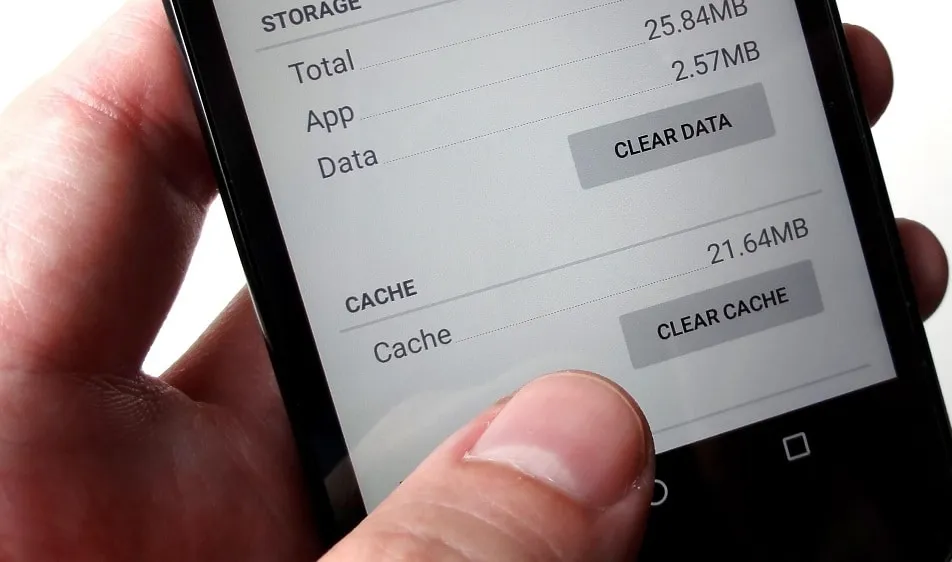
    When you open an app, you will see facts such as its size, user data, cache size, and total storage usage. At the top of the page, you will find two options: Clear storage and Clear cache.

    Tap Clear cache to clear the cache for that app. However, avoid tapping Clear storage because it will reset the app, requiring you to set it up again. Clearing the cache will not cause any problems.

    Continue to browse your list of installed apps, checking for any programs that take up a lot of space and removing their cache.

    If you are feeling particularly thorough, you might erase the cache for each app on your phone. However, it is a good idea to start with the biggest offenders, such as the Facebook app.

    Clear the cache from Chrome

    If Chrome is your primary browser, it may have accumulated a large amount of data, which can slow down your device. Here’s how to clear the cache.

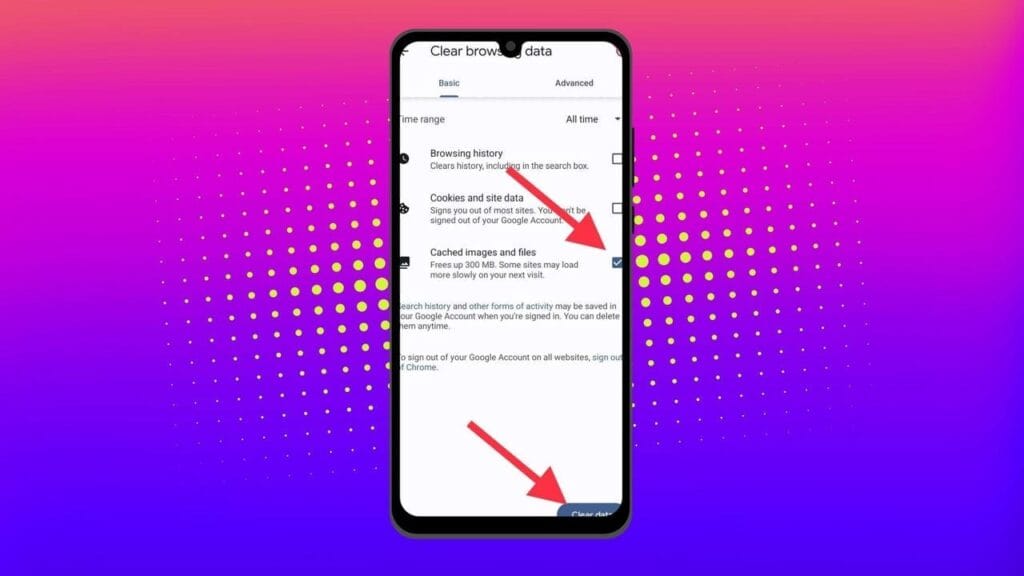
    Go to History settings in Chrome – Open the Chrome app on your Android device, press the three-dot menu in the top-right corner, click History, and then Clear browsing data.

    Choose the data you want to delete – The following screen will display a selection of alternatives, allowing you to select whatever data you want to erase from Chrome.

    You can also provide a timeframe for when you want the data cleared. Each option gives a brief explanation of what it does and how it may affect your browsing experience. For example, deleting cookies and site data will log you out of most (if not all) websites. Clearing cached images and files may cause Chrome to load images more slowly the next time you visit a website.

    clear the cache in chrome Android app

    In later versions of Chrome for Android, hitting the menu button displays the option “Clear Browsing Data”. When you select this option, a popup will display, allowing you to erase browsing data for a defined time period.

    If you choose More Options, you’ll be taken to the Browsing Data screen, where you can select the data to delete and choose the time range.

    What does cached data mean?

    Cache is temporary storage that stores data like as photos, files, and scripts from websites or apps you have visited in order to speed up their loading time. Clearing cached data, whether for Chrome or any other app, removes the files that have been kept on your device. For example, on Facebook, cached data could contain profile pictures, photos, and videos.

    Deleting cached data from the Facebook app removes these temporary files from your smartphone, which may cause the program to take longer to load content the next time you use it. However, this strategy will have no effect on the accounts you visit, the postings you make, or your personal information.

    Will deleting the cache remove all app data?

    No, emptying an app’s cache does not destroy crucial data such as login credentials or saved settings. It merely deletes temporary files that help the app load faster, so you do not lose any important data.

    Will deleting the cache make your Android device faster?

    Yes, clearing the cache can free up storage and remove corrupted or outdated files that may slow down your device, leading to smoother performance.

    How often should you clear your cached data?

    It depends on how well your equipment performs. If you are experiencing slowdowns or other problems, emptying the cache can be part of the solution. Otherwise, you may only need to perform it once every three to six months.

    Is the purpose of clearing the cache only to increase storage space?

    No. Clearing the cache is one of the first steps you should take when dealing with bugs or difficulties in an app. Cached files frequently get corrupted or outdated, and removing them causes the app to reload the cache, which can resolve the issue. As a result, deleting the cache can assist solve problems rather than simply free up space.

    Can you clear the cache for all Android apps simultaneously?

    There is no built-in method to remove the cache for all Android apps at once, but you can browse through the list and clear each app’s cache separately.