Tag: apps

  • 5 easy ways to use Google Gemini to boost your Android experience

    5 easy ways to use Google Gemini to boost your Android experience

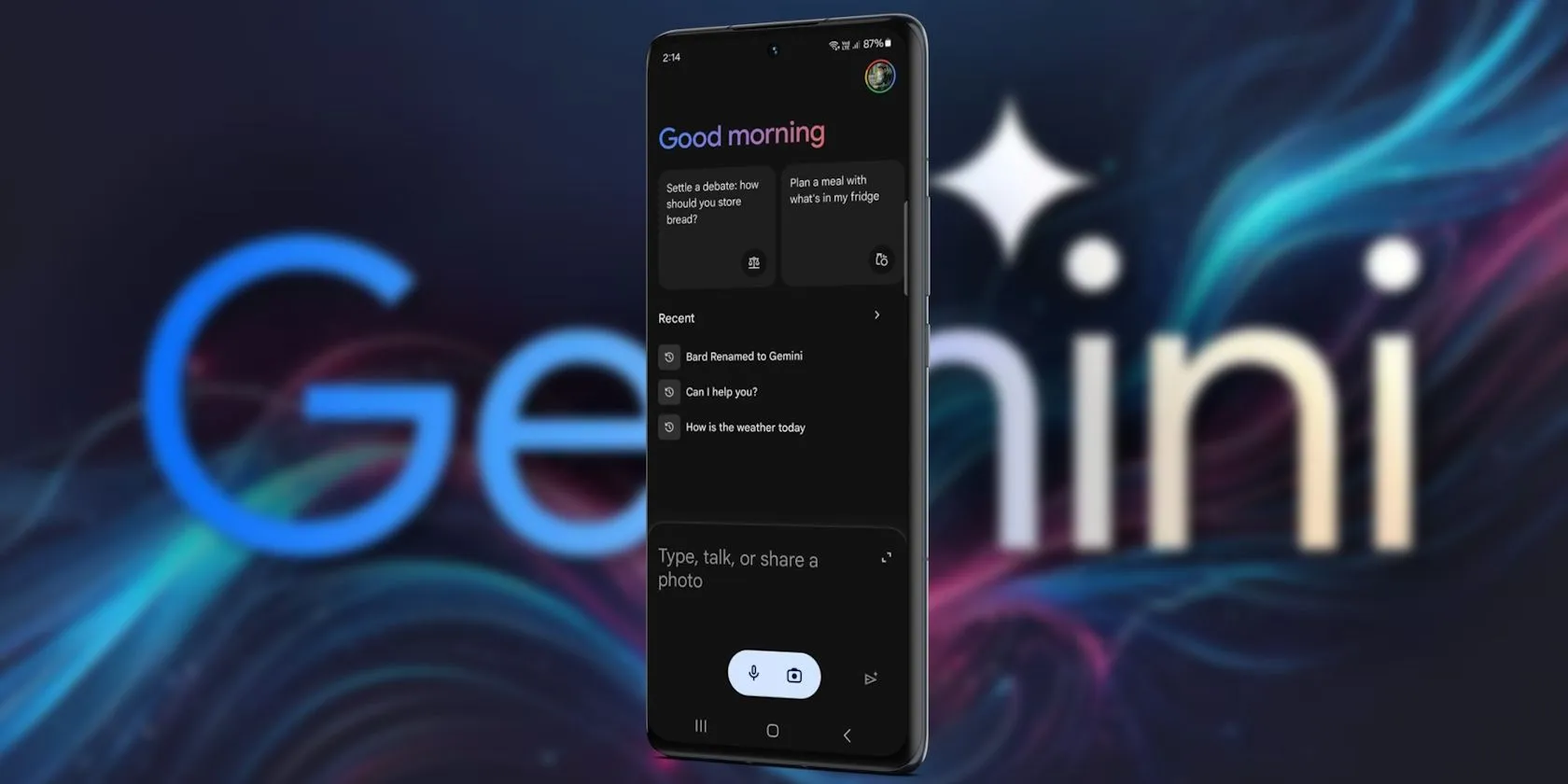
    Since its debut in 2016, Google Assistant has been a feature of the Android operating system. It is accessible by uttering the “OK Google” hot word, as a sticky widget in the dock, or in the news stream on the left side of your home screen. However, the assistant needed a makeover because AI was a key component of almost every phone that was released in the previous year.

    Google Gemini’s shortcomings were noted by early adopters, who said it could not execute jobs that Google Assistant could. With Gemini’s increased capabilities, a lot has changed. Here are some useful applications for it on an Android phone.

    Use Gemini from Messages
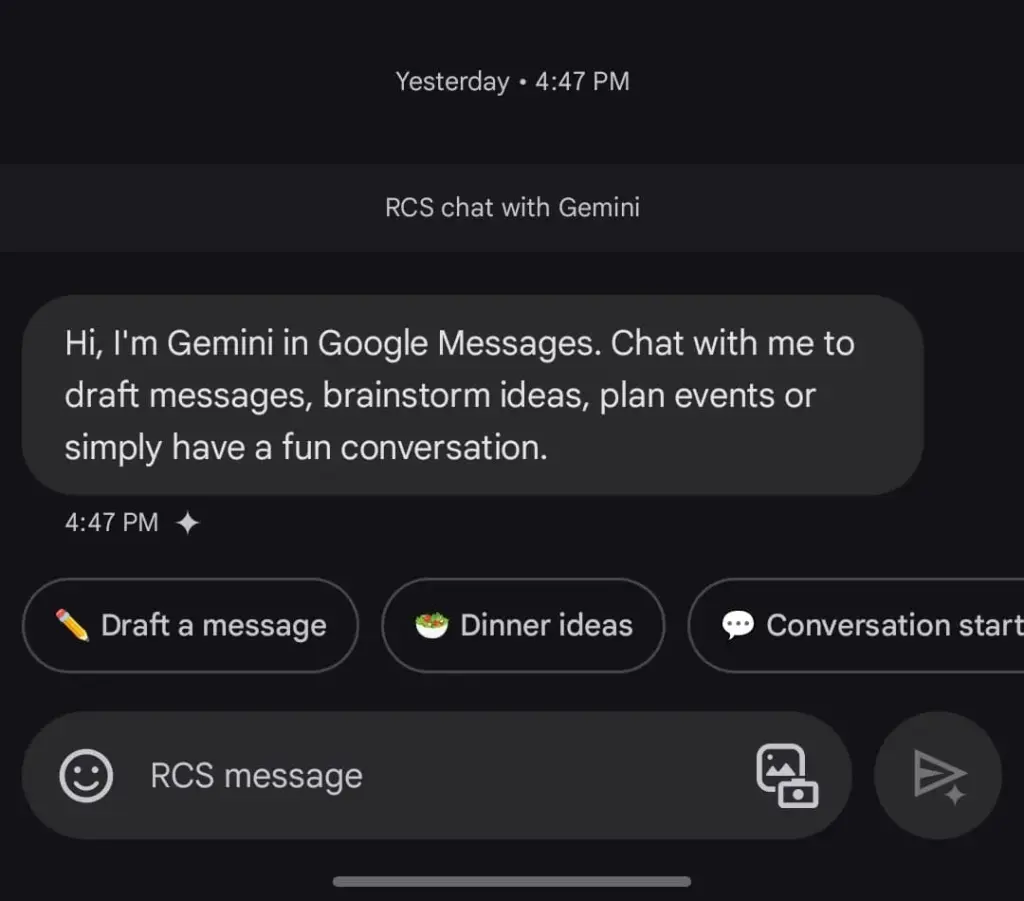
    google gemini in messeges

    Following Hangouts’ sunsetting and an unsuccessful attempt with Allo, Google finally figured out how to make texting work on Android. Google Messages is a fantastic way to interact with loved ones because of its many capabilities, especially when it comes to chats that use RCS.

    The option to talk with Gemini will appear if you open Google Messages and tap the Start chat icon. This allows you to use Gemini’s conversational side in a chat window. You can ask it to create images, recite poems, or write a birthday message.

    Gemini in Google Messages is incompatible with other apps and is unable to manage device settings. It does, however, provide a more conventional method of communicating with the assistance. It does not answer questions using pictures of individuals, but you can send it pictures of food, clothing, and other objects.

    Also, Gemini cannot be asked to send a message through Google Messages. You can use the Gemini app specifically for that purpose. Furthermore, Gemini may be used to call contacts or look up the phone numbers of nearby businesses, just like Google Assistant. But you can not use your friendship with someone to make calls or send SMS. It is possible that saying, “Hey Google, call my mom,” will ring another contact with the name “mom.”

    Control device settings
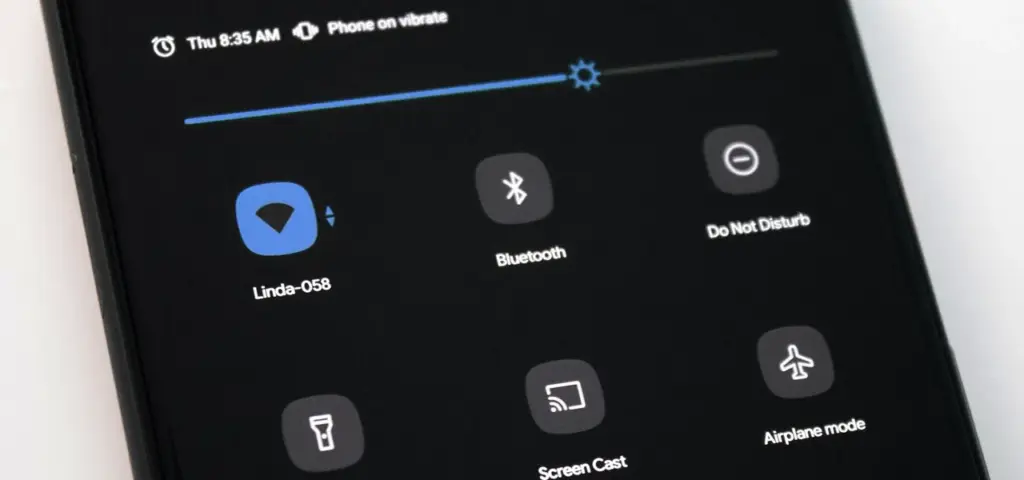
    disable pull down quick settings

    Gemini has the ability to switch off your Wi-Fi, but in order to utilize the assistant again, you will need to manually activate it. Bluetooth, location, auto-brightness, and flashlight settings are among the more practical device controls.

    A series of instructions, such as “turn off auto-rotate and then turn on mobile data,” can be requested, but Gemini can be picky. Routine tasks, such as turning off alarms or setting a timer, function well.

    Controlling my phone’s music playback is one of my favorite applications of this feature. You may ask Gemini to rewind a song by 30 seconds, but it can still play, pause, and skip songs as normal.

    Also, you may use a custom timer to instruct Gemini to take a picture. On the other hand, when I ran the identical query on my iPhone using Apple Intelligence, it set a five-second timer labeled “picture.” Regards, Apple.

    A conversational tool
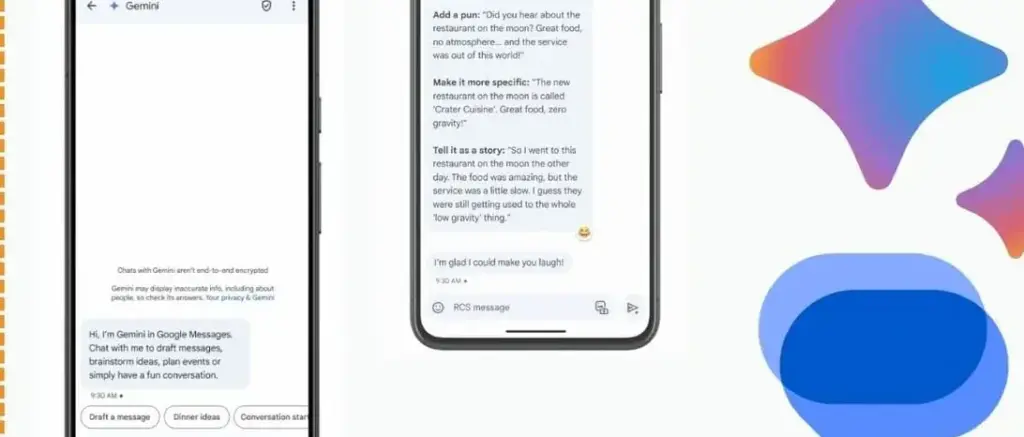
    Google Messages Gemini e1735622431861

    For years, we have been able to use voice commands to activate Google Assistant; however, typically, a specific action or question is required. By tapping the button next to the camera symbol in the Gemini Live app, you can initiate an unstructured chat.

    As long as the conversation does not violate the AI’s guidelines, you can talk about anything and get pertinent responses. It was a little unsettling to speak into my phone aloud and hear responses that seemed natural, but I eventually adapted. Gemini Live excels at having back-and-forth conversations, but you may also ask closed-ended questions.

    During a discussion, Gemini can be interrupted by tapping the screen or talking over it. When you use Live mode, you can choose from a small selection of voices. I use Gemini Live to practice talks, generate ideas, and learn new languages. This is an intriguing approach to employ an AI assistant on your phone because of its convincing and real-time responses.

    Use Gemini with Google Workspace
    Blog Header Light mode No text.w

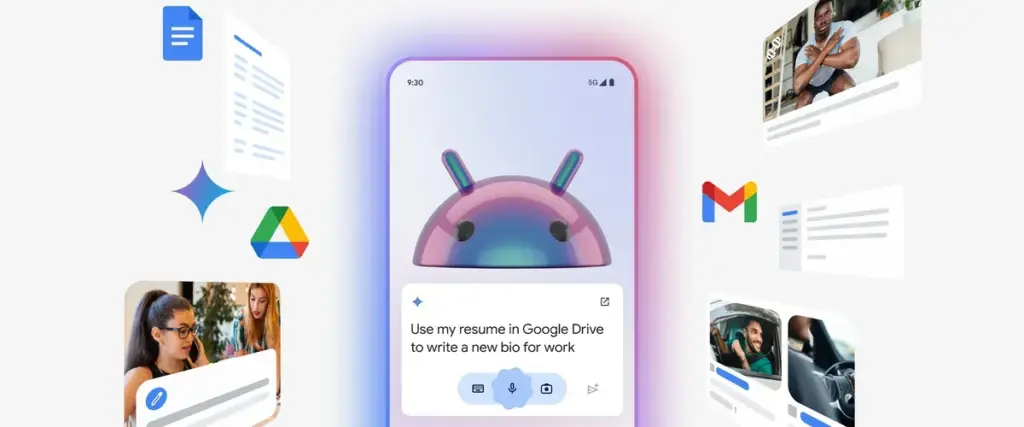
    With a subscription, Gemini may be used with Google Workspace applications such as Docs, Gmail, and Slides. You may retrieve and condense emails, tasks, and other items linked to your Google account on an Android phone by using the Google Workspace extension, which is available for free with Gemini.

    Gemini can filter emails by sender name or transmit a list of your most recent emails. It is unable to access attachments, though. Asking Gemini to summarize papers is a helpful tool, as I utilize Google Docs for the most of my class notes. In order to locate an event you have been searching for, it can also scan your calendar.

    Gemini can be asked to save notes or tasks. In the Google Keep app, entries filled in this manner display a Gemini tag. Additionally, it cleverly names notes according to their substance.

    Connect it with third-party apps

    Gemini extensions allow you to access and manage additional features on your device. It is cool to connect to Google Workspace, and more third-party apps should soon be compatible with Gemini. Without opening the app and looking for a playlist, you can play songs from your playlists by connecting to your Spotify account. Media playback control then assists you in selecting the ideal song for the situation.

    You may use voice commands on Google Gemini to send messages or make a call to a contact if you are one of the three billion WhatsApp users globally. You cannot, however, request that Gemini read your WhatsApp chats or attach anything to them.


    Compared to its first day, Gemini now does more. Because device controls are compatible with the AI assistant, you are no longer forced to pick between it and Google Assistant. Additionally, when Gemini is unable to complete a task, it will sometimes rely on the Google Assistant extension. Your time with a Gemini is not going to be a happy one. It still has hallucinations and is a huge language model.

    Even though it is capable of performing things like “turning on Bluetooth,” it occasionally refuses to do so. Starting a fresh chat is a good strategy to get good answers in these situations. You must unlock your phone’s screen in order to use the majority of its useful commands. Even with its limitations, Gemini keeps getting new features, such as the ability to operate smart home appliances with the Google Home extension.

  • Simple guide on how to make moving images on your smartphone

    Simple guide on how to make moving images on your smartphone

    We will learn how to create moving pictures on your phone today. It is a wonderful thing to capture a moment. However, what if your ideal image could be animated? What if a static moment in time could have a movement added to it? How awesome would that be? Imagine having a photograph of a waterfall. If the waterfall moved and everything else remained motionless, that would be amazing. Or picture a sunset.

    An already stunning composition would get a whole new level if a portion of the image were animated. Use this guide to improve your social media game and produce stunning moving graphics. Show off your editing and photography prowess to your friends.

    We will concentrate on only one photo editing app, despite the fact that there are many that allow you to create moving photographs Pixaloop.

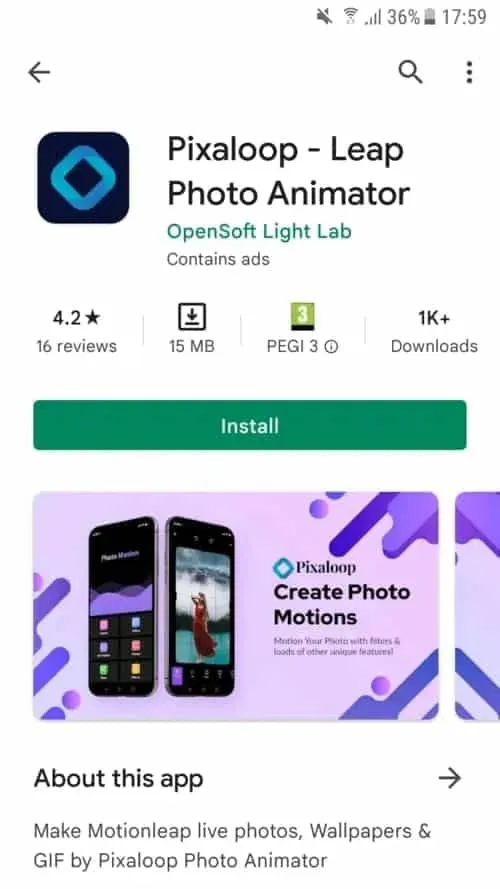
    Pixaloop is a free app that is available on both the Apple App Store and Google Play. It enables users to create GIF animation effects, live images, and backgrounds.

    It uses their cutting-edge photo animator to give static photographs alive. You have a successful app when you combine that with a simple and user-friendly UI. Let us test this application instead of just discussing it.

    Install Pixaloop

    Pixaloop is available on the Apple App Store and Google Play Store. I will be downloading and installing it from the Play Store because this demonstration is being done on an Android smartphone.

    1 install pixaloop 1

    Choosing an Image

    You begin by selecting an image, just like you would with any other image editing program. However, you can also choose to open your camera and take a fresh picture. I let you make that choice. Making moving pictures while on the fly might be entertaining at times. I will be selecting a picture from my collection for the tutorial.

    istockphoto 1133155890 612x612 1

    It’s an image I have previously downloaded on my phone.

    This is an awesome picture. We are going to be using it to demonstrate how to make moving image using your phone.

    Create a moving image on your device

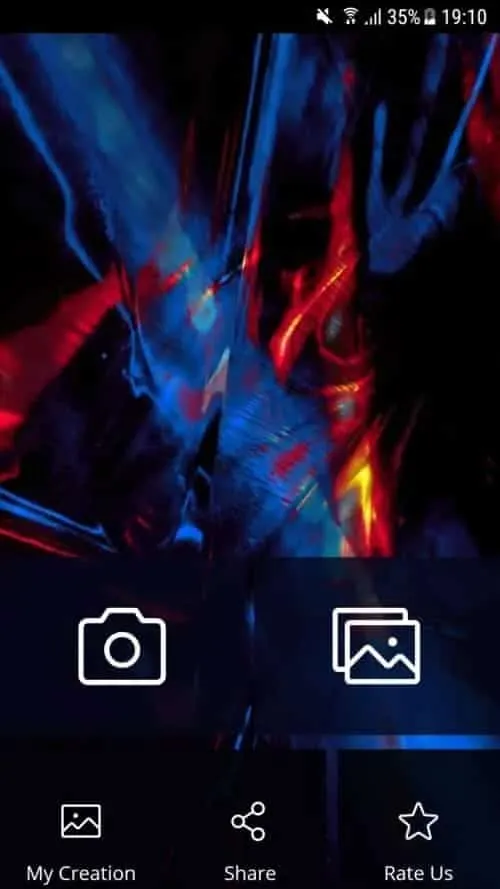
    When you launch Pixaloop it looks something like this

    2

    Your image can be animated in two different ways. You can either import an existing image or take a new one with your phone’s camera. I will bring mine in.

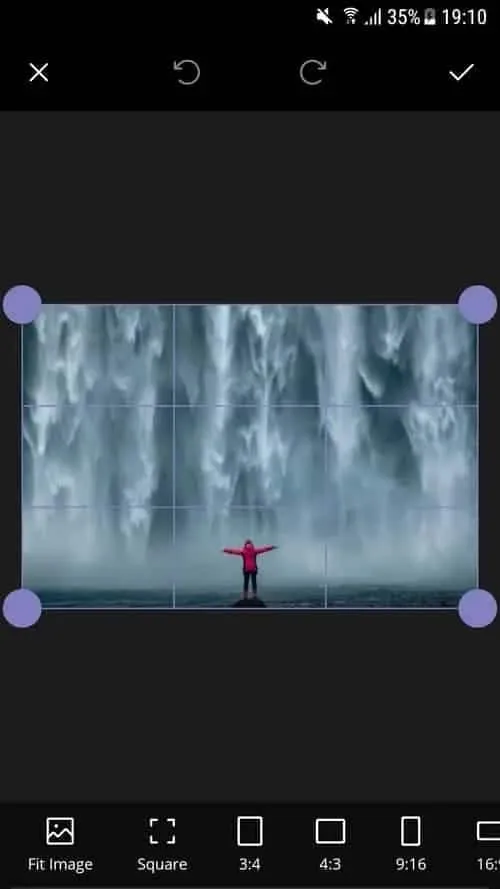
    3 crop image

    Before applying the motion effect, you can crop the image on the first screen. Cropping your work in advance is a good idea, depending on where you want to publish it.

    Personally, I think this works really well. I am not going to perform any cropping. will start working on a motion picture right away.

    I see a cascading waterfall in this picture, with the figure motionless. This picture will, in my opinion, take on a completely new level if the background is animated.

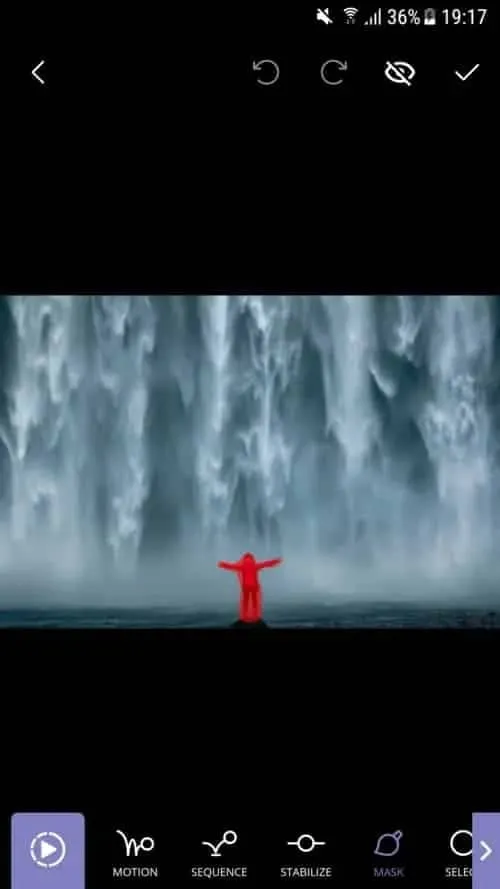
    4 masking the subject

    I also carried out my masking technique on the background. At least a portion of it. I do not want the ground to move either. The moving image does not look nice with it. Simply said, it is not natural. Trial and error is how you go about this procedure.

    After making your adjustments, hit the Play button. Proceed to the following step if you are satisfied with the outcome. If not, go back and make all the changes you dislike.

    6 animating the waterfall

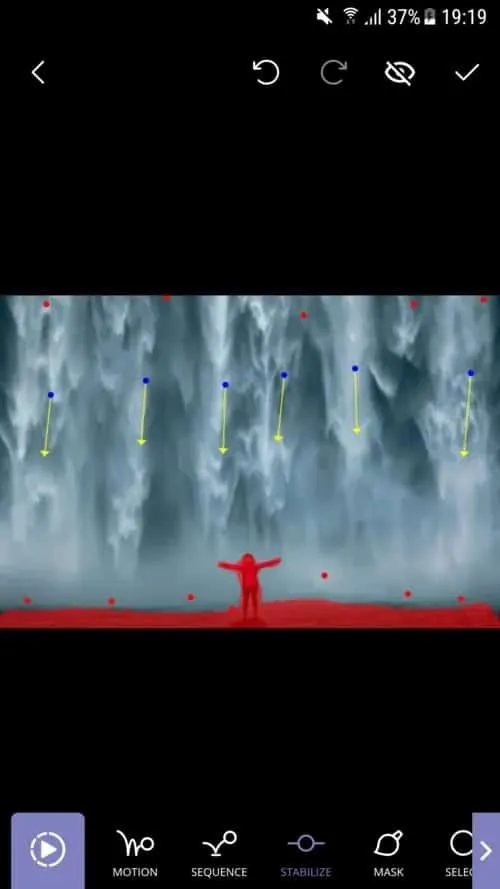
    I decided to use Motion Animation for this picture. Clicking the Motion button at the bottom of the screen will activate it. You can specify the animation’s path to the program when this parameter is enabled.

    As you can see, I made six pathways, each of which points downhill. I am emulating the course a waterfall would naturally follow.

    You can also adjust the waterfall upward if you would like. Using this tool to create a moving image would cause everything to animate in a downward manner. And I mean all of it. I discovered that both the top and bottom are dragged down after playing my clip. I utilized Anchor Points to resolve this problem.

    Five anchor points are visible on top of the photograph, and seven anchor points are directly above my ground mask. This keeps the image from moving strangely on the top and bottom. I was happy with the outcome after a few attempts, shifting and adding anchor points.

  • Temporarily free Android and IOS apps

    Temporarily free Android and IOS apps

    This is a list of paid apps that are temporarily free to download on the iOS and Android platforms.Read on to find the top free app offers available for download from the Apple App Store and Google Play Store.

    Download and install any apps you find that you would want to have but do not require right now. It would be seen as “purchased,” and even if you immediately remove it from your smartphone, it will always remain in your app library.

    Android apps and games that are free for a limited time

    Android apps for productivity and lifestyle

    • Corluma ($0.49): If you have smart lights at home, how about using this third-party app to control them? 
    • KX Music Player Pro ($2.99): Want a standalone music playback app? This one gets the job done without any frills.
    • Stitch Photos ($2.99): If there ever was a need to capture a really long screenshot, why not capture multiple ones and stitch them together?
    • 3D Earth Pro ($29.99): Don’t just find out what the weather is like, do so in style with this graphics-intensive app!

    Free Android games

    • Sudoku Premium ($1.99): Tickle your brain with this digital Sudoku game.
    • SPHAZE ($0.99): A beautifully crafted puzzle game with science fiction elements from the future.
    • Survival Dungeon ($0.49): Start from the very bottom in this roguelike survival RPG, where you grow in power and strength by defeating monsters and picking up loot.
    • Crossword Quest Premium ($2.99): Do you think you have what it takes to solve one crossword puzzle after another? Try this one out for size.
    • Burning Sky ($1.99): A shoot ’em up that is never short on adrenaline, where you test your reflexes against waves of enemies.

    iOS apps that are free for a short time

    iOS apps for productivity and lifestyle

    • Auto Enhance Photo Filters ($2.99): Up the ante the next time you shoot photos with your iPhone by using a range of filters.
    • mySymptoms Food Diary ($7.99): Keep a list of stuff you eat so that you can avoid wolfing down something that triggers your allergies.
    • Timestamp Cam ($9.99): Add the date and GPS location to your photos and videos.
    • weather+ ($0.99): Find out what the weather will be like for the day before you leave the house.
    • Light Meter ($3.99): Let this app detect the amount of light in the area so that you can capture the best-looking photos.

    Free games for the iPhone and iPad

    • AirCoaster ($0.99): Think you have what it takes to build a roller coaster ride for the ages? Try this out!
    • Light ‘Em Up ($0.99): A casual puzzle game that requires you to get all the circuits connected to light up the same colored lights.
    • Cafe ($5.99): Let your little ones kindle their love for whipping up delicious dishes in this pizza-making game.
    • My City: Star Horse Stable ($3.99): Let your little one experience what life is like having to take care of a virtual horse.
    • My City: New York ($3.99): Want to explore the city of New York safely? do so through this game.

    As of the date of publication, the deals were active. Please let us know in the comments if you came upon an offer that is no longer available. We advise you to review the app’s details in the Play Store or App Store before downloading any of the aforementioned apps. This is crucial since some of these free apps can have unique features or drawbacks of their own.

    Your personal information may be collected and shared by a variety of applications. It is critical to carefully consider the permissions that each application requests in order to secure your privacy. For example, why would an alarm clock app require access to your contact list or camera? You may greatly improve the security of your data by limiting the permissions you grant.

  • Free apps for iPhone and Android this weekend

    Free apps for iPhone and Android this weekend

    Once again, the weekend has arrived, which means it is that time of the week when we bring back a selection of premium apps that are only accessible for iOS and Android for a short period of time.See the top app sales in the Apple App Store and Google Play Store by reading on.

    Download and install any apps you find that you would want to have but do not require right now. It would be seen as “purchased,” and even if you immediately remove it from your smartphone, it will always remain in your app library.

    Android apps and games that are free for a limited time

    Android apps for productivity and lifestyle

    • Open Tracks ($3.49): A sports tracking app that keeps track of all your physical activities so you can work towards having a lovely record.
    • Image to PDF ($2.99): Just as the name implies, transform images into PDF format for easy printing across platforms.
    • Passport Photo ($4.99): Use this app to compose and print the perfect passport photo before you head off to your next holiday destination.
    • Matrix Determinant ($0.99): If you love math, surely you would have had experience with the dreaded matrix. Use this app to make your problem-solving adventures easier.

    Free Android games

    • Traffic Jam Cars Parking ($4.99): Can you make sure traffic becomes smooth again by solving numerous puzzles here?
    • Defense Legend 5 Pro: Epic TD ($1.99): A tower defense game that takes on a modern outlook with mechs and other futuristic machines dominating the battlefield.
    • Cooking Kawaii ($0.99): Cook up a storm in this game to keep your customers happy so that they return, which in turn gives you more profit to grow your business.
    • Theme Park Simulator ($0.99): Curious to know how a theme park works and operates? Find out in this game and see just how good your management skills are.
    • Word Tower Premium Puzzle ($2.99): How powerful is your vocabulary? Find out in this game that does not feature any annoying ads, allowing you to play offline, too.

    iOS apps that are free for a short time

    iOS apps for productivity and lifestyle

    • Brushstroke ($7.99): Transform your photos into nice-looking paintings with this app. 
    • Interval Timer for Tasks ($6.99): Remain more focused on your work by working on one task at a time without getting sidetracked or distracted.
    • Tiny Planner ($19.99): Need to get your life back on track without being pulled in all directions? This planner gets the job done.
    • The Wonder Weeks ($5.99): It is a miracle to follow your baby’s growth from birth until the present day. Never miss a moment by jotting it down here!

    Free games for the iPhone and iPad

    • Kingdom Rush: Tower Defense HD ($5.99): The enemy is storming the gates, and you and your ragtag team of defenders have to strategize to hold them off.
    • Macrocosm ($3.99): Talk about humble beginnings. This game sees the journey of a single atom to that on a galactic scale. How will you chart its growth?
    • Catenaccio Football Manager ($2.99): Think you have what it takes to be the perfect football manager? Try this game on for size! 
    • My City: Star Horse Stable ($3.99): Fancy owning your own horse? Why not give this game a try and see how well you can care for one?
    • Dirt Trackin’ 2 ($3.99): Indulge in some rally goodness with all the thrills and spills, minus the real-world damage to your ride!

    As of the date of publication, the deals were active. Please share any expired deals you come across in the comments section below.

    We advise you to review the app’s details in the Play Store or App Store before downloading any of the aforementioned apps. This is crucial since some of these free apps can have unique features or drawbacks of their own.

    In the constantly changing world of mobile applications, there are a few dishonest ones that use clever strategies to make money off of collecting and sharing your personal data. But do not worry, tech-savvy readers—we have some priceless tips to assist you strengthen the protection of your priceless data. We strongly advise you to be cautious while giving installed programs permissions.

    Why, after all, would a simple alarm clock require access to your contacts or camera? Furthermore, why would a flashlight app need to know your precise location? You may successfully protect your personal information from prying eyes by choosing which permissions to provide with caution.

    With the knowledge that your data is safe and secure, you may explore the wide selection of free apps that are available for download on your iOS or Android device.

  • Free Android and iOS apps for this week

    Free Android and iOS apps for this week

    Are your smartphone usage patterns becoming a little stale? If this sounds similar, now might be the ideal time to add some excitement by exploring the fascinating realm of apps discounts. This is your opportunity to find some undiscovered treasures on the iOS and Android platforms.

    We have put up a carefully chosen list of programs that are now free to download from the Apple App Store and Google Play Store in this issue. These temporary deals will not be available for long, so act quickly!

    Download and install any apps you find that you would want to have but do not require right now. It would be seen as “purchased,” and even if you immediately remove it from your smartphone, it will always remain in your app library.

    android and ios apps free for this week

    Android apps and games that are free for a limited time

    Android apps for productivity and lifestyle

    • Clock Widget — Word Clock ($6.49): Tell the time using words instead of numbers!
    • Shout Screen ($0.99): With smartphones getting larger screens each year, they can make for an impromptu prompter.
    • DJ Mix Studio ($12.99): Be a DJ and mix music right on your smartphone!
    • Equalizer and Volume Booster Pro ($4.99): Change the way your music sounds on your smartphone with this app.
    • Reminder Pro ($3.49): If you ever need a second brain to remind you of things, this app hits the spot.

    Free Android games

    • Balloons Pop Pro ($1.49): An addictive puzzle game with a twist, where you have 5 different modes to choose from!
    • Jewels Planet ($2.99): A match-3 game that does not require an internet connection to play.
    • Sky Wings VIP ($0.99): A shoot ’em up that sees you saving the world once again. You’ll need lightning-quick reflexes.
    • Hero of the Kingdom II ($8.49): Things went south for you in your village when it was raided by pirates. It is time to exact your pound of flesh, but it will require careful strategy and planning. 
    • Neo Monsters ($0.99): Find monsters, train them, send them out for battles, rinse, and repeat as they grow even more powerful while gaining new skills.

    iOS apps that are free for a short time

    iOS apps for productivity and lifestyle

    • mySymptoms Food Diary ($7.99): Do you have food allergies? Keep track of what you eat so that you can minimize food allergies.
    • Filterious Photo Filters ($2.99): Use this app to generate great-looking photos thanks to the long list of filters. 
    • ChaReader ($1.99): Use this text-to-speech app and consume content without reading anything.
    • ChirpOMatic ($4.99): Birdwatchers, do you have what it takes to identify all the right breeds through their songs? This app helps you get it right.

    Free games for the iPhone and iPad

    • Neo Monsters ($0.99): This is a recurring theme: capture monsters, train and take care of them, let them fight and gain experience to become more powerful.
    • Pirate Drops 2 ($4.99): An interesting match-3 game that takes on the pirate theme while offering various degrees of excitement as the game progresses. 
    • Kingdom Rush Tower Defense HD ($5.99): Defend your territory against a seemingly endless horde of advancing enemies, all within a medieval setting.
    • My City: Star Horse Stable ($3.99): Can’t afford a horse in real life? Let your little one have one in the virtual world and learn how to care for it.

    Your personal information may be collected and shared by a variety of applications. It is critical to carefully consider the permissions that each application requests in order to secure your privacy. For example, why would an alarm clock app require access to your contact list or camera? You may greatly improve the security of your data by limiting the permissions you grant.

  • Free Apps for iOS and Android

    Free Apps for iOS and Android

    It might be time for a refresh if you have realized that your smartphone routine feels a little stale, especially when it comes to the apps you use frequently. How about delving into the fascinating world of app discounts to breathe new life into your digital experience? This can be the ideal chance to find hidden treasures for your iOS or Android device.

    We will not go into great depth about every app, but be advised that some might have in-app purchases or ads. But do not worry! You can explore these options without breaking the bank because we have made sure that these choices are excellent. Let us explore the fascinating world of undiscovered free apps!

    Note

    If you come across an app that you’d like to have but don’t need right now, download and install it first. It would be considered as “bought” and it will be available in your app library forever—even if you uninstall it from your smartphone right after.

    Android apps and games that are free for a limited time

    Android apps for productivity and lifestyle

    • Date Calculator Pro ($0.99): Perform fast calculations of dates and days with this app without having to think too hard.
    • AppLock Pro ($4.49): Provide each app with varying privacy levels to prevent unwanted eyes from gaining access to them.

    Free Android games

    • Empire Warrior Tower Defense ($0.99): A classic tower defense game with cute graphics and heroes that can tip the balance in your favor…
    • Demon Hunter Premium ($0.99): Engage in epic boss fights where the odds are stacked against you and yet you somehow still make it past.
    • Heartless Knight ($0.49): A side-scrolling platformer played in amazing pixel art graphics.
    • Spaxe: Space Arcade ($0.49): Procedurally generated enemies to make sure this shoot ’em up does not play the same game twice!
    • Neon Beats ($0.49): A game of rhythm and timing. Do you have what it takes to be perfect?

    iOS apps that are free for a short time

    iOS apps for productivity and lifestyle

    • The Wonder Weeks ($5.99): Your first baby also deals with numerous ‘firsts’, from the first word to the first walk. Record them for posterity with this app!
    • Weather: it is nice outside ($0.99): What do you wear today before you venture outside? Make life easier by finding out what the weather will be like without making guesses.
    • Light Meter ($3.99): Get the picture-perfect shot by measuring the right amount of light for your photos with this app!
    • Christmas Countdown ($0.99): Christmas is not that far away, and I am sure your Mariah Carey Christmas song is already thawing…Use this app to count down the days.
    • Timestamp Cam ($9.99): The ideal app to add a date and GPS location to your photos and videos so that you know where and when you captured that shot.

    Free games for the iPhone and iPad

    • Cuppy Ball ($0.99): Time the ball’s release correctly to ensure it avoids all obstacles to end up in a cup located at the bottom.
    • My City: Hospital ($3.99): Let your little ones learn for themselves what it is like to run a hospital through this fun game.
    • Tap Dot Tap — Reaction Game ($0.29): Find out how fast your reflexes are in this lightning-quick reaction game.
    • My City: New York ($3.99): Live it out in the Big Apple with this fun game where you get to explore New York without the seedy side appearing.
    • Math Trainer Quick Questions ($0.99): Train your brain with this fast-paced math-based game.

    Many apps have the capacity to collect and distribute your personal data. It is critical to thoroughly review the permissions that each program seeks if you want to effectively secure your privacy. What possible use could an alarm clock app have for your contacts or camera, for example? Limiting the permissions granted to apps can help you better protect your data.

    Savor the experience of exploring an abundance of complimentary programs for Android and iOS platforms, all while feeling secure in the knowledge that your private data is protected.

  • Download Your Free Apps for Android and IOS

    Download Your Free Apps for Android and IOS

    Your smartphone may eventually start to feel a little too same-old, especially when it comes to the apps you use. There is nothing better than exploring the ever-changing world of app discounts to find the newest products available for iOS and Android. We have carefully chosen a wide selection of apps that are now free to download from the Google Play Store and the Apple App Store for this issue. But act quickly—these offers will not last long!

    Although we will not go into great detail about each app, it is vital to note that some may have advertisements and in-app purchases. Be at ease! We have taken care to ensure that you can examine only the best possibilities without going over budget.

    Now let us get started and find the free programs that are available for you to use immediately! Advice: Download and install any apps you see that you would want to have but do not require right now. It would be seen as “purchased,” and even if you immediately remove it from your smartphone, it will always remain in your app library.

    Android apps and games that are free for a limited time

    Android apps for productivity and lifestyle

    • Image Converter ($1.99): Convert images to PDF, making it easy to share with everyone else.
    • Deals Tracker Pro ($3.99): Keep track of deals from various e-tailers via this centralized app.

    Free Android games

    • One Shot ($0.99): Clear each level with just one motion. How good is your physics? 
    • The Weapon King VIP ($0.99): It is one weapon against another. Which will emerge as the winner in this no-holds-barred competition?
    • Shadow Survival ($0.99): It is you against the world. Do you have what it takes to survive hordes of enemies bearing down on you?
    • Stick Warrior ($0.49): It is a duel to the death, where each victory brings you one step closer to the finals in this beat ’em up.
    • Spelling Book Pro ($1.99): Play this game and improve your word power.

    iOS apps that are free for a short time

    iOS apps for productivity and lifestyle

    • Weather: it is nice outside ($0.99): Figure out what the weather will be like without making wild guesses.
    • Light Meter ($3.99): Get the right amount of light for your photos and capture the perfect shot with this app!
    • mySymptoms Food Diary ($7.99): Some of us are allergic to many types of foods. Why not use this food diary to keep track of your eating habits?
    • Timestamp Cam ($9.99): Use this app to add a date and GPS location to your photos and videos.
    • Christmas Countdown ($0.99): Admit it, Mariah Carey’s Christmas album is already thawing and Christmas will be upon us before you know it. Use this app to count down the days.

    Free games for the iPhone and iPad

    • Car Game for Kids ($5.99): This game is meant for your little ones, where you pick a car and be a taxi driver for the day.
    • Macrocosm ($3.99): Start from an atom and grow into a galactic empire. Everyone always has huge ambitions, here’s the chance to live it out.
    • Catenaccio Football Manager ($2.99): Think you’ve got the managerial chops to do better than the manager of your favorite football team? 
    • My City: Hospital ($3.99): Ever wondered how is it like to run a hospital? Find out in this kid-friendly game.
    • Cuppy Ball ($0.99): Release the ball and make sure it avoids all obstacles to end up in a cup at the bottom.

    The deals were live as of the publishing date. If you found an expired deal, please let us know via the comments below.

    Note – beware of in-app purchases and ads!

    Hidden in-app purchases and advertisements can be found in both paid and free apps, particularly in kid-friendly titles.

    Many apps have the capacity to collect and distribute your personal data. It is critical to thoroughly review the permissions that each program seeks if you want to effectively secure your privacy. What possible use could an alarm clock app have for your contacts or camera, for example? Limiting the permissions granted to apps can help you better protect your data.

    Enjoy the adventure of discovering a wealth of free applications on both Android and iOS, all while enjoying the confidence that your personal information is secure.

    Enjoy the adventure of discovering a wealth of free applications on both Android and iOS, all while enjoying the confidence that your personal information is secure.

    The tips for this article was sent by SEOSpike.

  • This weekend’s free Android and iOS Apps

    This weekend’s free Android and iOS Apps

    Plenty of new smartphones are released each week, drawing interest from tech enthusiasts. Remember, though, that a smartphone’s real worth is found in its apps. Where can we locate the very greatest ones, is the question.

    You need not worry, though, as we have hand-picked a selection of excellent free apps and games that are only found on the Google Play Store and Apple App Store. These applications, which are often paid for, are now free to download, so do not miss out!

    android and ios apps

    Download and install any apps you find that you would want to have but do not require right now. It would be seen as “purchased,” and even if you immediately remove it from your smartphone, it will always remain in your app library.

    Android apps and games that are free for a limited time

    Android apps for productivity and lifestyle

    • Premium Camera ($2.99): A flexible camera app that offers more than just filters, but various functions to boot.
    • Relaxing Tangle Pro ($0.49): This app aims to help you relax as you interact with different images.
    • Speed Camera Radar Pro ($26.99): For those with a heavy right foot, this app might help save you from collecting unwanted speeding tickets.

    Free Android games

    • Rogue Hearts ($0.99): Time to explore dungeons and conquer all whom stand before you, gaining upgrades in skill and equipment along the way.
    • Zombie Age 2 Premium Shooter ($0.99): You need all your wits about you to survive the zombie apocalypse, making the most of your resources.
    • Food Fever Premium Restaurant ($0.99): Ever wondered how it is like to run a restaurant? Keeping customers happy is tough, making this game challenging yet fun.
    • Stickman Legends ($1.99): A side-scrolling action game where you continue to battle over-the-top enemies and huge bosses.
    • Heroes Infinity Premium ($0.49): An action RPG that sees you control your party and make the most of the situation as you encounter different foes.
    samsung fe

    iOS apps that are free for a short time

    iOS apps for productivity and lifestyle

    • Metadata ($0.99): An app that lets professionals view metadata of photos taken.
    • AppSecret ($1.99): This app offers an array of lock functions to secure important data on your handset.
    • Safety Photo+Video Pro ($3.99): Another app to secure your most private files behind a vault to prevent prying eyes from viewing them.
    • mySymptoms Food Diary ($7.99): A food and symptom tracker that helps you monitor your health better.

    Free games for the iPhone and iPad

    • Kingdom Rush: Tower Defense ($5.99): Hordes of enemies are waiting at your doorstep, and there seems to be no end to them. Will your strategic placement of defenses work?
    • My City: Hospital ($3.99): A way to expose your little ones to the day-to-day running of a hospital.
    • Rescue the Enchanter ($3.99): A point-and-click puzzle game that requires you to search for the enchanter.
    • Tap It and Jump It ($4.99): A game to kill time, where it tests your reflexes and sense of timing.
    • Cuppy Ball ($0.99): Your objective is to get the ball into the cup, but first, you need to visualize a line where the ball won’t end up destroyed!

    We advise you to review the app’s details in the Play Store or App Store before downloading any of the listed apps. This is significant as a few of these free apps can offer unique features or drawbacks of their own.

    Within the constantly changing world of mobile applications, there are a few dishonest ones that use sly methods to make money off of collecting and sharing your personal data. But worry not, readers who are tech aware—we have some priceless suggestions to assist you strengthen the protection of your priceless data.

    We implore you to be cautious when giving permissions to the programs you download. After all, why would an alarm clock require access to your contacts or camera? And why on earth would a flashlight app need to know your precise location? You can successfully protect your private information from prying eyes by being selective about which permissions to provide.

    Therefore, feel free to explore the wide selection of free app downloads for Android and iOS devices, knowing that your data is safe and secure.

    This article was tipped by lead generation agencies

  • Temporary free apps and games on apps stores

    Temporary free apps and games on apps stores

    If there is nothing new on your phone, do you find yourself staring at it out of sheer boredom?Have you used every app on your phone or tablet? If so, there is no need to worry—we have a fantastic collection of premium programs that are now offered at no cost in the Google Play Store and the Apple App Store.

    You could question, how is this possible? For a restricted period, a few kind developers have decided to give away their paid applications for free. Thus, do not wait around because these freebies could go before you know it.

    As a tech publication, we make it our mission to provide you with affordable game and software recommendations that respect your privacy. It is important to note that some of these apps can provide in-app purchases and contain advertisements. Hey, who does not enjoy a good deal? So feel free to browse these free options; you might find your next favorite app!

    Download and install any apps you find that you would want to have but do not require right now. It will remain in your app library indefinitely and be regarded as “purchased” even if you immediately remove it from your smartphone.

    Android apps and games that are free for a limited time

    Android apps for productivity and lifestyle

    • Scan Text From Image English ($1.49): Here’s an interesting app, where you can extract English text from any image, as long as it is legible enough. While not 100% accurate, it is still better than slowly typing it out.
    • Datamosh: Datamoshing & Glitch ($1.49): Are you interested in churning out creative artwork by mixing up data within an image? Go dystopian with this app!
    • Passport Photo ID ($4.99): Snap photos of your mug for passport use instead of going to a photo studio.
    • Bright LED Flashlight Pro ($2.99): This flashlight comes with a twist, there is a built-in compass as well so you know where you’re going in the dark.
    • Touch Lock ($0.99): Disable the phone’s touch screen while you are busy consuming media like videos and music to prevent accidental interruptions.

    Free Android games

    • Speed Math ($1.49): Want to keep your brain constantly tickled and active? This game will bombard you with math problems.
    • Trivia Master – Quiz Games ($4.49). Think you are a walking encyclopedia? Give your trivia skills a try with this game.
    • Block Blast ($1.49): If you have fond memories of Arkanoid, then you will surely be able to take to this game like a duck to water.
    • Spelling Master ($3.99): There is no harm in brushing up your vocabulary with solid spelling capabilities, so why not let this game help you out?
    • Crisis of the Middle Ages ($0.99): A turn-based RPG that is chock-full of hilarious conversations that will surely keep you engrossed throughout your adventure.

    iOS apps that are free for a short time

    iOS apps for productivity and lifestyle

    • RCam – Manual Camera ($0.29): If you want more control over your camera app, why not give this a go?
    • RBrowser ($0.59): A unique browser for those who want to take the path less traveled, where you can even record what’s going on!
    • D3: Dot Lock Notes ($0.99): If you are someone who stores all your passwords in a single document and wants to keep that document safe from prying eyes, use this app!
    • NINU ($0.99): Do you travel overseas often? If you do, download this app as it stores the emergency numbers of various countries across different continents.

    Free games for the iPhone and iPad

    • Rally Stars ($3.99): Tackle challenging dirt tracks around the world without having to worry about car insurance premiums…
    • Tap Dot Tap ($0.29): Test your reaction with this game. Are you the quickest to tap the screen?
    • Tap It and Jump It ($4.99): A pointless game that is perfect for killing time, where you need to jump from one platform to the next. 
    • Vigil RPG ($2.00): An old-school text-based RPG with extremely simple graphics, but you know what they say, it is the story that matters. 
    • Red Conquest! ($0.99): A RTS title that is set in an open space environment, where you go up against enemy forces with just one objective – to eliminate them all!

    We advise you to review the app’s details in the Play Store or App Store before downloading any of the listed apps. This is significant as a few of these free apps can offer unique features or drawbacks of their own.

    Within the intriguing world of mobile applications, there are a few sly ones that use devious methods to make money by gathering and sharing your personal data. But fear not, folks; we have some priceless tips to help you protect your priceless information.

    First and foremost, we advise you to be cautious while giving apps rights. Why, after all, should a simple alarm clock need to have access to your contacts or camera? Furthermore, what basis does a flashlight app have to be aware of your precise location? You can efficiently keep prying eyes away from your personal information by granting permissions carefully.

  • Temporary free apps for IOS and Android

    Temporary free apps for IOS and Android

    We now have a fantastic selection of paid apps that are free to download from the Google Play Store and the Apple App Store. You could question, how is this possible? For a restricted period, a few kind developers have decided to give away their paid applications for free. Thus, do not wait around because these freebies could go before you know it.

    It is important to note that some of these apps can provide in-app purchases and contain advertisements. Well, who does not enjoy a good deal? So feel free to browse these free options; you might find your next favorite app!

    Download and install any apps you find that you would want to have but do not require right now. It will remain in your app library indefinitely and be regarded as “purchased” even if you immediately remove it from your smartphone.

    Android apps and games that are free for a limited time

    Android apps for productivity and lifestyle

    • QR/Barcode Scanner Pro ($5.99): If you are looking for an alternative QR code scanner, this app might be the right fit. 
    • Identify Dog Breeds ($0.99): Love hanging out at the park and admiring all those dogs that walk by? Why not identify their breeds with this app?
    • Battery Charging Animations ($0.99): Add some flair into your smartphone whenever you charge it.
    • 3D Earth Pro Local Forecast ($34.99): Find out what the weather is like with this app that features some great graphics.

    Free Android games

    • Missile Dude ($1.99): Be a baron of destruction as you trade weapons, hoping to be the king of the hill.
    • Final Castle Defence ($0.99). With hordes of enemies knocking on your castle’s door, it is up to you to prevent them from entering.
    • Kingdom War Premium TD Offline ($0.99): A tower defense game where you not only have regular towers to keep your castle safe but also heroes to aid you.
    • WindWings ($1.99): A shoot ’em-up set in space, where the hopes of an entire galaxy rest on your shoulders. 
    • Jewels Planet ($2.99): A match-3 game with jewels in the picture. Does this look and sound familiar?

    iOS apps that are free for a short time

    iOS apps for productivity and lifestyle

    • DayCost Pro ($2.99): Keep track of your expenses with this personal finance app.
    • Planimeter ($2.99): Do you get a kick out of measuring maps and distances between places? This app does so.
    • Calculator Easy HD ($0.99): This is no mere calculator, but also offers a live voice calculator option with key sounds for that added layer of authenticity.
    • Face Story Pro ($2.99): Have some fun with videos that allow you to morph your face into somebody else’s.
    • PXL Mosaic Art ($3.99): Transform any photo into mosaic art that will let you see things from a different perspective.

    Free games for the iPhone and iPad

    • Word Wings: Relaxing Word Game ($0.99): Imagine Tetris, but with letters that drop from above.
    • 2 Players 1 Device ($0.29): Want to keep two quibbling kids quiet with a single device? How about using this app that holds plenty of 2-player games that can be played on a single phone?
    • Light’Em Up Puzzle ($0.99): This is a puzzle game where you need to light up all the bulbs within the circuit with carefully placed batteries.
    • Blue Attack! ($1.99): It is a battle between blue and red forces, where you can make upgrades to earn an edge in battle.
    • Knight & Dragon ($0.99): A hack-and-slash offline RPG that rolls back the years.

    We advise you to review the app’s details in the Play Store or App Store before downloading any of the listed apps. This is significant as a few of these free apps can offer unique features or drawbacks of their own.