This news item isn’t exactly one of the more dramatic ones. It’s only the most recent upgrade to Google Wallet, though. A recent report claims that the Google Wallet app is now receiving independent notifications.
Although it has a separate app, Google Wallet is not totally independent. Wallet has its own app, however it lacks its own notifications. Indeed, they originate from Google Play Services. When you use Wallet to make a purchase, you’ll receive a notification with a brief description of the transaction. Google believes that it is now appropriate for Google Wallet to go independent.
Google Wallet is getting notifications
We don’t entirely understand the company’s motivations for separating Wallet from Play Services. We do know that Google is developing a new version of the Wallet app. For all we know, Google might be developing a more significant overall overhaul for Wallet. To be sure, we’ll need to wait for additional details on this.
In any event, the Wallet icon will be there next to your notice when it comes from Google Wallet. So, you must use the app’s notifications and not Google Play Services if you wish to turn off the notifications.
Google Wallet is receiving additional updates.
You need to be aware of how Google Wallet uses space before you open it. The app has a great deal of unneeded empty space. The cards are shown in a huge horizontally scrolling carousel that is topped with a sizable NFC icon. You may access the settings by clicking on your profile image in the top right corner of the page. You can see more cards at the bottom of the screen.
Google, however, intends to promote a redesign that will improve the UI’s use of the available space. To begin with, the NFC logo will vanish, and your cards will take its place. You may see your other passes, such as gift cards and reward cards, immediately beneath your cards.
All in all, the cards and passes will better fill out the interface. We’re not sure when Google is going to push this update to more devices, but it shouldn’t take too much time.
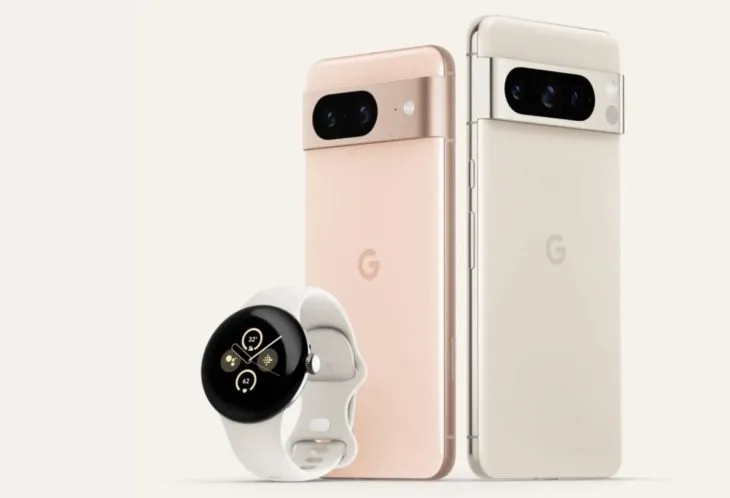
We’ve all been sufficiently spoiled for the Pixel 8 and Pixel 8 Pro, so let’s move on to the Pixel Watch 2. Apparently, there have been significant Pixel Watch 2 leaks this morning as well, including a promotion that may allow you to receive a free device in two weeks.
This most recent leak, which comes from @Za Raczke once more, is in the form of a promotional film that gives a Google tour of the Pixel Watch 2 and several of its capabilities. We get a clearer idea of the health and fitness capabilities that will be available on Google’s upcoming watch, even if Google has already published some of this information.
New in Pixel Watch 2
The new sensor in the Pixel Watch 2—likely the same sensor seen in the newest Fitbit smartwatches—is where the health story of the device begins. This sensor can detect more precise heart rate readings, assess your skin temperature, track stress (EDA), and offer heart rate variability (HRV). Moreover, you will receive pace and zone tracking, automatic workout start and stop reminders, and a number of safety features, including the new Safety Check. The Safety Check timer, which was made available for Pixel phones in June, enables you to check in with loved ones during a certain period of time.
In the realm of health and fitness trackers, none of it is really novel or ground-breaking, although Google did initially debut the Pixel Watch with mediocre health features that didn’t really measure up to the competition. This new sensor ought to help it fit in as a watch that is unquestionably expensive.
We may expect a 24-hour battery life with sleep tracking, so there isn’t much of an improvement there. That was sort of expected given that leaks had suggested for some time that Google was maintaining the same form factor without significantly increasing battery capacity. We might be able to use the always-on display so that we can receive the entire 24 hours thanks to the new Qualcomm chip.
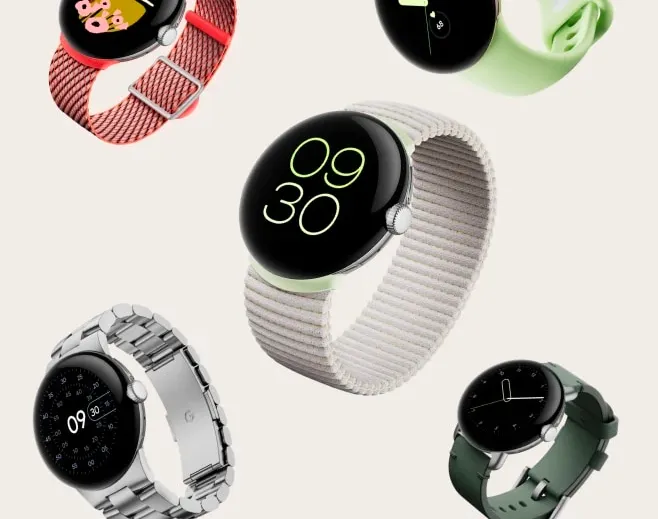
Last but not least, the film displays the new watch bands, including the Sport Band with a Hole and the Slim Metal Links Band in New Colors
Oh, and the promotion for the free Pixel Watch 2? If you pre-order the Pixel 8 Pro, it appears that Google will give the Pixel Watch 2 away for free. That’s a good addition, however it’s unclear yet if it will apply to the ordinary Pixel 8 as well or only the Pro. Price-wise, the Pixel Watch 2 should be close to the $350 of the first model.
Have you ever realized that you were aimlessly browsing through your phone without taking any action? It’s simple to get lost and unsure of which apps to really install when perusing the large selection of apps available on the Google Play Store or the Apple App Store, whether you’re looking through news, social media, or the apps themselves.
We are aware of the negative effects of this behavior, but we also value the thrill of finding a free program that is genuinely helpful. Because of this, we at Droid Tools have taken the time to search the Google Play Store and the Apple App Store for free apps that are usually not made available for free.
It’s crucial to remember that the free versions of the iOS and Android apps we describe below are only accessible right now. The expiration date of this deal is beyond our control. Because of this, it’s essential to take advantage of the chance and download/install any program that grabs your attention as quickly as you can, before it turns back into a paid app.
Android apps available for free for a limited time
Android apps for productivity and lifestyle
Reminder Pro($2.99): Our smartphones are supposed to help us be more efficient, so why not take advantage of this app so that you can remember stuff?
Home Workouts No Equipment Pro($1.49): You might have a thousand and one excuses not to work out at home, but this app ensures you can get a well-balanced workout even without any expensive gym equipment!
Android Games
Evertale($0.99): A fantasy game with monsters to kill and places to explore. A Pokemon clone of sorts, with extremely lovely graphics!
The Hearts PRO($1.99): A puzzle game that will certainly stretch your brain power. There are 6 different game modes to choose from to keep you occupied for hours on end.
Stickman Warriors Super Heroes($0.49): A beat’em up that will test your skill to the maximum. Do you have the type of reflexes required to win?
Space Shooter Galaxy Attack($0.99): It is up to you again to save the galaxy from an alien invasion force. Do you have what it takes?
Timing Hero PV($2.99): An interesting RPG that pays homage to the pixelated graphics from the 8-bit era, where you explore the world and start growing in power as you level up.
iOS apps available for free for a limited time
iOS apps for productivity and lifestyle
Memorize IELTS Vocabulary($4.99): If you are running out of time and need an app to help push you over the line in memorizing IELTS vocabulary, this might just be it!
Casual Dieting($0.99): Want to start keeping track of all that you eat? This log book makes everything look so cute, and it should spur you on!
Household Account Book($0.99): Balancing your monthly expenditure can be quite a chore, but what happens when you have an app that encourages you to do so with lovely graphics? It would be an encouragement for sure!
Pocket Chops($1.99): Practice makes perfect, and with 2,300 practice rudiments for the aspiring drummer, you’re spoilt for choice!
Locker Pro($15.99): Here’s where you can store all your passwords with peace of mind, at least it is an alternative if you are feeling paranoid.
iOS games
Geography Duel($2.99): Hello, nerd! Want to show the world just how good your geographical knowledge is? This game will find you out!
Drop Flop!($0.99): Just how fast do you think your reflexes are? Find out in this screen-tapping game!
Hexio($1.99): A mind-numbing minimalist puzzle game with 96 levels to help keep your brain on its toes.
Doge Flyer($0.99): Now here’s a game that pays homage to the endless runner genre, where you are a Shiba Inu flying around in a rocket, avoiding obstacles to stay alive. Unlike a cat, you do not have nine lives…
Cartoon Craft($1.99): It is a fierce battle between orcs and humans, which faction will you take in this RTS to emerge victorious?
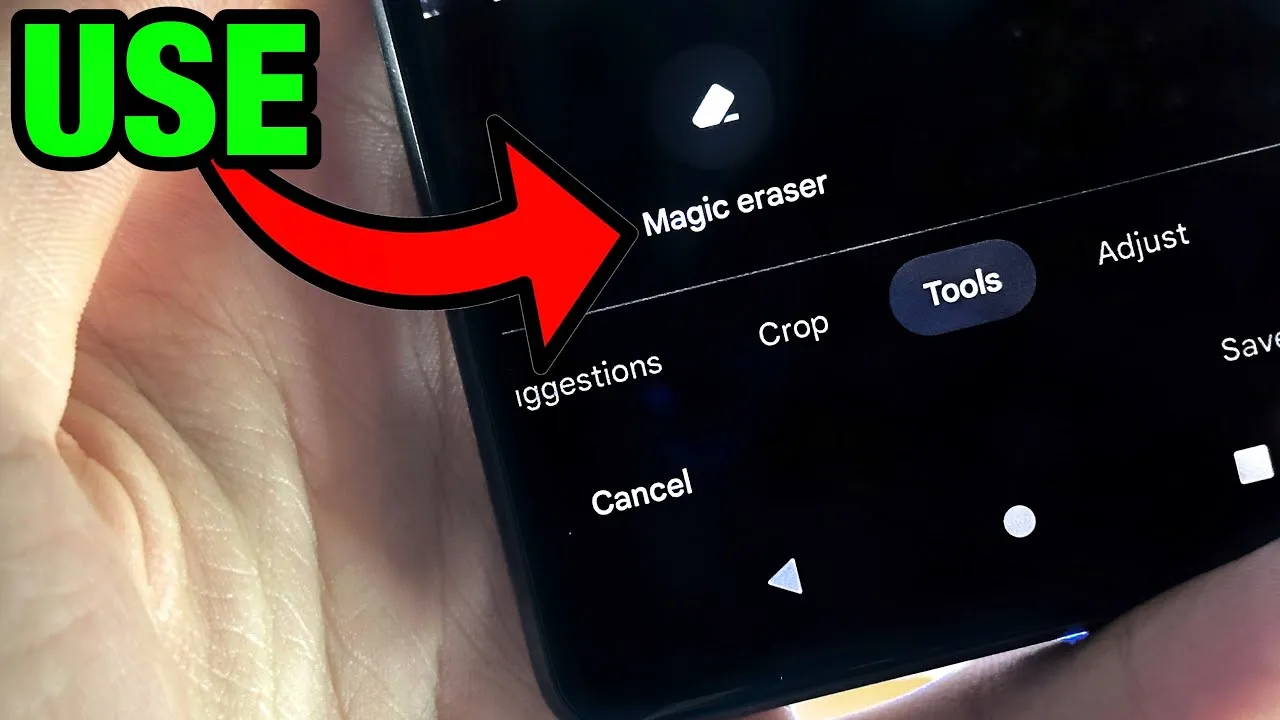
Google’s artificial intelligence (AI)-powered Magic Eraser tool debuted on the Pixel 6 smartphone. Later, it was expanded to accommodate additional iPhones and Android phones. A new version that removes various forms of audio from video recordings looks to be in development by Google; it will probably launch on the Google Pixel 8 and Pixel 8 Pro.
Google hasn’t yet acknowledged anything regarding the Pixel 8 smartphones, however over the weekend, an unidentified person purportedly uploaded some promotional content on X (formerly known as Twitter).
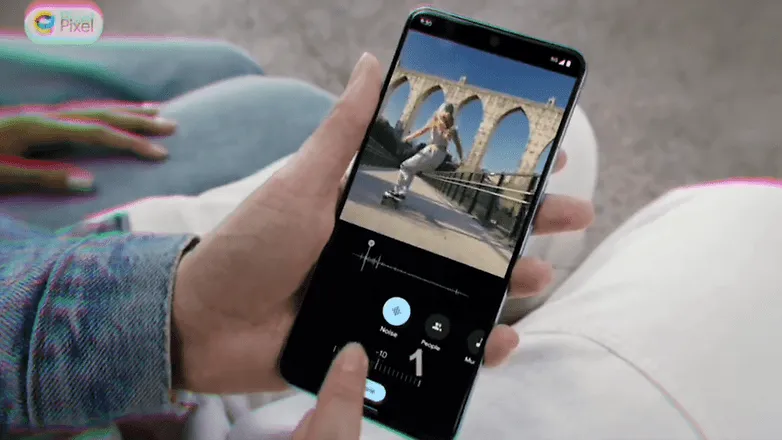
The unreleased Pixel 8 Pro was seen in the video clip sporting a brand-new feature called Audio Magic Eraser. The editing tool was identified as a video-specific version of Magic Eraser. It appears that the tool is able to recognize the important noises in videos and then gives the user the choice to decrease or delete the audio signature.
As for the many kinds of noises in videos, it can distinguish between background noise, people, and music. We would not, however, rule out the potential of the presence of more categories in addition to the aforementioned three.
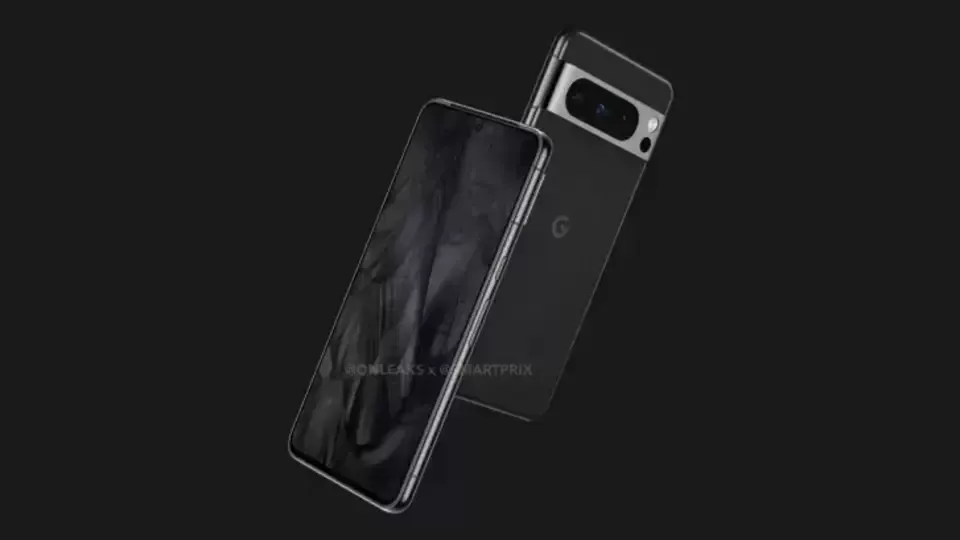
The Pixel 8 Pro has a similar appearance to the early renders that were published, but it has a new temperature sensor under the camera bump. It would seem appropriate for the low-cost Google flagship Android device to be unveiled in a fresh shade of blue, as is most likely the case with the smaller Pixel 8.
The Pixel 8 line will be powered by Android 14 and may ship in October, based on Google’s prior Pixel launches. At the same time, it’s anticipated that the speculated Pixel Watch 2 with its metal body and ultra-wideband connection would be unveiled.
A significant 0-click vulnerability in the Pixel 6 modem stack was identified by Google’s Android Red Team and has since been patched. This vulnerability allows a skilled attacker to take control of a target’s Android device by making a call to the victim.
Four members of Google’s Android Red Team demonstrated how two Pixel modem vulnerabilities (CVE-2022-20170, CVE-2022-20405) could be combined to first hijack a targeted Pixel’s cellular modem communication to the second-generation (2G) wireless standard with the aid of a cheap $1,000 home-made cellphone base station during the Wednesday Black Hat session.
The aforementioned bugs were first found in 2021 by Android Red Team members. With a CVSS score of 9.8, both modem flaws are now classified as critical. The over-the-air remote code execution bug, designated CVE-2022-20170, was addressed in June 2022. An elevation of privilege (EoP) weakness was discovered in the second vulnerability, tracked as CVE-2022-20405, and it was fixed in August 2022. The EoP bug was deemed to be of moderate severity when it was initially discovered in an Android security bulletin.
If the attack is successful, the enemy will be able to wirelessly execute remote code that is running in the Pixel modem’s privileged context. According to experts, an attacker would then be able to conduct out assaults against the handset, such as launching a DoS attack, performing SMS/RSC (text message) sniffing and spoofing, MFA compromise, and enabling a hacker to switch to the device’s main operating system kernel.
Google claimed that it was not aware of the issues being used in the wild and that internal Alphabet procedures were to blame for the delay in disclosing the technical CVE information.
2G is obsolete
The Android Red Team at Black Hat includes Xuan Xing, Eugene Rodionov, Xiling Gong, and Farzan Karimi to demonstrate the assault (see image). Exploiting flaws in the Android Pixel’s cellular data connection to 2G networks is the initial attack vector.
The goal of this attack, according to Karimi, is to downgrade mobile devices to 2G.
The majority of modern cellular modems operate on 4G or 5G frequency bands. Yet, the majority of cellular data modem chipsets continue to support 2G and other dated wireless frequencies. For uncommon use scenarios including outdated wireless network geography, devices cycling down to save handset power consumption, and phones going to international markets where legacy 2G cellular networks are more prevalent, legacy support is required.
Weak encryption between towers and devices is one of the security vulnerabilities with 2G, which attackers may (and have) easily hacked in order to intercept conversations or text messages. Even current phones, according to researchers, occasionally transition to 2G to handle signal congestion, roaming, and network switching better.
The Android Red Team went above and beyond the examples of hackers and government enforcement utilizing fake base stations dubbed ISMI catchers (international mobile subscriber identity) or surveillance tools like Stingray to collect phone ID data, geolocation data, and content. They demonstrated how a vulnerable Pixel phone could be controlled remotely via a $1,000 home-built base station in addition to being used to collect data.
Breaking down the attack
The Android Red Team went above and beyond the examples of hackers and government enforcement utilizing fake base stations dubbed ISMI catchers (international mobile subscriber identity) or surveillance tools like Stingray to collect phone ID data, geolocation data, and content. They demonstrated how a vulnerable Pixel phone could be controlled remotely via a $1,000 home-built base station in addition to being used to collect data.
“When a victim comes in proximity (a range of less than 5 miles) of the malicious base station it will connect to it,” said Karimi. “That allows the adversary to send the exploit payload and establish a foothold on the victim’s modem.”
In more precise terms, the RCE issue is an out-of-band (OOB) write error that happens during the decoding of OTA packets from 2G GSM connection. According to researchers, the EoP fault is caused by an error in the Pixel 6’s modem code, which renders memory space RWX (also known as the read (r), write (w), and execute (x) permissions) and available via signal processing instructions.
“The attacker fully controls up to 255 bytes written into 1-byte buffer in the heap,” researchers said. “CVE-2022-20170 enables us to overwrite heap header of the next adjacent chunk with fully controlled data.”
According to Google, the exploit technique allowed them to “corrupt nearby heap items and put a small amount of controlled bytes in the heap.” Uncertainty surrounds whether any of those items had an effect on the memory management unit (MMU) of the modem, which is essential to the next phase of the attack.
Researchers were able to execute 80 bytes of malicious shellcode via the modem’s (MMU) misconfiguration vulnerability (CVE-2022-20405), giving the attacker access to the affected device.
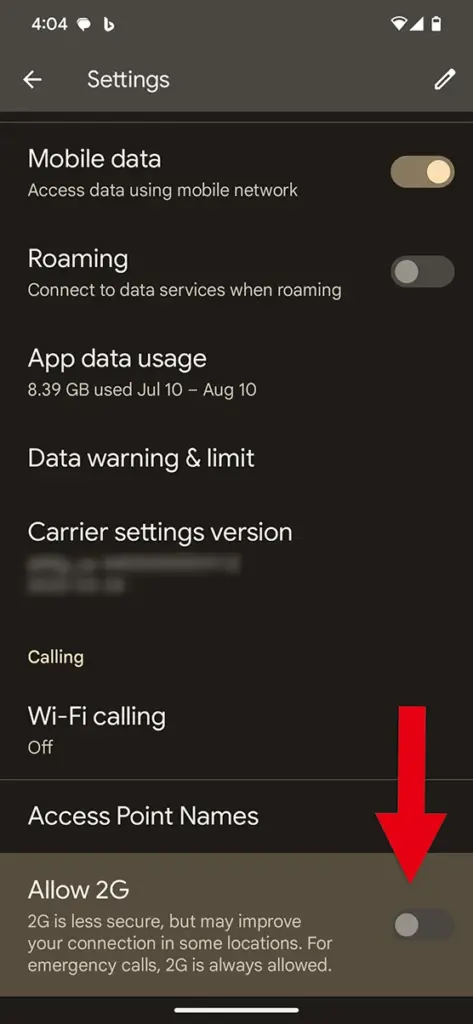
Google tip: Disable 2G
The 2G-attack method actually poses a threat. There have been reports of temporary 2G base stations popping up close to the hotels Paris Las Vegas and Caesars Palace during what is known as Hacker Summer Camp in Las Vegas, which features three security conferences: BSides, Black Hat, and DEF CON. Participants in DEF CON are renowned for having a habit of exposing cybersecurity experts who expose their digital equipment to a cyberattack.
Researchers strongly advised Black Hat attendees to turn off 2G support on their phones. To turn off 2G capability, simply search for 2G in Settings on an Android device.
In related news, Google announced Tuesday a suite of Android 14 advanced cellular security mitigations for enterprises.
“Android 14 introduces support for IT administrators to disable 2G support in their managed device fleet. Android 14 also introduces a feature that disables support for null-ciphered cellular connectivity,” according to a Google Security Blog writeup.
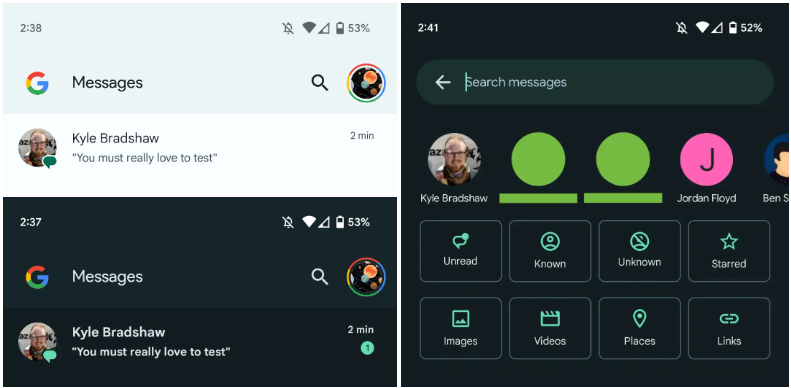
Interesting changes are being made by Google to the Messages homescreen, including the removal of the navigation drawer and the addition of prominent branding to the Android app.
The Google Messages homescreen has undergone another update with beta version 20230717 01 RC00.
With this redesign, the message organization feature that had recently been enabled for beta users is not present. In the meantime, Google has slightly modified the search filters. This new appearance has not yet been implemented broadly.
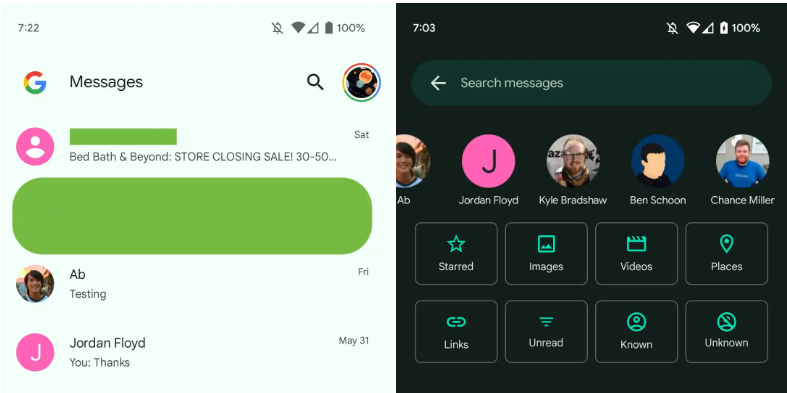
You only get a magnifying glass icon in place of a full-width search bar. Google’s four-color “G” logo is in the top-left corner, followed by the word “Messages.
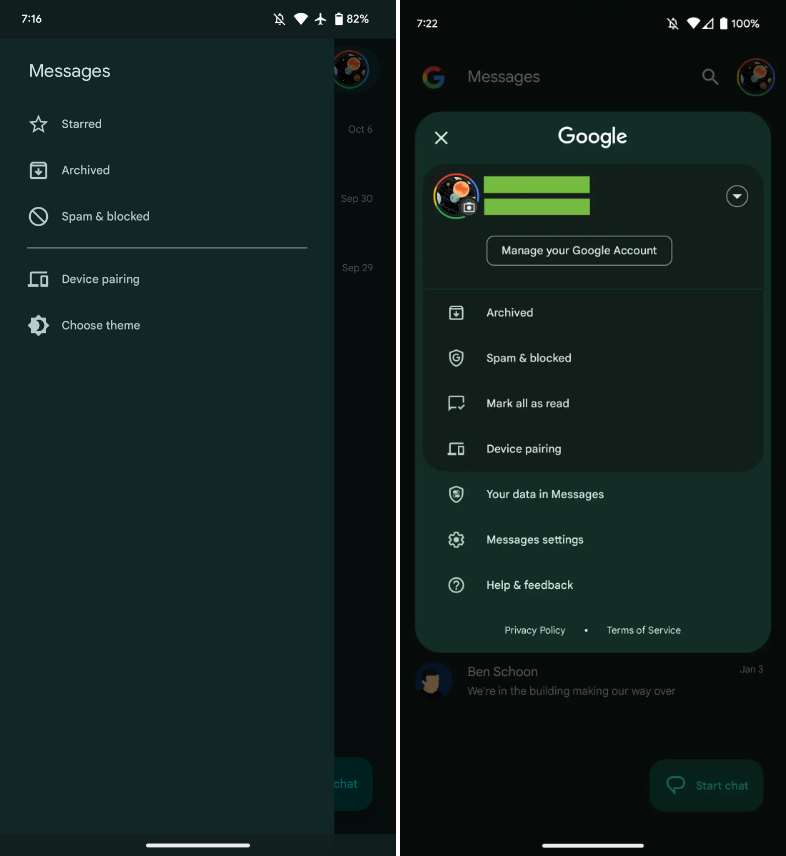
With those settings now under the account menu, the navigation drawer and its hamburger icon have been deleted. Your data in Messages, Messages settings, Help & feedback, Spam & blocked, Mark all as read, and Device pairing are displayed in that order. Google has shifted “Select theme” inside the settings menu in the interim.
Early in 2022, after previously solely using an overflow menu, Messages added a navigation drawer. This was considered to be defying current Google app design trends at the time.
A small change in search sees Google drop the “Categories” carousel for a standard grid that requires less scrolling: Starred, Images, Videos, Places, Links, Unread, Known, and Unknown.
In comparison to programs like Gmail, which has a huge list of categories and labels, and Calendar, Messages’ navigation menu was ineffective, included just a few items, and was unnecessary. This account menu strategy is more effective and is used by other first-party apps like the Google Play Store. The complete search box was likewise superfluous, despite being a Google app hallmark.
More interesting to me is the “G” logo in the top-left corner that serves as very explicit Google branding that denotes how this is how the company wants you to message. It can be seen as part of Google’s ongoing RCS campaign.
We’re seeing this homescreen redesign rolled out with version 20230608_01_RC00 of Google Messages that was released yesterday to the beta channel. This redesign is not yet widely available, but feels like a definite modernization.
The July Pixel update is now available as one of the final Android 13 updates, following the June release of a big quarterly platform update and Pixel Feature Drop that included new functionality and numerous bug fixes. It is anticipated to be somewhat less significant than last month’s and ought to prepare us well for the next Android 14 release.
Prepare your Pixel 4a, Pixel 7 Pro, and Pixel 7a for an update right away. The initial updates for your Pixel Fold or Pixel Tablet should also be available. The fact that new Pixel smartphones are receiving upgrades is huge news, even if it’s just a tiny update. As I type this, a 23.27MB update is downloading to my Pixel Tablet. It is also visible to others who have Pixel phones.
For those in the Android Beta Program, you are not likely to receive an update. When you are in that program, you are on a different software track.
July Google Pixel update builds
Global
Pixel 4a: TQ3A.230705.001
Pixel 4a (5G): TQ3A.230705.001
Pixel 5: TQ3A.230705.001
Pixel 5a (5G): TQ3A.230705.001
Pixel 6: TQ3A.230705.001
Pixel 6 Pro: TQ3A.230705.001
Pixel 6a: TQ3A.230705.001
Pixel 7: TQ3A.230705.001
Pixel 7 Pro: TQ3A.230705.001
Pixel 7a: TQ3A.230705.001
Pixel Fold: TQ3C.230705.001.C1
Pixel Tablet: TQ3A.230705.001.B4
Pixel Watch: RWDC.230705.001
Verizon
Pixel 7: TQ3A.230705.001.A1
Pixel 7 Pro: TQ3A.230705.001.A1
Pixel 7a: TQ3A.230705.001.A1
Pixel Fold: TQ3C.230705.001.B1
T-Mobile
Pixel 6: TQ3A.230705.001.A1
Pixel 6 Pro: TQ3A.230705.001.A1
Pixel 6a: TQ3A.230705.001.A1
Japan
Pixel Fold: TQ3C.230705.001.C2
July Google Pixel update bug fixes
No major bug fixes to report on any device outside of the Pixel Tablet. For Google’s biggest screen, they list the following:
Battery & Charging: General improvements for charging, battery usage or thermal performance in certain conditions
User Interface: Fix for issue occasionally causing lock screen notification text to display behind unlock UI elements
Again, Google should begin pushing these updates shortly over-the-air (Settings>System>System update), but if you don’t want to wait for Google and prefer to update manually, you will find each factory image or OTA file at the links below. For instructions on how to flash a factory image, here you go. For instructions on how to flash an OTA .zip file, here you go.
With our very own, always-on virtual assistants in our pockets, a futuristic utopia where Google Assistant was created was meant to be a reality for everyone. But even the best technology occasionally fails to function in the real world. In this post, we’ve outlined a number of actions you can do if your phone’s “OK Google” or “Hey Google” voice command isn’t functioning. To learn more, scroll down!
Identify the problem
Sometimes a bothersome problem can be resolved without the need for extensive, laborious, complicated debugging efforts. Something extremely simple might be the answer. And that’s precisely what we’re aiming for here. Let’s start with a few simple ways to fix your “OK Google not working” problem before moving on to some of the more challenging ones.
Is Google Assistant is turned on?
You might be astonished to learn just how many individuals may have just disabled the Google Assistant feature and then wondered why it wasn’t working, despite how simple it may seem. If you frequently give your phone to your children, they may occasionally tinker with the settings and mistakenly disable Google Assistant (including the “OK Google” command). Make sure Google Assistant is turned on before even reading about basic troubleshooting procedures.
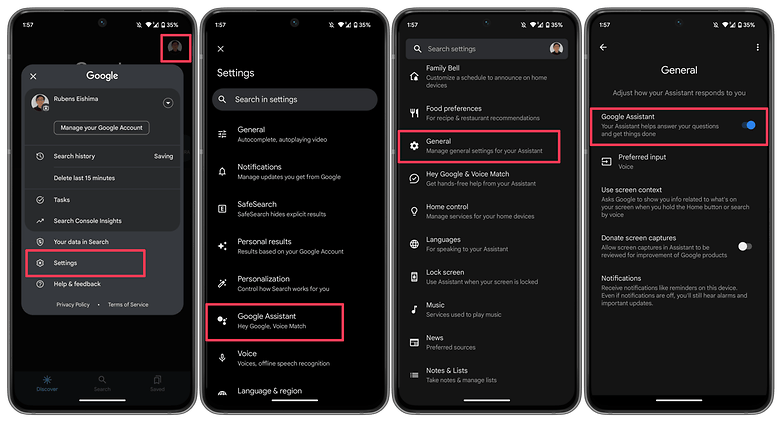
How to:
Launch the Google app on your phone.
Tap on your profile picture.
Select Settings.
Choose Google Assistant.
Tap on the General option.
Make sure that Google Assistant is enabled.
As an additional step, you may also want to check the following:
Follow steps 1 to 4 as mentioned above.
Select Hey Google & Voice Match.
Make sure the Hey Google option is enabled.
Make sure you’re connected to the Internet
Even though it may seem obvious, Google Assistant often requires a Wi-Fi or mobile data connection to work, so be sure your phone is connected before starting a search. Additionally, and this is arguably the oldest piece of wisdom in the book, it never hurts to run a quick reboot because magic can happen there from time to time!
Check if you’re not alone
It’s always good to know if the problem you’re facing is affecting just you and nobody else. There have been occasions when people noticed that the problem is on Google’s side rather than theirs. Check Twitter, Reddit, and Google’s support forums to see if other users are complaining about ‘OK Google’ not working or that ‘Google Voice’ is not working as it should. You can also try searching for a solution using the term ‘Google assistant not working.’
Check your language settings
Checking your phone’s language settings has proven to be a reliable solution for many people who experience the dreaded “Ok Google not working” problem. What if it transpires that the only reason Google Assistant isn’t responding to you is that you’re using the incorrect language when you speak to it?
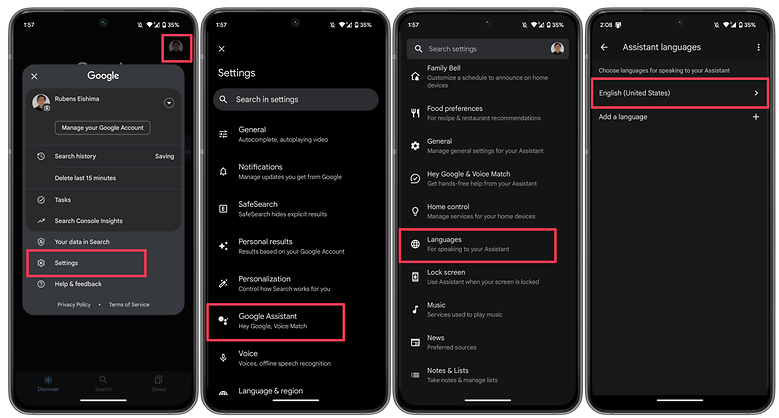
Note that US English will be the default language for many users, but it’s still worth checking in the Settings menu and making the necessary changes as required. To do this, perform the following steps:
Launch the Google app on your phone.
Tap on your profile picture.
Select Settings.
Choose Google Assistant.
Tap on Languages.
Select the first option to change the main language, or add a new language.
This same menu can show you dozens of language options, each one with a checkbox, allowing you to set primary and secondary languages if desired. Google will automatically detect which language you’re speaking and automatically switch between them. If you’re multilingual, be warned that voice recognition for languages other than English can sometimes be subpar.
Check microphone
Google Assistant depends on constant access to your smartphone’s microphone because it is a voice-based technology. The microphone symbol on the right side of the search bar should be bold and have well-defined lines when you first open the Google app. If there is a dotted line, your microphone might be malfunctioning.
If you carefully dig about with a safety pin or something similar to clear the debris in the tiny microphone hole, which is frequently located near to the charging port, you should be able to resolve the issue. Check the Google app’s microphone settings if that doesn’t work.
Occasionally, apps running in the background generate audio that may interfere with the microphone’s ability to pick up your voice, so check these too, and kill any apps that you think can be generating audio.
Turn off battery saver mode
To ensure you get the most life out of the battery, Android smartphones have a specific power-saving mode that shuts off background processes. Your Google Assistant (and the OK Google command) ceasing to function as a result is an unforeseen effect of this. Before you point the finger at anything else for OK Google not working, it is a good idea to make sure that the battery-saving mode on your phone is turned on.
On stock Android, you can check if the Battery saver option is enabled by taking these steps.
Launch the Settings app.
Scroll down and select Battery.
Choose the Battery Saver option.
Disable the UseBattery Saver option.
On other Android skins, the same option may appear under a different name, i.e. Adaptive Battery.
Update the Google app to the latest version
One possible fix to your OK Google problem is to ensure that your smartphone is running the latest version of the Google App. Here’s how you can make sure you’re on the newest version of the app.
On your smartphone, launch the Google Play Store.
Search for the Google app.
On the Google app page, check whether there is an option to Update instead of Uninstall.
Update the app by selecting Update to see whether the issue is resolved.
6. Retrain the “Ok Google” voice model
Sometimes, for reasons unknown, Google Assistant doesn’t retain the commands you have given it. If all else fails, it might be time to retrain your digital companion. Here’s how you can do so.
Launch the Google app.
Tap on your profile picture.
Select Settings.
Choose Hey Google & Voice Match.
Select Voice Model.
Tap on Retrain voice model and follow the on-screen instructions.
Now that you have reached the end of this article, do let us know if these steps helped you resolve the issue. Additionally, do let us know if we have missed any useful fixes.
Because to early investments in computational photography, Google Pixels have earned a reputation for being top-notch camera phones. The hardware of subsequent Pixel generations plateaued after Google continued to use the same primary camera sensor for four years in a row, but this was a great decision that kept them competitive. Even the Pixel 6a from a year ago, which used the same Sony IMX363 image sensor, was praised by us and other experts in the field of cameras.
After the Pixel 3, Google’s first significant camera hardware advancements debuted in the Pixel 6 series. The entire camera system was improved, but most notably the old primary sensor was changed for a Samsung ISOCELL GN1. The Google Pixel 7 series added a few more small upgrades to this setup, such as a new selfie camera, an improved telephoto lens, and macro capability on the Pro model. We have a lot of information on the camera specifications and features of the upcoming Google Pixel 8 series thanks to a source inside Google. So let’s get into the specifics.
Pixel 8 and Pixel 8 Pro camera specs – a big upgrade
Both Pixel 8 versions will receive the ISOCELL GN2 sensor as the primary update to the camera hardware this year, replacing the Samsung ISOCELL GN1 sensor. The sensor is bigger and should capture roughly 35% more light than its predecessor for brighter low-light shots and faster shutter speeds to lessen blur. These are the first enhancements.
The Tensor G3 CPU and the sensor both support the capture of 8K/30fps video. This might not reach users, though, as the Pixel 8’s GCam does not presently enable it, and older Pixel models already run quite warm at 4K/60 frames per second. The final improvement is the previously revealed Staggered HDR support. This shortens the time between HDR capture frames, which lessens ghosting and expedites the capture process. The innovation might enable quicker, more dependable photos by enhancing Google’s HDR+ capabilities.
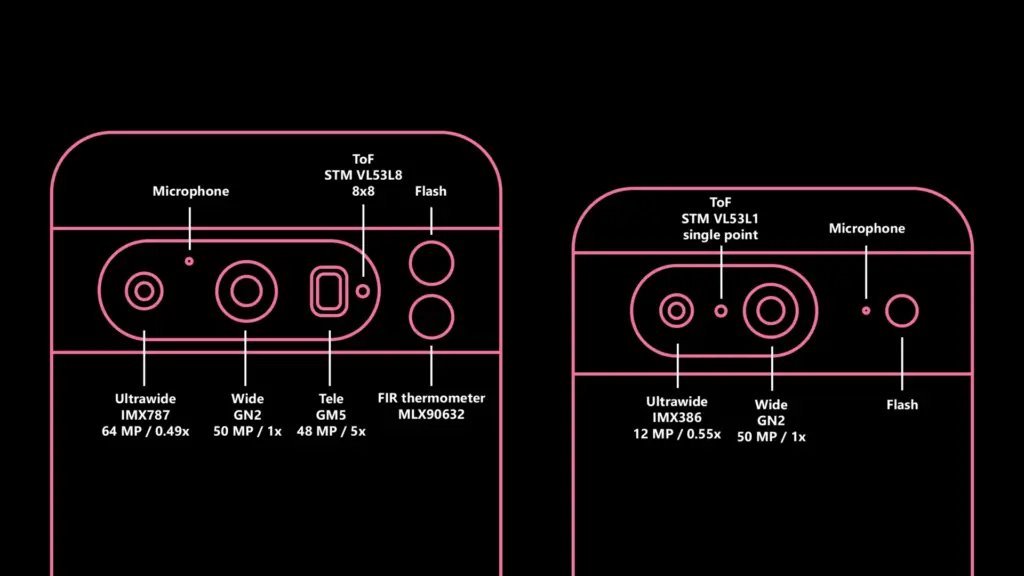
The ultrawide camera on the Google Pixel 8 Pro is also getting a much-needed boost. The 64MP Sony IMX787, which is the same sensor as the main camera featured on the Pixel 7a, has replaced the outdated 12MP Sony IMX386. The sensor is almost two times larger, which is a significant improvement for the ultrawide camera. The lens has also been slightly widened by Google. The field of vision (FoV) has been increased from a 0.56x zoom ratio to 0.49x, but I am unsure of the precise value. Unexpectedly, there’s a possibility that the macro mode introduced with the Pixel 7 series won’t be present this year. At now, the Pixel 8 Pro doesn’t have the capability enabled. Afterwards, the feature might be activated again.
The vanilla Google Pixel 8’s ultrawide camera is also upgraded, although more modestly. While the camera sensor is the same Sony IMX386 found in the Pixel 6 series, Google has made it slightly wider this year. Pixel 7 had a 0.67x zoom ratio, which is now 0.55x in the Pixel 8.
The telephoto camera on Pixel 8 Pro appears to remain the same 5x module as the Pixel 7 Pro. The same goes for the 11MP selfie camera from the Pixel 7 series. Here’s the full rundown:
Pixel 7
Pixel 8
Pixel 7 Pro
Pixel 8 Pro
Wide
Samsung GN1 (50 MP)
Samsung GN2 (50 MP)
Samsung GN2 (50 MP)
Samsung GN1 (50 MP)
Ultrawide
Sony IMX386 (12MP) – 0.67x zoom ratio
Sony IMX386 (12MP) – 0.55x zoom ratio
Sony IMX787 (64 MP) – 0.49x zoom ratio
Sony IMX386 (12MP) – 0.56x zoom ratio
Telephoto
–
–
Samsung GM5 (48 MP) – 5x zoom ratio
Samsung GM5 (48 MP) – 5x zoom ratio
Selfie
Samsung 3J1 (11 MP)
Samsung 3J1 (11 MP)
Samsung 3J1 (11 MP)
Samsung 3J1 (11 MP)
It’s intriguing to see Google further distinguish between the normal Pixels and their Pro counterparts. Although each generation’s previous Pixels had distinct distinctions (such as the addition of telephoto cameras on the Pro versions), it never felt as though the standard devices were a significant downgrade; rather, they just featured less features. This is altering with this generation. Now, purchasing the normal Pixel 8 over the Pixel 8 Pro will result in a lower-quality ultrawide experience and a lesser zoom.
Improved time-of-flight is coming to the Pixel 8
The STMicroelectronics VL53L1 single-point time-of-flight (ToF) sensor has been used in all Pixel phones since the Pixel 6 (apart from the Pixel A series), which is a little-known fact. This sensor helps the autofocus. It is depicted in the picture up top.
Finally, the Pixel 8 Pro get something more practical. It has a brand-new 88 ToF VL53L8 sensor. The new sensor in the Pixel 8 Pro is still a huge improvement, and it should, at the very least, make the autofocus much more dependable. Having a true LiDAR camera sensor, like the 0.3MP IMX590 in the iPhone 14 Pro, is obviously far more adaptable.
The ToF sensor upgrade isn’t coming to the regular Pixel 8; it retains the old VL53L1.
The Pixel 8 thermometer is just a thermometer
An FIR temperature sensor is yet another Pixel 8 Pro feature that has already surfaced online. Let me set the record straight: it is not a full thermal camera that can also be used for photography as some have suggested.
It is a Melexis MLX90632 sensor, which is primarily suggested for highly accurate non-contact temperature measurements, such as measuring body temperature. It is just capable of sensing temperature; it is neither a camera nor anything else. Simply said, and not for the first time, Google decided to incorporate a very pricey gimmick in its product (hello, Motion Sense).
Software updates for the Pixel 8 camera are coming
While the camera software on Pixel 8 is obviously in fairly early stages of development and mainly focuses on making the new hardware work, we have spotted some new low-level feature enhancements.
“Adaptive torch” is a new feature that dynamically adjusts the flash intensity based on the scene and other inputs (e.g. which capture mode is used). This should prevent overexposed shots and make low-light photography even better if you use the flash.
“Segmentation AWB” is another new feature. As the name implies, the scene will be divided into many segments using AI, and then certain portions of the image will be processed differently. This idea is not new; Qualcomm previously unveiled a feature of a similar nature for the Snapdragon 8 Gen 2. How Google integrates this into its current processing processes will be interesting to observe.
Google might also add a video bokeh blur level selection for the phone’s cinematic mode, which was first introduced on the Google Pixel 7 series.
Ordinarily, purchased apps on Google Play and the Apple App Store will cost you money, but occasionally, some creators may opt to spread the love by making their apps freely available to everyone. We do this twice a week by searching the Apple App Store and Google Play Store for the greatest deals. Download them now on your iPhone or Android before they become paid content.
Do take note that while they’re free as of publishing, these deals tend to expire without any due warning based on the developer’s whims and fancy. The promotional period for apps on these platforms can be both unpredictable and can end suddenly.
Therefore, we recommend that you exercise caution and conduct your own research before downloading any of these apps, as some may contain in-app purchases or hidden costs.
Android apps available for free for a limited time
Android apps for productivity and lifestyle
Save PDF Viewer Pro[4.4-stars / $1.49]: Are you ready to try an alternative app to read PDF files? This gets the job done with minimal fuss.
Simple Text Widget[4.9-stars / $1.49]: Keep yourself motivated every single day with this widget that adds text to the home screen.
80s Music Radio Pro[3.9-stars / $0.99]: An ad-free app that lets you enjoy all the top hits from the 1980s right on your smartphone.
Electron Config Pro[4.8-stars / $2.49]: Do you have a hard time with chemistry, trying to figure out which element is compatible with another? This app removes all guesswork with its precise answers.
Android games
Demon Warrior Premium[4.4-stars / $0.99]: Take a walk on the wild side and be the strongest demon there is out there.
Kaori After Story[4.9-stars / $4.99]: Immerse yourself in the life of a boyfriend who has been invited to spend Christmas with your girlfriend’s family! Just how will you act? This is a visual adventure novel.
Crazy Owls Puzzle[4.3-stars / $0.99]: Another variant of the “3-of-a-kind” puzzle game, except that owls are in the thick of the action this time around.
Stickman Warriors Super Hero[4.0-stars / $0.49]: Go one-on-one against different opponents as you work to be the ultimate warrior.
WindWings[4.9-stars / $1.99]: A shoot ’em up that requires you to be on your toes all the time to shoot down wave after wave of enemies and remain alive.
iOS apps available for free for a limited time
iOS apps for productivity and lifestyle
PDFGenius[4.4-stars / $9.99]: An intuitive tool that lets you manipulate PDF files on your iOS device.
Bear Walking Pal[4.7-stars / $0.99]: They say that the key to staying healthy is to walk 10,000 steps a day. Do so with this cute app!
PiP: Picture in Picture[4.7-stars / $0.99]: Just because Apple says you cannot multitask in iOS, doesn’t mean all apps agree with that. Enjoy Picture-in-Picture capability with this app!
Resize Image[4.9-stars / $0.99]: Is there a photo that you want to resize on your phone? Get it done with this app!
Lock Notes Pro[4.5-stars / $4.99]: Protect your precious notes and keep them private with a password.
iOS games
Astral Shapes[5.0-stars / $0.99]: A matching game that is out of this world, where you look for matching shapes and colors.
Ethereal Enigma[4.9-stars / $9.99]: A pictorial adventure story that can take up to 10 hours for a single playthrough. Just how well is your decision-making process?
Pocket GM 2: Football Sim[4.9-stars / $0.99]: Manage your own American Football franchise and see whether you have the chops to take your team to the very top!
Adventurer Legends[4.3-stars / $0.99]: A Diablo-like game that sees your party grow even more powerful as you progress.
Red Rocket[5.0-stars / $0.69]: Go against the traffic in your car, avoiding obstacles to remain on the road.