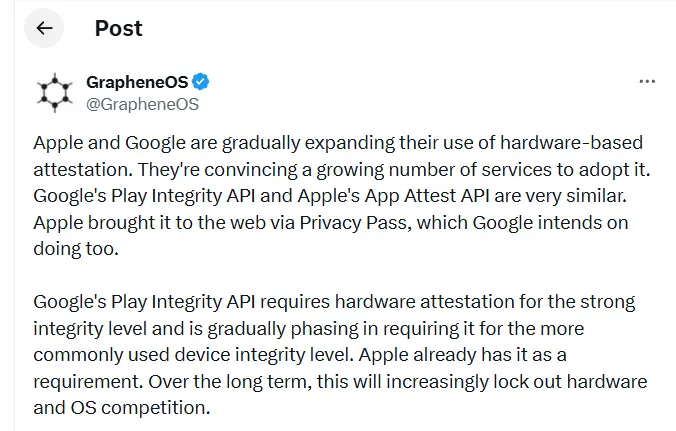
GrapheneOS has published a lengthy thread on X accusing Google and Apple of gradually making the internet and mobile apps more dependent on their own platforms, devices, and software ecosystems.
The project argues that tools like Google’s Play Integrity API and Apple’s App Attest are being marketed as security features when, in practice, they make it significantly harder for users to choose alternative operating systems. A growing number of apps and websites now check whether a user is running a trusted device and approved software before granting access. According to GrapheneOS, this trajectory could hand Google and Apple near-total control over which devices function properly online.
“Over the long term, this will increasingly lock out hardware and OS competition,” GrapheneOS wrote in the thread.
Much of the criticism is directed at Google’s Play Integrity API, which Android apps use to verify whether a device is genuine, running certified software, and considered secure. Banking apps commonly rely on these checks to block rooted phones or devices running modified versions of Android. GrapheneOS argues that the same system also shuts out legitimate alternatives – including its own OS.
“Google’s Play Integrity API bans using GrapheneOS despite it being far more secure than anything they permit,” the post states.
“The purpose of these systems is disallowing people from using hardware and software not approved by Apple or Google,” GrapheneOS added. “This is wrongly presented as being a security feature.”
reCAPTCHA concerns
The thread also raises concerns about reCAPTCHA, Google’s widely deployed CAPTCHA system. GrapheneOS points out that Google’s verification systems require users to confirm their identity using a certified Android or iOS device. In some cases, that means scanning a QR code with a phone just to prove you’re a real person before accessing a site or service. GrapheneOS warns this dynamic could eventually extend to desktop platforms like Windows and Linux as well.
“Control over reCAPTCHA puts Google in a position where they can require having either iOS or a certified Android device to use an enormous amount of the web,” the platform wrote.
GrapheneOS also highlights that governments and financial institutions are increasingly adopting these same verification systems for payments, digital ID apps, and age verification services – deepening the entrenchment of Apple and Google’s gatekeeping role.
“Instead of governments stopping Apple and Google from engaging in egregiously anti-competitive behavior, they’re directly participating in locking out competition via their own services,” GrapheneOS said.
Neither Google nor Apple has publicly responded to the issues raised in the thread.
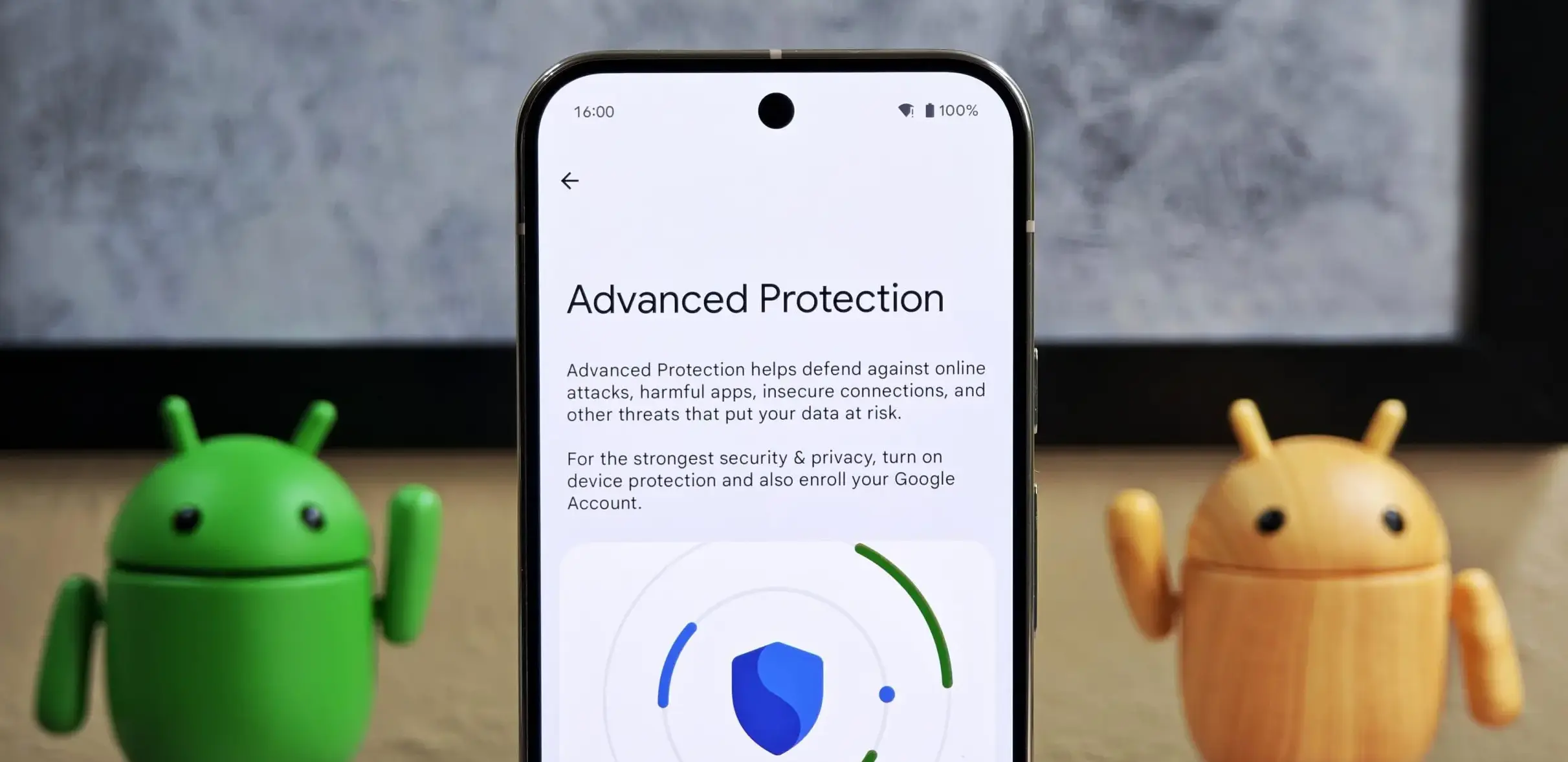
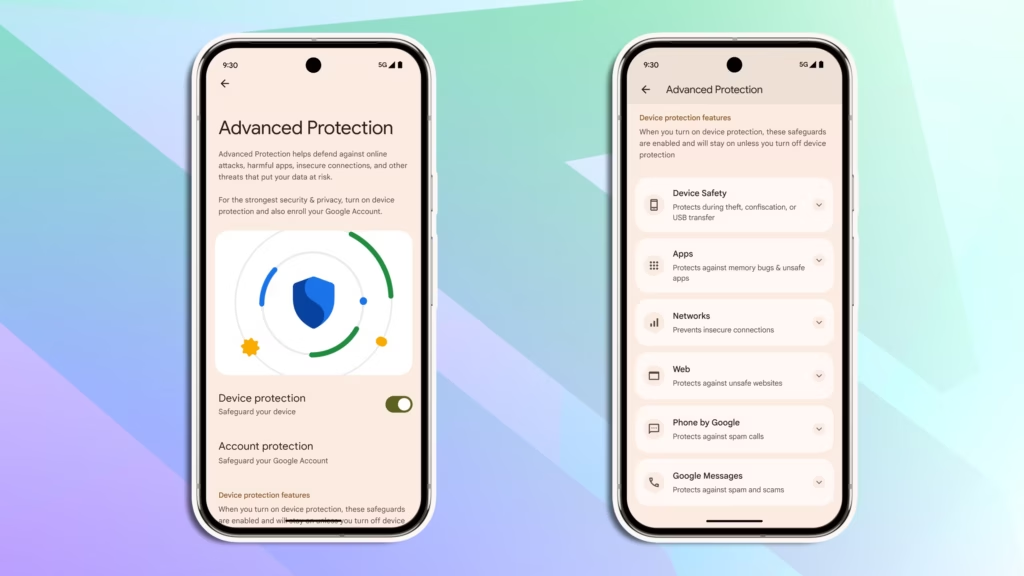
Android 16 quietly shipped with a feature called Advanced Protection, and it’s the closest thing Android has to a panic button for your privacy. Instead of digging through a maze of settings menus to harden your phone, you flip one switch — and Google activates its strongest security defenses all at once.
Think of it like Apple’s Lockdown Mode, but for Android. It protects you against theft, shady apps, unsecured networks, scam texts, and spam calls. The reason it’s off by default? It’s deliberately strict. There’s some friction involved. But if you actually care about who’s watching your data, that friction is worth it.
Here’s how to turn it on.
What you need first
Advanced Protection only works on Android 16. Before you do anything, check that your phone is up to date: go to Settings > System > Software update (or System update, depending on your device) and install anything pending. Android 16 is available on most Pixel phones and major Android models. You’ll also need a screen lock set up.
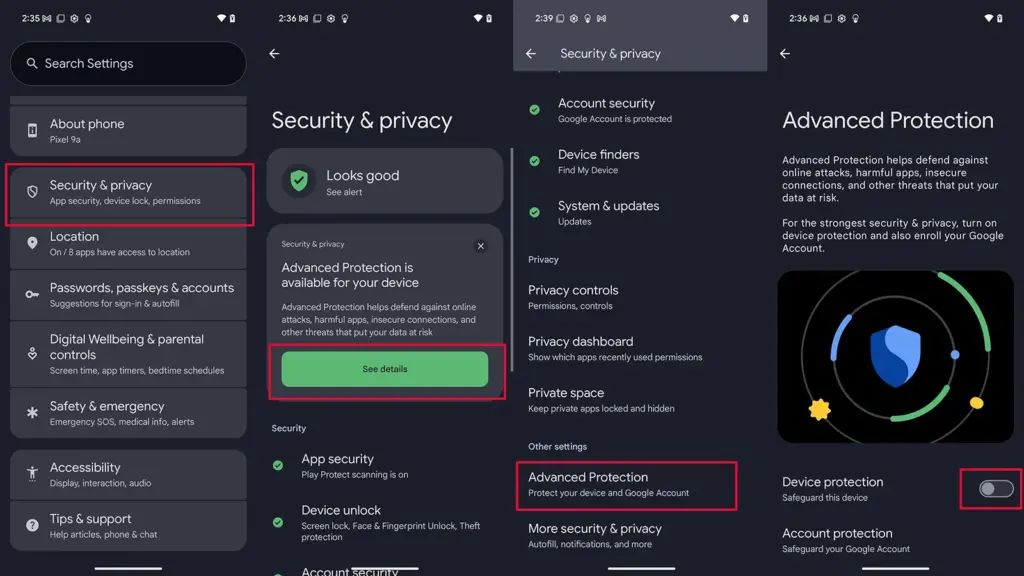
Step 1 — Find the setting
Open Settings
Tap Security and privacy
Select Advanced Protection (on some devices it’s tucked under Other settings)
Step 2 — Turn it on
Under Advanced Protection, toggle on Device protection
Tap Turn on
Restart your phone if prompted
That’s it. One switch activates a stack of protections: always-on malware scanning, a block on sideloading unknown apps, theft and offline device locks, spam and scam text filters, a block on weak 2G connections, tighter call screening, and stronger Chrome security settings — among other things.
Step 3 (optional) — Protect your Google account too
Turning on Advanced Protection for your device secures what’s on your phone. But your Google account — Gmail, Drive, Docs, Photos — is a separate story.
Google’s Advanced Protection Program is an opt-in service that locks down your account with stronger sign-in requirements, like passkeys or physical security keys, and limits which third-party apps can touch your data. If you’re a journalist, activist, executive, or anyone else with a good reason to be more cautious online, this is worth setting up.
To enroll:
Go to Advanced Protection in your Google Account settings and sign in
Follow the on-screen steps — you’ll likely be asked to set up a passkey or security key, and add a backup phone number and email
Tap Enroll to finish
To unenroll later: tap your Google Account profile photo > Manage your Google Account > Security > Advanced Protection Program > Manage Advanced Protection, then select Unenroll.
For most people, enabling device-level protection alone is a meaningful upgrade. If you want the full picture, pair it with account-level enrollment. Either way, it takes about two minutes — and it’s two minutes well spent.
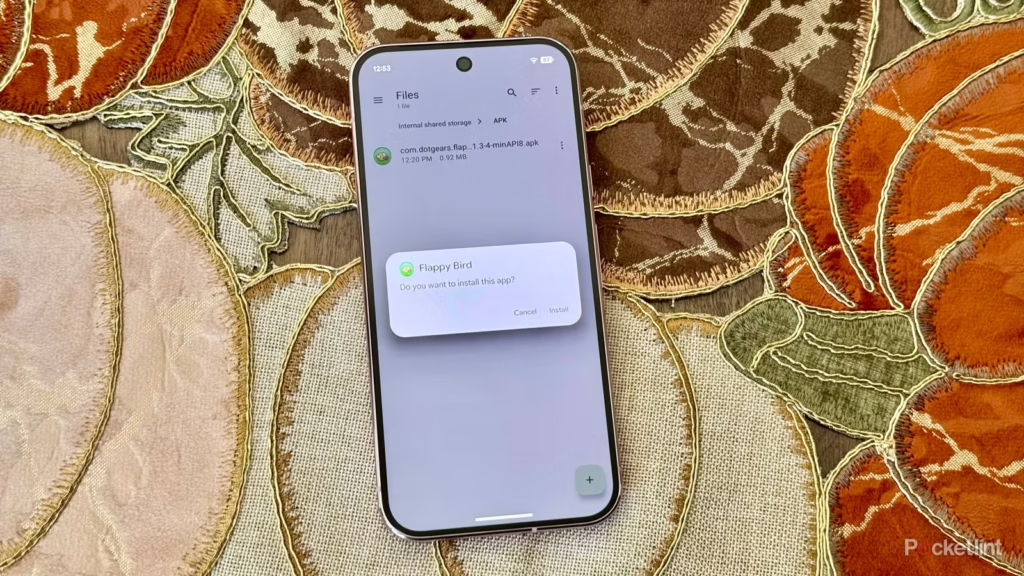
Since its launch, sideloading has been a crucial component of Android, giving it a great deal of flexibility as well as a feeling of freedom and openness. The community (quite understandably) panicked when Google announced it would make significant changes to sideloading. However, since Google has now demonstrated how its new sideloading flow on Android will operate, I’m not only relieved that sideloading won’t completely disappear, but also that Google’s compromise is as close to ideal as I believe we can get.
Some have called “Android Developer Verification” the demise of Android’s open nature. The change, which would require developers to register with Google in order to permit their apps to be installed on Android devices, was introduced by Google last year as a restriction on app installation, including sideloading. At first, Google described this as verifying the “who” of an app, similar to an airport ID check.
Combating scams, such as “convincing” bogus apps, and reducing malware and other harmful attacks—particularly those caused by sideloading from sources outside the Google Play Store—were always the main priorities here. Over the years, Google has been more aggressively combating Android frauds, with some degree of success. One way it has done this is by preventing sideloaded apps that are used in scams.
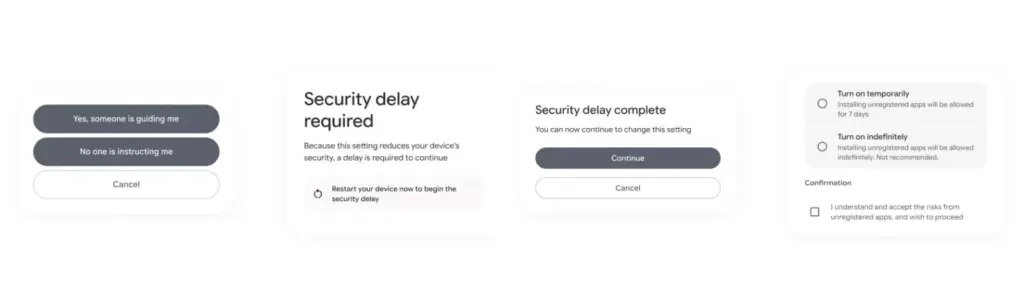
Google officially unveiled the new “advanced flow” this week, which enables users (and developers) to sideload apps that aren’t created by registered developers.After asking the user to certify that “no one is directing me,” the four-step procedure begins a 24-hour delay. In order to initiate the timer, the user must restart their device. After admitting the risks once more, they can resume the sideloading procedure 24 hours later; if they choose to leave it on “indefinitely,” the delay just occurs once. In actuality, this is really a one-time obstacle. Developer options must be enabled, but you can later disable them, which is the largest “headache.”
Google has stated time and time again that a “crackdown” on sideloading is not about taking away freedom or functionality, but rather about protecting users and, most importantly, stopping scams that are common on Android in particular areas. Google doesn’t prevent developers or even consumers from accomplishing what they truly want to do by restricting sideloading as planned, but it puts a huge barrier in the way of con artists.
Scammers frequently use timed pressure and a sense of urgency. A waiting period of twenty-four hours with a few additional warnings? That is a difficult barrier against those kinds of frauds. For people who are being duped by more prevalent scams, it’s also a major inconvenience. For instance, a few weeks ago, after purchasing a low-cost fitness tracker, a family member called me to inquire as to why their homescreen had changed. It turns out that the product needed them to sideload an unidentified software in place of their launcher. I guided them through the uninstall process, but a 24-hour wait and all these extra warning screens? The installation would never have taken place.
It’s a careful method of striking a balance between functionality and user protection. Because developers and enthusiasts who need or want to sideload an app immediately may still utilize the standard ADB tools, whereas the “ordinary Joe” must wait for that 24-hour period to end. Those who truly can’t wait the 24-hour period (which, once again, only needs to be once) still have options, although that is a headache for “regular” users and even more so for fraudsters.
Not to mention that you won’t often have to deal with this anyhow. After developers apply for Google’s developer verification program, sideloading is no longer a problem and there are no waiting times or other “in the way.”
How do you feel about Google’s modifications to Android sideloading? There are undoubtedly still many people who disagree with this, but as previously stated, I don’t think there is a better solution.
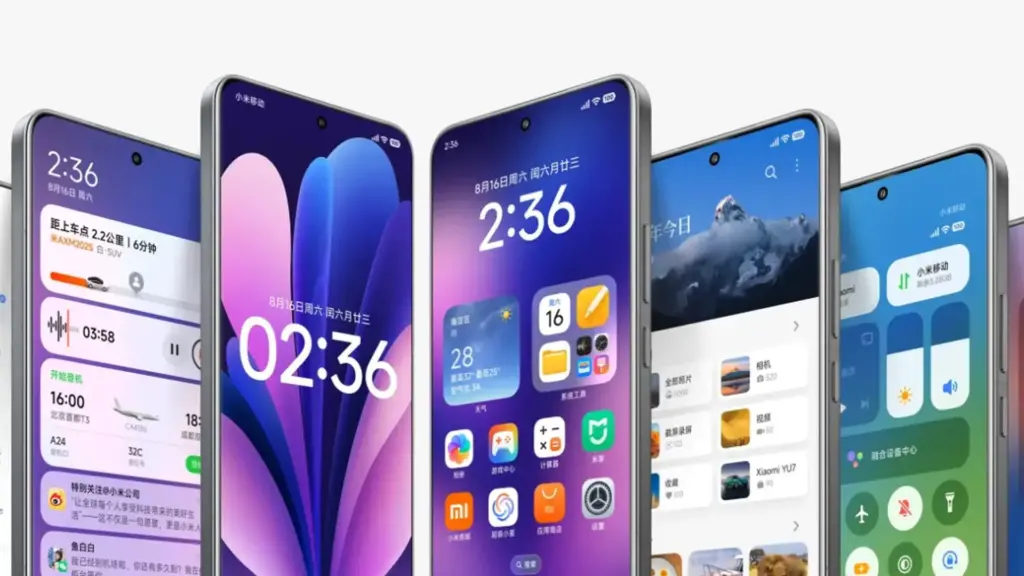
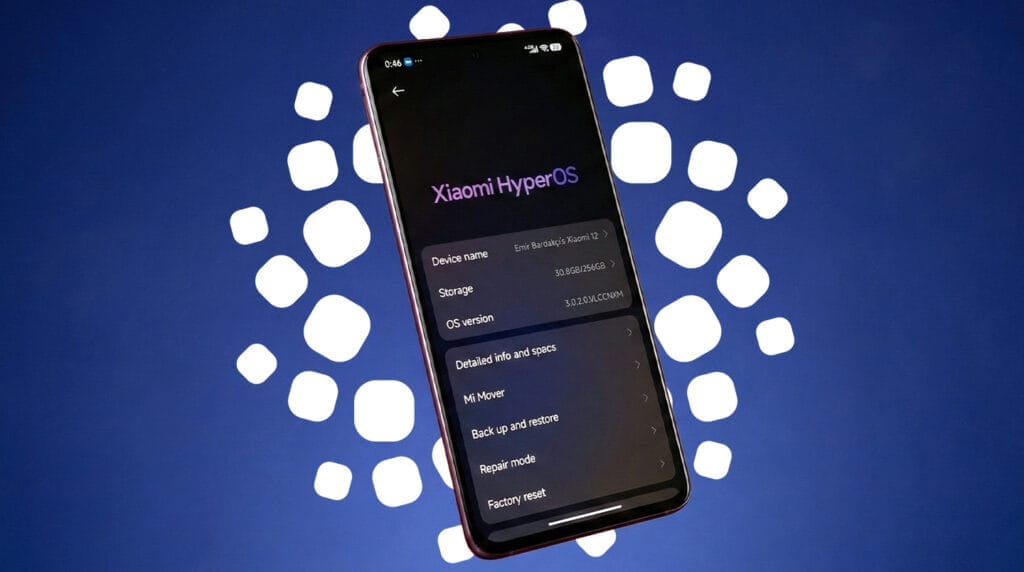
On January 22, 2026, Xiaomi launched the HyperOS 3.1 beta, which included minor but significant UI and privacy improvements. Phones become smoother and speedier as a result. Additionally, the HyperOS 3.1 update uses AI to extend battery life.
With improved app switching and adjustable settings, it improves the user interface. Additionally, it offers improved multitasking, smoother animations, and increased privacy and security.
A more reliable, refined, and connected experience is provided by HyperOS 3.1. It also offers support for iOS calls and security updates for Android 16. Let’s examine the characteristics of HyperOS 3.1 in more detail below:
Quick look at Xiaomi HyperOS 3.1 features coming to your device
Category
Feature
Explanation
iOS Integration
AirPods Native Pop-Up
Let users hide unlock pattern traces
iOS Integration
Spatial Audio Support
Enables 360-degree immersive audio on Xiaomi phones
iOS Integration
ANC & Transparency Control
Manage noise cancellation and sound modes easily
iOS Integration
Find My AirPods
Locate lost AirPods without needing an Apple ID
UI & Animations
New System Animations
Smoother, more fluid transitions across the system
UI & Animations
iOS-Style Recent Apps
Card-like multitasking view inspired by iOS
Apps Overhaul
New Gallery & Weather Apps
Faster apps with rewritten code for better performance
Accessibility
New “Assistance” Menu
Easier access to vision, hearing, and control tools
Accessibility
Active Visual Perception
Helps users better understand on-screen content
Motion & Comfort
Motion Sickness Feature
Reduces visual motion to prevent dizziness
Super Island
Live Update Support
Real-time updates from apps like Uber and Spotify
Super Island
Todo Notes & QR Access
View tasks, QR codes, and maps directly on Island
Lock Screen
Card Swipe Support
Swipe payment and transit cards on lock screen
Media
Music Progress Bar
iOS-style glowing progress bar on media player
Ecosystem
Xiaomi + iPhone Call Support
Answer Xiaomi calls directly on an iPhone
System Core
Biometric Redesign
Improved fingerprint and unlock settings
System Core
Quick Gestures
Faster gesture shortcuts on select premium phones
Security
New Password App
Stores passwords, Wi-Fi logins, and passkeys
Security
Password Breach Alerts
Warns if your passwords are compromised
Privacy
Shake Permission Update
Limits app access to camera, mic, or location
Privacy
Hidden Pattern Trail
Lets users hide unlock pattern traces
Performance
Faster & Smoother System
Improved speed and stability
Battery
AI Battery Optimization
Smarter power saving using AI
Android Core
Android 16 Security Patches
Latest system-level security improvements
iOS integration
You may have overlooked many Apple-only features if you have Apple AirPods and a Xiaomi phone. The AirPods’ battery level was visible before the introduction of Xiaomi HyperOS 3.1. Similar to Apple AirPods, Xiaomi phones have developed as a local brother that will never be alone.
Important improvements like Apple-like native Pop Up support are included in the latest version of HyperOS 3.1. A brief card with details about the battery and connectivity now appears on your screen when you open the AirPod
Spatial Auido, one of Apple’s most exclusive features, is now accessible. Users of Xiaoimi can now enjoy native 360-degree immersive audio. Additionally, the HyperOS club allows you to control the connection time, ANC, and Transparency mode.
Additionally, instead of displaying the standard Bluetooth icon, it only displays the appropriate AirPods model icon. Notably, Xiaomi’s “Find My” Integration allows you to locate your misplaced AirPods using Xiaomi Online Search without even requirin
New UI animations
Xiaomi rewrites Gallery and Weather and changes its animations. To enhance system performance, all outdated code has been eliminated. The new APK files will crash when installed on older HyperOS 3 devices as a result of this modification.
Additionally, the company imitated the latest iOS 26 app animation. Switching between programs feels more contemporary because to the new style, which resembles the iOS cards.
Improvements have been made to the white bar at the bottom of the screen that indicates when you are in full-screen mode. It now responds better to touch and moves more fluidly.
HyperOS 3.1 now has a new Motion Sickness function from Xiaomi. Motion sickness-causing visual motion cues are lessened by this featur
Improved Super Island
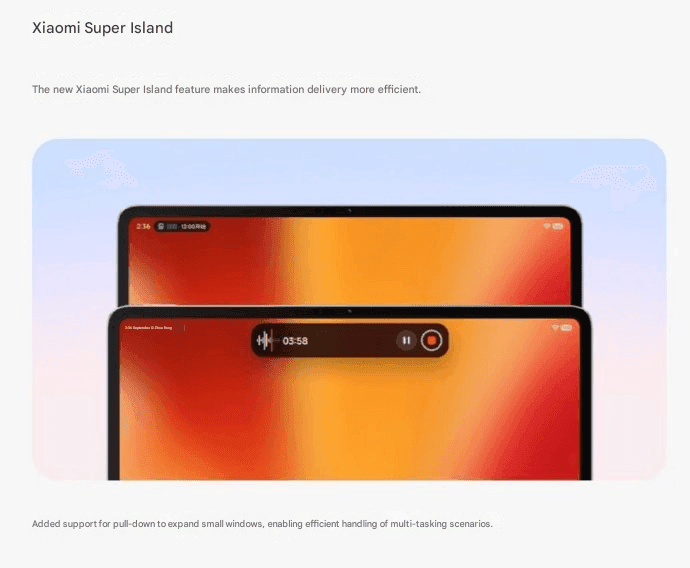
Although Super Island now uses the native Android 16 “Live update” API, it was completely inspired by iOS Dynamic Island. Thus, Xiaomi-specific code will no longer be required for international apps such as Uber, Spotify, or other food delivery services to display real-time information on Super Island
Following this upgrade, Xiaomi added a Todo Notes feature. You no longer need to open the app landing page in order to view a variety of notifications, QR codes, and map instructions in Island. Additionally, a function known as Lock Screen Card Swipe is added. This makes it simple to swipe through your cards, including transit and payment cards, directly on the lock screen. You won’t have to visit a different wallet website.
The new Music Progress Bar, which was completely lifted from iOS, is one of my favorites. The media player on the island now has a glowing progress bar thanks to a straightforward yet lovely modification.
System Core enhancements
The “Assistance” Menu functionality was implemented in HyperOS 3.1 (Accessibility Settings Change). This indicates that Xiaomi renamed and relocated the accessibility options to a new main menu called “Assistance.” Those who require simpler phone controls or who have vision or hearing issues can benefit from these options.
Features, for instance, relocated there. Active Visual Perception improves the clarity of what users see or comprehend on the screen. Screen readers, text size control, and tools for hearing and vision assistance.
Additionally, the new biometric area offers a more contemplative experience. Additionally, Xiaomi included Quick Gestures control, which is only available on more recent high-end models like the Poco F8 Ultra and Redmi K90 Pro Max.
As I have stated, deep ecosystems are greatly impacted by Apple AirPod integration. Additionally, the most crucial brick is iPhone Cross-Compatibility (Xiaomi + iPhone). You can now answer and receive calls from your Xiaomi phone directly on your iPhone if you have both an iPhone and a Xiaomi phone. To put it simply:
When your Xiaomi phone calls, you may answer it on your iPhone. Thus, you don’t always need to touch your Xiaomi phone. Since Apple and Xiaomi often don’t collaborate closely, this function is unique in that it links two competing ecosystems.
Many security improvements
The Passwprd App, similar to iOS, is now one of the key features of HyperOS 3.1. Similar to Apple, this new tool helps you manage your Wi-Fi passwords, passkeys, and app logins.
It can detect and alert you if your passwords have been stolen. Additionally, it allows you to manage all of your passwords in one location by combining them from several online browsers. Additionally, it offers a simple method for your passwords to be automatically filled in throughout the system.
The way you can use patterns and fingerprints has changed in the latest release. The pattern trace can now be concealed once more. Additionally, it is now simpler to select your security options because the fingerprint unlock is independent of the private password settings.
Shake Permission Update is a new function that allows you to modify your privacy. This enables you to restrict access to your location and camera, for example, only when your screen is on. Additionally, you have the option to restrict these permissions to eight seconds following the opening of an application. By doing this, you can stop apps from following you when you’re not
Overall, HyperOS 3.1’s improvements prioritize polish over a significant redesign, enhancing ecosystem connectivity, privacy, battery efficiency, and smoothness. This beta seems more polished, reliable, and prepared for the future than earlier HyperOS iterations thanks to Apple-inspired features and Android 16 security improvements.
Two groups of researchers have found two new, distinct types of malware that function similarly and are embedded in a variety of programs that are accessible through different channels. Worst of all, the standard advice to “don’t install apps from strange sites” is less helpful because some of them are even available on the Google Play Store.
Although these two pieces of malware appear to be distinct, they function similarly. They exploit the functions of your phone to click on advertisements nonstop, slowing it down and significantly depleting its battery.
Virtual screens, real ads
Researchers at the mobile security company Dr.Web found the latest recent spyware, which has not yet been named. Bleeping Computer revealed the discovery. This malware makes use of the TensorFlow.js framework that Google distributed with Android phones to enable machine learning operations in browsers.
And it works: when the malware is activated, it creates a virtual (false) screen where it shows and clicks on advertisements. Compared to more traditional ad-clickers, the clicks appear far more natural due to the usage of a machine learning technique. However, it has an equally detrimental effect on your device as earlier malware, with notable effects on battery life and processing speed.
Even worse, the app allows attackers to interact with the fake display as needed by opening a permanent livestream on your device.
Interestingly, Xiaomi’s GetApps software catalog is where the apps originates. Dr.Web claims that the malware is introduced after the apps are uploaded, avoiding all possible security measures.
inevitably, third-party app websites like Apkmody and Moddroid have also been severely compromised by the malware. Researchers assert that both the latter’s Editor’s Choice list and “premium” versions of apps like Spotify that may be accessible on Telegram channels are rife with compromised apps.
We recently reported about another type of banking Android malware that operates in the background and leverages accessibility settings to steal data, including passwords and bank credentials. More malware that allows remote attacks on Android devices and is freely disseminated among hackers as part of a subscription service has just been disclosed.
More banking malware on the loose
A new Android trojanware known as Albiriox has been found by researchers at the online fraud protection company Cleafy. Albiriox is disseminated through what are referred to as “dummy” or infected APKs to deceive users into downloading real apps, much as Sturnus, the malware that was discovered last week.
Hackers have tricked people by making phony copies of Google Play Store app listings, as Android Authority noted. As a result, potential victims may think they are downloading an app from a secure site when, in fact, they are not. Additionally, hackers have enticed victims by posting fictitious offers and promotions, requesting contact information, and then distributing the malicious APKs via well-known messaging services like Telegram and WhatsApp.
The research group claims that hackers in Russia and other nearby regions have been the primary users of these approaches. After being disseminated as a Malware-as-a-Service (MaaS) on dark web forums, it is reported to have lately acquired popularity.
The “install unknown apps” permission on users’ devices is mostly enabled via the APK files that hackers disseminate. The current (and destructive) program containing Albiriox is installed by the dropper app after that is activated.
According to Android Authority, the research organization has already caught over 400 fraudulent apps that target consumers in categories including banking, fintech, digital payments, and cryptocurrencies. Instead than obtaining users’ login credentials, these software versions enable hackers to conduct transactions directly on users’ banking apps.
You should be wary of any strange programs you install, especially if they appear to be connected to banking or any other financial service, as the malware works more covertly and silently. Make sure you have the most recent Play Protect update installed and that you only download apps from the official Google Play Store app.
In terms of updates, make sure your device has the most recent firmware that is supported, as this contains patches for vulnerabilities that have just been discovered. Similarly, Google has published the December Android Security Bulletin.
The Security V12 generation of Xiaomi’s standard Security app has finally been released with a significant update. The most recent build, V12.0.3-251114.1.1, is mostly concerned with modifications to the system infrastructure. However, as the new build offers a whole redesign of the Game Turbo interface and sophisticated system optimization logic, this would be quite intriguing for those waiting for the release of the next HyperOS stage. With this upgrade, Xiaomi is at last getting ready for a significant change in the management of background operations and the optimization of gaming performance on devices throughout the world.
Increased optimization in new Security V12
The Security V12 branch has been made available to the public for the first time with this build. The Security V12 series is a package deal of significant architectural improvements that align with next system versions, in contrast to the incremental updates that preceded it. The improved optimization engine, which promises to clear caches and free up memory without disrupting user activity, is especially noteworthy in the changelog. Thus, the move to version 12.0.3 would suggest that Xiaomi is preparing for more demanding software applications, maintaining devices’ responsiveness and fluidity during more taxing operations.
Enhanced gaming capabilities
However, the improved Game Turbo module is the most notable feature of this version. Performance modes and floating windows can now be accessed more quickly thanks to Xiaomi’s UI optimization. In order to prioritize frame rates and network stability during gameplay, new optimization algorithms operate in the background in silent mode. With much lower latency and input lag, enthusiasts who use their devices for competitive gaming will notice how much more seamless the transition from the game to system notific
How to update
To update the Security app on Xiaomi devices, open the Security app and scroll to the bottom until you see the Settings or About section. Tap Update (or Check for updates) if available. You can also update it through the GetApps store by searching for Security and installing the latest version. If the update doesn’t appear, make sure your phone is connected to the internet and running the latest MIUI/HyperOS system version, as some Security app updates are bundled with system updates.
Keeping system applications updated is very crucial for maintaining the security and performance stability of any device. Among such capabilities are unlocking hidden Xiaomi settings, updating other system applications seamlessly, and managing screen refresh rates, among the common updater features.
There may be hidden risks to billions of WhatsApp accounts. According to a recent analysis, there are major security flaws in the privacy of the communications that hackers might take advantage of.
With merely their phone number, finding someone on WhatsApp is very simple for many users, and the frequency of searches appears to be limitless. However, according to a recent analysis, this has turned into a significant security flaw that leaves 3.5 billion users of the messaging program vulnerable to assault.
Big WhatsApp security risk
Through a study carried out between December 2024 and April 2025, security researchers at the University of Vienna in Austria found the vulnerability. The primary cause of the problem is WhatsApp’s long-standing built-in capability for locating and adding contacts.
In theory, the app will display whether a number has an account if you add it and then search it up. Additionally, anyone with an active phone number is able to send messages to public accounts and view the profile.
A program known as “libphonegen,” which creates combinations of account numbers from other nations that may be registered on WhatsApp, was used by the team to carry out this procedure.
They were able to produce 63 billion possible accounts and 100 million numbers each hour in their study. 3.5 billion accounts were taken out of those. Of these, 29% had written profiles with sensitive information including political and religious affiliations and links to other social media accounts, while 57% had their profile images made public.
The vulnerability Is alarming
The results show how this WhatsApp security vulnerability could be exploited by malevolent parties, including fraudsters and attackers. For example, the encryption in the messaging app is weakened since public and identification keys are reusable rather than unique. Attackers might intercept and decrypt messages if security was compromised.
The identical WhatsApp vulnerability was discovered in 2017, but Meta has not been able to fix the flaw.
Following the discoveries, Meta was contacted by the security research group. The company verified that it implemented system modifications in October that restrict the number of account searches that may be done within the app.
How to protect yourself
Users with public profiles, however, are still vulnerable because others can still read their profile images and text. Making their WhatsApp profile private is advised for those who are worried about security and privacy.
Additionally, Meta has added new security and privacy features. A monthly message cap and automatically muting calls and messages from strangers are two of these that are presently being testing.
A new Android-based spyware that leverages NFC technology to make illegal ATM cash withdrawals and empty victims’ bank accounts was examined by the Polish Computer Emergency Response Team (CERT Polska).
Researchers discovered that the software, known as NGate, allows attackers to use banking information stolen from victims’ phones to withdraw money from ATMs (Automated Teller Machines, or cash machines) without actually taking the cards.
NFC is a wireless technology that enables close-quarters communication between gadgets like terminals, cellphones, and payment cards. Therefore, rather of stealing your bank card, the attackers use a mobile phone infected with the NGate virus to record NFC (Near Field Communication) activities and send that transaction data to ATM equipment. Instead of being relayed just via radio, the stolen data in NGate’s situation is transmitted over the network to the attackers’ servers.
There are several “flavors” of NFC. Some generate a static code, like the card that opens the door to my apartment complex. I can use a gadget like my “Flipper Zero” to open the door by just copying that type of signal. However, dynamic codes are used by sophisticated contactless payment cards, such as your Visa or Mastercard debit and credit cards. Your card’s chip creates a unique, one-time code (commonly referred to as a cryptogram or token) each time you use the NFC. This code is unique and cannot be reused.
That’s why the NGate malware is more advanced. It does more than just pick up a signal from your card. The victim must be duped into entering their PIN and completing a tap-to-pay or card-verification activity after the phone has been compromised. When that occurs, the app records every piece of information required for an NFC transaction, including the card number, new one-time codes, and other information created at that same moment.
All of the NFC data, including the PIN, is then immediately sent to the attacker’s handset via the virus. The attacker uses the codes right away to mimic your card at an ATM because they are newly produced and only valid for a brief period of time. The accomplice at the ATM displays the collected data using a card-emulating device, such as a phone, smartwatch, or bespoke hardware.
However, as you may guess, social engineering and preparation are necessary to be prepared at an ATM when the data arrives.
Attackers must first infect the victim’s device with malware. They usually send prospective victims phishing emails or SMS messages. They frequently try to create anxiety or urgency by claiming that there is a technical or security problem with their bank account. Occasionally, they make a follow-up call while posing as representatives of the bank. These calls or texts instruct victims to download a phony “banking” app from an unofficial source, like a direct link rather than Google Play.
After installation, the software requests permissions and guides users through fictitious “card verification” procedures. While an accomplice waits at an ATM to cash out, the objective is to persuade victims to act swiftly and trustingly.
Stay safe:
NGate only functions when your phone is compromised and you are duped into entering your PIN and starting a tap-to-pay action on the phony banking app. Therefore, the greatest defense against this infection is to protect your phone and be on the lookout for social engineering:
Stick to trusted sources. Download apps only from Google Play, Apple’s App Store, or the official provider. Your bank will never ask you to use another source.
Protect your devices. Use an up-to-date real-time anti-malware solution like Malwarebytes for Android, which already detects this malware.
Do not engage with unsolicited callers. If someone claims to be from your bank, tell them you’ll call them back at the number you have on file.
Ignore suspicious texts. Do not respond to or act upon unsolicited messages, no matter how harmless or urgent they seem.
Malwarebytes Mobile Security
Malwarebytes is an anti-malware software for Windows, macOS, ChromeOS, Android, and iOS that finds and removes malware.
Malwarebytes for Android detects these banking Trojans as Android/Trojan.Spy.NGate.C; Android/Trojan.Agent.SIB01022b454eH140; Android/Trojan.Agent.SIB01c84b1237H62; Android/Trojan.Spy.Generic.AUR9552b53bH2756 and Android/Trojan.Banker.AURf26adb59C19.
According to a survey by cloud security firm Zscaler, hundreds of malicious Android apps on Google Play were downloaded over 40 million times between June 2024 and May 2025.
The company saw a 67% year-over-year increase in malware that targeted mobile devices during that time, with banking trojans and spyware being the most common threats.
According to telemetry data, threat actors are leveraging phishing, smishing, SIM-swapping, and payment frauds to take advantage of mobile payments instead of traditional card fraud.
The shift to social engineering assaults can be explained by the widespread use of mobile payments and enhanced security standards like chip-and-PIN technology.
According to Zscaler, “to carry out these assaults, fraudsters use phishing trojans and malicious programs designed to steal financial information and login passwords.”
Zscaler estimates that it has found 239 harmful apps in the official Android store, with a total of 42 million downloads, compared to 200 malware apps on Google Play last year.
The emergence of adware as the most significant threat in the Android ecosystem, which now accounts for over 69% of all detections—nearly twice as many as the previous year—is another noteworthy trend observed at that time.
After leading with 38% the previous year, the Joker info-stealer is currently in second position with 23%.
The SpyNote, SpyLoan, and BadBazaar families—which are used for identity theft, extortion, and surveillance—were the primary drivers of the notable 220% year-over-year (YoY) increase in spyware.
Geographically speaking, 55% of all attacks were directed towards the United States, Canada, and India. Attacks against Israel and Italy also showed substantial increases, ranging from 800% to 4000% YoY, according to Zscaler.
Malicious Android apps and malware
In its annual study, Zscaler identifies three malware families that significantly affected Android users. The first is Anatsa, a banking trojan that occasionally enters Google Play through productivity and utility apps and receives hundreds of thousands of downloads each time.
Since its discovery in 2020, anatsa has undergone continuous evolution. The most recent version is capable of stealing data from bitcoin sites, more than 831 financial institutions, and new areas like South Korea and Germany.
The second is Android Void (Vo1d), a backdoor malware that targets Android TV boxes and has infected at least 1.6 million devices with out-of-date Android Open Source Project (AOSP) versions, mostly in Brazil and India.
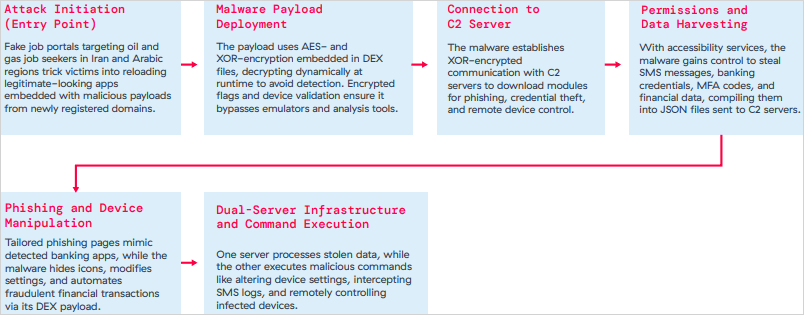
The third is Xnotice, a brand-new Android remote access trojan (RAT) that specifically targets job seekers in the oil and gas sector in Iran and Arabic-speaking areas.
Xnotice propagates via applications that are disseminated through phony employment websites and pose as tools for registering for exams or applying for jobs.
Through overlays, multi-factor authentication (MFA) codes, SMS messages, and screenshots, the spyware targets banking credentials.
Users are encouraged to install security updates, only trust reliable publishers, reject or restrict accessibility permissions, refrain from downloading unnecessary apps, and routinely run Play Protect scans in order to protect themselves from Android malware threats, including those from Google Play.
Routers continued to be the most targeted IoT equipment this year, according to Zscaler’s study. Hackers added routers to botnets or used them as proxies to spread malware by taking advantage of command injection flaws.
The majority of IoT attacks took place in the United States, with rising hotbeds in Hong Kong, Germany, India, and China following, suggesting that attackers are targeting devices throughout a larger geographic area.
The cybersecurity company advises businesses to harden IoT and cellular gateways by keeping an eye out for anomalies and implementing firmware-level protections, as well as to deploy zero-trust solutions for key networks.
Strict application control guidelines, security against phishing attacks, and monitoring SIM-level communications for anomalies should all be part of mobile endpoint protections.