Staying on top of the ever-changing environment of mobile security is one of the most difficult tasks for Android users. While Google has made significant progress in combating malware on its platform, fraudsters are quick to change their tactics. Under the guise of “Fast Cleaner,” security experts have discovered a new banking virus.
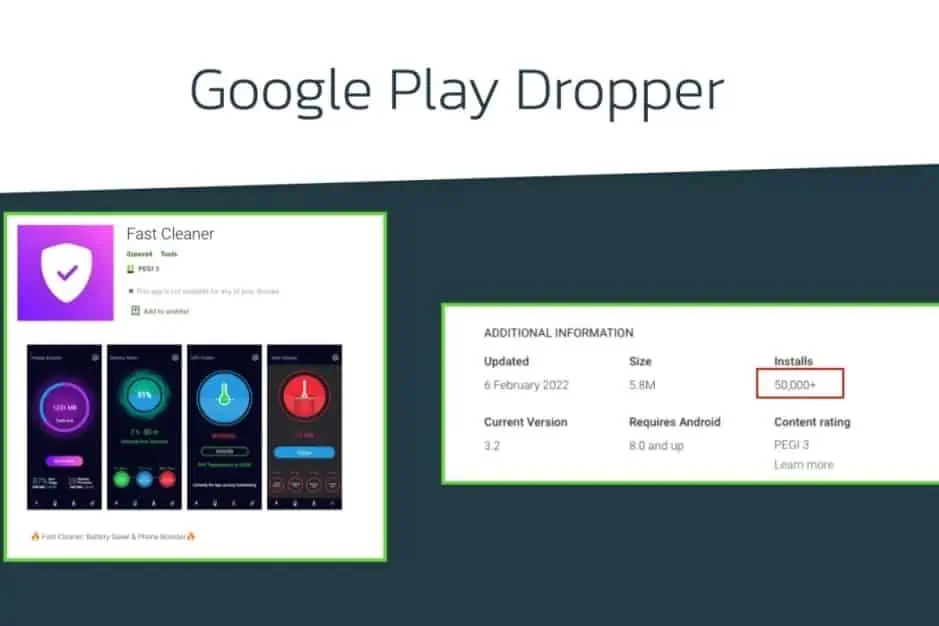
ThreatFabric, a security group, conducted a thorough investigation of the Fast Cleaner app. Before Google took it down, it had roughly 50,000 installs.
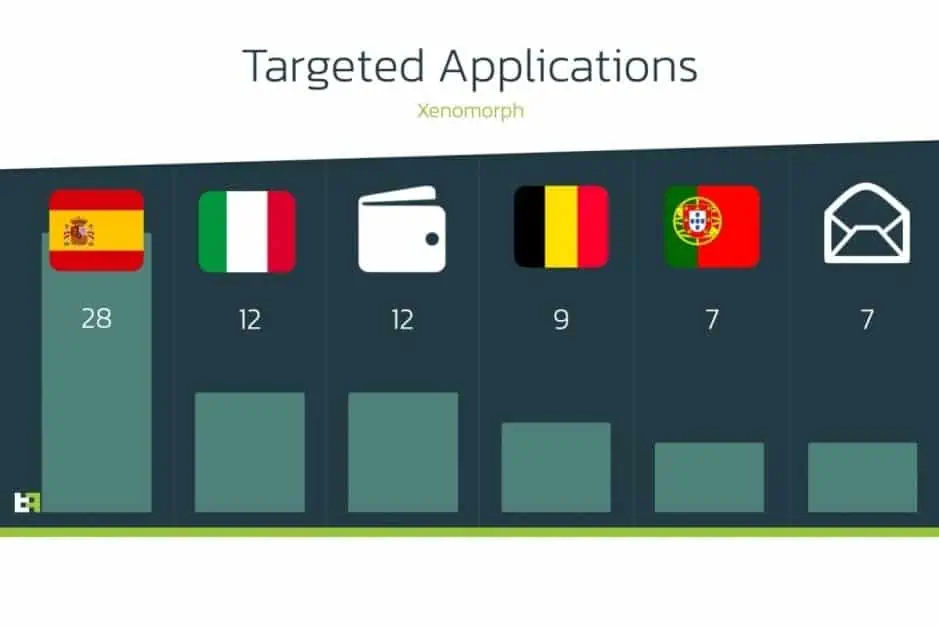
“Based on the intelligence gathered, users of 56 different European banks are among the targets of this new Android malware trojan, distributed on the official Google Play Store, with more than 50.000 installations,” the research team said in a blog post (via Phone Arena).
The Fast Cleaner program infects the Android device with a trojan meant to steal important information from the user, according to ThreatFabric. This could entail reading texts or receiving notifications without the user’s knowledge. This new malware is dubbed “Xenomorph” by the researchers, and it shares some characteristics with the recent Alien banking trojan.
Researchers said that Xenomorph is a relatively new malware and not as advanced as the Alien trojan
Of course, no one wants to install a harmful software on their phone. Users that downloaded the program did so based on the app’s description, which describes it as a “battery saver” and a “phone booster.” If you still have this app installed on your Android phone, uninstall it immediately.
Unfortunately, simply removing the rogue program may not be enough. Users should also review their bank statements for any odd activity and call the bank for additional information.
It’s practically impossible to tell which applications are excellent and which are terrible because there are so many with similar-sounding titles. The Fast Cleaner software was created by a developer identified as “ilzeeva4” and published on the Google Play Store.
According to ThreatFabric, Xenomorph was still in its early stages when it was discovered. This means it isn’t as sophisticated as the Alien trojan. This app was mostly targeted at European consumers, as shown in the graph below.
In terms of future measures, users should always double-check the apps they download. It’s also wise to go through the ratings and reviews on the Play Store or through other sources.
Android Antivirus apps remain one of Android’s most common of apps. Generally, if you’re playing it safe, you don’t need an antivirus app, just download apps from the Play Store, and keep your security settings available. There are many, though, who want to take a walk on the wild side and not do those things. A lot of extremely bad antivirus software are out there. Even if these apps aren’t needed, knowing the safe ones that don’t suck is helpful. Here are Android’s best antivirus software and anti-malware apps. As of January 2021, all rates are present.
Avira is one of the newer antivirus apps comparatively speaking. It grew rather quickly over the last year. The app comes with the basics, including device scans, real-time protection, external SD card scans, and a lot more. This one also comes with a VPN for added layer of security. Some other features include anti-theft support, privacy scanning, blacklisting, and even device admin features. It’s much lighter than apps like Norton and others.
The free version is functional for basic things. The premium versions include three tiered prices that add things like the aforementioned VPN, password generation, more frequent virus database updates, and more.
One of the most common antivirus applications on any platform is Avast Mobile Security. It boasts over 100 million features and millions of downloads. Classical antivirus scanning, an applock, call blocker, anti-theft protection, a picture vault, and even a rooted Android device firewall are some of the features. Even if you don’t need the antivirus part very much, that makes it an excellent instrument. There are also some booster characteristics, but you should avoid those as well.
The free edition comes with most features and is advertising-supported. The premium models come with more security features, no ads, and a VPN is also included in the most costly version.
Another major name in the field of antivirus software is AVG. It’s basically the same as AVAST, in fact. In 2016, AVAST actually bought AVG back. Thus, in both antivirus applications, the experience is identical. In much the same way, you can search your phone and find possible vulnerabilities.
This one has Google Maps anti-theft monitoring, but it does not have the availability of rooted firewalls as AVAST does. Thus, they are sufficiently different to be distinct products. Just make sure that the garbage features such as the phone boost are avoided because they don’t really work. Identical to AVAST are the price ranges and premium characteristics.
One of the few antivirus applications that are currently free is Bitdefender Antivirus. Over the years, it has not altered much. It provides a basic scanning feature, a simple interface, fast quality, and no configuration. For super simple needs, this is a perfect one. All it really does is scan items and then sit there and wait again for things to be scanned. A bigger, more in-depth Bitdefender app exists. However, for those who just want something easy, we think this one is better. With no in-app purchases or subscriptions, it’s also actually free. Advertising is there, however.
In the antivirus and anti-malware environment, ESET is another major name. It has a good range of features, including scans, support for anti-theft, a safety inspector feature, scheduling for scans, and more. A bit intrusive is the setup process. It’s one of the few to have an email address required. It works pretty well otherwise. Upon download, you get a free trial for one month. It goes for $1.99 a month from there, or $14.99 per year. It’s not quite as heavy as AVAST or AVG, but it’s heavier than Bitdefender or CM Protection Lite. For what it’s worth, take that info.
One of the most common antivirus apps is Kaspersky. It has a free version as well as a pro version. SMS and call blocking, scans, malware updates, and anti-theft are provided in both versions. The premium edition adds stuff like security in real time, an applock, and more. Of course, both models have malware scanning for computers and items like that.
It’s not about as heavy as the biggest antivirus software. Plus, it hardly has any hideous booster features that don’t work. Instead of trying to stretch to things that don’t make sense, it’s good to see an antivirus app double down on its intent. If you only need support for one computer, the subscription price is reasonably low.
McAfee is one of the biggest names in antivirus apps. It’s also one of the heaviest. The app includes scanning, anti-theft, anti-spyware, and security locking features. Additionally, it can take photos of your potential phone thief, record locations to the cloud before the phone shuts down, and more useful stuff. McAfee also has a variety of standalone apps for other things. The UI is old and it doesn’t look very good.
Additionally, it has phone booster features that don’t work and it requires an account creation to go pro. The antivirus portion of the app does work rather well and some of the tertiary features are nice. The lower tier subscription adds photo and video backup, an app locker, and Internet protection. The more expensive one adds additional protection for things like online banking.
Malwarebytes is one of the most popular antivirus apps on Windows. The mobile version is pretty good too. It features an aggressively updated virus database, support for malware and ransomware, a permission tracker, and more.
It can even scan messages in WhatsApp, Facebook, SMS, etc for potentially dangerous links. Of course, it does the usual stuff like scanning as well. The app looks nice, works well, and it’s not too heavy like others. It’s also reasonably priced at $1.49 per month or $11.99 per year.
The Android November security patch has just begun rolling out, and for Pixel users afflicted by a bug that silenced their starred contacts in Do Not Disturb (DND), it has something fantastic in tow. The issue should now be solved. When it’s necessary, no more missed calls from your loved ones. Make sure you go to your device settings and hit the update button if you have encountered the issue.
A few Pixel owners took to the Google support forum following the initial Android 11 update. They complained that their phones didn’t ring for starred contacts anymore, even though they set up the feature that way on Android 10. That had serious consequences: One affected person reported that their elderly mother couldn’t reach them while she was lying on the floor with a broken ankle.
There were a few troubleshooting tips, such as ensuring that via your volume rocker menu you haven’t switched off all warning sounds and some elaborate workarounds that included activating repeat callers. You can get into the specifics in the following paragraphs if you’re interested, but you really should just click your Pixel update button to get rid of the issue once and for all.
Solution 1: allow repeat callers
Many people could remedy the problems with a workaround posted by forum user Frank Longest. He writes that starred contacts could ring his Pixel 4 again after he turned on “allow repeat callers.” You can find that option by searching your phone settings for that term or by going to Sound -> Do Not Disturb -> People -> Calls. This will also allow non-starred contacts to reach you when they call twice within 15 minutes, so it’s not ideal.
If that doesn’t do the trick, forum user Titusz Rónai reports that you might also have to go to the Phone app info (tap and hold the icon in your launcher and look for the circled i symbol), and then Notifications -> Incoming Calls -> Advanced -> Override Do Not Disturb. However, this might cause the Phone app to always ring, regardless of who calls you.
Solution 3: factory reset
You can also have to reset your phone in the factory if none of these steps help, but this is the most drastic and time-consuming path. Make sure you’ve backed up all of your data in the cloud or on another computer to do so. Then, look for “factory reset” in the settings of your Pixel phone. Because we don’t know exactly what the culprit is, after resetting and restoring your phone from an Android backup, it’s entirely possible that the issue continues, so you may even have to start from scrap entirely. Your last resort really ought to be this solution.
Android users installing apps from third-party app stores are at risk of the BlackRock malware. How can this malware be stopped?
BlackRock malware is yet another threat worrying Android users. This newly-discovered malware can target a variety of different applications, thereby stealing your information.
Make sure you know what BlackRock malware is, and how you can protect yourself, before installing another file.
Security firm, ThreatFabric, discovered a digital danger that affects Android devices in May 2020: BlackRock malware.
Analysts however quickly discovered that BlackRock malware is not really a new threat. BlackRock malware is the product of leaked source code for Xeres malware, which is a form of trojan LokiBot banking.
Despite the fact that BlackRock malware is based on a banking trojan, it does not just affect banking apps. It also targets applications for shopping, leisure, social relations, entertainment and even dating. This extensive publicity makes it extremely risky.
It currently has 337 apps on its goal list, some of which you might be using on a regular basis. Its target applications aren’t limited to one country either — it targets applications across Europe, North America , and Australia.
ThreatFabric presents the full list of targets in its article. Some of the applications on the list include Gmail, Netflix, Snapchat, eBay, Twitter, TikTok, PayPal and more.
BlackRock malware has not been detected on the Google Play Store until now. Currently it targets downloaded apps from third-party sites, but that does not mean that BlackRock malware will never appear on the Google Play Store. Aggressive hackers also can find ways to break Google’s protection protocols.
How BlackRock Malware Steals Your Information
When BlackRock malware appears on your computer it can never be noticed by an unknowing user. It uses a technique known as a “overlay,” a fake window which pops up over a legitimate app. The overlay mixes with the software so it’s hard to say whether the pop-up is part of the app or not.
The window will ask you to enter your credit card number and login code, before you can even start using the legal app. This helps it to get the details right off the bat.
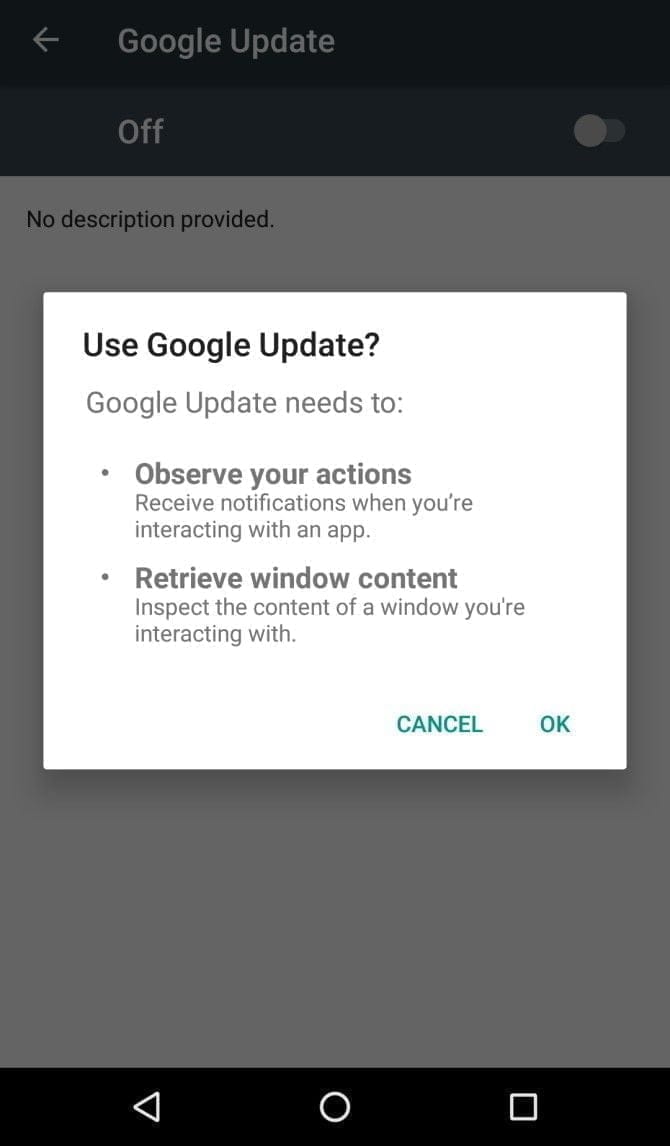
It infiltrates your device in the first place by getting Accessibility Services permissions. When you install an infected app, it’ll prompt you to enable a fake Google Update. Accepting the “Google Update” allows it to intervene with your device.
If you aren’t familiar with an Android’s Accessibility feature, you should know that it’s one of the most powerful functions on your device. It’s meant to help Android owners with disabilities, but Accessibility Services can be used to hack your phone as well. This feature can automate a variety of tasks for the user, including tapping the screen, reading text aloud, and even creating captions.
Giving BlackRock permission to use Accessibility Services lets you build the overlay that you can see when you open the target app. It also gives additional functionality to the malware, as it can then use an Android DPC (device policy controller) to grant administrator privileges to itself.
In other words, it not only steals the confidential details you type into its overlay — it can actually do a lot more than that. BlackRock does not only intercept SMS messages, mask alerts and lock your computer, it can also engage in keylogging. That said, this malware is certainly not what you want on your computer.
Protect yourself from BlackRock malware
As mentioned earlier, the Google Play Store still hasn’t found BlackRock. But just because apps from third-party app stores are currently being targeted, that doesn’t mean it’ll never make its way to Google Play.
ThreatFabric notes that it “can not yet predict how long BlackRock will be active on the threat landscape.” Meanwhile, it’s necessary to bear in mind some precautions before installing apps.
Why an anti-virus app won’t cut it
It’s not a bad idea to have an antivirus app on your smartphone, but unfortunately, an antivirus app won’t stop the BlackRock malware. When BlackRock infiltrates your phone, it has a feature that blocks you from using an antivirus app.
As soon as you open an antivirus or an Android cleaner app, such as Avast, Kaspersky, McAfee, BitDefender, or Superb Cleaner, BlackRock will immediately redirect you to your Home screen. This prevents you from removing the malware using an antivirus app.
So, if you download a sketchy app from a third-party store, and think that an antivirus app will keep you safe from all threats, think again.
Check app permissions
No matter how legit an app may seem, you should keep an eye on the app permissions. Some apps request permissions that have nothing to do with the App’s core function.
For example, your SMS messages obviously don’t need access to a flashlight app. This is a sign that you should immediately uninstall the App.
As BlackRock malware asks for permissions from Accessibility Services, you’ll want to look for any apps that require that particular privilege. If an app is legitimately for users with disabilities, has good reviews, and is from the Google Play Store, you are likely to have confidence in granting permission to the accessibility services. If not, avoid giving that privilege to any applications that don’t need it.
Download apps from Google Play Store only
Google Play Protect was put in place to scan your installed apps for malware as soon as you download them, as well as scan them periodically once installed. Third-party app stores don’t have this safety feature, so you’re pretty much on your own in terms of security.
The lack of security protocols on third-party stores has allowed BlackRock malware to thrive. To lower your risk of encountering BlackRock malware, try to avoid third-party apps stores, and refrain from downloading APKs.
Stay safe!
BlackRock malware will hopefully never hit the Google Play Store. There really isn’t any telling if the actors behind BlackRock malware can find a loophole in Google’s security policies, but if they succeed, BlackRock malware could accumulate a significant number of victims.
If BlackRock ever reaches the Google Play Store, it’s not too surprising. After all, despite Google’s strict security protocols, several apps that contain Joker malware still managed to make their way onto the Google Play Store.
Mozilla was busy working on a revised version of Firefox for Android, which is now live in the Beta and Nightly (previously Preview) channels of the browser. If you’re still on Firefox ‘s regular stable version for Android, though, you should update right now.
Firefox 68.10.1 is now running on the Play Store, which fixes a critical vulnerability that theoretically could allow remote web pages to read local files, including cookies from other websites:
A Content Provider in Firefox for Android allowed local files accessible by the browser to be read by a remote webpage, leading to sensitive data disclosure, including cookies for other origins.
There are not many public information about how the bug operates, but malicious sites won’t be able to take advantage of it until it’s widely patched, but only the classic Firefox browser will be affected. If you are using the versions Beta or Nightly / Preview, there’s nothing to worry about. Firefox browsers are also unaffected on other systems (Windows, macOS, and so forth).
If you are using the standard Android Firefox, you certainly need to update as soon as possible. The latest version (68.10.1) is already up and running on the Play Store, but you can grab it from APKMirror as well.