One of the easiest methods to increase the security of your user accounts is by using Google Authenticator. The ability to synchronize the 2FA generation between phones using the Google Account was recently enabled. Find out how to do it in the following stages.
Up until recently, it was not able to automatically synchronize the token creation between devices, which was one of the biggest drawbacks of utilizing Google Authenticator. Accounts in the app could be manually exported and imported, but users could momentarily lose access to their accounts if their phone was stolen or misplaced.
Synchronize 2FA codes between phones on Google Authenticator
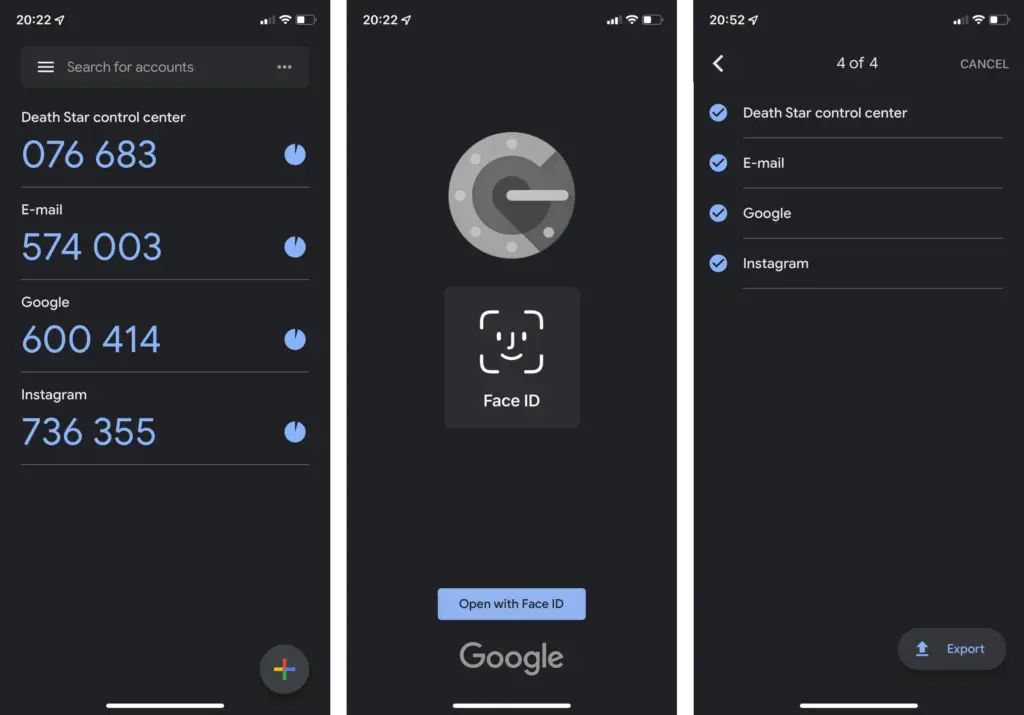
The new automatic syncing relies on the Google Account associated with the device but is optional in case you don’t want to have your security codes synced on Google’s servers—especially since Google doesn’t enforce another type of confirmation before syncing as Authy does. Having said that here is how you start syncing 2FA tokens using Google Authenticator:
Update or install Google Authenticator (Android | iOS).
On the “Welcome” screen, select the Google account used to synchronize 2FAs.
If you skipped the account selection during the first run, activating syncing is as simple as switching an account on any other Google app:
Tap on the profile logo in the top right corner.
Select the Google Account to synchronize 2FA.
When the 2FA codes are synced with the Google Account, it is indicated in both instances by the green cloud icon in the top right corner. Simply choose the same Google account the next time you open Google Authenticator on a new phone to enable the 2FA generators.
How to stop syncing 2FA online on Google Authenticator
If you want to stop syncing code generation in the Google Authenticator, the steps are similar:
Tap on the profile picture in the top right corner.
Select Use without an account.
Confirm the action by tapping on the Continue button.
Tech companies are slowly starting to implement Passkeys to replace passwords and 2FAs, but two-factor authentication is not going away anytime soon apparently, with even fewer services supporting the new security standard.
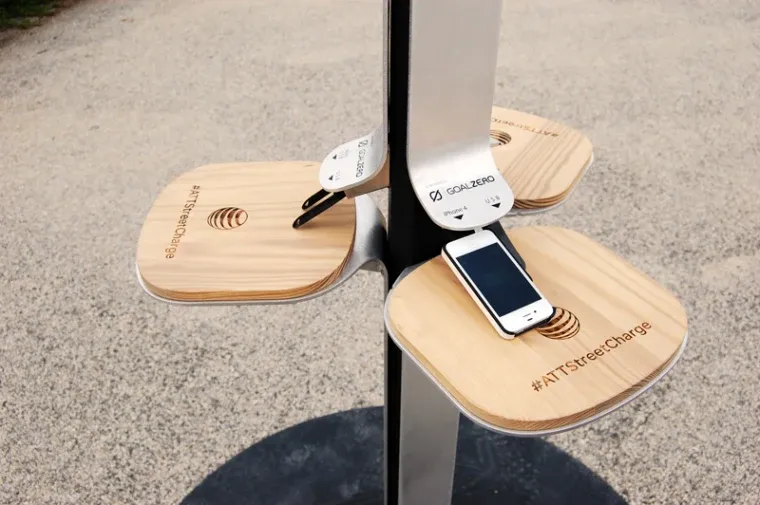
The FBI has issued a warning on public charges that may be found in malls, airports, and other places and requests that nobody make use of them. When traveling or doing other things, it’s a good idea to utilize your own portable charger or power bank since you’re not confined to one place.
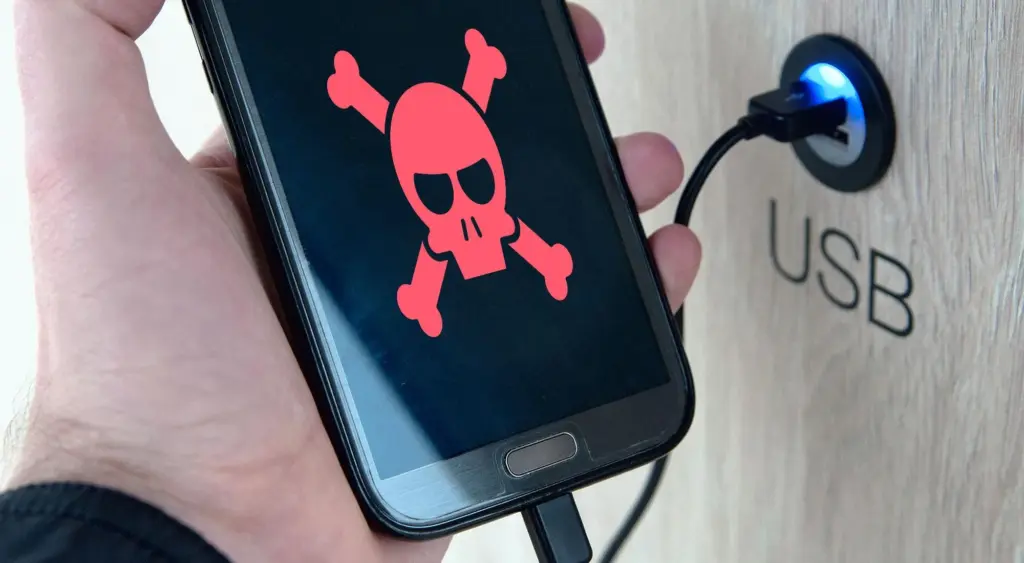
The FBI claims that criminals have discovered a way to use USB connections available in these places to install malware and monitoring software onto devices. and advises everyone to use an electrical outlet instead and bring their own charger and USB wire.
Juice jacking is the term used to describe this practice. This is how malicious software can be added to public charging stations by hackers. It gives them the ability to view, steal, and even track the data from your mobile devices. Regrettably, iOS devices are not immune to juice jacking; Android smartphones are more likely to be affected.
So how can juice jacking be prevented? The simplest solution is to always travel with your own USB cord and charger. For this reason, we advise getting a battery pack for your gadget. There are numerous solutions available for this as well.
This can be avoided
The simplest method is to use a battery pack. Since you are not required to remain confined to one outlet, you can carry it in your pocket and wander around the mall, airport, or anywhere else. Also, it functions when you need to charge your phone but are not in certain areas.
Although this is quite frightening, it is quite simple to avoid. It’s difficult to use one of those USB ports when you’re at the airport because they’re normally all occupied. But right now, you need to steer clear of them.
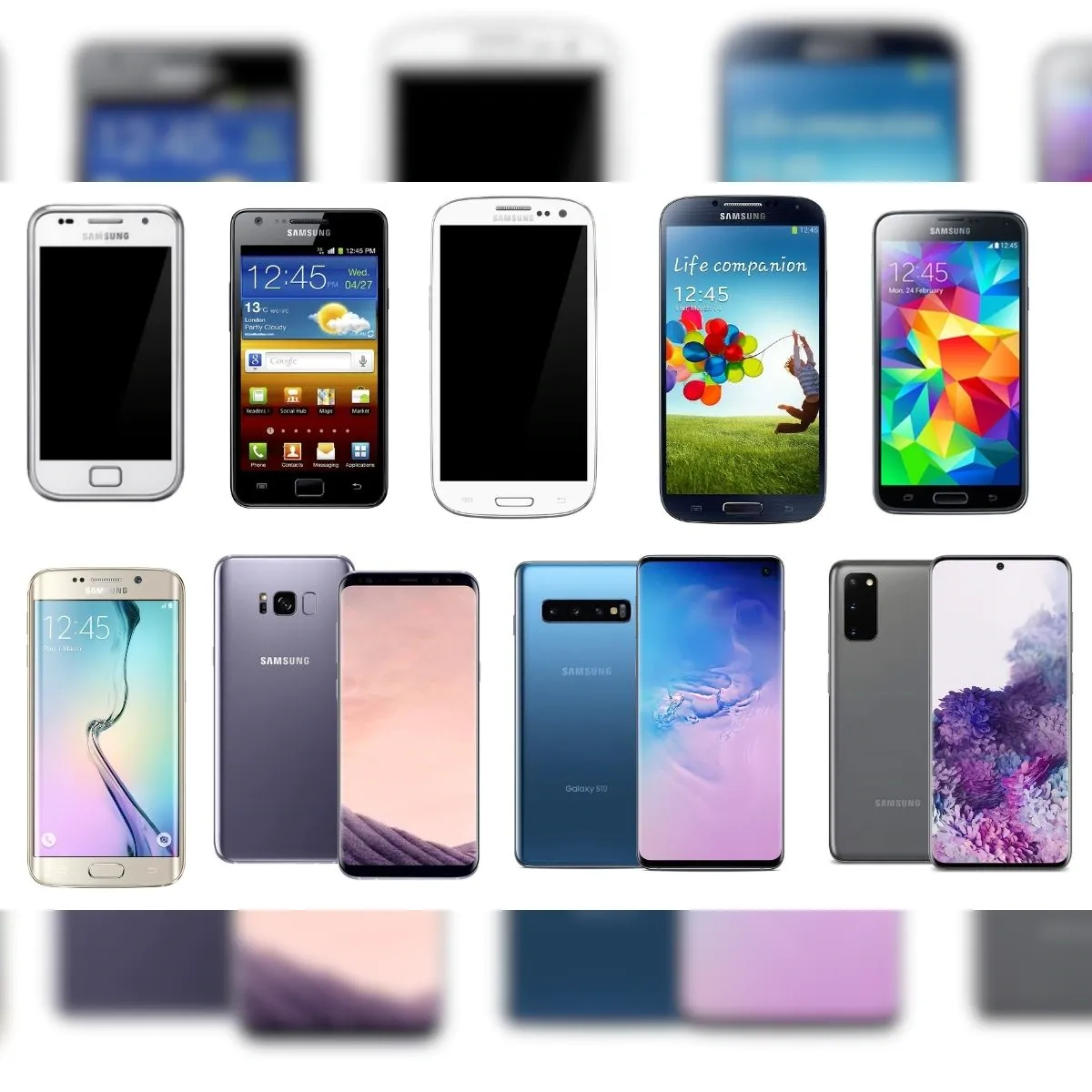
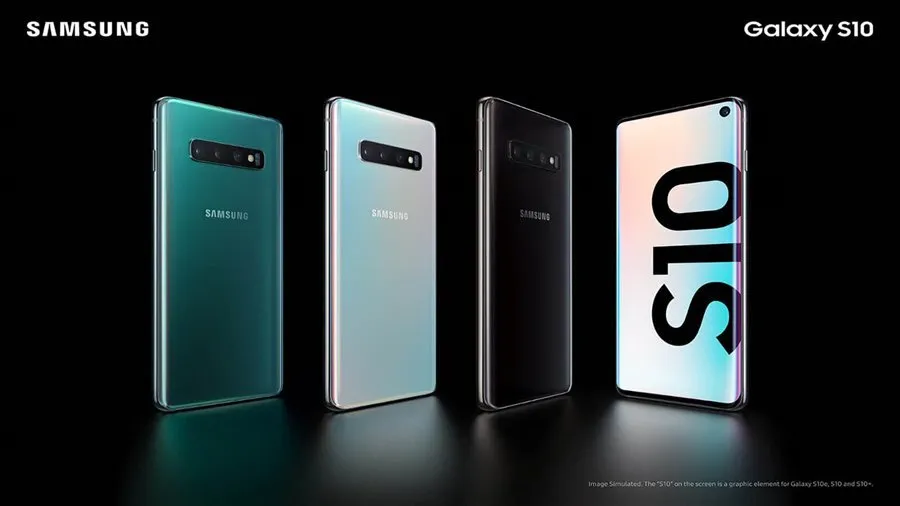
The Samsung S10 series has run out of options. Together with a few other 2019 products, Samsung has discontinued the S10 series.
Samsung has removed several of its older handsets from its public security update page, as 9to5Google has discovered. The Galaxy S10 series, Galaxy A30, and Galaxy A50 were among the gadgets taken out. The Galaxy S10 5G and Galaxy S10 Lite, on the other hand, have not been dropped. They haven’t been discontinued because those devices came out later, which is why.
This development happens as Samsung starts to put its new update strategy into practice. The business declared last year that it would extend its policy by a year, offering its phones five years of security upgrades and four years of significant OS changes. Nevertheless, the Galaxy S21 series and later were the only models covered by this regulation, leaving older models out.
The security update from March 2023 was the last one that the Galaxy S10 and other discontinued phones were supposed to receive. This update just recently went live. This upgrade is crucial following the disclosure of a serious vulnerability in Samsung’s Exynos chip by Google’s Project Zero team. The Galaxy S10 series was not, however, mentioned as being impacted by this issue.
Along with this information, it appears that the Galaxy Z Flip is no longer receiving monthly upgrades. It now only receives updates once every three months.
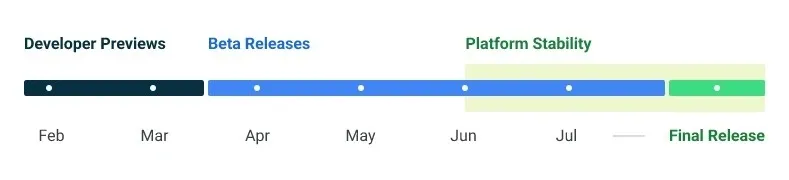
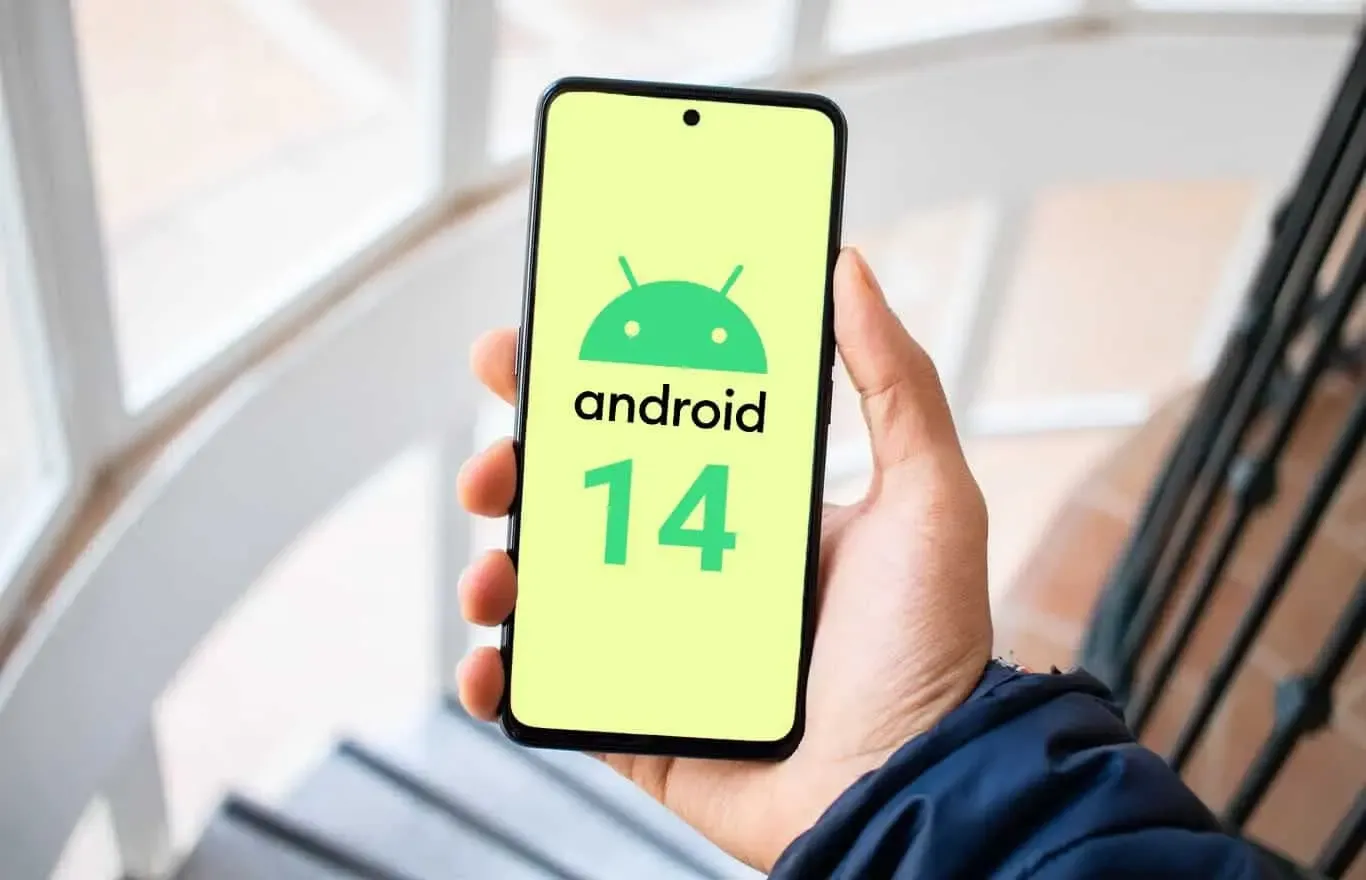
Google made the Android 14 Developer Preview (DP) available for testing on devices from the Pixel 7, Pixel 6, and Pixel 5 series, even the rudimentary Pixel 4a. A new DP edition is expected to be published in March, followed by a few beta releases until the summer, when more stable and feature-rich versions will be issued, and finally the final Android 14 release in the fall.
New Android 14 features
Speaking of new Android 14 features, as usual in the Developer Preview stage, there aren’t many user-facing ones, but rather deep under-the-hood changes that bring interface speed and power-draw optimizations, as well as security and privacy upgrades. Still, there is one biggie one it comes to new Android 14 feature that you will immediately notice.
System fonts
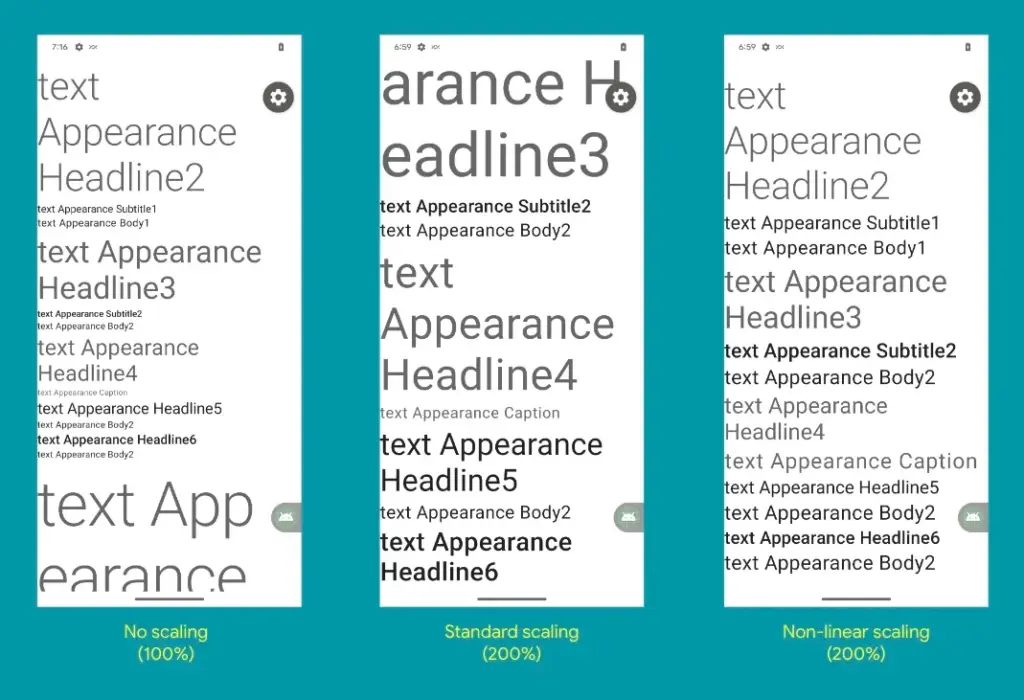
Bigger fonts with non-linear scaling is exactly what Google refers it as this new Android 14 option as. Instead of the current 130% threshold, Android phone owners will be able to increase the size of the system fonts by two times.
It makes sense considering that screens are growing bigger and bigger—we now have foldables with screens north of 7 inches diagonal and difficult-to-read small print. Without a doubt, Google uses “non-linear” scaling to raise text in fonts that are already sufficiently large compared to the smaller text that receives a size increase, rather than simply increasing the font size of Android 14 in a way that is deserving of the list of the best phones for seniors.
Performance and battery life
Android 14 will optimize the speed of the mobile OS system overall and offer less of a power pull from unnecessary activities thanks to a clever combination of background process optimization and presenting actionable requests to apps only when they are out of a cached state.
Additionally, without the user’s express consent, apps that don’t need a strict timing schedule, such clocks or calendars, won’t be able to continuously probe for resources by setting precise alarms.
Adapting to foreign language
With Android 14, a number of foreign language optimizations address the accessibility issues of the device by modifying the text to reflect the peculiarities of non-English speakers, such as tailored translations that take into account the different grammatical genders used in various languages.
The ability to dynamically update the list of foreign languages in an app’s settings to reflect the location and even alter the keyboard based on the interface language that the app is displaying in is another fantastic locale adaption improvement in Android 14.
Security and privacy
Down on the system level, Android 14 will include several new malware-fighting features that plug known exploits by blocking app installations or only allow them if they meet certain criteria.
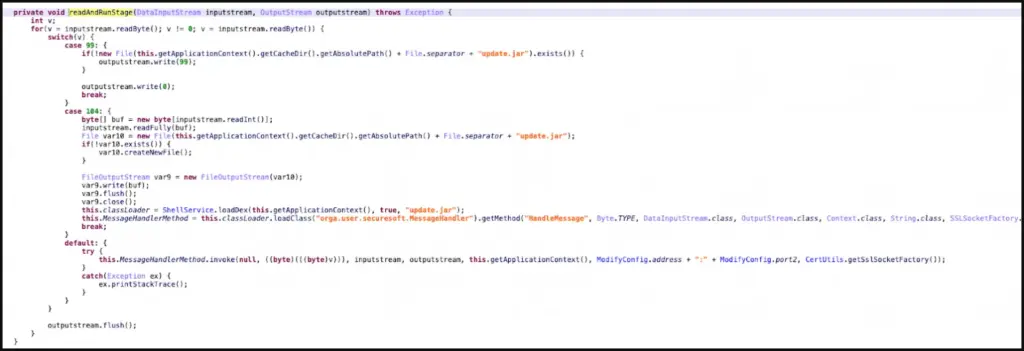
Dynamically loaded applications that can be changed by injecting code in the process will be marked to be read-only in Android 14 in order to close another door for the installation of malware and various exploits.
Android 14 release date
Android 14 Beta: April 2023
Final Android 14 release build: October-November 2023
How to install Android 14 Developer Preview on Pixel phones
Flash an Android 14 system image on a Pixel 7 Pro, Pixel 7, Pixel 6a, Pixel 6 Pro, Pixel 6, Pixel 5a 5G, Pixel 5, or Pixel 4a (5G) phone.
The foundation of Public Key Infrastructure (PKI) is its root certificates, which are certified by reputable Certificate Authorities, or CAs. A pre-packaged root store seen in browsers, apps, and other programs serves as a trust seal for these certificates. A website that supports HTTPS but isn’t using a certificate signed by a CA in the root store of your browser will be marked as insecure when you visit it. Applications and browsers can frequently update their certificates, but unless you use an OTA update, your phone cannot. According to Esper, with Android 14, that might alter.
Due to our reliance on certificates as the foundation of a chain of trust when visiting websites, there have been a few scares involving them throughout the years. Let’s Encrypt, a nonprofit CA, has signed the certificate used here on XDA. Your connection to this website is safe and secure thanks to their certificate, which was signed by the Internet Security Research Group. The same holds true for any other HTTPS-enabled website you visit.
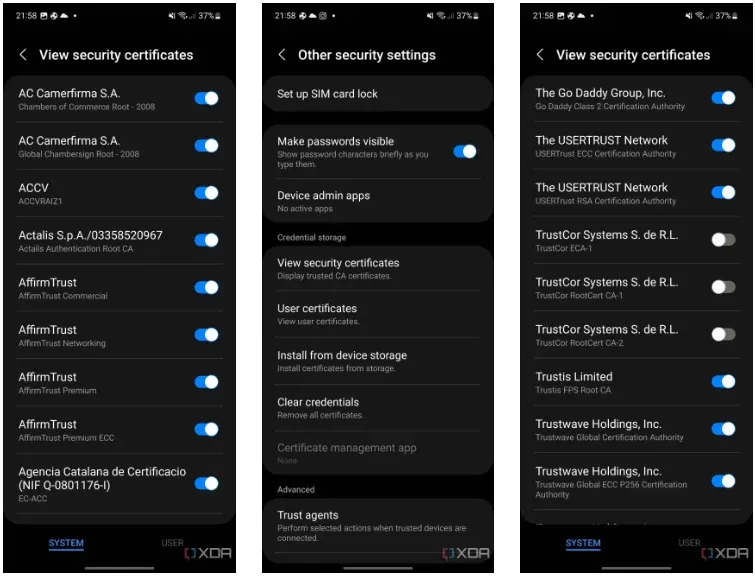
Every operating system has its own built-in root store, and Android is no different. You can actually view this root store on your Android smartphone by navigating to security and privacy in your device’s settings. From there, it will depend on the type of device you’re using, but the screenshots below show where it is on OneUI 5.
But even this root shop isn’t the be-all and end-all, you know? In an effort to fend off Man-in-the-Middle (MITM) attacks, apps can choose to utilize and trust their own root store (like Firefox does) and they can accept only particular certificates (a practice known as certificate pinning). Users can install their own certificates, but since Android 7, app developers have had to agree to let their apps utilize these certificates.
Why having these root certificates is important
A large portion of the internet depends on the security of the Internet Security Research Group since Let’s Encrypt certificates are cross-signed by this organization. The ISRG would have to revoke the key if it lost control of its private key (should it be stolen, for instance). Depending on how businesses react, some portions of the internet may become inaccessible to hardware lacking an updateable root certificate. Even though it’s a completely improbable nightmare scenario, Google aims to prevent situations like that from happening. Because of this, what is happening with TrustCor right now might be telling Google that it’s time to give Android updatable root certificates.
As an example, academics have questioned TrustCor after discovering that company allegedly has close ties to a US military contractor. Although TrustCor still has access to its private key, many businesses that must choose which certificates to include in their root stores no longer trust the company. These researchers said that TrustCor, a contractor for the US military, had paid programmers to include malware that gathered data from smartphone apps. Faith is crucial in PKI, but after these claims surfaced, TrustCor lost that trust. Since then, TrustCor has been abandoned as a certificate authority by organizations like Google, Microsoft, and Mozilla. But even though the commit has already made, an OTA update will be necessary to remove TrustCor’s certificates from the Android root store.
The upside is that you can disable TrustCor’s certificates on your device now by going to your certificates on your device, as we showed above, and then scrolling to TrustCor and disabling the three certificates that come with your device. According to developers from the GrapheneOS project, there should be “very little impact on web compatibility due to this CA barely being used by anyone other than a specific dynamic DNS provider.”
Solution: Project Mainline
If you’re familiar with Project Mainline, then you can already see how this can help solve the problem. Google makes use of Mainline modules which are delivered through the Google Play Services framework and the Google Play Store. Each Mainline module is delivered as either an APK file, an APEX file, or an APK-in-APEX. When a Mainline module is being updated, the user sees a “Google Play System Update” (GPSU) notification on their device. Effectively, to deliver updates to critical components, Google has bypassed the need to wait for an OEM to roll out an update, choosing to do the task itself. Bluetooth and Ultra-wideband are two essential Mainline modules handled by Google.
Conscrypt, a Mainline module that provides Android’s TLS implementation, will allow updatable root certificates in a future release, according to changes on the AOSP Gerrit (found by Esper). In the event that a situation similar to TrustCor (or worse) arises in the future, this would mean that certificates may be removed (or even added) via a Google Play System Update through Project Mainline, ensuring a considerably speedier process. It’s unclear when this will launch, but Android 14 is probably going to get it. Technically, Google could launch it with Android 13 QPR2, but it would only help Google Pixel users until Android 14 is released to the rest of the world next year. This is due to the fact that other OEMs usually do not release QPR updates.
The entire reason for this to exist would be so that Google can maintain control over another crucial aspect of device security without needing to rely on OEMs pushing updates instead. An OTA is currently required to update certificates, but in an emergency situation, every day where users don’t have an update could matter. Utilizing Project Mainline to ensure that users can get crucial certificate updates in time if they’re ever needed is certainly a welcome change.
Almost all Samsung Galaxy smartphones come with Samsung Knox pre-installed, and it serves as a security solution for device owners to make sure that both their smartphones and their data are protected. It goes beyond what TrustZone, a Trusted Execution Environment (TEE) that Samsung uses on its smartphones, previously provided by combining hardware-backed security with software. On more recent Samsung flagship smartphones, Knox Vault is an option that runs completely independently of the main processor.
Like TrustZone, Knox Vault safeguards your biometrics, cryptographic keys, and passwords. The distinction is that Android asks a TrustZone applet to validate the fingerprint or password on your behalf when you unlock your phone, even though TrustZone runs in parallel with Android on the same core application processor. Your biometric data and passwords cannot be stolen, even if your Android installation has been compromised. Knox Vault goes a step farther and serves as a beefed-up substitute for TrustZone.
TrustZone vs Knox Vault, difference?
On the SoC, a TEE is a secure area that manages sensitive data. Any modern smartphone has TEE because it is required for devices launched with Android 8 Oreo and higher. Anything outside of the TEE is regarded as “untrusted” and is limited to viewing encrypted content. For instance, content that is DRM-protected is encrypted using keys that are only accessible by software operating on the TEE. The content can be decrypted by the TEE and then shown to the user, while the main CPU can only see a stream of the encrypted content. Another TEE is Knox Vault.
In the case of Knox Vault, Samsung says that it “extends” upon the protection offered by TrustZone. Knox Vault is a replacement for TrustZone according to Samsung, and the company describes the difference in the following way in a blog post:
The way I think of it, TrustZone was a great safe in the middle of your bank’s branch office. There are a lot of people you don’t necessarily trust walking by the safe, doing day-to-day work that doesn’t require physical access to the safe. The secure processor in Samsung Knox Vault is more like Fort Knox: a safe securely placed far away from the bank, isolated from whoever walks into the branch.
How Samsung’s Knox Vault works
Knox Vault extends the security that TrustZone already offers, and Samsung phones from the Galaxy S21 and above have it. Knox Vault can:
Store sensitive data such as hardware-backed Android Keystore keys, the Samsung Attestation Key (SAK), biometric data, and blockchain credentials.
Run security-critical code that authenticates users with increasing timeouts between failures and controls access to keys depending on authentication.
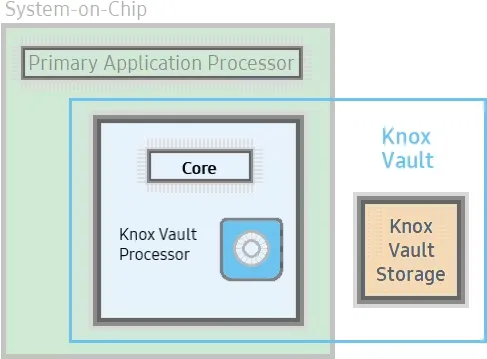
Knox Vault isn’t just a software isolation, it’s a physical isolation from the chipset on your smartphone. It’s an independent processor on the SoC with storage physically separate from the rest of the SoC. Because of this physical isolation, Knox Vault is even protected from side-channel attacks that target other software running on the primary processor.
Knox Vault’s architecture
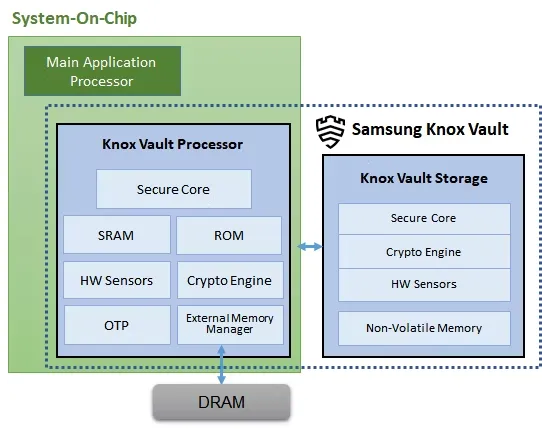
Knox Vault is made up of the following:
Knox Vault Subsystem: implemented as part of the SoC
Knox Vault Storage: an integrated circuit physically outside the SoC
How Knox Vault protects itself from attacks
If someone has physical access to your device, you should act and prepare as if it’s only a matter of time before they gain access to the protected data stored on it. Samsung says that with Knox Vault, that may not necessarily be the case. It’s resistant to hardware attacks such as the following:
Physical probing to disclose data
Physical manipulation of the circuitry to deactivate security mechanisms
Forced information leakage
Hardware side-channel attacks such as differential power analysis to disclose data
Fault injection to bypass security mechanisms.
As well, the Knox Vault Processor communicates with Knox Vault Storage via a dedicated I2C (Inter-Integrated Circuit) bus. Traffic on this bus is encrypted and transmitted with an authentication code to prevent eavesdropping on communications, and those communications are also protected against replay attacks.
Knox Vault Subsystem
It is intended for the Knox Vault Subsystem to function independently of other SoC components. The Knox Vault Processor, SRAM, and ROM make up its own safe processing environment. Additionally, it offers improved security and data protection from a variety of hardware-based threats by monitoring the environment and hardware state using a number of security sensors or detectors, such as:
High and low temperature detectors
High and low supply voltage detectors
Supply voltage glitch detector
Laser detector
When the Knox Vault Processor starts, the ROM code is loaded into SRAM. While the ROM code loads the Knox Vault Processor firmware, with the help of the modules running on the SoC’s main processor. The software stack of the Knox Vault Processor has its own secure boot chain.
The Knox Vault Subsystem also includes a dedicated random number generator and its own Crypto Engine. The Knox Vault Processor can access system DRAM through the External Memory Manager. This monitoring cannot be affected or bypassed by any application on the Knox Vault Processor, and physical intrusion will initiate a device lockdown sequence.
The crypto engine provides the following cryptographic functions:
AES encryption/decryption
DRBG random number generation
SHA hashing
HMAC keyed-hashing for message authentication code
RSA and ECC key generation and services
Knox Vault Storage
The Knox Vault Storage is a dedicated non-volatile memory device that stores sensitive data such as the following:
Cryptographic keys such as Blockchain keys and Device keys
Biometric data
Hashed authentication credentials
Just like the Knox Vault Processor, the storage is also safeguarded against physical and side-channel attacks. It has a secure core to do the following:
Execute the ROM code
Provide cryptographic operations for public key algorithms (RSA, ECC) and SHA algorithm with software libraries
Safely store data in dedicated SRAM and ROM
Samsung phones that support Knox Vault
Certain Samsung Galaxy tablets and smartphones, including the Samsung Galaxy S21 and later models in both the S series and the Fold series, feature Knox vault. Particularly for users who may rely on their smartphones for sensitive data storage or other enterprise usage, the level of security offered is intended to give you entire trust in your smartphone’s ability to house personal data.
Unknown Android spyware called “BadBazaar” has been found to target China’s ethnic and religious minorities, particularly the Uyghurs in Xinjiang.
Due to their cultural divergence from traditional eastern Chinese values, the central Chinese government has subjected the 13 million-strong Uyghur Muslim minority to extreme oppression.
The new spyware was originally discovered by MalwareHunterTeam and linked to Bahamut in VirusTotal detections.
BadBazaar spyware
Lookout performed more investigation on the malware and discovered that it was brand-new spyware that was being used by APT15, a state-sponsored hacking outfit, in its 2020 attacks against Uyghurs (aka “Pitty Tiger).
Lookout also noticed a second campaign employing updated versions of the spyware known as “Moonshine,” which CitizenLab first came up in 2019 when using it against Tibetan organizations.
Since 2018, the BadBazaar spyware has promoted itself on communication channels frequented by the targeted ethnic group by infecting Uyghurs using at least 111 different apps.
The impersonated apps fall under a variety of categories, including dictionaries, tools for religious practice, battery savers, and media players.
Since Google Play, Android’s official app store, has never seen any record of these apps, they are most likely distributed through rogue websites or unreliable third-party stores.
It’s interesting that there is only one instance of an iOS app on the Apple App Store that communicates with the malicious C2, but it merely sends the device UDID and doesn’t have spyware functionality.
BadBazaar’s data-collecting capabilities include the following:
Precise location
List of installed apps
Call logs with geolocation data
Contacts list
SMS
Complete device info
WiFi info
Phone call recording
Take pictures
Exfiltrate files or databases
Access folders of high-interest (images, IM app logs, chat history, etc.)
Looking into the C2 infrastructure, which exposes some of the admin panels and the GPS coordinates of test devices due to errors, Lookout analysts found connections to the Chinese defense contractor Xi’an Tian He Defense Technology.
Only a few of the BadBazaar apps promoted to Uyghurs(Lookout)Sample of apps carrying Moonshine spyware(Lookout)
Moonshine variants
Lookout researchers began to discover a new operation in July 2022 that uses 50 apps to push users new versions of the “Moonshine” spyware.
These programs are advertised on Telegram channels for Uyghur speakers, where dishonest users recommend them to other users as reliable software.
Examples of programs that contain the spyware Moonshine (Lookout) The creators of the more recent virus have added additional modules to increase the tool’s capacity for spying, and it is still modular.
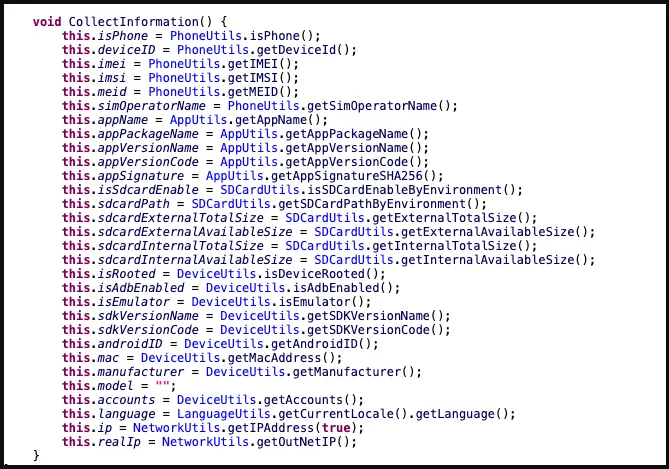
Network activity, IP addresses, hardware details, and other information are among the data that Moonshine takes from hacked devices.
Information collected by Moonshine(Lookout)
The C2 commands supported by the malware are:
Call recording
Contact collection
Retrieve files from a location specified by the C2
Collect device location data
Exfiltrate SMS messages
Camera capture
Microphone recording
Establish SOCKS proxy
Collect WeChat data
Lookout has found evidence that the authors of the new Moonshine version are Chinese, as both code comments and server-side API documentation are written in simplified Chinese.
“While Lookout researchers could not connect the malware client or infrastructure to a specific technology company, the malware client is a well-built and full-featured surveillance tool that would have likely required substantial resources.”
On Friday, Meta Platforms announced that it had discovered over 400 malicious apps on Android and iOS that it claimed were aimed at online users in order to steal their Facebook login credentials.
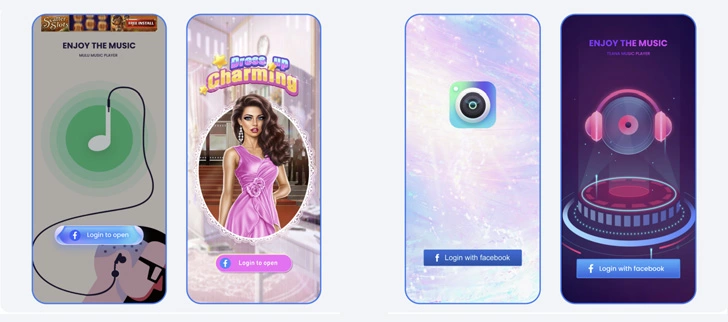
According to a study provided with Droid Tools by the social media giant, “These programs were placed on the Google Play Store and Apple’s App Store and disguised as photo editors, games, VPN services, business apps, and other utilities to deceive consumers into downloading them.”
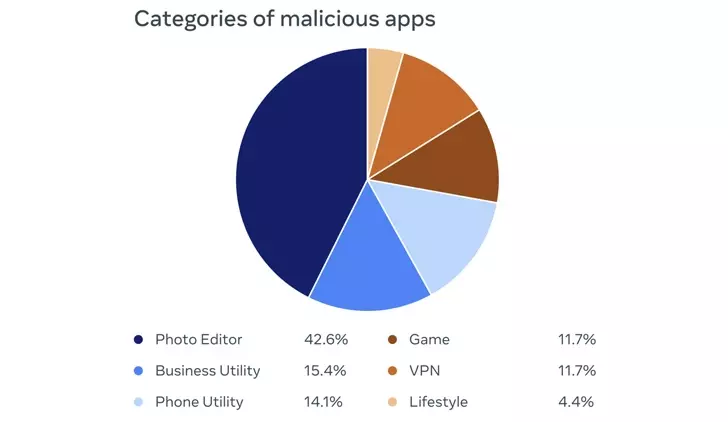
42.6% of the rogue apps were photo editors, followed by business utilities (15.4%), phone utilities (14.1%), games (11.7%), VPNs (11.7%), and lifestyle apps (4.4%). Interestingly, a majority of the iOS apps posed as ads manager tools for Meta and its Facebook subsidiary.
The owners of the plan not only disguised its nefarious nature as a collection of seemingly innocent apps, but they also posted fictitious reviews in an effort to counteract any unfavorable comments made by users who may have previously downloaded the apps.
By presenting a “Login With Facebook” prompt, the apps ultimately served as a way to steal the user login information.
“If the login information is stolen, attackers could potentially gain full access to a person’s account and do things like message their friends or access private information,” the company said.
Both app stores have removed all of the disputed apps. You may view the list of 402 apps, which includes 355 Android apps and 47 iOS apps.
It is crucial to use caution while downloading apps and providing access to Facebook in order to get the claimed functionality, as it is with all programs of this nature. This entails carefully examining app permissions and user evaluations as well as confirming the legitimacy of the app creators.
The disclosure was made at the same time that three Chinese and Taiwanese businesses were sued by Meta-owned WhatsApp for allegedly deceiving over a million users into compromising their own accounts by disseminating fake versions of the messaging software.
Over 3,000,000 people downloaded a new Android malware family from the Google Play Store that discreetly subscribes users to premium services.
Maxime Ingrao, an Evina security researcher, found the malware, known as “Autolycos,” in at least eight Android applications, of which two are still downloadable from the Google Play Store as of this writing.
The two apps still available are named ‘Funny Camera’ by KellyTech, which has over 500,000 installations, and ‘Razer Keyboard & Theme’ by rxcheldiolola, which counts over 50,000 installs on the Play Store.
The remaining six applications have been removed from the Google Play Store, but those who still have them installed risk being charged with costly subscriptions by the malware’s activities.
Vlog Star Video Editor (com.vlog.star.video.editor) – 1 million downloads
Creative 3D Launcher (app.launcher.creative3d) – 1 million downloads
Wow Beauty Camera (com.wowbeauty.camera) – 100,000 downloads
Freeglow Camera 1.0.0 (com.glow.camera.open) – 5,000 downloads
Coco Camera v1.1 (com.toomore.cool.camera) –1,000 downloads
During a discussion with Ingrao, the researcher told Droid Tools that he discovered the apps in June 2021 and reported his findings to Google at the time.
Although Google acknowledged receiving the report, it took the company six months to remove the set of six, while two malicious apps remain on the Play Store to this day.
After so much time had passed since the initial reporting, the researcher disclosed his findings publicly.
In place of using Webview, Autolycos uses stealthy malicious behavior to execute URLs on remote browsers and then include the results in HTTP requests.
This behavior is intended to hide its actions from users of infected devices so that they won’t be noticed.
When malicious apps were installed on a smartphone, they frequently asked for authorization to view SMS content, which gave them access to a victim’s SMS text messages.
The Autolycos owners launched various social media advertising campaigns to draw in new users to the apps. Ingrao discovered 74 Facebook ad campaigns for the Razer Keyboard & Theme alone.
Additionally, while some fraudulent apps on the Play Store received unavoidably bad reviews, some with less downloads continue to have positive user ratings thanks to fake reviews.
Android users should have Play Protect activated, monitor background internet data and battery usage, and attempt to install the fewest number of apps possible on their handsets in order to protect themselves against these attacks.
Realme is still providing the security patch for its handful of smartphones, but it’s not the latest one. The May 2022 security patch is rolling out for Realme Q5 Pro, Realme Q2, and Realme V5 5G in China.
The latest update for Realme Q5 Pro, Q2, and V5 seeding with build numbers C.07, C.17, and C.17, respectively. The update Optimizes system stability and improves user experience.
However, the changelog of Realme Q5 Pro is large and mentions camera and changing improvements – Optimize the blurred effect of the front portrait, the green and blue effects of video imaging, the clarity of night scene imaging.
Changelog:
Realme Q5 Pro 5G
System
Optimize system stability and improve user experience
Camera
Optimize the blurred effect of the front portrait
Optimize camera performance in some scenarios
Optimize the green and blue effects of video imaging
Optimize the clarity of night scene imaging
Charging
Optimize charging protection and charging icon display logic for individual scenarios