Tag: app

  • Best AI Apps for Android Users in 2023

    Best AI Apps for Android Users in 2023

    Every morning when you wake up, you drink your freshly brewed espresso while using the newest mobile applications. Every day that goes by, the market for Android and iOS applications expands. It’s growing quite quickly.

    It’s not surprising that the market for smartphone apps is booming. On the Google Play Store, 2.87 million apps are available for download. 50 or more times per day are used by 21% of Millennials. 49% of consumers use an app 11 or more times per day. Mobile apps account for 70% of all digital media consumption in the US.

    These days, public awareness of AI is widespread. Well, we are quite happy to provide you with all the best examples of Android AI apps. So let’s get started:

    The List of Top AI Apps for Android

    Buildfire’s analysis indicates that there are 6.3 billion smartphone users worldwide. But do you know why we’re here to talk about it? It’s the AI magic in Android applications. These days, public awareness of AI is widespread. Isn’t it intriguing to learn how AI functions in Android apps?

    To see their astonishing features, let’s learn more about these AI Apps for Android in depth.

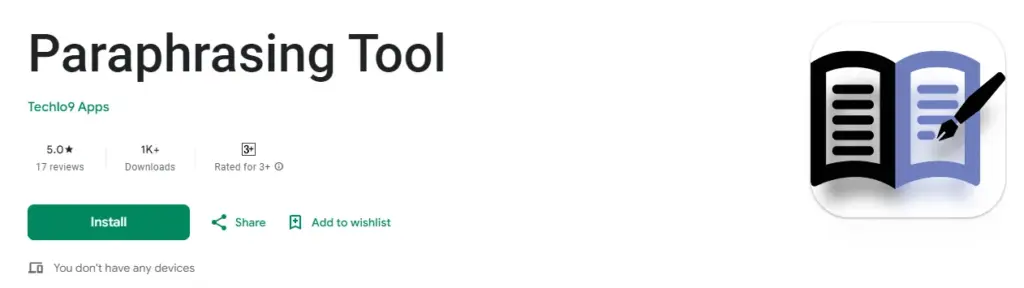
    Paraphrasing.io
    imagedisplay 5

    Artificial intelligence has significantly changed the digital market. We no longer need to spend more time and money creating excellent communication material.

    The main goal of this paraphrasing tool was to facilitate writing. It is possible to rephrase the content at the level of words, phrases, and sentences. The rewriter in this paraphrasing tool is one of the greatest AI tools for paraphrasing any type of text.

    In order to create entirely original, error-free work, it modifies the language and grammatical constructs changing the text while maintaining its readability and aesthetic appeal.

    It enables quick phrase changes for both short-form and long-form content. Create a statement to learn how to change the diction and tone.

    Google Assistant
    google assistant ai

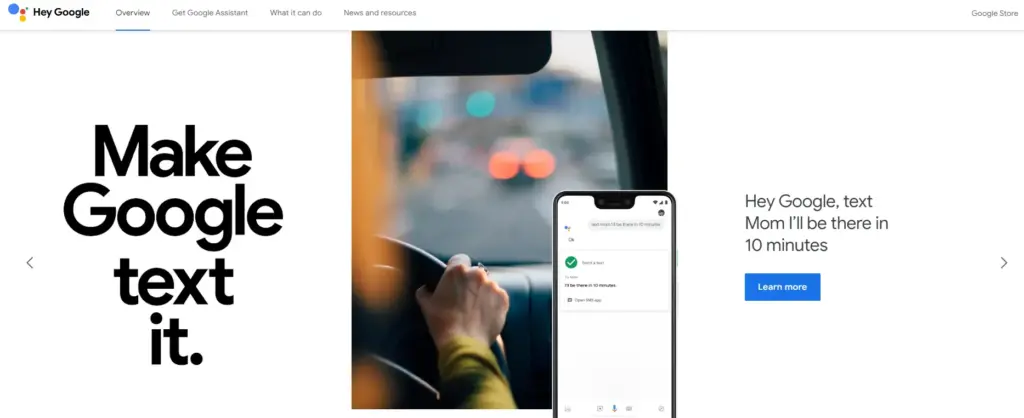
    It is a Google-created virtual assistant software program. It is mostly accessible through mobile and home automation technology. Android apps can be voice-activatedly controlled using Google Assistant.

    Users are able to open apps and do tasks with the aid of Google Assistant. They use search engines to acquire information and can accomplish a lot more things just by speaking commands like, “Hey Google, start a run on Example App.”

    Continued discussion is supported by Google Assistant. It enables users to express numerous requests or ask follow-up inquiries without having to repeat themselves.

    Numerous Google services, like Gmail, Google Calendar, Google Maps, and others, are smoothly integrated with it. Users can utilize this to navigate, view, and share images, as well as access their emails and make appointments.

    Netflix

    netflix ai

    This Android AI app does not require an introduction. Nearly everyone in your immediate vicinity is engrossed in using this app.

    Netflix is one of the most well-known streaming services in the world, and artificial intelligence has significantly contributed to this success. Using Netflix’s sophisticated recommendation technology, users can find content they might have missed.

    Within a single Netflix account, customers have the option to establish multiple profiles. With the help of this feature, each household member can enjoy individualized interactions with their own viewing preferences, watchlist, and suggestions.

    Depending on the subscription level, consumers can stream material to many devices at once. Family members or friends can watch various episodes or movies on their individual devices thanks to this capability.

    Amazon Alexa
    amazon alexa ai

    Amazon.com has created a different virtual assistant app. This app is used to establish a connection with Echo, Echo Dot, Echo Studio, and Tap speakers from Amazon.

    It is a straightforward program to use; all the user needs to do is issue voice instructions, and it will search and react correctly. It carries out numerous activities, such as playing music and giving the most recent news, weather updates, and alarms. With the aid of IoT, it is also beneficial for home automation.

    • Both iOS and Android are supported.
    • Available for use by anybody.
    • With over 100 million downloads, it has a 4.3 Google Play rating.
    • It supports multiple languages, including Hindi, Arabic, English, and more.

    ChatGPT
    chat gpt ai app

    ChatGPT was created by the OpenAI team. It is a free AI chatbot that can be downloaded right now from the Google Play Store. This service can fulfill your demands, make ideas that are tailored to you, spark your creativity, and offer a variety of other conveniences.

    If you purchased ChatGPT’s Plus version, you can log in with the same account to this app and access GPT-4’s mobile power. This ChatGPT mobile app from OpenAI is an official one; thus, it syncs your history across devices and offers the most recent model upgrades.

    Replika
    imagedisplay 6

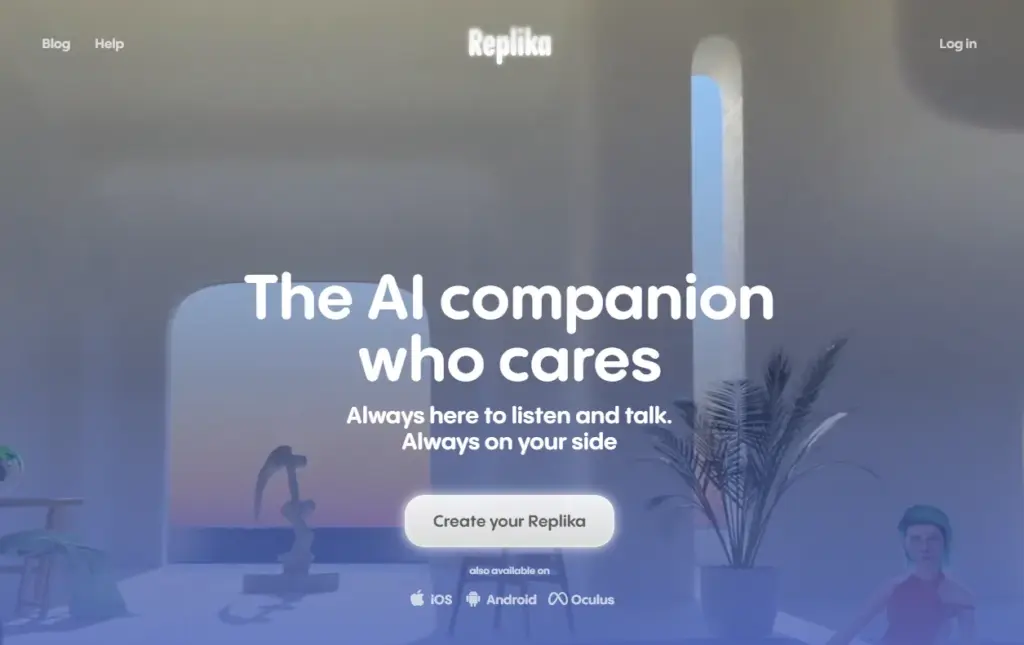
    Replika is a chatbot companion powered by AI that enables you to construct a 3D avatar that it refers to as Replika. Your Replika can be interacted with in the same way as a friend. As you converse more, it grows in personality and memory alongside you.

    On this app, you may build your own Replika (AI companion) and educate it about the outside world and about you. The AI companion’s personality will develop with time, and its communication skills will improve.

    It’s a great app for talking about your thoughts or how you’re feeling.

    Socratic

    Since it is a learning application, students can benefit from using it. It was created by Google and is suitable for college and high school students. Socratic is a well-known educational program that supports students in various topics, including literature, chemistry, and biology.

    Text and speech recognition power the program. Users can quickly access materials or lessons to learn from thanks to it. Simply take a picture of the question and post it, says the pupil. The program will locate all classes and tutorials pertinent to the query.

    Bottom Line

    You may expand your company by using AI business tools to their full potential. The state of artificial intelligence today is too advanced for what is available in the Google Play Store. Other Android AI applications are proliferating and making slow progress. The AI apps for Android are about to undergo a revolution thanks to advancements in the field of AI. If you run an inventive business, your next objective should be developing AI-based apps.

  • Temporarily free apps on the App stores this week.

    Temporarily free apps on the App stores this week.

    Have you ever let your phone idle while you scroll through it idly without doing anything? This involves looking via social media and the Google Play Store, as well as the Apple App Store. With so many apps available, it’s simple to become confused and unsure about which ones to install. Although there are disadvantages, there is also joy in discovering something free that is genuinely helpful. To identify free programs that are typically not free, we at nextpit have combed through the Google Play Store and the Apple App Store.

    First and foremost, it’s crucial to remember that the free, temporary availability of the iOS and Android apps described below. The expiration date of this deal is beyond our control. Hence, take advantage of the situation! Each program that captures your eye should be downloaded and installed right away before it starts to cost money.

    If you come across an interesting app that is listed here but don’t need it just yet, we would recommend you install it before deleting it. By doing so, you will save the app in your library and install it later without having to pay for it, even after the promotion has ended.

    Android apps available for free for a limited time

    Android apps for productivity and lifestyle

    • Reminder Pro ($2.99): Are you a very forgetful person and need an app that becomes your second brain? Reminder Pro fits the bill perfectly.
    • Home Workouts No Equipment Pro ($1.49)How is your New Year’s Resolution to keep fit and trim coming along? It is not too late to start yet, with this app to help you regain your strength and health without the need for expensive gym memberships or equipment.
    • ColorMeter Color Camera Picker ($1.99)This tool is a pretty cool one for content creators, as it helps you capture and identify colors in your surroundings easily. If you are a stickler for accurate stuff, then this is right up your alley!

    Android Games

    • Burning Fortress 2 ($0.99): Forget about defending your castle or fortress, this time around, it is your turn to be on the offensive! Just how well can you do?
    • Block Blast ($1.49): A retro puzzle game that is almost like Tetris, except that it is not. You need to match the colors of the blocks instead of clearing lines.
    • Kingdom Rush Vengeance TD Game ($4.99): A tower defense game that offers unique challenges that will keep you coming back for more!
    • Crazy Calculator ($1.49): Do you think you are a math whiz? If so, you might want to check out this game which looks like a calculator app but teases your brain in ways you never knew a calculator could.
    • Zombie Age 2 Premium Shooter ($0.99): A cartoonish side-scroller that sees you mow down wave after wave of zombies in a desperate bid for survival.

    iOS apps available for free for a limited time

    iOS apps for productivity and lifestyle

    • Farm Touch Sounds ($0.99): Listen to the different types of sounds that farm animals make by touching their respective photos.
    • HibiDo Pro ($2.99): We know that everyone is extremely busy just trying to survive. This means tons of tasks to do each day, so why not enlist the help of an app to simplify your life?
    • Sifter ($0.99): An app that filters incoming SMSes, making sure that no spam gets past it.

    iOS games

    • SARKWO ($0.99): A puzzle game that requires you to slide marbles in the right order so that you can advance to the next level.
    • Spell the Beans ($1.29): Absolutely cute title, where a bunch of spilled coffee beans will then require you to make words out of them.
    • Halloween II ($3.99): Find out everything that you need to know about Halloween right here in this cute little app.
    • Duplicado ($2.99): It is an avalance of avocados! You will need to slide all the avocados on the ground so that every single seed is planted to maximize the harvest.
    • Shock Clock Arcade ($0.99): Jump from clock to clock before time runs out. Just how fast are you?

    That’s it for now! To get you through the weekend, we hope you’ve enjoyed our selection of free iOS and Android apps. Were there any intriguing apps or games that you liked that you did not find here in the Apple App Store or Google Play Store? Please feel free to leave your suggestions in the comments section.

  • Google Messages removes nav drawer in the new redesign

    Google Messages removes nav drawer in the new redesign

    Interesting changes are being made by Google to the Messages homescreen, including the removal of the navigation drawer and the addition of prominent branding to the Android app.

    The Google Messages homescreen has undergone another update with beta version 20230717 01 RC00.

    With this redesign, the message organization feature that had recently been enabled for beta users is not present. In the meantime, Google has slightly modified the search filters. This new appearance has not yet been implemented broadly.

    Messages

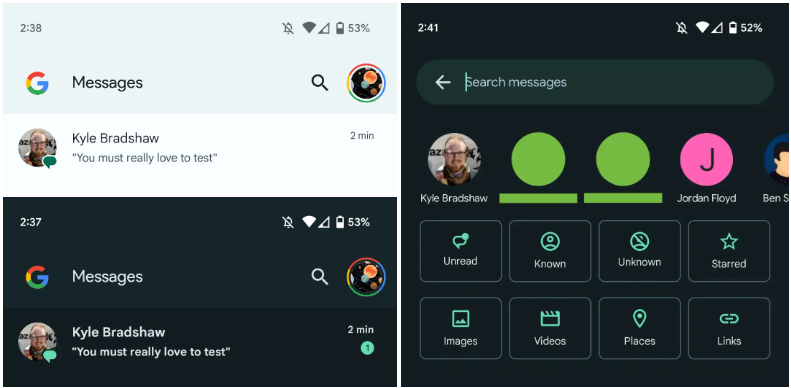
    You only get a magnifying glass icon in place of a full-width search bar. Google’s four-color “G” logo is in the top-left corner, followed by the word “Messages.

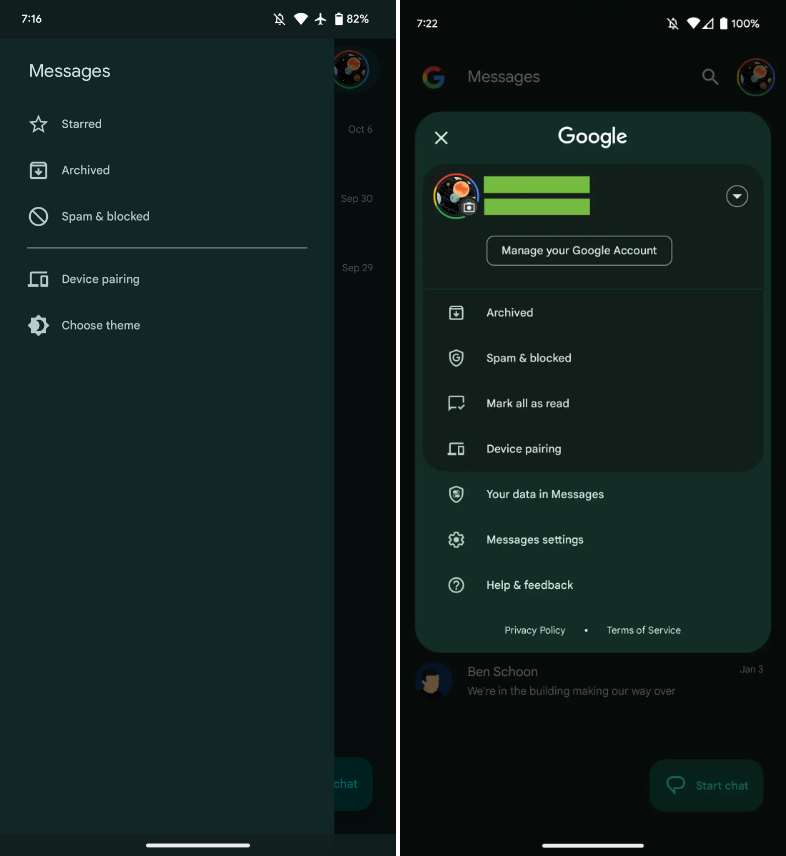
    With those settings now under the account menu, the navigation drawer and its hamburger icon have been deleted. Your data in Messages, Messages settings, Help & feedback, Spam & blocked, Mark all as read, and Device pairing are displayed in that order. Google has shifted “Select theme” inside the settings menu in the interim.

    Early in 2022, after previously solely using an overflow menu, Messages added a navigation drawer. This was considered to be defying current Google app design trends at the time.

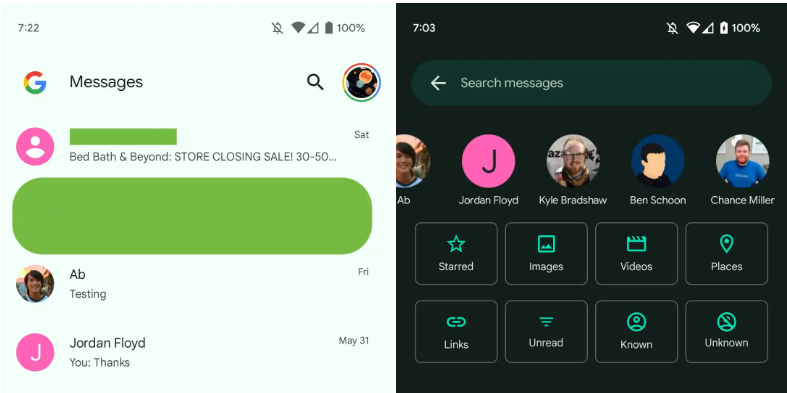
    A small change in search sees Google drop the “Categories” carousel for a standard grid that requires less scrolling: Starred, Images, Videos, Places, Links, Unread, Known, and Unknown.

    In comparison to programs like Gmail, which has a huge list of categories and labels, and Calendar, Messages’ navigation menu was ineffective, included just a few items, and was unnecessary. This account menu strategy is more effective and is used by other first-party apps like the Google Play Store. The complete search box was likewise superfluous, despite being a Google app hallmark.

    Messages

    More interesting to me is the “G” logo in the top-left corner that serves as very explicit Google branding that denotes how this is how the company wants you to message. It can be seen as part of Google’s ongoing RCS campaign

    We’re seeing this homescreen redesign rolled out with version 20230608_01_RC00 of Google Messages that was released yesterday to the beta channel. This redesign is not yet widely available, but feels like a definite modernization. 

    Messages

  • 4 apps you need to try if you use hue bulbs

    4 apps you need to try if you use hue bulbs

    Because they are capable of far more than just turning on and off, smart bulbs are intelligent. You can create schedules to deter would-be burglars while you’re on vacation, dim them with the press of a button on an app, or change their colors with a simple voice command (or just reduce your carbon footprint). Many third-party apps can allow you execute some cool tricks that you wouldn’t otherwise be able to do with the official mobile app. Certain smart bulbs can even be designed to function with third-party apps.

    The greatest smart lighting solution we’ve ever evaluated is the Philips Hue lighting system, which is a very adaptable smart lighting platform.

    There are many apps available in both the Apple App Store and the Google Play Store that can let you quickly access some of these “unlockable” tactics. Some of these apps even integrate with other smart bulb systems, making it possible to manage many smart bulb brands from a single platform.

    To set these things up yourself, you also don’t need to be a top-notch programmer. With just one of the mobile apps from our list and a little perseverance, you can combine a few instructions to control your smart lights even more.

    HueDisco (Android and iOS)

    smart led bulbs app

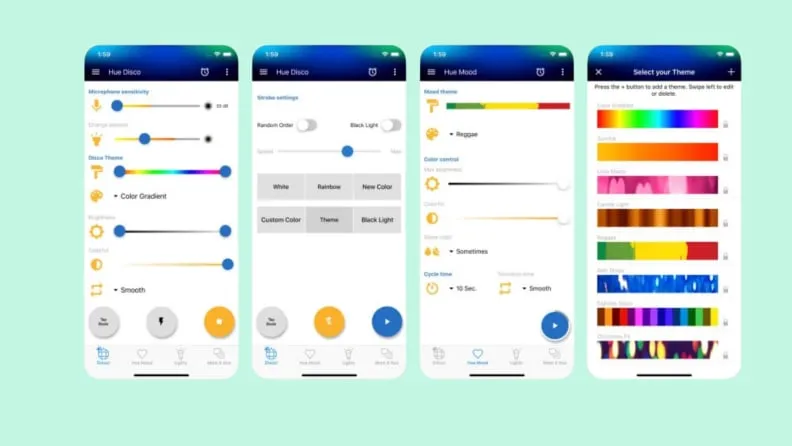
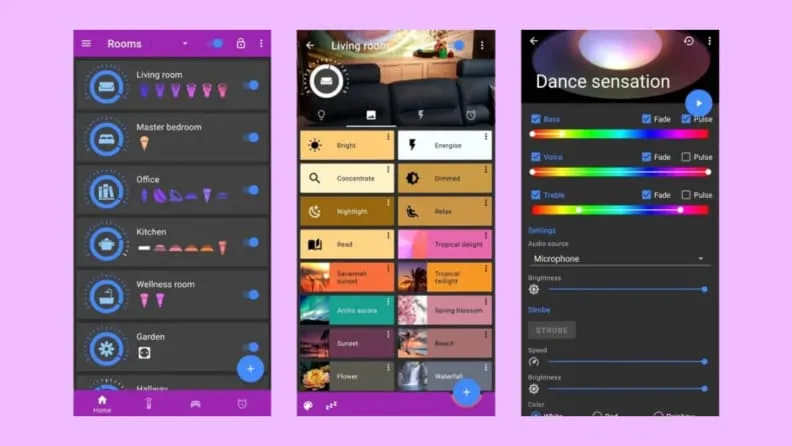
    HueDisco is a lot of fun. Anytime they want, everyone can turn their home into a dance party because it is accessible to both Android and iOS users. The app connects your lights and music, causing the lights to change color in time with the music.

    The microphone sensitivity and color range control settings allow you to fine-tune how accurately the bulbs pick up the sound recorded by your phone’s microphone and prevent your lights from bouncing from one end of the spectrum to the other. Even without playing loud music, you can establish the mood for the Hue lamps with a range of strobe patterns and arrays.

    Get HueDisco for Android ($3.99) Get HueDisco for iOS ($3.99)

    Hue Essentials (Android only)

    3

    The Hue Basics app is a respectable substitute for the Hue app by default for Android users. It has a beautiful layout with an easy slider control for each bulb and a shelf that contains quick links to other connected lights and their respective groups. Moreover, Hue Essentials provides rapid settings tiles, which are useful if you like to set the mood for group activities. Additionally, you can activate the Quick Settings toggle to enable push-button access from within the Android notification shade.

    This software also includes a useful feature that synchronizes your Hue lights with the music, similar to Hue Disco. The Hue Essentials app also provides control for many bridges at once for individuals who enjoy fiddling with settings.

    Get the Hue Essentials App for Android (Free)

    iConnectHue for Philips Hue bulbs (iOS only)

    4

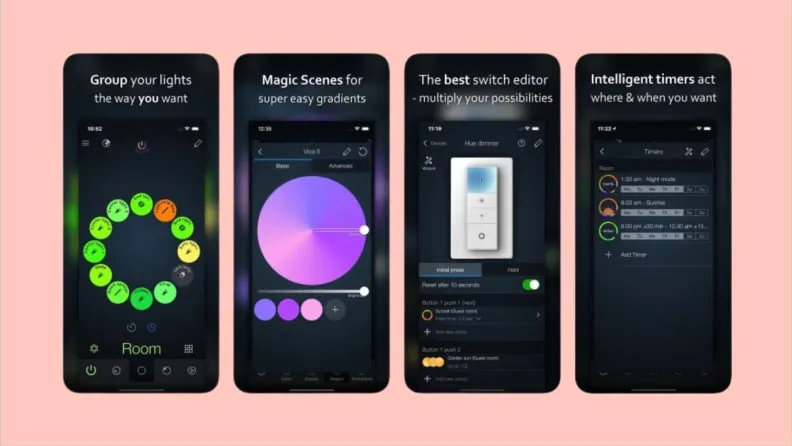
    The iConnectHue for Philips Hue app is a comparable substitute for iPhone customers looking for Hue Essentials. The Philips Hue light system now has automation, customization of individual and group lights, support for multiple bridges, and even Apple Watch capabilities thanks to this app. Even if you’ve connected your Hue lights to other smart bulbs or bec led, such as Cree, Osram, or GE Link, this app may be the best way to control them all from one location since it supports several lesser-known lighting manufacturers as well.

    Get iConnectHue for Philips Hue for iOS ($4.99)

    IFTTT (Android and iOS)

    8

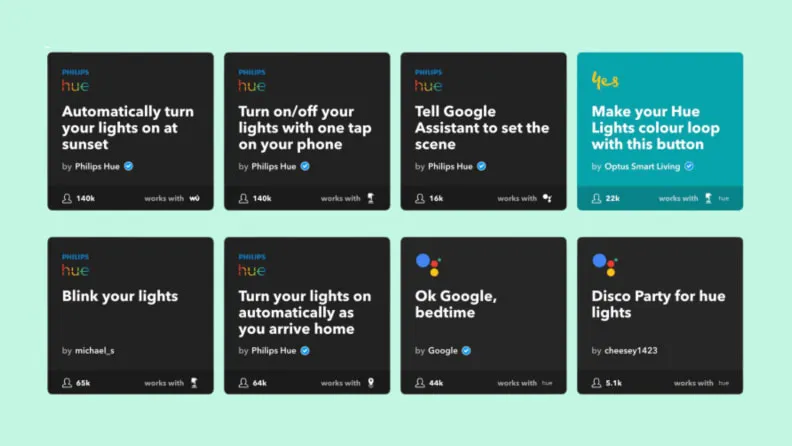
    IFTTT, which stands for “If This Then That,” is a perfectly good substitute for the complexity of Stringify and Yonomi if you don’t want to spend the time learning about home automation in-depth. It works with most of the well-liked smart lighting platforms now available, including Philips Hue, LIFX, TP-Link, Sengled, and others. Additionally, it integrates with a wide range of other services, including social networking accounts like Twitter and Facebook as well as cloud accounts like Dropbox. If you haven’t got the chance to plunge into automation yet, IFTTT is the ideal approach to whet your taste for it.

    Get IFTTT for Android (Free) Get IFTTT for iOS (Free)

  • Threads app, goodbye privacy

    Threads app, goodbye privacy

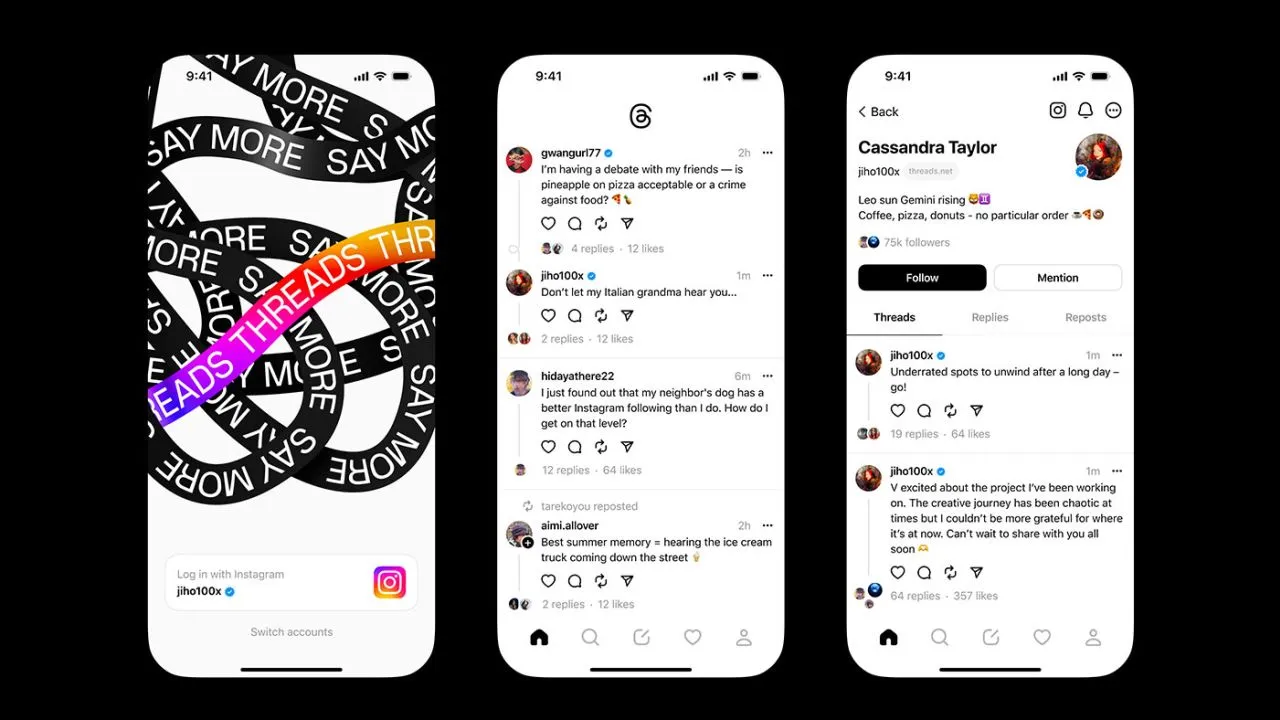
    Think again if you believed that your data on Threads is private.

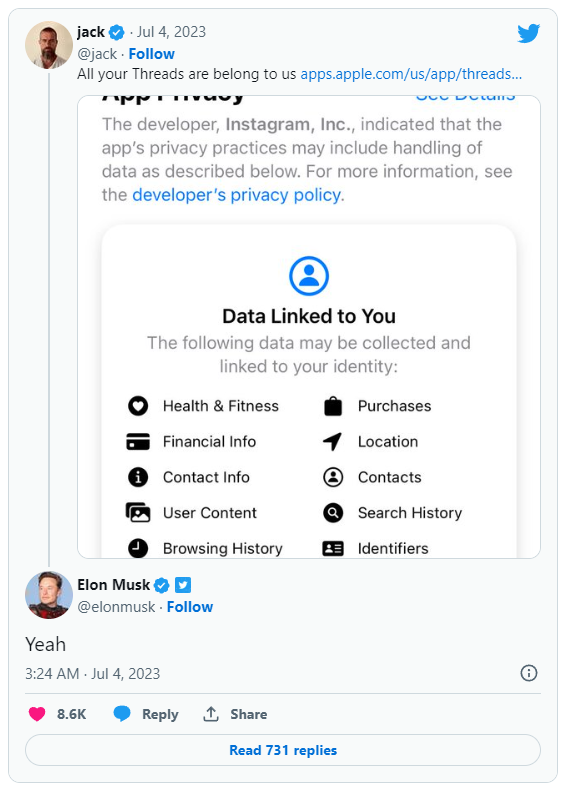
    All of the methods that Threads is following you and using your data are listed in the App Privacy section of the Threads App Store website. The list is very, very long, reader.

    Thursday saw the launch of Threads, Meta’s answer to Twitter, and it appears that in its first seven hours of operation, it attracted more than 10 million users.

    Click the “See Details” link in the App Privacy section of the App Store page for a comprehensive overview of the possible data collection and usage practices for Threads (opens in a new tab). But, the gist is this: Nearly all of your personal information is being gathered by Threads, including information about your transactions, finances, location, contact details, search history, and browsing habits.

    threads

    Jack Dorsey, a co-founder of Twitter, became aware of this and tweeted about the Threads App Privacy section. Elon Musk, the company’s current owner, simply said, “Yeah.”

    It doesn’t come as big surprise. The amount and breadth of data that Threads collects is similar to its sister app, Instagram(opens in a new tab) (both Threads and Instagram are owned by Meta, which also owns Facebook).

    Twitter and other significant social media platforms gather user data as well in order to provide advertisements from outside businesses more effectively. A comparable, albeit slightly condensed, overview of all the ways in which Twitter uses the data of its users can be found on its App Privacy(opens in a new tab) page.

    Even still, it’s upsetting to have to give a Twitter clone access to vast amounts of your personal information. Another Twitter competitor, Jack Dorsey’s BlueSky, which is now invite-only, claims to be looking into ways to make money without being as dependent on third parties as its rivals.

  • How to fix “OK Google” not working

    How to fix “OK Google” not working

    With our very own, always-on virtual assistants in our pockets, a futuristic utopia where Google Assistant was created was meant to be a reality for everyone. But even the best technology occasionally fails to function in the real world. In this post, we’ve outlined a number of actions you can do if your phone’s “OK Google” or “Hey Google” voice command isn’t functioning. To learn more, scroll down!

    Identify the problem

    Sometimes a bothersome problem can be resolved without the need for extensive, laborious, complicated debugging efforts. Something extremely simple might be the answer. And that’s precisely what we’re aiming for here. Let’s start with a few simple ways to fix your “OK Google not working” problem before moving on to some of the more challenging ones.

    Is Google Assistant is turned on?

    You might be astonished to learn just how many individuals may have just disabled the Google Assistant feature and then wondered why it wasn’t working, despite how simple it may seem. If you frequently give your phone to your children, they may occasionally tinker with the settings and mistakenly disable Google Assistant (including the “OK Google” command). Make sure Google Assistant is turned on before even reading about basic troubleshooting procedures.

    activate ok google

    How to:

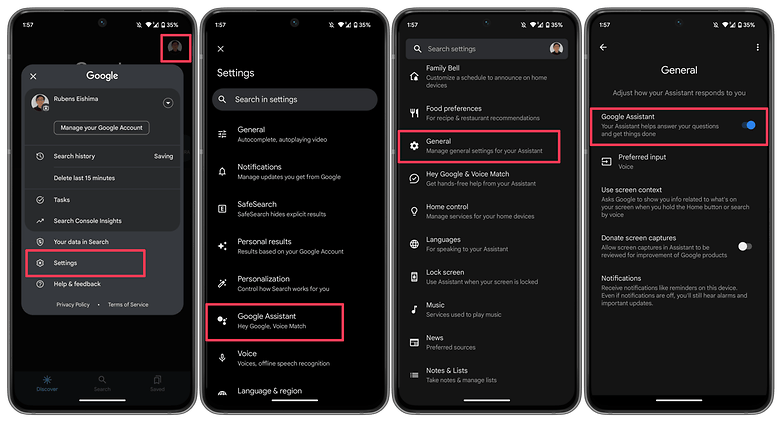
    1. Launch the Google app on your phone.
    2. Tap on your profile picture.
    3. Select Settings.
    4. Choose Google Assistant.
    5. Tap on the General option.
    6. Make sure that Google Assistant is enabled.

    As an additional step, you may also want to check the following:

    1. Follow steps 1 to 4 as mentioned above.
    2. Select Hey Google & Voice Match.
    3. Make sure the Hey Google option is enabled.

    Make sure you’re connected to the Internet

    Even though it may seem obvious, Google Assistant often requires a Wi-Fi or mobile data connection to work, so be sure your phone is connected before starting a search. Additionally, and this is arguably the oldest piece of wisdom in the book, it never hurts to run a quick reboot because magic can happen there from time to time!

    Check if you’re not alone

    It’s always good to know if the problem you’re facing is affecting just you and nobody else. There have been occasions when people noticed that the problem is on Google’s side rather than theirs. Check Twitter, Reddit, and Google’s support forums to see if other users are complaining about ‘OK Google’ not working or that ‘Google Voice’ is not working as it should. You can also try searching for a solution using the term ‘Google assistant not working.’

    Check your language settings

    Checking your phone’s language settings has proven to be a reliable solution for many people who experience the dreaded “Ok Google not working” problem. What if it transpires that the only reason Google Assistant isn’t responding to you is that you’re using the incorrect language when you speak to it?

    Note that US English will be the default language for many users, but it’s still worth checking in the Settings menu and making the necessary changes as required. To do this, perform the following steps:

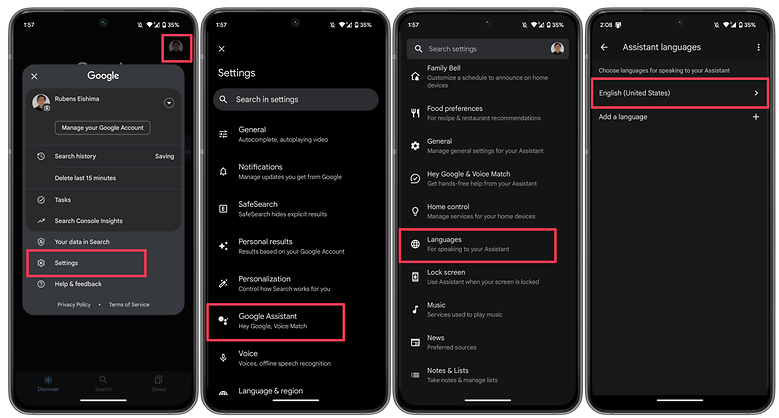
    1. Launch the Google app on your phone.
    2. Tap on your profile picture.
    3. Select Settings.
    4. Choose Google Assistant.
    5. Tap on Languages.
    6. Select the first option to change the main language, or add a new language. 

    This same menu can show you dozens of language options, each one with a checkbox, allowing you to set primary and secondary languages if desired. Google will automatically detect which language you’re speaking and automatically switch between them. If you’re multilingual, be warned that voice recognition for languages other than English can sometimes be subpar.

    google asisant set language

    Check microphone

    Google Assistant depends on constant access to your smartphone’s microphone because it is a voice-based technology. The microphone symbol on the right side of the search bar should be bold and have well-defined lines when you first open the Google app. If there is a dotted line, your microphone might be malfunctioning.

    If you carefully dig about with a safety pin or something similar to clear the debris in the tiny microphone hole, which is frequently located near to the charging port, you should be able to resolve the issue. Check the Google app’s microphone settings if that doesn’t work.

    Occasionally, apps running in the background generate audio that may interfere with the microphone’s ability to pick up your voice, so check these too, and kill any apps that you think can be generating audio.

    Turn off battery saver mode 

    To ensure you get the most life out of the battery, Android smartphones have a specific power-saving mode that shuts off background processes. Your Google Assistant (and the OK Google command) ceasing to function as a result is an unforeseen effect of this. Before you point the finger at anything else for OK Google not working, it is a good idea to make sure that the battery-saving mode on your phone is turned on.

    On stock Android, you can check if the Battery saver option is enabled by taking these steps.

    1. Launch the Settings app.
    2. Scroll down and select Battery.
    3. Choose the Battery Saver option.
    4. Disable the Use Battery Saver option.

    On other Android skins, the same option may appear under a different name, i.e. Adaptive Battery.

    Update the Google app to the latest version

    One possible fix to your OK Google problem is to ensure that your smartphone is running the latest version of the Google App. Here’s how you can make sure you’re on the newest version of the app.

    1. On your smartphone, launch the Google Play Store.
    2. Search for the Google app.
    3. On the Google app page, check whether there is an option to Update instead of Uninstall.
    4. Update the app by selecting Update to see whether the issue is resolved.

    6. Retrain the “Ok Google” voice model

    Sometimes, for reasons unknown, Google Assistant doesn’t retain the commands you have given it. If all else fails, it might be time to retrain your digital companion. Here’s how you can do so.

    1. Launch the Google app.
    2. Tap on your profile picture.
    3. Select Settings.
    4. Choose Hey Google & Voice Match.
    5. Select Voice Model.
    6. Tap on Retrain voice model and follow the on-screen instructions.

    Now that you have reached the end of this article, do let us know if these steps helped you resolve the issue. Additionally, do let us know if we have missed any useful fixes.

  • Free apps this week! – Android and iOS

    Free apps this week! – Android and iOS

    Now that another busy week in both work and general life has come to a conclusion, it’s time to move on. In fact, it is difficult to comprehend how quickly a half year will fly by. Why not unwind while playing some of the free games and applications available on the Google Play and Apple App Stores?

    Normally, these applications would cost money, but for a brief period of time, you can get them for free on iPhone and Android. Please be aware that this list is released twice a week on Tuesdays and Fridays.

    Let’s be honest, these are not entirely free apps. On Google Play and the Apple App Store, these are often paid applications that you must purchase if you wish to use them. However, occasionally, developers show their generosity by giving away their apps to the general public. We go through the Apple App Store and Google Play Store twice a week to find the greatest deals for you.

    Although the programs on this list are currently free, these offers occasionally stop without prior notice according to the whims and fancy of the creator. On these platforms, the advertising time for apps might be erratic and abruptly cease.

    free apps

    Android apps available for free for a limited time

    Android apps for productivity and lifestyle

    • Test Bluetooth Headset [4.5-stars / $2.99]: Find out just how much juice your Bluetooth headset has, complete with a discharge graph!
    • Camera 4K Pro [3.9-stars / $0.99]: Sick and tired of your stock camera app? Perhaps this one might provide more manual controls to capture better photos.
    • All TV Screen Mirroring Pro [4.1-stars / $4.99]: Want to display content on your smartphone but on a big screen TV? This app gets the job done with aplomb.

    Android games

    • Rusty: Island Survival Games [4.0-stars / $0.99]: Remember Tom Hanks in Cast Away? How well would you fare as a sole survivor on an island?
    • Rogue Hearts [4.3-stars / $0.99]: A turn-based tactical RPG with amazing graphics where you lead your party through different quests.
    • Dungeon Shooter: Dark Temple [4.2-stars / $1.99]: A FPS where you explore a temple and look for riches, but wait, there are monsters to get rid of!
    • SPHAZE: Sci-fi puzzle [4.5-stars / $0.99]: A puzzle game that is set in a sci-fi environment complete with amazing graphics to kill time intelligently.
    • Demon Warrior Premium [4.4-stars / $0.99]: You are an all-powerful warrior who dishes out plenty of damage while taking them like a champ. Will you be able to eradicate all the evil that you come across?

    iOS apps available for free for a limited time

    iOS apps for productivity and lifestyle

    • Unit Converter: Converter4U [4.7-stars / $0.99]: Remove all guesswork and get the exact information when switching between different measurement units.
    • Positive Thinking Meditation [4.5-stars / $3.99]: You know you’re already off to a good start when you get free positive thinking pointers for free in this app.
    • World Clock Time Travel Pro [4.7-stars / $0.99]: Do you do a lot of traveling? Adjusting to the new time zone is always a challenge, but at least get the local time right with this app.
    • Safety Note+ Pro [4.8-stars / $3.99]: Write your thoughts down digitally with this app, and secure it so that the contents remain safe from prying eyes. 
    • DailyBill—Expense Tracker [4.9-stars / $0.39]: How has your resolution of keeping track of your expenses been in 2023? If you have fallen off the wagon numerous times and need an app to keep you accountable, how about trying this out?

    iOS games

    • DobbyxEscape: Adventure Story [4.4-stars / $1.99]: A pirate adventure that is full of thrills and spills as you square up against the legendary Blackbeard himself!
    • Rogue Hearts [4.3-stars / $0.99]: A rogue-like dungeon crawler with a modern twist, featuring fantastic graphics and a story that will get you hooked from the very beginning!
    • Drop Flop! [4.7-stars / $2.99]: The mechanics of this game are elementary—tap the screen to drop a ball, and you need to time yourself well to catch it as well.
    • Airplane Flight Simulator Game [4.0-stars / $9.99]: You do not need a powerful rig to take to the skies as this flight simulator also offers you the chance to do so with breathtaking views and close-to-life controls.
    • Age of Zombies [4.3-stars / $0.99]: A top-down isometric third-person shooter that sees you run from two dangers—zombies and dinosaurs! Both of them are trying to get a piece of you, what will you do to survive?

    That’s it for now with today’s version of our free apps! We certainly hope you will be able to find something worth picking up whether it can be used right away or installed at a later date. What do you think of the apps which we have listed this week? For those who are looking for some online games to keep your adrenaline pumping without having to have an Internet connection, check out our linked story below.

  • How to configure and use Android’s ADB wirelessly

    How to configure and use Android’s ADB wirelessly

    ADB is a command-line tool that makes it easier for your Android smartphone and a PC to communicate. The tool has many more applications besides only rooting and updating Android ROMs (more on this later).

    The traditional method for using ADB entails connecting your Android device to the Desktop through USB. But there is an alternative. Let’s examine at some wireless ADB usage options.

    Set up ADB

    You can skip this step if ADB has previously been configured on your Android and PC. If you haven’t, remember that everything is new to you!

    You must first download and unzip the Android SDK Platform Tools from the Android developer website before you can use ADB on your machine.

    By executing the command: brew install homebrew/cask/android-platform-tools, Mac users can use Homebrew to install ADB.

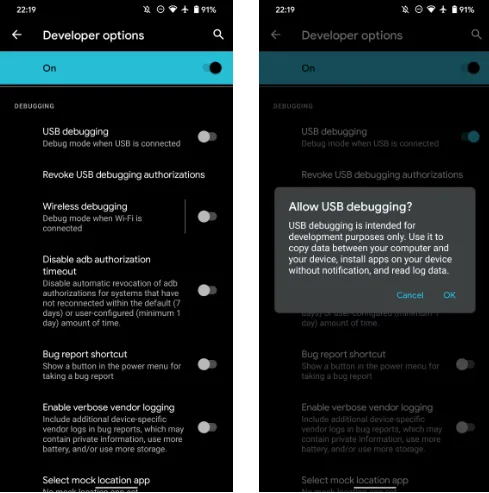
    Before you may connect your Android smartphone using ADB, you must first enable USB debugging in the developer settings.

    wireless adb setup

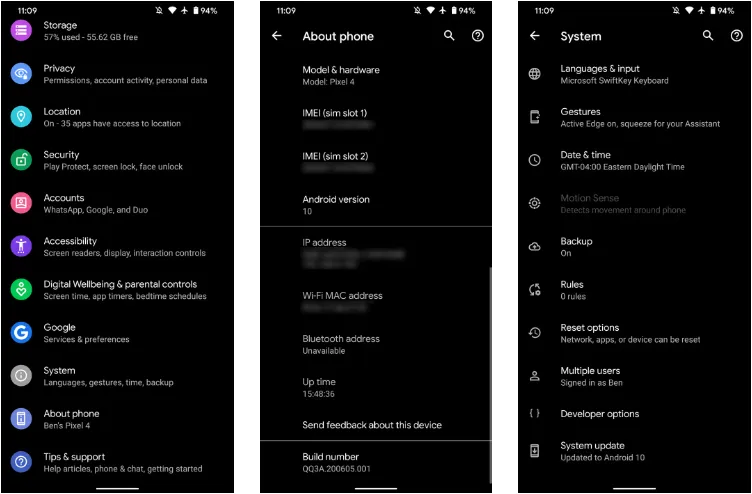
    Go to Settings > About phone then tap on the Build number several times. Once again, go to Settings > Developer options, then toggle on USB debugging.

    Once that is finished, use a USB cord to connect the Android device to your Desktop. You must utilize a cable initially even though we’re going to set up a wireless connection. The USB debugging prompt that will display on your Android device should always be accepted.

    enable usb debugging for ADB

    Open the command line or Terminal and navigate to the Platform Tools folder.

    If you’re on Windows, you can head to the downloaded Platform Tools folder and open the PowerShell window by pressing Shift and right-clicking anywhere in the folder, and selecting Open PowerShell Window here. On a Mac, open the Platform Tools folder and go to Finder > Services > New Terminal at Folder.

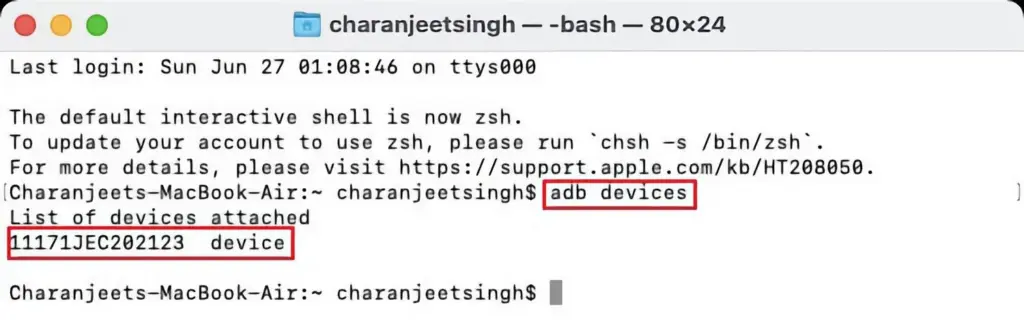
    If you’re using Windows, use the command adb devices into the command prompt. All instructions should be prefixed by a dot-slash on Linux and Mac, so it would be./adb devices.

    You should be able to find your device’s serial number in the list of attached devices if everything functions as it should.

    adb devices

    How to use Android wireless ADB

    The main topic at hand right now is how to connect your Android smartphone wirelessly to an ADB server. To use ADB wirelessly after configuring it and connecting your Android device to your PC, follow the instructions below.

    1. Type adb tcpip 5555 in the command line or Terminal and press Enter.
    2. Find your phone’s IP address in Settings > About Phone > Status > IP Address.
    3. Back in the command line or Terminal, type adb connect [your Android device’s IP address].
    4. Finally, press Enter again.

    The Android device should now be connected to ADB over a wireless connection. You can safely remove the USB cable.

    Is wireless ADB not working?

    Try installing Minimal ADB and Fastboot from the XDA Forums if your Android device won’t connect to Windows using ADB (you are getting errors in the command line). The required Android drivers are installed by this package, which may also assist you in fixing any command line issues.

    You can also utilize WebADB, which transfers all of ADB’s capabilities to your web browser. You can use the online tool to use ADB via Wi-Fi. In other words, you can completely forego installing ADB.

    What is ADB used for?

    The idea that Android ADB is solely helpful when rooting Android is a common one. It, however, is merely one of the several uses for the Android Debug Bridge.

    For example, you can use an ADB command to delete pre-installed apps from your Android device that is not rooted. Unwanted apps may be tough to remove from some Android cellphones, but ADB can assist.

    Without needing to root your device, you may also mirror your Android screen to a Desktop using the command line utility. This can be done using the free program Scrcpy. The tool’s wireless ADB connection results in extremely fantastic performance.

    Is safe to use?

    Using the utility won’t be a problem if you are familiar with ADB commands. There are risks involved with using ADB, especially if you are new to this field. If you are trying to root your device, using the incorrect commands could result in problems or, at worse, brick your phone.

    Although your Android smartphone won’t have any problems once you set up wireless ADB, you should always keep a backup of your data in the cloud or on an external storage device as a safety measure.

    No cables anymore

    Although though you first require a USB cord to set up ADB, the ability to utilize it wirelessly is incredibly useful. It allows you to walk around more freely while you work, allows you to simultaneously charge your phone at full speed, and is just much more practical in general. It’s definitely worth a go if you use ADB.

  • Mobile app for ChatGPT is now available for free.

    Mobile app for ChatGPT is now available for free.

    The first mobile application, called “OpenAI ChatGPT” on the Apple App Store, has now been released, as the US company OpenAI stated over the weekend on its own portal. The AI bot is currently free and only has a few features.

    ChatGPT for the Apple devices only for now

    Real enthusiasm has grown around the subject of AI bots during the last several days and weeks. The development of artificial intelligence (AI) is sparked by projects like “TruthGPT,” “Google Bard,” and OpenAI with “ChatGPT.” Others struggle to move growth forward quickly enough, while some are already fueling the flames of the end of the world.

    Sam Altman, the creator of ChatGPT, issues a risk alert and requests government regulation. On the other hand, the American business itself released the initial mobile application with “OpenAI ChatGPT” for free download in the Apple App Store over the weekend.

    chatGPT openai

    While the AI-supported chatbot is already available in the US as a desktop application in version 4.0, the mobile version, which for the time being is only available in the US and only for iOS from version 16.1, represents a premiere in the steady race. However, as the company announced, an implementation for Android is already in the works and a “soon” release is planned. Other countries are also expected to follow shortly.

    A chat can be begun on an Apple iPhone and continued later on a desktop browser thanks to the cross-platform functionality of the iOS mobile application. The inclusion of “Whisper,” an open-source neural speech recognition program based on 680,000 hours of multilingual and multitasking observed data, inside the ChatGPT mobile app provides another benefit.

    Although ChatGPT for iOS is in theory free, the “ChatGPT Plus” version requires a US$19.99 monthly membership. Initial information indicates that the Plus version includes features from ChatGPT 4.0. Those who want to utilize communications more extensively most likely will also need to pay. The “early access to features and faster response times” for Plus subscribers is another benefit.

  • #sale Free Android and iOS apps this week

    #sale Free Android and iOS apps this week

    Ordinarily, purchased apps on Google Play and the Apple App Store will cost you money, but occasionally, some creators may opt to spread the love by making their apps freely available to everyone. We do this twice a week by searching the Apple App Store and Google Play Store for the greatest deals. Download them now on your iPhone or Android before they become paid content.

    Do take note that while they’re free as of publishing, these deals tend to expire without any due warning based on the developer’s whims and fancy. The promotional period for apps on these platforms can be both unpredictable and can end suddenly.

    Therefore, we recommend that you exercise caution and conduct your own research before downloading any of these apps, as some may contain in-app purchases or hidden costs.

    Android apps available for free for a limited time

    Android apps for productivity and lifestyle

    • Save PDF Viewer Pro [4.4-stars / $1.49]: Are you ready to try an alternative app to read PDF files? This gets the job done with minimal fuss.
    • Simple Text Widget [4.9-stars / $1.49]: Keep yourself motivated every single day with this widget that adds text to the home screen.
    • 80s Music Radio Pro [3.9-stars / $0.99]: An ad-free app that lets you enjoy all the top hits from the 1980s right on your smartphone.
    • Electron Config Pro [4.8-stars / $2.49]: Do you have a hard time with chemistry, trying to figure out which element is compatible with another? This app removes all guesswork with its precise answers.

    Android games

    • Demon Warrior Premium [4.4-stars / $0.99]: Take a walk on the wild side and be the strongest demon there is out there.
    • Kaori After Story [4.9-stars / $4.99]: Immerse yourself in the life of a boyfriend who has been invited to spend Christmas with your girlfriend’s family! Just how will you act? This is a visual adventure novel.
    • Crazy Owls Puzzle [4.3-stars / $0.99]: Another variant of the “3-of-a-kind” puzzle game, except that owls are in the thick of the action this time around.
    • Stickman Warriors Super Hero [4.0-stars / $0.49]: Go one-on-one against different opponents as you work to be the ultimate warrior.
    • WindWings [4.9-stars / $1.99]: A shoot ’em up that requires you to be on your toes all the time to shoot down wave after wave of enemies and remain alive.

    iOS apps available for free for a limited time

    iOS apps for productivity and lifestyle

    • PDFGenius [4.4-stars / $9.99]: An intuitive tool that lets you manipulate PDF files on your iOS device.
    • Bear Walking Pal [4.7-stars / $0.99]: They say that the key to staying healthy is to walk 10,000 steps a day. Do so with this cute app! 
    • PiP: Picture in Picture [4.7-stars / $0.99]: Just because Apple says you cannot multitask in iOS, doesn’t mean all apps agree with that. Enjoy Picture-in-Picture capability with this app!
    • Resize Image [4.9-stars / $0.99]: Is there a photo that you want to resize on your phone? Get it done with this app!
    • Lock Notes Pro [4.5-stars / $4.99]: Protect your precious notes and keep them private with a password.

    iOS games

    • Astral Shapes [5.0-stars / $0.99]: A matching game that is out of this world, where you look for matching shapes and colors.
    • Ethereal Enigma [4.9-stars / $9.99]: A pictorial adventure story that can take up to 10 hours for a single playthrough. Just how well is your decision-making process? 
    • Pocket GM 2: Football Sim [4.9-stars / $0.99]: Manage your own American Football franchise and see whether you have the chops to take your team to the very top!
    • Adventurer Legends [4.3-stars / $0.99]: A Diablo-like game that sees your party grow even more powerful as you progress.
    • Red Rocket [5.0-stars / $0.69]: Go against the traffic in your car, avoiding obstacles to remain on the road.