Tag: app

  • This Week’s Free iOS and Android Apps to Download

    This Week’s Free iOS and Android Apps to Download

    We have made sure none of the apps on this list are scams or privacy traps, therefore you will not find any random apps here. This implies that some of them may have more in-app purchases and advertisements than usual.

    You can download and install an app in advance if you decide it is something you would like to use later on but not now. It will be permanently added to your app collection and regarded as “bought.” After that, you can uninstall it immediately.

    Android apps that are free for a short time

    Android apps for productivity and lifestyle

    • Reminder Pro ($3.49): Need a reminder app? This one gets the job done perfectly well.
    • Daily Calorie Balance Pro ($0.99): Keep track of your calorie intake with this app by keying in every single thing that you eat.
    • RunGPS Trainer Pro Full ($4.49): Do you like running? This app helps keep track of all your running efforts with metrics that can help you improve.

    Android games

    • Jewels Premium Match 3 Puzzles ($2.99): I guess you can call this a clone of Bejeweled, with some interesting game mechanics to switch things up.
    • Zombie Age 2 Premium Shooter ($0.99): A side-scrolling shooter where you mow down zombie after zombie with an arsenal of weapons.
    • Grow Dungeon Hero VIP ($1.99): Explore dungeons and get rid of all enemies you come across as you grow more powerful with gear upgrades and new abilities.
    • Tech Quiz Master ($2.49): Do you think you are the ultimate tech geek? Let’s see how well you do in this game. 
    • Secret Tower VIP ($0.99): Go all out as your characters continue to grow from strength to strength as you defeat huge bosses and obtain powerful gear.

    iOS apps that are free for a short time

    iOS apps for productivity and lifestyle

    • VidEdit ($0.99): No computer to edit your videos while you are on the move? Fret not, you can use this app to get the job done.
    • Metadata ($0.79): Make image management easier on your phone where you can view image metadata for each photo at a glance.
    • BeeScan ($9.99): Want to scan documents into the PDF format with your iPhone? This app does it pretty well.
    • Kintsugi ($24.99): A mindful and journaling self-care app that helps you remain focused on what’s important in your life.
    • FILCA – SLR Film Camera ($4.99): Get analog vibes for your photos and videos with this app where you can control your iPhone’s camera manually.

    Free games for iPhone and iPad

    • My City: Jail House ($3.99): A prison escape jail home game, where you are the prison warden and do your best to keep the law and order there.
    • Real Cricket ’24 ($8.99): Do you love the game of cricket? Find out just how good you are at managing your team with this game!
    • FurryFury: Smash & Roll ($3.99): A unique brawler game that requires skills and tactics, and not just button mashing. 
    • Dirt Trackin’ 2 ($3.99): Race online with numerous players in your rally car. Do you have what it takes?
    • Legacy 3 – The Hidden Relic ($1.99): A puzzle adventure game where you need to solve different puzzles in order to advance from one room to another.

    Were the free apps this week appealing to you? Have you noticed anything that catches your eye in the Apple App Store or Google Play Store? Please let us know if you have any recommendations for apps in the comments section.
  • 6 Smart Lighting Apps you should have on you smartphone

    6 Smart Lighting Apps you should have on you smartphone

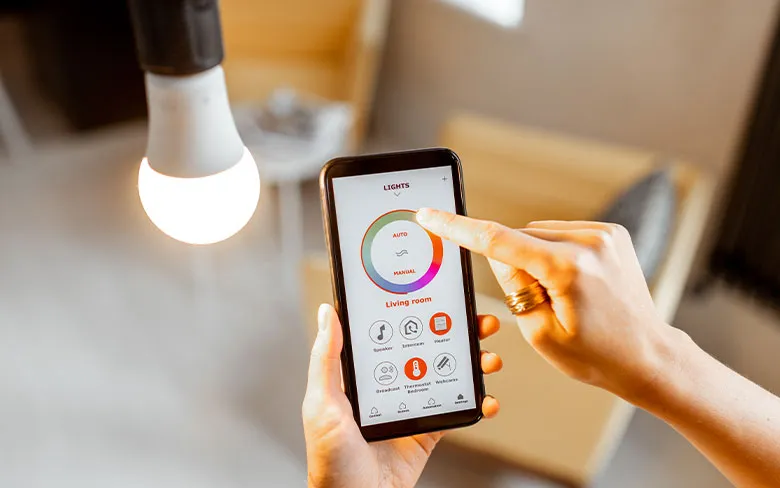
    The way we control and manage lighting in our homes and offices is being completely transformed by smart lighting apps. With the increasing popularity of smart bulbs and lighting systems, these apps are also becoming more sophisticated, offering a wide range of practical features that make them a vital component of any connected lighting setup.

    The ability to remotely control your lighting is one of the main advantages of smart lighting apps. This feature makes controlling your lighting infinitely more convenient than using outdated wall switches, and it also improves home security because it lets you make it appear as though someone is home even when you are not. You can use your smartphone to turn lights on or off, dim them, change their color, schedule them to come on at certain times, and more, no matter where you are.

    I was reading an article iluminat interior inteligent and i wanted to share with you some useful smart lighting apps.

    openHAB

    openHAB Lighting App

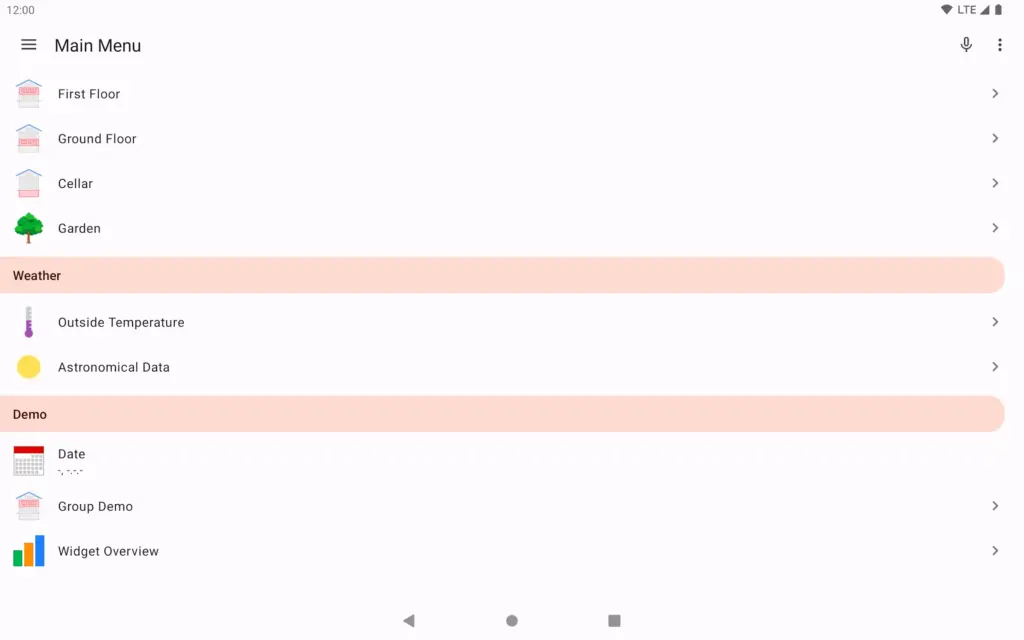
    openHAB – “empowering the smart home” – vendor and technology agnostic open source home automation

    Numerous apps are available for managing the entire home system. For example, openHAB is a comprehensive home automation platform that enables users to manage all of their appliances. All connected devices may be configured and operated within the application, and they are all available for further automation.

    Notably, you may connect all the devices by yourself. openHAB works with over 200 brands, ranging from Chromecast to Philips and Amazon. Because it is a open source project, you can download it for free.

    Geeni

    geeni smart light app

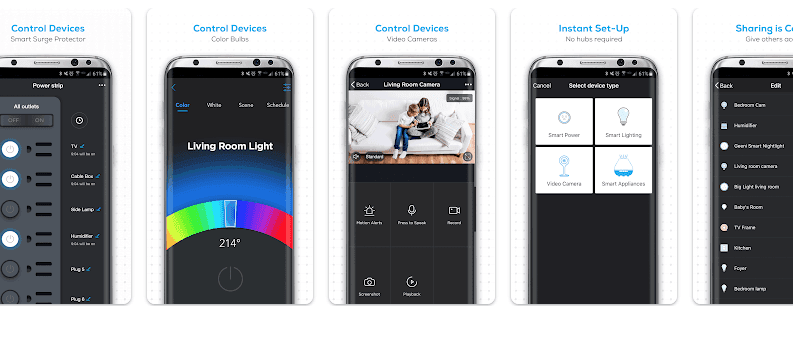
    Geeni is a user-friendly smart home solution that combines PREMIUM functionality with the SIMPLICITY of an on/off switch. Users can control all Geeni devices with just one simple app or by voice using Amazon Echo, from anywhere in the globe.

    Your colored lamps will be controlled from your smartphone all over the house. Whether you choose a color or set a smart color switch, Geeni has special modes.

    You can also control which devices will be shared with your family, and which you will control alone – for example, the scales or the lighting in your private room.

    Go Smart by Cuco Smart

    Go Smart by cuco

    A lot of people have dreams of putting their entire life on the cloud. While this may be simple in the case of images and movies, real-world device management is still required for home electronics.

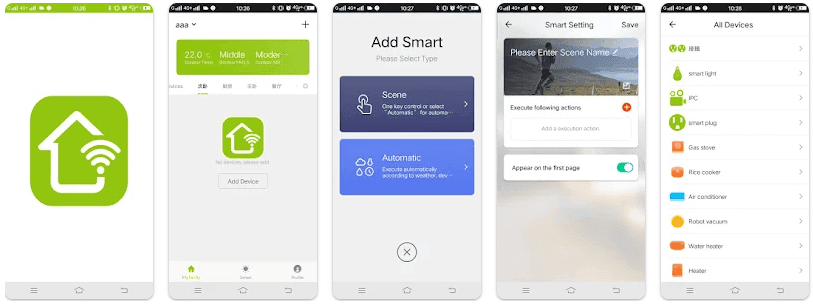
    You can now remotely and cloud-manage every smart item in your home with the Go Smart app. If you are worried that you left your appliances on or forgot to switch off your lights before you left, the app can assist you in doing so.

    Features:

    • Remote control of household appliances, worry, save power, open whenever you want

    • Can add multiple appliances at the same time, one APP controls all smart devices

    • Support for voice control smart devices such as Amazon Echo and Google Home

    • Intelligent linkage to automatically run smart devices based on your location’s temperature, location, and time

    • One-click sharing device for family and friends.

    AwoX Smart CONTROL

    AwoX Smart CONTROL

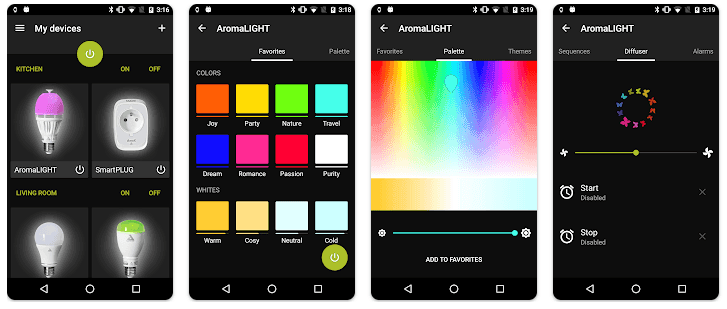
    AwoX Smart is a brand of lighting-related devices that you install in your home and control with your smartphone. The application has settings for individual lights as well as control over groups of lamps. The most recent versions of the application, which was released not too long ago, allow users to control the light even when they are outside by connecting via the cloud.

    If multiple types of AwoX Smart lamps are installed in a room, you can manage them separately. 

    With AwoX Smart CONTROL, you can set a certain common theme for the entire house, such as a color scheme or one of the templates in the application directory. Each lamp looks different in the application.

    Philips Hue

    Philips Hue

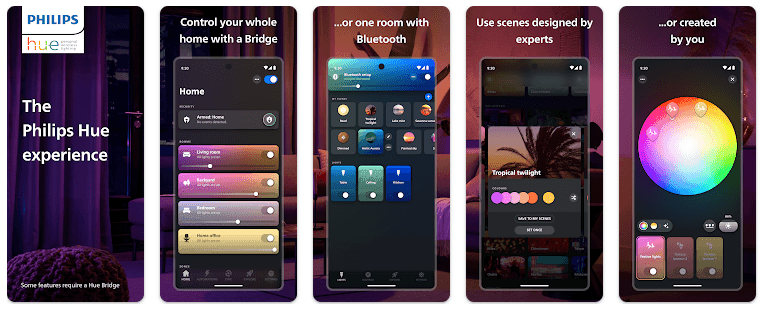
    With Philips Hue, you can entirely alter your perception of light. The app is meant for people who wish to maximize the usage of the technology in their environment.

    The Hue lights and accessories that light up countless homes every day all over the world are compatible with Philips Hue.

    Installing Philips Hue and adjusting the lighting on your smartphone will allow you to create a rainbow in your room by matching different colors to different lamps. With the Philips Hue app, you can choose from 16 million colors and shades for your lighting, so it will be difficult to narrow it down.

    V-TAC Smart Light

    V TAC Smart Light

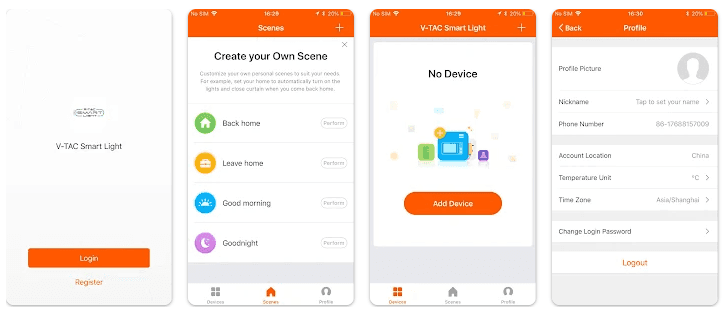
    Those who dislike excess are typically drawn to the minimalistic interface. If you are simply concerned with functionality and controllability, the V-TAC Smart Light is the right choice for you.

    It is important to note right away that you will need to register in the system. V-TAC Smart Light is designed to control LED lighting, which is quite common these days. Usually, such lamps can change the temperature of lighting and even the color itself. There is no overburdened design or complicated controls – all changes can be made with a few clicks on your smartphone screen.

    In the application, you can change all this, as well as set certain colors and even form lighting groups. Your life will be more smart and home control will be much easier. With the app, you can create groups of lamps per room in your home in just a few minutes, so you can control the light in each room individually.

    Bottom line on Smart Lighting Apps

    With versatile utility, remote access, automation, and central smart home management capabilities, smart lighting apps are invaluable additions to any connected lighting system or smart home in general. As the IoT space continues evolving, these apps will only get smarter and more useful over time. Whether enhancing convenience, saving energy, improving security, or enabling awe-inspiring lighting scenes, smart lighting apps deliver functionality that simply can’t be matched by standard wall switches alone. They truly unlock the full potential of advanced lighting control in both residential and commercial settings.

  • Affordable and High-Tech Smart Bluetooth Hearing Aids from Vivtone

    Affordable and High-Tech Smart Bluetooth Hearing Aids from Vivtone

    Are you looking for a affordable and high-quality smart bluetooth hearing aid option? Look no further than Vivtone’s Lucid508 hearing aids. Vivtone is an industry leader in providing accessible hearing aid solutions directly to consumers at direct-to-consumer prices. In this article, I will review Vivtone’s flagship Lucid508 hearing aid and why it may be the right choice for your hearing needs.

    Feature-Packed Technology at an Affordable Price

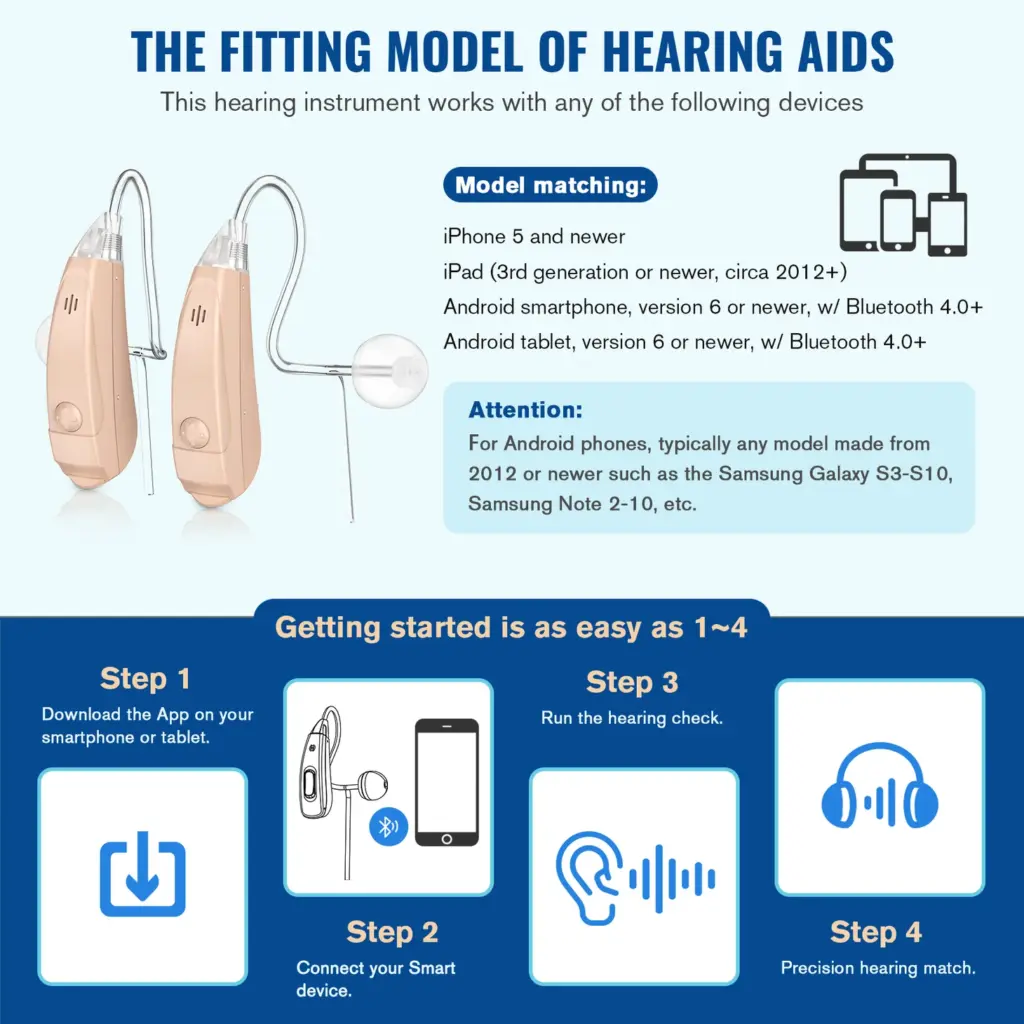
    What sets the Lucid508 apart from other hearing aids on the market is its impressive suite of technologies normally found in hearing aids costing thousands, available here for a fraction of the price. Some key features include:

    • Bluetooth connectivity for streaming audio from phones, TVs, and other Bluetooth devices
    • Rechargeable battery with a portable charging case good for over 30 hours of use per charge
    • Advanced noise reduction and feedback cancellation for crystal clear sound
    • Multiple listening modes for different environments like noisy places or one-on-one conversations
    • Discreet BTE design that is nearly invisible when worn

    All of these high-tech features are packed into a single hearing aid priced at just $273 per pair. That is hundreds, if not thousands, less than comparable hearing aids from other brands. Vivtone is able to achieve this thanks to their direct-to-consumer sales model that cuts out expensive middlemen and markups.

    vivtoneSmartbluetoothhearingaids connectwithdevice x730@2x

    Proven Performance and Support

    What’s more, the Lucid508 does not cut corners on sound quality or performance to achieve its affordable price. Reviewers consistently report natural, clear sound on par with devices costing significantly more. Vivtone also stands behind their products with a 45-day money back guarantee and lifetime technical support from their team of licensed professionals.

    For those new to hearing aids or with minor hearing loss conditions, the Lucid508 provides an easy to use solution right out of the box with no hardware or software configurations required. The size, fit, and sound can be adjusted intuitively without any required hearings tests or lengthy fittings either.

    An Accessible Solution for Hearing Healthcare

    As the old saying goes – you get what you pay for. But in the case of Vivtone, consumers are truly getting far more than the price suggests. By reforming the outdated hearing aid distribution and pricing models, Vivtone has made high-tech and capable hearing devices, including smart bluetooth hearing aids, truly accessible to all budgets and needs.

    If you or a loved one suffers from minor hearing loss and wants an affordable way to get their lives back without noise, the Lucid508 from Vivtone could be the perfect solution. Click the link below to learn more or purchase yours with free shipping and their risk-free trial period.

  • Temporary free Android And iOS apps this week

    Temporary free Android And iOS apps this week

    Without apps, a phone is useless. If you are not sure what to put on your phone, do not worry—we have a free iOS and Android Apps of the Week column that updates you on a variety of productivity and gaming apps that might be of interest to you every two weeks!

    android and ios apps

    When the developers decide to revert back to their paid status, we have no idea when these games and applications will be made accessible for free. If you find a listed program that is no longer free, please let us know so we can update the appropriate information.

    Tip: If you find an app that you want to have but do not need right now, download and install it first. It will stay in your app library forever, even if you remove it from your smartphone right away. This way, the program will be regarded as “purchased.”

    Android apps that are free for a short time

    Android apps for productivity and lifestyle

    • English for All Pro ($0.99): Want to master the English language? This app might help you out.
    • Reminder Pro ($3.49): Ever felt as though you keep on forgetting stuff? Here’s an app that will help you remember things…

    Android games

    • Legend of the Moon ($0.99):  A 2D side-scroller where you explore dungeon after dungeon, leveling up to be more powerful.
    • Defense Zone 3 Ultra HD ($2.99): Tower defense with extremely realistic graphics to keep you occupied.
    • SPHAZE ($0.99): A sci-fi puzzle game that looks great while tickling your grey matter.
    • Ruby Square: Puzzle Game ($0.99): With over 700 brain-teasers to choose from, you will definitely find this game worth your while if you love puzzlers.
    • Minesweeper Pro ($1.49): This is a classic game that everyone should experience at least once in their lives.

    iOS apps that are free for a short time

    iOS apps for productivity and lifestyle

    • FABULUS ($3.99): If you have trouble figuring out the chord to a particular song, this app might just be of help.
    • Dollar Bill Origami ($1.99): Your humble dollar bill is way more useful than just for monetary transactions… 
    • Streakly ($4.99): It is not too late to get started on your New Year resolutions yet. Why not get this app’s help to form new and positive habits?
    • ChatGo AI bot ($0.99): AI is taking over the world, so why not let it take over your phone?

    iOS games

    • Demetrios ($2.99): A visual novel that comes with plenty of silly jokes. This is the perfect pick-me-up if you’re ever feeling down.
    • Legacy 3: The Hidden Relic ($1.99): A 3D point-and-click adventure game that will certainly require you to think more than usual.
    • Agile 3 ($1.99): Test your reflexes and dexterity in this uniquely designed game. 
    • 2 Players 1 Device ($0.99): This is how you remedy a situation when you have two kids fighting over a single device… 

    What drew your attention this week? Which apps on the list—games or productivity—is your favorite? Share your opinions in the comments below.

  • Free premium apps for iOS and Android

    Free premium apps for iOS and Android

    Have you just pre-ordered a Galaxy S24 Ultra (hands-on)? If so, you might be able to find out which free apps are available for you to download and install in time for the delivery of your much-desired new phone! Take a look at our bi-weekly free iOS and Android Apps of the Week column to see if there is anything you could be interested in!

    All of these free apps have a time restriction before they become paid apps. If you find an app that is on this list that is no longer free, please let us know so we can update the post.

    TIP! When you see an app that you think you might like but do not need right now, download and install it first. That way, you will have “purchased” it for nothing once, and it will always be in your app library, even if you later remove it from your smartphone.

    Android apps that are free for a short time

    Android apps for productivity and lifestyle

    Android games

    • Rogue Hearts ($0.99):  Want some good old dungeon hack-and-slash adventure game? This is where you get your fix.
    • Zombie Age 2 Premium Shooter ($0.99): Time to shoot zombies to preserve your life. Can you survive the non-stop onslaught? 
    • Cooking Kawaii ($0.99): Can you build an empire of restaurants throughout the city? Give it a shot with this game!
    • Cytus II ($1.99): A very well-crafted music rhythm game to challenge your reflexes. 
    • RUSTY: Island Survival Pro ($0.99): You are stuck on an island and need all your wits to survive. Do you have what it takes? 

    iOS apps that are free for a short time

    iOS apps for productivity and lifestyle

    • Magnifying Glass & Flashlight ($0.99): Have trouble reading the fine print in books and documents? This app might be able to help.
    • Easy Spending Budget ($0.99): Want to keep track of your budget? Why not get an app to help you?
    • Pixel Art Pro ($2.99): If you love drawing pixel art, this app might help you get off on the right footing.
    • Vinyls ($4.99): A music player app that not only plays back your favorite tunes, it does so while looking aesthetically pleasing.
    • Search Ace – Adblock Browser ($2.99): Everyone’s surfing experience becomes better without ads, and this browser does the job.

    iOS games

    • Cytus II ($1.99): How is your hand-eye coordination? Give it a go with this music rhythm game.
    • My City: Newborn Baby ($3.99): Find out what life is like with a newborn baby. Bring the baby to the doctor’s, to the supermarket, the choice is yours! 
    • Demetrios ($2.99): A crazy adventure visual novel that is wacky and zany enough to tickle your imagination. 
    • Paintiles ($2.99): Paint the different tiles to match their colors in order to clear each level.
    • Mage Mania ($1.99): There is always a trade-off, isn’t there? Many treasures await you in the dungeon, but you might have to fend off dragons with your magic.

    Which of the apps on the list piques your interest? Please share your app choices in the comments section. We hope you have a wonderful weekend.
  • 9 best DSLR apps

    9 best DSLR apps

    The majority of serious photographers use DSLR cameras, which are currently the industry standard. You can purchase a variety of cameras and lenses, which can be costly but worthwhile. However, you can enhance your experience even more by using apps. Generally speaking, your camera comes equipped with all the controls you need, but some apps can add features like remote control support or quicker, easier update processes. There are not many excellent options, but the ones that are available are good enough. Here are the top DSLR apps for Android!

    Adobe Lightroom

    Price: Free / Up to $52.99 per month

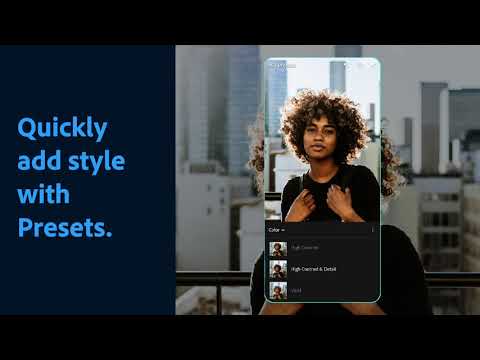
    A good photo editor app is one of a photographer’s most valuable tools, and Adobe Lightroom is one of the best; the mobile version offers many of the same features as the desktop version, such as support for RAW photos, easy reverting back to the original, and the ability to send the files to your desktop version if necessary.

    The majority of the features in the app are free, but if you already have an Adobe Creative Cloud subscription, you can access additional features. Overall, it is a good app for serious photographers.


    Youtube video

    Camera Connect

    Price: Free / Up to $5.99

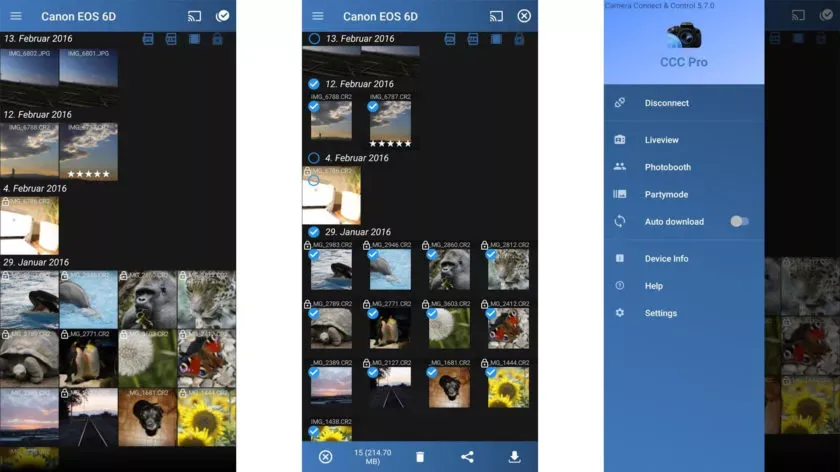
    One DSLR app that lets you control your camera is called Camera Connect and Control. It works with a number of cameras, including Nikon, Canon, Sony, and GoPro. Depending on your camera, you can connect via WiFi or USB.

    The app allows you to load your images to your phone and supports tethered shooting. Pro versions come with extra features like ad removal and access to EXIF data. The full pro version has even more features, but it has some bugs.


    Camera Connect and Control scree

    HyperFocal Pro

    Price: Free

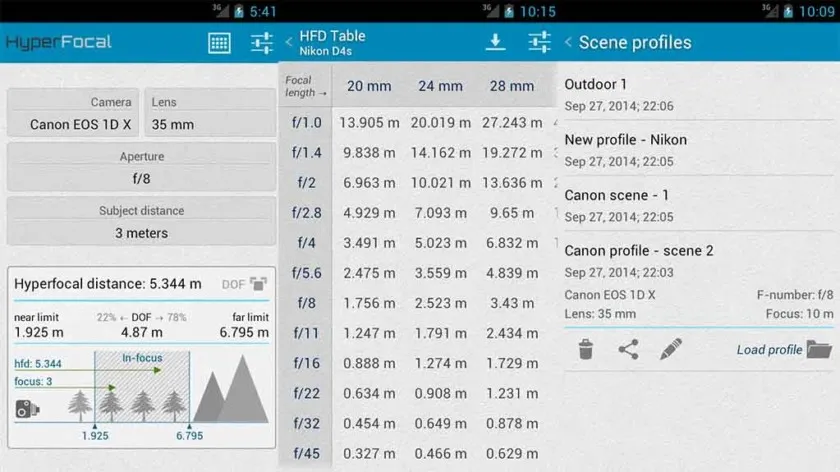
    A reference guide for photographers, HyperFocal Pro displays calculations to get the best focus, ideal focus ranges based on subject, distance, camera, and glass; it works with most cameras; it displays statistics for depth of field, angle of view, and field of view; it is easy to read; it is free of cost, has no in-app purchases, and has no advertising.

    For most beginning and intermediate photographers, it is a useful little tool.


    HyperFocal Pro

    Magic Viewfinder apps

    Price: Free / Varies

    The Magic Viewfinder app family is a collection of DSLR apps that do not control or connect to cameras; instead, they help you plan shots and see how your camera would perform by simulating your camera and lens setup. This allows you to accomplish tasks like framing without carrying your actual gear.

    The apps are available for free download, with cheap in-app purchases to unlock all of the features. While they are not always the most useful, they can be useful in certain situations.


    Youtube video

    qDslrDashboard

    Price: $8.66

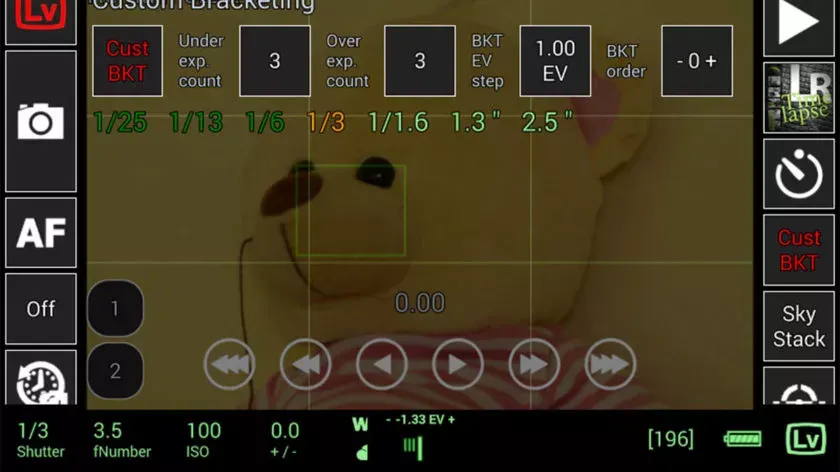
    This DSLR app, called qDslrDashboard, works with mirrorless cameras from Canon, Nikon, and Sony. It has a long list of features, such as support for multiple cameras, the ability to view and pull photos from a camera, time-lapse controls, wireless controls, and more. If you prefer to work wired, it can also be used over USB-OTG. However, not all cameras are compatible with this app, and many users have reported connection problems and other various bugs.

    Given its price tag, we imagine that’s why the rating is a bit lower than we’d normally see. In any case, if you try this, make sure to give it as thorough a testing as you can inside of the refund period, just in case.


    qDslrDashboard screenshot 840x47 1

    Smart IR Remote

    Price: Free / $6.99

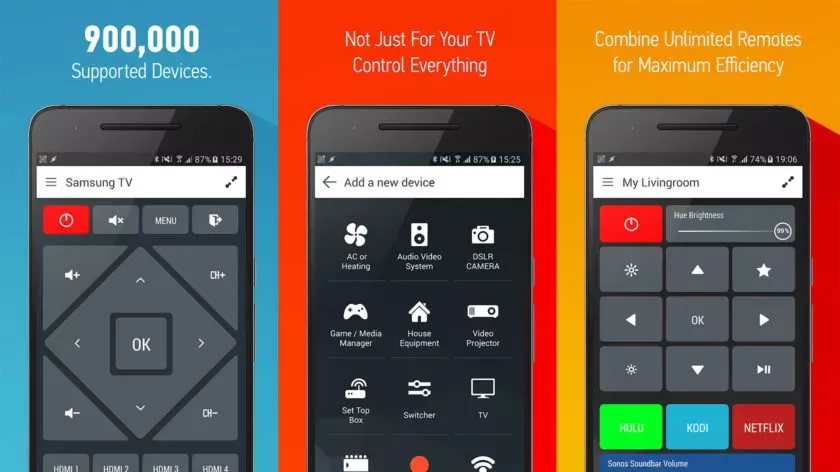
    With that said, there is an immediate caveat with this one: your device needs an IR blaster on the phone in order for this remote app to function at all. Other than that, it should work with almost anything that has an IR receiver, which does include some DSLR cameras and camera remotes. However, there is not an easy list to refer to as to what cameras work with this one. Smart IR Remote is primarily for TVs and other home electronics.

    The pro edition of the app is a bit pricey, but you definitely get what you pay for—it is arguably the greatest infrared remote software available on Google Play. Our recommendation is to download the free version and see if it functions with your camera.


    Smart IR Remote

    Snapseed

    Price: Free

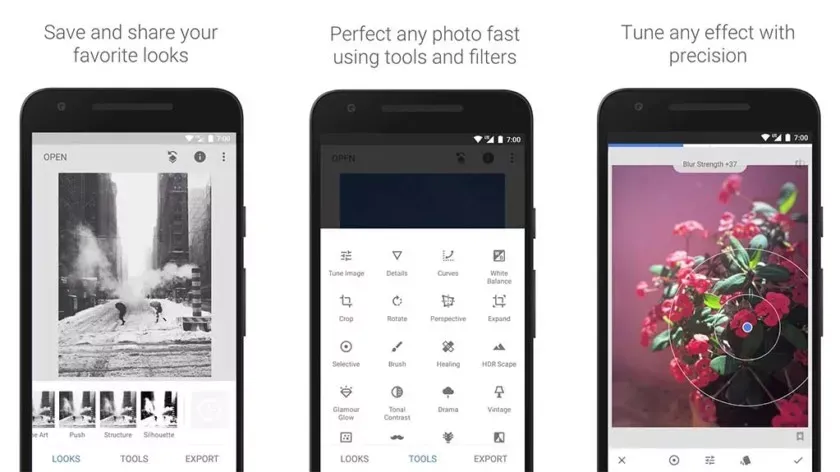
    Google’s Snapseed is an extremely feature-rich free photo editor app that supports RAW files in addition to offering 29 additional editing tools with intensity sliders for finer control; it can also perform standard photo editing functions like cropping and white balance.

    While it is not quite as powerful as desktop photo editors like Lightroom or Photoshop, Snapseed is probably the best option available for mobile devices.


    Snapseed

    Manufacturer DSLR apps

    Price: Free (usually)

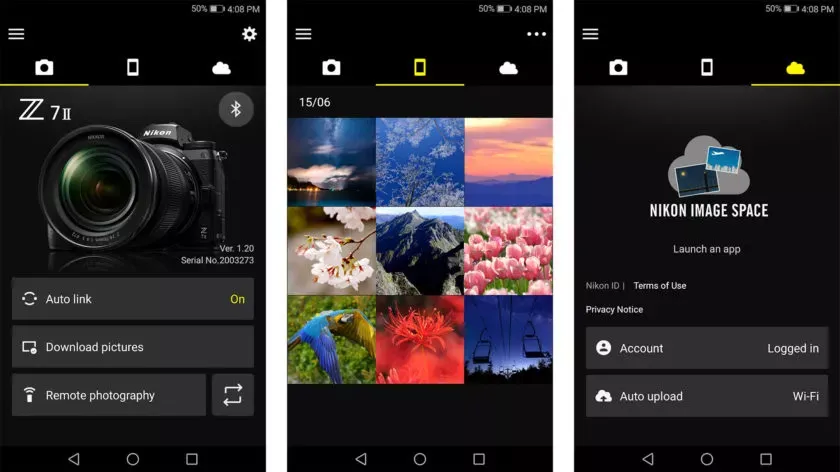
    DSLR apps are available from most camera manufacturers. Canon, Sony, Nikon, Lumix, and other manufacturers have official apps designed to be used with their cameras. These apps are typically not the best—if they were, you would not be here and this list would not be necessary—but they can do basic functions like taking photos and transferring them to your phone.

    While most of the apps are free, there are some that are more functional and allow you to do things like download via Bluetooth, take pictures remotely, and perform other advanced tasks. It is advisable to try the official app for your camera first (assuming it has one and is compatible) before downloading any other apps.


    SnapBridge

    DSLR shopping apps

    Price: Free

    There are a lot of apps that sell various DSLR cameras and accessories. Some examples include B&H Photo Video (linked at the button), Amazon Shopping (Google Play link), and Newegg (Google Play link). However, you can also find some neat stuff on sites like eBay if you want a new piece of glass or some lightly used accessories.

    Plus, those are excellent places to find lighting, filters, camera bags, cleaning supplies, and other things to make your photography life better. Hit all the links to check out the various apps.


    BH
  • Limited time offers: free Android and iOS apps and games:

    Limited time offers: free Android and iOS apps and games:

    This year, how has your smartphone experience been? Is it time to audit the apps you currently have on your phone? Maybe it is time to try something new, and we may have a free app (or two) that will catch your attention at the beginning of this week. The apps that are listed here are free for a limited period of time, but we have no idea when they will become paid again.

    Check out our weekly selection of games and apps below. We make every effort to ensure that these are free of scams and privacy issues, but please note that this list differs from our Apps category in that we do not review each app separately. As a result, some of the apps on this list may contain in-app purchases and advertisements.

    Tip: If you come across an interesting app on our list but don’t need it now, install it first and delete it afterward. This will cause the app to be saved to your library, allowing you to install it later for free, even after the promotion ends.

    android app development 1

    Android apps available for free for a limited time

    Android apps for productivity and lifestyle

    • Memorize: Learn Spanish Words ($6.99)It is never too late to start learning a new language. Use this app to pick up the pace of learning Spanish.
    • Mandala Maker ($0.49)You do not have to be an insanely creative artist to draw intricate mandalas with this app.

    Android Games

    • The Rich King ($0.99): Ever wondered how life would be if you were stinking rich? Find out virtually in this game!
    • Merge City Premium ($4.99): Spruce up your virtual city in this game from the ground up. It will carry your characteristics and thoughts.
    • Ruby Square ($0.99): A puzzle game where you rotate a square of colors to help them match with the surrounding squares.
    • Live or Die: Survival Pro ($0.49): Do you love survival games? If so, then this is the perfect game for you as you craft your way through a bleak future.
    • Shadow Survival ($0.99): It is you against the world. Do you have what it takes to take down never-ending hordes of enemies?

    iOS apps available for free for a limited time

    iOS apps for productivity and lifestyle

    • Panographic Photo ($1.99): Stitch different photos together using this app for a brand new look.
    • TILA: Sleep, Meditation & Calm ($2.99):  Want to sleep better? This app claims to be able to help you enter dreamland faster than usual.
    • Videdit ($0.99):  This is a useful video editing tool to use on your iPhone.
    • Face Story Pro ($2.99):  Be like T-1000 by changing your face to another through the morphing process.
    • ColorCamera – Color Picker ($0.99): This app is basically a teardrop tool, letting you select the perfect color from your photo collection. 

    iOS games

    • Shock Clock Arcade ($0.99): It is only a matter of time before you lose, but just how fast and far can you progress with your reflexes?
    • Pepi Bath 2 ($3.99): Not all kids love their bath times, perhaps this app might make it look fun enough for them to dip their toes in the bath next time without being dragged there screaming and kicking?
    • Neo Monsters ($0.99): Catch monsters. Train them. Let them fight with other monsters. Win and upgrade the monsters. Rinse and repeat.
    • 2 Players 1 Device ($0.99): If you are short on devices but have 2 squabbling kids to keep them occupied, this single device game is ideal.
    • Rain Drop Catcher ($1.99): Catch falling rain drops in this reflex-oriented game.

    That is all for now, and let us get started with this week’s free app and game selection.

  • Premium free Android and iOS apps

    Premium free Android and iOS apps

    Black Friday is getting closer every day, but before you go crazy with your shopping, take a look at this week’s second round of free games and apps for your iPhone or Android smartphone from the Google Play Store and Apple App Store. These are normally available for a price, but you can get them for free for a short while.

    Tip: If you come across an interesting app on our list but don’t need it now, install it first and delete it afterward. This will cause the app to be saved to your library, allowing you to install it later for free, even after the promotion ends.

    android and IOS apps

    Android apps available for free for a limited time

    Android apps for productivity and lifestyle

    • Date Calculator Pro ($0.99)Want to perform date and time operations on your Android device? Make life easier with this app. 
    • Age Calculator Pro ($0.99)Forget about making mental calculations, as this app provides you with an accurate answer to a person’s age based on their date of birth alone.
    • ColorMeter camera color picker ($1.99)Want to identify the exact color that you see? This app will go a long way in helping you do so accurately. 

    Android Games

    • Defense of Egypt TD Premium ($1.99): If you have not gotten sick of the tower defense genre yet, here is one title that is set in Ancient Egypt.
    • Traffic Jam Cars Puzzle Legend ($4.99): Everybody hates traffic jams. It is up to you to solve this puzzle game in a match 3 format. 
    • EHW Premium & 101 Classic Games ($0.99): This is a real-time strategy game that merges the online side-scroller defense genre alongside RPG elements for a truly revolutionary gaming experience.
    • Mental Hospital IV ($1.99): A first-person survival horror game where you need to escape from all the madness around you. It’s really creepy!
    • Summoners Era ($0.99): An idle RPG game that sees you pick a party of summoned monsters to defeat all who stand in your way.

    iOS apps available for free for a limited time

    iOS apps for productivity and lifestyle

    • Lottery Box – Lotto Manager ($5.99): Place the lottery numbers you play in a pool, where you can then tweak the combinations for one or multiple draws. Would it increase your chances of winning? Who knows, really?
    • AirDisk Pro ($2.99): Store, manage, and access files on your iPhone with this app in a new way.
    • Unit Converter Pro HD ($0.99): If your line of work happens to deal with many unit conversions, having this app comes in handy.
    • Voice Recorder, Screen Recorder ($4.99): Use your phone to record in RAW, MP3, AAC, M4A, and WAV formats.
    • Safety Note+ Pro ($3.99): Are you one who takes down notes every single day, jotting your thoughts so that you can refer to them later? This app keeps your notes secure with its own security mechanism.

    iOS games

    • Taijitu ($1.99): This is a game about balance, where you do your level best to avoid having two of the same colors on the same side of the screen. 
    • cat&line ($1.99): Draw a line and make sure that the cat will continue to have space to move forward. This is a fun mission-based runner.
    • Bug Bomber ($1.99): A classic action puzzle game that reminds you of Dr. Mario, except you will need four or more of the same color to clear a line.
    • Crystal Cove ($2.99): A totally new spin on the match 3 genres as you move your triangle around the board to clear it.
    • Wind Wings ($1.99): A 3D puzzle game that is certainly enthralling to keep you riveted.
  • This week’s free Apps and Games – Android and IOS

    This week’s free Apps and Games – Android and IOS

    With the start of a new week, it’s time to update Droid Tools’ collection of free apps and games for your iPhone or Android phone from the Apple App Store and Google Play Store. Join us as we highlight applications that are normally paid but are available for free for a limited time.

    We always try to seek games that do not have scams or privacy traps in them but bear in mind that we have not individually reviewed these apps. This means some of them might feature ads and in-app purchases.

    If you find an interesting app on our list but don’t need it right now, install it first and then uninstall it. This saves the software to your library, allowing you to install it later for free, even after the promotion has ended.

    android and ios free apps

    Android apps available for free for a limited time

    Android apps for productivity and lifestyle

    • ProCam X ($4.99)Popular with nextpit readers, this camera app gives extra manual controls over the default app, unlocking creative possibilities.
    • Blur Photo ($2.49)Blur details to hide confidential information on your pictures or simply give photos that nice background blur (bokeh) effect.
    • Mandala Maker 360 ($0.49)Create trippy patterns with various colors, brushes, backgrounds, and more.

    Android Games

    • Shadow Slayer ($4.99): Another side-scroller beat them up where you fight the creatures of the dark with the power of your light sword.
    • Fastar ($0.99): Tap your way through sparkling stages in this rhythm game with cute graphics.
    • Add and subtract within 20 ($2.99): Even Math can be gamified and help teach small kids how to do the basic operations.

    iOS apps available for free for a limited time

    iOS apps for productivity and lifestyle

    • Sticker Drop Maker Studio ($0.99): Just as the title says, create stickers to use on iMessage, WhatsApp, Facebook, Instagram and other messaging apps.  
    • Thunderspace Rain Sleep Sounds ($2.99): Another app with a pretty descriptive name, relax and concentrate better with nature or white noise sounds.
    • MovieSpirit ($9.99): Despite the rather crude interface, this video editor has hundreds of reviews on the App Store with an average score of over 4.5 stars.
    • Videdit ($0.99): Another well-reviewed video editor for iPadOS and iOS, edit your clips, make collages, and apply effects to your next best memories.

    iOS games

    • Sphaze ($0.99):  Solve increasingly complex puzzles with pretty, minimalistic graphics in the style of titles such as Monument Valley.
    • Universe Pandemic 2 ($1.99): Instead of surviving the pandemic (not again, please?), defeat the aliens by creating a devastating pathogen to take over the galaxy.
    • Hydropuzzle ($0.99): Conquer this text adventure by solving its puzzles using only your brain.

    Hopefully, you found our picks to kick off this week enjoyable. Did you notice anything noteworthy, or do you have a favorite program or game from the Google Play Store or Apple program Store? Please leave your suggestions in the comments!

  • Google Wallet has its own notifications

    Google Wallet has its own notifications

    This news item isn’t exactly one of the more dramatic ones. It’s only the most recent upgrade to Google Wallet, though. A recent report claims that the Google Wallet app is now receiving independent notifications.

    Although it has a separate app, Google Wallet is not totally independent. Wallet has its own app, however it lacks its own notifications. Indeed, they originate from Google Play Services. When you use Wallet to make a purchase, you’ll receive a notification with a brief description of the transaction. Google believes that it is now appropriate for Google Wallet to go independent.

    Google Wallet is getting notifications

    We don’t entirely understand the company’s motivations for separating Wallet from Play Services. We do know that Google is developing a new version of the Wallet app. For all we know, Google might be developing a more significant overall overhaul for Wallet. To be sure, we’ll need to wait for additional details on this.

    In any event, the Wallet icon will be there next to your notice when it comes from Google Wallet. So, you must use the app’s notifications and not Google Play Services if you wish to turn off the notifications.

    google wallet notofication

    Google Wallet is receiving additional updates.

    You need to be aware of how Google Wallet uses space before you open it. The app has a great deal of unneeded empty space. The cards are shown in a huge horizontally scrolling carousel that is topped with a sizable NFC icon. You may access the settings by clicking on your profile image in the top right corner of the page. You can see more cards at the bottom of the screen.

    Google, however, intends to promote a redesign that will improve the UI’s use of the available space. To begin with, the NFC logo will vanish, and your cards will take its place. You may see your other passes, such as gift cards and reward cards, immediately beneath your cards.

    All in all, the cards and passes will better fill out the interface. We’re not sure when Google is going to push this update to more devices, but it shouldn’t take too much time.