Perhaps it’s time to relax on your phone with the following free apps from the Google Play and Apple App Stores as you close out yet another work week. These apps are generally paid, but they are currently available for free, although for a brief period of time. In other words, if you want to buy some of the books that catch your attention, you will be able to pinch a few pennies here and there. Before they disappear, take advantage of these offers on your Android or iPhone.
Be aware that these apps are described as being free at the time of publication, and as it is up to the developers to decide when deals expire, it is impossible to predict when they will. Buyer beware: by the time you finish reading this post or attempt to download them, they might have changed to a paid status. This is problematic because there is no predetermined duration for app promotions on the Google Play Store or the Apple App Store, and such offers may end without prior notice in the same amount of time they were added.
While we do look through this list of free apps and do not include anything with low ratings, we also want you to know that we did not install any of them, unlike with our Top 5 Apps of the Week. As a result, we advise you to use caution and do your own research before downloading any of these apps because some of them might have hidden fees or in-app sales.
Android apps available for free for a limited time
Android apps for productivity and lifestyle
SkanApp[4.3-stars / $19.99]: You have a paper document that needs to be sent in digital format but you are nowhere near a scanner, what do you do? Thankfully, there is the SkanApp app that doubles up as a PDF scanner to help you out in such situations.
SUI File Explorer Pro[3.9-stars / $1.99]: If you are sick and tired of your phone’s stock file explorer app, perhaps trying this one will breathe a breath of fresh air.
Android games
WeaponWar![4.1-stars / $0.99]: An intense clash of weapons, where you need to win more battles to earn additional upgrades which in turn, make you more powerful.
Shadow Slayer: Ninja Warrior[4.4-stars / $4.99]: This epic side-scroller sees you plow through enemy after enemy in the fast-paced action.
King of Defense Premium[4.7-stars / $1.49]: A tower defense title that is full of excitement as you hold off hordes of monsters at bay from your castle.
Neo Monsters[4.4-stars / $0.99]: You capture monsters, train them, and send them out to battle. Repeat ad nauseam, except that some of the trainers have interesting clothing choices.
The Lonely Hacker[4.3-stars / $2.49]: A realistic hacking simulator created by security experts that puts you in the shoes of a bona fide hacker, sans the legal repercussions.
Brick Breaker Pro[4.2-stars / $0.99]: Arkanoid on steroids, ’nuff said. There, you probably know my age based on my Arkanoid reference.
Truth or Dare Pro[4.2-stars / $0.99]: This is one fun game to play, even more so when booze is involved. Socialites will love it!
Timing Hero PV[4.1-stars / $2.99]: 8-bit graphics that remind you of the Game Boy era, this RPG will see you begin in a hero battle that will set you off on an adventure where you battle numerous monsters and level up.
iOS apps available for free for a limited time
iOS apps for productivity and lifestyle
Olympia – Your Fitness Trainer[4.5-stars / $5.99]: Sweat it out at home with this unique app, where you get to stay fit without having to go out.
PropFun Pro[4.2-stars / $0.99]: Want to take some really nifty portrait photos? This app spices up your portraits with unique props.
Orange Weather[5.0-stars / $0.99]: A weather app that claims not to infringe on your privacy? I suppose the forecast would be for flying pigs tomorrow.
Safety Note+ Pro[4.8-stars / $3.99]: Keep your personal notes private with this app, where there are added layers of security before one can access them.
iOS games
Talking Typer[3.9-stars / $4.99]: Want to improve your typing skills? This game ensures you improve over time with faster and more challenging words thrown your way.
Zombie Survival Shooter Game[4.3-stars / $9.99]: Just about everyone near and dear to you is dead, or more likely, the walking dead. It is up to you to kill all of them in your quest to survive.
Tigers & Goats[5.0-stars / $0.99]: Yet another ancient game that has been digitized, where you play as a goat will try to trap the tigers, while the tiger attempts to eat all the goats on board.
Card Hog[4.6-stars / $1.99]: Got to love the punny name of this app. You move around the board and try to outwit others, gaining new weapons and items along the way to help you.
Wedgie Go[3.8-stars / $39.99]: Underwear can be a funny thing, you just purchased a brand new pair and indulge in some running, only to find that wedgies get in the way. A totally hilarious endless runner.
Block Brain Game[4.8-stars / $2.99]: This is a brain teaser that will certainly cause you to carefully think just where all these blocks go.
The following free apps are available from Google Play Store to start a brand-new week. These apps are usually paid, but right now they are available for free for a certain period of time. In other words, installing these won’t cost you a single penny! Before they disappear, take advantage of these offers on your device.
Be aware that although these apps are currently advertised as being free, there is no way of knowing when these offers will stop. As a result, by the time you finish reading this page or attempt to download them, they may have changed to a paid status. This is problematic because there is no predetermined duration for app promotions on the Google Play Store and such offers may end without prior notice in the same amount of time they were added.
Here’s a tip: If you come across an app or game on our list that piques your interest but you don’t need it right now, why not install it first before deleting it from your device? Doing so will save that app to your app library, which you can install it later in the future when you need it. It’s a great way to take full advantage of short-lived promotions.
Android apps available for free for a limited time
Android apps for productivity and lifestyle
Identify Dog Breed Pro[3.8-stars / $0.99]: Ever wondered what breed that dog is at the park? Perhaps this app can help you out.
GPS Speed Pro[3.5-stars / $2.99]: An app that keeps track of you wherever you go, while showing your mileage and speed.
Android games
WeaponWar![4.1-stars / $0.99]: An intense clash of weapons, where you need to win more battles to earn additional upgrades which in turn, make you more powerful.
Infinity Dungeon 2[4.1-stars / $0.99]: Cute little characters make up your party of rag-tag warriors who need to defeat other enemies you encounter.
Coin Princess[4.5-stars / $0.99]: A horizontal RPG that requires you to explore castles and dungeons while attempting to remain alive.
Cartoonite Multiplayer Builds[4.1-stars / $0.99]: An innovative sandbox racing game that brings racing to a whole new level.
Evertale[4.6-stars / $0.99]: A monster-catching RPG where you need to train candidates from your bestiary to become the best in town.
Heroes Legend – Epic Fantasy[4.4-stars / $0.99]: What kind of team can you assemble to defeat everybody else that crosses your path?
Backrooms[4.5-stars / $0.99]: A first-person puzzler, try to escape from what looks like a crazy maze.
Everybody’s RPG[4.3-stars / $0.99]: A pixelated RPG game that brings back memories of old-school gaming, right on your smartphone.
Apps that appear to be normal but are occasionally compromised with malware are extremely common. Users should always update their gadgets, keep an eye out for articles like this one, and take appropriate action. A virus campaign is affecting over 60 well-known apps with a combined install base of over 100 million in the Google Play Store. Some apps’ creators mistakenly incorporated the virus by utilizing a third-party library that included malware-filled sections. These apps are lethal because of a new strain of malware called “Goldoson.” By using these components, app developers can cut down on the time it can take to create particular app components.
Google asserts in a statement that it takes every precaution to shield users from this threat. A Google representative said in a statement to phonearena, “When we identify apps that violate our policies, we take immediate action. We have informed the developers that changes are required to bring their products into compliance with Google Play standards. Google Play Protect, which can alert users to harmful apps on Android devices, further protects consumers.
Is Goldoson a risk?
Goldoson was discovered by security researchers at the McAfee business, who noted on their blog that the virus may collect GPS coordinates and the names of Bluetooth and Wi-Fi-connected device names. Also, a list of the mobile phone’s apps will be compiled. Moreover, the malware has the capacity to click on background-running advertisements without the user’s awareness or consent.
The creators and Google are both aware of the infection. Since the developers were just as much of a victim as those who downloaded the infected apps, many of the impacted apps were cleaned up by the developers. However, those who disobeyed Google’s order had their apps removed from the Play Store.
Delete following apps immediately
The impacted apps’ developers either patched them or Google removed them from the Play Store, according to the information that is currently accessible. Even if the app is no longer accessible through the Play Store, users must still make sure that they do not have a malicious version of it installed on their devices. Even if the developer has provided a fix, users should still upgrade the software to be secure. The list of applications involved in this attack is provided below. The list prominently displays the quantity of downloads. Also, it demonstrates how Google or the developer changed the app or removed it from the Play Store.
The list:
L.POINT with L.PAY 10M+ Updated
Swipe Brick Breaker 10M+ Removed
Money Manager Expense & Budget 10M+ Updated
TMAP 10M+ Updated
Lotte Cinema 10M+ Updated*
Genie Music 10M+ Updated*
Cultureland version 2 5M+ Updated*
GOM Player 5M+ Updated*
Megabox 5M+ Removed**
LIVE Score Real-Time score 5M+ Updated*
Pikicast 5M+ Removed**
Compass 9: Smart Compass 1M+ Removed**
GOM Audio – Music, Sync lyrics 1M+ Updated*
TV – All About Video 1M+ Updated*
Guninday 1M+ Updated*
Item mania1M+ Removed**
LOTTE WORLD Magicpass 1M+ Updated*
Bounce Brick Breaker 1M+ Removed**
InfiniteSlice Infinite Slice 1M+ Removed**
Norae bang 1M+ Updated*
SomNote – Beautiful note app 1M+ Removed**
Korea Subway Info: Metroid 1M+ Updated*
GoodTVBible 1M+ Removed**
Happy Mobile Happy Screen1M+ Updated*
UBhind: Mobile Tracker Manager 1M+ Removed**
Mafu Driving Free 1M+ Removed**
Girl singer WorldCup 500K+ Updated*
FSP Mobile 500K+ Removed**
Audio Recorder 100K+ Removed**
Catmera 100K+ Removed**
Cultureland Plus 100K+ Updated*
Simple Air 100K+ Removed**
Lotteworld Seoul Sky 100K+ Updated*
Snake Ball Lover 100K+ Removed**
Play Geto 100K+ Removed**
Memory Memo 100K+ Removed**
PB Stream 100K+ Removed**
Money Manager (Remove Ads) 100K+ Updated*
Inssaticon – Cute Emoticons 100K+ Removed**
ECloud 100K+ Updated*
SCinema 50K+ Updated*
Ticket Office 50K+ Updated*
Lotteworld Aquarium 50K+ Updated*
Lotteworld Water Park 50K+ Updated*
T map for KT, LGU+ 50K+ Removed**
Random number 50K+ Updated*
AOG Loader 10K+ Removed**
GOM Audio Plus – Music, Sync l 10K+ Updated*
Swipe Brick Breaker 2 10K+ Removed**
Safe Home10K+ Removed**
Chuncheon 10K+ Removed**
Fantaholic 5K+ Removed**
Cinecube 5K+ Updated*
TNT 5K+ Removed**
Bestcare Health 1K+ Removed**
InfinitySolitaire 1K+ Removed**
New Safe 1K+ Removed**
Cashnote 1K+ Removed**
TDI News 1K+ Removed**
Eyesting 500+ Removed**
TingSearch 50+ Removed**
Krieshachu Fantastic 50+ Removed**
Yeonhagoogokka 10+ Removed**
As we have said several times before, we reemphasize again that even if an app has been deleted from the Play Store, it may still be able to steal your personal info and click on ads if it is still installed on your phone or tab. In other words, even if they were allegedly cleaned up by the developer and passed Google’s testing, uninstall any of these apps from any of your mobile devices right away. Do not take chances with your device.
In the future, spare yourself some time and check the evaluations written by users before installing an app from a new developer. If you notice a user complaining that there are too many adverts on their phone or that the software caused his device’s battery to start draining after installation, these are red flag indications that you should pay attention to. If an app fails the smell test, don’t even bother with it. It’s best to simply ignore them.
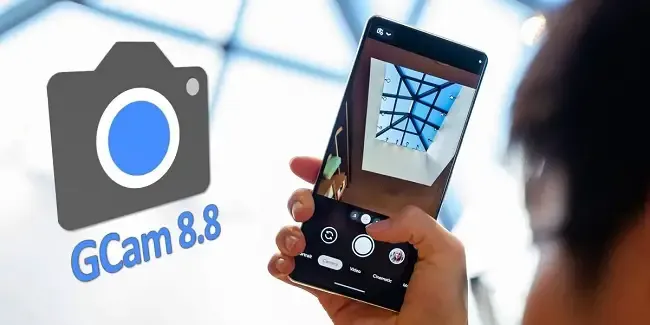
The best photography applications are found on Google Pixel smartphones, which begs the issue of whether they may also be used on other Android devices. The solution is found in GCam, a customized version of the Google camera that makes camera app capabilities available on mobile devices other than Pixel models. This includes the most recent 8.8 version of Shamim, a robust and extremely flexible program.
Modders that are committed to providing their own versions of the Pixel camera app in the form of GCam do likewise as Google keeps updating it. For the majority of devices, the most recent version, 8.8, offers a variety of fantastic possibilities. Iterations in the past, such as the one from BSG, were among the first to be made available but lacked the sophisticated tuning possibilities present in the app. Shamim’s 8.8 version, however, offers a lot more customization.
Gcam 8.8 unlocks the potential of your mobile
As soon as Google Camera 8.8 was released, the first modders started to release their own versions of the software, which is still under development. While one of the most well-known modders, Arnova8G2, has yet to release the current version beta, others are steadily updating their improvements. Shamim, whose GCam 8.8 is highly thorough, is one among them.
Shamim’s 8.8 update brings the app’s foundation up to date with the most recent Google camera version and includes a number of sophisticated settings. Interestingly, it also provides XML configuration options for every user. allowing anyone to quickly and easily customize the GCam to their device. Simply download the XML from the phone and apply it to the GCam settings to accomplish this.
On most phones, images taken using Shamim’s app have a tendency to be a little dark by default and occasionally have greenish tones. This was noticed after the app was installed on a Xiaomi handset. It is advised to go to Celso Azevedo’s website to find an XML file appropriate for a certain phone.
Once you download the file to the mobile device, move it to the “SGCAM/8.8.224/XML” folder. Shamim’s GCam will then automatically load the file upon starting and restart with the most appropriate settings for the phone. According to tests, this method works correctly, at least as far as a modified Google camera apk can function. If the XML does not work or requires more precise adjustments, users can delve into the advanced settings until they achieve their desired results.
Loaded with improvements
Shamim’s 8.8 stable version is available for download on Celso Azevedo’s webpage. As is often the case with GCam, the app may not function correctly on all Android devices. Users must try their luck and adjust the parameters as much as possible. It is also worthwhile to locate the configuration XML file for the mobile device installing the GCam, as this can save time and typically yields better results.
For its outstanding quality, the Google Pixel camera app is well-known. Some Android devices have been modified by modders. One such adaptation is GCam. For phones other than Pixels, Shamim’s 8.8 version offers powerful, highly customizable camera software. New and upgraded versions of this app constantly offer increased capabilities and customization choices.
For those interested in trying this camera app on their Android device, Shamim’s 8.8 stable version can be downloaded from Celso Azevedo’s webpage. Results may vary on different devices, but users can adjust parameters and find the right XML file for better results. GCam is constantly evolving, so Android users can expect even more powerful camera software in the future.
Overall, the GCam is a great option for anyone looking to improve the camera experience on their non Pixel Android device. And with the latest release, it’s easier than ever to configure the app to your specific phone. Why settle for a bad camera app? Google’s software is great – why not use it on your device? Give the GCam a try today.
Let’s have a look at some of the free apps and games on the Google Play Store. Now keep in mind that these apps typically have a price tag but are only free for a short period of time. This article will notify you of the special offers for paid apps that are completely free!
Please be aware that although these apps are advertised as being free at the time of publication, we are unable to predict when these offers will finish, so they may become paid by the time you read this post or attempt to download them. This is problematic because there is no predetermined duration for app promotions on the Google Play Store, and offers may end just as fast as they were placed without any warning.
If you come across an app or game on our list that piques your interest but you don’t need it right now, consider installing it and then deleting it from your device. This will save it to your app library, allowing you to install it again in the future when you need it. It’s a great way to take full advantage of short-lived promotions.
Android apps available for free for a limited time
Android apps for productivity and lifestyle
QR & Barcode Scanner Pro[4.8-stars / $1.99]: A separate app for those who do not want to settle for their stock QR and barcode scanner on their smartphones.
Speed View GPS Pro[4.9-stars / $1.49]: Track your speed, distance, time, location, and other metrics when you travel.
Electron Config Engine[4.4-stars / $2.49]: This is a good companion to have if you are learning chemistry.
Android games
Demon Warrior Premium[4.3-stars / $0.99]: Here is an anti-hero game, where you are in the race to be the best demon possible.
Burning Fortress 2[4.1-stars / $0.99]: Do you have what it takes to keep your fortress safe and sound from incoming enemies?
Rogue Hearts[4.1-stars / $0.99]: An isometric dungeon crawler that sees you survive using your gear, abilities, and wits.
Surface Trimino[4.1-stars / $0.99]: Your goal is to gain as much of the board’s surface as possible.
Monkey Go Happy[4.7-stars / $0.99]: Over 75 puzzles to solve, where you monkey around.
Missile Dude[4.7-stars / $1.99]: The more you progress, the bigger and more destructive your weapons get.
All apps on Google’s platform will be impacted by a new requirement that is being added to the Play Store. The goal of this new requirement is to provide people more control and privacy over their data.
All Google Play Store applications that currently support account creation will soon be required to support account deletion as well. The tech behemoth blogged about the new rule modification.
For apps that enable app account creation, developers will soon need to provide an option to initiate account and data deletion from within the app and online. This web requirement, which you will link in your Data safety form, is especially important so that a user can request account and data deletion without having to reinstall an app.
As the company mentions, the Data safety section in the Play Store already lets developers provide data deletion options. However, this move is meant to give users “an easier and more consistent way to request them.”
The developer will now have to remove the data connected to that account if you ask for your data to be erased. Hence, temporary account deactivation or deactivating will not be sufficient to comply with the new guideline. Developers must “clearly disclose those data retention procedures” if they need to retain data for justifiable purposes like fraud prevention or legal compliance.
It appears that the rule change won’t go into effect immediately, however. To give developers enough time to comply with the order, Google is rolling out the policy slowly.
As a first step, we’re asking developers to submit answers to new Data deletion questions in your app’s Data Safety form by December 7. Early next year, Google Play users will begin to see reflected changes in your app’s store listing, including the refreshed data deletion badge in the Data safety section and the new Data deletion area.
The company also notes that developers who need more time can file for an extension in Play Console until May 31, 2024.
Let’s start this brand-new week off by compiling a list of apps from the Google Play Store that are only accessible for a short period of time. You can find special offers for paid apps on this page without spending a dime.
Please be aware that although these apps are currently free, they may become paid by the time you read this post or attempt to download them because we are unsure of when these offers will expire. Because there is no predetermined duration for app promotions on the Google Play Store, bargains may be pulled just as quickly as they were published, which is terrible.
Here’s a good tip: If you see an app or game on our list that interests you but isn’t currently necessary, think about installing it and then removing it from your smartphone. This will add it to your app library so you may install it again whenever you need it in the future. It’s a fantastic technique to fully benefit from transient promotions.
Android apps for productivity and lifestyle
Pro MP3 Player QAMP[4.5-stars / $1.19]: Another versatile MP3 player just in case you want to spruce up your options.
Flashcards Club[3.9-stars / $3.99]: Create flashcards on the move with this app for easy teaching and learning.
500X Game Booster Pro[4.2-stars / $0.49]: Do you think your smartphone has what it takes to work to its maximum? Perhaps this app will be able to help you push out every single drop of performance.
Android games
Peppa Pig: Theme Park[3.9-stars / $3.99]: Let Peppa Pig keep your little ones entertained at a nearby theme park.
Concrete Defense 1940[4.0-stars / $0.99]: A tower defense title that takes place during World War II, so expect to see some old-school weaponry in action.
Shadow Knight: Ninja Fighting[4.4-stars / $0.99]: Do you want to earn the Shadow Legends title? Fight your way through hordes of enemies.
Defense Zone 3 Ultra HD[4.7-stars / $2.99]: Tower defense never looked so good on Android with this futuristic-looking title.
The Enchanted Worlds[4.4-stars / $2.99]: Find out uncle Henry’s secrets in this unique puzzle adventure title.
Angular Velocity Full[4.3-stars / $0.99]: In a physics-based world, the grappling hook is your only means of getting around. Will you swing correctly?
Whether you’re switching from an iPhone or an Android device, Google has improved data transfers from old smartphones to new ones for years. The information is mainly restricted to contact information, user account information, and default settings. As a result, third-party apps are no longer supported and require configuration. Thankfully, Xiaomi and Oppo have now made this possible on Android.
Certain iOS and Android apps currently allow for the movement of third-party data, but doing so necessitates synchronizing your account and putting the necessary data in the cloud. However, there are additional processes like downloading the appropriate apps and entering your security information again on a new phone. Several of these laborious processes are being eliminated by the most recent Chinese OEM program.
Third-party data transfer on Android
The three Android device makers, including Vivo, declared that they would simplify data switching and migration between their products, beginning in China. Incidentally, upon starting a transfer, data from third-party Android apps, such as recorded chat messages, will also be moved.
It was not stated which specific smartphones from these companies will be compatible or if there are plans to expand the availability of this feature to further nations and areas. To be safe, it might also only be available for the most recent models that make use of more advanced communication technologies like UWB (ultra wideband) or Bluetooth LE, on which Google’s Quick Pair is built.
It’s also unknown whether Google will later, maybe with Android 14, introduce a comparable feature to Android. Also, the feature appears to have been developed jointly by the three Chinese firms, so the search engine giant will probably need to contact other significant producers like Samsung to make it possible for a larger acceptance rate.
You’ve therefore chosen that you want to learn how to create Android apps. Great! Sadly, good intentions can only go you so far. It can be challenging to learn how to code. Sometimes even where to begin is a mystery! So, before you even begin, you undoubtedly have a ton of questions to address.
What programming language should you learn?
Where can you learn about your chosen language?
Once you’ve grasped the basics, where do you even start typing the code?
Lot of options
Selecting a language is the first step in developing Android apps. The distinctions among the various programming languages for Android can be somewhat subtle and complex.
But the primary characteristics and objectives of the tool to which the language is tied matter more than the language itself.
The languages you might consider learning for Android development include:
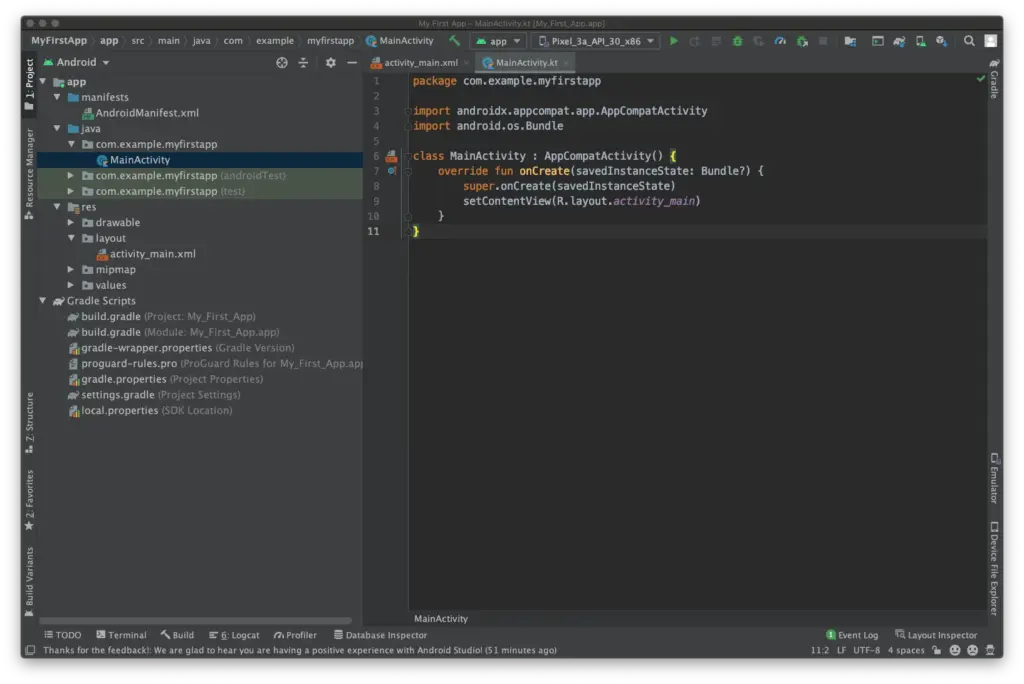
Java – Java is an official language of Android development and is supported by Android Studio. It has been an official language longer than Kotlin, and it is also popular outside of Kotlin development for many other purposes. Java and Android Studio have a steep learning curve, however.
Kotlin – Kotlin is another official Android language. It is similar to Java in many ways but is a little easier to get your head around. It is also now Google’s preferred language of choice, though it is not as widely used outside of Android Studio. This may make it slightly less appealing for those hoping to work as developers across numerous projects.
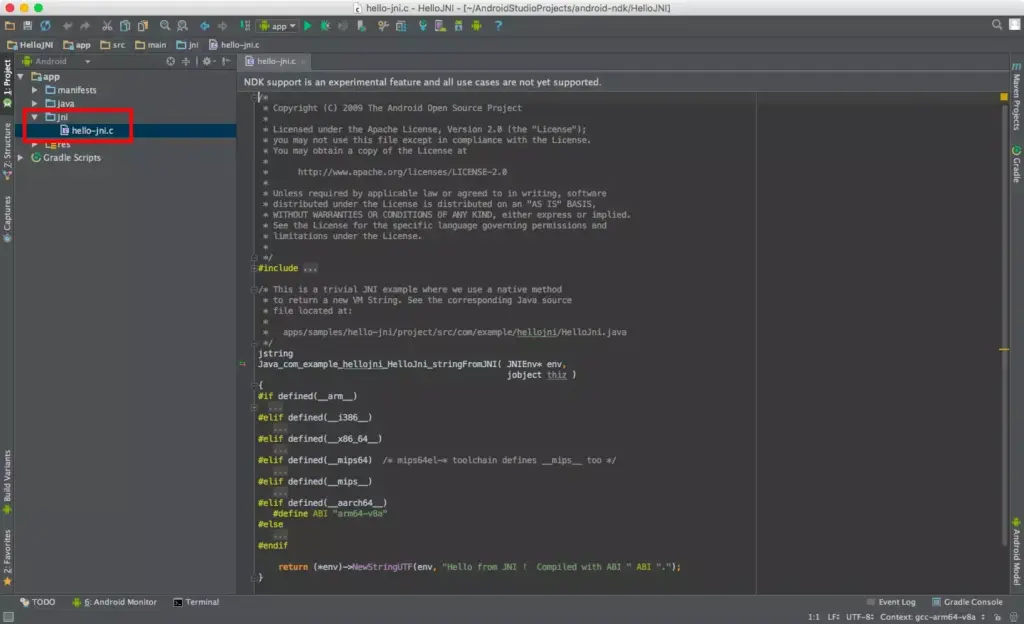
C++ — Android Studio also supports C++ with the use of the Java NDK. This allows for native coding applications, which can be handy for things like games. C++ is more complicated though, and this option is mostly only going to appeal to large, professional teams. C++ is also supported by Unreal Engine.
C# — C# is a more beginner-friendly alternative to C or C++ that obfuscates more code. It is also a little less difficult than Java, though the two languages are extremely similar. It’s supported by some very handy tools like Unity and Xamarin, which are great for game development and cross-platform development. C# with Unity is the best option for many mobile game developers.
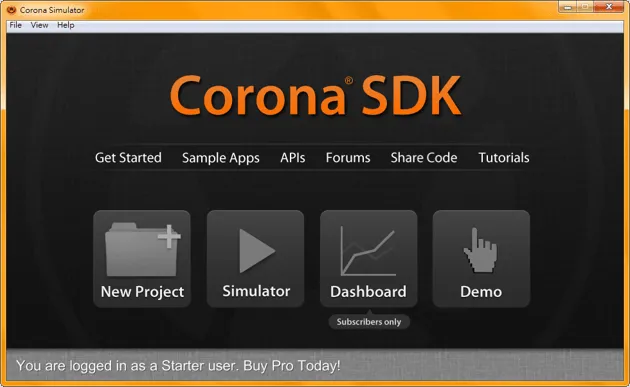
LUA (Corona) – Another cross-platform tool built on LUA. It massively simplifies the app-building process while stilling allowing you to call native libraries.
JavaScript (PhoneGap) – If you already know how to build interactive web pages, then you can use this knowledge with PhoneGap to build a more basic cross-platform app.
Java
Java is still one of the two authorized platforms for creating Android apps. This indicates that Google is quite supportive of it. Kotlin or Java were probably used to create the majority of non-game apps.
Downloading Android Studio is the best approach to start creating Android apps. Integrated Development Environment, or IDE, is the name of the piece of software in question. You will have everything you need in one location to get started thanks to the Android SDK that is supplied with it (a collection of tools designed expressly to make Android development easier).
Official documentation from Google will refer to Android Studio and Java (or Kotlin), and you’ll be able to find a lot of support online.
Sun Microsystems first introduced Java in 1995, and it is now utilized for a variety of programming applications. Even though Google has made it clear that it prefers Kotlin, many development teams have decided to continue with Java since it is so well-established and well-known.
Java is really difficult as well and not a fantastic “first language.” Once the Android SDK is included, things become much more challenging; a novice programmer may find it difficult to distinguish between Java and Android! Constructors, null pointer exceptions, checked exceptions, and other baffling concepts are all part of the object-oriented programming language known as Java.
You’ll use a lot of “boilerplate” code to do simple tasks, and it’s not very understandable. A rudimentary familiarity of ideas like Gradle, the Android Manifest, and the markup language XML is also necessary for development using this approach.
This is not meant to imply that Java is a terrible language; just the contrary. It is incorrect to label any language as “evil,” since the majority of Java’s drawbacks exist to promote clean code and serve our own interests.
Java is one of the most popular and versatile programming languages because of this, and many people adore it. Java is the programming language that employers are most interested in using, according to the PYPL (Popularity of Programming Languages) table.
Android Studio, has also been going from strength to strength over the last few years. Features like a visual designer and suggestions make the process a fair bit smoother, while advanced, powerful features are being added all the time to give developers access to things like cloud storage with easy implementation.
It’s worth getting aboard, even if this rapid progress does make it hard to keep up sometimes (especially if you’re some poor guy who writes about this stuff for a living!).
Kotlin
Kotlin has been an official language for Android development for a while now, and Google has even gone so far as to make it the preferred option for Android development. That said, with many development teams already deeply invested in Java, there are many who have chosen not to make the switch.
Kotlin utilizes the Java Virtual Machine much like Java does. Additionally, it fully integrates with Java and doesn’t result in any file size or performance issues. The distinction is that Kotlin is a more streamlined and simple-to-read system since it doesn’t require as much “boilerplate” code.
Additionally, it eliminates mistakes like null point exceptions and exempts you from using semicolons at the end of each line. In summary, it’s ideal if you’re just starting to learn how to design Android apps.
So, Kotlin is definitely an easier starting point for beginners, and the fact that you can still use Android Studio is a big plus. That said, it’s still a complex language in its own right, and you’ll still need to figure out an awful lot of extra “stuff” to build an Android app this way. There’s also the slight drawback of Kotlin being less widely used outside of Android development.
It’s safe to assume that the majority of readers shouldn’t choose this method of Android app development. The Android NDK’s C/C++ code can be supported by Android Studio (Native Development Kit). As a result, you’ll be creating code that runs natively on the device rather than on the Java Virtual Machine, giving you more control over processes like memory allocation. This can help you get more performance out of your Android device for demanding applications like 3D games. Also, it means you’ll be able to use C or C++ libraries.
However, it also tends to be much harder to set up, it introduces more bugs and it is less flexible. And if you did want to create a computer game, you’d probably be better off using a ready-made game engine such as Unity.
C#
Microsoft created C# with the intention of fusing the strength of C++ with the simplicity of Visual Basic. If you are familiar with one of these languages, such as Java, switching to the other should be rather easy. C# is garbage collected, just like Java, so you don’t have to worry about problems like memory leaks and manually freeing up memory. If this might simply be my own bias showing through, C# has a better syntax and is more current than Java. The best language for creating Android apps is frequently a matter of personal preference!
If you want a particularly easy and welcoming introduction to Android app development, I recommend the combination of C# and Unity. Unity is a game engine (meaning it provides things like physics calculations and 3D graphics rendering) and an IDE (like Android Studio). This is a free tool that makes it incredibly easy to create your own games – with just a few lines of code you can have a basic platform game set up in less than an hour. No exaggeration! And it’s perfectly powerful too, being the tool used by most game studios on the Google Play Store.
As a cross-platform solution, Unity will also let you port your games to other operating systems such as iOS and Windows. You can even make console games! On top of all that, developing in this way provides a very practical way to learn Object-Oriented coding (because the objects in this case actually are objects most of the time!). For those hoping to start a career in game development, learning Unity is an excellent first step.
The limitation? Unity is useful for creating games but sub-par for creating standard Android Apps, especially if you want to conform to Google’s Material Design language.
Not keen on Unity? Then you could consider Unreal instead (better graphics, less suited to mobile) or simplified game-makers like GameMaker Studio.
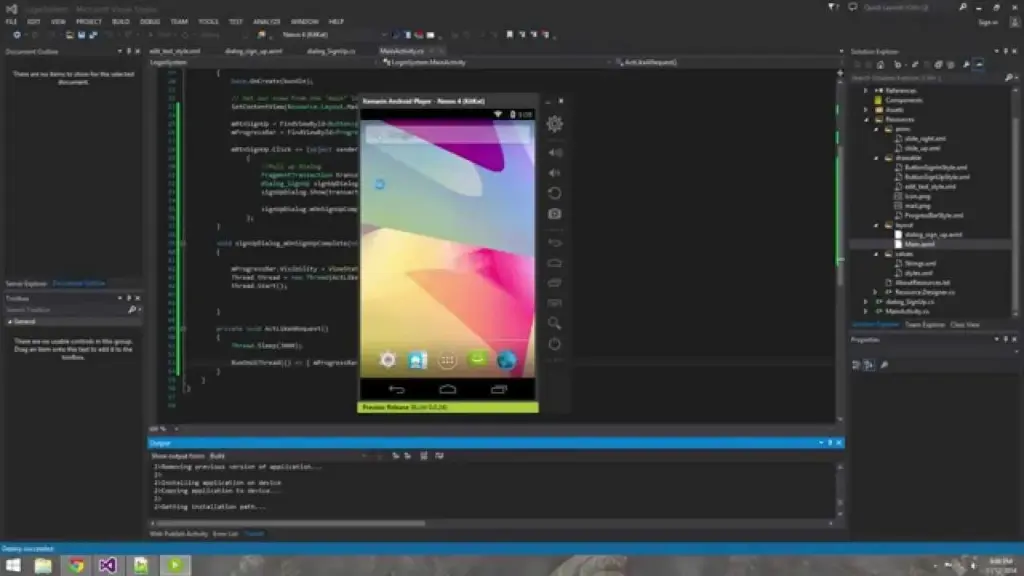
C# can also be used with Xamarin through Visual Studio. This is more akin to traditional Android development with the advantage of being cross-platform (one codebase for Android and iOS). For a complete beginner, this route is again a slightly obtuse entry point to Android development. But for a small company wanting to create an app for iOS and Android, it makes sense, and there’s plenty of support and information out there to help you out.
LUA (Corona)
Corona provides a different, far easier alternative for creating Android apps while still offering you a good deal of authority and control. It will be lot easier for you to code in LUA than in Java. Moreover, the Software Development Kit for Corona will make things much simpler. You can publish to several platforms and it supports all native libraries. It is mostly used for making games but can be used in a variety of other ways too. To enter your code, use a text editor like Notepad++; you don’t even need to build it before running it on an emulator. When the time comes, you’ll be able to use an online tool to develop and distribute an APK.
This does require basic coding skills, but it offers a nice and gentle introduction to the world of code. At the same time though, it is definitely limited in what it can accomplish and is only a few steps removed from getting into “app builder” territory. This is more useful for someone who wants to create something relatively simple and isn’t as concerned about developing their coding skills or becoming a pro. If you want to use features such as in-app purchasing, then you’ll need to pay a fee. The same goes for using native Android APIs.
HTML/CSS/JavaScript (PhoneGap)
PhoneGap is powered by Apache Cordova and essentially allows you to create apps using the same code you’d normally use to create a website: HTML, CSS and JavaScript. This is then shown through a “WebView” — a widget that displays a website within an app. PhoneGap acts like a bridge, allowing developers to access some basic native features of the phone or tablet such as the accelerometer or the camera.
This isn’t really “true” Android development though, and the only real programming will be JavaScript. For many basic tasks, it will do the job, but if you want to be able to claim true “Android app developerhood” (that’s a thing), then you should brave one of the other choices on this list.
Conclusion
So take your pick! Tere are plenty of options there for developing Android apps: from Java and Kotlin, to C, C#, and JavaScript!
Whatever you chose, you’ll find that learning to code is a tremendously satisfying experience and one that opens up a lot of options for you. The best choice will rely on your sensibility and your goals. And the best way to get started is by learning to code for Android. We hope that you now at least have a basic understanding of how to create Android apps, but if you still have any questions, feel free to post them in the comments below and our team and readers will try our best to respond.
How long have you been in love with your smartphone? The free apps of the week for this week are listed below if you feel the need to add a little more flair. We carefully examined the Google Play Store each week for apps that are free since you might wish to spice things up with your device.
These programs normally have a price, but for whatever reason, they are currently accessible to the general public for free for a brief period of time.
Every week, there will be two updates to this list of free apps: one at the start and one at the finish. The standard warning applies in this instance: although these apps were advertised as being free at the time of publication, by the time you read this post or use them, they may have changed to a paid version.
Since there is no set duration for the Google Play Store promotions on apps, they are difficult to spot and can be taken down from the list as quickly as they were added.
Temporary free Android apps on the Google Play Store
Android productivity/lifestyle apps that are temporarily free on the Google Play Store
Notes($5.49): Do you need yet another Notes app on your smartphone? Having more choices is always a good thing…
Rotation Control($0.99): Enjoy more flexibility when it comes to rotating your smartphone screen.
How Much Can I Spend?($2.99): A premium version of an app that helps you with your cash management. How apt.
Pro MP3 Player($1.19): A MP3 player that does not whip the llama’s ass…
500X Game Booster and GFX Pro($0.49): What are the odds of this actually working well, claiming to boost your smartphone’s performance.
Android mobile games that are temporarily free on the Google Play Store
Dungeon Shooter: Dark Temple($1.99): A FPS that lets you loot dungeons while ridding them of unsavory characters.
Paranormal Territory 2($0.99): Touted as a ‘test of courage’, this game aims to scare the crap out of you. Do you dare play it with the lights off while wearing a pair of headphones?
Dementia: Book of the Dead($0.49): An adventure game that explores the netherworld during medieval times.
A-2481($0.49): Another horror title where you try to uncover the horrors of military research.
World War 3 Tower Defense($0.99): This tower defense game peers into the future with unique weapons in the next world war.