Tag: android

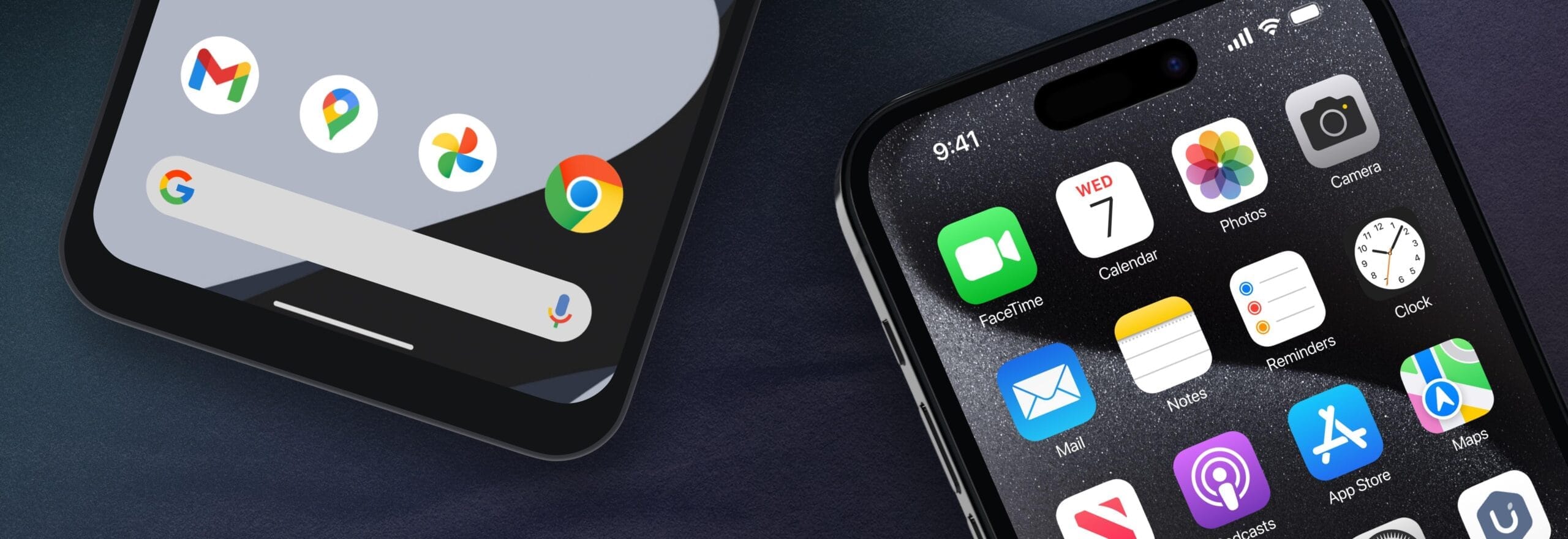
  • Limited-time freebies: discover top Android & iOS apps at no cost

    Limited-time freebies: discover top Android & iOS apps at no cost

    In today’s bustling app marketplace, finding quality apps and games without having to dip into your wallet can feel like striking gold. Developers often run special promotions where normally paid apps become free for a short window—an opportunity savvy users love to seize. Whether it’s a powerful productivity app, a fun puzzle game, or a creative tool, these limited-time offers are perfect for anyone looking to expand their digital collection without the usual price tag.

    A carefully chosen list of currently available, totally free Android and iOS apps and games may be found in this page. Every selection has distinct qualities that appeal to a variety of interests; there is definitely something here for everyone. But, be careful to move quickly because these deals could end at any time, and you’ll have to pay again to get access to these treasures.

    Check out the newest limited-time freebies below and take advantage of these exclusive offers while they last if you enjoy finding fantastic games and helpful apps without having to pay for them.
    android and ios apps

    Android

    Free Android Apps

    • Mockup for Everything ($8.99): This is a powerful t-shirt design app that lets you come up with personalized designs on the move.
    • Resize Image ($0.99): If there ever arises the need to resize your photos on your phone, then this app gets the job done with minimal fuss.
    • Chess Position Scanner ($4.99): I have a terrible memory, and trying to memorize the different positions in chess is tough. Good thing there’s an app for that!
    • Stroop Effect Test ($3.49): Challenge your brain and mind constantly by keeping it on its toes. 
    • Shortcut Maker ($0.99): Always a nifty addition to any phone if you want to create shortcuts to apps on the fly.

    Free Android Games

    • Space Shooter: Galaxy Attack ($0.99): It all boils down to your reflexes and how you are able to shoot all the incoming alien ships to protect your world.
    • Word Tower PRO ($0.49): Keep on creating new words to protect your tower from crumbling.
    • Tech Quiz Master ($2.49): Think you know everything about technology? Why not pit your knowledge against this game?
    • Avalar: Raid of Shadow ($0.99): An adventure RPG where you explore new lands and level up as you progress.
    • Rectangles Pro ($1.49): This is a game that tests your logical skills as you identify and tap four dots of the same color that form any rectangular shape on the grid. Best of all, this game also works for those who are colorblind. Talk about being inclusive!

    iOS

    Free iOS Apps

    • Password Cube ($1.99): Store, generate, and manage your passwords with minimal fuss.
    • Skywall – Ultra HD+ Wallpapers ($1.99): If you have always wanted to spruce up your iPhone’s background with high-resolution wallpapers, this is it.
    • Dr. Pet Play ($1.99): Being more educational than a brain-rotting game for kids, I’d say this is worth checking out if your little one has shown interest in being a vet.
    • Guestbook Go ($7.99): A digital guestbook for social events that does not need your supervision as the host? Count me in, it allows your device to let your guests take photos with Photo Booth, record videos, answer questions in Quiz Show, and write/draw, 
    • Time Calculator+ ($0.99): Ever wondered how long ago a particular event happened from today? Well, instead of manually hashing out the answer, let this app do the heavy lifting for you. 

    Free iPhone games

    • Animal Math Kindergarten Games ($7.99): Sporting over 100 math games to help your little ones remain glued to the screen, it offers an educational aspect while playing.
    • Pro Wrestling Manager ($3.99): While it is true that sports wrestling entertainment is scripted, it is still fun to watch. How about managing your own wrestlers?
    • Cut the Buttons ($1.99): A classic game that never gets old, and if you’ve never played it before, now is a good time to start.
    • WordWhile ($1.99): Think you have a fantastic collection of quotes in your head? This game will put that knowledge to the test.
    • Castle Ramble ($1.99): You’re a king, you own a castle, but there are invading pigs whom you need to fend off with your larger-than-life hammer! 

    Before you get started, a little reminder: Although these games and apps are free to download for a short period of time, keep in mind that some of them might have advertisements or require extra in-app purchases to unlock premium features or remove adverts. Although some features can improve your experience, using them may incur additional fees.

    To ensure you know exactly what to expect, always take a moment to check the program’s permissions and details in the app store. You can get the most out of your new apps and games and enjoy these free downloads without any unpleasant surprises if you keep an eye out for any potential advertisements or optional payments.
  • Change how notifications are displayed on Android lockscreen

    Change how notifications are displayed on Android lockscreen

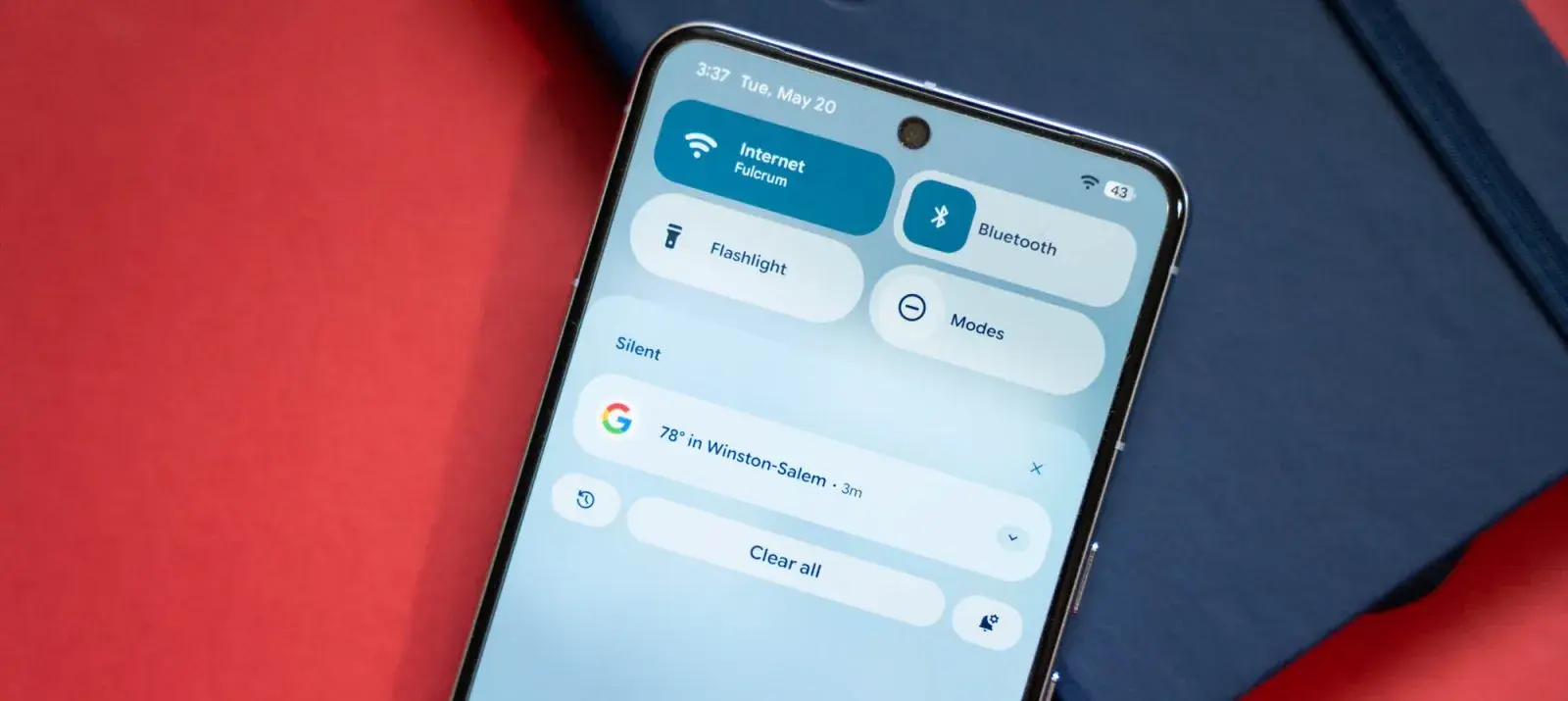
    With Android 16 QPR1, changes on how the how lock screen notifications are displayed came. The abrupt shift may be a little confusing if you’re not used to it. Now that the “compact” and “full” views are available, this guide will assist you in selecting the appropriate one.

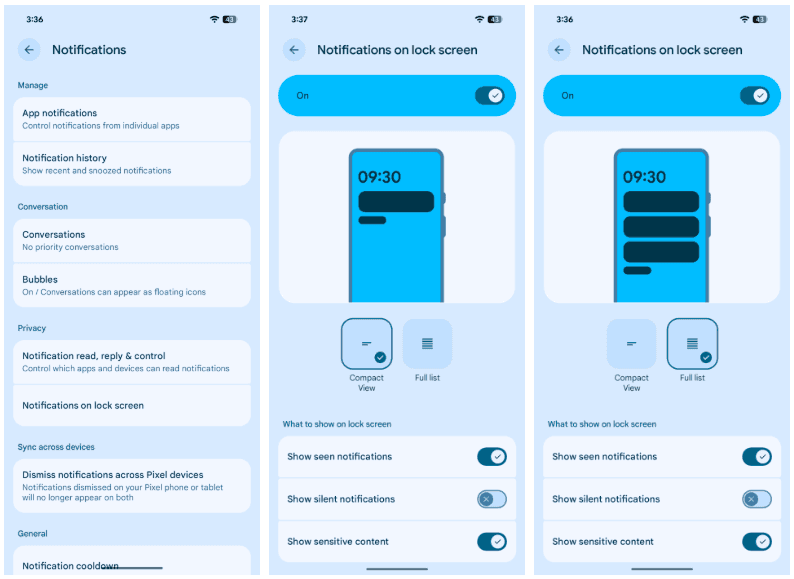
    In its new condensed layout, Google’s latest Android release by default shows notifications on the lock screen. merely one notification is displayed in the presentation; all other notifications are merely represented by app icons in the overflow menu below. The secondary compact portion receives alerts that are viewed.

    The only alternative way for alerts to appear on the Pixel’s lock screen is “full list.” Notifications are displayed in cards and in the order they were received. Although they can be enlarged, they do occupy a considerable lot of room.

    There are further choices as well. Notifications that are viewed without any action performed, such as unlocking the phone, are buried until the phone is unlocked when the “display seen notifications” setting is disabled. In order to keep the shade clear, the option to “Show silent notifications” will show alerts from apps that have been manually or automatically switched to silent.

    Here’s how to set your preferred view:

    1. On your Pixel running Android 16 QPR1 or later, head to settings.
    2. Find and tap Notifications.
    3. Hit Notifications on lock screen.
    4. Choose between Compact View and Full list.
    notifications list on Android 16

    Although you can always go back, for some people, full view can be the greatest choice. In contrast to compact mode, which only shows one notification at the top, all Pixel lock screen notifications are always shown in that mode. All of this depends on personal taste, but that’s what makes Android what it is!

  • Temporary free apps for iOS and Android

    Temporary free apps for iOS and Android

    We occasionally choose an intriguing selection of apps for fans of both Android and iPhone, which are often paid for but are currently accessible for free for a little period of time. Take advantage of these amazing discounts on games and apps to expand your device’s app library—just make sure to act quickly!

    We cannot guarantee how long these promotions will remain available on the Google Play Store or Apple App Store, so please keep in mind that they are just temporary. Therefore, it’s best to grab them while you can. Just a gentle warning to be mindful of any potential membership commitments, in-app purchases, and adverts that may accompany them.

    android and ios apps

    Even if you don’t require an app right away, install it if it piques your curiosity. It will be added to your app library and marked as “bought” as a result. After that, you may uninstall the app straight from your phone and get it back for free anytime you need it.

    Android Apps and Games

    Android Apps

    • Clock Widget ($0.99): Want to have the time told in words? This widget should do a decent job.
    • TriSolve ($0.99): See math from a different angle (heh!) with this app that helps calculate all things triangles for you.
    • QR and Barcode Scanner ($5.99): Here is a QR reader and barcode scanner code app that will make your life convenient. 
    • DogTok ($2.99): This app claims to be able to help you interact with your dog, but don’t expect to have heart-to-heart conversations with your furkid anytime soon.

    Android Games

    • Undead City: Survivor Premium ($0.99): You are a hero with many skills, and have a city full of hapless people to defend from waves of zombies. Can you do it?
    • Zombie Age 3 ($0.99): The zombie apocalypse is upon you, and you will need to have all your wits with you to survive.
    • Monster Killer Pro Shooter ($0.49): Choose from different characters with varying abilities to shoot monsters from a top-down perspective.
    • Live or Die: Survival Pro ($0.99): It is up to your wits and wisdom to survive an unforgiving environment.
    • Everybody’s RPG ($0.49): Go around, adventurer, recruiting more powerful heroes as you progress in the game to conquer new lands and defeat more dangerous enemies.

    iOS Apps and Games

    iOS Apps

    • Stickyboard 2 ($4.99): Imagine a giant board that lets you play with an unlimited number of sticky notes!
    • Breastfeeding Central ($1.99): A personal breastfeeding helper that you can ‘summon’ regardless of the time of the day (or night!) as it provides you with tips and tricks.
    • Amsterdam Audio Stories ($8.99): Walk through Amsterdam without actually being there, reliving the stories told over your headphones. 
    • Type Freely ($4.99): This app lets you get all your texts written freely, professionally, and shared as an HD image on social media.
    • Pool Calculator ($4.99): If you need help with calculations for your swimming pool or hot tub chemistry maintenance, then this app helps get the right balance on things.

    iPhone games

    • Word Search Creator ($0.99): Looking for a way to engage your audience? Why not come up with your own word search puzzle?
    • Color Lines 98 Bubbles Classic ($1.99): Connect color balls in a row to progress to the next level.
    • DEEMO ($1.99): A mobile rhythm game that requires you to have impeccable timing and a sense of rhythm.
    • Dead Rails ($6.99): If you love railroad networks, then how about navigating a train yourself through intricate rail networks while transporting passengers?
    • Tables – Multiplication Drills ($0.99): I have always been an advocate for practice makes perfect in math, and the same applies when it comes to mastering multiplication.

    We advise you to review the app’s details in the Play Store or App Store before downloading any of the aforementioned apps. This is crucial since some of these free apps can have unique features or drawbacks of their own.

    Both free and paid apps should be avoided since they could have unnoticed in-app purchases and adverts. This is especially important while downloading kid-friendly games.

    In the rapidly evolving world of mobile apps, several companies use cunning tactics to obtain your personal information. But tech buffs, don’t worry! We’ve compiled some crucial advice to help you safeguard your important data. Being selective about the permissions you grant the apps you decide to install is an essential first step.

  • This week’s Android and iOS temporarily free apps

    This week’s Android and iOS temporarily free apps

    Searching for the most amazing offers without breaking the bank? Each week, premium apps and games are available for free download for a brief period of time on both the Apple App Store and the Google Play Store. Whether you enjoy immersive games, lifestyle apps, or productivity tools, these short-lived sales are the ideal way to add to your collection without breaking the bank.

    The most recent free applications and games for iOS and Android are highlighted in this roundup. It’s a good idea to take advantage of these time-sensitive bargains before they revert back to their normal pricing. We’ll update the list frequently, so you won’t ever miss out on special offers for your preferred mobile devices.

    google play store apps

    Android apps and games

    Apps

    • English Verbs Pro ($3.99): If you want to up your verb game in English, this app will help nudge you forward.
    • Sharks 3D ($0.99): Want a live wallpaper without having to go to the aquarium? See sharks swimming around.
    • Color Wheel ($1.99): Any graphic designer or artist would definitely want to have this app at their disposal in selecting the most accurate color possible.
    • Rotation Control ($0.99): I guess this is useful for older devices that do not have built-in rotation controls.
    • 3D Anatomy ($2.99): This looks like a rather nifty app to help people get familiar with the human anatomy.

    Games

    • SPHAZE ($0.99): A sci-fi puzzle game that tickles your imagination while featuring great-looking graphics.
    • Empire Warriors: Tower Defense ($0.99): A tower defense game with cartoonish graphics that will surely keep you peeled.
    • Survival Island: Evolve Pro ($0.49): You’re marooned on an island and need to make sure you can do the necessary to remain alive.
    • Word Connect Crossword ($2.99): If you love words, then this crossword variant will keep you entertained. 

    iOS apps and games

    Apps

    • Haplo AI ($4.99): An offline chat AI that keeps your conversations private.
    • 3D Anatomy ($2.99): If you’re curious to get up close and personal with the human anatomy, then this app can help.
    • Sprite Pencil ($1.99): Come up with amazing pixel art using this app, although some patience is required. 
    • Magic Emoji ($1.99): You can call this an emoji kitchen, where various emojis can be merged to create a new one.

    Games

    • Peg Pals Pro ($1.99): A fast yet relaxing puzzle game that will keep your brain occupied during pockets of idle time.
    • Animal Math Games School Ed ($12.99): A game for the little ones who want to pick up math.
    • Cypher Vocab ($0.99): A GRE vocabulary game to help build up your word power. 
    • Fiete Choice ($2.99): Want to keep your little ones occupied? This game will garner their attention.

    The deals were active on the day of publication. Please leave a comment below if you come across an expired deal.

    Before downloading any of the aforementioned apps, we advise you to review the app’s details in the App Store or Play Store. Because some of these free programs might offer unique features or drawbacks of their own, this is crucial.

    Both free and paid apps should be avoided since they could have unnoticed in-app purchases and adverts. This is especially important while downloading kid-friendly games. In the rapidly evolving world of mobile apps, numerous companies use cunning tactics to obtain your personal information. But tech buffs, don’t worry! We’ve compiled some crucial advice to help you safeguard your important data. Being selective about the permissions you grant the apps you decide to install is an essential first step.

    Discover the wide range of free apps that are accessible on the iOS and Android operating systems, all while protecting your data.

  • HyperOS 3.0 brings new performance improvements and new visual styles

    HyperOS 3.0 brings new performance improvements and new visual styles

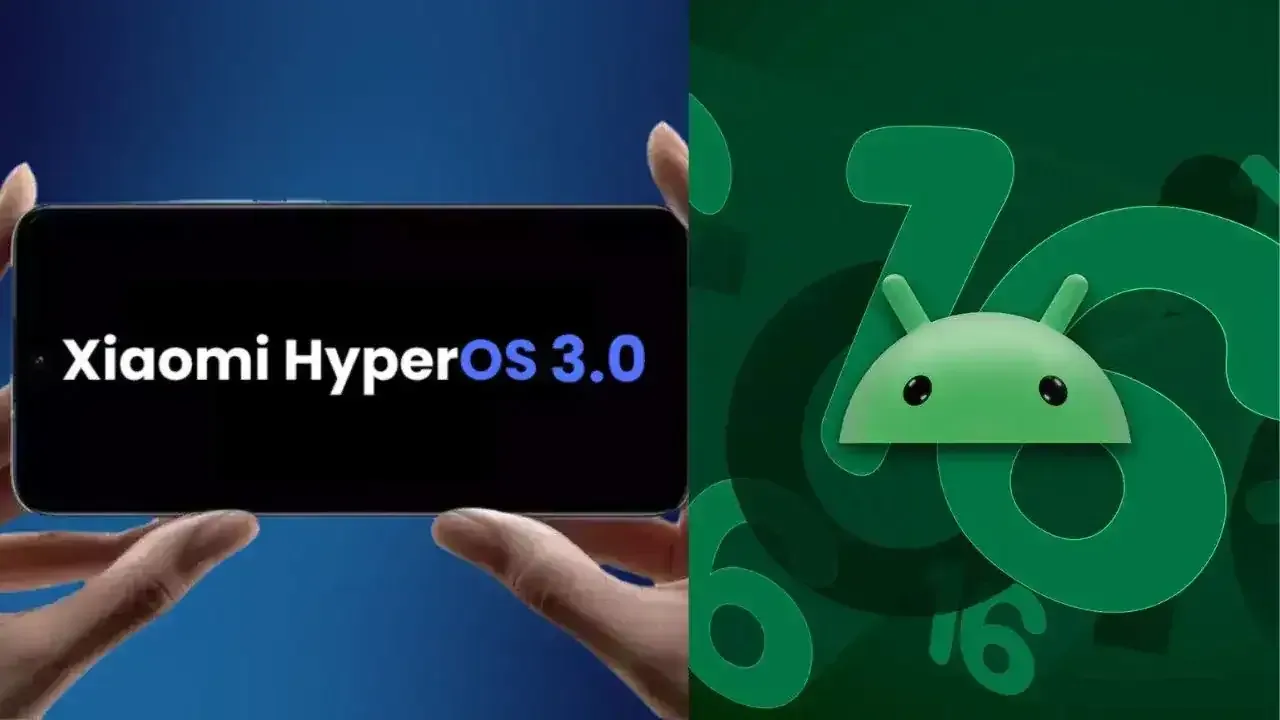
    Xiaomi disproved our assumption that the Android announcements for the month were over. With the release of HyperOS 3.0, the company’s most recent version based on Android 16, its mobile devices now include notable functional and visual improvements. The selected models will soon start beta testing, and in Q4, a broader public rollout is anticipated.

    What’s New in HyperOS 3.0

    hyperos 3.0 new icons and gallery

    HyperOS 3.0 is based on Android 16 and incorporates key enhancements from Google’s most recent Android release. Xiaomi, however, is doing more than just skinning Android; it is also incorporating its own significant features and design modifications into smartphones and tablets.

    New icons, super island, and a cleaner layout

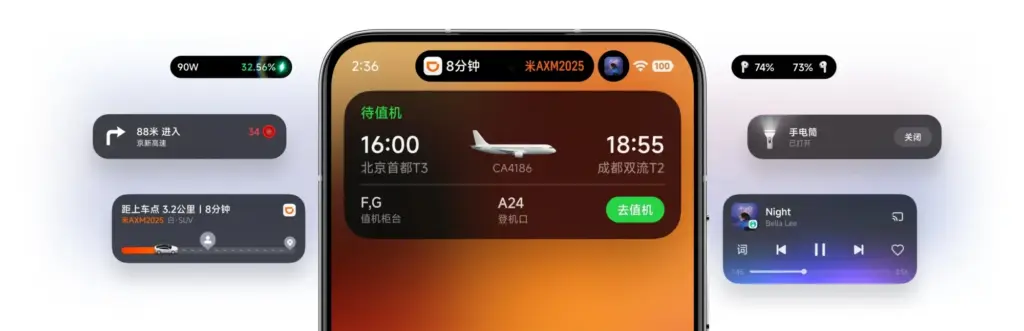
    Simplified app icons that mirror iOS and have square shapes with rounded sides give the UI a new look. A flatter, simpler look is also used for the quick settings and status bar. The dialer app is completely redesigned in China. Whether this will eventually be shipped to the global ROM is unknown.

    hyperos 3.0 super island

    Super Island, Xiaomi’s version of Google’s Live Updates and Apple’s Dynamic Island, is one notable feature. It displays dynamic overlays for media, notifications, and app activity on the front-facing punch-hole region. For more interaction, Super Island allows dragging and expanding, unlike its competitors.

    New lockscreen designs, like as animated effects that give still images movement, are powered by AI advancements. Additionally, there are more customizable choices for the home screen.

    New Gallery app and upgrades for tables

    hyperos 3.0 gallery app

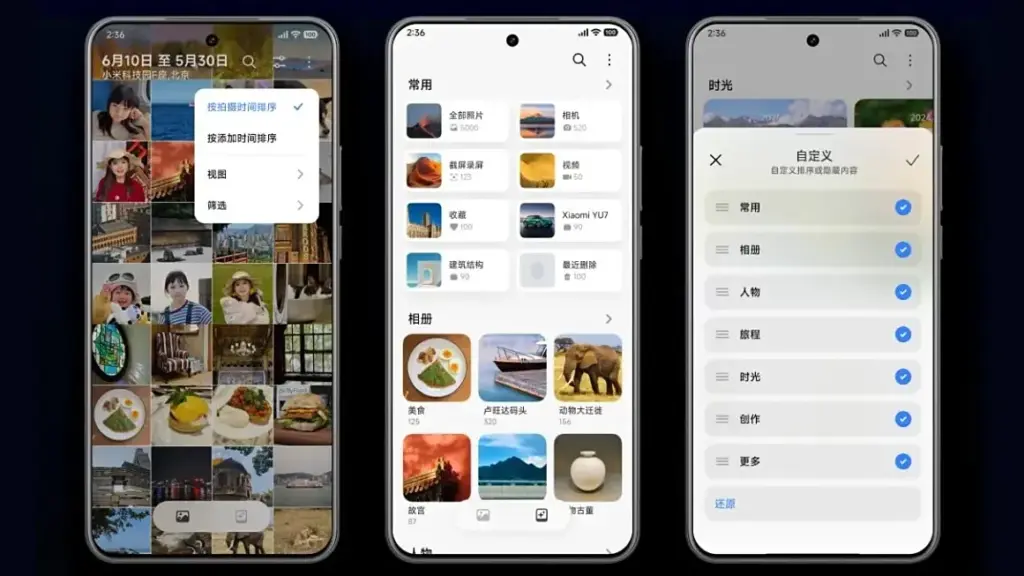
    All content, including albums and folders, now have a cleaner look and better search capabilities in the gallery app. Your furry pals’ pictures and videos are automatically arranged with a new pet album feature.

    Xiaomi adds adaptive window scaling and improved split-screen management to tablets. Enhancements in ultra-low latency and pressure sensitivity will be advantageous to stylus users.

    Significant performance and battery improvements

    HyperOS 3.0 offers significant performance improvements in addition to aesthetics. With over 100 new and improved animation effects, Xiaomi promises up to 21% less app latency and smoother system animations.

    According to reports, in-game frame rendering uses 9% less energy, video playback requires 10% less power, and gaming performance is 15% faster.

    xiaomi 15 with hyperos 3.0

    Xiaomi 15 5G

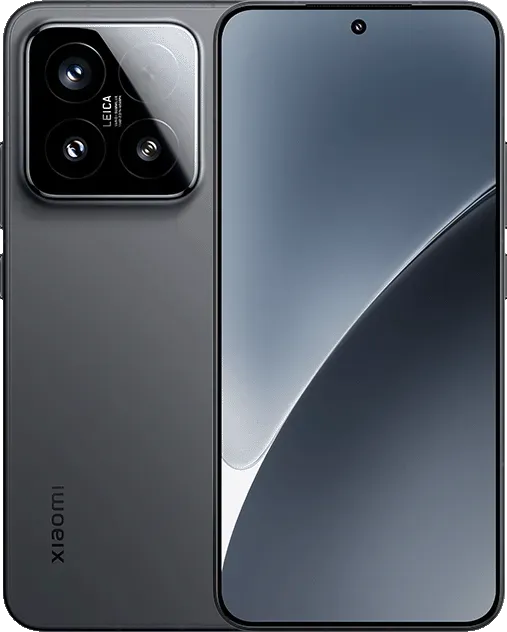
    The Xiaomi 15 features a 6.36-inch OLED display with a 1.5K resolution, a 120 Hz refresh rate, and a peak brightness of 3200 nits. The phone is built with an aviation-grade aluminum frame and has a compact design measuring 152.3 × 71.2 × 8.08 mm, weighing 181 g.

    Which Devices Get HyperOS 3.0 Beta?

    Xiaomi has stated that a few smartphones, tablets, and TVs will be available for the public beta, though it hasn’t yet disclosed the complete list of compatible devices. Please be aware that the gadgets on the list are Chinese versions; a different rollout timetable for models that are available worldwide will be revealed later.

    From August 29From September 17From September 30
    Xiaomi 15Xiaomi Mix Flip 2Xiaomi 14
    Xiaomi 15 ProRedmi K80Xiaomi 14 Pro
    Xiaomi 15 UltraRedmi K PadXiaomi 14 Ultra
    Xiaomi 15S ProXiaomi Pad 7Xiaomi Mix Flip
    Redmi K80 ExtremeXiaomi Pad 7 UltraXiaomi Mix Fold 4
    Redmi K80 ProXiaomi TV S Pro Mini-LEDRedmi K70
    Xiaomi Pad 7 ProXiaomi TV S Pro Mini-LED 2025Redmi K70 Pro
    Xiaomi Pad 7S Pro 12.5 Redmi K70E
      Xiaomi Pad 6S Pro 12.4
  • Temporarly free apps for Android and iOS – get them while they are free

    Temporarly free apps for Android and iOS – get them while they are free

    We offer you a variety of iPhone and Android apps that are typically paid for but are temporarily free. Take advantage of these savings on games and apps to add some diversity to your phone’s app store, but don’t wait!

    We only chose these applications since they are free right now! We are unable to guarantee that these limited-time offers will remain available on the Google Play Store or Apple App Store for very long, though. As a result, downloading them as soon as possible is advised. Just watch out for any possible subscription traps, in-app purchases, and advertisements.

    Even if you don’t require an app right away, install it if it piques your curiosity. It will be added to your app library and marked as “bought” as a result. After that, you may uninstall the app straight from your phone and get it back for free anytime you need it.

    Android

    Free apps

    • Sound Meter & Noise Detector ($3.29): The name says it all. Register sound levels wherever you are, with recordings, graphs, and statistics.
    • Bubble Level Pro ($2.79): Planning on hanging a new frame on the wall? Check if it is properly leveled.
    • Passport Photo: ID Photo Print ($5.99): Make photos appropriate for documents, remove backgrounds, choose the right dimensions, and more!
    • Fake Call Screen ($0.69): Create realistic call screens on your phone to get out of awkward situations.

    Free games

    • Grow Heroes VIP ($1.79): Evolve your fighters in this Idle RPG with charming retro graphics.
    • Epic Heroes War ($0.19): Hack and slash your way through the enemy hordes in this strategy-action-RPG.
    • Sudoku Master 2023 ($2.29): Challenge your brain in more than 5000 levels of puzzles.
    • ExtremeJobsKnight’sManager VIP ($0.79): Another Idle RPG. This time, collect and craft equipment in over-the-top battles.

    iOS

    Free apps

    • Videdit ($0.99): Edit your videos, apply effects, mix and match recordings for your next social media post.
    • Fotospot Road Trip ($3.99): Planning a road trip in the USA? Check this curated list of over 11,000 places across the country.
    • Magic Emoji: Merge two emojis ($1.99): Mix emojis like the Google keyboard to create funny stickers.
    • Medieval Madness Stickers ($0.99): Wanna try a different set of stickers? How about this collection of zany illustrations inspired by the Middle Ages.

    Free games

    • Pro Wrestling Manager ($3.99): Create and manage your professional wrestling association, with storylines, rivalries, and everything that made the “sport” popular in the past.
    • Kid Tarzan Bubble POP Shooter ($0.99): Save the baby animals in the jungle by popping balloons in this classic puzzle game.
    • ABC Star ($4.99): Instead of feeding your kid endless videos on YouTube, teach them the alphabet!

    As of the date of publication, the deals were active. Please share any expired deals you come across in the comments section below.

    We advise you to review the app’s details in the Play Store or App Store before downloading any of the aforementioned apps. This is crucial as some of these free apps can offer unique features or drawbacks of their own.

    Both free and paid apps should be avoided since they could have unnoticed in-app purchases and adverts. This is especially important while downloading kid-friendly games.

    In the rapidly evolving world of mobile apps, numerous companies use cunning tactics to obtain your personal information. But tech buffs, don’t worry! We’ve compiled some crucial advice to help you safeguard your important data. Being selective about the permissions you grant the apps you decide to install is an essential first step.

    Discover the wide range of free apps that are accessible on the iOS and Android operating systems, all while protecting your data.

  • 5 best Android file explorers to manage your phone like a pro

    5 best Android file explorers to manage your phone like a pro

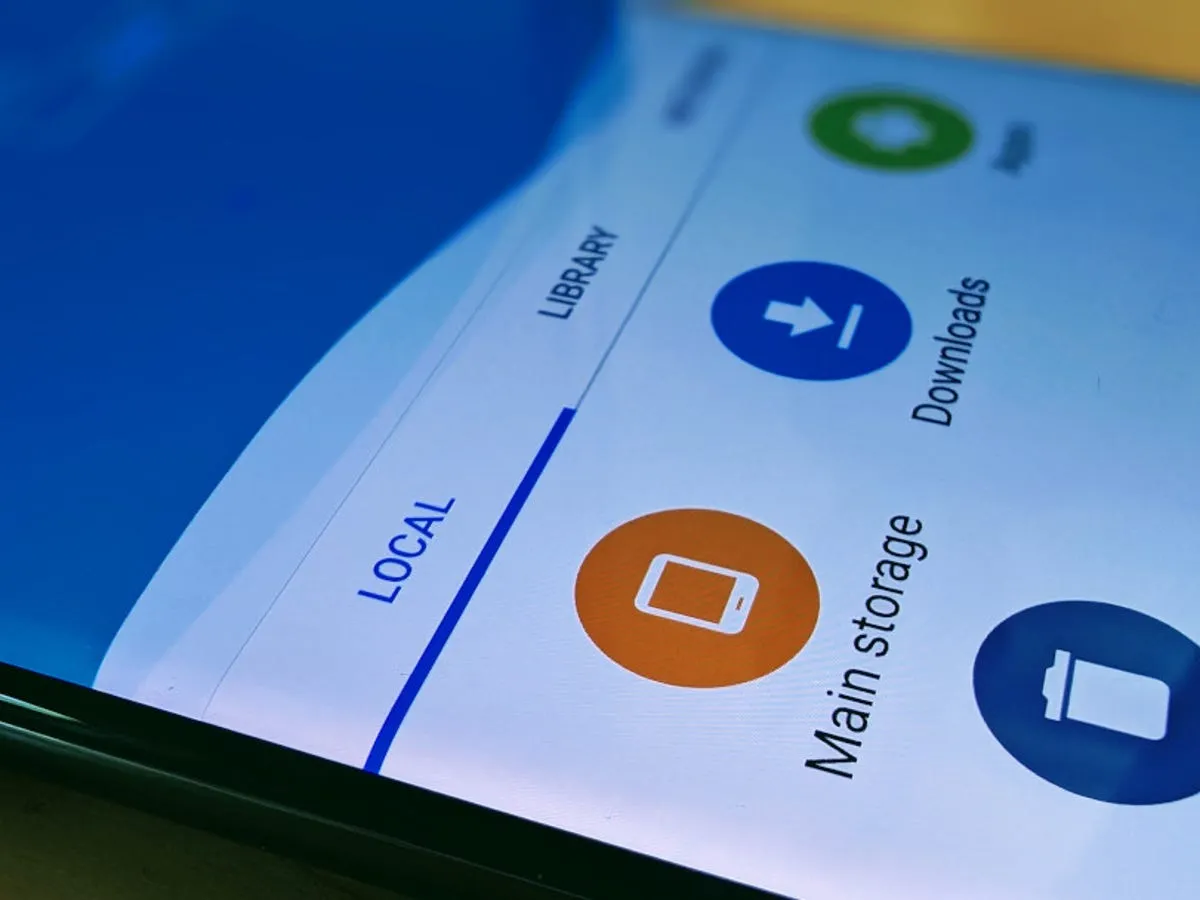
    Every Android smartphone requires a file explorer, and Google Files is the default choice for Pixel smartphones and many others. This lightweight, free tool has all the necessary file management features, and its simple layout makes it simple to examine information in folders or categories. It’s not the greatest file management tool for Android, but it’s an excellent method to get rid of duplicate files and keep your smartphone free of clutter.

    I’ve used a lot of Android file explorers over the years, and these are the greatest substitutes for Google Files since they have more sophisticated capabilities, a more appealing appearance, and more customization choices.

    Cx File Explorer

    With a variety of options to assist users in managing their decreasing storage space, Cx File Explorer focuses primarily on managing the storage on Android devices. Its analysis features, which show the location of storage hogs, the amount of storage used by each file type, and the largest files on the device, are its strongest feature. This feature is very useful to me because it makes it easier to organize the videos I have on my device for offline entertainment and flights.

    In addition to these features, Cx File Explorer has a simple layout with integrated image, video, and audio players, a handy info box showing available storage, and a small icon-based breadcrumbs menu.

    cx file explorer

    Cx File Explorer

    Cx File Explorer is a powerful file manager & storage cleaner app with a clean and intuitive interface. With this file manager app, you can quickly browse and manage the files on your mobile device,

    Mixplorer

    Mixplorer is more extensible and versatile than most file explorers. Having been in development for more than ten years, this is my favorite Android file management software.

    As implied by its name, Mixplorer may easily connect a wide range of storage options, including LAN, Google Drive, OneDrive, external media, internal storage, and other cloud services. You can view all of this info without launching specific apps once it’s set up. Additionally, Mixplorer is compatible with symlinks, which offer even more versatile file access options throughout Android.

    The customizable design of Mixplorer is another well-liked feature. Although the basic layout is easy to use, power users may install skins to customize the software, integrate add-ons for more functionality, and effortlessly navigate between services and folders using the tabbed interface. I adore Mixplorer’s dropdown breadcrumbs menu because it’s a clever design decision that allows you to quickly navigate back to a root folder without taking up much screen real estate.

    mixplorer Android file explorer

    Mixplorer

    MiX Silver is a bundle of MiXplorer file manager and Archiver, Image, Tagger and PDF add-ons as a paid app to support development of MiXplorer.

    Solid Explorer

    In the Android app market, Solid Explorer is likewise quite well-regarded. Solid, a high-end file management program, has many of the same functions as Mixplorer, plus a few extras. Its real-time folder size indicator, which refreshes each directory’s byte count as files are added or removed, is possibly my favorite feature.

    solid explorer

    Solid Explorer File Manager

    Solid Explorer is a file management app inspired by the old school file commander applications.

    Material Files

    Material Files appeals to both Files by Google consumers and power users by striking a mix between an intuitive user interface and a robust feature set. The app feels as though Google themselves could create it because of its heavy reliance on Material You. Its components permit automated Night mode activation based on system settings and take on the color scheme of your device.

    Even though it doesn’t offer the same expandability as Mixplorer, I would contend that its user interface is simpler to use. Nevertheless, the left-hand sidebar has all the information I require. Its dedicated Screenshots shortcut, which takes me straight to screenshots of the programs I frequently use for my articles, is something I really like.

    The program does not let you connect to and access files on Google Drive, for example, but it does enable external storage on physical media or local networks.

    material files file explorer

    Material Files

    An open source Material Design file manager. Lightweight, clean and secure. Follows Material Design guidelines, with attention into details.

    Fossify File Manager

    Finally, Fossify File Manager prioritizes simplicity and privacy and is open-source and free. With more security features, it most likely offers the experience that is closest to Files by Google in that regard. For example, it enables users to secure certain files and folders using a password or fingerprint.

    With multiple color choices for the overall theme, a tab that shows you which file kinds are using up space on your disk, and basic search and organizing tools, the user interface is very user-friendly.

    fosify file manager

    Fossify File Manager

    Tired of file managers that slow you down and invade your privacy? Unlock a lightning-fast, secure, and completely customizable experience with Fossify File Manager.

    Google Files is by no means an inferior app. In fact, Google has created a straightforward and dependable file management solution that ensures constant performance for all Android applications. Consider one of the five programs listed above, though, if you require a few extra capabilities, wish to access local network stores and cloud storage, or want to add protection to your crucial files.

  • Android 16 will be the final major upgrade for these Realme devices

    Android 16 will be the final major upgrade for these Realme devices

    Google launched Android 16 more than two months ago, yet no Realme phone has received the upgrade as of yet. However, the company claims to be one of the first to roll out Android 16 on premium phones. The deployment of mid-range and low-cost phones should also happen sooner than normal as a result.

    Realme plans to update a number of phones in various pricing ranges to Android 16. However, it will mark the end of significant upgrades for several of them. In other words, no significant updates beyond Android 16 will be available for those devices, which will continue to run the same OS for the remainder of their lifetimes. We’ve put together a list of these gadgets. Check it out below to see if you’ll soon need to upgrade your smartphone.

    Android 16 – the final major upgrade

    • Realme GT 5
    • Realme GT 5 240W
    • Realme GT 3
    • Realme 14x
    • Realme 14 Pro Lite
    • Realme 13 (LTE/5G)
    • Realme 13+
    • Realme 13 Pro
    • Realme 13 Pro+
    • Realme 12 (LTE/5G)
    • Realme 12+
    • Realme 12 Pro
    • Realme 12 Pro+
    • Realme 12x
    • Realme 12 Lite
    • Realme Narzo 70
    • Realme Narzo 70 Pro
    • Realme Narzo 70x
    • Realme Narzo 70 Turbo
    • Realme Narzo N65
    • Realme C75 4G
    • Realme C67 4G
    • Realme C65
    • Realme C65 4G
    • Realme C63 5G
    • Realme C63
    • Realme C61
    • Realme P2 Pro
    • Realme P1
    • Realme P1 Pro
    • Realme P1 Speed
    • Realme Note 60
    • Realme Note 60x

    The list was created using the update policy and previous rollouts as a guide. Even while it ought to be largely correct, I still advise verifying with the official announcement for the last word.

    realme devices

    When will the Android 16 update be released by Realme?

    A release date for Android 16 has not yet been disclosed by Realme. But the company has previously stated that the Realme GT 7 Pro will be the phone running Android 16’s Realme UI 7.0 update. Soon after, the GT 7 and GT 7T will join the celebration.

    Starting with the GT 6 and GT 6T, the company will introduce the stable Realme UI 7.0 to the GT 6 series after the Realme GT 7 series. Other Realme devices that qualify will thereafter progressively receive the update.

    The company has not commented on the Android 16 release, but given that competitors like Oppo, OnePlus, and Samsung are also doing so for their own Android skins, it must be getting ready for a Realme UI 7.0 beta release shortly. Realme is anticipated to begin hiring beta testers for Realme UI 7.0 in a few days, with the stable rollout probably starting in September.

  • 4 new features Pixel 10 series brings

    4 new features Pixel 10 series brings

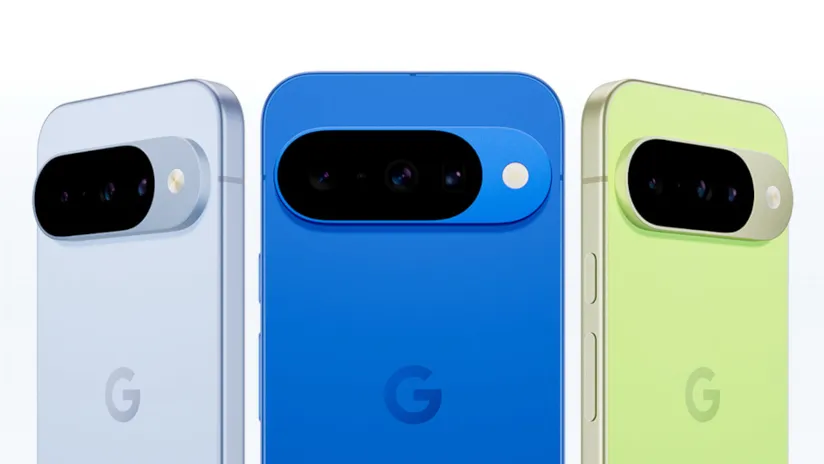
    The Google Pixel 10 Pro XL is a major advancement in smartphone design, emphasizing improved utility and more intelligent software integration over drastic hardware changes. This device is designed to improve your everyday interactions with features including wireless charging, camera technology, widgets, software automation, and performance improvements. We examine its top features below, highlighting the reasons the Pixel 10 series is unique in the crowded smartphone market.

    google pixel 10 pro

    Google Pixel 10 Pro with $200 Amazon Gift Card

    Order the new Google Pixel 10 Pro and get an Amazon Gift Card. Valid 8/20/2025 until 9/4/2025 at 11:59pm PT, while supplies last and subject to availability

    $1,199.00$999.00Amazon

    Qi2 Wireless Charging

    google pixel 10 qi2 wireless charging

    As the first significant Android smartphone to use the Qi2 wireless charging standard, the Pixel 10 series raises the bar for compatibility and ease of use. This method greatly increases charging efficiency by using magnets for exact alignment. It also makes it possible for MagSafe accessories to work seamlessly, so you can connect magnetic wallets, power banks, or stands without the need for additional cases or adapters.

    This integration increases the phone’s functionality while also making charging easier. The Qi2 standard makes sure your gadget is always charged and prepared to fit your needs, whether you’re at home, at work, or on the go. This feature is a unique addition to the Pixel 10 series since it combines efficiency and ease.

    Innovative Camera System in Pixel 10 series

    Screenshot 2025 08 21 at 11.59.2

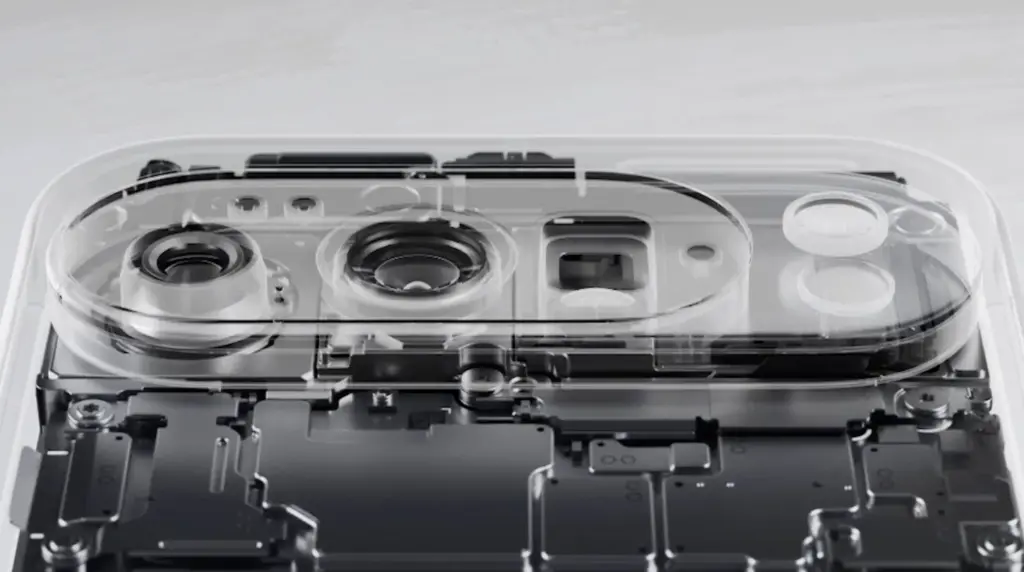
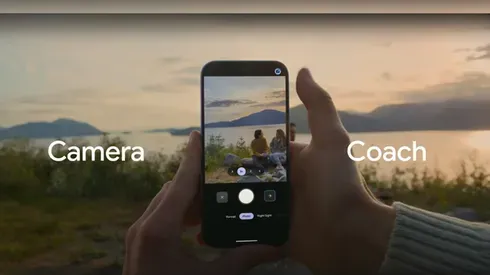
    With its Gemini Eye technology, the Pixel 10 Pro XL elevates smartphone photography to a new level. A “Camera Coach,” which offers real-time advice on lighting, framing, and other settings to help you effortlessly take professional-quality photos, is a feature of this cutting-edge device. Even when photographing distant scenes, the 11-megapixel telephoto lens and up to 20x super-res zoom guarantee that your images stay crisp and clear.

    The Gemini Eye technology makes it simpler to get amazing results, whether you’re a casual user taking short pictures or a photography fanatic striving for perfection. The Pixel 10 Pro XL is now a top option for those who are camera-focused thanks to these improvements, which demonstrate Google’s dedication to providing an excellent shooting experience.

    pixel 10 camera jpg

    Intelligent Automation with Magic Cue Assistant

    Intelligent Automation with Magic Cue Assistant

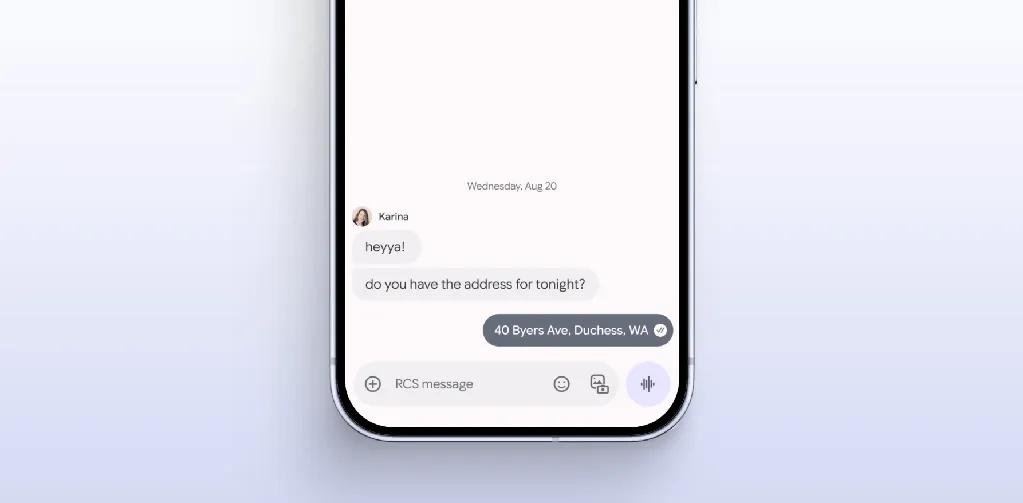
    The Magic Coup Assistant is another example of how Google is pushing the limits of software innovation. This tool automates repetitive chores and provides contextual recommendations by using machine learning to understand your preferences and behaviors. Magic Coup Assistant is made to make your life easier, from scheduling to changing settings according to your activity or location.

    For instance, it can remind you of crucial deadlines, recommend routes depending on traffic, or automatically turn off messages during meetings. The Pixel 10 Pro XL is a sensible option for people who value efficiency and convenience because of this degree of personalization, which shows Google’s commitment to making the experience more intuitive and user-friendly.

    Smarter Widgets with Gemini Space

    Gemini Space, a development of Google’s “At a Glance” function, offers a major improvement to the Pixel 10 Pro XL’s widgets. This utility adds real-time updates from programs like Docs, Maps, and Gmail straight to your home and lock displays. Gemini Space keeps you focused and organized without requiring you to launch numerous apps by giving you access to real-time information at a glance.

    Keeping track of appointments, managing hectic calendars, and remaining informed about critical activities are all made easier with this tool. It is a minor but significant innovation that improves the user experience overall because it might simplify your everyday routine. The Pixel 10 Pro XL provides a more user-friendly method of interacting with your smartphone with Gemini Space.

    google pixel 10 pro

    Google Pixel 10 Pro with $200 Amazon Gift Card

    Order the new Google Pixel 10 Pro and get an Amazon Gift Card. Valid 8/20/2025 until 9/4/2025 at 11:59pm PT, while supplies last and subject to availability

    $1,199.00$999.00Amazon

    The Google Pixel 10 Pro XL places a high priority on significant upgrades that boost speed and usability. This smartphone is made to satisfy the demands of the customers, from a more potent Tensor G5 chip to the cutting-edge Gemini Eye camera system and the creative Qi2 wireless charging. The experience is further enhanced by features like the Magic Cue Assistant and Gemini Space widgets, which provide a smooth fusion of convenience and functionality.

    These well-considered improvements show Google’s dedication to providing a feature-rich gadget that fits your needs. Whether you’re a photography enthusiast, tech enthusiast, or someone looking for a dependable and effective smartphone, the Pixel 10 Pro XL provides an alluring blend of innovation and usefulness.

  • Guide on how to clear cache of any Android device

    Guide on how to clear cache of any Android device

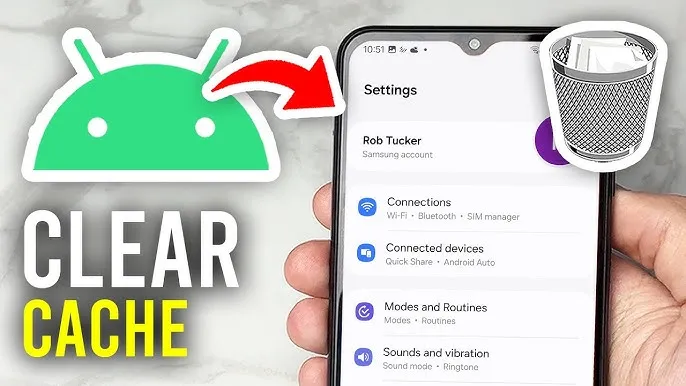
    Your device may slow down as a result of cached data that builds up, corrupts, or just becomes out of date over time. Although a targeted cache clear is a quick fix that doesn’t require updating hardware, restarting your phone frequently helps.

    In June, Google introduced Android 16 to Pixel devices and a few OEMs, bringing with it new Material You updates, performance enhancements, and other improvements. Clearing the cache on your Android phone or tablet can give it a new boost and free up some storage space if you want to attempt this update but are concerned since you’ve observed it already feels too sluggish.

    Although each manufacturer may have somewhat different processes, the overall procedure is the same.

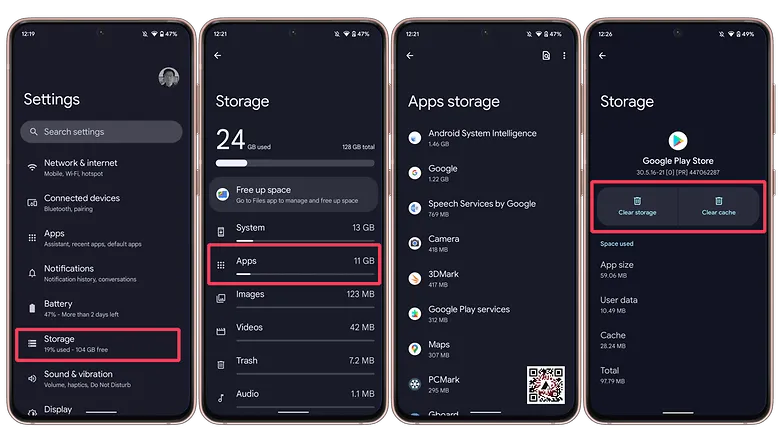
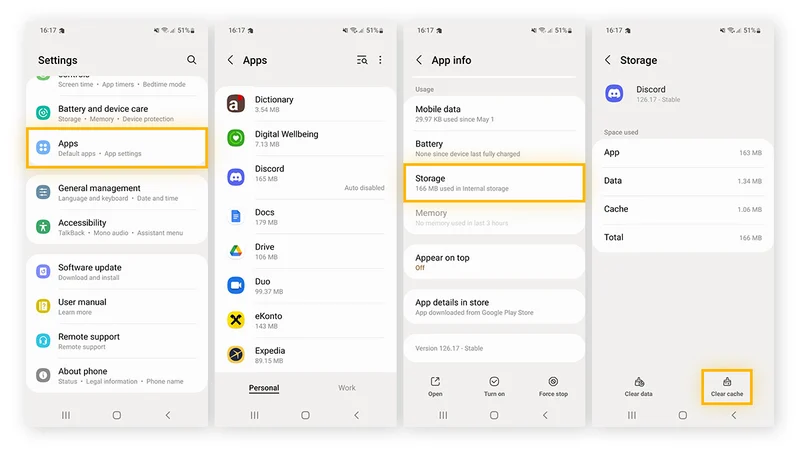
    Navigate to Storage in Settings, then select Apps. If there isn’t a specific Apps entry, you may easily locate it in Settings by using the search bar.

    Some Android devices now offer a “Free up space” option through the Google Files app in the Storage menu as well. This can be used by opening Files, selecting Clean from the three-line menu in the top-left. Examine each recommendation (such as duplicates, huge files, and useless apps), then follow the instructions to remove any files you no longer require.

    clear cache android

    (Avoid system services) press an installed app, choose “Storage and cache,” and then press “Clear cache.” Tap “Clear storage” only if you wish to fully reset the application.

    Clear cache for individual apps

    Do the same with any programs that consume a lot of storage. Data-hungry hogs like social apps and streaming services are a good place to start.

    Additionally, some Android versions make it simple to view which apps are using the most space when you’re in the Apps menu. Just choose Sort by Size from the three-dot menu that appears in the upper-right corner.

    Note: There may be an integrated clear-all-cache feature on some Android phones. There should be a ‘Select All’ button at the top under Settings > Storage > and App Cache.

    How to clear cache from Chrome

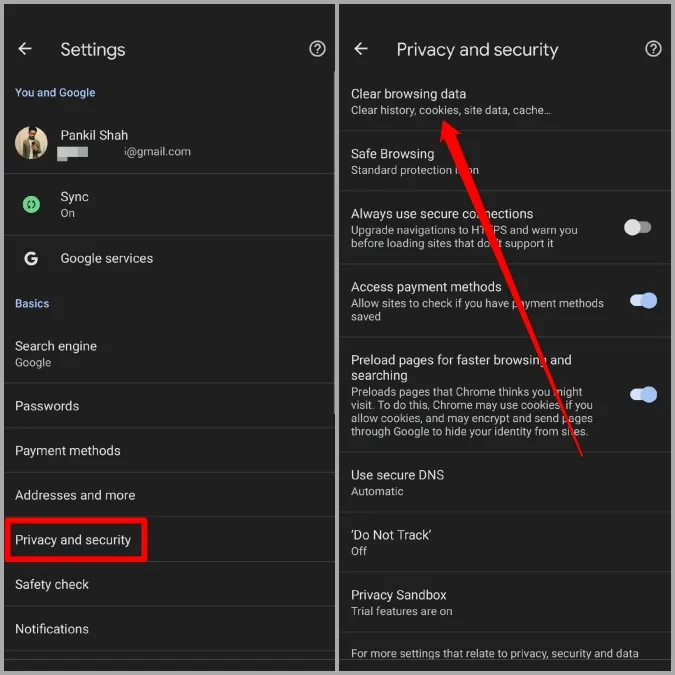
    Open Chrome, tap the three-dot menu Settings > History > Clear browsing data.

    Check “Cached pictures and files” (as well as anything else you want to delete) after choosing the time frame. Next, select “Clear data.”

    Every choice describes its function and how it impacts your experience. removing cached files and pictures may result in Chrome loading images more slowly the next time you visit a website, while removing cookies and site data will log you out of many or all websites.

    In recent versions of Chrome for Android, hitting the menu button brings up the Clear Browsing Data option. When you choose this, a pop-up window requesting that you delete your browsing history from a certain time frame will show up. Selecting More Options will bring up the Browsing Data screen, where you can pick which data to remove and what time period to use.