Blog

  • How to configure and use Android’s ADB wirelessly

    How to configure and use Android’s ADB wirelessly

    ADB is a command-line tool that makes it easier for your Android smartphone and a PC to communicate. The tool has many more applications besides only rooting and updating Android ROMs (more on this later).

    The traditional method for using ADB entails connecting your Android device to the Desktop through USB. But there is an alternative. Let’s examine at some wireless ADB usage options.

    Set up ADB

    You can skip this step if ADB has previously been configured on your Android and PC. If you haven’t, remember that everything is new to you!

    You must first download and unzip the Android SDK Platform Tools from the Android developer website before you can use ADB on your machine.

    By executing the command: brew install homebrew/cask/android-platform-tools, Mac users can use Homebrew to install ADB.

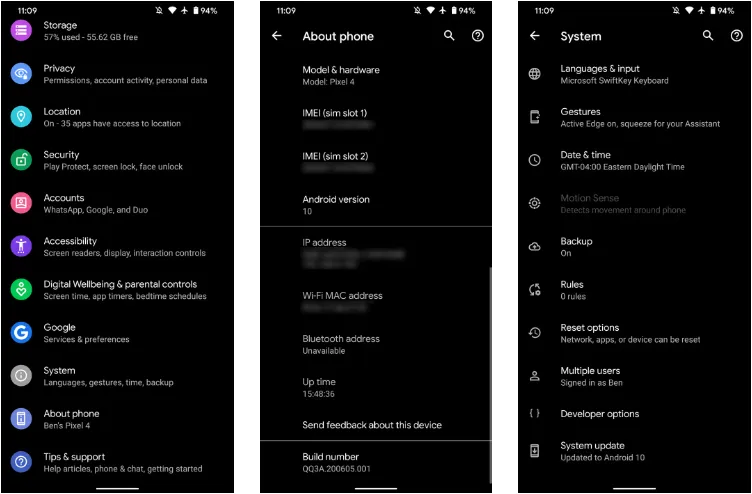
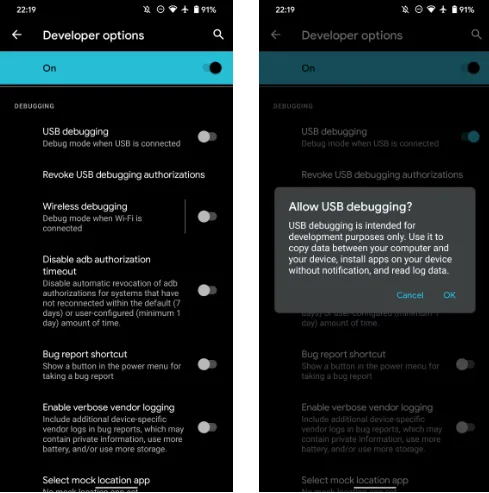
    Before you may connect your Android smartphone using ADB, you must first enable USB debugging in the developer settings.
    wireless adb setup

    Go to Settings > About phone then tap on the Build number several times. Once again, go to Settings > Developer options, then toggle on USB debugging.

    Once that is finished, use a USB cord to connect the Android device to your Desktop. You must utilize a cable initially even though we’re going to set up a wireless connection. The USB debugging prompt that will display on your Android device should always be accepted.
    enable usb debugging for ADB

    Open the command line or Terminal and navigate to the Platform Tools folder.

    If you’re on Windows, you can head to the downloaded Platform Tools folder and open the PowerShell window by pressing Shift and right-clicking anywhere in the folder, and selecting Open PowerShell Window here. On a Mac, open the Platform Tools folder and go to Finder > Services > New Terminal at Folder.

    If you’re using Windows, use the command adb devices into the command prompt. All instructions should be prefixed by a dot-slash on Linux and Mac, so it would be./adb devices.

    You should be able to find your device’s serial number in the list of attached devices if everything functions as it should.
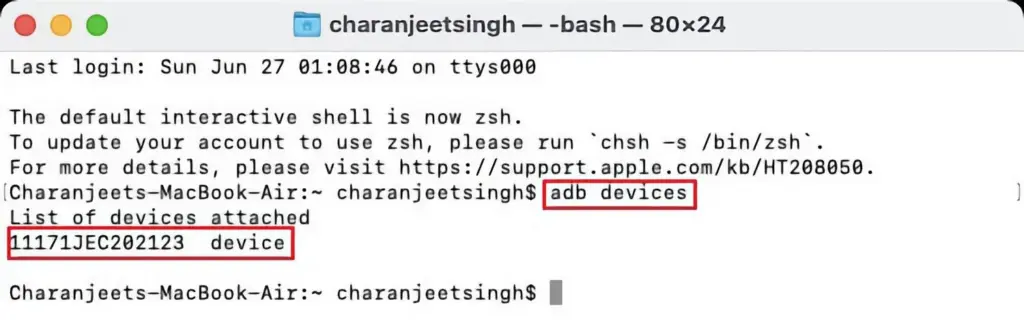
    adb devices

    How to use Android wireless ADB

    The main topic at hand right now is how to connect your Android smartphone wirelessly to an ADB server. To use ADB wirelessly after configuring it and connecting your Android device to your PC, follow the instructions below.

    1. Type adb tcpip 5555 in the command line or Terminal and press Enter.
    2. Find your phone’s IP address in Settings > About Phone > Status > IP Address.
    3. Back in the command line or Terminal, type adb connect [your Android device’s IP address].
    4. Finally, press Enter again.

    The Android device should now be connected to ADB over a wireless connection. You can safely remove the USB cable.

    Is wireless ADB not working?

    Try installing Minimal ADB and Fastboot from the XDA Forums if your Android device won’t connect to Windows using ADB (you are getting errors in the command line). The required Android drivers are installed by this package, which may also assist you in fixing any command line issues.

    You can also utilize WebADB, which transfers all of ADB’s capabilities to your web browser. You can use the online tool to use ADB via Wi-Fi. In other words, you can completely forego installing ADB.

    What is ADB used for?

    The idea that Android ADB is solely helpful when rooting Android is a common one. It, however, is merely one of the several uses for the Android Debug Bridge.

    For example, you can use an ADB command to delete pre-installed apps from your Android device that is not rooted. Unwanted apps may be tough to remove from some Android cellphones, but ADB can assist.

    Without needing to root your device, you may also mirror your Android screen to a Desktop using the command line utility. This can be done using the free program Scrcpy. The tool’s wireless ADB connection results in extremely fantastic performance.

    Is safe to use?

    Using the utility won’t be a problem if you are familiar with ADB commands. There are risks involved with using ADB, especially if you are new to this field. If you are trying to root your device, using the incorrect commands could result in problems or, at worse, brick your phone.

    Although your Android smartphone won’t have any problems once you set up wireless ADB, you should always keep a backup of your data in the cloud or on an external storage device as a safety measure.

    No cables anymore

    Although though you first require a USB cord to set up ADB, the ability to utilize it wirelessly is incredibly useful. It allows you to walk around more freely while you work, allows you to simultaneously charge your phone at full speed, and is just much more practical in general. It’s definitely worth a go if you use ADB.
  • Evolution X 7.9 for the Google Pixel 6, 6 Pro & 6a – oriole – raven – bluejay

    Evolution X 7.9 for the Google Pixel 6, 6 Pro & 6a – oriole – raven – bluejay

    Modified versions of the Android operating system known as “custom ROMs” are produced by independent developers or communities. Beyond what is offered by the software from the original manufacturer, these ROMs provide a distinctive and personalized user experience.

    What is a custom ROM

    Custom ROMs are frequently used by users to enhance performance, unlock new features, or prolong the life of their devices.

    The ability to alter a device’s design and functionality is one of the main reasons people prefer custom ROMs. Themes, user interfaces, and the installation of custom kernels and changes to improve performance and battery life are all examples of customization possibilities. These ROMs frequently provide more device control, enabling users to customize their experiences to suit their preferences.

    The flexibility custom ROMs offer in terms of software upgrades is another important benefit. Official updates for older or less well-liked devices are occasionally delayed or completely abandoned by manufacturers and carriers.

    On the other side, custom ROM developers keep supporting these devices, giving customers the most recent versions of Android long after the official support stops. Users can now take advantage of new features and security updates that they wouldn’t otherwise have access to.

    evolution x

    Evolution X

    Popular custom ROM Evolution X, which is based on the Android operating system, strives to offer a distinctive and feature-rich user experience. Evolution X, created by a passionate community of enthusiasts, offers a wide range of customization options, performance upgrades, and an easy-to-use interface, all while adhering to the fundamental values of stability and dependability.

    Evolution X is fundamentally based on the most recent Android releases, featuring Google’s most recent features and security updates. By doing this, customers are guaranteed access to the most recent features and security measures provided by the Android ecosystem. Even if official manufacturer updates are no longer available, customers can still benefit from a new operating system on their compatible devices with Evolution X.

    Another trait of Evolution X is performance optimizations. The ROM includes a number of adjustments and improvements meant to increase the device’s responsiveness, speed, and battery life. Users can fine-tune the performance of their device to suit their preferences by using sophisticated performance settings like undervolting or overclocking. Additionally, Evolution X makes the most of system resources to guarantee fluid animations and seamless multitasking.

    Evolution X also places a strong emphasis on privacy and security. The ROM includes built-in privacy features, such as advanced permission controls and privacy settings, to give users more control over their data and app permissions. Furthermore, Evolution X incorporates the latest security patches and updates to protect users from potential vulnerabilities and ensure a secure browsing and app experience.

    Features lists

    Themes
    
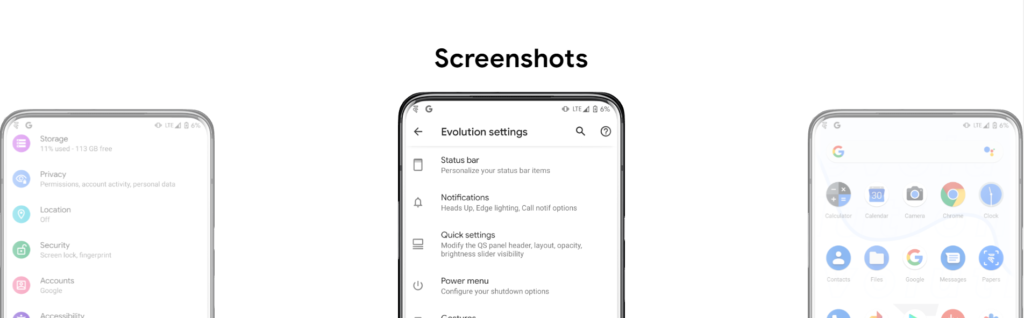
    - Theming Settings (Style, Color Source, Accent Color, Accent Background, Background Color, Luminance, Chroma, Tint Background)
    - Custom Themes (Black, Clear, Vivid, Paint In The Snow, Espresso)
    - Dark Theme Schedules
    - Lock screen Clock Fonts (16 Fonts)
    - Headline/Body Fonts (53 Fonts)
    - SB Icon Packs (10 Styles)
    - SB Signal Icon Packs (14 Styles)
    - SB WiFi Icon Packs (10 Styles)
    - System Icon Shape Packs (16 Styles)
    - 3 Button Navbar Styles (10 Styles)
    
    Status bar
    
    - Status Bar Lyrics
    - Clock Styles (Right, Center, Left)
    - Clock & Date Configs (Auto Hide, Hide Duration, Show Duration, Seconds, AM/PM, Font Size, Date Position/Case/Format)
    - SB Logo Pack (20 Styles, Right/Left)
    - Network Traffic Indicators
    - Battery Icon Styles (19 Styles)
    - Battery Percent (Hidden, Inside Icon, Next To Icon)
    - Battery Bar (Thickness, Alignment, Blend Colors, Reverse Direction, Colors, Animation)
    - System SB UI Tuner
    - Data Disabled Icon (On/Off)
    - Old Style Mobile Data
    - 4G Instead Of LTE
    - Roaming Indicator
    - WiFi Type Icon
    - Colored Icons
    - Notification Count
    - Bluetooth Battery Status
    - Mic/Camera Privacy Indicator
    - Location Privacy Indicator
    - Media Projection Privacy Indicator
    
    Notifications
    
    - ReTicker
    - App Colored Background For Reticker
    - Heads Up (Time Out, Importance Threshold, Less Boring, Stoplist/BlockList)
    - Force Expand Notifications
    - Notification Sound If Active
    - Kill App Button
    - Blink Flashlight For Incoming Call (When Ringing, When Silent, When Entierly Silent, Always)
    - Blink Flashlight For Notifications
    - In-Call-Vibrations (Connect, Waiting, Disconnect)
    
    Quick Settings
    
    - Clock
    - Clock Font Size
    - Date
    - Battery Style (15 Styles)
    - Battery Percent Location (Hidden, Inside Icon, Next To Icon)
    - Battery Estimates
    - Secure QS Tiles Requires Unlocking
    - Quick QS Pulldown (Disabled, Right, Left, Always)
    - Brightness Slider (Never, Expanded, Always)
    - Brightness Slider Position (Top, Bottom)
    - Auto Brightness Icon
    - Hide Labels
    - Label Text Size
    - Smart Pulldown
    - Vertical Layout
    - Columns In Portrait (2-5)
    - Columns In Landscape (2-6)
    - QS Tile Animation Style (3 Styles)
    - QS Tile Animation Druations (3 Speeds)
    - QS Tile Animation Interpolator (8 Styles)
    - Vibration On Touch
    - Vibration On Touch Duration
    - QS Footer Warnings
    - Show Data Usage
    - User Account Icon
    - Edit Icon
    - Power Menu Shortcut
    - Running Services Shortcut
    - Settings Shortcut
    - Clear All Button (10 Styles, 5 Backgrounds)
    
    Power Menu
    
    - System Settings (Hold PWR Assistant + Hold Duration)
    - Disable Power Menu On LS
    - Power
    - Restart
    - Advanced Reboot Options
    - Screenshot
    - On-The-Go Mode
    - Settings
    - Lock Down
    - Emergency
    - Device Controls
    - Users
    - Logout
    - Bug Report
    
    Gestures
    
    - System Settings
    - Quick Tap
    - Volume Button Playback Control
    - Swipe To Screenshot
    - Brightness Control
    - PWR Button Torch
    - Double Tap To Sleep Status Bar
    - Double Tap To Sleep Lock screen
    - AOSP Gestures
    - Pill Length
    - Pill Radius
    - Hide IME Button Space
    - Back Gesture Animation
    
    Lock screen
    
    - Edge Light
    - Always On Fingerprint
    - UDFPS Icon Picker (55 Styles)
    - UDFPS Animation Picker (38 Styles)
    - Lock screen Charging Info
    - Hide Status Bar
    - Hide QS During Secure Lock screen
    - Media Cover Art (5 Filters)
    - Ripple Effect
    - Fingerprint Authentication Vibration
    - Fingerprint Error Vibration
    
    Buttons
    
    - Navigation Bar
    - Compact Layout
    - Invert Layout
    - Show Vol Panel On Left
    - Per App Vol Control
    - On-Screen NavBar
    - Reorient Volume
    - Volume Rocker Wake
    - Keyboard Cursor Control
    - Alert Slider Notifications
    - Alert Slider Pulse
    - Block Alert Slider In Pocket Mode
    - Click To Partial Screenshot
    
    Animations
    
    - Screen Off Animation (3 Styles)
    - Power Menu Animations (11 Styles)
    - Android P Animation Style
    
    Miscellaneous
    
    - AOD Display Schedule
    - Google Services
    - Game Space
    - Smart Pixels
    - App Lock
    - Launch Music App On Headset Connection
    - Unlimited Photos Storage
    - Unlock Higher FPS In Games
    - Netflix Spoof
    - Pulse Music Visualizer (Navbar, LS, Ambient)
    - Volume Panel Timeout
    - Jitter Test
    - Ignore Secure Window Flags
    - Show CPU Info
    - Toast App Icon
    - Sensor Block Per Package
    - Wakelock Blocker
    - Alarm Blocker
    - Default USB Configuration
    - Radio Info

    First Time Install

    • 1. Download vendor_boot & rom for your device from here
    • 2. Reboot to bootloader
    • 3. fastboot flash vendor_boot vendor_boot.img fastboot reboot recovery
    • 4. While in recovery navigate to Factory reset -> Format data/factory reset and confim to format the device.
    • 5. When done formatting, go back to the main menu and then navigate to Apply update -> Apply from ADB
    • 6. adb sideload rom.zip (replace “rom” with actual filename)
    • 7 (optional). Reboot to recovery to sideload any add-ons (e.g magisk)
    • 8. Reboot to system & #KeepEvolving

    Update

    • 1. Reboot to recovery
    • 2. While in recovery, navigate to Apply update -> Apply from ADB
    • 3. adb sideload rom.zip (replace “rom” with actual filename)
    • 4 (optional). Reboot to recovery to sideload any add-ons (e.g magisk)
    • 5. Reboot to system & #KeepEvolving

    OTA

    • 1. Check for update. If available, select “Download and install” (approx 10-15 min)
    • 2. Reboot & #KeepEvolving
  • Remove all bloatware apps from your device – debloater

    Remove all bloatware apps from your device – debloater

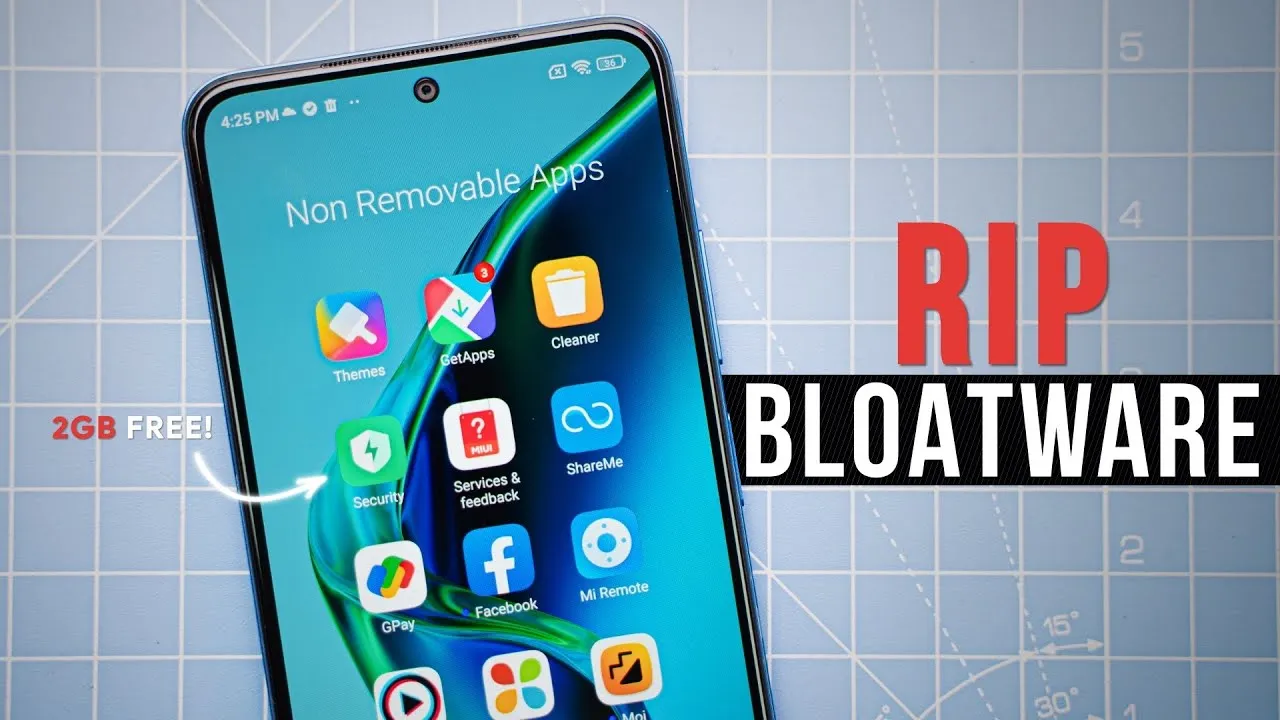
    Bloatware is an awful phenomenon that millions of consumers encounter in the broad world of Android smartphones. The term “Android bloatware” describes the pre-installed applications that come with a new device and take up important storage space and system resources.

    This article discusses the idea of “bloatware,” considers its ramifications, and investigates solutions to lessen its negative effects on the Android experience.

    What is bloatware?

    Bloatware is a term used to describe a variety of unwanted apps that customers may find redundant or superfluous and is frequently installed by device manufacturers or carriers. These apps could include demo versions of purchased software, carrier brand apps, and utilities tailored to particular manufacturers.

    While some of the pre-installed apps may be beneficial, a large number are rarely used, clutter the device, and suck up resources. Bloatware installation is frequently motivated primarily by financial gain because app developers may pay device makers and carriers to include their programs.

    android bloatware

    Implications and Challenges

    Bloatware’s presence can affect Android users in a variety of ways. First of all, it limits the amount of storage space that is available on a device, making it harder for users to install and save their favourite media and programs. Second, these undesirable programs might operate in the background, using up system resources, drained battery life, and possibly impairing device performance. Bloatware can also compromise user security and privacy since some pre-installed apps may gather private information or have security flaws that could be used by hackers. Last but not least, bloatware frequently can’t be removed, which frustrates consumers and prevents them from taking back control of their devices.

    Bloatware impact

    While completely eradicating bloatware without rooting the device is difficult (doing so can violate warranties and present security issues), there are a few tactics that can be used to lessen its negative effects. The first option is for users to disable or conceal unneeded apps in their device settings. This operation saves system resources by preventing the programs from running in the background and clogging up the app drawer. Second, using third-party app managers or cleaners can help with bloatware identification and removal, but caution must be used to prevent mistakenly uninstalling crucial system components.

    Consider buying unlocked gadgets straight from manufacturers as an alternative strategy. These gadgets frequently have a cleaner Android experience and are devoid of carrier-specific software. Additionally, bloatware-free experiences can be had with custom ROMs and alternative firmware, like LineageOS, but these options call for technical know-how and may not be acceptable for all users.

    Android debloater

    he main goal is to improve battery performance and privacy by removing unnecessary and obscure system apps. This can also contribute to improve security by reducing the attack surface.

    Packages are as well documented as possible in order to provide a better understanding of what you can delete or not. The worst thing which could happen is removing an essential system package needed during boot causing then an unfortunate bootloop. After about 5 failed system boots, the phone will automatically reboot in recovery mode and you’ll have to perform a FACTORY RESET. So make a backup first!

    In any case, you can NOT brick your device with this script ! That’s the main thing, right ? 

    image

    Features

    • Uninstall/Disable and Restore/Enable system packages
    • Multi-user support (e.g apps in work profiles)
    • Export/Import your selection in uad_exported_selection.txt
    • Multi-device support: you can connect multiple phones at the same time
    • All your actions are logged so you never forget what you’ve done

    NB : System apps cannot really be uninstalled without root (see the FAQ)

    Universal debloat lists

    • GFAM (Google/Facebook/Amazon/Microsoft)
    • AOSP
    • Manufacturers (OEM)
    • Mobile carriers
    • Qualcomm / Mediatek / Miscellaneous

    Manufacturers debloat lists

    • Asus
    • LG
    • Google
    • Fairphone
    • Huawei
    • Motorola
    • Nokia
    • OnePlus
    • Oppo
    • Samsung
    • Sony
    • Xiaomi

    Mobile carriers debloat lists

    • French carriers: SFR / Orange / Free / Bouygues
    • US carriers: T-mobile / Verizon / AT&T / Sprint
    • German carriers: Telekom
    • UK: EE

    How to use

    • Enable Developer Options on your smartphone.
    • Turn on USB Debugging from the developer panel.
    • From the settings, disconnect from any OEM accounts (when you delete an OEM account package it could lock you on the lockscreen because the phone can’t associate your identity anymore)
    • Install ADB: instructions
    • Download the latest release of UAD GUI for your Operating System here. Take the opengl version only if the default version (with a Vulkan backend) doesn’t launch.

    NOTE: Chinese phones users may need to use the AOSP list for removing some stock apps because those Chinese manufacturers (especially Xiaomi and Huawei) have been using the name of AOSP packages for their own (modified & closed-source) apps.

    IMPORTANT NOTE: You will have to run this software whenever your OEM pushes an update to your phone as some uninstalled system apps could be reinstalled.

  • Mobile app for ChatGPT is now available for free.

    Mobile app for ChatGPT is now available for free.

    The first mobile application, called “OpenAI ChatGPT” on the Apple App Store, has now been released, as the US company OpenAI stated over the weekend on its own portal. The AI bot is currently free and only has a few features.

    ChatGPT for the Apple devices only for now

    Real enthusiasm has grown around the subject of AI bots during the last several days and weeks. The development of artificial intelligence (AI) is sparked by projects like “TruthGPT,” “Google Bard,” and OpenAI with “ChatGPT.” Others struggle to move growth forward quickly enough, while some are already fueling the flames of the end of the world.

    Sam Altman, the creator of ChatGPT, issues a risk alert and requests government regulation. On the other hand, the American business itself released the initial mobile application with “OpenAI ChatGPT” for free download in the Apple App Store over the weekend.

    chatGPT openai

    While the AI-supported chatbot is already available in the US as a desktop application in version 4.0, the mobile version, which for the time being is only available in the US and only for iOS from version 16.1, represents a premiere in the steady race. However, as the company announced, an implementation for Android is already in the works and a “soon” release is planned. Other countries are also expected to follow shortly.

    A chat can be begun on an Apple iPhone and continued later on a desktop browser thanks to the cross-platform functionality of the iOS mobile application. The inclusion of “Whisper,” an open-source neural speech recognition program based on 680,000 hours of multilingual and multitasking observed data, inside the ChatGPT mobile app provides another benefit.

    Although ChatGPT for iOS is in theory free, the “ChatGPT Plus” version requires a US$19.99 monthly membership. Initial information indicates that the Plus version includes features from ChatGPT 4.0. Those who want to utilize communications more extensively most likely will also need to pay. The “early access to features and faster response times” for Plus subscribers is another benefit.

  • #sale Free Android and iOS apps this week

    #sale Free Android and iOS apps this week

    Ordinarily, purchased apps on Google Play and the Apple App Store will cost you money, but occasionally, some creators may opt to spread the love by making their apps freely available to everyone. We do this twice a week by searching the Apple App Store and Google Play Store for the greatest deals. Download them now on your iPhone or Android before they become paid content.

    Do take note that while they’re free as of publishing, these deals tend to expire without any due warning based on the developer’s whims and fancy. The promotional period for apps on these platforms can be both unpredictable and can end suddenly.

    Therefore, we recommend that you exercise caution and conduct your own research before downloading any of these apps, as some may contain in-app purchases or hidden costs.

    Android apps available for free for a limited time

    Android apps for productivity and lifestyle

    • Save PDF Viewer Pro [4.4-stars / $1.49]: Are you ready to try an alternative app to read PDF files? This gets the job done with minimal fuss.
    • Simple Text Widget [4.9-stars / $1.49]: Keep yourself motivated every single day with this widget that adds text to the home screen.
    • 80s Music Radio Pro [3.9-stars / $0.99]: An ad-free app that lets you enjoy all the top hits from the 1980s right on your smartphone.
    • Electron Config Pro [4.8-stars / $2.49]: Do you have a hard time with chemistry, trying to figure out which element is compatible with another? This app removes all guesswork with its precise answers.

    Android games

    • Demon Warrior Premium [4.4-stars / $0.99]: Take a walk on the wild side and be the strongest demon there is out there.
    • Kaori After Story [4.9-stars / $4.99]: Immerse yourself in the life of a boyfriend who has been invited to spend Christmas with your girlfriend’s family! Just how will you act? This is a visual adventure novel.
    • Crazy Owls Puzzle [4.3-stars / $0.99]: Another variant of the “3-of-a-kind” puzzle game, except that owls are in the thick of the action this time around.
    • Stickman Warriors Super Hero [4.0-stars / $0.49]: Go one-on-one against different opponents as you work to be the ultimate warrior.
    • WindWings [4.9-stars / $1.99]: A shoot ’em up that requires you to be on your toes all the time to shoot down wave after wave of enemies and remain alive.

    iOS apps available for free for a limited time

    iOS apps for productivity and lifestyle

    • PDFGenius [4.4-stars / $9.99]: An intuitive tool that lets you manipulate PDF files on your iOS device.
    • Bear Walking Pal [4.7-stars / $0.99]: They say that the key to staying healthy is to walk 10,000 steps a day. Do so with this cute app! 
    • PiP: Picture in Picture [4.7-stars / $0.99]: Just because Apple says you cannot multitask in iOS, doesn’t mean all apps agree with that. Enjoy Picture-in-Picture capability with this app!
    • Resize Image [4.9-stars / $0.99]: Is there a photo that you want to resize on your phone? Get it done with this app!
    • Lock Notes Pro [4.5-stars / $4.99]: Protect your precious notes and keep them private with a password.

    iOS games

    • Astral Shapes [5.0-stars / $0.99]: A matching game that is out of this world, where you look for matching shapes and colors.
    • Ethereal Enigma [4.9-stars / $9.99]: A pictorial adventure story that can take up to 10 hours for a single playthrough. Just how well is your decision-making process? 
    • Pocket GM 2: Football Sim [4.9-stars / $0.99]: Manage your own American Football franchise and see whether you have the chops to take your team to the very top!
    • Adventurer Legends [4.3-stars / $0.99]: A Diablo-like game that sees your party grow even more powerful as you progress.
    • Red Rocket [5.0-stars / $0.69]: Go against the traffic in your car, avoiding obstacles to remain on the road. 
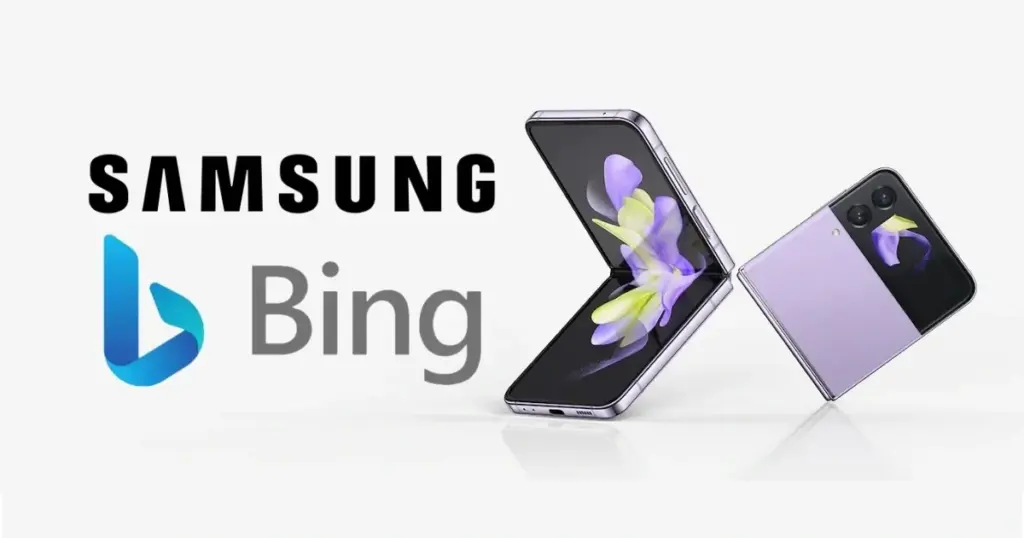
  • Samsung realized switching Google for Bing was bad

    Samsung realized switching Google for Bing was bad

    Google has long been the default search engine on Galaxy handsets thanks to payments from Samsung. But with a revelation that Samsung was considering switching to Bing as the default search engine last month, that agreement appeared to be in jeopardy.

    Now, according to sources familiar with the situation, Samsung has postponed an internal review of switching from Google to Bing, according to the Wall Street Journal (h/t: Reuters).

    The outlet claims that Samsung initially thought about changing the default search engine in the Samsung Internet browser to Bing. According to reports, the business reasoned that since the majority of Samsung users already choose alternative browsers like Chrome, switching wouldn’t “significantly disrupt the status quo.

    Samsung

    Why did Samsung changed its mind?

    According to WSJ’s sources, the business chose to put a review on hold for the time being due to worries about how the switch would be seen by the market and how it would affect its relationship with Google.

    According to the sources, Samsung isn’t totally ruling out switching to Bing. So it’s feasible that the business will examine the issue and change search providers in the future.

    In any case, we can’t say that we’re shocked that Samsung has chosen to continue with Google. After all, Google has long been the Galaxy phones’ default search engine. Who knows, maybe Samsung got a better bargain as a result of this controversy.

  • Official look at the Google Pixel Fold, launching on May 10

    Official look at the Google Pixel Fold, launching on May 10

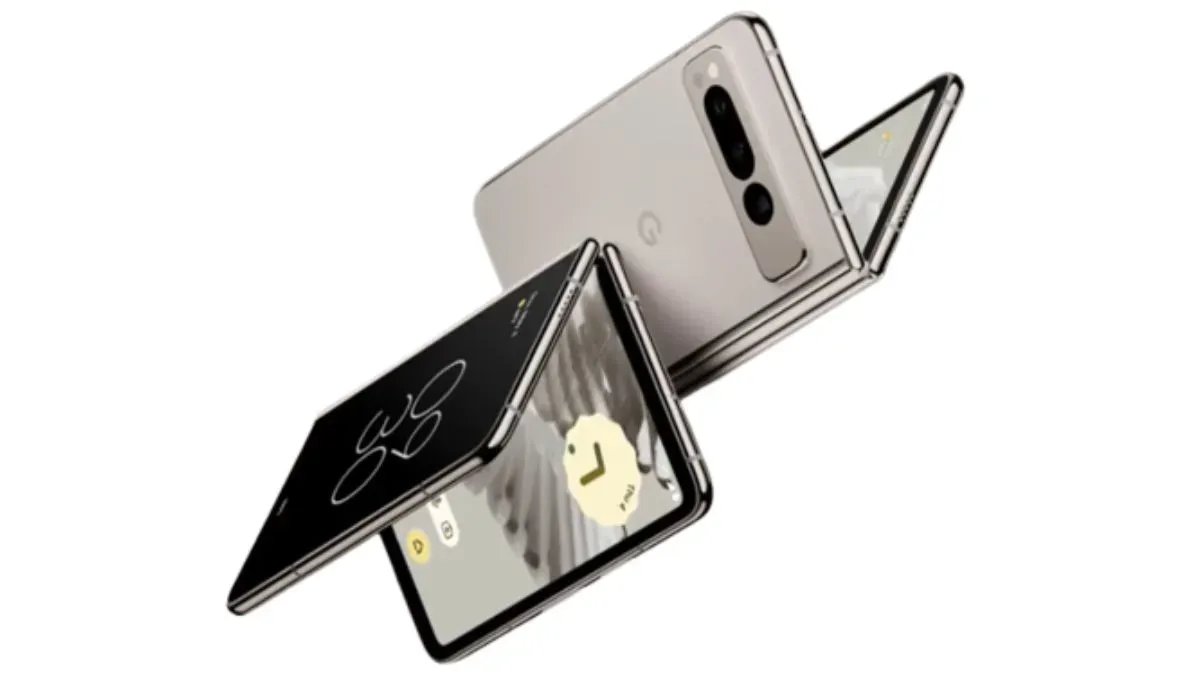
    Google won today’s game against the leakers. The Google Pixel Fold was presented for the first time by the business. This is actually the first time the business has ever used the term “Pixel Fold” in any official capacity.

    The Google Pixel Fold debut event will take place at Google I/O 2023 on May 10, as anticipated. The Pixel Fold will officially launch next week, however the company did not specify a price or a start date for availability.

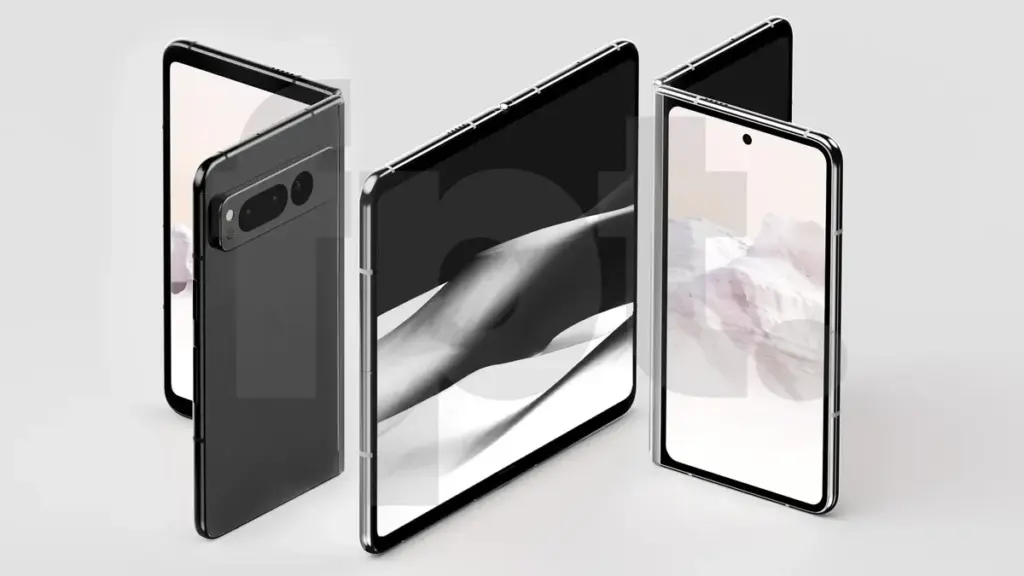
    The Pixel Fold is depicted in the still image up top, and it fits all the stories we’ve heard thus far extremely well. The tweet from Google, however, demonstrates animations of the phone unfolding.

    google pixel fold

    The Pixel Fold is depicted in the still image above, which accords quite well with all the speculations we have heard thus far. As you can see in the tweet below, Google also displayed animations of the phone unfolding. While May 4 is celebrated as an unofficial Star Wars holiday all around the world, the tweet’s clever message makes a play on the phrase “May The Force Be With You.”

    Along with the tweet, the company also published a new Pixel Fold page at the Google Store. This page reveals the Google Pixel Fold launch details and gives folks interested in getting one the ability to sign up for alerts about its availability.

    What else do we know about the Google Pixel Fold launch?

    We can be sure that Google will introduce the Pixel Fold and Google Pixel 7a at Google I/O. There is a good probability that the Pixel Tablet will also make its formal debut, but Google hasn’t said anything about that just yet.

    Several of the same features seen in the Pixel 7 Pro will probably also be found in the Pixel Fold. A triple-lens rear camera with wide, ultrawide, and telephoto lenses, the Tensor G2 SoC, a ton of Memory, a ton of storage, wireless charging, and more would be included. Of course, with all that power and the foldable design, the Pixel Fold will probably be incredibly pricey. As of now, reports point to a starting price of $1,799, the same as Samsung’s Galaxy Z Fold 4.

  • Dimensity 9200+ breaks record! Geekbench V6 multi-core score reaches 5655 points

    Dimensity 9200+ breaks record! Geekbench V6 multi-core score reaches 5655 points

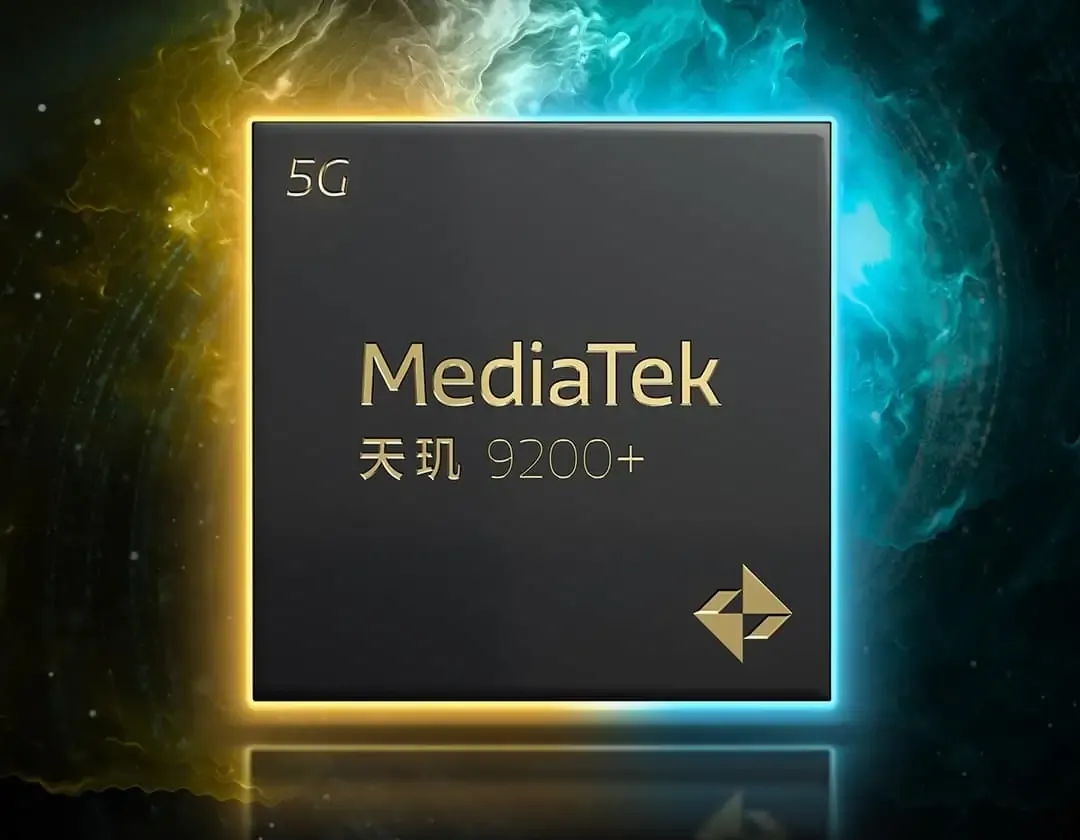
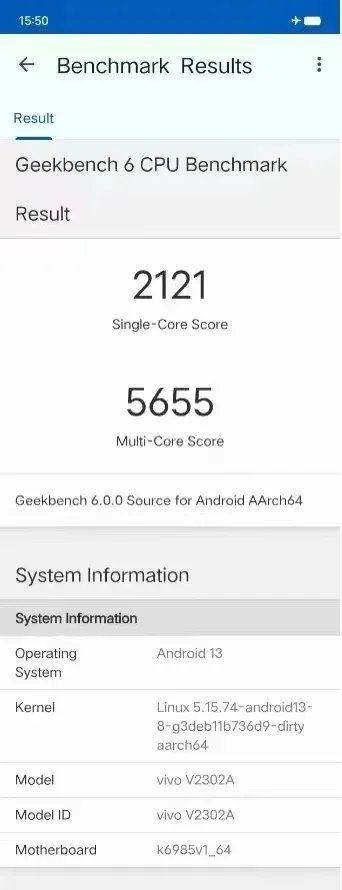
    Recently, the much awaited Dimensity 9200+ processor has been in the news for its ground-breaking performance on Geekbench V6. The Dimensity 9200+ reportedly broke all existing Android CPU performance records with a single-core score of 2121 points and a multi-core score of 5655 points.

    Rumored specifications

    The Dimensity 9200+ has cemented its reputation as a potent chipset thanks to this amazing result and the Dimensity 9200+’s superb AnTuTu performance. The Dimensity 9200+ has an octa-core architecture with four A510 small cores, three 3.0GHz A175 big cores, and a 3.35GHz Cortex-X3 super large core. Additionally, it has a GPU with an immortalis-G715MC11 core. One of the factors contributing to the processor’s potent performance is the big core’s 3.0GHz clock speed.

    Dimensity 9200+ geekbench

    The official release from MediaTek states that the Dimensity 9200+ will go on sale on May 10. The “strength depends on flagship+” poster indicates that the Dimensity 9200+ has performed admirably. Furthermore, the flagship smartphone market is about to heat up again given MediaTek’s trend of releasing “Plus” versions of its flagship processors every six months. The iQOO Neo 8 Pro is anticipated to be the first smartphone to use the Dimensity 9200+ chipset, according to benchmark listings.

    New CPUs are being developed by Qualcomm and other significant industry players. The next Snapdragon Gen 3 from Qualcomm is anticipated to have a new architecture and a potent 3.7GHz prime core, which could potentially perform better than the Dimensity 9200+.

    How these two processors compare and which one wins out will be interesting to observe. Nevertheless, the Dimensity 9200+ is positioned to compete fiercely in the high-end smartphone market thanks to its impressive benchmark results and promised performance capabilities.

  • Snapdragon 8 Gen 3 more performance from higher clockspeed

    Snapdragon 8 Gen 3 more performance from higher clockspeed

    In the process of creating the undisclosed Snapdragon 8 Gen 3 chipset, Qualcomm could have taken no short cuts. Recent record-breaking benchmarks may also be explained by a new leak that shows the flagship processor is using an entirely new eight-core arrangement with a Cortex-X4 primary core with an unheard-of peak mobile clock speed.

    According to a claim on a Chinese website, which cites user Digital Chat Station as the source, Qualcomm is adopting a different cluster design for the Snapdragon 8 Gen 3 in place of the 1+4+3 layout used by its predecessor. Instead, Qualcomm is employing a 1+5+2 structure. According to reports, the configuration consists of a primary Cortex-X4 core, five big cores, and two efficiency cores.

    snapdragon 8 gen 3

    The Snapdragon 8 Gen 3’s maximum clockspeed

    Aside from the fact that there are now more potent cores, Qualcomm has also raised the main core’s maximum speed to 3.7 GHz. For comparison, the normal Snapdragon 8 Gen 2 is rated at 3.2 GHz while the Cortex-X3 on a bespoke Snapdragon 8 Gen 2 can reach up to 3.36 GHz.

    Currently, only Samsung’s Galaxy S23 line of handsets have the overclocked Snapdragon 8 Gen 2. The majority of other Android manufacturers rely on the processor’s default rating. What the base speed of the forthcoming Qualcomm silicon will be is also unknown.

    Will the GPU on the Snapdragon 8 Gen 3 also be improved?

    The Snapdragon 8 Gen 3 will be constructed on the latest TSMC N4P node, excluding from the CPU. Although it continues to use a 4 nm process, it is claimed to be more efficient than the SoC from the previous year. Regarding graphics, it is said that the Adreno 750 GPU performs 50% better than the Adreno 740.

    The chipmaker is expected to make its next-generation chipset announcement earlier than it did last year. This might be because Qualcomm abandoned its plans to release a Snapdragon 8 Gen 3 “plus” model.

    Meanwhile, let us know your thoughts on the Snapdragon 8 Gen 3. Are you willing to wait for it before upgrading your next smartphone? 

    Via: GizChina Source: MyDrivers

  • Android and iOS Apps – free this week.

    Android and iOS Apps – free this week.

    Perhaps it’s time to relax on your phone with the following free apps from the Google Play and Apple App Stores as you close out yet another work week. These apps are generally paid, but they are currently available for free, although for a brief period of time. In other words, if you want to buy some of the books that catch your attention, you will be able to pinch a few pennies here and there. Before they disappear, take advantage of these offers on your Android or iPhone.

    Be aware that these apps are described as being free at the time of publication, and as it is up to the developers to decide when deals expire, it is impossible to predict when they will. Buyer beware: by the time you finish reading this post or attempt to download them, they might have changed to a paid status. This is problematic because there is no predetermined duration for app promotions on the Google Play Store or the Apple App Store, and such offers may end without prior notice in the same amount of time they were added.

    free android apps

    While we do look through this list of free apps and do not include anything with low ratings, we also want you to know that we did not install any of them, unlike with our Top 5 Apps of the Week. As a result, we advise you to use caution and do your own research before downloading any of these apps because some of them might have hidden fees or in-app sales.

    Android apps available for free for a limited time

    Android apps for productivity and lifestyle

    • SkanApp [4.3-stars / $19.99]: You have a paper document that needs to be sent in digital format but you are nowhere near a scanner, what do you do? Thankfully, there is the SkanApp app that doubles up as a PDF scanner to help you out in such situations.
    • SUI File Explorer Pro [3.9-stars / $1.99]: If you are sick and tired of your phone’s stock file explorer app, perhaps trying this one will breathe a breath of fresh air.

    Android games

    • WeaponWar! [4.1-stars / $0.99]: An intense clash of weapons, where you need to win more battles to earn additional upgrades which in turn, make you more powerful.
    • Shadow Slayer: Ninja Warrior [4.4-stars / $4.99]: This epic side-scroller sees you plow through enemy after enemy in the fast-paced action.
    • King of Defense Premium [4.7-stars / $1.49]: A tower defense title that is full of excitement as you hold off hordes of monsters at bay from your castle.
    • Neo Monsters [4.4-stars / $0.99]: You capture monsters, train them, and send them out to battle. Repeat ad nauseam, except that some of the trainers have interesting clothing choices.
    • The Lonely Hacker [4.3-stars / $2.49]: A realistic hacking simulator created by security experts that puts you in the shoes of a bona fide hacker, sans the legal repercussions.
    • Brick Breaker Pro [4.2-stars / $0.99]: Arkanoid on steroids, ’nuff said. There, you probably know my age based on my Arkanoid reference.
    • Truth or Dare Pro [4.2-stars / $0.99]: This is one fun game to play, even more so when booze is involved. Socialites will love it!
    • Timing Hero PV [4.1-stars / $2.99]: 8-bit graphics that remind you of the Game Boy era, this RPG will see you begin in a hero battle that will set you off on an adventure where you battle numerous monsters and level up.

    iOS apps available for free for a limited time

    iOS apps for productivity and lifestyle

    • Olympia – Your Fitness Trainer [4.5-stars / $5.99]: Sweat it out at home with this unique app, where you get to stay fit without having to go out.
    • PropFun Pro [4.2-stars / $0.99]: Want to take some really nifty portrait photos? This app spices up your portraits with unique props. 
    • Orange Weather [5.0-stars / $0.99]: A weather app that claims not to infringe on your privacy? I suppose the forecast would be for flying pigs tomorrow.
    • Safety Note+ Pro [4.8-stars / $3.99]: Keep your personal notes private with this app, where there are added layers of security before one can access them.

    iOS games

    • Talking Typer [3.9-stars / $4.99]: Want to improve your typing skills? This game ensures you improve over time with faster and more challenging words thrown your way. 
    • Zombie Survival Shooter Game [4.3-stars / $9.99]: Just about everyone near and dear to you is dead, or more likely, the walking dead. It is up to you to kill all of them in your quest to survive.
    • Tigers & Goats [5.0-stars / $0.99]: Yet another ancient game that has been digitized, where you play as a goat will try to trap the tigers, while the tiger attempts to eat all the goats on board.
    • Card Hog [4.6-stars / $1.99]: Got to love the punny name of this app. You move around the board and try to outwit others, gaining new weapons and items along the way to help you.
    • Wedgie Go [3.8-stars / $39.99]: Underwear can be a funny thing, you just purchased a brand new pair and indulge in some running, only to find that wedgies get in the way. A totally hilarious endless runner.
    • Block Brain Game [4.8-stars / $2.99]: This is a brain teaser that will certainly cause you to carefully think just where all these blocks go.