Tag: update

  • Google Gemini 2.5 is here – better than ever

    Google Gemini 2.5 is here – better than ever

    Google is releasing Gemini 2.5, another major AI update, just months after releasing the Gemini 2.0 Flash Thinking model. Gemini 2.5 Pro Experimental, the first model based on this new technology, is currently accessible to Gemini AI Studio and Advanced users.

    Infused with reasoning

    Google describes version 2.5 as its “most intelligent” AI model to date in a news release. It is the second of its kind and falls into the same category as Gemini 2.0 Flash Thinking, which is a thinking model. Gemini 2.5 differs from previous models in that it can use contextual intelligence, draw well-reasoned conclusions, and make educated decisions, going beyond the conventional “classification and prediction” method used by non-thinking models.

    The Gemini 2.5 model, which was created as an improved version of Gemini 2.0 Flash Thinking, has a better base and more sophisticated post-training. Additionally, Google has shown ambitions to integrate Gemini 2.5’s reasoning capabilities into its non-thinking models.

    New benchmark in AI reasoning

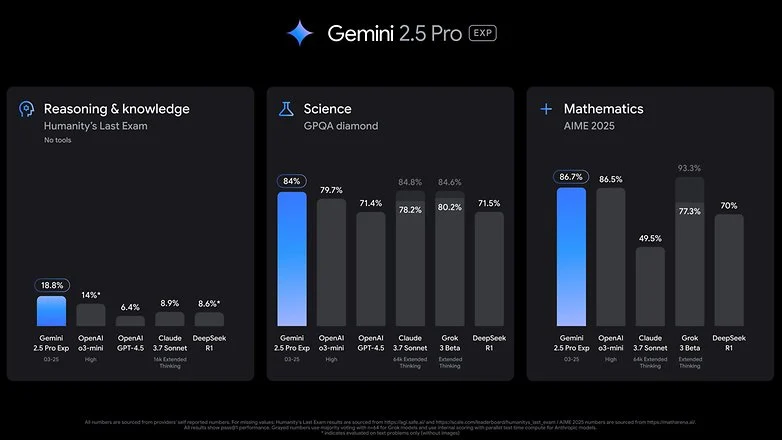
    Gemini 2.5 Pro Experimental, the first product to use 2.5 version, is offered as a model option within Google’s AI services. Google claims that in the Humanity’s Last Exam test, which is a standard for AI knowledge and reasoning, The2.5 Pro Experimental has fared better than top reasoning models like OpenAI’s o3-mini and Claude 3.5 Sonnet. Furthermore, Gemini 2.5 Pro outperformed rivals like OpenAI’s GPT-4.5 and X’s Grok 3 Beta in math and science benchmarks.

    With Gemini 2.5 Pro, Google also highlights improvements in software creation and coding. Coders, editors, and developers can use the concept to create “agentic applications and web apps.” It demonstrated its capabilities by creating a game from a single line of prompt in a demonstration video.
    Gemini 2.5

    Currently, business and educational plans, as well as Advanced subscribers under One AI Premium, can access Gemini 2.5 Pro. Additionally, it can be accessed through Gemini Studio, and Vertex AI will soon be available as well. Google has said that it will shortly reveal the cost of extended access, even though usage is still restricted.

    The release of 2.5 comes after Google opened up the Gemini 2.0 Flash and Deep Research models, as well as Gemini Live screen sharing, which was previously only available to subscribers. It is probable that the AI may soon be widely available due to this tendency.
  • Samsung One UI 7 sneak peek – a beautiful new look

    Samsung One UI 7 sneak peek – a beautiful new look

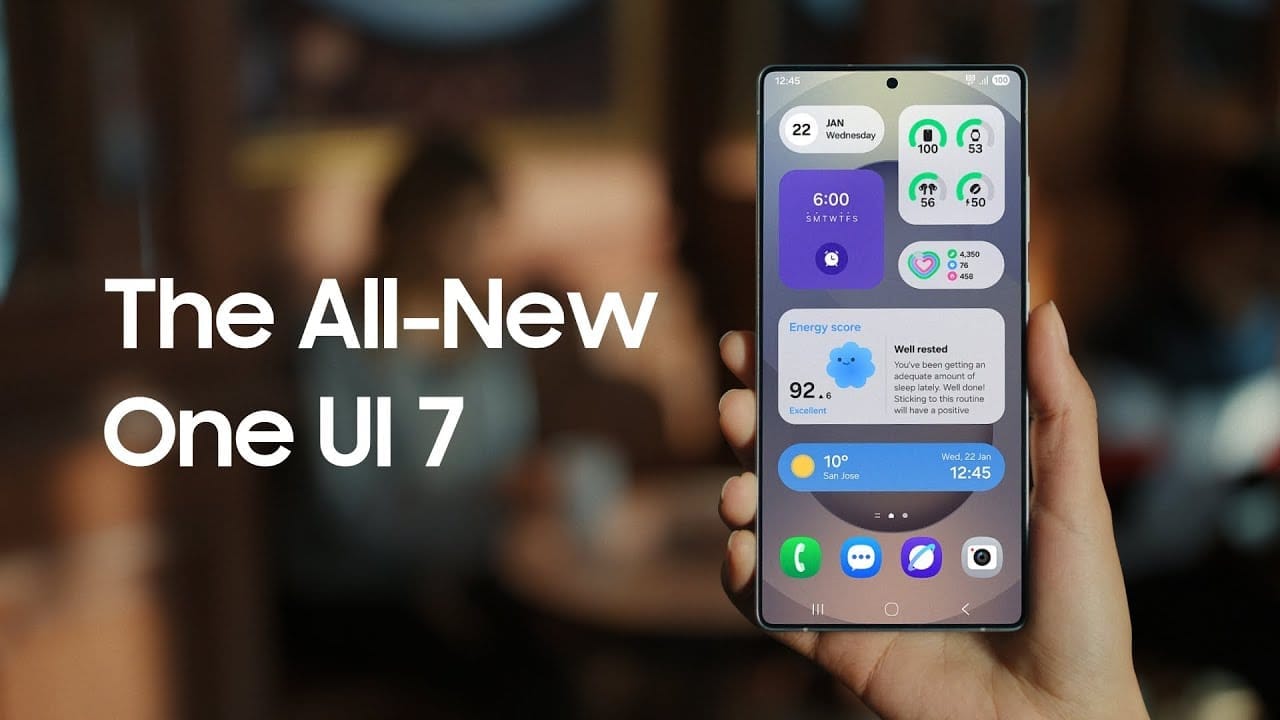
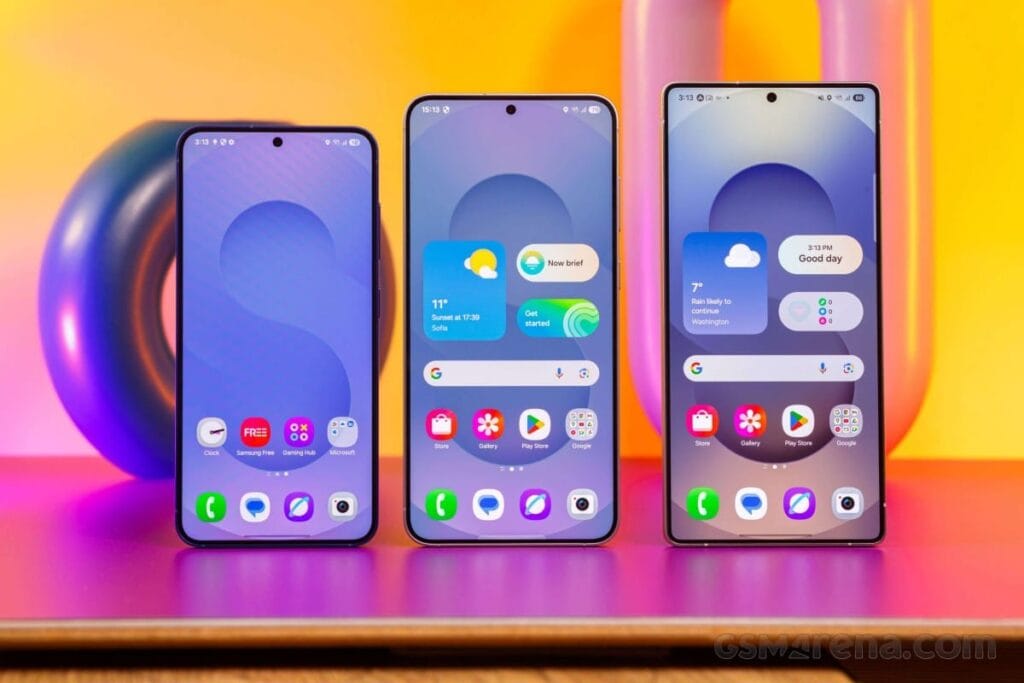
    Samsung basically teased their major One UI 7 update with a two-minute video that was just released. They are all getting ready and showcasing some of the exciting things that are on the horizon. In addition to letting us know that One UI 7 will soon be available for the Galaxy S24 and older phones, they are also using it to sort of encourage people to buy the new Galaxy S25. At last! Up until now, we had only seen it in beta.

    According to Samsung, One UI 7 will be far more “you” than it has ever been. Like, more natural, more user-friendly, and more intimate. They are showcasing Google’s Gemini, “Now Brief,” “Now Bar,” “Sketch to Image,” and various AI-powered search tools.

    Samsung One UI 7 sneak peek -

    The teaser video from Samsung hints at a few UI 7 features.

    This video now? It is only a preview. We are not seeing everything. However, the timing is intriguing. It is obvious that they are preparing for a big release.The strange aspect is that last week, they announced that the S24, Z Flip 6, and Z Fold 6 updates would be available in certain locations beginning on April 7, 10, and 14. However, they later retracted the April 10th date for the US, which gave them a somewhat uncertain appearance.

    https://www.youtube.com/watch?v=P4AEIu3V6F4

    In essence, Samsung is building anticipation for One UI 7, but they are being a little reticent about when it will be released. The only thing we can do is wait and see when it lands. However, before that, you may see if your Samsung Galaxy phone is compatible with the company’s recently announced seamless updates function, which installs updates while you are still using your phone, saving you time waiting for it to restart.

    The business claims that if your Galaxy phone was released prior than 2025, it probably does not enable seamless updates. The Galaxy A55 is an odd outlier. But anything starting in 2025? It ought to have it.

  • Finally, new status bar customizations are available in Xiaomi HyperOS 2.2.

    Finally, new status bar customizations are available in Xiaomi HyperOS 2.2.

    Full status bar customisation is a groundbreaking feature that has been on wish lists for years, and Xiaomi has finally released the eagerly anticipated HyperOS 2.2. As demonstrated by our previous coverage of HyperOS features, customers now have total control over their notification system thanks to this much anticipated upgrade that was released overnight.

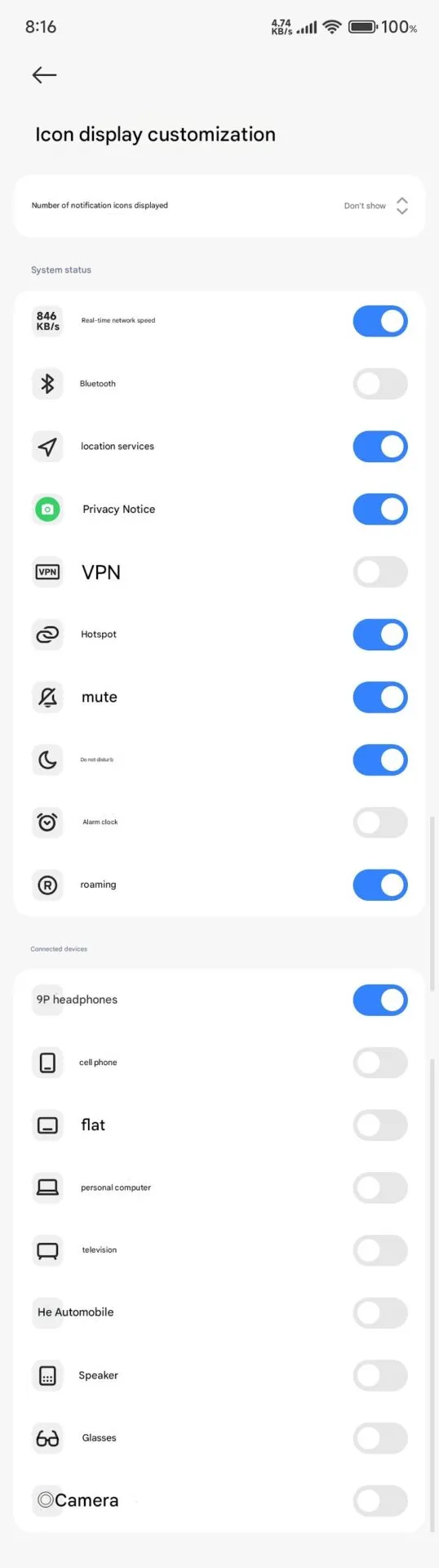
    The new “Status Bar Icon Display Customization” is a tip of the hat to customization options that debuted with AOSP Android 6, but with Xiaomi polish and attention to detail that we’ve come to expect with their software updates and UI improvements.

    Customization of status bar: what is new

    Xiaomi HyperOS 2.2 status bar customization

    The latest update brings unprecedented freedom to personalize your status bar on your device:

    • Control of Notification Icons: Select precisely how many notification icons are displayed
    • System Status Toggles: Toggle system status indicators on and off individually
    • Connected Device Display: Select which connected device icons are to be displayed
    • Cleaner Interface: Keep it clean by hiding unnecessary icons

    The downside is that it can’t be personalized and will be shown each time that you activate NFC.

    Additional improvements

    The customization of the status bar is not isolated in this update. HyperOS 2.2 OS2.0.200 Beta release includes a series of other enhancements:

    1. Enhanced System Animations: Smooth transition through the interface
    2. Blurred Wallpaper Enhancements: Improved visual quality for background objects
    3. Signal HD Icon Fix: HD icon no longer remains in the status bar

    Currently, Xiaomi 15 series phones running HyperOS 2.2 OS2.0.200 Beta support the feature. Although there are no set dates, more phones in their lineup will gain this feature in the upcoming weeks. Xiaomi’s ongoing dedication to enabling customers to customize their devices is reflected in this much-anticipated feature.

  • How to add your driving license on Google Wallet

    How to add your driving license on Google Wallet

    Bank cards, tickets, passes, keys, identity cards, passports, and driver’s licenses may all be securely stored in the Google Wallet app, an advanced digital wallet.

    This service, which has just been established in a couple of countries allows users to carry their critical credentials digitally on their smartphones.

    Once you download the Google Wallet app, you can easily add your driving license details, ensuring quick and secure access wherever you are.

    Google Wallet protects users’ ID passes, driver’s licenses, and state IDs with strong encryption and personal authentication. If your phone is lost or stolen, Google says your digital ID can be wiped remotely to prevent illegal access.

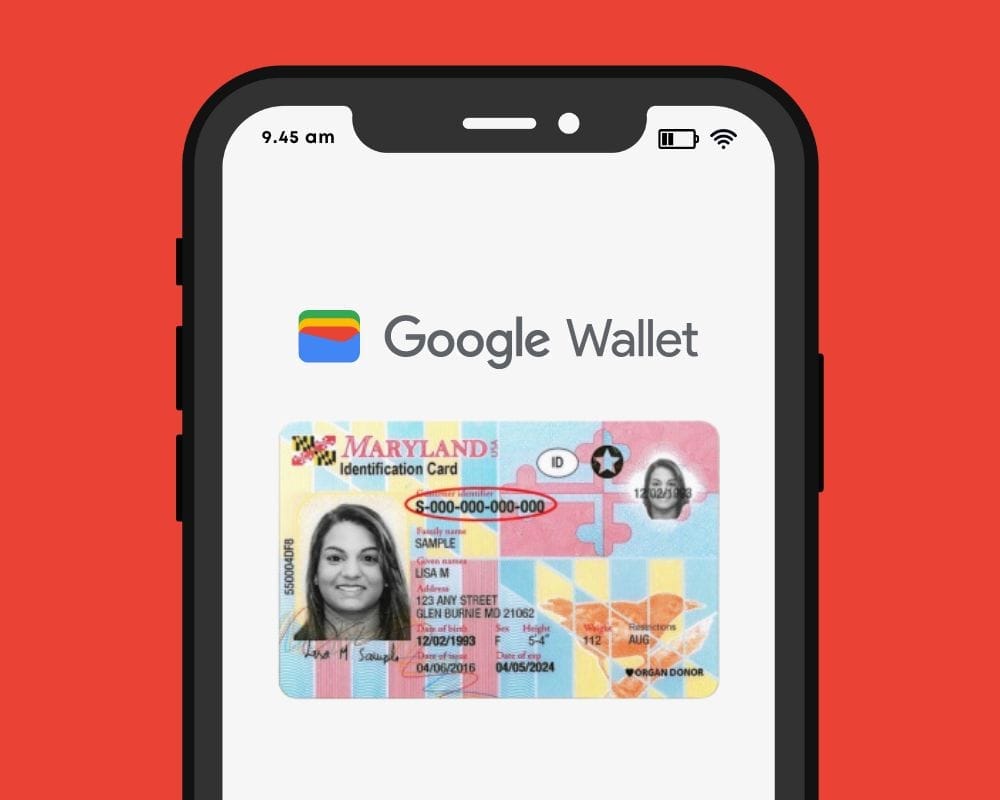
    driving license on Google Wallet

    Steps to add your driving license to Google Wallet 

    Driving licenses are required for all drivers. Follow these steps to add it to Google Wallet:

    1. Open the Google Wallet app on your Android device.
    2. Navigate to the bottom and tap “Add to Google Wallet.”
    3. Select “ID” and then “Driver’s License.”
    4. Tap “Get Started” and agree to the terms.
    5. Scan both sides of your license.
    6. For verification, upload your photos, including front and side poses.
    7. Tap “Continue,” then “Done.”
    8. Await the notification confirming the completion of verification.

    This function is now only available in the United States, but it is planned to be expanded to other nations shortly. Notably, Google Wallet just launched in Pakistan, providing further ease to customers in the region.

    Digital integration via systems such as Google Wallet provides a streamlined experience for keeping important papers, integrating technology with ease of use.

    Android users can now add payment cards from major banks and experience features like tap-and-pay in stores, seamless online checkouts, and quick access to boarding tickets for trips.

  • Xiaomi finally released HyperOS 2.2 update

    Xiaomi finally released HyperOS 2.2 update

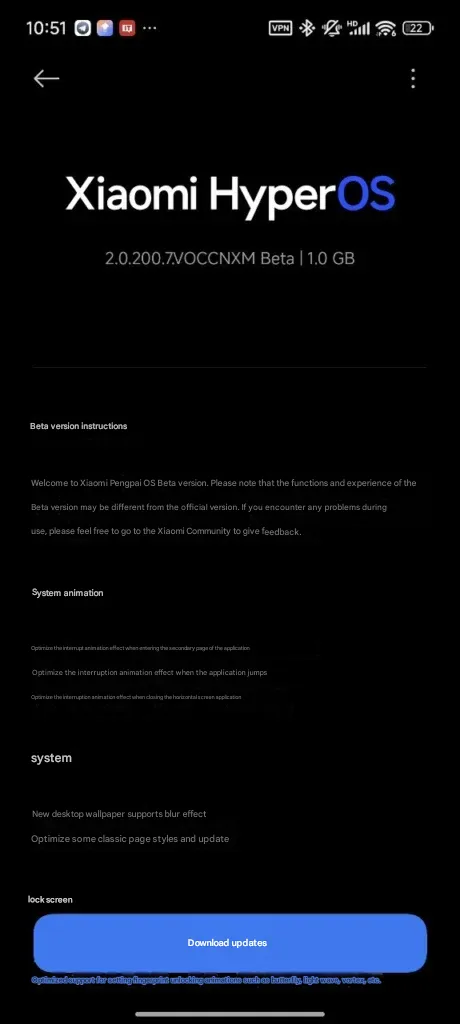
    The formal rollout of HyperOS 2.2 has begun, with the Xiaomi 15 and Xiaomi 15 Pro receiving beta releases first. This update improves and adds new capabilities to Xiaomi’s top-of-the-range mobiles, highlighting the company’s commitment to software quality. As China-region variations lead the way with this initial beta release, we have compiled a comprehensive list of what is new, what is modified, and how to securely update your device to this release.

    Official build information

    The beta of HyperOS 2.2 is now available on the Xiaomi 15 series with build numbers as follows:

    • Xiaomi 15: OS2.0.200.7.VOCCNXM
    • Xiaomi 15 Pro: OS2.0.200.1.VOBCNXM

    These early beta releases are Xiaomi’s first move in rolling out the upgraded HyperOS 2.2 to users, building on the enhancements previously present in HyperOS 2.1 on China ROM versions.

    HyperOS 2.2 update

    Improvements in HyperOS 2.2

    The update introduces a number of important enhancements to many areas of the system:

    System Animations

    Xiaomi has taken special care to make the user interface more streamlined through optimized animations:

    • Enhanced interrupt animation while browsing application subpages
    • Improved transition animations while switching between apps
    • Enhanced animations while closing landscape-oriented apps

    System Configuration

    The personalisation options have been expanded with:

    • Desktop wallpaper now supports blur effect
    • Streamlined traditional page layouts throughout the system

    Lock Screen

    The lock screen is updated meaningfully:

    • New oriental lock screen templates, enhanced fingerprint unlock animations like:
      • Butterfly effect
      • Patterns of Light Waves
      • Vortex animations

    Status Bar and Notifications

    Numerous functional enhancements make daily application more convenient:

    • Additional status bar icon support through customized display
    • Expandable custom notifications
    • Enhanced icon behavior of optimized signals (now no longer permanently visible)

    System Navigation

    The update also brings enhancements to navigation settings:

    • Improved shortcut capability in system navigation mode in desktop settings
    • Xiaomi keeps making incremental improvements to HyperOS with every release that reflect the company’s intent to refine user experience through thoughtful software tuning.

    The release of the HyperOS 2.2 beta on Xiaomi’s 15 series is only the beginning, with other devices scheduled to be updated in the following days and weeks.

  • Older Pixel Phones gets a kernel update along with March update

    Older Pixel Phones gets a kernel update along with March update

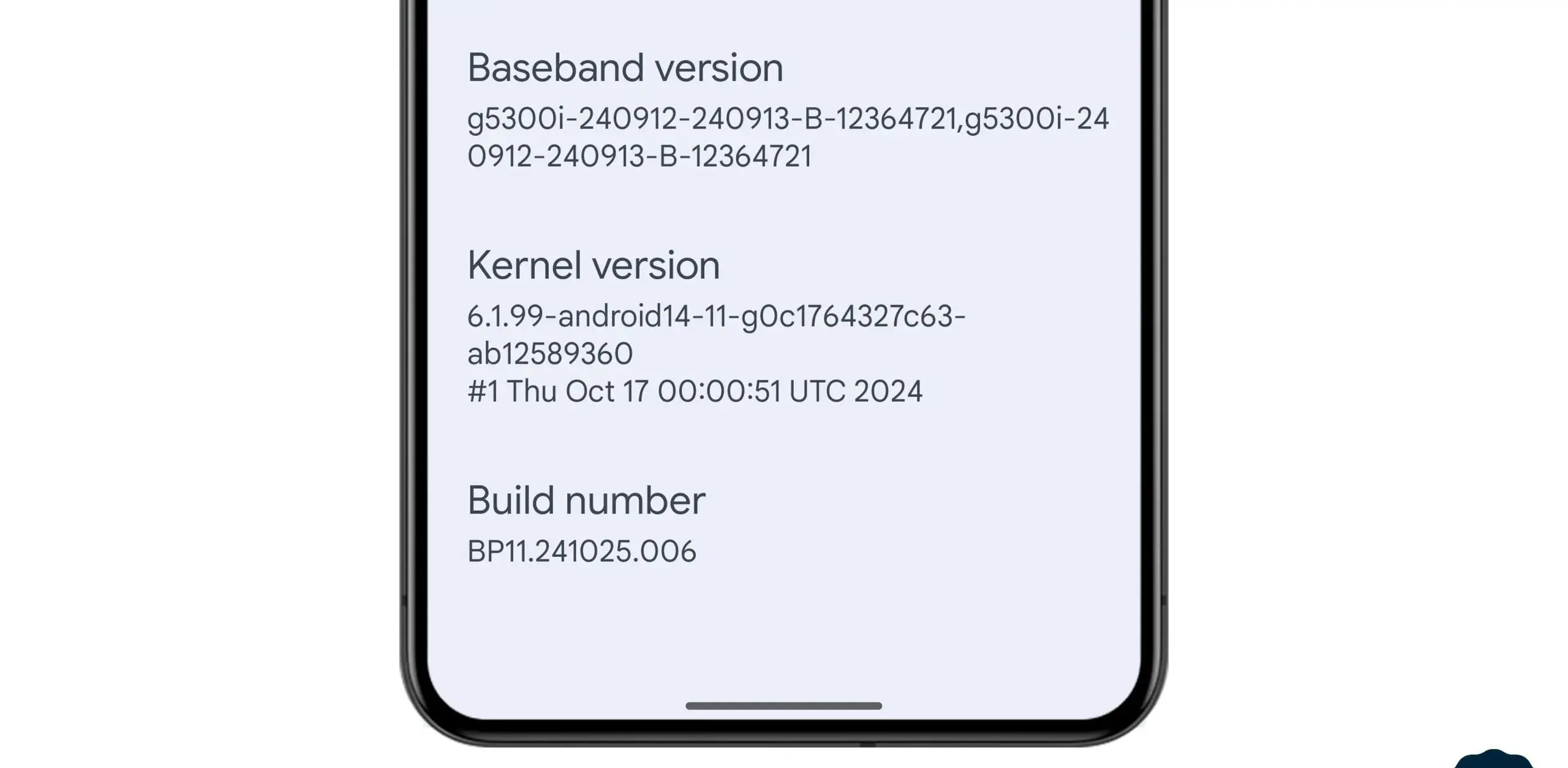
    In the stable March 2025 update, Google formally released the Linux 6.1 kernel for Tensor-powered Pixel phones from the prior generation. This update brings the Pixel Tablet and Pixel Fold, as well as the Pixel 6, 7, and 8 series devices, up to the same kernel version as the Pixel 9 series. Performance and security will probably improve as a result, and some users are already experiencing the advantages.

    pixel with Kernel update

    In the QPR2 beta, where it was announced that Tensor-powered Pixels will be switching from older kernel versions to 6.1, we previously reported that Google was testing this update. The update is now available to all users with the March stable release.

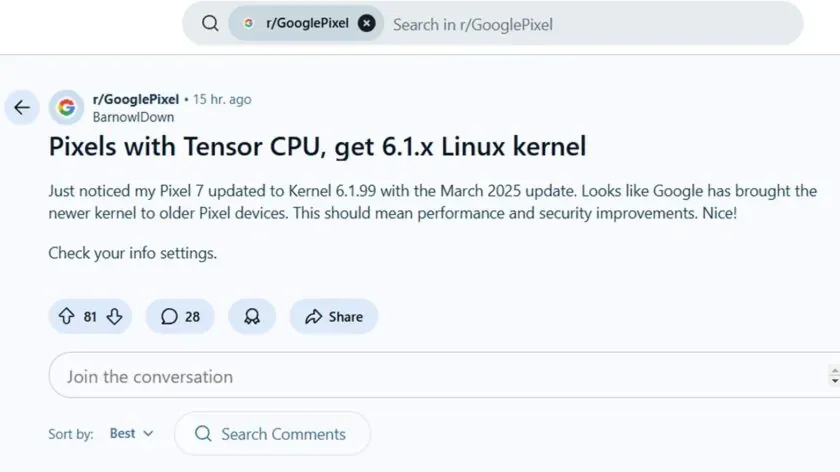
    News of the update was posted by a commenter on the GooglePixel subreddit, who said, “Just noticed my Pixel 7 updated to Kernel 6.1.99 with the March 2025 update.” While several Redditors in the topic commented on a perceived gain in battery life since the update, another Pixel 6a owner in the thread stated that their phone seems “extremely responsive compared to [the] pre-March update.” Although it is difficult to confirm that the new kernel is directly responsible for these developments, the indications are unquestionably encouraging.

    This kernel upgrade is part of Google’s broader commitment to long-term software support. Google’s Longevity GRF program plays a crucial role in ensuring that Tensor-powered Pixels meet their update policies by implementing major kernel upgrades when necessary.

    If you own a Pixel 6, 7, 8, or another Tensor-powered device, you can check your kernel version by heading to Settings — About phone — Android version and looking under Kernel version.

  • HyperOS 2.1 update rolled out to seven Xiaomi devices

    HyperOS 2.1 update rolled out to seven Xiaomi devices

    Xiaomi keeps updating more of its devices to HyperOS 2.1 in an effort to reach a larger audience with the newest features and enhancements. The Chinese company just released an update for seven Xiaomi devices.

    The latest recipients of HyperOS 2.1 include some high-end Xiaomi phones, a Xiaomi tablet, and affordable Poco phones. Here’s the list:

    • Xiaomi 14 Ultra
    • Xiaomi 14T Pro
    • Xiaomi 13 Pro
    • Xiaomi Pad 6S Pro 12.4
    • POCO X6 Pro 5G
    • Poco F6
    • Xiaomi 13 Ultra

    You may be able to install the HyperOS 2.1 upgrade if you own any of these Xiaomi devices. Open the Settings app, select About Phone, and then hit the HyperOS logo to see whether there is a new update available. To find out if your device has an update available, click Check for updates.

    A number of internal improvements have been made in the latest HyperOS 2.1 software to enhance the user experience and animations. Voice chats without an internet connection are also possible with the new Networkless mode. In places with inadequate connectivity, this function enables users to converse efficiently.

    Xiaomi’s device connect prompts have been improved. Additionally, the file transfer function has been enhanced to provide a smooth experience. Better night vision is one of the camera enhancements brought about by the HyperOS 2.1 software. Additionally, the update enhances imaging performance in a range of lighting settings and snapshot capabilities.

    The update also brings a redesigned album layout and new album display columns. The search functions have also been improved. Xiaomi has also made improvements to the image recognition capabilities for the circle to search feature. The Gaming Toolbox now has a performance dashboard and offers an enhanced gaming experience.

  • Google Pixel March update – fixed bugs and more

    Google Pixel March update – fixed bugs and more

    Google’s March update bug list, which is already being rolled out to compatible devices, has been made public. Even if it is a short list, it is nevertheless wise to keep in mind in case you have been dealing with any of these problems.

    Although not every device is receiving the identical set of changes, these fixes are applicable to devices as far back as the Pixel 6 series. For instance, Google claims updates for Bluetooth headset loudness issues, camera stability, and display stability, among other things. You can use the number that corresponds to each item on the list to determine which device the fix is for.

    Pixel Update – March Bug Fixes

    Apps

    • Fix for stability or performance with certain apps using WebView

    Audio

    • Fix for issues with adjusting call volume on calls over BT headsets]

    Camera

    Display & Graphics

    • Fix for display stability and performance in certain conditions

    System

    Telephony

    • General improvements for network connection stability and performance in certain conditions

    User Interface

    • Fix for issue occasionally causing color theme in launcher preview to not match with the selected wallpaper in certain conditions
    • Fix for issue with home screen icons to appear transparent after unlocking or switching apps in certain conditions
    • Fix for issue with switching between apps when using third party launchers in certain conditions
    • Fix for issue with themed icons in certain conditions
    • General improvements for performance and stability in certain UI transitions and animations

    Fixes are available for all Pixel devices that are supported. Certain fixes can be region/carrier specific.

  • Xiaomi accidentally discloses the release date for HyperOS 2.2.

    Xiaomi accidentally discloses the release date for HyperOS 2.2.

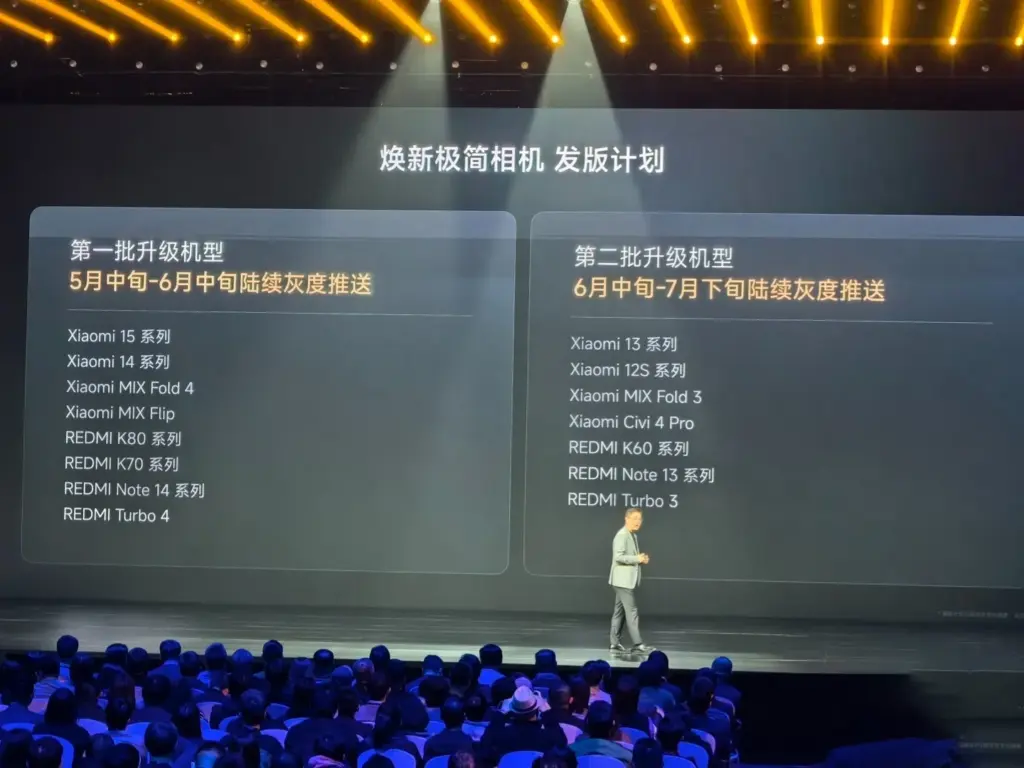
    Although Xiaomi has been working on HyperOS 2.2 in the background, the release date may have been unintentionally disclosed. Xiaomi just released a description of how it plans to roll out its new, minimalist camera app, which debuted alongside the Xiaomi 15 Ultra. However, a closer examination of the camera update’s deployment schedule suggests that HyperOS 2.2 might be released earlier than anticipated.

    HyperOS 2.2 launch date

    HyperOS 2.2 development is underway

    Based on Xiaomi’s standard rollout plan, the following can be expected:

    • Late April 2025: Mi Pilot releases of HyperOS 2.2
    • Early May 2025:  Stable releases of Mi Pilot
    • Mid-May 2025: Flagship devices stable release rollout
    • Jun–Jul 2025: Wider rollout to other models

    This is in line with Xiaomi’s previous actions. For instance, the new Game Turbo capabilities were introduced with the REDMI K80 series and were available on all HyperOS 2.1-compatible devices. The new simple camera app, which will come pre-installed on HyperOS 2.2, will experience the same thing.

    image 1

    Mid-May to Mid-June 2025

    • Xiaomi 15 Series
    • Xiaomi 14 Series
    • Mi Mix Fold 4
    • Mi MIX Flip
    • Redmi K80 Series
    • Redmi K70 Series
    • Redmi Note 14 Series
    • Redmi Turbo 4

    Mid-June through Late July, 2025

    • Xiaomi 13 Series
    • Xiaomi 12S Series
    • Xiaomi MIX Fold 3
    • Xiaomi Civi 4 Pro / Xiaomi 14 CIVI
    • Redmi K60 series
    • Redmi Note 13 series
    • Redmi Turbo 3 / POCO F6 series

    What to Expect in HyperOS 2.2

    Xiaomi has not yet formally confirmed all of the new features, but the following are some anticipated additions:

    • Simplified Camera UI – An overhauled interface with enhanced user experience
    • New AI Features – More sophisticated photo and video processing
    • Optimized Performance – Better efficiency and enhanced handling of memory
    • Enhanced Game Turbo 6.1 – More mobile gaming improvements
    • System-wide UI Adjustments – Slight design improvements and smoother animations

    In the near future, Xiaomi customers may anticipate some amazing new features as version 2.2 is a significant update.

  • ArkUI and other improvements available in Huawei HarmonyOS 5.0.3 Beta 2

    ArkUI and other improvements available in Huawei HarmonyOS 5.0.3 Beta 2

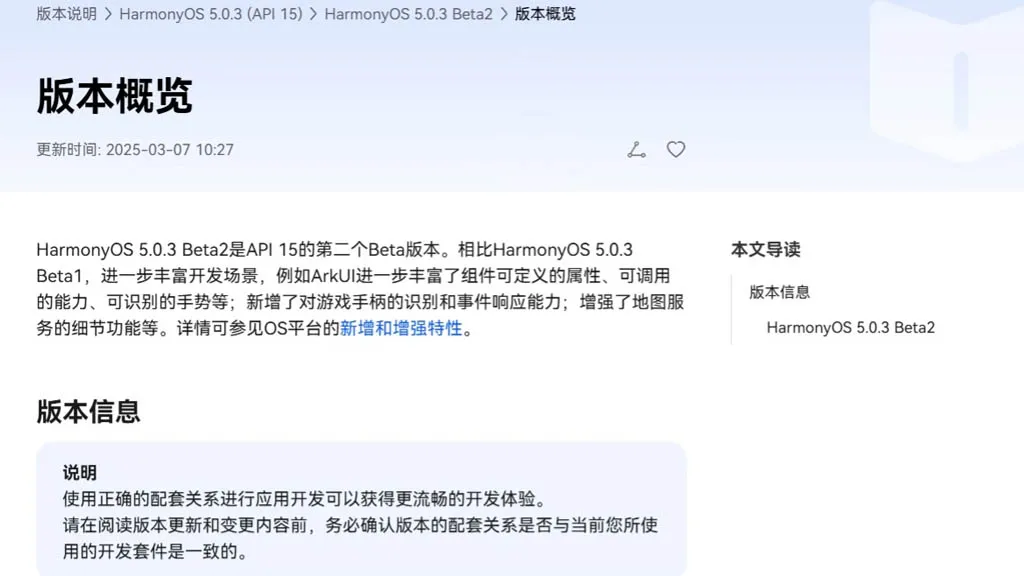
    With an extensive list of new features and improvements, Huawei has made the HarmonyOS 5.0.3 beta 2 rollout available to developers. Numerous areas have been enhanced by the company, such as ArkData, ArkUI, AppGallery Kit, Camera Kit, Core File Kit, and more.

    Also, it has expanded these segments’ capabilities to improve internal management and developers’ overall experience. The new HarmonyOS 5.0.3 Beta 2 was created by the Chinese phone manufacturer using API 15. In comparison to the previous edition, it significantly redesigns the development scenarios.

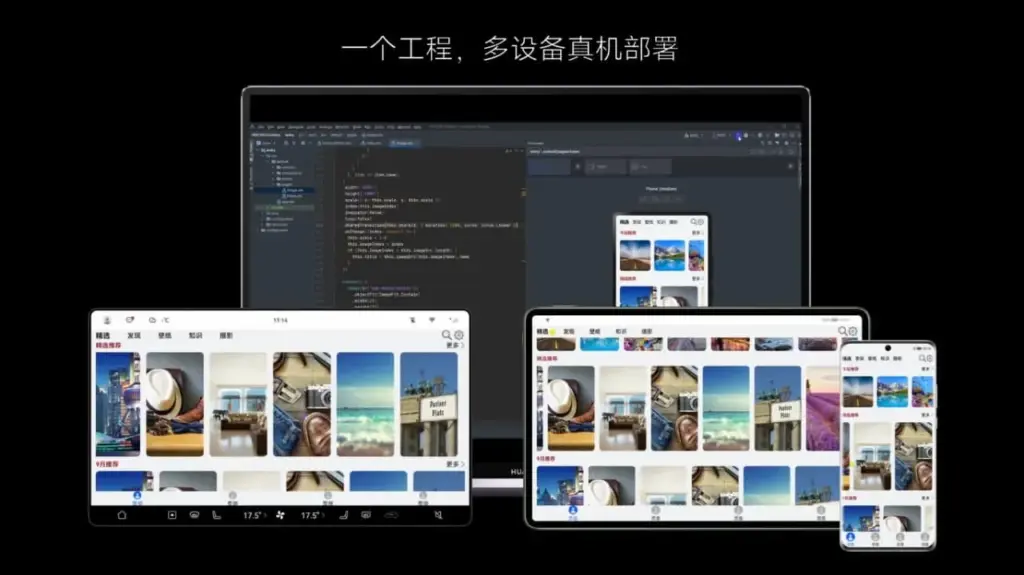
    harmonyos with arkui framework

    Mainly ArkUI improves the responsiveness, callable capabilities, and customizable attributes for map services and game controllers. Only because of its graphical repercussions for the development of HarmonyOS 5.0.3 have we brought up the ArkUI in the vast changelog. The complete changelog is available at the source link below.

    harmonyos 5.0.3 Beta2

    HarmonyOS 5.0.3 Beta 2: ArkUI Changes

    • The basic component now supports the ability to insert text at a specified location in the edited text and delete the content in a specified area.
    • The focus axis event has been added to the general events to support responses to game controller axis events. The C API also supports obtaining the value of the operation type of the current axis event.
    • The pattern password lock component now supports setting whether unselected grid dots are automatically selected when the password path passes through them.
    • Window Management A new C API for window management is defined, which is mainly used to set and get the properties of a specified window, as well as to set the status bar style and navigation bar style of a specified window.
    • The Image component now supports color filling that can overwrite the original color. This feature is only available for image sources in SVG format.
    • The Image component now supports automatic transformation based on the image matrix, providing automatic transformation optimization when presenting grid-type thumbnails in scenes similar to galleries.
    • The Tabs component and Swiper component now support setting the mouse wheel page turning mode.
    • NavDestination adds support for callbacks when events return, which is used to pass parameters when events return.
    • The TextPicker component now supports configuring the text style of each selection item.
    • The Progress component adds a new C API to support the setting of the linear progress bar style.
    • The folding screen state enumeration in the screen property module adds multiple state definitions for the folding axis 2.
    • The Node attribute style of the C API adds the background blur effect attribute NODE_BACKDROP_BLUR.
    • FrameNode now supports cross-language capabilities.
    • FrameNode now supports the expansion mode of child nodes when traversing nodes.
    • Size settings now support setting width and height to adapt to the parent component layout.
    • Text components now support shortcut key tips (labelInfo) in TextMenuItem.
    • The three types of pop-up components now support setting the pop-up display level and related properties and effects (levelMode, levelUniqueId, immersiveMode).
    • BindSheet adds support for the radius property, which is used to set the radius of the semi-modal page corners, and adds support for the detentSelection property, which is used to set the non-gesture switching position.
    • Added a new navigation point component, providing two navigation point styles: dot navigation point and digital navigation point.
    • The Swiper and Tabs components now support animated transitions.
    • The Swiper component now supports sliding behavior interception events, which can determine whether sliding behavior is allowed. The C API controls this through a property named NODE_SWIPER_EVENT_ON_CONTENT_WILL_SCROLL.
    • Third-party platforms have added support for finding the previous or next focus (ARKUI_ACCESSIBILITY_NATIVE_ACTION_TYPE_NEXT_HTML_ITEM, ARKUI_ACCESSIBILITY_NATIVE_ACTION_TYPE_PREVIOUS_HTML_ITEM) when they are connected to the ArkUI accessibility framework.
    • The third-party platform is connected to the ArkUI accessibility framework to add support for multi-instance scenarios.
    • The NavDestination component information of the ohos.arkui.observer module adds the NavDestination type and uniqueId.
    • Added support for C API screenshot capability.
    • UIContext now supports getting screenshots of loaded components by unique Id.
    • UIContext now supports the ability to obtain the layout information of the meta-service menu bar relative to the window.
    • New C API for common events supports obtaining the ID of the current touch event trigger.
    • A new interface with the same name has been added to the window for 2-in-1 devices to set application window size limits.
    • A new interface of the same name is added to the window for specifying the position of the mouse within the window and moving the window.
    • The window adds an asynchronous callback for the window close event monitoring of 2-in-1 devices.
    • The window now supports enabling the monitoring of picture-in-picture window size change events.
    • The window now supports dynamically setting the title of the window title bar.
    • The window now supports setting the main window’s support modes (full screen, floating window, split screen, etc.).
    • NavDestination now supports setting whether to hide the back button in the title bar.
    • Added C API support for controlling focus and handling focus events.
    • Added C API to support forwarding of clone events.
    • The Popup component adds the keyboardAvoidMode property to set whether the Popup bubble avoids the soft keyboard.
    • The pop-up window now supports setting the distance to avoid the keyboard. The ArkTS API is provided as attributes. You can search for the keyword keyboardAvoidDistance in the table pointed to by the link.
    • The attribute string now supports the settings of ResourceStr type images.
    • The attributed string image object now supports obtaining the attributed string image color filter effect (colorFilter).
    • The drag capability now supports obtaining the drag data of the drag progress bar.
    • The component screenshot capability now supports defining component screenshot areas.
    • The Tabs component adds component parameters to support setting the tab position of the Tabs.
    • Text components now support triggering callbacks when the text content is about to change.
    • Added support for obtaining whether touch-related events come from the left or right hand, involving multiple modules: the event module added relevant C API, the gesture binding method added a hand attribute to the FingerInfo object, the touch event TouchObject object added a hand attribute, and the click event clickevent object added a hand attribute.
    • Added support for checking the number of fingers touching the screen, involving multiple modules: NDK added related C APIs, and components added the property isFingerCountLimited to set whether to check the number of fingers touching the screen. This property can be viewed in the reference page of each component.
    • Added support for setting the priority of key event processing and the ability to redistribute. Involved: NDK added a C API for setting the priority of key event processing, NDK added NODE_DISPATCH_KEY_EVENT to the ArkUI_NodeEventType enumeration, indicating the component key event redispatching event (C API), UIContext added an ArkTS API for setting the priority of key event processing, and UIContext added an ArkTS API for distributing key events to specified components.
    • The C API adds support for NODE_CHECKBOX_GROUP-related capabilities. You can search for this keyword in the API reference.