The proliferation of images in the digital realm is undeniable. We’re constantly snapping photos, whether they’re professional shots or casual memories captured on our smartphones. And as technology continues to evolve, so do the file formats we use to store these images. Enter HEIC – a relatively new and efficient format that’s making waves, yet presents certain challenges that prompt the need for conversion tools.
Understanding HEIC’s Rise
When Apple introduced HEIC (High-Efficiency Image File Format) as its default format for photos, it marked a shift in the digital imaging landscape. HEIC offers high-resolution image storage with almost half the size of its JPG counterpart. It’s the future, blending quality and efficiency. But like all advancements, it’s not without its teething issues.
The HEIC Hurdle
The brilliance of HEIC lies in its space-saving capacity without compromising on image quality. But this comes with the cost of compatibility. Most non-Apple devices, and even some popular software and platforms, have yet to adopt this format.
So, what do you do when you have a top-quality HEIC image that needs to be viewed, edited, or shared on a platform that doesn’t support it? You resort to conversion.
The Conversion Solution
JPG: The Universal Language of Images – The need to convert heic to jpg stems from the universal acceptance of the JPG format. Almost all devices and platforms recognize it. Converting HEIC to JPG allows users to maintain a balance between quality and compatibility. It ensures that your photos can be easily accessed, edited, and shared across various platforms.
PNG: Preserving Quality – For those who prioritize image integrity, especially when dealing with graphics or images with transparency, PNG is a preferred choice. Thus, the option to convert heic to png offers a lossless compression solution. This means every pixel of the original image is preserved, ensuring no degradation in quality.
Why Convert?
Compatibility: While HEIC might be efficient, it’s not universally accepted. Converting ensures your images are accessible everywhere.
Flexibility: Different projects require different formats. Whether you’re designing a website or editing a photograph for print, having your image in the right format is crucial.
Storage Management: Although HEIC is efficient, there might be instances where you’d need to convert to JPG to reduce file size further or to PNG to maintain quality.
Embracing the Future
There’s no denying that HEIC is a testament to the ever-evolving digital world. As we move forward, it’s crucial to have the right tools to navigate these changes. Conversion tools serve as a bridge, ensuring that while we embrace the future, we remain rooted in the present’s practicalities. In the end, it’s all about ensuring our memories and professional works are not confined by formats but are free to be shared, appreciated, and utilized in the vast digital universe.
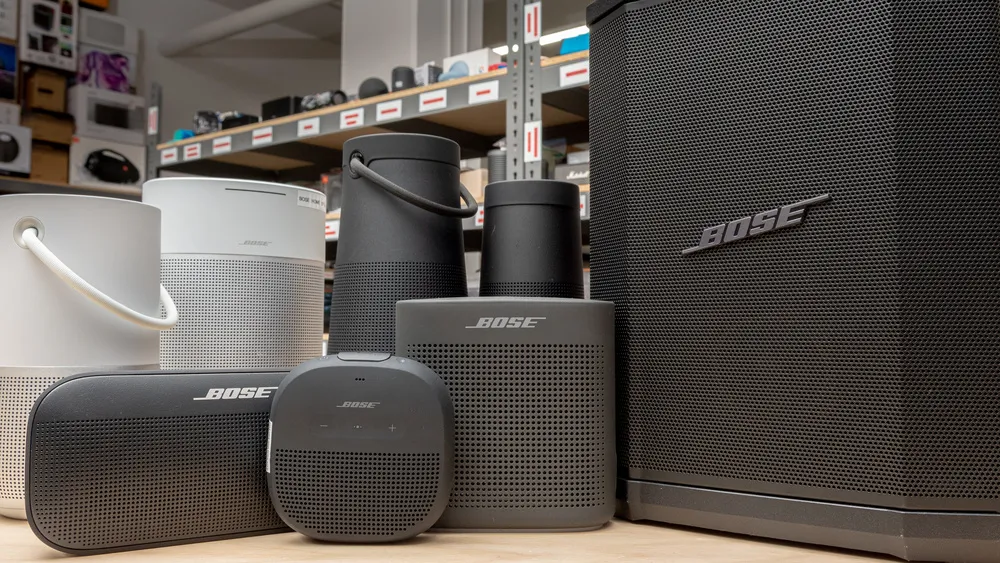
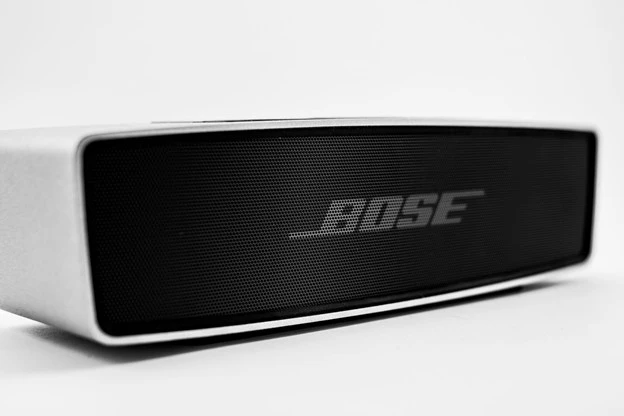
When it comes to portable audio, Bose speakers have established themselves as reliable and high-performing options.
With their impeccable build quality and impressive sound, Bose continues to be a go-to brand for audio enthusiasts.
In this guide, we’ll explore the considerations for choosing the best Bose Bluetooth speaker, recommend some top models, provide troubleshooting tips, and ultimately help you make an informed decision.
Considerations for Choosing a Bose Speaker
Here are some key factors to look out for when buying a Bose speaker.
Sound Quality as a Key Factor
Bose offers a range of speakers, each with its own sound signature and characteristics. Whether you prefer punchy bass, balanced audio, or crystal-clear vocals, understanding the variations in sound quality within the Bose speaker range is crucial.
Take into account your personal preferences and the kind of music you enjoy. While the Bose bluetooth speakers price may be high, they are well complemented with the features.
Size, Power, and Portability Considerations
Deciding between a portable or domestic speaker depends on your usage requirements. If you need a speaker for outdoor adventures or traveling, a portable option is ideal. Consider factors like battery life, durability, and IP ratings for water and dust resistance.
If the Bose Bluetooth speakers price is high, make sure you are getting what you are really looking for.
Features to Consider
Bose is known for incorporating useful features into its speakers. Determine which features are essential for you, such as voice assistant compatibility, Wi-Fi streaming capabilities, and multi-room audio, if you want the best bose bluetooth speaker.
Strike a balance between the features you need and the Bose Bluetooth speakers price.
Bose Bluetooth Speaker Recommendations
Here are our top recommendations for the best Bose speaker you can buy
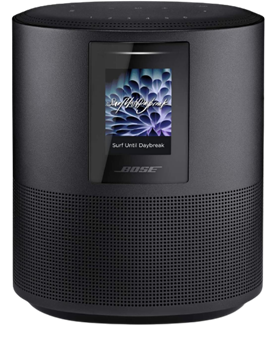
Bose Home Speaker 500
With the Bose Home Speaker 500, you can fill any room with impressive wall-to-wall stereo sound from a single speaker. This smart speaker comes equipped with built-in Amazon Alexa and Google Assistant for convenient voice control. Its noise-rejection microphone system listens in every direction, ensuring your voice commands are always heard.
Connectivity options with Bose Home Speaker 500 are abundant, allowing you to pair your device via Bluetooth, home Wi-Fi network, Apple AirPlay 2, or Spotify Connect. Managing your listening experience is a breeze with three different control options: voice commands, the Bose Music app, or the six one-touch presets on the speaker itself.
Make or take calls hands-free with Alexa, connecting to other Bose smart products, Amazon Echo devices, and contacts in your list. The Bose Music app offers simple setup with detailed prompts, ensuring you can quickly get the most out of your Bose Home Speaker 500.
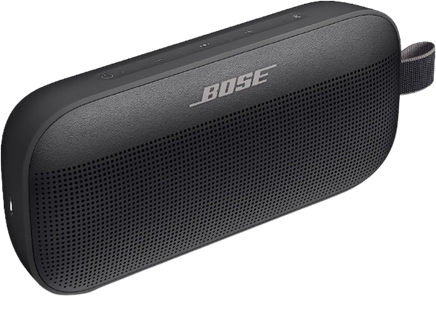
Bose SoundLink Flex
The Bose SoundLink Flex is a state-of-the-art outdoor speaker that delivers impressive audio whether you’re at home or on the go. Packed with exclusive technologies and a custom-engineered transducer, it ensures deep, clear, and immersive sound quality.
One standout feature of Bose SoundLink Flex is the proprietary Position Qtechnology, which automatically detects the orientation of your portable Bluetooth speaker, optimizing sound quality for any environment. The SoundLink Flex has been rigorously tested to meet IP67 waterproof standards, making it resistant to water and capable of floating—perfect for your outdoor adventures.
Designed to withstand drops, rust, and debris, this portable Bluetooth speaker is built to last. It’s also resistant to corrosion and UV light, ensuring it remains in top shape over time. The rechargeable battery of the Bose SoundLink Flex provides up to 12 hours of playtime and charges conveniently through the included USB-C cable.
Equipped with a built-in microphone, the SoundLink Flex allows you to make and receive calls directly through the speaker. It also offers easy access to your phone’s voice assistants, such as Siri or Google Assistant, with just a single button press.
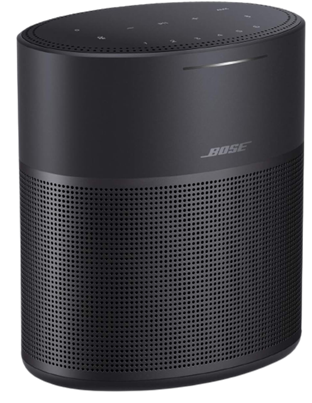
Bose Home Speaker 300
Compact yet powerful, the Bose Home Speaker 300 delivers room-rocking bass and lifelike 360-degree sound. This speaker needs to be plugged into a wall outlet to function and comes with built-in Amazon Alexa and Google Assistant for hands-free voice control.
Connectivity options with Bose Home Speaker 300 are abundant, allowing you to stream music and more via Bluetooth, your home Wi-Fi network, Apple AirPlay 2, or Spotify Connect. You have multiple ways to manage your listening experience, whether it’s through voice commands, the Bose Music app, or the convenient six one-touch presets located on the top of the speaker.
If you’re looking to expand your audio setup, the Bose Home Speaker 300 is part of the Bose Smart Family, allowing it to work in conjunction with other Bose smart speakers and soundbars for a multi-room listening experience.
You can also use Bose SimpleSync technology to pair the Bose Home Speaker 300 with a Bose Bluetooth or SoundTouch speaker, enabling synchronized music playback.
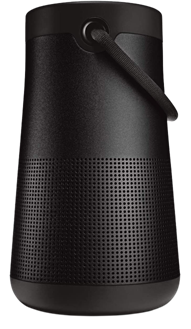
Bose SoundLink Revolve+ (Series II)
The Bose SoundLink Revolve+ (Series II) takes sound to another level with its true 360-degree coverage, playing louder and deeper with extended battery life compared to its predecessor. Its rechargeable lithium-ion battery offers up to 17 hours of playtime, and charging is a breeze thanks to the Micro-B USB port.
Designed to be a durable portable speaker, the SoundLink Revolve+ (Series II) is both dust and water-resistant with an IP55 rating. It can withstand splashes by the pool and features a flexible fabric handle for easy transport.
Take calls directly from the speaker and access your device’s default voice assistant or connect it to an Amazon Alexa-enabled device for even more hands-free control.
Just like other Bose products, the SoundLink Revolve+ (Series II) is compatible with Bose SimpleSync technology, allowing you to pair it with compatible Bose products for synchronized sound throughout your home.
Whether you’re away from your phone or already enjoying music in a group, you can sync the sound by pressing and holding the Bluetooth button or linking them with the Action button.
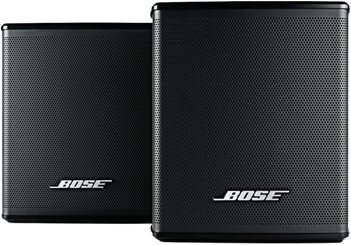
Bose Surround Speakers
If you’re looking for immersive surround sound without sacrificing space, the Bose Surround Speakers are the perfect choice. Designed to be the smallest speakers by Bose, they allow you to focus on your home entertainment rather than the speakers themselves.
These surround speakers bring your music, movies, and TV shows to life with full immersive sound. They effortlessly integrate with the Bose Soundbar 500, Bose Soundbar 700, and SoundTouch 300, creating a theater-like experience with just one connection.
To enhance your home entertainment experience even further, consider adding the Bose Bass Module 500 or Bose Bass Module 700. These bass modules deliver deeper, more impactful bass that you can not only hear but also feel.
With the Bose Surround Speakers, you can elevate your home audio setup and immerse yourself in a true cinematic experience.
Troubleshooting Bose Bluetooth Speakers
Whether you have a Bose Home Speaker 500 or the Bose SoundLink Flex, you are bound to experience problems:
Common Issues and Solutions
Despite the Bose Bluetooth speakers price, you might experience some problems, such as pairing difficulties, Bluetooth connectivity issues, and audio distortion. But there are easy solutions and often, restarting the speaker fixes them.
Updating Firmware and Software
Keeping your Bose speaker’s firmware and software up to date is crucial for optimal performance. So make sure to keep an eye out for any updates and keep your speakers at the nominal working.
Contacting Bose Support
With the Bose Bluetooth speakers price, you get your money’s worth. Customer service, or Bose support, is always there to fix any problems you might have.
Conclusion
In this guide, we’ve explored the considerations for choosing a Bose Bluetooth speaker, recommended some top models across various categories, and provided troubleshooting tips for common issues.
Remember to assess your personal preferences, prioritize the features that matter most to you, and select a speaker that suits your needs. With Bose’s reputation for premium sound quality and build, you can’t go wrong with any of their offerings.
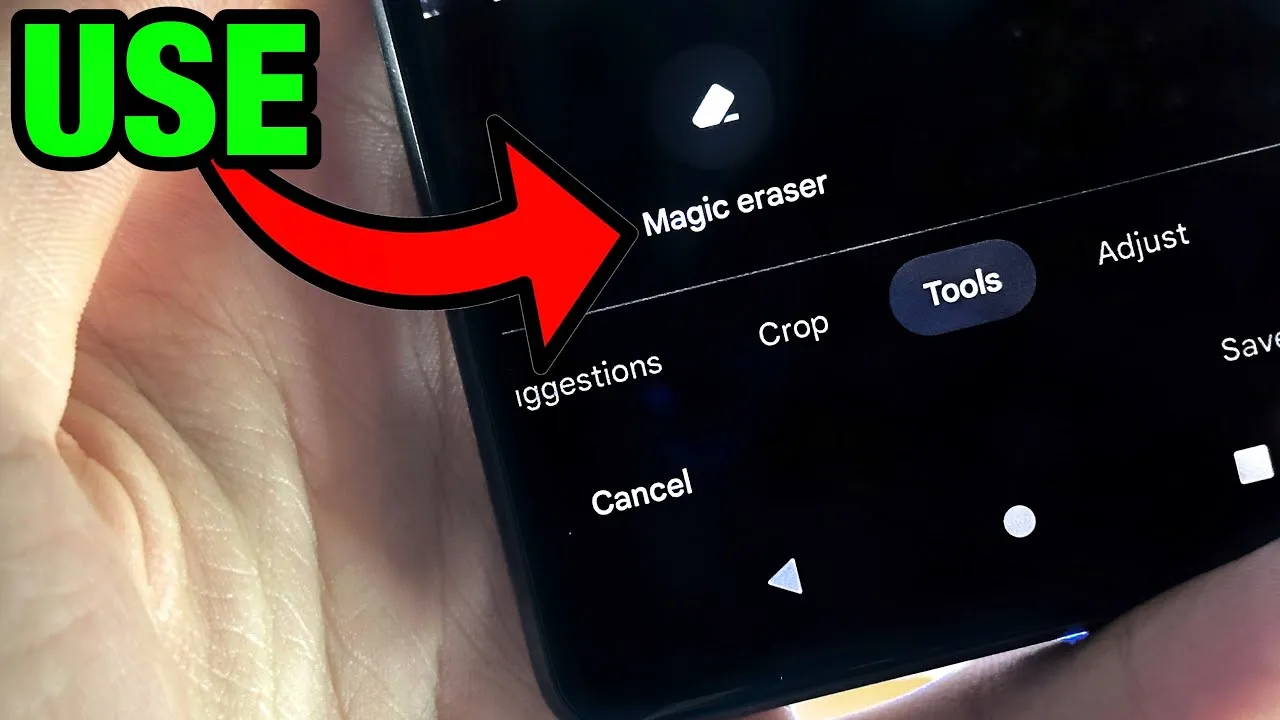
Google’s artificial intelligence (AI)-powered Magic Eraser tool debuted on the Pixel 6 smartphone. Later, it was expanded to accommodate additional iPhones and Android phones. A new version that removes various forms of audio from video recordings looks to be in development by Google; it will probably launch on the Google Pixel 8 and Pixel 8 Pro.
Google hasn’t yet acknowledged anything regarding the Pixel 8 smartphones, however over the weekend, an unidentified person purportedly uploaded some promotional content on X (formerly known as Twitter).
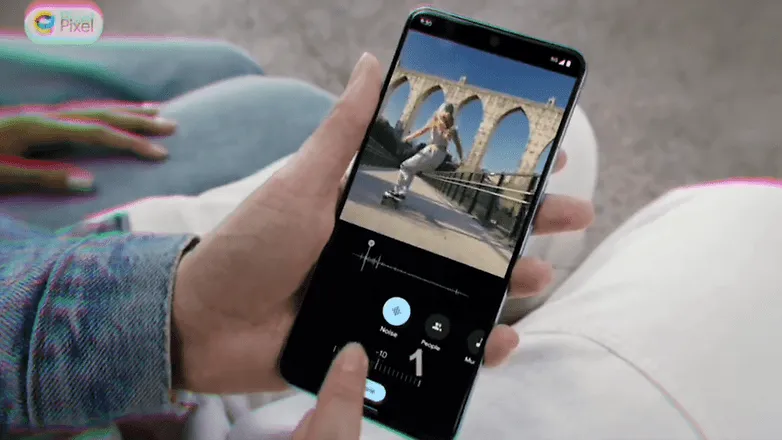
The unreleased Pixel 8 Pro was seen in the video clip sporting a brand-new feature called Audio Magic Eraser. The editing tool was identified as a video-specific version of Magic Eraser. It appears that the tool is able to recognize the important noises in videos and then gives the user the choice to decrease or delete the audio signature.
As for the many kinds of noises in videos, it can distinguish between background noise, people, and music. We would not, however, rule out the potential of the presence of more categories in addition to the aforementioned three.
The Pixel 8 Pro has a similar appearance to the early renders that were published, but it has a new temperature sensor under the camera bump. It would seem appropriate for the low-cost Google flagship Android device to be unveiled in a fresh shade of blue, as is most likely the case with the smaller Pixel 8.
The Pixel 8 line will be powered by Android 14 and may ship in October, based on Google’s prior Pixel launches. At the same time, it’s anticipated that the speculated Pixel Watch 2 with its metal body and ultra-wideband connection would be unveiled.
Have you ever let your phone idle while you scroll through it idly without doing anything? This involves looking via social media and the Google Play Store, as well as the Apple App Store. With so many apps available, it’s simple to become confused and unsure about which ones to install. Although there are disadvantages, there is also joy in discovering something free that is genuinely helpful. To identify free programs that are typically not free, we at nextpit have combed through the Google Play Store and the Apple App Store.
First and foremost, it’s crucial to remember that the free, temporary availability of the iOS and Android apps described below. The expiration date of this deal is beyond our control. Hence, take advantage of the situation! Each program that captures your eye should be downloaded and installed right away before it starts to cost money.
If you come across an interesting app that is listed here but don’t need it just yet, we would recommend you install it before deleting it. By doing so, you will save the app in your library and install it later without having to pay for it, even after the promotion has ended.
Android apps available for free for a limited time
Android apps for productivity and lifestyle
Reminder Pro($2.99): Are you a very forgetful person and need an app that becomes your second brain? Reminder Pro fits the bill perfectly.
Home Workouts No Equipment Pro($1.49): How is your New Year’s Resolution to keep fit and trim coming along? It is not too late to start yet, with this app to help you regain your strength and health without the need for expensive gym memberships or equipment.
ColorMeter Color Camera Picker($1.99): This tool is a pretty cool one for content creators, as it helps you capture and identify colors in your surroundings easily. If you are a stickler for accurate stuff, then this is right up your alley!
Android Games
Burning Fortress 2($0.99): Forget about defending your castle or fortress, this time around, it is your turn to be on the offensive! Just how well can you do?
Block Blast($1.49): A retro puzzle game that is almost like Tetris, except that it is not. You need to match the colors of the blocks instead of clearing lines.
Kingdom Rush Vengeance TD Game($4.99): A tower defense game that offers unique challenges that will keep you coming back for more!
Crazy Calculator($1.49): Do you think you are a math whiz? If so, you might want to check out this game which looks like a calculator app but teases your brain in ways you never knew a calculator could.
Zombie Age 2 Premium Shooter($0.99): A cartoonish side-scroller that sees you mow down wave after wave of zombies in a desperate bid for survival.
iOS apps available for free for a limited time
iOS apps for productivity and lifestyle
Farm Touch Sounds($0.99): Listen to the different types of sounds that farm animals make by touching their respective photos.
HibiDo Pro($2.99): We know that everyone is extremely busy just trying to survive. This means tons of tasks to do each day, so why not enlist the help of an app to simplify your life?
Sifter($0.99): An app that filters incoming SMSes, making sure that no spam gets past it.
iOS games
SARKWO($0.99): A puzzle game that requires you to slide marbles in the right order so that you can advance to the next level.
Spell the Beans($1.29): Absolutely cute title, where a bunch of spilled coffee beans will then require you to make words out of them.
Halloween II($3.99): Find out everything that you need to know about Halloween right here in this cute little app.
Duplicado($2.99): It is an avalance of avocados! You will need to slide all the avocados on the ground so that every single seed is planted to maximize the harvest.
Shock Clock Arcade($0.99): Jump from clock to clock before time runs out. Just how fast are you?
That’s it for now! To get you through the weekend, we hope you’ve enjoyed our selection of free iOS and Android apps. Were there any intriguing apps or games that you liked that you did not find here in the Apple App Store or Google Play Store? Please feel free to leave your suggestions in the comments section.
A significant 0-click vulnerability in the Pixel 6 modem stack was identified by Google’s Android Red Team and has since been patched. This vulnerability allows a skilled attacker to take control of a target’s Android device by making a call to the victim.
Four members of Google’s Android Red Team demonstrated how two Pixel modem vulnerabilities (CVE-2022-20170, CVE-2022-20405) could be combined to first hijack a targeted Pixel’s cellular modem communication to the second-generation (2G) wireless standard with the aid of a cheap $1,000 home-made cellphone base station during the Wednesday Black Hat session.
The aforementioned bugs were first found in 2021 by Android Red Team members. With a CVSS score of 9.8, both modem flaws are now classified as critical. The over-the-air remote code execution bug, designated CVE-2022-20170, was addressed in June 2022. An elevation of privilege (EoP) weakness was discovered in the second vulnerability, tracked as CVE-2022-20405, and it was fixed in August 2022. The EoP bug was deemed to be of moderate severity when it was initially discovered in an Android security bulletin.
If the attack is successful, the enemy will be able to wirelessly execute remote code that is running in the Pixel modem’s privileged context. According to experts, an attacker would then be able to conduct out assaults against the handset, such as launching a DoS attack, performing SMS/RSC (text message) sniffing and spoofing, MFA compromise, and enabling a hacker to switch to the device’s main operating system kernel.
Google claimed that it was not aware of the issues being used in the wild and that internal Alphabet procedures were to blame for the delay in disclosing the technical CVE information.
2G is obsolete
The Android Red Team at Black Hat includes Xuan Xing, Eugene Rodionov, Xiling Gong, and Farzan Karimi to demonstrate the assault (see image). Exploiting flaws in the Android Pixel’s cellular data connection to 2G networks is the initial attack vector.
The goal of this attack, according to Karimi, is to downgrade mobile devices to 2G.
The majority of modern cellular modems operate on 4G or 5G frequency bands. Yet, the majority of cellular data modem chipsets continue to support 2G and other dated wireless frequencies. For uncommon use scenarios including outdated wireless network geography, devices cycling down to save handset power consumption, and phones going to international markets where legacy 2G cellular networks are more prevalent, legacy support is required.
Weak encryption between towers and devices is one of the security vulnerabilities with 2G, which attackers may (and have) easily hacked in order to intercept conversations or text messages. Even current phones, according to researchers, occasionally transition to 2G to handle signal congestion, roaming, and network switching better.
The Android Red Team went above and beyond the examples of hackers and government enforcement utilizing fake base stations dubbed ISMI catchers (international mobile subscriber identity) or surveillance tools like Stingray to collect phone ID data, geolocation data, and content. They demonstrated how a vulnerable Pixel phone could be controlled remotely via a $1,000 home-built base station in addition to being used to collect data.
Breaking down the attack
The Android Red Team went above and beyond the examples of hackers and government enforcement utilizing fake base stations dubbed ISMI catchers (international mobile subscriber identity) or surveillance tools like Stingray to collect phone ID data, geolocation data, and content. They demonstrated how a vulnerable Pixel phone could be controlled remotely via a $1,000 home-built base station in addition to being used to collect data.
“When a victim comes in proximity (a range of less than 5 miles) of the malicious base station it will connect to it,” said Karimi. “That allows the adversary to send the exploit payload and establish a foothold on the victim’s modem.”
In more precise terms, the RCE issue is an out-of-band (OOB) write error that happens during the decoding of OTA packets from 2G GSM connection. According to researchers, the EoP fault is caused by an error in the Pixel 6’s modem code, which renders memory space RWX (also known as the read (r), write (w), and execute (x) permissions) and available via signal processing instructions.
“The attacker fully controls up to 255 bytes written into 1-byte buffer in the heap,” researchers said. “CVE-2022-20170 enables us to overwrite heap header of the next adjacent chunk with fully controlled data.”
According to Google, the exploit technique allowed them to “corrupt nearby heap items and put a small amount of controlled bytes in the heap.” Uncertainty surrounds whether any of those items had an effect on the memory management unit (MMU) of the modem, which is essential to the next phase of the attack.
Researchers were able to execute 80 bytes of malicious shellcode via the modem’s (MMU) misconfiguration vulnerability (CVE-2022-20405), giving the attacker access to the affected device.
Google tip: Disable 2G
The 2G-attack method actually poses a threat. There have been reports of temporary 2G base stations popping up close to the hotels Paris Las Vegas and Caesars Palace during what is known as Hacker Summer Camp in Las Vegas, which features three security conferences: BSides, Black Hat, and DEF CON. Participants in DEF CON are renowned for having a habit of exposing cybersecurity experts who expose their digital equipment to a cyberattack.
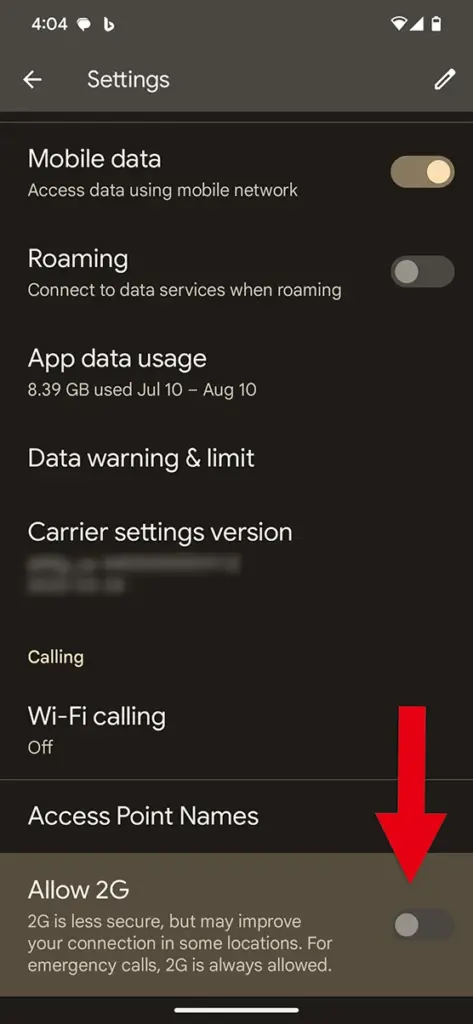
Researchers strongly advised Black Hat attendees to turn off 2G support on their phones. To turn off 2G capability, simply search for 2G in Settings on an Android device.
In related news, Google announced Tuesday a suite of Android 14 advanced cellular security mitigations for enterprises.
“Android 14 introduces support for IT administrators to disable 2G support in their managed device fleet. Android 14 also introduces a feature that disables support for null-ciphered cellular connectivity,” according to a Google Security Blog writeup.
Although MIUI 15 has been planned for development and release by Xiaomi for a number of years, it is still in the alpha testing phase. Yet this marks the first time that MIUI 15 has been reported to have appeared on MIUI.com without the words “alpha” or “test” next to it. Sadly, this time only a text string was discovered in a webpage’s HTML code; there was no beta test version released into the open. Yet, its release represents a significant turning point in the development of MIUI 15.
Although MIUI 15 has been planned for development and release by Xiaomi for a number of years, it is still in the alpha testing phase. Yet this marks the first time that MIUI 15 has been reported to have appeared on MIUI.com without the words “alpha” or “test” next to it. Sadly, this time only a text string was discovered in a webpage’s HTML code; there was no beta test version released into the open. Yet, its release represents a significant turning point in the development of MIUI 15.
Many Xiaomi consumers are still awaiting the MIUI 14 upgrade for their devices even though MIUI 15 is still a few months away. It is yet unknown whether all eligible devices will be updated before the launch of MIUI 15, as delayed upgrades are never helpful for a tablet or smartphone manufacturer’s reputation.
Are you planning to purchase the newest Samsung phone, or are you a bigger Pixel fan? You’ll want to reset your old Android phone to factory settings in order to remove all of your data before selling it on eBay, giving it away to a friend, discarding it, or trading it in for a discount on your new phone. Fortunately, doing that is fairly simple.
Before you begin, keep in mind that while the process for the most of recent Android phones should essentially be the same, these instructions were tested on a Pixel 3 running Android 12. It goes without saying that you should first confirm that all of your data has been moved to your new phone, backed up, or both. No turning back after your previous phone has reset.
Go to Settings
Select System > Reset options
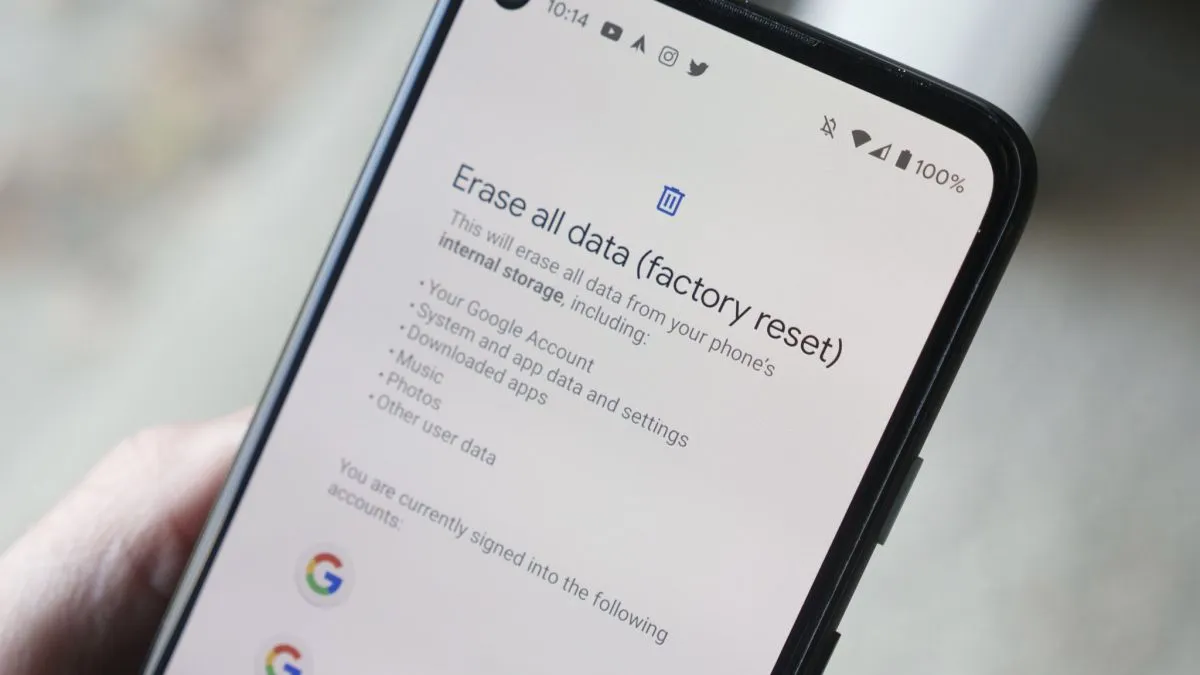
You will be presented with four choices. Reset Wi-Fi, mobile & Bluetooth is sometimes useful if you’re having trouble with connectivity. Reset app preferences will restore all of your app and notification defaults, among other things. Erase downloaded SIMs will help you delete any digital SIMs you no longer need. However, none of these will delete the data on your phone. That’s the job of the last choice, Erase all data (factory reset), and that’s the one you’re going to select.
The next screen will tell you what is going to be erased, and which accounts you’re signed into. Select Erase all data.
If you have a PIN or some other security setup, you’ll be asked to enter it
You’ll get another screen asking if you’re sure this is what you want to do. Are you sure? Then hit the Erase all data button.
I’m done now! Typically, the procedure takes two to three minutes. After rebooting, your phone will ask you the customary questions about language, account, network, etc. When you see those, you’ll understand that it was successful.
There are several things to keep in mind. Before you can reset your Samsung phone, you could first be prompted for your Samsung account password (provided you’ve made one and connected it to the device).
If you’ve got an Android phone that is using an earlier version of the OS (say, before version 8), the reset may, after it reboots, ask for your login. This could be awkward if you’ve already sent the phone to someone else. As a result, if you’ve got an older phone, it’s a good idea to turn off your screen lock (by going to Security > Screen lock and selecting None) and deleting your Google account (which you’ll find at Settings > Account > Google) before you start the reset. (In fact, that may be a good idea in any case.)
There is evidence that some data may remain on a phone even after it’s been reset. To be extra careful, you can encrypt the phone before resetting it:
Go to Settings > Security > Encryption & credentials and select Encrypt phone
Go back to your settings and start the reset process
To ensure optimal usability, smartphone makers tune the default touch sensitivity. However you might think it’s too low and have trouble with simple navigation. Poor calibration, low refresh rate settings, a thick screen protector, dampness, and other factors may all contribute to it. For your top budget phone, the majority of Android OEMs (original equipment manufacturers) provide pertinent alternatives to improve touch sensitivity.
When the touch screen on your Android phone doesn’t respond to your touches correctly, you may expect a below-average experience. Such delays in touch annoy and perplex you. Use the tips below to increase the sensitivity of your Android phone before you trade it in for an iPhone.
Increase touch sensitivity on Android
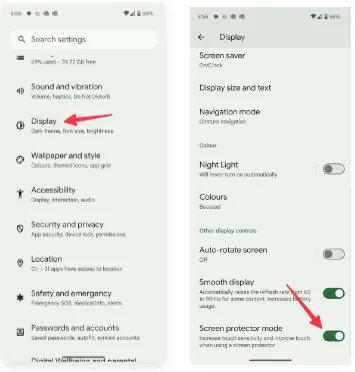
A screen protector is one of the must-have accessories to protect your Android phone’s expensive display. However, many have noticed a degraded touchscreen sensitivity after applying tempered glass on their Android devices. If you are among them, make a tweak from Settings.
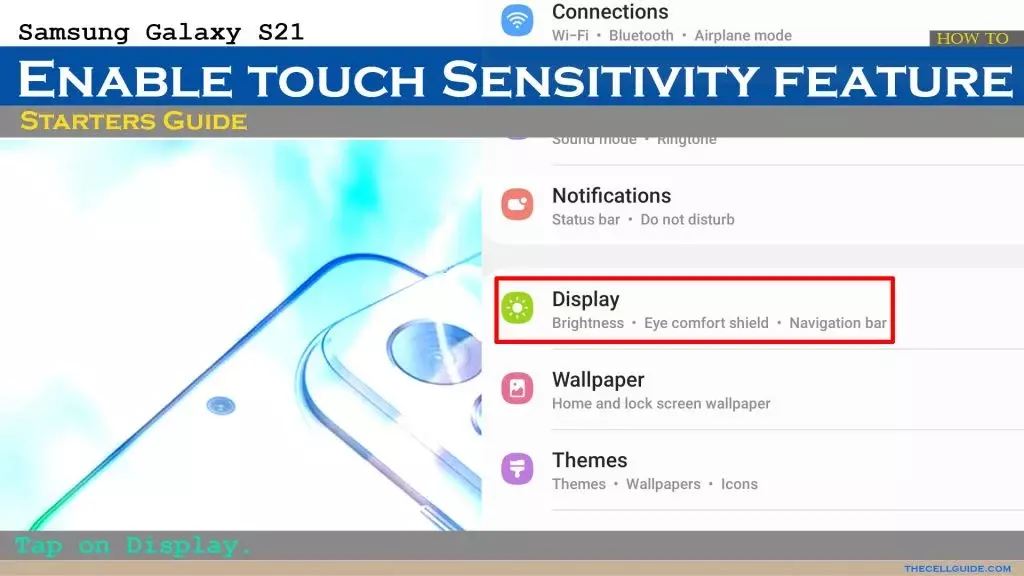
Open Settings on your Android phone.
Scroll to Display.
Turn on the Screen protector mode toggle to increase the sensitivity level.
Increase touch sensitivity on Samsung Galaxy phones
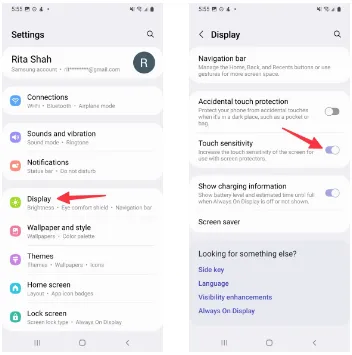
We talked about the default Settings menu that’s preinstalled on most Android phones, including the Google Pixel. Samsung uses a different Settings menu on One UI software. If you have one of the top Galaxy phones, use the steps below to change touch sensitivity.
Open Settings on your Samsung phone.
Select Display and turn on the Touch sensitivity toggle.
Increase display refresh rate
Did you set your mobile device’s refresh rate to 60 Hz instead of 120 Hz? To increase the battery life of their phones, many people lower the panel refresh rate. Nevertheless, switching back to 60 Hz after being accustomed to a refresh rate of 120 Hz or greater can impair your experience with touch sensitivity. It’s time to switch your Android phone to a high refresh rate.
Open Settings and go to Display.
Turn on the Smooth display toggle.
Samsung phones
Samsung users can go through the steps below to increase the refresh rate.
Launch Settings and scroll to Display.
Select Motion smoothness.
Tap the radio button beside Adaptive.
If your LTPO (low-temperature polycrystalline oxide) display automatically adjusts the refresh rate, you can adjust the Developer settings to force the peak refresh rate, which will enhance the quality of your animations and touch responsiveness.
Increase pointer speed on Android
Do you notice lag while using a Bluetooth mouse on your Android phone or tablet? You can change the pointer speed and wheel scrolling speed from Settings.
Launch the Settings app and scroll to General management.
Select Mouse and trackpad.
Use the slider to increase the pointer speed and wheel scrolling speed.
We used screenshots from a Samsung phone. The steps may change on your Android, OnePlus, or Google Pixel phone. On some phones, it’s often a part of the accessibility menu.
Use a high-quality screen protector
Did you buy a screen protector from a sketchy Amazon listing? These below-average screen protectors often cause issues with touch sensitivity even when you increase the touch sensitivity from Settings.
You should stick to reputed names or opt for the official tempered glass from the OEM for your Android phone.
Use phone-compatible gloves
Traditional gloves don’t often play nice with modern smartphones. If your region has snowfalls during the winter, get a pair of gloves that are compatible with your smartphone.
Let your phone cool down
If you use your phone after a long gaming session or recording a lengthy 4K clip, the device temperatures go abnormally high, and you may face issues with touch sensitivity for a while. You may also notice lag with basic scrolling on the homescreen or the web page. Let your phone cool down and use it after some time has passed. The issue is more apparent on phones with poor cooling systems.
Can you use third-party apps to improve touchscreen response speed?
The Google Play Store is packed with third-party apps that claim to improve the touchscreen response speed and sensitivity of your screen during gaming. You should always take such apps with a pinch of salt. They also advertise calibrating the touchscreen to factory settings. Most of these apps are paid and may not work as expected. If you face this issue, get a refund from the Google Play Store.
Think again if you believed that your data on Threads is private.
All of the methods that Threads is following you and using your data are listed in the App Privacy section of the Threads App Store website. The list is very, very long, reader.
Thursday saw the launch of Threads, Meta’s answer to Twitter, and it appears that in its first seven hours of operation, it attracted more than 10 million users.
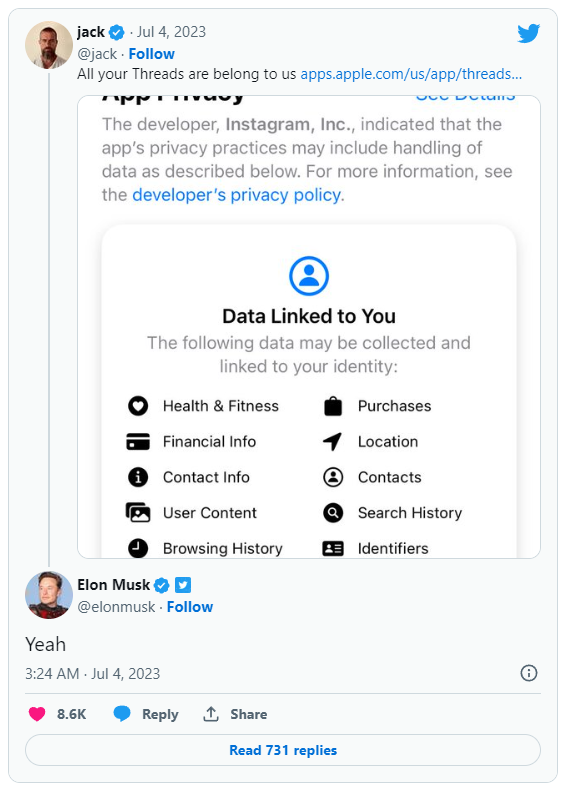
Click the “See Details” link in the App Privacy section of the App Store page for a comprehensive overview of the possible data collection and usage practices for Threads (opens in a new tab). But, the gist is this: Nearly all of your personal information is being gathered by Threads, including information about your transactions, finances, location, contact details, search history, and browsing habits.
Jack Dorsey, a co-founder of Twitter, became aware of this and tweeted about the Threads App Privacy section. Elon Musk, the company’s current owner, simply said, “Yeah.”
It doesn’t come as big surprise. The amount and breadth of data that Threads collects is similar to its sister app, Instagram(opens in a new tab) (both Threads and Instagram are owned by Meta, which also owns Facebook).
Twitter and other significant social media platforms gather user data as well in order to provide advertisements from outside businesses more effectively. A comparable, albeit slightly condensed, overview of all the ways in which Twitter uses the data of its users can be found on its App Privacy(opens in a new tab) page.
Even still, it’s upsetting to have to give a Twitter clone access to vast amounts of your personal information. Another Twitter competitor, Jack Dorsey’s BlueSky, which is now invite-only, claims to be looking into ways to make money without being as dependent on third parties as its rivals.
Are you looking for a music-making app for your Android device? Then you have landed in the right place. Because in this blog, we will be covering the best ones of 2023. So, continue reading to learn about them.
The concept of making music on smartphones might have felt surreal two or three decades ago, but now that we are living in the 21st century, you can easily create any kind of music on your Android device anywhere, anytime.
While it is true that producing music on a laptop or desktop system lets you create better quality and more powerful music within a much shorter time with their robust processors and external USB device facilities, there are some excellent music-making apps for Android devices that seamlessly let you create music on the go.
So, what are you waiting for?
Let’s dive into the world of the best music apps and take advantage of advanced technology.
Best music-making apps for Android 2023
There are countless types of music apps available on the market. For instance, there are the best soundboard apps that let you play audio clips, and then there are music-creating apps that we will be discussing in the coming part to make the everyday lives of artists easier and more interesting. The purpose of these apps is to create music you like and share it with your loved ones.
So, let’s get to know them.
KORG Kaossilator for Android
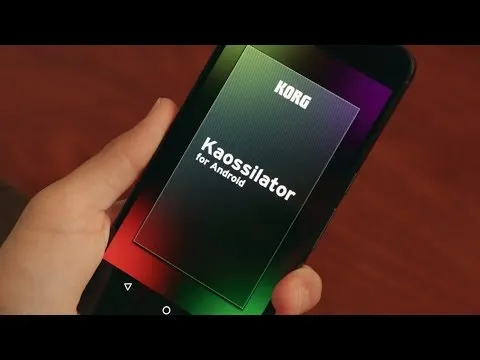
KORG Kaossilator for Android is another excellent music-synthesizing app that gives you a full-fledged experience by simply moving your fingers on a touchpad. You can seamlessly add layers to your performance and record them. With a wide range of options, from electronic to instrumental to acoustic, you can engage yourself in the world of music creation if you want to.
Moreover, the app offers 150 diverse in-built music sounds through which you can create versatile dance music styles, be they techno, house, EDM, electro, or a lot more. Also, you can erase all your wrong notes using its scale/key feature so that your music stays in the right place.
And if you want to level up your music performance with additional layering, you can also do that with the help of its in-built loop sequencer, which includes five different types of layering, including synth, bass, chords, drums, and sound effects.
However, the only downside of this app is that it is a bit pricey and includes in-app purchase.
FL Studio Mobile
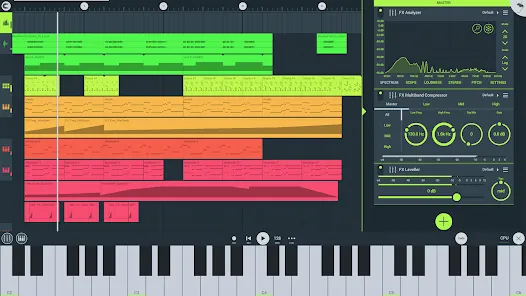
Powered by Image-Line, FL Studio Mobile is an excellent music-making app for Android users that lets you produce ultra-high-quality music on the go. The interesting thing about this app is that you can plug it into your desktop when you reach home and continue working from the system, which is a great advantage for professional music composers.
Furthermore, if you want to add step-by-step sequences, you can use this app and then further refine your music with reverbs, filters, and effect modules. Moreover, the app lets you save the files in multiple formats, including WAV, MP3, FLAC, and MIDI, and share them with your loved ones via WiFi or any cloud.
However, the only downside of this app is that it is not free and includes an in-app purchase for the DirectWave Sample Player.
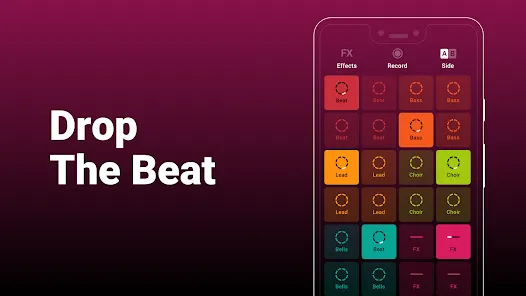
Groovepad
As its name says, the Groovepad music-making app lets you create your own smooth-sounding music at ease with all its keyboards and extensive library of one-of-a-kind and unconventional soundtracks. It has an engaging interface and very color-coordinated buttons that make the whole spotting and navigation process easier.
Just pick any song from its array of genres, including Hip-hop, EDM, House, Trap, electronic, and more, and create your own incredible melody. Talking about its other eccentric features, it includes mind-boggling FX effects like reverb, flanger, delay, or filter that bring back the party feels into your life.
An ideal choice for both beginners and professionals, the app lets you share your self-created music with your loved ones using your inner DJing talents.
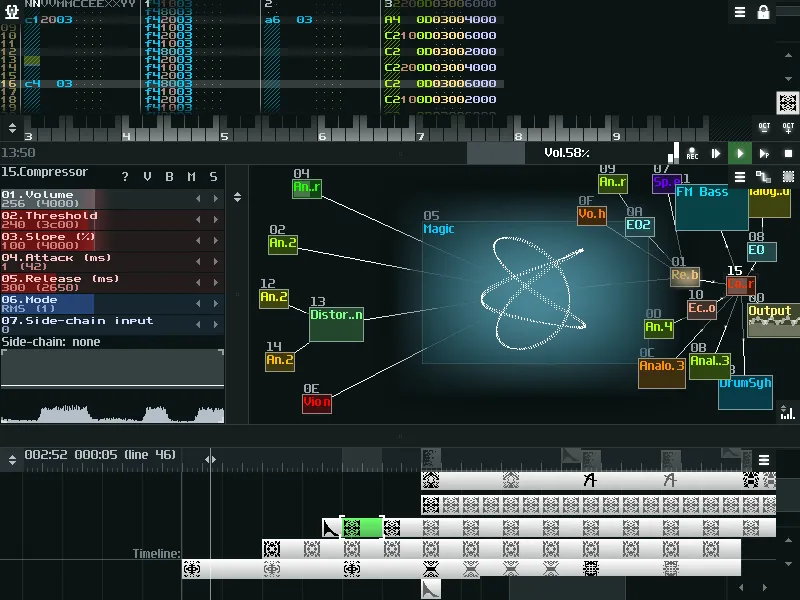
SunVox
SunVox is a distinctive music sequencer app for small and fast cross-platform devices with an in-built pattern-based sequencer (also called the tracker). It is a tool that most professional music composers would like, as it comes with extremely optimized synth algorithms, a malleable architecture, and multi-platform support systems.
Furthermore, the app has a well-defined modular interface that makes it easy to understand and use. And if you’re ready to import music that consists of multiple tracks, you can even export it into WAV format.
Its other potential features include USB musical instrument digital interface IN/OUT for 6+ Android users, mic recording using a sampler, the ability for developers to deploy the SunVox engine into their own apps via its free library, and support for 16/24/32 bit WAV, AIFF, and XI music samples.
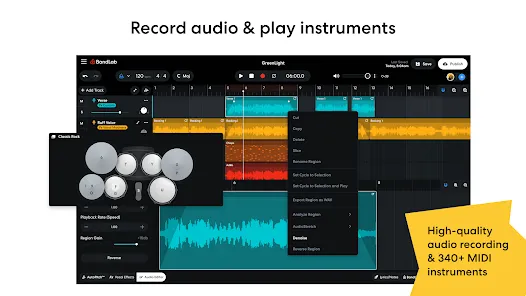
BandLab – Music Making Studio
BandLab: Music Making Studio is another potential music-making app for Android devices with a global user base of 60 million. It is the best free multi-track music maker app available on the market. Its digital audio workstation (DAW) lets you seamlessly record, edit, and add multiple layers of music to create your own grooving remix.
The app gives you limitless music storage and accessibility from any device, so now you can create and access it from anywhere and at any time. Furthermore, there are over 15,000 royalty-free sounds and beats that you can use in your music. This app is more than just any music app; you can use it as a beat-maker or an audio recording app.
With 180+ distinct vocal, guitar, and bass effect presets, 330+ virtual MIDI instruments, and tools like AutoPitch, Looper, Metronome, or Tuner, you can create your own world of music and live in it for a lifetime.
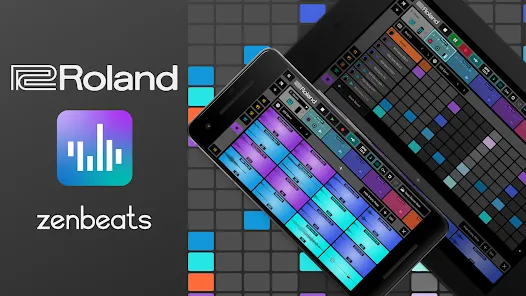
Roland Zenbeats Music Creation
With its classic collection of traditional and modern sounds, Roland Zenbeats Music Creation brings out the history of Roland into a very unique melody style. The app works well for the halfway-to-advanced level of music creators. So, in whichever part of the world you are living in, unleash your inner creative spirit with the app and create your own sense of beats, a multitrack song, or a melody.
Talking about the features that the app offers, it comes with 14,000 plus presets that let you create something super exciting and fresh; you can tweak your music with its advanced edit functionality; sample your music with a touch of your finger on Zen’s drums; it offers you a set of drum tones from TR-808 to TR-909; and a lot more.
The number of presets or any kind of advanced functionality is fairly distributed between the free and pro versions.
RD4 Groovebox
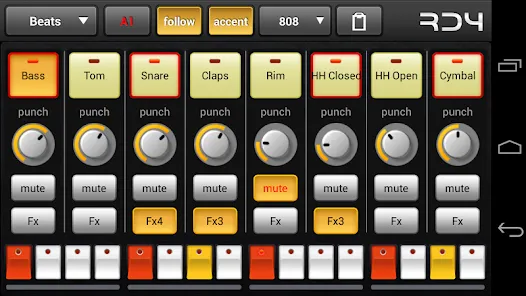
RD4 Groovebox is another premium music-making app that lets composers and artists create their styles of music in real-time with the in-built virtual analogue synthesisers, marvellous drum effects, and grooving tunes. One can simultaneously select instruments for the four channels and record and set the notes for each of these instruments.
Also, the interface has been mindfully designed to match the shape of the fingertips and the frequency. The multi-touch sensor-enabled app makes it simple for the creators to invent multiple musical phrases. Furthermore, one can tweak the sound of music by modifying the oscillators, adding filters, or even adding audio envelopes.
To even refine the music, you can add reverb, phaser, distortion, delay, and even control the tempo. Overall, it is another great paid music-making app for Android devices.
Add Music to Voice
The app does exactly what its name says. Add Music to Voice is a great choice for those vocalists who don’t have a playback band or an instrument and have just started out in their career and are looking for that perfect track for their voice.
So, the app simply lets you record a new voice or add an existing one from your device and add background music from its amazing music library. To refine the final output, you can take advantage of smart filters so that your voice and music blend smoothly. Consider it a useful app for all your Karaoke parties.
Hip-Hop Producer Pads
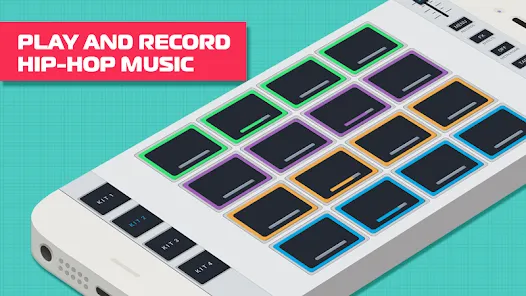
It is a fun music-making app for Android devices. As the name says, the app lets you create super-fresh, unique Hip-Hop music using the in-built virtual Sampler and drum equipment.
Considering its key features, it lets you create melodies with an array of options like Loops, One-Shots, or samples; to keep the rhythm, there is a metronome, and create outstanding music and be the real hero of the party.
Wrapping-Up
That’s all for the best music-making apps for Android devices. Now that you know about these amazing apps, it’s time to take advantage of their power-packed functionalities.
Use their incredible soundtracks, beats, voiceovers, and sound effects, seamlessly cut and merge them, and create the music your heart agrees upon. And feel immense joy by sharing it with your family, friends, and that special someone.
We hope you find these music apps worthy. If so, don’t forget to share your favorite among them.