Tag: android

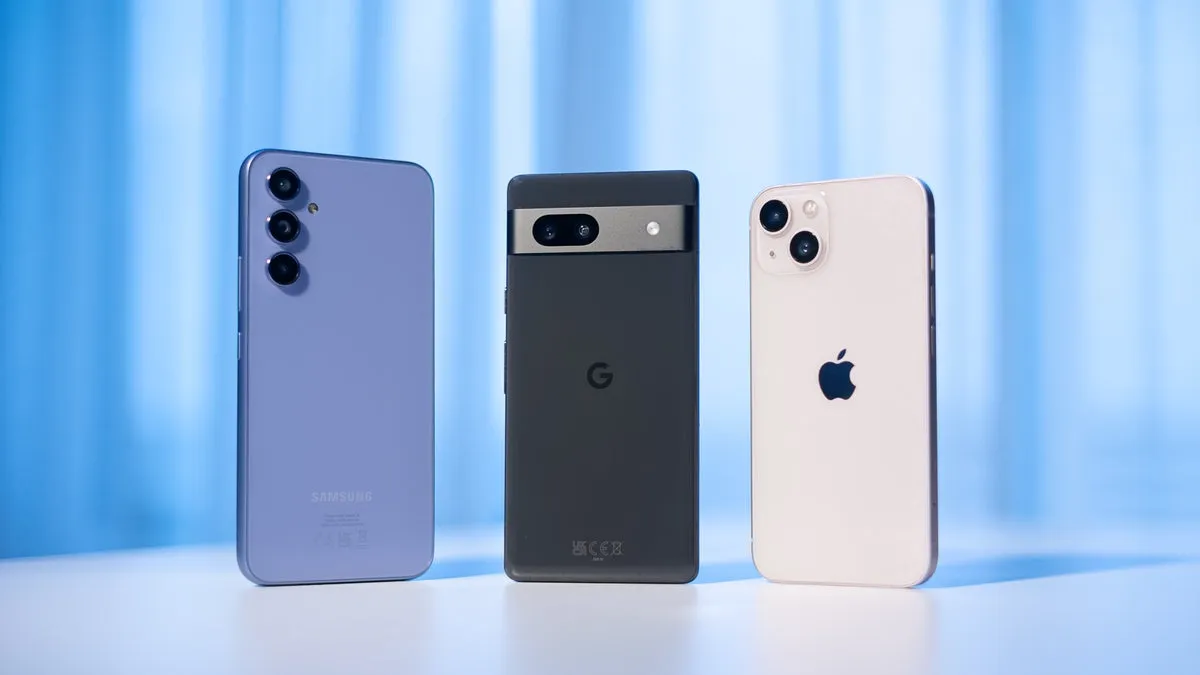
  • Top 4 compact smartphones to check out in 2024

    Top 4 compact smartphones to check out in 2024

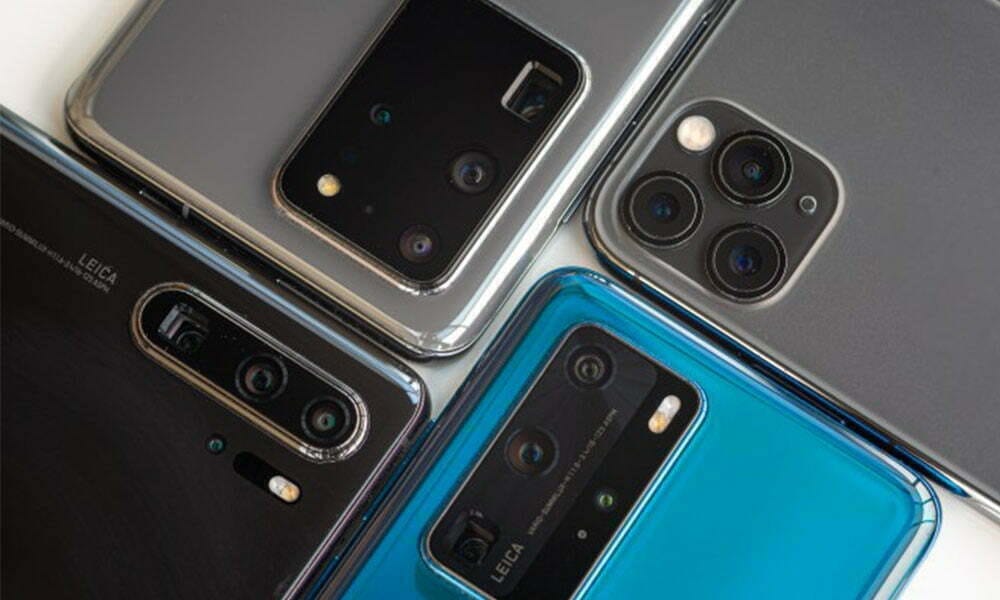
    Smartphones come in many shapes and sizes, but choosing a good smartphone that is also tiny is a little more difficult.

    Smaller phones have traditionally been concentrated on the low end of the market because smaller displays are less expensive to manufacture, but we have seen a rebirth of small phones in the luxury end of the market in recent years with the likes of the Samsung Galaxy S24 and Asus ZenFone 10.

    However, it remains challenging to find a smartphone that is both tiny and provides a satisfying smartphone experience. That is why we thoroughly benchmarked each option on our list, with our reviewers switching SIM cards and transferring all apps and data to test real-world performance.

    We take into account screen size, dimensions, and weight, in addition to the usual performance, camera, and battery testing that we do with all smartphone reviews, and we have divided our list into categories – best small Android, best small mid-ranger, and more – to make the decision easier.

    It is definitely worth noting that our official definition of a small phone is one with a maximum display size of 6.1 inches; nevertheless, if there are any exceptions to this criterion in our selection below, we will make sure to explain why. If you have changed your mind and are now tempted by something a little larger, check out our list of the top smartphones and Android phones for more ideas.

    If you need a little phone but want to continue with Android, the Asus ZenFone 10 is your best option. It is not quite as little as the iPhone 13 mini, with a 5.9-inch 120Hz OLED display, but it is still modest in comparison to other Android flagships, which have 6.7- or even 6.8-inch displays. And, like with the iPhone 13 mini, do not be fooled by its diminutive size; this is a flagship smartphone with blockbuster specs.

    That contains the latest and greatest Qualcomm CPU, the Snapdragon 8 Gen 2, as well as 8GB or 16GB of RAM and up to 512GB of UFS 4.0 storage, allowing the ZenFone 10 to handle everything you throw at it with ease. Gaming was also enjoyable on the small phone, which managed to stay cool even throughout extended gameplay sessions.

    There is also excellent camera performance from a 50MP main and a 13MP ultrawide, particularly in terms of image stabilisation, and a 32MP RGBW selfie camera produces some of the best selfies we have seen this year. What actually distinguishes the ZenFone 10 from the competition is its highly customizable approach to Android 13.

    You may either use Asus’ ZenUI skin or something very similar to pure Android, with Material You and other UI customization options. It outperforms almost every other Android OEM, making it a pleasure to use on a daily basis. Add in a comfortable all-day battery life with a 4,300mAh cell, and you have got a fantastic tiny Android smartphone that will not break the bank.

    The Asus ZenFone 10 remains the smallest flagship Android smartphone available, but the Samsung Galaxy S24 is not only more powerful, but also has a larger screen in a body that is only slightly larger than the ZenFone’s.

    The 6.2-inch Dynamic AMOLED 2X screen is somewhat larger than last year’s 6.1-inch panel, but do not worry; this is feasible because Samsung reduced the screen’s bezels, leaving the form factor nearly equal to its older sister. That means it is not only larger while preserving a compact form factor, but it also has high-end features like an LTPO-enabled 120Hz refresh rate, HDR10+ support, and a maximum brightness of 2600nits.

    It gets a little confused in the chipset sector, with the Exynos 2400 chipset available in the UK, Europe, and other regions, yet the Snapdragon 8 Gen 3 for Galaxy is available in the United States.

    We evaluated the former, but we benchmarked the latter, and it is evident that the Snapdragon-equipped edition outperforms in GPU tests, but you will not notice a difference in regular use. It is fast and responsive, and it makes use of GenAI capabilities to deliver on-device translation, voice recording transcription, and other features. That could only get better with its improved seven-year OS upgrade cycle, which is the longest of any small-screen phone now available.

    The only disappointment is camera performance; while it is far from a bad camera setup, consisting of a 50MP main, 12MP ultrawide, and 10MP telephoto, it is been unchanged for the third year in a row, and as a result, there are more powerful options on the market – though many of these are attached to larger screens like Samsung’s own 6.8-inch Samsung Galaxy S24 Ultra.

    Still, if you are seeking for a reliable small-screen flagship that can handle just about anything, the Galaxy S24 is a compelling alternative.

    What if your budget does not cover flagship-level devices like the S24 or ZenFone 10? The Google Pixel 8a is our top pick for tiny smartphone aficionados on a tight budget.

    The Pixel 8a measures 6.1 inches, has a smooth 120Hz refresh rate, and uses Actua technology from the flagship Pixel 8 to improve brightness to 2000nits. It is also a lovely, compact size that feels well in the hand, especially with the Pixel 8a’s rounded corners.

    The Pixel 7a flexes its mid-range muscles in the camera department, where it uses the flagship-level Tensor G2 chipset to power a variety of AI features such as Super Res Zoom and Night Sight, as well as exclusive photo editing features that remove background distractions and sharpen blurry images.

    That AI goodness extends to the overall experience, with the Pixel 8a’s stock Android 14 littered with useful AI features to improve your day-to-day, from displaying upcoming calendar invites and the weather on the Home screen to Recently Played, an AI feature that detects music in your surroundings as you go about your day – a real boon for music discovery.

    The battery life is also good, but it is still only a one-day gadget, which is one of the drawbacks of more compact smartphones. Still, if you want a tiny phone on a cheap, the Google Pixel 8a in 2024 is the best option.

    If you are seeking for a really compact Android smartphone with a large-screen experience, a solid camera, powerful performance, and an all-day battery life, the Motorola Razr 50 Ultra (or Razr+ 2024 if you are in the US) is the best option.

    While the main 6.9-inch 165Hz pOLED panel is far from small, it outperforms some of the largest smartphones on the market. When folded, the external display measures only 4 inches. This is ideal for one-handed use because all corners are easily accessible with just your thumb.

    Not only is the external screen small yet highly functional, but the handset itself is only 15mm thick when folded, making it easy to sneak into your pocket or purse. You will not have to worry about scratches because the display is protected by Gorilla Glass Victus.

    Aside from the screens, the Razr 50 Ultra has two updated back cameras: a 50MP main and a 50MP 2x telephoto, with the latter replacing the ultrawide lens on the previous generation model. We were generally pleased with the new lenses’ performance, albeit the phone struggled with difficult photos such as brilliant sunsets, and HDR performance was occasionally hit-or-miss.

    The phone features the Snapdragon 8s Gen 3 chipset, which, while not Qualcomm’s most recent engine, is nonetheless powerful and performed well in our CPU and GPU benchmark tests when compared to the foldable competitors, with no significant differences in everyday use.

    Whether you want the tiniest smartphone possible or simply want to recreate the flip phone experience of the noughties, the Motorola Razr 50 Ultra is an excellent choice for the majority of people.
  • True variable refresh rate support for Android 15 is here

    True variable refresh rate support for Android 15 is here

    These days, swift screens are not limited to the the greatest Android phones. The majority of premium and mid-range Android phones, as well as many low-cost phones, have displays with refresh rates higher than 60 Hz.

    However, because their displays do not support variable refresh rate (VRR) technology, the majority of these phones only refresh at a few set speeds, such as 60Hz, 90Hz, or 120Hz. As it turns out, Android has not had real VRR support up until now, although certain phones do feature VRR-capable screens.

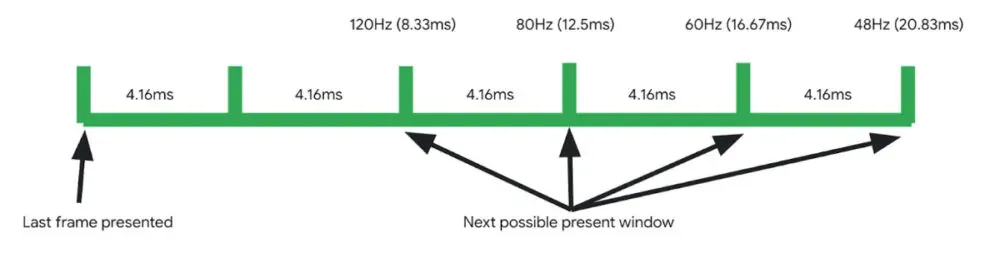
    Google claims that Android 15 is the first version of the Android operating system to feature adaptive refresh rate (ARR), also known as variable refresh rate. The operating system allowed for multiple refresh rates with refresh rate switching prior to Android 15. In essence, the OS would instruct the screen to alternate between the many display modes that it supported, like 1080p@60Hz and 1080p@90Hz.

    Therefore, it would track the type of view that is displayed in an attempt to do this intelligently, but it was never really adaptive. Nevertheless, Android 15 introduced adaptive refresh rate, which allows the refresh rate to alter within a single display mode in addition to adapting to the content frame rate.

    According to Google, there are two main advantages to Android 15’s adaptive refresh rate functionality. By allowing devices to “function at rates lower than their maximum refresh rates, switching to higher rates only when critical for the user experience, which eliminates wasteful power consumption,” it first lowers power usage. Second, by removing the need to switch between display modes—which Google claims is a “known cause for jank”—ARR enhances performance.

    android 15 variable refresh rate

    Many of you are probably asking if this adaptive refresh rate feature is indeed new. What gives, considering that smartphone manufacturers have been promoting variable refresh rate as a key feature made possible by the advent of LTPO screens for years? Although I am not very knowledgeable about display technology, from what I gather, even these gadgets have never offered full VRR on Android, unlike PC players. For instance, unlike many PCs, Android smartphones with LTPO OLED screens are unable to synchronize their display refresh rates with games.

    Many of you are probably asking if this adaptive refresh rate feature is indeed new. What gives, considering that smartphone manufacturers have been promoting variable refresh rate as a key feature made possible by the advent of LTPO screens for years?

    While We aren’t very knowledgeable about display technology, from what I gather, even these gadgets have never offered full VRR on Android, unlike PC players. For instance, unlike many PCs, Android smartphones with LTPO OLED screens are unable to synchronize their display refresh rates with games.

    Rather, the introduction of LTPO backplanes to OLED screens just improved the power efficiency of operating those screens at lower refresh rates. This expanded the range of available refresh rates by enabling Android devices with LTPO OLED displays to operate at 1Hz or even 10Hz when necessary.

    These refresh rates were still connected to distinct display modes, though, and Android controlled them by calling lower-level display software through the Hardware Composer (HWC) hardware abstraction layer (HAL). As a result, the Android OS would alter the refresh rate by switching the display mode even on devices having a real VRR/ARR panel.

    Some Android devices already have the ability to switch refresh rates inside the same display mode, but their OEMs had to add kernel-level support for this, according to display expert Dylan Raga.

    The drawback of this strategy is that every OEM would have to create their own logic for determining when to reduce the refresh rate. This is difficult not only because Android requires a generic kernel image, but also because the kernel does not know as well as the OS does what content is displayed.

    Because it offers a uniform method of reducing the refresh rate using data and cues that are more easily accessible to the OS, Android 15’s implementation of appropriate support for VRR/ARR at the HAL level is crucial. However, OEMs must implement version 3 of the HWC HAL APIs in addition to supporting the necessary kernel and system updates on Android 15 or later devices in order to allow VRR/ARR.

    It is hoped that more apps would utilize lower refresh rates once Android devices have this adaptive refresh rate capability enabled. Dylan Raga cited the fact that most Android phones now run at 60 Hz when a movie is playing rather than 30 or 24 Hz, which this feature may correct.

    Yet, according to Google’s documentation, this functionality only permits the panel to operate at refresh rates that are “divisors of the panel’s tearing effect (TE),” therefore it is unlikely to bring PC-like game refresh rate syncing to Android. It is long overdue that Google disclose more information about this function and whether it is available on any of its current Pixel smartphones.

  • Officially, these seven Motorola phones will get Android 15.

    Officially, these seven Motorola phones will get Android 15.

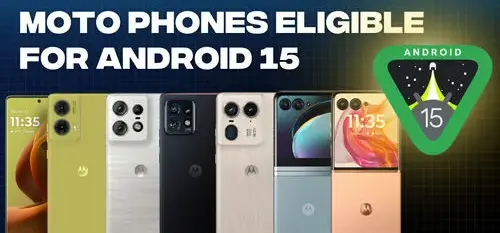
    There has been a lot of interest in determining which firms would be the first to update their phones to the latest version of Android, as well as which phones will be included, since the official release of Android 15 on October 15. Motorola most recently stated that the Android 15 update will be applied to a few more devices.

    Moto Phones Eligible for Android e1732466828543

    Motorola has started updating support pages for its devices and verifying Android 15 upgrades in this manner, despite the fact that the company has not made any official pronouncements about its plans for Android 15. Motorola has now announced that the following handsets will receive Android 15 as part of this most recent batch of updates:

    It is heartening to see Motorola continuing to expand its network of Android 15 updates, even though only one of those phones—the Edge 2023—is accessible in the United States. Updates for Android 15 were confirmed for a far wider range of other Motorola phones, such as the Razr (2024), Razr Plus (2024), Edge (2024), and others, this past October. Motorola began its upgrade process by releasing the Android 15 beta to the Edge 50 Fusion shortly after the first list was found.

    motorola android 15 update

    There is a lingering asterisk, even if more Motorola phones are receiving Android 15. When Android 15 will be formally available on any of Motorola’s smartphones is yet unknown. Furthermore, Motorola has a reputation for being among the slowest firms to offer timely Android upgrades. Therefore, even though Android 15 for other Moto phones is fantastic, it can take some time for your device to receive the update.

  • NFC mobile payments are abused in the new Ghost Tap exploit to steal money.

    NFC mobile payments are abused in the new Ghost Tap exploit to steal money.

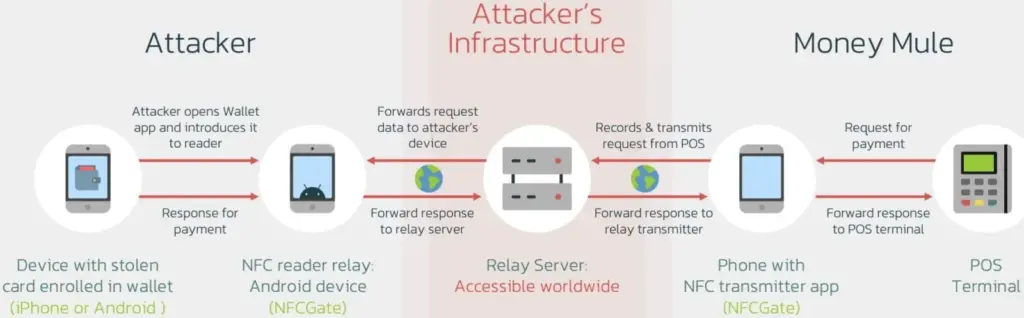
    Cybercriminals have created a brand-new technique called “Ghost Tap,” which transmits NFC card information to money mules all around the world, to profit from stolen credit card information connected to mobile payment systems like Apple Pay and Google Pay.

    The strategy expands on techniques used by mobile viruses such as NGate, which were reported by ESET in August and involved using payment card Near Field Communication (NFC) signals. Ghost Tap employs money mules at several remote places connecting with Point of Sale (PoS) terminals, is more obfuscated and difficult to detect, and does not require the victim’s mobile or card. It also does not require constant victim interchange.

    121d article 220614 ghost touch

    Ghost Tap was found by mobile security company Threat Fabric, which cautions about the growing potential and adoption of the novel method. Threat Fabric told Droid Tools that it has recently observed an increase in the use of Ghost Tap in the field.

    An overview of Ghost Tap and a comparison with NGate

    The attack starts by stealing payment card information and intercepting the one-time passwords (OTP) required to register for a virtual wallet on Google Pay and Apple Pay. Payment card information can be stolen via phishing websites, keylogging, or banking malware that shows overlays that seem like digital payment apps.

    Malware that tracks text messages or social engineering are two ways that OTPs can be stolen. Previously, NGate-based assaults required the use of specialist software to mislead the victim into scanning their card via the NFC mechanism on their device.

    Payment card information is still transmitted using the NFCGate tool. But in the interim, a relay server is set up to transmit the information to a vast network of money mules while hiding their true locations. Using the NFC chip on their cellphone, the mules then make large-scale, multi-location retail purchases, making it challenging to identify the main attacker or map the fraud network.

    Threat actors were restricted to making minor contactless payments and ATM withdrawals during the NGate attacks, which jeopardized their identity and occasionally resulted in arrests.

    The threat actors have stopped making ATM withdrawals as a result of the new Ghost Taps operation. Rather, they merely carry out cash outs at the time of sale and distribute them around a vast global network of mules. This just endangers the mules by obscuring the path to the primary perpetrators of the nefarious conduct.

    diagram

    Defending Against Ghost Tap

    Threat Fabric cautions that because the transactions seem authentic and take place across several locations, the new strategy is difficult for financial institutions to identify and halt.

    The researchers claim that although many banks’ anti-fraud systems identify purchases made in odd places, as when visiting another nation, the many tiny payments might evade these detections.

    “The new tactic for cash-outs poses a challenge for financial organisations: the ability of cybercriminals to scale the fraudulent offline purchases, making multiple small payments in different places, might not trigger the anti-fraud mechanisms and might allow cybercriminals to successfully buy goods that can be further re-sold (like gift cards),” explains ThreatFabric.

    If the attack is used widely, the total amount lost might be substantial even though all of these tiny transactions seem to have originated from the same device (connected to the same Apple Pay or Google Pay account). The mules switched their handsets to “airplane mode,” which still permits the NFC system to operate normally, in order to avoid being tracked.

    Banks may only prevent Ghost Tap by flagging transactions made using the same card at locations that are physically impossible to visit in between charges. For instance, carrying out a fraudulent transaction in Cyprus 10 minutes after completing one in New York.

    From the standpoint of the customer, keeping an eye out for fraudulent transactions and promptly reporting them to your bank is essential for freezing the card and reducing losses.

  • Simple guide on how to make moving images on your smartphone

    Simple guide on how to make moving images on your smartphone

    We will learn how to create moving pictures on your phone today. It is a wonderful thing to capture a moment. However, what if your ideal image could be animated? What if a static moment in time could have a movement added to it? How awesome would that be? Imagine having a photograph of a waterfall. If the waterfall moved and everything else remained motionless, that would be amazing. Or picture a sunset.

    An already stunning composition would get a whole new level if a portion of the image were animated. Use this guide to improve your social media game and produce stunning moving graphics. Show off your editing and photography prowess to your friends.

    We will concentrate on only one photo editing app, despite the fact that there are many that allow you to create moving photographs Pixaloop.

    Pixaloop is a free app that is available on both the Apple App Store and Google Play. It enables users to create GIF animation effects, live images, and backgrounds.

    It uses their cutting-edge photo animator to give static photographs alive. You have a successful app when you combine that with a simple and user-friendly UI. Let us test this application instead of just discussing it.

    Install Pixaloop

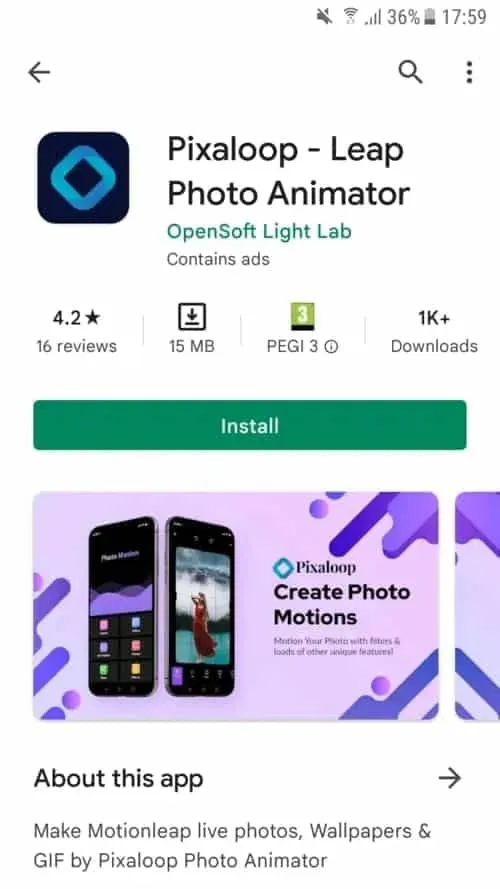
    Pixaloop is available on the Apple App Store and Google Play Store. I will be downloading and installing it from the Play Store because this demonstration is being done on an Android smartphone.

    1 install pixaloop 1

    Choosing an Image

    You begin by selecting an image, just like you would with any other image editing program. However, you can also choose to open your camera and take a fresh picture. I let you make that choice. Making moving pictures while on the fly might be entertaining at times. I will be selecting a picture from my collection for the tutorial.

    istockphoto 1133155890 612x612 1

    It’s an image I have previously downloaded on my phone.

    This is an awesome picture. We are going to be using it to demonstrate how to make moving image using your phone.

    Create a moving image on your device

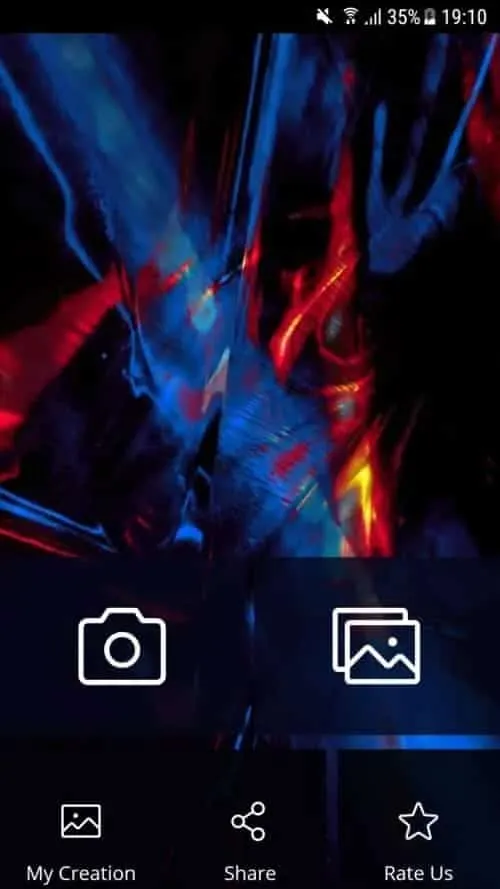
    When you launch Pixaloop it looks something like this

    2

    Your image can be animated in two different ways. You can either import an existing image or take a new one with your phone’s camera. I will bring mine in.

    3 crop image

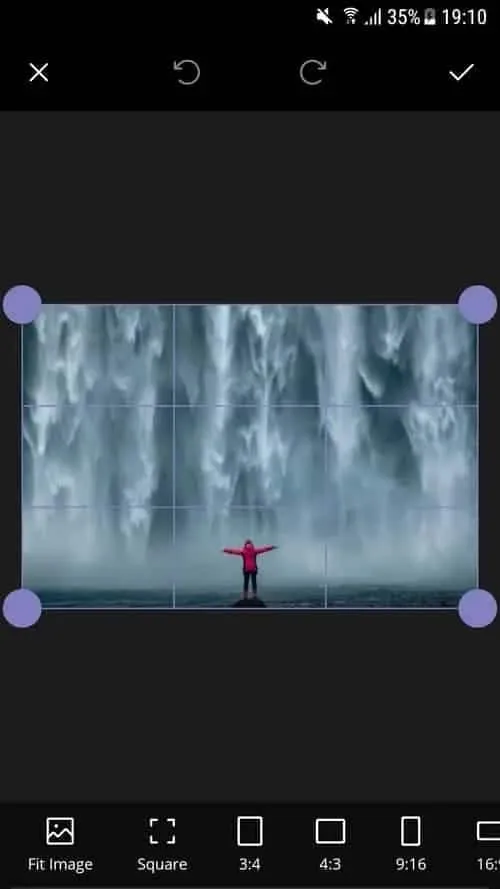
    Before applying the motion effect, you can crop the image on the first screen. Cropping your work in advance is a good idea, depending on where you want to publish it.

    Personally, I think this works really well. I am not going to perform any cropping. will start working on a motion picture right away.

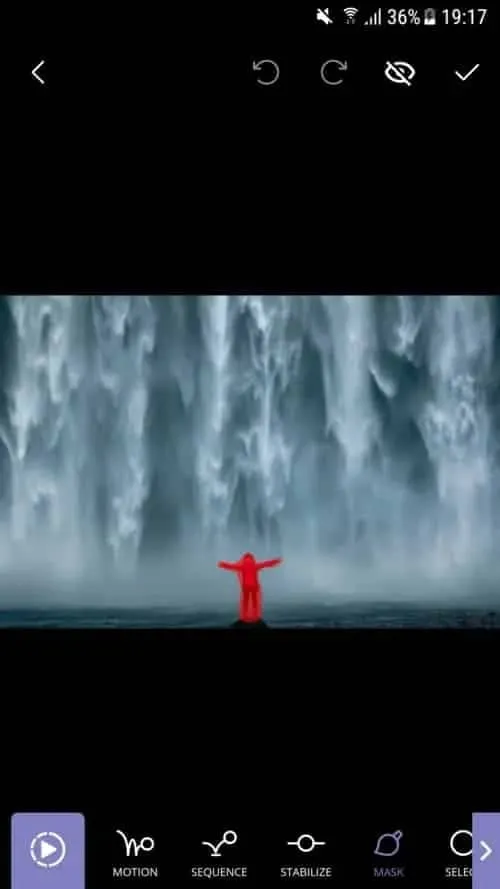
    I see a cascading waterfall in this picture, with the figure motionless. This picture will, in my opinion, take on a completely new level if the background is animated.

    4 masking the subject

    I also carried out my masking technique on the background. At least a portion of it. I do not want the ground to move either. The moving image does not look nice with it. Simply said, it is not natural. Trial and error is how you go about this procedure.

    After making your adjustments, hit the Play button. Proceed to the following step if you are satisfied with the outcome. If not, go back and make all the changes you dislike.

    6 animating the waterfall

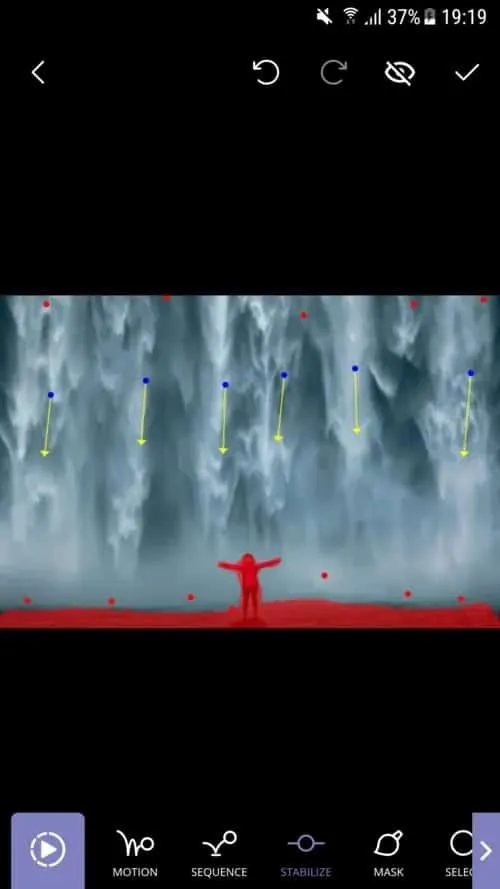
    I decided to use Motion Animation for this picture. Clicking the Motion button at the bottom of the screen will activate it. You can specify the animation’s path to the program when this parameter is enabled.

    As you can see, I made six pathways, each of which points downhill. I am emulating the course a waterfall would naturally follow.

    You can also adjust the waterfall upward if you would like. Using this tool to create a moving image would cause everything to animate in a downward manner. And I mean all of it. I discovered that both the top and bottom are dragged down after playing my clip. I utilized Anchor Points to resolve this problem.

    Five anchor points are visible on top of the photograph, and seven anchor points are directly above my ground mask. This keeps the image from moving strangely on the top and bottom. I was happy with the outcome after a few attempts, shifting and adding anchor points.

  • Budget smartphone? Best under $400

    Budget smartphone? Best under $400

    Uncertain about which budget smartphone to buy with $400 to spend? With features like 120 Hz screens, top-notch cameras, and gaming-ready SoCs with 5G, we have compiled a list of the best smartphones available for $400 or less. Here are our best choices for cellphones under $400 without further ado.

    Take a look at the table below if you are pressed for time and just want our best pick for a $400 smartphone. Before choosing, read the descriptions below or look through the available reviews for a more thorough understanding of our best choices.

    best budget phones

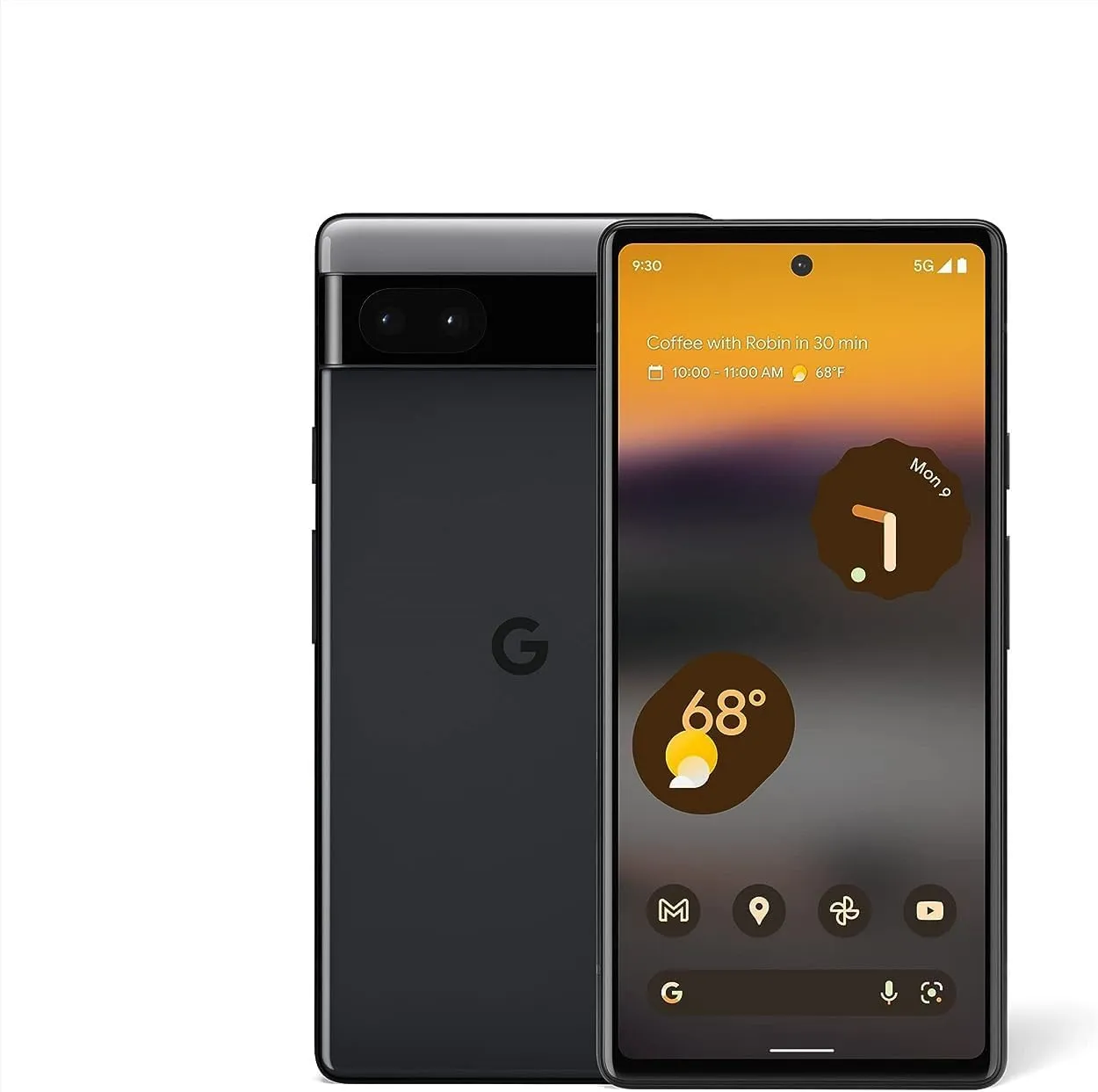
    Google Pixel 6a

    Although the Google Pixel 6a has been on sale since July 21, 2022, it is strangely still available on Amazon for $399 with 128 GB. The Pixel 6a appears to be the greatest choice for people looking for a smaller Google phone in 2024 since it is loaded with Google’s proprietary Tensor processor, which improves the performance of machine learning-based functions.

    Even though the phone only has one internal storage choice and a 60 Hz refresh rate, it was already quite obvious from my assessment that it was the best smartphone under $400. Furthermore, among all the smartphones in the Pixel 6 series, the 6a is the most affordable.

    The Pixel 6a has a very basic camera suite module, but considering that Google’s main strength is its camera software, it does not truly fall behind the competition. Thus, you can be certain that the images captured with the 6a will have the quality seal of the Pixel series.

    pixel 6a on Amazon

    Google Pixel 6a

    The Google Pixel 6a has been available for purchase since July 21, 2022, but surprisingly the device can be found on Amazon for less than $399 with 128 GB.

    Best pick
    $349.00$329.99Buy now

    Consider checking the Google Pixel 7a prices before making a purchase. The device might be available at a similar price on your preferred e-commerce platform.

    Apple iPhone SE (2022)

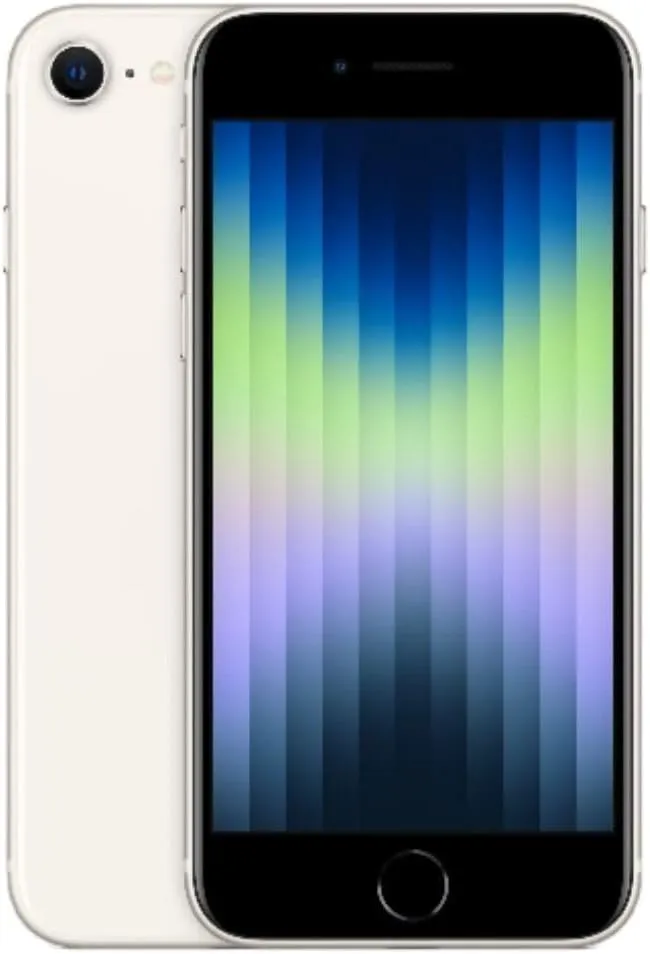
    Without hesitation, we suggest the iPhone SE (2022) as an Apple substitute. The new low-cost iPhone, which comes two years after the iPhone SE (2020), has a potent A15-bionic but is not much better than the original. A 12MP camera and IP67 resistance are included in a chassis that is quite similar to that of the iPhone SE 2020 (and iPhone 8/7/6s).

    Aside from the SoC (and the additional 4GB of RAM), the true change is 5G connectivity, which enables the device to finally take use of the newest connectivity technologies, just like the other sub-$400 handsets on this list. The iPhone SE (2022), which we have already examined, is undoubtedly a fantastic option for anyone searching for a reasonably priced iPhone.

    iPhone se 2022

    Apple iPhone SE (2022)

    We suggest the iPhone SE (2022) as an Apple substitute. A 12MP camera and IP67 resistance are included.

    Good choice

    Samsung Galaxy A35

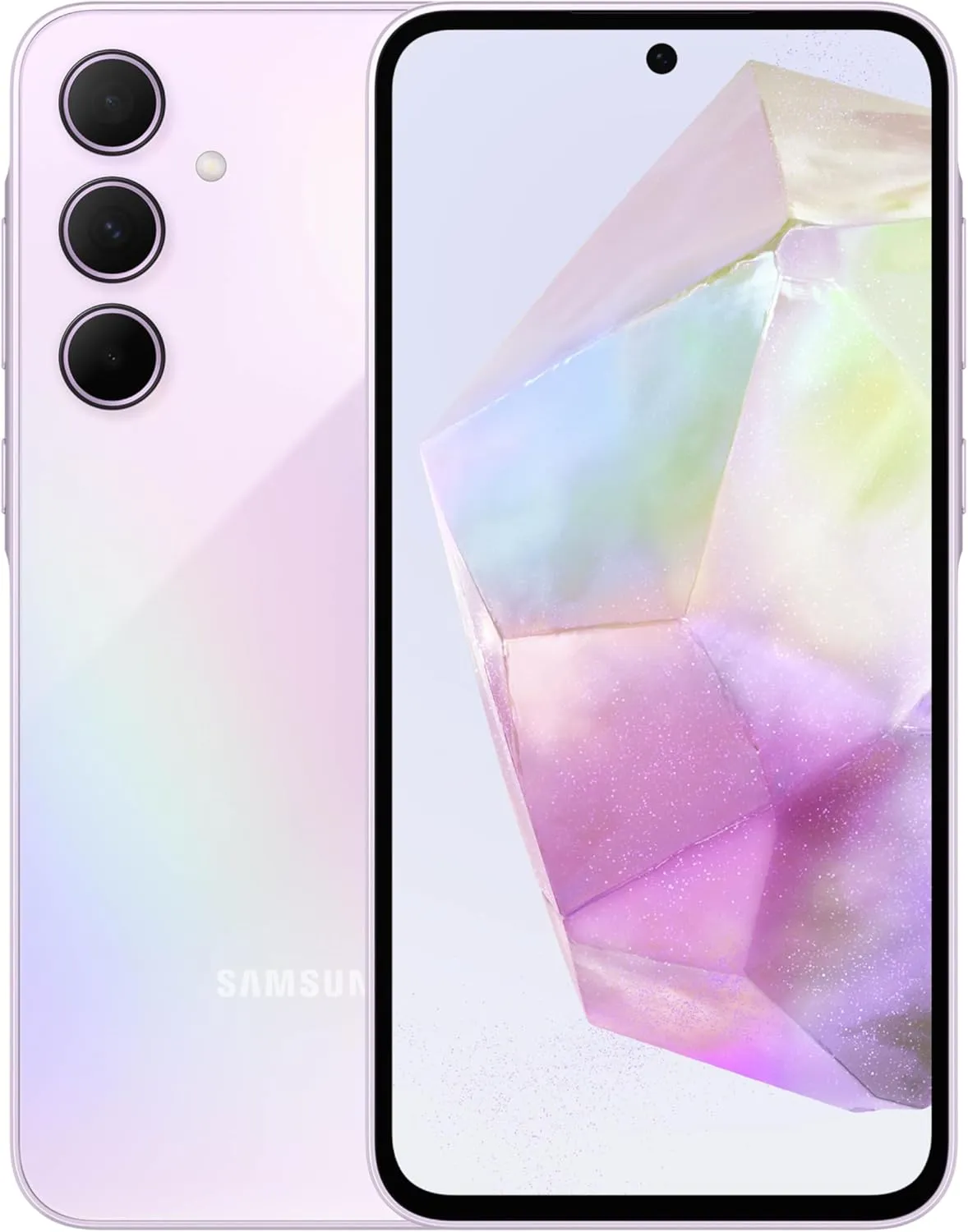
    Strangely, Samsung decided not to release its top-selling Galaxy A55 model in the US in 2024. The South Korean company replaced it with the less expensive A35 model as a mid-range market substitute.

    In actuality, the two phones are rather comparable in terms of features and performance, offering a comprehensive package that includes cameras, software support, and battery life. Smooth performance for everyday work and even some games is promised by the A35, which inherits the Exynos 1380 CPU from our last suggestion, the Galaxy A54.

    With Samsung guaranteeing patches through 2029, the Galaxy A35 is the phone on this list that will continue to receive security upgrades for a longer period of time. Even longer support is beginning to be promised by more recent phones, but none at this price point.

    samsung a35

    Samsung Galaxy A35

    128GB Unlocked Android Smartphone, AMOLED Display, Advanced Triple Camera System, Expandable Storage, Rugged Design, US Version, 2024

    Good choice

    Nothing Phone (2a)

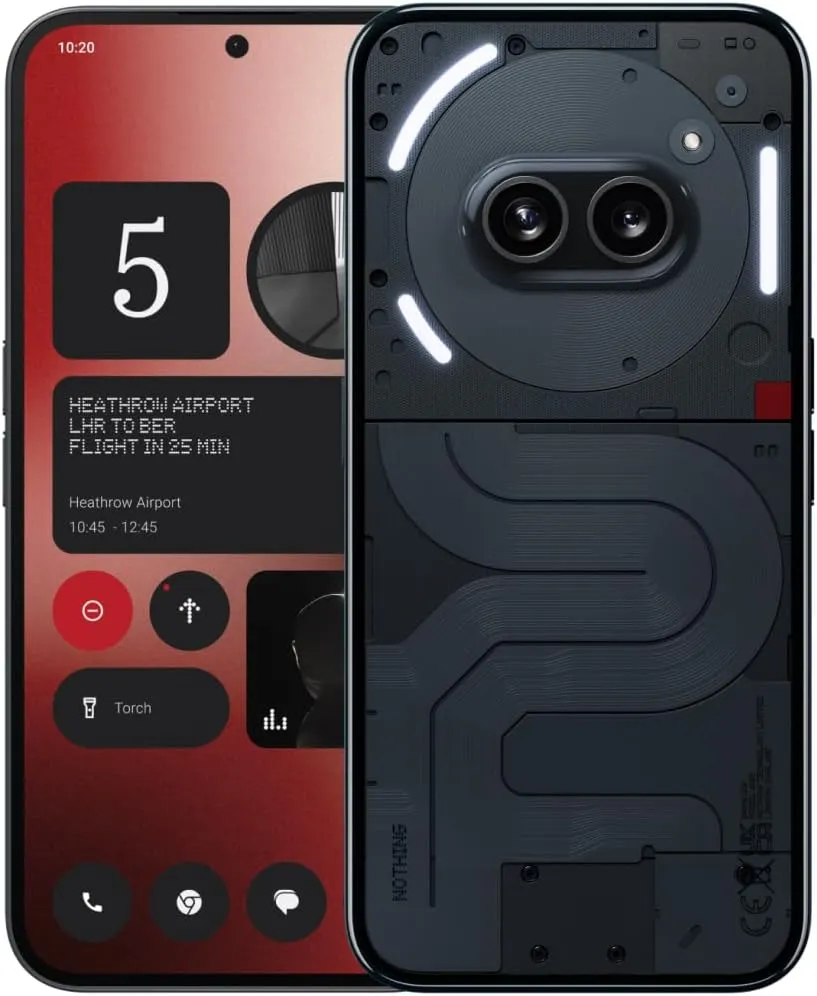
    Nothing’s newest low-cost smartphone is called the Phone (2a). Although its technological specifications are well-balanced, its appearance is what really makes it stand out; according to my colleague Antoine Engels, it is the most attractive mid-range smartphone of 2024.

    The Phone (2a) is the autonomy champion in its price range thanks to its 5000 mAh battery that supports 45 W rapid charging. The smartphone lasted an amazing 17 hours and 2 minutes on our battery assessment. Without recharging your phone, you can easily go two days (2a). Additionally, it has the benefit of charging at a moderate pace.

    The photo quality is not very realistic, especially at night, so I think that is the only major compromise you will have to make. The Nothing Phone (2a) is a well-balanced mid-range smartphone that boasts a stunning screen, respectable performance, and, most importantly, an impressive battery life.

    nothing phone 2

    Nothing Phone (2a)

    Unlocked 5G Android Phone Dimensity 7200 Pro, 50MP Dual Camera Cell Phone, 6.7” AMOLED Display, 5000mAh Battery, NFC

    Very good choice
    $399.50$379.00Buy on Amazon

    Expectations for mobile devices costing up to $400

    In the US, mid-range phones fall somewhere between affordable models and high-end mid-range phones, albeit offering a respectable price-performance ratio. You may discover older or lower-specified devices at this pricing. They may lag in terms of camera, performance, and design even though the majority feature 5G.

    • Power and performance: Investing in a sub-$400 device will at least guarantee that the SoC can tackle the most recent games. Here, you should expect SoC’s that are at least one to two years old and offer good performance for daily tasks.
    • Cameras: In the mid-range, models like the Samsung Galaxy A35 have 50-megapixel main cameras, but don’t match the Galaxy Ultra’s photo quality. The primary issue in this range is with the cameras, especially “Quad cameras” that use low-quality macro and depth sensors. Unfortunately, the telephoto camera often gets compromised.
    • Battery & charging: Batteries in this price range are typically between 4,500 and 5,000 mAh, but charging speeds are subpar. Devices from Honor and Xiaomi offer over 60W fast-charging, but they aren’t available in the US. Here, 10W to 15W is decent. Wireless charging is rare at this price point.
    • Display: In terms of display, we can expect FullHD+ screens with high refresh rates (except for Apple), and OLED displays are getting increasingly popular, with nice color reproduction and impressive contrast levels.
    • Age and support: At this price, be wary of devices older than two years due to limited software updates. Most will receive only one or two updates beyond their initial OS. Hence, Android 10 devices will become outdated after the launch of Android 14 in 2023, for example.
    • Carrier compatibility: In this price range, not all devices are compatible with every carrier. Many are designed for GSM networks, common outside the US. If you’re on a CDMA network like Verizon, ensure compatibility. However, with 4G LTE and 5G, this issue is diminishing.

  • Temporarily free Android and IOS apps

    Temporarily free Android and IOS apps

    This is a list of paid apps that are temporarily free to download on the iOS and Android platforms.Read on to find the top free app offers available for download from the Apple App Store and Google Play Store.

    Download and install any apps you find that you would want to have but do not require right now. It would be seen as “purchased,” and even if you immediately remove it from your smartphone, it will always remain in your app library.

    Android apps and games that are free for a limited time

    Android apps for productivity and lifestyle

    • Corluma ($0.49): If you have smart lights at home, how about using this third-party app to control them? 
    • KX Music Player Pro ($2.99): Want a standalone music playback app? This one gets the job done without any frills.
    • Stitch Photos ($2.99): If there ever was a need to capture a really long screenshot, why not capture multiple ones and stitch them together?
    • 3D Earth Pro ($29.99): Don’t just find out what the weather is like, do so in style with this graphics-intensive app!

    Free Android games

    • Sudoku Premium ($1.99): Tickle your brain with this digital Sudoku game.
    • SPHAZE ($0.99): A beautifully crafted puzzle game with science fiction elements from the future.
    • Survival Dungeon ($0.49): Start from the very bottom in this roguelike survival RPG, where you grow in power and strength by defeating monsters and picking up loot.
    • Crossword Quest Premium ($2.99): Do you think you have what it takes to solve one crossword puzzle after another? Try this one out for size.
    • Burning Sky ($1.99): A shoot ’em up that is never short on adrenaline, where you test your reflexes against waves of enemies.

    iOS apps that are free for a short time

    iOS apps for productivity and lifestyle

    • Auto Enhance Photo Filters ($2.99): Up the ante the next time you shoot photos with your iPhone by using a range of filters.
    • mySymptoms Food Diary ($7.99): Keep a list of stuff you eat so that you can avoid wolfing down something that triggers your allergies.
    • Timestamp Cam ($9.99): Add the date and GPS location to your photos and videos.
    • weather+ ($0.99): Find out what the weather will be like for the day before you leave the house.
    • Light Meter ($3.99): Let this app detect the amount of light in the area so that you can capture the best-looking photos.

    Free games for the iPhone and iPad

    • AirCoaster ($0.99): Think you have what it takes to build a roller coaster ride for the ages? Try this out!
    • Light ‘Em Up ($0.99): A casual puzzle game that requires you to get all the circuits connected to light up the same colored lights.
    • Cafe ($5.99): Let your little ones kindle their love for whipping up delicious dishes in this pizza-making game.
    • My City: Star Horse Stable ($3.99): Let your little one experience what life is like having to take care of a virtual horse.
    • My City: New York ($3.99): Want to explore the city of New York safely? do so through this game.

    As of the date of publication, the deals were active. Please let us know in the comments if you came upon an offer that is no longer available. We advise you to review the app’s details in the Play Store or App Store before downloading any of the aforementioned apps. This is crucial since some of these free apps can have unique features or drawbacks of their own.

    Your personal information may be collected and shared by a variety of applications. It is critical to carefully consider the permissions that each application requests in order to secure your privacy. For example, why would an alarm clock app require access to your contact list or camera? You may greatly improve the security of your data by limiting the permissions you grant.

  • Free apps for iPhone and Android this weekend

    Free apps for iPhone and Android this weekend

    Once again, the weekend has arrived, which means it is that time of the week when we bring back a selection of premium apps that are only accessible for iOS and Android for a short period of time.See the top app sales in the Apple App Store and Google Play Store by reading on.

    Download and install any apps you find that you would want to have but do not require right now. It would be seen as “purchased,” and even if you immediately remove it from your smartphone, it will always remain in your app library.

    Android apps and games that are free for a limited time

    Android apps for productivity and lifestyle

    • Open Tracks ($3.49): A sports tracking app that keeps track of all your physical activities so you can work towards having a lovely record.
    • Image to PDF ($2.99): Just as the name implies, transform images into PDF format for easy printing across platforms.
    • Passport Photo ($4.99): Use this app to compose and print the perfect passport photo before you head off to your next holiday destination.
    • Matrix Determinant ($0.99): If you love math, surely you would have had experience with the dreaded matrix. Use this app to make your problem-solving adventures easier.

    Free Android games

    • Traffic Jam Cars Parking ($4.99): Can you make sure traffic becomes smooth again by solving numerous puzzles here?
    • Defense Legend 5 Pro: Epic TD ($1.99): A tower defense game that takes on a modern outlook with mechs and other futuristic machines dominating the battlefield.
    • Cooking Kawaii ($0.99): Cook up a storm in this game to keep your customers happy so that they return, which in turn gives you more profit to grow your business.
    • Theme Park Simulator ($0.99): Curious to know how a theme park works and operates? Find out in this game and see just how good your management skills are.
    • Word Tower Premium Puzzle ($2.99): How powerful is your vocabulary? Find out in this game that does not feature any annoying ads, allowing you to play offline, too.

    iOS apps that are free for a short time

    iOS apps for productivity and lifestyle

    • Brushstroke ($7.99): Transform your photos into nice-looking paintings with this app. 
    • Interval Timer for Tasks ($6.99): Remain more focused on your work by working on one task at a time without getting sidetracked or distracted.
    • Tiny Planner ($19.99): Need to get your life back on track without being pulled in all directions? This planner gets the job done.
    • The Wonder Weeks ($5.99): It is a miracle to follow your baby’s growth from birth until the present day. Never miss a moment by jotting it down here!

    Free games for the iPhone and iPad

    • Kingdom Rush: Tower Defense HD ($5.99): The enemy is storming the gates, and you and your ragtag team of defenders have to strategize to hold them off.
    • Macrocosm ($3.99): Talk about humble beginnings. This game sees the journey of a single atom to that on a galactic scale. How will you chart its growth?
    • Catenaccio Football Manager ($2.99): Think you have what it takes to be the perfect football manager? Try this game on for size! 
    • My City: Star Horse Stable ($3.99): Fancy owning your own horse? Why not give this game a try and see how well you can care for one?
    • Dirt Trackin’ 2 ($3.99): Indulge in some rally goodness with all the thrills and spills, minus the real-world damage to your ride!

    As of the date of publication, the deals were active. Please share any expired deals you come across in the comments section below.

    We advise you to review the app’s details in the Play Store or App Store before downloading any of the aforementioned apps. This is crucial since some of these free apps can have unique features or drawbacks of their own.

    In the constantly changing world of mobile applications, there are a few dishonest ones that use clever strategies to make money off of collecting and sharing your personal data. But do not worry, tech-savvy readers—we have some priceless tips to assist you strengthen the protection of your priceless data. We strongly advise you to be cautious while giving installed programs permissions.

    Why, after all, would a simple alarm clock require access to your contacts or camera? Furthermore, why would a flashlight app need to know your precise location? You may successfully protect your personal information from prying eyes by choosing which permissions to provide with caution.

    With the knowledge that your data is safe and secure, you may explore the wide selection of free apps that are available for download on your iOS or Android device.

  • Android 15 can change the intensity of vibrations according to your environment.

    Android 15 can change the intensity of vibrations according to your environment.

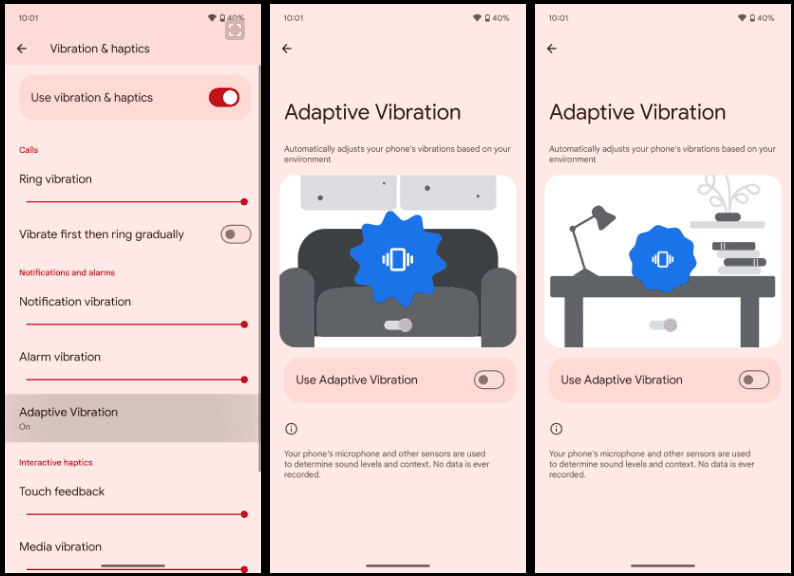
    With Android 15 Beta 2, Google introduced a brilliant new “Adaptive Vibration” setting that lets Pixel phones use their microphones to change the intensity of vibration. Almost everyone has experienced a circumstance when their phone’s vibration was louder than the ringing it was supposed to replace. The ability to manually change the vibration intensity has existed for a while, but Google is now expanding on it.

    Google introduced “Adaptive Vibration” to Pixel Phones in Android 15 Beta 2. This new setting, located in Settings under the “Vibration & haptics” menu, is set to off by default. According to Google, the setting uses sensors to automatically modify the vibration intensity based on your environment.

    According to the animation on the new Adaptive Vibration website, when the device is placed on a table, the vibration intensity decreases, which is what Pixel phones will do when the feature is enabled. The “Adaptive alert vibration” setting, which can reduce vibration intensity while the phone is face up with the screen on, is distinct from this.

    Screenshot 2024 10 20 195238

    The Pixel 7a introduced that capability. This feature appears to be helpful, but we will have to wait and see how it functions in practice. Although it is still disabled by default, the functionality was being developed in earlier beta editions, according to Android Authority. It is difficult to predict when these things will become live.

    If Google’s various other “Adaptive” settings shown anything, it’s that this new option could prove invaluable to the experience in the long run.

  • Free Android and iOS apps for this week

    Free Android and iOS apps for this week

    Are your smartphone usage patterns becoming a little stale? If this sounds similar, now might be the ideal time to add some excitement by exploring the fascinating realm of apps discounts. This is your opportunity to find some undiscovered treasures on the iOS and Android platforms.

    We have put up a carefully chosen list of programs that are now free to download from the Apple App Store and Google Play Store in this issue. These temporary deals will not be available for long, so act quickly!

    Download and install any apps you find that you would want to have but do not require right now. It would be seen as “purchased,” and even if you immediately remove it from your smartphone, it will always remain in your app library.

    android and ios apps free for this week

    Android apps and games that are free for a limited time

    Android apps for productivity and lifestyle

    • Clock Widget — Word Clock ($6.49): Tell the time using words instead of numbers!
    • Shout Screen ($0.99): With smartphones getting larger screens each year, they can make for an impromptu prompter.
    • DJ Mix Studio ($12.99): Be a DJ and mix music right on your smartphone!
    • Equalizer and Volume Booster Pro ($4.99): Change the way your music sounds on your smartphone with this app.
    • Reminder Pro ($3.49): If you ever need a second brain to remind you of things, this app hits the spot.

    Free Android games

    • Balloons Pop Pro ($1.49): An addictive puzzle game with a twist, where you have 5 different modes to choose from!
    • Jewels Planet ($2.99): A match-3 game that does not require an internet connection to play.
    • Sky Wings VIP ($0.99): A shoot ’em up that sees you saving the world once again. You’ll need lightning-quick reflexes.
    • Hero of the Kingdom II ($8.49): Things went south for you in your village when it was raided by pirates. It is time to exact your pound of flesh, but it will require careful strategy and planning. 
    • Neo Monsters ($0.99): Find monsters, train them, send them out for battles, rinse, and repeat as they grow even more powerful while gaining new skills.

    iOS apps that are free for a short time

    iOS apps for productivity and lifestyle

    • mySymptoms Food Diary ($7.99): Do you have food allergies? Keep track of what you eat so that you can minimize food allergies.
    • Filterious Photo Filters ($2.99): Use this app to generate great-looking photos thanks to the long list of filters. 
    • ChaReader ($1.99): Use this text-to-speech app and consume content without reading anything.
    • ChirpOMatic ($4.99): Birdwatchers, do you have what it takes to identify all the right breeds through their songs? This app helps you get it right.

    Free games for the iPhone and iPad

    • Neo Monsters ($0.99): This is a recurring theme: capture monsters, train and take care of them, let them fight and gain experience to become more powerful.
    • Pirate Drops 2 ($4.99): An interesting match-3 game that takes on the pirate theme while offering various degrees of excitement as the game progresses. 
    • Kingdom Rush Tower Defense HD ($5.99): Defend your territory against a seemingly endless horde of advancing enemies, all within a medieval setting.
    • My City: Star Horse Stable ($3.99): Can’t afford a horse in real life? Let your little one have one in the virtual world and learn how to care for it.

    Your personal information may be collected and shared by a variety of applications. It is critical to carefully consider the permissions that each application requests in order to secure your privacy. For example, why would an alarm clock app require access to your contact list or camera? You may greatly improve the security of your data by limiting the permissions you grant.