Tag: google

  • Snapdragon on future Samsung’s S series

    Snapdragon on future Samsung’s S series

    Which of the various Samsung flagship phones you receive depends on where you reside. While Exynos chips produced in-house are available in some markets, Qualcomm’s Snapdragon CPUs are available in others. And this has been the case for years, with a few extremely rare exceptions like the Galaxy S6 in 2015, which was Exynos-only. Despite having on paper comparable or even superior specifications than their Snapdragon counterparts, Exynos chips are generally thought to be inferior. You’ll be relieved to learn what Samsung might accomplish in the coming year if you reside in Europe and have been envious of those in North America and China who have Snapdragon phones.

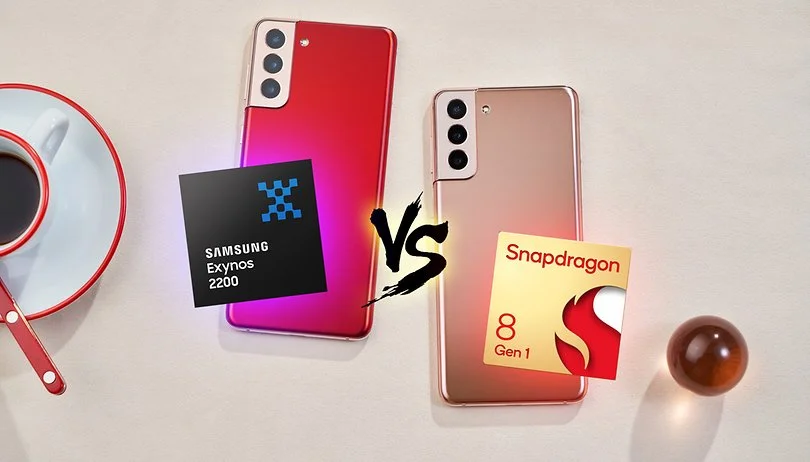
    Famous supply chain expert Ming-Chi Kuo claims that the Samsung Galaxy S23 may completely exclude Exynos CPUs in favor of Snapdragon processors in all markets next year (via 9to5Google). Even for users in Europe, Qualcomm would end up being the exclusive source of chips for Galaxy S23 smartphones.
    samsung snapdragon

    Samsung has been experimenting with Snapdragon a lot more recently, most notably by introducing the Galaxy S22 with the Snapdragon 8 Gen 1 in India, a country that has historically favored Exynos. If this change is real, everyone in the world will receive a Galaxy S23 with a Snapdragon processor.

    What justifies this? It appears like Samsung is simply coming clean to avoid more embarrassment in 2019. Exynos 2300, which is expected to launch as the Snapdragon 8 Gen 2, will not be able to compete with the SM8550 chip because Qualcomm built it to conform to TSMC’s design specifications. Although embarrassing would be a strong word, the Exynos 2200 launch was a bit of a disaster, and this year’s Exynos-powered Galaxy S22 phones received a ton of unfavorable press. Samsung appears to be trying to avoid that happening again.

    Does this indicate that Samsung has finished producing chips? Most likely not. A custom, Galaxy-only SoC is allegedly being created by the firm, but that won’t be available until the Galaxy S25 in 2025, according to rumors. While Samsung Semiconductor refocuses its efforts on that unique chip, it’s possible that we’ll see a few generations of Samsung phones that only use the Snapdragon processor over the course of the next couple of years. But as of right now, all of this is just conjecture. We’ll have to hold off and see.

    One thing, however, is certain — many will be thankful if Samsung actually ditches Exynos on the Galaxy S23 entirely next year.

  • 42 Chinese Spying Android Apps

    42 Chinese Spying Android Apps

    Android Apps

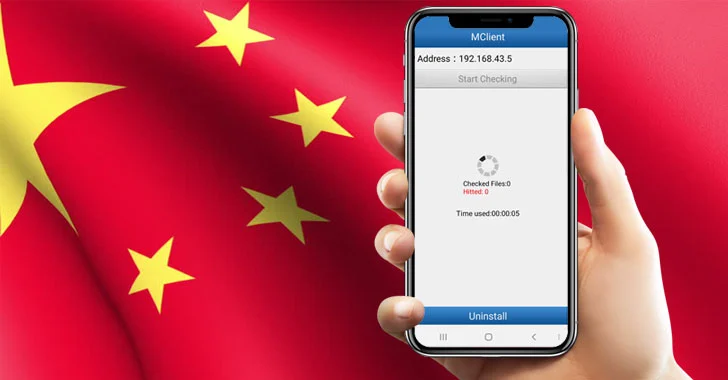
    The Intelligence Bureau (IB), India’s domestic spy agency, issued a warning to soldiers not to use certain Chinese eavesdropping Android apps as a matter of national security.

    42 Chinese Android apps, including some well-known ones like We Chat, True Caller, UC Browser, and UC News, have been listed by the IB as purportedly gathering crucial data about the Indian security installations.

    According to the report, the Intelligence Bureau in a November 24th advisory directed the soldiers assigned on Line of Actual Control (LAC) to uninstall these Chinese spying Android apps from their smartphones and also format the device after uninstallation as it may compromise national security.

    Chinese Spying Android Apps:

    1. Weibo
    2. WeChat
    3. ShareIt
    4. TrueCaller
    5. UC News
    6. UC Browser
    7. BeautyPlus
    8. NewsDog
    9. Viva Video – QU Video Inc.
    10. Parallel Space
    11. Apus Browser
    12. Perfect Corp
    13. Virus Cleaner – Hi Security Lab
    14. CM Browser
    15. Mi Community
    16. Mi Store
    17. Mi Video call
    18. Vault Hide – NQ Mobile Security
    19. YouCam Makeup
    20. CacheCleaner – DU Apps Studio
    21. DU Recorder
    22. DU Battery Saver
    23. DU Cleaner
    24. DU Privacy
    25. DU Browser
    26. 360 Security
    27. Clean Master – Cheetah Mobile
    28. Baidu Translate
    29. Baidu Map
    30. Wonder Camera – Baidu Inc
    31. ES File Explorer
    32. Photo Wonder
    33. QQ International
    34. QQ Music
    35. QQ Mail
    36. QQ Player
    37. QQ Newsfeed
    38. QQ Launcher
    39. QQ Security Center
    40. WeSync
    41. Selfie City
    42. Mail Master

    However, China has a history of snooping on people using Android apps. Many complaints were made in the past concerning UC Browser’s dubious methods for gathering user data and sending it back to China. Now that the issue has received considerable attention, the administration has advised the troops to delete these risky apps in order to prevent eavesdropping by Chinese eyes.

    Just keep in mind that by using these apps, you might unwittingly turn against your country because you never know what information these terrible Chinese espionage applications are sending to China.

  • Google Camera (GCam) Mod for all Devices [v8.4.6]

    Google Camera (GCam) Mod for all Devices [v8.4.6]

    google camera app

    Download Google Camera (GCam) Mod For All Android Smartphones [v8.4.6] – Google Camera (Gcam), also called Pixel Camera, is a camera phone application developed by Google for Android. In comparison with the normal camera, it becomes clear that GCAM produces pictures that are true to the source and has a better dynamic range. It is chiefly known for its awesome features that allow the user to create a ‘Photo Sphere’, a 360-degree panorama photo, etc.

    Today we have very good news: the GCam version 8.4.6 is now available with a MOD compatible with a large part of Android phones. We’ll tell you everything you need to know and how to install it!

    You only need two requirements: run Android 10 or higher and have the Camera2 API. The main requirement for using the mod is that the device supports the Camera2 API. You can check this using a special application.

    If you meet both requirements, you have almost everything done. Installing the GCam 8.4.6 is something extremely easy that you can do in a few steps:

    1. Enter the BSG repository and click on ‘Download
    2. Once the APK has been downloaded, you can install it.
    3. Open the GCam app installed on your smartphone and you’re done

    The process is as simple as downloading the APK and installing it. You shouldn’t do anything else. Of course, depending on the device you have, you will be able to access some functions or others of the GCam. Not all sections are compatible with all smartphones.

  • How to make a backup for you Android device

    How to make a backup for you Android device

    There is no universal way for backing up and restoring Android phones that works for everyone. To keep things simple but effective, many users may choose a cloud-based system with automatic backups. Others, on the other hand, may want to store them offline and manually create backups for safekeeping. There is no right or wrong way to approach things here; depending on what you’re searching for, both options may have trade-offs. In this post, we’ll go over some of the most common techniques for backing up and restoring your Android phone.

    Google One Backup

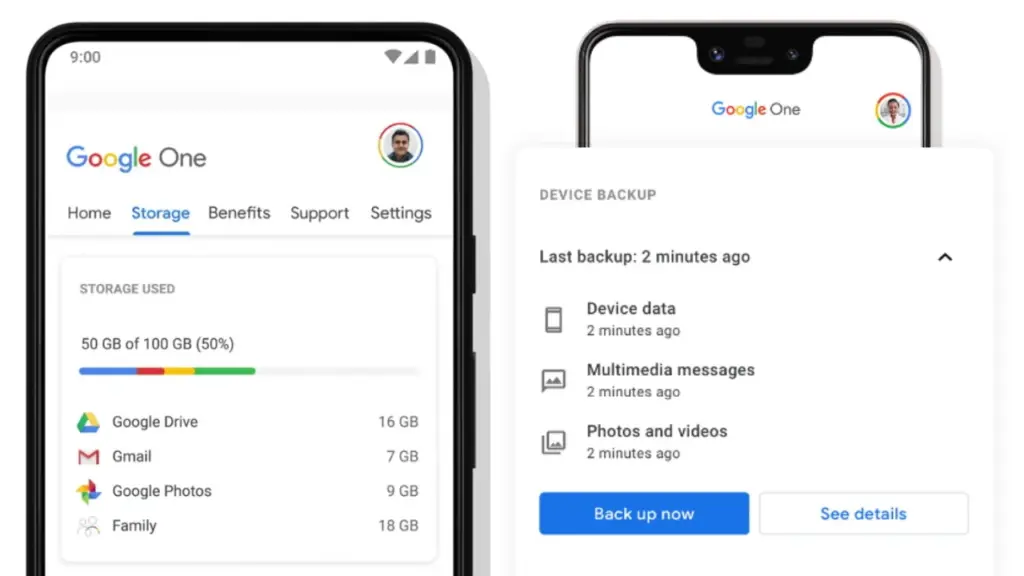
    Google One is here to help you keep your life easy if you’re seeking for a fantastic, all-around backup solution for Android. Because Google is the official Android maintainer, it makes reasonable to utilize a first-party mechanism that can be accessed by almost any Android phone. To say the least, backing up your device with Google One allows you to save your images, messages, and a list of loaded apps. After your smartphone has been charging and idle for 2 hours over Wi-Fi, you’ll get automatic cloud backups.

    google one backup

    Access Google One using the app

    If you have a Pixel phone, Google One comes pre-installed as part of the operating system for quick access. Go to System Backup in the Settings app after opening it. All Google accounts come with 15 GB of free cloud storage for things like photographs, movies, and device backups. Increased storage capacity is available for a few bucks per month if needed. You may install Google One on your Pixel or any other Android phone by following these steps:

    1. Download the Google One app if needed, then open it to continue.
    2. Press the Set up device backup button to begin the process.
    3. Tap Turn on to enable Google One backups for your device.
    4. Hit Continue to grant the proper Google Photos permission as needed for your photos and videos.
      • You can always press Cancel if you don’t plan on using Google Photos to save your photos and videos.
    5. Tap the Back up now button to begin backing up your device data to Google One.
    6. Once the backup has been completed, you can view more info under the Backup details section.

    Google Photos

    Although Google One includes this feature during the setup process, it does not imply that you intend to use it. If you just want to back up your photographs and videos, you could always utilize Google Photos as a stand-alone alternative. You can use the Google Photos cloud storage capability by following these steps:

    1. Download the Google Photos app if needed, then open it to continue.
    2. Press the Turn on Backup button to enable the cloud storage feature.
    3. Pick Original quality or Storage saver depending on your needs, then press Confirm.
    4. Swipe through the intro page as needed, then press Done to get to the main screen.
      • You can also tap Skip to quickly move past the intro and onto the main app.
    5. If you have any photos or videos waiting to be backed up, they should have started uploading now.
    6. Tap your profile icon in the upper right to view the status of your uploads.
      • You’ll be good to go once it shows the Backup complete message.
    7. After that, all the content that just backed up should appear on the main screen for you to view.

    Cloud Backup from Samsung

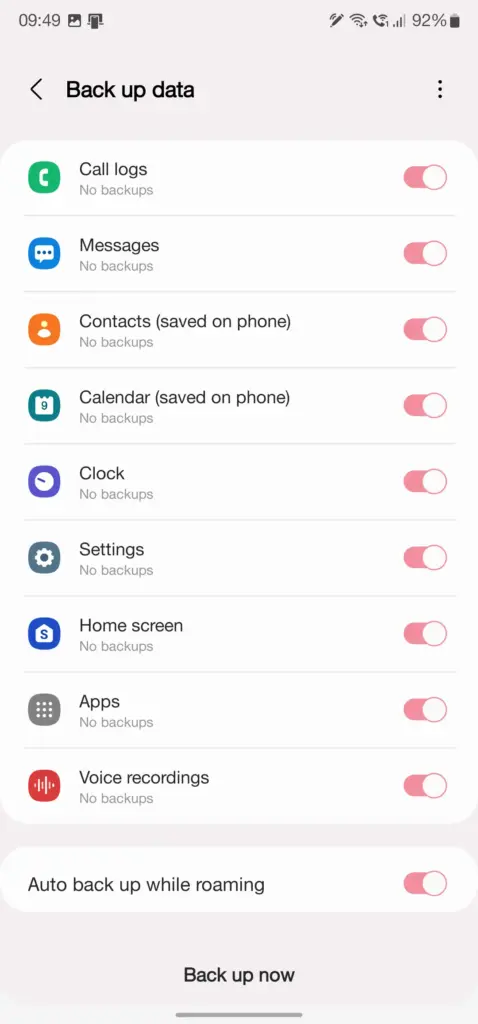
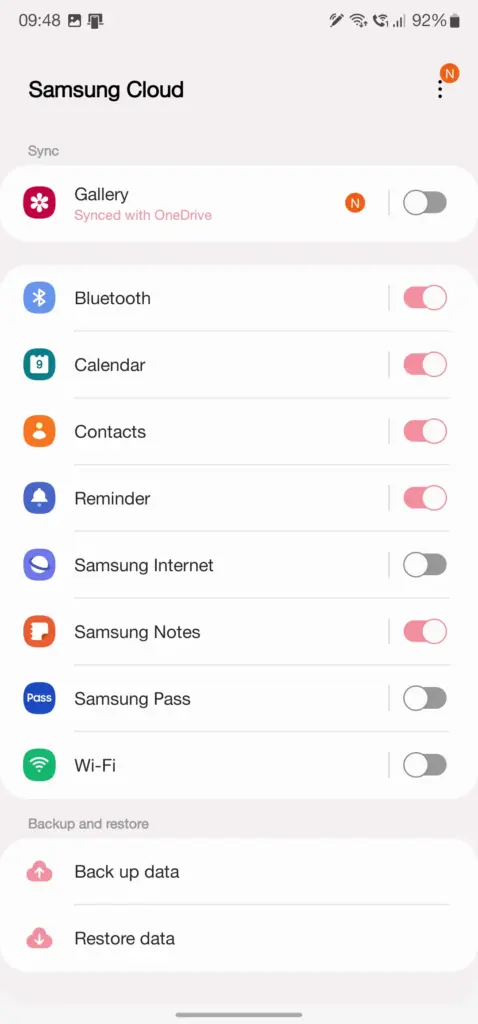
    Users who have invested in the Samsung ecosystem can use Samsung Cloud, a dedicated service for their phone. This allows you to back up and restore your Samsung device in the event that it is lost, broken, or reset. System settings, Wi-Fi networks, and the layout of your home screen are just a few of the things you may back up and store in the cloud. The Samsung Cloud Backup app for Android is quick and simple to use, and it works across all of your devices.

    Swift Backup

    When it comes to backing up your Android device, this is one of the most useful third-party apps available right now. With only a few short touches, Swift Backup allows you to perform batch activities. You may choose which apps you wish to store, hit a button, and it will handle the rest. It has a slight learning curve because it works with the Shizuku service, which grants you higher-level system rights. The good news is that many of its better features can be accessed without root access.

    Swift Backup

    You’ll also be able to back up your messages, phone call logs, and device wallpapers in one go. And once the app is set up to your liking, you can create an automatic schedule to keep everything constantly backed up. We’ve personally tested Swift Backup and highly recommend it for offline and cloud-based solutions. If you want to learn more about Swift Backup, we have a guide here that gives you an in-depth view of how to use it.

    NANDroid backup with custom recovery

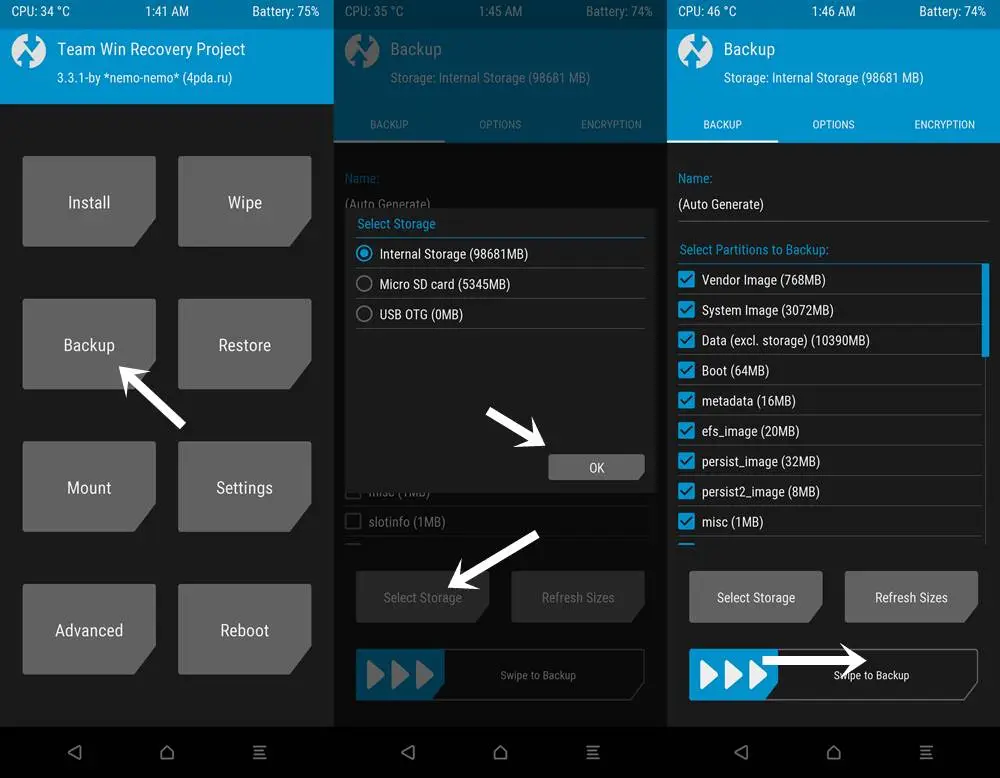
    When it comes to backing up and restoring Android devices, sophisticated users have a handy trick under their sleeves. You can take full system image backups of your smartphone using a custom recovery environment like TWRP. A NANDroid backup in this situation allows you to practically clone your system and restore it exactly as you left it, including all app data. It doesn’t require root access, but it does require an unlocked bootloader, a device that supports TWRP, and some knowledge.

    NANDroid backup

    If you can get beyond the learning curve and qualifications, NANDroid backups can make your life easier. Once you’ve done that, all you have to do now is manually save your downloaded media files, images, and videos. Many Pixel, OnePlus, and Exynos variant Samsung phones should be on the list of Android devices that gain TWRP support. Because of the committed developer community, the Pixel 5, OnePlus 9 Pro, and Galaxy S22 Exynos edition all have access to TWRP.

    Backing everything up

    There are a slew of different proprietary backup alternatives available from Android device manufacturers, as well as a slew of third-party apps on the Play Store. In the above list, we’ve merely highlighted a handful of the more common and effective approaches. Which one you choose is entirely dependent on your personal preferences and requirements for your individual device. And now that you’ve had a good starting point, you should be able to identify the one that works best for you.

  • Google Pixel 7 prototype photo gallery

    Google Pixel 7 prototype photo gallery

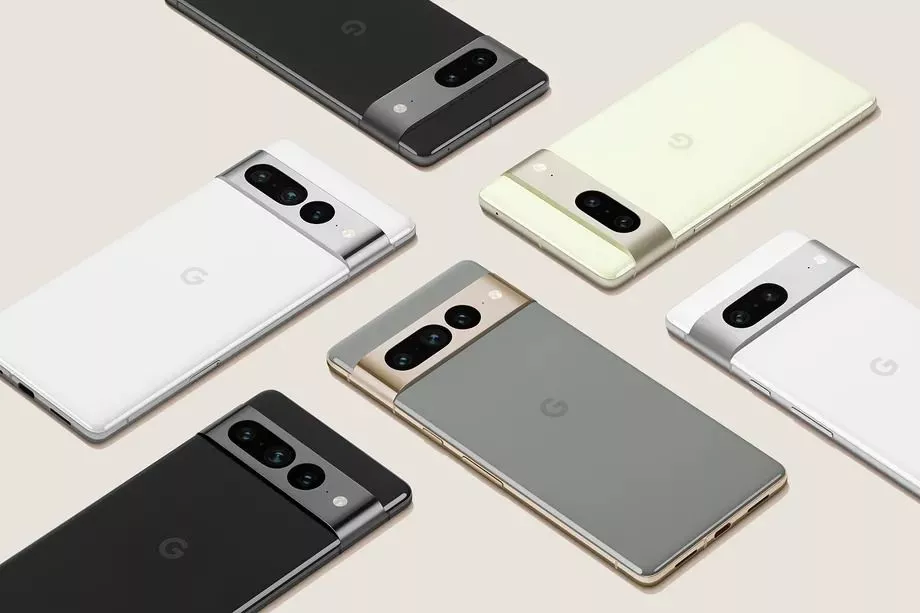
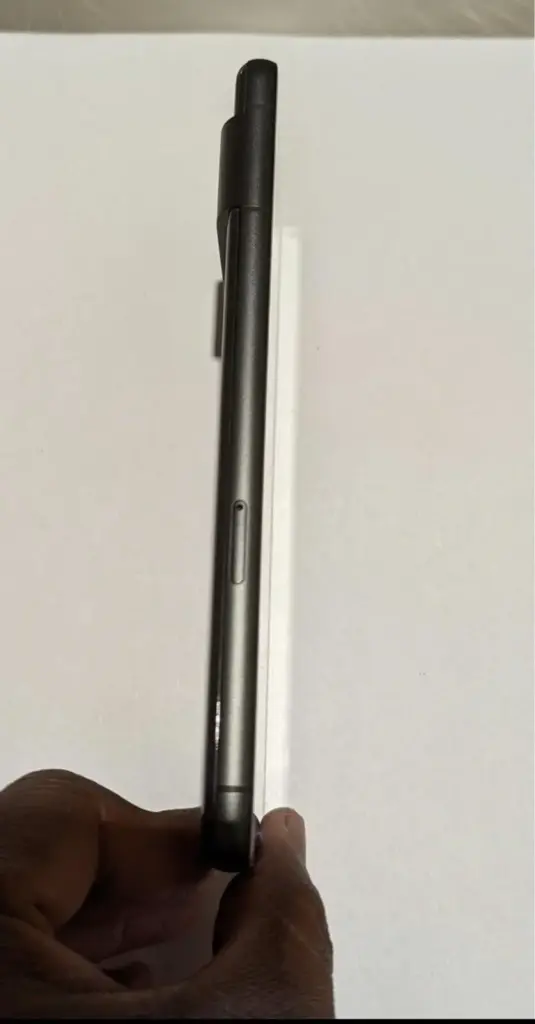
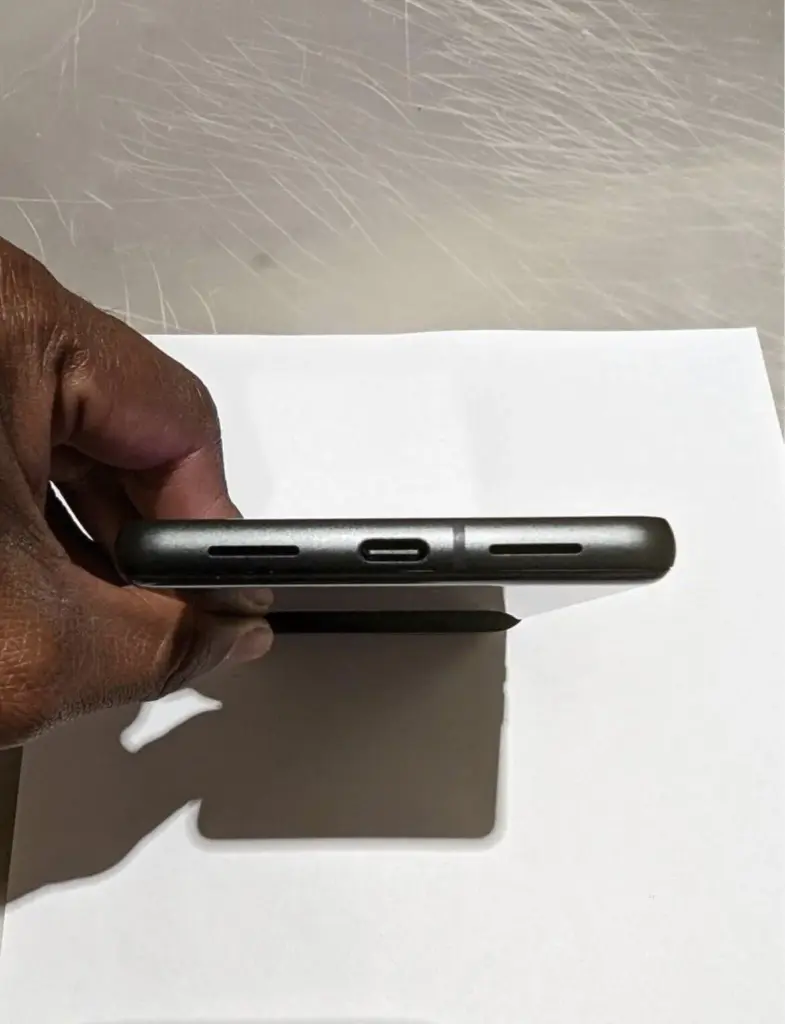
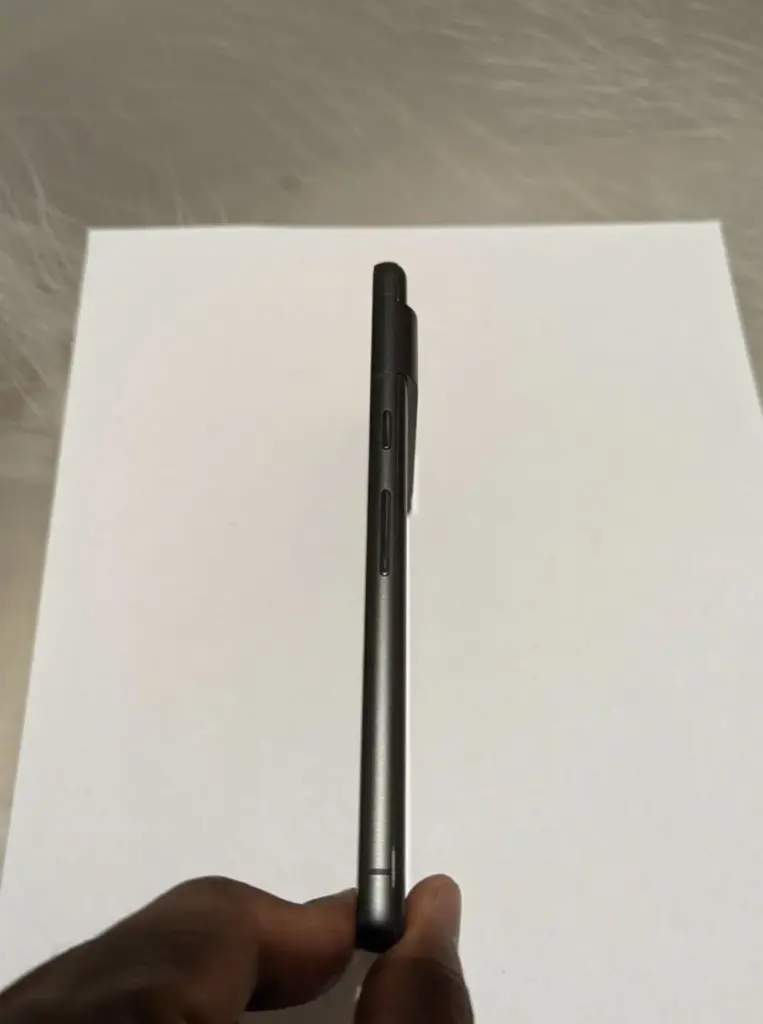
    We got our first official look at the Pixel 7 and Pixel 7 Pro at Google I/O, and now we’re getting even more due to an early prototype of the Pixel 7 appearing on eBay.

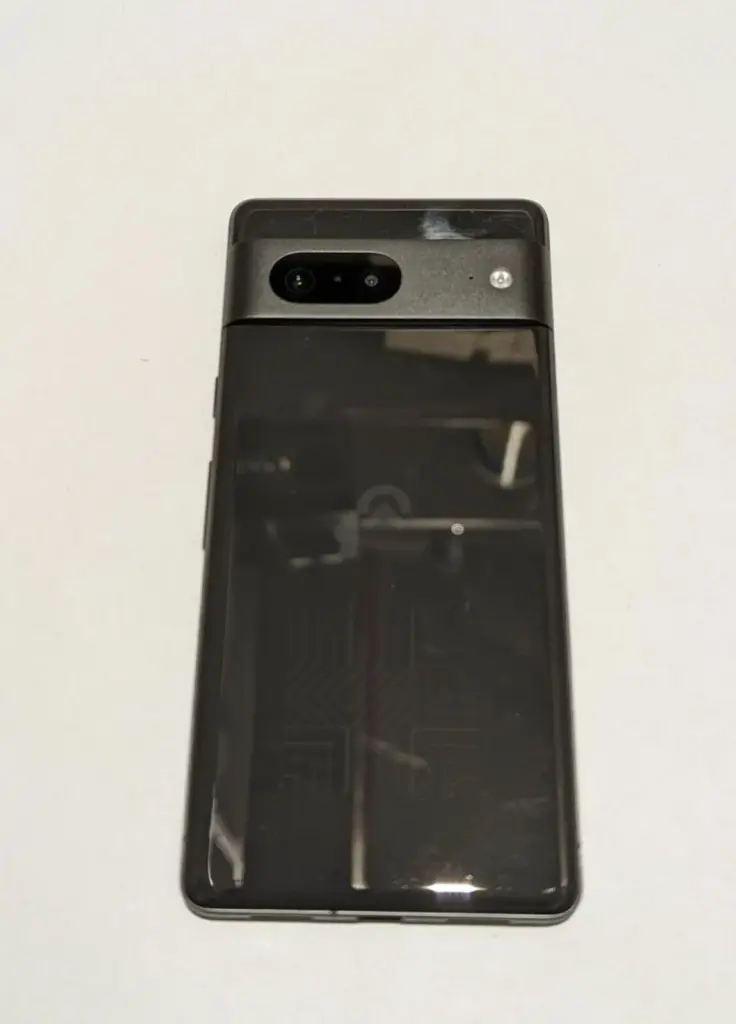
    Today, an eBay auction appeared for someone selling what appears to be a Pixel 7 prototype. The listing was pulled down shortly after this item was published, about 1:30 p.m. ET.

    The gadget is seen in its black “Obsidian” version, which includes a glossy glass back and the new metal camera bar that Google previously demonstrated. The device also includes a logo that is similar to previous Google prototypes but has been modified.

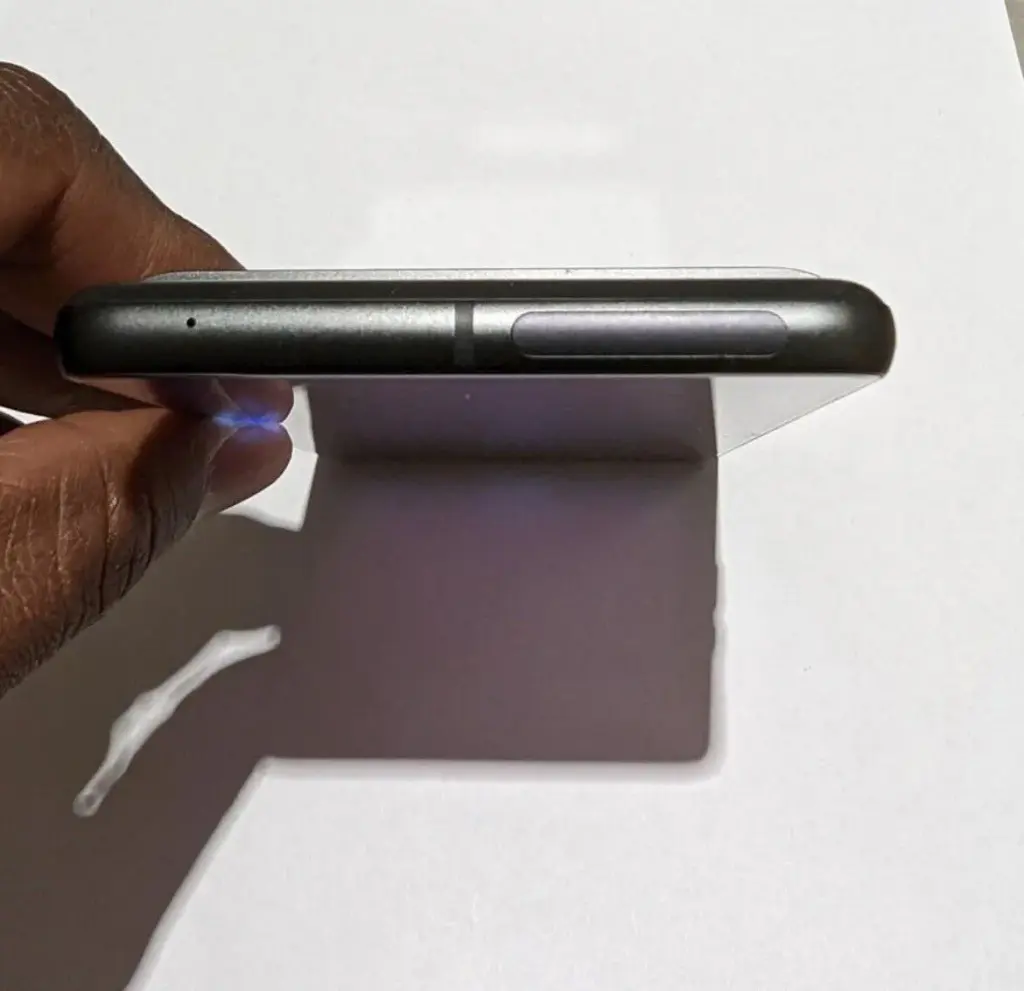
    Because Google has previously shown the Pixel 7’s design, this eBay auction doesn’t reveal much new information, though it does confirm that the Pixel 7 will ditch the matte black frame of the Pixel 6 in favor of a textured metal frame. The mmWave antenna window, which was previously seen in CAD leaks, is also visible.

    We can also see the Pixel 7 Pro in the mirror, with its unique camera bar snapping shots of this phone, which is a little amusing.

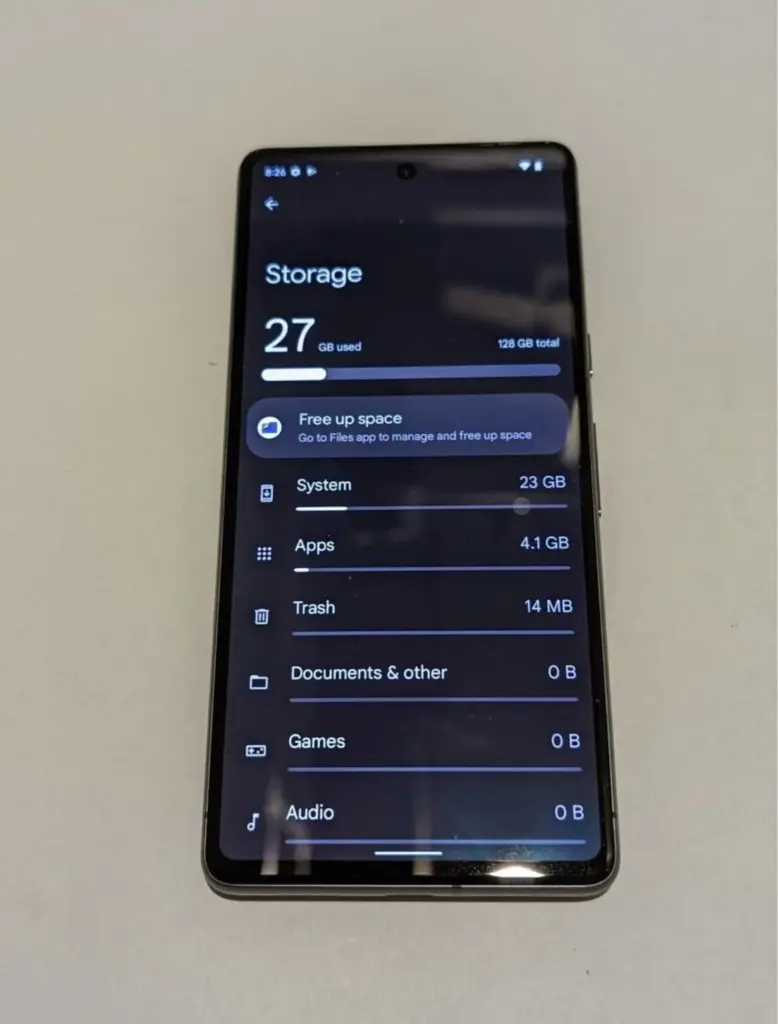
    The listing went on to say that the phone already had Android 13 installed and that “pixel apps were in the development stage.

    The only other thing we know from this leak is that the Pixel 7 will have 128GB of storage, as expected.

    Google has already confirmed that the Pixel 7 and Pixel 7 Pro will be releasing this fall. Pixel 7 specs will include a second-generation Tensor chipset. This updated design will come in the “Obsidian” color we’re seeing here as well as being sold in “Lemongrass” and “Snow.”

  • Friday – temporarily free and on-sale apps and games

    Friday – temporarily free and on-sale apps and games

    The start of the year is usually slow, but we’ve had some good sales today, including some fantastic standouts. The first is Old Man’s Journey, a beautiful adventure game with a touching plot. The next game is Hexologic, which is similar to Sudoku but uses hexagons instead of squares. Last but not least, there’s ELOH, a soothing puzzle game with a captivating rhythm mechanic. As usual, I’ve bolded all of the fascinating titles to make it simpler for you to find them. Here are the finest temporarily free and on-sale apps and games for the end of the week, without further ado.

    Free

    Apps

    1. Scalar Pro — Advanced Scientific Calculator $2.49 -> free; Sale ends in 4 days
    2. Video Speed Controller Pro $2.99 -> free; Sale ends in 5 days
    3. Video player – PRO version $1.49 -> free; Sale ends in 6 days
    4. Number to word converter offline $0.99 -> free; Sale ends in 7 days
    5. Pro Mp3 player – Qamp $0.99 -> free; Sale ends in 7 days

    Games

    1. Sally’s Spa $9.99 -> free; Sale ends in 1 day
    2. The Last Roman Village $1.99 -> free; Sale ends in 2 days
    3. Cartoon Craft $1.99 -> free; Sale ends in 5 days
    4. Hills Legend: Action-horror $0.99 -> free; Sale ends in 5 days
    5. Empire Warriors – Offline Game $0.99 -> free; Sale ends in 6 days
    6. Tap Legend Premium $0.99 -> free; Sale ends in 6 days

    Icon packs & customization

    1. Cerco Pro $0.99 -> free; Sale ends in 4 days
    2. Milky Launcher Pro $1.49 -> free; Sale ends in 7 days
    3. Star Launcher Prime $1.49 -> free; Sale ends in 7 days

    Sale

    Apps

    1. 3D EARTH PRO – local weather forecast & rain radar $9.49 -> $1.49; Sale ends in 4 days
    2. Hydro Coach PRO: drink water $8.49 -> $3.99; Sale ends in 4 days
    3. Moon Writer Pro Key $1.99 -> $0.99; Sale ends in 5 days
    4. KReader PRO $3.49 -> $1.49; Sale ends in 6 days
    5. onTouch English Dict – Premium $2.49 -> $0.99; Sale ends in 6 days
    6. Travel Tracker Pro – GPS $4.49 -> $2.49; Sale ends in 7 days

    Games

    1. Charlie the Duck $2.99 -> $1.49; Sale ends in 4 days
    2. Slaughter 3: The Rebels $5.00 -> $0.99; Sale ends in 4 days
    3. 1941 Frozen Front Premium $2.99 -> $0.99; Sale ends in 5 days
    4. Demetrios $3.49 -> $0.99; Sale ends in 5 days
    5. Dungeon Adventure: Heroic Ed. $2.49 -> $0.99; Sale ends in 5 days
    6. Neighbours from Hell 2 Premium $3.99 -> $0.99; Sale ends in 5 days
    7. Shattered Plane: Turn-Based Strategy Game $4.99 -> $0.99; Sale ends in 5 days
    8. Legacy of Elaed: RPG $1.49 -> $0.99; Sale ends in 6 days
    9. Mindcell $5.00 -> $0.99; Sale ends in 6 days
    10. Mortal Crusade $3.99 -> $1.99; Sale ends in 6 days
    11. The Insider–interactive movie $3.49 -> $1.49; Sale ends in 6 days
    12. Gnomes Garden 5: Halloween $1.99 -> $0.99; Sale ends in 7 days
    13. Mega Mall Story 2 $6.99 -> $2.99; Sale ends in 7 days
    14. Vengeance RPG 2D $3.49 -> $1.49; Sale ends in 7 days
    15. ELOH $2.99 -> $0.99; Sale ends in ?
    16. Hexologic $1.99 -> $0.99; Sale ends in ?
    17. Old Man’s Journey $4.99 -> $1.99; Sale ends in ?
    18. Pascal’s Wager $6.99 -> $3.99; Sale ends in ?

    Icon packs & customization

    1. Vera Icon Pack: shapeless icon $1.99 -> $0.99; Sale ends in 8 hours
    2. PastelWalls: Pastel wallpapers $1.99 -> $0.99; Sale ends in 1 day
    3. Frosty for KLWP $1.59 -> $0.99; Sale ends in 3 days
    4. Selene Icon Pack $1.99 -> $0.99; Sale ends in 3 days
    5. Selene Noir: Dark Icon Pack $1.99 -> $0.99; Sale ends in 3 days
    6. Chocolate KWGT $2.49 -> $0.99; Sale ends in 4 days
    7. Android 12 Black – Icon Pack $1.99 -> $0.99; Sale ends in 6 days
    8. Android 12 Dark – Icon Pack $1.99 -> $0.99; Sale ends in 6 days
    9. Flat Black – Icon Pack $1.99 -> $0.99; Sale ends in 7 days
  • Google Pixel 6 and 6 Pro deals in late March 2022

    Google Pixel 6 and 6 Pro deals in late March 2022

    Look no further if you’re looking for the best Google Pixel 6 prices or the most intriguing Google Pixel 6 Pro bargains. We’ve compiled all of the finest Google Pixel 6 deals so you can concentrate on picking your new favorite gadget.

    Trading in your old device is a quick and easy method to save money, but if you’re willing to switch carriers or add a new line, there are also some good options. The offers roundup can be found at the bottom of this page, but first, let’s discuss the devices.

    The Pixel 6 and Pixel 6 Pro have made waves as powerful and affordable alternatives to Samsung and Apple handsets since their arrival last autumn, but that wasn’t always the case. Previous incarnations of the smartphone were tarnished by software issues, unimaginative design, and poor battery performance, as we mentioned in our review of the Google Pixel 6. For years, the world pondered whether Google would ever change its mind and produce a high-end flagship smartphone.

    Thankfully, with the Pixel 6 lineup, Google has finally delivered. The two Pixel 6 devices have wowed users with their advanced 50MP rear cameras and the introduction of the ‘Tensor’, Google’s very first in-house chipset. In fact, we went so far as to select the Pixel 6 and the Pixel 6 Pro as two of the best Android phones that you can buy right now. 

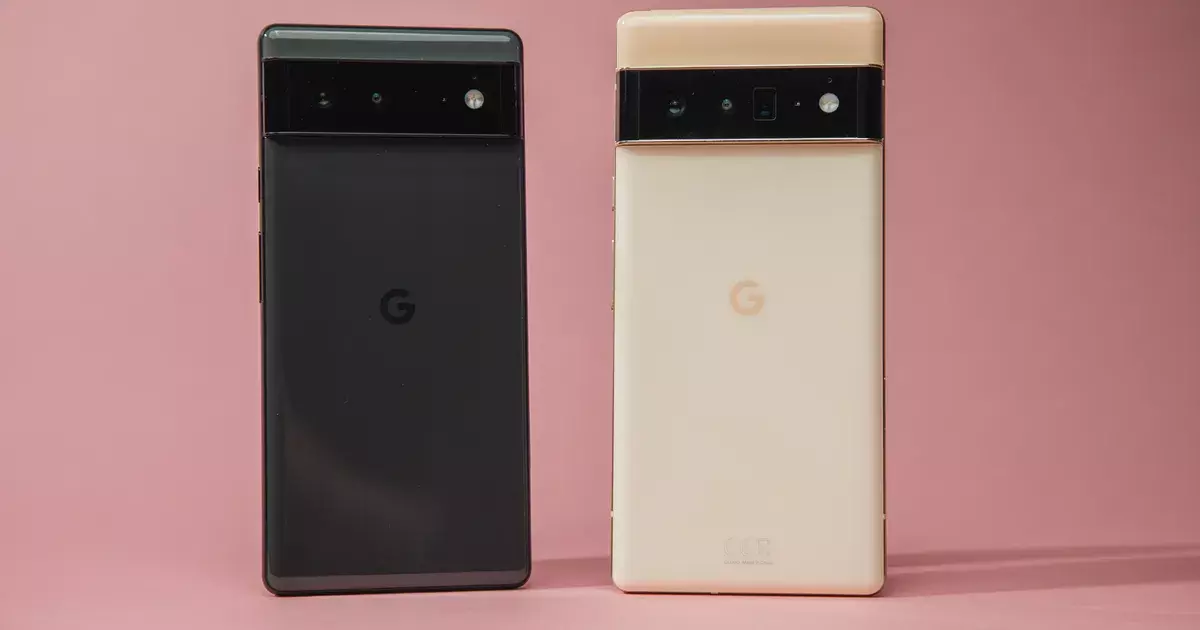
    The Google Pixel 6 has a beautiful 6.4-inch AMOLED display with a 90Hz refresh rate, and with a starting price of under $600, you’re paying much less than you would for a similar phone like the Samsung Galaxy S21. 

    The Pixel 6 Pro takes things even further, with a large 6.7-inch display, improved battery life, 12GB of RAM (compared to 8GB with the Pixel 6), and rounded edges for an elegant look. With a starting price of $899 for the 128GB version, it’s not quite as affordable as the Pixel 6, but you’re still getting a great value when you compare this device to non-Google competitors. 

    Although the rates are low, new discounts are always being added. We can move on to the discounts of the month now that you know a little more about the Pixel 6 series. We’ll start with some Google Pixel 6 bargains before moving on to Pixel 6 Pro deals.

    If you’re still not convinced, check out our Pixel 6 and Pixel 6 Pro buying guides to learn more about the smartphones’ flaws and merits, as well as to see how their cutting-edge cameras perform.

    GOOGLE PIXEL 6 DEALS

    Google Pixel 6

    Google Pixel 6 $699.99 FREE with eligible data plans

    Coming in at the top of our list is this very generous offer from Verizon. Sign up for a new line with an unlimited data plan, and the wireless carrier will basically hand over a new Google Pixel 6 at no cost to you and no trade-ins necessary. 

    Naturally, this deal will appeal the most to people who need a new phone line, but it’s an impressive offer nonetheless. If you’re a brand new Verizon subscriber who just switched, check to see if you’re eligible to receive a $1,000 gift card. VIEW DEAL

    Google Pixel 6 $599.99 with 0% APR over 24 months

    Google Pixel 6 $599.99 with 0% APR over 24 months

    Buy the unlocked phone directly from the Google Store and you can get 0% interest if you pay over 24 months (that’s a monthly payment of $24.96). If you’re interested in Google Store Financing, the company is also offering a $100 statement credit for a limited time. VIEW DEAL

    Save up to $800 with eligible trade-in and data plan

    Save up to $800 with eligible trade-in and data plan

    AT&T is offering some huge savings if you’re able to meet the requirements. Sign up for an unlimited data plan, trade in your old device, and receive up to $800 in credits over 36 months (the entire cost of a Google Pixel 6). There is a lot of fine print associated with this deal, but the value is huge if you can make it work. 

    This deal is also available for the Google Pixel 6 Pro.VIEW DEAL

    FREE $100 virtual gift card when you switch to Visible

    FREE $100 virtual gift card when you switch to Visible

    This offer simply gives you a $100 gift card after three months if you buy a Google Pixel 6 and switch to Visible from another wireless carrier. The deal is good whether you buy the phone upfront or pay over 24 months (with 0% APR). 

    This deal is also available for the Google Pixel 6 Pro.VIEW DEAL

    Get a Pixel 6 for only $99 when you add a line

    Get a Pixel 6 for only $99 when you add a line

    If you buy a new Google Pixel 6 and add one of their eligible lines, T-Mobile will give you $500.99 over two years in the form of monthly credits, bringing the price of the phone down to $99 with no trade-in required. VIEW DEAL

  • Google updates its apps recently. Full list here!

    Google updates its apps recently. Full list here!

    The Android operating system requires frequent updates. They include security patches and other bug fixes in addition to new designs and features. However, OS updates aren’t the only thing that matters; apps require attention as well.

    With that in mind, there have been a slew of improvements to major Google apps in recent months. Some of them have already been discussed, such as Messages’ solution to the vexing problem of iMessage reactions appearing as duplicated texts. However, a few have slipped between the cracks.

    We now have a complete list of some of the most important app upgrades that Google has released recently, thanks to Google. Some of these are completely new features, while others are simply changes to existing ones. In any case, if you’re curious about what’s new with your Google apps, here is a fantastic place to start.

    google apps update

    Messages

    • iMessage reactions: Reactions from iMessage users will now be displayed as emojis on text messages. This prevents the old problem of getting texts back that just said: “Liked [full original text message here].”
    • Categories: You can now easily view Personal and Business texts with the tap of the various categories at the top of your inbox.
    • OTP cleanup: You also have the option to automatically delete one-time passwords 24 hours after receipt.
    • Nudges: Quick reminders to reply to messages that you may have missed.
    • Birthday reminders: If you have a contact in Google’s Contacts app with a birthday listed, you’ll see a reminder that day when you open Messages or enter a conversation with them.
    • Photos integration: Google is further integrating one of its other super popular Google apps into Messages. Now, you can share your videos in high quality with your iOS friends, too. Messages will send videos as Google Photos links.
    • YouTube previews: You can see a preview of the video right in the conversation.

    Gboard

    • Grammar Correction: Gboard’s Grammar Correction will correct your spelling and grammar as you type. It works entirely on-device to preserve privacy. This was originally released to Pixel users but is now available to all of Android.
    • Emoji Kitchen: Google’s popular sticker creation tool now has over 2,000 new mashups.

    Photos

    • Portrait Blur: If you subscribe to Google One and/or own a Pixel device, you’ll soon have access to Portrait Blur on more subjects. These will include pets, food, and plants. You can even retroactively add blur to photos that didn’t have the effect when you took them

    Other Google apps

    • Google TV: A new feature called Highlights will bring together the latest stories about your favorite TV shows.
    • Android Auto: You can now pay for parking using only your voice.
    • Nearby Share: It is now possible to share something with multiple people at the same time.
    • Widgets: A new screen time widget helps people stay on top of their digital consumption.
    • Live Transcribe: This feature now works without an internet connection.
  • Portrait Mode to your dogs, food, and much more from Google Photos

    Portrait Mode to your dogs, food, and much more from Google Photos

    Over the last few months, Google Photos has been quietly rolling out new features, and another one will be available shortly, expanding Portrait mode beyond your typical single subject. Unfortunately, like last year’s Pixel-exclusive Photo editing tools, this new Portrait Blur will only be available for Pixels and Google One users via the Google Photos Android app.

    Prior to Google Photos Portrait Blur, Portrait Mode was only available for human images. Now, it’s available for a considerably wider range of subjects. Portrait Blur can attract focus and blur away crowded backgrounds in everything from images of animal pets you’re continually sending to your grandkids to that great meal you’re enjoying on vacation to the flowers in your yard coming into bloom this month.

    https://youtube.com/watch?v=fXEkPeSBr-Q

    This function isn’t limited to fresh pictures, either. You’ll be able to use it on any suitable photo once it’s available on your Android phone. This means you can take Portrait mode photos of your first puppy just as easily as the one you should be scritching behind the ears right now, providing you tagged their photos for easier reminiscing. Because this is performed after the photo is taken rather than during it, you can revert the snapshot to its original condition if the Portrait mode fails.

    This is just one of the many announcements Google dropped today, including a new screen time widget, iMessage reaction support for Google Messages, an expansion of Gboard grammar check to all Android devices, and lots more, all rolling out in the coming weeks.

  • Best free and on-sale apps for this week

    Best free and on-sale apps for this week

    Today’s first standout is Battle Chasers: Nightwar, an excellent turn-based RPG, and if you dig RPGs, Dragon Quest VIII is also on sale today. If RPGs aren’t your bag, then perhaps the fantastic auto-runner FOTONICA will float your boat. As always, I’ve highlighted all of the interesting titles in bold in order to make discovery easier. So without further ado, here are the best temporarily free and on-sale apps and games for the weekend.

    apps

    Free

    Apps

    1. 80s Music Radio Pro $0.99 -> free; Sale ends in 2 days
    2. 90s Music Radio Pro $1.49 -> free; Sale ends in 2 days
    3. English for all! Pro $0.99 -> free; Sale ends in 2 days
    4. Fast Video Splitter for Whatsapp status $0.99 -> free; Sale ends in 2 days
    5. Password Saver $0.99 -> free; Sale ends in 2 days
    6. Volume Slider Like Android P Volume Control $0.99 -> free; Sale ends in 2 days
    7. Pro Mp3 player – Qamp $0.99 -> free; Sale ends in 3 days
    8. Note Recognition – Convert Music into Sheet Music $4.49 -> free; Sale ends in 5 days

    Games

    1. AntiGravity Puzzle Game $1.99 -> free; Sale ends in 1 day
    2. Ruby Square: logical puzzle game (700 levels) $0.99 -> free; Sale ends in 1 day
    3. Ego Rigo $3.99 -> free; Sale ends in 2 days
    4. Hills Legend: Action-horror $0.99 -> free; Sale ends in 2 days
    5. Manor $3.99 -> free; Sale ends in 2 days
    6. Peppa Pig: Golden Boots $2.99 -> free; Sale ends in 2 days
    7. Hitman Sniper $0.99 -> free; Sale ends in 4 days
    8. 2048 – Puzzle Game $3.99 -> free; Sale ends in 5 days
    9. Ball Reach $0.99 -> free; Sale ends in 5 days
    10. Block Puzzle $3.99 -> free; Sale ends in 5 days
    11. Data Defense $4.99 -> free; Sale ends in 7 days

    Icon packs & customization

    1. Play Edition $0.99 -> free; Sale ends in 1 day

    Sale

    Apps

    1. EvoWallet – Money Tracker [Premium] $1.49 -> $0.99; Sale ends in 3 days
    2. KReader PRO $3.49 -> $1.99; Sale ends in 3 days
    3. Hydro Coach PRO: drink water $8.49 -> $3.99; Sale ends in 4 days
    4. LED Blinker Notifications Pro $3.99 -> $2.49; Sale ends in 5 days
    5. My Face Shape Meter and frames $1.49 -> $0.99; Sale ends in 5 days
    6. Notas U Pro: School Planner $1.99 -> $0.99; Sale ends in 5 days
    7. OsmAnd+ — Maps & GPS Offline $24.99 -> $12.49; Sale ends in 5 days
    8. iGuitar – Major Scale Modes $3.49 -> $1.99; Sale ends in 6 days

    Games

    1. Magazine Mogul $5.49 -> $1.99; Sale ends in 1 day
    2. March to a Million $6.99 -> $2.99; Sale ends in 1 day
    3. Oh!Edo Towns $6.99 -> $2.99; Sale ends in 1 day
    4. PARS Squad: Special Forces Warfare Action Shooter $0.99 -> $0.49; Sale ends in 1 day
    5. Pocket Arcade Story $6.99 -> $2.49; Sale ends in 1 day
    6. Silver Screen Story $6.99 -> $3.49; Sale ends in 1 day
    7. Slaughter 3: The Rebels $5.00 -> $0.49; Sale ends in 1 day
    8. Charlie the Duck $2.99 -> $1.49; Sale ends in 2 days
    9. Demetrios $3.49 -> $0.99; Sale ends in 2 days
    10. DRAW CHILLY $1.99 -> $0.99; Sale ends in 2 days
    11. Mortal Crusade $3.99 -> $1.99; Sale ends in 2 days
    12. Peace, Death! $1.99 -> $0.99; Sale ends in 2 days
    13. WHO IS AWESOME $1.99 -> $0.99; Sale ends in 2 days
    14. Black Border Patrol Simulator $2.49 -> $0.99; Sale ends in 3 days
    15. cress pro $1.49 -> $0.49; Sale ends in 3 days
    16. Mindcell $5.00 -> $0.49; Sale ends in 3 days
    17. Unbroken Soul $2.99 -> $0.99; Sale ends in 3 days
    18. Vengeance RPG 2D $3.49 -> $1.49; Sale ends in 3 days
    19. Cyberlords – Arcology $1.99 -> $0.99; Sale ends in 5 days
    20. IMAGEine Premium $1.99 -> $0.99; Sale ends in 5 days
    21. Hidden Folks $4.99 -> $2.49; Sale ends in 6 days
    22. Rush Rally 2 $1.99 -> $1.29; Sale ends in 6 days
    23. Battle Chasers: Nightwar $9.99 -> $0.99; Sale ends in ?
    24. DRAGON QUEST VIII $19.99 -> $14.99; Sale ends in ?
    25. FOTONICA $2.99 -> $0.99; Sale ends in ?
    26. Hexologic $1.99 -> $0.99; Sale ends in ?
    27. RPG Covenant of Solitude $7.99 -> $2.99; Sale ends in ?

    Icon packs & customization

    1. Lox Icon Pack (Light version) $1.49 -> $0.99; Sale ends in 1 day
    2. Khromatic – Icon Pack $1.49 -> $0.49; Sale ends in 2 days
    3. Spaghetti Wallpapers $1.49 -> $0.99; Sale ends in 2 days
    4. Fruti Icon Pack $1.99 -> $0.99; Sale ends in 3 days
    5. Sliced Icon Pack $1.49 -> $0.49; Sale ends in 3 days
    6. Delux Black – Round Icon Pack $1.49 -> $0.49; Sale ends in 6 days
    7. Delux – Icon Pack $1.49 -> $0.49; Sale ends in 6 days
    8. Delux – Round Icon pack $1.49 -> $0.49; Sale ends in 6 days