Tag: google

  • First custom rom running Android 12 for Google Pixel 2 XL -ProtonAOSP

    First custom rom running Android 12 for Google Pixel 2 XL -ProtonAOSP

    The 2 XL’s update end-of-life date was in December of last year, just a few months after Google introduced Android 11. Even though they’re getting on in years, these phones are still adequate for basic day-to-day use. If you have a Pixel 2 XL and want to try Android 12 out, you can do so right now if you’re ready to take matters into your own hands. The first Android 12-based custom ROM for the Pixel has been launched, and it includes all of the important new features such as Material You, a redesigned Quick Settings panel, new system animations, and privacy improvements.

    While you can always install the GSI build of Android 12 on your Pixel, the experience isn’t stable enough for everyday use because it’s designed for developers. This is where ProtonAOSP comes in, since it provides a relatively stable option for Pixel 2 XL owners to try out the latest Android update on their aging hardware. The ProtonAOSP Android 12 ROM is currently only available for the Pixel 2 XL, but a build for the smaller Pixel 2 is on the way.

    Installing the ProtonAOSP’s Android 12 release is different from other ROMs as it is available as a factory image (see how over at XDA Developers). You’ll need to unlock the bootloader on your Pixel 2 and use the bundled flash-all script to install the ROM. If the installation fails, you may need to repartition and allocate more storage to various system partitions.

    If you do install the ProtonAOSP ROM on your Pixel 2 XL, be prepared to run into some bugs and occasional performance issues. The major ones are non-functional Wi-Fi and Permissive SELinux permission in the current build. There are likely other issues as well that haven’t been reported yet. Nonetheless, if you want to try out Android 12 on your Pixel 2 XL, this is your best bet right now.

    Manual install ProtonAOSP

    This is a guide for installing ProtonAOSP manually, using the command line. The web installer is recommended if you don’t have a specific need for this. Check the list of common misconceptions if you’re not sure.

    You can only use a Windows, macOS, or Linux computer for this manual installation; use the web installer if you want to install from a Chromebook or another phone.

    Download a build

    Download the build you want to install in factory images format.

    Prepare your phone

    Put your device into bootloader mode by restarting it and holding the volume down button until you see a red warning sign or green Android robot.

    Once your device is in bootloader mode, plug it into the computer or device you’re installing from. Make sure you use a high-quality USB cable, as many cables will cause issues. Avoid USB hubs if possible.

    Your USB cable needs to be able to copy files. Charging-only cables won’t work.

    If you’re switching from the stock OS or another ROM, make sure all your important data is backed up. You’ll need to wipe all your data in order to use ProtonAOSP.

    Prepare your system

    First, open the “Command Prompt” app from the Start menu.

    Next, download the Android SDK Platform Tools and extract them. Navigate to the extracted platform-tools folder in the terminal by typing cd  (with the space at the end) and dragging the folder into Command Prompt. Then run the following command:

    set PATH=%CD%;%PATH%

    If it’s your first time installing from this computer, you also need to install drivers:

    1. Open Settings → Windows Update
    2. Click “Check for updates” and wait
    3. Click “View optional updates”
    4. Select the “Android Bootloader Interface” update (ignore the brand name; it doesn’t matter)
    5. Click “Download and install” and wait for it to finish
    6. Unplug your device and plug it back in

    Wipe data#

    If you’re switching from the stock OS or another ROM, you need to wipe all data before installing ProtonAOSP:

    fastboot -w

    Otherwise, ProtonAOSP won’t boot and your phone will get stuck on the boot animation after the installation.

    DANGER

    All data on your phone will be lost, so make sure your important files are backed up before doing this.

    Install the build

    Factory images

    Extract factory images

    Extract the downloaded factory images package (e.g. proton-aosp_redfin-factory_11.5.0.zip). Navigate to the new folder (e.g. redfin-rq2a.210505.003) by typing cd  (with the space at the end) and dragging the folder into your terminal.

    Flash factory images

    Run the following command to flash the factory images:

    • Windows
    • macOS
    • Linux
    ./flash-all.sh

    Copy

    Don’t touch, unplug, or press any buttons on your device during the install. Your phone will restart several times, but don’t touch it. It will automatically boot into ProtonAOSP once the installation process completes.

    Finish

    You can now delete the factory images package, but don’t delete the platform tools — you’ll need them for updating in the future.

    See First Steps for what to do next.

    For security, you may also wish to re-lock the bootloader to enforce verified boot, which improves physical security and resistance against persistent attacks.


  • Extensions, better macOS & Flutter support, Personalization beta, more for Firebase

    Extensions, better macOS & Flutter support, Personalization beta, more for Firebase

    During the annual Firebase Summit, Google revealed more simple extensions and improved support for macOS and Flutter apps, as well as the beta launch of Firebase Personalization.

    If you’re unfamiliar with Firebase, it’s a set of cloud-based app development tools from Google that provide developers access to things like a database, storage, hosting, crash analytics, and more.

    Google launched “Extensions” for Firebase in 2019, allowing developers to simplify common use cases and potentially connect their Firebase project to other services. Building on the previously implemented Algolia extension, an Elastic App Search extension has been created to make your database searchable. There are also new extensions for adding Google Pay and/or Stripe payments to your app.

    firebase

    Flutter developers can start experimenting with Firebase APIs right now without having to install anything. You can now test Firebase code in Flutter Web projects directly from your web browser using the DartPad web app, and the same code will work in Flutter Android and iOS applications as well.

    Firebase is also increasing its reach into Apple’s ecosystem today, with support for macOS and tvOS coming in Beta, the stage Google considers ready for production apps. The ability to use several of Firebase’s C++ libraries in Apple TV apps is also part of the new tvOS beta support, with Google recommending it for usage with Apple Arcade games.

    Developers can alter how certain aspects of their apps function without having to push a new update to the Play Store or App Store using the long-standing Firebase Remote Config. The options of Remote Config can now be picked automatically in a fashion that’s personalized to each individual user, thanks to “Personalization,” which is available in Beta today. While Firebase Personalization can be used in a variety of ways, Fruit Ninja creator Halfbrick found it to be effective in increasing ad revenue from one of their games without increasing negative ratings.

    For Android developers, Firebase is also releasing new documentation about the privacy disclosures necessary for each of Firebase’s tools. These are going to be especially helpful for the new “Data safety” section coming to the Play Store, which is set to become a requirement by April of next year.
    To get more details about what’s new in Firebase, like real-time alerts from Firebase Performance Monitoring, be sure to check out the Firebase Blog or watch the full Firebase Summit stream.

  • Google Play on Huawei HMS Phones via Google Space

    Google Play on Huawei HMS Phones via Google Space

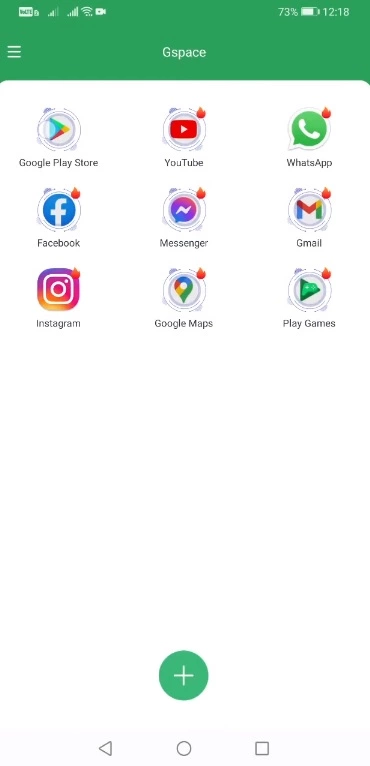
    A new way to get Google Play on Huawei HMS phones has just been released. This new solution makes use of the Google Space app. Fortunately, this solution appears to work on all Huawei phones launched to date. This contains Huawei’s newest Mate 40 smartphone, as well as a few forthcoming Huawei devices. So, in this method, I’ll show you how to download Google Play on Huawei HMS phones right now using Google Space. Before I show you the processes, let me give you a brief history of Google’s love-hate relationship with Huawei.

    Google Play Store and Huawei phones

    Huawei was blacklisted by the US a few years ago for having ties to the Chinese government. Since then, Huawei has encountered numerous roadblocks, including the termination of Google’s services on Huawei’s devices, US penalties on Huawei’s network equipment, multiple platforms that had to say goodbye to Huawei, and the famed chipmaker ARM being barred from working with Huawei. Huawei is not authorized to make any new chips with support manufacturers from the United States or the United Kingdom as of January 2021.

    google play store app

    Huawei has long abandoned Google’s architecture, but the App Gallery, Huawei’s own version of the Play Store, is still in its infancy. In fact, the App Gallery still has millions of typical programs that aren’t available. App installation through the App Gallery is also a little challenging. It even includes APKs from untrustworthy third-party sources, which has piqued the interest of many Huawei users. Despite Huawei’s best attempts to eliminate its reliance on Google Apps, a large percentage of Huawei smartphone owners still desire the Google Play Store to run on their handsets.

    In the last 2 years, there have been over a dozen methods allowing the installation of Google Apps on Huawei phones, but these methods keep getting patched. We have had the solutions like the GMS Installer, the GMSanzhuangqi App, the backup-restore method, and many other such tricks. The only problem with these tricks is that sooner or later, they come to an end leaving Huawei consumers in a street with a dead end.

    If you’ve been looking for a new method and have found yourself on this website, first and foremost, I’d want to congratulate you on your discovery of a new method. Let’s look at how to download Google Play Store on Huawei phones in 2021 in the simplest, fastest, and quickest way possible.

    Download and install Google Play on Huawei HMS devices

    1. On your Huawei handset, open the App Gallery.
    2. In the App Gallery’s search, type “Google Space”.
    3. As you find the Google Space App, install it.
    4. Once installed, click on “Open” at the bottom of Google Space
    5. Now click on “Google Play” and launch it.
    6. Log into Google Play using your Google Account.
    7. All done, install any app you want and enjoy the Play Store!
  • Free and on-sale apps and games on Google Play Store

    Free and on-sale apps and games on Google Play Store

    Things have calmed down after a wild weekend of game sales, but I still have some awesome sales to share with everyone, including a few standouts. First up is KWGT Kustom Widget Pro Key, an unlock app for a popular widget creation app KWGT Kustom Widget Maker. Next, I have Mathematiqa, a puzzle and riddle game that’s amassed over 100K installs. Last but not least is LayerPaint HD, a lesser-known drawing app that offers a boatload of features and a reliable developer. As always, I’ve highlighted all of the interesting titles in bold in order to make discovery easier. So without further ado, here are 13 temporarily free and 30 on-sale apps and games for the middle of the week.

    Free

    Apps

    1. Mandala Maker 360 $6.49 -> Free; Sale ends in 2 days
    2. OnSite Checklist – Quality & Safety Inspector $5.49 -> Free; Sale ends in 4 days
    3. 7 Minute Workout PRO $2.99 -> Free; Sale ends in 5 days
    4. Brightness Manager – brightness per app manager $0.99 -> Free; Sale ends in 7 days

    Games

    1. MinionSlayer: Growth Defense $0.99 -> Free; Sale ends in 6 days
    2. Truth Or Dare Pro $0.99 -> Free; Sale ends in 6 days
    3. Color Link Deluxe VIP $1.99 -> Free; Sale ends in 7 days
    4. Empire Warriors: Tower Defense Offline Games $0.99 -> Free; Sale ends in 7 days

    Icon packs & customization

    1. Khromatic – Icon Pack $0.99 -> Free; Sale ends in 10 hours
    2. Light Pink – Icon Pack $0.99 -> Free; Sale ends in 10 hours
    3. Teardrop White – Icon Pack $0.99 -> Free; Sale ends in 10 hours
    4. Lines Square – Neon icon Pack $1.49 -> Free; Sale ends in 2 days
    5. Simple Clock Widget – Word Clock $0.99 -> Free; Sale ends in 6 days

    Sale

    Apps

    1. LayerPaint HD $6.99 -> $2.49; Sale ends in 2 days
    2. Auto TTS $9.99 -> $4.99; Sale ends in 5 days
    3. 7 World Wonders For Kids $5.99 -> $0.99; Sale ends in 6 days
    4. Gym Coach Beginner workout Pro $1.99 -> $0.99; Sale ends in 6 days
    5. The three little pigs $1.99 -> $0.99; Sale ends in 6 days

    Games

    1. Mathematiqa – Math Brain Game Puzzles And Riddles $5.49 -> $1.99; Sale ends in 6 days
    2. Traffic Jam Car Puzzle Legend Match 3 Puzzle Game $3.99 -> $0.99; Sale ends in 7 days

    Icon packs & customization

    1. Black Pink – Icon Pack $1.99 -> $0.99; Sale ends in 2 days
    2. Cuticon Square – Icon Pack $1.99 -> $0.99; Sale ends in 2 days
    3. Dark Pink – Icon Pack $1.99 -> $0.99; Sale ends in 2 days
    4. Fledermaus – Icon Pack $1.99 -> $0.99; Sale ends in 2 days
    5. KLCK Kustom Lock Screen Pro Key $5.99 -> $2.49; Sale ends in 2 days
    6. KLWP Live Wallpaper Pro Key $5.99 -> $2.49; Sale ends in 2 days
    7. KWGT Kustom Widget Pro Key $5.99 -> $3.49; Sale ends in 2 days
    8. Nambula Bubblegum – Lines Icon Pack $1.99 -> $0.99; Sale ends in 2 days
    9. Nambula Pink – Lines Icon Pack $1.99 -> $0.99; Sale ends in 2 days
    10. Norma – Icon Pack $1.99 -> $0.99; Sale ends in 2 days
    11. OTO – Icon Pack $1.99 -> $0.99; Sale ends in 2 days
    12. Rubuk – Icon Pack $1.99 -> $0.99; Sale ends in 2 days
    13. Shimu icon pack $1.49 -> $0.99; Sale ends in 2 days
    14. Aline Black: linear icon pack $1.99 -> $0.99; Sale ends in 3 days
    15. Aline White: linear icon pack $1.99 -> $0.99; Sale ends in 3 days
    16. Anubis White – Round Icon Pack $1.49 -> $0.99; Sale ends in 4 days
    17. Anubis Black – Round Icon Pack $1.49 -> $0.99; Sale ends in 4 days
    18. Anubis White – Icon Pack $1.49 -> $0.99; Sale ends in 4 days
    19. Anubis Black – Icon Pack $1.49 -> $0.99; Sale ends in 4 days
    20. Lanting Icon Pack: Material and Colorful $1.99 -> $0.99; Sale ends in 6 days
    21. Neuon KWGT $2.49 -> $0.99; Sale ends in 6 days
    22. TapOn KWGT $2.49 -> $0.99; Sale ends in 6 days
    23. Ripple Elite – Walls for the Elite $1.99 -> $0.99; Sale ends in 7 days
  • Free and on-sale apps on Google Play Store

    Free and on-sale apps on Google Play Store

    First up is Cultist Simulator, a highly-polished single-player card-based roguelike. Next, I have Slaughter 3: The Rebels, a third-person shooter that offers exemplarily graphics. Last but not least is Cessabit, a delightful black-and-white memory game. As always, I’ve highlighted all of the interesting titles in bold in order to make discovery easier. So without further ado, here are 14 temporarily free and 44 on-sale apps and games for the middle of the week.

    Free

    Apps

    1. Onigiri KanaKana – Hiragana Katakana $4.49 -> Free; Sale ends in 3 days
    2. Edge Side Bar – Swipe Apps – App Shortcuts $0.99 -> Free; Sale ends in 7 days

    Games

    1. Hook $0.99 -> Free; Sale ends in 1 day
    2. Merge Number Puzzle $3.99 -> Free; Sale ends in 5 days
    3. 2048 – Puzzle Game $3.99 -> Free; Sale ends in 6 days
    4. Emoji Quiz – Combine emojis to guess words $0.99 -> Free; Sale ends in 6 days
    5. Soul Warrior Premium: Sword and Magic $0.99 -> Free; Sale ends in 6 days
    6. Live or Die: Zombie Survival Pro $0.99 -> Free; Sale ends in 7 days
    7. Speed Math – Mini Math Games $1.49 -> Free; Sale ends in 7 days

    Icon packs & customization

    1. Light Yellow – Icon Pack $1.99 -> Free; Sale ends in 1 day
    2. Darko5 – Icon Pack $1.99 -> Free; Sale ends in 4 days
    3. Proton – Icon Pack $0.99 -> Free; Sale ends in 4 days
    4. Xperia Theme – Fujiyama Night $0.99 -> Free; Sale ends in ?
    5. Xperia Theme – Osaka Castle $0.99 -> Free; Sale ends in ?

    Sale

    Apps

    1. aWallet Cloud Password Manager $5.99 -> $2.99; Sale ends in 3 days
    2. CloudPlayer™ Platinum cloud music player $7.99 -> $5.59; Sale ends in 6 days
    3. Differential Dx $3.99 -> $0.99; Sale ends in 6 days
    4. Earth 3D – World Atlas $2.99 -> $0.99; Sale ends in 6 days
    5. Guitar Engineer $2.99 -> $0.99; Sale ends in 6 days
    6. KosChertified? Grocery List + $3.99 -> $1.99; Sale ends in 6 days
    7. Universe Astronomy For Kids $5.99 -> $0.99; Sale ends in 6 days
    8. BMI Calculator PRO $3.49 -> $1.69; Sale ends in 7 days
    9. Europe map $2.49 -> $1.49; Sale ends in 7 days
    10. Hydro Coach PRO: drink water $8.49 -> $3.99; Sale ends in 7 days
    11. National Anthems PRO $1.99 -> $1.19; Sale ends in 7 days
    12. Swiss Driving Theory $7.99 -> $4.49; Sale ends in 7 days
    13. YoWindow Weather – Unlimited $9.99 -> $5.99; Sale ends in 7 days

    Games

    1. Boss Rush: Mythology Mobile $1.49 -> $0.99; Sale ends in 6 days
    2. Breaking Gates – 2D Action Platformer $2.99 -> $1.49; Sale ends in 6 days
    3. Cultist Simulator $6.99 -> $0.99; Sale ends in 6 days
    4. Fait – The Machine $1.99 -> $0.99; Sale ends in 6 days
    5. OUT OF THE BOX | Life Simulation Puzzle Adventure $4.99 -> $0.99; Sale ends in 6 days
    6. Whispering Willows $4.99 -> $0.99; Sale ends in 6 days
    7. Cessabit: a memory game $1.99 -> $0.99; Sale ends in 7 days
    8. Frontline: Western Front – WW2 Strategy War Game $1.99 -> $0.99; Sale ends in 7 days
    9. KNIGHTS $1.49 -> $0.99; Sale ends in 7 days
    10. PEG $1.49 -> $0.99; Sale ends in 7 days
    11. Slaughter 3: The Rebels $5.00 -> $0.99; Sale ends in 7 days
    12. Stormhill Mystery (Full) $4.99 -> $2.49; Sale ends in 7 days
    13. The Last Roman Village $1.99 -> $0.99; Sale ends in 7 days
    14. Vengeance RPG 2D $3.49 -> $1.99; Sale ends in 7 days

    Icon packs & customization

    1. Daily Wallpapers Pro $1.99 -> $0.99; Sale ends in 1 day
    2. Athena Dark Icon Pack $1.99 -> $0.99; Sale ends in 3 days
    3. Athena Icon Pack: iOS icons $1.99 -> $0.99; Sale ends in 3 days
    4. Black Yellow – Icon Pack $1.99 -> $0.99; Sale ends in 3 days
    5. Blackdiant Yellow – Icon Pack $1.99 -> $0.99; Sale ends in 3 days
    6. Dark Yellow – Icon Pack $1.99 -> $0.99; Sale ends in 3 days
    7. Nambula Nuclear – Lines Icon Pack $1.99 -> $0.99; Sale ends in 3 days
    8. One4KWGT Pro: KWGT Pro widgets $1.99 -> $0.99; Sale ends in 3 days
    9. Pixel Ring – Icon Pack $1.99 -> $0.99; Sale ends in 3 days
    10. iOS 15 Dark – Icon Pack $1.99 -> $0.99; Sale ends in 5 days
    11. iOS 15 White – Icon Pack $1.99 -> $0.99; Sale ends in 6 days
    12. Pix Material Icon Pack $1.49 -> $0.99; Sale ends in 6 days
    13. Sagon Circle Icon Pack: Dark UI $1.99 -> $0.99; Sale ends in 6 days
    14. One UI 4 Black – Icon Pack $1.99 -> $0.99; Sale ends in 7 days
    15. One UI 4 Dark – Icon Pack $1.99 -> $0.99; Sale ends in 7 days
    16. One UI 4 White – Icon Pack $1.99 -> $0.99; Sale ends in 7 days
    17. GRADION Icon Pack: On sale $1.99 -> $0.99; Sale ends in ?

    Tips send by Real Estate

  • Free and on-sale apps and games from Play Store

    Free and on-sale apps and games from Play Store

    The first game is Hidden Through Time, a charming hidden object game. Then there’s 911 Operator, a popular simulation game in which you play the role of a 911 operator. Last but not least is Distraint 2, a psychological horror game ideal for Halloween. As usual, I’ve highlighted all of the noteworthy titles in bold to make it easy to find them. So, without further ado, here are 26 applications and games that are currently free and 40 that are on sale for the start of the week.

    Free

    Apps

    1. Clean Equalizer & Bass Booster Pro $2.99 -> Free; Sale ends in 5 days
    2. Contacts Widget – Quick Dial Widget – Speed Dial $0.99 -> Free; Sale ends in 5 days
    3. CP Meeting Notes – Recorder, memo and minutes $2.99 -> Free; Sale ends in 6 days
    4. Ringtone Scheduler – Ringtone as per your mood $0.99 -> Free; Sale ends in 6 days
    5. Shortcuts widget – Apps Folder Widget $0.99 -> Free; Sale ends in 7 days
    6. Teach Me Surgery $6.99 -> Free; Sale ends in ?

    Games

    1. Left vs Right Brain Exercise Game Pro $0.99 -> Free; Sale ends in 1 day
    2. Slender man RE $0.99 -> Free; Sale ends in 2 days
    3. Balance Game $0.99 -> Free; Sale ends in 4 days
    4. Healing Matching Puzzle $0.99 -> Free; Sale ends in 4 days
    5. Manguni Squad $0.99 -> Free; Sale ends in 4 days
    6. Siren Head The Project S $0.99 -> Free; Sale ends in 4 days
    7. Special Elite force Mission $7.99 -> Free; Sale ends in 4 days
    8. Assassin Lord : Idle RPG (Magic) $1.99 -> Free; Sale ends in 5 days
    9. Grow Zombie VIP – Merge Zombies $1.99 -> Free; Sale ends in 5 days
    10. Neo Monsters $0.99 -> Free; Sale ends in 5 days
    11. Tower of Farming – idle RPG (Soul Event) $0.99 -> Free; Sale ends in 5 days
    12. Trojan War Premium: Legend of Sparta $0.99 -> Free; Sale ends in 5 days
    13. Cooking Quest VIP : Food Wagon Adventure $0.99 -> Free; Sale ends in 6 days
    14. D7: pack the colored Dominoes per 7. Casual game. $0.99 -> Free; Sale ends in 7 days
    15. Defender Heroes Premium: Castle Defense – Epic TD $0.99 -> Free; Sale ends in 7 days
    16. Knife Hit – Throw Knife Get Rewards $0.99 -> Free; Sale ends in 7 days

    Icon packs & customization

    1. Pixel Ring Drop – Icon Pack $1.49 -> Free; Sale ends in 10 hours
    2. Pixel Net White – Icon Pack $0.99 -> Free; Sale ends in 2 days
    3. Pixel Icon Pack: Pixel Icons & Wallpapers (No Ads) $0.99 -> Free; Sale ends in 3 days
    4. The Lox Icon Pack (Light version) $1.49 -> Free; Sale ends in 6 days

    Sale

    Apps

    1. Baby Sleep PRO $2.99 -> $0.99; Sale ends in 3 days
    2. Mindroid PRO Unlock $4.99 -> $2.50; Sale ends in 3 days
    3. Sleep as Android Unlock: Sleep cycle smart alarm $15.99 -> $4.49; Sale ends in 3 days
    4. Twilight Pro Unlock $4.99 -> $0.99; Sale ends in 3 days
    5. Parenting Hero – Become a wiser parent $2.99 -> $1.49; Sale ends in 5 days
    6. Pencil Sketch HD $4.49 -> $2.49; Sale ends in 5 days
    7. Sketch Master Pro $2.99 -> $1.49; Sale ends in 5 days
    8. 3D Charts Pro $2.95 -> $0.99; Sale ends in 7 days
    9. HTTP Redirection Trace $4.49 -> $1.49; Sale ends in 7 days
    10. SUI File Explorer PRO $1.99 -> $1.20; Sale ends in 7 days
    11. Edge Gestures $1.99 -> $0.99; Sale ends in ?
    12. Popup Widget 3 $1.99 -> $0.99; Sale ends in ?
    13. Power Shortcuts $1.99 -> $0.99; Sale ends in ?

    Games

    1. Pachoink! $1.99 -> $0.99; Sale ends in 2 days
    2. Gunslugs $3.49 -> $0.99; Sale ends in 4 days
    3. She Sees Red – Interactive Thriller $2.99 -> $0.99; Sale ends in 4 days
    4. 112 Operator $7.99 -> $2.99; Sale ends in 5 days
    5. 911 Operator $6.49 -> $1.99; Sale ends in 5 days
    6. BE-A Walker $4.99 -> $1.49; Sale ends in 5 days
    7. Counter Terrorist Agency $4.99 -> $1.49; Sale ends in 5 days
    8. Crystal Wars $1.49 -> $0.99; Sale ends in 5 days
    9. Radio Commander $6.49 -> $2.49; Sale ends in 5 days
    10. SnakEscape: Escape from Snake Turn-Based Game $3.99 -> $0.99; Sale ends in 5 days
    11. Bronze Age $1.99 -> $1.38; Sale ends in 6 days
    12. Marble Age: Remastered $4.49 -> $3.14; Sale ends in 6 days
    13. Pocket Rogues: Ultimate $3.99 -> $1.99; Sale ends in 6 days
    14. Quest of Wizard $2.99 -> $0.99; Sale ends in 6 days
    15. AWAKENING HORROR 1-5 $3.99 -> $0.99; Sale ends in 7 days
    16. Braveland Pirate $5.49 -> $0.99; Sale ends in 7 days
    17. Caapora Adventure – Ojibe’s Revenge $3.99 -> $0.99; Sale ends in 7 days
    18. DISTRAINT 2 $7.49 -> $1.99; Sale ends in 7 days
    19. Hidden Through Time $2.99 -> $1.49; Sale ends in 7 days
    20. Jaland $1.99 -> $0.99; Sale ends in 6 days
    21. BabyMagica $2.99 -> $0.99; Sale ends in ?

    Icon packs & customization

    1. Dock Hexa 3D- Icon Pack $1.99 -> $0.99; Sale ends in 2 days
    2. Alexis Icon Pack: Clean and Minimalistic $1.99 -> $0.99; Sale ends in 5 days
    3. Gems Icon Pack $1.49 -> $0.99; Sale ends in 5 days
    4. Transparent White – Icon Pack $1.99 -> $0.99; Sale ends in 5 days
    5. Light Sensation- Icon Pack BETA $1.99 -> $0.99; Sale ends in 6 days
    6. Droid 2 – Watch Face $1.99 -> $0.99; Sale ends in ?
  • Temporarily free and on-sale apps and games for Wednesday

    Temporarily free and on-sale apps and games for Wednesday

    First up is a huge discount for Evoland 2, an excellent RPG that’s easily worth a dollar. Next, I have a sale for Redsun RTS Premium, an older strategy game that still holds its own. Last but not least is a significant reduction in price for Dariusburst -SP-, an enjoyable shoot ’em up. As always, I’ve highlighted all of the interesting titles in bold in order to make discovery easier. So without further ado, here are 12 temporarily free and 33 on-sale apps and games for the middle of the week.

    google play store free apps

    Free

    Apps

    1. Dark screen filter – Blue light – Night mode $0.99 -> Free; Sale ends in 6 days
    2. Electron Config Engine $2.49 -> Free; Sale ends in 6 days
    3. Fast Video Splitter for Whatsapp status $0.99 -> Free; Sale ends in 6 days

    Games

    1. Demon Warrior Premium – Stickman Shadow Action RPG $0.99 -> Free; Sale ends in 6 days
    2. Extreme Mini Fun Car Racing 3D $1.49 -> Free; Sale ends in 6 days
    3. ExtremeJobs Knight’s Assistant VIP $0.99 -> Free; Sale ends in 6 days
    4. Secret Tower VIP (Super fast growing idle RPG) $0.99 -> Free; Sale ends in 6 days
    5. Stickman Master: League Of Shadow – Ninja Fight $0.99 -> Free; Sale ends in 6 days
    6. Superhero War Premium: Robot Fight $0.99 -> Free; Sale ends in 6 days
    7. Survival Island: EVO PRO– Survivor building home $0.99 -> Free; Sale ends in 6 days

    Icon packs & customization

    1. Light Purple – Icon Pack $0.99 -> Free; Sale ends in 1 day
    2. Play Edition $0.99 -> Free; Sale ends in 3 days

    Sale

    Apps

    1. PRO Voice Navigator “IGH” $2.99 -> $0.99; Sale ends in 2 days
    2. pedestrian voice navigator PRO $4.99 -> $0.99; Sale ends in 3 days
    3. Custom Data Recorder $1.99 -> $0.99; Sale ends in 5 days
    4. Float It $1.99 -> $0.99; Sale ends in 5 days
    5. Handy Surveying $2.99 -> $1.99; Sale ends in 5 days
    6. FIRE POWERAMP VISUALIZATION $1.99 -> $0.99; Sale ends in 6 days
    7. Greek Mythology For Kids $5.99 -> $0.99; Sale ends in 6 days
    8. iLondon Collection. Immersive Reading Experience $1.99 -> $0.99; Sale ends in 7 days
    9. iLovecraft Collection Vol. 1 “Immersive Book” $1.99 -> $0.99; Sale ends in 7 days
    10. iLovecraft 2 Immersive Reading $1.99 -> $0.99; Sale ends in 7 days
    11. iPoe Collection Vol. 1 – Edgar Allan Poe $1.99 -> $0.99; Sale ends in 7 days
    12. iPoe Collection Vol. 2 – Edgar Allan Poe $1.99 -> $0.99; Sale ends in 7 days
    13. iPoe Collection Vol. 3 – Edgar Allan Poe $1.99 -> $0.99; Sale ends in 7 days
    14. iWilde Collection (Immersive Reading Experience) $1.99 -> $0.99; Sale ends in 7 days
    15. The Canterville Ghost (Oscar Wilde) Immersive Book $1.99 -> $0.99; Sale ends in 7 days
    16. The interactive Adventures of Sherlock Holmes $1.99 -> $0.99; Sale ends in 7 days
    17. The Legend of Sleepy Hollow (Immersive Experience) $1.99 -> $0.99; Sale ends in 7 days

    Games

    1. Mahjong Fantasy $3.49 -> $0.99; Sale ends in 3 days
    2. Naked King $4.49 -> $0.99; Sale ends in 5 days
    3. Evoland 2 $8.49 -> $0.99; Sale ends in 6 days
    4. Redsun RTS Premium $1.49 -> $0.99; Sale ends in 6 days
    5. Heroes of Flatlandia – Turn based strategy $2.49 -> $0.99; Sale ends in 7 days
    6. RPG Knight Bewitched $1.99 -> $0.99; Sale ends in 7 days
    7. Shattered Plane: Turn-Based Strategy Game $4.99 -> $0.99; Sale ends in 7 days
    8. DARIUSBURST -SP- $9.99 -> $4.49; Sale ends in ?
    9. Thinkrolls Kings & Queens – Full $5.99 -> $3.99; Sale ends in ?

    Icon packs & customization

    1. Black Purple – Icon Pack $1.99 -> $0.99; Sale ends in 3 days
    2. Dark Purple – Icon Pack $1.99 -> $0.99; Sale ends in 3 days
    3. Hera Dark Icon Pack – Circle Shaped Dark Icons $1.99 -> $0.99; Sale ends in 3 days
    4. Hera Icon Pack – Circle Icons $1.99 -> $0.99; Sale ends in 3 days
    5. Nambula Purple – Lines Icon Pack $1.99 -> $0.99; Sale ends in 3 days
    6. One4KWGT Reloaded – widgets for KWGT $1.99 -> $0.99; Sale ends in 3 days
    7. Dusk KWGT $1.99 -> $1.49; Sale ends in ?
  • Oganization feature for power users catches up with Google Photos

    Oganization feature for power users catches up with Google Photos

    Google Photos remains one of the finest methods to sync your collection to the cloud, even without its free high-quality backups. It can be accessed from any web-connected device, although not all applications have the same tools. For years, the Photos app for Android has been unable to manually change metadata — a critical function for any gallery tool — but that is now changing with Google’s latest version.

    google photos

    The ability to add and alter information from photographs and videos is realistically required, and it is something that Android customers have long sought from the firm.

    Not only did Google add it to the web client way back in 2015, but the iOS version of the app supports editing this info as well — something we’ve previously highlighted as an odd exclusion.

    google photos organize

    So while this feature is definitely overdue, it’s at least easy to use (via 9to5Google). To edit the time and date for an image, just tap on the pencil icon in the description field below your selection. It uses Android’s standard day and time picker to change this info, so it’s easy to select the exact timeframe you want. Once the new metadata is entered, just tap back to your photo to close it.

    There is no method to remove or conceal metadata from individual photos, but you can set random entries if you want to remove or hide metadata from specific captures. There is also no ability to batch update your photos; instead, you must utilize the online app for group editing.

    This appears to be a server-side upgrade, like with most Google app updates. However, we are seeing it on Google Photos v5.60, so it may already be on your phone. If you don’t see the edit button, try updating the app from the Play Store link below or downloading the most recent APK from APK Mirror.

  • Download Google Camera (Gcam) for Exynos devices

    Download Google Camera (Gcam) for Exynos devices

    If you enjoy mobile photography, particularly on Android devices, you should be aware of the GCam app. The Google Camera (GCam) app does not require any introduction because it is one of the best third-party camera apps for a non-Pixel Android device. Whether you have a mid-range or flagship Android device with a better camera, most images will lack crisp details and color accuracy if you don’t have the Google Camera app. We’ve included a link to download Gcam for all Samsung Exynos devices [GCam ZCam APK] below.

    If you don’t know, you might be wondering why Samsung Exynos? Because the majority of Samsung devices (global) use Exynos processors, users are unable to find a compatible or stable Gcam app for those specific models. While Snapdragon-powered devices are more developer-friendly than Exynos variants. As a result, you will receive GCam ported APK files for the majority of Snapdragon Samsung Galaxy devices. However, you can download a ZCam ported APK file of GCam for the Samsung Galaxy Exynos variant from the link provided below.

    google camera

    We all know that Samsung Galaxy smartphones have excellent cameras with a variety of modes and features such as Portrait mode, Slow-Motion mode, Panorama mode, improved hybrid zooming capability, and more. While newer Samsung Galaxy devices also include super steady video recording, night mode, sharp daylight images, up to 8K video recording, up to 100x hybrid zoom, and other features. However, when it comes to the Google Camera app, no other stock camera apps stand out from the crowd.

    With the help of powerful software development, the Gcam app delivers a stunning color contrast ratio with a better dynamic range, exposure level, etc. It features a simple camera interface with loads of advanced settings, Google Lens integration, Night Sight mode, Portrait mode with focus slider, Slow-Motion, HDR+, HDR+ Enhanced, Playground (AR Stickers), Lens Blur, PhotoSphere, RAW image option, improved video stabilization, etc.

    The GCam app also provides better edge detection in portrait shots, nice shadow & depth in low lighting conditions, and color levels that are close to reality, all of which contribute to capturing a better image. At the time of writing, ZGCam Exynos had shared ZGCam 692. (latest version). This developer deserves all of the credit. Now, without further ado, let’s get to the download link and installation instructions.

    Download Link

    • Google Camera 8.1 for Samsung Exynos: Download
    • Google Camera 7.4 for Samsung Exynos v1.03359: Download
    • Google Camera 7.4 for Samsung Exynos V1.03344: Download
    • Google Camera Samsung Exynos 3.8.01149: Download
    • Google Camera Samsung Exynos 3.8.01106: Download
    • Google Camera Samsung Exynos 3.8.01024: Download
    • Google Camera Samsung Exynos 3.8.00990: Download
    • Google Camera Samsung Exynos 3.8.00917: Download
    • Google Camera Samsung Exynos 3.8.00838: Download
    • Google Camera Samsung Exynos 3.8.00703: Download
    • Google Camera Samsung Exynos 3.8.00692: Download

    Download Config for ZGCAM

    Google Camera Samsung Exynos Installation

    1. Download the GCam APK file on your device.
    2. Now, enable Unknown Sources options from the device Settings > Security or Privacy.
    3. Tap on the GCam APK file again to install it.
    4. Launch the GCam app and give all the required permissions.
    5. You’re done.

    We hope you’ve found this article useful and you can now use the GCam ported app on any of your Samsung Galaxy Exynos variant devices. Feel free to ask in the comments below for any queries.

  • How to disable in-app purchases on smartphones & tablets

    How to disable in-app purchases on smartphones & tablets

    While smartphones and tablets are excellent temporary digital nannies for keeping children entertained, they also pose a risk of children spending their parents’ money on in-app purchases and the Google Play Store itself. This article will teach you how to avoid making unintentional or unwanted purchases on your Android smartphone or tablet.

    Anyone with young children has most likely placed a smartphone or tablet in the hands of their child, assuming the child does not already have their own device. However, with so many games offering in-app purchases, how do you keep them from exceeding your credit card limit?

    With the popularity of the one-click purchase feature, such convenience creates a risk for poorly secured devices in children’s hands. Securing your device will also assist you in avoiding impulse or even accidental purchases.

    Both Google and Apple offer tools to control or prevent such unwanted or accidental purchases on Android or iOS/iPadOS. In this article, we’ll show you how to do that in Google’s ecosystem.

    Avoid unwanted purchases on your smartphone by your child

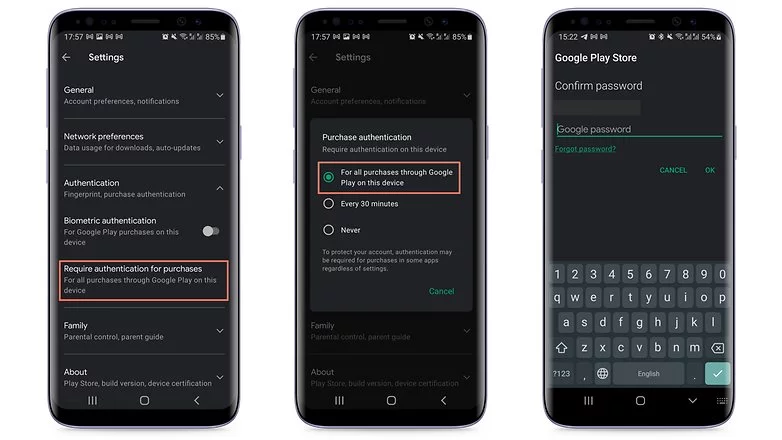
    If your child uses your smartphone or tablet while logged in to your Google account, the simplest solution is to make all purchases require approval via account password confirmation. Simply follow these steps to accomplish this:

    1. Tap the profile picture in the top corner of the screen in the Play Store.
    2. Choose Settings.
    3. Tap the Authentication field to launch the available options.
    4. Select Require authentication for purchases.
    5. Choose For all purchases through Google Play purchases on this device.
    in app purchases
    disable in app purchases android

    As the option itself already mentioned, you will need to repeat the steps on all tablets and smartphones used by the child.

    Otherwise, the child may authorize purchases using his or her fingerprint or other biometric systems registered on the device if the Biometric authentication option is enabled.

    Needless to say, the password to your Google account is private and should never be shared with your child. Disable biometric authentication as well if necessary.

    After following the above steps, every time you or anyone else using the device would like to make a purchase, you/they will need to authorize it by entering your Google account password, including in-game and in-app purchases that rely on the Google Play Services payment system.

    Another important point is to remember to repeat the steps for all user accounts that have been registered on the smartphone or tablet. Doing so will help avoid unwanted scares on devices used, for instance, covering both personal and professional areas.

    After you’ve completed the preceding steps, every time you or anyone else using the device wants to make a purchase, you’ll need to authorize it by entering your Google account password, including in-game and in-app purchases that use the Google Play Services payment system.

    Another important point to remember is to repeat the steps for all user accounts registered on the smartphone or tablet. This will help to avoid unwanted scares on devices used, for example, in both personal and professional settings.

    Use parental Control to prevent unwanted purchases

    If your child has his or her own tablet or smartphone, we recommend using parental controls to force purchase authorization. Google provides the Family Link app for just this purpose. This app allows you to create a user account just for your child or teen, as well as other admin options for YouTube, web search, and other services.

    After installing the app on your smartphone or the smartphone of the child’s guardian, launch Family Link and follow the steps shown below:

    ezgif.com gif maker 4
    1. After the app is launched, choose the user account of the parent or guardian.
    2. In the next screen, select the Parent option.
    3. Choose Next and then I’m ready.
    4. On the next screen, we will choose to create a new account for the child by tapping No.
      1. If she already has a Google account, just go to Settings on the other device, then Google > Parental Controls, and set up the device to be managed from your smartphone.
    5. Tap Next to begin the account creation process, which will require more information and can take around 10 minutes.
      1. During this step, you will need to agree to additional terms of use and confirm your user password, as well as accept the privacy rules for the new account.
    6. At the end of the creation process tap the Next button.

    After creating the Family Link account, use the login as the primary Google account on the child’s device. Return to your smartphone and launch the Family Link app to configure the following restrictions on the child’s account:

    ezgif.com gif maker 3
    1. Tap the View button under the profile that will have restricted purchases.
    2. Select the Manage settings option.
    3. Choose Google Play.
    4. Tap Require approval for.
    5. Select the All content option just to be safe!

    After that, each time the child attempts to purchase content, they must authorize the transaction on the parent or guardian’s device.

    Depending on how the secondary account is set up, make sure there is no form of payment registered in the account. If there are any, simply follow the steps in the next section.

    Remove associated credit or debit cards on the Google account

    This is a more extreme option, and it is not recommended if you also buy a lot of apps, have subscriptions or recurring payments associated with your Google account, or use the Google Pay service. Removing all payment methods from your Google account affects all devices associated with the login, so think twice before wiping your account clean.

    To remove a credit card, debit card, or other payment methods from your account, follow these steps:

    1. Launch the Play Store app and tap your profile photo.
    2. Select the Payments and subscriptions option.
    3. Choose Payment methods.
    4. Scroll down the screen and launch the More payment settings option.
    5. The browser will open a list of all available payment methods registered on the account. Tap Remove.
    6. Confirm the removal of the credit/debit card from the account by tapping Remove again.

    You will need to repeat these steps for each registered payment method, as well as all for all user accounts associated with the device.