Tag: cybersecurity

  • New Android malware copies card data and PINs for instant ATM cashouts

    New Android malware copies card data and PINs for instant ATM cashouts

    A new Android-based spyware that leverages NFC technology to make illegal ATM cash withdrawals and empty victims’ bank accounts was examined by the Polish Computer Emergency Response Team (CERT Polska).

    Researchers discovered that the software, known as NGate, allows attackers to use banking information stolen from victims’ phones to withdraw money from ATMs (Automated Teller Machines, or cash machines) without actually taking the cards.

    NFC is a wireless technology that enables close-quarters communication between gadgets like terminals, cellphones, and payment cards. Therefore, rather of stealing your bank card, the attackers use a mobile phone infected with the NGate virus to record NFC (Near Field Communication) activities and send that transaction data to ATM equipment. Instead of being relayed just via radio, the stolen data in NGate’s situation is transmitted over the network to the attackers’ servers.

    There are several “flavors” of NFC. Some generate a static code, like the card that opens the door to my apartment complex. I can use a gadget like my “Flipper Zero” to open the door by just copying that type of signal. However, dynamic codes are used by sophisticated contactless payment cards, such as your Visa or Mastercard debit and credit cards. Your card’s chip creates a unique, one-time code (commonly referred to as a cryptogram or token) each time you use the NFC. This code is unique and cannot be reused.

    That’s why the NGate malware is more advanced. It does more than just pick up a signal from your card. The victim must be duped into entering their PIN and completing a tap-to-pay or card-verification activity after the phone has been compromised. When that occurs, the app records every piece of information required for an NFC transaction, including the card number, new one-time codes, and other information created at that same moment.
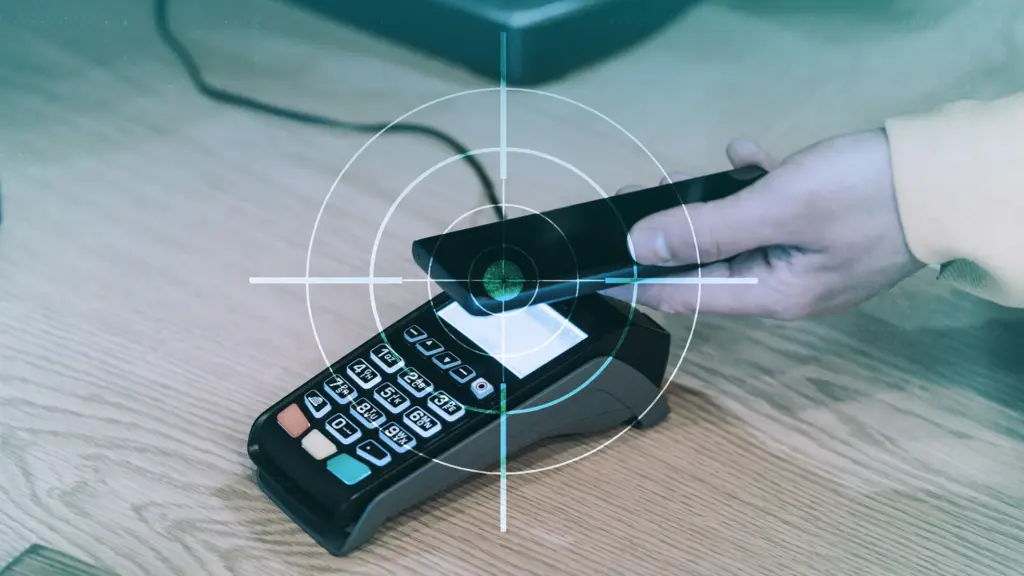
    android malware steals data nfc

    All of the NFC data, including the PIN, is then immediately sent to the attacker’s handset via the virus. The attacker uses the codes right away to mimic your card at an ATM because they are newly produced and only valid for a brief period of time. The accomplice at the ATM displays the collected data using a card-emulating device, such as a phone, smartwatch, or bespoke hardware.

    However, as you may guess, social engineering and preparation are necessary to be prepared at an ATM when the data arrives.

    Attackers must first infect the victim’s device with malware. They usually send prospective victims phishing emails or SMS messages. They frequently try to create anxiety or urgency by claiming that there is a technical or security problem with their bank account. Occasionally, they make a follow-up call while posing as representatives of the bank. These calls or texts instruct victims to download a phony “banking” app from an unofficial source, like a direct link rather than Google Play.

    After installation, the software requests permissions and guides users through fictitious “card verification” procedures. While an accomplice waits at an ATM to cash out, the objective is to persuade victims to act swiftly and trustingly.

    Stay safe:

    NGate only functions when your phone is compromised and you are duped into entering your PIN and starting a tap-to-pay action on the phony banking app. Therefore, the greatest defense against this infection is to protect your phone and be on the lookout for social engineering:

    • Stick to trusted sources. Download apps only from Google Play, Apple’s App Store, or the official provider. Your bank will never ask you to use another source.
    • Protect your devices. Use an up-to-date real-time anti-malware solution like Malwarebytes for Android, which already detects this malware.
    • Do not engage with unsolicited callers. If someone claims to be from your bank, tell them you’ll call them back at the number you have on file.
    • Ignore suspicious texts. Do not respond to or act upon unsolicited messages, no matter how harmless or urgent they seem.

    malwarebytes

    Malwarebytes Mobile Security

    Malwarebytes is an anti-malware software for Windows, macOS, ChromeOS, Android, and iOS that finds and removes malware.

    Malwarebytes for Android detects these banking Trojans as Android/Trojan.Spy.NGate.C; Android/Trojan.Agent.SIB01022b454eH140; Android/Trojan.Agent.SIB01c84b1237H62; Android/Trojan.Spy.Generic.AUR9552b53bH2756 and Android/Trojan.Banker.AURf26adb59C19.

  • Over 42 million downloads: malicious Android apps found on Google Play

    Over 42 million downloads: malicious Android apps found on Google Play

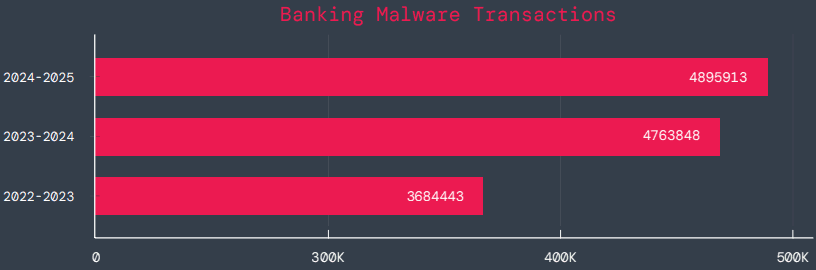
    According to a survey by cloud security firm Zscaler, hundreds of malicious Android apps on Google Play were downloaded over 40 million times between June 2024 and May 2025.

    The company saw a 67% year-over-year increase in malware that targeted mobile devices during that time, with banking trojans and spyware being the most common threats.

    According to telemetry data, threat actors are leveraging phishing, smishing, SIM-swapping, and payment frauds to take advantage of mobile payments instead of traditional card fraud.

    Malicious Android apps found on Google Play

    The shift to social engineering assaults can be explained by the widespread use of mobile payments and enhanced security standards like chip-and-PIN technology.

    According to Zscaler, “to carry out these assaults, fraudsters use phishing trojans and malicious programs designed to steal financial information and login passwords.”

    Zscaler estimates that it has found 239 harmful apps in the official Android store, with a total of 42 million downloads, compared to 200 malware apps on Google Play last year.

    The emergence of adware as the most significant threat in the Android ecosystem, which now accounts for over 69% of all detections—nearly twice as many as the previous year—is another noteworthy trend observed at that time.

    After leading with 38% the previous year, the Joker info-stealer is currently in second position with 23%.

    The SpyNote, SpyLoan, and BadBazaar families—which are used for identity theft, extortion, and surveillance—were the primary drivers of the notable 220% year-over-year (YoY) increase in spyware.

    Geographically speaking, 55% of all attacks were directed towards the United States, Canada, and India. Attacks against Israel and Italy also showed substantial increases, ranging from 800% to 4000% YoY, according to Zscaler.

    Malicious Android apps and malware

    In its annual study, Zscaler identifies three malware families that significantly affected Android users. The first is Anatsa, a banking trojan that occasionally enters Google Play through productivity and utility apps and receives hundreds of thousands of downloads each time.

    Since its discovery in 2020, anatsa has undergone continuous evolution. The most recent version is capable of stealing data from bitcoin sites, more than 831 financial institutions, and new areas like South Korea and Germany.

    The second is Android Void (Vo1d), a backdoor malware that targets Android TV boxes and has infected at least 1.6 million devices with out-of-date Android Open Source Project (AOSP) versions, mostly in Brazil and India.

    Malicious Android apps found on Google Play

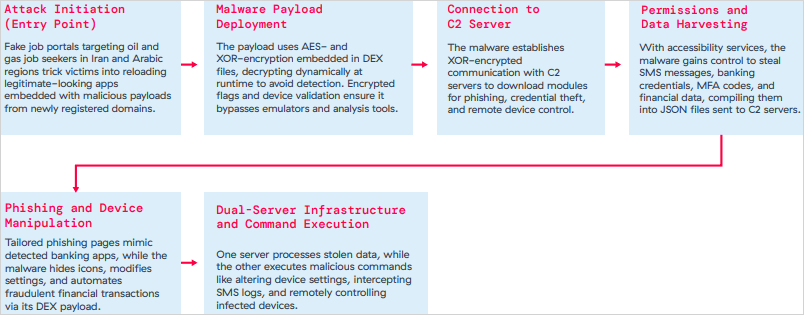
    The third is Xnotice, a brand-new Android remote access trojan (RAT) that specifically targets job seekers in the oil and gas sector in Iran and Arabic-speaking areas.

    Xnotice propagates via applications that are disseminated through phony employment websites and pose as tools for registering for exams or applying for jobs.

    Through overlays, multi-factor authentication (MFA) codes, SMS messages, and screenshots, the spyware targets banking credentials.

    Users are encouraged to install security updates, only trust reliable publishers, reject or restrict accessibility permissions, refrain from downloading unnecessary apps, and routinely run Play Protect scans in order to protect themselves from Android malware threats, including those from Google Play.

    Routers continued to be the most targeted IoT equipment this year, according to Zscaler’s study. Hackers added routers to botnets or used them as proxies to spread malware by taking advantage of command injection flaws.

    The majority of IoT attacks took place in the United States, with rising hotbeds in Hong Kong, Germany, India, and China following, suggesting that attackers are targeting devices throughout a larger geographic area.

    The cybersecurity company advises businesses to harden IoT and cellular gateways by keeping an eye out for anomalies and implementing firmware-level protections, as well as to deploy zero-trust solutions for key networks.

    Strict application control guidelines, security against phishing attacks, and monitoring SIM-level communications for anomalies should all be part of mobile endpoint protections.

  • Quishing #alert – FBI warns smartphone users about fake QR codes stealing money

    Quishing #alert – FBI warns smartphone users about fake QR codes stealing money

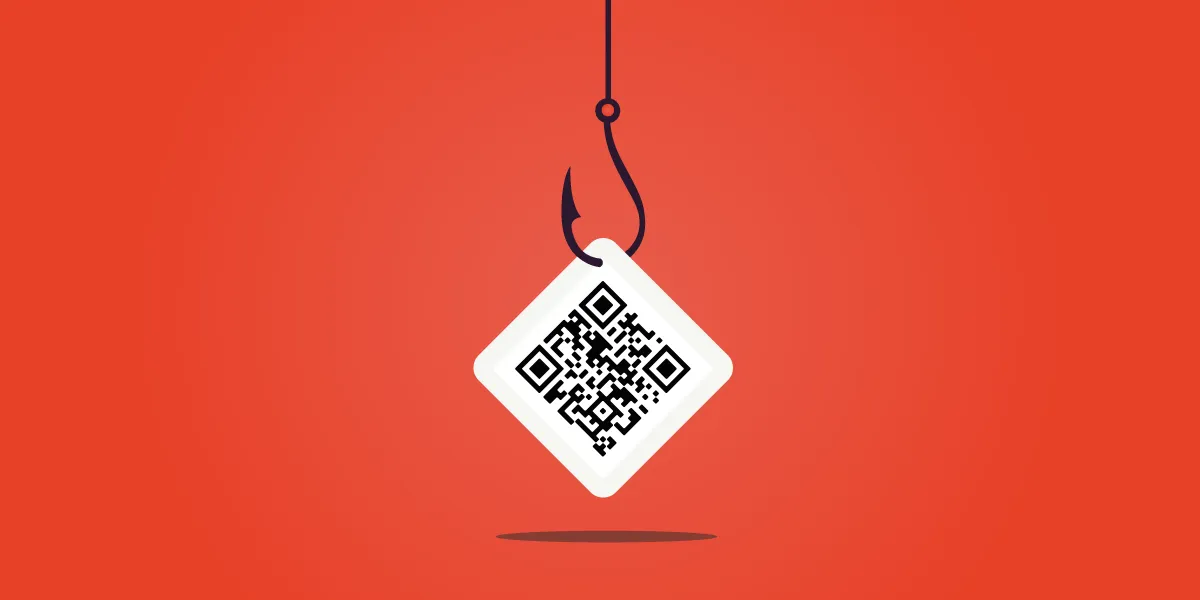
    Smartphone users are now being alerted by the FBI and cybersecurity organizations to a new fraud called “Quishing,” which includes malicious or phony QR codes. Particularly vulnerable are those who often utilize QR codes for logins or payments; some victims have lost thousands of dollars. Here’s what you should know and how to protect yourself.

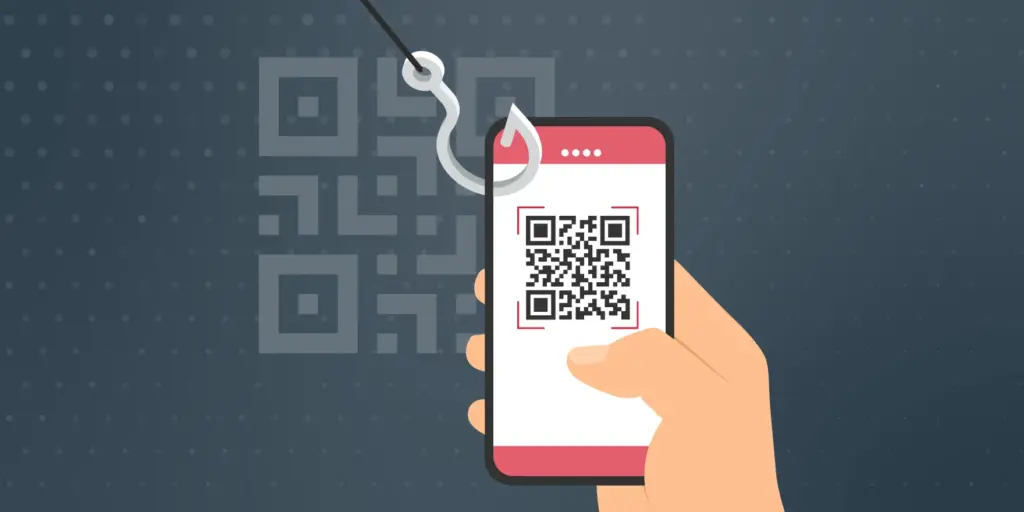
    The FBI and other federal authorities have recently expressed concern over the increase in QR scam attacks, sometimes known as quishing, in which unwanted parcels show up at people’s doorsteps. These packages frequently contain QR codes that, when read by the camera on mobile phones, cause victims to install malware or be redirected to phony websites. Your device may be compromised as a result, and your personal information may be taken.

    Quishing scam alert

    Online retailers are targeted by Quishing

    The most recent worry centers on these frauds that prey on people who frequently transact online. In order to steal your data, attackers are creating QR codes that point to dubious websites. These scams can also compromise your bank accounts and phone, enabling scammers to steal your money, according to the Brandenburg Consumer Advice Centre (VZB).

    In one scenario, scammers pose as legitimate customers interested in buying a product. They ask the seller to scan a QR code to start the transaction rather than giving money straight to the seller. By directing the victim to a phony PayPal login screen, this code may fool them into inputting their account information. This strategy is a type of phishing on websites.

    With zero-click tactics that don’t involve any user engagement, some attacks are become even more hazardous. Usually, high-profile people like politicians, journalists, attorneys, and activists are the target of these.

    Cyber Security Coach Online security specialist Alex East cautions that hackers might post phony QR codes in both public and private areas, such convenience store payment terminals or gas pumps. During normal transactions, these codes have the ability to reroute customers to malicious websites.

    Quishing alert - warning

    Ways to stay safe

    VZB recommends users to exercise caution when making digital transactions to prevent becoming victims of QR code frauds. It’s crucial to confirm that the vendor is the one displaying the QR code before paying, as opposed to scanning one that has been supplied by another party. Always look for indications of questionable activity on the website you are sent to, such as misspelled domain names or odd layouts.

    Scanning QR codes from unwanted parcels, email attachments, or public places should generally be done with caution as they may direct users to fraudulent websites. It’s even better to stay away from scanning QR codes completely unless you know exactly where they came from.

    It’s also strongly advised to strengthen account security using two-factor authentication (2FA), particularly when money is involved. Consider using passkeys, a more secure login option that is already supported by many websites and apps, for even more security.

    Security features on both iPhones and Android smartphones, such as warnings for phony websites and fraud detection in calls and messages, can aid in spotting scammers. To get the most protection, make sure these features are turned on.

  • How to locate and remove “Stalkerware” from your device

    How to locate and remove “Stalkerware” from your device

    Even though your mobile device has many built-in safeguards to preserve your privacy and keep your data safe, it could still be subject to snooping if someone you know gains access to your accounts or installs hidden programs, or stalkerware, that follow you about. These malicious apps may spy on you by taking use of permissions and built-in capabilities on your Android or iPhone. Here’s how to find stalkerware on your smartphone and get rid of it.

    What is a stalkerware?

    Stalkerware is a type of malware that tracks and monitors your device’s activities, including messages, images, and location in real time, without your permission. Most frequently, stalkerware is an app that is downloaded straight to your device. It can be hidden from your home screen or masqueraded as something normal to make it harder for you to spot anything fishy. TechCrunch points out that Cocospy, Spyic, and TheTruthSpy are examples of popular stalkerware applications. Stalkerware can be installed or side-loaded from unapproved sources other than the Apple and Google Play stores.

    Large data usage on your device, a warmer or slower-than-normal phone, a faster-than-normal battery drain, an increase in screen time, and odd alerts are some potential indicators of stalkerware (and other dangerous programs). But stalkerware can exist without any of these problems. The Coalition Against Stalkerware claims that a typical indicator of monitoring isn’t really related to your phone’s technological features: Instead, it’s the stalker’s altered conduct or awareness of your actions.

    Keep in mind that although stalkerware apps are one way for someone to secretly monitor you, other phone settings, such backups, location sharing, and Google and Apple accounts that are controlled or accessible by someone else, can also be misused.

    If you think your phone may be compromised, you should consult Cornell University’s Clinic to End Tech Abuse (CETA), which offers comprehensive resources for detecting and eliminating stalkerware as well as other security measures to protect your device from eavesdropping.

    Create a safety plan first

    You must have a safety plan in place before trying to remove stalkerware from your device or alter shared access to your accounts and apps. The danger of abuse or harassment may rise if monitoring applications are removed or permissions are updated, alerting the person who installed them. A list of organizations and services for survivor aid in various nations may be found on the Coalition Against Stalkerware.

    Eliminating stalkerware also has the potential to destroy any evidence you might need to provide to law police if you intend to report the occurrence. You might want to record your experiences in a journal.

    stalkerware

    Check for unrecognized apps

    Even without an icon on the home screen, you can still access installed apps in your device’s settings. This can be found in the settings app on both iOS and Android, under the Apps or App management option. (On iOS, you have to scroll all the way to the bottom of the list to see hidden apps.) Keep an eye out for anything unfamiliar.

    You should look for any apps listed under this section of your settings because stalkerware on Android may exploit the access granted by your device’s accessibility mode. You can have a harmful program installed if you don’t use accessibility features or don’t identify an app. Device admin settings may potentially be exploited by stalkerware. Go to Device Admin App under Settings > Security. Nothing should be included here for the majority of personal devices.

    Review app permissions and settings

    Because stalkerware may misuse access to your device’s data, permissions are another approach to spot questionable programs. In your settings, you can view permissions for each individual app, including location, camera, microphone, and keyboard access. TechCrunch advises carefully examining which third-party apps on Android have access to your notifications, as this permits monitoring of your messages and alerts (check your device settings for Special app access).

    To control permissions and sharing with people and apps, utilize Apple’s Safety Check feature (Settings > Privacy & Security > Safety Check) if you’re running iOS 16 or later. Among other settings, you can update your passcode, reset system privacy permissions, switch devices linked to your Apple account, and verify who you are sharing information with. There is a Quick Exit button in case you need to exit with a single push, as well as an Emergency Reset option that will instantly stop transmitting all data from your device.

    Use this CETA guide to iOS safety if you don’t have Safety Check installed on your device or if you want to look into specific phone settings that might be sharing your data with someone else, such Family Sharing or text message forwarding.

    How to remove stalkerware from your device

    Getting a new phone, which you can and should lock down with a new PIN to stop someone with physical access to your device from installing dangerous apps, is the most drastic action you can take to avoid stalkerware.

    A factory reset is an additional choice that will remove all data and programs from your smartphone. This may be found in the Settings app on Android and Settings > General > Transfer or Reset iPhone on iOS (you can find the exact path on your device manufacturer’s support website). Keep in mind that any data that isn’t backed up, such contacts, messages, and pictures, will be lost. Even if you’re not positive whether your phone has a stalkerware program installed, a factory reset can be helpful. However, it could not resolve the problem if the spy still has access to the Google account or Apple ID linked to your device.

    Additionally, you can manually remove or uninstall programs from your device and utilize an antivirus app from a reliable provider to check for hidden and harmful apps (Google Play Protect can also do this on Android).

    After deleting stalkerware, make sure your device has a new lock screen passcode that is difficult for someone with physical access to figure out. You should also take precautions to secure your email and other accounts by using two-factor authentication and using strong, one-of-a-kind passwords.

  • Make your phone hackproof with Advanced Protection feature

    Make your phone hackproof with Advanced Protection feature

    Google has released the Material 3 Expressive design language for Android 16 QPR1 Beta. In addition to the new UI changes, it comes with a new Advanced Protection feature, which is a collection of security measures intended to keep Android users safe. Here’s how to activate it and when you should think about activating it.

    The Advanced Protection feature was included in the Android 16 QPR1 update for Pixel devices, but it is anticipated that the final stable update will make it available on further devices in the future.

    What is Advanced Protection?

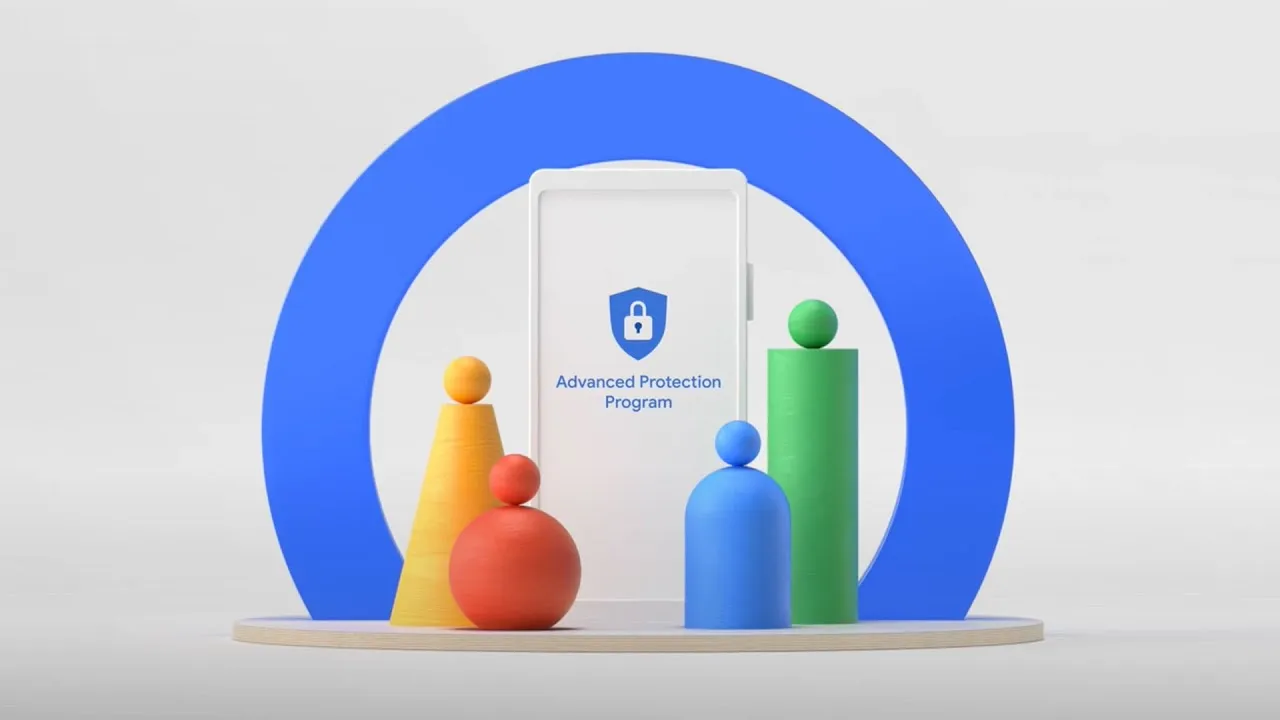
    Advanced Protection, as the name implies, is a new mode that gives your Android device and linked Google account overall increased security. When you believe there are security risks or breaches, you can activate it.

    It combines and activates a number of current and future Android features, despite sounding like a brand-new security feature. Put differently, it’s a feature that combines multiple protections in one location and activates them all at once when required. This is especially helpful when you just want to make sure your device and account are as safe as possible but are unable to pinpoint a threat or assault.

    This features enable different security tools

    Device theft, app, network, browser, and phone protections are among the options available in Pixels’ Advanced Protection mode.

    In order to further prevent access to stored data, device theft prevention, an anti-theft feature for stolen phones that is already commonly present on the majority of contemporary Android smartphones, will immediately lock the device and compel a restart if it stays locked for three days. Additionally, it will prevent unwanted USB access.

    App protection, meanwhile, checks for memory problems in apps, screens for malware and dangerous apps, and prevents installations from unreliable developers and sources. At the same time, the network tool prevents the device from using 2G, which is based on a less secure protocol, and requires it to utilize 3G and newer networks.

    These protections apply to browsing as well as making and receiving calls and messages. While the Phone by Google and Messages applications check numbers during calls and chats to determine whether they are spam or real businesses using Google’s scam detection, the web blocker prevents non-HTTPS and malicious websites.

    How to Enable Advanced Protection

    Advanced Protection feature on Android 16

    Once enabled, the feature is located in the Security & Privacy section of the settings on your Google Pixel or compatible Android smartphone. To turn it on, follow these steps:

    1. Go to Settings > Security & Privacy.
    2. Scroll down and look for Other security settings.
    3. Tap on Advanced Protection.
    4. Toggle on Device protection.
    5. Confirm the step.
    6. Restart your device.

    To disable it again after it has been enabled, you must authenticate using biometrics or your password and PIN.

    Stay connected with the latest from Droid Tools—follow us on X @droid_tools, like our page on Facebook, check out our updates on Instagram, and follow us on Google News for real-time news, device tips, and mobile tech insights.

  • How antivirus software secures your Android data from theft and loss 

    How antivirus software secures your Android data from theft and loss 

    Android devices are extremely popular, mainly due to their open-source model, wide range of device options, and affordability, which makes them appealing to a broad demographic and accessible to people from diverse incomes.  

    However, due to its popularity, it makes Android devices an easy target for attacks, resulting in multiple risks associated with storing sensitive data on mobile devices.  

    This is why it is important to secure Android devices and data against theft and loss, especially in the current digital landscape.  

    Threats that Android users face 

    If you haven’t installed a suitable antivirus for Android, you are opening yourself to multiple cybersecurity threats to your private data, which can result in the theft and loss of confidential information that can lead to financial losses. 

    Malware Threats 

    These include viruses, spyware, ransomware, and trojans, among other malware. They are harmful for a number of reasons, which sometimes overlap with each other. 

    • They are sometimes disguised as legitimate apps.
    • Monitor activity and collect data to send to attackers
    • They can steal sensitive information like banking credentials 
    • They can intercept communications to access confidential information 
    • It locks or encrypts files to demand a ransom in order to restore access. 

    Phishing attacks

    • These attackers can create apps that mimic legitimate ones or fake overlay screens to trick users into entering their credentials.
    • They can disguise themselves as popular services which are distributed through unofficial app stores, bypassing Google Play’s protections 
    • They can send deceptive messages that come from seemingly trusted sources to click on malicious links or input sensitive information. 
    • Some phishing apps can read information from the Android notification bar and access information like one-time passcodes, which can help bypass multifactor authentication.  

    Biggest data concerns for Android users 

    • Widespread privacy concerns: Android users actively seek ways to configure privacy settings on their devices. This is due to the majority of privacy-related concerns reflecting anxiety on how personal data is handled by the OS and popular apps.  
    • Excessive Data Collection and Sharing: Android devices often collect and share large amounts of user data with third parties, sometimes they don’t offer users a way to opt out. Google tracks Android phones using cookies, identifiers, and other data stores, often without user awareness. 
    • Security Vulnerabilities and Exploits: Android’s open nature and fragmented update system expose users to high-severity vulnerabilities. This includes zero-day exploits that lead to privilege escalation and remote code execution. 
    • Malicious Apps and Sideloading Risks: Android users are at risk of malicious apps, especially those installed outside of the official Google Play Store, which can bypass Google’s security checks. These apps can introduce malware, spyware, and stalkerware that compromise device security and user privacy.  
    • Insecure App Permissions and Poor Passcode Hygiene: Many users grant excessive permissions to apps, which increases the risk of data misuse or leakage. Weak or reused passwords and simple device passcodes make it easier for attackers to gain unauthorised access. 
    • Biometric and financial data exposure: Vulnerabilities in Android can put biometric data, like fingerprints, and financial information, like credit card details, leaving many devices exposed to known vulnerabilities for extended periods.  

    Built-in Android security features 

    Android devices come with their own set of security features that attempt to protect data stored on them.  

    • Google Play Protect: The official store for downloading apps, scans apps and actively monitors for malware and prompts users to uninstall apps that may be harmful. It also blocks apps from untrusted sources.  
    • Safe browsing and permission management: Alerts users when they attempt to visit dangerous sites, suspicious links, or files that may be harmful.  
    • Encryption and authentication: The devices come with encryption by default, which ensures all data is stored securely, and only someone with the PIN, password, or authentication can access the data and protect it if the device is lost or stolen. 
    • Find My Device: For locating or erasing data on lost devices. It prevents unauthorised access to personal data. 

    Why Additional Measures are Needed 

    There are several gaps in Android’s native security, such as delayed security updates from manufacturers and the risks of sideloading apps and using public Wi-Fi. This is why additional protection, such as antivirus software, is needed.  

    Scenarios where antivirus is especially important 

    • Handling sensitive data such as banking, work files, and personal information. 
    • Frequent connection to unsecured networks. 
    • Downloading apps from third-party sources. 

    How anti-virus software protects your data

    • Real-time malware protection and detection, and removal of these threats. 
    • This software blocks ransomware before device lockout occurs. 
    • It scans for phishing URLs and fraudulent websites before users access them. 
    • Conducts privacy audits to monitor app permissions and data access. 
    • Monitors for identity theft protection and aids with secure online payments. 
    • Some software has VPN and secure browsing features. 
    • Has in place a remote device location, lock, or wipe in case of loss or theft.

    What to be wary of

    • With Antivirus Software: Some apps contain vulnerabilities, like exposing the address book or allowing attackers to disable the antivirus software itself. Some also track user data and end up creating new risks instead of eliminating them. 
    • Google Play Protect: These and other official store apps are not always foolproof;  malicious apps are able to slip through the vetting process, and antivirus software that scans before and after installation can add a layer of defence. 
    • Making the Choice: When choosing the right software for you, you want a comprehensive malware detection, real-time protection and updates, privacy controls, app permission management, and additional tools like VPN, anti-theft, backup, and Data Loss Prevention (DLP). 

    DLP and Advanced Security Features of Antivirus Software 

    • It encrypts data in transit and at rest. 
    • Separates personal and corporate data for business users. 
    • Centralised password and access management. 
    • Remote wipe and selective data erasure for lost or stolen devices. 
    • App and domain whitelisting to restrict access. 

    Practices for Maximising Android Security

    • Keep operating system and apps updated: Install the latest Android OS and app updates to patch vulnerabilities and protect against new threats. 
    • Regular review app permissions: Check which permissions each app has and revoke those that are unnecessary. Only grant essential permissions for app functionality.  
    • Avoid downloading from untrusted sources: Download apps from the Google Play Store or reputable sources. Avoid third-party app stores, which are more likely to host malicious apps.  
    • Use strong passwords and enable biometric authentication: Use a strong PIN pattern for the lock screen, and use fingerprint or face access for added security. 
    • Enable remote tracking: Enables wiping features if devices are lost or stolen to protect confidential information. 

    Conclusion

    Installing antivirus software on Android devices helps protect the device’s data from being compromised and open to cyber threats. To make the most of your protection attempts, make use of built-in features in conjunction with a reputable antivirus solution for comprehensive protection.

  • Crocodilus malware takes Android users’ crypto wallet keys

    Crocodilus malware takes Android users’ crypto wallet keys

    Using a warning to backup the key to prevent losing access, a recently identified Android malware known as Crocodilus deceives users into entering the seed phrase for the bitcoin wallet.

    Despite being a recent banking malware, Crocodilus has fully functional capabilities to remotely control, take over the device, and collect data.

    According to researchers at the fraud prevention firm ThreatFabric, the malware is disseminated by a custom dropper that gets around security measures in Android 13 and later.

    crypto

    The dropper circumvents Accessibility Service limitations and installs the virus without activating Play Protect.

    Crocodilus is unique because it uses social engineering to force victims to divulge their crypto-wallet seed phrase.

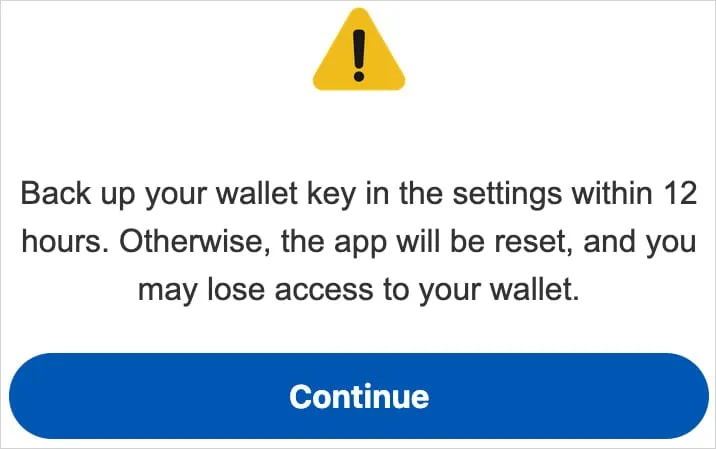
    A screen overlay alerting users to “back up their wallet key in the settings within 12 hours” or risk losing your wallet is how it accomplishes this.

    “This social engineering trick guides the victim to navigate to their seed phrase (wallet key), allowing Crocodilus to harvest the text using its Accessibility Logger,” ThreatFabric explains.

    “With this information, attackers can seize full control of the wallet and drain it completely,” the researchers say.

    Crocodilus was seen to target customers in Spain and Turkey, including bank accounts from those two nations, during its initial operations. Based on the debug messages, it seems that the infection originated in Turkey.

    Although the exact mechanism of the first infection is unknown, users are usually duped into downloading droppers by malicious websites, phony SMS or social media advertisements, and third-party app shops.

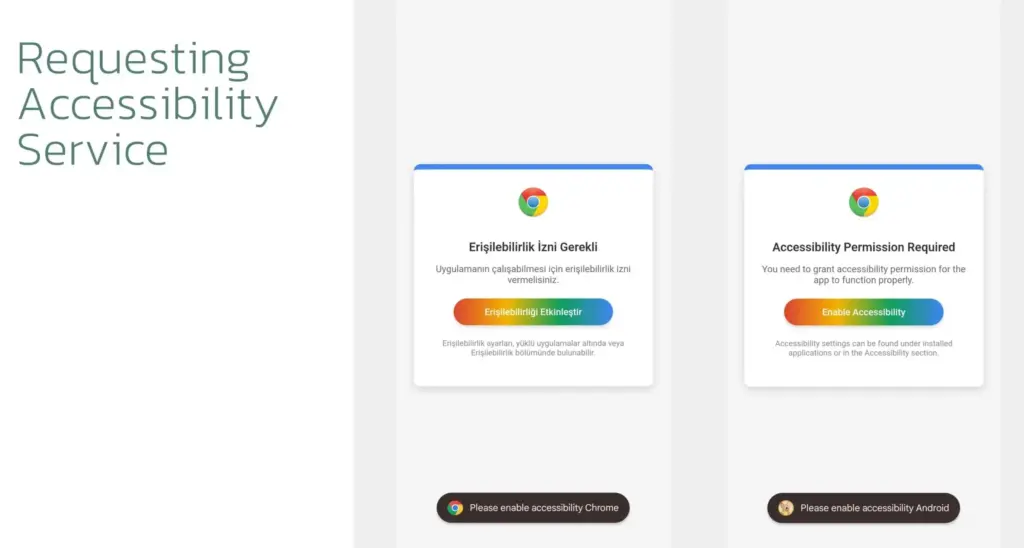
    When Crocodilus is launched, it has access to Accessibility Services, which are typically designated for helping individuals with disabilities. These services allow Crocodilus to make navigation motions, monitor for app launches, and unlock screen content.

    crocodilus malware

    Crocodilus puts a phony overlay over the legitimate app when the victim accesses a targeted banking or cryptocurrency app in order to obtain the victim’s login information.

    The bot component of the malware supports a set of 23 commands that it can execute on the device, including:

    • Enable call forwarding
    • Launch a specific application
    • Post a push notification
    • Send SMS to all contacts or a specified number
    • Get SMS messages
    • Request Device Admin privileges
    • Enable a black overlay
    • Enable/disable sound
    • Lock screen
    • Make itself the default SMS manager

    Additionally, the malware has remote access trojan (RAT) capabilities that let its operators swipe, tap, and browse the user interface, among other things.

    To collect one-time password codes used for two-factor authentication account protection, a specific RAT command is also available to snap a screenshot of the Google Authenticator application.

    To conceal the activity from the victim and give the impression that the device is locked, Crocodilus operators can mute the device and activate a black screen overlay while doing these tasks.

    Crocodilus may soon expand its activities and add more apps to its target list, even if it currently seems to be targeting only Spain and Turkey.

    It is recommended that Android users make sure Play Protect is constantly enabled on their devices and refrain from downloading APKs from sources other than Google Play.

  • BadBox 2.0 more than 1 million Android devices infected – how to stay safe

    BadBox 2.0 more than 1 million Android devices infected – how to stay safe

    Together with Google, Trend Micro, The Shadowserver Foundation, and other partners, researchers from HUMAN’s Satori Threat Intelligence team were able to take down BadBox 2.0, the biggest network of compromised connected TV sets.

    The BadBox malware typically comes pre-installed on TV streaming boxes, smart TVs, tablets, digital projectors, or smartphones, and it infects a botnet of off-brand Android devices. As a backup backdoor distribution method, threat actors in this instance also ran hundreds of versions of well-known programs. Thankfully, 24 malicious “evil twin” apps that were distributing this virus were found and taken down from the Google Play Store by HUMAN’s researchers.

    They were successful in sink-holing communications to the malicious domains used by the hackers behind this effort, disrupting the botnet on more than 500,000 Android devices in total. In order to stop the compromised devices from contacting the command-and-control (C2) servers that the hackers have set up, the researchers have taken control of thousands of these BadBox 2.0 domains. This allows them to keep an eye on the connections and collect information on the botnet.

    badbox malware

    What is BadBox 2.0?

    BadBox 2.0 is a malware-based botnet that commits fraud and other criminal activities using less expensive, off-brand Android handsets. In October 2023, the original BadBox virus was disabled or rendered dormant, having infected 74,000 devices.

    This new version, BadBox 2.0, has infected more than 1 million devices according to HUMAN. The majority of the infections appear to be focused on Brazil (37.6%), followed by the U.S. (18.2%), Mexico (6.3%) and Argentina (5.3%).

    The compromised devices, which include, among other things, video projectors, smartphones, tablets, smart TVs, and Android TV streaming boxes, frequently come with malware pre-installed by the manufacturer. Alternatively, malicious “evil twin” software or firmware downloads infect them and add them to the botnet. “The infected devices are Android Open Source Project devices, not Android TV OS devices or Play Protect certified Android devices,” HUMAN said in a blog post.

    How to protect yourself from BadBox 2.0

    Google has already established a Play Protect enforcement rule to alert users and prevent the installation of apps linked to BadBox 2.0 on any certified Android devices, as well as deleted the dangerous apps found by HUMAN’s researchers from the Play Store.

    BadBox cannot be completely removed, though, because the search engine behemoth is unable to disinfect Android devices that are not Play Protect. The very bottom of Human’s report, which is mentioned above, has a list of devices that are known to be impacted by the current version of BadBox. It is unlikely that you will be able to upgrade your gadget with clean firmware if it is on that list. Disconnecting that gadget from the internet or, better yet, switching it out for a certified device from a reliable manufacturer is your safest course of action.

    “If a device isn’t Play Protect certified, Google doesn’t have a record of security and compatibility test results.” a Google spokesperson explained in a statement to BleepingComputer. “Play Protect certified Android devices undergo extensive testing to ensure quality and user safety. Users should ensure Google Play Protect, Android’s malware protection that is one by default on devices with Google Play Services, is enabled.”

    Avoid purchasing AOSP-based Android devices, such as off-brand TV boxes, that do not officially support Google Play Services if you want to be safe. Additionally, on whatever top streaming device you are using right now, always be sure to keep your firmware updated and apply the most recent security updates as soon as they are released.

    Additionally, you should only use apps from the Google Play Store and other official app shops and refrain from sideloading them. Similarly, while not in use, Android TV devices can be made offline by disabling their remote access functions. If your devices have unintentionally joined a botnet, this might offer an additional layer of protection to safeguard your data and equipment.

    Investing in one of the top mesh Wi-Fi systems with integrated security software or one of the best Wi-Fi routers may also be worthwhile.

  • NFC mobile payments are abused in the new Ghost Tap exploit to steal money.

    NFC mobile payments are abused in the new Ghost Tap exploit to steal money.

    Cybercriminals have created a brand-new technique called “Ghost Tap,” which transmits NFC card information to money mules all around the world, to profit from stolen credit card information connected to mobile payment systems like Apple Pay and Google Pay.

    The strategy expands on techniques used by mobile viruses such as NGate, which were reported by ESET in August and involved using payment card Near Field Communication (NFC) signals. Ghost Tap employs money mules at several remote places connecting with Point of Sale (PoS) terminals, is more obfuscated and difficult to detect, and does not require the victim’s mobile or card. It also does not require constant victim interchange.

    121d article 220614 ghost touch

    Ghost Tap was found by mobile security company Threat Fabric, which cautions about the growing potential and adoption of the novel method. Threat Fabric told Droid Tools that it has recently observed an increase in the use of Ghost Tap in the field.

    An overview of Ghost Tap and a comparison with NGate

    The attack starts by stealing payment card information and intercepting the one-time passwords (OTP) required to register for a virtual wallet on Google Pay and Apple Pay. Payment card information can be stolen via phishing websites, keylogging, or banking malware that shows overlays that seem like digital payment apps.

    Malware that tracks text messages or social engineering are two ways that OTPs can be stolen. Previously, NGate-based assaults required the use of specialist software to mislead the victim into scanning their card via the NFC mechanism on their device.

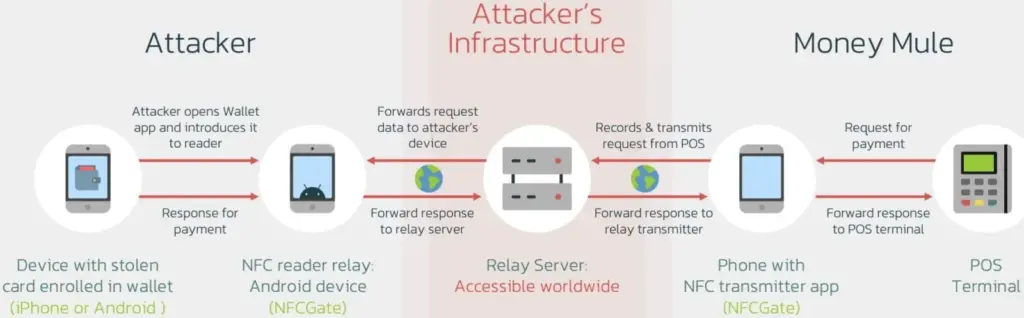
    Payment card information is still transmitted using the NFCGate tool. But in the interim, a relay server is set up to transmit the information to a vast network of money mules while hiding their true locations. Using the NFC chip on their cellphone, the mules then make large-scale, multi-location retail purchases, making it challenging to identify the main attacker or map the fraud network.

    Threat actors were restricted to making minor contactless payments and ATM withdrawals during the NGate attacks, which jeopardized their identity and occasionally resulted in arrests.

    The threat actors have stopped making ATM withdrawals as a result of the new Ghost Taps operation. Rather, they merely carry out cash outs at the time of sale and distribute them around a vast global network of mules. This just endangers the mules by obscuring the path to the primary perpetrators of the nefarious conduct.

    diagram

    Defending Against Ghost Tap

    Threat Fabric cautions that because the transactions seem authentic and take place across several locations, the new strategy is difficult for financial institutions to identify and halt.

    The researchers claim that although many banks’ anti-fraud systems identify purchases made in odd places, as when visiting another nation, the many tiny payments might evade these detections.

    “The new tactic for cash-outs poses a challenge for financial organisations: the ability of cybercriminals to scale the fraudulent offline purchases, making multiple small payments in different places, might not trigger the anti-fraud mechanisms and might allow cybercriminals to successfully buy goods that can be further re-sold (like gift cards),” explains ThreatFabric.

    If the attack is used widely, the total amount lost might be substantial even though all of these tiny transactions seem to have originated from the same device (connected to the same Apple Pay or Google Pay account). The mules switched their handsets to “airplane mode,” which still permits the NFC system to operate normally, in order to avoid being tracked.

    Banks may only prevent Ghost Tap by flagging transactions made using the same card at locations that are physically impossible to visit in between charges. For instance, carrying out a fraudulent transaction in Cyprus 10 minutes after completing one in New York.

    From the standpoint of the customer, keeping an eye out for fraudulent transactions and promptly reporting them to your bank is essential for freezing the card and reducing losses.

  • Chrome’s cookie encryption has been broken by the new Glove infostealer malware.

    Chrome’s cookie encryption has been broken by the new Glove infostealer malware.

    The new Glove Stealer malware can collect browser cookies by getting past Google Chrome’s Application-Bound (App-Bound) encryption. This information-stealing virus is “very simple and contains limited obfuscation or protective features,” suggesting that it is most likely still in its early stages of development, according to Gen Digital security researchers who first discovered it when looking into a recent phishing attempt.

    During their attacks, the threat actors used social engineering tactics similar to those used in the ClickFix infection chain, where potential victims get tricked into installing malware using fake error windows displayed within HTML files attached to the phishing emails.

    Glove Stealer

    Cookies from Firefox and Chromium-based browsers (such as Chrome, Edge, Brave, Yandex, and Opera) can be extracted and exfiltrated by the Glove Stealer.NET virus.

    Additionally, it can collect password information from Bitwarden, LastPass, and KeePass, cryptocurrency wallets from browser extensions, 2FA session tokens from Google, Microsoft, Aegis, and LastPass authenticator apps, and emails from mail programs like Thunderbird.

    “Other than stealing private data from browsers, it also tries to exfiltrate sensitive information from a list of 280 browser extensions and more than 80 locally installed applications,” said malware researcher Jan Rubín.

    “These extensions and applications typically involve cryptocurrency wallets, 2FA authenticators, password managers, email clients and others.”

    Glove Stealer bypasses Google’s App-Bound encryption cookie-theft safeguards, which were implemented by Chrome 127 in July, in order to steal credentials from Chromium web browsers. It accomplishes this by employing a supporting module that decrypts and recovers App-Bound encrypted keys using Chrome’s own COM-based IElevator Windows service (running with SYSTEM rights), as outlined by security researcher Alexander Hagenah last month.

    To install this module in the Program Files directory of Google Chrome and utilize it to recover encrypted keys, the virus must first obtain local administrator capabilities on the infected PCs.

    However, despite its attractive appearance, Glove Stealer is still in its early stages of development since, as researcher g0njxa told BleepingComputer in October, it is a simple technique that most other information thieves have already accomplished to collect cookies from all Google Chrome versions.

    Russian Panda, a malware analyst, previously told BleepingComputer that Hagenah’s technique resembles early workarounds used by other viruses following Google’s introduction of Chrome App-Bound encryption.

    When Google told BleepingComputer last month that “this code [xaitax’s] requires admin credentials, which shows that we have successfully upped the degree of access required to properly pull off this type of assault,” Unfortunately, the number of active information-stealing malware campaigns has not decreased significantly despite the requirement for administrator access to circumvent App-Bound encryption.

    Attacks have only increased since July when Google first implemented App-Bound encryption, targeting potential victims via vulnerable driverszero-day vulnerabilitiesmalvertising, spearphishingStackOverflow answers, and fake fixes to GitHub issues.