Tag: antivirus

  • How antivirus software secures your Android data from theft and loss 

    How antivirus software secures your Android data from theft and loss 

    Android devices are extremely popular, mainly due to their open-source model, wide range of device options, and affordability, which makes them appealing to a broad demographic and accessible to people from diverse incomes.  

    However, due to its popularity, it makes Android devices an easy target for attacks, resulting in multiple risks associated with storing sensitive data on mobile devices.  

    This is why it is important to secure Android devices and data against theft and loss, especially in the current digital landscape.  

    Threats that Android users face 

    If you haven’t installed a suitable antivirus for Android, you are opening yourself to multiple cybersecurity threats to your private data, which can result in the theft and loss of confidential information that can lead to financial losses. 

    Malware Threats 

    These include viruses, spyware, ransomware, and trojans, among other malware. They are harmful for a number of reasons, which sometimes overlap with each other. 

    • They are sometimes disguised as legitimate apps.
    • Monitor activity and collect data to send to attackers
    • They can steal sensitive information like banking credentials 
    • They can intercept communications to access confidential information 
    • It locks or encrypts files to demand a ransom in order to restore access. 

    Phishing attacks

    • These attackers can create apps that mimic legitimate ones or fake overlay screens to trick users into entering their credentials.
    • They can disguise themselves as popular services which are distributed through unofficial app stores, bypassing Google Play’s protections 
    • They can send deceptive messages that come from seemingly trusted sources to click on malicious links or input sensitive information. 
    • Some phishing apps can read information from the Android notification bar and access information like one-time passcodes, which can help bypass multifactor authentication.  

    Biggest data concerns for Android users 

    • Widespread privacy concerns: Android users actively seek ways to configure privacy settings on their devices. This is due to the majority of privacy-related concerns reflecting anxiety on how personal data is handled by the OS and popular apps.  
    • Excessive Data Collection and Sharing: Android devices often collect and share large amounts of user data with third parties, sometimes they don’t offer users a way to opt out. Google tracks Android phones using cookies, identifiers, and other data stores, often without user awareness. 
    • Security Vulnerabilities and Exploits: Android’s open nature and fragmented update system expose users to high-severity vulnerabilities. This includes zero-day exploits that lead to privilege escalation and remote code execution. 
    • Malicious Apps and Sideloading Risks: Android users are at risk of malicious apps, especially those installed outside of the official Google Play Store, which can bypass Google’s security checks. These apps can introduce malware, spyware, and stalkerware that compromise device security and user privacy.  
    • Insecure App Permissions and Poor Passcode Hygiene: Many users grant excessive permissions to apps, which increases the risk of data misuse or leakage. Weak or reused passwords and simple device passcodes make it easier for attackers to gain unauthorised access. 
    • Biometric and financial data exposure: Vulnerabilities in Android can put biometric data, like fingerprints, and financial information, like credit card details, leaving many devices exposed to known vulnerabilities for extended periods.  

    Built-in Android security features 

    Android devices come with their own set of security features that attempt to protect data stored on them.  

    • Google Play Protect: The official store for downloading apps, scans apps and actively monitors for malware and prompts users to uninstall apps that may be harmful. It also blocks apps from untrusted sources.  
    • Safe browsing and permission management: Alerts users when they attempt to visit dangerous sites, suspicious links, or files that may be harmful.  
    • Encryption and authentication: The devices come with encryption by default, which ensures all data is stored securely, and only someone with the PIN, password, or authentication can access the data and protect it if the device is lost or stolen. 
    • Find My Device: For locating or erasing data on lost devices. It prevents unauthorised access to personal data. 

    Why Additional Measures are Needed 

    There are several gaps in Android’s native security, such as delayed security updates from manufacturers and the risks of sideloading apps and using public Wi-Fi. This is why additional protection, such as antivirus software, is needed.  

    Scenarios where antivirus is especially important 

    • Handling sensitive data such as banking, work files, and personal information. 
    • Frequent connection to unsecured networks. 
    • Downloading apps from third-party sources. 

    How anti-virus software protects your data

    • Real-time malware protection and detection, and removal of these threats. 
    • This software blocks ransomware before device lockout occurs. 
    • It scans for phishing URLs and fraudulent websites before users access them. 
    • Conducts privacy audits to monitor app permissions and data access. 
    • Monitors for identity theft protection and aids with secure online payments. 
    • Some software has VPN and secure browsing features. 
    • Has in place a remote device location, lock, or wipe in case of loss or theft.

    What to be wary of

    • With Antivirus Software: Some apps contain vulnerabilities, like exposing the address book or allowing attackers to disable the antivirus software itself. Some also track user data and end up creating new risks instead of eliminating them. 
    • Google Play Protect: These and other official store apps are not always foolproof;  malicious apps are able to slip through the vetting process, and antivirus software that scans before and after installation can add a layer of defence. 
    • Making the Choice: When choosing the right software for you, you want a comprehensive malware detection, real-time protection and updates, privacy controls, app permission management, and additional tools like VPN, anti-theft, backup, and Data Loss Prevention (DLP). 

    DLP and Advanced Security Features of Antivirus Software 

    • It encrypts data in transit and at rest. 
    • Separates personal and corporate data for business users. 
    • Centralised password and access management. 
    • Remote wipe and selective data erasure for lost or stolen devices. 
    • App and domain whitelisting to restrict access. 

    Practices for Maximising Android Security

    • Keep operating system and apps updated: Install the latest Android OS and app updates to patch vulnerabilities and protect against new threats. 
    • Regular review app permissions: Check which permissions each app has and revoke those that are unnecessary. Only grant essential permissions for app functionality.  
    • Avoid downloading from untrusted sources: Download apps from the Google Play Store or reputable sources. Avoid third-party app stores, which are more likely to host malicious apps.  
    • Use strong passwords and enable biometric authentication: Use a strong PIN pattern for the lock screen, and use fingerprint or face access for added security. 
    • Enable remote tracking: Enables wiping features if devices are lost or stolen to protect confidential information. 

    Conclusion

    Installing antivirus software on Android devices helps protect the device’s data from being compromised and open to cyber threats. To make the most of your protection attempts, make use of built-in features in conjunction with a reputable antivirus solution for comprehensive protection.
  • Best antivirus and anti-malware apps for Android in 2021

    Best antivirus and anti-malware apps for Android in 2021

    Android Antivirus apps remain one of Android’s most common of apps. Generally, if you’re playing it safe, you don’t need an antivirus app, just download apps from the Play Store, and keep your security settings available. There are many, though, who want to take a walk on the wild side and not do those things. A lot of extremely bad antivirus software are out there. Even if these apps aren’t needed, knowing the safe ones that don’t suck is helpful. Here are Android’s best antivirus software and anti-malware apps. As of January 2021, all rates are present.

    Avira

    Avira is one of the newer antivirus apps comparatively speaking. It grew rather quickly over the last year. The app comes with the basics, including device scans, real-time protection, external SD card scans, and a lot more. This one also comes with a VPN for added layer of security. Some other features include anti-theft support, privacy scanning, blacklisting, and even device admin features. It’s much lighter than apps like Norton and others.

    The free version is functional for basic things. The premium versions include three tiered prices that add things like the aforementioned VPN, password generation, more frequent virus database updates, and more.

    avira antivirus

    Avast Antivirus

    One of the most common antivirus applications on any platform is Avast Mobile Security. It boasts over 100 million features and millions of downloads. Classical antivirus scanning, an applock, call blocker, anti-theft protection, a picture vault, and even a rooted Android device firewall are some of the features. Even if you don’t need the antivirus part very much, that makes it an excellent instrument. There are also some booster characteristics, but you should avoid those as well.

    The free edition comes with most features and is advertising-supported. The premium models come with more security features, no ads, and a VPN is also included in the most costly version.

    avast antivirus

    AVG Antivirus Free

    Another major name in the field of antivirus software is AVG. It’s basically the same as AVAST, in fact. In 2016, AVAST actually bought AVG back. Thus, in both antivirus applications, the experience is identical. In much the same way, you can search your phone and find possible vulnerabilities.

    This one has Google Maps anti-theft monitoring, but it does not have the availability of rooted firewalls as AVAST does. Thus, they are sufficiently different to be distinct products. Just make sure that the garbage features such as the phone boost are avoided because they don’t really work. Identical to AVAST are the price ranges and premium characteristics.

    avg antivirus

    Bitdefender Free Antivirus

    One of the few antivirus applications that are currently free is Bitdefender Antivirus. Over the years, it has not altered much. It provides a basic scanning feature, a simple interface, fast quality, and no configuration. For super simple needs, this is a perfect one. All it really does is scan items and then sit there and wait again for things to be scanned. A bigger, more in-depth Bitdefender app exists. However, for those who just want something easy, we think this one is better. With no in-app purchases or subscriptions, it’s also actually free. Advertising is there, however.

    bitdefender antivirus

    ESET Mobile Security and Antivirus

    In the antivirus and anti-malware environment, ESET is another major name. It has a good range of features, including scans, support for anti-theft, a safety inspector feature, scheduling for scans, and more. A bit intrusive is the setup process. It’s one of the few to have an email address required. It works pretty well otherwise. Upon download, you get a free trial for one month. It goes for $1.99 a month from there, or $14.99 per year. It’s not quite as heavy as AVAST or AVG, but it’s heavier than Bitdefender or CM Protection Lite. For what it’s worth, take that info.

    Youtube video

    Kaspersky Mobile Antivirus

    One of the most common antivirus apps is Kaspersky. It has a free version as well as a pro version. SMS and call blocking, scans, malware updates, and anti-theft are provided in both versions. The premium edition adds stuff like security in real time, an applock, and more. Of course, both models have malware scanning for computers and items like that.

    It’s not about as heavy as the biggest antivirus software. Plus, it hardly has any hideous booster features that don’t work. Instead of trying to stretch to things that don’t make sense, it’s good to see an antivirus app double down on its intent. If you only need support for one computer, the subscription price is reasonably low.

    kaspersky

    McAfee Mobile Security

    McAfee is one of the biggest names in antivirus apps. It’s also one of the heaviest. The app includes scanning, anti-theft, anti-spyware, and security locking features. Additionally, it can take photos of your potential phone thief, record locations to the cloud before the phone shuts down, and more useful stuff. McAfee also has a variety of standalone apps for other things. The UI is old and it doesn’t look very good.

    Additionally, it has phone booster features that don’t work and it requires an account creation to go pro. The antivirus portion of the app does work rather well and some of the tertiary features are nice. The lower tier subscription adds photo and video backup, an app locker, and Internet protection. The more expensive one adds additional protection for things like online banking.

    Youtube video

    Malwarebytes Security

    Malwarebytes is one of the most popular antivirus apps on Windows. The mobile version is pretty good too. It features an aggressively updated virus database, support for malware and ransomware, a permission tracker, and more.

    It can even scan messages in WhatsApp, Facebook, SMS, etc for potentially dangerous links. Of course, it does the usual stuff like scanning as well. The app looks nice, works well, and it’s not too heavy like others. It’s also reasonably priced at $1.49 per month or $11.99 per year.

  • The malware that signs you up for pricey services – Joker

    The malware that signs you up for pricey services – Joker

    Dozens of malicious apps, some available in Play, found in the past couple months. Joker malware

    September has been a busy month for malicious Android apps, with hundreds of them flooding either Google Play or third-party markets from a single malware family alone, researchers from security companies said.

    Known as Joker, since late 2016, this family of malicious apps has been targeting Android users and has been one of the most common threats to Android more recently. Joker apps secretly subscribe to costly subscription services once activated and can even steal SMS messages, contact lists, and computer information. Researchers last July said they found Joker lurking about 500,000 times in 11 apparently legitimate apps downloaded from Play.

    Late last week, researchers from security firm Zscaler said they discovered a new batch of 120,000 downloads containing 17 Joker-tainted games. Over the course of September, the applications were progressively uploaded to Play. Meanwhile, security firm Zimperium announced on Monday that in September, company researchers discovered 64 new Joker variants, most or all of which were seeded in third-party app stores.

    (adsbygoogle = window.adsbygoogle || []).push({});

    And, as ZDNet noted, this month and in July, researchers from security firms Pradeo and Anquanke found more Joker outbreaks. Since it first came to light in December 2016, Anquanke said it had located more than 13,000 samples.

    “Joker is one of the most prominent malware families that continually targets Android devices,” Zscaler researcher Viral Gandhi wrote in last week’s post. “Despite awareness of this particular malware, it keeps finding its way into Google’s official application market by employing changes in its code, execution methods, or payload-retrieving techniques.”

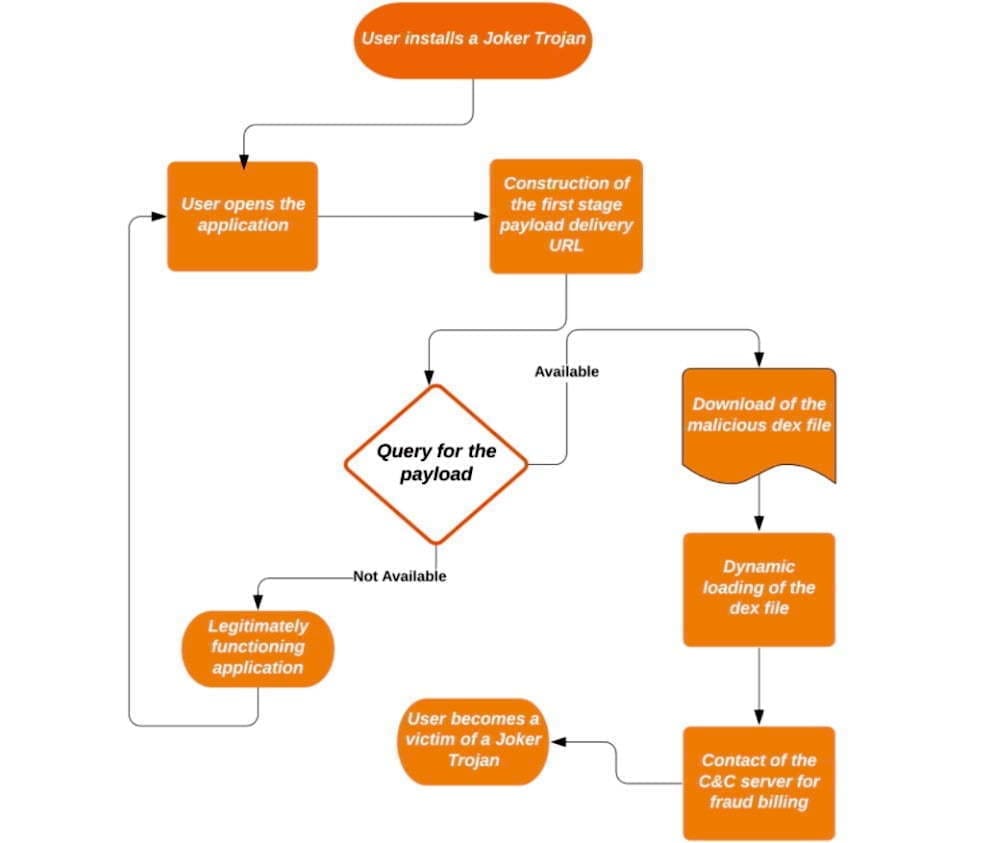
    The roundabout way of attack is one of the keys to the Joker ‘s success. The apps are knockoffs of legitimate apps and contain no malicious code other than a “dropper” when downloaded from Play or a different market. The dropper, which is heavily obfuscated and includes only a few lines of code, installs a malicious part and drops it into the app after a delay of hours or even days.

    joker malware

    A flow chart that captures the four pivot points each Joker sample uses was given by Zimperium. In order to mask update components as innocuous applications such as games, wallpapers, messengers, translators and photo editors, the malware often uses evasion techniques.

    (adsbygoogle = window.adsbygoogle || []).push({});

    The evasion techniques include encoded strings inside the samples where an app is to download a dex, which is an Android-native file that comprises the APK package, possibly along with other dexes. The dexes are disguised as mp3 .css, or .json files. To further hide, Joker uses code injection to hide among legitimate third-party packages—such as org.junit.internal, com.google.android.gms.dynamite, or com.unity3d.player.UnityProvider—already installed on the phone.

    The purpose of this is to make it more difficult for the malware analyst to spot the malicious code, as third-party libraries generally contain a lot of code and the existence of additional obfuscation will make it much more difficult to spot the injected classes, “wrote Zimperium researcher Aazim Yaswant.” “In addition, the use of valid package names defeats naïve [blocklisting] attempts, but our z9 machine-learning engine allowed the researchers to detect the above-mentioned injection tricks safely.”

    Three forms of post-download strategies to circumvent Google’s app-vetting process are detailed in the Zscaler write-up: direct downloads, one-stage downloads, and two-stage downloads. The final payload was the same, despite the delivery variations. If the final payload is downloaded and enabled by an application, the knock-off application has the opportunity to sign up for premium subscriptions using the user’s SMS app.

    A Google spokesman declined to comment other than to note that Zscaler reported that the company removed the apps once they were privately reported.

    (adsbygoogle = window.adsbygoogle || []).push({});

    Using an antivirus app from Malwarebytes, Eset, F-Secure, or another reputable maker is also an option, although they, too, can have difficulty detecting Joker or other malware.

  • BlackRock Android Malware – what is it and how to avoid it

    BlackRock Android Malware – what is it and how to avoid it

    Android users installing apps from third-party app stores are at risk of the BlackRock malware. How can this malware be stopped?

    BlackRock malware is yet another threat worrying Android users. This newly-discovered malware can target a variety of different applications, thereby stealing your information.

    Make sure you know what BlackRock malware is, and how you can protect yourself, before installing another file.

    Security firm, ThreatFabric, discovered a digital danger that affects Android devices in May 2020: BlackRock malware.

    Analysts however quickly discovered that BlackRock malware is not really a new threat. BlackRock malware is the product of leaked source code for Xeres malware, which is a form of trojan LokiBot banking.

    Despite the fact that BlackRock malware is based on a banking trojan, it does not just affect banking apps. It also targets applications for shopping, leisure, social relations, entertainment and even dating. This extensive publicity makes it extremely risky.

    It currently has 337 apps on its goal list, some of which you might be using on a regular basis. Its target applications aren’t limited to one country either — it targets applications across Europe, North America , and Australia.

    ThreatFabric presents the full list of targets in its article. Some of the applications on the list include Gmail, Netflix, Snapchat, eBay, Twitter, TikTok, PayPal and more.

    BlackRock malware has not been detected on the Google Play Store until now. Currently it targets downloaded apps from third-party sites, but that does not mean that BlackRock malware will never appear on the Google Play Store. Aggressive hackers also can find ways to break Google’s protection protocols.

    How BlackRock Malware Steals Your Information

    When BlackRock malware appears on your computer it can never be noticed by an unknowing user. It uses a technique known as a “overlay,” a fake window which pops up over a legitimate app. The overlay mixes with the software so it’s hard to say whether the pop-up is part of the app or not.

    The window will ask you to enter your credit card number and login code, before you can even start using the legal app. This helps it to get the details right off the bat.

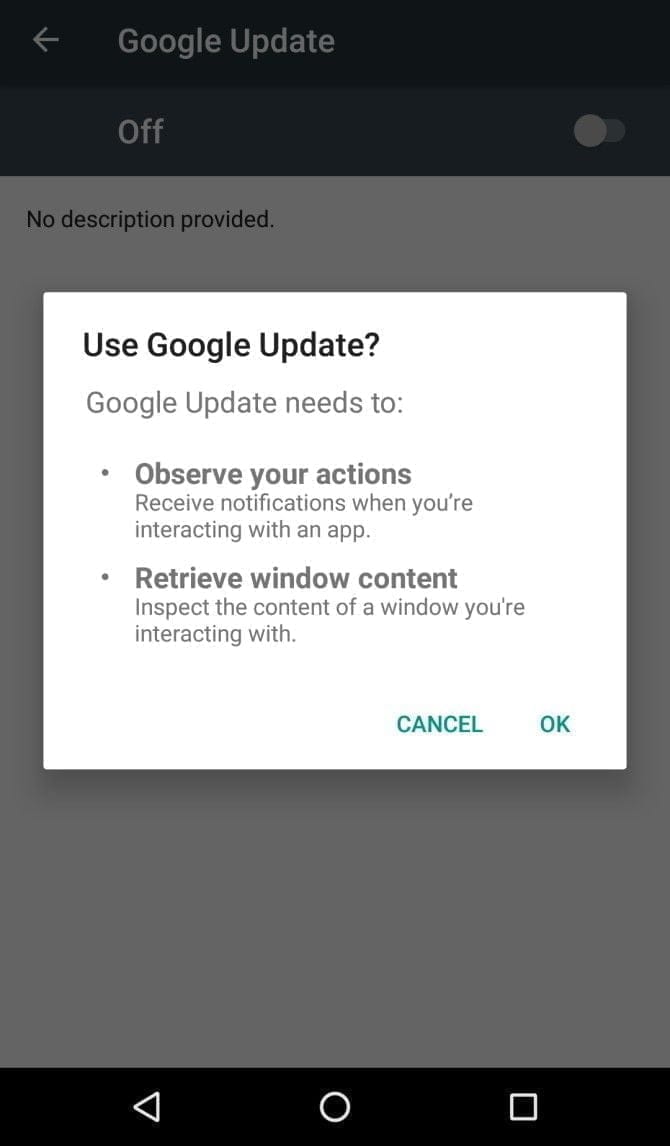
    It infiltrates your device in the first place by getting Accessibility Services permissions. When you install an infected app, it’ll prompt you to enable a fake Google Update. Accepting the “Google Update” allows it to intervene with your device.

    If you aren’t familiar with an Android’s Accessibility feature, you should know that it’s one of the most powerful functions on your device. It’s meant to help Android owners with disabilities, but Accessibility Services can be used to hack your phone as well. This feature can automate a variety of tasks for the user, including tapping the screen, reading text aloud, and even creating captions.

    Giving BlackRock permission to use Accessibility Services lets you build the overlay that you can see when you open the target app. It also gives additional functionality to the malware, as it can then use an Android DPC (device policy controller) to grant administrator privileges to itself.

    In other words, it not only steals the confidential details you type into its overlay — it can actually do a lot more than that. BlackRock does not only intercept SMS messages, mask alerts and lock your computer, it can also engage in keylogging. That said, this malware is certainly not what you want on your computer.

    Protect yourself from BlackRock malware

    As mentioned earlier, the Google Play Store still hasn’t found BlackRock. But just because apps from third-party app stores are currently being targeted, that doesn’t mean it’ll never make its way to Google Play.

    ThreatFabric notes that it “can not yet predict how long BlackRock will be active on the threat landscape.” Meanwhile, it’s necessary to bear in mind some precautions before installing apps.

    Why an anti-virus app won’t cut it

    It’s not a bad idea to have an antivirus app on your smartphone, but unfortunately, an antivirus app won’t stop the BlackRock malware. When BlackRock infiltrates your phone, it has a feature that blocks you from using an antivirus app.

    As soon as you open an antivirus or an Android cleaner app, such as Avast, Kaspersky, McAfee, BitDefender, or Superb Cleaner, BlackRock will immediately redirect you to your Home screen. This prevents you from removing the malware using an antivirus app.

    So, if you download a sketchy app from a third-party store, and think that an antivirus app will keep you safe from all threats, think again.

    Check app permissions

    No matter how legit an app may seem, you should keep an eye on the app permissions. Some apps request permissions that have nothing to do with the App’s core function.

    For example, your SMS messages obviously don’t need access to a flashlight app. This is a sign that you should immediately uninstall the App.

    As BlackRock malware asks for permissions from Accessibility Services, you’ll want to look for any apps that require that particular privilege. If an app is legitimately for users with disabilities, has good reviews, and is from the Google Play Store, you are likely to have confidence in granting permission to the accessibility services. If not, avoid giving that privilege to any applications that don’t need it.

    Download apps from Google Play Store only

    Google Play Protect was put in place to scan your installed apps for malware as soon as you download them, as well as scan them periodically once installed. Third-party app stores don’t have this safety feature, so you’re pretty much on your own in terms of security.

    The lack of security protocols on third-party stores has allowed BlackRock malware to thrive. To lower your risk of encountering BlackRock malware, try to avoid third-party apps stores, and refrain from downloading APKs.

    Stay safe!

    BlackRock malware will hopefully never hit the Google Play Store. There really isn’t any telling if the actors behind BlackRock malware can find a loophole in Google’s security policies, but if they succeed, BlackRock malware could accumulate a significant number of victims.

    If BlackRock ever reaches the Google Play Store, it’s not too surprising. After all, despite Google’s strict security protocols, several apps that contain Joker malware still managed to make their way onto the Google Play Store.

  • Antivirus and anti-malware apps for Android

    Antivirus and anti-malware apps for Android

    Android antivirus apps remain one of Android’s most common applications. Generally speaking, if you play it safely, you don’t need to have an antivirus program, just download apps from the Play Store and keep your security settings available. In the other side, however, there are those who enjoy taking a stroll and not doing those things. There’s just a lot of bad antivirus software out there. Even if those apps aren’t needed, knowing the safe ones that don’t suck is fine. Below are Android’s best Antivirus and Anti-Malware devices.


    360 Security

    360 Security android app

    360 Security is something of a mixed bag. Any of the protection stuff isn’t half bad and the other half is pretty bad then. The app scans your devices for possible malicious activity, but its detection rate is slightly higher than we would expect. Facebook is evil, and all, but it is not malware yet. In any case, this is a good, super simple antivirus app that shows you possible vulnerabilities and will do the scans. The software also includes a range of functions like phone booster and phone generator. We suggest that you should not use those at all because they are snake oil and they are not really operating.


    McAfee Mobile Security

    screen 0

    McAfee is one of the big names of antivirus software. It is one of the biggest ones, too. The application provides features for screening, anti-theft, anti-spyware and security locking. Additionally, it can take photographs of your possible phone thief, record cloud locations until the phone shuts down, and other useful things. McAfee also has a number of other standalone apps. The UI is old, and looks not very fine. In addition, it has boosting features that don’t work and it needs the development of an account to go pro. The application’s antivirus portion works pretty well and some tertiary features are good.


    Kaspersky Mobile Antivirus

    Kaspersky Mobile Antivirus

    Kaspersky is among the most common antivirus apps available. It has both a free version, and a paid edition. All versions provide SMS blocking and calling, scanning, malware monitoring and anti-theft. The premium edition includes items like the security in real time, an applock and more. Both models of course have malware scanning tools and things like that. It’s not nearly as powerful as the big antivirus software. Plus, it has no nasty booster features which don’t work. It’s good to see an antivirus app that doubles down on its intent, rather than trying to expand to items that make no sense. For many people, that makes it a good middle-of – the-road option.


    ESET Mobile Security and Antivirus

    Eset mobile security

    ESET is another major name in the anti-malware and antivirus world. It includes scans, anti-theft support, a security auditor tool, scan scheduling, and more. The design is a little distracting. One of the few needing an email address is this. Otherwise, it would work reasonably well. Upon download, you’ll get a free one month trial. It goes from there for $1.99 a month, or $14.99 a year. As anything like AVAST or AVG it’s not quite heavy, but it’s heavier than CM Protection Lite or Bitdefender.


    Malwarebytes Security

    96442c3c6d2c5519990e5eec0a4f295d

    Malwarebytes is among the most common Windows antivirus software. The mobile version is also relatively fine. It features a collection of actively modified viruses, malware and ransomware support, a permission tracker, and more. It can also search messages for potentially harmful connections in WhatsApp, Email, SMS and so on. Obviously it even does the normal stuff like scanning. The app looks good, it works well and isn’t as heavy as others. This is also reasonably priced at $1.49 a month, or $11.99 a year.