Category: Guides

Expert Android guides that help you master phones, apps, operating systems and wearables with clear, step‑by‑step advice for real‑life use.

  • How to clear the cache on your Android device

    How to clear the cache on your Android device

    You are not alone if your Android device has started to lag. Many gadgets have the potential to slow down over time, but there are easy solutions to boost performance. Restarting the device is a quick fix that can resolve a lot of frequent problems. Clearing up cached data from websites and apps is another efficient way to increase speed and free up storage.

    With the use of simple steps, you will go through the process of clearing your Android device’s cache. Depending on the manufacturer and software customisation of your Android device, the steps described may differ, but the overall procedure is the same, and this guide should help you get started.

    View every application that is installed on your Android smartphone.

    To easily view all of the apps on your Android phone or tablet, launch the Settings app. Scroll until you see Storage, then tap on it. Next, check for the Apps option. On some Android devices, Storage may not appear, and you can navigate directly to Apps from the Settings menu.

    If you’re having trouble finding the Apps section, you can always use the search bar at the top of the Settings app to help.

    When you are in the Apps area, some Android versions make it simple to view which apps use the most space. Simply hit the three-dot menu in the upper right corner and select Sort by Size.

    Clear the cache

    Clear the cache of of the installed apps

    Select an app from the list to remove its cache. Just a heads up: I prefer using an app you installed over a system service like Android System Intelligence. I have had inconsistent outcomes with emptying the cache of system apps, thus it is recommended to only delete the cache for apps you added yourself.

    When you open an app, you will see facts such as its size, user data, cache size, and total storage usage. At the top of the page, you will find two options: Clear storage and Clear cache.

    Tap Clear cache to clear the cache for that app. However, avoid tapping Clear storage because it will reset the app, requiring you to set it up again. Clearing the cache will not cause any problems.

    Continue to browse your list of installed apps, checking for any programs that take up a lot of space and removing their cache.

    If you are feeling particularly thorough, you might erase the cache for each app on your phone. However, it is a good idea to start with the biggest offenders, such as the Facebook app.

    Clear the cache from Chrome

    If Chrome is your primary browser, it may have accumulated a large amount of data, which can slow down your device. Here’s how to clear the cache.

    Go to History settings in Chrome – Open the Chrome app on your Android device, press the three-dot menu in the top-right corner, click History, and then Clear browsing data.

    Choose the data you want to delete – The following screen will display a selection of alternatives, allowing you to select whatever data you want to erase from Chrome.

    You can also provide a timeframe for when you want the data cleared. Each option gives a brief explanation of what it does and how it may affect your browsing experience. For example, deleting cookies and site data will log you out of most (if not all) websites. Clearing cached images and files may cause Chrome to load images more slowly the next time you visit a website.
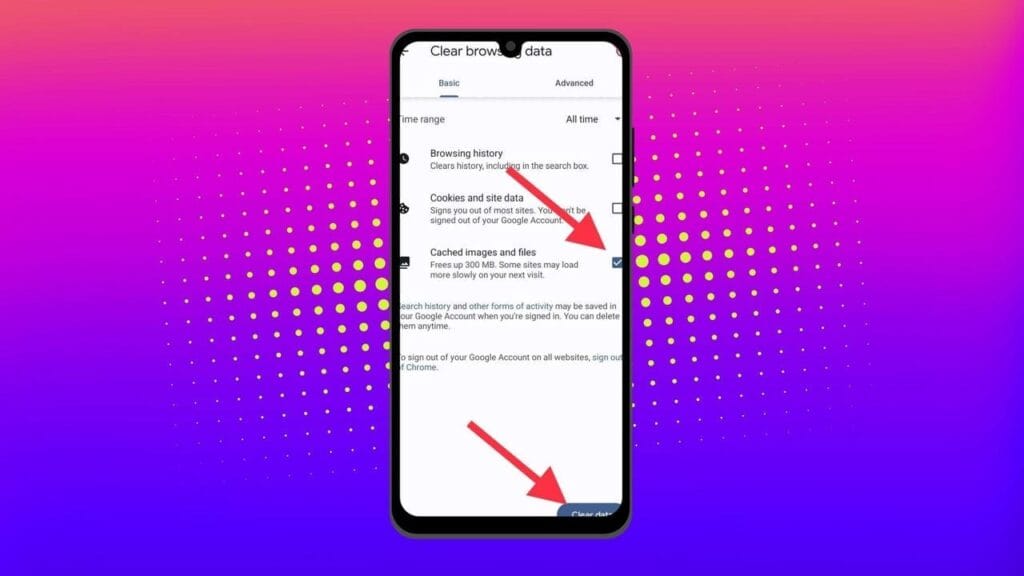
    clear the cache in chrome Android app

    In later versions of Chrome for Android, hitting the menu button displays the option “Clear Browsing Data”. When you select this option, a popup will display, allowing you to erase browsing data for a defined time period.

    If you choose More Options, you’ll be taken to the Browsing Data screen, where you can select the data to delete and choose the time range.

    What does cached data mean?

    Cache is temporary storage that stores data like as photos, files, and scripts from websites or apps you have visited in order to speed up their loading time. Clearing cached data, whether for Chrome or any other app, removes the files that have been kept on your device. For example, on Facebook, cached data could contain profile pictures, photos, and videos.

    Deleting cached data from the Facebook app removes these temporary files from your smartphone, which may cause the program to take longer to load content the next time you use it. However, this strategy will have no effect on the accounts you visit, the postings you make, or your personal information.

    Will deleting the cache remove all app data?

    No, emptying an app’s cache does not destroy crucial data such as login credentials or saved settings. It merely deletes temporary files that help the app load faster, so you do not lose any important data.

    Will deleting the cache make your Android device faster?

    Yes, clearing the cache can free up storage and remove corrupted or outdated files that may slow down your device, leading to smoother performance.

    How often should you clear your cached data?

    It depends on how well your equipment performs. If you are experiencing slowdowns or other problems, emptying the cache can be part of the solution. Otherwise, you may only need to perform it once every three to six months.

    Is the purpose of clearing the cache only to increase storage space?

    No. Clearing the cache is one of the first steps you should take when dealing with bugs or difficulties in an app. Cached files frequently get corrupted or outdated, and removing them causes the app to reload the cache, which can resolve the issue. As a result, deleting the cache can assist solve problems rather than simply free up space.

    Can you clear the cache for all Android apps simultaneously?

    There is no built-in method to remove the cache for all Android apps at once, but you can browse through the list and clear each app’s cache separately.

  • How to activate secret Pixel camera setting that enhances the vibrancy of your images

    How to activate secret Pixel camera setting that enhances the vibrancy of your images

    The camera on the Pixel phones is one factor contributing to its success. Most phone cameras are unable to match the depth, clarity, and vivid/accurate colors.

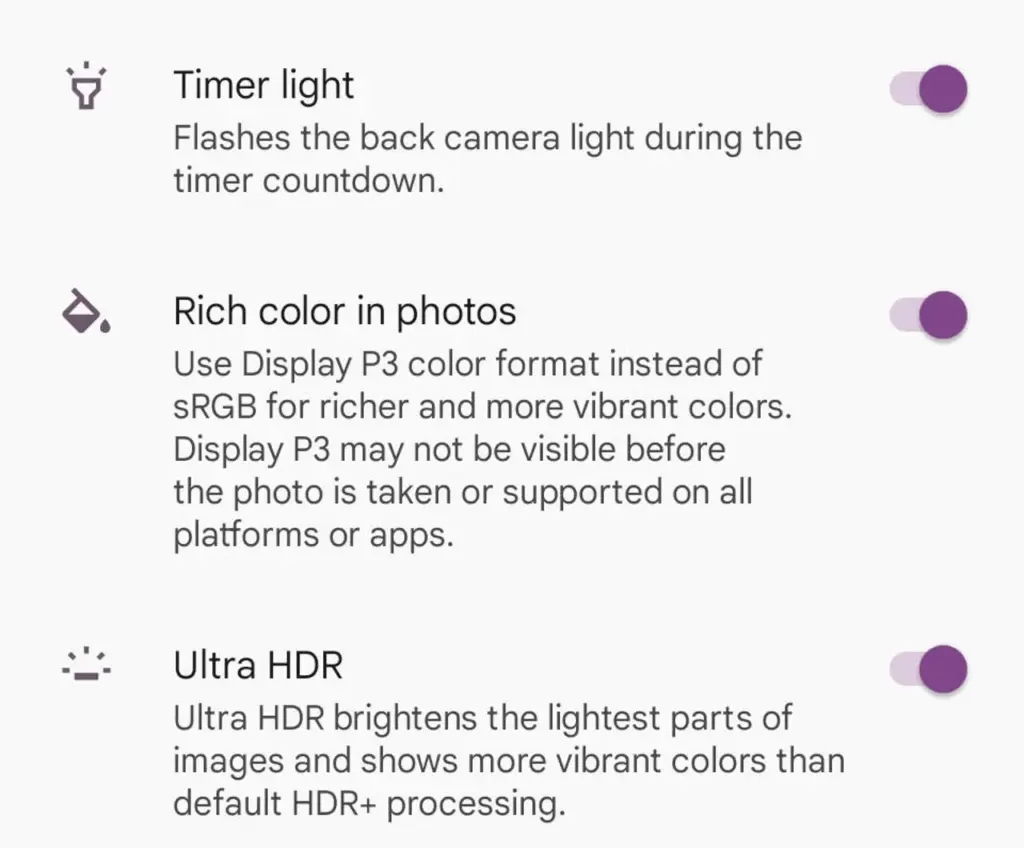
    With each new edition of the Pixel camera, Google aims to surpass itself. Google first debuted the P3 wide gamut capture feature with the Pixel 8, which was accompanied by the Ultra HDR format of Android 14. Photos truly come to life with color thanks to the Display P3’s wide gamut capture.

    Display P3: What is it?

    Display P3 is a color space that combines the following:

    • DCI-P3 color gamut
    • D65 white point
    • sRGB gamma curve

    Gamma is a nonlinear operation that is used to encode and decode brightness in images and videos, for those who were not present at the popular photography club table over lunch. Gamma is defined as the relationship between the luminance and the numerical value of a pixel, which is an even simpler description. Your photographs would not capture color as your eyes perceive it if gamma were not present.

    A camera can prevent color and light tint by using white point, often known as white balance. Consider it in terms of the temperature of color. Are you recording in warm inside light or in the daylight? Your images may appear amber or blue if the white point is set incorrectly.

    The range of colors in a color space that a device can replicate is known as the color gamut.

    The Society of Motion Picture and Television Engineers and the Digital Cinema Initiatives developed Display P3, or DCI-P3, as a color space in an effort to standardize colors used in motion pictures. P3 focuses on what you see in movies. The coordinates of the red (x =.68, y =.332), green (x =.265, y =.69), blue (x =.15, y =.06), and white points (x =.134, y =.351) are even charted.

    Anyone wishing to improve their smartphone photography skills should think about utilizing Display P3, as it gives a far wider variety of colors than sRGB. All of the phones in that range support P3, so if you own a Google Pixel 8 or 9, you are in luck.

    How to enable P3 in the Pixel camera app

    A Pixel 8 or 9 phone is all you will need for this. It may be XL, Pro, or ordinary.

    • Open the Camera app – to begin, unlock your phone and open the camera app.
    • Open Settings – Ttap the gear icon in the lower left corner of the window to open Settings.
    • Open More Settings – From the Settings pop-up, tap “More settings.”
    • Enable P3 – Move the On/Off slider for that entry until it’s in the On position. You can now back out of settings. 
    pixel camera setting

    The color enhancement may appear mild on some devices and striking on others when you take pictures.

    It should be noted that not all devices are compatible with P3. You may use the P3 gamut to snap a picture and then send it to someone whose device does not support it. The shot will not look nearly as good on their device as it does on yours.

  • Simple guide on how to make moving images on your smartphone

    Simple guide on how to make moving images on your smartphone

    We will learn how to create moving pictures on your phone today. It is a wonderful thing to capture a moment. However, what if your ideal image could be animated? What if a static moment in time could have a movement added to it? How awesome would that be? Imagine having a photograph of a waterfall. If the waterfall moved and everything else remained motionless, that would be amazing. Or picture a sunset.

    An already stunning composition would get a whole new level if a portion of the image were animated. Use this guide to improve your social media game and produce stunning moving graphics. Show off your editing and photography prowess to your friends.

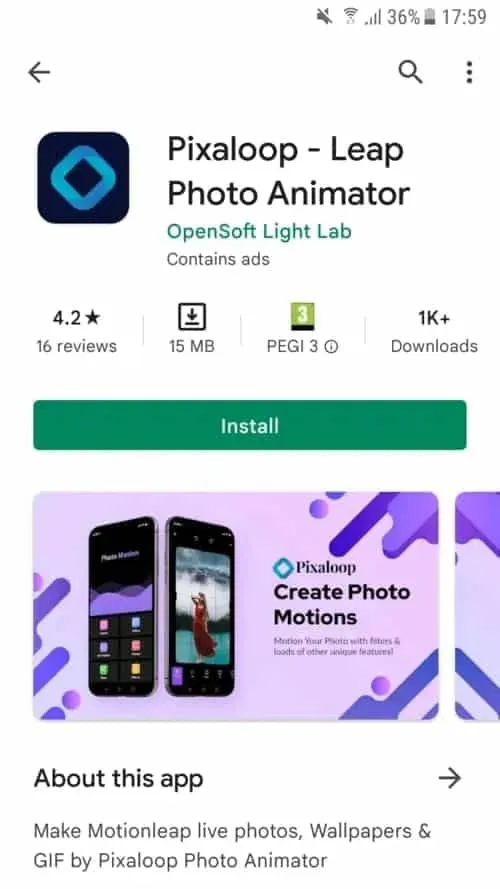
    We will concentrate on only one photo editing app, despite the fact that there are many that allow you to create moving photographs Pixaloop.

    Pixaloop is a free app that is available on both the Apple App Store and Google Play. It enables users to create GIF animation effects, live images, and backgrounds.

    It uses their cutting-edge photo animator to give static photographs alive. You have a successful app when you combine that with a simple and user-friendly UI. Let us test this application instead of just discussing it.

    Install Pixaloop

    Pixaloop is available on the Apple App Store and Google Play Store. I will be downloading and installing it from the Play Store because this demonstration is being done on an Android smartphone.

    1 install pixaloop 1

    Choosing an Image

    You begin by selecting an image, just like you would with any other image editing program. However, you can also choose to open your camera and take a fresh picture. I let you make that choice. Making moving pictures while on the fly might be entertaining at times. I will be selecting a picture from my collection for the tutorial.

    istockphoto 1133155890 612x612 1

    It’s an image I have previously downloaded on my phone.

    This is an awesome picture. We are going to be using it to demonstrate how to make moving image using your phone.

    Create a moving image on your device

    When you launch Pixaloop it looks something like this

    2

    Your image can be animated in two different ways. You can either import an existing image or take a new one with your phone’s camera. I will bring mine in.

    3 crop image

    Before applying the motion effect, you can crop the image on the first screen. Cropping your work in advance is a good idea, depending on where you want to publish it.

    Personally, I think this works really well. I am not going to perform any cropping. will start working on a motion picture right away.

    I see a cascading waterfall in this picture, with the figure motionless. This picture will, in my opinion, take on a completely new level if the background is animated.

    4 masking the subject

    I also carried out my masking technique on the background. At least a portion of it. I do not want the ground to move either. The moving image does not look nice with it. Simply said, it is not natural. Trial and error is how you go about this procedure.

    After making your adjustments, hit the Play button. Proceed to the following step if you are satisfied with the outcome. If not, go back and make all the changes you dislike.

    6 animating the waterfall

    I decided to use Motion Animation for this picture. Clicking the Motion button at the bottom of the screen will activate it. You can specify the animation’s path to the program when this parameter is enabled.

    As you can see, I made six pathways, each of which points downhill. I am emulating the course a waterfall would naturally follow.

    You can also adjust the waterfall upward if you would like. Using this tool to create a moving image would cause everything to animate in a downward manner. And I mean all of it. I discovered that both the top and bottom are dragged down after playing my clip. I utilized Anchor Points to resolve this problem.

    Five anchor points are visible on top of the photograph, and seven anchor points are directly above my ground mask. This keeps the image from moving strangely on the top and bottom. I was happy with the outcome after a few attempts, shifting and adding anchor points.

  • Android 15 can change the intensity of vibrations according to your environment.

    Android 15 can change the intensity of vibrations according to your environment.

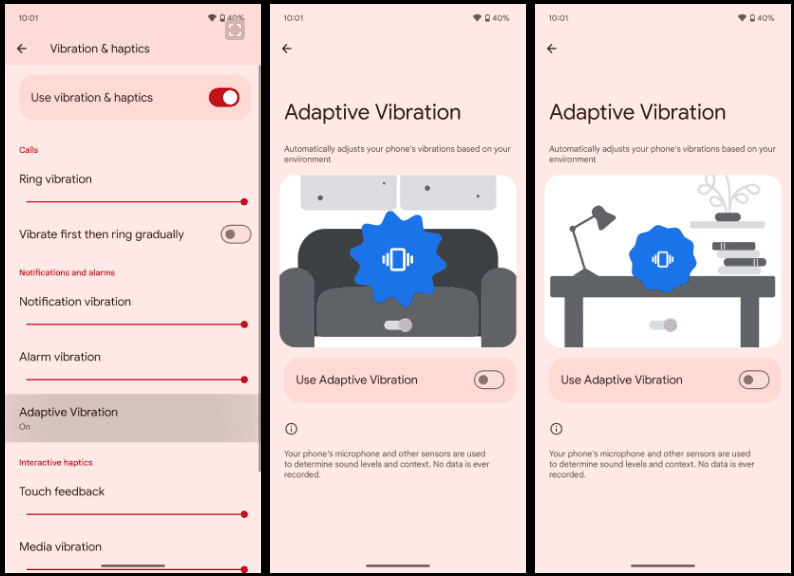
    With Android 15 Beta 2, Google introduced a brilliant new “Adaptive Vibration” setting that lets Pixel phones use their microphones to change the intensity of vibration. Almost everyone has experienced a circumstance when their phone’s vibration was louder than the ringing it was supposed to replace. The ability to manually change the vibration intensity has existed for a while, but Google is now expanding on it.

    Google introduced “Adaptive Vibration” to Pixel Phones in Android 15 Beta 2. This new setting, located in Settings under the “Vibration & haptics” menu, is set to off by default. According to Google, the setting uses sensors to automatically modify the vibration intensity based on your environment.

    According to the animation on the new Adaptive Vibration website, when the device is placed on a table, the vibration intensity decreases, which is what Pixel phones will do when the feature is enabled. The “Adaptive alert vibration” setting, which can reduce vibration intensity while the phone is face up with the screen on, is distinct from this.

    Screenshot 2024 10 20 195238

    The Pixel 7a introduced that capability. This feature appears to be helpful, but we will have to wait and see how it functions in practice. Although it is still disabled by default, the functionality was being developed in earlier beta editions, according to Android Authority. It is difficult to predict when these things will become live.

    If Google’s various other “Adaptive” settings shown anything, it’s that this new option could prove invaluable to the experience in the long run.

  • Take the Next Step: Global NLP Training for a Brighter Tomorrow

    Take the Next Step: Global NLP Training for a Brighter Tomorrow

    Introduction

    Understanding NLP Training

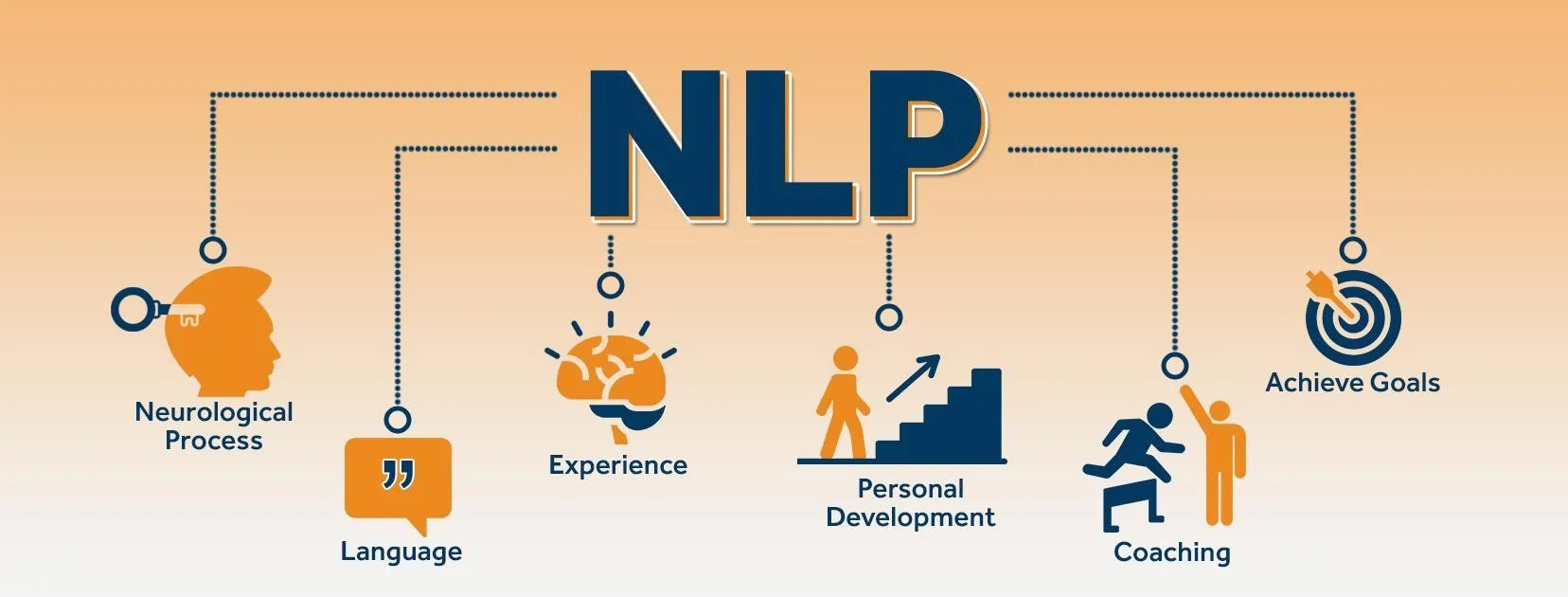
    Neuro Linguistic Programming, or NLP, serves as a transformative toolbox designed to optimize our thoughts, feelings, and behaviors. It emerged from the desire to understand and model the strategies of high achievers across various fields, including business, education, and sports. The founders of NLP did not focus on traditional psychotherapy but instead sought practical applications that could enact real-world change. This approach has allowed countless individuals over the decades to develop vital skills for personal and professional success. For example, one might practice reframing negative thoughts into constructive ones. This simple yet powerful shift fosters a more positive mindset and enhances overall well-being.

    Importance of Global NLP Training

    The significance of global NLP training cannot be overstated; it provides individuals from diverse backgrounds access to these life-altering techniques. NLP training is not limited to a specific demographic; instead, it welcomes professionals, educators, therapists, and anyone seeking personal growth. Benefits of global NLP training include:

    • Cultural Exchange: Participants bring unique perspectives, enriching the learning experience.
    • Networking Opportunities: Building connections with like-minded individuals from across the globe.
    • Adaptability: Learning various NLP techniques allows individuals to adapt them to their own cultural contexts.

    By engaging in NLP training worldwide, individuals become part of a movement aimed at personal transformation and collective betterment, fostering a brighter future for themselves and their communities.

    Nicole

    Benefits of NLP Training

    Enhanced Communication Skills

    One of the standout benefits of NLP training is its ability to significantly enhance communication skills. Whether in a professional or personal context, the effectiveness of communication can dramatically influence outcomes and relationships. Through NLP techniques, individuals learn to:

    • Mirror and Match: This method involves reflecting a client’s body language and vocal tone, establishing rapport in conversations. By practicing this, participants can create an atmosphere of comfort and trust.
    • Active Listening: It’s not just about hearing words; it’s about understanding the emotions and intentions behind them. NLP teaches coaches to truly listen, fostering a deeper connection and realization of a client’s needs.

    In my experience as an Certified NLP practitioner, I’ve witnessed clients transitioning from hesitant speakers to compelling communicators who can engage with audiences effortlessly.

    Personal Growth and Development

    NLP training is not solely about improving professional interaction; it also facilitates profound personal growth. This methodology empowers individuals to tackle their limiting beliefs and emotional barriers head-on. Key aspects of personal development through NLP include:

    • Overcoming Limiting Beliefs: Participants learn techniques to identify and reframe the negative beliefs that hold them back, fostering a healthier mindset.
    • Increased Self-Awareness: NLP encourages introspection, enabling individuals to understand their thoughts, feelings, and behaviors better.
    • Resilience: By applying NLP strategies, many have reported feeling more resilient in facing life’s challenges, enhancing their overall well-being.

    Those who have undergone NLP training often reflect on their transformative journeys, sharing how the experience has reshaped their perspectives and behaviors for the better. The tools gained through NLP not only enhance their communication but also elevate their quality of life.

    Global NLP Training Programs

    Online NLP Courses

    Global NLP Training offers a variety of online NLP courses designed for those seeking flexibility without compromising on quality. These courses can be completed at your own pace, allowing individuals to absorb materials and practice techniques from the comfort of their homes. Some benefits of online NLP courses include:

    • Accessibility: No matter where you are, you can participate in NLP training from anywhere in the world.
    • Video Lessons and Resources: Engaging video content and comprehensive materials allow for a rich learning experience.
    • Interactive Components: Many online programs integrate forums and webinars for real-time interaction with trainers and peers.

    Having taken an online NLP course myself, I found the blend of flexibility and interaction to be incredibly enriching, as I could apply what I learned in real-time while balancing my everyday responsibilities.

    In-Person NLP Workshops

    For those who thrive in immersive environments, in-person NLP workshops offer transformative experiences that go beyond traditional learning. Global NLP Training provides several locations—Europe, the USA, Asia (Bali), and Mexico—where participants can engage deeply with the material. These workshops often feature:

    • Full Immersion Experiences: Participants undergo an intensive 16-day program that enables them to focus solely on their growth and mastery of NLP techniques.
    • Hands-On Practice: There’s no substitute for practicing NLP techniques in real-time with fellow participants and trainers, which cements learning and builds camaraderie.
    • In-Depth Certification Programs: Earn certifications as an NLP Practitioner, Master Practitioner, or Life Coach, which can elevate your career in the coaching industry.

    I recall attending an in-person workshop where the collaborative environment fostered personal breakthroughs and skill enhancements, reinforcing the power of face-to-face learning. Whether online or in person, engaging in NLP training can open new doors for both personal and professional development.

    Accreditation and Certification

    Recognized NLP Certifications

    Understanding the significance of accreditation in Neuro Linguistic Programming (NLP) training is essential for anyone considering entering this field. Recognized certifications can profoundly impact a professional’s credibility and career opportunities. Major certifications include:

    • NLP Practitioner: This foundational certification equips individuals with essential NLP skills for personal development and coaching.
    • NLP Master Practitioner: Building on the practitioner level, this advanced certification dives deeper into complex NLP techniques and theories to refine coaching abilities.
    • Mindset and Life Strategy Coach Certification: This certification offers a blend of NLP with strategic communication, enabling practitioners to enhance client transformations effectively.

    Having undergone NLP training myself, I can attest to how these certifications boost confidence and recognition among peers and clients alike. They signify that individuals have met rigorous standards of knowledge and skill in NLP.

    Accredited NLP Training Institutions

    Accreditation plays a crucial role in ensuring the quality of NLP training programs. Institutions like the International NLP Association (INA) and the International Coaching Federation (ICF) establish a framework that sets high standards for educational programming. When choosing a training institution, consider:

    • ICF Accreditation: The ICF requires a curriculum that meets specific core competencies.
    • Comprehensive Course Materials: High-quality training institutions provide extensive course materials, including videos, live sessions, and practical assignments.
    • Lifetime Access and Ongoing Support: Many accredited programs offer lifetime access to resources and trainer support, ensuring a network for continual learning.

    Selecting an accredited NLP program not only enhances one’s education but also ensures that you receive a quality experience that can facilitate personal and professional growth.

    Career Opportunities in NLP

    NLP Practitioner Roles

    Embracing a career as an NLP practitioner offers a wide array of fulfilling opportunities. Whether you aspire to work in individual coaching, corporate training, or facilitation, the skills acquired during your NLP training can be instrumental in guiding others toward personal and professional breakthroughs. Common roles include:

    • Life Coach: Helping clients set and achieve personal goals, overcome limiting beliefs, and enhance self-awareness.
    • Corporate Trainer: Conducting workshops and seminars for businesses, focusing on communication skills or team dynamics.
    • Therapist or Counselor: Utilizing NLP techniques to assist clients with emotional and behavioral challenges, fostering deeper understanding and healing.

    Having stepped into my own role as an NLP practitioner, I’ve found that the diversity of the career path ensures continual growth and learning—there’s always something new to explore, whether it’s through working with different clients or integrating new techniques.

    Advancing in the NLP Field

    For those already established in NLP, advancing your career can lead to even more rewarding paths. Here are some options for growth:

    • Specialization: You can deepen your expertise by focusing on specific niches such as wellness coaching, career coaching, or executive coaching.
    • Master Practitioner Certification: Pursuing further certifications can enhance your credentials and open higher-level coaching positions, allowing for greater responsibilities and impacts.
    • Teaching and Mentoring: After gaining experience, you might choose to become a trainer or mentor, teaching the next generation of NLP practitioners.

    Engaging in continued education and connecting with the wider NLP community are vital strategies for fostering growth and ensuring that you remain at the forefront of the field, ultimately enhancing your ability to facilitate change in others.

    This post was delivered to you by the Accessily platform. If you want to showcase your content on our site, visit the Accessily Guest Post Marketplace.

  • US Carriers that enabled RCS messaging for iPhones

    US Carriers that enabled RCS messaging for iPhones

    This week, Apple unveiled iOS 18, which includes a number of improvements, including the long-awaited Rich Communication Services, or RCS. The iPhone 16 was also announced alongside iOS 18. Since carrier activation is necessary for the messaging service to function, not all American networks will offer it at launch. The most recent list of carriers that support RCS on iPhones can be found on Droid Tools.

    Since Google originally implemented RCS on iPhones a few years ago, it has been a frequently desired feature. This messaging protocol was created to take the place of SMS and MMS on mobile or cellular phones. This has several capabilities including sending and receiving high-resolution photos, read receipts, typing indicators, and improved group chat management, even if it does not eliminate the green bubbles from Android messages.

    How to turn on RCS on an iPhone

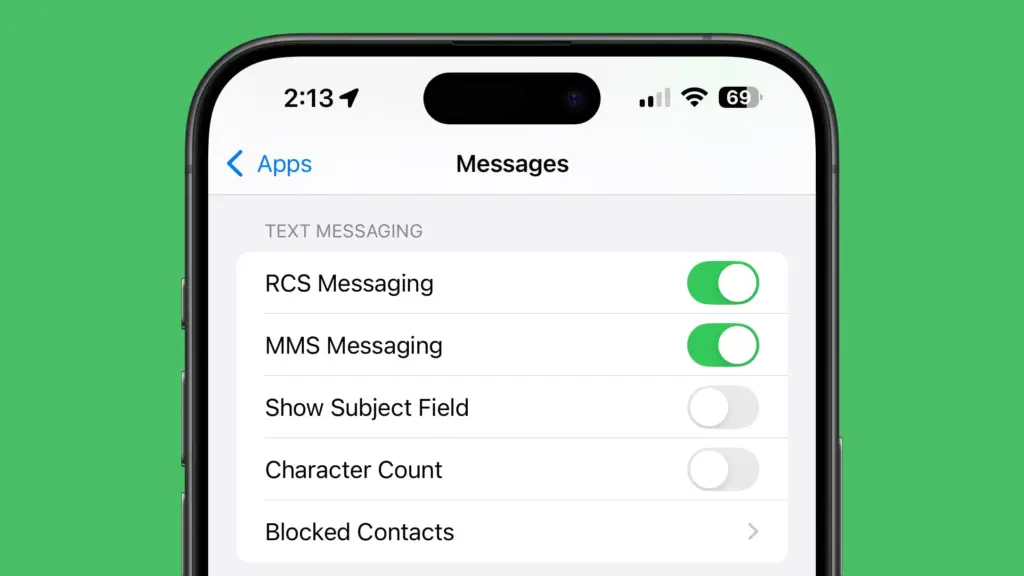
    Even after updating to iOS 18, RCS messaging is disabled by default. Users of upgraded iPhones will need to activate it through the settings. How to do it is as follows:

    1. Open the Settings app on your iPhone.
    2. Scroll down and tap Apps.
    3. Select Messages from the menu.
    4. Toggle on RCS.
    5. Exit the window to save changes.
    RCS messaging

    Which US carriers offer RCS for iPhones?

    Only a few carriers have enabled RCS since iOS 18 was released for compatible iPhones. Major carriers have been on the list, nevertheless, since the beginning. The carriers listed below provide RCS for iPhones.

    1. AT&T
    2. T-Mobile
    3. Verizon
    4. Metro by T-Mobile
    5. U.S. Cellular
    6. Cricket
    7. Spectrum
    8. TracFone
    9. Straight Talk
    10. Xfinity Mobile
    11. C Spire
    12. Consumer Cellular
    13. FirstNet
    14. PureTalk
    15. Red Pocket
    16. Visible

    There is no confirmation yet when other telco operators like Mint and Boost will enable RCS on their network.

    Which Canadian carriers offer RCS for iPhones?

    If you’re residing in Canada or traveling there, most major carriers there offer RCS on iPhones as well. You can find the list below.

    1. Bell
    2. Rogers
    3. Telus
    4. Fido
    5. Virgin Mobile
    6. Freedom Mobile
    7. Koodo
    8. Lucky Mobile
    9. Videotron
    10. Chatr

    If you would rather see it in a more organized manner, Apple’s support page has a list of several wireless providers in various nations and areas that have already integrated RCS into their networks.

  • Clean your browser junk files in a few steps.

    Clean your browser junk files in a few steps.

    Regularly clearing the cache and cookies in your web browser will help you get rid of unnecessary garbage files.

    Much of the information that your Android phone’s web browser gathers from the websites you visit is unnecessary for it to be on your phone.

    The information kept in your cookies and cache, regardless of whether you are using Samsung Internet, Mozilla Firefox, or Google Chrome, may come in handy occasionally. It is what keeps you signed into your accounts and enables you to swiftly access websites that you visit often. That is great, but your browser’s cookies and cache include a lot of unnecessary data that may even pose a privacy concern.

    The reasons behind periodicaly clearing your cache and cookies

    A large portion of the content that accumulates in your cookies and cache is just useless garbage. A portion of it might have come from single-visited websites. Some appear to be actively monitoring your browser history in order to provide you with adverts that are relevant to what you purchase or watch online. For example, after looking at a few stores, I keep getting advertising for buying glasses online, or I get ads from Amazon that just so happen to reflect what was last in my shopping basket.

    It is a good idea to periodically clean your cache because of this. It enables you to delete data from your phone that you no longer require, particularly if one of the cookies on your phone has an unknown data tracker. You will have to log back into some of your favorite websites after clearing your cache, but it is a tiny annoyance to ensure that your phone is not accumulating unnecessary data.

    The steps differ slightly depending on the type of phone and web browser app you’re using. Below, we’ll go over how to clear this data for Google’s Chrome browser (often the default for many Android phones, like the Google Pixel line), Samsung’s internet browser (often the default on the Galaxy phone series) and Mozilla’s Firefox browser.

    Google Chrome

    In the Google Chrome app for Android, you can clear your cache and cookies by first clicking the More button (shown by a column of three dots) in the top right corner of the browser, then selecting History, and then selecting Clear browsing data. Alternatively, you may access this by selecting Privacy and Security from the Chrome Settings menu, followed by Clear browsing data.

    Additionally, Chrome has Basic and Advanced settings for deleting cookies, site data, cached files and pictures, and browsing history. You can choose to erase all of your information or just a portion of it, ranging from the recent 24 hours to the previous four weeks, using the Time range drop-down menu. You can also delete Saved passwords, Autofill form data, and Site settings by tapping Advanced.

    chrome browser clear cache

    Once you have decided what to remove, hit the blue “Clear data” button. If Chrome considers any websites to be “essential” to you, you may receive an additional prompt, and you will be able to accept before clearing. In the event that you do not receive the prompt, Chrome will clear as soon as you tell it to.

    Samsung Internet

    You can delete the cache and cookie data from your Samsung Internet browser in two distinct methods. You have two options for clearing: using the Settings app on your phone, or directly from within the browser.

    To clear while in the Samsung Internet browser app, first tap the Options button in the bottom right corner represented by three horizontal lines, then Settings; scroll down to and tap Personal Data, then tap Delete browsing data to get a menu of options to delete. You can clear your Browsing historyCookies and site dataCached images and filesPasswords and Autofill forms in any combination. After tapping Delete data, you’ll then receive a prompt asking for you to confirm your choices before deleting.

    samsung internet cache clear

    You can customize what you want to erase the most by going through the browser app itself. Nevertheless, you may launch the Settings app, touch on Apps, scroll down to Samsung Internet, and then tap Storage if you want to access comparable choices from your phone’s settings menu.

    There are distinct options to clear data and clear cache at the bottom of Storage. Choosing Clear data triggers a warning that all of the application’s data, including files, settings, accounts, and databases, will be permanently erased. Tapping Clear cache will instantly remove the cache. This “going nuclear” method should erase all leftover data, even though it does not mention cookies, allowing you to restart the Samsung Internet browser as if it were a fresh install.

    Mozilla Firefox

    You may empty the cache from within the Mozilla Firefox Android app, just like you can with Google Chrome. Once more represented by three vertically aligned dots, the More button is located to the right of the address bar. Tap it to access this function. Next, select Settings and proceed to the Delete browsing data section.

    Of the three browsers we’re discussing here, Firefox gives you the most options under the Delete browsing data menu, allowing you to also delete any existing Open tabs, your Browsing history and site dataSite permissions and even your Downloads folder alongside Cookies and Cached images and files

    firefox browser cookies cache

    You can be more precise about the kind of data you want to erase, even though you are unable to select a time frame like you can with Chrome.

    Additionally, Firefox offers a second option for users who want not to store their browser history once they close the program. There is a Delete browsing data on stop option in Settings that tells Firefox to remove any combination of these same settings each time the program is closed. This is a helpful function if you want to maintain your browser clean and, for example, not unintentionally give your browsing history to someone who could have stolen or otherwise obtained access to your phone.

  • 6 Common Device Performance Issues and Solutions

    6 Common Device Performance Issues and Solutions

    Now more than ever, we depend on digital devices like smartphones and computers for work and entertainment.

    Users want a smooth experience. However, there are times when our devices show signs of poor performance and other issues.

    Let’s take a look at some of the most common problems and methods to minimize or eliminate these issues.

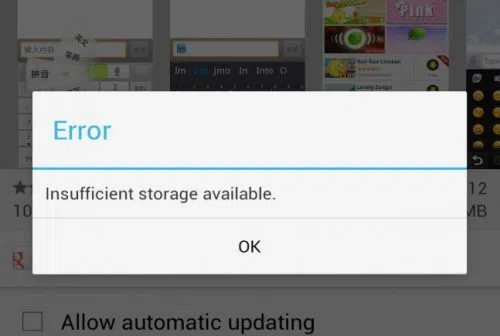
    1. Insufficient Storage

    insufficient strorage available error in android

    You work with a finite amount of storage. Some devices boast of having terabytes of available space, so running out of available disk space is often not a problem.

    On the other hand, some devices come with much less than that. It is crucial to keep an eye on what you download and store on the device. Get in the habit of deleting files you no longer need. 

    Remember that you do not need to store everything on the device. Cloud storage and external storage accessories (hard drives and USB flash sticks) offer a solid alternative.

    2. Overheating

    l intro 1657216441

    Overheating is one of those problems that you want to avoid as much as possible. The process works as an anxiety builder, making you aware that something is wrong. Ideally, your device should be lukewarm at most.

    Having said that, it is not how digital devices work, particularly when you initiate resource-heavy processes, such as video games. 

    Certain devices have more flexibility to adjust temperatures. For instance, the MacBook kernel_task high CPU is one such indicator, and it’s a built-in feature.

    Generally, overheating can be reduced by limiting background processes. Check background applications and close them. Moreover, if you have some time, clean the dust and other particles that are inside the device (provided you know what you are doing).

    3. Sluggish Performance

    A sluggish performance can be the result of different factors building up over time. More often than not, users don’t pay attention to basic maintenance routines, leaving their smartphones or computers to their own devices.

    Doing so is bound to backfire. As a rule of thumb, there should be a maintenance routine that users follow, regardless of how big or small it is.

    The goal is to ensure optimal device performance and increase its lifespan. At times, you may need to reinstall an operating system, ensure that the latest OS version is installed, and upgrade hardware when/if possible.

    4. Malware

    malware android

    Cybersecurity threats are running rampant online, attacking unsuspecting users. It is no longer enough to have reliable antivirus software, though it remains a cornerstone of a good anti-malware strategy.

    More and more people are looking to rely on virtual private networks to encrypt their surfing data and block devices from hackers. A VPN is helpful, particularly when you have to connect to public Wi-Fi, which is notorious for missing the necessary security protocols.

    The awareness via various campaigns comes in handy, too. Organizations are trying their best to educate people about the dangers of the internet. It goes beyond protecting your devices. Personal and sensitive information is another thing malicious cybercriminals are after.

    5. Poor Connectivity

    As much as we rely on our devices, the same can be said for the internet. Having a poor connection is enough to ruin somebody’s day.

    Naturally, some locations have a better internet connection. Certain ISPs are notorious for providing lackluster experience.

    Still, one should not underestimate the impact on the user itself. You may have an outdated router or a third-party device jamming the signal. Not to mention that sometimes restarting the device or reconnecting to the network is enough to solve the problem. 

    6. Lackluster Battery Life

    If you are on a desktop computer, battery lifespan problems are not something to worry about. Alternatively, smartphone and laptop users have to keep a close eye on the battery bar.

    The likelihood of running out of battery life is not zero. The bar might go down without you realizing it. And if there are no means to quickly recharge the device, you will be in trouble.

    Make sure to close background apps and other battery hogs. If the battery becomes outdated and struggles to recharge or maintain a decent battery life, you might have no other option but to get a replacement.

  • Make Your Instagram Page Explode with Followers by Using These Tips

    Make Your Instagram Page Explode with Followers by Using These Tips

    In the realm of social media, Instagram remains a kingdom of visual storytelling and brand marketing. In this dynamic platform, amassing followers isn’t just about popularity; it’s pivotal for businesses, influencers, and marketers looking to widen their reach. But how do you break through the clutter and make your Instagram page a magnet for followers? It’s not about chasing fleeting trends—it’s about strategic maneuvers and genuine engagement. In this blog post, we’ll walk you through the thrusts and parries of Instagram’s social chessboard. When you are a bit more versed in the art of Instagram, you can be sure your page will rise above the competition.

    Optimize Your Profile for Impact

    Before you dive into the strategies, ensure your home base is fortified—that is, your profile. Your profile is the first impression visitors have of your Instagram presence. It should encapsulate your brand identity, mission, and tone. Start with a clear and memorable profile picture that resonates with your brand. Your bio should succinctly convey who you are, what you do, and why people should care. A call-to-action linked to your website or latest promotion can funnel profile visitors into leads or customers.

    Remember, it’s also important to include relevant contact information and utilize the category feature to amplify your niche or industry. Optimization goes beyond looks—it’s about making your profile a launchpad for discovery and conversion.

    Buy Legit Followers from Trusted Sources

    While many purists would argue against buying followers, the practice is common in the cutthroat world of Instagram marketing. The critical aspect here is the authenticity and quality of purchased followers. There are reputable services that provide real followers, as opposed to bots or inactive accounts. 

    These followers can help bolster your social proof and make your account more attractive to potential organic followers. Always conduct thorough research and choose providers with credibility and positive testimonials before you invest. Namely, you can buy 100 Instagram followers with instant delivery guaranteed so that you can focus on crafting quality content and let the followers come to you. Considering how much time and effort go into building a sizable following, this strategy can be an effective shortcut to grow your page.

    Leverage Hashtags Effectively

    image1
    https://unsplash.com/photos/a-person-writing-on-a-piece-of-paper-with-a-marker-iOnN7Et1FhA

    Hashtags are the road signs that guide users to your content. They are incredibly potent when used correctly. But how do you use them effectively? First, research trending and relevant hashtags in your field. Think quality over quantity; it’s about being specific and relevant rather than casting a wide and vague net. Use a mix of popular, niche-specific, and branded hashtags to reach diverse segments of Instagram users.

    Remember, although Instagram allows you to use up to 30 hashtags per post, that doesn’t mean you should max out every time. 

    The sweet spot varies but using around five to ten pertinent hashtags can yield better engagement than overloading your posts. Even more so, the “follow hashtag” feature makes it even easier for users to discover content through hashtags. Make sure your posts are optimized with relevant tags and you could potentially reach new audiences beyond your followers.

    Engage with Your Audience

    One of Instagram’s golden rules is engagement. If you want followers, you need to interact. This means replying to comments, participating in conversations, liking, and sharing content from your followers and peers. Host Q&A sessions, polls on your stories, or schedule live sessions where you can interact in real time with your audience. Authentic interaction fosters community and loyalty, which in turn fuels organic growth.

    Don’t forget about the timing of your posts and engagement sessions. Utilize Instagram’s insights or third-party analytics tools to determine when your audience is most active. This increases the chance of your content being seen and interacted with.

    Collaborate and Cross-Promote

    Teaming up with other Instagrammers is like merging lanes on the social media highway. Collaborations and partnerships can expose your brand to a broader audience. This could be in the form of shoutouts, joint promotions, giveaways, or takeovers.

    Identify accounts that complement rather than compete directly with yours. Make sure any collaboration is aligned with your brand values and that the partner’s audience might be genuinely interested in what you have to offer. Transparency and alignment in collaborative efforts are critical to maintaining trust with your followers.

    In some cases, it may be beneficial to cross-promote on other social media platforms. For example, sharing your Instagram content on Facebook or Twitter can drive traffic and potential followers to your page. Being able to tap into different social media communities widens your reach and attracts a more diverse following.

    Explore Instagram Reels and IGTV

    image2
    https://unsplash.com/photos/shallow-focus-photo-of-man-in-gray-collared-top-taking-selfie-1-Osp6CvhXc

    Instagram loves to see users take full advantage of its features. Reels and IGTV offer more substantial content options beyond the constraints of a single post or Story, allowing you to share longer, more in-depth content. They are attractive tools for storytelling and showcasing different aspects of your brand or personality.

    Reels can be particularly powerful due to their prominent placement in the app and their shareable nature. Incorporating trendy music, engaging visual effects, and relevant content can get your reels noticed not just by your followers, but also by the broader Instagram community.

    Continuously Analyze and Adapt Your Strategy

    Even the best Instagram strategies can become outdated as the platform evolves and user behavior shifts. Therefore, it’s vital to monitor your account’s performance regularly and be ready to refine your approach. Analyze which types of content are resonating with your audience by reviewing engagement rates, reach, and the demographic data of your followers. Use Instagram’s in-built analytics to understand these metrics better or supplement with third-party tools for deeper insights.

    Remember, the algorithm favors accounts that keep users engaged and on the platform for extended periods. By analyzing your most successful posts, you can discern patterns that work and double down on similar content. Likewise, don’t be afraid to experiment with new content types or strategies to keep your feed fresh and engaging. As you iterate, maintain a balance between creative exploration and data-driven decision-making to foster an adaptive, growth-oriented Instagram presence.

    Mastering the art of Instagram marketing is an ongoing process of strategic planning, creative expression, and community engagement. By refining your profile, making informed choices about follower growth, leveraging hashtags, engaging with your audience, exploring collaborative opportunities, and staying adaptable to the platform’s changes, you set the stage for continued success. The tips outlined in this post are your arsenal in the ever-evolving social media landscape. Put these techniques into regular practice, and watch as your Instagram page transforms into a thriving hub for your brand, nurturing both connections and conversions. Remember, on Instagram’s vibrant stage, your brand’s narrative is unfolding one post at a time—make every frame count.

  • Xiaomi HyperOS secret codes: uncover hidden features and more

    Xiaomi HyperOS secret codes: uncover hidden features and more

    For users of Xiaomi smartphones running the Xiaomi HyperOS operating system, there are hidden codes that can unlock additional features and settings, providing a deeper level of customization and control. In this article, we’ll explore some of these secret codes and the functionalities they offer to enhance your Xiaomi HyperOS experience.

    *#06# – IMEI

    Need to check your device’s International Mobile Equipment Identity (IMEI) number? Dial *#06# to quickly access this information.

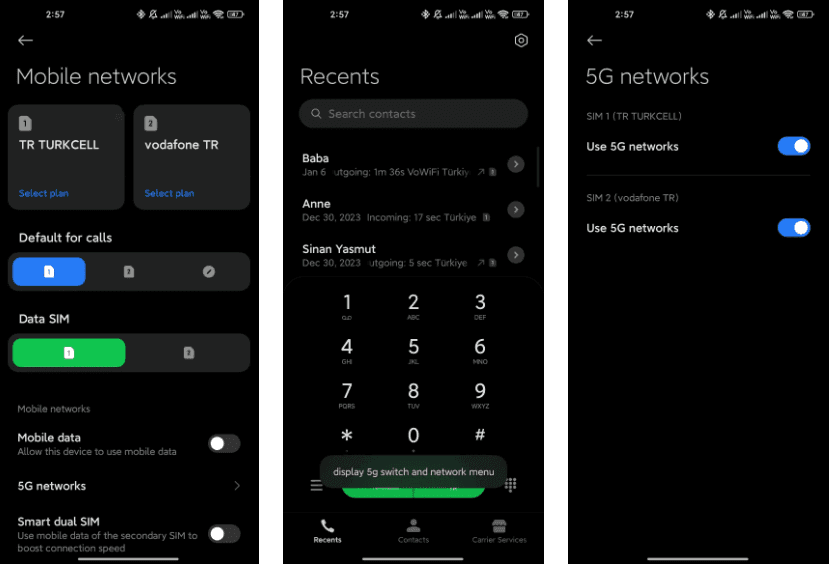
    *#*#*54638#*#* – Enable/Disable 5G Carrier Check

    Toggle the 5G carrier check with this code, giving you control over your network settings and the ability to enable or disable 5G functionality.

    5g switch

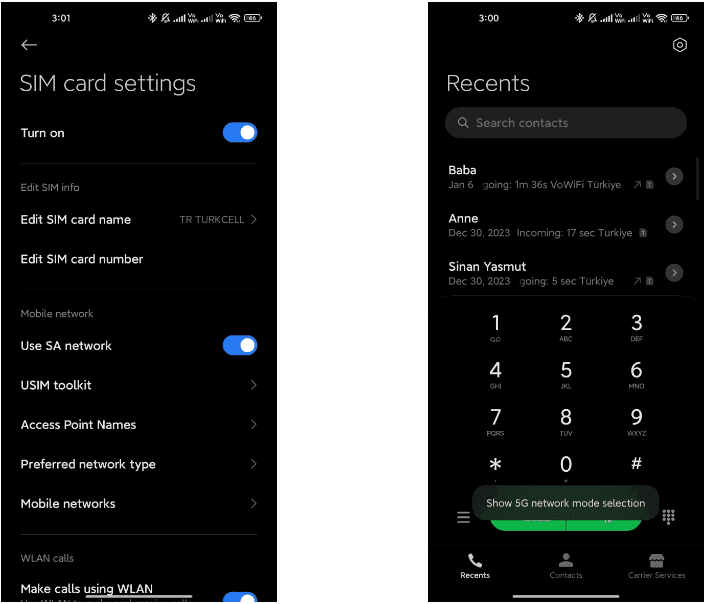
    *#*#726633#*#* – Enable/Disable 5G SA Option on HyperOS

    Unlock the 5G Standalone (SA) option on your network settings using this code, providing more control over your device’s connectivity.

    5g sa

    *#*#6484#*#* – Xiaomi Factory Test Menu (CIT)

    Explore the Xiaomi Factory Test Menu for advanced testing and configuration options.

    xiaomi cit menu

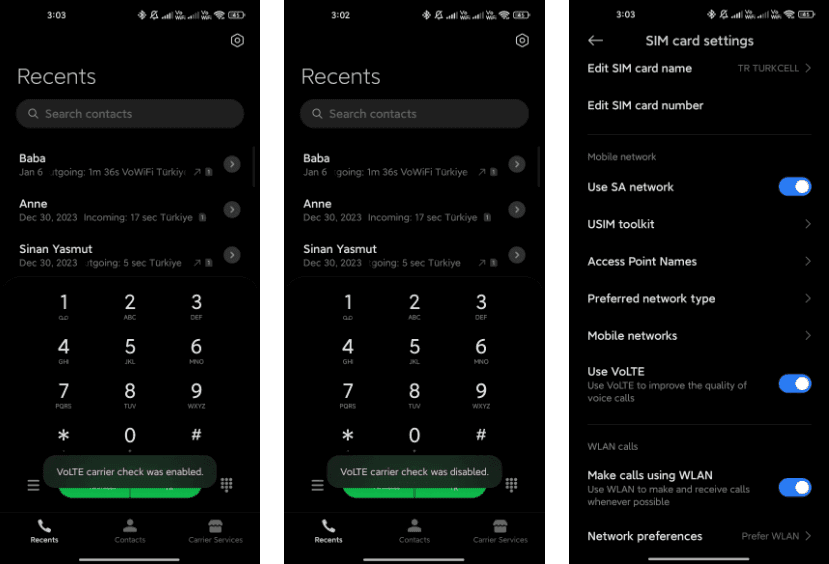
    *#*#86583#*#* –  Enable/Disable VoLTE Carrier Check

    Toggle the VoLTE (Voice over LTE) carrier check to customize your network settings and enable or disable this feature.

    volte carier check

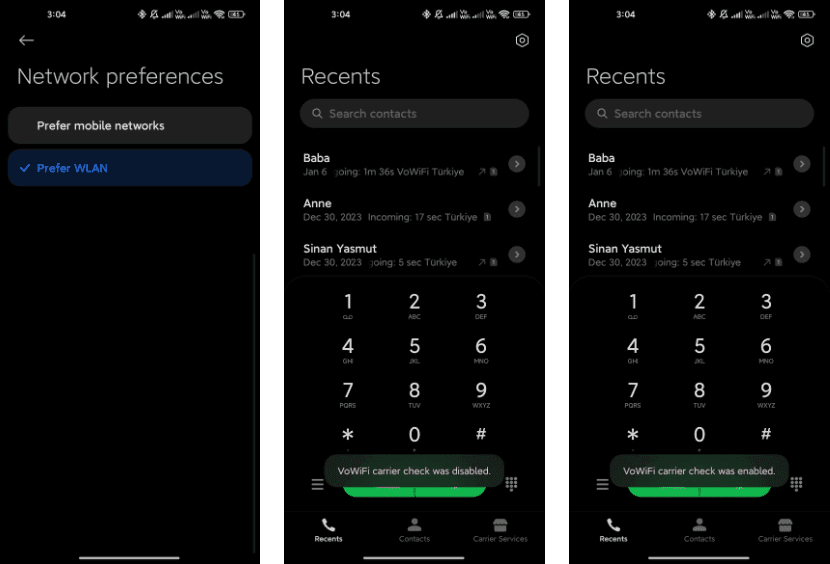
    *#*#869434#*#* –  Enable/Disable VoWi-Fi Carrier Check

    Take control of your Voice over Wi-Fi (VoWi-Fi) settings by using this code to enable or disable the carrier check.

    wofi

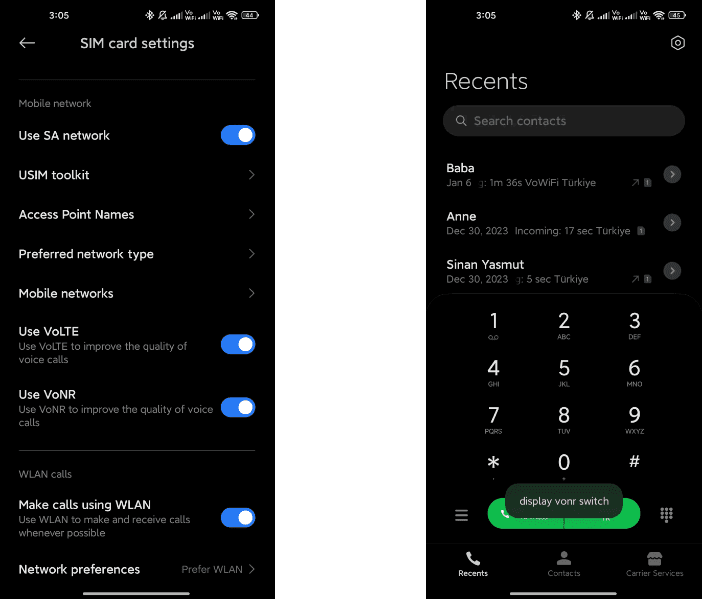
    *#*#8667#*#* – Enable/Disable VoNR

    Manage Voice over New Radio (VoNR) settings with this code, providing more options for your device’s voice capabilities.

    vonr

    *#*#4636#*#* – Network Information

    Access detailed network information to check your device’s status and connection details.

    *#*#6485#*#* – Battery Information

    Get insights into your device’s battery, including cycle information, actual and original capacity, charging status, temperature, health status, and charging protocol type.

    6485.jpg

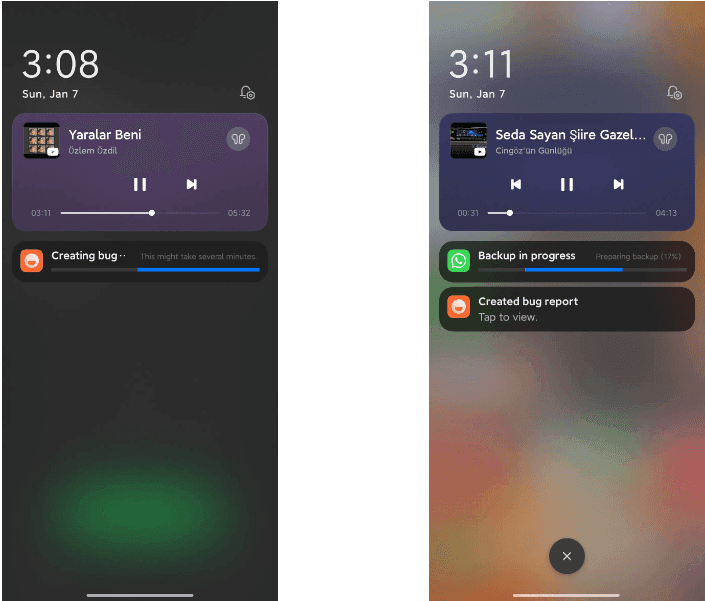
    *#*#284#*#* – Capture System Log

    Generate a BUG report to capture system logs, providing valuable information for debugging purposes. The report is saved in the MIUI\debug-log\ folder.

    system log

    *#*#76937#*#* – Disable Thermal Check

    Turn off thermal checking with this code, potentially preventing your device from throttling performance due to high temperatures.

    *#*#3223#*#* – Turn on DC DIMMING Option

    Activate the DC DIMMING option using this code, allowing you to adjust the display settings for a more comfortable viewing experience.

    Unlock the full potential of your Xiaomi device with these secret codes, and improve your Xiaomi HyperOS experience. These hidden codes offer Xiaomi HyperOS users a range of functionalities, from network customization to battery insights and advanced testing options. Users should exercise caution and be mindful of potential impacts on device settings while exploring these codes.