How about starting things off with some brand-new software on your smartphone as we head into yet another weekend?
Here, you will be able to find exclusive deals for paid apps that are now available for free for a limited time only. Don’t miss out on huge savings and download these apps today on your Android.
Please keep in mind that although these apps are currently free, by the time you read this page or attempt to download them, they may have changed to a paid status. Because there is no predetermined duration for app promotions on the Google Play Store or the Apple App Store, bargains may be pulled just as quickly as they were published, which is terrible.
Here’s a helpful recommendation: If you come across an app or game on our list that piques your interest but you don’t need it right now, consider installing it and then deleting it from your device. This will save it to your app library, allowing you to install it again in the future when you need it. It’s a great way to take full advantage of short-lived promotions.
Android apps for productivity and lifestyle
Internet Optimizer PRO[4.3-stars / $0.49]: Use this app to try to get the fastest DNS connection possible with minimal changes to your settings.
Painteresque[4.5-stars / $2.00]: Want to spruce things up a bit? Let AI make modifications to your photos.
SnagBricks—Site Auditing[4.3-stars / $4.99]: This app simplifies site auditing, allowing you to manage all your work, including safety inspections, defect finding, punch lists, and more, into different projects.
Game Booster Pro[4.4-stars / $0.49]: Make your smartphone run games faster through software optimization.
Reminder Pro[4.3-stars / $2.99]: Do you keep forgetting tasks that you need to do? Perhaps this app can help.
Android games
Infinite Launch[3.6-stars / $1.49]: Help mankind colonize the planets by launching rockets to outer space.
Jeff the Killer REborn[3.7-stars / $0.99]: Jeff the killer is on the loose. You must beat the level by evading Jeff. Your life is at stake!
Becker’s Cat Adventures[4.1-stars / $0.99]: Becker is a cat who has a cub and mate, and is out on the streets scouring for tuna to keep his family well-fed.
Kingdom War TD[4.1-stars / $0.99]: A cute little tower defense game where you have to fend off hordes of enemies with carefully placed characters.
Shuriken Jump[4.0-stars / $0.99]: Make your shuriken travel as high as possible!
Please share your opinions on this week’s choice with us! Have you found any more amusing games or apps in the Apple App Store or Google Play Store? Join the discussion by adding your recommendations in the comments section below.
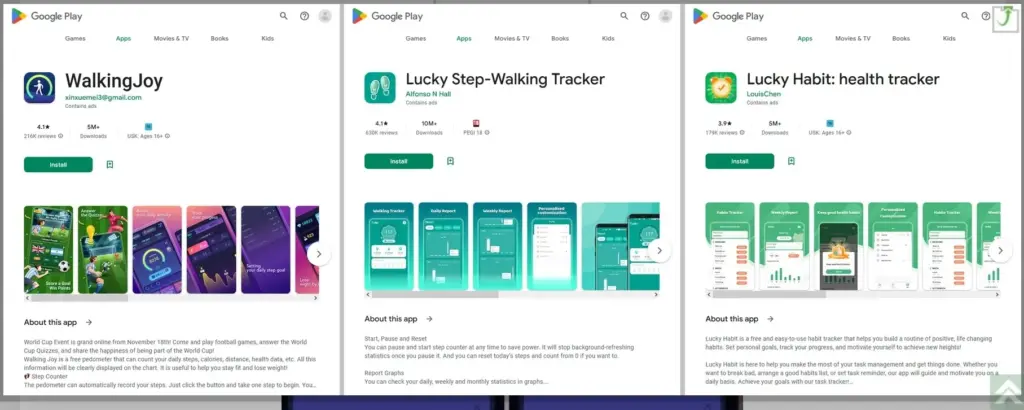
Around 20 million activity-tracking apps have been downloaded from the Google Play Store, according to software company Dr.Web (via BleepingComputer). What draws Android users to these three tracking applications so much? They advertise themselves as pedometers and health trackers that encourage you to exercise by promising to pay out cash rewards to those who meet specific targets.
They are still listed in the Google Play Store
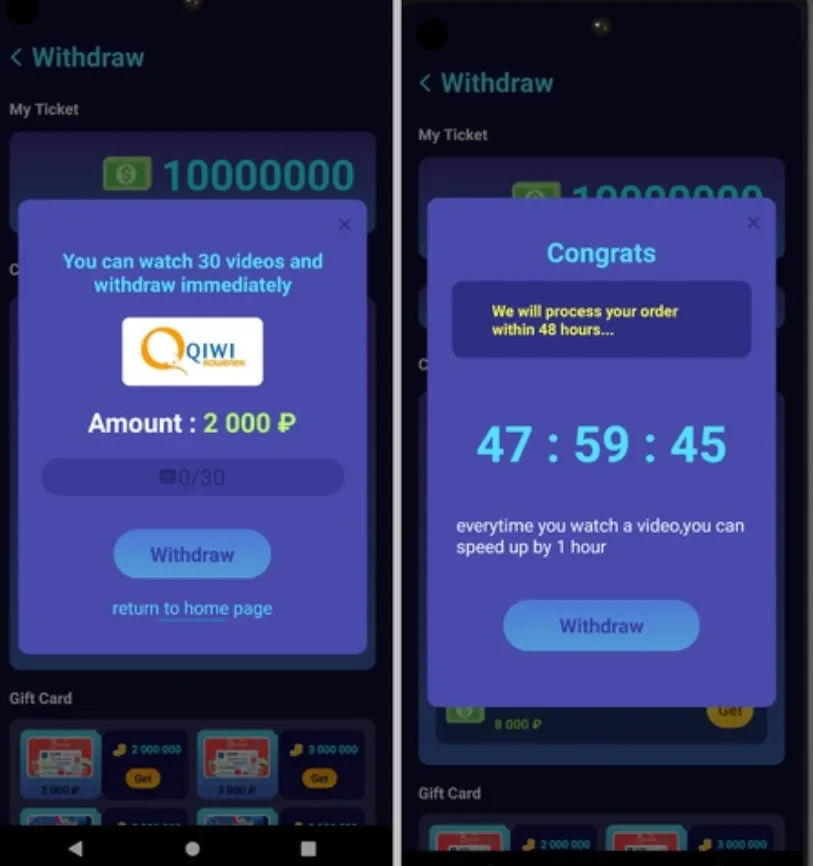
According to the study from Dr.Web, these prizes are frequently impossible to obtain because users must accrue a significant number of awards before being required to view a huge number of ads in order to cash out. Users were instructed to watch more advertisements after they had already seen all of them in order to “speed up” the rewards process. “The applications did not check any of the payment-related data submitted by users, therefore the chances of obtaining any of the money promised from these apps are extremely tiny,” the research claims, despite this.
Three apps mentioned in the report remain in the Google Play Store. They are:
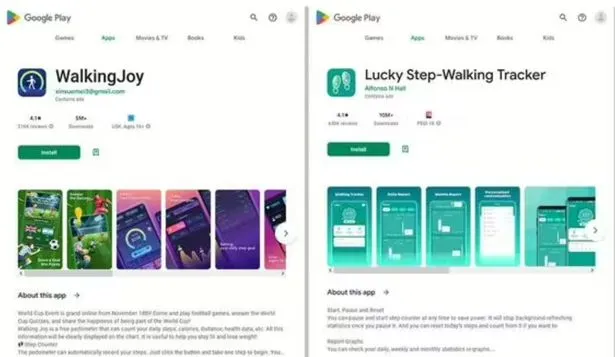
Lucky Step – Walking Tracker with 10 million downloads.
WalkingJoy with 5 million downloads.
Lucky Habit: health tracker with 5 million downloads.
All three apps connect with the same command & control server. Such servers are usually used by attackers to send directions to systems infected by malware. With all three apps communicating with the same remote server, it is apparent that they have the same developer. It is also pointed out that earlier versions of the Lucky Step-Walking Tracker falsely said that users had the option of converting their rewards into gift cards for various online stores.
Remember, these crooked developers make money when you view their ads. The more ads you watch, the more money they make.
The mechanism that would convert prizes into cash was eventually deleted from the Lucky Step-Walking Tracker app update, and the interface elements that would need to be tapped to complete this conversion vanished. The prizes that had been accumulated before were now useless.
One more malicious app that you need to avoid
A workout program called FitStar that generates a personalized weight-loss plan for 29 rubles was also highlighted in Dr. Web’s report (equivalent to 41 U.S. cents). Nevertheless, individuals who subscribed were unaware that the program they were enrolling in was only valid for one day. Following the trial period, users were automatically renewed for an additional four days of service at 980 rubles ($13.86). The program’s full access cost 7,000 rubles ($98.98), and users’ subscriptions were automatically renewed every four days.
This app is also still listed in the Google Play Store. Comments for this app note that if you install it, the icon doesn’t show up on your phone’s list of installed apps making it hard to uninstall. The same review also notes that “The app is trying from the start to get into either Facebook or Google data…”
Phishing games
In the same report, Dr. Web warned that phishing apps disguised as investment apps and games were found on Google Play, measuring over 450,000 downloads.
The apps connect to a remote server upon launch and receive a configuration instructing them on what to do. Typically, the instructions involve loading phishing pages that request users to enter sensitive details.
The malicious game apps observed by Dr. Web are the following:
Golden Hunt – 100,000 downloads
Reflector – 100,000 downloads
Seven Golden Wolf blackjack – 100,000 downloads (still on Google Play)
Unlimited Score – 50,000 downloads
Big Decisions – 50,000 downloads
Jewel Sea – 10,000 downloads
Lux Fruits Game – 10,000 downloads
Lucky Clover – 10,000 downloads
King Blitz – 5,000 downloads
Lucky Hammer – 1,000 downloads
If any of the aforementioned phishing apps are already installed on your Android device, you should uninstall them right once. After that, conduct an antivirus scan to find and get rid of any leftovers.
Google has been questioned regarding the security of the apps that are still available on the Play Store.
The Google Pixel family became some of the greatest Android phones for photography on the market for a number of years thanks to Google Camera and its post-processing algorithms, which clearly changed the game in terms of what we expect from smartphone cameras. That’s precisely why Google Camera ports for non-Google devices are so popular.
For practically every smartphone that supports the Camera2API, you may access Google’s improved HDR+ enhancement and its Portrait Mode by using the appropriate ported Google Camera software, also known by the community as simply “Gcam.” Google even released Google Camera Go, a condensed version of the Pixel’s Google Camera software that can be sideloaded on multiple devices without further tinkering. The “Go” version initially lacked the majority of the exciting features you’d find in the full-fledged app, but over the past few years, Google has been striving to add support for some of those cutting-edge capabilities.
Besides the Camera2 API, Google Camera also requires Google Play Services. The app will crash if you try to run it on a phone without Google Apps. You can, however, use MicroG or Gcam Services Provider to spoof Google’s proprietary libraries.
Download the most compatible APK file of the ported Google Camera from the next section and install it.
Either use one of the suggested versions for your device or pick one of the generic mods.
You may need to install additional XML configuration files.
Restart the app
List of devices that have known working Google Camera Ports
Devices from multiple OEMs having at least one functional Google Camera Port are listed below. We looked for the most reliable and well-liked versions. Although there may be “better” versions available, most users should be able to use the ports provided here. Please let us know in the comments area below if you believe that a device is missing or that a link needs to be updated.
Please take note that the gadgets below are displayed in name-alphabetical order. There’s a chance that some of the linked threads aren’t actually from the device forum. This is accurate because numerous ports function on a variety of devices. Simply said, we provided a link to a post where you could get the necessary APKs and configuration files.
How long have you been in love with your smartphone? The free apps of the week for this week are listed below if you feel the need to add a little more flair. We carefully examined the Google Play Store each week for apps that are free since you might wish to spice things up with your device.
These programs normally have a price, but for whatever reason, they are currently accessible to the general public for free for a brief period of time.
Every week, there will be two updates to this list of free apps: one at the start and one at the finish. The standard warning applies in this instance: although these apps were advertised as being free at the time of publication, by the time you read this post or use them, they may have changed to a paid version.
Since there is no set duration for the Google Play Store promotions on apps, they are difficult to spot and can be taken down from the list as quickly as they were added.
Temporary free Android apps on the Google Play Store
Android productivity/lifestyle apps that are temporarily free on the Google Play Store
Notes($5.49): Do you need yet another Notes app on your smartphone? Having more choices is always a good thing…
Rotation Control($0.99): Enjoy more flexibility when it comes to rotating your smartphone screen.
How Much Can I Spend?($2.99): A premium version of an app that helps you with your cash management. How apt.
Pro MP3 Player($1.19): A MP3 player that does not whip the llama’s ass…
500X Game Booster and GFX Pro($0.49): What are the odds of this actually working well, claiming to boost your smartphone’s performance.
Android mobile games that are temporarily free on the Google Play Store
Dungeon Shooter: Dark Temple($1.99): A FPS that lets you loot dungeons while ridding them of unsavory characters.
Paranormal Territory 2($0.99): Touted as a ‘test of courage’, this game aims to scare the crap out of you. Do you dare play it with the lights off while wearing a pair of headphones?
Dementia: Book of the Dead($0.49): An adventure game that explores the netherworld during medieval times.
A-2481($0.49): Another horror title where you try to uncover the horrors of military research.
World War 3 Tower Defense($0.99): This tower defense game peers into the future with unique weapons in the next world war.
Popular apps have been pulled from the Google Play store, and users of Android devices are being asked to do so right away.
Millions of users have downloaded the harmful apps, which pose as questionnaire, fitness, or gaming apps and lure users into accepting bogus incentives or clicking on links that take them to dubious websites.
The most recent apps that were banned offered prizes to users for remaining active by giving them points for walking and working out. However, when individuals attempted to pay out, they were either prevented from doing so or have to watch interminable commercials for no reason.
Cybersecurity experts at Dr.Web flagged these apps, some of which already had millions of downloads before being booted from the Play store.
As reported by the Express, the apps that have recently flagged by the IT cybersecurity firm are:
Lucky Step: Walking Tracker – 10 million downloads
WalkingJoy: walking tracker – 5 million downloads
Lucky Habit: health tracker – 5 million downloads
Despite being flagged for using the same tactics as the other two, Lucky Habit has not been removed from the app store at this time.
It comes after 10 more apps were also axed for the Google store, in this instance due to bad links that downloaded malware, or direct users to dodgy websites.
According to Dr.Web, these fake applications presented themselves as investing software, directories, questionnaires and addictive games. They are as follows:
Golden Hunt – 100K downloads
Reflector – 100K downloads
Seven Golden Wolf blackjack – 100K downloads
Unlimited Score – 50K downloads
Big Decisions – 50K downloads
Jewel Sea – 10K downloads
Lux Fruits Game – 10K downloads
Lucky Clover – 10K downloads
King Blitz – 5K downloads
Lucky Hammer – 1Kdownloads
All of these apps have already been removed from the Play Store, but if you have one of them on your device it should be deleted right away.
According to Dr.Web for Android’s detection statistics, the activity of spyware, trojans, and adware surged in December 2022.
Hundreds of bogus apps and trojans that sign their victims up for premium services were among the several new risks they discovered at the same time on Google Play.
One of the most widely used messaging services is Facebook Messenger, but its parent company, Meta, has a spotty history of protecting users’ interests. The social media behemoth has recently been the target of multiple security breaches and is infamously linked to the Cambridge Analytica affair. The fact that a former data scientist for the firm believes Messenger can intentionally drain your smartphone’s battery in the sake of feature testing, potentially placing you in danger, is concerning because it shows that user interests continue to be Meta’s secondary concern.
Data scientist George Hayward, 33, filed a lawsuit against his former employer in Manhattan Federal Court after being fired in November, terminating his three-year employment with Meta (via Android Authority). According to Hayward’s lawsuit, the business let him go because he refused to participate in negative testing, which is the technique of deliberately supplying false data to an app to ensure that it will work when users use it inappropriately.
Hayward disagreed with negative testing, but not because of the method Meta used to conduct it. The battery life of a Messenger user’s phone would suffer when the business remotely initiated negative testing on that user’s device. The majority of people keep a close eye on their phone’s battery level throughout the day, but in the event of an extreme depletion, they can find themselves in a situation where they are unable to contact family or emergency services.
According to Hayward, who spoke with the New York Post, the true risk comes from users not being aware of Meta’s negative testing procedures. But that’s not all; according to reports, Meta also gives staff members manuals on how to conduct considerate negative tests that use examples from actual research. This appears to suggest that Meta runs these tests frequently and would perhaps assign larger teams to the job. Sadly, Hayward continues, discussing the appropriateness of the procedures with superiors didn’t go over well; he hinted that refusing to submit to the tests would result in his termination.
Hayward made certain claims, but Meta hasn’t responded to them. The lawsuit has subsequently been dropped. If the required arbitration attempts between the two parties are failed, it may go on.
If you’re worried about Messenger’s negative testing in the interim, you can go to its Program Info page on your Android phone, pick “Battery,” and then select “Restricted,” to stop the app from operating in the background. However, be aware that this could cause delayed message alerts. Reviewing the privacy settings on your phone and looking for more battery-saving techniques may be a preferable course of action.
Almost all Samsung Galaxy smartphones come with Samsung Knox pre-installed, and it serves as a security solution for device owners to make sure that both their smartphones and their data are protected. It goes beyond what TrustZone, a Trusted Execution Environment (TEE) that Samsung uses on its smartphones, previously provided by combining hardware-backed security with software. On more recent Samsung flagship smartphones, Knox Vault is an option that runs completely independently of the main processor.
Like TrustZone, Knox Vault safeguards your biometrics, cryptographic keys, and passwords. The distinction is that Android asks a TrustZone applet to validate the fingerprint or password on your behalf when you unlock your phone, even though TrustZone runs in parallel with Android on the same core application processor. Your biometric data and passwords cannot be stolen, even if your Android installation has been compromised. Knox Vault goes a step farther and serves as a beefed-up substitute for TrustZone.
TrustZone vs Knox Vault, difference?
On the SoC, a TEE is a secure area that manages sensitive data. Any modern smartphone has TEE because it is required for devices launched with Android 8 Oreo and higher. Anything outside of the TEE is regarded as “untrusted” and is limited to viewing encrypted content. For instance, content that is DRM-protected is encrypted using keys that are only accessible by software operating on the TEE. The content can be decrypted by the TEE and then shown to the user, while the main CPU can only see a stream of the encrypted content. Another TEE is Knox Vault.
In the case of Knox Vault, Samsung says that it “extends” upon the protection offered by TrustZone. Knox Vault is a replacement for TrustZone according to Samsung, and the company describes the difference in the following way in a blog post:
The way I think of it, TrustZone was a great safe in the middle of your bank’s branch office. There are a lot of people you don’t necessarily trust walking by the safe, doing day-to-day work that doesn’t require physical access to the safe. The secure processor in Samsung Knox Vault is more like Fort Knox: a safe securely placed far away from the bank, isolated from whoever walks into the branch.
How Samsung’s Knox Vault works
Knox Vault extends the security that TrustZone already offers, and Samsung phones from the Galaxy S21 and above have it. Knox Vault can:
Store sensitive data such as hardware-backed Android Keystore keys, the Samsung Attestation Key (SAK), biometric data, and blockchain credentials.
Run security-critical code that authenticates users with increasing timeouts between failures and controls access to keys depending on authentication.
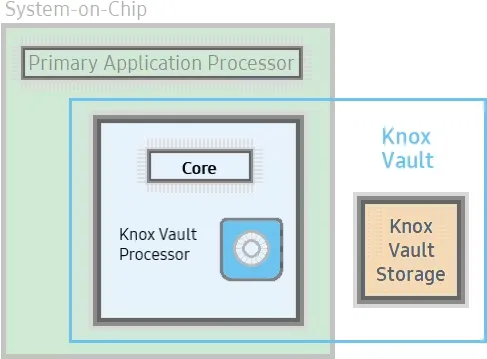
Knox Vault isn’t just a software isolation, it’s a physical isolation from the chipset on your smartphone. It’s an independent processor on the SoC with storage physically separate from the rest of the SoC. Because of this physical isolation, Knox Vault is even protected from side-channel attacks that target other software running on the primary processor.
Knox Vault’s architecture
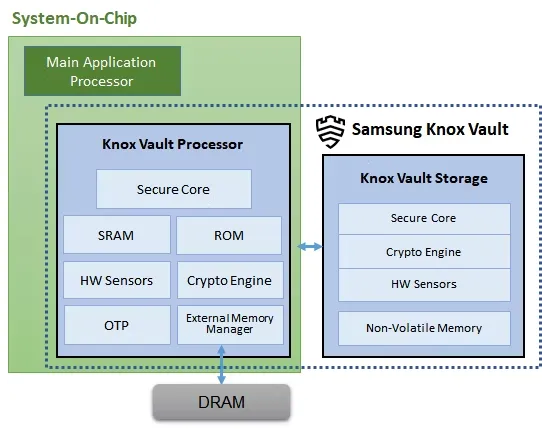
Knox Vault is made up of the following:
Knox Vault Subsystem: implemented as part of the SoC
Knox Vault Storage: an integrated circuit physically outside the SoC
How Knox Vault protects itself from attacks
If someone has physical access to your device, you should act and prepare as if it’s only a matter of time before they gain access to the protected data stored on it. Samsung says that with Knox Vault, that may not necessarily be the case. It’s resistant to hardware attacks such as the following:
Physical probing to disclose data
Physical manipulation of the circuitry to deactivate security mechanisms
Forced information leakage
Hardware side-channel attacks such as differential power analysis to disclose data
Fault injection to bypass security mechanisms.
As well, the Knox Vault Processor communicates with Knox Vault Storage via a dedicated I2C (Inter-Integrated Circuit) bus. Traffic on this bus is encrypted and transmitted with an authentication code to prevent eavesdropping on communications, and those communications are also protected against replay attacks.
Knox Vault Subsystem
It is intended for the Knox Vault Subsystem to function independently of other SoC components. The Knox Vault Processor, SRAM, and ROM make up its own safe processing environment. Additionally, it offers improved security and data protection from a variety of hardware-based threats by monitoring the environment and hardware state using a number of security sensors or detectors, such as:
High and low temperature detectors
High and low supply voltage detectors
Supply voltage glitch detector
Laser detector
When the Knox Vault Processor starts, the ROM code is loaded into SRAM. While the ROM code loads the Knox Vault Processor firmware, with the help of the modules running on the SoC’s main processor. The software stack of the Knox Vault Processor has its own secure boot chain.
The Knox Vault Subsystem also includes a dedicated random number generator and its own Crypto Engine. The Knox Vault Processor can access system DRAM through the External Memory Manager. This monitoring cannot be affected or bypassed by any application on the Knox Vault Processor, and physical intrusion will initiate a device lockdown sequence.
The crypto engine provides the following cryptographic functions:
AES encryption/decryption
DRBG random number generation
SHA hashing
HMAC keyed-hashing for message authentication code
RSA and ECC key generation and services
Knox Vault Storage
The Knox Vault Storage is a dedicated non-volatile memory device that stores sensitive data such as the following:
Cryptographic keys such as Blockchain keys and Device keys
Biometric data
Hashed authentication credentials
Just like the Knox Vault Processor, the storage is also safeguarded against physical and side-channel attacks. It has a secure core to do the following:
Execute the ROM code
Provide cryptographic operations for public key algorithms (RSA, ECC) and SHA algorithm with software libraries
Safely store data in dedicated SRAM and ROM
Samsung phones that support Knox Vault
Certain Samsung Galaxy tablets and smartphones, including the Samsung Galaxy S21 and later models in both the S series and the Fold series, feature Knox vault. Particularly for users who may rely on their smartphones for sensitive data storage or other enterprise usage, the level of security offered is intended to give you entire trust in your smartphone’s ability to house personal data.
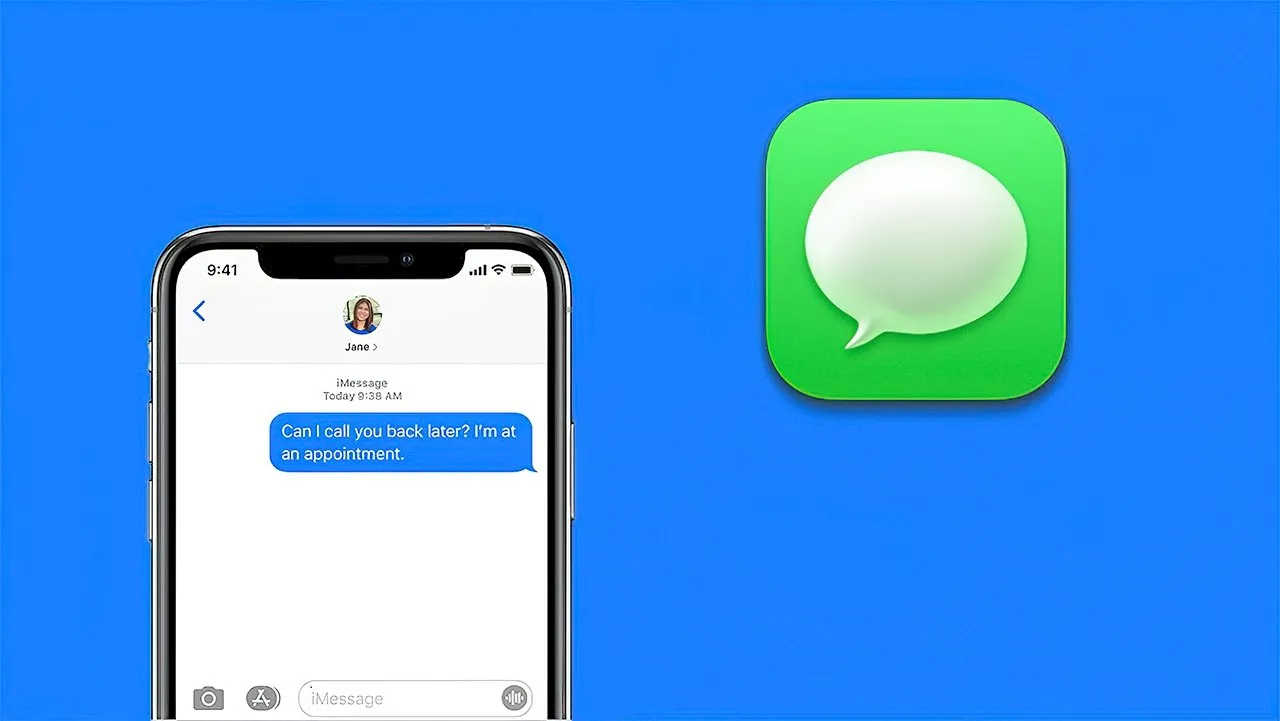
iMessage has long been the primary distinction between iPhone and Android users (well, here in the US anyway). It’s created a massive rift between the two platforms because iPhone users have their own exclusive space to hang out where Android users are at best annoying and at worst downright prohibited.
Many businesses have made an effort to address this issue. Despite its wealth and influence, Google has chosen to publicly mock the entire issue and urge Apple to implement RCS. By charging customers to link an Android handset with a real Apple device, like a Mac or even an iPhone, Beeper provides iMessage to Android.
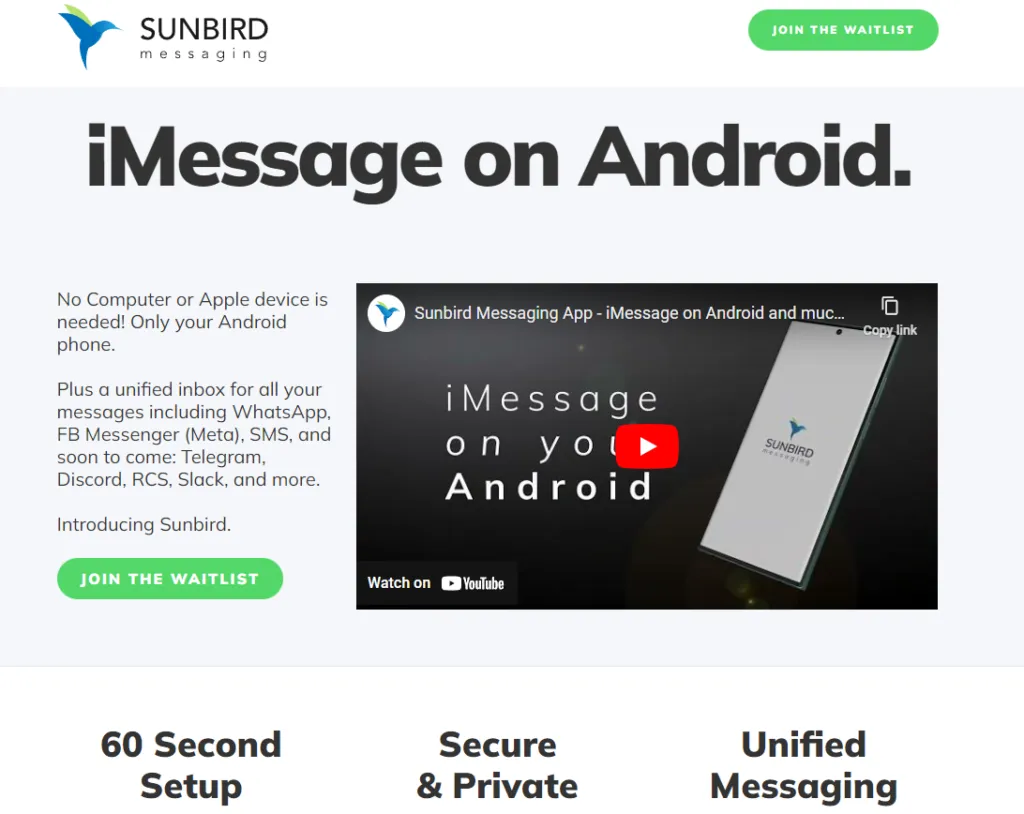
Sunbird, though, is looking to be the one true app to rule them all. Today, the company gave Android Authority a rundown of the app (which is still in alpha) and how it works.
Sunbird: iMessage on Android
A pre-recorded screencast showing a Samsung phone interacting with what appears to be an iPhone via iMessage was displayed during the company’s presentation. Blue bubbles, Emoji replies, typing indicators, etc. were all present. It appeared as though the Samsung phone was an iPhone in all respects.
But the business never displayed what the iPhone saw. The fact that it was a pre-recorded film just added to our natural skepticism. We eventually received early access to the Sunbird app from the company so that we could test it out for ourselves.
The good news is that Sunbird and my Apple ID might be linked. I was able to hypothetically connect the two by logging into Apple via the Sunbird app. My subsequent attempts to send iMessages were unsuccessful. Whether it was text, a picture, or a vCard, my messages were simply never delivered to my intended receivers.
Sunbird and I tried to troubleshoot together, but we were unsuccessful. If we are successful in getting it running in the future, we will let you know.\
Does it work and what will it cost?
Sunbird has no intention of making its iMessage-to-Android technology open-source. Therefore, we were not given a thorough explanation of how this program functions (or at least should work).
However, based on what the business did state, it appears like it has expanded on the Beeper approach, which involves connecting an Android phone to an Apple-based system. The first is that each user does not require their own connected gear. Sunbird has developed a method that enables tens of thousands of users to connect to a single computer. Second, the company has also discovered a way to maintain end-to-end encryption using this technique, something Beeper and similar companies are unable to do. Once more, Sunbird withheld its method of operation.
Thankfully, if and when it does work and launches to the public, Sunbird says the app will be free — for a while. Early birds will get access to iMessage on Android and not have to pay a dime. In the future, the company could monetize the app by charging for other connected services, such as Telegram, Signal, or other chat apps.
In the meantime, we’ll continue working with Sunbird to get the app up and running on our own devices.
Don’t worry if you and your friends can’t decide whether iOS or Android is better for mobile gaming. Actually, there’s no need to pick one over the other since both operating systems support cross-platform gaming.
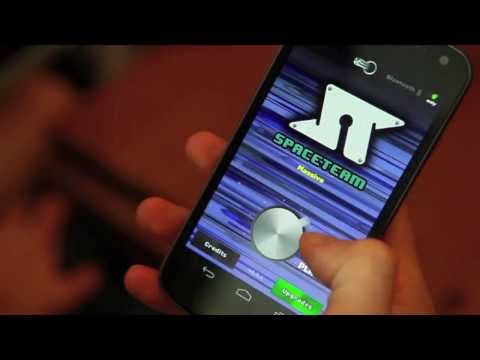
Spaceteam
The only game on this list that necessitates having all of your buddies in one location is Spaceteam.
You and your friends are the crew of a spaceship in the game Spaceteam, and everything is going wrong. You’ll need to communicate with one another by shouting various fictitious space commands in order to stay on course. As the speed and chaos increase, you all inevitably crash and perish while still receiving posthumous medals. But while it lasts, it’s enjoyable.
Download: Spaceteam for iOS | Android (Free, in-app purchases available)
The highly regarded Words With Friends sequel is more of an update.
There is also the standard Words With Friends experience, where you and a friend or online stranger take turns trying to score points on a board by spelling out words in the Scrabble style.
Words With Friends 2 does, however, add a few new modes for a different challenge while retaining everything you loved about the original game.
In the Lightning Round, two teams of five compete to determine who can reach a given score in the shortest amount of time. You can compete in Solo Challenge to compete against testing bots and win a virtual prize. Finally, Words With Friends Live interrupts your game with HQ Trivia-style questions.
Download: Words With Friends 2 for iOS | Android (Free, in-app purchases available)
Vainglory
Vainglory is a MOBA (Multiplayer Online Battle Arena) that is comparable to League of Legends and allows you to team up in 5v5 or 3v3 modes against real players or computer opponents.
To compete against another team and destroy their Vain crystal before they destroy yours, pick a hero from the more than 40 available. Destroy enemy turrets and minions as you move through the jungle using your special abilities and your team’s cooperation.
Teamfight Tactics
The auto chess game from Riot Games offers a competitive experience with well-known League of Legends heroes. With the goal of assembling the best squad, you draft and play champions.
Play normal or ranked matches with your friends while you discover the greatest item combinations and synergies thanks to complete cross-platform support. It’s also among the top PC games for multiplayer PvP!
The mobile version of Minecraft, which was first known as the Pocket Edition, is nearly identical to the PC version. The inability to use third-party servers or connect to third-party modifications is the only notable difference. Every time a new update for Minecraft is released, the mobile versions often follow later.
Having saying that, playing Minecraft on a mobile device is a great experience.
But playing Minecraft by yourself is boring. Any platform can play Minecraft, and because it is cross-platform compatible, you can play with your pals. Try out these tranquil gaming apps to help lower feelings of anxiety and stress if Minecraft doesn’t satisfy your need for exploration or provide enough space for calming world-building.
While playing trading card games in person is enjoyable, playing them online allows you to do actions like summoning demons and detonating booster packs.
The strategy game Hearthstone, created by Blizzard and set in the Warcraft universe, allows you to design decks, gather cards, and play matches with your friends. Although the game is free to play, you can purchase new card packs to offer yourself a benefit.
There are constantly reasons to play Hearthstone because of the game’s recurring expansions, competitions, and challenges. To raise your Rank, you can compete against strangers or your friends in the Arena.
Download: Hearthstone for iOS | Android (Free, in-app purchases available)
Pokémon Go
When it first came out, Pokémon Go broke the barrier between gaming and augmented reality by bringing virtual creatures into the real world. You and your buddies can go outside and explore with your smartphones, whether they are Android or iOS.
Download: Pokémon Go for iOS | Android (Free, in-app purchases available)
PUBG Mobile
The most well-known battle royale game in the world is playable on pretty about every platform imaginable, including iOS and Android.
Although Fortnite’s mobile app also satisfies this need, playing the game on Android and iOS calls for further procedures to enable cross-platform teaming. In contrast, PUBG Mobile provides an easy download for both Android and iOS smartphones. But PUBG Mobile unquestionably delivers this if you’re searching for an equally capable, event-ready rival.
Additionally, it’s one of the simpler phone games to play with your pals online because to its normal match times of around thirty minutes.
Download: PUBG Mobile for iOS | Android (Free, in-app purchases available)
Super Stickman Golf 3
Enjoy a short nine holes of golf before lunch with this easy-to-play but entertaining game.
Stickman Golf features two distinct multiplayer modes in addition to a fun Single Player option. In the Turn-Based mode, you can either take turns or compete to see who can play each hole the fastest in Race Mode. You can play offline or online as well.
Super Stickman Golf 3 can be downloaded from the developer’s APK file rather than straight from the Google Play store. Check out our description of what an APK file is and does if you’re not familiar.
Download: Super Stickman Golf 3 for iOS | Android – APK File (Free, in-app purchases available)
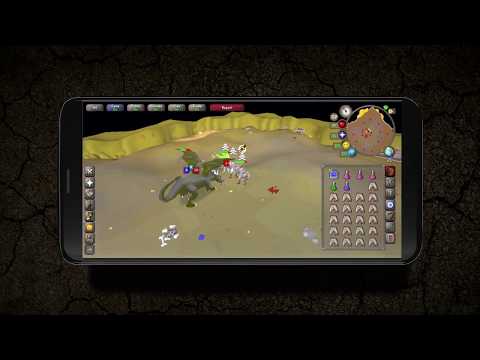
Old School RuneScape
Are you prepared to share your nostalgia with friends? Many players will have warm memories of RuneScape because it was one of the first widely available MMORPGs. You may continue your travels with all of your buddies in true crossplay fashion, whether you’re ready to mine, mine, or battle.
Download: Old School RuneScape for iOS | Android (Free, in-app purchases available)
League of Legends: Wild Rift
If you’re a fan of Riot Games’ League of Legends series, you couldn’t previously play with friends on a mobile device on the Rift. Despite the fact that League of Legends: Wild Rift does not support crossplay with PC players, Android and iOS users can queue up in pairs, trios, or a full five-person party as you aim for the enemy’s nexus. Now that Riot’s MOBA has launched on mobile devices, you can play a complete phone game with your friends.
Download: League of Legends: Wild Rift for iOS | Android (Free, in-app purchases available)
More games
So there you have it, a list of the top mobile cross-platform multiplayer games. With these tried-and-true games, you may download one that you and your friends can enjoy for a very long time. So, it’s just a quick install away if you want more entertaining mobile games to play with friends.
The “App Tracking Protection” feature of DuckDuckGo for Android has entered open beta and now enables all Android users to prevent third-party trackers across all of their installed apps.
The DuckDuckGo for Android app is a privacy-focused web browser, search engine, and data protection utility, downloaded over 10 million times from Google Play. It includes numerous privacy features, including search term anonymity, hidden tracker blocking, email tracker protection, auto-HTTPS, and one-tap browsing history clearing.
By preventing third-party tracking scripts in other Android apps that have been installed on the device, the “App Tracking Protection” attempts to increase privacy throughout the entire operating system.
‘It’s a free feature in the DuckDuckGo Android app that helps block 3rd party trackers in the apps on your phone (like Google spying in your weather app),’ stated DuckDuckGo today. ‘This means more comprehensive privacy and less invasive targeting.
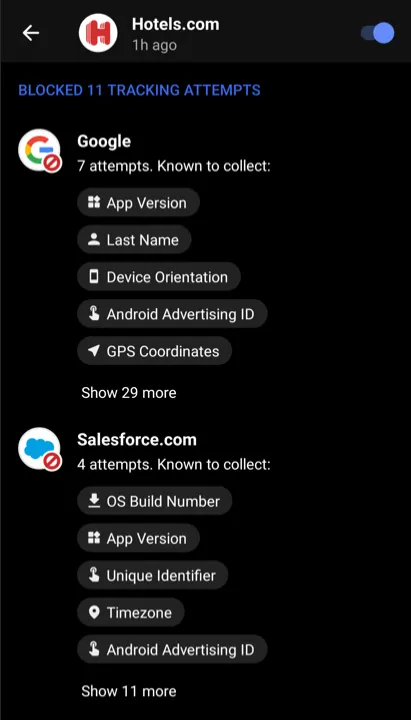
The new version of App Tracking Protection allows Android users to see precisely which trackers are blocked and what kind of data they are seeking, in contrast to the prior close beta version of the service.
The feature is somewhat similar to Apple’s ‘App Tracking Transparency,’ but unlike the Apple feature, DuckDuckGo’s system does not depend on the app developers’ compliance with user choice.
Blocking all known trackers
According to DuckDuckGo, Android users have 35 apps installed on their smartphones on average, which results in 1,000–2,000 daily tracking attempts for more than 70 tracking organizations.
While consumers frequently use their devices to browse the web, play games, or check the weather, the App Tracking Protection guarantees to thwart all these attempts in the background.
Additionally, this blocking occurs with no discernible impact on device performance, which was enhanced in the most recent version of the app.
The blocking is based on a constantly updated and growing list of known trackers and is independent of the user’s choice in the associated tracking request dialogs usually served within apps.
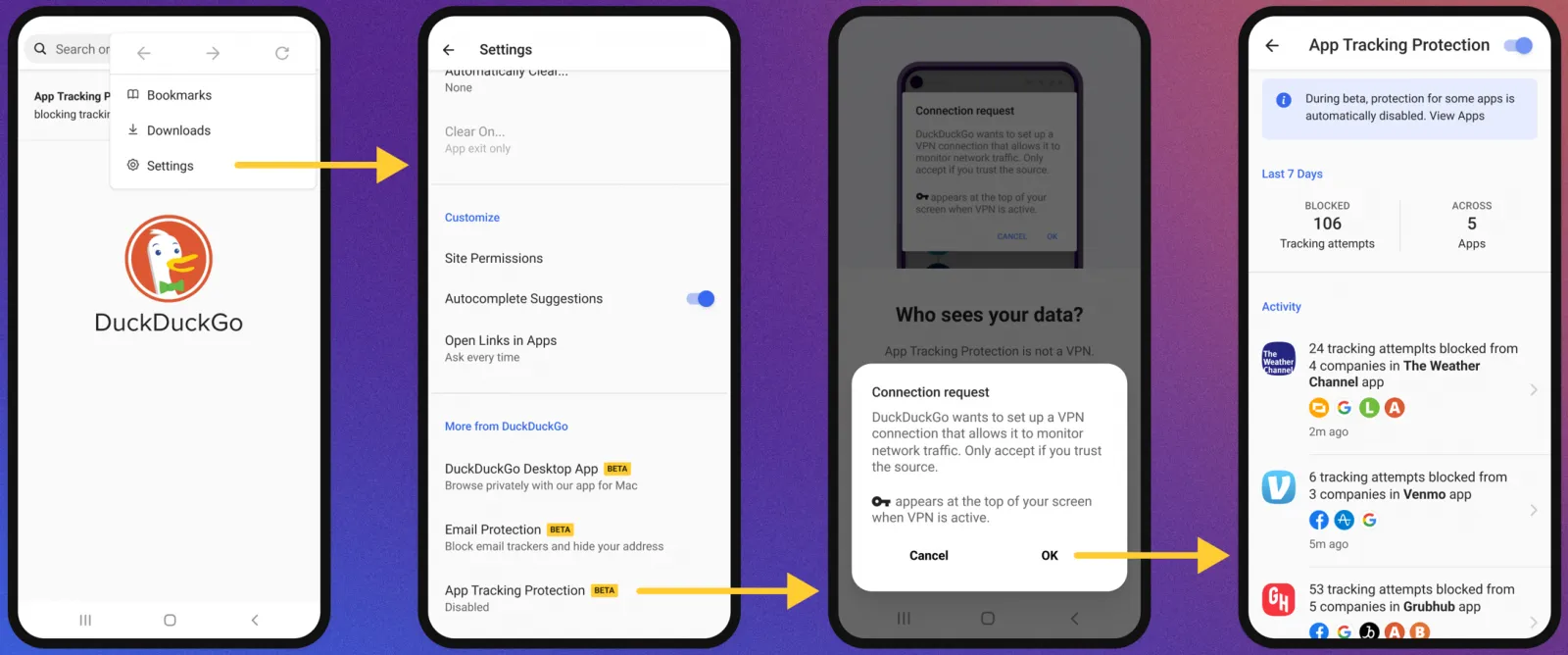
To activate the new feature, the user has to open the DuckDuckGo app on Android, navigate to Settings → More from DuckDuckGo, and then enable App Tracking Protection, as shown below.
Activating App Tracking Protection
The function operates by setting up the DuckDuckGo for Android app on the device as a VPN, enabling the app to filter app traffic and block trackers.
However, unlike a conventional VPN, this is only used locally and does not offer anonymity when using the internet or connecting to other remote devices.
“App Tracking Protection uses a local “VPN connection,” which means that it works its magic right on your smartphone and without sending app data to DuckDuckGo or other remote servers,” explains DuckDuckGo.
Therefore, to enable the feature, DuckDuckGo will request the user allow the VPN connection to be created, which is required for the blocker to function as expected.
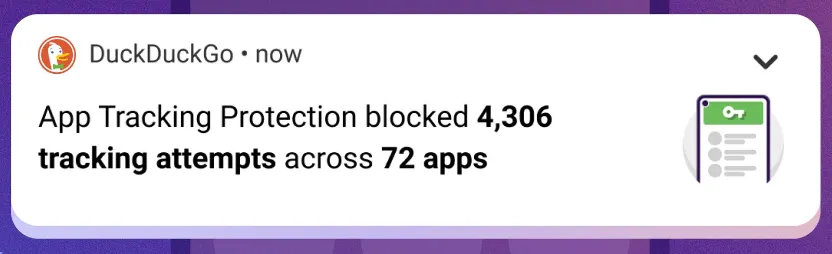
From then on, the app will regularly update the user with automatically generated summaries of blocked app trackers to give them an idea of what is happening behind the scenes.
Those who want to evaluate how threatening each app is to their privacy can use App Tracking Protection’s real-time view to see what trackers are loaded and blocked.
Although App Tracking Protection is a strong tool, users should be aware that it is still in the beta testing phase of development.
As a result, it could result in performance issues, incorrect operation of websites or apps, or the evasion of some trackers. You can turn off the feature if you experience any of these problems.