Category: Apps

Explore the latest mobile apps for productivity, entertainment and tools that fit your daily routine and Android‑centric lifestyle.

  • Free apps for Android, these Pro versions are currently free

    Free apps for Android, these Pro versions are currently free

    Every week, Droid Tools provides you with a selection of excellent deals for Android games and applications that are often purchased but are currently on sale for free on Google Play Store.

    This list of free apps is updated weekly with at least two weekly editions, on Tuesday and Saturday. Between the publication and the moment you consult this article, it is possible that some applications have become paid again. Google Play Store promos on apps are fairly easy to predict, but it’s more complicated with App Store promos since Apple doesn’t specify how long the discount is valid.

    Quick tip: When you find an interesting app, but you can’t really use it yet, install the app anyway, then delete it from your device. This way, the app will become part of your app library and you can install it again for free when you need it. It’s a good way not to miss a short-lived promotion.
    google play apps free

    Temporarily free Android apps on the Google Play Store

    Android productivity/lifestyle apps temporarily free on the Google Play Store

    • Task Destroyer ($1.99): Create tasks by entering the title (or image), health, color-coding, size and type of task. You can then place them anywhere in the space to better organize your to-do list.
    • Los tiempos verbales en inglés ($1.19): A useful tool when learning Spanish or English, using this application you will be able to learn all the active and passive tenses of English with useful tables in English, translations in Russian and Spanish and with zero advertising.
    • Ringtone Scheduler ($.69): Ringtone scheduler allows you to change your ringtone automatically depending on the time and your mood. It also has a nice explorer that helps you quickly create lists of ringtones.
    • Quick Volume Control ($.79 ): A simple tool that allows you to control volume via the notification bar.
    • Memorize: Learn TOEFL Vocabulary ($4.99): Same as the previous one, this application allows you to learn and memorize TOEFL vocabulary.
    • Number to word converter offline ($.69): Have you ever needed to convert numbers into English words, i.e. “929” into “nine hundred and twenty-nine”? This application was designed for that.

    Android mobile games temporarily free on the Google Play Store

    • Dead Bunker 2 HD ($.59): A 3D shooting game in which you have to fight zombies.
    • Kamikazee Dice Score Card ($1,19): A strange dice game.
    • Coin Princess ($.99)A game with a retro look and sound where your goal is to help the kidnapped princess escape from the monsters.
    • Everybody’s RPG ($.99): PvP and single player battles in a traditional 16-bit style RPG.
    • Live or Die: Survival Pro ($1.19): Dive into the heart of this apocalyptic world, complete quests and get fantastic rewards.
    • Pirate Defender Premium ($.59): A tower defense game where you play as a pirate captain and must defend your ship from waves of other… pirates.
  • Download latest GCam port for your device

    Download latest GCam port for your device

    The software power in image and video processing is one of Google and its products’ most intriguing potentials. The ports of the Google Camera are therefore much sought after by other Android smartphone manufacturers. In actuality, a lot of customers like installing and utilizing the Google Camera ports over the Stock Camera applications developed by other manufacturers.

    Google Camera (Gcam), often known as Pixel Camera, is an Android camera phone application. It is evident that GCAM creates images that are more faithful to the source and have a wider dynamic range than the typical camera. It is renowned primarily for its incredible features that enable users to generate “Photo Spheres,” 360-degree panorama photos, etc.

    gcam google camera port

    How to download GCam 8.5.3 on your device

    The latest version of the GCam, 8.5.300, is available thanks to the developer BSG one of the most active since the beginning in the attempts to make the software available for non-Pixel devices; given that you meet the aforementioned requirements. In reality, for the attempted series it does not harm, the application could be functional even with devices equipped with previous Android versions.

    You only need two requirements: run Android 10 or higher and have the Camera2 API. The main requirement for using the mod is that the device supports the Camera2 API. You can check this using a special application.

    Download GCam 8.5.300 APK

    Disclaimer: This application provided by BSG. If the application is not installed on your mobile or there is any problem with your mobile being installed then we will not be responsible for it. [Install own your risk]

    Changelog:

    • First release 8.5.300
    • General settings are added: “Interface”, “Hardware Level”, “Activate HDRNET”, google AWB and DEV settings.
    • Added settings divided into modules: “model”, “preview format”.

    If you meet both requirements, you have almost everything done. Installing the GCam 8.5.3 is something extremely easy that you can do in a few steps:

    1. Enter the BSG repository and click on ‘Download
    2. Once the APK has been downloaded, you can install it.
    3. Open the GCam app installed on your smartphone and you’re done

    The process is as simple as downloading the APK and installing it. You shouldn’t do anything else. Of course, depending on the device you have, you will be able to access some functions or others of the GCam. Not all sections are compatible with all smartphones.

  • 42 Chinese Spying Android Apps

    42 Chinese Spying Android Apps

    Android Apps

    The Intelligence Bureau (IB), India’s domestic spy agency, issued a warning to soldiers not to use certain Chinese eavesdropping Android apps as a matter of national security.

    42 Chinese Android apps, including some well-known ones like We Chat, True Caller, UC Browser, and UC News, have been listed by the IB as purportedly gathering crucial data about the Indian security installations.

    According to the report, the Intelligence Bureau in a November 24th advisory directed the soldiers assigned on Line of Actual Control (LAC) to uninstall these Chinese spying Android apps from their smartphones and also format the device after uninstallation as it may compromise national security.

    Chinese Spying Android Apps:

    1. Weibo
    2. WeChat
    3. ShareIt
    4. TrueCaller
    5. UC News
    6. UC Browser
    7. BeautyPlus
    8. NewsDog
    9. Viva Video – QU Video Inc.
    10. Parallel Space
    11. Apus Browser
    12. Perfect Corp
    13. Virus Cleaner – Hi Security Lab
    14. CM Browser
    15. Mi Community
    16. Mi Store
    17. Mi Video call
    18. Vault Hide – NQ Mobile Security
    19. YouCam Makeup
    20. CacheCleaner – DU Apps Studio
    21. DU Recorder
    22. DU Battery Saver
    23. DU Cleaner
    24. DU Privacy
    25. DU Browser
    26. 360 Security
    27. Clean Master – Cheetah Mobile
    28. Baidu Translate
    29. Baidu Map
    30. Wonder Camera – Baidu Inc
    31. ES File Explorer
    32. Photo Wonder
    33. QQ International
    34. QQ Music
    35. QQ Mail
    36. QQ Player
    37. QQ Newsfeed
    38. QQ Launcher
    39. QQ Security Center
    40. WeSync
    41. Selfie City
    42. Mail Master

    However, China has a history of snooping on people using Android apps. Many complaints were made in the past concerning UC Browser’s dubious methods for gathering user data and sending it back to China. Now that the issue has received considerable attention, the administration has advised the troops to delete these risky apps in order to prevent eavesdropping by Chinese eyes.

    Just keep in mind that by using these apps, you might unwittingly turn against your country because you never know what information these terrible Chinese espionage applications are sending to China.

  • Telegram Premium – coming in June 2022

    Telegram Premium – coming in June 2022

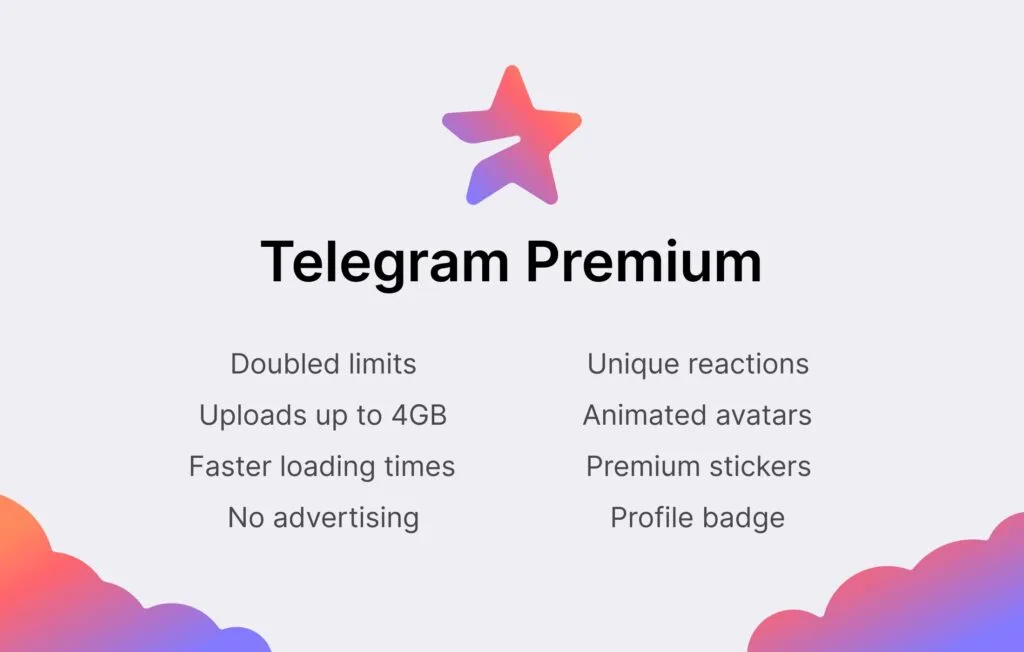
    Telegram‘s founder Pavel Durov has disclosed that the company plans to add a premium membership service to its already remarkable feature set.

    Telegram is a popular chat app that prioritizes privacy and security. It competes with WhatsApp and Signal in the same market, but it stands out for the sheer variety of functions it offers and its generous usage restrictions. According to Durov, the corporation intends to increase its capabilities and limitations even more, but at a cost.

    telegram premium

    The most difficult part of adding new services and increasing use limits, according to Durov, is figuring out how to do so without driving up infrastructure costs. With a paid subscription service, the revenues collected will assist the company cover its costs while also limiting the demand for enhanced usage restrictions to only those consumers who are ready to pay for the premium service.

    The app’s existing functions will stay free, and the business expects to continue adding new capabilities to the free service, which is good news for customers. Some of the work that goes into the subscription edition will help all users.

    Moreover, even users who don’t subscribe to Telegram Premium will be able to enjoy some of its benefits: for example, they will be able to view extra-large documents, media, and stickers sent by Premium users, or tap to add Premium reactions already pinned to a message to react in the same way” Durov explains.

    Durov says Telegram Premium will arrive in June 2022. Pricing was not divulged.

  • Google Camera (GCam) Mod for all Devices [v8.4.6]

    Google Camera (GCam) Mod for all Devices [v8.4.6]

    google camera app

    Download Google Camera (GCam) Mod For All Android Smartphones [v8.4.6] – Google Camera (Gcam), also called Pixel Camera, is a camera phone application developed by Google for Android. In comparison with the normal camera, it becomes clear that GCAM produces pictures that are true to the source and has a better dynamic range. It is chiefly known for its awesome features that allow the user to create a ‘Photo Sphere’, a 360-degree panorama photo, etc.

    Today we have very good news: the GCam version 8.4.6 is now available with a MOD compatible with a large part of Android phones. We’ll tell you everything you need to know and how to install it!

    You only need two requirements: run Android 10 or higher and have the Camera2 API. The main requirement for using the mod is that the device supports the Camera2 API. You can check this using a special application.

    If you meet both requirements, you have almost everything done. Installing the GCam 8.4.6 is something extremely easy that you can do in a few steps:

    1. Enter the BSG repository and click on ‘Download
    2. Once the APK has been downloaded, you can install it.
    3. Open the GCam app installed on your smartphone and you’re done

    The process is as simple as downloading the APK and installing it. You shouldn’t do anything else. Of course, depending on the device you have, you will be able to access some functions or others of the GCam. Not all sections are compatible with all smartphones.

  • Updated setting tabs for Youtube Music

    Updated setting tabs for Youtube Music

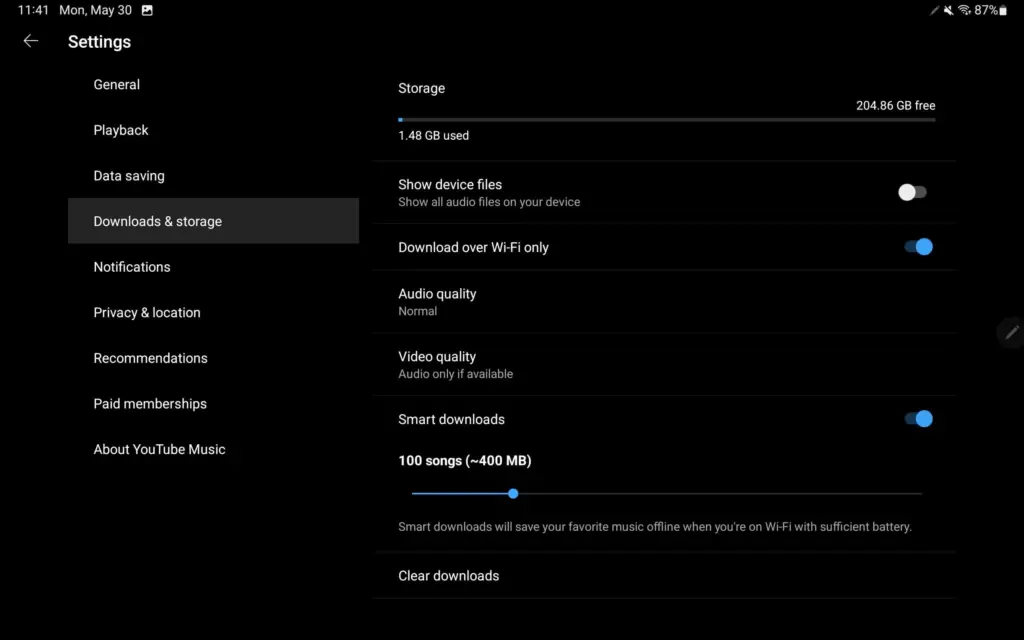
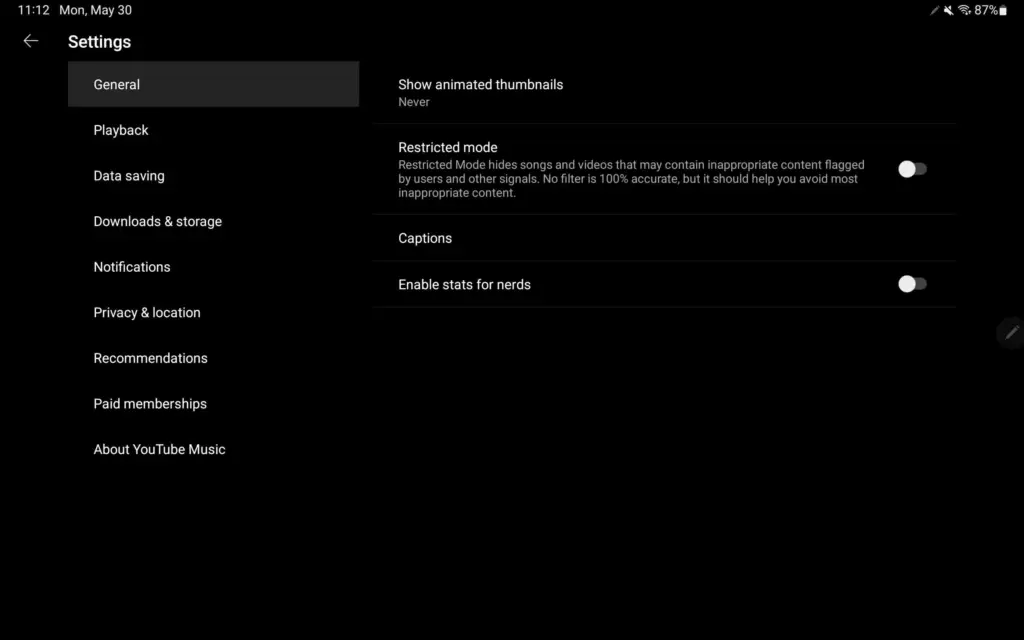
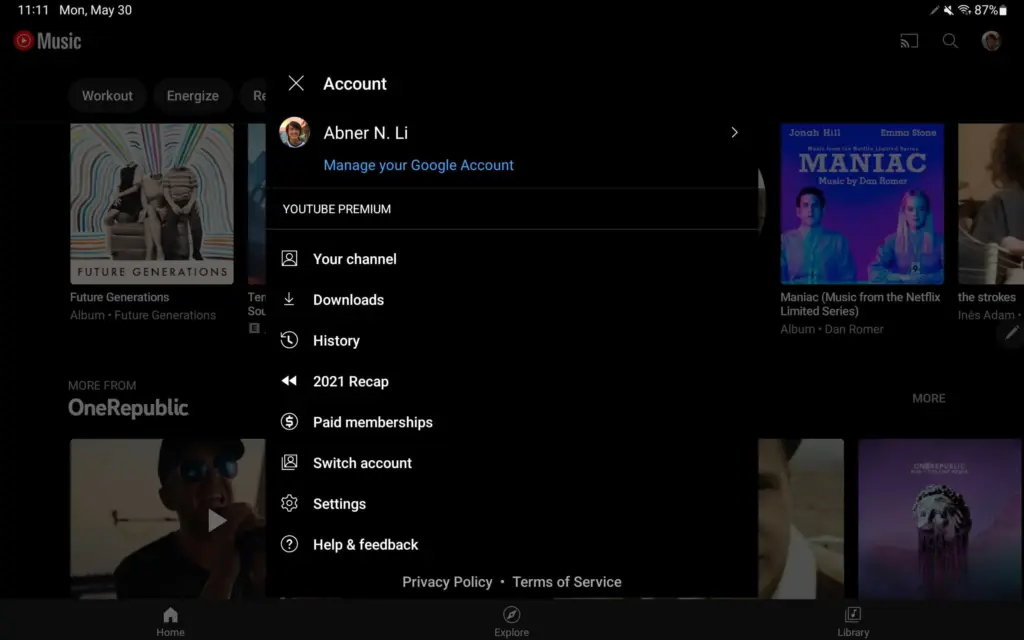
    YouTube Music upgraded its Home feed for tablets at the start of this year, promising additional UI improvements, particularly for playlists. On Android, YouTube Music now has a more user-friendly settings structure.

    Instead of the fullscreen page available on phones, visiting the Account menu on Android tablets (and Chromebooks) initiates a pop-up (keeping navigation context).

    Settings now has a two-column UI, which is common among first-party Android apps like Google Search, Gmail, YouTube, and others. The real controls are on the right, while the available options are listed on the left.

    This is a much better approach as settings for YouTube Music have been unwieldy for some time now as more things were added. We’re not encountering it on Android phones today, but YouTube Music offers a similar list approach on iPhone and iPad, though with different groupings. It could also be coming to smaller Android screens as a result.

    This is a much better method, as YouTube Music settings have been unmanageable for a long time as more features have been added. We haven’t seen it on Android phones yet, but YouTube Music on iPhone and iPad has a similar list structure, though with different groups. As a result, it’s possible that it’ll be available on smaller Android screens as well.

  • AppGallery from Huawei bug allows paid apps to be downloaded for free

    AppGallery from Huawei bug allows paid apps to be downloaded for free

    In Huawei’s app store, an interesting problem has been discovered. A glitch in the Huawei AppGallery allows users to free download paid Android apps.

    According to the source’s information, this exploit allows users to “get a genuine APK download link for premium programs.” This might, of course, be used to pirate apps.

    According to the source, Huawei has been informed of the flaw. The firm recognized the issue but did not specify when it would be resolved. However, we believe that will happen very soon.

    If you’re a developer, you should consider protecting your apps. It is recommended that developers use DRM, such as the AppGallery’s DRM Service, to safeguard their apps.

    Huawei’s AppGallery has been doing exceptionally well. Since the US embargo went into place, the corporation has put a lot of money into it. It now has a large number of apps, albeit it is still nothing near the Google Play Store.

    Still, the sheer number of good apps in the AppGallery these days may surprise you. If you can’t find what you’re looking for in the AppGallery, Huawei also allows you to install programs from APK repositories.

    It’s also worth mentioning that AppGallery isn’t exclusive to Huawei phones. It is not available on the Google Play Store, but it may be sideloaded into your smartphone. Why would you want to do something like that? If you require Huawei’s own apps, you may get them here.

    The Health and AI Life apps are required if you’re using the company’s watches or earphones. The AppGallery has the most recent versions of those programs. Of course, that is only one example.

  • Friday – temporarily free and on-sale apps and games

    Friday – temporarily free and on-sale apps and games

    The start of the year is usually slow, but we’ve had some good sales today, including some fantastic standouts. The first is Old Man’s Journey, a beautiful adventure game with a touching plot. The next game is Hexologic, which is similar to Sudoku but uses hexagons instead of squares. Last but not least, there’s ELOH, a soothing puzzle game with a captivating rhythm mechanic. As usual, I’ve bolded all of the fascinating titles to make it simpler for you to find them. Here are the finest temporarily free and on-sale apps and games for the end of the week, without further ado.

    Free

    Apps

    1. Scalar Pro — Advanced Scientific Calculator $2.49 -> free; Sale ends in 4 days
    2. Video Speed Controller Pro $2.99 -> free; Sale ends in 5 days
    3. Video player – PRO version $1.49 -> free; Sale ends in 6 days
    4. Number to word converter offline $0.99 -> free; Sale ends in 7 days
    5. Pro Mp3 player – Qamp $0.99 -> free; Sale ends in 7 days

    Games

    1. Sally’s Spa $9.99 -> free; Sale ends in 1 day
    2. The Last Roman Village $1.99 -> free; Sale ends in 2 days
    3. Cartoon Craft $1.99 -> free; Sale ends in 5 days
    4. Hills Legend: Action-horror $0.99 -> free; Sale ends in 5 days
    5. Empire Warriors – Offline Game $0.99 -> free; Sale ends in 6 days
    6. Tap Legend Premium $0.99 -> free; Sale ends in 6 days

    Icon packs & customization

    1. Cerco Pro $0.99 -> free; Sale ends in 4 days
    2. Milky Launcher Pro $1.49 -> free; Sale ends in 7 days
    3. Star Launcher Prime $1.49 -> free; Sale ends in 7 days

    Sale

    Apps

    1. 3D EARTH PRO – local weather forecast & rain radar $9.49 -> $1.49; Sale ends in 4 days
    2. Hydro Coach PRO: drink water $8.49 -> $3.99; Sale ends in 4 days
    3. Moon Writer Pro Key $1.99 -> $0.99; Sale ends in 5 days
    4. KReader PRO $3.49 -> $1.49; Sale ends in 6 days
    5. onTouch English Dict – Premium $2.49 -> $0.99; Sale ends in 6 days
    6. Travel Tracker Pro – GPS $4.49 -> $2.49; Sale ends in 7 days

    Games

    1. Charlie the Duck $2.99 -> $1.49; Sale ends in 4 days
    2. Slaughter 3: The Rebels $5.00 -> $0.99; Sale ends in 4 days
    3. 1941 Frozen Front Premium $2.99 -> $0.99; Sale ends in 5 days
    4. Demetrios $3.49 -> $0.99; Sale ends in 5 days
    5. Dungeon Adventure: Heroic Ed. $2.49 -> $0.99; Sale ends in 5 days
    6. Neighbours from Hell 2 Premium $3.99 -> $0.99; Sale ends in 5 days
    7. Shattered Plane: Turn-Based Strategy Game $4.99 -> $0.99; Sale ends in 5 days
    8. Legacy of Elaed: RPG $1.49 -> $0.99; Sale ends in 6 days
    9. Mindcell $5.00 -> $0.99; Sale ends in 6 days
    10. Mortal Crusade $3.99 -> $1.99; Sale ends in 6 days
    11. The Insider–interactive movie $3.49 -> $1.49; Sale ends in 6 days
    12. Gnomes Garden 5: Halloween $1.99 -> $0.99; Sale ends in 7 days
    13. Mega Mall Story 2 $6.99 -> $2.99; Sale ends in 7 days
    14. Vengeance RPG 2D $3.49 -> $1.49; Sale ends in 7 days
    15. ELOH $2.99 -> $0.99; Sale ends in ?
    16. Hexologic $1.99 -> $0.99; Sale ends in ?
    17. Old Man’s Journey $4.99 -> $1.99; Sale ends in ?
    18. Pascal’s Wager $6.99 -> $3.99; Sale ends in ?

    Icon packs & customization

    1. Vera Icon Pack: shapeless icon $1.99 -> $0.99; Sale ends in 8 hours
    2. PastelWalls: Pastel wallpapers $1.99 -> $0.99; Sale ends in 1 day
    3. Frosty for KLWP $1.59 -> $0.99; Sale ends in 3 days
    4. Selene Icon Pack $1.99 -> $0.99; Sale ends in 3 days
    5. Selene Noir: Dark Icon Pack $1.99 -> $0.99; Sale ends in 3 days
    6. Chocolate KWGT $2.49 -> $0.99; Sale ends in 4 days
    7. Android 12 Black – Icon Pack $1.99 -> $0.99; Sale ends in 6 days
    8. Android 12 Dark – Icon Pack $1.99 -> $0.99; Sale ends in 6 days
    9. Flat Black – Icon Pack $1.99 -> $0.99; Sale ends in 7 days
  • WhatsApp make it easier to start chats with unsaved numbers

    WhatsApp make it easier to start chats with unsaved numbers

    WhatsApp is the most popular messaging software in the world, offering a variety of services in addition to regular text chats. However, you can’t quickly start a chat with numbers that aren’t recorded in your contacts list.

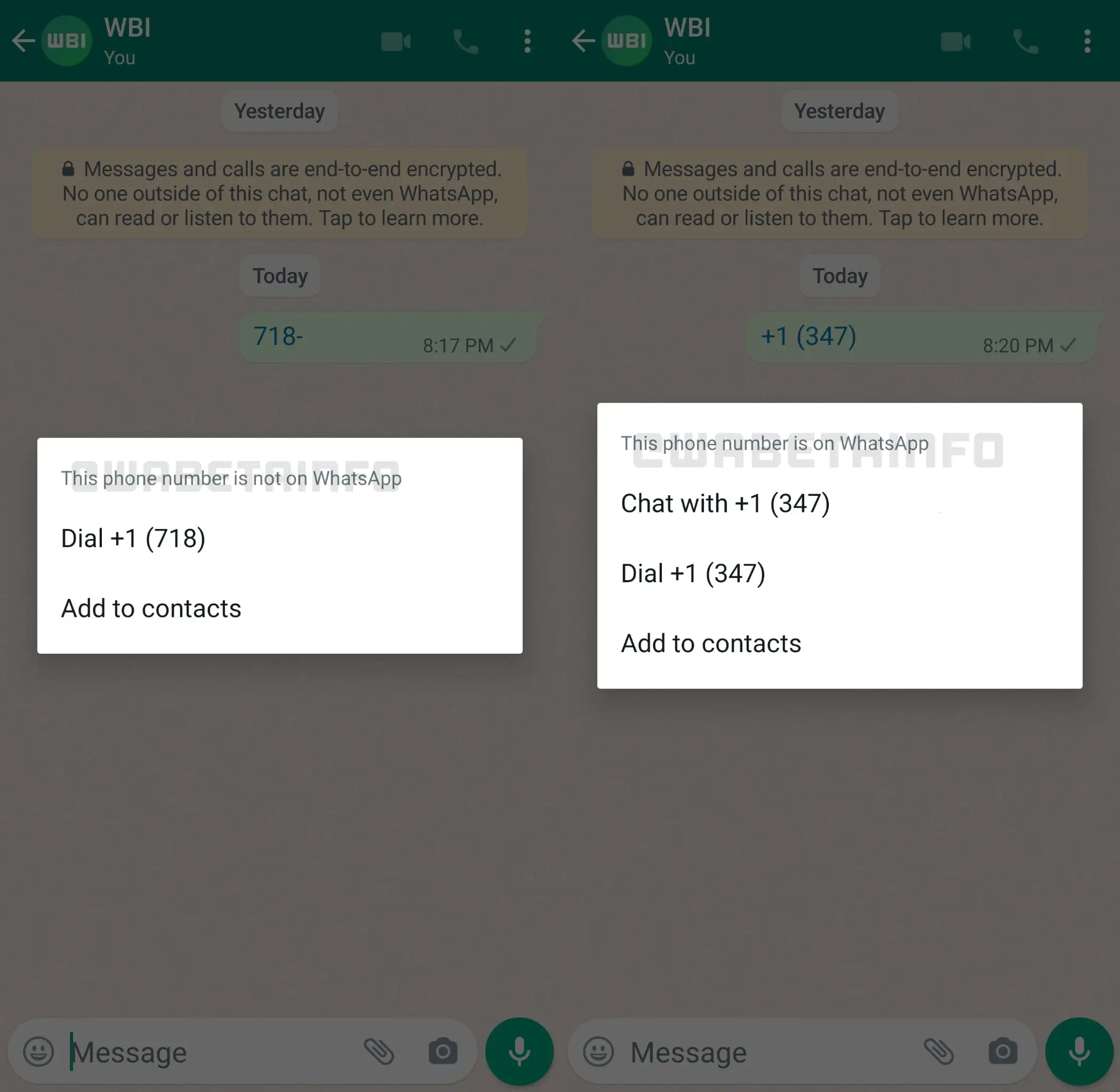
    Fortunately, frequent leaker WABetaInfo has dug through Android beta software version 2.22.8.11 and discovered that the firm is working on a remedy. Taping on an unsaved phone number in a chat bubble now opens an in-app menu that lets you chat with the person if they’re on WhatsApp.

    You may also call them or store their number to your contact list using the in-app options. We’ve confirmed that the menu is visible in the beta version we’re using. Take a look at the image below.

    whatsapp

    This is a significant departure from previous conduct. Currently, touching an unsaved number in a chat thread opens the dialer app on your Android phone instead.

    However, this approach isn’t ideal because it requires someone to either send you the number or for you to send the unsaved number to another contact. So, ideally, additional work will be done in this area to improve message delivery to unsaved contacts.

    There are several workarounds, however, such as using WhatsApp’s short links system. You can take a look at the various solutions for chatting with an unsaved number at the link.

  • DMs on Instagram get better on last update

    DMs on Instagram get better on last update

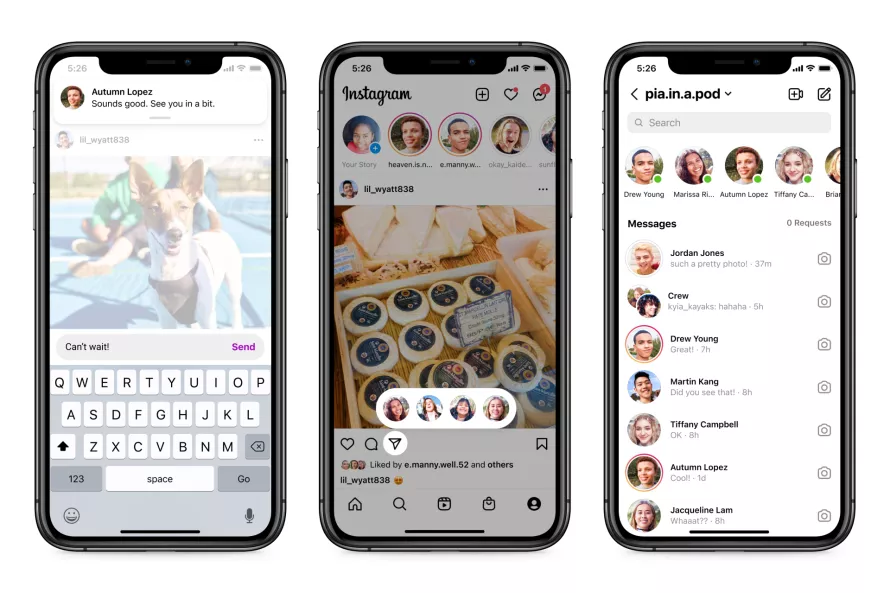
    Meta is delivering a plethora of new capabilities for Instagram, after major messaging enhancements for WhatsApp and Messanger. The new features will make it easy to share content and respond to conversations from anywhere.

    The option to respond to fresh messages while browsing Instagram DMs is a welcome addition. Instead of disrupting your surfing activity, users will receive a new in-app notice that will allow them to respond quickly without having to go to the inbox.

    Additionally, you may now share a post more quickly by hitting and holding the “send” button when you locate one you wish to share. This will bring up a list of “your closest friends” with whom you may instantly share the post — all while continuing to browse. If you’re in your inbox, Meta is showing how a row at the top of your inbox — similar to Messenger — will show you who is online and accessible to speak.

    In addition, Meta is bringing a new function to Instagram that was previously only available on Messenger. Silent messages allow you to communicate your friends without causing them to receive a notification, which is very useful if you’re sending a message late at night or simply don’t want to bother them.

    instagram dm

    In a nod to Messenger, Instagram is also adding a new lo-fi chat style and the ability to post votes in group messaging.

    Thanks to integrations with some of the top music streaming services like Spotify, Amazon Music, and Apple Music, users will soon be able to share previews of their favorite tunes. Users will be able to listen to up to 30 seconds of a song immediately in the chat, which could be useful for music discovery.

    These enhancements come only one day after Meta revealed a raft of improvements to WhatsApp’s voice messaging feature, demonstrating that the firm is on a roll with new features to improve its messaging apps. Instagram’s new features are now being rolled out in “certain countries,” with intentions to expand them globally in the near future.

    These enhancements come only one day after Meta revealed a raft of improvements to WhatsApp’s voice messaging feature, demonstrating that the firm is on a roll with new features to improve its messaging apps. Instagram’s new features are now being rolled out in “certain countries,” with intentions to expand them globally in the near future.