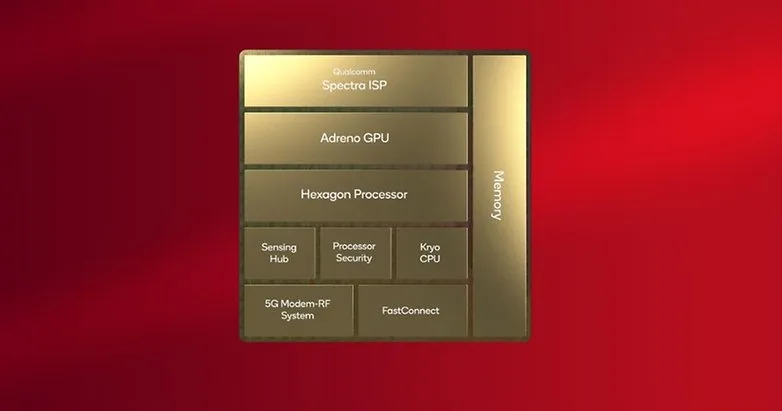
As the October launch date draws nearer, more information about Qualcomm’s next-generation system-on-chip for smartphones and tablets is starting to emerge. A purported benchmark for the Snapdragon 8 Gen 3 has just surfaced, suggesting significant upgrades over the previous flagship chipset.
The alleged GeekBench 5 scores of the forthcoming Snapdragon 8 Gen 3 have reportedly been uploaded by a Chinese leaker and trustworthy source, Digital Talk Station. The silicon reached 1700 in the single-core category, and roughly 6600 in the multicore category, according the listing. With an average of 1500 and 5000, respectively, the new chip outperforms the Snapdragon 8 Gen 2 by 12 and 20%.
Qualcomm Snapdragon 8 Gen 3 vs. Apple A16 Bionic
If these results are replicated in the chipset’s production unit, the Snapdragon 8 Gen 3 will perform worse on single-core tests than Apple’s A16 Bionic (1800/5300), but far better on multi-core tests. The iPhone 14 Pro (review) and iPhone 14 Pro Max are now powered by the Apple A16 Bionic, whereas the iPhone 15 will be the first device to use the more effective A17 Bionic.
These scores are based on the upgraded configuration of the chipset, which has a 1+5+2 core cluster, according to another leak that Twitter user @tech reve reported. Although the five performance cores are now operating at two distinct frequencies, the main Cortex-X4 appears to have been turned down from 3.4 GHz to 3.2 GHz, increasing the multicore value.
It was previously believed that the Snapdragon 8 Gen 3 had a top clock speed of 3.7 GHz and a 50% boost in GPU performance. But, there hasn’t been any further information regarding this since. Perhaps Samsung will reserve and only use this version of the proprietary Processor, just like they did with the Snapdragon 8 Gen 2 for Galaxy.
The Snapdragon 8 Gen 3 may be unveiled during the upcoming Snapdragon Summit, which Qualcomm said will take place in October. In November, the first smartphones that utilize the platform are anticipated. At the aforementioned later date, Xiaomi is supposedly unveiling the Xiaomi 14 series.
In the process of creating the undisclosed Snapdragon 8 Gen 3 chipset, Qualcomm could have taken no short cuts. Recent record-breaking benchmarks may also be explained by a new leak that shows the flagship processor is using an entirely new eight-core arrangement with a Cortex-X4 primary core with an unheard-of peak mobile clock speed.
According to a claim on a Chinese website, which cites user Digital Chat Station as the source, Qualcomm is adopting a different cluster design for the Snapdragon 8 Gen 3 in place of the 1+4+3 layout used by its predecessor. Instead, Qualcomm is employing a 1+5+2 structure. According to reports, the configuration consists of a primary Cortex-X4 core, five big cores, and two efficiency cores.
The Snapdragon 8 Gen 3’s maximum clockspeed
Aside from the fact that there are now more potent cores, Qualcomm has also raised the main core’s maximum speed to 3.7 GHz. For comparison, the normal Snapdragon 8 Gen 2 is rated at 3.2 GHz while the Cortex-X3 on a bespoke Snapdragon 8 Gen 2 can reach up to 3.36 GHz.
Currently, only Samsung’s Galaxy S23 line of handsets have the overclocked Snapdragon 8 Gen 2. The majority of other Android manufacturers rely on the processor’s default rating. What the base speed of the forthcoming Qualcomm silicon will be is also unknown.
Will the GPU on the Snapdragon 8 Gen 3 also be improved?
The Snapdragon 8 Gen 3 will be constructed on the latest TSMC N4P node, excluding from the CPU. Although it continues to use a 4 nm process, it is claimed to be more efficient than the SoC from the previous year. Regarding graphics, it is said that the Adreno 750 GPU performs 50% better than the Adreno 740.
The chipmaker is expected to make its next-generation chipset announcement earlier than it did last year. This might be because Qualcomm abandoned its plans to release a Snapdragon 8 Gen 3 “plus” model.
Meanwhile, let us know your thoughts on the Snapdragon 8 Gen 3. Are you willing to wait for it before upgrading your next smartphone?
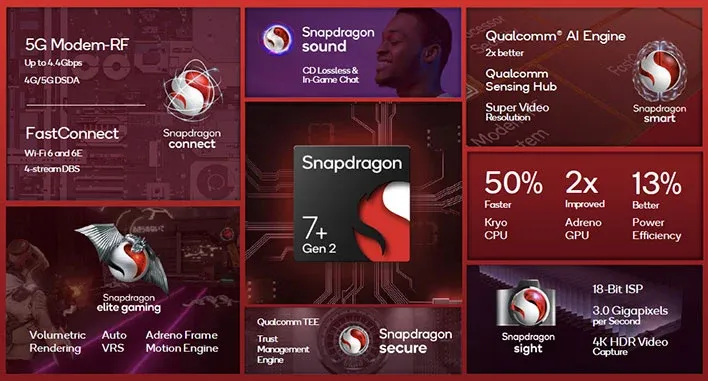
This week, Qualcomm unveiled the Snapdragon 7 Plus Gen 2, which is obviously a significant improvement over the mid-range Snapdragon 7 series on paper.
A single Cortex-X2 core running at 2.91 GHz, three Cortex-A710 cores running at 2.49 GHz, and four Cortex-A510 cores operating at 1.8 GHz make up the new chipset’s amazing CPU system, which is reminiscent of the Snapdragon 8 Gen 1 series. The Cortex-X CPU core is now present in a Snapdragon 7 series chipset for the first time. Moreover, Qualcomm claims that the Adreno GPU has been updated and will perform twice as well as the Snapdragon 7 Gen 1 did.
What does this all mean in terms of actual performance, though? We were able to benchmark a Snapdragon 7 Plus Gen 2 reference handset ahead of launch to get a better idea of what to expect.
Design
Obviously, the reference devices from Qualcomm are not smartphones. In essence, these are test versions intended for internal use. It’s important to remember that although this specific device is rather slim, reference designs often have a tendency to be fairly thick when compared to commercial handsets. But, due to software, cooling systems, and various designs, we are still anticipating diverse results for commercial devices.
Nonetheless, the Qualcomm reference design features a 4,192mAh battery, a 6.65-inch 144Hz OLED screen in FHD+, 12GB of LPDDR5 Memory, and 256GB of UFS 3.1 storage. Moreover, the phone lacks an active cooling system like a fan.
Snapdragon 7 Plus Gen 2 tests
Since all three chipsets use the same CPU cores, we anticipated CPU-related results to be comparable to those of the Snapdragon 8 Gen 1 family going into this. Due to greater Processor clock speeds, nevertheless, we might anticipate the Snapdragon 8 Plus Gen 1 to have a slight advantage.
The normal Snapdragon 8 Gen 1 is a particularly interesting comparison because it is made using the lesser 4nm Samsung technology, whereas the 7 Gen 2 uses the superior 4nm TSMC process. Our research demonstrates that, at least in part as a result of the move from Samsung to TSMC, the Snapdragon 8 Plus Gen 1 enjoys a significant performance and efficiency increase. Let’s examine the 7 Plus Gen 2 to determine if the same is the case.
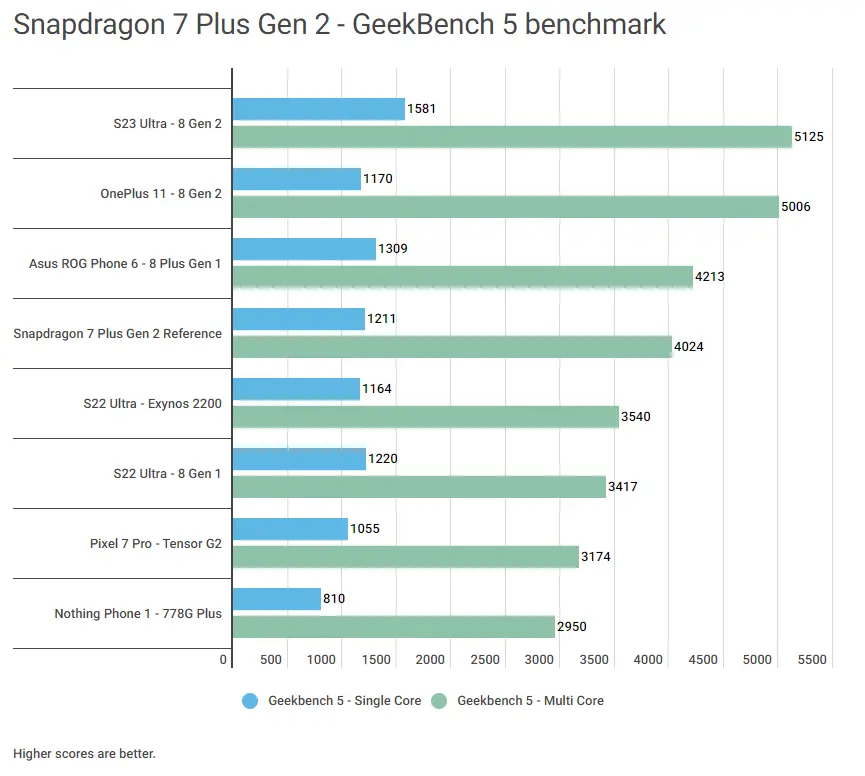
Furthermore, in single-core tests, the Snapdragon 7 Plus Gen 2 reference phone defeats the Exynos 2200-equipped and Snapdragon 8 Gen 1 S22 Ultra and even edges out the OnePlus 11 powered by the Snapdragon 8 Gen 2. To maximize efficiency, OnePlus is extremely careful with single-core performance in the latter circumstance. Yet the S23 Ultra, which has less restrictions, outperforms rivals like the recently released Snapdragon 7.
The reference design manages to outperform every Snapdragon 8 Gen 1 device on the list when looking at multi-core CPU results. Also, it has a score that is comparable to smartphones with Snapdragon 8 Plus Gen 1. However Qualcomm’s most recent flagship 8 Gen 2 chip continues to hold a significant lead.
Overall, it appears that, in terms of CPU performance, the Snapdragon 7 Plus Gen 2 is competitive with the Snapdragon 8 Gen 1 across the board. The Snapdragon 8 Plus Gen 1 phones, meanwhile, are also not far behind. The somewhat quicker CPU clock rates and possibly different cache capacities could account for this.
GPU testing
The question of graphical performance is a murkier one on paper, owing to the closed-box nature of the Adreno GPU architecture. However, Qualcomm has noted that the Snapdragon 7 Plus Gen 2 enjoys a two-fold performance boost over the Snapdragon 7 Gen 1. How does this compare to flagship silicon, though?
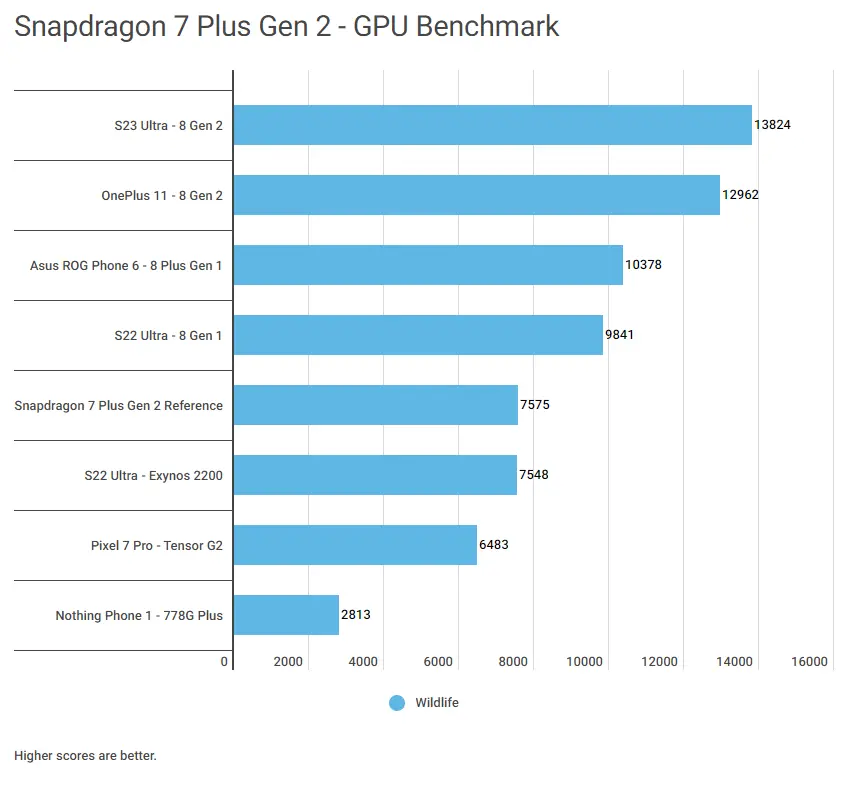
Comparing mid-range chipsets to their flagship counterparts, mid-range chipsets often perform worse in the GPU domain, and the traditional 3DMark Wild Life test confirms this is still the case. The 7 Plus Gen 2 reference design and the Snapdragon 8 Gen 1 series as a whole have significantly different scores.
Thankfully, the Snapdragon 7 Plus Gen 2 easily surpasses the Arm Mali GPU of the Pixel 7 Pro while matching the high-end AMD GPU of the Exynos 2200. Moreover, the reference design score indicates that the Snapdragon 778G Plus GPU in the Nothing Phone 1 offers 2.7x the GPU performance.
This score highlights that Snapdragon 7 Plus Gen 2 phones can handle today’s demanding games at respectable frame rates. Demanding gamers might still want a phone with a Snapdragon 8 Gen 1 series or Snapdragon 8 Gen 2 processor for advanced games down the line, but this is a significant win for the mid-tier chipset nonetheless.
Snapdragon 7 Plus Gen 2 stress testing
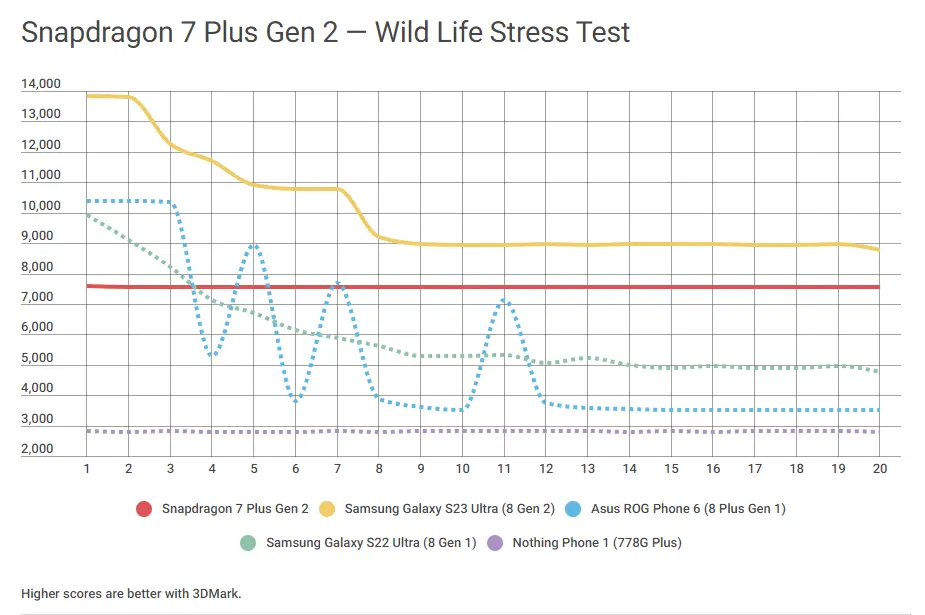
One-off GPU testing is one thing, but a lot can be gleaned from stress tests. We subjected the Snapdragon 7 Plus Gen 2 device to a 3DMark Wild Life Stress Test to get a better idea of sustained performance.
The stress test results make for very interesting reading, as the Snapdragon 7 Plus Gen 2 reference device displays rock-solid stability of 99.76%. In fact, this stability means that the Snapdragon 7 Plus Gen 2 handset can beat the Galaxy S22 Ultra (Snapdragon 8 Gen 1) when put under extended stress. Needless to say, the Nothing Phone 1 and its Snapdragon 778G Plus chipset is far behind as well.
What’s particularly intriguing is that over the course of the stress test, the Snapdragon 7 Plus Gen 2 smartphone closed the gap with the Galaxy S23 Ultra and its Snapdragon 8 Gen 2 chipset. This is primarily because the Galaxy handset only maintained 64.6% stability; other 8 Gen 2 handsets performed better.
Although the cynic in us suspects that commercial phones equipped with this chipset may not be as reliable, it still augurs well for prolonged play sessions.
Overall thoughts
Benchmarking reveals that we’re looking at a chipset that’s at least as powerful as the Snapdragon 8 Gen 1 from a CPU perspective. That’s no mean feat, and it’s a good sign for those who value speed, be it for everyday performance or those who intend to keep their phones for a few years.
Even when compared to more recent flagship chips, mid-range processors typically show a sizable GPU performance disparity. The bad news is that, in one-off GPU testing, the Snapdragon 7 Plus Gen 2 is not really an exception. Between Qualcomm’s mid-range and flagship chips, there is still a significant disparity. The less powerful GPU, however, was able to surpass Google and Samsung’s flagship CPUs.
The good news is that the 4nm TSMC architecture and purportedly lower GPU clock speed suggest that we could be looking at rock-solid sustained performance in this case. In a stress test, the chipset can even defeat some Snapdragon 8 Gen 1 series smartphones.
Again, this is just a reference design, but those on the hunt for sustained gaming performance on a budget should keep an eye on phones with the Snapdragon 7 Plus Gen 2. Fortunately, we won’t have to wait too long, as Qualcomm confirmed that the first phones are coming this month. The company also name-dropped Redmi and realme as brands working on devices with this chipset.
Google made the Android 14 Developer Preview (DP) available for testing on devices from the Pixel 7, Pixel 6, and Pixel 5 series, even the rudimentary Pixel 4a. A new DP edition is expected to be published in March, followed by a few beta releases until the summer, when more stable and feature-rich versions will be issued, and finally the final Android 14 release in the fall.
New Android 14 features
Speaking of new Android 14 features, as usual in the Developer Preview stage, there aren’t many user-facing ones, but rather deep under-the-hood changes that bring interface speed and power-draw optimizations, as well as security and privacy upgrades. Still, there is one biggie one it comes to new Android 14 feature that you will immediately notice.
System fonts
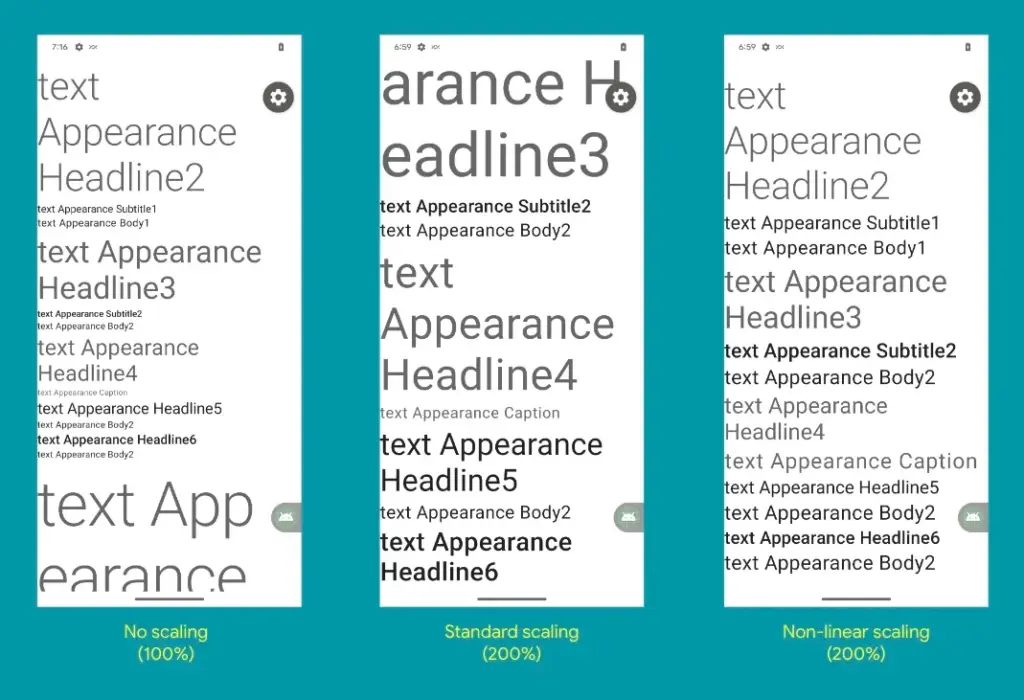
Bigger fonts with non-linear scaling is exactly what Google refers it as this new Android 14 option as. Instead of the current 130% threshold, Android phone owners will be able to increase the size of the system fonts by two times.
It makes sense considering that screens are growing bigger and bigger—we now have foldables with screens north of 7 inches diagonal and difficult-to-read small print. Without a doubt, Google uses “non-linear” scaling to raise text in fonts that are already sufficiently large compared to the smaller text that receives a size increase, rather than simply increasing the font size of Android 14 in a way that is deserving of the list of the best phones for seniors.
Performance and battery life
Android 14 will optimize the speed of the mobile OS system overall and offer less of a power pull from unnecessary activities thanks to a clever combination of background process optimization and presenting actionable requests to apps only when they are out of a cached state.
Additionally, without the user’s express consent, apps that don’t need a strict timing schedule, such clocks or calendars, won’t be able to continuously probe for resources by setting precise alarms.
Adapting to foreign language
With Android 14, a number of foreign language optimizations address the accessibility issues of the device by modifying the text to reflect the peculiarities of non-English speakers, such as tailored translations that take into account the different grammatical genders used in various languages.
The ability to dynamically update the list of foreign languages in an app’s settings to reflect the location and even alter the keyboard based on the interface language that the app is displaying in is another fantastic locale adaption improvement in Android 14.
Security and privacy
Down on the system level, Android 14 will include several new malware-fighting features that plug known exploits by blocking app installations or only allow them if they meet certain criteria.
Dynamically loaded applications that can be changed by injecting code in the process will be marked to be read-only in Android 14 in order to close another door for the installation of malware and various exploits.
Android 14 release date
Android 14 Beta: April 2023
Final Android 14 release build: October-November 2023
How to install Android 14 Developer Preview on Pixel phones
Flash an Android 14 system image on a Pixel 7 Pro, Pixel 7, Pixel 6a, Pixel 6 Pro, Pixel 6, Pixel 5a 5G, Pixel 5, or Pixel 4a (5G) phone.
You may or may not remember Samsung tipster Ice Universe pointing out that the low Geekbench results for the Galaxy S23 line suggested that the overclocked Snapdragon 8 Gen 2 chip powering the Galaxy S23 devices was not functioning properly. A benchmark test called Geekbench is used to evaluate and compare the central processing unit CPU of chipsets used in smartphones (it works with processors on other types of devices, but we are focused on handsets for this story).
The Galaxy S23‘s single-core Geekbench score was comparable to other smartphones powered by the same SoC, as we noted approximately a week and a half ago. However, the multi-core scores fell short of expectations, which is strange given that the overclocked Snapdragon 8 Gen 2’s X-3 high-performance core should result in higher Geekbench scores than other models using the chip’s stock configuration.
Previous Geekbench tests hinted that Samsung was throttling the CPU of the Snapdragon 8 Gen 2 for the S23 line
And since none of the multi-core Geekbench tests for the Galaxy S23 line topped a score of 5,000 (something that other phones running the latest Snapdragon application processor (AP) did, it led to concerns that Samsung must be throttling the processor on the Galaxy S23 series which is something that would be done if the chipset was overheating.
Let’s explore the Snapdragon 8 Gen 2 chipset that powers the Galaxy S23 range in more detail. There are two variations; the Motorola X40 and OnePlus 11 will use the 4nm process node and the X-3 high-performance core, which has a 3.2 GHz clock speed. Samsung Foundry will produce the version for the Galaxy S23 range utilizing its 4nm production node and an X-3 high-performance processor clocked at 3.32GHz.
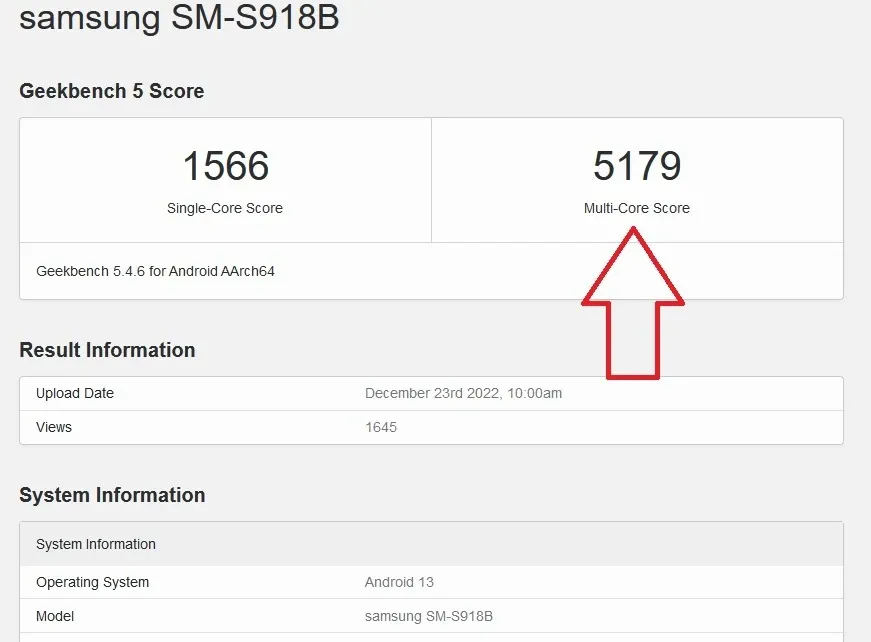
However, a recent Geekbench test on the Galaxy S23 Ultra resulted in a multi-core score of 5,179, finally crossing the 5,000 threshold, according to Android Headlines. This suggests that any thermal issues that would have compelled Samsung to reduce the processor’s speed may have been resolved.
The cooling system on the Galaxy S23 model will reportedly be enhanced and 1.6 times more effective than the cooling system on the Galaxy S22, according to a Twitter tipper by the name of Ahmed Qwaider (@AhmedQwaider888). The cooling system on the Galaxy S23+ will be 2.8 times more effective than the one on the Galaxy S22+, while the cooling system on the Galaxy S23 Ultra will be 2.3 times more effective than the one on the Galaxy S22 Ultra.
The new chipset and cooling systems should keep the Galaxy S23 line from overheating
The upgraded cooling systems will be able to prevent the Galaxy S23 series from overheating during periods of high usage without the need to throttle the processor, which is the bottom line. Furthermore, if your flagship phones’ overclocked Snapdragon 8 Gen 2 chipsets are going to be throttled in any case, what would be the point?
The tipper notes that the Galaxy S23 models’ battery life would increase and less heat will be produced as a result of the upgraded Snapdragon 8 Gen 2 SoC and better cooling system. Additionally, he claims that the performance of the Neural Processing Unity (NPU) would increase by 60% due to the enhanced usage of artificial intelligence (AI) features, and that the performance of the CPU will increase by 36% compared to the Snapdragon 8 Gen 1 chip used in the Galaxy S22 series.
The Samsung Galaxy S23 series is rumored to be pre-installed with the One UI 5.1 interface which includes newer Android 13 features that were released by Google with the Android 13 Quarterly Platform Release 1 that was dropped early last month. The One UI interface is designed to make it easier for users to reach on-screen elements that are usually placed out of reach of users sporting a large-screened phone. This is done by keeping most of the elements near the bottom of the display.
In the previous post, we discussed how by following some tips & tricks, you can boost the battery of your Android smartphone.
There are so many reasons why the performance of an Android smartphone would slow down. For instance, Android is too old, with low RAM & ROM, full storage, etc. Today, to get the best output from an Android phone, we’ll look at every problem and try to solve all of them. So, as you might have guessed, following are some smartphone tips to instantly enhance your Android smarthphone performance.
Uninstall unused apps
This is one of the reasons why it’s very sluggish on your Android. In general people install lots of Android applications even though they are not using them on their smartphone. Not only does having so many apps require room, but it also slows down performance. Just go to your smartphone settings then manage apps and uninstall those apps that you’re not using currently.
Your Android also has certain device bloatware that you can not easily uninstall. However to delete these types of software, I have made a separate post, you can read that from here, How to Uninstall Device Bloatware from Android Phones.
Keep some storage free
If your smartphone has a large storage capacity, the chances are it will not lag too much. This is because there will be lots of free spaces in memory to load apps resources. Whereas, there’ll no space to load the resources if your phone has low storage capacity. That’s the main reason for slowing down a smartphone performance. Always make sure that your smartphone has 3GB to 4GB memory free in ROM and slightly less in RAM.
To free your storage, you can delete the junk files and unnecessary files including useless WhatsApp photos, videos, thumbnails, etc.
Update your OS
With every Android update, smartphones still get better. New functionality, bug fixes, optimized performance and other enhancements are included in the update. So to get security updates and overall improved system performance, always keep your system updated.
An update, however, can often contain a massive bug, but it seldom occurs. You will collect reviews from users about the new update and then decide whether or not to install it.
Factory reset
After a long smartphone usage, it looses the performance overtime. Also, whenever smartphone software becomes too old, it loses the smoothness and performance as it was in the brand new smartphone. Which requires to perform a factory reset to fix some errors and clear all the smartphone logs from the memory. Well! there are many ways to reset an Android phone but you can reset your phone Settings > Backup & restore > Reset.
Do NOT INSTALL speed booster apps
From the play store, you can get tons of speed booster apps which promise to increase the performance of Android within a single tap. Oh, NO! Don’t install those kinds of software. Instead as a struggling launch app, that will make your phone much more laggy. They have clear frequent cache memory for multi-tasking, which is fine. In a nutshell, do not use boosters for speed.
Try new launcher
Some issues cause the output of the smartphone to slow down after using the default Android launcher for a long time. Well! Well! Oh! You’ve got too many launchers at the play store there. The best launcher, in my opinion, is Nova. See if your Android performance improves after upgrading to a new launcher, then follow other tips to stick with it.
Clear apps data or cache
An app increases its size when you start using it. And, sometimes size grows massive large to 1GB or more. Cache data are vital to load apps faster but creates problems when it stores than usual data that are no longer in use. And, it’s our responsibility to clear cache memory to free the useless filled storage. It makes smartphone fast as light. To clear cache of Android apps at once, go to Settings then tap Storage, choose Cache and delete them. Another way to do this, go to manage apps from settings and choose apps and clear data & cache one by one.
Increase animation speed
Increasing animation speed doesn’t directly increase the smartphone performance, however, it gives a feeling of fast performance. You can adjust the animation speed from Android developer settings. To get developer options, Go to Settings > About > Build number > tap 7 times.
Now, open developer settings and find these three options and set their value to 0.5 or turn it off completely.
Xiaomi and Redmi phones have a secret GPU Overclock mode using MIUI software to boost gaming performance. You can get more FPS in games, better score for Antutu, if you allow this mode. Allowing this mode however will cause the system to overheat. Long-term usage it can turn into a dangerous situation.