Blog

  • Google strikes a smart compromise instead of removing Android sideloading

    Google strikes a smart compromise instead of removing Android sideloading

    Since its launch, sideloading has been a crucial component of Android, giving it a great deal of flexibility as well as a feeling of freedom and openness. The community (quite understandably) panicked when Google announced it would make significant changes to sideloading. However, since Google has now demonstrated how its new sideloading flow on Android will operate, I’m not only relieved that sideloading won’t completely disappear, but also that Google’s compromise is as close to ideal as I believe we can get.

    android sideloading an app

    Some have called “Android Developer Verification” the demise of Android’s open nature. The change, which would require developers to register with Google in order to permit their apps to be installed on Android devices, was introduced by Google last year as a restriction on app installation, including sideloading. At first, Google described this as verifying the “who” of an app, similar to an airport ID check.

    Combating scams, such as “convincing” bogus apps, and reducing malware and other harmful attacks—particularly those caused by sideloading from sources outside the Google Play Store—were always the main priorities here. Over the years, Google has been more aggressively combating Android frauds, with some degree of success. One way it has done this is by preventing sideloaded apps that are used in scams.

    Google officially unveiled the new “advanced flow” this week, which enables users (and developers) to sideload apps that aren’t created by registered developers.After asking the user to certify that “no one is directing me,” the four-step procedure begins a 24-hour delay. In order to initiate the timer, the user must restart their device. After admitting the risks once more, they can resume the sideloading procedure 24 hours later; if they choose to leave it on “indefinitely,” the delay just occurs once. In actuality, this is really a one-time obstacle. Developer options must be enabled, but you can later disable them, which is the largest “headache.”
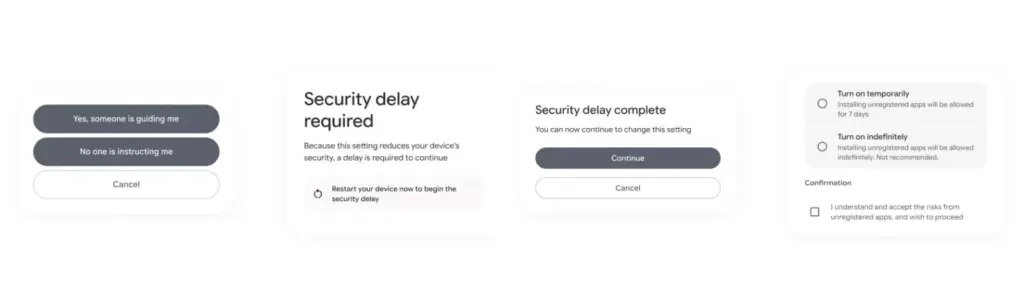
    activate android apk sideloading

    Google has stated time and time again that a “crackdown” on sideloading is not about taking away freedom or functionality, but rather about protecting users and, most importantly, stopping scams that are common on Android in particular areas. Google doesn’t prevent developers or even consumers from accomplishing what they truly want to do by restricting sideloading as planned, but it puts a huge barrier in the way of con artists.

    Scammers frequently use timed pressure and a sense of urgency. A waiting period of twenty-four hours with a few additional warnings? That is a difficult barrier against those kinds of frauds. For people who are being duped by more prevalent scams, it’s also a major inconvenience. For instance, a few weeks ago, after purchasing a low-cost fitness tracker, a family member called me to inquire as to why their homescreen had changed. It turns out that the product needed them to sideload an unidentified software in place of their launcher. I guided them through the uninstall process, but a 24-hour wait and all these extra warning screens? The installation would never have taken place.

    It’s a careful method of striking a balance between functionality and user protection. Because developers and enthusiasts who need or want to sideload an app immediately may still utilize the standard ADB tools, whereas the “ordinary Joe” must wait for that 24-hour period to end. Those who truly can’t wait the 24-hour period (which, once again, only needs to be once) still have options, although that is a headache for “regular” users and even more so for fraudsters.

    Not to mention that you won’t often have to deal with this anyhow. After developers apply for Google’s developer verification program, sideloading is no longer a problem and there are no waiting times or other “in the way.”

    How do you feel about Google’s modifications to Android sideloading? There are undoubtedly still many people who disagree with this, but as previously stated, I don’t think there is a better solution.
  • Can Robot Vacuums Scratch Wood Floors?

    Can Robot Vacuums Scratch Wood Floors?

    Real Testing

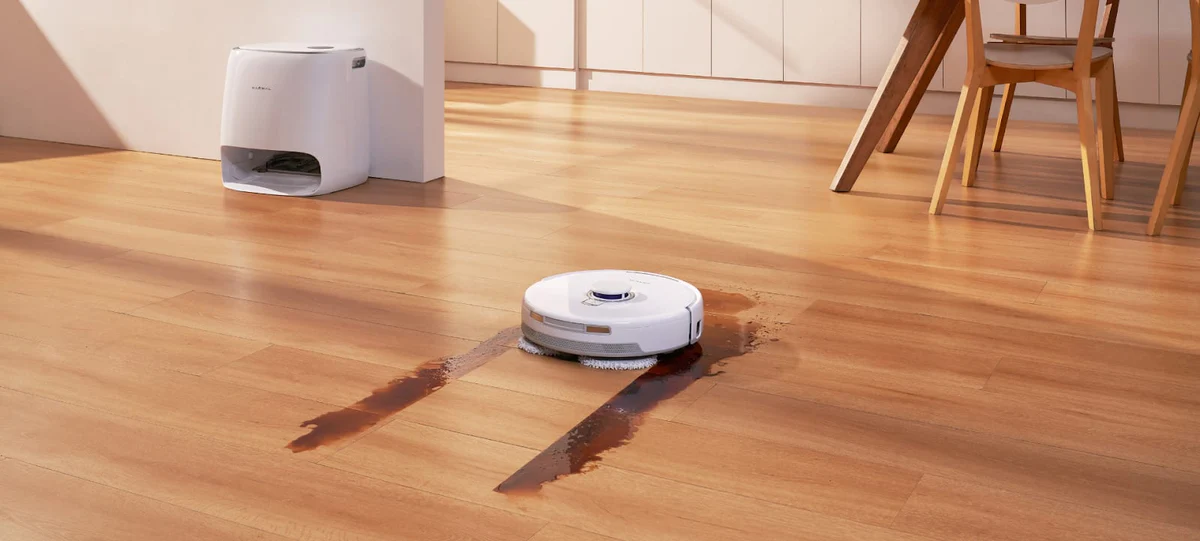
    Maintaining wood floors is a top priority for homeowners across Canada, from cozy Montreal apartments to spacious Calgary houses. Hardwood and engineered wood floors are durable and stylish, but they can be vulnerable to scratches and dents. With robot vacuums becoming increasingly common, many Canadians wonder: can a robot vacuum damage wood floors? Let’s look at real-world testing, practical scenarios, and how the right vacuum can keep floors safe.

    Understanding the Risk

    Robot vacuums navigate your home autonomously, sweeping or mopping as they go. While convenient, wood floors are softer than tile or stone, and scratches can occur depending on several factors:

    • Brush Type – Hard bristles can sometimes scratch delicate floors. Soft or microfiber brushes are gentler.
    • Wheel Material – Rubberized wheels glide more smoothly than cheap plastic ones.
    • Weight and Pressure – Heavier robots may press down too hard, causing subtle abrasions over time.
    • Dirt and Debris – Small particles like sand or pet hair can act like sandpaper if dragged across the floor.

    Real-World Testing: What Canadian Homes Reveal

    Many Canadian households have put robot vacuums to the test on different types of wood floors, including maple, oak, and bamboo. Here’s what they found:

    • Daily Dust Cleaning – Robots with soft brushes can clean light dust without leaving marks.
    • Pet Hair Management – Homes with dogs like Golden Retrievers or Huskies need a vacuum that removes hair efficiently without aggressive brushing.
    • Furniture Navigation – Units with sensors that detect furniture and adjustable heights prevent accidental scratches on floor edges or furniture legs.
    • Seasonal Sensitivity – In winter, wood contracts slightly due to dry indoor air, so careful suction adjustment and smooth wheels help prevent damage.

    Features That Protect Wood Floors

    Modern robot vacuums have evolved to address these concerns. For Canadian homes, the following features are particularly important:

    • Soft Mop or Brush Options – Interchangeable mop pads designed for wood floors reduce friction and prevent scratches.
    • Dynamic Suction – Automatic suction adjustment ensures strong cleaning without over-pressuring delicate wood.
    • Smart Obstacle Handling – Retractable sensors and chassis lift mechanisms allow safe navigation around furniture and thresholds.
    • Hair and Dirt Removal Efficiency – High-suction, tangle-free systems prevent debris from dragging across the floor.

    Recommended Robot Vacuum: MOVA MOBIUS 60

    MOVA MOBIUS 60 Robot Vacuum Robot Vacuums

    Among Canadian homeowners, the MOVA MOBIUS 60 Robot Vacuum stands out for wood floor safety and effective cleaning. It offers features that directly address the concerns above:

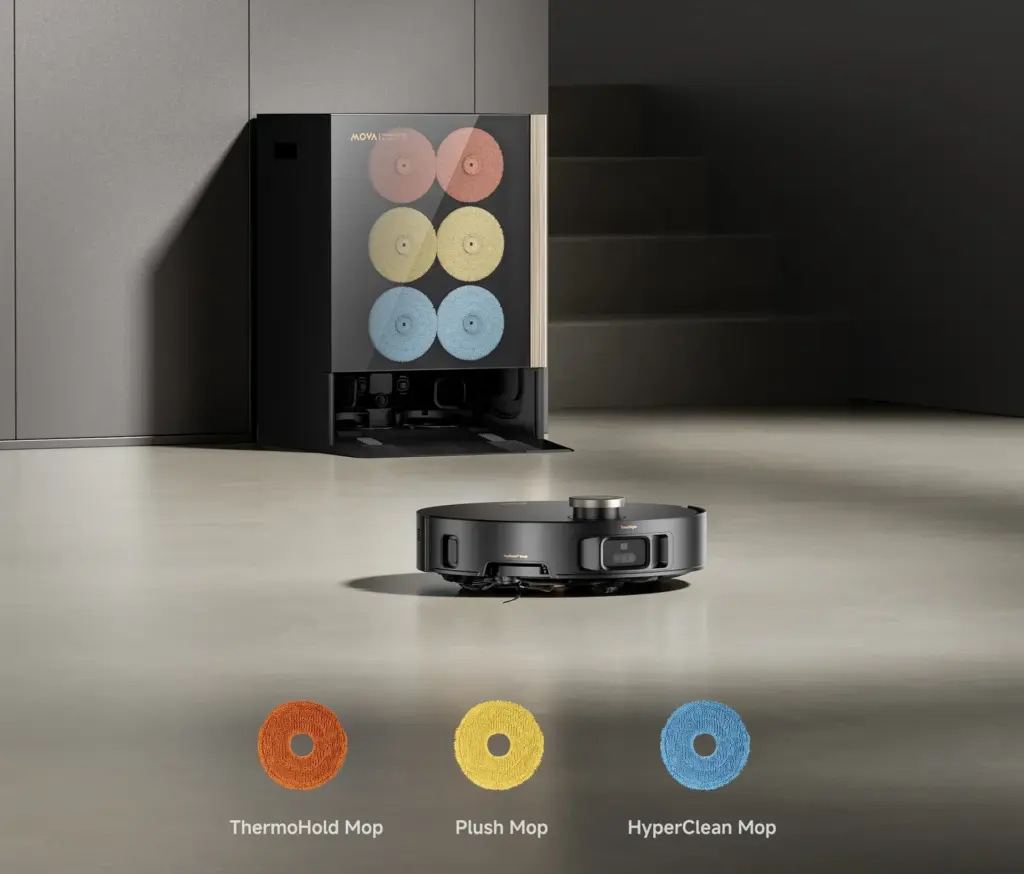
    • MopSwap System: Three interchangeable pads including Plush for wooden floors, ThermoHold for greasy kitchens, and HyperClean for general use.
    • Dynamic Suction Retention: Automatically increases suction power when encountering carpets, but gentle on hard floors, lifting dust and hair efficiently.
    • StepMaster 2.0: Retractable legs allow the vacuum to cross obstacles up to 3.14 inches without scraping the floor.
    • FlexScope Navigation: Retractable sensors adjust the height to reach under furniture and expand the field of view in open areas.
    • 99.99% Hair Removal: Powerful 30,000Pa suction removes hair, dirt, and debris without dragging or scratching.
    • All-in-One Base: Automatically refills, empties, and washes mop pads with 212°F hot water, dissolving stains without harsh scrubbing.

    These features make it an ideal choice for Canadian homes with mixed flooring, pets, or high traffic areas. Users report minimal risk of scratches while enjoying thorough cleaning across rooms.

    Practical Tips for Scratch-Free Wood Floors

    Even with a safe robot vacuum, following some precautions ensures your floors stay flawless:

    • Pre-Clean High-Debris Areas – Remove stones, grit, or excessive dirt before running the vacuum.
    • Routine Maintenance – Clean brushes, wheels, and sensors regularly to prevent debris buildup.
    • Use Rugs or Runners in Key Areas – Protect high-traffic zones or delicate finishes.
    • Smart Scheduling – Run the robot during dry conditions, avoiding damp winter slush or wet spills.
    • Short Test Runs – Start with small areas to check for any friction marks before full-room cleaning.

    User Scenarios in Canadian Homes

    Canadian homes face specific challenges that a robot vacuum must handle carefully:

    • Pet-Friendly Homes – The MOVA MOBIUS 60 excels at removing pet hair from floors and carpets without tangling or dragging debris.
    • Winter Grit Management – Dynamic suction and floor-specific pads prevent snow or sand from scratching surfaces.
    • Apartment Living – Flexible navigation ensures the vacuum avoids baseboards, furniture, and edges while cleaning efficiently.
    • Multi-Room Cleaning – Interchangeable mop pads and adaptive suction allow seamless transition between wood floors, rugs, and tiles.

    Conclusion

    Robot vacuums can safely maintain wood floors when chosen carefully. The MOVA MOBIUS 60 offers soft, wood-specific mop pads, adaptive suction, and smart navigation to protect your floors while providing powerful cleaning. By combining the right technology with simple precautions, Canadian homeowners can enjoy the convenience of a robot vacuum without worrying about scratches.

  • Oppo Watch X3 reveals titanium design, ultra-bright display and ECG support

    Oppo Watch X3 reveals titanium design, ultra-bright display and ECG support

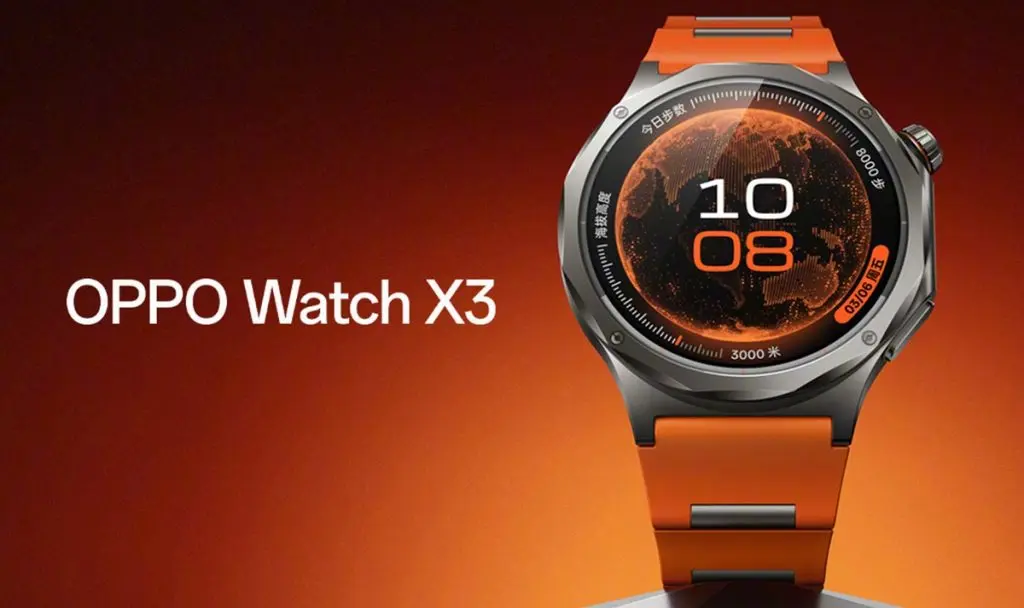
    In a few days, Oppo will formally debut its next-generation flagship smartwatch. Many of the primary characteristics of the smartwatch, which will reportedly be lighter and thinner in addition to having a modem and a brighter display inside its titanium case, are now being made public by the maker.

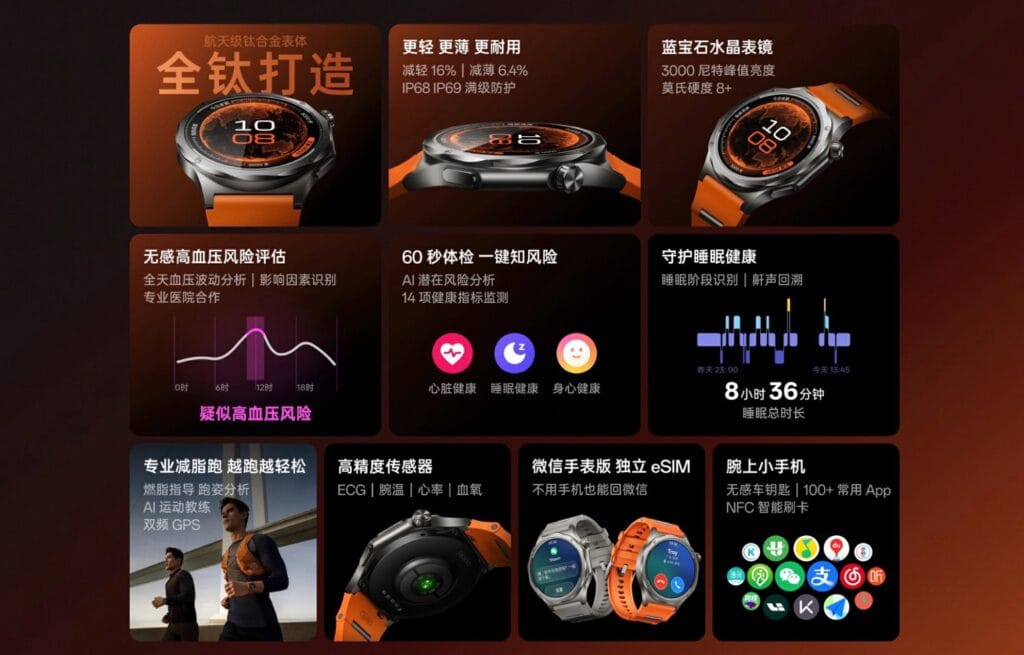
    On Tuesday, March 17, an alternative to the OnePlus Watch 3 ($249.99 on Amazon) will be formally introduced. Oppo has now disclosed several of the key features of the wristwatch ahead of time on a teaser website. The case is now 16% lighter and 6.4% slimmer thanks to Oppo’s switch from stainless steel to titanium.

    Oppo Watch X3 leaks reveal titanium design, ultra-bright display and ECG support
    Screenshot

    The IP69 and MIL-STD-810H certified case allows the smartwatch to be worn while swimming. The maximum brightness of smartwatches can typically only be activated in direct sunlight to enhance reading, but the round AMOLED display achieves a much higher brightness of 3,000 nits. Apart from the touchscreen, other control options include a button and a digital crown.

    Numerous features, particularly those related to health, are promised by the Oppo Watch X3. An ECG, a skin temperature sensor, and a heart rate and SpO2 sensor have all been fitted by Oppo. The smartwatch can simultaneously gather data from all sensors to get a snapshot of all indicators during a 60-second health check. Although the Oppo Watch X3 is not able to monitor actual blood pressure, it is intended to alert users if they are at risk for high blood pressure.

  • Google Pixel Watch 5 rumors: launch, price, and features

    Google Pixel Watch 5 rumors: launch, price, and features

    The Pixel Watch 5 is anticipated to launch in late 2026. The Pixel Watch 4 was released in October of last year, despite Google’s August announcement. As of right now, there are no leaks that indicate when its replacement will be released.

    The pricing of the Pixel Watch 5 is anticipated to stay the same as that of its predecessor, with the Wi-Fi-only variant in the smaller size starting at $349. However, we haven’t yet received any information via leaks, so it’s still possible that Google will increase pricing.

    Google Pixel Watch 5 storage and design

    Google Pixel watch 5 design

    The Pixel Watch 4’s 32 GB of storage is more than plenty for a smartwatch. We anticipate that its replacement will provide the same storage capacity.

    The Pixel Watch 4 did not include a significant change. It did, however, bring about a change that many would value: the Pixel Watch 4 is repairable, so if its glass breaks, it is no longer something to discard.

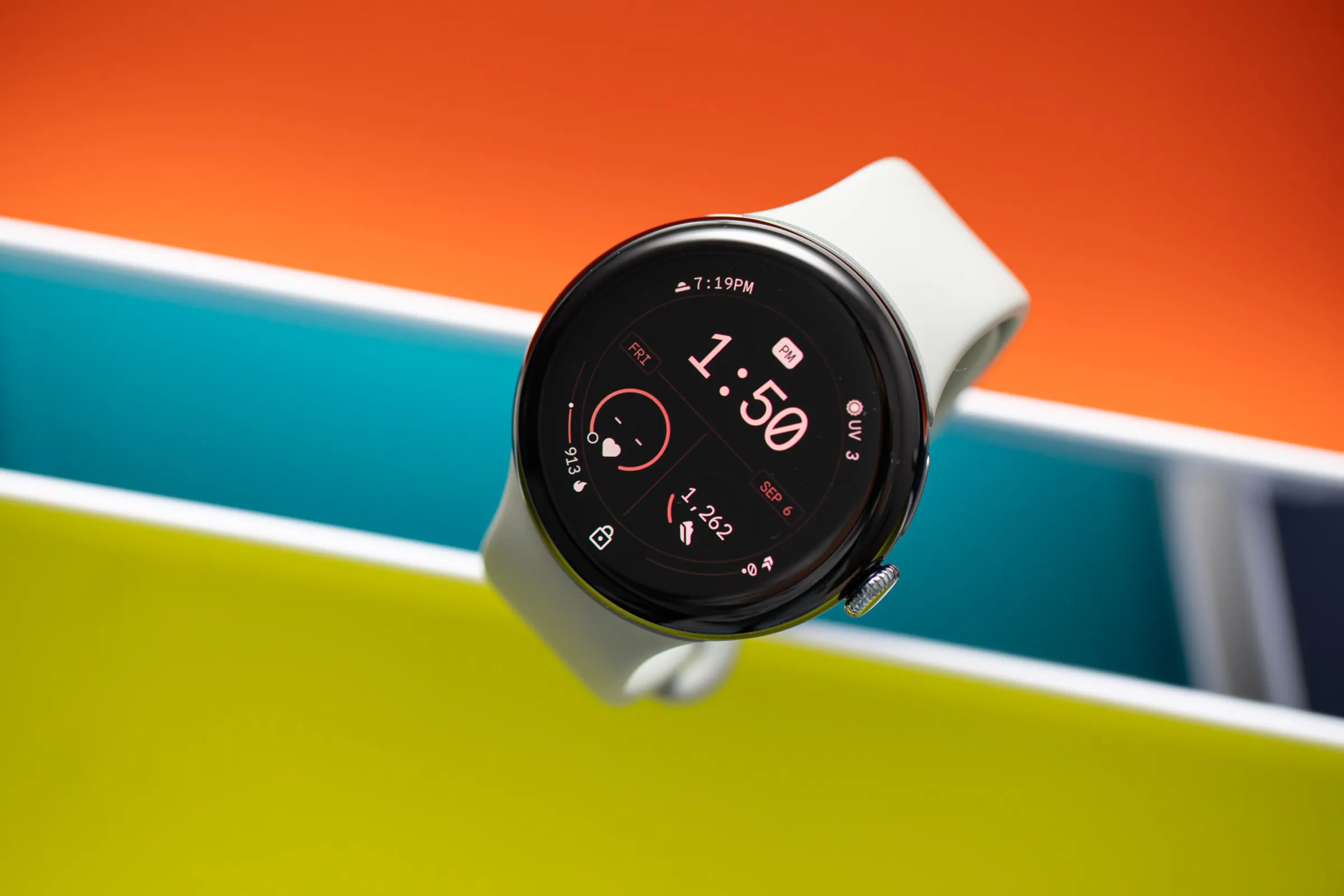
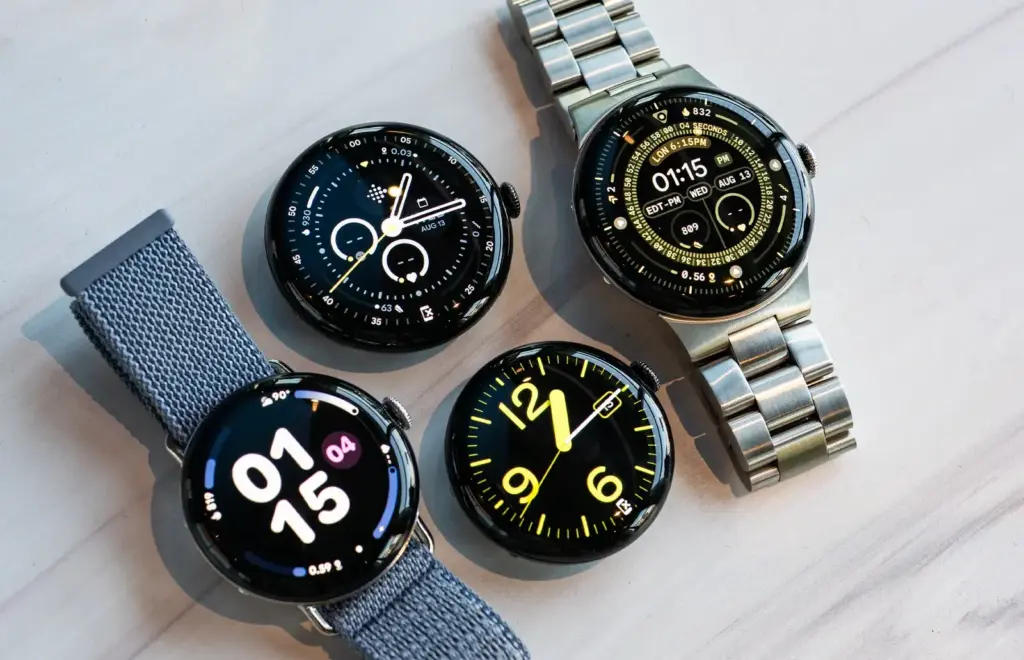
    The Pixel Watch 5 will probably continue to be repairable. Like its predecessor, we anticipate that it will be rated IP68 or 5 ATM. Once more, we anticipate a distinctive, simple circle shape with two sizes (41 and 45 mm). According to several rumors, sapphire crystal durability may be improved.

    Along with new watch faces, we might also see some new hues.

    Pixel Watch 5 display

    The display of the Pixel Watch 5’s predecessor was improved, reaching a peak brightness of 3,000 nits. It’s safe to presume that this time around, the upgrades will be more modest, even though no leaks have yet revealed what we might anticipate.

    Google Pixel Watch 5 rumors: launch timing, price, and new features

    For a more contemporary appearance, Google might further reduce the bezels (the Pixel Watch 4’s bezels were 16% thinner than last year). The Actua 360 domed display, which gives the entire display a sleek and distinctive appearance, was also included with the Watch 4.

    Battery and features

    According to rumors, the Pixel Watch 5 may concentrate on maximizing battery life because of its potential new processor. Although there haven’t been any updates regarding battery sizes, the Watch 4 has already made some improvements in this area, allowing the 45 mm model to survive up to 40 hours and the 41 mm model to last up to 30.

    Naturally, Google also provides Battery Saver, which further extends the watch’s battery life. Google introduced quick charging with the Watch 4, so it’s likely that this feature will remain as well.

    Anticipate the same features from the previous year, such as fall and crash detection, emergency satellite communication, safety check, and emergency sharing. Along with the Pixel Recorder app and the Pixel Phone Camera Control, Google Maps and Wallet compatibility is probably on the horizon.

    Additionally, you’ll probably be able to benefit from more than 40 different forms of exercise as well as the Fitbit Morning Brief, which provides a daily summary of your health-related activities (sleep, readiness, and goal progress). Naturally, a personal AI Health Coach with Fitbit Premium will also be beneficial to you.

    google pixel watch 5 features

    Google Pixel Watch 5 specs

    The processor is the most intriguing component of the Pixel Watch 5’s hardware expectations. There are rumors that Google might select its own Tensor chip this time. The quick and powerful Qualcomm Snapdragon W5 Gen 2 was included with the Watch 4.

    If the reports are true, Google’s decision to use its own specially designed Tensor chip for the smartwatch could help it outperform earlier models in terms of efficiency and performance. Although we are unsure about the exact chip, it might be a Tensor made just for smartwatches rather than the Tensor G6 that is anticipated for the Pixel 11. However, the chip can be based on the phone processor.

    The next device’s battery life is expected to be improved by the new chip.

    It’s crucial to remember that Google can choose to stick with the Qualcomm chip for an additional year. This might theoretically be a W5 Gen 3 chip.

    Pixel Watch 5 rumored specs:

    • CPU: Potential Tensor chip, or chip from Qualcomm
    • Battery: 45 mm – up to 40 hours, 41 mm – up to 30 hours
    • Charging: 0-50% in 15 min.
    • Storage: 32 GB
  • Global Huawei Watch 5 tipped to receive HarmonyOS 6

    Global Huawei Watch 5 tipped to receive HarmonyOS 6

    Owners of the Huawei Watch 5 vanilla model are currently quite pleased that the HarmonyOS 6.0 update is finally available on the global market. Your eligible wearable will soon receive the latest software version that the company has begun to push in batches.

    Huawei has upgraded numerous smartwatches to HarmonyOS 6 thus far. For example, the global market offers the Watch GT 5 Pro, Watch FIT 4 series, Watch GT 5 models, and more.

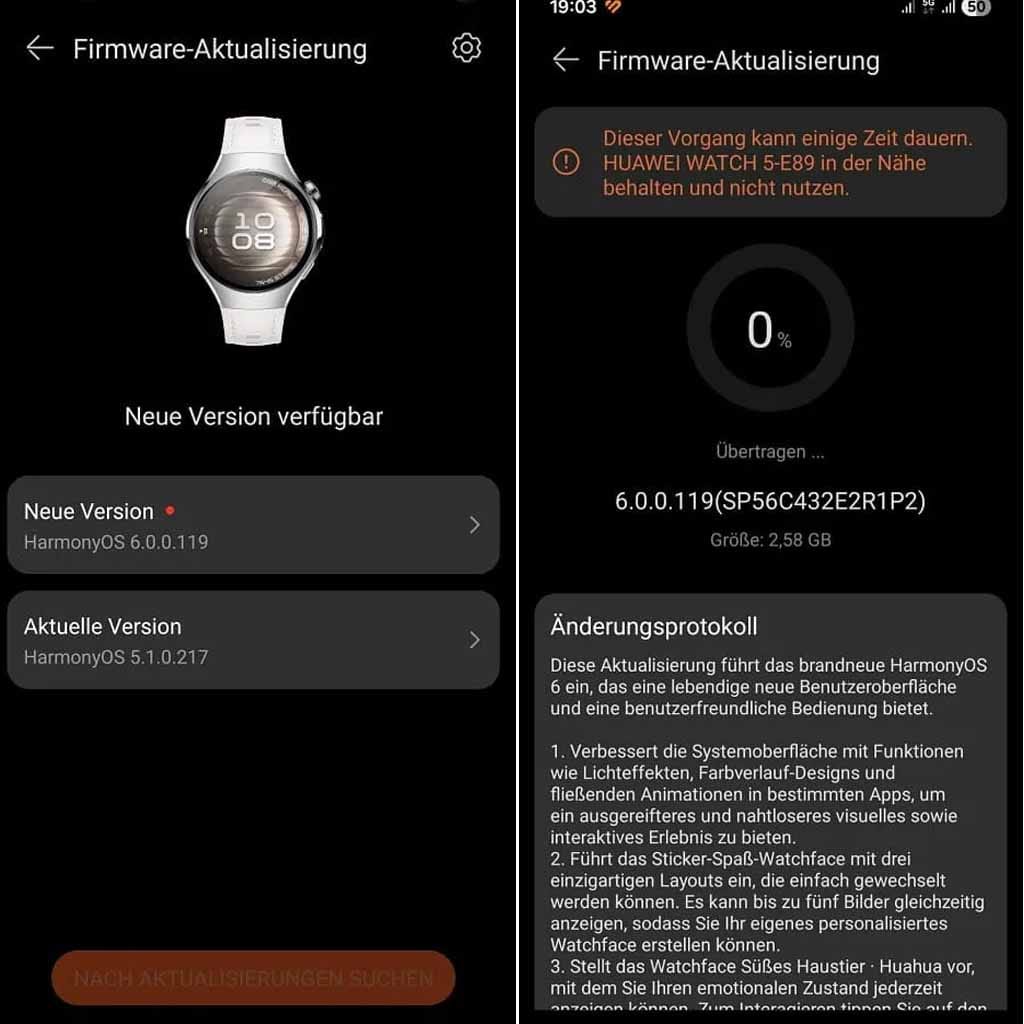
    Now the company is bringing the HarmonyOS 6.0 upgrade to the Huawei Watch 5 global users with a huge changelog. Yes, the OEM has added 16 new enhancements to the wearable, enhancing the complete experience for its users.

    Global Huawei Watch 5 tipped to receive HarmonyOS 6 upgrade

    Watch 5 global users can identify the update with the HarmonyOS build version 6.0.0.119. Make sure to have sufficient storage as the package weighs 2.58GB.

    To improve the user interface, the business has incorporated additional stickers and watch faces. Huawei has updated the Emotional Wellbeing app with better mood recognition at the same time. The Settings app and even Power Saving Mode will be improved for users. All of these qualities are listed below.

    HarmonyOS 6.0 added features

    • Introduces the Sticker Fun watch face with three unique layouts that are easy to switch between. It can display up to five images at once, allowing you to create your own personalized watch face.
    • Introduces the Cute Pet Huahua watch face, which lets you view your emotional state at any time. Tap the screen to interact. You can also customize the displayed data, such as calendar, battery level, and health information.
    • Introduces the Modules 2025 watch face, which lets you mix and match widgets of different sizes and switch between various design colors.
    • Introduces a redesigned Emotional Wellbeing app, which lets you experience 12 different emotions based on your emotional state and stress level. You can also try breathing exercises guided by a charming pet.
    • Adds the shortcut settings screen, accessible by swiping right on the workout screen. There, you can easily adjust the volume of workout reminders or change workout settings.
    • Introduces the following improvements in power saving mode: The Contacts app can now display all contacts on your phone, and the call log is renamed to “Phone.” Tapping the Phone app will display a keypad for making calls when the wearable is paired with your phone. (Update your phone and the Huawei Health app to the latest versions before using this feature.)
    • Introduces the following improvements in power saving mode: Enhances the calendar experience by adding week and month views, as well as a calendar card, to the Assistant: TODAY screen.

    Enhancements

    • 1. Enhances the system interface with features like lighting effects, gradient designs, and fluid animations in select apps for a more sophisticated and seamless visual and interactive experience.
    • Allows you to adjust the vibration intensity for alarms (under Settings > Sounds & Vibration > Vibrate > Custom) and mute alarm notifications by simply covering the screen with your palm.
    • Supports connectivity with heart rate monitors, speed sensors, power meters, and cadence sensors to meet professional fitness needs. (In standard mode, you’ll find the settings under Settings > Cross-Device Cooperation > Health Device Management, while in power-saving mode, you’ll find them under Settings > More Connections > Health & Fitness Devices.)
    • Enhances the Golf Mode experience with stunning panoramic views of the fairways and vivid details of the greens. You can also effortlessly measure distances from any position, helping you pinpoint the location of the green and hazards.
    • Improves the trail running mode, including an elevation graph that clearly displays elevation changes at your current location. It also offers segment-based navigation that guides you precisely through each segment, helping you manage your training like a Pro.
    • Features such as warm-up, courses, interval training, lactate threshold, race guidance, and routes are moved to the “More” screen. (Swipe up on the “Training Preparation” screen to access the “More” screen.)
    • Improves usability by supporting more app icons for notifications, making it easier to identify message sources.
    • Enhances the user experience with smart hand gestures through increased detection accuracy.
    • Enables VoLTE by default for certain providers after the eSIM is activated. Manual control of VoLTE is not available.
  • Galaxy Buds 4’s ultra-high quality audio is limited to these phones

    Galaxy Buds 4’s ultra-high quality audio is limited to these phones

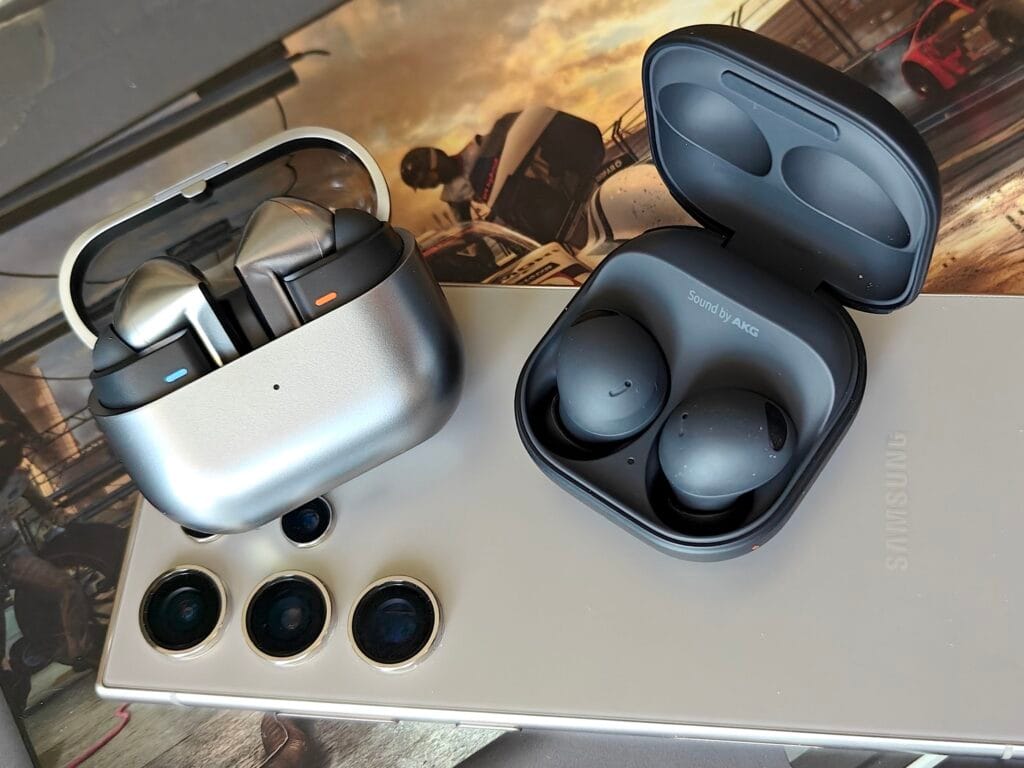
    Ultra-high quality, or UHQ, audio is supported by Samsung’s recently released Galaxy Buds 4 and Galaxy Buds 4 Pro. The fact that they support 24-bit Hi-Fi will further please audiophiles.

    In order to fully utilize these functionalities, it’s crucial to pay attention to the finer points because they aren’t compatible with every device you might pair the earphones with.

    Buds 4 ultra-quality audio only works with the right streaming source

    samsung galaxy buds 4
    Oplus_16908288

    The SSC code, which is exclusive to Samsung, enables 24bit/96kHz ultra-high quality audio playing for the Galaxy Buds 4 series. Finally, it supports direct multi-channel audio and 360-degree audio.

    The Galaxy Buds 4 can only be paired with a Galaxy S23/S24/S25/S26, Galaxy Z Fold 5/6/7, Galaxy Z Flip 5/6/7, Galaxy Z TriFold, or a Galaxy Tab S9 series device running One UI 6.1.1 or higher, according to Samsung. It does draw attention to the possibility of future device support.

    However, it won’t be sufficient to just pair the earbuds with the appropriate device. The source of the audio is equally important. If you’re streaming from YouTube or Spotify, don’t anticipate the UHQ experience. You’ll need an audio source that offers better streaming quality, like Tidal or Amazon Music Unlimited.

  • HyperOS 4 arrives August 2026 — Xiaomi promises its most refined update

    HyperOS 4 arrives August 2026 — Xiaomi promises its most refined update

    With HyperOS 4, Xiaomi intends to make significant changes. The old MIUI code is entirely removed by the business. The system becomes more stable and quicker as a result. In August 2026, HyperOS 4 will be available. It turns into the initial “Zero-Legacy” version.

    In HyperOS 3.1, Xiaomi begins to clear up outdated code. The MIUI SDK is eliminated from the Weather and Gallery applications. All legacy code from MIUI 1 to HyperOS 3 is removed. The system eliminates outdated dependencies and sluggish function calls. A new operating system is produced as a result. It decreases bugs and increases speed.

    xiaomi hyperos 4 update for all devices

    Key changes:

    • Removes MIUI backward compatibility layer
    • Uses only HyperOS SDK in all modules
    • Deletes over 10 years of old code
    • Makes updates faster and more stable

    HyperOS 4 brings high-performance apps with Flutter and Rust

    Xiaomi uses Rust and Flutter to rework key apps. The Weather app on HyperOS 3.1 checks this. These tools are extensively utilized in HyperOS 4. UI is made fluid via Flutter. Rust improves safety and speed. Versions of new apps are not available to older HyperOS users. This eliminates older phones’ backward compatibility.

    Key features:

    • Flutter for standard UI rendering
    • Rust for secure and fast core code
    • Modular apps that update independently
    • Better stability on all devices

    Small improvements are made to flagship phones. Large speed increases are seen in low-cost phones. Xiaomi resolves outdated code issues. The most stable experience in Xiaomi history is what it promises.

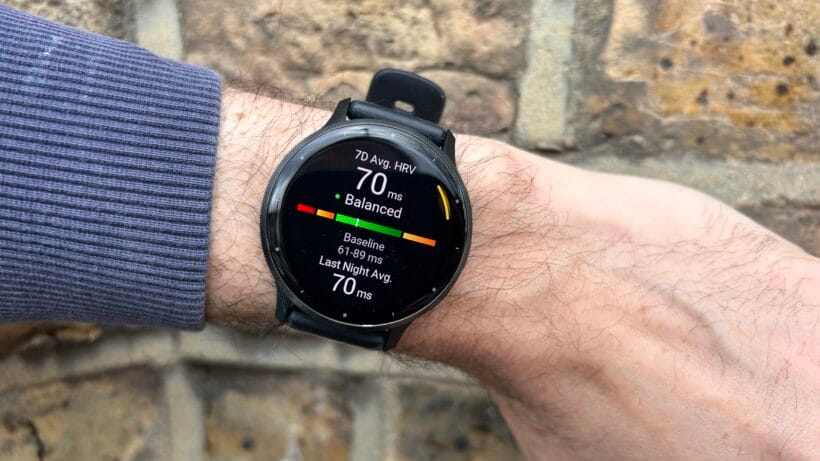
  • Garmin Venu 3 drops to a new lower price, offering better value than Galaxy and Pixel Watch rivals.

    Garmin Venu 3 drops to a new lower price, offering better value than Galaxy and Pixel Watch rivals.

    Although we adore Wear OS smartwatches, a Garmin smartwatch is going to be a fantastic choice if you’re searching for something with around the same functionality but a bit more battery life. Although most Garmin smartwatches are somewhat large, the Garmin Venu 3S has a more understated style that you may wear to any event.

    Garmin Venu 3 drops

    In addition to its stylish appearance, it has a variety of sensors to monitor your fitness and health parameters. Additionally, the battery has a good lifespan of up to 10 days. This watch used to cost $450, but with a $100 discount, it is now only $350.

    Everything you could possibly need in a smartwatch – Garmin Venu 3

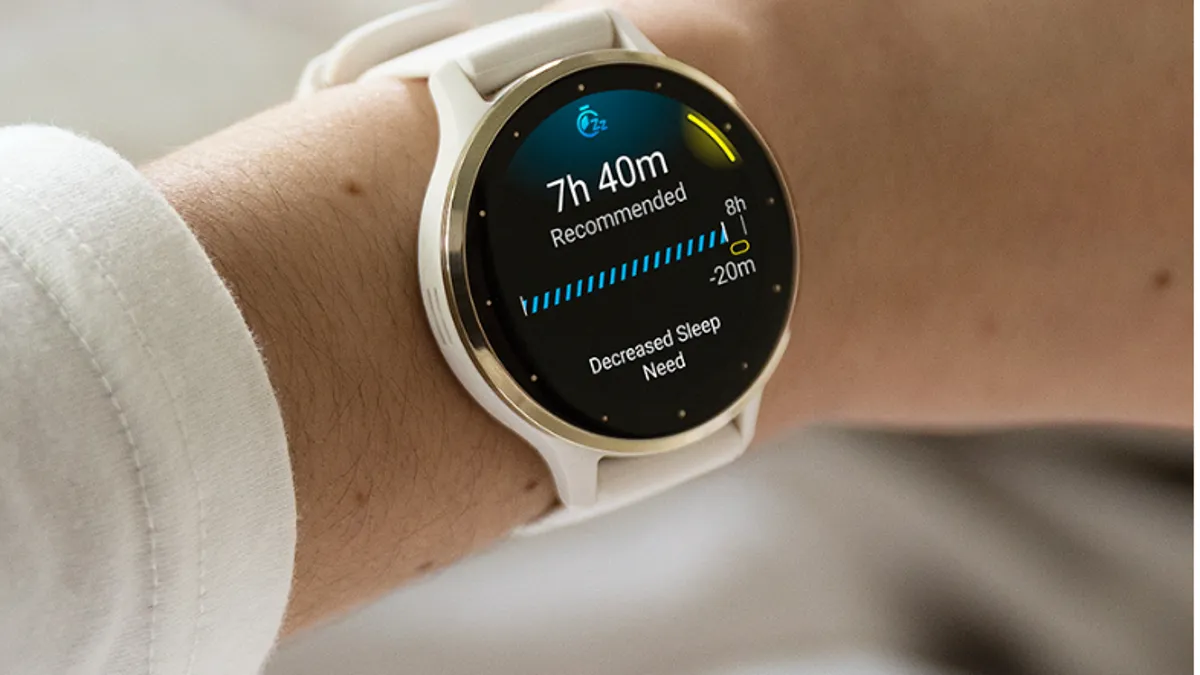
    We have previously discussed the Garmin Venu 3S and even had the opportunity to test out the Venu 3, its bigger sibling. It’s a reliable smartwatch designed with exercise and health monitoring in mind. As usual, this watch has an extremely long battery life, lasting up to 10 days between charges.

    The watch’s hardware, which includes a vivid and bright AMOLED screen, is consistently strong. Along with a variety of sensors, it can assess your stress levels and sleep quality to provide you a comprehensive report on your day. Garmin offers a means to track it, regardless of your interests.

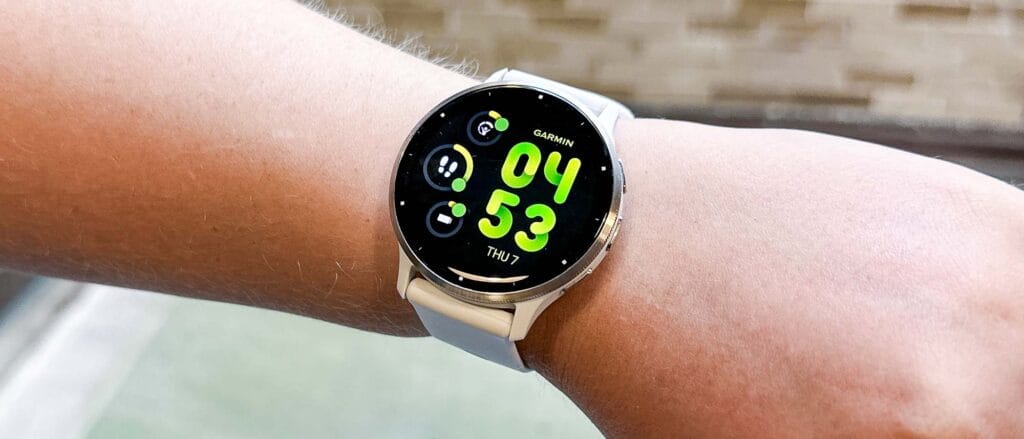
    garmin venu 3 on hand

    There are built-in workouts with images to help you learn new things, and Garmin Coach can assist you in training to achieve your goals. Additionally, a GPS is included in case you prefer to take a much less-traveled route. Additionally, because this is a smartwatch, you can keep in touch by receiving calls and notifications directly on your wrist.

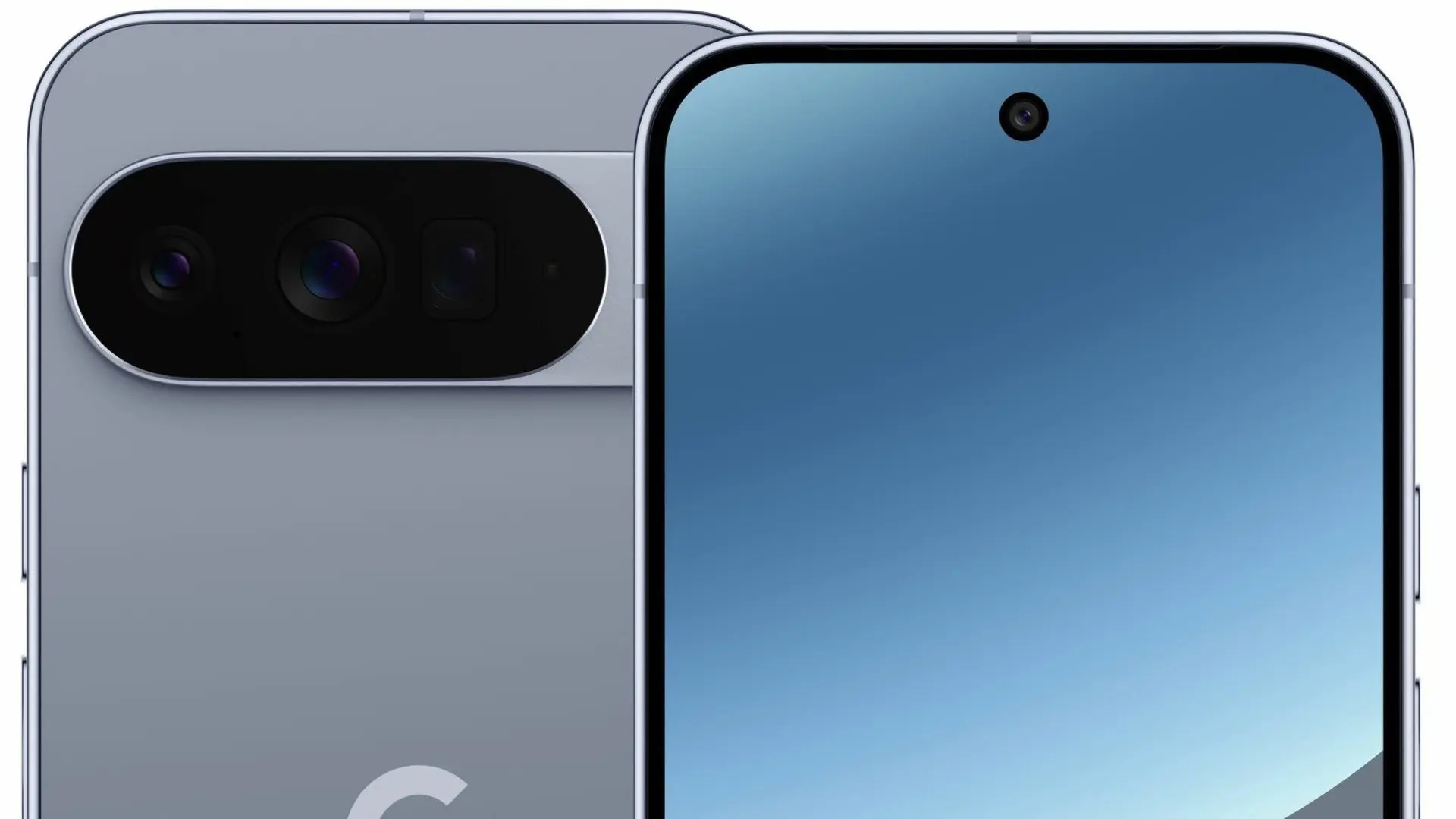
  • Pixel 10 Pro XL hits shocking $349 price in unexpected discount

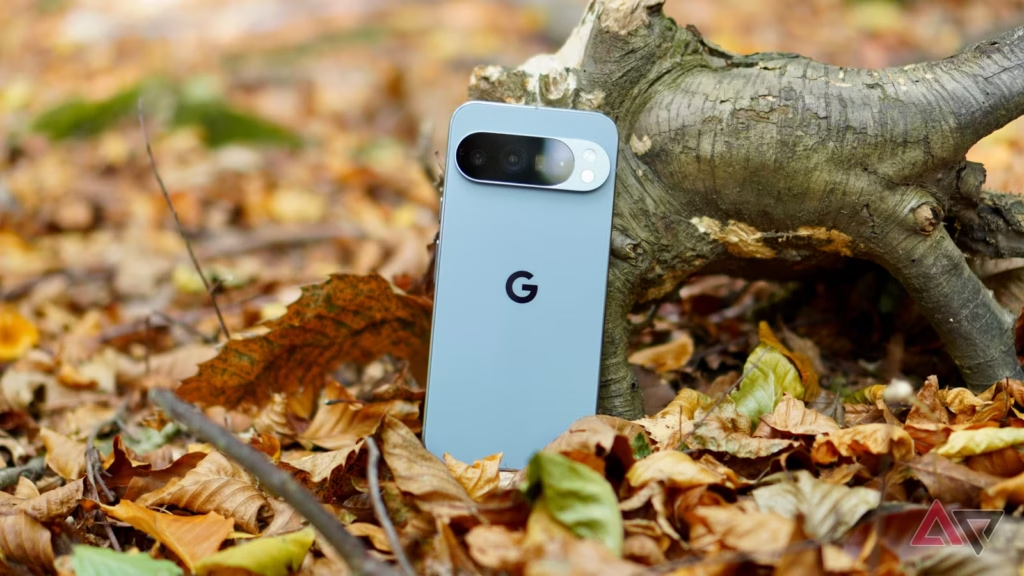
    Pixel 10 Pro XL hits shocking $349 price in unexpected discount

    In our opinion, the Google Pixel 10 Pro XL is one of the best phone currently available. In addition to offering an amazing hardware and software experience, it has a clean, contemporary, and distinctive appearance. Additionally, Google has committed to supporting the phone for seven years, so as time goes on, the software will only get better.

    Although this phone is worth the original retail price, we usually advise getting it while it’s on sale. Even though there were some really good offers during the holidays, if you’re prepared to get one from US Mobile, the price has dropped significantly. The Pixel 10 Pro XL is currently on sale for just $349 from the carrier, which offers some of the finest prepaid service in the US.

    Google Pixel 10 Pro XL in nature

    A good price for one of the best smartphone on the market

    Although not everyone will benefit from this promotion, we believe it will be worthwhile to look into if you’ve been considering changing carriers or simply need new phone service in general. Therefore, you can now purchase the Pixel 10 Pro XL for just $349 if you want to sign up with US Mobile.

    There is no long-term commitment with US Mobile because it is a prepaid carrier, and you can stop using the service after 30 days. But for the entire year, the phone will be locked. Therefore, using the service with the phone is the ideal way to benefit from this promotion. The good news is that the full-year plan costs start at just $119.

    You read correctly—a full year of US Mobile service is available for as little as $119. Additionally, an advanced plan is available for $149 each year. Unlimited talk, text, and data are included in both plans. Depending on the plan, you also receive additional benefits like hotspot and international data, among other things. Those who intend to get one without a new plan will pay $449, which is slightly more.

    All things considered, if you need a new phone with service, you can’t really go wrong here. Of course, you have a chance to get one for free if you join up with a postpaid carrier. However, you must dedicate yourself to the carrier for a minimum of 24 months. It truly depends on your circumstances. However, the US Mobile promotion is currently active.

  • Best ai 3d modeling tool 2026

    Best ai 3d modeling tool 2026

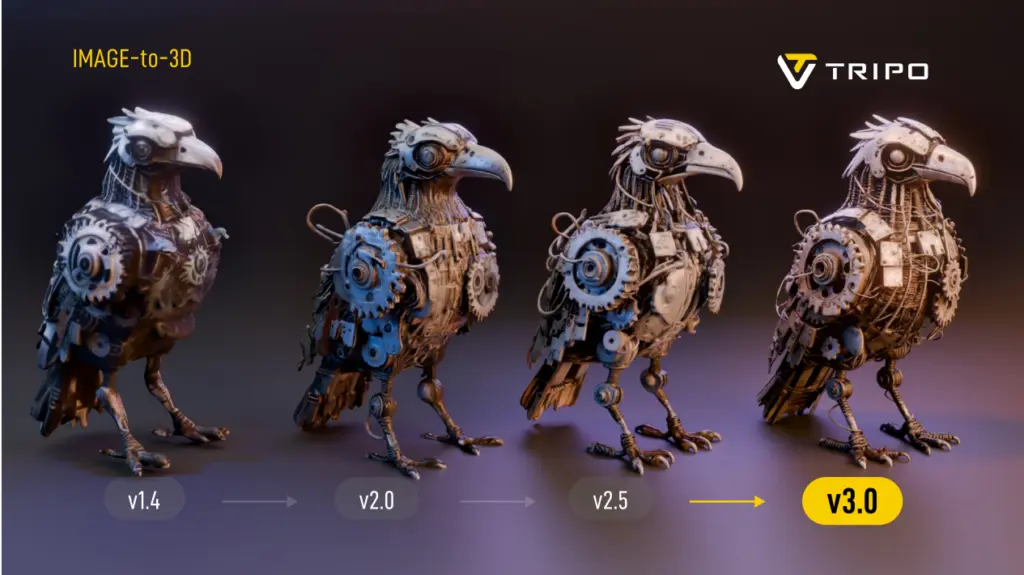
    The landscape of digital content creation has shifted dramatically in 2026, moving away from labor-intensive manual sculpting toward automated generative workflows. As demand for immersive content in gaming and spatial computing accelerates, the industry now prioritizes tools that deliver instant text-to-3D and image-to-3D capabilities without compromising topology. This analysis evaluates the current market leaders, specifically examining how Tripo AI positions itself against competitors like Meshy and Hyper. The focus lies on identifying the best AI 3D modeling tool capable of producing professional-grade assets with efficient geometry and high-fidelity textures.

    image 4 1

    Key Insights

    • Speed vs. Quality: Modern algorithms now generate standard “white mold” (geometry-only) models in under 20 seconds, a benchmark set by leading platforms.
    • Topology Control: Professional workflows require more than just a mesh; they demand clean topology and rigging readiness, features now integrated into browser-based studios.
    • Asset Scalability: The ability to upscale textures to 4K resolution is becoming a standard requirement for game development and cinematic rendering.
    • Market Leadership: Data indicates that platforms utilizing large-scale models (200 billion+ parameters) offer superior geometric accuracy compared to earlier generative iterations.

    The Evolution of the Best AI 3D Modeling Tool

    image 1 1024x575 1

    The definitive AI 3D modeling tool in 2026 is defined by its ability to balance generative speed with the structural integrity required for professional pipelines, moving beyond simple prototyping to final asset delivery.

    The search for the best AI 3D modeling tool has historically been plagued by a trade-off between speed and usability. Early iterations of generative AI often produced “soup-like” meshes—models that looked acceptable from a distance but lacked the edge flow necessary for animation or game engine integration. However, recent advancements have introduced algorithms capable of instant generation with topologically sound structures.

    Tripo has emerged as a significant entity in this space, leveraging a massive 20 billion+ parameter AI model to address these geometry challenges. Unlike basic generators that rely solely on surface approximation, this approach ensures that the output is not just a visual representation but a functional 3D asset. For developers and designers seeking a robust AI 3D Model Generator, the distinction lies in this underlying architectural complexity.

    Instant Text-to-3D and Image-to-3D Generation Capabilities

    image 3 1024x613 1

    Efficiency in 2026 is measured by the “20-second rule,” where top-tier tools can transform a simple text prompt or single image into a fully realized spatial object without manual intervention.

    For game developers and rapid prototypers, time is the most critical resource. The industry standard has tightened significantly; waiting minutes for a cloud based generation is no longer competitive. Analysis of Tripo reveals a capability to generate standard models in approximately 20 seconds, supporting rapid iteration cycles. This speed is vital for Text to 3D Model workflows where designers must generate dozens of variations to find the perfect silhouette.

    Furthermore, the Image to 3D Model functionality has evolved to handle multi-view consistency. A major pain point in previous years was the “hallucination” of back-facing geometry—where the AI would guess incorrectly what the back of an object looked like. Current best-in-class solutions utilize multi-view consistency algorithms to ensure that an input image results in a coherent 360-degree model. This allows creators to bypass the modeling phase entirely for static props and background assets.

    Professional Workflows: Topology, Rigging, and Texturing

    image 2 1024x575 1

    The “best” tool must extend beyond generation into editing, offering features like auto-rigging, retopology, and PBR material synthesis to fit seamlessly into pipelines like Unity, Unreal Engine, or Blender.

    While generation speed attracts attention, retention in professional circles depends on the “Studio” experience. Digital creators require granular control over the mesh. Tools like Tripo Studio have introduced interactive editing capabilities that allow for fine-tuning of grids, topology control, and component completion. This shift marks the transition from “AI as a toy” to “AI as a workspace.”

    Texture quality is another differentiator. An AI 3D Editor must support high-resolution outputs. Tripo, for instance, supports upscaling models and textures to 4K resolution, ensuring that the visual fidelity holds up on large screens and high-definition renders. Additionally, the integration of Auto-Rigging features significantly reduces the technical barrier for animators, automating the skeletal binding process that traditionally takes hours.

    Comparative Analysis: Tripo vs. Meshy vs. Hyper

    image 1024x536 1

    In the competitive US market, selecting the right tool depends on specific project needs; Tripo excels in geometric precision and asset volume, while competitors have niche strengths.

    The following table breaks down the capabilities of the leading AI generators in 2026.

    Feature SetTripo AIMeshyHyper
    Core StrengthGeometric Precision & SpeedTexture/Material GenerationAvatar/Stylized Characters
    Generation Time~20 Seconds (Fastest)1-2 Minutes2-5 Minutes
    Model Size20 Billion+ ParametersUndisclosedUndisclosed
    WorkflowOnline 3D Studio (Full Edit)Web-based ViewerMobile-First/Web
    Max Resolution4K Textures2K Textures1080p equivalent
    Topology ControlHigh (Retopology supported)MediumLow (Fixed topology)
    Pricing ModelFlexible (Monthly/Yearly)Credit-basedSubscription

    Analysis: While Meshy provides strong competition in purely artistic texturing, Tripo demonstrates a distinct advantage in structural integrity and speed, driven by its larger parameter model. Hyper remains a viable choice for specific character niches but lacks the broad “generalist” capability required for comprehensive game development environments. The sheer volume of the Tripo asset library—numbering in the millions—also provides a significant head start for creators looking for reference assets.

    Conclusion

    As 2026 unfolds, the definition of the best AI 3D modeling tool has solidified around efficiency, compatibility, and quality. The era of manual vertex pushing for background assets is effectively over. Tools that offer a comprehensive suite—from Prompt to Mesh generation to high-res texturing and rigging—are capturing the market. Tripo’s strategic focus on a parameter model and a holistic studio environment positions it as a definitive solution for professionals seeking to leverage 3D Generative AI for tangible production gains.

    FAQ

    What makes Tripo the most efficient AI-powered 3D generator for game development?

    Tripo reduces the asset creation time to approximately 20 seconds for standard models and supports export to standard formats (GLB/USDZ), making it highly compatible with engines like Unity and Unreal.

    Can I use AI tools to convert 2D images into 3D models for printing?

    Yes, the Image to 3D Model feature is designed to interpret depth and volume from 2D inputs, creating watertight meshes suitable for 3D printing enthusiasts and professionals.

    Does the generated 3D model require manual cleanup?

    While older tools required significant cleanup, modern platforms like Tripo Studio offer built-in tools for topology control and component completion, minimizing the need for external software like Blender or Maya.

    How does the pricing of Tripo compare to other professional tools?

    Tripo offers a competitive pricing structure with a Professional annual plan averaging around $11.94 per month, which is generally more cost-effective than per-asset credit systems used by some competitors.

    Is it possible to generate animated 3D models ?

    Yes, advanced studios now include rigging and animation previews as part of the generation pipeline, allowing users to bind skeletons to their generated meshes automatically.