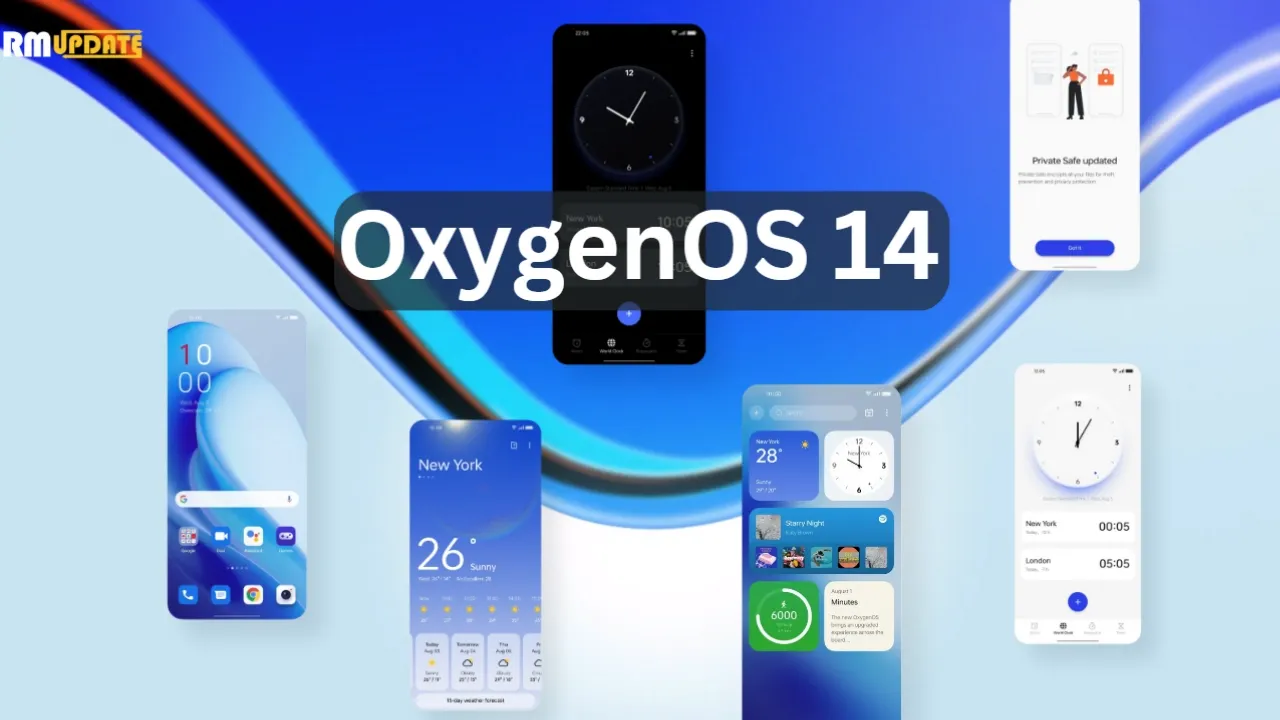
Today, OnePlus officially unveiled OxygenOS 14, the latest iteration of its Android 14 skin. Although OxygenOS 14 isn’t officially available yet, at least not in a stable state, OnePlus wants you to be prepared for it when it does. For the time being, it’s accessible as a second beta for the OnePlus 11 that includes all of the new features.
What new features are those? Truthfully, I’m not sure. Although OnePlus was gracious enough to invite us to a briefing on OxygenOS 14, it was challenging for me to learn much because the verbal word salad used to describe what this skin aims to do is more than my brain can process. This stuff is filled with laughable buzzwords and talking points. I’m fairly certain that it was created by a set of algorithms powered by artificial intelligence (AI) and a microchip inserted into the brain.
I’ll do my best to sum-up what OxygenOS will offer your OnePlus phone.
The Trinity Engine! I have no idea what this is, but OnePlus describes it as a combination of CPU, ROM, and RAM Vitalization, as well as the attachment of the capitalized word HYPER to rendering, touch, and boost. All you need to know is that they are powered by an algorithm…and they should make your phone feel faster and smoother for years to come.
OnePlus Cloud now integrates with Google Photos for backups. Cool.
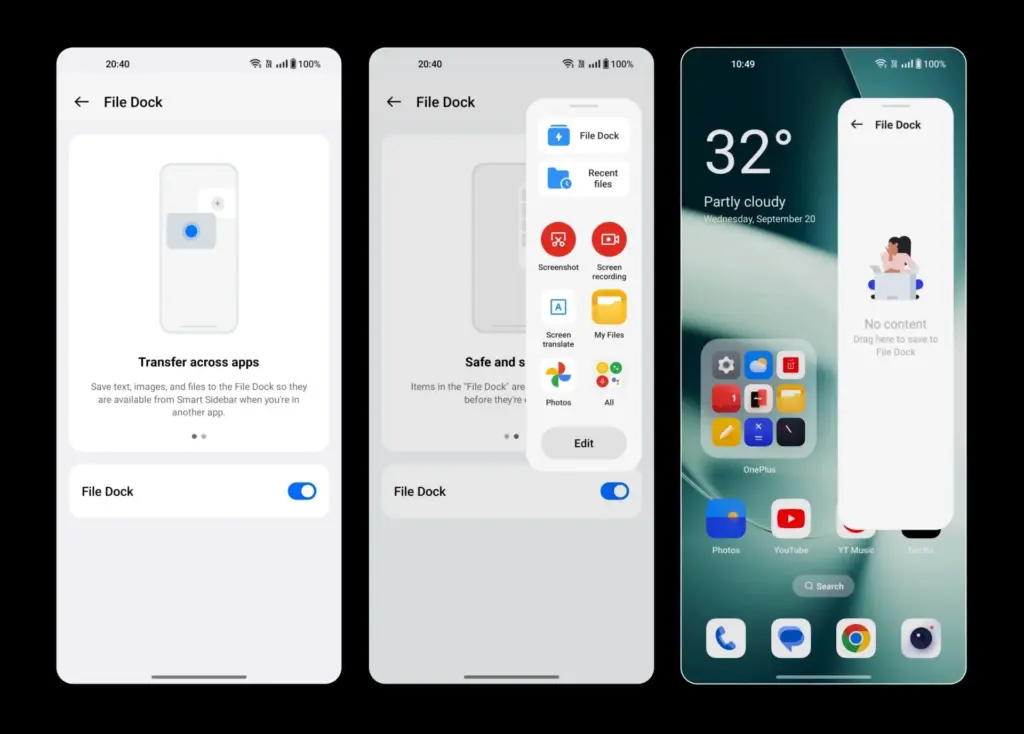
File Dock “enables collection, analysis, and sharing of global information through the Dock or other applications simply by making gestures.” What? I think that means you have a system-level copy-paste-clipboard feature that works across your phone and tablet and PC. Maybe?
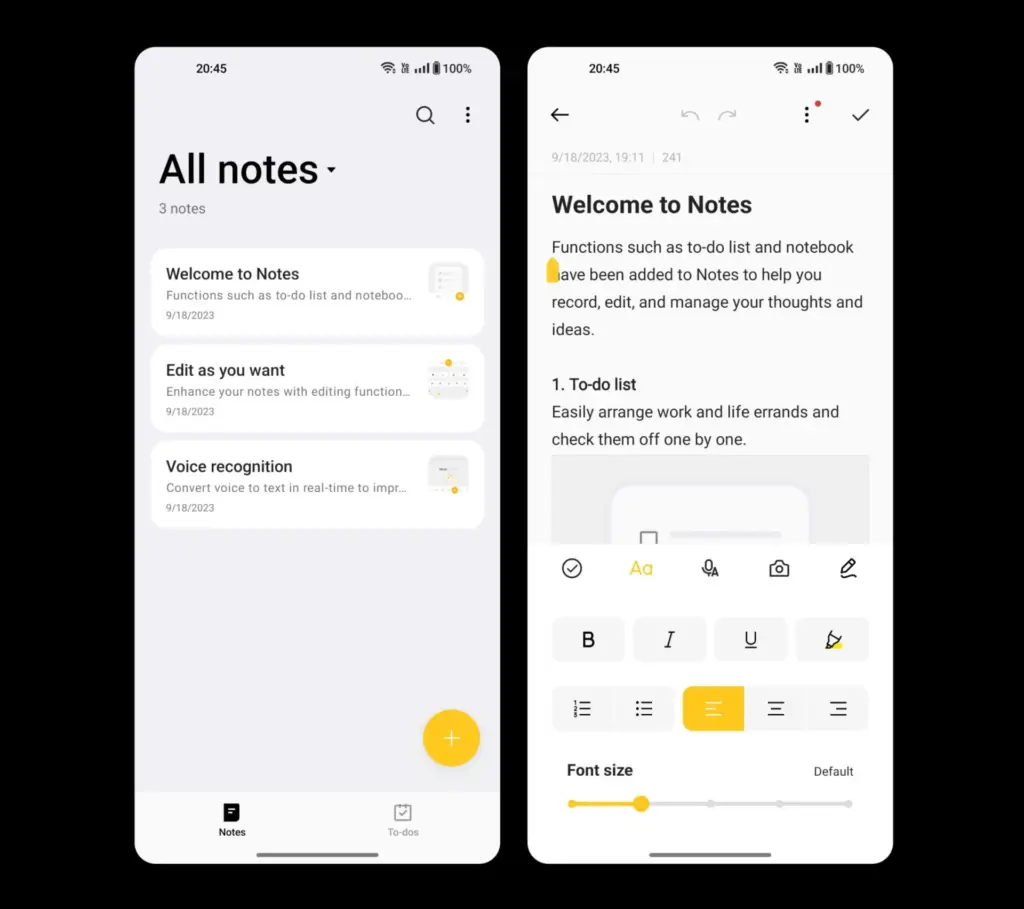
Notes app is more robust with a “touch of personality” that includes color, a creative font, and different sized text or images. You’ll also find note editing using underlines, strikethrough, and split lines, as well as categorization.
Smart Cutout allows you to long-press any person or pet in a full-size image (or on a paused video) to crop them out and then play with them as a wallpaper or poster. In OxygenOS 14, you can now identify up to 3 objects in a single photo.
Multi-Screen Connect 2.0 connects your OnePlus phones running OS 14 with a “faster and more stable” connection.
Clone Phone 2.0 lets you setup a new phone to quickly syncrhonize your network, account, and other basic settings.
Security Center from Android 14 is here, because this is Android 14.
Auto Pixelate 2.0 can now “intelligently detect formats like receipts, screenshots from social apps, car license plates, ID documents, boarding passes and more” to pixelate that sensitive info.
Fluid Cloud is apparently not a cloud service and is instead a new design on information presented through notifications and the status bar. It’s like water and liquid, or something, because it expands on OnePlus’ Aquamorphic Design. I just hope they fixed the way notifications work on the lock screen and in the pulldown.
Sounds from nature have taken over with new ringtones and notification sounds.
Go Green AOD is a new take on the always-on display that tracks your steps as you walk throughout the day to then let you know that you are reducing CO2 in the air because you didn’t drive a car.
Once more, OxygenOS 14 Beta 2 is now available to OnePlus 11 users. There is no information yet on when it will become stable. You may expect beta builds for devices including the OnePlus Pad, Nord 3, OnePlus 11R, 10 Pro, and 10T in October. In November, beta builds will be released for yet another set of hardware. Below is a list of everything on it.
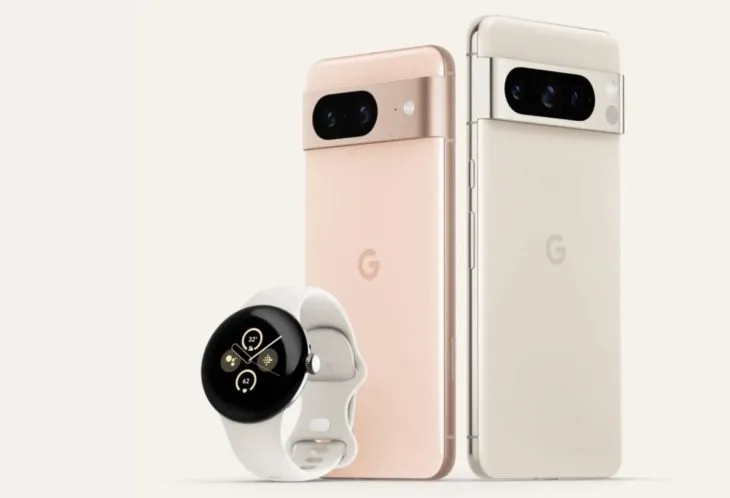
We’ve all been sufficiently spoiled for the Pixel 8 and Pixel 8 Pro, so let’s move on to the Pixel Watch 2. Apparently, there have been significant Pixel Watch 2 leaks this morning as well, including a promotion that may allow you to receive a free device in two weeks.
This most recent leak, which comes from @Za Raczke once more, is in the form of a promotional film that gives a Google tour of the Pixel Watch 2 and several of its capabilities. We get a clearer idea of the health and fitness capabilities that will be available on Google’s upcoming watch, even if Google has already published some of this information.
New in Pixel Watch 2
The new sensor in the Pixel Watch 2—likely the same sensor seen in the newest Fitbit smartwatches—is where the health story of the device begins. This sensor can detect more precise heart rate readings, assess your skin temperature, track stress (EDA), and offer heart rate variability (HRV). Moreover, you will receive pace and zone tracking, automatic workout start and stop reminders, and a number of safety features, including the new Safety Check. The Safety Check timer, which was made available for Pixel phones in June, enables you to check in with loved ones during a certain period of time.
In the realm of health and fitness trackers, none of it is really novel or ground-breaking, although Google did initially debut the Pixel Watch with mediocre health features that didn’t really measure up to the competition. This new sensor ought to help it fit in as a watch that is unquestionably expensive.
We may expect a 24-hour battery life with sleep tracking, so there isn’t much of an improvement there. That was sort of expected given that leaks had suggested for some time that Google was maintaining the same form factor without significantly increasing battery capacity. We might be able to use the always-on display so that we can receive the entire 24 hours thanks to the new Qualcomm chip.
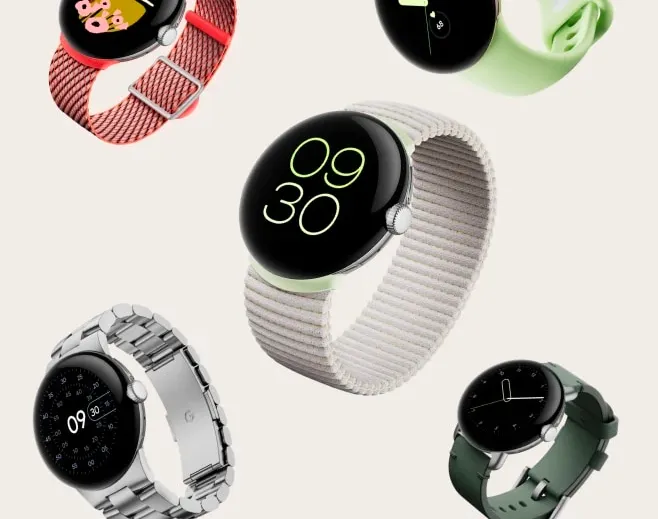
Last but not least, the film displays the new watch bands, including the Sport Band with a Hole and the Slim Metal Links Band in New Colors
Oh, and the promotion for the free Pixel Watch 2? If you pre-order the Pixel 8 Pro, it appears that Google will give the Pixel Watch 2 away for free. That’s a good addition, however it’s unclear yet if it will apply to the ordinary Pixel 8 as well or only the Pro. Price-wise, the Pixel Watch 2 should be close to the $350 of the first model.
The proliferation of images in the digital realm is undeniable. We’re constantly snapping photos, whether they’re professional shots or casual memories captured on our smartphones. And as technology continues to evolve, so do the file formats we use to store these images. Enter HEIC – a relatively new and efficient format that’s making waves, yet presents certain challenges that prompt the need for conversion tools.
Understanding HEIC’s Rise
When Apple introduced HEIC (High-Efficiency Image File Format) as its default format for photos, it marked a shift in the digital imaging landscape. HEIC offers high-resolution image storage with almost half the size of its JPG counterpart. It’s the future, blending quality and efficiency. But like all advancements, it’s not without its teething issues.
The HEIC Hurdle
The brilliance of HEIC lies in its space-saving capacity without compromising on image quality. But this comes with the cost of compatibility. Most non-Apple devices, and even some popular software and platforms, have yet to adopt this format.
So, what do you do when you have a top-quality HEIC image that needs to be viewed, edited, or shared on a platform that doesn’t support it? You resort to conversion.
The Conversion Solution
JPG: The Universal Language of Images – The need to convert heic to jpg stems from the universal acceptance of the JPG format. Almost all devices and platforms recognize it. Converting HEIC to JPG allows users to maintain a balance between quality and compatibility. It ensures that your photos can be easily accessed, edited, and shared across various platforms.
PNG: Preserving Quality – For those who prioritize image integrity, especially when dealing with graphics or images with transparency, PNG is a preferred choice. Thus, the option to convert heic to png offers a lossless compression solution. This means every pixel of the original image is preserved, ensuring no degradation in quality.
Why Convert?
Compatibility: While HEIC might be efficient, it’s not universally accepted. Converting ensures your images are accessible everywhere.
Flexibility: Different projects require different formats. Whether you’re designing a website or editing a photograph for print, having your image in the right format is crucial.
Storage Management: Although HEIC is efficient, there might be instances where you’d need to convert to JPG to reduce file size further or to PNG to maintain quality.
Embracing the Future
There’s no denying that HEIC is a testament to the ever-evolving digital world. As we move forward, it’s crucial to have the right tools to navigate these changes. Conversion tools serve as a bridge, ensuring that while we embrace the future, we remain rooted in the present’s practicalities. In the end, it’s all about ensuring our memories and professional works are not confined by formats but are free to be shared, appreciated, and utilized in the vast digital universe.
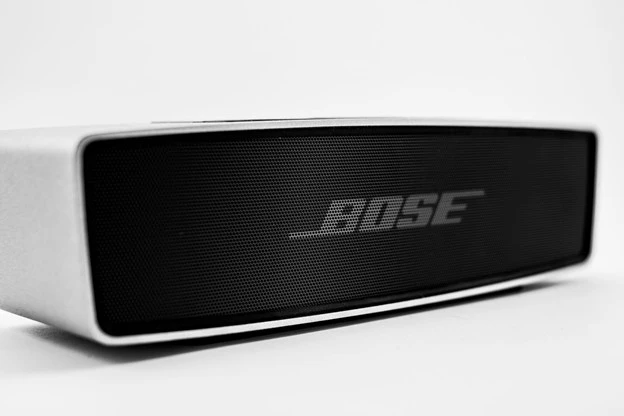
When it comes to portable audio, Bose speakers have established themselves as reliable and high-performing options.
With their impeccable build quality and impressive sound, Bose continues to be a go-to brand for audio enthusiasts.
In this guide, we’ll explore the considerations for choosing the best Bose Bluetooth speaker, recommend some top models, provide troubleshooting tips, and ultimately help you make an informed decision.
Considerations for Choosing a Bose Speaker
Here are some key factors to look out for when buying a Bose speaker.
Sound Quality as a Key Factor
Bose offers a range of speakers, each with its own sound signature and characteristics. Whether you prefer punchy bass, balanced audio, or crystal-clear vocals, understanding the variations in sound quality within the Bose speaker range is crucial.
Take into account your personal preferences and the kind of music you enjoy. While the Bose bluetooth speakers price may be high, they are well complemented with the features.
Size, Power, and Portability Considerations
Deciding between a portable or domestic speaker depends on your usage requirements. If you need a speaker for outdoor adventures or traveling, a portable option is ideal. Consider factors like battery life, durability, and IP ratings for water and dust resistance.
If the Bose Bluetooth speakers price is high, make sure you are getting what you are really looking for.
Features to Consider
Bose is known for incorporating useful features into its speakers. Determine which features are essential for you, such as voice assistant compatibility, Wi-Fi streaming capabilities, and multi-room audio, if you want the best bose bluetooth speaker.
Strike a balance between the features you need and the Bose Bluetooth speakers price.
Bose Bluetooth Speaker Recommendations
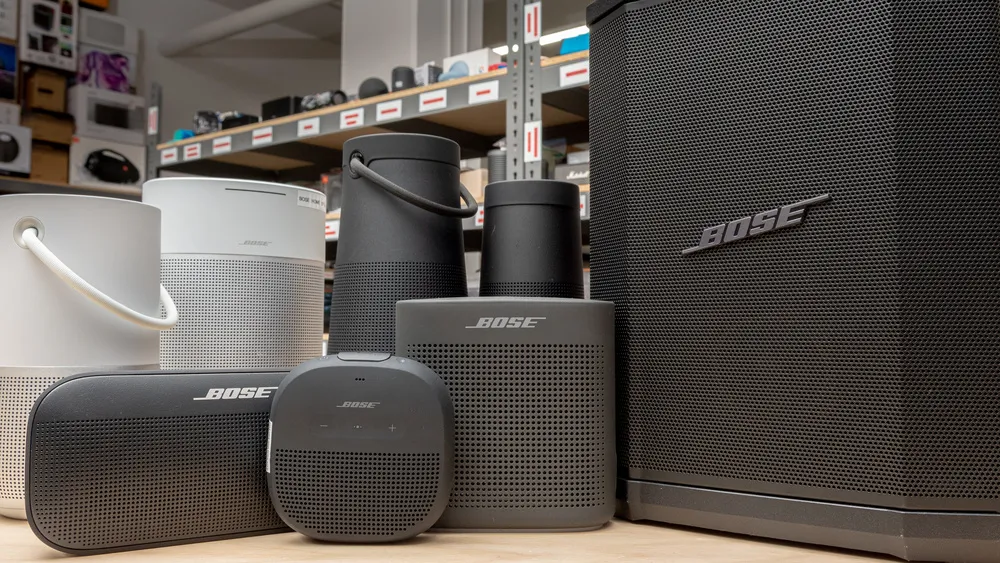
Here are our top recommendations for the best Bose speaker you can buy
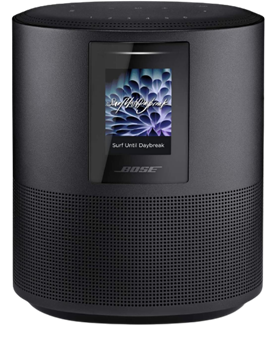
Bose Home Speaker 500
With the Bose Home Speaker 500, you can fill any room with impressive wall-to-wall stereo sound from a single speaker. This smart speaker comes equipped with built-in Amazon Alexa and Google Assistant for convenient voice control. Its noise-rejection microphone system listens in every direction, ensuring your voice commands are always heard.
Connectivity options with Bose Home Speaker 500 are abundant, allowing you to pair your device via Bluetooth, home Wi-Fi network, Apple AirPlay 2, or Spotify Connect. Managing your listening experience is a breeze with three different control options: voice commands, the Bose Music app, or the six one-touch presets on the speaker itself.
Make or take calls hands-free with Alexa, connecting to other Bose smart products, Amazon Echo devices, and contacts in your list. The Bose Music app offers simple setup with detailed prompts, ensuring you can quickly get the most out of your Bose Home Speaker 500.
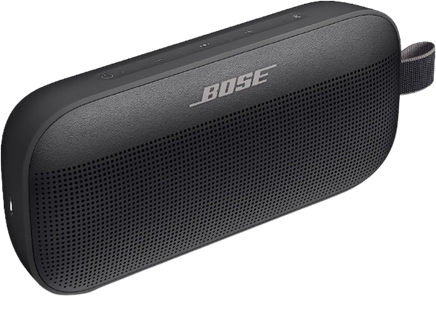
Bose SoundLink Flex
The Bose SoundLink Flex is a state-of-the-art outdoor speaker that delivers impressive audio whether you’re at home or on the go. Packed with exclusive technologies and a custom-engineered transducer, it ensures deep, clear, and immersive sound quality.
One standout feature of Bose SoundLink Flex is the proprietary Position Qtechnology, which automatically detects the orientation of your portable Bluetooth speaker, optimizing sound quality for any environment. The SoundLink Flex has been rigorously tested to meet IP67 waterproof standards, making it resistant to water and capable of floating—perfect for your outdoor adventures.
Designed to withstand drops, rust, and debris, this portable Bluetooth speaker is built to last. It’s also resistant to corrosion and UV light, ensuring it remains in top shape over time. The rechargeable battery of the Bose SoundLink Flex provides up to 12 hours of playtime and charges conveniently through the included USB-C cable.
Equipped with a built-in microphone, the SoundLink Flex allows you to make and receive calls directly through the speaker. It also offers easy access to your phone’s voice assistants, such as Siri or Google Assistant, with just a single button press.
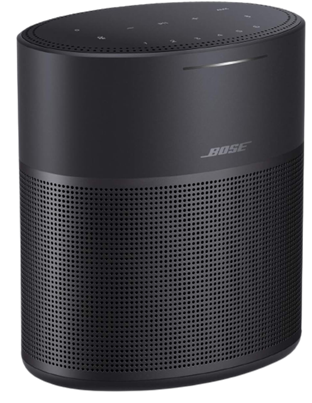
Bose Home Speaker 300
Compact yet powerful, the Bose Home Speaker 300 delivers room-rocking bass and lifelike 360-degree sound. This speaker needs to be plugged into a wall outlet to function and comes with built-in Amazon Alexa and Google Assistant for hands-free voice control.
Connectivity options with Bose Home Speaker 300 are abundant, allowing you to stream music and more via Bluetooth, your home Wi-Fi network, Apple AirPlay 2, or Spotify Connect. You have multiple ways to manage your listening experience, whether it’s through voice commands, the Bose Music app, or the convenient six one-touch presets located on the top of the speaker.
If you’re looking to expand your audio setup, the Bose Home Speaker 300 is part of the Bose Smart Family, allowing it to work in conjunction with other Bose smart speakers and soundbars for a multi-room listening experience.
You can also use Bose SimpleSync technology to pair the Bose Home Speaker 300 with a Bose Bluetooth or SoundTouch speaker, enabling synchronized music playback.
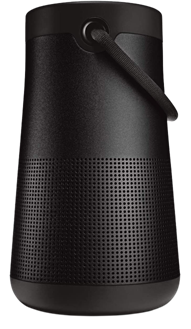
Bose SoundLink Revolve+ (Series II)
The Bose SoundLink Revolve+ (Series II) takes sound to another level with its true 360-degree coverage, playing louder and deeper with extended battery life compared to its predecessor. Its rechargeable lithium-ion battery offers up to 17 hours of playtime, and charging is a breeze thanks to the Micro-B USB port.
Designed to be a durable portable speaker, the SoundLink Revolve+ (Series II) is both dust and water-resistant with an IP55 rating. It can withstand splashes by the pool and features a flexible fabric handle for easy transport.
Take calls directly from the speaker and access your device’s default voice assistant or connect it to an Amazon Alexa-enabled device for even more hands-free control.
Just like other Bose products, the SoundLink Revolve+ (Series II) is compatible with Bose SimpleSync technology, allowing you to pair it with compatible Bose products for synchronized sound throughout your home.
Whether you’re away from your phone or already enjoying music in a group, you can sync the sound by pressing and holding the Bluetooth button or linking them with the Action button.
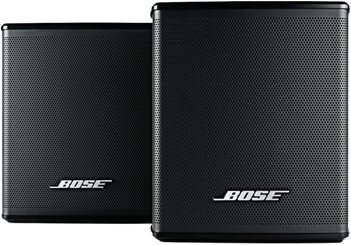
Bose Surround Speakers
If you’re looking for immersive surround sound without sacrificing space, the Bose Surround Speakers are the perfect choice. Designed to be the smallest speakers by Bose, they allow you to focus on your home entertainment rather than the speakers themselves.
These surround speakers bring your music, movies, and TV shows to life with full immersive sound. They effortlessly integrate with the Bose Soundbar 500, Bose Soundbar 700, and SoundTouch 300, creating a theater-like experience with just one connection.
To enhance your home entertainment experience even further, consider adding the Bose Bass Module 500 or Bose Bass Module 700. These bass modules deliver deeper, more impactful bass that you can not only hear but also feel.
With the Bose Surround Speakers, you can elevate your home audio setup and immerse yourself in a true cinematic experience.
Troubleshooting Bose Bluetooth Speakers
Whether you have a Bose Home Speaker 500 or the Bose SoundLink Flex, you are bound to experience problems:
Common Issues and Solutions
Despite the Bose Bluetooth speakers price, you might experience some problems, such as pairing difficulties, Bluetooth connectivity issues, and audio distortion. But there are easy solutions and often, restarting the speaker fixes them.
Updating Firmware and Software
Keeping your Bose speaker’s firmware and software up to date is crucial for optimal performance. So make sure to keep an eye out for any updates and keep your speakers at the nominal working.
Contacting Bose Support
With the Bose Bluetooth speakers price, you get your money’s worth. Customer service, or Bose support, is always there to fix any problems you might have.
Conclusion
In this guide, we’ve explored the considerations for choosing a Bose Bluetooth speaker, recommended some top models across various categories, and provided troubleshooting tips for common issues.
Remember to assess your personal preferences, prioritize the features that matter most to you, and select a speaker that suits your needs. With Bose’s reputation for premium sound quality and build, you can’t go wrong with any of their offerings.
Have you ever realized that you were aimlessly browsing through your phone without taking any action? It’s simple to get lost and unsure of which apps to really install when perusing the large selection of apps available on the Google Play Store or the Apple App Store, whether you’re looking through news, social media, or the apps themselves.
We are aware of the negative effects of this behavior, but we also value the thrill of finding a free program that is genuinely helpful. Because of this, we at Droid Tools have taken the time to search the Google Play Store and the Apple App Store for free apps that are usually not made available for free.
It’s crucial to remember that the free versions of the iOS and Android apps we describe below are only accessible right now. The expiration date of this deal is beyond our control. Because of this, it’s essential to take advantage of the chance and download/install any program that grabs your attention as quickly as you can, before it turns back into a paid app.
Android apps available for free for a limited time
Android apps for productivity and lifestyle
Reminder Pro($2.99): Our smartphones are supposed to help us be more efficient, so why not take advantage of this app so that you can remember stuff?
Home Workouts No Equipment Pro($1.49): You might have a thousand and one excuses not to work out at home, but this app ensures you can get a well-balanced workout even without any expensive gym equipment!
Android Games
Evertale($0.99): A fantasy game with monsters to kill and places to explore. A Pokemon clone of sorts, with extremely lovely graphics!
The Hearts PRO($1.99): A puzzle game that will certainly stretch your brain power. There are 6 different game modes to choose from to keep you occupied for hours on end.
Stickman Warriors Super Heroes($0.49): A beat’em up that will test your skill to the maximum. Do you have the type of reflexes required to win?
Space Shooter Galaxy Attack($0.99): It is up to you again to save the galaxy from an alien invasion force. Do you have what it takes?
Timing Hero PV($2.99): An interesting RPG that pays homage to the pixelated graphics from the 8-bit era, where you explore the world and start growing in power as you level up.
iOS apps available for free for a limited time
iOS apps for productivity and lifestyle
Memorize IELTS Vocabulary($4.99): If you are running out of time and need an app to help push you over the line in memorizing IELTS vocabulary, this might just be it!
Casual Dieting($0.99): Want to start keeping track of all that you eat? This log book makes everything look so cute, and it should spur you on!
Household Account Book($0.99): Balancing your monthly expenditure can be quite a chore, but what happens when you have an app that encourages you to do so with lovely graphics? It would be an encouragement for sure!
Pocket Chops($1.99): Practice makes perfect, and with 2,300 practice rudiments for the aspiring drummer, you’re spoilt for choice!
Locker Pro($15.99): Here’s where you can store all your passwords with peace of mind, at least it is an alternative if you are feeling paranoid.
iOS games
Geography Duel($2.99): Hello, nerd! Want to show the world just how good your geographical knowledge is? This game will find you out!
Drop Flop!($0.99): Just how fast do you think your reflexes are? Find out in this screen-tapping game!
Hexio($1.99): A mind-numbing minimalist puzzle game with 96 levels to help keep your brain on its toes.
Doge Flyer($0.99): Now here’s a game that pays homage to the endless runner genre, where you are a Shiba Inu flying around in a rocket, avoiding obstacles to stay alive. Unlike a cat, you do not have nine lives…
Cartoon Craft($1.99): It is a fierce battle between orcs and humans, which faction will you take in this RTS to emerge victorious?
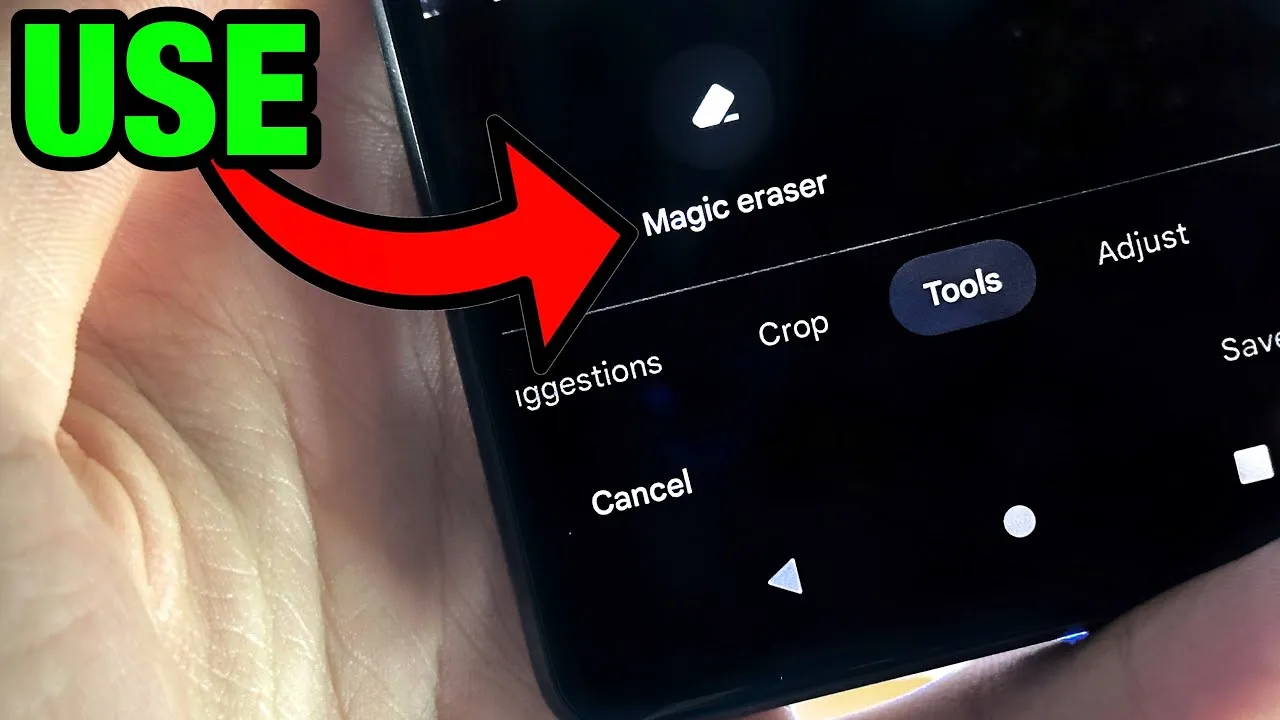
Google’s artificial intelligence (AI)-powered Magic Eraser tool debuted on the Pixel 6 smartphone. Later, it was expanded to accommodate additional iPhones and Android phones. A new version that removes various forms of audio from video recordings looks to be in development by Google; it will probably launch on the Google Pixel 8 and Pixel 8 Pro.
Google hasn’t yet acknowledged anything regarding the Pixel 8 smartphones, however over the weekend, an unidentified person purportedly uploaded some promotional content on X (formerly known as Twitter).
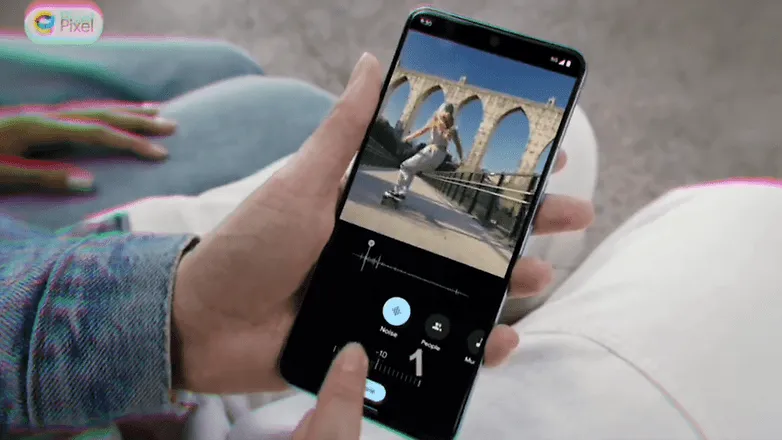
The unreleased Pixel 8 Pro was seen in the video clip sporting a brand-new feature called Audio Magic Eraser. The editing tool was identified as a video-specific version of Magic Eraser. It appears that the tool is able to recognize the important noises in videos and then gives the user the choice to decrease or delete the audio signature.
As for the many kinds of noises in videos, it can distinguish between background noise, people, and music. We would not, however, rule out the potential of the presence of more categories in addition to the aforementioned three.
The Pixel 8 Pro has a similar appearance to the early renders that were published, but it has a new temperature sensor under the camera bump. It would seem appropriate for the low-cost Google flagship Android device to be unveiled in a fresh shade of blue, as is most likely the case with the smaller Pixel 8.
The Pixel 8 line will be powered by Android 14 and may ship in October, based on Google’s prior Pixel launches. At the same time, it’s anticipated that the speculated Pixel Watch 2 with its metal body and ultra-wideband connection would be unveiled.
Have you ever let your phone idle while you scroll through it idly without doing anything? This involves looking via social media and the Google Play Store, as well as the Apple App Store. With so many apps available, it’s simple to become confused and unsure about which ones to install. Although there are disadvantages, there is also joy in discovering something free that is genuinely helpful. To identify free programs that are typically not free, we at nextpit have combed through the Google Play Store and the Apple App Store.
First and foremost, it’s crucial to remember that the free, temporary availability of the iOS and Android apps described below. The expiration date of this deal is beyond our control. Hence, take advantage of the situation! Each program that captures your eye should be downloaded and installed right away before it starts to cost money.
If you come across an interesting app that is listed here but don’t need it just yet, we would recommend you install it before deleting it. By doing so, you will save the app in your library and install it later without having to pay for it, even after the promotion has ended.
Android apps available for free for a limited time
Android apps for productivity and lifestyle
Reminder Pro($2.99): Are you a very forgetful person and need an app that becomes your second brain? Reminder Pro fits the bill perfectly.
Home Workouts No Equipment Pro($1.49): How is your New Year’s Resolution to keep fit and trim coming along? It is not too late to start yet, with this app to help you regain your strength and health without the need for expensive gym memberships or equipment.
ColorMeter Color Camera Picker($1.99): This tool is a pretty cool one for content creators, as it helps you capture and identify colors in your surroundings easily. If you are a stickler for accurate stuff, then this is right up your alley!
Android Games
Burning Fortress 2($0.99): Forget about defending your castle or fortress, this time around, it is your turn to be on the offensive! Just how well can you do?
Block Blast($1.49): A retro puzzle game that is almost like Tetris, except that it is not. You need to match the colors of the blocks instead of clearing lines.
Kingdom Rush Vengeance TD Game($4.99): A tower defense game that offers unique challenges that will keep you coming back for more!
Crazy Calculator($1.49): Do you think you are a math whiz? If so, you might want to check out this game which looks like a calculator app but teases your brain in ways you never knew a calculator could.
Zombie Age 2 Premium Shooter($0.99): A cartoonish side-scroller that sees you mow down wave after wave of zombies in a desperate bid for survival.
iOS apps available for free for a limited time
iOS apps for productivity and lifestyle
Farm Touch Sounds($0.99): Listen to the different types of sounds that farm animals make by touching their respective photos.
HibiDo Pro($2.99): We know that everyone is extremely busy just trying to survive. This means tons of tasks to do each day, so why not enlist the help of an app to simplify your life?
Sifter($0.99): An app that filters incoming SMSes, making sure that no spam gets past it.
iOS games
SARKWO($0.99): A puzzle game that requires you to slide marbles in the right order so that you can advance to the next level.
Spell the Beans($1.29): Absolutely cute title, where a bunch of spilled coffee beans will then require you to make words out of them.
Halloween II($3.99): Find out everything that you need to know about Halloween right here in this cute little app.
Duplicado($2.99): It is an avalance of avocados! You will need to slide all the avocados on the ground so that every single seed is planted to maximize the harvest.
Shock Clock Arcade($0.99): Jump from clock to clock before time runs out. Just how fast are you?
That’s it for now! To get you through the weekend, we hope you’ve enjoyed our selection of free iOS and Android apps. Were there any intriguing apps or games that you liked that you did not find here in the Apple App Store or Google Play Store? Please feel free to leave your suggestions in the comments section.
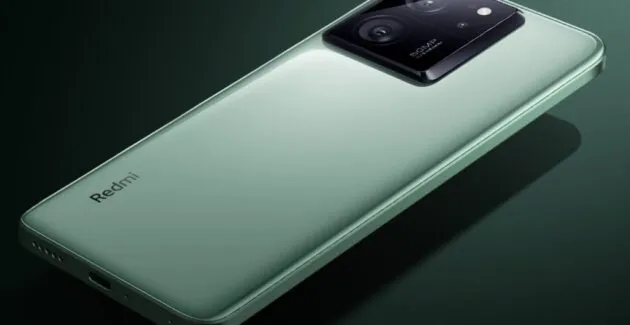
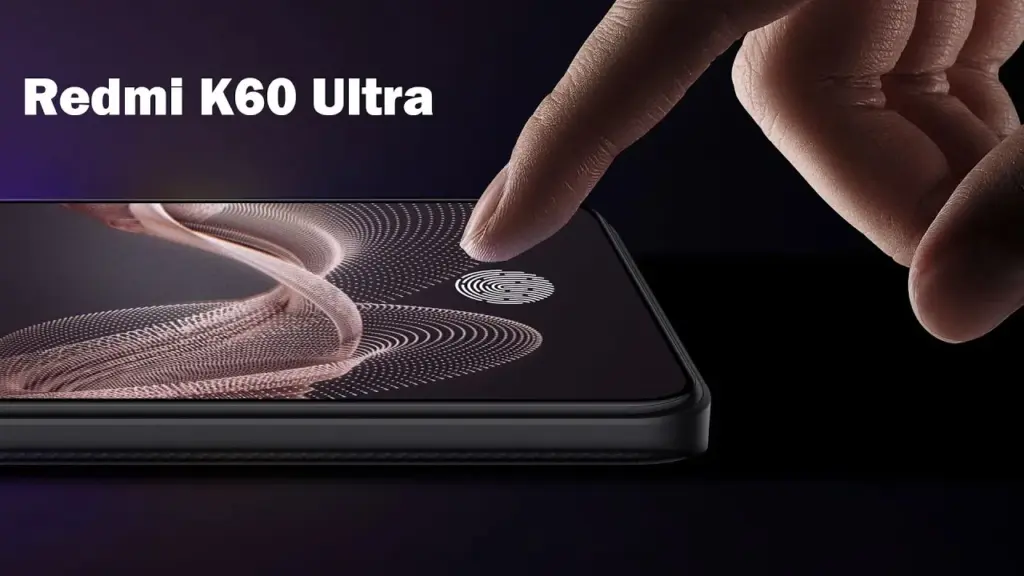
Leaked Redmi K60 Ultra launch date, style, features, and anticipated cost. The Redmi K60 Ultra is the forthcoming flagship model for the Chinese market from Xiaomi’s Redmi sub-brand. The device will be made available as a replacement for last year’s Redmi K50 Ultra.
Like its predecessor, the K6 Ultra is projected to exclusively be offered in the Chinese market. Similar to how a modified version of the K50 Ultra was introduced with the Xiaomi 12T Pro moniker in the foreign market, a customized model of the K60 Ultra is rumored to arrive soon globally under the Xiaomi 13T Pro label.
Here is a summary of all the information we currently have on the K60 Ultra. On August 14 at 7 o’clock (local time), the Redmi K60 Ultra is scheduled to go on sale in China. The event will be aired live in China on Weibo and other streaming services.
Rumors on specifications
At the same launch, the Xiaomi Mix Fold 3 folding phone, Xiaomi Pad 6 Max tablet, and Xiaomi Band 8 Pro will all be introduced. The Redmi K60 Ultra will come with a 6.67-inch OLED display with a 1.5K resolution, 144Hz refresh rate, P3 color gamut, and 2,600 nits of brightness.
The company has already disclosed that a PixelWorks X7 display chip will power the screen, providing a superior viewing experience. Nothing is known about the Redmi K60 Ultra’s front camera. But, the 50-megapixel Sony IMX800 primary camera on its back panel will feature OIS and have an 8K video recording capability. There is currently no information available concerning the extra cameras on the device.
A significant 0-click vulnerability in the Pixel 6 modem stack was identified by Google’s Android Red Team and has since been patched. This vulnerability allows a skilled attacker to take control of a target’s Android device by making a call to the victim.
Four members of Google’s Android Red Team demonstrated how two Pixel modem vulnerabilities (CVE-2022-20170, CVE-2022-20405) could be combined to first hijack a targeted Pixel’s cellular modem communication to the second-generation (2G) wireless standard with the aid of a cheap $1,000 home-made cellphone base station during the Wednesday Black Hat session.
The aforementioned bugs were first found in 2021 by Android Red Team members. With a CVSS score of 9.8, both modem flaws are now classified as critical. The over-the-air remote code execution bug, designated CVE-2022-20170, was addressed in June 2022. An elevation of privilege (EoP) weakness was discovered in the second vulnerability, tracked as CVE-2022-20405, and it was fixed in August 2022. The EoP bug was deemed to be of moderate severity when it was initially discovered in an Android security bulletin.
If the attack is successful, the enemy will be able to wirelessly execute remote code that is running in the Pixel modem’s privileged context. According to experts, an attacker would then be able to conduct out assaults against the handset, such as launching a DoS attack, performing SMS/RSC (text message) sniffing and spoofing, MFA compromise, and enabling a hacker to switch to the device’s main operating system kernel.
Google claimed that it was not aware of the issues being used in the wild and that internal Alphabet procedures were to blame for the delay in disclosing the technical CVE information.
2G is obsolete
The Android Red Team at Black Hat includes Xuan Xing, Eugene Rodionov, Xiling Gong, and Farzan Karimi to demonstrate the assault (see image). Exploiting flaws in the Android Pixel’s cellular data connection to 2G networks is the initial attack vector.
The goal of this attack, according to Karimi, is to downgrade mobile devices to 2G.
The majority of modern cellular modems operate on 4G or 5G frequency bands. Yet, the majority of cellular data modem chipsets continue to support 2G and other dated wireless frequencies. For uncommon use scenarios including outdated wireless network geography, devices cycling down to save handset power consumption, and phones going to international markets where legacy 2G cellular networks are more prevalent, legacy support is required.
Weak encryption between towers and devices is one of the security vulnerabilities with 2G, which attackers may (and have) easily hacked in order to intercept conversations or text messages. Even current phones, according to researchers, occasionally transition to 2G to handle signal congestion, roaming, and network switching better.
The Android Red Team went above and beyond the examples of hackers and government enforcement utilizing fake base stations dubbed ISMI catchers (international mobile subscriber identity) or surveillance tools like Stingray to collect phone ID data, geolocation data, and content. They demonstrated how a vulnerable Pixel phone could be controlled remotely via a $1,000 home-built base station in addition to being used to collect data.
Breaking down the attack
The Android Red Team went above and beyond the examples of hackers and government enforcement utilizing fake base stations dubbed ISMI catchers (international mobile subscriber identity) or surveillance tools like Stingray to collect phone ID data, geolocation data, and content. They demonstrated how a vulnerable Pixel phone could be controlled remotely via a $1,000 home-built base station in addition to being used to collect data.
“When a victim comes in proximity (a range of less than 5 miles) of the malicious base station it will connect to it,” said Karimi. “That allows the adversary to send the exploit payload and establish a foothold on the victim’s modem.”
In more precise terms, the RCE issue is an out-of-band (OOB) write error that happens during the decoding of OTA packets from 2G GSM connection. According to researchers, the EoP fault is caused by an error in the Pixel 6’s modem code, which renders memory space RWX (also known as the read (r), write (w), and execute (x) permissions) and available via signal processing instructions.
“The attacker fully controls up to 255 bytes written into 1-byte buffer in the heap,” researchers said. “CVE-2022-20170 enables us to overwrite heap header of the next adjacent chunk with fully controlled data.”
According to Google, the exploit technique allowed them to “corrupt nearby heap items and put a small amount of controlled bytes in the heap.” Uncertainty surrounds whether any of those items had an effect on the memory management unit (MMU) of the modem, which is essential to the next phase of the attack.
Researchers were able to execute 80 bytes of malicious shellcode via the modem’s (MMU) misconfiguration vulnerability (CVE-2022-20405), giving the attacker access to the affected device.
Google tip: Disable 2G
The 2G-attack method actually poses a threat. There have been reports of temporary 2G base stations popping up close to the hotels Paris Las Vegas and Caesars Palace during what is known as Hacker Summer Camp in Las Vegas, which features three security conferences: BSides, Black Hat, and DEF CON. Participants in DEF CON are renowned for having a habit of exposing cybersecurity experts who expose their digital equipment to a cyberattack.
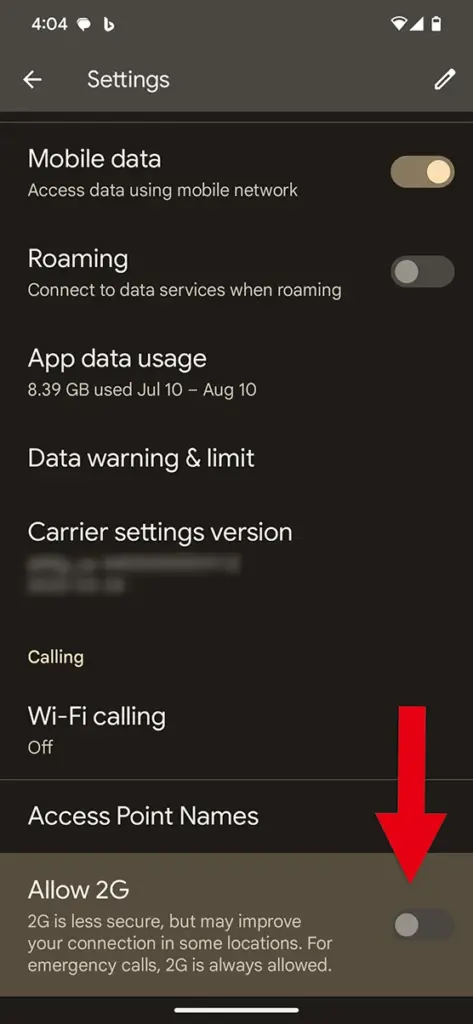
Researchers strongly advised Black Hat attendees to turn off 2G support on their phones. To turn off 2G capability, simply search for 2G in Settings on an Android device.
In related news, Google announced Tuesday a suite of Android 14 advanced cellular security mitigations for enterprises.
“Android 14 introduces support for IT administrators to disable 2G support in their managed device fleet. Android 14 also introduces a feature that disables support for null-ciphered cellular connectivity,” according to a Google Security Blog writeup.
Although MIUI 15 has been planned for development and release by Xiaomi for a number of years, it is still in the alpha testing phase. Yet this marks the first time that MIUI 15 has been reported to have appeared on MIUI.com without the words “alpha” or “test” next to it. Sadly, this time only a text string was discovered in a webpage’s HTML code; there was no beta test version released into the open. Yet, its release represents a significant turning point in the development of MIUI 15.
Although MIUI 15 has been planned for development and release by Xiaomi for a number of years, it is still in the alpha testing phase. Yet this marks the first time that MIUI 15 has been reported to have appeared on MIUI.com without the words “alpha” or “test” next to it. Sadly, this time only a text string was discovered in a webpage’s HTML code; there was no beta test version released into the open. Yet, its release represents a significant turning point in the development of MIUI 15.
Many Xiaomi consumers are still awaiting the MIUI 14 upgrade for their devices even though MIUI 15 is still a few months away. It is yet unknown whether all eligible devices will be updated before the launch of MIUI 15, as delayed upgrades are never helpful for a tablet or smartphone manufacturer’s reputation.