Blog

  • Limited-time freebies: discover top Android & iOS apps at no cost

    Limited-time freebies: discover top Android & iOS apps at no cost

    In today’s bustling app marketplace, finding quality apps and games without having to dip into your wallet can feel like striking gold. Developers often run special promotions where normally paid apps become free for a short window—an opportunity savvy users love to seize. Whether it’s a powerful productivity app, a fun puzzle game, or a creative tool, these limited-time offers are perfect for anyone looking to expand their digital collection without the usual price tag.

    A carefully chosen list of currently available, totally free Android and iOS apps and games may be found in this page. Every selection has distinct qualities that appeal to a variety of interests; there is definitely something here for everyone. But, be careful to move quickly because these deals could end at any time, and you’ll have to pay again to get access to these treasures.

    Check out the newest limited-time freebies below and take advantage of these exclusive offers while they last if you enjoy finding fantastic games and helpful apps without having to pay for them.
    android and ios apps

    Android

    Free Android Apps

    • Mockup for Everything ($8.99): This is a powerful t-shirt design app that lets you come up with personalized designs on the move.
    • Resize Image ($0.99): If there ever arises the need to resize your photos on your phone, then this app gets the job done with minimal fuss.
    • Chess Position Scanner ($4.99): I have a terrible memory, and trying to memorize the different positions in chess is tough. Good thing there’s an app for that!
    • Stroop Effect Test ($3.49): Challenge your brain and mind constantly by keeping it on its toes. 
    • Shortcut Maker ($0.99): Always a nifty addition to any phone if you want to create shortcuts to apps on the fly.

    Free Android Games

    • Space Shooter: Galaxy Attack ($0.99): It all boils down to your reflexes and how you are able to shoot all the incoming alien ships to protect your world.
    • Word Tower PRO ($0.49): Keep on creating new words to protect your tower from crumbling.
    • Tech Quiz Master ($2.49): Think you know everything about technology? Why not pit your knowledge against this game?
    • Avalar: Raid of Shadow ($0.99): An adventure RPG where you explore new lands and level up as you progress.
    • Rectangles Pro ($1.49): This is a game that tests your logical skills as you identify and tap four dots of the same color that form any rectangular shape on the grid. Best of all, this game also works for those who are colorblind. Talk about being inclusive!

    iOS

    Free iOS Apps

    • Password Cube ($1.99): Store, generate, and manage your passwords with minimal fuss.
    • Skywall – Ultra HD+ Wallpapers ($1.99): If you have always wanted to spruce up your iPhone’s background with high-resolution wallpapers, this is it.
    • Dr. Pet Play ($1.99): Being more educational than a brain-rotting game for kids, I’d say this is worth checking out if your little one has shown interest in being a vet.
    • Guestbook Go ($7.99): A digital guestbook for social events that does not need your supervision as the host? Count me in, it allows your device to let your guests take photos with Photo Booth, record videos, answer questions in Quiz Show, and write/draw, 
    • Time Calculator+ ($0.99): Ever wondered how long ago a particular event happened from today? Well, instead of manually hashing out the answer, let this app do the heavy lifting for you. 

    Free iPhone games

    • Animal Math Kindergarten Games ($7.99): Sporting over 100 math games to help your little ones remain glued to the screen, it offers an educational aspect while playing.
    • Pro Wrestling Manager ($3.99): While it is true that sports wrestling entertainment is scripted, it is still fun to watch. How about managing your own wrestlers?
    • Cut the Buttons ($1.99): A classic game that never gets old, and if you’ve never played it before, now is a good time to start.
    • WordWhile ($1.99): Think you have a fantastic collection of quotes in your head? This game will put that knowledge to the test.
    • Castle Ramble ($1.99): You’re a king, you own a castle, but there are invading pigs whom you need to fend off with your larger-than-life hammer! 

    Before you get started, a little reminder: Although these games and apps are free to download for a short period of time, keep in mind that some of them might have advertisements or require extra in-app purchases to unlock premium features or remove adverts. Although some features can improve your experience, using them may incur additional fees.

    To ensure you know exactly what to expect, always take a moment to check the program’s permissions and details in the app store. You can get the most out of your new apps and games and enjoy these free downloads without any unpleasant surprises if you keep an eye out for any potential advertisements or optional payments.
  • The simplified truth you need to know about AVIF to PNG

    The simplified truth you need to know about AVIF to PNG

    AVIF and PNG are the two most popular image formats, but both serve different functions. AVIF is developed primarily for excellent compression, which is superb for use on the Internet. PNG, on the other hand, is a conventional image format highly admired for its compatibility and transparency. 

    You may need to transform AVIF to PNG in specific cases, especially to gain support in old editing software. Transforming AVIF to PNG is also required to maintain transparency in applications that do not fully support it.    

    But how can you bridge the gap between the two? This is exactly what we will cover in this blog post. We will explore some of the best ways to convert AVIF to PNG using multiple tools and software. 

    Whether you need to convert your images one-by-one, or you need them in batch conversions, this blog will have you covered.

    The Whys of AVIF to PNG

    What makes AVIF stand out compared to other image formats is that it is a next-gen image format, offering superb compression and photo quality compared with PNGs. 

    But, there are other reasons why you need to change from AVIF to PNG. 

    • Compatibility: AVIF is like a cool new kid in the image neighbourhood, due to which many old browsers and applications do not fully support it.

    PNG, on the other hand, is also known as a universal image format that is recognized and supported in almost all devices and software.

    • Support for Transparency: The PNG image format is broadly used for its high transparency. 

    Although AVIF also supports transparency still some applications may not be able to render it properly.  

    • Editing Purposes: Many old image-editing tools do not have native support for AVIF. Therefore, you need to convert AVIF to PNG for editing purposes. 

    The Basics of AVIF and PNG Image Formats

    Both AVIF and PNG are highly popular image formats, but they differ in their purposes. 

    AVIF 

    In simple terms, AVIF stands for AV1 Image File Format, a new image format created for the Internet. This image format supports exceptionally high image quality at the lowest file sizes. It makes AVIF one of the most ideal for fast and data-efficient web pages. 

    AVIF also supports HDR and Wide Color Gamut, which gives images life-like visuals. These features give AVIF a perfect balance of compression, quality, and versatility.  

    PNG 

    PNG is a universally used lossless image format that is ideal for preserving image fidelity. The full form of PNG is Portable Network Graphics, which is the most efficient for compatibility. They are also great for making icons and logos with transparent backgrounds. 

    However, the biggest disadvantage of the PNG format is that they do not support advanced compression abilities. This makes a PNG image higher in file size. 

    Easy Ways to Convert AVIF to PNG

    There are multiple ways in which you can convert AVIF to PNG, ranging from online tools to editing software. In this section, we will take a closer look at some of the easiest ways to do so. 

    Online Image Converters

    If you want a fast and hassle-free way of converting AVIF to PNG, then online image converters are your best bet. You just need an active internet connection to work with these tools. 

    Some popular and efficient image converters are listed below. 

    1. RabbitLoader Image Converter: RabbitLoader’s image converter is a fast and easy-to-use tool for converting your AVIF images to PNG format. Visit the tool from your browser and follow the instructions to unlock hassle-free conversions in minutes. 

    2. Convertio: It is a great tool for fast and reliable image conversion from AVIF to PNG. This image converter boasts a highly user-friendly interface, which makes it easy to use. Convertio also offers a cloud space for easy storage of your images. 

    3. Zamzar: Zamzar is a highly popular online file converter admired for its efficiency and simplicity. The tool offers a quick and simple way to convert your AVIF images to PNG. All you need to do is visit the platform and select your output type, and initiate the conversion.  

    Software Tools

    Those who want more control over the image conversion process can opt for editing software tools. 

    Some of the most famous software tools for photo editing are summarized below. 

    1. GIMP: To save your image in PNG format from an AVIF file, you should first open the file in the GIMP software. Then, you need to navigate to “File” and “Save As” and then choose “Select File Type.” PNG must be the output format, and lastly, click on the “Export” button.   

    2. XnConvert: This software is a free and user-friendly batch image converter. It supports all other types of image formats, except AVIF and PNG. You can use this software for simple and advanced compression tasks. 

    Bulk Conversion of AVIF to PNG

    If you have many images in AVIF format and want them converted to PNGs, batch conversion is the most reliable and fastest way to do so. Instead of converting your images individually, batch conversion converts all your images at once. 

    The best way to batch convert your images from AVIF to PNG is by using RabbitLoader’s website optimization plugin. The plugin is primarily designed for WordPress websites, but site owners in WooCommerce and Shopify can also use RabbitLoader. 

    Installing RabbitLoader and connecting it with your website will leave you worry-free about handling hectic image conversions. RabbitLoader takes responsibility for converting your large-sized PNG or other conventional image formats to fast and efficient next-gen formats like AVIF and WebP. 

    The image optimization process in RabbitLoader is automatic. Apart from seamless image optimizations, RabbitLoader’s all-in-one optimization tool also offers advanced optimization techniques like lazy loading, minification, and caching to upgrade your website’s speed to a whole new level.

  • OnePlus is preparing the OxygenOS 16 launch

    OnePlus is preparing the OxygenOS 16 launch

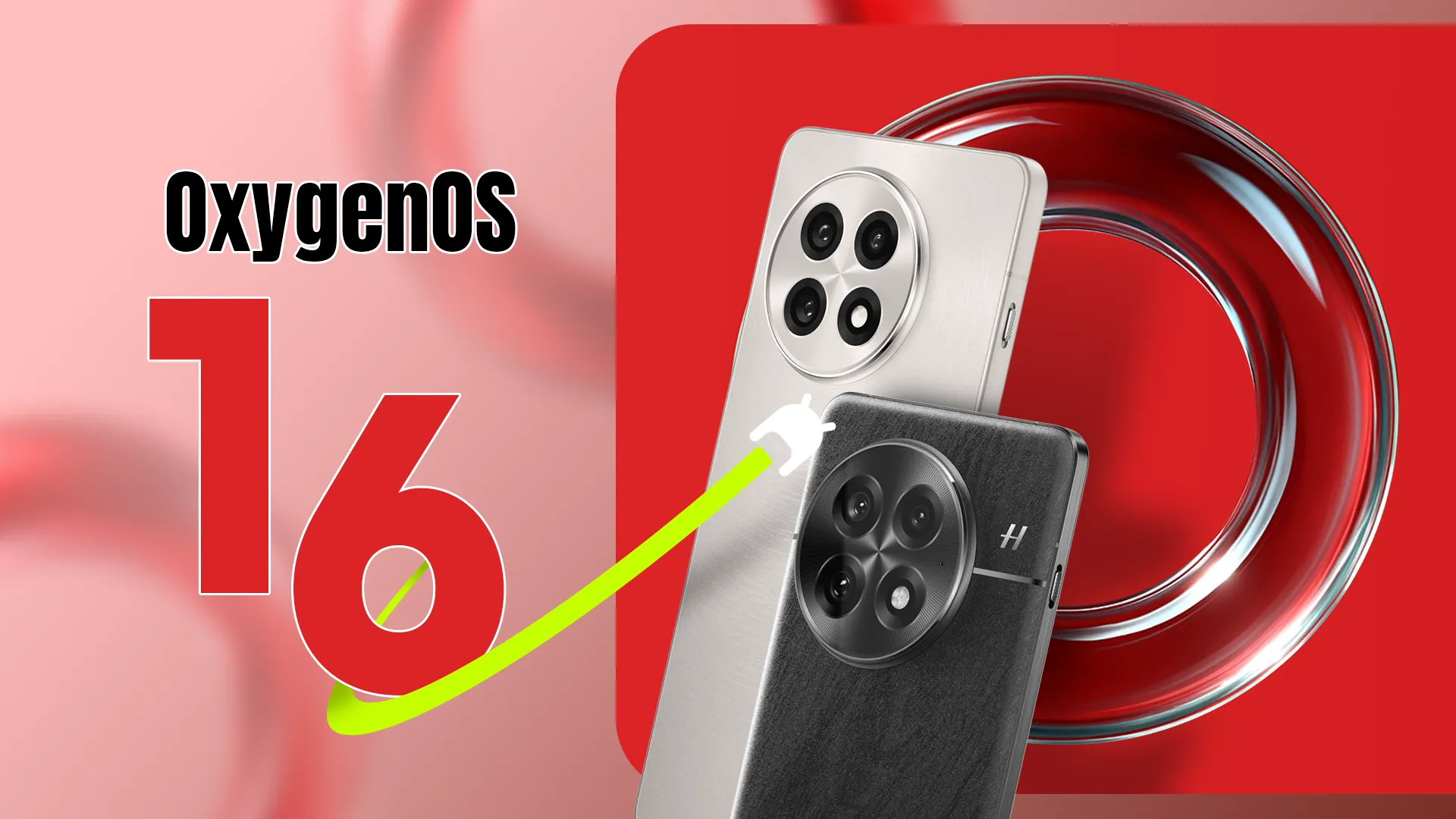
    OxygenOS 16, based on Android 16, will be a major upgrade for OnePlus devices, expected to bring tons of enhancements, new features, and visual changes throughout the system. The Android 16 beta has been available to select OnePlus phones since April, and now it appears that the stable release of OxygenOS 16 is around the corner. So, if you have a OnePlus device, here’s what you need to know and what to expect.

    When the stable release will be pushed to public?

    This year, Google released Android 16 more quickly than normal. The new operating system upgrade was made available to qualified Google Pixels in June. Although we had anticipated a speedier release from other Android companies as well, the stable release is taking a long time to arrive.

    However, earlier this year, OnePlus was among the first companies to release the Android 16 beta. The second and third betas for the OnePlus 13 were released in April and May, respectively, omitting the first beta. However, it hasn’t said anything regarding the stable release as of yet. OnePlus has not disclosed the plan or the date of the stable OxygenOS 16 release.

    However, given that the company has already started OxygenOS 16 closed beta testing on a number of handsets, including the OnePlus 13 and 13s, it looks like the stable release may not be far off. This beta program is fairly private. Before releasing the stable build, OnePlus may soon conduct a large-scale open beta release for its users.

    In October, the brand is anticipated to begin the stable rollout of OxygenOS 16. The upgrade will first be available for the OnePlus 13 series, then previous flagship phones, and finally mid-range and less expensive variants.

    What will OxygenOS 16 bring?

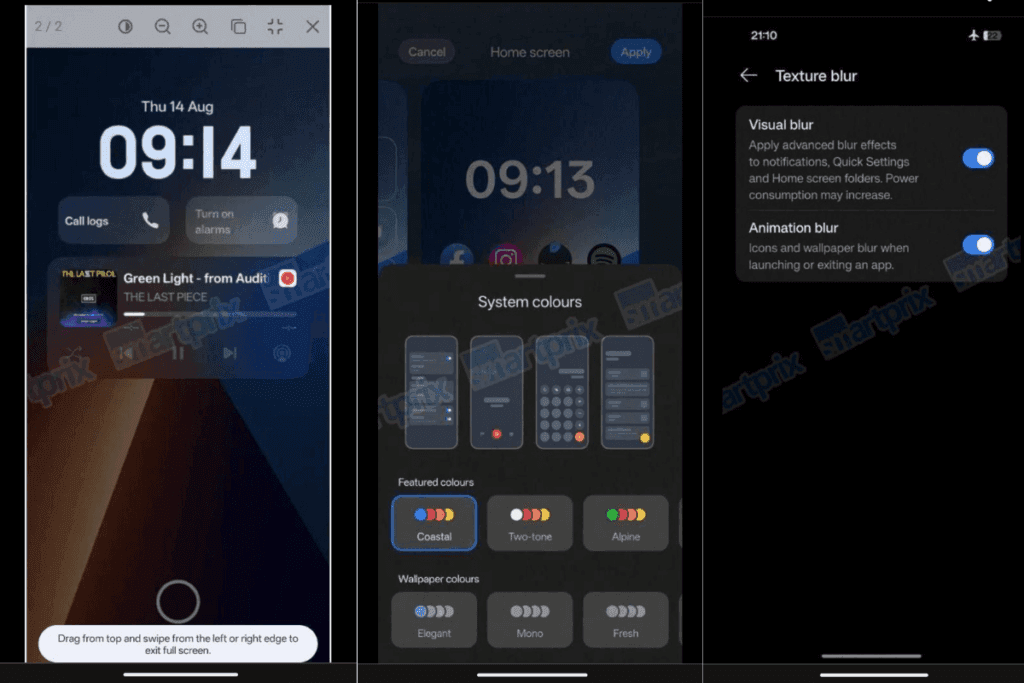
    OxygenOS 16 leaked screenshots

    Details on OxygenOS 16’s upcoming features and updates have not been disclosed by OnePlus. But because to recent leaks and earlier beta releases, we already have a solid notion of it. Along with several updates and new features from the OnePlus development team, the update will include new Google features as part of Android 16.

    A revamped fast settings menu, more customization options, notification grouping, and the most recent security and privacy improvements are just a few of the things that OnePlus may incorporate into its upcoming major update from Android 16. For increased utility, Live Alerts might be combined with Android 16’s Live Updates feature.

    A leak from Smartprix claims that OxygenOS 16 will finally include the eagerly anticipated lock screen widgets, increasing the lock screen’s usefulness. Numerous widgets will be available, such as calendar, weather, and widgets from compatible apps. Three new clock styles are also being added to the lock screen, one of which is a full-width stretched clock modeled after iOS 16.

    New choices also improve the Quick Settings panel. Users can drag and drop toggles anywhere on the screen while using the Split layout. For convenience, a new scrollable layout has also been included. The update also includes a number of internal adjustments that improve the software’s responsiveness and smoothness.

    When OnePlus publishes the final version of OxygenOS 16, I’m very certain there will be a ton of more great additions and updates. There is a lot to anticipate, so to remain informed about the most recent developments, you might want to frequently check out our Android 16 section or think about subscribing to our X.

  • Amazfit Balance 2 – review – good but not the best

    Amazfit Balance 2 – review – good but not the best

    The Amazfit Balance 2, a smartwatch that puts your fitness first, is the sequel to the Balance.

    The Active 2 has the intelligence to cover you whether you’re a Hyrox fan, want something to help you train for a marathon, or want to jump in the water with it. In addition to tracking, it aims to assist you in making more informed choices regarding when to workout and when to take a day off.

    Through the ability to pay for itself, stream music while on the go, and download apps to improve the Balance 2’s functionality, it seeks to compete with the Apple Watch and Wear OS devices, such the Samsung Galaxy Watch 8.

    Design and display

    Recensione Amazfit Balance 2 scaled 1

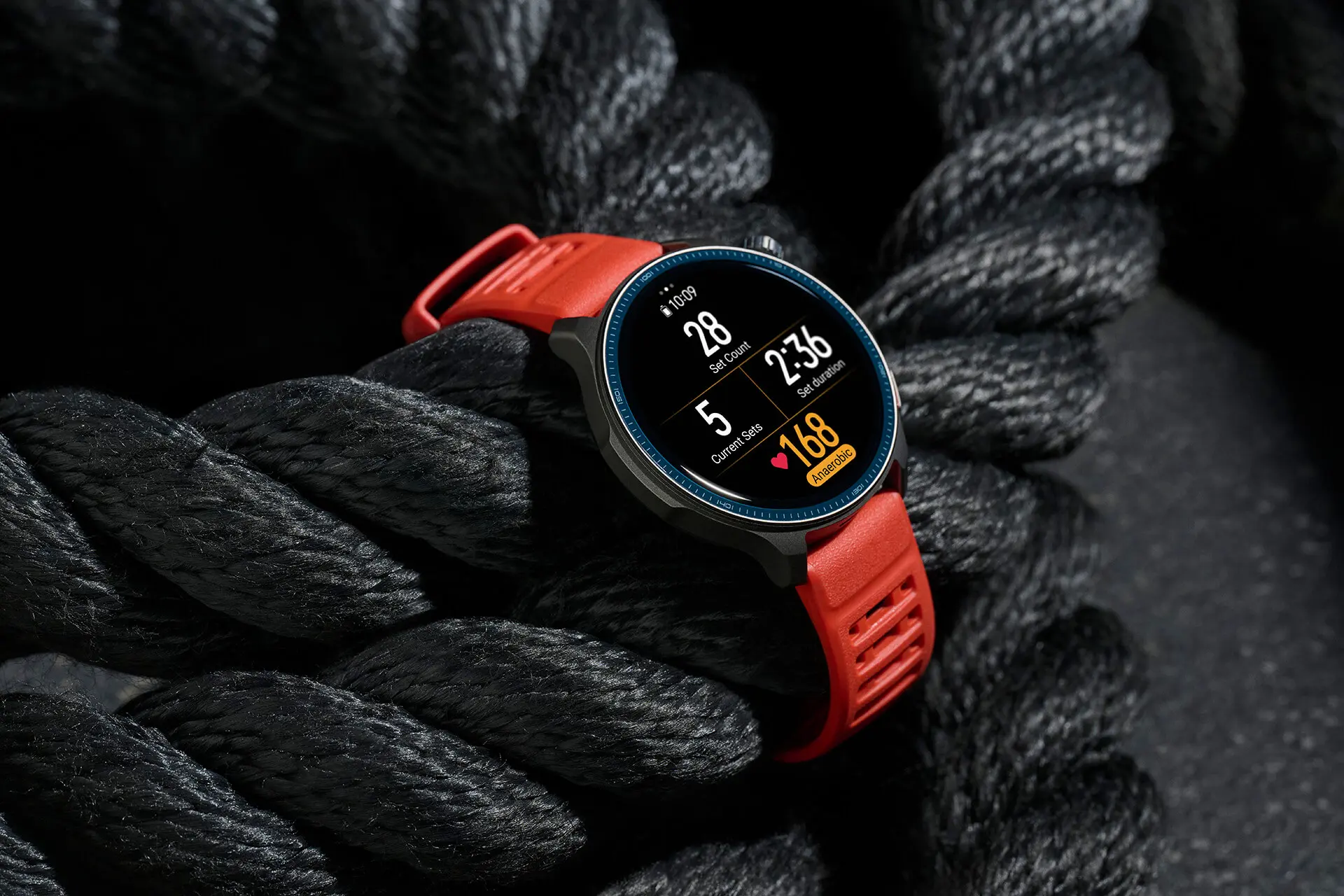
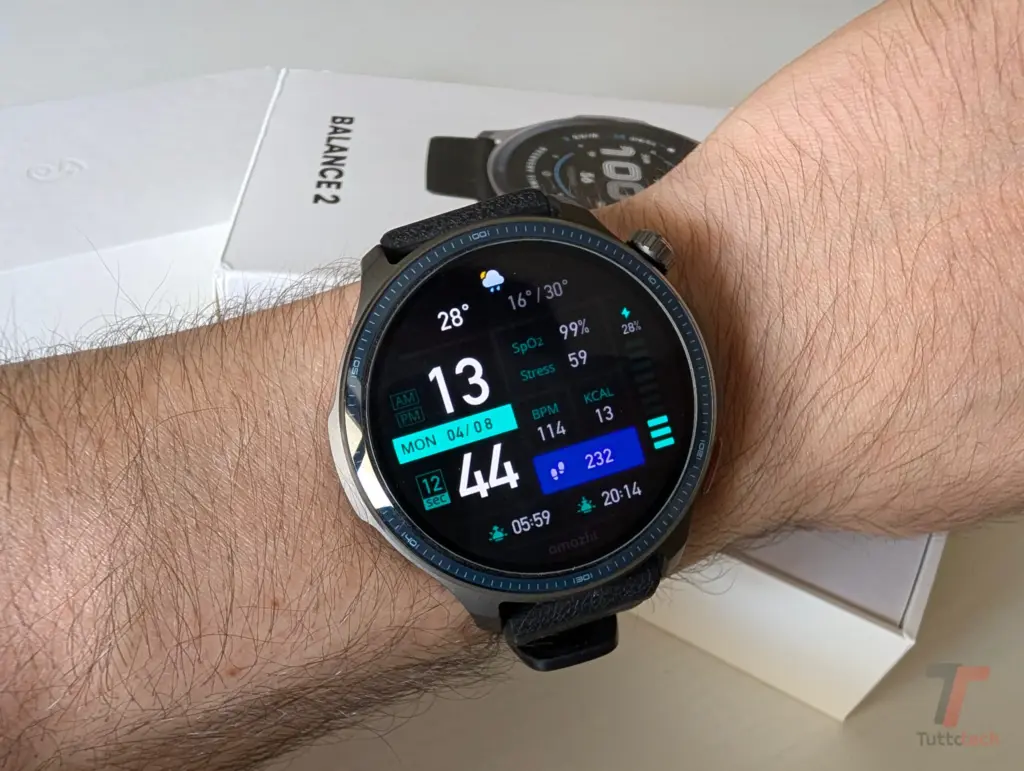
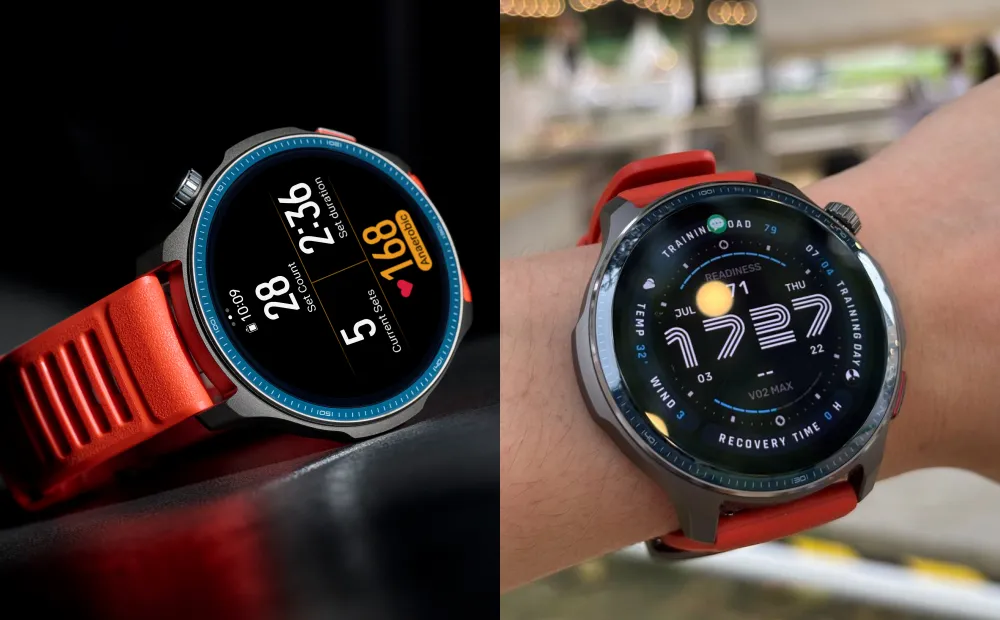
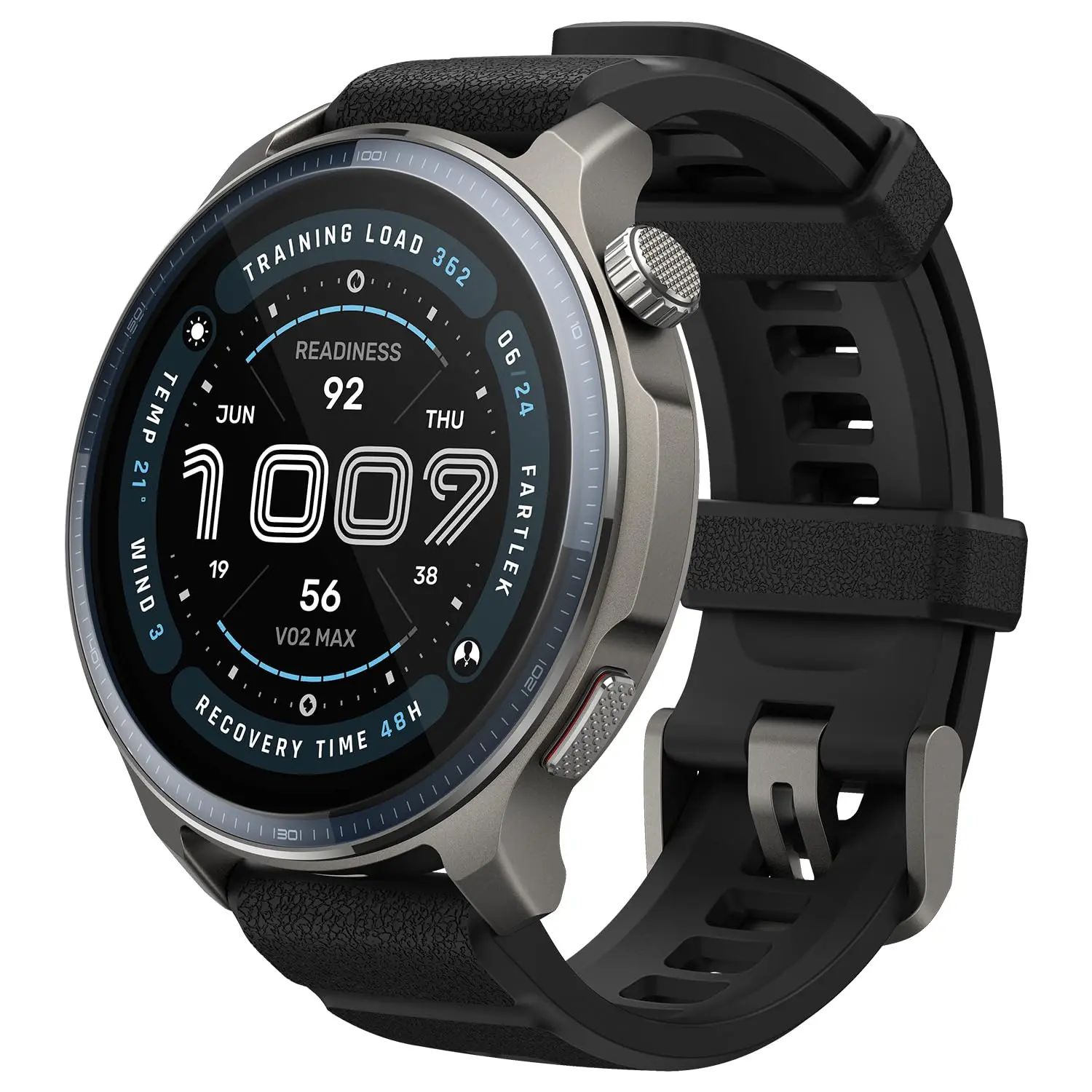
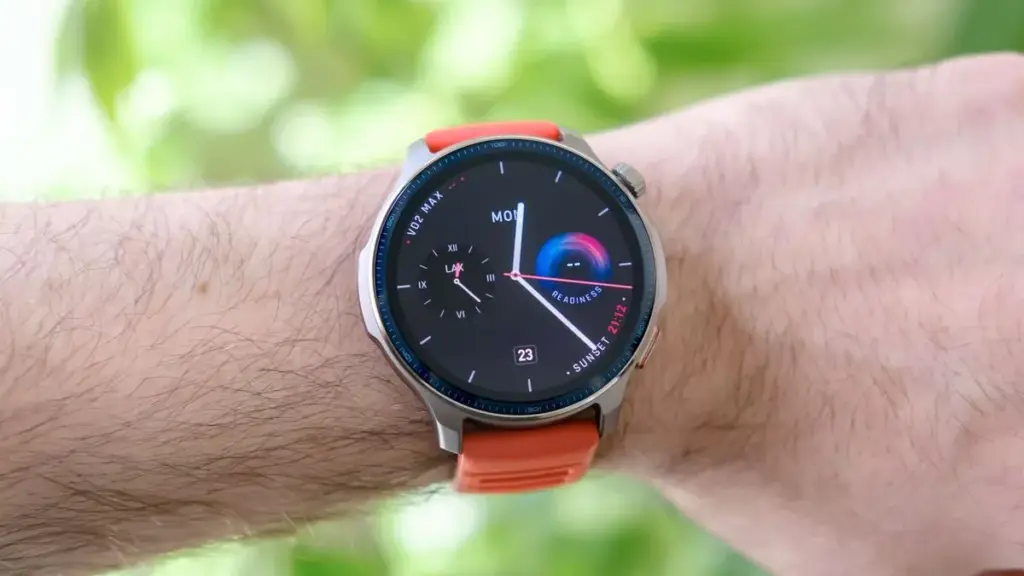
    Like the original Balance, the Balance 2 features a totally circular case with a thin physical bezel, a single pusher, and a rotating crown-style button. Overall, it’s a quite stylish watch, but it’s a little chunkier than the previous Balance due to its 12.3mm thickness.

    The well-weighted aluminum alloy used to make that 47mm case has polymer around the rear, which houses the optical sensor array. The silicone strap is rather commonplace and not all that unlike from those found on sports watches made by Garmin or Polar. The box comes with two different colored straps that you can interchange between, which is excellent.

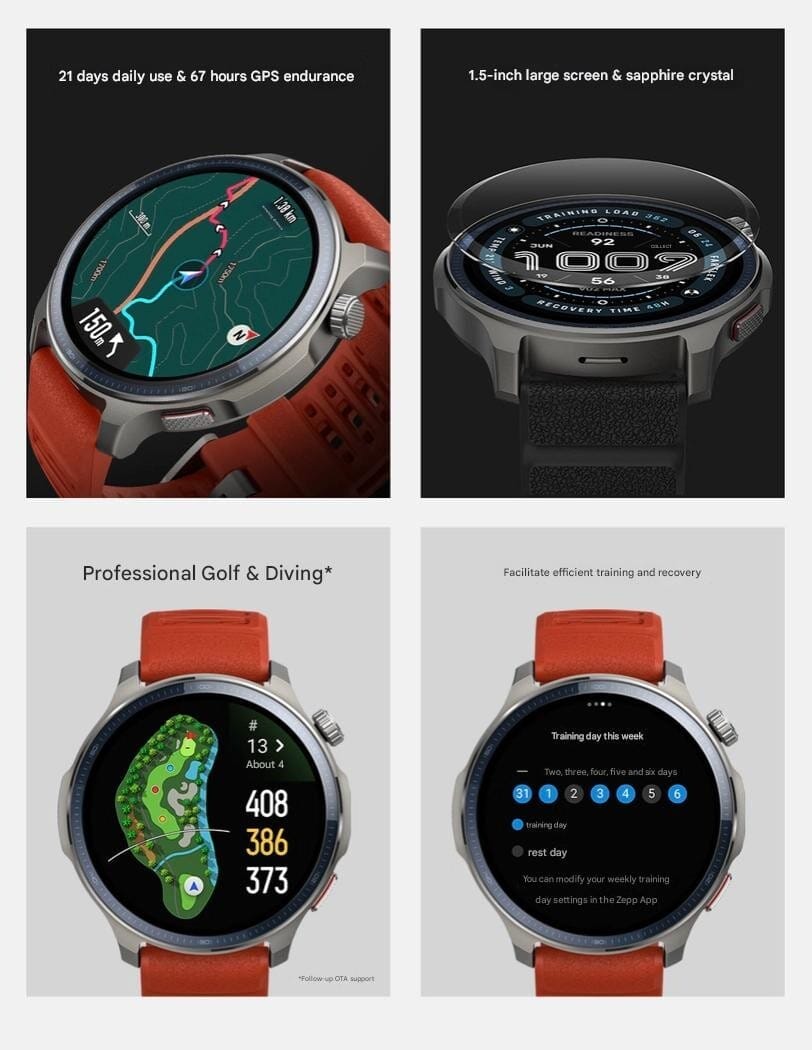
    A 1.5-inch AMOLED touchscreen with 480 x 480 resolution is front and center; its dimensions and resolution are identical to those of the original Balance.

    The Balance 2 has a maximum screen brightness of 2,000 nits, which is something that smartwatch manufacturers currently love to boast about. Overall, the display provides a positive experience. It responds to swipes, touches, and prods, is razor sharp, and provides good visibility in brighter outdoor light.

    Sapphire glass, which offers some of the strongest protection available on a watch, shields its display from scratches. It’s nice to see it on a more affordable watch because it’s typically found on much more costly ones. Additionally, there were no scratches found throughout testing.

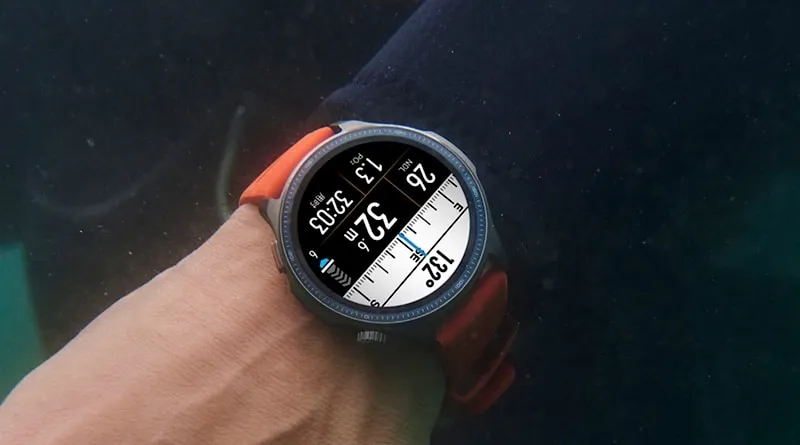
    The Balance 2 is also very waterproof. It has a waterproof rating of 10ATM, which is higher than the 5ATM found on the original Balance. Because of this, it can now be immersed in water up to 100 meters deep. Furthermore, it can be used for recreational diving up to 45 meters. Generally speaking, a smartwatch that can do that would cost a lot more.

    Amazfit Balance 2 SmartWatch
    Amazfit Balance 2 Smart Watch

    Amazfit Balance 2

    Built for Performance and Style: The sleek aluminum body and 1.5″ durable sapphire crystal glass screen of the Balance 2 smart watch offer a premium, resilient design, while dual speakers provide clear audio cues during training.

    $299.99Amazon

    Performance

    Similar to other Amazfit smartwatches, the Balance 2 is powered by a proprietary operating system. It comes with Zepp OS 5.0, which has a significant AI effect. You can utilize Zepp Coach for exercise or the mediocrely helpful Zepp Flow smart assistant.

    In addition to those AI-powered smarts, you’ll also receive standard smartwatch features, such as the ability to check notifications, which are shown on the watch as a stream. They accomplish the task, but they are not the actionable type. There is a well-optimized music player with playing controls, as well as the option to answer calls over Bluetooth, where the built-in speaker and microphone provide good loudness and clarity.

    Amazfit Balance 2 performance

    Zepp Pay, which is currently available in 31 countries, does support contactless payments. Although it’s not nearly as smooth as Apple Pay, it does allow you to leave your contactless cards and extra change behind, something that other Apple Watch and Wear OS wristwatch competitors make more difficult.

    Other apps and watch faces are also available to you. Since the preloaded watch faces aren’t very great, I would highly advise looking at the other possibilities available in the store.

    There is a variety of both free and paid applications accessible. GoPro, DJI, and Sonos all have a limited number of approved apps. In addition, you will need to seek for the most helpful ones to download. No, Google Play isn’t.

    The software experience on the watch is a fairly standard gesture-based one. Key functionalities are all accessible with a finger swipe. While it is still busy in areas like device settings and workout tab navigation, the Zepp companion app has grown a little less cumbersome overall.

    Is the experience on the wristwatch comparable to that of an Apple Watch or a Wear OS smartwatch? No, in my opinion. Is it sufficient? If you’re not too picky about having the greatest smartwatch features, I’d say there’s enough to please most people.

    Amazfit Balance 2 Smart Watch

    Amazfit Balance 2

    Built for Performance and Style: The sleek aluminum body and 1.5″ durable sapphire crystal glass screen of the Balance 2 smart watch offer a premium, resilient design, while dual speakers provide clear audio cues during training.

    $299.99Amazon

    Features

    Amazfit Balance 2 features

    Now let’s go into the specifics of the Balance 2, which is mostly a smartwatch that tracks your exercises. It possesses almost all of the necessary components to accomplish that.

    Training insights like VO2 max and recovery time recommendations, the ability to create and follow training regimens, the newest dual-band GPS technology for more precise outside monitoring, and the ability to sync data to third-party fitness apps like Strava are all available.

    When compared to one of Garmin’s best dual-band sports watches, the Balance 2 did well in our GPS testing from a tracking perspective. However, it did occasionally record somewhat shorter distances for certain outdoor exercises.

    During exercise, the heart rate sensor also performed well. It performed well for average and maximum heart rate measurements when I used it for interval-style exercises instead of a dedicated heart rate monitor. The possibility to attach external heart rate monitors is also a nice feature in case you ever doubt the accuracy of the wrist-based data. It performed similarly to other swim trackers for pool swims in terms of stroke detection, pace, and distance.

    In addition to promoting its Hyrox modes, Zepp Health also provides recognition for a variety of strength-based exercises for individuals who enjoy strength training.

    Generally speaking, these modes function well. It can track runs and effort levels for the latter, whether you’re using it for Hyrox sessions or on race day. You may create training regimens on the app and choose exercises that will sync with your watch. It’s all quite simple.

    Amazfit Balance 2 diving mode

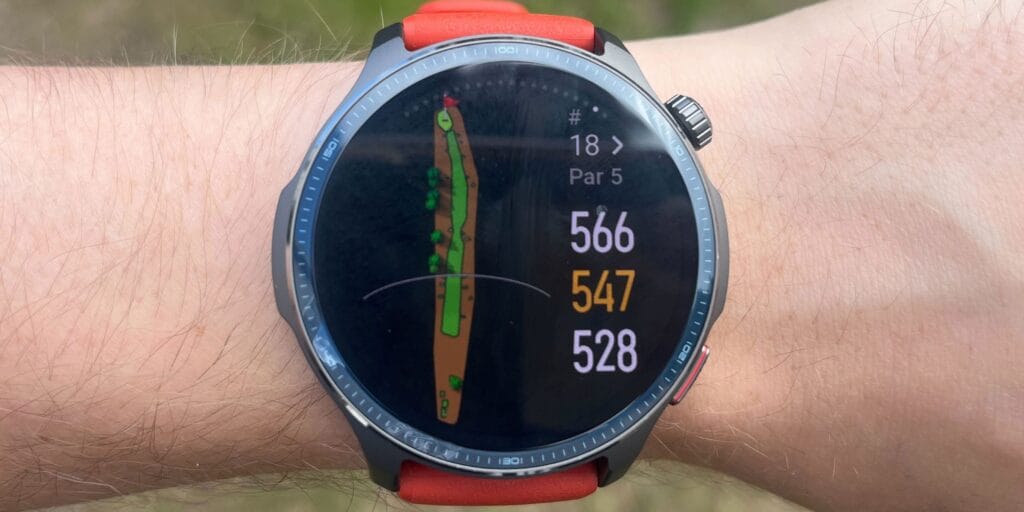
    Free color maps are also available for people who enjoy exerting themselves on adventures; these must be downloaded from the app and then synchronized across. Although it might not have as many settings as the greatest watch-based mapping support available, it still performs far better than the majority of smartwatches in this area.

    I would argue that the Balance 2 is catching up to the sports watch industry if you want it to be more of a training partner. It didn’t feel very helpful or insightful to use the AI-powered Zepp Coach and premium Zepp Coach Chat capabilities.

    With data and assistance comparable to sports watches, the Balance 2 may be used to build workouts and rely on training insights, such as VO2 Max predictions and training load.

    The Balance 2 will track the length of sleep, create sleep scores, and separate sleep into its several phases. The data for the core sleep data has been quite comparable on the most of the nights that I’ve been wearing it in conjunction with the Oura Ring 4.

    Amazfit Balance 2 smartwatch

    Battery

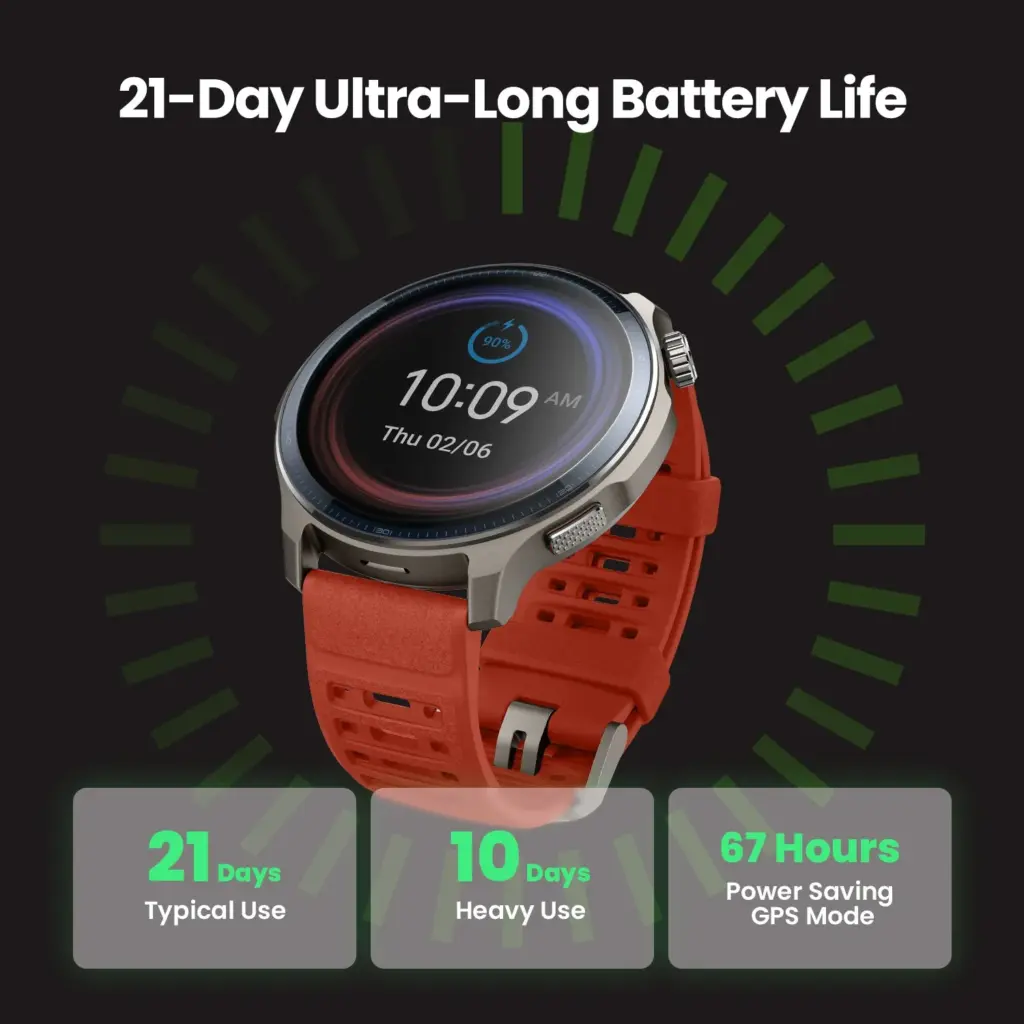
    The Balance 2 is a smartwatch that can endure a week of heavier use or go weeks without needing to be charged. According to Zepp Health, the battery can last up to 21 days, but if you’re using the most power-hungry functions, it will only last 10 days.

    AmaxBalance 2

    The Balance 2 is a smartwatch that can endure a week of heavier use or go weeks without needing to be charged. According to Zepp Health, the battery can last up to 21 days, but if you’re using the most power-hungry functions, it will only last 10 days.

    There is a tiny proprietary charging cradle that needs one of your own USB-C charging cables to power back up when it’s time to charge because one isn’t included in the package. Although you won’t be charging it as frequently as you would other smartwatches, it is also a reasonably quick charger.

    Amazfit Balance 2 Smart Watch

    Amazfit Balance 2

    Built for Performance and Style: The sleek aluminum body and 1.5″ durable sapphire crystal glass screen of the Balance 2 smart watch offer a premium, resilient design, while dual speakers provide clear audio cues during training.

    $299.99Amazon

    If you’re searching for a more affordable alternative to numerous sports watches that combine smartwatch and sports tracking capabilities, the Amazfit Balance 2 is another evidence that Zepp Health is making significant strides with its smartwatches.

    The same thing that hinders other Amazfit smartwatches also hinders the Balance 2. It’s still not nearly the whole package. There are many things that it does well, but overall, the program is a little sloppy and just falls short of the competition.

    I’d be more persuaded that watches like the Balance 2 are respectable substitutes for the top sports smartwatches available if Zepp Health could improve those aspects.

    Full Specs

     Amazfit Balance 2 Specs
    Battery658 mAh
    ColoursBlack
    First Reviewed Date11/09/2025
    GPSYes
    IP ratingIP68
    ManufacturerAmazfit
    Operating SystemZepp OS 5.0
    Release Date2025
    Screen Size1.5 inches
    Size (Dimensions)47.4 x 47.4 x 12.3 MM
    UK RRP£299
    USA RRP$299
    Waterproof10ATM
    Weight43 G
  • September comes with HyperOS 3.0 update for more Xiaomi devices

    September comes with HyperOS 3.0 update for more Xiaomi devices

    Xiaomi unveiled HyperOS 3.0, the company’s most recent overlay built on the Android 16 operating system, last week. It goes without saying that the skin has a lot of new features and modifications. The business has released a HyperOS 3.0 beta deployment plan after outlining the list of improvements, and you’ll be happy to hear that a large number of phones are qualified to get the much-anticipated software update this month.

    The list of Xiaomi smartphones, tablets, and smart TVs that will get the HyperOS 3.0 beta upgrade in September 2025 is available here.

    The restricted beta program for a number of Xiaomi devices, including the Xiaomi 15 series, Redmi K80 Pro series, and Xiaomi Pad 7/7s Pro, was launched by Xiaomi on August 29. The HyperOS 3.0 beta, which is focused on Android 16, is currently available for testing on any of these devices.

    Xiaomi HyperOS 3

    Let’s move on to the list of gadgets that can get the September HyperOS 3.0 beta. The full list of devices eligible to receive a beta update this month is provided here. Xiaomi is now expanding the beta program to smart TVs.

    September HyperOS 3.0 updates

    Starting September 17

    • Xiaomi MIX Flip 2
    • Redmi K80
    • Xiaomi Pad 7 Ultra
    • Xiaomi Pad 7
    • Redmi K Pad
    • Xiaomi TV S Pro Mini LED 2025 series
    • Xiaomi TV S Pro Mini LED series

    Starting September 30

    • Xiaomi MIX Fold 4
    • Xiaomi MIX Flip
    • Xiaomi 14 Ultra / Xiaomi 14 Ultra Titanium Special Edition
    • Xiaomi 14 Pro / Xiaomi 14 Pro Titanium Special Edition
    • Xiaomi 14
    • Redmi K70 Pro
    • Redmi K70 Extreme Edition
    • Redmi K70
    • Redmi K70E
    • Xiaomi Pad 6S Pro 12.4

    It goes without saying that the beta program will launch in mainland China before being extended to other countries.

    You can just sign up for the beta program when it launches if your device is compatible with HyperOS 3.0. Installing the Mi Community app, selecting Global as the region, and then enrolling in the beta program will allow you to participate in the Mi Pilot testing program.

    Regarding the stable release, it is anticipated to be made available a month or two following the beta program.

  • Change how notifications are displayed on Android lockscreen

    Change how notifications are displayed on Android lockscreen

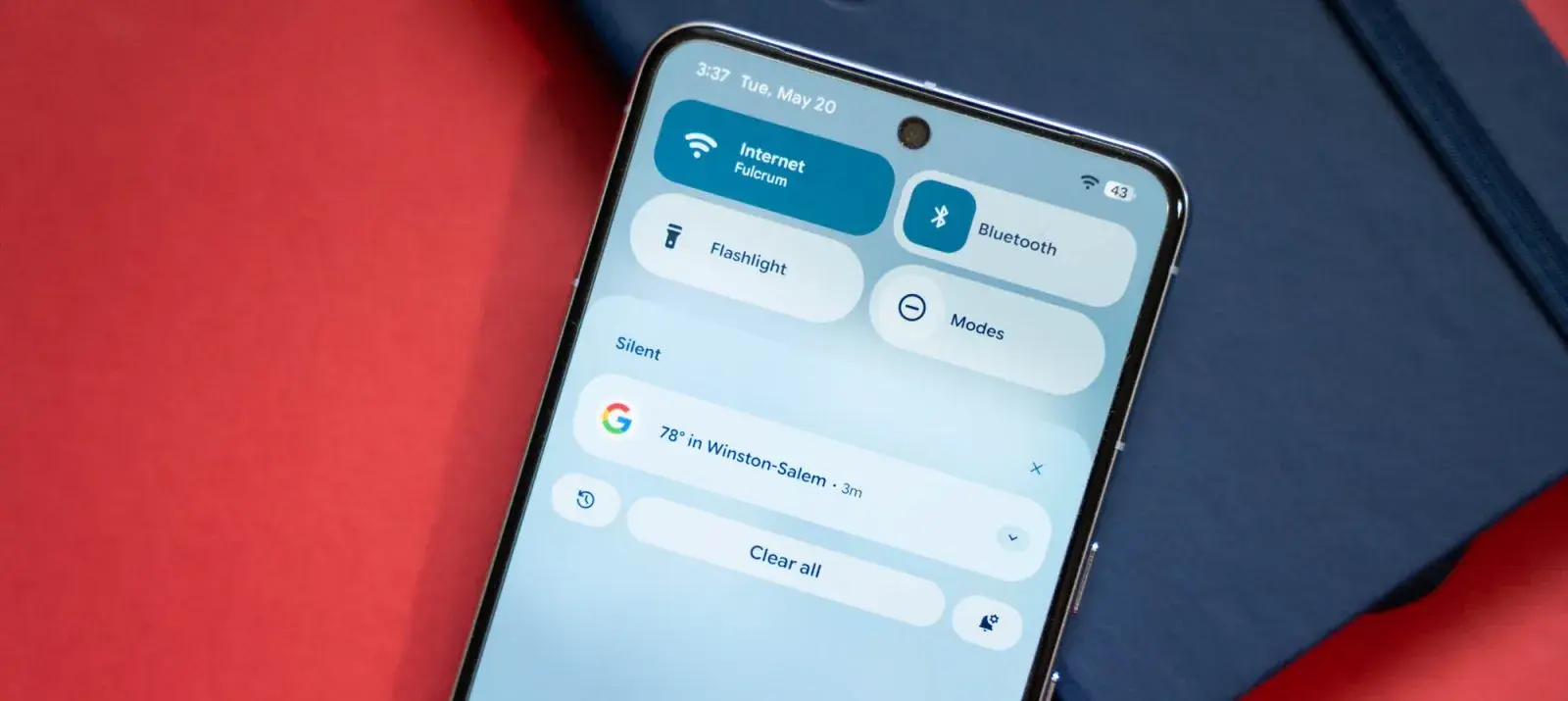
    With Android 16 QPR1, changes on how the how lock screen notifications are displayed came. The abrupt shift may be a little confusing if you’re not used to it. Now that the “compact” and “full” views are available, this guide will assist you in selecting the appropriate one.

    In its new condensed layout, Google’s latest Android release by default shows notifications on the lock screen. merely one notification is displayed in the presentation; all other notifications are merely represented by app icons in the overflow menu below. The secondary compact portion receives alerts that are viewed.

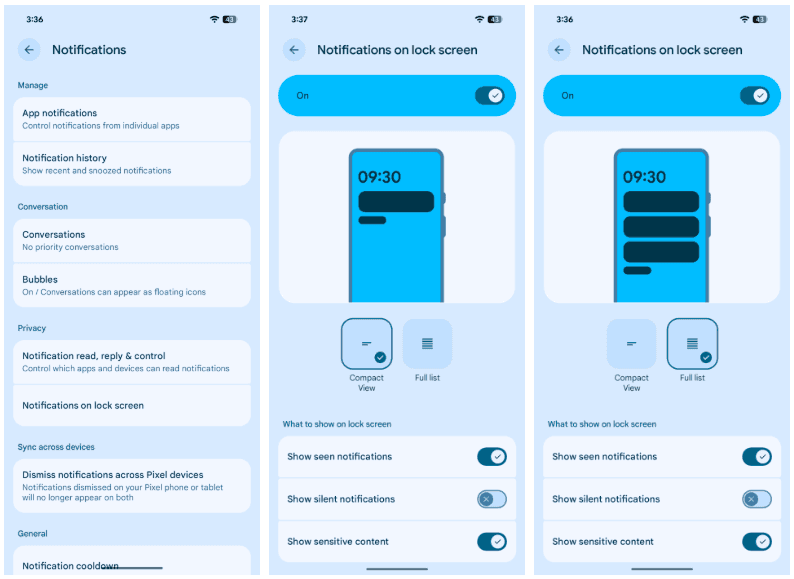
    The only alternative way for alerts to appear on the Pixel’s lock screen is “full list.” Notifications are displayed in cards and in the order they were received. Although they can be enlarged, they do occupy a considerable lot of room.

    There are further choices as well. Notifications that are viewed without any action performed, such as unlocking the phone, are buried until the phone is unlocked when the “display seen notifications” setting is disabled. In order to keep the shade clear, the option to “Show silent notifications” will show alerts from apps that have been manually or automatically switched to silent.

    Here’s how to set your preferred view:

    1. On your Pixel running Android 16 QPR1 or later, head to settings.
    2. Find and tap Notifications.
    3. Hit Notifications on lock screen.
    4. Choose between Compact View and Full list.
    notifications list on Android 16

    Although you can always go back, for some people, full view can be the greatest choice. In contrast to compact mode, which only shows one notification at the top, all Pixel lock screen notifications are always shown in that mode. All of this depends on personal taste, but that’s what makes Android what it is!

  • Temporary free apps for iOS and Android

    Temporary free apps for iOS and Android

    We occasionally choose an intriguing selection of apps for fans of both Android and iPhone, which are often paid for but are currently accessible for free for a little period of time. Take advantage of these amazing discounts on games and apps to expand your device’s app library—just make sure to act quickly!

    We cannot guarantee how long these promotions will remain available on the Google Play Store or Apple App Store, so please keep in mind that they are just temporary. Therefore, it’s best to grab them while you can. Just a gentle warning to be mindful of any potential membership commitments, in-app purchases, and adverts that may accompany them.

    android and ios apps

    Even if you don’t require an app right away, install it if it piques your curiosity. It will be added to your app library and marked as “bought” as a result. After that, you may uninstall the app straight from your phone and get it back for free anytime you need it.

    Android Apps and Games

    Android Apps

    • Clock Widget ($0.99): Want to have the time told in words? This widget should do a decent job.
    • TriSolve ($0.99): See math from a different angle (heh!) with this app that helps calculate all things triangles for you.
    • QR and Barcode Scanner ($5.99): Here is a QR reader and barcode scanner code app that will make your life convenient. 
    • DogTok ($2.99): This app claims to be able to help you interact with your dog, but don’t expect to have heart-to-heart conversations with your furkid anytime soon.

    Android Games

    • Undead City: Survivor Premium ($0.99): You are a hero with many skills, and have a city full of hapless people to defend from waves of zombies. Can you do it?
    • Zombie Age 3 ($0.99): The zombie apocalypse is upon you, and you will need to have all your wits with you to survive.
    • Monster Killer Pro Shooter ($0.49): Choose from different characters with varying abilities to shoot monsters from a top-down perspective.
    • Live or Die: Survival Pro ($0.99): It is up to your wits and wisdom to survive an unforgiving environment.
    • Everybody’s RPG ($0.49): Go around, adventurer, recruiting more powerful heroes as you progress in the game to conquer new lands and defeat more dangerous enemies.

    iOS Apps and Games

    iOS Apps

    • Stickyboard 2 ($4.99): Imagine a giant board that lets you play with an unlimited number of sticky notes!
    • Breastfeeding Central ($1.99): A personal breastfeeding helper that you can ‘summon’ regardless of the time of the day (or night!) as it provides you with tips and tricks.
    • Amsterdam Audio Stories ($8.99): Walk through Amsterdam without actually being there, reliving the stories told over your headphones. 
    • Type Freely ($4.99): This app lets you get all your texts written freely, professionally, and shared as an HD image on social media.
    • Pool Calculator ($4.99): If you need help with calculations for your swimming pool or hot tub chemistry maintenance, then this app helps get the right balance on things.

    iPhone games

    • Word Search Creator ($0.99): Looking for a way to engage your audience? Why not come up with your own word search puzzle?
    • Color Lines 98 Bubbles Classic ($1.99): Connect color balls in a row to progress to the next level.
    • DEEMO ($1.99): A mobile rhythm game that requires you to have impeccable timing and a sense of rhythm.
    • Dead Rails ($6.99): If you love railroad networks, then how about navigating a train yourself through intricate rail networks while transporting passengers?
    • Tables – Multiplication Drills ($0.99): I have always been an advocate for practice makes perfect in math, and the same applies when it comes to mastering multiplication.

    We advise you to review the app’s details in the Play Store or App Store before downloading any of the aforementioned apps. This is crucial since some of these free apps can have unique features or drawbacks of their own.

    Both free and paid apps should be avoided since they could have unnoticed in-app purchases and adverts. This is especially important while downloading kid-friendly games.

    In the rapidly evolving world of mobile apps, several companies use cunning tactics to obtain your personal information. But tech buffs, don’t worry! We’ve compiled some crucial advice to help you safeguard your important data. Being selective about the permissions you grant the apps you decide to install is an essential first step.

  • OnePlus 15, Vivo X300 Pro, and Oppo Find X9 ready for launch – 3C certification received

    OnePlus 15, Vivo X300 Pro, and Oppo Find X9 ready for launch – 3C certification received

    While manufacturers like OnePlus, Oppo, and Vivo are ready to release their next-generation smartphones, the Snapdragon 8 Elite 2 and Dimensity 9500 chipsets are on the horizon. Future gadgets, purportedly the Vivo X300 Pro, Oppo Find X9, and OnePlus 15, have now obtained 3C approval in China.

    Two new flagship chipsets, the Qualcomm Snapdragon 8 Elite 2 and the MediaTek Dimensity 9500, are anticipated to be released later this month (September 2025). It is anticipated that Chinese manufacturers such as Xiaomi, Oppo, Vivo, and OnePlus will be among the first to produce smartphones with the new chipsets. In China, three of these flagship gadgets have already been certified 3C.

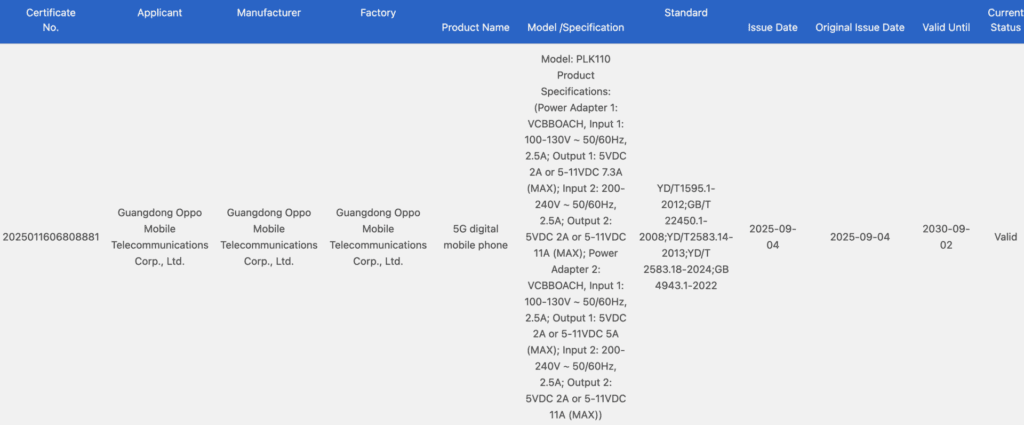
    The smartphones that gained 3C certification include apparently the OnePlus 15, Vivo X300 Pro, and Oppo Find X9. It is anticipated that the Snapdragon 8 Elite 2 chipset would power the OnePlus 15. It has surfaced on the 3C certification site with model number PLK110, and shows that it will ship with a 120W charger.


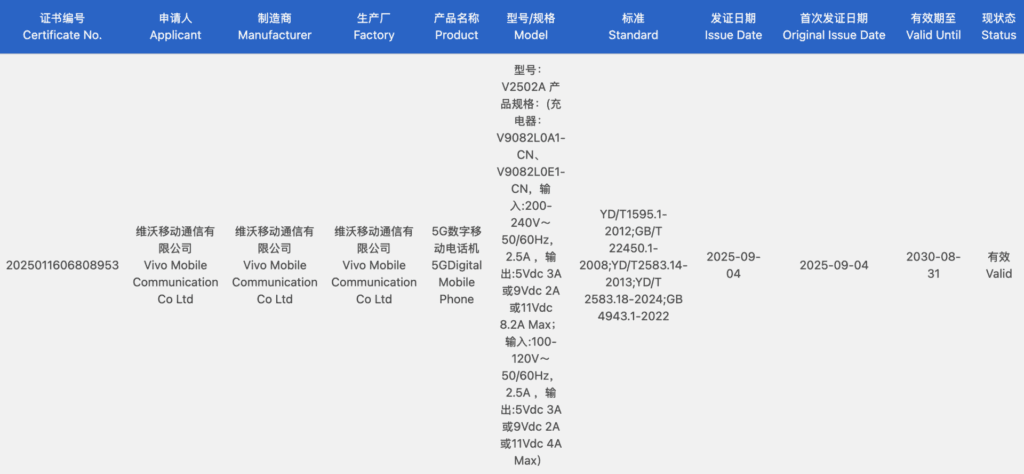
    In the meantime, the MediaTek Dimensity 9500 processor is anticipated to power the Vivo X300 Pro and Oppo Find X9. The devices, which have model codes V2502A and PLJ110, respectively, have been certified on the 3C certification portal. A 90W charger might be included with the Vivo X300 Pro, and an 80W charger might be included with the Oppo Find X9.

    It is anticipated that Chinese smartphone manufacturers would introduce the new flagship chipsets in October after MediaTek and Qualcomm announced them in late September. Global launches, however, might—and probably will—occur weeks or months later.

    csm OnePlus cert 1779718a76
    csm Vivo Phone 46cf8111dc
    csm oppo find x9 740ba26fec

  • Tensor G5 vs Tensor G4 – specs and benchmarks

    Tensor G5 vs Tensor G4 – specs and benchmarks

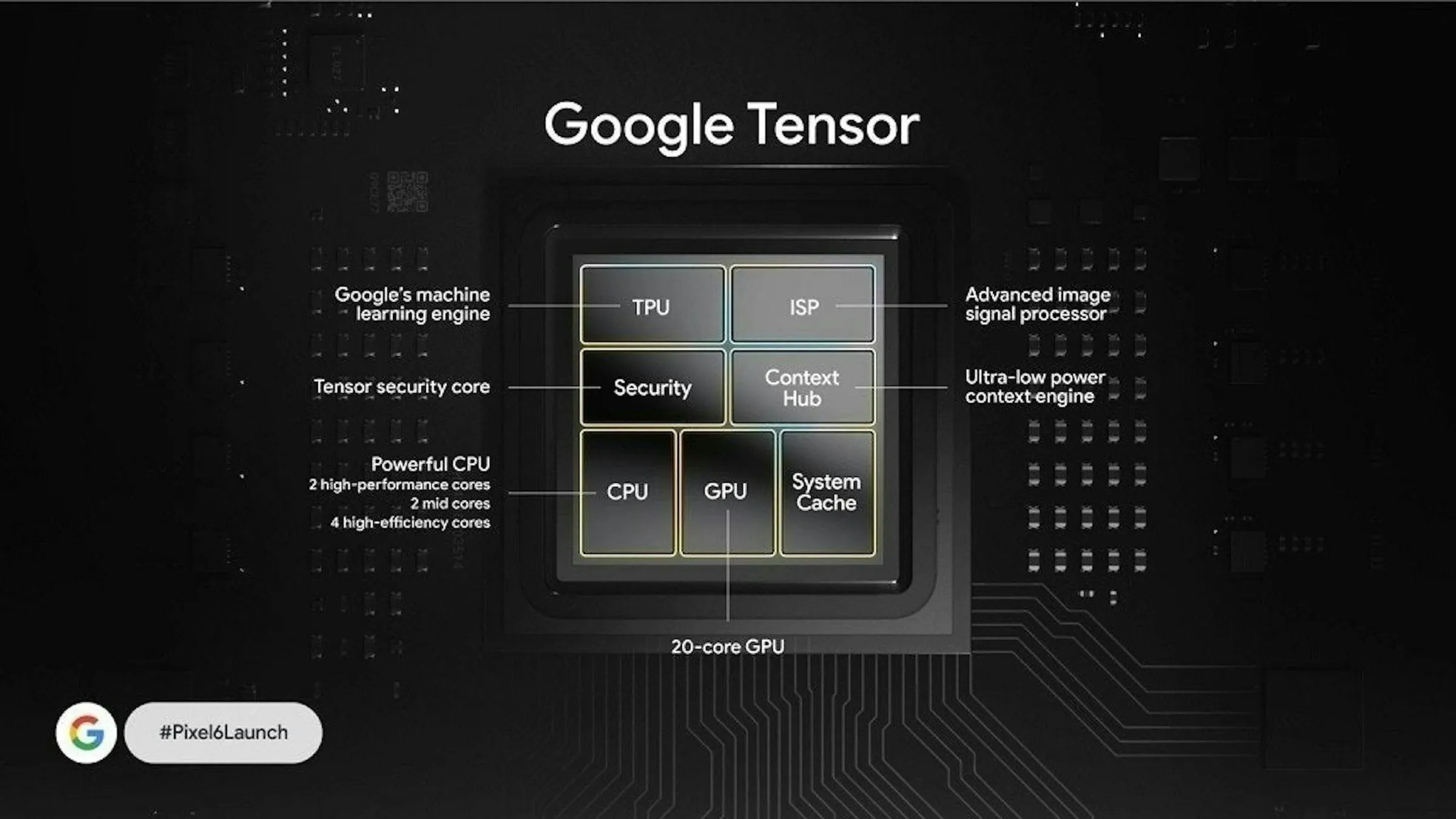
    Over the years, Google’s proprietary Tensor chips have progressively advanced to become a dependable everyday driver with strong energy economy. However, performance has frequently been a source of contention. Previous Tensor chips performed well on routine tasks, but not so well on intensive workloads like gaming. That might change with the upcoming Tensor G5, which promises notable performance improvements.

    “Tensor G5 is our greatest upgrade yet and gives a huge performance gain,” the tech giant claims. The newest Tensor chip, which launched with the Pixel 10 series last month, is said to feature a 30% faster average CPU and a 60% more potent TPU. Additionally, this is Google’s first mobile chipset produced at TSMC’s facility; Samsung previously produced Tensor chips. Better performance and increased battery economy are promised by the Tensor G5’s use of a more sophisticated 3nm manufacturing node.

    Will the Tensor G5’s major improvements, as promised by Google, significantly improve benchmark scores where earlier Tensor chips have underperformed? We’ll examine the benchmark numbers. Here is the specification document to view the differences on paper before that:

    Tensor G5Tensor G4
    AnnouncedAugust 2025August 2024
    Process nodeTSMC’s 3nm (N3E)Samsung’s 4nm
    CPU1x 3.78 GHz — Cortex-X4
    5x 3.05 GHz — Cortex-A725
    2x 2.25 GHz — Cortex-A520
    1x 3.1 GHz — Cortex-X4
    3x 2.6 GHz — Cortex-A720
    4x 1.92 GHz — Cortex-A520
    GPUPowerVR DXT-48-1536 GPU
    No ray tracing support
    Mali-G715 MP7 GPU
    No Ray tacing support
    NPUNew Google Edge TPUGoogle Custom TPU
    Memory
    Storage
    LPDDR5X
    Zoned UFS 4.0 (512GB+)
    LPDDR5X
    UFS 3.1
    ConnectivitySamsung Exynos 5400 5G modem
    Wi-Fi 7, Wi-Fi 6E
    Bluetooth 6.0
    Samsung Exynos 5400 5G modem
    Wi-Fi 7
    Bluetooth 6.0

    AnTuTu

    Tensor G5 vs Tensor T4 AnTuTu score

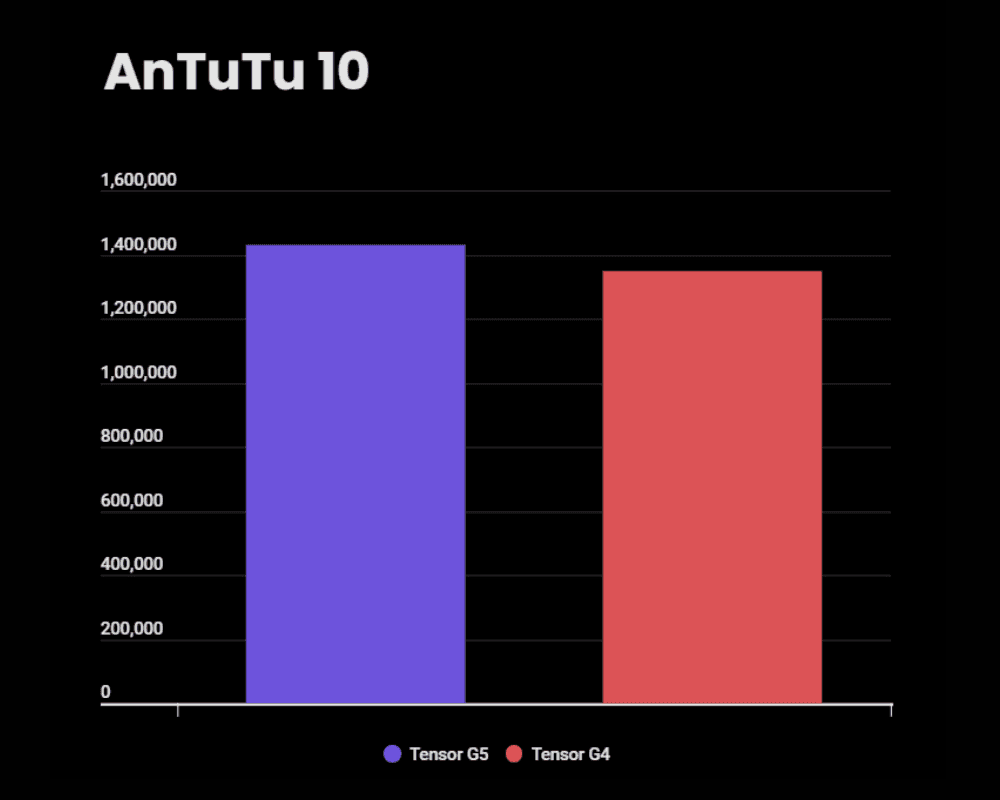
    According to the AnTuTu (version 10) benchmark, the new Tensor G5 chip has a little overall improvement of 6%, scoring 1,429,557 as opposed to 1,348,226 for the Tensor G4. However, there is a pleasant 20% rise in the CPU (483,989 vs. 401,746). The RAM and UX scores also favor the newer chip with an improvement of roughly 10%.

    The most unexpected of all is the GPU score, which is actually 10% lower than the G4 from the previous year. This implies that rather than promoting sheer graphics performance, Google might have placed greater emphasis on efficiency.

    Tensor G5Tensor G4
    AnTuTu score1,429,5571,348,226
    CPU483,989401,746
    GPU416,313462,415
    Memory293,467266,535
    UX235,788217,530

    Geekbench

    Tensor G5 vs Tensor T4 Geekbench score

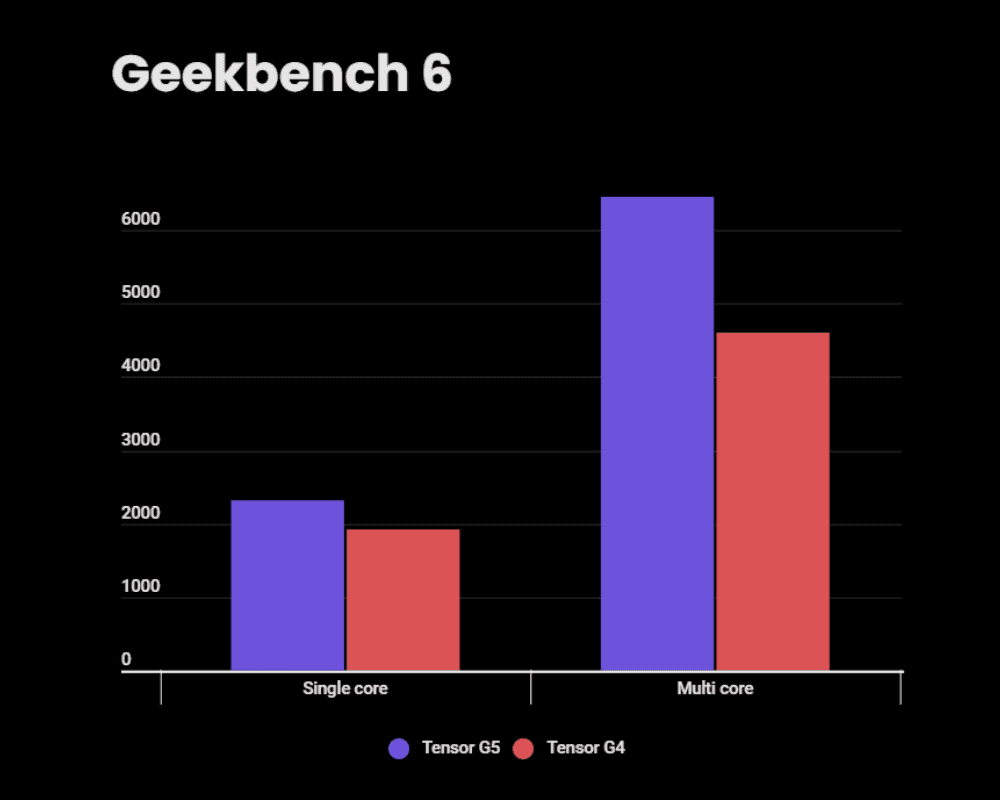
    The Tensor G5 clearly outperforms the Tensor G4 in Geekbench 6. Its 2,316 single-core test score is around 20% higher than the G4’s 1,923, indicating faster responsiveness for daily tasks like UI navigation and app launches.

    Stronger performance in multitasking, productivity apps, and heavier workloads is highlighted by the multi-core score, which soars to 6,452, a staggering 40% increase over the G4’s 4,602.

    Overall, the results from Geekbench point to encouraging gains in Tensor G5’s raw CPU performance, particularly in multi-core efficiency, which could result in considerably more fluid performance.

    G5G4
    Single core2,3161,923
    Multi core6,4524,602

    3DMark score

    Tensor G5 vs Tensor T4 3DMark score

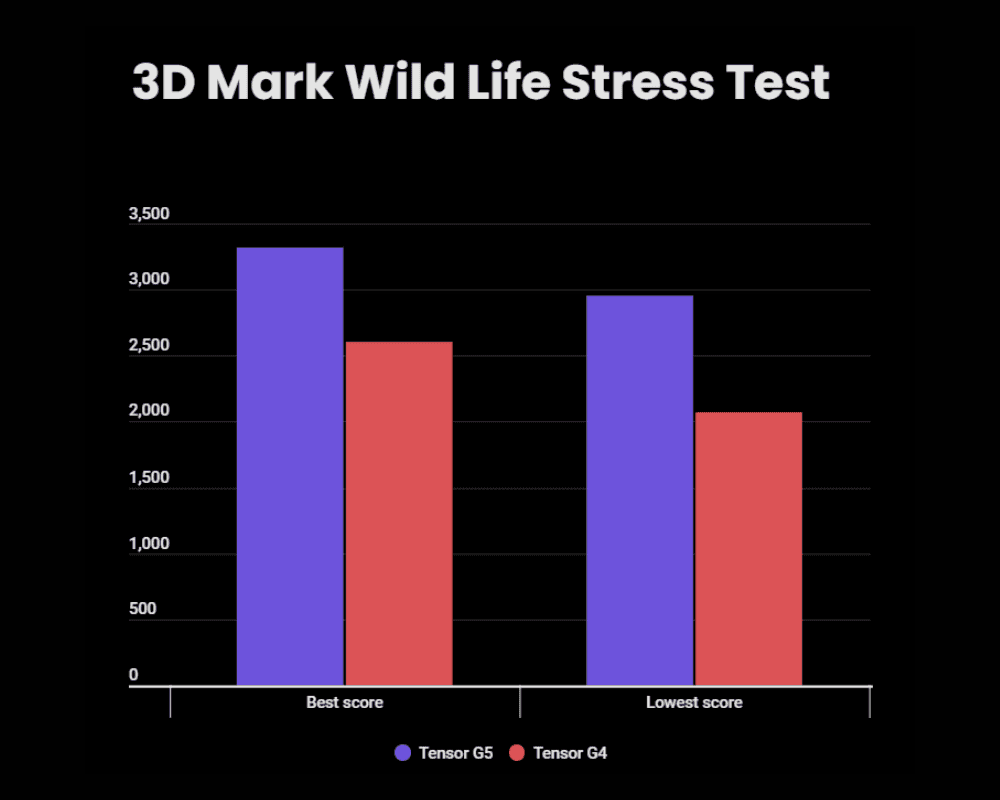
    In the 3DMark Wild Life Extreme Stress Test, which gauges sustained GPU performance under high load, the Tensor G5 clearly outperforms the Tensor G4. With a highest loop score of 3,319 as opposed to 2,603 for the G4, the G5 scores an astounding 27% improvement in peak graphics performance.

    More significantly, the G5 offers improved consistency as well. The G4 descends to 2,071, and its lowest loop score is 2,954. 89% vs. 79.6% is not only better performance, but also significantly more stability. As a result, the Tensor G5 is far less likely to experience thermal throttling and ought to offer more consistent, fluid gaming over extended periods.

    Tensor G5Tensor G4
    Best loop score3,3192,603
    Lowest loop score2,9542,071
    Stability89%79.6%

    Tensor G5 vs Tensor G4

    Thanks to enhanced CPU cores and more sophisticated TSMC manufacturing, the Tensor G5 exhibits encouraging improvements in CPU performance. GPU performance and consistency have also significantly improved, according to the 3DMark test. A better gaming experience and faster daily performance should follow from this. The majority of the heating and throttling problems users had with earlier Tensor chips are likewise fixed by the new chip.

    Even while the latest Tensor chip offers significant improvements, Google still needs to catch up in order to compete with Qualcomm and MediaTek’s top offerings. We have contrasted the Snapdragon 8 Elite and Snapdragon 8 Gen 3 with the Tensor G5. To see how Google’s most recent chip compares to the finest in the business, you can look through those comparisons.

  • HyperOS 3.0 panel on older versions

    HyperOS 3.0 panel on older versions

    HyperOS 3 has generated a lot of interest, particularly because of its revamped Control Center, which is obviously more useful and aesthetically pleasing than HyperOS 2. Users are asking whether it’s possible to extend the new Control Center experience to their existing HyperOS 2 devices, which is understandable given the excitement.

    To put it simply, that’s not feasible. You cannot just install the HyperOS 3 Control Center as a stand-alone feature. Because it depends on improved user interface elements, animations, and fundamental optimizations not seen in HyperOS 2, it is closely interwoven with the system. If you try to install it on an outdated system, you run the risk of software instability or, in the worst case, the device being unusable.

    xiaomi hyperos control panel 1

    Although it is not possible to migrate the actual Control Center from HyperOS 3 to HyperOS 2, there is a useful workaround for those that desire a comparable appearance. A variety of themes that visually update icons, the Control Center interface, and wallpapers to closely mirror the most recent design are available in the Xiaomi Themes shop, some of which are specifically inspired by HyperOS 3.

    It is crucial to remember that this is only a cosmetic remedy. You won’t get the new functionality or underlying speed improvements of HyperOS 3, just the redesigned graphics.