Blog

  • Samsung Galaxy S21 and S21 Ultra first design leak

    Samsung Galaxy S21 and S21 Ultra first design leak

    Thick camera bump, a flat screen, and will be launched in January 2021

    If you’re eagerly waiting for Samsung’s 2021 flagship to get your hands on it, new reports have revealed a few details about it, showing the future design and release date of the handset. The actual Galaxy S21 will look different as this information is not official, but this leak still sheds some light on what to expect early next year.

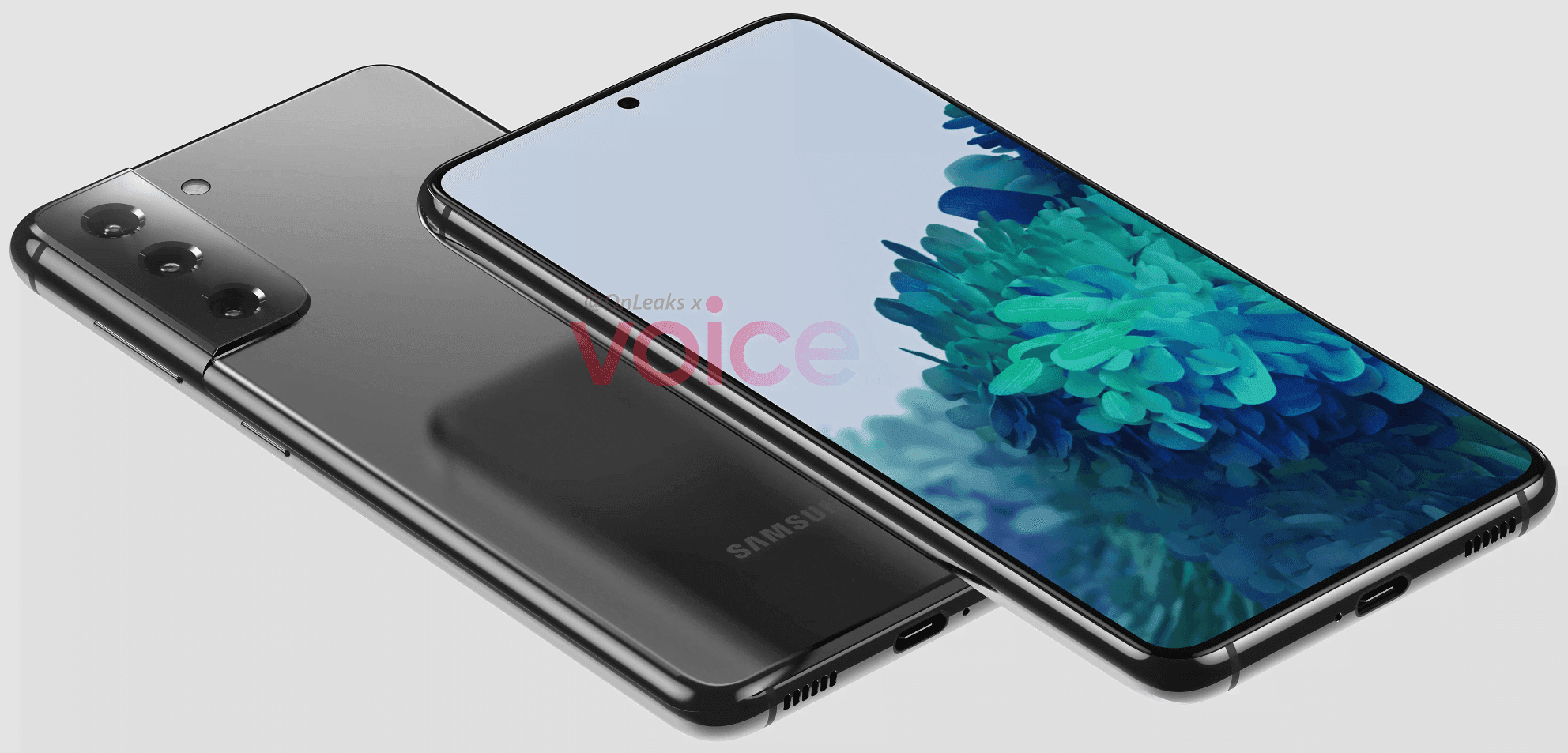
    The front of the phone has not changed much compared to its predecessor, based on the pictures, with the future smartphone looking very similar to the S20, including its punch-hole to house the selfie camera at the center of the screen. However, with a new camera configuration that tends to stretch from the frame, the back has been raised, producing a comparatively thick hump, measured at 1.1 mm. However, the number of shooters remained the same, with three rear cameras, at least on the ‘ordinary’ S21. The computer should have a flat 6.2-inch display and weigh around 151.7 x 71.2 x 7.9 mm, according to Steve Hemmerstoffer (@OnLeaks).

    More importantly, reports say that the phone may be launched in January 2021, which is much earlier than normal. While only the design of the S21 has emerged so far, it is still expected that the company will launch three devices, including “Plus” and “Ultra” versions.

    There’s a lot that remains unknown about Samsung’s future flagship, including its battery size and details specs. Its name is also unconfirmed so far, as we’re unsure whether it will be called the Galaxy S21 or S30. We’ll keep you posted as we learn more about the company’s upcoming lineup.

    As mentioned above, Samsung is very likely to announce an S21 Ultra, alongside the “regular” model. The higher-end device has just leaked, revealing further details about the upcoming lineup.

    The images show the S21 Ultra should come with a curved display, measuring between 6.7 and 6.9-inches. The larger display means the phone would also be bigger than the S21, measuring approximately 165.1 x 75.6 x 8.9mm.

    On the rear side of the handset, with a humongous 1.9mm-thick camera module bulging from its back, the biggest difference in design is. The latter houses four sensors, together with the LED light, which, interestingly, does not form part of the “standard” S21 camera setup.

    Youtube video

    Thank you to the Three Movers Mobile App for the helpful tips and guidance. Your insights have been incredibly valuable in simplifying the moving process and helping users stay organized every step of the way. From planning and packing to coordinating logistics, the app offers practical tools and expert advice that make a real difference. We appreciate your commitment to making moves smoother and more manageable for everyone.

  • Android 11 upgrade timeline for Nokia

    Android 11 upgrade timeline for Nokia

    Most Nokia phones will have to wait until 2021

    Nokia phones from HMD Global come with some of the cleanest Android builds around, but that still does not make it the quickest company to upgrade its smartphones. As the company posted and then removed a roadmap on when we can expect the new software to reach the Nokia lineup, with the last phones expected to get the update in Q2 2021, it looks like the same will be true for the Android 11 launch.

    (adsbygoogle = window.adsbygoogle || []).push({});

    Fortunately, the tweet was saved by Neowin, who first came forward with the news that would otherwise have gone unnoticed. It looks like phones from the last two years are on board, as with recent Android update updates, which is the cut-off date that Nokia normally promises with newly launched phones.

    nokia update
    (adsbygoogle = window.adsbygoogle || []).push({});

    First in for the update are the Nokia 8.3 5G, the 2.2, the 5.3, and the 8.1, slated to receive the update in Q4 2020. They’re followed by the 1.3, the 4.2, the 2.4, the 2.3, and the 3.4 in Q1 2021. The Nokia 3.2, 7.2, and 6.2 are supposed to get the update a little later, between Q1 and Q2 2021. You’ll find the Nokia 1 Plus and the 9 Pureview last in line with a Q2 2021 estimate. The 2018 flagship Nokia 8 Sirocco is nowhere to be seen, unfortunately — it launched with Android 8 back in the day and got updated to Android 10 this year.

    It’s unclear why HMD Global decided to pull the tweet, as nothing further has been communicated by the company. That’s why you’ll need to take this timeline with a grain of salt — we don’t know if the plans have changed in the meantime. In a worst-case scenario, it’s possible that fewer phones will see the update than stated in the tweet, but the dates might also be incorrect. Either way, the timeline still gives us a rough idea of when to expect which updates.

    (adsbygoogle = window.adsbygoogle || []).push({});
  • Temporarily free and on-sale apps and games for 10.09.2020

    Temporarily free and on-sale apps and games for 10.09.2020

    Now that the weekend is almost here, it’s time once again to pore through the latest app and game sales currently available on the Play Store. I also have a few notable sales to share. The Lonely Hacker is currently available for free. This Is the Police is available for half off its retail price, and you can pick up Aces of the Luftwaffe – Squadron: Extended Edition at a drastic discount. As always, I’ve highlighted all of the interesting titles in bold to make discovery easier. So without further ado, here are 26 temporarily free and 42 on-sale apps and games for the end of the week.

    Free

    Apps

    1. NetX Network Tools PRO $2.99 -> Free; Sale ends in 1 day
    2. BlackCam Pro – B&W Camera $1.49 -> Free; Sale ends in 3 days
    3. Gif Me! Camera Pro $1.49 -> Free; Sale ends in 3 days
    4. Resize Me! Pro – Photo & Picture resizer $1.49 -> Free; Sale ends in 3 days
    5. Sketch Me! Pro $1.49 -> Free; Sale ends in 3 days
    6. TypIt Pro – Watermark, Logo & Text on Photos $0.99 -> Free; Sale ends in 3 days
    7. MyApplause $0.99 -> Free; Sale ends in 6 days
    8. QR Code & Barcode Scanner Pro $2.99 -> Free; Sale ends in 6 days

    Games

    1. Parliament Tycoon $1.49 -> Free; Sale ends in 8 hours
    2. Preston Sterling $0.99 -> Free; Sale ends in 3 days
    3. Math Path $2.49 -> Free; Sale ends in 5 days
    4. Tim The Traveler $0.99 -> Free; Sale ends in 5 days
    5. Heroes Infinity Premium $0.99 -> Free; Sale ends in 6 days
    6. Jumpies 3 $0.99 -> Free; Sale ends in 6 days
    7. Nova Galaxy $0.99 -> Free; Sale ends in 6 days
    8. The Lonely Hacker $2.99 -> Free; Sale ends in 6 days
    9. Food Cutter 3D – Cool Relaxing Cooking game $1.49 -> Free; Sale ends in 7 days
    10. Hills Legend: Action-horror $0.99 -> Free; Sale ends in 7 days
    11. Merge Attack : Attack on Legion $1.00 -> Free; Sale ends in 7 days
    12. The House: Action-horror $0.99 -> Free; Sale ends in 7 days
    13. Zombie Masters VIP – Ultimate Action Game $0.99 -> Free; Sale ends in 7 days

    Icon packs & customization

    1. Squirrel – Icon Pack $1.49 -> Free; Sale ends in 8 hours
    2. Raya Black Icon Pack – 100% Black $0.99 -> Free; Sale ends in 3 days
    3. Fledermaus – Icon Pack $1.49 -> Free; Sale ends in 7 days
    4. Hexaring – Icon Pack $1.49 -> Free; Sale ends in 7 days
    5. Planets Live Wallpaper Plus $0.99 -> Free; Sale ends in 7 days

    Sale

    Apps

    1. NT Calculator – Extensive Calculator Pro $2.49 -> $0.99; Sale ends in 3 days
    2. Blue Light Filter & Night Mode – Night Shift Pro $3.99 -> $1.99; Sale ends in 6 days
    3. Diseases & Disorders $2.99 -> $0.99; Sale ends in 6 days
    4. Drink Water Reminder Pro – Water Tracker $3.99 -> $1.99; Sale ends in 6 days
    5. Shred Guitar Mastery $3.99 -> $1.99; Sale ends in 6 days
    6. SSH Server $1.49 -> $0.99; Sale ends in 6 days
    7. NoteLynX Pro Outliner Mindmap Wiki $2.49 -> $1.49; Sale ends in 7 days
    8. Private DIARY Pro – Personal journal $1.49 -> $0.99; Sale ends in 7 days
    9. Travel Tracker Pro – GPS tracker $3.99 -> $2.49; Sale ends in 7 days
    10. Speccy – Spectrum Analyzer $1.49 -> $0.99; Sale ends in ?

    Games

    1. Aces of the Luftwaffe – Squadron: Extended Edition $7.99 -> $2.99; Sale ends in 5 days
    2. Casino Crime $1.99 -> $0.99; Sale ends in 5 days
    3. infeCCt – addictive puzzle fun $1.99 -> $0.99; Sale ends in 5 days
    4. This Is the Police $7.99 -> $3.49; Sale ends in 5 days
    5. ACCESS CODE: HEAVEN $1.99 -> $0.99; Sale ends in 6 days
    6. Anhui Mahjong Solitaire Saga $5.49 -> $1.99; Sale ends in 6 days
    7. Hangman Premium $2.99 -> $0.99; Sale ends in 6 days
    8. Jack in Space – educational game $2.99 -> $1.49; Sale ends in 6 days
    9. Mahjong Star Pro $5.49 -> $1.99; Sale ends in 6 days
    10. Pilot Brothers 1 $3.99 -> $0.99; Sale ends in 6 days
    11. Pilot Brothers 3 $3.99 -> $0.99; Sale ends in 6 days
    12. Pocket Rogues: Ultimate $2.99 -> $1.99; Sale ends in 6 days
    13. Re Village $1.49 -> $0.99; Sale ends in 6 days
    14. She Sees Red – Interactive Thriller $2.99 -> $0.99; Sale ends in 6 days
    15. Solitaire Dungeon Escape $5.49 -> $1.99; Sale ends in 6 days
    16. Wanna Survive $2.99 -> $1.99; Sale ends in 6 days
    17. Word Search Premium $2.99 -> $0.99; Sale ends in 6 days
    18. Angelo and Deemon: One Hell of a Quest (Full) $4.99 -> $2.49; Sale ends in 7 days
    19. Data Defense $4.99 -> $0.99; Sale ends in 7 days
    20. Galaxy Trader $2.99 -> $0.99; Sale ends in 7 days
    21. OrbaDrone – Faded Light $2.99 -> $1.49; Sale ends in 7 days
    22. ReactionLab 2 – Particle Sandbox $2.77 -> $0.99; Sale ends in 7 days

    Icon packs & customization

    1. Hera Dark Icon Pack – Circle Shaped Dark Icons $1.99 -> $0.99; Sale ends in 2 days
    2. Pixie R Icon Pack $1.49 -> $0.99; Sale ends in 5 days
    3. Rounded – Icon Pack $1.49 -> $0.99; Sale ends in 5 days
    4. Colored Wood Icon Pack $1.99 -> $0.99; Sale ends in 6 days
    5. Luxury Gold Icon Pack $1.49 -> $0.99; Sale ends in 6 days
    6. Pix Color Icon Pack $1.49 -> $0.99; Sale ends in 6 days
    7. Pixurr Wallpapers – 4K, HD Walls & Backgrounds $1.49 -> $0.99; Sale ends in 6 days
    8. Monotone – Dark Icon Pack $1.79 -> $0.99; Sale ends in 7 days
    9. Octane icon pack $1.79 -> $0.99; Sale ends in 7 days
    10. Pix Dark Icon Pack $1.49 -> $0.99; Sale ends in 7 days
  • Magisk 21.0 and Magisk Manager 8.0.0 APK – download

    Magisk 21.0 and Magisk Manager 8.0.0 APK – download

    Magisk – one of the most common rooting methods for any Android device. For rooting Android devices, stock firmware and custom ROMS, SuperSU was once the go to exploit. The growth is now continuing with the latest Magisk method.

    However, Magisk is much more advanced and matured over the years for a full-fledged rooting software. Some of the features, apart from gaining systemless root access on Android, include – MagiskHide for bypassing root detection, Google’s SafetyNet bypass, third-party modules support, etc. The developer, topjohnwu, just released a new version of Magisk v21.0 today with official Android 11 support. So download and install stable Magisk 21.0 zip and latest Magisk Manager v8.0.0 APK.

    Latest Magisk v21 brings official support for Android 11. Now you can gain root access on most of the smartphones and tablets running Android 11 from various manufacturers. This includes Google’s Pixel lineup, Oxygen OS 11 for OnePlus phones, MIUI 12 for Xiaomi devices, One UI 3.0 from Samsung, ColorOS 11, and much more. It also includes custom ROMS like Lineage OS 18 and AOSP based Android 11 GSI builds for Project Treble devices.

    All of your favorite features from previous releases, like Magisk v20.4 with official support for the Android 10 OS update, are also included in the new version. It also changed the MagiskSU (supersu) on many Android devices for better root support. The developer has also made substantial improvements to the root structure on Android phones and the way Magisk hides root detection. For banking apps, Google Pay, Samsung Pay on rooted devices, you get a full proof solution for root hide (or root detection) with Magisk v20. With the new versions of Android 11, 10, 9.0 Pie, 8 Oreo, 7.0/7.1 Nougat, Marshmallow or earlier, the SafetyNet bypass is already introduced.

    An upgrade to build 8.0.0.0. was also given to Magisk Manager APK Magisk 21.0 brings a range of changes in reliability and bug fixes. All the technical information can be found out from the change log below.

    [General] Support Android 11 ????
    [General] Add Safe Mode detection. Disable all modules when the device is booting into Safe Mode.
    [General] Increase post-fs-data mode timeout from 10 seconds to 40 seconds
    [MagiskInit] Rewritten 2SI support from scratch
    [MagiskInit] Support when no /sbin folder exists (Android 11)
    [MagiskInit] Dump fstab from device-tree to rootfs and force init to use it for 2SI devices
    [MagiskInit] Strip out AVB for 2SI as it may cause bootloop
    [Modules] Rewritten module mounting logic from scratch
    [MagiskSU] For Android 8.0+, a completely new policy setup is used. This reduces compromises in Android’s sandbox, providing more policy isolation and better security for root users.
    [MagiskSU] Isolated mount namespace will now first inherit from parent process, then isolate itself from the world
    [MagiskSU] Update communication protocol with Magisk Manager to work with the hardened SELinux setup
    [MagiskPolicy] Optimize match all rules. This will significantly reduce policy binary size and save memory and improve general kernel performance.
    [MagiskPolicy] Support declaring new types and attributes
    [MagiskPolicy] Make policy statement closer to stock *.te format. Please check updated documentation or magiskpolicy --help for more details.
    [MagiskBoot] Support compressed extra blobs
    [MagiskBoot] Pad boot images to original size with zeros
    [MagiskHide] Manipulate additional vendor properties

    Download Magisk 21.0

    Following are the direct download links right from the Github repository of the project.

    Full downloads repository:

    Use either the stable or beta Magisk v21+ zip and flash it via TWRP recovery to root Android devices running Android 9.0 Pie, 8.0/8.1 Oreo, 7.0/7.1 Nougat, Marshmallow or earlier. You may also need to install Magisk Manager APK after you have booted into the system.

    In case you don’t want Magisk or want to completely unroot your Android phone, then flash the Magisk uninstaller zip via TWRP recovery.

  • How to enable Verified Calls feature

    How to enable Verified Calls feature

    You can immediately allow Google’s Verified Call feature if you are looking to get even more privacy on your Android phone.

    Verified Calls is Google’s way of amplifying caller ID in such a way that you can quickly tell if a caller is a legitimate business or not. With this feature now available, businesses can sign up to use Verified Calls which makes it possible for them to better inform you why they are calling. In other words, you won’t even have to answer the call to know why that legit business is trying to contact you. 

    It will help to make it easier for users to stop spam calls and make it easy to check instantly if a call is from a company they trust. This new feature will improve call response times for businesses and could help create trust between you and potential customers / consumers.

    The feature started rolling out to Android in September and is only available for the Google Phone app. If your device works with stock Android you should be good to go. However, if your Android phone of choice is a Samsung (or from another manufacturer that uses a different phone app), you’ll need to install the Google Phone app from the Google Play Store. Without the Google Phone app, you cannot make use of this feature–one that many will eventually be considered a must-have.

    To enable the Verified Calls feature, open the Phone app and tap on the menu button in the upper-right corner. From the popup menu, tap Settings. From the list of options, tap Caller ID and spam.

    In the resulting window, tap the On/Off slider for Verified Calls until it’s in the On position

    This website has send us the tip on the article.

  • Magisk modules you should have in 2020

    Magisk modules you should have in 2020

    Magisk modules for this month

    Nowadays, rooting your own Android device gives you longer benefits than it failed earlier, as long as you root it with all the systemless frame of Magisk.

    Maybe Magisk doesn’t only bypass the safety net, but it also gives you the option to put in multiple modules. Such modules exhibit unique characteristics.

    If you had an Android phone frozen, you would have been aware of Magisk. It is now the most widely used rooting remedy for Android Phones, overtaking the SuperSU of Chainfire. Magisk can also be a rooting mechanism that is systemless, such that nothing from the partition can be changed. So Google’s Security Web checks can go to a computer precisely frozen with Magisk. Numerous services such as Netflix, Pokemon Continue, banking services, etc. use the Security Web. Sequence to avoid frozen computer use. With SuperSU, the service for Magisk modules, Magisk also has another major benefit. Magisk is all about Xposed Systemless. Even, to learn more about your favorite celebrities, make sure you check out the Names Wiki.

    Although fair, Magisk has 50 percent of the variety of modules that the Xposed frame is likely to have. Even so, there are plenty of Magisk channels out there, a number not in the state repositories. The truth is that the systemless setup of Xposed by way of Magisk is also possible. However, if you are inexperienced, you may want to look at how exactly to bring Magisk in. Currently, we are going to take a look at a number of the very optimal / optimal Magisk modules you need to download and also try to.

    How To Install

    • Your device should be Rooted with Magisk manager How to Root
    • After Rooting your device download Magisk Modules from the link below or from Magisk Manager.
    • Open up Magisk Manager go to modules and click on + button and flash downloaded module.
    • Or just open up Magisk Manger and go to downloads and search any module and install it.
    • Reboot and enjoy.

    Magisk Modules Download And Setup Actions

    1. Open up Magisk Manager.
    2. Swipe in your left border of this display screen to start the side bar and then decide on Downloads.
    3. You will now find a set of obtainable Magisk modules. Harness you to find out details, for example any extra directions about what best to set up or utilize it. You are going to wish to be cautious here because not only all of Magisk modules are intended for each and every telephone. Many are distinctive to Devices from the specific manufacturer and sometimes perhaps a particular Devices like these modules such as your OnePlus mobiles .
    4. To put in a module, then tap the down load icon near its title . A popup will subsequently appear providing you several possibilities which you are able to choose 1. Down load conserves the module into a mobile’s storage, then and then you’re have to manually put in it manually along with set up downloads and supports immediately.
    5. Pick Set up . The method will not require overly much time, however nevertheless, it is going to be dependent in your own online rates and also the magnitude of this module.
    6. Harness Display once prompted, and also your mobile will automatically re start and also the module will likely be working as it boots .In the event you were to think we missed a few wonderful Magisk module at our list, then please tell us.

    Downloads

    • Foxy Boot : Download
    • Kali NetHunter Module:-Download
    • Facebook Emoji:-Download
    • Font Changer:-Download
    • Round Corners:-Download
    • Debloater : Download
    • Sa2ration APK : Download
    • Viper4Android : Download
    • Universal GSM Doze In the event you have used a device with no Google programs, for example Google perform companies, perform retail store, etc., you will know that these Device normally have far superior battery lifetime. That is since Google engage in products and services along with other programs which are a part of all GMS (Google cell Suite) are derived from Android’s battery-saving capabilities.

    This module handles the and also makes positive the doze options apply to GMS programs. It’s contained inside the Magisk repositories and will be downloaded by your Magisk supervisor program.

  • Download and install Kali NetHunter on any Android device

    Download and install Kali NetHunter on any Android device

    Kali NetHunter Rom

    The Kali NetHunter is an Android ROM overlay that provides a robust Mobile Penetration Testing Framework. A custom kernel, a Kali Linux chroot, and an associated Android application are included in the overlay, making it easier to communicate with different security tools and attacks.

    • 802.11 Wireless Injection and AP mode support with multiple supported USB wifi cards.
    • Capable of running USB HID Keyboard attacks, much like the Teensy device is able to do.
    • Supports BadUSB MITM attacks. Plug in your Nethunter to a victim PC, and have your traffic relayed though it.
    • Contains a full Kali Linux toolset, with many tools available via a simple menu system.
    • USB Y-cable support in the Nethunter kernel – use your OTG cable while still charging your Nexus device!
    • Software Defined Radio support. Use Kali Nethunter with your HackRF to explore the wireless radio space.

    The power of NetHunter does not stop there, however. We’ve introduced some awesome features that are both powerful and special into the NetHunter OS. From pre-programmed HID Keyboard (Teensy) attacks to BadUSB Man In The Center attacks, to one-click configurations of MANA Evil Access Point, access to the Aggressive Protection Exploit Database … And yes, with a range of supported USB NICs, NetHunter natively supports wireless 802.11 frame injection.

    Kali NetHunter is a popular Android ROM penetration testing platform that is open source. The developers behind the ROM made it, along with older OnePlus phones and some older Samsung Galaxy phones, to work on Google’s older Nexus smartphones.

    Kali NetHunter

    Prepare your phone

    It must be rooted in a software like SuperSu before you download and install Kali NetHunter on your Android computer. You will need to have the BusyBox app from the Google Play Store enabled. You should also have plenty of usable free storage on your Android computer. Lastly, custom ROMs such as CM12. It is also a good thing to have CM12.1 and CM13 ready to go, but they are not completely important.

    Install Kali NetHunter

    Once your phone is prepared, go to the Offensive Security website and download the Kali NetHunter ROM version that corresponds to your Android version on your device.

    • DOWNLOAD KALI NETHUNTER
    • Once that’s done, you should extract the Zip file. Then go to /data/app and install the apps present in that folder one by one.
    • Then open up your preferred root explorer app, and go to /data/data/com.offsec.nethunter/files/scripts.
    • Copy all the files and paste into /system/bin (Note: If you don’t see the folder or content in files/scripts, open NetHunter app and then close it and check again)
    • Open the Nethunter App and Go to the Kali Chroot Manager and install the “Minimal Chroot”. You can also select “Full Chroot” but this is not recommended.
    • Open Terminal Emulator or nh-terminal and choose “KALI”. This will open up Kali shell. You may be prompted to allow root permission.
    • Run the following commands in the terminal one by one: apt-get update, apt-get upgrade, apt-get dist-upgrade, apt-get install kali-linux-nethunter

    How To Install

    -Download the ROM and GApps of your choice

    -Make a full wipe (system, data, cache, dalvik)

    -Flash Firmware -Flash Rom

    -Flash GAPPS package

    -And at last Reboot! Clean Flash is always recommended!

    NetHunter downloads

    List Of Kali Nethunter Zips By Device And Kernel

    MT6572 Downloads

    MT6797 Downloads

    MT6735 Downloads

    MT6577 Downloads

    MT6580 Downloads

    MT6582 Downloads

    MT6589 Downloads

    MT6592 Downloads

    MT6752 Downloads

    MT6753 Downloads

    MT6755 Downloads

    MT6795 Downloads

    MT6782 Downloads

    MT6737 Downloads

    Nougat (Safe One)

    Redmi note 4:-Download

    Gapps:-Download

    Oneplus & Nexus Phones:-Download

  • Temporarily free and on-sale apps and games for this Wednesday

    Temporarily free and on-sale apps and games for this Wednesday

    While the middle of the week tends to be slow as far as sales are concerned, we still have a few standouts to share with everyone today. First up is the pleasant weather app YoWindow, which offers a slick theme thanks to its beautiful backgrounds. Next up is the popular rhythm game Muse Dash. And last but not least is Space Grunts, a delightful roguelike. As always, I’ve highlighted all of the interesting titles in bold to make discovery easier. So without further ado, here are 16 temporarily free and 30 on-sale apps and games for the middle of the week.

    Free

    Apps

    1. Unit Converter (Pega Pro) – Premium $7.49 -> Free; Sale ends in 1 day
    2. Redeemer – free promocodes & paid apps sales $1.49 -> Free; Sale ends in 5 days
    3. Audible Broadcast text to sound walkie-talkie $0.99 -> Free; Sale ends in 6 days
    4. Chemical equation keyboard C $0.99 -> Free; Sale ends in 6 days
    5. Equalizer – Bass Booster – Volume Booster Pro $1.99 -> Free; Sale ends in 6 days
    6. Equalizer & Bass Booster Pro $1.99 -> Free; Sale ends in 6 days
    7. Equalizer Bass Booster Pro $1.99 -> Free; Sale ends in 6 days
    8. Identify Dog Breeds Pro $0.99 -> Free; Sale ends in 6 days
    9. Simpan – Note various needs $1.49 -> Free; Sale ends in 7 days

    Games

    1. Best U $0.99 -> Free; Sale ends in 5 days
    2. Freelancer Simulator Inc : Game Dev Money Clicker $0.99 -> Free; Sale ends in 6 days
    3. Dash race 3D – Runny racing arcade game $0.99 -> Free; Sale ends in 7 days
    4. Dead Bunker 2 $0.99 -> Free; Sale ends in 7 days
    5. Dungeon Corporation VIP: An auto-farming RPG game! $0.99 -> Free; Sale ends in 7 days
    6. Mystery of Fortune 3 $3.99 -> Free; Sale ends in 7 days

    Icon packs & customization

    1. Cuticon Squircle – Icon Pack $1.49 -> Free; Sale ends in 6 days

    Sale

    Apps

    1. Network Manager – Network Tools & Utilities (Pro) $5.99 -> $2.99; Sale ends in 8 hours
    2. EasyJoin – A decentralized communication system $13.99 -> $9.49; Sale ends in 1 day
    3. Shortcutter Premium Key $2.49 -> $1.49; Sale ends in 4 days
    4. WiFi Analyzer Premium $3.99 -> $1.99; Sale ends in 5 days
    5. YoWindow Weather – Unlimited $9.99 -> $5.99; Sale ends in 6 days
    6. CryptoTab Browser Pro—mine on a PRO level $1.99 -> $0.99; Sale ends in 7 days
    7. E Numbers Pro $1.99 -> $0.99; Sale ends in 7 days
    8. NFC ReTag PRO $2.99 -> $0.99; Sale ends in 7 days
    9. SousVideUnlimited $7.99 -> $2.00; Sale ends in ?

    Games

    1. Space Grunts $4.49 -> $2.49; Sale ends in 2 days
    2. Shattered Plane: Turn-Based Strategy Game $4.99 -> $0.99; Sale ends in 2 days
    3. Aquarium Tycoon $1.99 -> $0.99; Sale ends in 5 days
    4. Knife Club: Premium $2.99 -> $0.99; Sale ends in 5 days
    5. Prison Run and Gun $1.99 -> $0.99; Sale ends in 5 days
    6. Crystalline $9.99 -> $1.99; Sale ends in 6 days
    7. Ethereal Enigma $9.99 -> $6.49; Sale ends in 6 days
    8. Muse Dash $2.99 -> $1.49; Sale ends in 6 days
    9. Pegs – Solitaire – Solo Halma (Boardgame) $1.49 -> $0.99; Sale ends in 6 days
    10. Sonya The Great Adventure Full $3.99 -> $0.99; Sale ends in 6 days
    11. Sudoku Master PRO (No Ads) $1.99 -> $0.99; Sale ends in 6 days
    12. The Dresden Files Cooperative Card Game $6.99 -> $3.99; Sale ends in 6 days
    13. Tiny Little Kingdoms $3.99 -> $2.49; Sale ends in 6 days
    14. Warhammer Quest $3.99 -> $0.99; Sale ends in 6 days
    15. Enpuzzled $1.99 -> $0.99; Sale ends in 7 days
    16. Naked King $2.49 -> $0.99; Sale ends in 7 days

    Icon packs & customization

    1. Vera Outline White – White linear icons (Beta) $1.99 -> $0.99; Sale ends in 3 days
    2. MIU! 3D – Icon Pack $1.99 -> $1.19; Sale ends in 6 days
    3. Miui Carbon – Icon Pack $1.99 -> $0.99; Sale ends in 6 days
    4. Reev Pro – Icon Pack $1.99 -> $0.99; Sale ends in 6 days
    5. Color S8 – Icon Pack $1.49 -> $0.99; Sale ends in 7 days
  • Protect your privacy from Google Assistant – 5 settings to disable

    Protect your privacy from Google Assistant – 5 settings to disable

    In recent months, Google Assistant has grown a lot and is one of the most innovative online voice assistants available today. These days, it is also built into all Android smartphones, so it is very popular.

    Voice assistants are often not ideal or not ideal for all, it would be best to disable certain features in some cases to provide a better user experience and protection.

    By disabling some Google Assistant settings, not only for better protection for our privacy but also we will be able to make the use of the big G-assistant more comfortably, compared to the basic configuration.

    (adsbygoogle = window.adsbygoogle || []).push({});

    These changes are very simple. In short, the use of Google Assistant can (and should) be customized according to our needs to derive real benefit from it without giving Google complete access to our data.

    To protect your privacy when using Google Assistant, you need to follow these five tips:

    Audio Recordings

    (adsbygoogle = window.adsbygoogle || []).push({});

    The new Google privacy settings updates do not automatically record what we are asking the Assistant to do. In the past, these recordings were sent to research teams composed of actual people who listened to our words to see whether the algorithm had reacted effectively. 

    If we want to manually disable (or enable) these recordings, we need to open Google Assistant by pressing the home button for a long time (or you can also install the Google Home app, but it’s easier to disable it via Google Assistant). 

    Google Assistant

    Open Google Assistant, tap on the profile picture at the top right of your computer to go to the settings. Then go to the “You” tab and “Your data in the assistant.

    Scrolling down, you will find “Audio recordings.”

    From there, you will be able to see what Google Assistant has recorded, delete the audio clips, and choose whether to turn off the recordings entirely or pause it, etc.

    (adsbygoogle = window.adsbygoogle || []).push({});

    Continued Conversation

    After the Assistant replies, the phone’s microphone is reactivated while Continued Conversation is active, to hear any other questions. We would not have to say the activation expression “Hey Google” again this way.

    continuos conversation

    To disable this Google Assistant feature, after opening the Google Assistant settings, go to the ‘Assistant’ tab. Then tap on “Continued Conversation,” and you can disable or activate it there.

    Assistant Sensitivity

    (adsbygoogle = window.adsbygoogle || []).push({});

    In certain smart devices, such as speakers, the Google Assistant often activates for no reason, or it often takes too long to activate. This is due to an incorrect configuration of the activation phrase sensitivity.

    You can adjust this sensitivity by going to ‘Assistant settings > Assistant tab’ and then selecting the computer that the Assistant is active on (if you have more than one linked to the same Google account).

    Then tap the Settings button, and you can find and change “Hey Google Sensitivity.” This function may be restricted or absent depending on the language you are using the Assistant. For smartphones, this option is not open. It is primarily for other devices that are smart.

    Video Camera

    If we use a smart display with a camera, then this hardware part can be accessed by Google Assistant to, for example, start a video call.

    Even if we do not call anyone, some smart displays hold the camera running, and this might become a privacy problem. The management of this part is therefore important, but unfortunately, it differs from model to smart display model.

    Therefore, after the purchase, you can automatically search for a way to set the camera so that it does not work until it is really necessary.

    (adsbygoogle = window.adsbygoogle || []).push({});

    Activity Management

    Via the Google Home app, you will know exactly what Google tracks, just open it and tap the profile picture first and then the menu.

    You’ll find “Google Activity Controls” here and pick the “Manage Activity” option after opening it, and you’ll see an interface displaying all the things you’ve done online: websites, games, etc.

    So, yeah, Google knows what you do, but by trying the options listed above, you can cover those things. So next time, in order to protect your privacy, better disable these Google Assistant settings.

  • The malware that signs you up for pricey services – Joker

    The malware that signs you up for pricey services – Joker

    Dozens of malicious apps, some available in Play, found in the past couple months. Joker malware

    September has been a busy month for malicious Android apps, with hundreds of them flooding either Google Play or third-party markets from a single malware family alone, researchers from security companies said.

    Known as Joker, since late 2016, this family of malicious apps has been targeting Android users and has been one of the most common threats to Android more recently. Joker apps secretly subscribe to costly subscription services once activated and can even steal SMS messages, contact lists, and computer information. Researchers last July said they found Joker lurking about 500,000 times in 11 apparently legitimate apps downloaded from Play.

    Late last week, researchers from security firm Zscaler said they discovered a new batch of 120,000 downloads containing 17 Joker-tainted games. Over the course of September, the applications were progressively uploaded to Play. Meanwhile, security firm Zimperium announced on Monday that in September, company researchers discovered 64 new Joker variants, most or all of which were seeded in third-party app stores.

    (adsbygoogle = window.adsbygoogle || []).push({});

    And, as ZDNet noted, this month and in July, researchers from security firms Pradeo and Anquanke found more Joker outbreaks. Since it first came to light in December 2016, Anquanke said it had located more than 13,000 samples.

    “Joker is one of the most prominent malware families that continually targets Android devices,” Zscaler researcher Viral Gandhi wrote in last week’s post. “Despite awareness of this particular malware, it keeps finding its way into Google’s official application market by employing changes in its code, execution methods, or payload-retrieving techniques.”

    The roundabout way of attack is one of the keys to the Joker ‘s success. The apps are knockoffs of legitimate apps and contain no malicious code other than a “dropper” when downloaded from Play or a different market. The dropper, which is heavily obfuscated and includes only a few lines of code, installs a malicious part and drops it into the app after a delay of hours or even days.

    joker malware

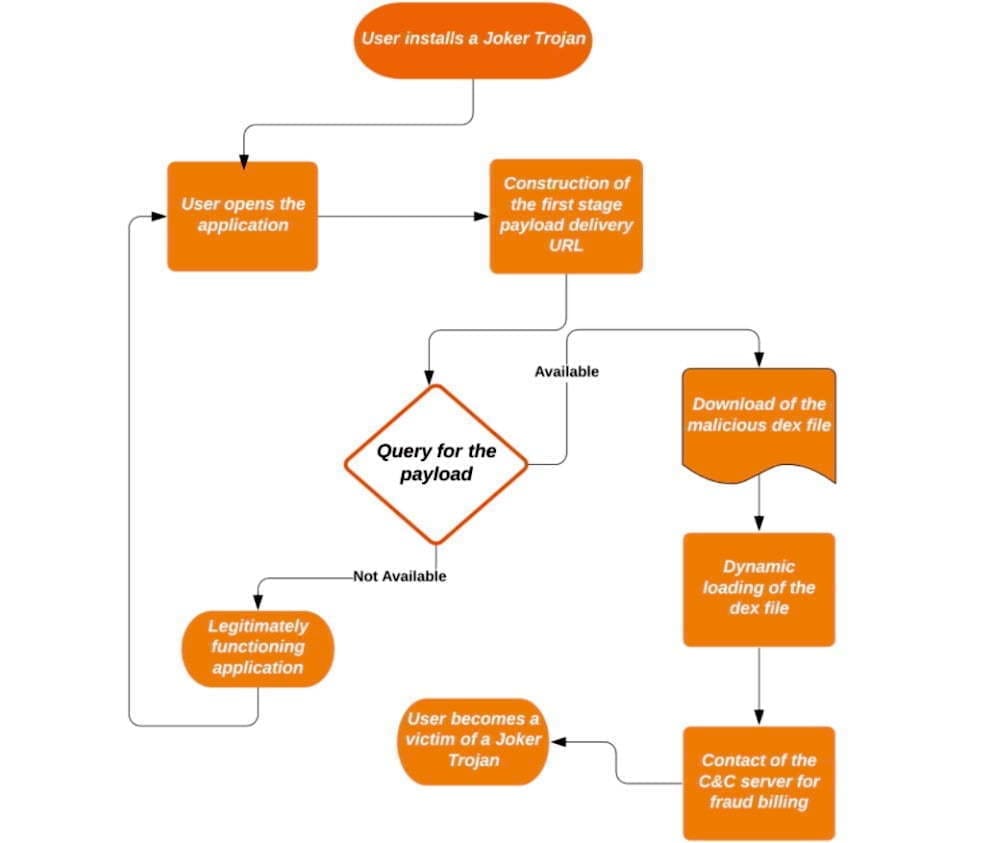
    A flow chart that captures the four pivot points each Joker sample uses was given by Zimperium. In order to mask update components as innocuous applications such as games, wallpapers, messengers, translators and photo editors, the malware often uses evasion techniques.

    (adsbygoogle = window.adsbygoogle || []).push({});

    The evasion techniques include encoded strings inside the samples where an app is to download a dex, which is an Android-native file that comprises the APK package, possibly along with other dexes. The dexes are disguised as mp3 .css, or .json files. To further hide, Joker uses code injection to hide among legitimate third-party packages—such as org.junit.internal, com.google.android.gms.dynamite, or com.unity3d.player.UnityProvider—already installed on the phone.

    The purpose of this is to make it more difficult for the malware analyst to spot the malicious code, as third-party libraries generally contain a lot of code and the existence of additional obfuscation will make it much more difficult to spot the injected classes, “wrote Zimperium researcher Aazim Yaswant.” “In addition, the use of valid package names defeats naïve [blocklisting] attempts, but our z9 machine-learning engine allowed the researchers to detect the above-mentioned injection tricks safely.”

    Three forms of post-download strategies to circumvent Google’s app-vetting process are detailed in the Zscaler write-up: direct downloads, one-stage downloads, and two-stage downloads. The final payload was the same, despite the delivery variations. If the final payload is downloaded and enabled by an application, the knock-off application has the opportunity to sign up for premium subscriptions using the user’s SMS app.

    A Google spokesman declined to comment other than to note that Zscaler reported that the company removed the apps once they were privately reported.

    (adsbygoogle = window.adsbygoogle || []).push({});

    Using an antivirus app from Malwarebytes, Eset, F-Secure, or another reputable maker is also an option, although they, too, can have difficulty detecting Joker or other malware.