Blog

  • Temporarily free and on-sale apps and games for Wednesday

    Temporarily free and on-sale apps and games for Wednesday

    Is Wednesday again , everyone. While the middle of the week tends to be slow when it comes to sales on the Play Store, I still have a couple of standouts to share with everyone today. First up is Romancing SaGa3, a solid JRPG from Square Enix that usually retails for $28.99, but today you can pick it up for $7.99, which is a fantastic deal. Next up is Doom & Destiny, an enjoyable RPG in its own right that sports a wicked sense of humor. Last up is DISTRAINT: Deluxe Edition, a 2D psychological horror that’s well-worth the current sale price. As always, I’ve highlighted all of the interesting titles in bold to make discovery easier. So without further ado, here are 14 temporarily free and 22 on-sale apps and games for the middle of the week.

    Free

    Apps

    1. 4K Camera – Filmmaker Pro Camera Movie Recorder $4.99 -> Free; Sale ends in 3 days
    2. Simpan – Note various needs $1.49 -> Free; Sale ends in 7 days
    3. Weather Live Pro $3.99 -> Free; Sale ends in 7 days

    Games

    1. The Lost Civilization $1.99 -> Free; Sale ends in 1 day
    2. Even and Odd Premium $0.99 -> Free; Sale ends in 5 days
    3. Hero Evolution2 : SP $2.49 -> Free; Sale ends in 5 days
    4. Emoji Match: A sliding puzzle $0.99 -> Free; Sale ends in 6 days
    5. [VIP]Infinity Dungeon 2- Offline Defence RPG $0.99 -> Free; Sale ends in 7 days
    6. [VIP] WeaponWar : Offline Idle Merge Game $0.99 -> Free; Sale ends in 7 days
    7. Hero Evolution : SP $1.49 -> Free; Sale ends in 7 days
    8. Mystery Tiles $0.99 -> Free; Sale ends in 7 days

    Icon packs & customization

    1. Black Army Ruby – Icon Pack – Fresh dashboard $0.99 -> Free; Sale ends in 2 days
    2. Live 3D Parallax Wallpapers Pro: (No Ads) $0.99 -> Free; Sale ends in 4 days
    3. Roundy Icon pack – round pixel icons $0.99 -> Free; Sale ends in 6 days

    Sale

    Apps

    1. Search Duplicate File (SDF Pro) $5.19 -> $2.99; Sale ends in 1 day
    2. Multi-Screen Voice Calculator Pro $7.99 -> $0.99; Sale ends in 7 days

    Games

    1. Perfect Fit Block Puzzle $1.99 -> $0.99; Sale ends in 5 days
    2. AWAKENING HORROR 1-5 $2.99 -> $0.99; Sale ends in 6 days
    3. DISTRAINT: Deluxe Edition $4.49 -> $0.99; Sale ends in 6 days
    4. Green Project $5.49 -> $3.84; Sale ends in 6 days
    5. Johnny Bonasera 1 $2.49 -> $0.99; Sale ends in 6 days
    6. PowBall Renaissance $1.99 -> $0.99; Sale ends in 6 days
    7. The Insider – interactive movie $1.99 -> $0.99; Sale ends in 6 days
    8. Doom & Destiny $4.99 -> $0.99; Sale ends in 7 days
    9. Doom & Destiny Advanced $4.99 -> $0.99; Sale ends in 7 days
    10. Lemegeton Master Edition $9.99 -> $1.49; Sale ends in 7 days
    11. Vengeance RPG $2.99 -> $1.49; Sale ends in 7 days
    12. Weapon stripping NoAds $2.49 -> $0.99; Sale ends in 7 days
    13. Romancing SaGa3 $28.99 -> $7.99; Sale ends in ?

    Icon packs & customization

    1. Pix-Pie Icon Pack $1.99 -> $0.99; Sale ends in 2 days
    2. Vera Outline Icon Pack – outline icons $1.99 -> $0.99; Sale ends in 3 days
    3. Flat Circle – Icon Pack $1.99 -> $0.99; Sale ends in 5 days
    4. RetrOxygen – Icon Pack $1.99 -> $0.99; Sale ends in 6 days
    5. X Launcher Pro $1.99 -> $0.99; Sale ends in 6 days
    6. Pixel One Ui – Icon Pack $1.99 -> $1.19; Sale ends in 7 days
    7. Super Icon Pack $1.99 -> $0.99; Sale ends in 7 days
  • EMUI 11 release schedule published – 37 Huawei and Honor devices eligible

    EMUI 11 release schedule published – 37 Huawei and Honor devices eligible

    EMUI 11 to be released

    emui 11

    Recently, one of Huawei ‘s officials confirmed in an interview that the company is planning for the EMUI 11 user interface to become the last in the firmware sequence of the manufacturer’s firmware before transitioning to its own operating system. So, it’s interesting to see which devices from Huawei are going to update to EMUI 11.

    The company has published a list of those models that will soon receive the new version of their user interface. It includes 37 devices from Huawei and Honor. Already in November, owners of flagship series Huawei P40, Honor 20, Huawei Mate 30 and Mate 20 will be able to upgrade to EMUI 11, and for Huawei Nova 7, Nova 7 Pro 5G, Nova 6, Nova 6 5G, Huawei P30 / P30 Pro, Honor V30 / V30 Pro, Honor 30/30 Pro / 30 Pro + and Huawei MatePad 10.8, they will have a beta version of the new firmware.

    The full list of models that will receive the update can be found on the company’s official timeline. And note that this is the Chinese edition of EMUI 11.

    All of these devices are the first devices to get the patented HongMeng OS (Harmony OS) operating system, with a high degree of likelihood. Note that Huawei aims to move its devices to operating systems that are proprietary. EMUI 11 is, in reality, a transitional firmware version. It will mark the change to their own OS for the company’s gadgets.

    HongMengOS 2.0 beta is already ready for different devices at the moment, including TVs and smartwatches. We expect that on mobile devices, this specific firmware update should arrive. On this matter, we are waiting for official comments from the organization.

    emui 11

    A new report from MyDrivers cites an interview with Wang Chenglu, head of software development at Huawei Consumer Business Group. The interview raised the question of how the company plans to replace EMUI 11 with the Harmony (or HongMeng in China) operating system. To this, Chenglu replied that EMUI 11 already uses the same framework as HongMeng; the same system scheduler, and other similar elements.

    It can be understood from these terms that the new version of EMUI, based on Android 11, was developed specifically as a transitional version, which prepares the devices for the adoption of the first public HarmonyOS update.

    The new version of the firmware, HongMengOS 2.0 beta, is currently ready for different smart devices: TVs, watches, etc. It is suspected that smartphones would have to come with this unique version of the firmware. We’re going to wait for formal statements.

  • Monday – 19 temporarily free and 57 on-sale apps and games

    Monday – 19 temporarily free and 57 on-sale apps and games

    Don’t miss out on the sales for Reigns, The Quest, and Danganronpa

    After a holiday weekend, it would appear we are starting off this week with a bang. Not only are three separate Reigns titles on sale today, but you can also pick up both Danganronpa mystery games at a drastic discount. There’s also a sale on The Quest, a fantastic RPG that offers a plethora of expansions. As always, I’ve highlighted all of the interesting titles in bold to make discovery easier. So without further ado, here are 19 temporarily free and 57 on-sale apps and games for the beginning of the week.

    Free

    Apps

    1. The Legend of Sleepy Hollow (Immersive Experience) $0.99 -> Free; Sale ends in 7 hours
    2. Memorize: Learn Spanish Words with Flashcards $4.99 -> Free; Sale ends in 4 days
    3. Buggy Backup Pro $5.99 -> Free; Sale ends in 5 days
    4. Last Survivors – Survival App $4.49 -> Free; Sale ends in 5 days
    5. Clean Equalizer & Bass Booster Pro $2.99 -> Free; Sale ends in 7 days
    6. Contacts Widget – Quick Dial Widget – Speed Dial $0.99 -> Free; Sale ends in 6 days
    7. Hue Melodi – Philips Hue lights dancing to music $1.99 -> Free; Sale ends in 6 days
    8. CPUz Pro $5.49 -> Free; Sale ends in 7 days

    Games

    1. Monster Mingle $2.99 -> Free; Sale ends in 7 hours
    2. Shadow of Naught – An Interactive Story Adventure $2.99 -> Free; Sale ends in 1 day
    3. Slender man RE $1.49 -> Free; Sale ends in 4 days
    4. Sudoku Ultimate(No Ads) $1.99 -> Free; Sale ends in 4 days
    5. Stickman Legends: Shadow War Offline Fighting Game $0.99 -> Free; Sale ends in 5 days
    6. Sudoku : Cartoon $0.99 -> Free; Sale ends in 5 days
    7. Boymate10 4P – Brain Card Game $3.99 -> Free; Sale ends in 6 days
    8. Grow Zombie VIP – Merge Zombies $0.99 -> Free; Sale ends in 6 days
    9. RFS – Real Flight Simulator $0.99 -> Free; Sale ends in 6 days

    Icon packs & customization

    1. GIN Icon Pack – Get It Now $0.99 -> Free; Sale ends in 3 days
    2. Minka Dark – Icon Pack $1.49 -> Free; Sale ends in 5 days

    Sale

    Apps

    1. Jazz Rock Guitar $5.99 -> $2.49; Sale ends in 4 days
    2. LiquidPlayer Pro : music equalizer mp3 radio 3D $3.99 -> $1.99; Sale ends in 4 days
    3. Reminder PRO $3.99 -> $0.99; Sale ends in 4 days
    4. Duplicate File Remover Pro(No Ads) $1.99 -> $0.99; Sale ends in 5 days
    5. EvoWallet – Money Tracker [Premium] $1.99 -> $0.99; Sale ends in 5 days
    6. Hot VPN Pro – HAM Paid VPN Private Network $3.49 -> $0.99; Sale ends in 5 days
    7. FolderSync Pro $4.49 -> $2.99; Sale ends in 6 days
    8. Change DNS Pro (No Root 3G, 4G, Wifi) $4.99 -> $2.99; Sale ends in 7 days
    9. Filter Calculator (RC, RL, LC, RLC) $1.99 -> $0.99; Sale ends in 7 days
    10. Scalar Pro — Most Advanced Scientific Calculator $2.49 -> $1.49; Sale ends in 7 days

    Games

    1. Bouncing Hero $2.99 -> $0.99; Sale ends in 1 day
    2. Danganronpa: Trigger Happy Havoc Anniversary Editi $15.99 -> $4.99; Sale ends in 4 days
    3. Danganronpa 2: Goodbye Despair Anniversary Edition $15.99 -> $4.99; Sale ends in 4 days
    4. Gunslugs $1.99 -> $0.99; Sale ends in 4 days
    5. Xenomorph Genocide Alien Invasion????Kill All Humans $3.49 -> $0.99; Sale ends in 4 days
    6. A Street Cat’s Tale : support edition $1.99 -> $0.99; Sale ends in 5 days
    7. Achikaps Pro $1.99 -> $0.99; Sale ends in 5 days
    8. Animus – Harbinger Unpacked $4.99 -> $2.99; Sale ends in 5 days
    9. Animus – Stand Alone $3.99 -> $1.99; Sale ends in 5 days
    10. Bleentoro Pro $1.99 -> $0.99; Sale ends in 5 days
    11. Charlie the Duck $2.99 -> $1.49; Sale ends in 5 days
    12. RPG Knight Bewitched 2 $3.99 -> $1.99; Sale ends in 5 days
    13. Vodobanka Pro $1.99 -> $0.99; Sale ends in 5 days
    14. [Premium] RPG Fernz Gate $7.99 -> $3.99; Sale ends in 6 days
    15. Gordon Streaman $1.99 -> $0.99; Sale ends in 6 days
    16. Math for Kids Premium $1.99 -> $0.99; Sale ends in 6 days
    17. RPG Destiny Fantasia – KEMCO $3.99 -> $0.99; Sale ends in 6 days
    18. RPG Illusion of L’Phalcia $8.99 -> $0.99; Sale ends in 6 days
    19. RPG Ruinverse $8.99 -> $5.99; Sale ends in 6 days
    20. RPG Seven Sacred Beasts $3.99 -> $0.99; Sale ends in 6 days
    21. Rusted Warfare – RTS Strategy $1.99 -> $0.99; Sale ends in 6 days
    22. Siege of Dragonspear $9.99 -> $4.49; Sale ends in 6 days
    23. Fishing PRO 2020(full)-fishing simulator with chat $1.99 -> $0.99; Sale ends in 7 days
    24. Hero Generations $4.99 -> $1.99; Sale ends in 7 days
    25. Hot Guns $1.49 -> $0.99; Sale ends in 7 days
    26. Nobunaga’s Shadow (Ninja RPG) $1.99 -> $0.99; Sale ends in 7 days
    27. Reigns $2.99 -> $0.99; Sale ends in 7 days
    28. Reigns: Game of Thrones $3.99 -> $1.99; Sale ends in 7 days
    29. Reigns: Her Majesty $2.99 -> $0.99; Sale ends in 7 days
    30. Shattered Plane: Turn-Based Strategy Game $4.99 -> $0.99; Sale ends in 7 days
    31. Speccy – Complete Sinclair ZX Spectrum Emulator $4.99 -> $2.99; Sale ends in 7 days
    32. Aerofly FS 2020 $7.99 -> $3.99; Sale ends in ?
    33. The Quest $7.99 -> $3.99; Sale ends in ?
    34. The Quest – Islands of Ice and Fire $3.99 -> $1.99; Sale ends in ?

    Icon packs & customization

    1. Daily Wallpapers Pro – Automatic Daily Wallpapers $1.99 -> $0.99; Sale ends in 2 days
    2. Madness Substratum $1.99 -> $1.05; Sale ends in 2 days
    3. Nova Dark Icon Pack – Rounded Square Shaped Icons $1.99 -> $0.99; Sale ends in 3 days
    4. Merry Christmas & Happy New Year 2020 Icon Pack $1.49 -> $0.99; Sale ends in 4 days
    5. Business Gold Icon Pack $1.49 -> $0.99; Sale ends in 5 days
    6. Baked – Dark Android Pie Icon Pack $1.99 -> $0.99; Sale ends in 6 days
    7. InfraRED – Stealth Red Icon Pack $2.49 -> $0.99; Sale ends in 6 days
    8. Night Vision – Stealth Green Icon Pack $2.49 -> $0.99; Sale ends in 6 days
    9. PieCons – Ultimate Android Pie Icon Pack $1.99 -> $0.99; Sale ends in 6 days
    10. Sliced Icon Pack $1.39 -> $0.99; Sale ends in 6 days
    11. Crispy 3D – Icon Pack $1.99 -> $1.19; Sale ends in 7 days
    12. Miui 12 Fluo – Icon Pack $1.99 -> $0.99; Sale ends in 7 days
    13. Painting – Icon Pack $1.99 -> $0.99; Sale ends in 7 days
  • Update is coming – MIUI 12.1 with refreshed interface

    Update is coming – MIUI 12.1 with refreshed interface

    Xiaomi, one of the smartphone market’s most significant manufacturers, regularly upgrades its MIUI firmware and introduces new features. It introduced many technologies and significant characteristics to Xiaomi and Redmi phones with MIUI 12 and continues to add new ones. New features are not open to everyone. These features, provided to some users on the Chinese forum of MIUI, will be open to all in the future.

    (adsbygoogle = window.adsbygoogle || []).push({});

    Dark Mode

    With the new update coming to MIUI 12, it is now easier to change themes. 2 large boxes were placed at the top, light and dark. There are many options such as timing just below.

    (adsbygoogle = window.adsbygoogle || []).push({});

    Power Menu

    Although some sites also write this as the MIUI 13 feature, this will be an MIUI 12 update. It is too early to leak about MIUI 13. A style that makes it easy to use with one hand is preferred. You can use the options by swiping up or down.

    (adsbygoogle = window.adsbygoogle || []).push({});

    Messages

    Messages application is now much more functional. While there are no big changes, it sure does make things easier. New settings received:

    • Show Profile Photo
    • Assign contact photo
    • Notifications Group

    Settings

    When connected to the computer, the interface of the options has been renewed. It’s a not big change but functional.

    (adsbygoogle = window.adsbygoogle || []).push({});
    miu 12.1 connect settings

    Notification settings

    MIUI 12 offers you an option to return to the old style if you like the notification style of MIUI 11 more. This choice can, however, be hard to find. Finding this setting is a lot simpler with the latest update. Renewed the interface for modifying the notification window.

    (adsbygoogle = window.adsbygoogle || []).push({});

    Gallery

    Many new styles of filters have been added to the gallery application. You can now customize your photos even more.

    miui 12.1 new filters
    (adsbygoogle = window.adsbygoogle || []).push({});

    Notes

    We can say that the Notes application has revolutionary features. With the new update, objects such as brushes and pens have been added. You can now draw a picture.

    miui 12.1 notes
    (adsbygoogle = window.adsbygoogle || []).push({});
  • Custom ROMs For Realme 1

    Custom ROMs For Realme 1

    Realme1 is a legendary device which disrupted the market with its performance to price ratio back in 2018. Today also this old gun can compete any budget device in terms of performance. Since the official support has ended months ago I wanted you guys to be aware of the Custom ROM developments going on. So below is a list some the custom ROMs designed for Realme 1. A huge thanks to all hardworking developers behind these ROMs .

    Installation process

    Please familiarize yourself with flashing and custom rom use before attempting to flash the rom. Please make sure you download the correct version of ROMs for your specific device. Make sure you have TWRP installed.

    ➼Download the latest Rom & the latest GApps package

    ➼Boot into recovery

    ➼Backup your current ROM (optional)

    ➼Perform a FULL factory wipe and wipe /system and dalvik cache as a precaution

    ➼Flash Custom ROM

    ➼Reboot recovery

    ➼Flash OpenGapps–NANO PACKAGE!!

    ➼*Flash magisk* optional (v21 recommended)

    ➼First boot may take up to 10 minutes. This is due to Gapps and root optimization.

    BlissRoms based on Android 10

    Bliss ROMs comes with a wide selection of customization options from around the Android community as well as unique options developed by our team. With so many options available, you’ll find it hard not to enjoy the Blissful experience.

    bliss rom
    bliss rom screen shots

    ????BUGS????

    ➼SELinux is permissive

    ➼VoLTE

    ➼Video codec issues in all Chromium-based browsers.

    XDA | Download

    Project Sakura 2.Q

    Project Sakura is a custom ROM built around Lineage OS 17.1, It tries to remain true to it while also providing some more functionality and UI changes.

    Project Sakura
    Project Sakura screenshots

    ????BUGS????

    ➼SELinux is permissive

    ➼VoLTE

    ➼Video codec issues in all Chromium-based browsers.

    XDA | Download [631 MB]

    Credits: CyberJalagam

    LineageOS

    LineageOS is a free and open-source operating system for set-top boxes, smartphones and tablet computers, based on the Android mobile platform. It is the successor to the custom ROM CyanogenMod.

    lineage os
    lineage os screenshots

    ????BUGS????

    ➼ Selinux is permissive.

    ➼ Video codec issues in all Chromium based browser.

    ➼ VoLTE

    XDA | Download

    Credits: Mmoreyrav + Team

    ShapeShiftOS

    ShapeShiftOS is a custom-rom based on ExtendedUI that aims to provide a different user interface and experience than any other ROM on the market.

    shapeshift os
    shapeshift os screenshots

    ????BUGS????

    ➼ Selinux Permissive

    ➼ VoLTE

    ➼ No Offline Charging Animation

    XDA | Download [978 MB]

    Credit: CyberJalagam

    AospExtended v7.3

    AOSP Extended is an AOSP based ROM which provides stock UI/UX experience with useful customizations. Being based on AOSP it provides a smooth experience. We have added useful customizations from various other open-source projects and have tried to keep our things simple. A ROM by a user, for a user. #BeExtended

    aosp extened
    aosp extened screenshots

    ????BUGS????

    ➼ Selinux is permissive.

    ➼ VoLTE.

    ➼ Video codec issues in all Chromium based browser.

    XDA | Download [816 MB]

    Credit:-ishubhamsingh(Owner/Dev/Designer)

  • How to enable hidden Developer Options on your Samsung Galaxy Note 20 or Note 20 Ultra

    How to enable hidden Developer Options on your Samsung Galaxy Note 20 or Note 20 Ultra

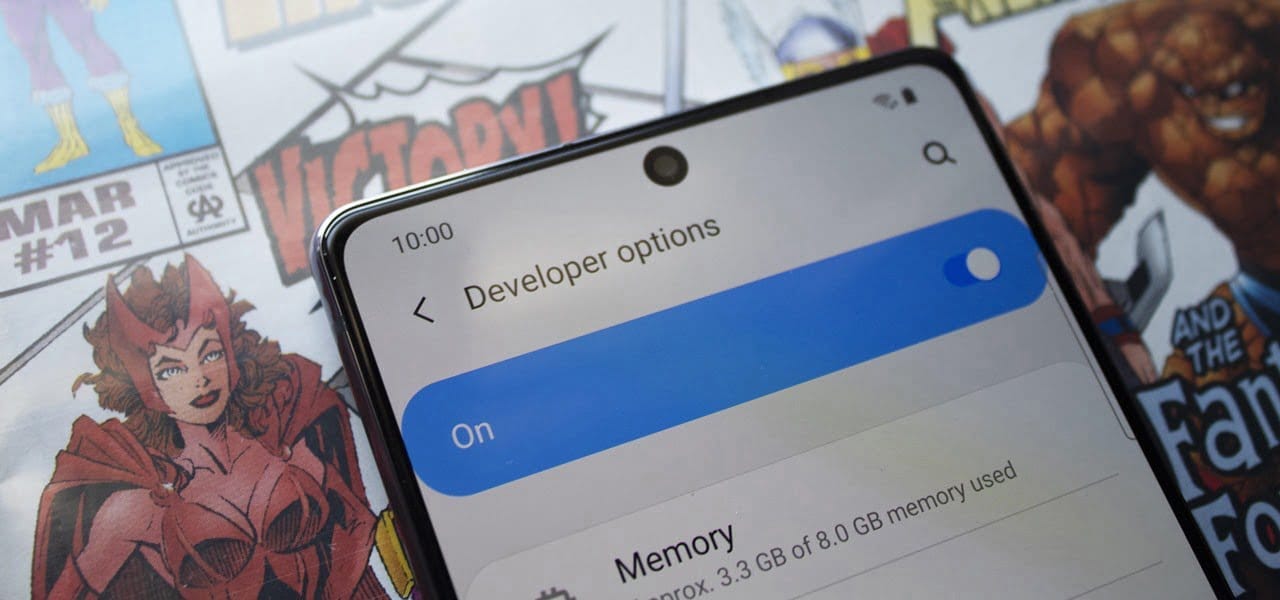
    samsung developer mode

    Even if you’re new to Android phones, chances are you’ve learned about the customization power of Android, and that also applies to the Samsung Galaxy Note 20 series. The operating system of your brand new Galaxy Note 20 or Note 20 Ultra is able to adjust beyond what is available in the standard Settings app, and it all begins with the secret “Developer options” menu.

    (adsbygoogle = window.adsbygoogle || []).push({});

    Unlocking ‘Developer options‘ is one of the first items for power users to check off when setting up a new Android phone. The secret menu, hidden by default, unlocks resources usually reserved for developers, such as eliminating bloatware programs, speeding up animations, and using ADB commands. Any user may benefit from these, and it is possible to toggle most of the customizations using simple switches.

    If rooting is accessible on the Galaxy Note 20 or Note 20 Ultra Snapdragon version, it would be step one to enable “Developer options” to do so.

    There is, however, an explanation why the menu is hidden by default. Making menu changes can make your system buggy and may cause other problems. Make them one at a time while making improvements, to easily help locate the culprit if problems occur.

    Making Developer Options visible in your Settings

    (adsbygoogle = window.adsbygoogle || []).push({});

    To un-hide “Developer options,” open the Settings app. Then, go to the “Software information” section in “About phone.” Finally, find “Build number” and tap it seven times in rapid succession. When done correctly, a toast message will appear between taps letting you know how much closer you are to becoming “a developer.”

    On the seventh tap, you’ll be prompted for your lock screen PIN, gesture, or password, if you have one set. Provide this information, and you’ll be greeted by a new toast message: “Developer mode has been turned on.” You’ll then find the new “Developer options” menu unhidden at the bottom of the Settings app’s main page, right below “About phone.

    (adsbygoogle = window.adsbygoogle || []).push({});

    If you ever want to re-hide the secret menu, navigate to it in Settings, then toggle off “Developer options” at the top. You’ll still be on the menu after disabling it, but most of the settings you changed in it will revert to normal, and “Developer options” will no longer appear in Settings until you repeat the unlocking process.

  • Eagle debloater – debloat Oxygen OS

    Eagle debloater – debloat Oxygen OS

    debloat

    Eagle debloater V2.0 – debloat OxygenOS magisk module

    When you get a new phone, the last thing you want to deal with is a bunch of preinstalled programs looking back at you. Not only do they clutter your home screen with applications that you might never use, but they also waste room on your internal storage and possibly drain your battery. You’ll need root to really uninstall them, but even then, it can be hard to pin down all the apps that should be deleted.

    Debloats Oneplus analytics, Google apps, unnecesary apps
    Personally i’m using Extreme debloat and disable analytics services

    Requirements:
    – OOS A10
    – Supports All oneplus 7 series (i have tested only on op7p but it supports all)
    – Magisk 20+
    Should be flashed only in Magisk
    – Those who have india.img must flash Overlay Mount Fix magisk module v2.1 by Zackptg5 (inorder to debloat system/product apps).
    If you don’t know you have india.img or not, just flash the above overlay fix in magisk. If it flashed successfully no problem.
    If it says “No overlay detected”, also no problem you can now directly flash debloat zip

    Debloating Options :

    1- Extreme debloat

    DEBLOATED APP LIST CAN BE FOUND HERE

    Warning
    – Before flashing extreme debloat, Goto Settings – Security – Emergency rescue – Emergency call triggerDisable
    If you don’t disable emergency rescue, double tap power button -camera shortcut won’t work.
    – Oneplus software update app was removed so use oxygen updater from Playstore
    – Removed Google apps can be installed from Playstore
    Code:

    /system/app/OPPush
    /system/app/GooglePay
    /system/app/EngineeringMode
    /system/app/Backup
    /system/app/BackupRestoreRemoteService
    /system/app/GooglePrintRecommendationService
    /system/app/EngSpecialTest
    /system/app/LogKitSdService
    /system/app/NFCTestMode
    /system/app/oem_tcma
    /system/app/OPYellowpage
    /system/app/PhotosOnline
    /system/app/OPBackup
    /system/app/OEMLogKit
    /system/app/NVBackupUI
    /system/app/OPBreathMode
    /system/app/OemAutoTestServer
    /system/app/OPBugReportLite
    /system/app/OPCommonLogTool
    /system/app/BasicDreams
    /system/app/OPFilemanager
    /system/app/BookmarkProvider
    /system/app/Traceur
    /system/app/Stk
    /system/app/Rftoolkit
    /system/app/PartnerBookmarksProvider
    /system/app/BuiltInPrintService
    /system/app/BTtestmode
    /system/app/WifiRfTestApk
    /system/app/PlayAutoInstallConfig
    /system/app/SensorTestTool
    /system/app/CarrierDefaultApp
    /system/app/OPAppUpgrader
    /system/product/app/QtiSettings
    /system/priv-app/RcsSDK
    /system/app/WAPPushManager
    /system/app/SmscPlugger
    /system/priv-app/IFAAService
    /system/priv-app/DynamicSystemInstallationService
    /system/priv-app/ManagedProvisioning
    /system/priv-app/OnePlusWizard
    /system/priv-app/EmergencyInfo
    /system/product/app/LatinImeGoogle
    /system/priv-app/GoogleDocumentsUIPrebuilt
    /system/product/priv-app/Turbo
    /system/priv-app/BackupRestoreConfirmation
    /system/priv-app/OPSimContacts
    /system/priv-app/SharedStorageBackup
    /system/priv-app/subsdm
    /system/priv-app/TSDM
    /system/priv-app/OPDeviceManager
    /system/priv-app/OPCellBroadcastReceiver
    /system/priv-app/OPDeviceManagerProvider
    /system/product/app/CalendarGoogle
    /system/product/app/Chrome
    /system/product/app/TmoEngMode
    /system/product/app/uimremoteclient
    /system/product/app/Drive
    /system/product/app/Gmail2
    /system/product/app/GooglePay
    /system/product/app/Videos
    /system/product/app/talkback
    /system/product/priv-app/GooglePartnerSetup
    /system/product/app/Music2
    /system/product/app/GoogleLocationHistory
    /system/product/app/YouTube
    /system/product/app/Duo
    /system/product/priv-app/GooglePartnerSetup
    /system/priv-app/HotwordEnrollmentOKGoogleWCD9340
    /system/priv-app/HotwordEnrollmentXGoogleWCD9340
    /system/product/app/Maps
    /system/product/app/Photos
    /system/product/app/GoogleTTS
    /system/product/priv-app/Velvet
    /system/product/priv-app/WallpaperCropper
    /system/product/priv-app/SetupWizard
    /system/product/priv-app/GoogleFeedback
    /system/product/priv-app/GoogleOneTimeInitializer
    /system/product/priv-app/GoogleRestore
    /system/product/priv-app/AndroidAutoStub
    /system/vendor/app/PowerOffAlarm
    /system/reserve
    /system/product/app/uceShimService
    /system/product/app/com.qualcomm.qti.services.secureui
    /system/vendor/app/pasrservice
    /system/product/app/remotesimlockservice
    /system/product/app/remoteSimLockAuthentication
    /system/product/app/uimgbaservice
    /system/product/app/uimlpaservice
    /system/product/app/DeviceInfo
    /system/app/Netflix_Activation
    /system/app/Netflix_Stub
    /system/app/OPGeoIpTime
    /system/priv-app/CallLogBackup
    /system/app/OPSesAuthentication
    /system/app/WallpaperBackup
    /system/app/WapiCertManage
    /system/product/priv-app/Wellbeing

    2 – Debloat Google apps except play service and playstore
    Code:

    /system/app/GooglePay
    /system/app/BookmarkProvider
    /system/app/PlayAutoInstallConfig
    /system/app/BuiltInPrintService
    /system/app/GooglePrintRecommendationService
    /system/priv-app/HotwordEnrollmentOKGoogleWCD9340
    /system/priv-app/HotwordEnrollmentXGoogleWCD9340
    /system/product/app/CalendarGoogle
    /system/product/app/Maps
    /system/product/app/Photos
    /system/product/app/Chrome
    /system/product/app/Drive
    /system/priv-app/SharedStorageBackup
    /system/product/priv-app/GooglePartnerSetup
    /system/product/app/Gmail2
    /system/product/app/GooglePay
    /system/product/app/Videos
    /system/product/app/talkback
    /system/product/app/Music2
    /system/product/app/GoogleLocationHistory
    /system/product/app/YouTube
    /system/product/app/Duo
    /system/product/app/GoogleTTS
    /system/product/priv-app/Wellbeing
    /system/product/priv-app/GooglePartnerSetup
    /system/product/priv-app/Velvet
    /system/product/priv-app/GoogleFeedback
    /system/product/priv-app/GoogleOneTimeInitializer
    /system/product/priv-app/GoogleRestore
    /system/product/priv-app/AndroidAutoStub
    /system/priv-app/BackupRestoreConfirmation
    /system/product/app/LatinImeGoogle
    /system/priv-app/GoogleDocumentsUIPrebuilt
    /system/product/priv-app/Turbo

    3- Debloat Oneplus Analytics only
    Code:

    /system/app/EngineeringMode
    /system/app/EngSpecialTest
    /system/app/LogKitSdService
    /system/app/NFCTestMode
    /system/app/oem_tcma
    /system/app/OPYellowpage
    /system/app/PhotosOnline
    /system/app/OPBackup
    /system/app/OEMLogKit
    /system/app/NVBackupUI
    /system/app/OPBreathMode
    /system/app/OemAutoTestServer
    /system/app/OPBugReportLite
    /system/app/OPCommonLogTool
    /system/app/OPPush
    /system/app/OPFilemanager
    /system/app/BookmarkProvider
    /system/app/Traceur
    /system/app/WifiRfTestApk
    /system/app/PlayAutoInstallConfig
    /system/app/SensorTestTool
    /system/product/app/TmoEngMode
    /system/product/app/uimremoteclient
    /system/priv-app/OneplusWizard
    /system/priv-app/OPDeviceManager
    /system/priv-app/OPCellBroadcastReceiver
    /system/priv-app/OPDeviceManagerProvider
    /system/reserve/OPBackupRestore
    /system/reserve/OPFilemanager
    /system/reserve/OPForum
    /system/priv-app/subsdm
    /system/priv-app/TSDM
    /system/app/OPSesAuthentication
    /system/reserve

    4- Remove unnecessary services like appmeasurement, gms analytics
    Script by By foobar66
    List of services disabled
    Code:

    com.braintreepayments.api.internal.AnalyticsIntentService
    com.facebook.ads.internal.ipc.AdsMessengerService
    com.facebook.ads.internal.ipc.AdsProcessPriorityService
    com.facebook.internal.FacebookInitProvider
    com.google.analytics.tracking.android.CampaignTrackingReceiver
    com.google.analytics.tracking.android.CampaignTrackingService
    com.google.android.gms.ads.MobileAdsInitProvider
    com.google.android.gms.analytics.AnalyticsJobService
    com.google.android.gms.analytics.AnalyticsReceiver
    com.google.android.gms.analytics.AnalyticsService
    com.google.android.gms.analytics.AnalyticsTaskService
    com.google.android.gms.auth.api.signin.RevocationBoundService
    com.google.android.gms.measurement.AppMeasurementInstallReferrerReceiver
    com.google.android.gms.measurement.AppMeasurementJobService
    com.google.android.gms.measurement.AppMeasurementReceiver com.google.android.gms.measurement.AppMeasurementService
    com.google.firebase.perf.provider.FirebasePerfProvider
    com.google.firebase.provider.FirebasePerfProvider
    com.google.android.apps.xcn.libraries.clearcut.persistence.LogCommitService"

    Download link
    Android File host

  • Greenify speeds up your Android

    Greenify speeds up your Android

    Greenify – putting battery hogging, always-on apps in hibernation

    Remember how fast your Android device was, fresh out of the store when you first turned it on? Each phone or tablet gets bogged down with apps and user data over time, not unlike a PC, turning increasingly sluggish. There are ways to get around that, luckily. For instance, Greenify is an app designed to customize your Android device to function as smoothly as it originally did.

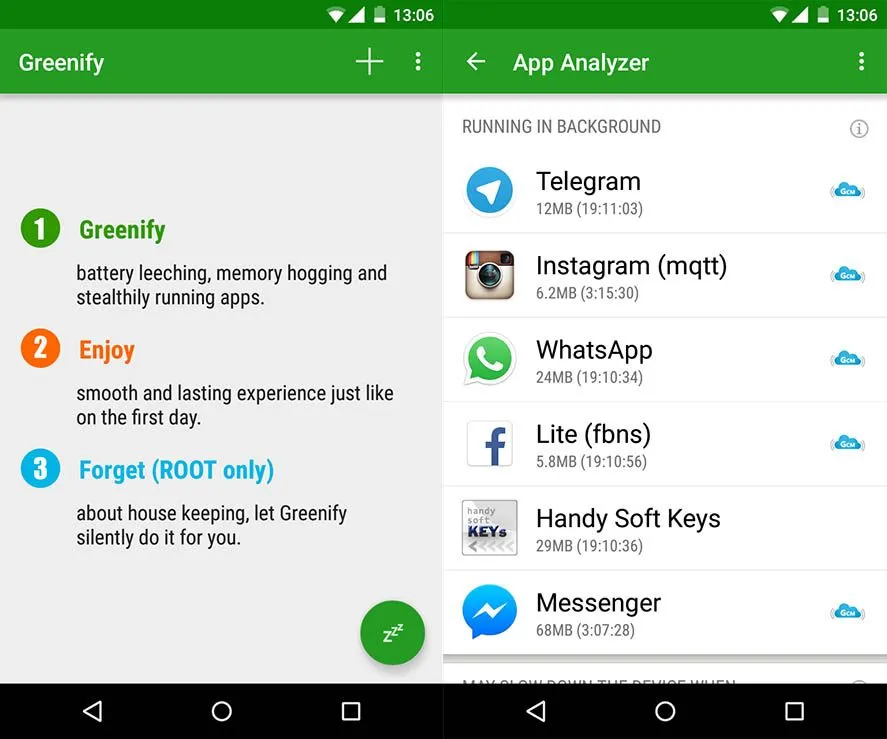
    This does not accomplish this by removing stale data, but by helping you to recognise apps that misbehave, sustain their operation, and consume battery life when you do not use them. It puts certain apps in hibernation mode upon discovery, which prevents them from bogging down the computer and draining its battery. Well, it sounds neat, no?

    greenify en screenshot

    But when they are off the grid, what happens to those apps? Well, when you need them, or other applications call upon them, you can launch them again. When the foreground is going, their full functionality is maintained-it ‘s just not active. Greenify doesn’t “freeze” programs and it’s not a killer of tasks.

    Greenify ‘s Software Analyzer only displays applications that have a POTENTIAL effect on battery or system output usage. Only those you occasionally use are recommended to hibernate, along with the apps you are sure to have a detrimental effect. It’s best to contact the Battery Manager of your Android phone, or your favorite 3rd party battery status app, for that.

    Greenify does not support devices running Android 2.x, but something above Android 4.x is gaming! The software is free, but it needs a computer with roots.

    Greenify is a well-known Android app that detects and suspends background programs that use excessive amounts of resources in order to enhance device performance and battery life. Greenify is a straightforward yet efficient method of extending battery life without the need for intricate setups, regardless of whether you’re using an older or more recent smartphone model. It automatically pauses apps when they’re not in use, avoiding needless background activity, as opposed to freezing or force-stopping them like some harsh task killers.

    Anything suitable for users looking to optimize their Android experience, Greenify remains a trusted choice among power users and casual users alike.

  • 25 temporarily free and 44 on-sale apps and games

    25 temporarily free and 44 on-sale apps and games

    Welcome to Friday, everyone. It would appear that today’s sales concentrate primarily on games, and so I have a few standouts to share with everyone. First up is Death Worm, a delightful title all about eating everything and anything as a giant worm. Next is G30 – A Memory Maze, a minimal puzzler that tells a story through each puzzle. Last up is Legends of Andor – The King’s Secret, a deep and engaging board game adaptation that’s easily worth the current asking price. As always, I’ve highlighted all of the interesting titles in bold to make discovery easier. So without further ado, here are 25 temporarily free and 44 on-sale apps and games for the end of the week.

    Free

    Apps

    1. Crypto Helper $0.99 -> Free; Sale ends in 9 hours
    2. Color Wheel $1.99 -> Free; Sale ends in 1 day
    3. English Thesaurus $2.99 -> Free; Sale ends in 2 days
    4. Lecture Notes – Classroom Notes Made Simple $2.99 -> Free; Sale ends in 6 days
    5. Stickers Friends PRO – WAStickerApps $0.99 -> Free; Sale ends in 6 days

    Games

    1. Brothers 3 The Saga Continue $1.49 -> Free; Sale ends in 9 hours
    2. Cartoon Craft $0.99 -> Free; Sale ends in 2 days
    3. Infinity Duels $2.99 -> Free; Sale ends in 2 days
    4. Orisons of Fate: Indie Offline RPG $2.49 -> Free; Sale ends in 4 days
    5. 2048 Puzzle Game $2.99 -> Free; Sale ends in 5 days
    6. Teach Your Monster to Read: Phonics & Reading Game $4.99 -> Free; Sale ends in 5 days
    7. Sweet Candy Blast $0.99 -> Free; Sale ends in 6 days
    8. Theme Solitaire Tripeaks Tri Tower PV $0.99 -> Free; Sale ends in 6 days
    9. Tower of Farming – idle RPG (Soul Event) $0.99 -> Free; Sale ends in 6 days
    10. Cyber Fighters: League of Cyberpunk Stickman 2077 $0.99 -> Free; Sale ends in 7 days
    11. Dead Bunker 3: On a Surface $0.99 -> Free; Sale ends in 7 days
    12. Evertale $0.99 -> Free; Sale ends in 7 days
    13. Terra Fighter 2 Pro $0.99 -> Free; Sale ends in 7 days

    Icon packs & customization

    1. 3D Dollar Sign Live Wallpaper $0.99 -> Free; Sale ends in 2 days
    2. Gear Sun 2 $0.99 -> Free; Sale ends in 2 days
    3. Darko – Icon Pack $1.49 -> Free; Sale ends in 5 days
    4. Darko 2 – Icon Pack $0.99 -> Free; Sale ends in 5 days
    5. Wooden Icons Blue $1.49 -> Free; Sale ends in 5 days
    6. Pixel Cubic 3D – Icon Pack $1.49 -> Free; Sale ends in 6 days
    7. Pixel Net White – Icon Pack $0.99 -> Free; Sale ends in 6 days

    Sale

    Apps

    1. Learn Forex Trading [PRO] Guide – Learn To Trade $1.49 -> $0.99; Sale ends in 3 days
    2. Screen Lock : Pro screen off and lock app $1.99 -> $0.99; Sale ends in 4 days
    3. Password Manager+: Cloud Backup & Fingerprint $4.49 -> $1.99; Sale ends in 5 days
    4. Stellarium Mobile PLUS – Star Map $9.99 -> $5.99; Sale ends in 5 days
    5. Graphing Calculator | Solve| Derivatives $4.49 -> $0.99; Sale ends in 6 days
    6. HSPA+ Optimizer Pro Version $1.99 -> $0.99; Sale ends in 6 days
    7. Learn Japanese Pro $3.49 -> $1.99; Sale ends in 6 days
    8. Learn Korean – Grammar Pro $3.99 -> $1.99; Sale ends in 6 days
    9. Photo Studio PRO $9.99 -> $3.99; Sale ends in 6 days
    10. ColorMeter camera color picker $2.99 -> $0.99; Sale ends in 7 days

    Games

    1. Castles of Mad King Ludwig $7.99 -> $0.99; Sale ends in 2 days
    2. G30 – A Memory Maze $3.99 -> $0.99; Sale ends in 2 days
    3. King Tactics – The Wars of the Roses $2.99 -> $0.99; Sale ends in 2 days
    4. Legends of Andor – The King’s Secret $5.99 -> $3.99; Sale ends in 2 days
    5. Planescape: Torment: Enhanced Edition $9.99 -> $4.49; Sale ends in 2 days
    6. SUBURBIA City Building Game $7.99 -> $0.99; Sale ends in 2 days
    7. Ubongo – Puzzle Challenge $2.99 -> $0.99; Sale ends in 2 days
    8. 1941 Frozen Front Premium $2.99 -> $0.99; Sale ends in 5 days
    9. Devils & Demons – Arena Wars Premium $2.99 -> $0.99; Sale ends in 5 days
    10. Farm Invasion USA – Premium $2.99 -> $0.99; Sale ends in 5 days
    11. Guns’n’Glory WW2 Premium $2.99 -> $0.99; Sale ends in 5 days
    12. Through the Darkest of Times $7.99 -> $4.99; Sale ends in 5 days
    13. Chess Trainer PRO – Repertoire Builder $3.99 -> $0.99; Sale ends in 6 days
    14. Death Worm™ $2.99 -> $0.99; Sale ends in 6 days
    15. Fairy Knights : Story driven RPG $3.99 -> $1.99; Sale ends in 6 days
    16. Funny Veggies! Kids games for girls, boys, babies $2.99 -> $1.49; Sale ends in 6 days
    17. The Last Dream (Full) $4.99 -> $1.99; Sale ends in 6 days
    18. Timen Runner $2.99 -> $0.99; Sale ends in 6 days
    19. BonVoyage! $1.99 -> $0.99; Sale ends in 7 days

    20. CHAMBER $2.49 -> $0.99; Sale ends in 7 days
    21. CRAZY CHICKEN strikes back $3.99 -> $0.99; Sale ends in 7 days
    22. Lovecraft’s Untold Stories $9.99 -> $3.99; Sale ends in 7 days
    23. Lucid Dream Adventure 2 – Story Point & Click Game $2.99 -> $1.49; Sale ends in 7 days
    24. Rule with an Iron Fish: A Pirate Fishing RPG $3.99 -> $1.99; Sale ends in 7 days
    25. Slenderman Origins 1 Full $2.99 -> $0.99; Sale ends in 7 days
    26. Slenderman Origins 2 Saga. Full. Horror Quest. $2.99 -> $0.99; Sale ends in 7 days
    27. SpellKeeper $1.99 -> $0.99; Sale ends in 7 days
    28. Aeon’s End $9.99 -> $4.99; Sale ends in ?
    29. Enigmatis 2: The Mists of Ravenwood (Full) $6.99 -> $1.99; Sale ends in ?
    30. Legends Arcana $2.99 -> $1.99; Sale ends in ?
    31. One Deck Dungeon $6.99 -> $0.99; Sale ends in ?

    Icon packs & customization

    1. None Dark Icon Pack $1.49 -> $0.99; Sale ends in 6 days
    2. NYON – Icon Pack (SALE!!!) $1.49 -> $0.99; Sale ends in 6 days
    3. ARC Launcher® Pro???? 2020 Themes,DIY,Wallpaper,FAST $3.49 -> $0.99; Sale ends in 7 days
  • Google Camera 7.6 available for Pixel 4, 3, 2 devices

    Google Camera 7.6 available for Pixel 4, 3, 2 devices

    Google Camera download

    Google has just launched two new Pixel 5 and 4a 5 G smartphones. The two phones have just launched with intriguing specifications for hardware and software. Although the Pixel 5 is not the flagship phone with the highest hardware configuration, the Snapdragon 700 SoC series still supports 5G. As for the applications, out of the box, both the devices feature Android 11 and some exclusive Pixel apps and services such as the camera app. The stock of older Pixel 4 (XL), 3 (XL), 2 (XL) and 4a and 3a cameras have all been updated to the new Google v7.6 APK camera.

    Sadly, Google has not mentioned what’s new in the latest version of the camera, including v7.6.

    The Play Store listing only mentions the age-old changelog of dual exposure controls to adjust brightness and HDR of your photo, added Astrophotography feature to Night Sight mode for the Pixel 3, 3a, and 4. Top Shot photos feature with touch and hold on the shutter button to capture. Here is the complete changelog from the Play Store listing:

    •  Added dual exposure controls to adjust brightness and HDR of your photo (Pixel 4).
    • Added Astrophotography to Night Sight to allow you take a picture of the Milky Way with one tap (Pixel 3, 3a, and 4).
    • Added Frequent Faces to help you capture Top Shot photos where the people you photograph most are smiling and not blinking (Pixel 4).
    • Added Touch and hold on the shutter button to capture Top Shot photos in the default camera mode (Pixel 2, 3, 3a, and 4).
     camera
    google camera

    We do, however, have a list of features from previous versions of the Pixel camera, such as the Gcam 7.5. “Audio zoom” allows you to capture audio / sound from the microphone in a particular direction with a motion blur effect that provides DSLR-like quality for images of moving objects. The flash intensity allows you to change the flash intensity at will. The video sharing feature now also applies to videos. In Google camera 7.6, we should expect all these features as well.

    On the other hand, Pixel 5 and 4a 5G feature new Google Camera 8.0 out of the box. This camera update didn’t come to the older Pixel series yet. However, you can still install it using our Gcam 8.0 post from here alongside your original camera app. You can expect some of Google camera 8.0 features into the Gcam 7.6 as well. Check out all the Pixel 5 and 4a camera features here.

    Moreover, previous Google Camera 7.4 enables 8X camera zoom for video recording on the current flagships Pixel 4 and 4XL. It also brings a new toggle for changing resolution while video recording in the dropdown menu on the viewfinder. Later, Google released a newer stable Google Camera 7.4.200 APK as well.

    Download Google Camera 7.6 APK

    Here is the latest Google Camera 7.6.008.327100377 original APK available for download for older Pixel series phones including Pixel 4 (XL), Pixel 3 (XL), 2 (XL), OG Pixel 1 (XL). So if you have an older Pixel device and do not see the newest update on the Play Store, then download the APK and simply install it as a normal app. It will only support Android 11 or later.

    APK download