Blog

  • Temporarily free and on-sale apps and games for this week

    Temporarily free and on-sale apps and games for this week

    As always, we highlighted all of the interesting titles in bold to make discovery easier. So without further ado, here are 18 temporarily free and 28 on-sale apps and games for the middle of the week.

    First and foremost, the popular rhythm game Cytus II is currently available for free along with the well-reviewed notes app Lecture NotesLovecraft’s Untold Stories is also available, and you can grab it at a steep discount, so don’t miss out.

    Free

    Apps

    1. Lecture Notes – Classroom Notes Made Simple $2.99 -> Free; Sale ends in 5 days
    2. Smart Touch (Pro – No ads) $1.49 -> Free; Sale ends in 5 days

    Games

    1. Concrete Defense 1940: WWII Tower Siege $0.99 -> Free; Sale ends in 2 days
    2. Agent Shot 3D – Cop shooting and chasing game $0.99 -> Free; Sale ends in 3 days
    3. Push them all 3D – Smart block puzzle game $0.99 -> Free; Sale ends in 3 days
    4. Becker cat’s adventures $0.99 -> Free; Sale ends in 4 days
    5. Slender man RE $1.49 -> Free; Sale ends in 4 days
    6. Dungeon999 $0.99 -> Free; Sale ends in 5 days
    7. Tap tap cartoonist – Cartoon999 (VIP) $0.99 -> Free; Sale ends in 5 days
    8. Amazing Taxi Sim 2020 Pro $0.99 -> Free; Sale ends in 6 days
    9. Cytus II $1.99 -> Free; Sale ends in 6 days
    10. Superhero Armor: City War – Robot Fighting Premium $1.99 -> Free; Sale ends in 6 days
    11. Superheroes Junior: Robo Fighting – Offline Game $1.99 -> Free; Sale ends in 6 days
    12. Terra Fighter 2 Pro $0.99 -> Free; Sale ends in 6 days
    13. Bermuda Triangle Pro $1.99 -> Free; Sale ends in 7 days
    14. Teach Your Monster to Read: Phonics & Reading Game $4.99 -> Free; Sale ends in 7 days
    15. Timing Hero PV: Retro Fighting Action RPG $3.49 -> Free; Sale ends in 7 days

    Icon packs & customization

    1. Distraction Free Icon Pack $0.99 -> Free; Sale ends in 2 days

    Sale

    Apps

    1. Premium English Irregular Verbs $1.99 -> $0.99; Sale ends in 2 days
    2. Radio online – Tequila Radio Player PRO $1.49 -> $0.99; Sale ends in 2 days
    3. Everyday Key $1.49 -> $0.99; Sale ends in 3 days
    4. PDF Editor & Creator , Tool , Merge , Watermark $9.99 -> $0.99; Sale ends in 3 days
    5. AlmostTI – TI Calc Emulator $4.99 -> $2.99; Sale ends in 5 days
    6. Bass Engineer $2.49 -> $0.99; Sale ends in 6 days
    7. KnowledgeBase Builder $10.99 -> $4.49; Sale ends in 6 days
    8. MC50 Programmable Calculator $1.99 -> $0.99; Sale ends in 6 days
    9. Mushroom Identification $4.99 -> $1.99; Sale ends in 6 days
    10. SoundHound ∞ – Music Discovery & Hands-Free Player $5.99 -> $3.99; Sale ends in 6 days
    11. Tournament Manager Pro $1.99 -> $0.99; Sale ends in 7 days
    12. All in one browser Mediabook Pro $1.99 -> $1.49; Sale ends in ?

    Games

    1. Naked King $2.49 -> $0.99; Sale ends in 2 days
    2. Bug School: Learn Kindergarten Skills $2.99 -> $0.99; Sale ends in 4 days
    3. Pirate world Ocean break $1.99 -> $0.99; Sale ends in 4 days
    4. Gordon Streaman $1.99 -> $0.99; Sale ends in 5 days
    5. Timen Runner $2.99 -> $0.99; Sale ends in 5 days
    6. Codex of Victory – sci-fi turn based strategy $3.99 -> $1.49; Sale ends in 6 days
    7. Lovecraft’s Untold Stories $9.99 -> $3.99; Sale ends in 6 days
    8. SpellKeeper $1.99 -> $0.99; Sale ends in 6 days
    9. Aeon’s End $9.99 -> $4.99; Sale ends in 7 days
    10. BuildFall 2 ???? : Drag????, Stack????, Smash???? $6.99 -> $3.49; Sale ends in 7 days
    11. Last Day Survivors ( zombie shooter TDS ) $3.99 -> $0.99; Sale ends in 7 days

    Icon packs & customization

    1. EXA Neon Icon Pack $1.49 -> $0.99; Sale ends in 4 days
    2. Lines Live Wallpaper $2.99 -> $0.99; Sale ends in 7 days
    3. Bubbles Live Wallpaper $2.99 -> $0.99; Sale ends in 7 days
    4. Knots Live Wallpaper $2.99 -> $0.99; Sale ends in 6 days
    5. Vera Icon Pack $1.99 -> $0.99; Sale ends in 2 days
  • Corvus OS v9.0 – Android 10 custom rom

    Corvus OS v9.0 – Android 10 custom rom

    corvus OS

    Corvus OS is another Android custom ROM with many customization.

    First, it’s inspired by Dirty Unicorns, but developers picked many other features too. Their objectives are a stable and feature ROM that can be enjoyed by many devices.

    Developers won’t say that Corvus is better ROM than others, but we always try to give you the best.

    CorvusOS v9 changelog (2020.09.12)

    • Merged September Security Patch
    • Bumped to the EndGame 9.0
    • Added More QS Tile Styles (OOS, Divided & Cosmos)
    • Added toggle for carrier group visibility
    • Updated QS tile icons (Airplane Mode, Dark Mode, Data Saver, Flashlight & Mobile Data)
    • Added some new Headers (One-piece Anime pack, Hunter x Hunter, Shingeki no Kyojin, Kimetsu no Yaiba, My Hero Academia)
    • Added Mi 10 Ultra FOD animations
    • Beautify airplane & mobile data icons
    • Imported back arrow from OOS
    • Added Option to use linear scale in BrightnessController
    • Redesign some drawables in Settings
    • Fixed crash when uninstalling apps with fragile data
    • Fingerprint: fix client was canceled by service by mistake
    • TaskHelper: allowed to get foreground app label
    • Fixed QS tile layout w.r.t detail view expand button
    • Made QS security footer color consistent with the panel
    • Added policy-based firewall in the security tab
    • Fixed CDM.requestNotificationAccess() in profile
    • Fixed NPE on global actions dialog
    • Fixed status bar battery level padding
    • Updated Translations RU & PT-BR to Raven’s Lair
    • Removed NEON matrix procs
    • Improved backwards memmove performance
    • Benchmark unaligned memmove
    • Reverted bool to ignore icon space reserved in Settings
    • Many more underhood changes and fixes check on gerrit

    Corvus 9 features

    corvus os customizations

    Accents

    Backgrounds

    Fonts Statusbar

    Icons Quick

    Settings syles

    Theme Schedule

    Notification features

    corvus os notifications center
    • Heads up options
    • Charging animation
    • Edge Lighting
    • Blink Flashlight on Call

    Lockscreen features

    corvus os lockscreen
    • Show status bar on lockscreen
    • Disable QS when locked
    • Lockscreen charging info
    • Lockscreen album art filter
    • Media artwork blur level
    • Shortcuts
    • Charging animation
    • Lockscreen style
    • Fod Icon picker
    • Hide lock icon
    • DT2sleep
    • Lockscreen visualizer

    Statusbar features

    corvus os statusbar
    • Battery Customization
    • Charging LED
    • Battery Estimates Toggle
    • Battery Icon Style
    • Battery Percentage
    • Aggressive Battery
    • Battery Bar Customization
    • Custom Statusbar icons

    Display features

    corvus os display settings
    • Ambient Display
    • Always on
    • Custom Options
    • Batter level on bottom
    • Always on when charging
    • New notifications toggle
    • Lift to check phone
    • Hand wave pulse
    • Pocket notifications on removal
    • Brightness options on Ambient
    • Ambient music ticker
    • Ambient wake gestures
    • Night Light
    • Adaptive Brightness
    • Styles and wallpapers
    • Screen Attention
    • Display Colors
    • Screen Savers
    • Screen rotations
    • Wake on plug
    • Game driver preferences
    • DT2wake

    How to install Corvus OS on your device

    1. Wipe data, Cache & Dalvik , And system
    2. Flash rom
    3. Reboot
    4. Reboot to recovery
    4. Flash Gapps (for Google services)
    5. Flash Magisk (for root)
    6. Reboot to system.
    5. Reboot & enjoy!

    Officially supported devices

    ENCHILADA
    RAPHAEL
    BERYLLIUM
    DAVINCI
    RMX1801
    PHOENIX
    RMX199X
    MIDO
    KENZO
    BEGONIA
    SANDERS
    TISSOT
    CURTANA
    VINCE
    VIOLET
    WAYNE
    WHYRED
    X00TD
    JD2019
    GINKGO
    JASMINE_SPROUT

    Check this article to see why Corvus OS is the best gaming rom.

  • Check Android 11 (Oxygen OS 11) beta release for OnePlus 8 & OnePlus 8 Pro

    Check Android 11 (Oxygen OS 11) beta release for OnePlus 8 & OnePlus 8 Pro

    Interestingly, Google released the brand latest Android 11 late last night. Interestingly, the latest Android 11 is available for non-pixel smartphones this time too. OnePlus published the developer preview of Oxygen OS 11 for the OnePlus 8 series a few months ago. The brand has launched the beta public which means that everyone owning the system will install the latest update.

    The new UI will get both Oxygen OS 11 features as well as Android 11 features. Most of you remember that the Oxygen OS 11 is almost similar to the OneUI 2.1.

    As reported, both the OnePlus 8 and the OnePlus 8 Pro are available for the new update. Those who are eager to try the latest UI will download and install the same with minor glitches. Follow our manual to install the latest Oxygen OS 11 in your system.

    OnePlus 8 & OnePlus 8 Pro Android 11 Update Download Links

    How to install Oxygen OS 11 (Android 11) in your device!

    Oxygen OS allows you guys to download and install locally. There are some custom UI’s which doesn’t allow the same. We might have to navigate to recovery for doing the update. But, as said updating OnePlus devices manually isn’t a huge task.

    • Download the public-beta file from OnePlus community or by following the below links
    • Once the file is downloaded, move the same to the internal storage.
    • Now, navigate to Settings, and tap on System.
    • Once you reach, click on System Update, and select the “Settings” icon from the top right.
    • After this, click on “Local upgrade”, and choose the file which you have downloaded earlier.
    • Now, tap on install, and your device will be upgraded to the latest Android 11
    • Do check out the “About Phone” page for verifying the update.

    As of now, no users reported any major bugs after installing the new Oxygen OS 11 on top of Android 11. What we can understand from here is that, you can this as a daily driver. Do let us know if you have any doubts on the same.

  • How to fix fingerprint sensor faults on Realme devices

    How to fix fingerprint sensor faults on Realme devices

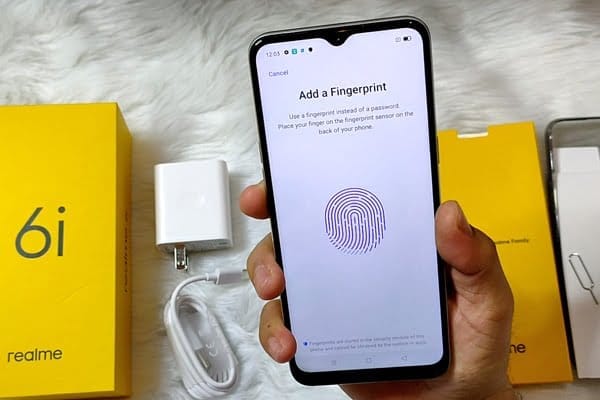
    realme 6i fingerprint sensor 600x400 1

    Unless we’re talking about an entry-level smartphone, all of the latest mid- and high-range Android devices have a fingerprint sensor as the most significant unlocking process. Realme mobiles also use this technology, either on the back or by sensors on the phone. The fingerprint reader can fail at any time though.

    Any piece of hardware at any given time is vulnerable to failure. We also tell you about various issues on our site several times, but thankfully in most cases the solutions are at our fingertips. The same is true of Realme mobiles and the fingerprint sensor, which can fail without warning and without having an obvious trigger for us.

    (adsbygoogle = window.adsbygoogle || []).push({});

    Test the device

    Realme cell phones modified or released with RealmeUI have a security center to identify potential hardware or software issues. The application can be found with the other apps of the device and can measure several aspects, including the fingerprint sensor. In order to be able to test this section, we have to uncheck all the others (or leave them in case we take advantage of a full test)

    We will click on the “Start search” button until completed. The device will take a few minutes and we’ll be able to see if there is a fingerprint sensor problem at the moment. If it does, the device will provide us with the necessary rabbits to solve them.

    test real me device
    (adsbygoogle = window.adsbygoogle || []).push({});

    Register the fingerprint again

    This is the easiest way to troubleshoot or spot unusual fingerprints. The goal is to delete all the tracks we’ve captured and start anew. Click on the trash can icon in the registered fingerprints to do this, and click on “Add a fingerprint” and re-register our fingerprint until done.

    real me register fingerprint

    Register a finger more times

    This is a trick to offer maximum precision in finger unlocking. It involves registering the same finger at least twice. In this way the system will detect our fingerprint more times, being able to register parts that it did not do in the first pass and thus being more precise.

    Clean the sensor

    Dirt is one of the key explanations for sensor failures on fingerprints. Over time and after using the mobile with dirty hands, a thin film of fat between the sensor and our finger can be produced which prevents correct reading. This can cause problems, and lead us to believe it is a malfunction of the sensor. While our Realme has a fingerprint sensor on the screen or on the back, it is enough from time to time to wipe with a dry cloth to remove dirt and restore its efficacy to what it was before.

    Factory reset

    If any of the above does not work, it is best to return the system to factory settings so that all settings and downloaded data can be removed and then try to get the fingerprint sensor to work again. To do this, click on Settings / Backup and then click on “Delete Factory Files.” This choice may be under Storage / Backup and Restore, depending on the version of ColorOS or RealmeUI. The process will last a couple of minutes and the mobile will turn on again and the fingerprint sensor will respond again.

    Hardware problem

    If even with those, the fingerprint sensor works again, it is possible that we are facing a hardware problem caused by a blow or internal failure , which requires the assistance of a professional technician.

  • First screenshots from OxygenOS 11 reveal some major UI changes

    First screenshots from OxygenOS 11 reveal some major UI changes

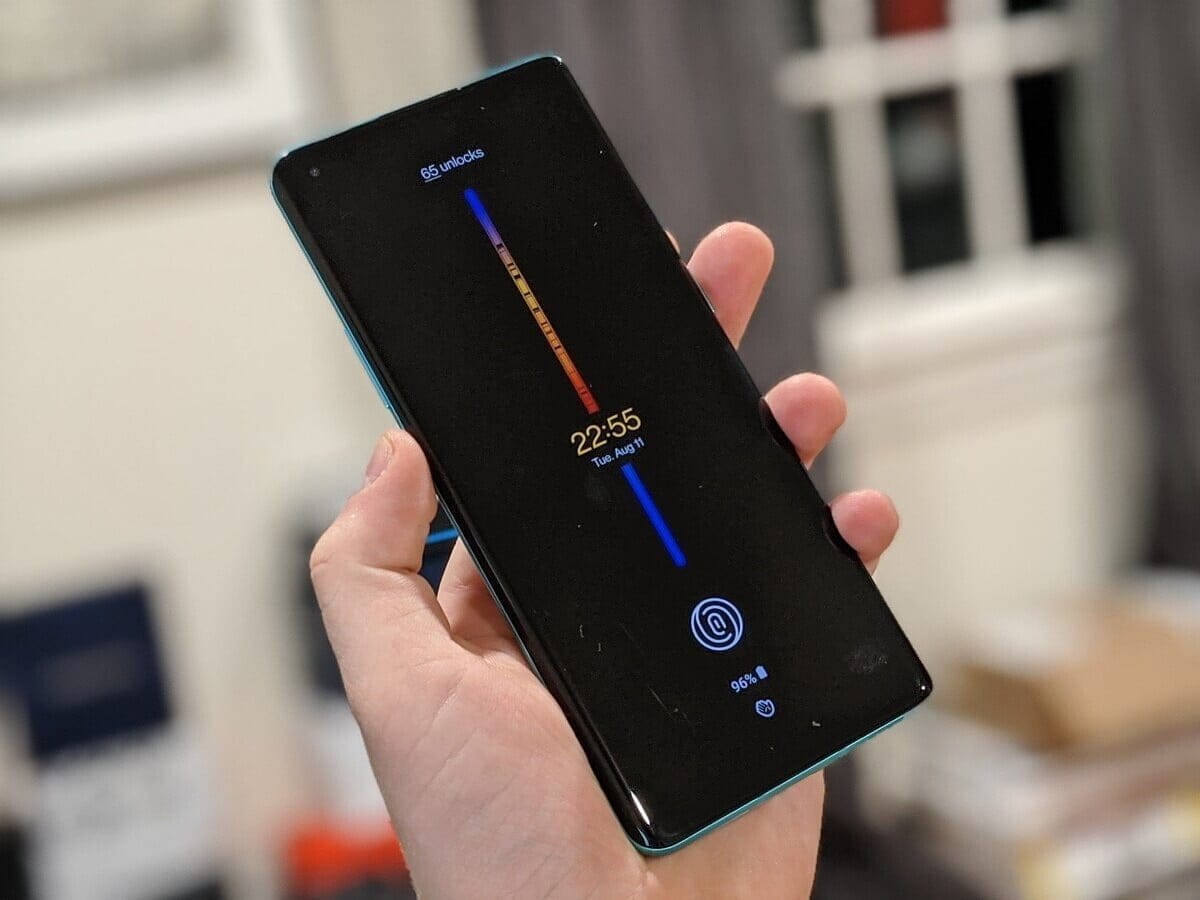
    On August 10th, OnePlus will launch its latest 11-based OxygenOS 11. The first screenshots of the new version have been posted, which will feature significant improvements to the interface and new functionality. OxygenOS 11 has a OneUI-like look and has a rather convenient one-handed interface.

    (adsbygoogle = window.adsbygoogle || []).push({});

    OxygenOS, which has a pure Android design in general until this time, will have a much more original design with the new version. OnePlus will open the closed test version to the community members with its event on August 10. The company invites its “most technically-inclined” community members to try the release. “Then once we’ve squashed most of the big bugs and improved over stability, we’ll release a full open beta to let even more of you try it out,” OnePlus CEO Pete Lau said.

    OxygenOS is also based on new features in Android. So in OxyegenOS 11 you can see all of the features of Android 11. It is not known on which devices a closed trial will be held on 10 August. This will probably be released for OnePlus 8 and 8 Pro, backed by Android 11 Beta.

  • Enable hidden performance mode for GPU overclocking on Xiaomi / Redmi

    Enable hidden performance mode for GPU overclocking on Xiaomi / Redmi

    Xiaomi and Redmi phones have a secret GPU Overclock mode using MIUI software to boost gaming performance. You can get more FPS in games, better score for Antutu, if you allow this mode. Allowing this mode however will cause the system to overheat. Long-term usage it can turn into a dangerous situation.

    How to Enable Performance Mode

    (adsbygoogle = window.adsbygoogle || []).push({});
    1. Enter dialer app
    2. Type: *#*#8106#*#*
    3. Done!

    Antutu tests performed after enabling this mode on K20 Pro and Mi 9 devices:

  • Pixel Experience – Android 10 custom rom

    Pixel Experience – Android 10 custom rom

    pixel experience

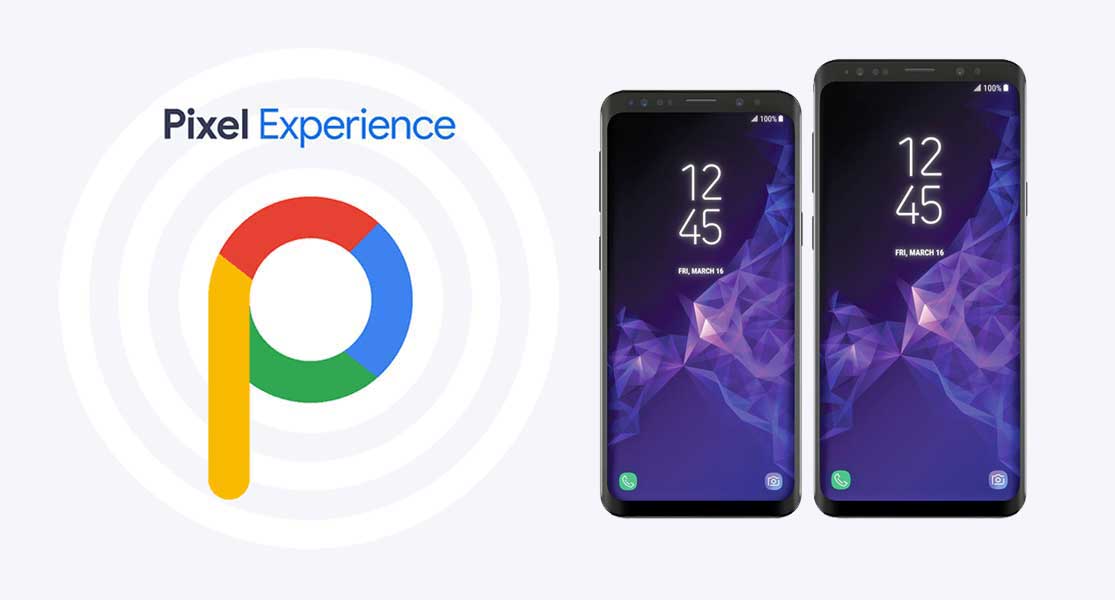
    PixelExperience is an AOSP based ROM, with Google apps included and all Pixel goodies (launcher, wallpapers, icons, fonts, bootanimation).

    Their mission is to offer the maximum possible stability and security, along with essential and useful features for the proper functioning of the device.

    The new Android 10 brings new system UI, new gesture navigation, improved privacy and location control. The update also offers enhanced app permissions, foldable display support, security features, system-wide dark mode, etc.

    (adsbygoogle = window.adsbygoogle || []).push({});

    The Android 10 also offers built-in call screening, multi-camera API, smart replies in the notification panel, 5G support, improved call quality, bubble feature, live caption, and more. While the latest version also improves battery life, Focus mode which is similar to the Do Not Disturb mode, etc. Apart from that Android 10 also features 65 new emojis. It also comes with direct audio streaming support to hearing aid devices.

    It has all the features and applications which comes out of the box with Google Pixel smartphone. Now you can experience the real Pixel Smartphone with this ROM. With this ROM, you can enjoy

    • All Google Apps
    • Pixel Launcher with round icon support
    • Pixel Boot Animation
    • Google Assistant
    • Pixel Sounds
    • Pixel Live Wallpapers
    • Root
    • Round Icon for Settings
    • Pixel’s blue accent

  • Magisk Manager app from Google Play Store is a Malware

    Magisk Manager app from Google Play Store is a Malware

    official magisk manager

    Magisk is a popular name for Android users who are fond of rooting their smartphones. The app is not available in the Google Play store, either. However in the recent foun that there is a clone of his Magisk on the Google Play store, the app creator John Wu. The clone looks exactly the same as the original Magisk application, and it also has the same name. It was all cool, though, until the time the app was reported to contain malware. That simply means you are not supposed to download the Magisk application from Google Play store.

    Google Play store policy explicitly notes that Google will never allow an app that helps to root. Thus the Magisk could not penetrate the environment of the Play store. However, the app that was mentioned was downloaded and updated about 50k times before people found out about it.

    The app has been listed on the Google Play Store by the Loringo, Inc. , a company that uploads clones of KKGamer Pro, Pro ZArchiver, and android Dolphin Emulator software. The business has used Magisk ‘s branding to distribute malware to Android users who enjoy rooting their computers. The App developer, however, had asked the users to report the app to stop the business. Thus, the Android version is no longer available on the Google Play Store.

    But we should always review an app before we hit the download button for our protection as Android users. However, Magisk will not make its way to the Play store anytime soon according to Google policies. So make sure on Google Play store you stop each and every clone of the application. If possible just go ahead and report it, this way the other android users won’t be targeted by scams and malware

  • MIUI devices that will receive Android 11

    MIUI devices that will receive Android 11

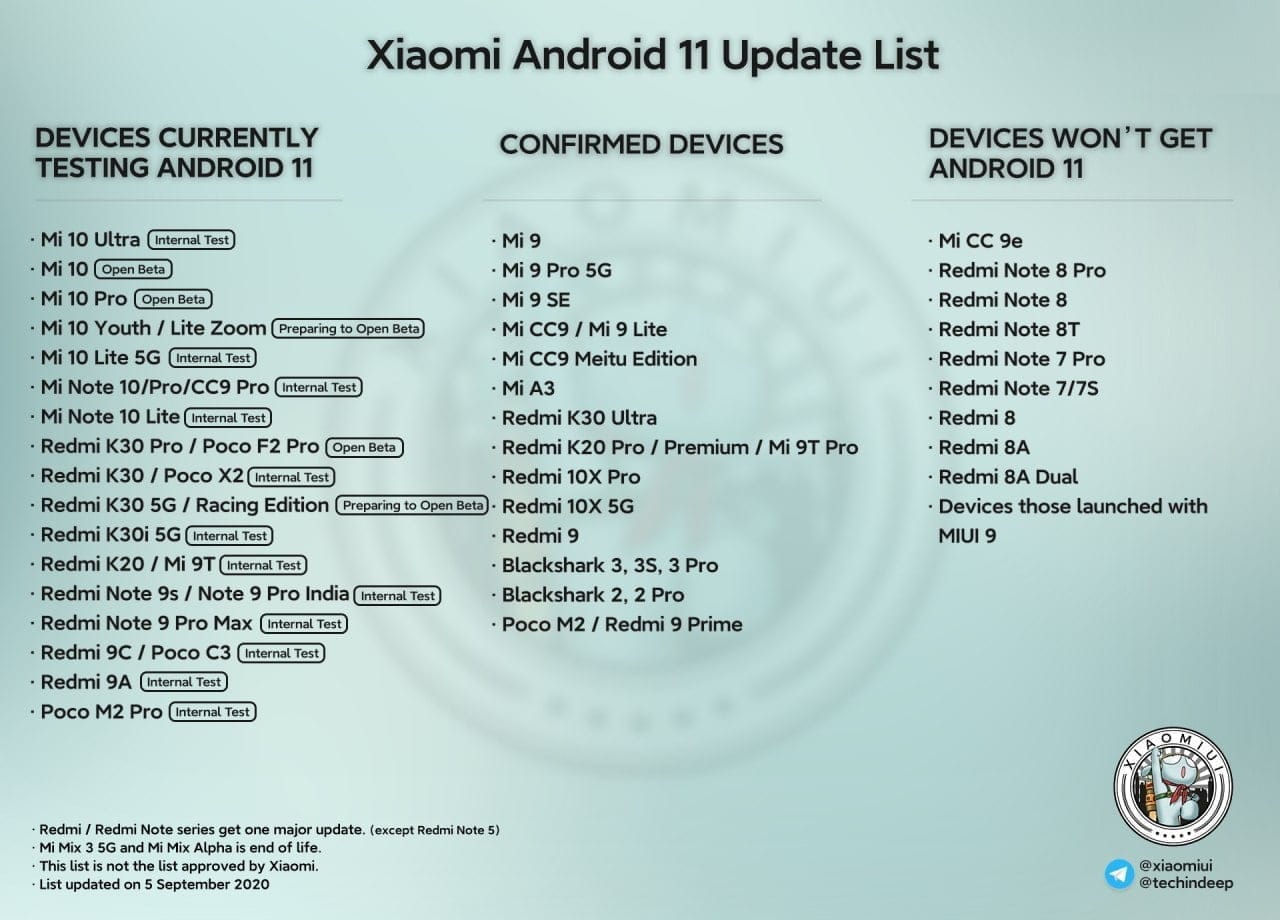
    List of devices that will receive Android 11

    This list updated on 5 September 2020.

    Xiaomi redmices that receive Android 11

    What to expect with MIUI on Android 11

    New features

    • Native screen recording: Google has been toying around with adding a built-in screen recorder to Android, and Android 11 pretty much confirms the feature will launch this year. You could use the screen recorder in the first Android 11 preview but it is much more refined in DP2. In the second beta, capturing device audio is now supported, all but assuring us that the stable release will include this long-awaited feature.
    • Muting notifications during video: Don’t you hate when you’re filming your dog or your kid and you get a notification? That’s super annoying. Android 11 will let you mute notifications while you’re recording video.
    • Increase touch sensitivity: Those who use screen protectors will love this feature. Google added an “increase touch sensitivity” option to the settings menu that lets you, well, increase the sensitivity of your touchscreen. If you use a screen protector, this should result in fewer missed taps and scrolls.
    • Notification History: Android doesn’t make it easy for you to see previously dismissed notifications, with Android 10’s Notification Log basically hidden for users. Android 11 DP1 hinted at a Notification History option and DP2 basically confirmed it. The new feature looks like it will be pretty useful.
    • Auto revoke app permissions: Android 11 DP3 has introduced a new option to automatically revoke permissions such as camera, location, and more, from apps that haven’t been used for a while. This new setting can be turned on if you think you’re not going to be actively using an app after a few months. You can read more about it here.
    • Easter egg: What would a new version of Android be without the traditional Easter egg? The third beta finally brought us the latest secret addition to the operating system. You can see it in full action here.
    • Exposure Notification API: Google and Apple worked together in a rare form of solidarity to create the Exposure Notification API. This system allows official health organizations to make contact tracing applications to help stem the spread of COVID-19. In Android 11, the Exposure Notification API is incorporated and turned on automatically.

    Updated or revamped features

    • Revamped power menu: Android 11 will have a wildly revamped power menu that gives you quick access to smart home controls, your Google Wallet cards, and (obviously) power options.
      • Update: This new feature was slightly refined in the latest Android 11 beta 2. Check out the subtle differences here.
    • Screenshot markup interface tweaks: If you take a screenshot on your Android phone, there’s a native way for you to mark it up with notes or scribbles. However, there’s no way to delete the screenshot from that interface. That will change in Android 11.
    • Revamped overview menu, screenshot shortcuts: In Android 11 Developer Preview 3, Google revamped the overview menu (recent apps screen) to show larger cards as well as two new screenshot shortcuts. However, it also removed the ability to access the app drawer from the overview menu.
    • New text selection mode in overview menu: In the fourth Android 11 Developer Preview, Google added a “Select” button to the overview menu. Tapping it allows you to quickly select text inside an app and paste it into another app.
    • Undoing recently cleared apps: Speaking of the revamped overview menu, you can now also undo an accidentally cleared app by quickly swiping down on the screen.
      • Update: With the fourth Android 11 Developer Preview, Google removed the ability to undo recently cleared apps in the multitasking menu.
    • Media players now head to quick settings: If you’re listening to music on your phone, you’re used to finding a media player in your notification shade. In Android 11, the player will move to the quick settings area and get a few more tools, including the ability to easily pick an output device. If you are playing two forms of media at once (music and a podcast, for example), you’ll be able to swipe the notification to swap between the different players.
    • Ability to dismiss persistent app notifications: If you’ve ever used Android, you’ve probably run into a persistent notification (one that you can’t easily swipe away). In Android 11 Developer Preview 3, Google lets you clear all notifications. Don’t worry — you can quickly bring persistent notifications back if you swiped them away by accident.
      • Update: This feature was removed in Android 11 Developer Preview 4.
    • More granular back gesture tweaking: The back gesture can be a little frustrating at times, as you perform a similar gesture to activate hamburger menus. Fortunately, Android 11 has two sliders to let you control the sensitivity of the back gesture — one for the left side of the screen and one for the right. This is a welcome change from the single sensitivity slider in Android 10.
    • Airplane mode doesn’t kill Bluetooth: Previously, turning on airplane mode would also kill Bluetooth on your phone, which doesn’t make much sense. People who use airplane mode might have Bluetooth headphones connected, resulting in having to turn on Bluetooth again. In Android 11, Bluetooth stays on when airplane mode is activated.
    • Pixel Themes gets clock tweaks: In the Pixel theming section of Settings, you will likely be able to customize how your clock looks on the AOD and lock screen. However, in the first beta, there is only one clock option available.
      • Update: This feature was removed in the second beta release.
    • New Motion Sense option for Pixel 4: We’ve been complaining for a few months that Google seems to be neglecting Motion Sense on the Pixel 4. In Android 11, the company is adding a new way to control your phone without touching it. In Android 11, you can tap the air above the phone to pause your music.
    • Pixel 4 Face Unlock will require you to open your eyes: Speaking of the Pixel 4, it looks like Android 11 will offer users the ability to require their eyes be open for Face Unlock to work. This might make unlocks less efficient, but it will certainly make your phone more secure.
    • App pinning in the share menu: Android used to let you pin your most frequently used apps to the share sheet, but that option was removed in Android 10. Now it’s back and there will even be a little pin icon next to the apps you’ve pinned so you know what’s up.
    • Enhanced notification shade conversations: When you get a text, you can see the most recent message in your notification shade under a new Conversations tab. Not only will you be able to see more of the thread but you’ll also have richer ways to compose messages, including a way to send picture messages right from the notification. Notifications will also look a lot more organized thanks to a revamp of how they look.
    • Upgraded Voice Access capabilities: Previously, Android’s Voice Access labeled all the actions on the screen with a number, allowing you to call out the number to perform said action. Now, Android 11 can read what’s on your screen and let you say the action instead, being a rather cool accessibility upgrade. An example shown by The Verge‘s Dieter Bohn includes saying “Instagram” to launch the app rather than saying the corresponding number.

  • BlackRock Android Malware – what is it and how to avoid it

    BlackRock Android Malware – what is it and how to avoid it

    Android users installing apps from third-party app stores are at risk of the BlackRock malware. How can this malware be stopped?

    BlackRock malware is yet another threat worrying Android users. This newly-discovered malware can target a variety of different applications, thereby stealing your information.

    Make sure you know what BlackRock malware is, and how you can protect yourself, before installing another file.

    Security firm, ThreatFabric, discovered a digital danger that affects Android devices in May 2020: BlackRock malware.

    Analysts however quickly discovered that BlackRock malware is not really a new threat. BlackRock malware is the product of leaked source code for Xeres malware, which is a form of trojan LokiBot banking.

    Despite the fact that BlackRock malware is based on a banking trojan, it does not just affect banking apps. It also targets applications for shopping, leisure, social relations, entertainment and even dating. This extensive publicity makes it extremely risky.

    It currently has 337 apps on its goal list, some of which you might be using on a regular basis. Its target applications aren’t limited to one country either — it targets applications across Europe, North America , and Australia.

    ThreatFabric presents the full list of targets in its article. Some of the applications on the list include Gmail, Netflix, Snapchat, eBay, Twitter, TikTok, PayPal and more.

    BlackRock malware has not been detected on the Google Play Store until now. Currently it targets downloaded apps from third-party sites, but that does not mean that BlackRock malware will never appear on the Google Play Store. Aggressive hackers also can find ways to break Google’s protection protocols.

    How BlackRock Malware Steals Your Information

    When BlackRock malware appears on your computer it can never be noticed by an unknowing user. It uses a technique known as a “overlay,” a fake window which pops up over a legitimate app. The overlay mixes with the software so it’s hard to say whether the pop-up is part of the app or not.

    The window will ask you to enter your credit card number and login code, before you can even start using the legal app. This helps it to get the details right off the bat.

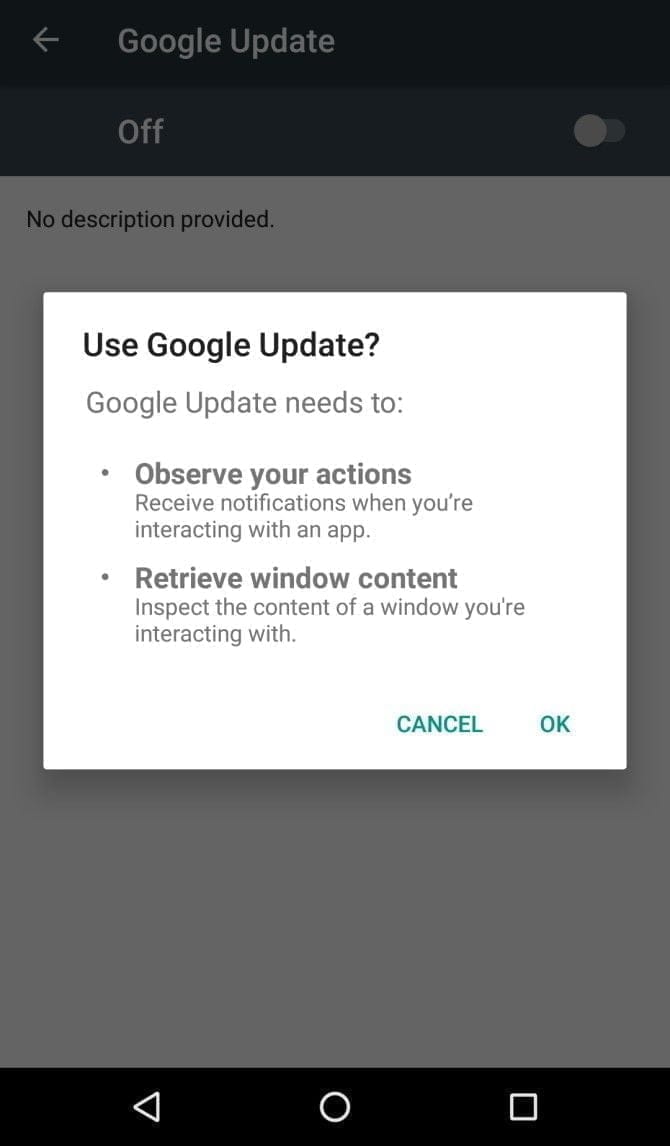
    It infiltrates your device in the first place by getting Accessibility Services permissions. When you install an infected app, it’ll prompt you to enable a fake Google Update. Accepting the “Google Update” allows it to intervene with your device.

    If you aren’t familiar with an Android’s Accessibility feature, you should know that it’s one of the most powerful functions on your device. It’s meant to help Android owners with disabilities, but Accessibility Services can be used to hack your phone as well. This feature can automate a variety of tasks for the user, including tapping the screen, reading text aloud, and even creating captions.

    Giving BlackRock permission to use Accessibility Services lets you build the overlay that you can see when you open the target app. It also gives additional functionality to the malware, as it can then use an Android DPC (device policy controller) to grant administrator privileges to itself.

    In other words, it not only steals the confidential details you type into its overlay — it can actually do a lot more than that. BlackRock does not only intercept SMS messages, mask alerts and lock your computer, it can also engage in keylogging. That said, this malware is certainly not what you want on your computer.

    Protect yourself from BlackRock malware

    As mentioned earlier, the Google Play Store still hasn’t found BlackRock. But just because apps from third-party app stores are currently being targeted, that doesn’t mean it’ll never make its way to Google Play.

    ThreatFabric notes that it “can not yet predict how long BlackRock will be active on the threat landscape.” Meanwhile, it’s necessary to bear in mind some precautions before installing apps.

    Why an anti-virus app won’t cut it

    It’s not a bad idea to have an antivirus app on your smartphone, but unfortunately, an antivirus app won’t stop the BlackRock malware. When BlackRock infiltrates your phone, it has a feature that blocks you from using an antivirus app.

    As soon as you open an antivirus or an Android cleaner app, such as Avast, Kaspersky, McAfee, BitDefender, or Superb Cleaner, BlackRock will immediately redirect you to your Home screen. This prevents you from removing the malware using an antivirus app.

    So, if you download a sketchy app from a third-party store, and think that an antivirus app will keep you safe from all threats, think again.

    Check app permissions

    No matter how legit an app may seem, you should keep an eye on the app permissions. Some apps request permissions that have nothing to do with the App’s core function.

    For example, your SMS messages obviously don’t need access to a flashlight app. This is a sign that you should immediately uninstall the App.

    As BlackRock malware asks for permissions from Accessibility Services, you’ll want to look for any apps that require that particular privilege. If an app is legitimately for users with disabilities, has good reviews, and is from the Google Play Store, you are likely to have confidence in granting permission to the accessibility services. If not, avoid giving that privilege to any applications that don’t need it.

    Download apps from Google Play Store only

    Google Play Protect was put in place to scan your installed apps for malware as soon as you download them, as well as scan them periodically once installed. Third-party app stores don’t have this safety feature, so you’re pretty much on your own in terms of security.

    The lack of security protocols on third-party stores has allowed BlackRock malware to thrive. To lower your risk of encountering BlackRock malware, try to avoid third-party apps stores, and refrain from downloading APKs.

    Stay safe!

    BlackRock malware will hopefully never hit the Google Play Store. There really isn’t any telling if the actors behind BlackRock malware can find a loophole in Google’s security policies, but if they succeed, BlackRock malware could accumulate a significant number of victims.

    If BlackRock ever reaches the Google Play Store, it’s not too surprising. After all, despite Google’s strict security protocols, several apps that contain Joker malware still managed to make their way onto the Google Play Store.