Tag: whatsapp

  • Samsung Messages Is Shutting Down — Here Are the Best Alternatives

    Samsung Messages Is Shutting Down — Here Are the Best Alternatives

    Samsung has officially confirmed what many Galaxy users feared: Samsung Messages is going away. The app will be fully discontinued in July 2026. It’s already been pulled from pre-installation on newer Galaxy devices, including the Galaxy S26 series. Once July hits, you won’t be able to download it from the Galaxy Store either. And shortly after that, sending messages through it will stop working — except to emergency numbers.

    If you’ve been using Samsung Messages as your daily driver for SMS and RCS conversations, this is the moment to start thinking about your next move. Not next month. Now.

    The good news? There are solid alternatives. The complicated news? None of them are perfect one-to-one replacements. Here’s an honest breakdown.

    Why Samsung Messages Shutting Down Is a Bigger Deal Than It Sounds

    Across Reddit threads, Galaxy owners have expressed real frustration with this decision. Some have said things like “we might as well get Google Pixels” – because part of what made Samsung phones feel distinct was the software layer on top of Android. Losing Samsung Messages removes one more point of differentiation.

    That’s a fair observation. Samsung Messages wasn’t just a texting app – it was a familiar interface for millions of users who had customized their notification sounds, set up message categories, and built habits around a specific UI. Switching costs are real, even for something as seemingly simple as a messaging app.

    The other dimension here is RCS. Rich Communication Services — think of it as the modern upgrade to traditional SMS — enables typing indicators, read receipts, high-quality media sharing, and improved group chats. No alternative texting app outside of Google Messages currently has access to RCS. That means if you go with a different app, you’re stepping back to a more basic messaging experience — no read receipts, no high-res photo sharing, and frustrating group conversations.

    That’s not a minor inconvenience. That’s a real trade-off.

    Google Messages: The Natural Heir (With Some Strings Attached)
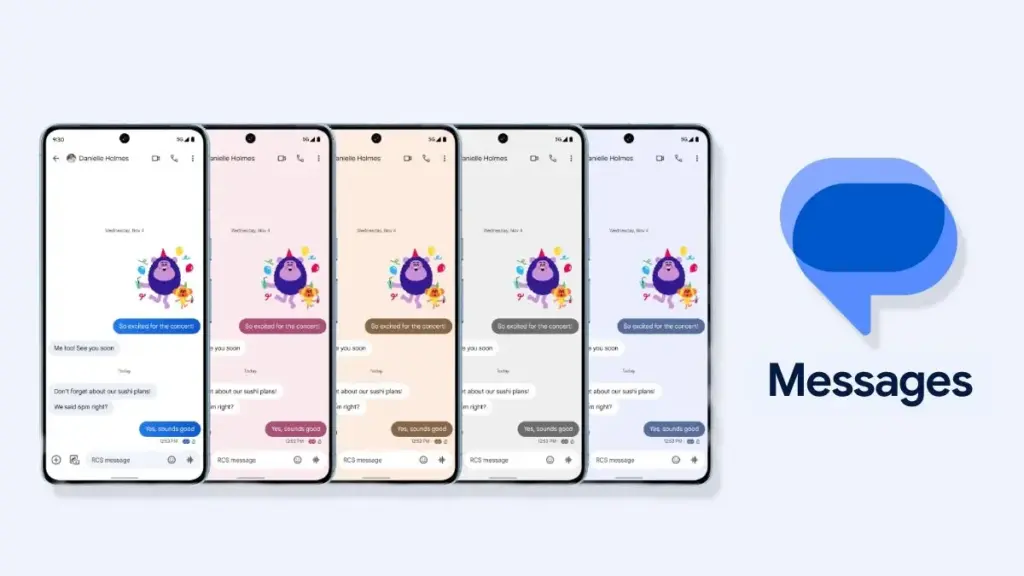
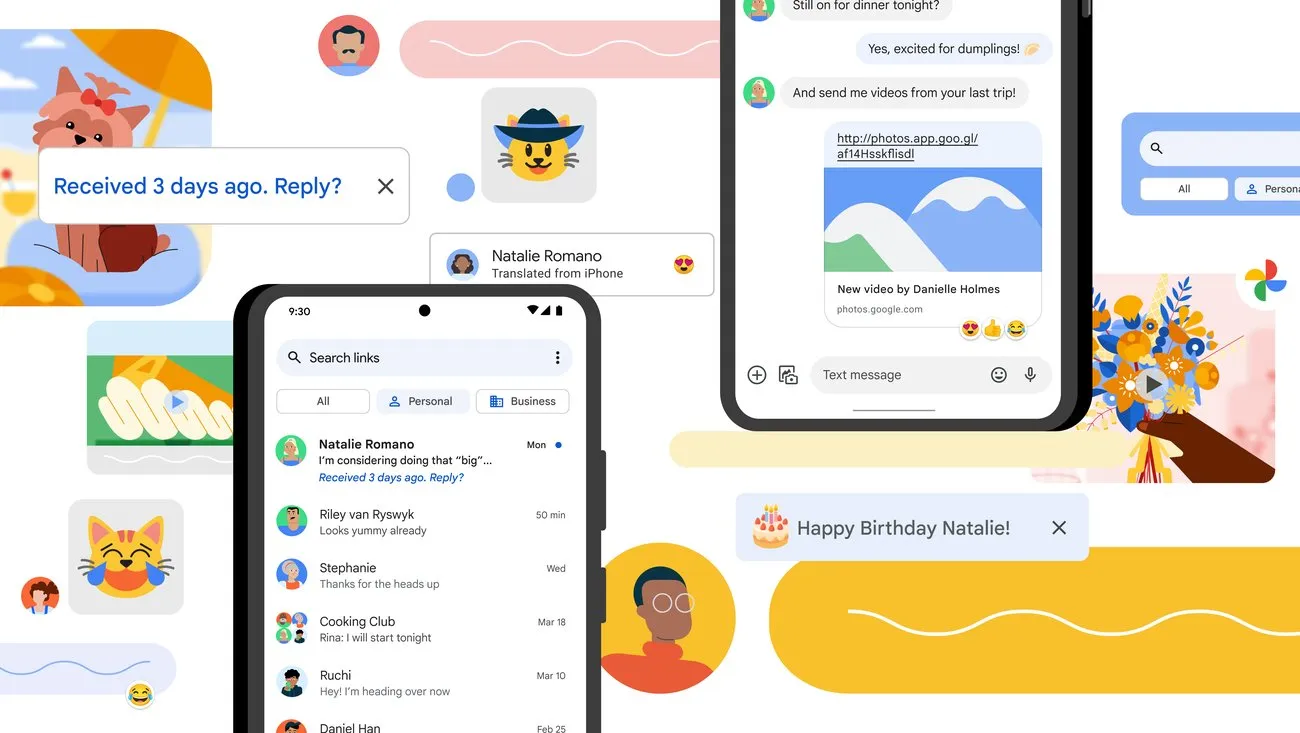
    Google Messages rolls out custom RCS conversation color themes more widely

    The most natural successor to Samsung Messages, especially if you want to keep RCS, is Google Messages. It’s already the default messaging app on most Android phones, and Google has been adding new features consistently to make it more capable.

    google messeges icon

    Google Messages

    Google Messages is the official Google app for messaging. Google Messages is revolutionizing how a billion users connect and is powered by Rich Communication Services (RCS), the industry standard for texting that replaces SMS and MMS.

    With RCS enabled on Google Messages, you get typing indicators, message reactions, high-quality media sharing, and built-in spam protection. And since iOS 18, iPhones also support RCS – so cross-platform conversations with iPhone users are now much cleaner than the old SMS-green-bubble situation.

    From a practical standpoint, the migration is straightforward. All messages and conversations will automatically transfer between Samsung Messages and Google Messages, though the process can take up to approximately 24 hours depending on how much data you have. That’s not a dealbreaker — just plan ahead.

    What you’ll miss? Samsung Messages had better message categorization and a more flexible UI for organizing conversations. Google Messages is improving steadily, but it still feels slightly more rigid. And the Gemini AI integration – while genuinely useful for some – might feel intrusive if you just want a clean, minimal texting interface.

    Still. If RCS matters to you, this is your best bet. It’s well-maintained, it’s free, and it works.

    WhatsApp and Telegram: The Cross-Platform Heavyweights
    whatsapp and telegram getting familiar with each 1

    If you’re open to moving away from traditional SMS entirely, WhatsApp is probably the easiest transition. Most people already have it installed. It works across Android, iPhone, and even desktop. You get voice and video calls, group chats, message reactions, and end-to-end encryption by default.
    WhatsApp Messenger
    Telegram

    There have been recent concerns around privacy with WhatsApp, with reports suggesting Meta employees could potentially access private messages – although the company has denied these claims. It’s something worth knowing, even if you decide it doesn’t change your decision.

    Telegram is a different beast. It’s faster, more feature-rich than WhatsApp in some ways (channels, bots, large group support, customizable themes), and has a devoted user base. The catch: default chats on Telegram are not end-to-end encrypted – only “Secret Chats” are. That surprises a lot of people who assume Telegram equals private.

    Both WhatsApp and Telegram require your contacts to also use the app. There’s a chance many people you know are already on these platforms — it might be worth a quick conversation with friends and family to see which one already has the most traction in your circle.

    Signal: For Users Who Actually Care About Privacy
    Signal

    Signal is the gold standard for private messaging. Everything is end-to-end encrypted by default, the organization behind it is a nonprofit, and the app collects almost no metadata. If you’ve ever looked at WhatsApp’s privacy policy and felt uneasy, Signal is the answer.

    signal icon

    Signal Private Messenger

    Signal is a messaging app with privacy at its core. It is free and easy to use, with strong end-to-end encryption that keeps your communication completely private.

    The downside is that it’s not as widely used, and the feature set is more minimal compared to WhatsApp or Telegram. You’d need to convince your close contacts to switch — which isn’t always easy.

    Signal also can’t replace SMS for people outside the app. So it works best as a secure messaging layer for a specific group — close friends, family, work contacts who are already privacy-conscious. Not a universal solution, but for what it does, nothing comes close.

    The Niche Options: Textra, Fossify, and Others
    samsung messages icon

    Here’s where it gets more interesting.

    On Reddit, Galaxy owners have been recommending apps like Textra SMS, Handcent Next SMS, Fossify Messages, Pulse SMS, and ZenSMS as alternatives. These apps are primarily SMS-focused, which means they feel a lot closer to the traditional Samsung Messages experience — customizable themes, cleaner UIs, message scheduling on some of them.

    The trade-off is clear: none of them support RCS. You lose typing indicators, read receipts, and high-quality media delivery. If your contact list is split between Android and iPhone users and you’ve been enjoying the improved cross-platform experience that RCS brought, you’ll notice the difference immediately.

    Textra, specifically, has been around for years and is genuinely well-designed. It’s a solid choice if you value aesthetic customization and don’t have strong feelings about RCS. Fossify Messages is open-source and lightweight — a good pick for users who want minimal data collection and a clean interface.

    How to Switch Without Losing Your Messages

    One thing people often overlook: the practical mechanics of switching.

    To switch to Google Messages manually: open or download Google Messages from the Play Store, tap “Set default SMS app” when prompted, select Google Messages, and confirm. The switch is fairly painless.

    A few things to be aware of:

    • If you’re on an older Samsung device released before 2022, switching apps may temporarily disrupt ongoing RCS conversations. They’ll resume once both sides are on Google Messages.
    • Older Tizen OS watches (Galaxy Watch3 and earlier) won’t be able to display full message conversation history after the switch — though they’ll still let you read and send texts.
    • Back up your messages before switching. Samsung Cloud or Google One can handle this — and WhatsApp has its own built-in backup system if you’re going that route.

    The transfer itself is largely automatic. Just give it time.

    So, Which App Should You Actually Choose?

    Honestly? It depends on who you text.

    If most of your contacts are on Android and you care about a seamless, modern texting experience — Google Messages. It’s not as customizable as Samsung Messages, but it’s the only real RCS option.

    If you text internationally a lot and your social circle is already on it — WhatsApp. The network effect alone makes it worth considering.

    If you want something that looks and feels closer to Samsung Messages, and you’re okay giving up RCS — Textra or Fossify Messages.

    If privacy is non-negotiable — Signal, used alongside one of the above for regular SMS.

    There’s no perfect answer here. Samsung Messages built a loyal user base over years, and its shutdown is a genuine inconvenience. But the replacement options are functional, and in some cases — particularly Google Messages with RCS — objectively more capable.

    Start testing your top choice now, before July. Don’t wait until the last moment when the app goes dark.


    Frequently Asked Questions

    When exactly is Samsung Messages shutting down? Samsung Messages will be discontinued in July 2026 in the US market. Users on Android 11 or lower are not affected by this end-of-service change.

    Will I lose my messages when Samsung Messages shuts down? No — your SMS and MMS history is stored on your device, not in the app itself. Switching to a new app won’t delete your messages. RCS chat history may transfer automatically when you move to Google Messages.

    Does any alternative support RCS like Samsung Messages did? Currently, Google Messages is the only third-party SMS app with access to RCS. Apps like Textra and other SMS alternatives do not support RCS.

    Can I still use Samsung Messages after July 2026? After Samsung Messages is discontinued, sending messages through the app will no longer be possible, except for emergency service numbers or emergency contacts defined on your device.
  • WhatsApp warning: A simple trick compromised 3.5 billion accounts

    WhatsApp warning: A simple trick compromised 3.5 billion accounts

    There may be hidden risks to billions of WhatsApp accounts. According to a recent analysis, there are major security flaws in the privacy of the communications that hackers might take advantage of.

    With merely their phone number, finding someone on WhatsApp is very simple for many users, and the frequency of searches appears to be limitless. However, according to a recent analysis, this has turned into a significant security flaw that leaves 3.5 billion users of the messaging program vulnerable to assault.

    Big WhatsApp security risk

    Through a study carried out between December 2024 and April 2025, security researchers at the University of Vienna in Austria found the vulnerability. The primary cause of the problem is WhatsApp’s long-standing built-in capability for locating and adding contacts.

    In theory, the app will display whether a number has an account if you add it and then search it up. Additionally, anyone with an active phone number is able to send messages to public accounts and view the profile.

    WhatsApp warning

    A program known as “libphonegen,” which creates combinations of account numbers from other nations that may be registered on WhatsApp, was used by the team to carry out this procedure.

    They were able to produce 63 billion possible accounts and 100 million numbers each hour in their study. 3.5 billion accounts were taken out of those. Of these, 29% had written profiles with sensitive information including political and religious affiliations and links to other social media accounts, while 57% had their profile images made public.

    The vulnerability Is alarming

    The results show how this WhatsApp security vulnerability could be exploited by malevolent parties, including fraudsters and attackers. For example, the encryption in the messaging app is weakened since public and identification keys are reusable rather than unique. Attackers might intercept and decrypt messages if security was compromised.

    The identical WhatsApp vulnerability was discovered in 2017, but Meta has not been able to fix the flaw.

    Following the discoveries, Meta was contacted by the security research group. The company verified that it implemented system modifications in October that restrict the number of account searches that may be done within the app.

    How to protect yourself

    Users with public profiles, however, are still vulnerable because others can still read their profile images and text. Making their WhatsApp profile private is advised for those who are worried about security and privacy.

    Additionally, Meta has added new security and privacy features. A monthly message cap and automatically muting calls and messages from strangers are two of these that are presently being testing.

  • Update Now! the fix for critical WhatsApp bug that allows hackers to spy on iPhones is live

    Update Now! the fix for critical WhatsApp bug that allows hackers to spy on iPhones is live

    You should be aware that not everyone using WhatsApp is safe. Meta has alerted users to a significant security vulnerability that hackers used to launch a sophisticated, focused malware campaign that compromised dozens of WhatsApp accounts. This is why it’s important and why you should upgrade the app right now.

    In order to fix a vulnerability that was exploited in conjunction with another weakness in Apple devices, WhatsApp declared on Friday that it has released an emergency patch for its messaging program on iOS and Mac. According to reports, a week before WhatsApp’s upgrade, Apple resolved the security flaw in its devices.

    whatsapp bug fix

    Why is this so dangerous?

    Hackers reportedly used a well-known zero-click attack—a technique that compromises a device without requiring user interaction—to successfully exploit both vulnerabilities. In certain situations, a victim might get a link or image from an attacker, who might then take control of the device and run malicious code to spy on or steal private data without the victim having to click.

    Meta acknowledged notifying dozens of people it thought were the campaign’s target. A copy of the alert message, which detailed the reason for the warning and the next steps, was posted on X by the head of the security company Amnesty Tech. The notification suggested that victims reset their device to factory defaults.

    We’ve made changes to prevent this specific attack from occurring through WhatsApp. However, your device’s operating system could remain compromised by the malware or targeted in other ways.
    To best protect yourself, we recommend a full device factory reset. We also strongly urge you to keep your devices updated to the latest version of the operating system, and ensure that your WhatsApp app is up to date.

    Meta

    These kinds of advertisements have already targeted WhatsApp users. Similar zero-day exploits have been connected in the past to monitoring operations targeting prominent people, such as journalists and politicians.

    What should you do to be safe?

    Even though only a small percentage of WhatsApp users were impacted, others should still be concerned about this attack. Installing the most recent security update for your Apple device and updating WhatsApp on your Mac and iPhone are highly advised.

    Even while Android users aren’t being targeted by this operation, they could still be at risk due to the same WhatsApp flaws. They should also install the most recent Android security patch and update to the most recent version of WhatsApp. Users who believe they may be in danger can manually activate new features like Advanced Device Protection, which provide an additional layer of security.

  • Google Messages receives the “Delete for everyone” feature

    Google Messages receives the “Delete for everyone” feature

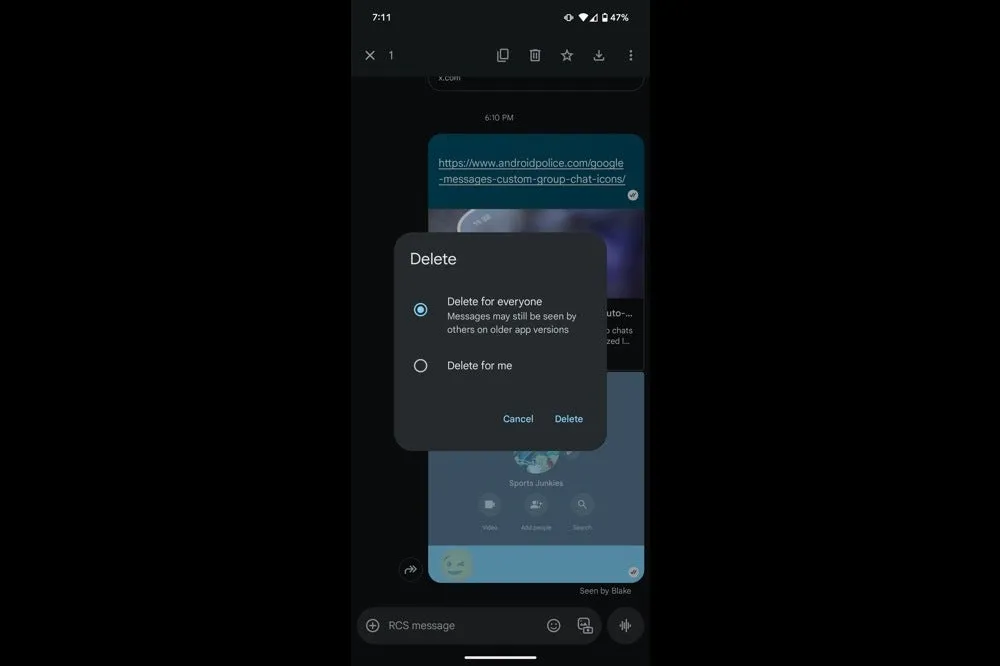
    In order to provide Android users a 15-minute opportunity to remove an RCS text that shouldn’t have ever left the phone in the first place, Google Messages is now testing a “Delete for everyone” option. The most recent beta version has led to early complaints that when you long press on a message, two options would appear: “Delete for everyone” and “Delete for me.” When the first option is selected, the chat replaces the text with a tiny label that reads “Message removed,” which is visible to all participants.

    The feature is currently limited to chats in large groups. While the option remained hidden in smaller groups and one-on-one talks, one tester was successful in a thread with twelve participants. Even though it’s in beta, it’s good to see this feature finally being released after it was first discovered in March.

    It should be mentioned that the recall is dependent on RCS Universal Profile 2.7, therefore all conversation participants must have the most recent version of Google Messages installed, else the delete request would silently fail. Furthermore, it appears that Google is already turning off its servers for a small group of beta users to ensure the system is stable before expanding.

    Google Messages logo

    Google Messages

    Safety starts with understanding how developers collect and share your data. Data privacy and security practices may vary based on your use, region, and age. The developer provided this information and may update it over time.

    It is not surprising that the rollout was so limited. This safety net has been provided by rival apps for years, and each one has its own boundaries. For a generous two days, WhatsApp allows you to retrieve a message. You have fifteen minutes to modify and two minutes to undo in iMessage. Telegram takes one step further by enabling users to delete texts whenever they want without leaving any evidence behind. Google’s 15-minute limit is tiny when compared to that lineup, but it still fills the largest hole in its flagship chat service.

    Google Messages delete

    Given that Apple intends to switch to the same RCS profile that supports these additional functions later this year, the timing is crucial. Google has also been working hard to improve Messages’ quality of life features, such as AI reply suggestions, reaction effects, and a long-overdue edit button that took four months to move from beta to stable last year. By the end of 2025, delete for everyone could reach the majority of phones if the firm keeps up its current pace.

    When you consider the time that comes with Apple’s release, I think this is a significant move. Android owners will have the same peace of mind that WhatsApp and iPhone users currently have while keeping their chats organized if Google expands support prior to the stable release.

  • Use WhatsApp on multiple devices

    Use WhatsApp on multiple devices

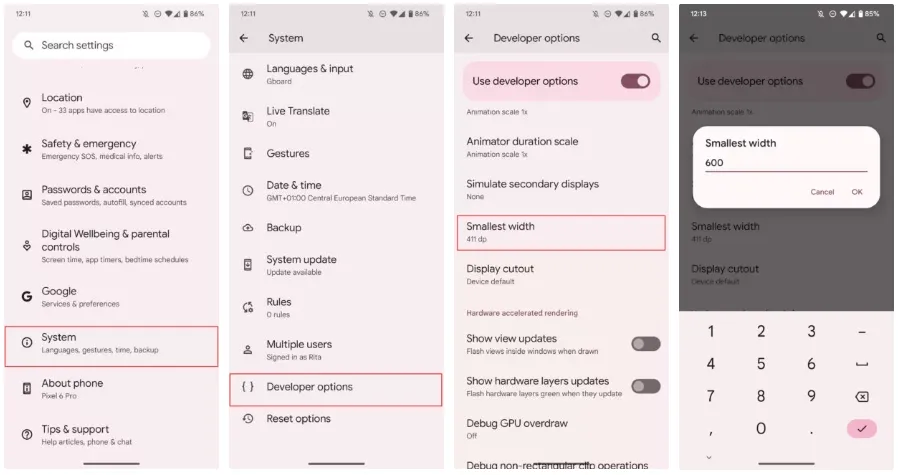
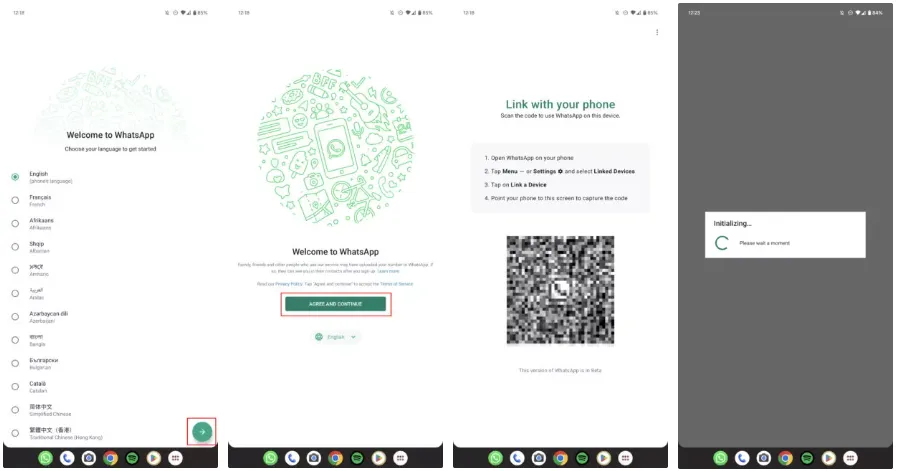
    Users can use WhatsApp on numerous devices without their primary smartphone’s primary smartphone needing to have an active internet connection thanks to WhatsApp’s multi-device capability. WhatsApp is still in the early stages of multi-device compatibility; the firm releases new functionality every other week. You may now use WhatsApp on both expensive and low-cost Android tablets thanks to a recent beta release from WhatsApp. Here’s how to set up and use WhatsApp on several devices if you haven’t already used this function.

    Using WhatsApp on multiple devices: What you need to know

    End-to-end encryption for WhatsApp is supported by its support for multiple devices. This implies that the implementation has certain constraints, though. Your primary phone is one of the five connected devices that WhatsApp supports. You cannot link the service to several phones because your WhatsApp account can only be connected to one phone number.

    The WhatsApp upgrade makes it simpler to communicate with others because you may send messages from your computer or browser without your phone being connected to the internet. However, if your main phone does not go online at least once every 14 days, you are immediately logged out from all devices. In order to connect any new device to your account, you also need the phone.

    whatsapp on multiple devices

    On desktops, the multi-device capability is functional, while on tablets, it is currently in beta. Additionally, only Android tablets are compatible with WhatsApp’s multi-device capability in the current beta. You can access your chats on your tablet using the WhatsApp Web client if you use an iPad or are not a beta tester. For more information, see our guide on using WhatsApp on tablets.

    Also, certain WhatsApp features can only be used on your smartphone:

    • Clearing or deleting chats on linked devices if your primary device is an iPhone.
    • Messaging or calling someone who uses an older version of WhatsApp on their phone.
    • Viewing live location on linked devices.
    • Creating and viewing broadcast lists on linked devices.
    • Sending messages with link previews from WhatsApp Web.

    Follow these steps to connect your phone or tablet to your WhatsApp account:

    1. Open the Google Play Store and make sure the latest version of WhatsApp is installed on your phone.
    2. Open WhatsApp.
    3. Tap the three-dot menu button in the upper-right corner, and then tap Linked devices.
    4. Select Link a Device option.
    5. Verify your identity using your fingerprint or the device pattern/pin unlock.
    6. Give WhatsApp access to your phone’s camera if you have not done so.
    7. Open WhatsApp Web on your PC or use the desktop app.
    8. Scan the QR code shown on the page using your phone.
    9. On your iPhone, open WhatsApp, go to Settings > Linked Devices > Link a Device, and scan the QR code.
    10. WhatsApp loads your chats and group conversations.

    The process to unlink a device from your WhatsApp account is relatively simple. Follow these steps:

    1. Open WhatsApp.
    2. Tap the three-dot menu button in the upper-right corner, and then tap Linked devices.
    3. The devices linked to your WhatsApp account appear here.
    4. Tap any device name to unlink it.
    5. Confirm your selection by selecting Log Out from the dialog box that appears.

    To unlink a device on your iPhone, go to Settings > Linked Devices, and tap the device you want to unlink. Use the Log Out button to unlink the device. You can re-link any removed device again without any issues.

    Clean up your WhatsApp space

    If you are a heavy WhatsApp user and receive many unwanted media files and forwards, delete old WhatsApp media from your phone to free up storage.

  • WhatsApp make it easier to start chats with unsaved numbers

    WhatsApp make it easier to start chats with unsaved numbers

    WhatsApp is the most popular messaging software in the world, offering a variety of services in addition to regular text chats. However, you can’t quickly start a chat with numbers that aren’t recorded in your contacts list.

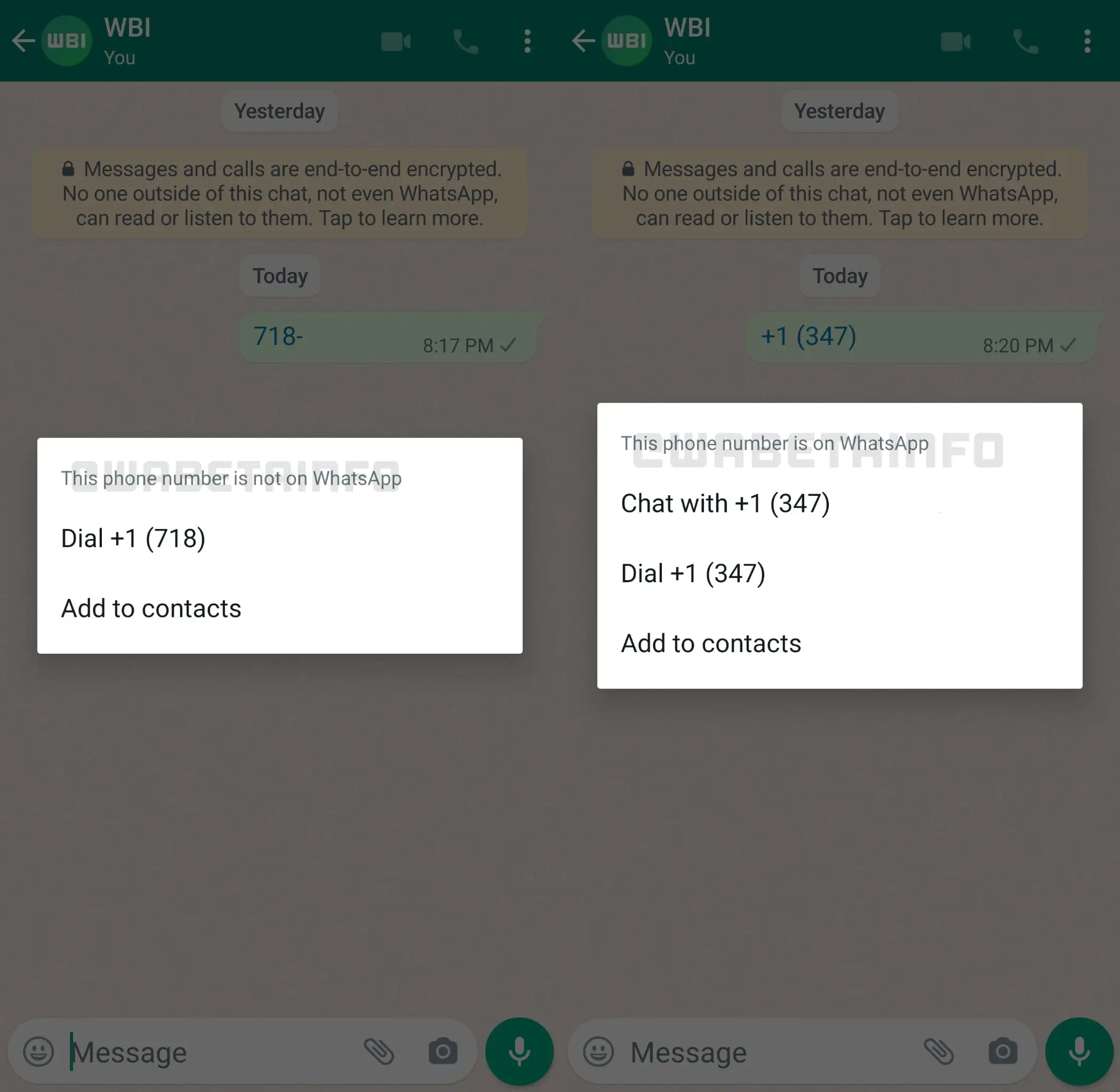
    Fortunately, frequent leaker WABetaInfo has dug through Android beta software version 2.22.8.11 and discovered that the firm is working on a remedy. Taping on an unsaved phone number in a chat bubble now opens an in-app menu that lets you chat with the person if they’re on WhatsApp.

    You may also call them or store their number to your contact list using the in-app options. We’ve confirmed that the menu is visible in the beta version we’re using. Take a look at the image below.

    whatsapp

    This is a significant departure from previous conduct. Currently, touching an unsaved number in a chat thread opens the dialer app on your Android phone instead.

    However, this approach isn’t ideal because it requires someone to either send you the number or for you to send the unsaved number to another contact. So, ideally, additional work will be done in this area to improve message delivery to unsaved contacts.

    There are several workarounds, however, such as using WhatsApp’s short links system. You can take a look at the various solutions for chatting with an unsaved number at the link.

  • Send a WhatsApp message without adding the number to your contact list

    Send a WhatsApp message without adding the number to your contact list

    With over 2 billion monthly users, Meta’s WhatsApp is one of the most popular messaging platforms on the planet. We occasionally need to send messages on WhatsApp, but in order for our contacts to appear in the list, we must first sync them.

    Despite the fact that WhatsApp does not have this capability, there is a way to message any number without saving it to your device’s contact list. Please bear with us. Follow the simple actions outlined here.

    We’ll go over the best methods for sending a messages without preserving your phone number in your contacts.

    You won’t have to install or do anything additional with this, and it’s the best method to have a brief chat with anyone who has an active WhatsApp account. Let’s have a look at it now, without further ado.

    • Open your internet browser on your device.
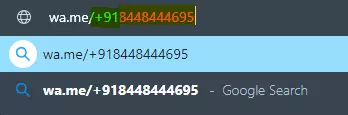
    • Then, in the browser’s address bar, type wa.me/phone number (phone number includes mobile number beginning with country/region code).
    • E.g., wa.me/+91xxxxxxxxx (+91 is a country/region code for India. (Use your code before entering the contact number.) | Find your country code here...
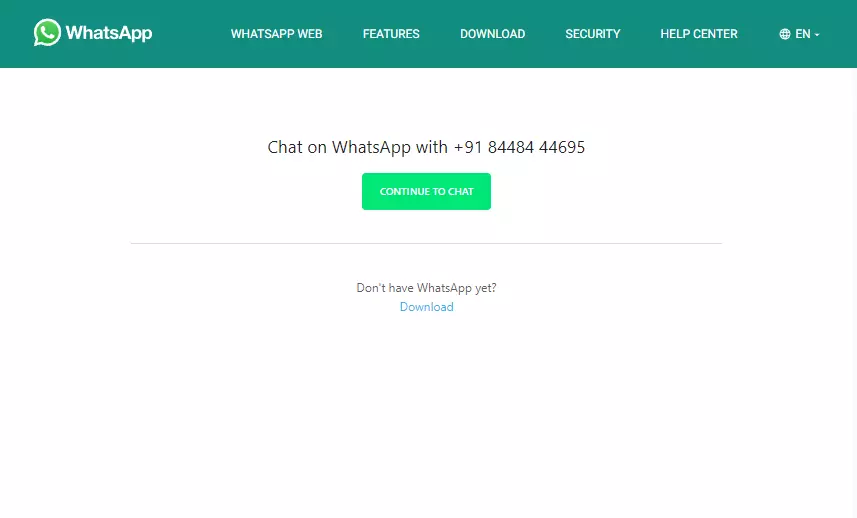
    • Hit enter, and it will show Continue the chat with the number.
    • Click on the green button, and from there you can chat, call, or check the details.
    WhatsApp
    WhatsApp

    You can perform this on any platform. It doesn’t matter if it’s on Android, iOS, Windows, or Linux. All you need for this is to have the app installed on your device and active internet connectivity. The recipient should have an active WhatsApp Mobile number.

    How is this possible, and is there any thread while using this method?

    No, there isn’t a problem because wa.me is a short-link that the app API uses to start a WhatsApp conversation. The same API is used to integrate WhatsApp Direct Messages, and you may find that this isn’t always the case. To talk or contact someone on WhatsApp, click here. It’s one of the references in the book.

    There are no threads to be concerned about. They’re perfectly safe and have always been wa.me. This is a short WhatsApp link. G.co for Google, youtu.be for YouTube, and fb.com for Facebook are examples of short links.

    Hopefully, this instruction was useful to you and you were able to send WhatsApp messages successfully. Thank you for joining us. We’d like to hear your thoughts and suggestions. If you have any questions, please leave them in the comments area below.

  • Set up two-factor authentication on WhatsApp

    WhatsApp is an top notch and revolutionary app. Simple to use, free, and with out a advertising, it isnow notunexpected that it isdesiredvia many users spherical the world. With its written and voice messaging system, the strength to form voice and video calls, it gives a service like that of a telephone.

    Many peopleuse it on a each day and percentage tons of private data, that’s why it’scrucial to stay it secure. We, therefore, recommend that you trulydiscovered out two-aspect authentication to your account. This characteristic are going to be especially beneficialonce you log into WhatsApp on another device to feature additional safetyon your profile.

    Enable two-factor authentication

    There is only one method for two-factor authentication on WhatsApp. Once logged in, the application prompts you to create a custom PIN code.

    whatsapp screenshot2
    1. Open the WhatsApp application on your phone.
    2. Press the three dots in the upper right corner.
    3. Press Settings.
    4. Press Account.
    5. Press Two-step Verification.
    6. Press Activate.
    7. Enter your personalized PIN code before clicking on next.
    8. Re-enter your personalized PIN code.
    9. Press Confirm.
    10. Enter your email address before clicking on next.
    11. Re-enter your email address.
    12. Press Save.
    13. Press Done.
    whatsapp screenshot3

    The two-factor authentication imagined by using WhatsApp has a as a substituteuncommon configuration however well, we do with what we have, as they say. Most important: greater securityfor your data.
    The best small constraint of this selection is to remember this unique WhatsApp PIN code with a view to be used very rarely. Before developing it, I invite you to choose a password that is easy for you to take into account, butbest for you.