Tag: play

  • Temporary free apps and games for both Android and iOS

    Temporary free apps and games for both Android and iOS

    We have compiled a list of the most recent apps available on the iOS and Android platforms that have temporarily reduced their prices to $0.

    These temporary promotions allow you to purchase high-quality apps and gamges that typically have a price tag, such as top-rated games and premium productivity tools. Act quickly, though, as these offers will not last long, and you will lose your chance to download an app for free once it goes back to its normal price. Let us explore the must-have freebies of today that will improve your mobile experience.

    Android apps and games that are free for a limited time

    Android apps for productivity and lifestyle

    • Linea – Icon Pack ($1.49): If you want to spruce up your smartphone’s user interface, this is one icon pack that gets the job done.
    • 80s Music Radio Pro ($0.70): Stream hit music from the 1980s with this unique app.
    • AppLock Pro ($4.49): Keep your apps private with another layer of security. 
    • Fraction Maths Pro ($0.99): Need a quick calculating app to figure out fractions? This might be the app to do so.
    • Temperature Converter Pro ($0.99): No need to squeeze unnecessary brain power anymore in figuring out the temperature now.

    Free Android games

    • The Wordies Pro ($1.49): A relaxing word search game that helps you kill time without getting all stressed out.
    • Hero of the Kingdom: Tales 1 ($6.49): There is a looming dragon threat coming, make sure you prepare the villagers for it!
    • Survival Dungeon: Loot RPG Pro ($0.49): A mobile roguelike action RPG where you explore different dungeons and engage in battles.
    • Magnet Balls Pro Puzzle ($0.99): Remember Puzzle Bobble? This is something along the same lines, without cute dinosaurs.
    • Burning Sky VIP ($1.99): It is up to you to save the galaxy once again from endless waves of invaders from outer space.

    iOS apps that are free for a short time

    iOS apps for productivity and lifestyle

    • Strength Flight ($2.99): Want to bring your strength level to new heights? This app will hopefully help you be on that path.
    • Reverse Videos ($0.99): Here is a different video editing app where it basically does what it is named after – reversing videos.
    • Liftoff Workout Log ($4.99): Anything that can be measured, can be improved. Get better with your workouts by keeping track of them.
    • Hidgets ($2.99): View more health widgets on your phone’s home screen with this.
    • Loscil – Adrift ($2.99): This is a collection of 4 pieces of endless music by ambient musician loscil, where it relies on structured random selection that plays music continuously. 

    Free games for the iPhone and iPad

    • PicaSim ($2.99): Learn how to fly different aircraft with this game.
    • The Bug Butcher ($0.99): A side-scrolling shooter where you use your wits and reflexes to get rid of enemies.
    • Hack RUN ($2.99): Live the exciting (and perhaps glamorous?) life of a hacker with this game.
    • PuzzlAR: World Tour ($0.99): Join the navy, see the world? Nah, you can do so via this game now.
    • The Brilliant Kid ($1.99): An educational game for the little ones to keep them occupied.

    As of the date of publication, the deals were active. Please share any expired deals you come across in the comments section below.

    We advise you to review the app’s details in the Play Store or App Store before downloading any of the aforementioned apps. This is crucial as some of these free apps can have unique features or drawbacks of their own.

    Both free and paid apps should be used with caution because they may conceal advertising and in-app purchases. This is especially important while downloading kid-friendly games.

    In the quickly evolving world of mobile applications, some people use cunning tactics to make money by collecting and using your personal data. But do not worry, IT enthusiasts—we have some crucial advice to improve the security of your priceless data. When it comes to providing access for the apps you decide to install, it is important to remain vigilant.

    Why would a basic alarm clock require access to your contacts or camera? Alternatively, why would a flashlight app require your exact location? You may successfully protect your personal data from unauthorized access by carefully controlling the permissions you grant.

    Be sure to take advantage of these important opportunities! Even if these apps are free right now, they can suddenly and unexpectedly go back to their normal costs. Before downloading, make sure to read the app’s ratings and reviews. If you see something that strikes your eye, do not hesitate to take advantage of these offers.

    You may amass an outstanding library of premium apps without spending any money if you keep an eye out for these brief offerings. Developers often provide these time-limited promotions, so be sure to return again for new alerts about free apps. There has never been a better moment to upgrade your mobile device with high-quality, free software, regardless of your preference for iOS or Android.

  • Limited time offers: free Android and iOS apps and games:

    Limited time offers: free Android and iOS apps and games:

    This year, how has your smartphone experience been? Is it time to audit the apps you currently have on your phone? Maybe it is time to try something new, and we may have a free app (or two) that will catch your attention at the beginning of this week. The apps that are listed here are free for a limited period of time, but we have no idea when they will become paid again.

    Check out our weekly selection of games and apps below. We make every effort to ensure that these are free of scams and privacy issues, but please note that this list differs from our Apps category in that we do not review each app separately. As a result, some of the apps on this list may contain in-app purchases and advertisements.

    Tip: If you come across an interesting app on our list but don’t need it now, install it first and delete it afterward. This will cause the app to be saved to your library, allowing you to install it later for free, even after the promotion ends.

    android app development 1

    Android apps available for free for a limited time

    Android apps for productivity and lifestyle

    • Memorize: Learn Spanish Words ($6.99)It is never too late to start learning a new language. Use this app to pick up the pace of learning Spanish.
    • Mandala Maker ($0.49)You do not have to be an insanely creative artist to draw intricate mandalas with this app.

    Android Games

    • The Rich King ($0.99): Ever wondered how life would be if you were stinking rich? Find out virtually in this game!
    • Merge City Premium ($4.99): Spruce up your virtual city in this game from the ground up. It will carry your characteristics and thoughts.
    • Ruby Square ($0.99): A puzzle game where you rotate a square of colors to help them match with the surrounding squares.
    • Live or Die: Survival Pro ($0.49): Do you love survival games? If so, then this is the perfect game for you as you craft your way through a bleak future.
    • Shadow Survival ($0.99): It is you against the world. Do you have what it takes to take down never-ending hordes of enemies?

    iOS apps available for free for a limited time

    iOS apps for productivity and lifestyle

    • Panographic Photo ($1.99): Stitch different photos together using this app for a brand new look.
    • TILA: Sleep, Meditation & Calm ($2.99):  Want to sleep better? This app claims to be able to help you enter dreamland faster than usual.
    • Videdit ($0.99):  This is a useful video editing tool to use on your iPhone.
    • Face Story Pro ($2.99):  Be like T-1000 by changing your face to another through the morphing process.
    • ColorCamera – Color Picker ($0.99): This app is basically a teardrop tool, letting you select the perfect color from your photo collection. 

    iOS games

    • Shock Clock Arcade ($0.99): It is only a matter of time before you lose, but just how fast and far can you progress with your reflexes?
    • Pepi Bath 2 ($3.99): Not all kids love their bath times, perhaps this app might make it look fun enough for them to dip their toes in the bath next time without being dragged there screaming and kicking?
    • Neo Monsters ($0.99): Catch monsters. Train them. Let them fight with other monsters. Win and upgrade the monsters. Rinse and repeat.
    • 2 Players 1 Device ($0.99): If you are short on devices but have 2 squabbling kids to keep them occupied, this single device game is ideal.
    • Rain Drop Catcher ($1.99): Catch falling rain drops in this reflex-oriented game.

    That is all for now, and let us get started with this week’s free app and game selection.

  • Temporarily free apps on the App stores this week.

    Temporarily free apps on the App stores this week.

    Have you ever let your phone idle while you scroll through it idly without doing anything? This involves looking via social media and the Google Play Store, as well as the Apple App Store. With so many apps available, it’s simple to become confused and unsure about which ones to install. Although there are disadvantages, there is also joy in discovering something free that is genuinely helpful. To identify free programs that are typically not free, we at nextpit have combed through the Google Play Store and the Apple App Store.

    First and foremost, it’s crucial to remember that the free, temporary availability of the iOS and Android apps described below. The expiration date of this deal is beyond our control. Hence, take advantage of the situation! Each program that captures your eye should be downloaded and installed right away before it starts to cost money.

    If you come across an interesting app that is listed here but don’t need it just yet, we would recommend you install it before deleting it. By doing so, you will save the app in your library and install it later without having to pay for it, even after the promotion has ended.

    Android apps available for free for a limited time

    Android apps for productivity and lifestyle

    • Reminder Pro ($2.99): Are you a very forgetful person and need an app that becomes your second brain? Reminder Pro fits the bill perfectly.
    • Home Workouts No Equipment Pro ($1.49)How is your New Year’s Resolution to keep fit and trim coming along? It is not too late to start yet, with this app to help you regain your strength and health without the need for expensive gym memberships or equipment.
    • ColorMeter Color Camera Picker ($1.99)This tool is a pretty cool one for content creators, as it helps you capture and identify colors in your surroundings easily. If you are a stickler for accurate stuff, then this is right up your alley!

    Android Games

    • Burning Fortress 2 ($0.99): Forget about defending your castle or fortress, this time around, it is your turn to be on the offensive! Just how well can you do?
    • Block Blast ($1.49): A retro puzzle game that is almost like Tetris, except that it is not. You need to match the colors of the blocks instead of clearing lines.
    • Kingdom Rush Vengeance TD Game ($4.99): A tower defense game that offers unique challenges that will keep you coming back for more!
    • Crazy Calculator ($1.49): Do you think you are a math whiz? If so, you might want to check out this game which looks like a calculator app but teases your brain in ways you never knew a calculator could.
    • Zombie Age 2 Premium Shooter ($0.99): A cartoonish side-scroller that sees you mow down wave after wave of zombies in a desperate bid for survival.

    iOS apps available for free for a limited time

    iOS apps for productivity and lifestyle

    • Farm Touch Sounds ($0.99): Listen to the different types of sounds that farm animals make by touching their respective photos.
    • HibiDo Pro ($2.99): We know that everyone is extremely busy just trying to survive. This means tons of tasks to do each day, so why not enlist the help of an app to simplify your life?
    • Sifter ($0.99): An app that filters incoming SMSes, making sure that no spam gets past it.

    iOS games

    • SARKWO ($0.99): A puzzle game that requires you to slide marbles in the right order so that you can advance to the next level.
    • Spell the Beans ($1.29): Absolutely cute title, where a bunch of spilled coffee beans will then require you to make words out of them.
    • Halloween II ($3.99): Find out everything that you need to know about Halloween right here in this cute little app.
    • Duplicado ($2.99): It is an avalance of avocados! You will need to slide all the avocados on the ground so that every single seed is planted to maximize the harvest.
    • Shock Clock Arcade ($0.99): Jump from clock to clock before time runs out. Just how fast are you?

    That’s it for now! To get you through the weekend, we hope you’ve enjoyed our selection of free iOS and Android apps. Were there any intriguing apps or games that you liked that you did not find here in the Apple App Store or Google Play Store? Please feel free to leave your suggestions in the comments section.

  • Free Android apps of the week

    Free Android apps of the week

    Let’s start this brand-new week off by compiling a list of apps from the Google Play Store that are only accessible for a short period of time. You can find special offers for paid apps on this page without spending a dime.

    Please be aware that although these apps are currently free, they may become paid by the time you read this post or attempt to download them because we are unsure of when these offers will expire. Because there is no predetermined duration for app promotions on the Google Play Store, bargains may be pulled just as quickly as they were published, which is terrible.

    Here’s a good tip: If you see an app or game on our list that interests you but isn’t currently necessary, think about installing it and then removing it from your smartphone. This will add it to your app library so you may install it again whenever you need it in the future. It’s a fantastic technique to fully benefit from transient promotions.

    Android apps for productivity and lifestyle

    • Pro MP3 Player QAMP [4.5-stars / $1.19]: Another versatile MP3 player just in case you want to spruce up your options.
    • Flashcards Club [3.9-stars / $3.99]: Create flashcards on the move with this app for easy teaching and learning.
    • 500X Game Booster Pro [4.2-stars / $0.49]: Do you think your smartphone has what it takes to work to its maximum? Perhaps this app will be able to help you push out every single drop of performance.

    Android games

    • Peppa Pig: Theme Park [3.9-stars / $3.99]: Let Peppa Pig keep your little ones entertained at a nearby theme park.
    • Concrete Defense 1940 [4.0-stars / $0.99]: A tower defense title that takes place during World War II, so expect to see some old-school weaponry in action.
    • Shadow Knight: Ninja Fighting [4.4-stars / $0.99]: Do you want to earn the Shadow Legends title? Fight your way through hordes of enemies.
    • Defense Zone 3 Ultra HD [4.7-stars / $2.99]: Tower defense never looked so good on Android with this futuristic-looking title.
    • The Enchanted Worlds [4.4-stars / $2.99]: Find out uncle Henry’s secrets in this unique puzzle adventure title.
    • Angular Velocity Full [4.3-stars / $0.99]: In a physics-based world, the grappling hook is your only means of getting around. Will you swing correctly?
  • These Android apps are available for free this week

    These Android apps are available for free this week

    How about starting things off with some brand-new software on your smartphone as we head into yet another weekend?

    Here, you will be able to find exclusive deals for paid apps that are now available for free for a limited time only. Don’t miss out on huge savings and download these apps today on your Android.

    Please keep in mind that although these apps are currently free, by the time you read this page or attempt to download them, they may have changed to a paid status. Because there is no predetermined duration for app promotions on the Google Play Store or the Apple App Store, bargains may be pulled just as quickly as they were published, which is terrible.

    android apps

    Here’s a helpful recommendation: If you come across an app or game on our list that piques your interest but you don’t need it right now, consider installing it and then deleting it from your device. This will save it to your app library, allowing you to install it again in the future when you need it. It’s a great way to take full advantage of short-lived promotions.

    Android apps for productivity and lifestyle

    • Internet Optimizer PRO [4.3-stars / $0.49]:  Use this app to try to get the fastest DNS connection possible with minimal changes to your settings.
    • Painteresque [4.5-stars / $2.00]: Want to spruce things up a bit? Let AI make modifications to your photos.
    • SnagBricks—Site Auditing [4.3-stars / $4.99]: This app simplifies site auditing, allowing you to manage all your work, including safety inspections, defect finding, punch lists, and more, into different projects.
    • Game Booster Pro [4.4-stars / $0.49]: Make your smartphone run games faster through software optimization.
    • Reminder Pro [4.3-stars / $2.99]: Do you keep forgetting tasks that you need to do? Perhaps this app can help.

    Android games

    • Infinite Launch [3.6-stars / $1.49]: Help mankind colonize the planets by launching rockets to outer space.
    • Jeff the Killer REborn [3.7-stars / $0.99]: Jeff the killer is on the loose. You must beat the level by evading Jeff. Your life is at stake!
    • Becker’s Cat Adventures [4.1-stars / $0.99]: Becker is a cat who has a cub and mate, and is out on the streets scouring for tuna to keep his family well-fed.
    • Kingdom War TD [4.1-stars / $0.99]: A cute little tower defense game where you have to fend off hordes of enemies with carefully placed characters. 
    • Shuriken Jump [4.0-stars / $0.99]: Make your shuriken travel as high as possible!

    Please share your opinions on this week’s choice with us! Have you found any more amusing games or apps in the Apple App Store or Google Play Store? Join the discussion by adding your recommendations in the comments section below.

  • Fix “This device isn’t Play Protect Certified” error on custom ROMs

    Fix “This device isn’t Play Protect Certified” error on custom ROMs

    An Android phone stands apart in the market thanks to customization and the freedom to do anything with it. You can replace the phone’s stock UI with a custom ROM if you don’t like it. Once more, if your manufacturer has stopped providing updates for your phone, you can try out custom ROMs that are powered by the newest version of Android. You therefore have significant customization options and control over your smartphone in both situations.

    However, a developer of a modified ROM must register the ROM with Google. The device will not be able to use any Google services, including Google apps and services, if it is not registered with Google.

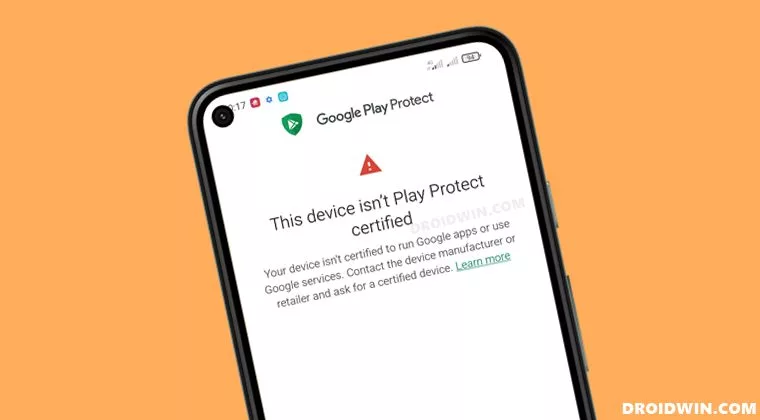
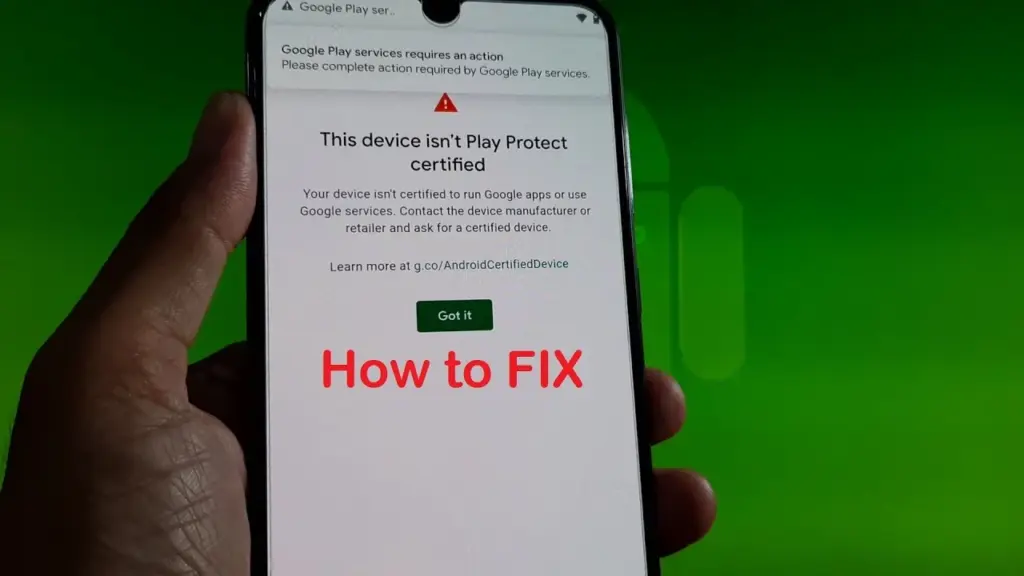
    When a device has an unregistered custom ROM installed, they get the “This Device Isn’t Play Protect Certified” error. Now, if you are one of those struggling with such an error message, this article will help you. Here, we have listed how you can fix this. So without any further ado, let’s get into this.

    You need to follow the steps for this in a systematic manner. It is exactly as we have mentioned below here. Do not skip any of these steps, and ensure one step is complete before moving to the next one.

    How to fix This Device Isn’t Play Protect Certified Error On Custom ROMs?

    This device isn’t Play Protect Certified

    Install Android SDK:

    Download and extract the Android SDK Platform Tools on your PC. Depending on your PC’s OS, download it for WindowsMac, or Linux. It will be a zip file. Once you have it, extract it in any preferred location. Now, you need to enable USB debugging on your smartphone for that.

    Enable USB Debugging:

    This step is essential if you want your PC to recognize your device when connecting it via USB in ADB mode.

    • Open up the settings menu on your phone.
    • Navigate to About Phone > Build Number. You need to tap on the Build number 7 times. You will see a pop-up on your screen that reads, “You are now a developer.”
    • Now go back to Settings and Open up System.
    • Navigate to Advanced > Developer Options > Enable USB Debugging.

    And that’s it. Your smartphone is now ready to take in ADB shell commands.

    Find Device ID:

    Obtaining the device ID used to be a challenging task; users would frequently need to root their phones in order to obtain this data. But that is no longer the case. The Google Play Store offers a program called Device ID that you can download. When you launch it after installation, the device ID details will be visible. After noting the device ID, proceed on to the following action.

    Register Your Custom ROM:

    You must visit the Google Device registration page for the final registration process.

    • Click on this link to go to Google’s Device registration page.
    • Sign in to your account here.
    • Now type in the device ID under the “Google Service Framework Android ID” section.
    • Verify the captcha and then click on the Register button below it.
    • Wait for an hour, and your device should be registered successfully.

    Once the registration is complete, your Custom ROM will also be registered, and you won’t see the “This Device Isn’t Play Protect Certified” error on your screen anymore. If you have any questions or queries about this article, comment below, and we will get back to you.

  • Google Play update brings critical bug fixes & more

    Google Play update brings critical bug fixes & more

    Google has recently begun to publish changelogs for its Google Play System updates. We were able to comprehend all of the changes that last month’s upgrade brought to the devices as a result of this. The corporation is now releasing a new Google Play System update for February 2022.

    The official changelog is also available on the support page for this new update. It lists all of the new features that the Google Play System update in February 2022 will bring to the devices.

    The current version, according to the support page, primarily fixes errors relating to device connectivity, safety, emergency, system, and other issues.

    google play

    Fixes for the Play Store’s Play-as-you-go download feature are also included. New app discovery, Google Play Billing changes, and new Play Pass and Play Points capabilities are all part of the February 2022 Google Play System upgrade.

    Go here to get the whole changelog for the most recent Google Play System upgrade. Play Protect will continue to improve with the latest version in order to keep your device safe.

    Changes will arrive with the Google Play Store v29.2 starting February 8

    The Google Play Store’s download and installation performance has also been enhanced. The Play-as-you-go feature will be improved, allowing players to begin playing mobile games while they are being downloaded, reducing wait times.

    Overall, the update is extremely feature-rich, and now that the official changelog is available, we know exactly what to expect from a new Google Play System upgrade.

    There are also some new developer features. These developer capabilities will aid Google and third-party app developers in making their apps support advertisements, accessibility, machine learning, and AI-related activities.

    According to the official support website, the Google Play System update for February will include all major bug fixes for device connectivity, developer services, safety and emergency, system administration, and other services.

    All of the previously stated Google Play Store updates, such as improvements to Play-as-you-go, a new app discovery tool, and changes to the Play Pass and Play Points programs, will be available starting February 8th with Google Play Store v29.2.

    The official changelog mentions that the developer services and system management updates will be accessible starting February 10 via Google Play services v22.06.2.

    Comparing the Google Play System February update with the January update shows it is a nearly identical list. In fact, last month’s update packed in more goodies as compared to the upcoming update.

  • How to disable in-app purchases on smartphones & tablets

    How to disable in-app purchases on smartphones & tablets

    While smartphones and tablets are excellent temporary digital nannies for keeping children entertained, they also pose a risk of children spending their parents’ money on in-app purchases and the Google Play Store itself. This article will teach you how to avoid making unintentional or unwanted purchases on your Android smartphone or tablet.

    Anyone with young children has most likely placed a smartphone or tablet in the hands of their child, assuming the child does not already have their own device. However, with so many games offering in-app purchases, how do you keep them from exceeding your credit card limit?

    With the popularity of the one-click purchase feature, such convenience creates a risk for poorly secured devices in children’s hands. Securing your device will also assist you in avoiding impulse or even accidental purchases.

    Both Google and Apple offer tools to control or prevent such unwanted or accidental purchases on Android or iOS/iPadOS. In this article, we’ll show you how to do that in Google’s ecosystem.

    Avoid unwanted purchases on your smartphone by your child

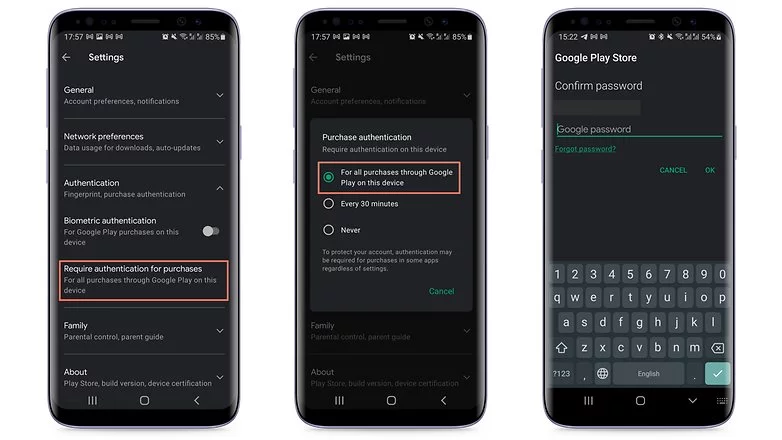
    If your child uses your smartphone or tablet while logged in to your Google account, the simplest solution is to make all purchases require approval via account password confirmation. Simply follow these steps to accomplish this:

    1. Tap the profile picture in the top corner of the screen in the Play Store.
    2. Choose Settings.
    3. Tap the Authentication field to launch the available options.
    4. Select Require authentication for purchases.
    5. Choose For all purchases through Google Play purchases on this device.
    in app purchases
    disable in app purchases android

    As the option itself already mentioned, you will need to repeat the steps on all tablets and smartphones used by the child.

    Otherwise, the child may authorize purchases using his or her fingerprint or other biometric systems registered on the device if the Biometric authentication option is enabled.

    Needless to say, the password to your Google account is private and should never be shared with your child. Disable biometric authentication as well if necessary.

    After following the above steps, every time you or anyone else using the device would like to make a purchase, you/they will need to authorize it by entering your Google account password, including in-game and in-app purchases that rely on the Google Play Services payment system.

    Another important point is to remember to repeat the steps for all user accounts that have been registered on the smartphone or tablet. Doing so will help avoid unwanted scares on devices used, for instance, covering both personal and professional areas.

    After you’ve completed the preceding steps, every time you or anyone else using the device wants to make a purchase, you’ll need to authorize it by entering your Google account password, including in-game and in-app purchases that use the Google Play Services payment system.

    Another important point to remember is to repeat the steps for all user accounts registered on the smartphone or tablet. This will help to avoid unwanted scares on devices used, for example, in both personal and professional settings.

    Use parental Control to prevent unwanted purchases

    If your child has his or her own tablet or smartphone, we recommend using parental controls to force purchase authorization. Google provides the Family Link app for just this purpose. This app allows you to create a user account just for your child or teen, as well as other admin options for YouTube, web search, and other services.

    After installing the app on your smartphone or the smartphone of the child’s guardian, launch Family Link and follow the steps shown below:

    ezgif.com gif maker 4
    1. After the app is launched, choose the user account of the parent or guardian.
    2. In the next screen, select the Parent option.
    3. Choose Next and then I’m ready.
    4. On the next screen, we will choose to create a new account for the child by tapping No.
      1. If she already has a Google account, just go to Settings on the other device, then Google > Parental Controls, and set up the device to be managed from your smartphone.
    5. Tap Next to begin the account creation process, which will require more information and can take around 10 minutes.
      1. During this step, you will need to agree to additional terms of use and confirm your user password, as well as accept the privacy rules for the new account.
    6. At the end of the creation process tap the Next button.

    After creating the Family Link account, use the login as the primary Google account on the child’s device. Return to your smartphone and launch the Family Link app to configure the following restrictions on the child’s account:

    ezgif.com gif maker 3
    1. Tap the View button under the profile that will have restricted purchases.
    2. Select the Manage settings option.
    3. Choose Google Play.
    4. Tap Require approval for.
    5. Select the All content option just to be safe!

    After that, each time the child attempts to purchase content, they must authorize the transaction on the parent or guardian’s device.

    Depending on how the secondary account is set up, make sure there is no form of payment registered in the account. If there are any, simply follow the steps in the next section.

    Remove associated credit or debit cards on the Google account

    This is a more extreme option, and it is not recommended if you also buy a lot of apps, have subscriptions or recurring payments associated with your Google account, or use the Google Pay service. Removing all payment methods from your Google account affects all devices associated with the login, so think twice before wiping your account clean.

    To remove a credit card, debit card, or other payment methods from your account, follow these steps:

    1. Launch the Play Store app and tap your profile photo.
    2. Select the Payments and subscriptions option.
    3. Choose Payment methods.
    4. Scroll down the screen and launch the More payment settings option.
    5. The browser will open a list of all available payment methods registered on the account. Tap Remove.
    6. Confirm the removal of the credit/debit card from the account by tapping Remove again.

    You will need to repeat these steps for each registered payment method, as well as all for all user accounts associated with the device.

  • Get Pro versions for free! – free premium apps for this week

    Get Pro versions for free! – free premium apps for this week

    It’s time for our weekly roundup of free Android apps. We’ve compiled a list of normally paid apps and games that are currently available for free for a limited time. Don’t waste time and take advantage of the promotions!

    Here’s a tip: If you find an interesting app but can’t really use it right now? Install the app anyway, then delete it from your device. That way, the app will become part of your app library, and you can install it again for free when you need it. This is a good way not to miss out on a short-lived promo.

    Free apps in the Google Play Store

    • Correlate ($2.99): Record your habits, food and understand the relationships of your choices and actions in your daily life and health.
    • SnagBricks ($5,49): For construction engineers, designers and other professionals in the construction industry, this app helps track construction progress, with report export options.
    • SUI File Explorer PRO ($1.99): A four-star rated file explorer. It lets you search files on your hard drive or conveniently install APKs, for example.
    • Multiscreen Calculator with Voice Input Pro ($3.99): You’re obviously getting a fantastic calculator here. From the screenshots, I wouldn’t have guessed that the app was rated 4.5 stars by nearly 4,000 users.
    • CP Meeting Notes ($2.99): A cross between a notes app and a voice recorder. Only rated by 35 voices so far, but you might find it quite interesting!
    • One Swipe Notes ($0.99): Another note app that lets you swipe away completed tasks. In my opinion, a good feeling when you have finished a task!

    Free games in the Google Play Store

    • The Lone Hacker ($3.00): Still in development, become a digital security expert by finding flaws in computers around the world. Although still incomplete, the game has thousands of positive reviews on Play Store.
    • Sudoku Pro ($2.99): Contains ads and purchases: challenge your mind in more than 9,000 puzzles (yes, I only listed this game to enjoy the meme).
    • Cat Simulator Kitty Craft Pro Edition ($0.99): CAT SIMULATOR: if the internet is for viewing pictures of cats, that’s what cell phones and their multiple CPU and GPU cores are for.
    • Dead Bunker 2 HD ($0.99): An old acquaintance in our free apps! The HD version of Dead Bunker 2 is currently available for free.
  • Temporarily free and on-sale apps and games for Wednesday on Google Play Store

    Temporarily free and on-sale apps and games for Wednesday on Google Play Store

    Things are cooling down now that the rash of sales influenced by Valve’s Steam sale has tapered off. Luckily I still have some standouts to share with everyone today. First up is Leo’s Fortune, one of the best platformers on Android. Next, I have Distraint: Deluxe Edition, a point-and-click horror adventure that’s easily worth the current asking price. Last but not least is Hexologic, a well-reviewed minimal puzzler that looks great in action. As always, I’ve highlighted all of the interesting titles in bold green text in order to make discovery easier. So without further ado, here are 16 temporarily free and 31 on-sale apps and games for the middle of the week.

    Free

    Apps

    1. Essential Oils Center -> Free Sale end in 5 days
    2. Knots 3D $5.99 -> Free; Sale ends in 9 hours
    3. Unit Converter (Pega Pro) – Premium $7.49 -> Free; Sale ends in 4 days
    4. Audio Recorder $0.99 -> Free; Sale ends in 6 days
    5. BabyBook Journal – Baby Tracker & Newborn Diary $2.99 -> Free; Sale ends in 6 days
    6. Float tube $0.99 -> Free; Sale ends in 6 days

    Games

    1. City Destructor HD $2.49 -> Free; Sale ends in 1 day
    2. Sudoku {Premium Pro} $3.99 -> Free; Sale ends in 4 days
    3. Dead Strive: Zombie Survival FPS Shooting $2.49 -> Free; Sale ends in 5 days
    4. WindWings: Space shooter, Galaxy attack (Premium) $1.99 -> Free; Sale ends in 5 days
    5. 2021 NEW Math puzzles $0.99 -> Free; Sale ends in 6 days
    6. Dungeon Corporation P : (An auto-farming RPG game) $1.99 -> Free; Sale ends in 6 days
    7. Everybody’s RPG $0.99 -> Free; Sale ends in 6 days
    8. Rogue Hearts $0.99 -> Free; Sale ends in 7 days

    Icon packs & customization

    1. Asteroid $0.99 -> Free; Sale ends in 1 day
    2. Black Army Omni – Icon Pack – Fresh dashboard $1.49 -> Free; Sale ends in 4 days
    3. FLUX – Rounded Square Icon Pack $0.99 -> Free; Sale ends in 6 days

    Sale

    Apps

    1. Geometry PRO $1.99 -> $0.99; Sale ends in 2 days
    2. Bass Engineer $2.49 -> $0.99; Sale ends in 5 days
    3. Sendmate [share files using wifi] $2.49 -> $0.99; Sale ends in 6 days
    4. My Face Shape Meter match and try eyeglass frames $2.99 -> $0.99; Sale ends in 7 days
    5. Pocket Note Pro – a new type of notebook $3.99 -> $1.49; Sale ends in 7 days

    Games

    1. Black Border: Border Patrol Simulator Game $2.99 -> $0.99; Sale ends in 4 days
    2. DISTRAINT: Deluxe Edition $4.49 -> $0.99; Sale ends in 6 days
    3. Endurance: infection in space (Premium) $3.99 -> $1.99; Sale ends in 6 days
    4. fMSX Deluxe – Complete MSX Emulator $4.99 -> $2.99; Sale ends in 6 days
    5. Shattered Plane: Turn-Based Strategy Game $4.99 -> $0.99; Sale ends in 6 days
    6. Hexologic $1.99 -> $0.99; Sale ends in 7 days
    7. Hollow Earth – Hardcore Arcade Space Shooter $1.99 -> $0.99; Sale ends in 7 days
    8. Leo’s Fortune $4.99 -> $2.99; Sale ends in 7 days

    Icon packs & customization

    1. Aline Black icon pack – linear black icons $1.99 -> $0.99; Sale ends in 4 days
    2. Cartogram – Live Map Wallpapers & Backgrounds $2.50 -> $0.99; Sale ends in 6 days
    3. InfraRED – Stealth Red Icon Pack $2.49 -> $0.99; Sale ends in 7 days
    4. Night Vision – Stealth Green Icon Pack $2.49 -> $0.99; Sale ends in 7 days
    5. Pink Punk Icon Pack $2.49 -> $0.99; Sale ends in 7 days
    6. RGB – Rainbow LED Icon Pack $2.49 -> $0.99; Sale ends in 7 days
    7. Ultraviolet – Stealth Purple Icon Pack $2.49 -> $0.99; Sale ends in 7 days
    8. Aura – Icon Pack $1.99 -> $0.99; Sale ends in ?
    9. Aurora Icon Pack $1.99 -> $0.99; Sale ends in ?
    10. Flax – Icon Pack $1.99 -> $0.99; Sale ends in ?
    11. Graby – Icon Pack $1.99 -> $0.99; Sale ends in ?
    12. Krix Icon Pack $1.99 -> $0.99; Sale ends in ?
    13. Mellow Dark – Icon Pack $1.99 -> $0.99; Sale ends in ?
    14. Mingo Premium – Icon Pack $1.99 -> $0.99; Sale ends in ?
    15. Mingo R – Icon Pack $1.99 -> $0.99; Sale ends in ?
    16. Olmo – Premium Icon Pack $1.99 -> $0.99; Sale ends in ?
    17. Rugos Premium – Icon Pack $1.99 -> $0.99; Sale ends in ?
    18. Smoon UI – Squircle Icon Pack $1.99 -> $0.99; Sale ends in ?