Tag: malware

  • 6 Common Device Performance Issues and Solutions

    6 Common Device Performance Issues and Solutions

    Now more than ever, we depend on digital devices like smartphones and computers for work and entertainment.

    Users want a smooth experience. However, there are times when our devices show signs of poor performance and other issues.

    Let’s take a look at some of the most common problems and methods to minimize or eliminate these issues.

    1. Insufficient Storage
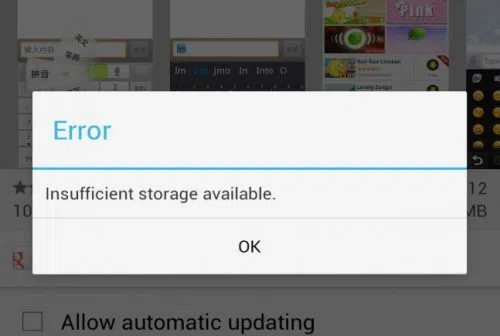
    insufficient strorage available error in android

    You work with a finite amount of storage. Some devices boast of having terabytes of available space, so running out of available disk space is often not a problem.

    On the other hand, some devices come with much less than that. It is crucial to keep an eye on what you download and store on the device. Get in the habit of deleting files you no longer need. 

    Remember that you do not need to store everything on the device. Cloud storage and external storage accessories (hard drives and USB flash sticks) offer a solid alternative.

    2. Overheating

    l intro 1657216441

    Overheating is one of those problems that you want to avoid as much as possible. The process works as an anxiety builder, making you aware that something is wrong. Ideally, your device should be lukewarm at most.

    Having said that, it is not how digital devices work, particularly when you initiate resource-heavy processes, such as video games. 

    Certain devices have more flexibility to adjust temperatures. For instance, the MacBook kernel_task high CPU is one such indicator, and it’s a built-in feature.

    Generally, overheating can be reduced by limiting background processes. Check background applications and close them. Moreover, if you have some time, clean the dust and other particles that are inside the device (provided you know what you are doing).

    3. Sluggish Performance

    A sluggish performance can be the result of different factors building up over time. More often than not, users don’t pay attention to basic maintenance routines, leaving their smartphones or computers to their own devices.

    Doing so is bound to backfire. As a rule of thumb, there should be a maintenance routine that users follow, regardless of how big or small it is.

    The goal is to ensure optimal device performance and increase its lifespan. At times, you may need to reinstall an operating system, ensure that the latest OS version is installed, and upgrade hardware when/if possible.

    4. Malware
    malware android

    Cybersecurity threats are running rampant online, attacking unsuspecting users. It is no longer enough to have reliable antivirus software, though it remains a cornerstone of a good anti-malware strategy.

    More and more people are looking to rely on virtual private networks to encrypt their surfing data and block devices from hackers. A VPN is helpful, particularly when you have to connect to public Wi-Fi, which is notorious for missing the necessary security protocols.

    The awareness via various campaigns comes in handy, too. Organizations are trying their best to educate people about the dangers of the internet. It goes beyond protecting your devices. Personal and sensitive information is another thing malicious cybercriminals are after.

    5. Poor Connectivity

    As much as we rely on our devices, the same can be said for the internet. Having a poor connection is enough to ruin somebody’s day.

    Naturally, some locations have a better internet connection. Certain ISPs are notorious for providing lackluster experience.

    Still, one should not underestimate the impact on the user itself. You may have an outdated router or a third-party device jamming the signal. Not to mention that sometimes restarting the device or reconnecting to the network is enough to solve the problem. 

    6. Lackluster Battery Life

    If you are on a desktop computer, battery lifespan problems are not something to worry about. Alternatively, smartphone and laptop users have to keep a close eye on the battery bar.

    The likelihood of running out of battery life is not zero. The bar might go down without you realizing it. And if there are no means to quickly recharge the device, you will be in trouble.

    Make sure to close background apps and other battery hogs. If the battery becomes outdated and struggles to recharge or maintain a decent battery life, you might have no other option but to get a replacement.

  • #malwarealert Stop using these Android apps immediately

    #malwarealert Stop using these Android apps immediately

    Apps that appear to be normal but are occasionally compromised with malware are extremely common. Users should always update their gadgets, keep an eye out for articles like this one, and take appropriate action. A virus campaign is affecting over 60 well-known apps with a combined install base of over 100 million in the Google Play Store. Some apps’ creators mistakenly incorporated the virus by utilizing a third-party library that included malware-filled sections. These apps are lethal because of a new strain of malware called “Goldoson.” By using these components, app developers can cut down on the time it can take to create particular app components.

    Google asserts in a statement that it takes every precaution to shield users from this threat. A Google representative said in a statement to phonearena, “When we identify apps that violate our policies, we take immediate action. We have informed the developers that changes are required to bring their products into compliance with Google Play standards. Google Play Protect, which can alert users to harmful apps on Android devices, further protects consumers.

    goldoson malware has infected mo

    Is Goldoson a risk?

    Goldoson was discovered by security researchers at the McAfee business, who noted on their blog that the virus may collect GPS coordinates and the names of Bluetooth and Wi-Fi-connected device names. Also, a list of the mobile phone’s apps will be compiled. Moreover, the malware has the capacity to click on background-running advertisements without the user’s awareness or consent.

    The creators and Google are both aware of the infection. Since the developers were just as much of a victim as those who downloaded the infected apps, many of the impacted apps were cleaned up by the developers. However, those who disobeyed Google’s order had their apps removed from the Play Store.

    Delete following apps immediately

    The impacted apps’ developers either patched them or Google removed them from the Play Store, according to the information that is currently accessible. Even if the app is no longer accessible through the Play Store, users must still make sure that they do not have a malicious version of it installed on their devices. Even if the developer has provided a fix, users should still upgrade the software to be secure. The list of applications involved in this attack is provided below. The list prominently displays the quantity of downloads. Also, it demonstrates how Google or the developer changed the app or removed it from the Play Store.

    The list:

    • L.POINT with L.PAY 10M+ Updated
    • Swipe Brick Breaker 10M+ Removed
    • Money Manager Expense & Budget 10M+ Updated
    • TMAP 10M+ Updated
    • Lotte Cinema 10M+ Updated*
    • Genie Music 10M+ Updated*
    • Cultureland version 2 5M+ Updated*
    • GOM Player 5M+ Updated*
    • Megabox 5M+ Removed**
    • LIVE Score Real-Time score 5M+ Updated*
    • Pikicast 5M+ Removed**
    • Compass 9: Smart Compass 1M+ Removed**
    • GOM Audio – Music, Sync lyrics 1M+ Updated*
    • TV – All About Video 1M+ Updated*
    • Guninday 1M+ Updated*
    • Item mania1M+ Removed**
    • LOTTE WORLD Magicpass 1M+ Updated*
    • Bounce Brick Breaker 1M+ Removed**
    • InfiniteSlice Infinite Slice 1M+ Removed**
    • Norae bang 1M+ Updated*
    • SomNote – Beautiful note app 1M+ Removed**
    • Korea Subway Info: Metroid 1M+ Updated*
    • GoodTVBible 1M+ Removed**
    • Happy Mobile Happy Screen1M+ Updated*
    • UBhind: Mobile Tracker Manager 1M+ Removed**
    • Mafu Driving Free 1M+ Removed**
    • Girl singer WorldCup 500K+ Updated*
    • FSP Mobile 500K+ Removed**
    • Audio Recorder 100K+ Removed**
    • Catmera 100K+ Removed**
    • Cultureland Plus 100K+ Updated*
    • Simple Air 100K+ Removed**
    • Lotteworld Seoul Sky 100K+ Updated*
    • Snake Ball Lover 100K+ Removed**
    • Play Geto 100K+ Removed**
    • Memory Memo 100K+ Removed**
    • PB Stream 100K+ Removed**
    • Money Manager (Remove Ads) 100K+ Updated*
    • Inssaticon – Cute Emoticons 100K+ Removed**
    • ECloud 100K+ Updated*
    • SCinema 50K+ Updated*
    • Ticket Office 50K+ Updated*
    • Lotteworld Aquarium 50K+ Updated*
    • Lotteworld Water Park 50K+ Updated*
    • T map for KT, LGU+ 50K+ Removed**
    • Random number 50K+ Updated*
    • AOG Loader 10K+ Removed**
    • GOM Audio Plus – Music, Sync l 10K+ Updated*
    • Swipe Brick Breaker 2 10K+ Removed**
    • Safe Home10K+ Removed**
    • Chuncheon 10K+ Removed**
    • Fantaholic  5K+ Removed**
    • Cinecube 5K+ Updated*
    • TNT 5K+ Removed**
    • Bestcare Health 1K+ Removed**
    • InfinitySolitaire 1K+ Removed**
    • New Safe 1K+ Removed**
    • Cashnote 1K+ Removed**
    • TDI News 1K+ Removed**
    • Eyesting 500+ Removed**
    • TingSearch 50+ Removed**
    • Krieshachu Fantastic 50+ Removed**
    • Yeonhagoogokka  10+ Removed**

    As we have said several times before, we reemphasize again that even if an app has been deleted from the Play Store, it may still be able to steal your personal info and click on ads if it is still installed on your phone or tab. In other words, even if they were allegedly cleaned up by the developer and passed Google’s testing, uninstall any of these apps from any of your mobile devices right away. Do not take chances with your device.

    In the future, spare yourself some time and check the evaluations written by users before installing an app from a new developer. If you notice a user complaining that there are too many adverts on their phone or that the software caused his device’s battery to start draining after installation, these are red flag indications that you should pay attention to. If an app fails the smell test, don’t even bother with it. It’s best to simply ignore them.

  • Delete these 12 apps from your device now!

    Delete these 12 apps from your device now!

    Popular apps have been pulled from the Google Play store, and users of Android devices are being asked to do so right away.

    Millions of users have downloaded the harmful apps, which pose as questionnaire, fitness, or gaming apps and lure users into accepting bogus incentives or clicking on links that take them to dubious websites.

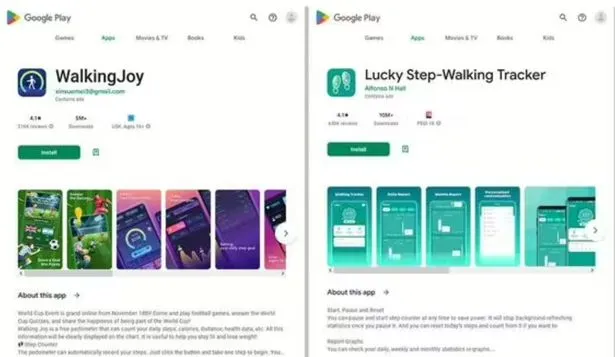
    The most recent apps that were banned offered prizes to users for remaining active by giving them points for walking and working out. However, when individuals attempted to pay out, they were either prevented from doing so or have to watch interminable commercials for no reason.

    Cybersecurity experts at Dr.Web flagged these apps, some of which already had millions of downloads before being booted from the Play store.

    As reported by the Express, the apps that have recently flagged by the IT cybersecurity firm are:

    • Lucky Step: Walking Tracker – 10 million downloads
    • WalkingJoy: walking tracker – 5 million downloads
    • Lucky Habit: health tracker – 5 million downloads

    Despite being flagged for using the same tactics as the other two, Lucky Habit has not been removed from the app store at this time.

    0 Screenshot 2023 02 01 113906

    It comes after 10 more apps were also axed for the Google store, in this instance due to bad links that downloaded malware, or direct users to dodgy websites.

    According to Dr.Web, these fake applications presented themselves as investing software, directories, questionnaires and addictive games. They are as follows:

    • Golden Hunt – 100K downloads
    • Reflector – 100K downloads
    • Seven Golden Wolf blackjack – 100K downloads
    • Unlimited Score – 50K downloads
    • Big Decisions – 50K downloads
    • Jewel Sea – 10K downloads
    • Lux Fruits Game – 10K downloads
    • Lucky Clover – 10K downloads
    • King Blitz – 5K downloads
    • Lucky Hammer – 1Kdownloads

    All of these apps have already been removed from the Play Store, but if you have one of them on your device it should be deleted right away.

    According to Dr.Web for Android’s detection statistics, the activity of spyware, trojans, and adware surged in December 2022.

    Hundreds of bogus apps and trojans that sign their victims up for premium services were among the several new risks they discovered at the same time on Google Play.

  • BadBazaar Android malware linked to Chinese cyberspies

    BadBazaar Android malware linked to Chinese cyberspies

    Unknown Android spyware called “BadBazaar” has been found to target China’s ethnic and religious minorities, particularly the Uyghurs in Xinjiang.

    Due to their cultural divergence from traditional eastern Chinese values, the central Chinese government has subjected the 13 million-strong Uyghur Muslim minority to extreme oppression.

    The new spyware was originally discovered by MalwareHunterTeam and linked to Bahamut in VirusTotal detections.

    BadBazaar spyware

    Lookout performed more investigation on the malware and discovered that it was brand-new spyware that was being used by APT15, a state-sponsored hacking outfit, in its 2020 attacks against Uyghurs (aka “Pitty Tiger).

    Lookout also noticed a second campaign employing updated versions of the spyware known as “Moonshine,” which CitizenLab first came up in 2019 when using it against Tibetan organizations.

    BadBazaar malware

    Since 2018, the BadBazaar spyware has promoted itself on communication channels frequented by the targeted ethnic group by infecting Uyghurs using at least 111 different apps.

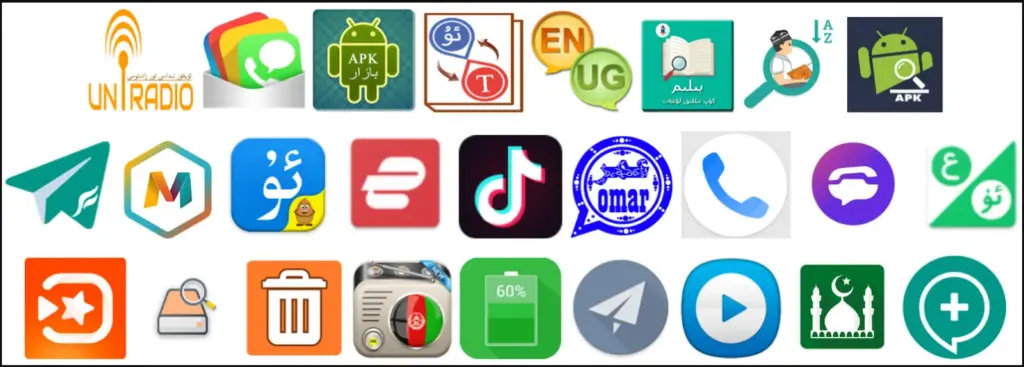
    The impersonated apps fall under a variety of categories, including dictionaries, tools for religious practice, battery savers, and media players.

    Since Google Play, Android’s official app store, has never seen any record of these apps, they are most likely distributed through rogue websites or unreliable third-party stores.

    It’s interesting that there is only one instance of an iOS app on the Apple App Store that communicates with the malicious C2, but it merely sends the device UDID and doesn’t have spyware functionality.

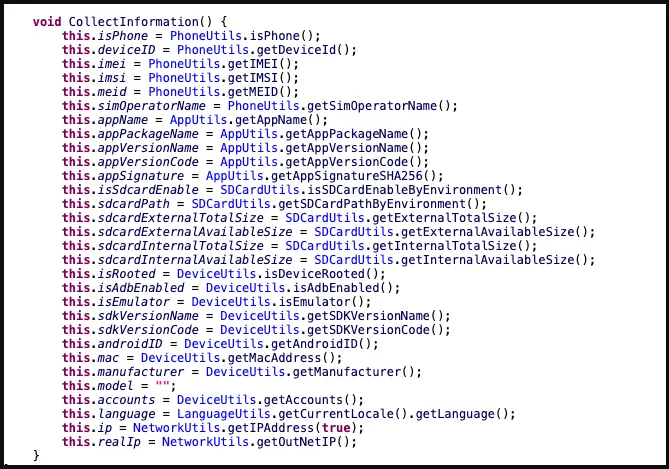
    BadBazaar’s data-collecting capabilities include the following:

    • Precise location
    • List of installed apps
    • Call logs with geolocation data
    • Contacts list
    • SMS
    • Complete device info
    • WiFi info
    • Phone call recording
    • Take pictures
    • Exfiltrate files or databases
    • Access folders of high-interest (images, IM app logs, chat history, etc.)

    Looking into the C2 infrastructure, which exposes some of the admin panels and the GPS coordinates of test devices due to errors, Lookout analysts found connections to the Chinese defense contractor Xi’an Tian He Defense Technology.

    BadBazaar malware apps
    Only a few of the BadBazaar apps promoted to Uyghurs (Lookout)
    BadBazaar malware infected apps
    Sample of apps carrying Moonshine spyware (Lookout)

    Moonshine variants

    Lookout researchers began to discover a new operation in July 2022 that uses 50 apps to push users new versions of the “Moonshine” spyware.

    These programs are advertised on Telegram channels for Uyghur speakers, where dishonest users recommend them to other users as reliable software.

    Examples of programs that contain the spyware Moonshine (Lookout)
    The creators of the more recent virus have added additional modules to increase the tool’s capacity for spying, and it is still modular.

    Network activity, IP addresses, hardware details, and other information are among the data that Moonshine takes from hacked devices.

    BadBazaar data collection
    Information collected by Moonshine (Lookout)

    The C2 commands supported by the malware are:

    • Call recording
    • Contact collection
    • Retrieve files from a location specified by the C2
    • Collect device location data
    • Exfiltrate SMS messages
    • Camera capture
    • Microphone recording
    • Establish SOCKS proxy
    • Collect WeChat data

    Lookout has found evidence that the authors of the new Moonshine version are Chinese, as both code comments and server-side API documentation are written in simplified Chinese.

    “While Lookout researchers could not connect the malware client or infrastructure to a specific technology company, the malware client is a well-built and full-featured surveillance tool that would have likely required substantial resources.”

    Lookout.

    This report indicates that surveillance of Chinese minorities continues unabated despite the outcry from international human rights protection organizations.

  • Autolycos installed 3 million times from Google Play Store

    Autolycos installed 3 million times from Google Play Store

    Over 3,000,000 people downloaded a new Android malware family from the Google Play Store that discreetly subscribes users to premium services.

    Maxime Ingrao, an Evina security researcher, found the malware, known as “Autolycos,” in at least eight Android applications, of which two are still downloadable from the Google Play Store as of this writing.

    The two apps still available are named ‘Funny Camera’ by KellyTech, which has over 500,000 installations, and ‘Razer Keyboard & Theme’ by rxcheldiolola, which counts over 50,000 installs on the Play Store.

    Autolycos android malware

    The remaining six applications have been removed from the Google Play Store, but those who still have them installed risk being charged with costly subscriptions by the malware’s activities.

    • Vlog Star Video Editor (com.vlog.star.video.editor) – 1 million downloads
    • Creative 3D Launcher (app.launcher.creative3d) – 1 million downloads
    • Wow Beauty Camera (com.wowbeauty.camera) – 100,000 downloads
    • Gif Emoji Keyboard (com.gif.emoji.keyboard) – 100,000 downloads
    • Freeglow Camera 1.0.0 (com.glow.camera.open) – 5,000 downloads
    • Coco Camera v1.1 (com.toomore.cool.camera) –1,000 downloads

    During a discussion with Ingrao, the researcher told Droid Tools that he discovered the apps in June 2021 and reported his findings to Google at the time.

    Although Google acknowledged receiving the report, it took the company six months to remove the set of six, while two malicious apps remain on the Play Store to this day.

    After so much time had passed since the initial reporting, the researcher disclosed his findings publicly.

    In place of using Webview, Autolycos uses stealthy malicious behavior to execute URLs on remote browsers and then include the results in HTTP requests.

    This behavior is intended to hide its actions from users of infected devices so that they won’t be noticed.

    When malicious apps were installed on a smartphone, they frequently asked for authorization to view SMS content, which gave them access to a victim’s SMS text messages.

    The Autolycos owners launched various social media advertising campaigns to draw in new users to the apps. Ingrao discovered 74 Facebook ad campaigns for the Razer Keyboard & Theme alone.

    Additionally, while some fraudulent apps on the Play Store received unavoidably bad reviews, some with less downloads continue to have positive user ratings thanks to fake reviews.

    Android users should have Play Protect activated, monitor background internet data and battery usage, and attempt to install the fewest number of apps possible on their handsets in order to protect themselves against these attacks.

  • Kernel bug exposes Android to potential malware – Linux Dirty Pipe

    Kernel bug exposes Android to potential malware – Linux Dirty Pipe

    If Android were a car engine, and you popped the hood and poked around a bit, you’d find the label “Linux” etched on the engine block. The open-source operating system provides the starting point that Android’s built on top of, but sharing code also means sharing vulnerabilities. Now a newly discovered Linux kernel bug is raising concerns for the security of Android devices, as it leaves a door open for malware intrusion.

    android malware 1

    The glitch in question has been dubbed “Dirty Pipe” by software engineer Max Kellerman, who provides a detailed writeup about the bug’s discovery. He first spotted some mysteriously corrupted log files last year, and his analysis of the problem revealed a kernel-level flaw that’s existed since 2020. The vulnerability lets software overwrite the system page cache, even for files where apps shouldn’t otherwise have permission. He determined that in the wrong hands the issue had potential for exploitation and alerted the team behind Linux kernel security. Properly coded malware could use this method to obtain full control of a vulnerable system by overwriting files as vital as the system’s root password.

    Kellerman was also able to reproduce the bug on a Pixel 6, and reached out to let Google know. The company similarly prepared a fix, and merged it into the Android kernel. Right now, it’s just a matter of OEMs needing to incorporate that fixed kernel in future device updates.

    For what it’s worth, Google confirmed to Android Police that Dirty Pipe did not play a role in delaying the release of Android 12L for the Pixel 6. Linux users, meanwhile, need to install their distro’s most recent security updates ASAP.

  • Banking malware ‘Xenomorph’ have impacted thousands in Android Comunity

    Banking malware ‘Xenomorph’ have impacted thousands in Android Comunity

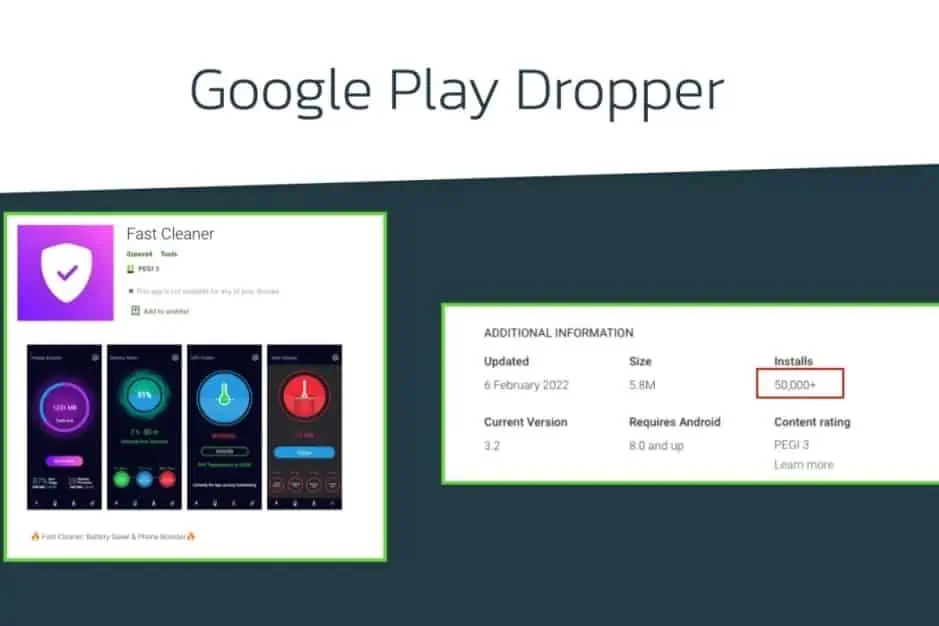
    Staying on top of the ever-changing environment of mobile security is one of the most difficult tasks for Android users. While Google has made significant progress in combating malware on its platform, fraudsters are quick to change their tactics. Under the guise of “Fast Cleaner,” security experts have discovered a new banking virus.

    ThreatFabric, a security group, conducted a thorough investigation of the Fast Cleaner app. Before Google took it down, it had roughly 50,000 installs.

    “Based on the intelligence gathered, users of 56 different European banks are among the targets of this new Android malware trojan, distributed on the official Google Play Store, with more than 50.000 installations,” the research team said in a blog post (via Phone Arena).

    The Fast Cleaner program infects the Android device with a trojan meant to steal important information from the user, according to ThreatFabric. This could entail reading texts or receiving notifications without the user’s knowledge. This new malware is dubbed “Xenomorph” by the researchers, and it shares some characteristics with the recent Alien banking trojan.

    Researchers said that Xenomorph is a relatively new malware and not as advanced as the Alien trojan

    Of course, no one wants to install a harmful software on their phone. Users that downloaded the program did so based on the app’s description, which describes it as a “battery saver” and a “phone booster.” If you still have this app installed on your Android phone, uninstall it immediately.

    Unfortunately, simply removing the rogue program may not be enough. Users should also review their bank statements for any odd activity and call the bank for additional information.

    It’s practically impossible to tell which applications are excellent and which are terrible because there are so many with similar-sounding titles. The Fast Cleaner software was created by a developer identified as “ilzeeva4” and published on the Google Play Store.

    Xenomorph target

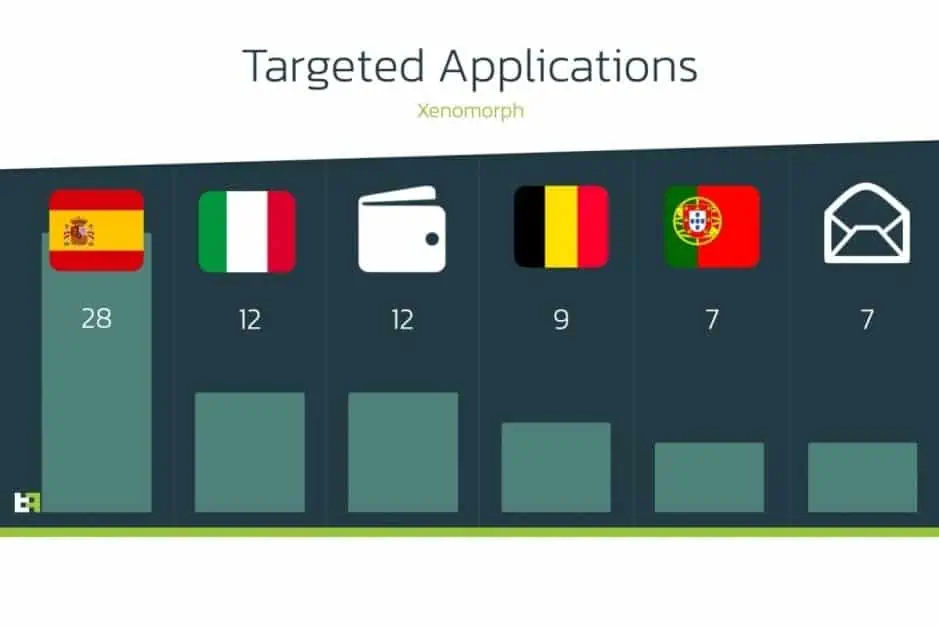
    According to ThreatFabric, Xenomorph was still in its early stages when it was discovered. This means it isn’t as sophisticated as the Alien trojan. This app was mostly targeted at European consumers, as shown in the graph below.

    In terms of future measures, users should always double-check the apps they download. It’s also wise to go through the ratings and reviews on the Play Store or through other sources.

  • The malware that signs you up for pricey services – Joker

    The malware that signs you up for pricey services – Joker

    Dozens of malicious apps, some available in Play, found in the past couple months. Joker malware

    September has been a busy month for malicious Android apps, with hundreds of them flooding either Google Play or third-party markets from a single malware family alone, researchers from security companies said.

    Known as Joker, since late 2016, this family of malicious apps has been targeting Android users and has been one of the most common threats to Android more recently. Joker apps secretly subscribe to costly subscription services once activated and can even steal SMS messages, contact lists, and computer information. Researchers last July said they found Joker lurking about 500,000 times in 11 apparently legitimate apps downloaded from Play.

    Late last week, researchers from security firm Zscaler said they discovered a new batch of 120,000 downloads containing 17 Joker-tainted games. Over the course of September, the applications were progressively uploaded to Play. Meanwhile, security firm Zimperium announced on Monday that in September, company researchers discovered 64 new Joker variants, most or all of which were seeded in third-party app stores.

    (adsbygoogle = window.adsbygoogle || []).push({});

    And, as ZDNet noted, this month and in July, researchers from security firms Pradeo and Anquanke found more Joker outbreaks. Since it first came to light in December 2016, Anquanke said it had located more than 13,000 samples.

    “Joker is one of the most prominent malware families that continually targets Android devices,” Zscaler researcher Viral Gandhi wrote in last week’s post. “Despite awareness of this particular malware, it keeps finding its way into Google’s official application market by employing changes in its code, execution methods, or payload-retrieving techniques.”

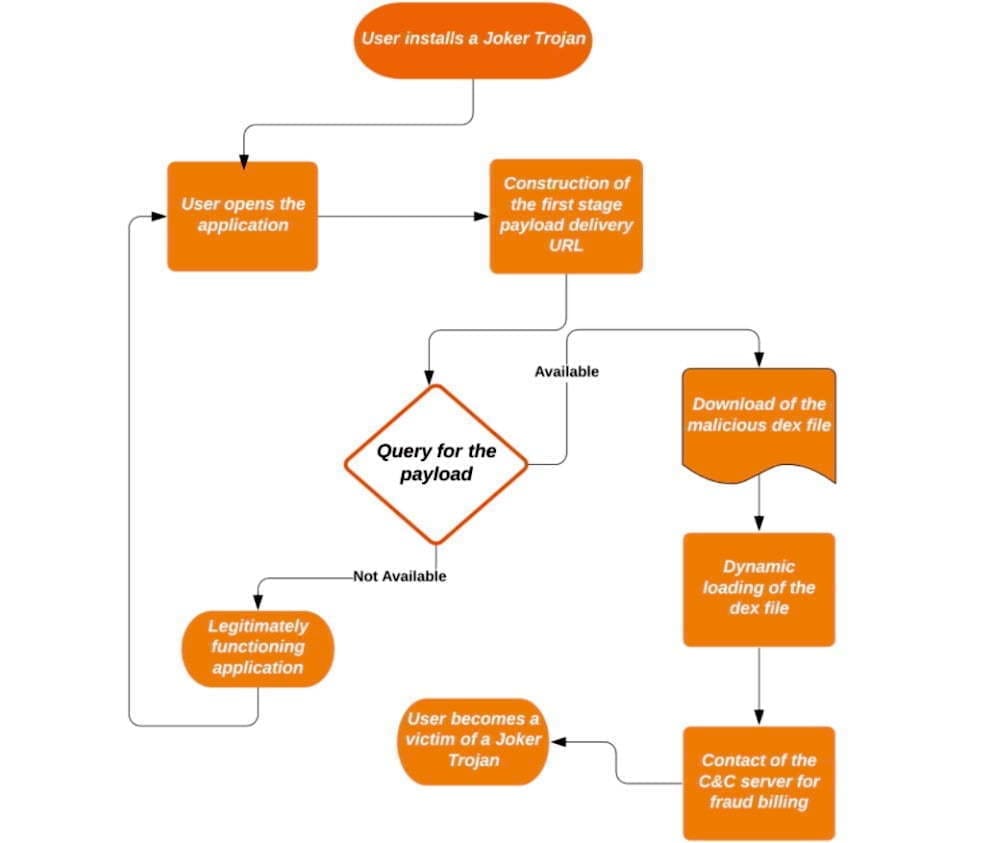
    The roundabout way of attack is one of the keys to the Joker ‘s success. The apps are knockoffs of legitimate apps and contain no malicious code other than a “dropper” when downloaded from Play or a different market. The dropper, which is heavily obfuscated and includes only a few lines of code, installs a malicious part and drops it into the app after a delay of hours or even days.

    joker malware

    A flow chart that captures the four pivot points each Joker sample uses was given by Zimperium. In order to mask update components as innocuous applications such as games, wallpapers, messengers, translators and photo editors, the malware often uses evasion techniques.

    (adsbygoogle = window.adsbygoogle || []).push({});

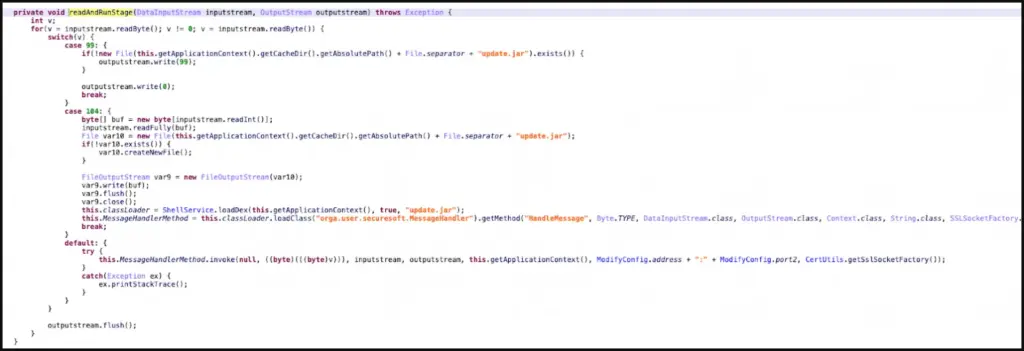
    The evasion techniques include encoded strings inside the samples where an app is to download a dex, which is an Android-native file that comprises the APK package, possibly along with other dexes. The dexes are disguised as mp3 .css, or .json files. To further hide, Joker uses code injection to hide among legitimate third-party packages—such as org.junit.internal, com.google.android.gms.dynamite, or com.unity3d.player.UnityProvider—already installed on the phone.

    The purpose of this is to make it more difficult for the malware analyst to spot the malicious code, as third-party libraries generally contain a lot of code and the existence of additional obfuscation will make it much more difficult to spot the injected classes, “wrote Zimperium researcher Aazim Yaswant.” “In addition, the use of valid package names defeats naïve [blocklisting] attempts, but our z9 machine-learning engine allowed the researchers to detect the above-mentioned injection tricks safely.”

    Three forms of post-download strategies to circumvent Google’s app-vetting process are detailed in the Zscaler write-up: direct downloads, one-stage downloads, and two-stage downloads. The final payload was the same, despite the delivery variations. If the final payload is downloaded and enabled by an application, the knock-off application has the opportunity to sign up for premium subscriptions using the user’s SMS app.

    A Google spokesman declined to comment other than to note that Zscaler reported that the company removed the apps once they were privately reported.

    (adsbygoogle = window.adsbygoogle || []).push({});

    Using an antivirus app from Malwarebytes, Eset, F-Secure, or another reputable maker is also an option, although they, too, can have difficulty detecting Joker or other malware.

  • Magisk Manager app from Google Play Store is a Malware

    Magisk Manager app from Google Play Store is a Malware

    official magisk manager

    Magisk is a popular name for Android users who are fond of rooting their smartphones. The app is not available in the Google Play store, either. However in the recent foun that there is a clone of his Magisk on the Google Play store, the app creator John Wu. The clone looks exactly the same as the original Magisk application, and it also has the same name. It was all cool, though, until the time the app was reported to contain malware. That simply means you are not supposed to download the Magisk application from Google Play store.

    Google Play store policy explicitly notes that Google will never allow an app that helps to root. Thus the Magisk could not penetrate the environment of the Play store. However, the app that was mentioned was downloaded and updated about 50k times before people found out about it.

    The app has been listed on the Google Play Store by the Loringo, Inc. , a company that uploads clones of KKGamer Pro, Pro ZArchiver, and android Dolphin Emulator software. The business has used Magisk ‘s branding to distribute malware to Android users who enjoy rooting their computers. The App developer, however, had asked the users to report the app to stop the business. Thus, the Android version is no longer available on the Google Play Store.

    But we should always review an app before we hit the download button for our protection as Android users. However, Magisk will not make its way to the Play store anytime soon according to Google policies. So make sure on Google Play store you stop each and every clone of the application. If possible just go ahead and report it, this way the other android users won’t be targeted by scams and malware

  • BlackRock Android Malware – what is it and how to avoid it

    BlackRock Android Malware – what is it and how to avoid it

    Android users installing apps from third-party app stores are at risk of the BlackRock malware. How can this malware be stopped?

    BlackRock malware is yet another threat worrying Android users. This newly-discovered malware can target a variety of different applications, thereby stealing your information.

    Make sure you know what BlackRock malware is, and how you can protect yourself, before installing another file.

    Security firm, ThreatFabric, discovered a digital danger that affects Android devices in May 2020: BlackRock malware.

    Analysts however quickly discovered that BlackRock malware is not really a new threat. BlackRock malware is the product of leaked source code for Xeres malware, which is a form of trojan LokiBot banking.

    Despite the fact that BlackRock malware is based on a banking trojan, it does not just affect banking apps. It also targets applications for shopping, leisure, social relations, entertainment and even dating. This extensive publicity makes it extremely risky.

    It currently has 337 apps on its goal list, some of which you might be using on a regular basis. Its target applications aren’t limited to one country either — it targets applications across Europe, North America , and Australia.

    ThreatFabric presents the full list of targets in its article. Some of the applications on the list include Gmail, Netflix, Snapchat, eBay, Twitter, TikTok, PayPal and more.

    BlackRock malware has not been detected on the Google Play Store until now. Currently it targets downloaded apps from third-party sites, but that does not mean that BlackRock malware will never appear on the Google Play Store. Aggressive hackers also can find ways to break Google’s protection protocols.

    How BlackRock Malware Steals Your Information

    When BlackRock malware appears on your computer it can never be noticed by an unknowing user. It uses a technique known as a “overlay,” a fake window which pops up over a legitimate app. The overlay mixes with the software so it’s hard to say whether the pop-up is part of the app or not.

    The window will ask you to enter your credit card number and login code, before you can even start using the legal app. This helps it to get the details right off the bat.

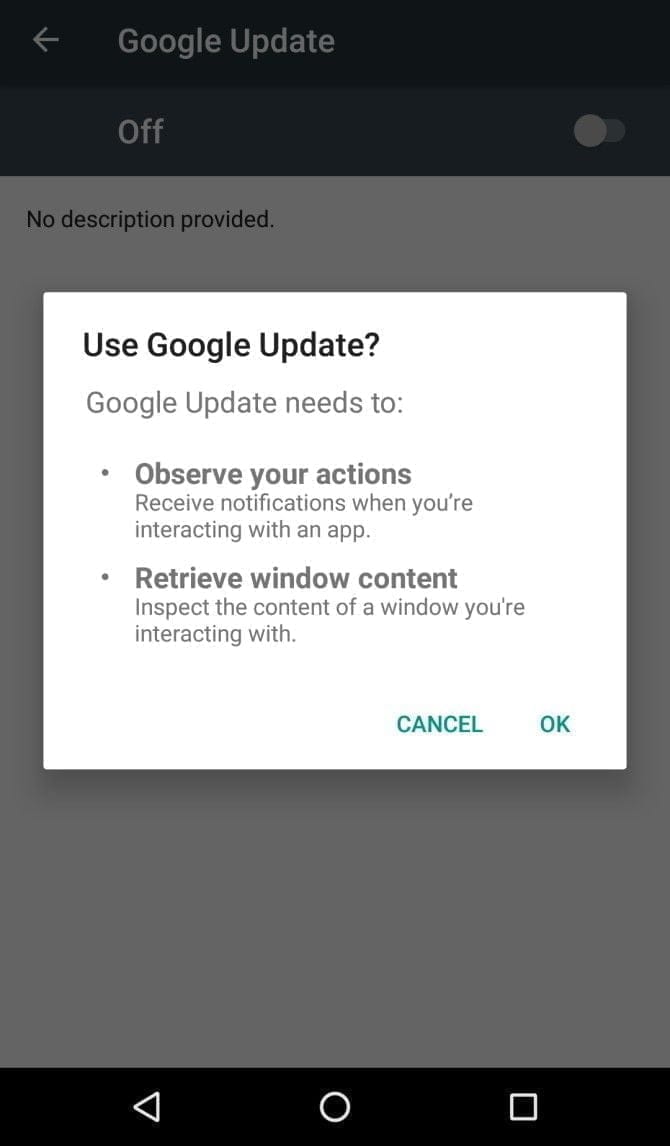
    It infiltrates your device in the first place by getting Accessibility Services permissions. When you install an infected app, it’ll prompt you to enable a fake Google Update. Accepting the “Google Update” allows it to intervene with your device.

    If you aren’t familiar with an Android’s Accessibility feature, you should know that it’s one of the most powerful functions on your device. It’s meant to help Android owners with disabilities, but Accessibility Services can be used to hack your phone as well. This feature can automate a variety of tasks for the user, including tapping the screen, reading text aloud, and even creating captions.

    Giving BlackRock permission to use Accessibility Services lets you build the overlay that you can see when you open the target app. It also gives additional functionality to the malware, as it can then use an Android DPC (device policy controller) to grant administrator privileges to itself.

    In other words, it not only steals the confidential details you type into its overlay — it can actually do a lot more than that. BlackRock does not only intercept SMS messages, mask alerts and lock your computer, it can also engage in keylogging. That said, this malware is certainly not what you want on your computer.

    Protect yourself from BlackRock malware

    As mentioned earlier, the Google Play Store still hasn’t found BlackRock. But just because apps from third-party app stores are currently being targeted, that doesn’t mean it’ll never make its way to Google Play.

    ThreatFabric notes that it “can not yet predict how long BlackRock will be active on the threat landscape.” Meanwhile, it’s necessary to bear in mind some precautions before installing apps.

    Why an anti-virus app won’t cut it

    It’s not a bad idea to have an antivirus app on your smartphone, but unfortunately, an antivirus app won’t stop the BlackRock malware. When BlackRock infiltrates your phone, it has a feature that blocks you from using an antivirus app.

    As soon as you open an antivirus or an Android cleaner app, such as Avast, Kaspersky, McAfee, BitDefender, or Superb Cleaner, BlackRock will immediately redirect you to your Home screen. This prevents you from removing the malware using an antivirus app.

    So, if you download a sketchy app from a third-party store, and think that an antivirus app will keep you safe from all threats, think again.

    Check app permissions

    No matter how legit an app may seem, you should keep an eye on the app permissions. Some apps request permissions that have nothing to do with the App’s core function.

    For example, your SMS messages obviously don’t need access to a flashlight app. This is a sign that you should immediately uninstall the App.

    As BlackRock malware asks for permissions from Accessibility Services, you’ll want to look for any apps that require that particular privilege. If an app is legitimately for users with disabilities, has good reviews, and is from the Google Play Store, you are likely to have confidence in granting permission to the accessibility services. If not, avoid giving that privilege to any applications that don’t need it.

    Download apps from Google Play Store only

    Google Play Protect was put in place to scan your installed apps for malware as soon as you download them, as well as scan them periodically once installed. Third-party app stores don’t have this safety feature, so you’re pretty much on your own in terms of security.

    The lack of security protocols on third-party stores has allowed BlackRock malware to thrive. To lower your risk of encountering BlackRock malware, try to avoid third-party apps stores, and refrain from downloading APKs.

    Stay safe!

    BlackRock malware will hopefully never hit the Google Play Store. There really isn’t any telling if the actors behind BlackRock malware can find a loophole in Google’s security policies, but if they succeed, BlackRock malware could accumulate a significant number of victims.

    If BlackRock ever reaches the Google Play Store, it’s not too surprising. After all, despite Google’s strict security protocols, several apps that contain Joker malware still managed to make their way onto the Google Play Store.