Tag: huawei

  • Google Play on Huawei HMS Phones via Google Space

    Google Play on Huawei HMS Phones via Google Space

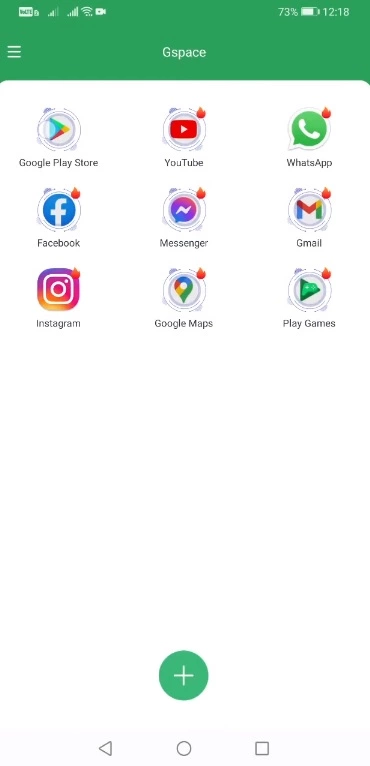
    A new way to get Google Play on Huawei HMS phones has just been released. This new solution makes use of the Google Space app. Fortunately, this solution appears to work on all Huawei phones launched to date. This contains Huawei’s newest Mate 40 smartphone, as well as a few forthcoming Huawei devices. So, in this method, I’ll show you how to download Google Play on Huawei HMS phones right now using Google Space. Before I show you the processes, let me give you a brief history of Google’s love-hate relationship with Huawei.

    Google Play Store and Huawei phones

    Huawei was blacklisted by the US a few years ago for having ties to the Chinese government. Since then, Huawei has encountered numerous roadblocks, including the termination of Google’s services on Huawei’s devices, US penalties on Huawei’s network equipment, multiple platforms that had to say goodbye to Huawei, and the famed chipmaker ARM being barred from working with Huawei. Huawei is not authorized to make any new chips with support manufacturers from the United States or the United Kingdom as of January 2021.

    google play store app

    Huawei has long abandoned Google’s architecture, but the App Gallery, Huawei’s own version of the Play Store, is still in its infancy. In fact, the App Gallery still has millions of typical programs that aren’t available. App installation through the App Gallery is also a little challenging. It even includes APKs from untrustworthy third-party sources, which has piqued the interest of many Huawei users. Despite Huawei’s best attempts to eliminate its reliance on Google Apps, a large percentage of Huawei smartphone owners still desire the Google Play Store to run on their handsets.

    In the last 2 years, there have been over a dozen methods allowing the installation of Google Apps on Huawei phones, but these methods keep getting patched. We have had the solutions like the GMS Installer, the GMSanzhuangqi App, the backup-restore method, and many other such tricks. The only problem with these tricks is that sooner or later, they come to an end leaving Huawei consumers in a street with a dead end.

    If you’ve been looking for a new method and have found yourself on this website, first and foremost, I’d want to congratulate you on your discovery of a new method. Let’s look at how to download Google Play Store on Huawei phones in 2021 in the simplest, fastest, and quickest way possible.

    Download and install Google Play on Huawei HMS devices

    1. On your Huawei handset, open the App Gallery.
    2. In the App Gallery’s search, type “Google Space”.
    3. As you find the Google Space App, install it.
    4. Once installed, click on “Open” at the bottom of Google Space
    5. Now click on “Google Play” and launch it.
    6. Log into Google Play using your Google Account.
    7. All done, install any app you want and enjoy the Play Store!
  • Huawei’s US ban isn’t going away under the Biden administration

    Huawei’s US ban isn’t going away under the Biden administration

    Huawei’s misfortunes began back in 2019, when the Trump administration placed him on the Entity List, prohibiting him from doing business with US firms. With the recent change of guard in the country, there was hope that the government of Biden would show some leniency to Huawei. That possibility seems bleak now that the President’s appointment as Secretary of Commerce, Gina Raimondo, has said (h/t Bloomberg) that she sees “no reason” why Huawei and other Chinese companies should not remain subject to the trade embargo.

    “I understand that parties are placed on the Entity List and the Military End-User List generally because they pose a risk to US national security or foreign policy interests. I currently have no reason to believe that entities on those lists should not be there. If confirmed, I look forward to a briefing on these entities and others of concern,” said Raimondo, responding to written questions from Senate Republicans about her stance on Huawei and Hikvision.

    In response to Raimondo’s remarks, the Chinese Foreign Ministry spokesperson said that the eastern country remains opposed to sanctions imposed by the US on its companies. “We urge you to stop this wilful oppression of Chinese companies,” said Wang Wenbin at a press briefing held in Beijing on Thursday.

    Meanwhile, Huawei is witnessing a significant decline in its global market share of smartphones. The company has lost its position in the top five smartphone vendors’ list, with a 35 percent drop in shipments in the fourth quarter of 2020.

    With these latest developments, it looks unlikely that Huawei will get any reprieve from the stringent US sanctions anytime soon. It’s developing its own operating system to offset the loss of Google Mobile Services (GMS). However, that might not be enough to regain lost user interest.

  • EMUI 11 release schedule published – 37 Huawei and Honor devices eligible

    EMUI 11 release schedule published – 37 Huawei and Honor devices eligible

    EMUI 11 to be released

    emui 11

    Recently, one of Huawei ‘s officials confirmed in an interview that the company is planning for the EMUI 11 user interface to become the last in the firmware sequence of the manufacturer’s firmware before transitioning to its own operating system. So, it’s interesting to see which devices from Huawei are going to update to EMUI 11.

    The company has published a list of those models that will soon receive the new version of their user interface. It includes 37 devices from Huawei and Honor. Already in November, owners of flagship series Huawei P40, Honor 20, Huawei Mate 30 and Mate 20 will be able to upgrade to EMUI 11, and for Huawei Nova 7, Nova 7 Pro 5G, Nova 6, Nova 6 5G, Huawei P30 / P30 Pro, Honor V30 / V30 Pro, Honor 30/30 Pro / 30 Pro + and Huawei MatePad 10.8, they will have a beta version of the new firmware.

    The full list of models that will receive the update can be found on the company’s official timeline. And note that this is the Chinese edition of EMUI 11.

    All of these devices are the first devices to get the patented HongMeng OS (Harmony OS) operating system, with a high degree of likelihood. Note that Huawei aims to move its devices to operating systems that are proprietary. EMUI 11 is, in reality, a transitional firmware version. It will mark the change to their own OS for the company’s gadgets.

    HongMengOS 2.0 beta is already ready for different devices at the moment, including TVs and smartwatches. We expect that on mobile devices, this specific firmware update should arrive. On this matter, we are waiting for official comments from the organization.

    emui 11

    A new report from MyDrivers cites an interview with Wang Chenglu, head of software development at Huawei Consumer Business Group. The interview raised the question of how the company plans to replace EMUI 11 with the Harmony (or HongMeng in China) operating system. To this, Chenglu replied that EMUI 11 already uses the same framework as HongMeng; the same system scheduler, and other similar elements.

    It can be understood from these terms that the new version of EMUI, based on Android 11, was developed specifically as a transitional version, which prepares the devices for the adoption of the first public HarmonyOS update.

    The new version of the firmware, HongMengOS 2.0 beta, is currently ready for different smart devices: TVs, watches, etc. It is suspected that smartphones would have to come with this unique version of the firmware. We’re going to wait for formal statements.

  • UK may increased Huawei restrictions

    UK may increased Huawei restrictions

    Huawei ‘s recently had its share of rough times. By going through the chaos of US trade ban, to finding out how to market phones without Google’s Play services and mobile set, it’s been an adjustment time for China’s largest telecom. And now it seems the company is facing renewed criticism over the use of its products in the UK.

    uk ban huawei

    The UK’s National Cyber Security Center has issued new recommendations on doing business with Huawei, according to a new report from the BBC, saying it can no longer verify the safety of Huawei ‘s products.

    Curiously enough, this is due in part to the sanctions that the US has imposed on Huawei. Since the company will no longer work with third-party suppliers who produce some of its more high-tech processors, there is a possibility who materials will have to be purchased from a different, unknown source. The BBC also says the US sanctions basically prevent Huawei from using software that is critical to designing and testing chips before making them.

    The United States may have considered Huawei untrustworthy enough to issue a trade ban, but the United Kingdom did not act as aggressive — or at least at first. We reported in May that the UK was reassessing its position, and planning to reduce Huawei ‘s contributions to the 5 G network infrastructure. It’s uncertain what the future holds in the UK for Huawei with this new growth. The company’s goods are already highly integrated, so quick removal of them will possibly cost a pretty penny. Parliamentarians are scheduled to discuss the new report in more detail later this week, when Huawei and network providers are expected to be asked about the potential impact of a ban.

    Even if no major new actions are taken, it’s yet another obstacle facing Huawei. US trade restrictions have banned companies from doing business with it. Google apps and services aren’t coming back to its devices anytime soon.

    Via BBC

  • Install Google apps on Huawei

    Install Google apps on Huawei

    There is no official way for Google apps to be enabled on Huawei smartphones, like the Mate 30 Pro. We want to make this clear from the start. And this is where you should stop reading if you were expecting an official way. Yet there are other ways to do this that give us an alternative way. That’s an open secret. Most of Google’s applications are also free online and easy to use

    Installation takes less than 5 minutes to complete. No protection is assured, however, because the circumstances surrounding the situation in Google–Huawei attract people with malicious intent. Copy security specifications for HD streaming of different services can not be enabled. Furthermore, you can not install Google Bill, too.

    Install Google Service

    All you need is the Chat Partner app. Only a few clicks, you can install mobile services on Google more easily than ever before. No prior experience, technical know-how or accessories are needed. Download Partner Chat app HERE

    • Download, install & start the app
    • Follow the instructions in the app (see screenshots above)
    • – Detect device
    • – Repair Now
    • – Activate
    • Restart (!)
    • Log in to the installed Google Play Store (again) with a Google account
    • Create additional Google accounts or install Google Apps via the Play Store
    Youtube video

    Notes!

    • Despite our extensive tests, app appraisal and observation of possible illegal account activity in the days after the installation, we received a legitimate security
    • Notice: The login via Webview can be potentially unsafe.
    • It also seems to be possible to skip this step and restart the device directly in order to then create a Google account via the Play Store or the system settings (secure).
    • So far, we have not been able to test whether this will lead to restrictions in subsequent use – which we do not assume, however.
    • The app can also be uninstalled after achieving your goal.