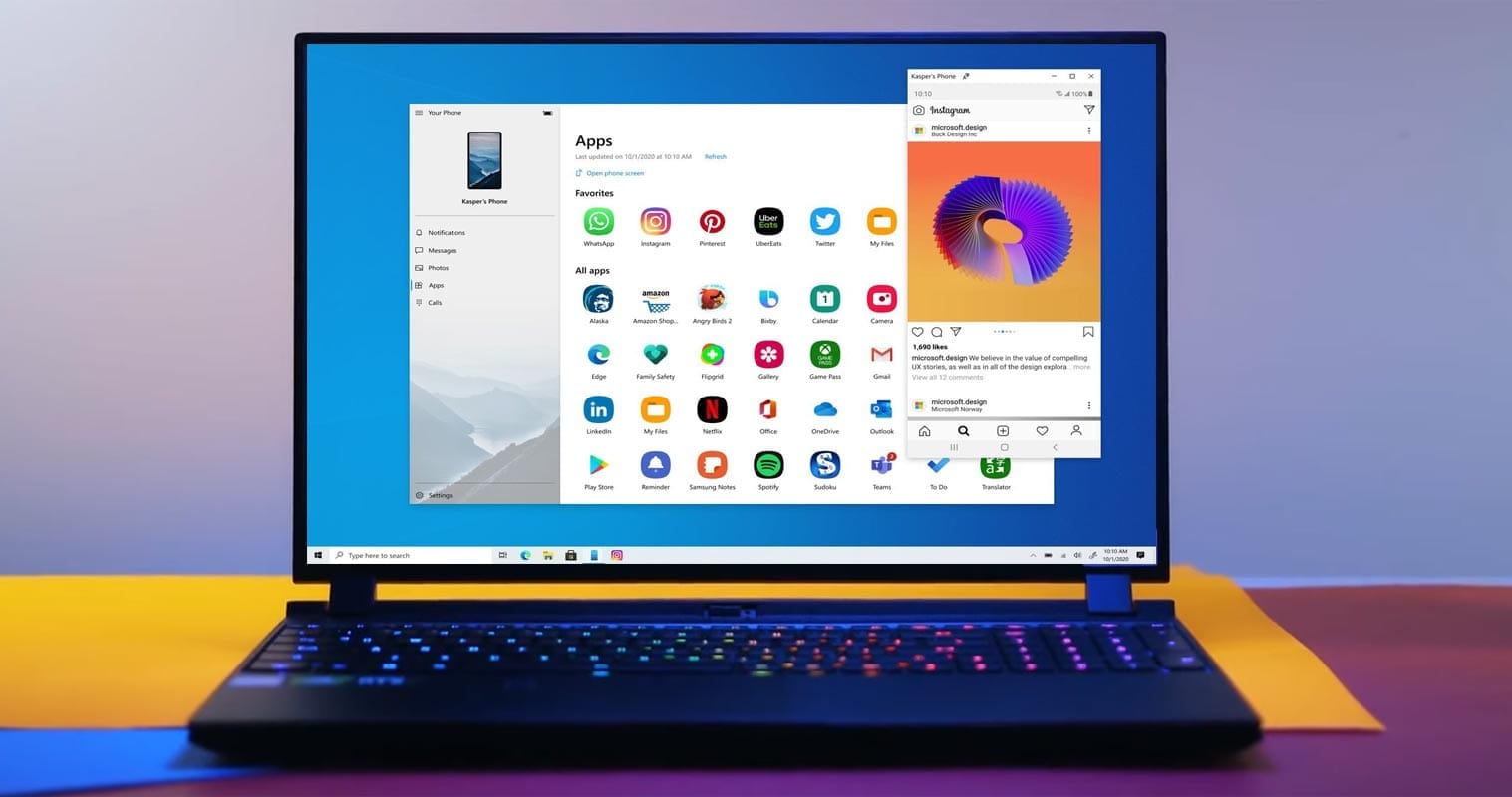
With the recent release of Apple Macs and MacBooks powered by M1 that are capable of running iOS apps, it seems as if we will soon see something similar happen on the PC side of the fence. Microsoft’s “Project Latte” could see Android apps running on Windows, according to Windows Central.
So some of your reading would probably convince you that you can do this already. Yes, thanks to the Connect to Windows feature with the Your Phone app available on some Samsung Galaxy hardware, you can sort of do it. This execution is not always the most effective, with disconnections and problems that mean that the experience can be a little temperamental.
With very little extra work needed, Project Latte will effectively allow developers to port their Android apps to Windows 10. Plus, for developers looking to expand their installation base, this might also open up an expanded marketplace.
The use of the Windows Subsystem for Linux plus an added Android subsystem would require Android apps on Windows so that apps may actually run. Unfortunately, Project Latte is unlikely to support applications that require Google Play Services to run, if this comes to fruition. This limits the pool of applications that will be available immediately, at least before developers eliminate their dependency on Play Services to run.
Android apps are now running Chrome OS, although it took a long time to actually be introduced. So, with that in mind, it may take just as long for Android apps on Windows with Project Latte. Throw in the added space for problems and the implementation of Your Phone and Connection to Windows sounds a lot more appealing.
This also isn’t the first time that Microsoft has tried to bring Android apps to Windows, as the failed Astoria project is over 5-years-old at this stage. We’re not holding our breath for Project Latte, but according to Windows Central, a touted launch timeframe is “fall 2021” alongside the Windows 10 release around that period.
The bigger question is would you even want to run standalone Android apps on your Windows PC? Let us know down in the comments section below.
Is Monday, everyone. Today we have more than a few noteworthy titles worth to mention, and we’d like to highlight the these, such as the current discount on Romancing SaGa 2, a quality RPG that usually costs twice as much. Also Botanicula is on sale, an enjoyable adventure game from Amanita Design, and last up is 911 Operator, an enjoyable simulation game that also has a sequel on sale today. As always, I’ve highlighted all of the interesting titles in bold green text in order to make discovery easier.
It’s the end of the week, and so I have some awesome sales to share with everyone. Teslagrad, a fantastic platformer that offers Metroidvania mechanics. Last but not least is Lock’s Quest, an enjoyable Nintendo DS game that was remastered and ported to Android. As always, I’ve highlighted all of the interesting titles in bold green text in order to make discovery easier. So without further ado, here are 19 temporarily free and 27 on-sale apps and games for the end of the week.
The majority of Black Friday and Cyber Monday sales are over, but luckily there are still a few developers out there willing to list their apps and games at a discount.
First up is Square Enix’s SaGa: Scarlet Grace: Ambitions, a solid RPG remaster that’s typically $30. Next, we have Icewind Dale: Enhanced Edition, a classic CRPG easily worth the asking price when listed for half off. Last up is the entire WitchSpring RPG series, an enjoyable mobile long-running RPG that’s well-reviewed for a reason.
So without further talk, here are temporarily free and on-sale apps and games for the beginning of the week.
Welcome to Wednesday, everyone. Now that Black Friday and Cyber Monday are over, it would appear things are getting back to normal, and so today’s list is on the smaller side, though I still have a few noteworthy titles to share with everyone. First up is Planescape: Torment: Enhanced Edition, a quality CRPG that’s often on sale but is still a worthwhile pickup if you’ve never played. Next is Prune, a minimal puzzler that’s also very relaxing, and last up is Love You to Bits, an enjoyable point and click adventure game that offers excellent 2D graphics. As always, I’ve highlighted all of the interesting titles in bold green text in order to make discovery easier. So without further ado, here are 31 temporarily free and 34 on-sale apps and games for the middle of the week.
In the previous post, we discussed how by following some tips & tricks, you can boost the battery of your Android smartphone.
There are so many reasons why the performance of an Android smartphone would slow down. For instance, Android is too old, with low RAM & ROM, full storage, etc. Today, to get the best output from an Android phone, we’ll look at every problem and try to solve all of them. So, as you might have guessed, following are some smartphone tips to instantly enhance your Android smarthphone performance.
Uninstall unused apps
This is one of the reasons why it’s very sluggish on your Android. In general people install lots of Android applications even though they are not using them on their smartphone. Not only does having so many apps require room, but it also slows down performance. Just go to your smartphone settings then manage apps and uninstall those apps that you’re not using currently.
Your Android also has certain device bloatware that you can not easily uninstall. However to delete these types of software, I have made a separate post, you can read that from here, How to Uninstall Device Bloatware from Android Phones.
Keep some storage free
If your smartphone has a large storage capacity, the chances are it will not lag too much. This is because there will be lots of free spaces in memory to load apps resources. Whereas, there’ll no space to load the resources if your phone has low storage capacity. That’s the main reason for slowing down a smartphone performance. Always make sure that your smartphone has 3GB to 4GB memory free in ROM and slightly less in RAM.
To free your storage, you can delete the junk files and unnecessary files including useless WhatsApp photos, videos, thumbnails, etc.
Update your OS
With every Android update, smartphones still get better. New functionality, bug fixes, optimized performance and other enhancements are included in the update. So to get security updates and overall improved system performance, always keep your system updated.
An update, however, can often contain a massive bug, but it seldom occurs. You will collect reviews from users about the new update and then decide whether or not to install it.
Factory reset
After a long smartphone usage, it looses the performance overtime. Also, whenever smartphone software becomes too old, it loses the smoothness and performance as it was in the brand new smartphone. Which requires to perform a factory reset to fix some errors and clear all the smartphone logs from the memory. Well! there are many ways to reset an Android phone but you can reset your phone Settings > Backup & restore > Reset.
Do NOT INSTALL speed booster apps
From the play store, you can get tons of speed booster apps which promise to increase the performance of Android within a single tap. Oh, NO! Don’t install those kinds of software. Instead as a struggling launch app, that will make your phone much more laggy. They have clear frequent cache memory for multi-tasking, which is fine. In a nutshell, do not use boosters for speed.
Try new launcher
Some issues cause the output of the smartphone to slow down after using the default Android launcher for a long time. Well! Well! Oh! You’ve got too many launchers at the play store there. The best launcher, in my opinion, is Nova. See if your Android performance improves after upgrading to a new launcher, then follow other tips to stick with it.
Clear apps data or cache
An app increases its size when you start using it. And, sometimes size grows massive large to 1GB or more. Cache data are vital to load apps faster but creates problems when it stores than usual data that are no longer in use. And, it’s our responsibility to clear cache memory to free the useless filled storage. It makes smartphone fast as light. To clear cache of Android apps at once, go to Settings then tap Storage, choose Cache and delete them. Another way to do this, go to manage apps from settings and choose apps and clear data & cache one by one.
Increase animation speed
Increasing animation speed doesn’t directly increase the smartphone performance, however, it gives a feeling of fast performance. You can adjust the animation speed from Android developer settings. To get developer options, Go to Settings > About > Build number > tap 7 times.
Now, open developer settings and find these three options and set their value to 0.5 or turn it off completely.
As expected, there are a boatload of apps and game sales available today, primarily premium apps/games, and yes, there are a bunch of noteworthy titles in the list. So without further ado, here are 29 temporarily free and a whopping 206 on-sale apps and games for Black Friday 2020.
This week started off strong, though things have settled down a bit. Thankfully I still have a few standouts to share with everyone, including a couple of solid board game adaptations from Marmalade Game Studio, such as Battleship and Clue. I also have an unlock app for Sleep as Android, a well-reviewed alarm clock that sports a sleep cycle tracker. In order to make discover easier, I’ve highlighted all of the interesting titles in green bolded text. So without further ado, here are 30 temporarily free and 24 on-sale apps and games for the middle of the week.
Don’t miss out on the sales for Reigns, The Quest, and Danganronpa
After a holiday weekend, it would appear we are starting off this week with a bang. Not only are three separate Reigns titles on sale today, but you can also pick up both Danganronpa mystery games at a drastic discount. There’s also a sale on The Quest, a fantastic RPG that offers a plethora of expansions. As always, I’ve highlighted all of the interesting titles in bold to make discovery easier. So without further ado, here are 19 temporarily free and 57 on-sale apps and games for the beginning of the week.
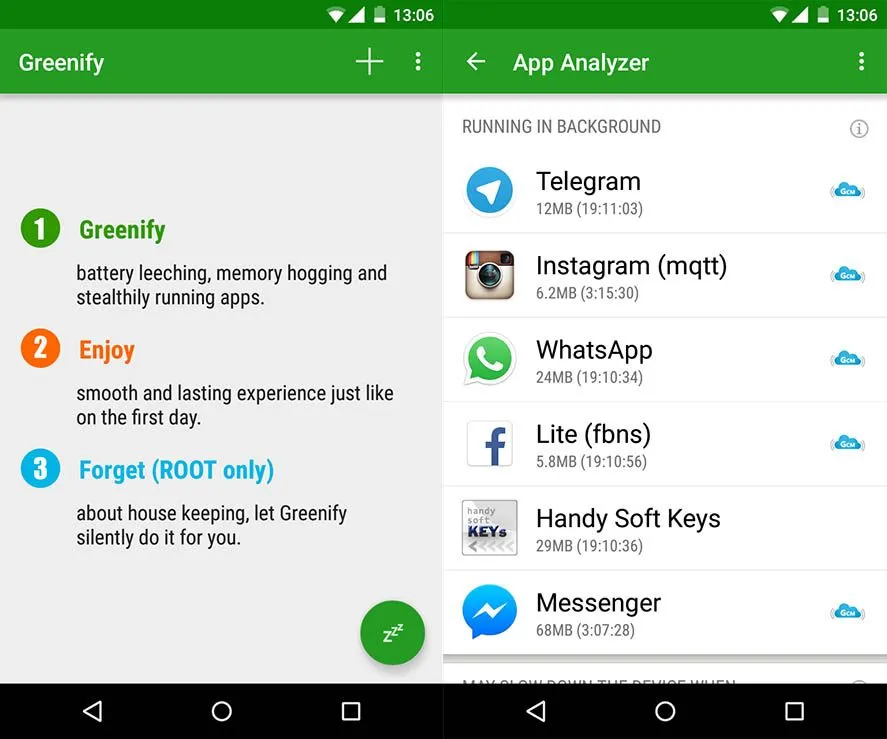
Greenify – putting battery hogging, always-on apps in hibernation
Remember how fast your Android device was, fresh out of the store when you first turned it on? Each phone or tablet gets bogged down with apps and user data over time, not unlike a PC, turning increasingly sluggish. There are ways to get around that, luckily. For instance, Greenify is an app designed to customize your Android device to function as smoothly as it originally did.
This does not accomplish this by removing stale data, but by helping you to recognise apps that misbehave, sustain their operation, and consume battery life when you do not use them. It puts certain apps in hibernation mode upon discovery, which prevents them from bogging down the computer and draining its battery. Well, it sounds neat, no?
But when they are off the grid, what happens to those apps? Well, when you need them, or other applications call upon them, you can launch them again. When the foreground is going, their full functionality is maintained-it ‘s just not active. Greenify doesn’t “freeze” programs and it’s not a killer of tasks.
Greenify ‘s Software Analyzer only displays applications that have a POTENTIAL effect on battery or system output usage. Only those you occasionally use are recommended to hibernate, along with the apps you are sure to have a detrimental effect. It’s best to contact the Battery Manager of your Android phone, or your favorite 3rd party battery status app, for that.
Greenify does not support devices running Android 2.x, but something above Android 4.x is gaming! The software is free, but it needs a computer with roots.
Greenify is a well-known Android app that detects and suspends background programs that use excessive amounts of resources in order to enhance device performance and battery life. Greenify is a straightforward yet efficient method of extending battery life without the need for intricate setups, regardless of whether you’re using an older or more recent smartphone model. It automatically pauses apps when they’re not in use, avoiding needless background activity, as opposed to freezing or force-stopping them like some harsh task killers.
Anything suitable for users looking to optimize their Android experience, Greenify remains a trusted choice among power users and casual users alike.