Copying an SSD (solid-state drive) has become pretty common among folks who want to move all their data, operating system, and preferences to a new drive quickly. This post dives into why people clone SSDs and offers one best disk clone software for Windows users.
Why Clone an SSD?
Cloning an SSD brings several benefits compared to manual data transfer or OS reinstallation. It’s a time and effort saver, copying all data and settings from the source SSD to the target one. Whether you’re upgrading, replacing a faulty drive, or seeking more storage space, cloning streamlines the process while safeguarding data integrity. Specifically:
Helpful for booting your computer in case of accidents or from a secondary hard drive.
Upgrade to a new SSD for improved performance or increased storage capacity.
What’s the best SSD cloning software?
Since there’s no built-in cloning software offered by Windows, you need to select a well-functioning cloning tool. AOMEI Backupper, a software designed for Windows systems backup and clone, support OS like Windows 11/10/8.1/8/7/Vista/XP, stands out as a top choice for SSD cloning software. Some great features are presented as below:
Disk Clone: Easily clone entire hard drives, including all volumes. Whether you’re migrating from an HDD to a smaller SSD or upgrading to a larger SSD, this feature has you covered.
Partition Clone: Copy selected partitions, such as NTFS drives, with ease.
Intelligent Clone: By default, it only copies used sectors, making it efficient for cloning larger drives to smaller ones.
SSD Alignment: Improves performance and extends the lifespan of your destination SSD.
VSS Technology: Runs the cloning process in the background, allowing you to continue using your computer without interruption.
Sector by Sector Clone: This function enables you to clone all sectors, whether used or not, making an exact copy of the source disk. You can activate this feature if you need an identical replica of the source disk.
Compatibility: AOMEI Backupper Standard works seamlessly with all Crucial SSD models, such as Crucial MX100, Crucial MX200, Crucial MX500, Crucial BX500, M500 Series, and also supports other popular brands like WD SSD, Samsung SSD, and SanDisk SSD.
Apart from extraordinary cloning functions, this pretty tool offers full backup and recovery solutions, and enables users share data with its wonderful syncing options.
Stepwise guide on cloning SSD to another drive
Now I will show you how to create a step-by-step guide on cloning SSD to another drive like HDD or another SSD. Before you start, please make some preparations:
Ensure your old SSD and new drive are properly connected to your computer. If you have only one drive bay, use a USB-to-SATA adapter.
Make sure there’s enough space in the destination disk to store the data or the cloning process will fail.
Remember that the target disk will be overwritten during cloning, so back up any important files if needed.
Download and install the free SSD migration software.
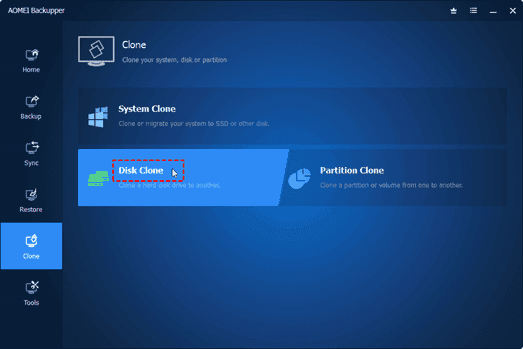
Step 1. Now launch AOMEI Backupper on your computer. Click on the Clone button and select Disk Clone in the next window.
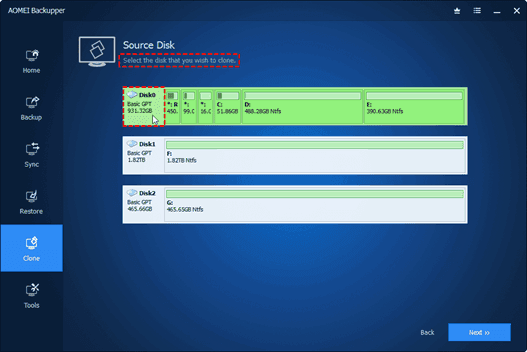
Step 2. Choose the original SSD as the source disk and then select the new drive as the destination disk.
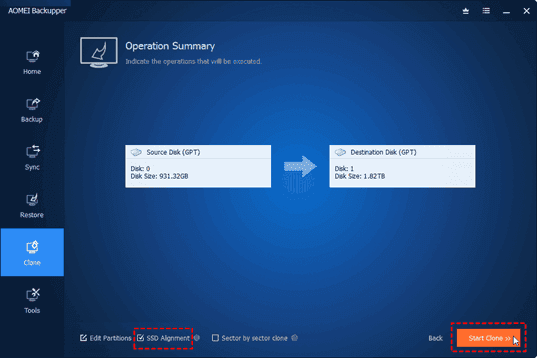
Step 3. Optimize the performance of the destination SSD by checking the SSD Alignment option if needed.
Step 4. Click on Start Clone to initiate the SSD cloning process.
Step 5. When the cloning process ended, click on the Finish icon to end the whole cloning process.
Note: If you want to clone every sector, including unused sectors, tick the Sector By Sector Clone option. Additionally, if you’re upgrading to a larger SSD, you can use the Edit Partitions option to avoid unallocated space after cloning.
Conclusion
In conclusion, cloning an SSD provides a convenient way to transfer data, operating systems, and settings to a new drive, saving time and effort compared to manual reinstallation. Before starting the cloning process, ensure both the source and target SSDs are connected, verify sufficient disk space, and choose reliable cloning software.
Among the available options, AOMEI Backupper stands out as the best cloning software due to its user-friendly interface, advanced cloning options, data integrity and security measures, and additional backup features.Now you can try this sofwtare yourself!
Are you interested in protecting your computer data by creating an online computer backup? Opting for an online backup solution ensures that your backed-up data is securely stored in the provider’s data center, offering protection against local accidents and disasters. Additionally, once you’ve made online backup for your computer data, you’ll have the freedom to access, download, and modify your data from any device.
What Makes Online Computer Backup the Preferred Choice?
Many users, like yourself, are increasingly opting for PC online backup. Let’s delve into the advantages of this backup solution:
Local data loss prevention: Local accidents such as system crashes, virus attacks, natural disasters, and equipment failures can result in data loss. However, creating an online computer backup ensures the safety of your data on the cloud.
Cost-effectiveness: Unlike traditional backup methods, online computer backup services often offer free cloud storage. If you require additional backup space, you can easily upgrade your cloud storage service according to your needs.
Simple data recovery: Online computer backup services maintain multiple versions of your backed-up data, enabling you to restore it to any previous version effortlessly.
Streamlined backup tasks: Online computer backup typically offers advanced features and settings to simplify and optimize your backup process.
Discover the Best Online Computer Backup Service: CBackup
Are you faced with the dilemma of selecting a reliable online computer backup service for your computer data? With numerous options available in the market, comparing different aspects can be time-consuming. Do not worry, as we introduce you to the ultimate online backup service: CBackup.
CBackup is from a professional company specializing in global data security for many years. CBackup employs OAuth to effectively protect your account and login information. Furthermore, the utilization of 256-bit AES Encryption guarantees the safety of your important computer data during upload and transfer tasks.
Regardless of the operating system you use, you can access CBackup from its official web page. If you’re using a Windows operating system like Windows 11, 10, 8.1, 8, 7, or XP, you can download and install the CBackup desktop client directly on your computer, facilitating the creation of an online computer backup.
With CBackup, you can create backup tasks for your entire computer, or select certain files and folders from computer to back up.
CBackup offers a wide array of free backup and sync features. Here’s a brief overview of some of them that can help safeguard your computer data:
Backup PC to public cloud: The backup feature lies at the core of CBackup. You can easily back up your computer data to many common cloud drives such as Google Drive, OneDrive, and Dropbox.
Backup PC to CBackup Cloud: In addition to public cloud drives, CBackup also provides the option to use CBackup Cloud. Upon signing up for a new account, you receive 10GB of free cloud storage in CBackup Cloud.
Combine cloud storage: A standout feature of CBackup, it allows you to merge multiple cloud drive accounts into a single combined cloud, granting you unlimited cloud backup space. You can select accounts from the same platform or different cloud drives.
Sync PC to public cloud: CBackup enables you to sync your PC data with public cloud drives, offering this feature for free.
Cloud to cloud backup or sync: Aside from transferring data from local storage to the cloud, CBackup facilitates seamless data transfer between different cloud drive accounts using the cloud to cloud backup or cloud to cloud transfer feature.
Step-by-Step Tutorial: Creating an Online Computer Backup
If you’re eager to utilize the CBackup desktop application for creating an online computer backup, refer to the simple tutorial provided below:
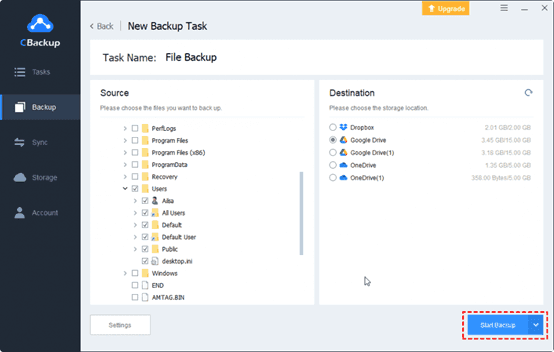
Start by downloading and installing the CBackup desktop app from the official website. Sign up for a new account and open the CBackup desktop application to log in.
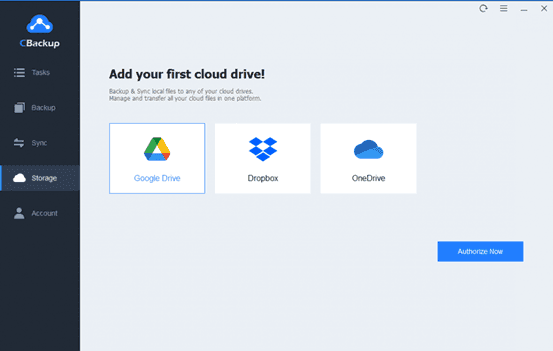
1. On the left-hand side, click on the Storage tab, choose a public cloud, and click “Authorize Now” to add it.
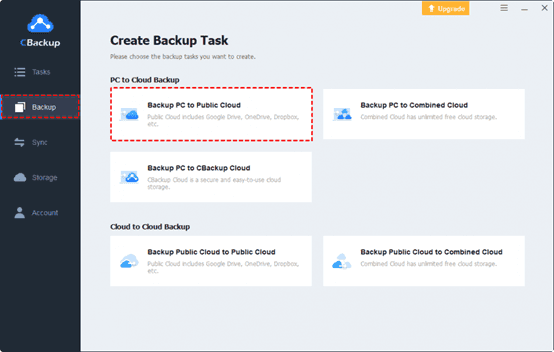
2. Press Backup and select “Backup PC to Public Cloud” in turn.
3. Choose any data from your computer or the entire computer as the backup source. Then, select the cloud drive account you have added to CBackup as the backup destination.
Finally, click the “Start Backup” button to swiftly back up your PC data to the online cloud.
In Conclusion
That concludes our discussion on the best backup software for computers, along with a step-by-step guideline. With CBackup, you can explore a range of additional free features to enhance the convenience of your online computer backup.
In the realm of presentations, PowerPoint reigns supreme as a versatile tool for conveying ideas and information. However, the dread of losing unsaved work can strike fear into the hearts of even the most seasoned presenters. But fear not! There are effective methods to recover unsaved PowerPoint files and rescue your hard work. Let’s dive into the depths of this digital dilemma and emerge victorious with our presentations intact.
Understanding the Importance of Unsaved PowerPoint Recovery
Before we delve into solutions, let’s grasp the significance of recovering unsaved PowerPoint files. Imagine pouring hours of creativity and effort into crafting a compelling presentation, only to have it vanish in the blink of an eye due to a technical glitch or accidental closure. The frustration is palpable, but with the right knowledge and tools, you can reclaim your lost masterpiece and avoid future mishaps.
The Perils of Unsaved Work
Accidents happen, and in the realm of technology, they can be particularly unforgiving. Here are some common scenarios where unsaved PowerPoint files may be lost:
1.Unexpected Shutdowns: Power outages, system crashes, or software glitches can abruptly terminate your PowerPoint session, leaving your work unsaved.
2.Human Error: Accidentally closing PowerPoint without saving changes or neglecting to save periodically can result in lost progress.
3.Software Malfunctions: Bugs or compatibility issues within PowerPoint or your operating system may lead to data loss.
4.Hardware Failures: Issues with your computer’s hardware, such as a failing hard drive, can corrupt or lose unsaved files.
5.Interruptions: Distractions or interruptions while working on your presentation may cause you to forget to save your progress.
Effective Solutions for Recovering Unsaved PowerPoint Files
Now that we understand the risks, let’s explore five effective solutions for recovering unsaved PowerPoint files:
Solution 1: Utilize AutoRecover Feature
Most versions of PowerPoint come equipped with an AutoRecover feature that periodically saves your work in progress. By accessing the AutoRecover folder, you can retrieve unsaved files and resume your presentation where you left off.
Solution 2: Check Temporary Files
When PowerPoint crashes or closes unexpectedly, it often creates temporary files as backups. These temporary files may contain recent changes to your presentation and can be located and recovered from your computer’s temporary files directory.
Solution 3: Leverage File Recovery Software
Specialized file recovery software offers advanced capabilities for retrieving unsaved or deleted files. These tools scan your computer’s storage devices for traces of lost data, including unsaved PowerPoint files, and can often recover them successfully.
Solution 4: Explore Previous Versions
If you’re using a recent version of Windows, you can take advantage of the Previous Versions feature, which allows you to restore earlier versions of files. This feature can be particularly useful for recovering unsaved changes to your PowerPoint presentation.
Solution 5: Try WinfrGUI for Graphical Recovery
WinfrGUI, a graphical user interface for Windows File Recovery, provides a convenient solution for recovering unsaved PowerPoint files. By leveraging WinfrGUI’s intuitive interface, users can restore unsaved presentations effortlessly. This tool fully invokes Windows File Recovery, utilizing its command-line capabilities within a user-friendly environment.
Additional Solutions to Consider
In addition to the aforementioned solutions, here are a few more strategies to explore:
Utilize the best hard drive recovery software: Specialized tools designed for solid-state drives (SSDs) can offer additional options for recovering unsaved PowerPoint files, especially if your presentation was stored on an SSD.
Investigate Cloud Backup Services: If you have cloud backup services enabled, such as OneDrive or Google Drive, check to see if a recent version of your presentation was automatically saved to the cloud.
Consult IT Support: If you’re unable to recover your unsaved PowerPoint files using the methods mentioned above, consider reaching out to your organization’s IT support team for assistance. They may have additional resources or expertise to help recover lost data.
Tips for Preventing Future Data Loss
Before concluding, let’s consider some essential tips for preventing future mishaps:
1.Save frequently: Make it a habit to save your PowerPoint presentation regularly to avoid losing unsaved changes.
2.Enable AutoRecover: Ensure that the AutoRecover feature is enabled in PowerPoint settings to automatically save your work at regular intervals.
3.Backup your files: Implement a robust backup strategy to protect your PowerPoint presentations from unexpected data loss events.
4.Stay vigilant: Remain attentive while working on your presentation to minimize the risk of accidental closures or interruptions.
5.Keep software updated: Regularly update PowerPoint and your operating system to ensure compatibility and mitigate software-related issues.
Conclusion
In conclusion, the loss of unsaved PowerPoint files can be a source of frustration and anxiety, but with the right knowledge and tools, it’s entirely possible to recover your work and avoid future mishaps. By leveraging features like AutoRecover, exploring file recovery software, and staying vigilant while working on your presentations, you can safeguard your hard work and ensure that your presentations shine brightly when it matters most.
Let us start this new week off on Droid Tools with yet another round of free iOS and Android apps. See our selection of offers for paid applications and games that are currently available for free download. This is only possible if you move quickly because they are limited-time offers.
Tip: If you come across an app that you’d like to have but don’t need right now, download and install it first. It would be considered as “bought” and it will be available in your app library forever—even if you uninstall it from your smartphone right after.
Android apps and games that are free for a limited time
Android apps for productivity and lifestyle
AppLock Pro ($2.49): Secure your handset with another layer of security which prevents prying eyes from your phone’s apps and content!
Bubble Level Pro ($2.99): This is the ideal app if you do a lot of woodworking or other kinds of home improvement projects, where you need to make sure a surface is particularly level.
Sound Meter & Voice Detector ($2.99): Ever wondered how much sound is in your car or room? Measure it with this app!
Free Android games
Cooking Quest VIP ($0.99): A food truck simulation game that will see you balance your penchant for great food with business decisions!
Everybody’s RPG ($0.49): An idle RPG that is engrossing to play without requiring too much commitment.
ExtremeJobsKnight’sManager ($0.99): A tried-and-true formula that lets you train and manage a warrior to be the best in the business.
EHW Premium Stick & Fight ($0.49): A real-time strategy game that brings together elements of RPGs and side-scrollers.
On Tour Board Game ($3.99): You head a band who is on tour and want to make the most of your road trip adventures!
iOS apps that are free for a short time
iOS apps for productivity and lifestyle
Calcvier – Keyboard Calculator ($2.99): This interesting app transforms your keyboard into a calculator, letting you reply to messages while you’re doing calculations!
ToPack: Trip Packing Checklist ($2.99): Ever gone on a holiday only to realize you forgot to pack something important? This app helps prevent such tragedies from happening.
Safety Note+ Pro ($3.99): Want to keep your private thoughts protected away from the prying eyes of the world? This app gets the job done.
PDFs Split & Merge ($8.99): Do you have two different segments in various PDFs that you want to merge into a single document? This app lets you do so.
Daygram ($0.99): A penny for your thoughts? This app lets you jot down your private musings and keeps it safe and secure through various protective elements.
Free games for the iPhone and iPad
Neo Monsters ($0.99): Collect monsters, train them to be the very best version of themselves, and pit them against other trainers!
Dark Tower ($1.99): With so many floors to explore, you will have a fun time getting rid of different monsters in this classic-style logic RPG.
Wind Wings ($1.99): Take to the skies and shoot down as many enemy aircraft as possible, gaining experience along the way to upgrade your ship.
Fit Beats ($1.99): Match the different shapes while listening to electronic dance music in a strangely addictive game.
Cyber Protocol ($1.99): Do you have what it takes to solve all 100 puzzles of this hardcore arcade puzzle game?
We advise you to review the app’s details in the Play Store or App Store before downloading any of the listed apps. This is significant as a few of these free apps can offer unique features or drawbacks of their own.
Some apps gather and share your personal data in an ingenious way to make money. It is best to only allow permissions that are necessary for the app to operate in order to safeguard your personal information. An alarm clock app, for instance, does not require access to your contacts or camera. In a similar vein, a flashlight app does not require location awareness.
We hope these recommendations will help you to safely enjoy free app downloads on Android and iOS devices.
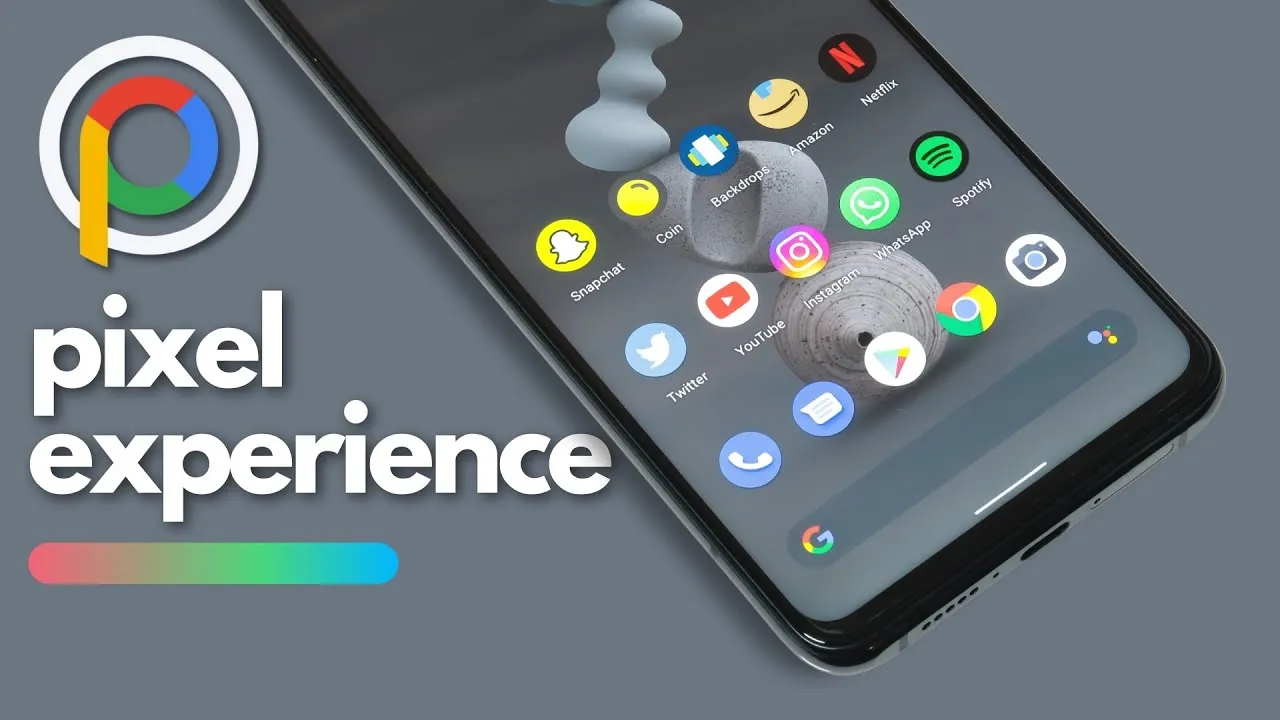
What happens if you like the Google Pixel phone’s software but not the hardware? Using a modified Android ROM to give other OEM phones the Pixel experience is the best method to get around this problem.
Precisely what the Pixel Experience ROM accomplished. Regretfully, however, the project’s lead developer declared today that he is ending the work. He clarified in a short blog post that while he will not be making any further builds, prior versions of the ROM will still be accessible.
José Henrique wrote in the post, “I share crucial information with you today with a feeling of thankfulness.” “After giving it some thought, I decided to finish developing Pixel Experience.
It is interesting that Henrique chose not to directly address why he chose to end things. It is probable he does not have the time because he is too busy with other initiatives. Another possibility is that he is not as excited about the idea as he once was. It is odd that he does not explain the sudden decision—if only partially.
In any case, it is feasible that a different developer will take up the project or start a new one with comparable objectives. Although the community for custom ROMs has dwindled over the last ten years, people who want to flash alternate builds on their Android smartphones will always exist.
We announced a few weeks ago that Woot is offering a massive $510 discount on the amazing Pixel 7 Pro, which comes with 512GB of storage capacity. Unfortunately, the deal ended quickly, leaving many Pixel lovers devastated that they were unable to take advantage of significant discounts on this incredible phone.
But it seems Lady Luck saw all those tears since this amazing deal is up for grabs again! Yes, indeed! Yes, you read it correctly! Once again, Google’s former flagship smartphone, the 512GB model, is 46% less expensive at just $589.99, thanks to a crazy $509 discount. That so, we advise you to move quickly because this is another one-time offer. The significant price reduction may cause the phone to sell out rapidly. Thus, move quickly! Simply click the below deal button to start saving a significant amount of money on this premium phone!
Google Pixel 7 Pro 256GB: Save $371!
Alternatively, you can snag the 256GB model on Amazon, where this bad boy is discounted by $371.
Even while the Pixel 7 Pro is not Google’s newest phone anymore, its AI-powered Tensor G2 chipset still performs admirably and can easily tackle demanding tasks. Additionally, because it is a Pixel phone, this bad boy’s 10.8MP selfie camera and 50MP primary camera produce amazing images. The 5000 mAh battery on board guarantees you will have enough juice for the day, and it can also shoot videos in 4K at 60 frames per second.
All things considered, the Pixel 7 Pro is a really feature-rich phone. It has excellent performance, fantastic cameras that will make you appear stunning in pictures, and a long-lasting battery. Furthermore, it is simply incredible that the 512GB variant is currently available for the cost of a mid-ranger.
You no longer need a bulky fax machine or a dedicated phone line to send and receive faxes. Free faxing apps have emerged as convenient solutions, allowing you to handle your faxing needs right from your smartphone or computer. In this article, we’ll explore some of the best free faxing apps available, their features, and how they can benefit you.
The Rise of Free Faxing Apps
Gone are the days when faxing required cumbersome machines and dedicated phone lines. Today, free faxing apps have revolutionized the way we handle fax communications. These apps leverage the power of the internet to transmit documents securely and efficiently, eliminating the need for traditional fax machines.
Key Features to Look For
When choosing a free faxing app, it’s essential to consider its features to ensure it meets your specific needs. Here are some key features to look for:
Ease of Use: The app should have an intuitive interface that makes sending and receiving faxes a breeze.
Document Compatibility: Ensure the app supports a wide range of document formats, including PDF, Word, and image files.
Security: Look for features like encryption and password protection to keep your faxed documents secure.
Reliability: Opt for apps with a reputation for reliability and minimal downtime.
Integration: If you need to integrate faxing with other tools or services, choose an app that offers seamless integration options.
Best Free Faxing Apps
Now let’s dive into some of the best free faxing apps available:
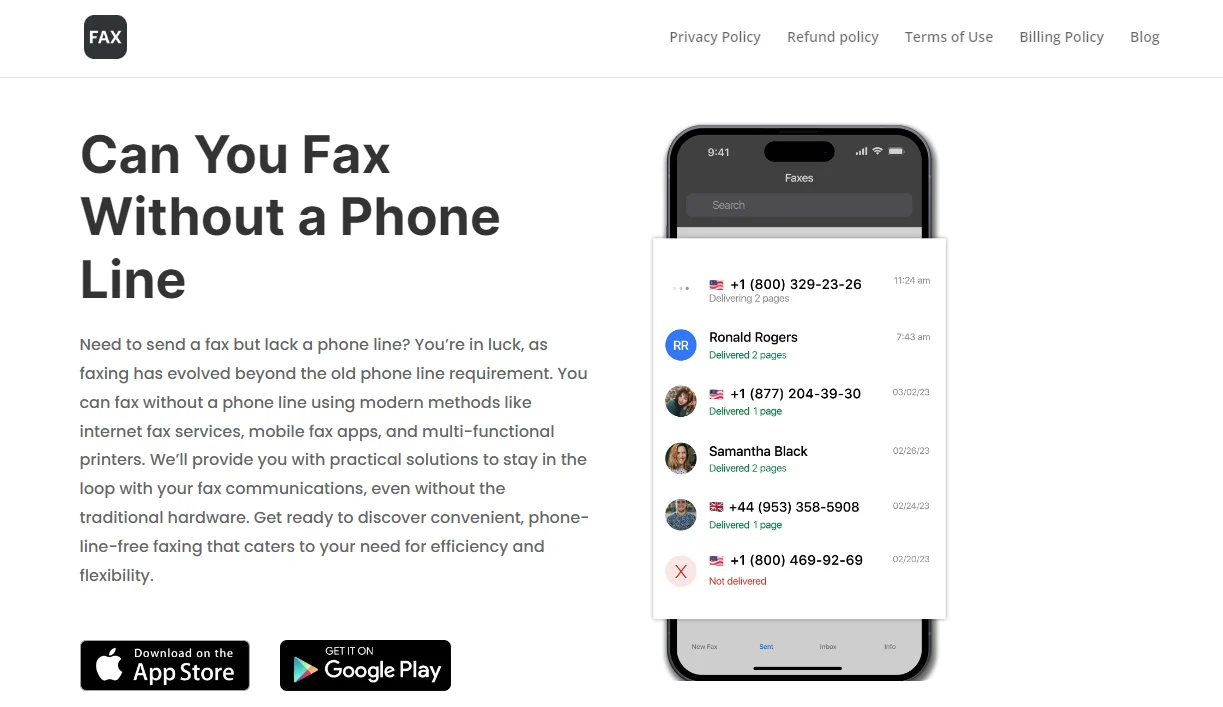
Fax App: offers a user-friendly interface and allows you to send faxes to more than 180 countries. It supports various document formats and provides advanced features like electronic signatures and cloud storage integration.
eFax: eFax is another popular choice, offering free faxing with limited features. It supports both mobile and desktop platforms and allows you to send faxes via email or the eFax app.
MyFax: MyFax offers a free plan with limited features, including the ability to send up to 10 pages per month. It supports multiple file formats and provides email-to-fax and fax-to-email capabilities.
FaxZero: FaxZero allows you to send faxes for free with some limitations, such as a maximum of three pages per fax and a cover page with advertisements. It’s a simple and straightforward option for occasional faxing needs.
GotFreeFax: GotFreeFax offers free faxing with no ads on the cover page, making it a suitable choice for those who prefer a cleaner faxing experience. It supports various file formats and allows you to send faxes to multiple recipients simultaneously.
Benefits of Using Free Faxing Apps
Using free faxing apps offers several benefits:
Cost Savings: By eliminating the need for a traditional fax machine and phone line, free faxing apps can save you money on equipment and maintenance costs.
Convenience: With free faxing apps, you can send and receive faxes anytime, anywhere, as long as you have an internet connection.
Environmental Friendliness: Going digital with faxing reduces paper waste, contributing to a more sustainable environment.
Improved Efficiency: Free faxing apps streamline the faxing process, allowing you to send and receive documents more quickly and efficiently.
Enhanced Security: Many free faxing apps offer encryption and other security features to protect your sensitive documents from unauthorized access.
Conclusion
Free faxing apps have made fax communications more accessible and convenient than ever before. Whether you’re a business professional or an individual user, these apps offer a cost-effective and efficient way to handle your faxing needs. By choosing the right app with the features that matter most to you, you can streamline your faxing processes and focus on what matters most – getting work done.
So why wait? Explore the options mentioned above and start faxing for free today!
When something can be obtained for free, why spend money on it? Both iOS and Android have a wide selection of apps. Better apps typically cost money, but occasionally creators could be so generous as to give away their pricey programs for free.
It is difficult to predict when these freebies may start to cost money again, though. Therefore, we highly advise downloading any app you believe you would like before it reverts to a paid download.
You can download and install an app before removing it if you think you might need it in the future but do not need it right now. That app will be permanently added to your app collection and regarded as “bought.”
Android apps that are free for a short time
Android apps for productivity and lifestyle
150X Duplicate Remover Pro($0.49):I know you have tons of storage on your phone, but don’t you wish you can remove duplicates of files to maximize space?
Dark Screen Filter($0.99):Is your phone by your bedside all the time when you sleep? Perhaps this app can help reduce the amount of light from incoming notifications so you can sleep better.
Resume Builder($4.99): Do you need help building your resume to secure the next dream job? Let this app help!
Unit Converter Pro($0.99): Do you deal with a lot of unit conversions in your line of work or studies? Why not let an app do the job for you?
Free Android games
Dungeon Corp S Idle($1.49):A fun game with cute graphics in an office setting where you farm for ever more powerful items to defeat crazy monsters!
Bulbs($0.99):Test your memory in this classic Simon game and boost your brain power.
Word Search Game Offline($1.99): Do you want to keep your brain active with this word search game? Play it offline wherever you are.
Infinity Highway($0.99):Fast cars and exotic tracks, what is there not to like about this game!
Live or Die: Survival Pro($0.49):It boils down to you and your wits to survive in this post-apocalyptic landscape that is full of zombies.
iOS apps that are free for a short time
iOS apps for productivity and lifestyle
1 Minute Fitness($0.99):Get fit no matter where you are with this app!
Driving Theory by James May($5.99):Prepare yourself well with this app before you get behind the wheel for real.
Ad Block Multi($0.99):Block irritating ads for a better iPhone experience. There are 21 filter lists and counting!
BeeScan – PDF Scanner App($9.99):Transform your iPhone into a portable scanner, scanning documents into PDF on the fly.
Free games for the iPhone and iPad
Wild Wolf Simulator Games 3D($9.99):Live the life of a wild wolf in a pack and experience things from a whole new perspective.
Pop Math Cards($1.99):Think you’re a math whiz? Why not give this game a go and see how fast you can think on your feet!
Orbital Invaders: Space Shooter($0.99):Clearly inspired by the classic Asteroids game, this version boasts amazing graphics with fast-paced gameplay.
Eastern Market Murder($2.99):An augmented reality game that requires plenty of brain power and curiosity to fully enjoy the game.
SpellbookMaster($3.99):Locate Dungeons & Dragons and Pathfinder spells easily while reading up on their details. Guess this is more game-related than a game per se.
We advise you to check the app’s details on the Play Store or App Store before downloading any of the aforementioned apps. This is significant because a few of these free apps can offer special features or disadvantages of their own.
In today’s mobile-driven world, delivering outstanding app experiences is crucial for business success. However, meeting soaring customer expectations and ensuring high performance can be challenging. Imagine seamlessly connecting with users across multiple channels, providing personalized support that fosters loyalty and engagement.
The powerful combination of advanced CRM and omnichannel call center technologies offers a game-changing solution. By integrating these systems, businesses gain a comprehensive view of each customer’s journey, enabling anticipation of needs, proactive issue resolution, and tailored recommendations.
Automation and predictive analytics streamline routine tasks, freeing up teams to focus on complex inquiries while driving continuous improvement. This potent duo empowers businesses to revolutionize customer support strategies, ensuring every interaction is tailored to individual preferences and delivered through the preferred channel.
In this article, we’ll explore how embracing advanced CRM and omnichannel call center technologies can unlock new levels of mobile app performance and create exceptional experiences that cultivate long-lasting customer loyalty.
What is crm call center?
A CRM call center combines traditional call center functions with Customer Relationship Management (CRM) technology to offer a more personalized and efficient customer service experience. By integrating call center operations with detailed customer data, agents can access a wealth of information about a caller’s history, preferences, and previous interactions with the company in real-time. This enables them to provide tailored assistance, resolve issues more quickly, and improve overall customer satisfaction.
The Omnichannel Call Center Revolution
Traditional call centers have long been a cornerstone of customer service, but the rise of digital channels has necessitated a shift towards an omnichannel approach. Customers now expect seamless interactions across various platforms, including mobile apps, social media, live chat, and more.
This demand for a cohesive experience has propelled the adoption of omnichannel customer support software. It enables businesses to manage and optimize customer interactions across multiple touchpoints.
According to a study, 88% of customers believe that the experience a company provides is as important as its products or services. This statistic underscores the pivotal role of omnichannel call center optimization in boosting mobile app performance by ensuring exceptional customer experiences.
Key Strategies for Enhancing Call Center Performance
To capitalize on the transformative power of omnichannel call center software, businesses must adopt strategic approaches that align with evolving customer expectations. Here are some key strategies to consider:
Seamless Omnichannel Integration: Integrating omnichannel call center software is crucial for enabling agents to seamlessly switch between communication channels during customer interactions. This ensures a consistent and personalized experience, regardless of the platform used.
Agent Training and Development: Providing comprehensive training programs tailored for agents in an omnichannel environment is essential. This ensures that agents are equipped with the skills and knowledge necessary to navigate multiple channels and provide consistent, high-quality customer service.
Leveraging Key Performance Indicators (KPIs): Establishing and monitoring relevant KPIs, such as first-call resolution rates, average handle times, and customer satisfaction scores, can help measure and enhance the effectiveness of omnichannel support.
A/B Testing: Utilizing A/B testing methodologies can help refine omnichannel communication strategies and processes, enabling businesses to identify and implement the most effective approaches for their customer base.
Automation and Streamlining: Implementing automation within omnichannel call centers can reduce manual tasks and streamline customer interactions, improving efficiency and enabling agents to focus on more complex inquiries.
Advanced CRM and Omnichannel Technologies
Maintaining high customer satisfaction and engagement levels requires more than just traditional methods. The seamless integration of customer interactions across various platforms is essential for creating a cohesive user experience. CRM call center, is a pivotal solution that bridges the gap between customer expectations and service delivery. By leveraging advanced CRM and omnichannel technologies, businesses can effectively streamline communication, ensuring that every customer interaction is personalized, efficient, and consistent. This approach not only enhances call center performance but also significantly boosts mobile app success, setting a new standard in customer service excellence.
Here are some key solutions to consider:
CRM Call Center vs. Traditional Call Center
Feature
CRM Call Center
Traditional Call Center
Data Integration
Integrates with CRM for real-time customer data access
Limited or no integration with customer data
Personalization
High personalization based on customer history and preferences
Generic interactions with limited personalization
Efficiency
Higher efficiency with access to customer data
Efficiency may be compromised due to lack of customer insights
Customer Satisfaction
Enhanced due to personalized and informed support
May be lower due to generic support
Technology Use
Utilizes advanced CRM technologies
Primarily relies on traditional telephony systems
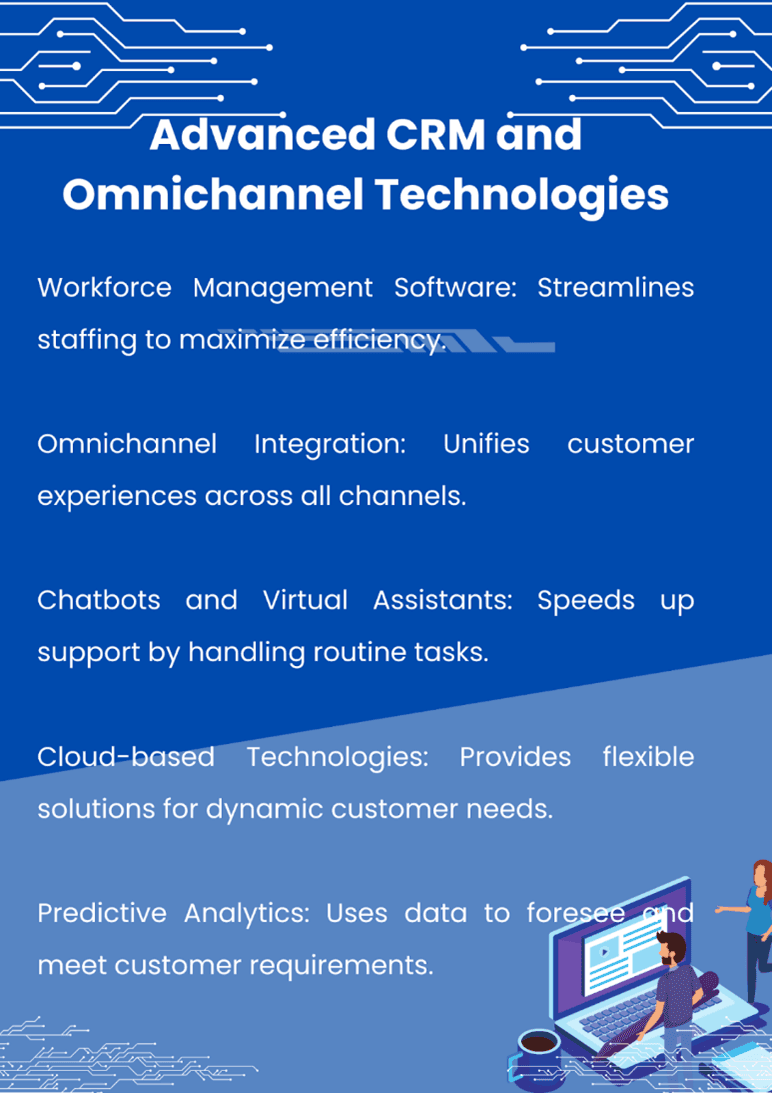
Workforce Management Software: Implementing workforce management software, alongside integrating clean-up software for Android devices, can significantly enhance operational efficiency within an omnichannel call center. This dual approach ensures not only optimal staffing and scheduling across all communication channels but also maximizes resource utilization by maintaining high-performance levels on Android platforms used by the staff.
By leveraging workforce management solutions, call centers can accurately forecast demand, allocate resources effectively, and adjust schedules in real-time to meet customer needs. Meanwhile, clean up software for Android helps in maintaining the devices used by the workforce, ensuring they run smoothly and reliably. This combination of tools supports a seamless customer service experience, reduces downtime, and promotes a more productive and satisfied workforce, ultimately contributing to the overall success of the call center operations.
Omnichannel Integration: Integrating omnichannel call center software with other systems, such as CRM platforms and mobile apps, is critical for providing a cohesive customer experience across all touchpoints.
Chatbots and Virtual Assistants: Enhancing efficiency with chatbots and virtual assistants within omnichannel platforms can help automate routine tasks and provide immediate support, reducing wait times and improving customer satisfaction.
Cloud-based Technologies: Embracing cloud-based technologies can offer scalable and cost-effective omnichannel call center operations, enabling businesses to rapidly adapt to changing customer demands and market conditions.
Predictive Analytics: Employing predictive analytics can help anticipate customer needs and optimize omnichannel support strategies, ensuring proactive engagement and personalized experiences.
The Impact on Mobile App Performance
The correlation between efficient omnichannel customer support and user satisfaction in mobile apps is undeniable. When customers can easily access support through their preferred channels and receive consistent, personalized experiences, their overall perception of the app is significantly enhanced.
Furthermore, efficient omnichannel support directly influences app retention rates and positive user feedback. According to a report, customers spend an average of 4.8 hours a day on their devices, frequently switching between apps. By meeting customers on their preferred platforms and providing seamless interactions, businesses can increase user engagement and loyalty, ultimately driving better app performance and success.
Optimizing Mobile App Performance with Advanced CRM
In today’s mobile-centric world, businesses must go beyond traditional customer support channels to deliver exceptional experiences. This is where integrating advanced CRM (Customer Relationship Management) systems with omnichannel call center software can significantly optimize mobile app performance.
CRM systems serve as a central repository for customer data, allowing businesses to gain valuable insights into customer preferences, behaviors, and interactions across multiple touchpoints, including mobile apps. By leveraging this comprehensive customer information, businesses can provide personalized and contextual support, enhancing user experiences and driving app engagement.
When integrated with omnichannel call center software, CRM systems enable agents to access a complete view of the customer’s journey, including their mobile app interactions, purchase history, and support tickets. This seamless data flow empowers agents to provide more informed and efficient support, reducing the need for customers to repeat information across different channels.
By seamlessly combining the power of advanced CRM systems with omnichannel call center software, businesses can unlock a wealth of opportunities to optimize mobile app performance. From providing personalized and contextual support to proactively addressing customer needs and automating routine tasks, this integration empowers businesses to deliver exceptional user experiences that drive app engagement, retention, and long-term success.
Wrapping Up
In the highly competitive mobile app market, optimizing performance and delivering exceptional customer experiences are paramount. By embracing the power of advanced CRM and omnichannel call center technologies, businesses can gain a significant competitive edge.
Through the strategic implementation of omnichannel customer support software, businesses can ensure seamless interactions across all platforms, improving customer satisfaction, app retention rates, and overall success. With the right solutions in place, companies can not only meet but exceed evolving customer expectations, positioning themselves as industry leaders in a rapidly evolving digital landscape.
So, take the leap and invest in omnichannel call center optimization. Empower your business with the tools and strategies necessary to deliver unparalleled mobile app performance and customer experiences that set you apart from the competition.
Elevate your mobile app’s success by partnering with a trusted omnichannel call center software provider. Request a consultation today and unlock the full potential of seamless customer interactions and optimized app performance.
FAQs:
What is CRM in customer service?
CRM (Customer Relationship Management) is a system that helps businesses manage interactions with customers. It stores customer data, tracks communication history, and provides tools to improve customer experience.
What is CRM full form?
CRM stands for Customer Relationship Management. It is a technology that helps businesses build strong relationships with their customers.
Are CRM and BPO the Same?
No, CRM and BPO (Business Process Outsourcing) are not the same. CRM is a technology tool, while BPO refers to outsourcing business processes to third-party service providers.
What Are the 3 Types of CRM?
The three main types of CRM are Operational CRM (sales, marketing, service), Analytical CRM (data analysis), and Collaborative CRM (interaction channels like social media).
We have made sure none of the apps on this list are scams or privacy traps, therefore you will not find any random apps here. This implies that some of them may have more in-app purchases and advertisements than usual.
You can download and install an app in advance if you decide it is something you would like to use later on but not now. It will be permanently added to your app collection and regarded as “bought.” After that, you can uninstall it immediately.
Android apps that are free for a short time
Android apps for productivity and lifestyle
Reminder Pro($3.49):Need a reminder app? This one gets the job done perfectly well.
Daily Calorie Balance Pro($0.99):Keep track of your calorie intake with this app by keying in every single thing that you eat.
RunGPS Trainer Pro Full($4.49): Do you like running? This app helps keep track of all your running efforts with metrics that can help you improve.
Android games
Jewels Premium Match 3 Puzzles($2.99):I guess you can call this a clone of Bejeweled, with some interesting game mechanics to switch things up.
Zombie Age 2 Premium Shooter($0.99):A side-scrolling shooter where you mow down zombie after zombie with an arsenal of weapons.
Grow Dungeon Hero VIP($1.99): Explore dungeons and get rid of all enemies you come across as you grow more powerful with gear upgrades and new abilities.
Tech Quiz Master($2.49):Do you think you are the ultimate tech geek? Let’s see how well you do in this game.
Secret Tower VIP($0.99):Go all out as your characters continue to grow from strength to strength as you defeat huge bosses and obtain powerful gear.
iOS apps that are free for a short time
iOS apps for productivity and lifestyle
VidEdit($0.99):No computer to edit your videos while you are on the move? Fret not, you can use this app to get the job done.
Metadata($0.79):Make image management easier on your phone where you can view image metadata for each photo at a glance.
BeeScan($9.99):Want to scan documents into the PDF format with your iPhone? This app does it pretty well.
Kintsugi($24.99):A mindful and journaling self-care app that helps you remain focused on what’s important in your life.
FILCA – SLR Film Camera($4.99):Get analog vibes for your photos and videos with this app where you can control your iPhone’s camera manually.
Free games for iPhone and iPad
My City: Jail House($3.99):A prison escape jail home game, where you are the prison warden and do your best to keep the law and order there.
Real Cricket ’24($8.99):Do you love the game of cricket? Find out just how good you are at managing your team with this game!
FurryFury: Smash & Roll($3.99):A unique brawler game that requires skills and tactics, and not just button mashing.
Dirt Trackin’ 2($3.99):Race online with numerous players in your rally car. Do you have what it takes?
Legacy 3 – The Hidden Relic($1.99):A puzzle adventure game where you need to solve different puzzles in order to advance from one room to another.
Were the free apps this week appealing to you? Have you noticed anything that catches your eye in the Apple App Store or Google Play Store? Please let us know if you have any recommendations for apps in the comments section.