Author: Robert Haba

  • Free and on-sale apps and games on Google Play Store

    Free and on-sale apps and games on Google Play Store

    Welcome to Friday, everyone. Things may be slow, but I still have a few highlights to share with everyone. Both Doom & Destiny and Doom & Destiny Advanced are currently available at a discount. And if RPGs don’t float your boat, perhaps GoBlox Premium will scratch your puzzle itch. As always, I’ve highlighted all of the interesting titles in bold green text in order to make discovery easier. So without further ado, here are 19 temporarily free and 22 on-sale apps and games for the end of the week.

    Free

    Apps

    1. QR and Barcode Scanner PRO $1.99 -> Free; Sale ends in 6 days
    2. Shortcut Manager – Pin shortcuts @ home screen $0.99 -> Free; Sale ends in 6 days
    3. Flashcard Baby (No Ads) $2.99 -> Free; Sale ends in 7 days

    Games

    1. Assassin Lord : Idle RPG (BUFF) $1.99 -> Free; Sale ends in 6 days
    2. Dungeon Corporation P : (An auto-farming RPG game) $1.99 -> Free; Sale ends in 6 days
    3. FASTAR VIP – Shooting Star Rhythm Game $0.99 -> Free; Sale ends in 6 days
    4. GoBlox: Premium $0.99 -> Free; Sale ends in 6 days
    5. Kamikazee Dice Score Card $0.99 -> Free; Sale ends in 6 days
    6. Knife Club: Premium $2.99 -> Free; Sale ends in 6 days
    7. Sniper Battle – Call of Commando Shooting Games 3D $1.99 -> Free; Sale ends in 6 days
    8. Stickman Legends: Shadow War Offline Fighting Game $0.99 -> Free; Sale ends in 6 days
    9. Survival Derby 3D – car racing & running game $0.99 -> Free; Sale ends in 6 days
    10. Burning Fortress 2 $1.00 -> Free; Sale ends in 7 days

    Icon packs & customization

    1. Coral $0.99 -> Free; Sale ends in 5 days
    2. Minka Dark – Icon Pack $0.99 -> Free; Sale ends in 6 days
    3. Pixel Net White – Icon Pack $0.99 -> Free; Sale ends in 6 days
    4. Xperia Theme – Fujiyama Night $1.99 -> Free; Sale ends in 6 days
    5. Video Gallery – HD Video Live Wallpapers $1.49 -> Free; Sale ends in 7 days
    6. Wallpapers Gallery – HD Wallpapers & Backgrounds $1.49 -> Free; Sale ends in 7 days

    Sale

    Apps

    1. MongoLime – MongoDB client $3.99 -> $2.49; Sale ends in 6 days
    2. Pocket Note Pro – a new type of notebook $3.99 -> $1.99; Sale ends in 6 days
    3. Pencil Sketch HD $4.49 -> $2.49; Sale ends in 7 days
    4. Aubade Audio Studio $4.49 -> $2.49; Sale ends in ?
    5. DriveMate Fuel $1.37 -> $0.99; Sale ends in ?

    Games

    1. BotSumo: Battle Arena 2-player $1.49 -> $0.99; Sale ends in 5 days
    2. Devils & Demons – Arena Wars Premium $2.99 -> $0.99; Sale ends in 5 days
    3. Farm Invasion USA – Premium $2.99 -> $0.99; Sale ends in 5 days
    4. Pandemia: Virus Outbreak $3.49 -> $0.99; Sale ends in 6 days
    5. Doom & Destiny $4.99 -> $0.99; Sale ends in 7 days
    6. Doom & Destiny Advanced $4.99 -> $0.99; Sale ends in 7 days
    7. Green Project $5.99 -> $3.84; Sale ends in 7 days

    Icon packs & customization

    1. Bliss – Icon Pack $1.49 -> $0.99; Sale ends in 6 days
    2. Dock 3D – Icon Pack $1.99 -> $0.99; Sale ends in 6 days
    3. Dock Circle 3D – Icon Pack $1.99 -> $0.99; Sale ends in 6 days
    4. Garis Light – Lines Icon Pack $1.99 -> $0.99; Sale ends in 6 days
    5. Sunlight – Icon Pack $2.49 -> $0.99; Sale ends in 6 days
    6. Alexis Pie Icon Pack: Clean and Minimalistic $1.99 -> $0.99; Sale ends in 7 days
    7. Color OS – Icon Pack $1.99 -> $0.99; Sale ends in 7 days
    8. Emui – Icon Pack $1.99 -> $0.99; Sale ends in 7 days
    9. Painting – Icon Pack $1.99 -> $0.99; Sale ends in 7 days
    10. Verticons Icon Pack $1.79 -> $0.99; Sale ends in 7 days
  • 21 temporarily free and many on-sale apps and games

    21 temporarily free and many on-sale apps and games

    Free

    Apps

    1. Color Wheel $1.99 -> Free; Sale ends in 8 hours
    2. Football Pro: Soccer Scores, Football News, Videos $1.49 -> Free; Sale ends in 4 days
    3. Relaxing Sleep Sounds PRO $0.99 -> Free; Sale ends in 4 days
    4. Simpan – Note various needs $3.99 -> Free; Sale ends in 5 days
    5. BitProject $0.99 -> Free; Sale ends in 6 days
    6. Bookmark Manager – Website favorites manager $0.99 -> Free; Sale ends in 7 days
    7. MultiPro: GoPro ProTune Bluetooth Remote $1.49 -> Free; Sale ends in 7 days
    8. Forecaster – visual, accurate weather for the week $2.49 -> Free; Sale ends in ?

    Games

    1. Memory Game – Official $0.99 -> Free; Sale ends in 5 days
    2. New Math Puzzles for Geniuses 2021 $0.99 -> Free; Sale ends in 5 days
    3. Defense Warrior Premium: Castle Battle Offline $0.99 -> Free; Sale ends in 6 days
    4. Grow Zombie VIP – Merge Zombies $0.99 -> Free; Sale ends in 6 days
    5. Heroes Defender Fantasy – Epic Tower Defense Game $0.99 -> Free; Sale ends in 6 days
    6. Superhero Fruit Premium: Robot Wars Future Battles $0.99 -> Free; Sale ends in 6 days
    7. Sword Warriors Premium: Heroes Fight – Epic Action $0.99 -> Free; Sale ends in 6 days
    8. Tap Legend Premium: Hero Fight Offline $0.99 -> Free; Sale ends in 6 days
    9. Even and Odd Premium $0.99 -> Free; Sale ends in 7 days
    10. One Line Deluxe VIP – one touch drawing puzzle $1.99 -> Free; Sale ends in 7 days
    11. Sakura girls Pro: Anime love novel $0.99 -> Free; Sale ends in 7 days
    12. Shape Puzzle (Ads Free) $0.99 -> Free; Sale ends in 7 days
    13. truTV Impractical Jokers Wheel of Doom $3.99 -> Free; Sale ends in ?

    Sale

    Apps

    1. Math Studio $3.99 -> $1.99; Sale ends in 3 days
    2. Melody Engineer $4.49 -> $2.49; Sale ends in 4 days
    3. Money Manager – Expense Tracker, Personal Finance $3.49 -> $2.39; Sale ends in 5 days
    4. YoWindow Weather – Unlimited $9.99 -> $5.99; Sale ends in 5 days
    5. Ba Financial Calculator plus $5.99 -> $2.99; Sale ends in 6 days
    6. Classic eReader – book reader $2.99 -> $1.99; Sale ends in 6 days
    7. EvoWallet – Money Tracker [Premium] $1.49 -> $0.99; Sale ends in 6 days
    8. Logo Maker Graphic Design & Logo Templates Pro $19.99 -> $13.99; Sale ends in 6 days
    9. Prometheus News Feeds $2.99 -> $1.99; Sale ends in 6 days
    10. Gym Coach | Gym Trainer workout for Beginners Pro -> $1.99;

    Games

    1. Imperial Settlers: Roll & Write $3.99 -> $1.99; Sale ends in 8 hours
    2. Neuroshima Convoy card game $4.99 -> $1.99; Sale ends in 8 hours
    3. Tides of Time $5.49 -> $0.99; Sale ends in 8 hours
    4. Tunn – the smallest game in the world $1.99 -> $0.99; Sale ends in 4 days
    5. 112 Operator $7.99 -> $3.99; Sale ends in 5 days
    6. 911 Operator $6.49 -> $2.99; Sale ends in 5 days
    7. A Street Cat’s Tale : support edition $2.49 -> $0.99; Sale ends in 5 days
    8. BE-A Walker $4.99 -> $2.49; Sale ends in 5 days
    9. Dodge Blast $1.99 -> $0.99; Sale ends in 5 days
    10. Radio Commander $6.49 -> $2.99; Sale ends in 5 days
    11. Shattered Plane: Turn-Based Strategy Game $4.99 -> $0.99; Sale ends in 5 days
    12. Baldur’s Gate: Enhanced Edition $9.99 -> $4.49; Sale ends in 6 days
    13. Baldur’s Gate II $9.99 -> $4.49; Sale ends in 6 days
    14. Civilization Path $1.49 -> $0.99; Sale ends in 6 days
    15. Despotism 3k $3.49 -> $1.49; Sale ends in 6 days
    16. PowBall Renaissance $1.99 -> $0.99; Sale ends in 6 days
    17. Warhammer Quest $3.99 -> $0.99; Sale ends in 6 days
    18. End Space $10.99 -> $5.99; Sale ends in 7 days
    19. Hot Guns $1.99 -> $0.99; Sale ends in 7 days
    20. Lemegeton Master Edition $9.99 -> $0.99; Sale ends in 7 days
    21. Mindcell $5.00 -> $0.99; Sale ends in 7 days
    22. Super64Pro (N64 Emulator) $3.99 -> $2.49; Sale ends in 7 days

    Icon packs & customization

    1. STOKiE PRO: HD Stock Wallpapers & Backgrounds $2.49 -> $0.99; Sale ends in 8 hours
    2. Hera Dark Icon Pack – Circle Shaped Dark Icons $1.99 -> $0.99; Sale ends in 4 days
    3. Vera Outline Icon Pack – outline icons $1.99 -> $0.99; Sale ends in 4 days
    4. Madness Substratum [Q | ANDROID 10] $1.99 -> $1.29; Sale ends in 6 days
    5. Material Reborn Icon Pack $1.49 -> $0.99; Sale ends in 6 days
    6. Metal Redefined Icon Pack | Metallic Icons $1.49 -> $0.99; Sale ends in 6 days
    7. Pix Material Dark Icon Pack $1.49 -> $0.99; Sale ends in 6 days
    8. Pix Material Icon Pack $1.49 -> $0.99; Sale ends in 6 days
    9. Pix-Pie Icon Pack $1.99 -> $0.99; Sale ends in 6 days
    10. Joy Walls ツ – 4k Wallpapers App $1.99 -> $0.99; Sale ends in 7 days
  • Google Duo and Messages will not work on uncertified devices soon

    Google Duo and Messages will not work on uncertified devices soon

    Duo and Google Messages are among the best communications apps Google has ever released, so it’s no surprise that they’re incredibly popular even among people whose phones ship without Google apps.

    (adsbygoogle = window.adsbygoogle || []).push({});

    Unfortunately, it looks like those uncertified phones may soon no longer be able to run Duo and Messages. XDA Developers and 9to5Google have uncovered strings that show that apps will soon stop working on unsupported devices.

    google Messages
    <string name="ip_compliance_warning_message">On March 31, Messages will stop working on uncertified devices, including this one.</string>

    The Messages string is as clear as it can be. If Google passes through the certification requirement for Messages, users with uncertified phones may soon see the following message in the app: “On March 31, Messages will stop working on uncertified devices, including this one.” This should only affect a small fraction of Android phones that do not ship with Google apps, such as recent Huawei phones, Chinese ROM phones, and, of course, custom ROMs. XDA Developers suspects that the move will follow the RCS end-to-end encryption roll-out, as the company cannot guarantee that the uncertified device will not be compromised.

    <string name="grace_period_notification_body">"Because you're using an unsupported device, Duo will unregister your account on this device soon. Download your Clips and call history to avoid losing them."</string>
    <string name="grace_period_notification_title">Duo is going away soon</string>

    Google Duo users with uncertified phones will see a similar message saying: “Because you’re using an unsupported device, Duo will unregister your account on this device soon. Download your Clips and call history to avoid losing them.” Even though these strings don’t explicitly mention “uncertified” devices, 9to5Google says that a look at the code reveals that the change is related to “GmsCompilance.” GMS is short for Google Mobile Services, the package responsible for bringing Google’s core apps and important APIs including the Play Services to certified phones. In contrast to Messages, there’s no firm deadline yet.

    (adsbygoogle = window.adsbygoogle || []).push({});

    If Google pulls through with the change, people with uncertified phones will soon have to look for other solutions. Perhaps Signal could be a good replacement for both — it supports sending and receiving SMS in addition to its text and video chat service.

  • January 21 – official release date for Vivo X60 Pro+

    January 21 – official release date for Vivo X60 Pro+

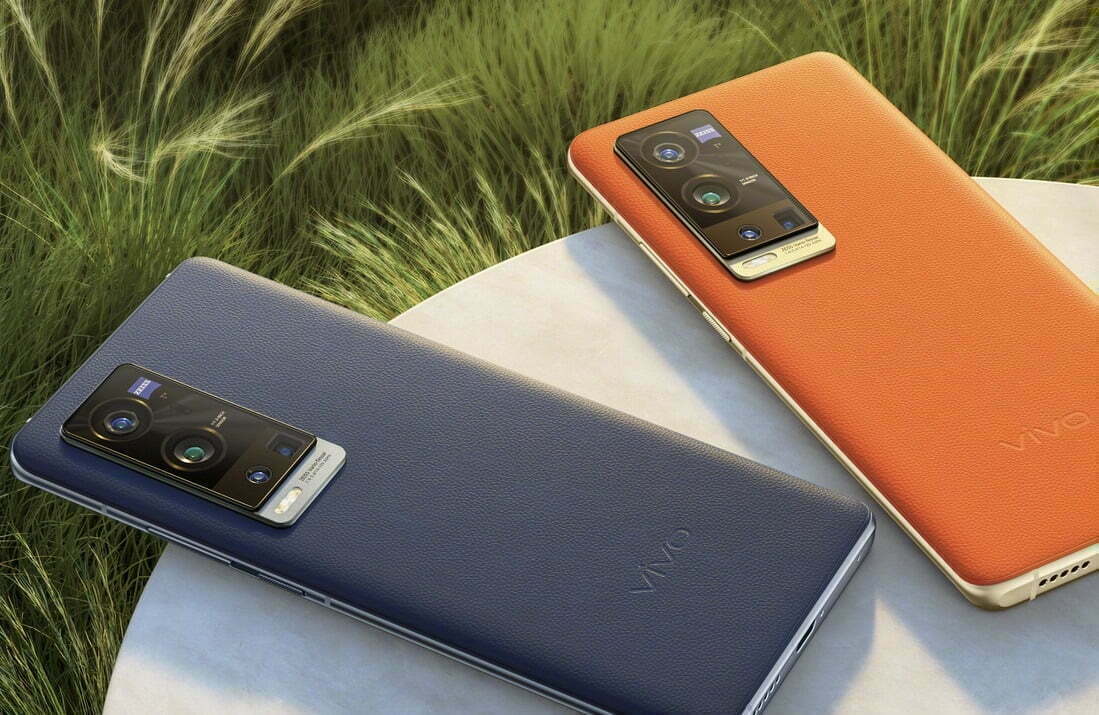
    Vivo recently confirmed that it’ll unveil the X60 Pro+ on January 21 in China at 7:30 PM local time. The announcement came a few weeks following the launch of the X60 and X60 Pro.

    It is also confirmed that the phone will come with a 6.5-inch AMOLED screen with a center-aligned punch-hole, 120Hz refresh rate, and 128GB/256G storage options. The device might also come in vegan leather color options ala Mate 30 of Huawei.

    Geekbench and 3C recently showed a device with a V2056A model number that could be the X60 Pro+. It has 12GB RAM, 55W charging, and Android 11 OS.

    Vivo X60 Pro+

    But a new rumor from known leakers suggests that the handset might be powered by the unreleased Snapdragon 875 processor, a higher clocked version of the SD865 Plus last year.

    Known leaker Digital Chat Station noted that the chip with SDM8250 UHF codename might be called Snapdragon 870 3.19GHz clock speed and a higher GPU frequency.

    One thing is for sure, this will be vivo’s top-end offering of the year with interesting cameras and performance.

  • 4 free tools to get latest updates on your Samsung Galaxy devices

    4 free tools to get latest updates on your Samsung Galaxy devices

    If you’ve ever tried looking for firmware to install on your Samsung Galaxy smartphone or tablet, it might be pretty annoying. While companies like Google, OnePlus, and Xiaomi provide download links on their websites, Samsung has yet to provide an official firmware download portal. That’s one of the reasons why there are so many Samsung firmware download sites out there. These sites scrap Samsung’s FUS (Firmware Update Server) for the latest firmware releases and categorize them by model number, carrier/region, and OS version. However, many of these services use a “freemium” model that throttles the base-tier download speed.

    Fortunately, there is no shortage of community-developed tools to directly download a new software update for a compatible Galaxy device. We’ve talked about two such tools — SamFirm and Frija — many times in the past. Samloader is another open-source, cross-platform alternative. While I personally think that downloading Samsung firmware using one of these utilities is simple enough, some may still find them inadequate to meet their needs. If you do, then here are a few more solutions that make it even easier to grab official Samsung firmware packages for your device.

    1. SamFirm_Reborn

    samsung update tool

    Created by XDA Recognized Developer Ivan_Meler, SamFirm_Reborn is a reincarnation of the original SamFirm tool. The developer decompiled the legacy application and patched the codebase to make it compatible with Samsung’s server-side changes. SamFirm_Reborn is open source and it does offer a handy command-line interface besides the familiar GUI.

    Download SamFirm_Reborn

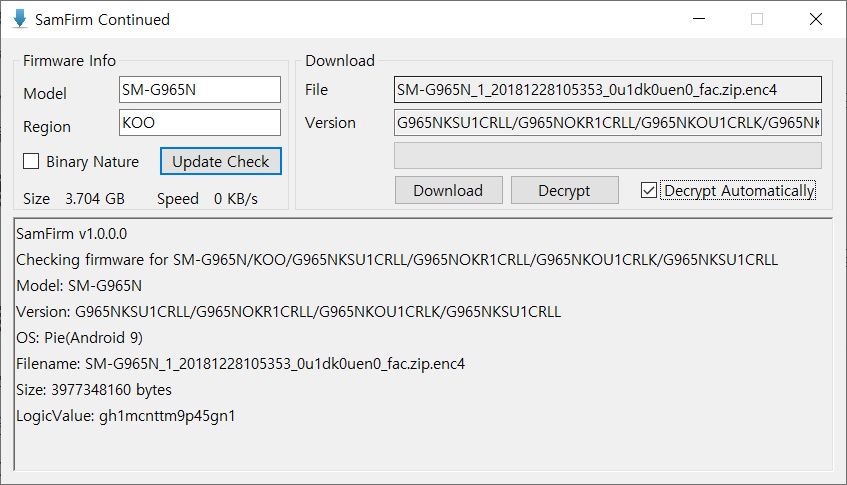
    2. SamFirm-continued and SamFwTool

    SamFirm Continued
    SamFwTool

    SamFirm-continued started its journey as yet another open-source fork of the legacy SamFirm, but the maintainer abandoned the project a few months ago. Later on, XDA Member Tungtata picked up the baton and created SamFwTool. One of the highlights of SamFwTool is the auto-detection feature. Just connect your phone in MTP mode and press “Auto detect” to identify your device model and region code.

    Download SamFwTool

    3. SamFirm.js

    The whole Samsung firmware downloading saga is now on a different level, as XDA Recognized Developer jesec has presented SamFirm.js, a streaming downloader, decryptor, and extractor coded in JavaScript. With SamFirm.js as the backend, you should be able to construct a web app to fetch stock Samsung firmware packages. The project is a collaboration between developers jesec and LuK1337.

    Download SamFirm.js

    4. SamFetch

    In case you’re looking for a web API variant of the Samloader project, you should try out SamFetch. XDA Member YusufCihan reimplemented the functions from Samloader’s code as web routes in order to expose a simplified REST API to download Samsung firmware.

    Download SamFetch

  • Funtouch OS based on Android 11 – when Vivo will roll out?

    Funtouch OS based on Android 11 – when Vivo will roll out?

    funtouch os android 11

    While Google’s latest Pixel devices are typically the first to be launched with Android’s latest flavor, Chinese OEM Vivo hit Google with its Vivo V20 last year. The device was the first new smartphone to launch Android 11 out of the box, hitting the new Pixel 5 and Pixel 4a 5G by just a few hours. Since then, Vivo has launched a few other devices running the latest Funtouch OS-based Android 11 flavor, but the company has yet to release updates to older devices.

    Although Vivo has previously released a Funtouch OS 11 beta for the Nex 3S 5G and the iQOO 3 4G/5G, the company hasn’t shared an update timeline for other devices in its portfolio. That changes today, as Vivo has now shared a Funtouch OS beta roll-out plan on Twitter. According to the tweet, Vivo has already started rolling out the Funtouch OS 11 beta to the X50 Pro last month. The Vivo V19 and X50 should start receiving their first beta releases by the end of this month.

    Older devices, like the Vivo V17, V17 Pro, V15 Pro, and S1, will start receiving the first Funtouch OS 11 beta by the end of March 2021. The Vivo S1 Pro, Z1x, and Z1 Pro will follow soon thereafter by the end of April 2021. And finally, the Vivo V15 will receive its first Android 11 beta by the end of June 2021. The beta releases for all the aforementioned devices will roll out in a staggered fashion, with users receiving the update in small batches. Once Vivo ensures that the beta release doesn’t have any critical bugs, the devices should receive the stable version of Funtouch OS 11 based on Android 11. As of now, the company hasn’t shared a release timeline for the stable update.

    It’s worth noting that Vivo has already launched a new Android skin called OriginOS, which is expected to replace Funtouch OS in the future. But, for the time being, the company hasn’t clarified exactly when the new Android skin will land on its devices. Currently, Vivo X60 and X60 Pro are the only devices in its portfolio to run OriginOS 1.0 based on Android 11.

  • Free wireless earbuds on OnePlus Nord N10 or N100 pre-order

    Free wireless earbuds on OnePlus Nord N10 or N100 pre-order

    The latest phones in the OnePlus range are coming to the US next week, and you can pre-order them as of today. Not only that, both the OnePlus Nord N10 and Nord N100 come with free OnePlus-branded earbuds thrown in as a sweetener.

    You can use OnePlus Nord N10 and N100 Onn Virtual Reality Headset

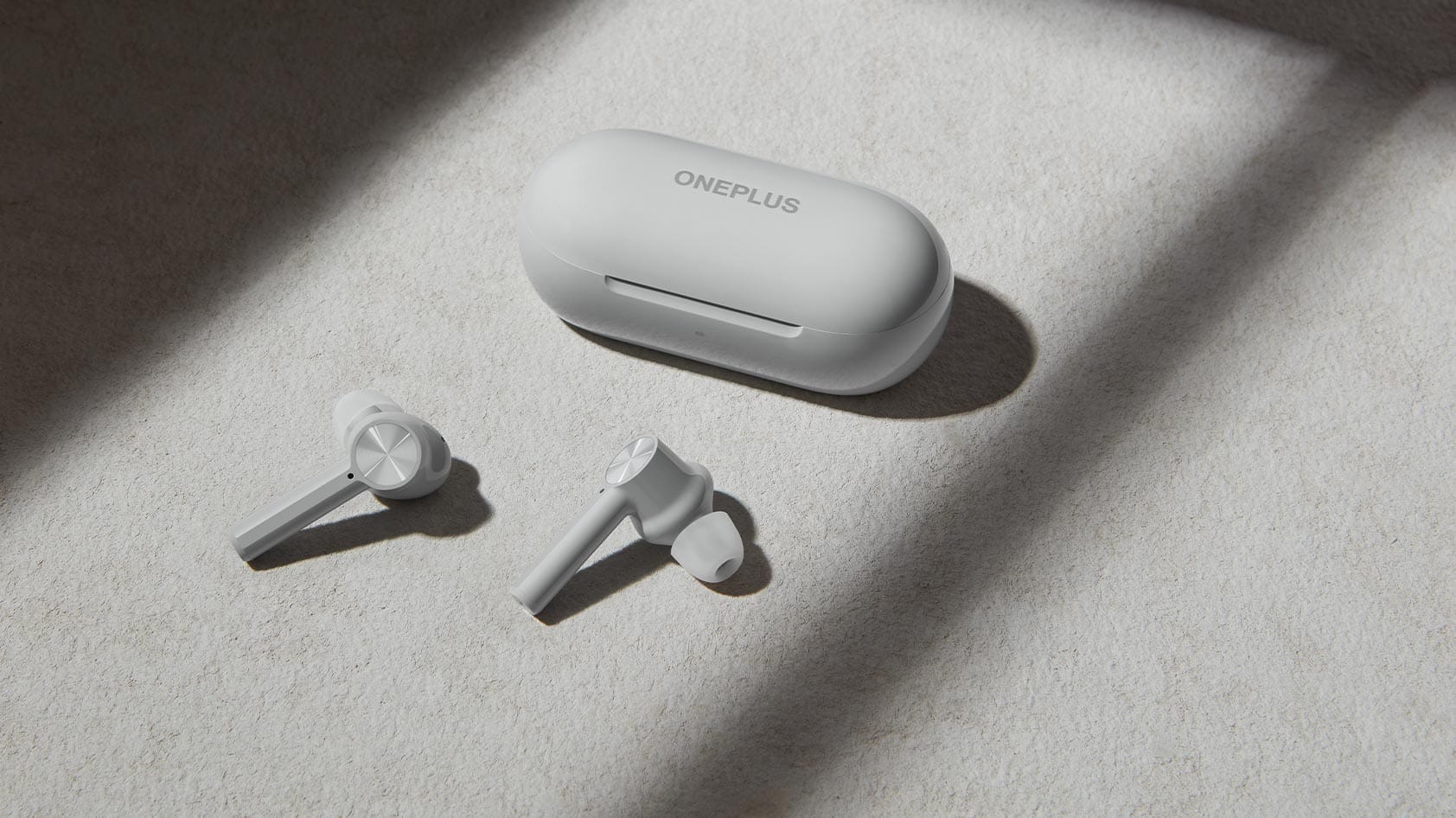
    The buds you get depend on which device you go for, but they are much cheaper than the premium OnePlus flagships for both phones. The OnePlus Nord N10 is available for $299.99 and you’ll also get a free pair of OnePlus Buds Z when you pre-order it before January 15.

    The Nord N10 has 6 GB of RAM and 128 GB of storage and is a solid mid-ranger. It is not, by any means, a world-beating smartphone, but it is a capable phone and an inexpensive way of entering the 5G revolution.

    The OnePlus Nord N100 retails for just $179.99 if you’re on a tighter budget. It is aimed at offering value for money. As standard, with a large battery, a 90Hz screen, and Oxygen OS. There are trade-offs at this price point, as you would imagine, though, with both the camera and output left a little wanting.

    earbuds

    On the plus side, when you pre-order the Nord N100, the free gift you get is a pair of OnePlus Bullets Wireless Z earbuds. Both these earbuds and the Buds Z are worth about $50, so if you already had your eye on one of these cheap phones, they’re a good extra incentive.

    Free Oneplus earbuds

    Oh and one more thing — all you need to do to get an extra 10% off your order is subscribe to the OnePlus newsletter. It’s a pretty small step for the extra savings. Follow the links below to find out more.

  • Best antivirus and anti-malware apps for Android in 2021

    Best antivirus and anti-malware apps for Android in 2021

    Android Antivirus apps remain one of Android’s most common of apps. Generally, if you’re playing it safe, you don’t need an antivirus app, just download apps from the Play Store, and keep your security settings available. There are many, though, who want to take a walk on the wild side and not do those things. A lot of extremely bad antivirus software are out there. Even if these apps aren’t needed, knowing the safe ones that don’t suck is helpful. Here are Android’s best antivirus software and anti-malware apps. As of January 2021, all rates are present.

    Avira

    Avira is one of the newer antivirus apps comparatively speaking. It grew rather quickly over the last year. The app comes with the basics, including device scans, real-time protection, external SD card scans, and a lot more. This one also comes with a VPN for added layer of security. Some other features include anti-theft support, privacy scanning, blacklisting, and even device admin features. It’s much lighter than apps like Norton and others.

    The free version is functional for basic things. The premium versions include three tiered prices that add things like the aforementioned VPN, password generation, more frequent virus database updates, and more.

    avira antivirus

    Avast Antivirus

    One of the most common antivirus applications on any platform is Avast Mobile Security. It boasts over 100 million features and millions of downloads. Classical antivirus scanning, an applock, call blocker, anti-theft protection, a picture vault, and even a rooted Android device firewall are some of the features. Even if you don’t need the antivirus part very much, that makes it an excellent instrument. There are also some booster characteristics, but you should avoid those as well.

    The free edition comes with most features and is advertising-supported. The premium models come with more security features, no ads, and a VPN is also included in the most costly version.

    avast antivirus

    AVG Antivirus Free

    Another major name in the field of antivirus software is AVG. It’s basically the same as AVAST, in fact. In 2016, AVAST actually bought AVG back. Thus, in both antivirus applications, the experience is identical. In much the same way, you can search your phone and find possible vulnerabilities.

    This one has Google Maps anti-theft monitoring, but it does not have the availability of rooted firewalls as AVAST does. Thus, they are sufficiently different to be distinct products. Just make sure that the garbage features such as the phone boost are avoided because they don’t really work. Identical to AVAST are the price ranges and premium characteristics.

    avg antivirus

    Bitdefender Free Antivirus

    One of the few antivirus applications that are currently free is Bitdefender Antivirus. Over the years, it has not altered much. It provides a basic scanning feature, a simple interface, fast quality, and no configuration. For super simple needs, this is a perfect one. All it really does is scan items and then sit there and wait again for things to be scanned. A bigger, more in-depth Bitdefender app exists. However, for those who just want something easy, we think this one is better. With no in-app purchases or subscriptions, it’s also actually free. Advertising is there, however.

    bitdefender antivirus

    ESET Mobile Security and Antivirus

    In the antivirus and anti-malware environment, ESET is another major name. It has a good range of features, including scans, support for anti-theft, a safety inspector feature, scheduling for scans, and more. A bit intrusive is the setup process. It’s one of the few to have an email address required. It works pretty well otherwise. Upon download, you get a free trial for one month. It goes for $1.99 a month from there, or $14.99 per year. It’s not quite as heavy as AVAST or AVG, but it’s heavier than Bitdefender or CM Protection Lite. For what it’s worth, take that info.

    Youtube video

    Kaspersky Mobile Antivirus

    One of the most common antivirus apps is Kaspersky. It has a free version as well as a pro version. SMS and call blocking, scans, malware updates, and anti-theft are provided in both versions. The premium edition adds stuff like security in real time, an applock, and more. Of course, both models have malware scanning for computers and items like that.

    It’s not about as heavy as the biggest antivirus software. Plus, it hardly has any hideous booster features that don’t work. Instead of trying to stretch to things that don’t make sense, it’s good to see an antivirus app double down on its intent. If you only need support for one computer, the subscription price is reasonably low.

    kaspersky

    McAfee Mobile Security

    McAfee is one of the biggest names in antivirus apps. It’s also one of the heaviest. The app includes scanning, anti-theft, anti-spyware, and security locking features. Additionally, it can take photos of your potential phone thief, record locations to the cloud before the phone shuts down, and more useful stuff. McAfee also has a variety of standalone apps for other things. The UI is old and it doesn’t look very good.

    Additionally, it has phone booster features that don’t work and it requires an account creation to go pro. The antivirus portion of the app does work rather well and some of the tertiary features are nice. The lower tier subscription adds photo and video backup, an app locker, and Internet protection. The more expensive one adds additional protection for things like online banking.

    Youtube video

    Malwarebytes Security

    Malwarebytes is one of the most popular antivirus apps on Windows. The mobile version is pretty good too. It features an aggressively updated virus database, support for malware and ransomware, a permission tracker, and more.

    It can even scan messages in WhatsApp, Facebook, SMS, etc for potentially dangerous links. Of course, it does the usual stuff like scanning as well. The app looks nice, works well, and it’s not too heavy like others. It’s also reasonably priced at $1.49 per month or $11.99 per year.

  • 26 temporarily free / 69 on-sale apps and games on Google Play Store

    26 temporarily free / 69 on-sale apps and games on Google Play Store

    Free and on-sale apps

    Christmas is over, but the New Year is just around the corner, so we still have to share with everyone more than a few quality sales. First up, Baldur’s Gate II, a quality CRPG that’s easily worth $5, is a staple of our sales roundups. Passpartout is next up: The Starving Artist, a quirky indie sim that boasts a wicked sense of humor. This War of Mine: Stories – Father’s Promise, a standalone add-on to This War of Mine, a well-reviewed survival game suitable for short sessions, is last but not least. As always, to make exploration simpler, I’ve highlighted all of the interesting titles in bold green text. So there are 26 temporarily free and 69 on-sale applications and games for the start of the week without further ado.

    Free

    Apps

    1. English for all! Pro $0.99 -> Free; Sale ends in 2 days
    2. PDF viewer pro 2020 $0.99 -> Free; Sale ends in 3 days
    3. Boundo: System Tool Set $0.99 -> Free; Sale ends in 5 days
    4. English Puzzle $0.99 -> Free; Sale ends in 5 days
    5. English Tenses $0.99 -> Free; Sale ends in 5 days
    6. Quick Arc Launcher ( Smart One Swipe Launcher ) $2.99 -> Free; Sale ends in 5 days
    7. Website Shortcut Maker – URL Shortcut Maker $0.99 -> Free; Sale ends in 5 days
    8. Mathematical keyboard B $0.99 -> Free; Sale ends in 6 days
    9. Snipback – Lifehacker smart voice recorder PRO HD $2.99 -> Free; Sale ends in 6 days
    10. Reminder Pro $1.49 -> Free; Sale ends in 7 days

    Games

    1. Collision Line $0.99 -> Free; Sale ends in 2 days
    2. [VIP]Coin Princess: Offline Retro RPG Quest $0.99 -> Free; Sale ends in 5 days
    3. Hero Knights (idle RPG) $1.49 -> Free; Sale ends in 5 days
    4. Legend of the cartoon $2.49 -> Free; Sale ends in 5 days
    5. Live Superhero Aqua Hero Man 3D – Superhero Games $1.49 -> Free; Sale ends in 5 days
    6. Secret Tower VIP (Super fast growing idle RPG) $0.99 -> Free; Sale ends in 5 days
    7. Defender Legend Premium: Hero Champions TD $1.99 -> Free; Sale ends in 6 days
    8. Monster Killer Pro – Assassin, Archer Hero Shooter $0.99 -> Free; Sale ends in 6 days
    9. Take Away 3D – Endless running hyper casual game $1.49 -> Free; Sale ends in 6 days
    10. AceSpeeder3 $0.99 -> Free; Sale ends in 7 days
    11. Deadly Traps Premium – Adventure of Hell $1.49 -> Free; Sale ends in 7 days
    12. Flippy Geometry 3D Puzzles meditation game $0.99 -> Free; Sale ends in 7 days

    Icon packs & customization

    1. Black Army Diamond – Icon Pack – Fresh dashboard $0.99 -> Free; Sale ends in 3 days
    2. Reborn Icon Pack $0.99 -> Free; Sale ends in 4 days
    3. Contacts Widget – Quick Dial Widget – Speed Dial $0.99 -> Free; Sale ends in 5 days
    4. Timus Circle Dark Icon Pack $1.49 -> Free; Sale ends in 5 days

    Sale

    Apps

    1. Baby Sleep PRO ???? $2.99 -> $0.99; Sale ends in 3 days
    2. Mindroid ???? PRO Unlock $4.99 -> $0.99; Sale ends in 3 days
    3. PowerLine PRO Unlock $2.99 -> $0.99; Sale ends in 3 days
    4. ShootAssist $10.99 -> $5.49; Sale ends in 3 days
    5. Sleep as Android Unlock ???? Sleep cycle smart alarm $9.99 -> $4.99; Sale ends in 3 days
    6. Twilight Pro Unlock $4.99 -> $0.99; Sale ends in 3 days
    7. Deals Tracker for eBay PRO – Real Time Alerts $3.99 -> $1.99; Sale ends in 5 days
    8. ReadEra Premium – book reader pdf, epub, word $10.99 -> $7.69; Sale ends in 5 days
    9. VIP Notes – notepad with encryption text and files $5.49 -> $2.49; Sale ends in 5 days
    10. Character Maker -How to draw $2.99 -> $1.49; Sale ends in 6 days
    11. DecidApp – decision making $3.49 -> $1.49; Sale ends in 6 days
    12. FDE.AI Pro [ROOT] + FPS meter $3.49 -> $1.99; Sale ends in 6 days
    13. Intello X+ $2.49 -> $0.99; Sale ends in 6 days
    14. MuteAll Pro – Mute sounds(Camera, Video etc) $3.49 -> $0.99; Sale ends in 6 days
    15. My Location Notes :Place+ $2.99 -> $1.99; Sale ends in 6 days
    16. 432 Player Pro – Lossless 432hz Audio Music Player $8.99 -> $5.49;
    17. Bird Mail Pro -Email App $4.49 -> $1.99;
    18. Eon Player Pro $5.49 -> $3.49;
    19. Mobi Calculator PRO -50% SALE $3.49 -> $1.49;

    Games

    1. Castles of Mad King Ludwig $7.99 -> $1.99; Sale ends in 8 hours
    2. Smoothie, Alfie Atkins $6.49 -> $3.49; Sale ends in 8 hours
    3. Unbroken Soul $1.99 -> $0.99; Sale ends in 8 hours
    4. SUBURBIA City Building Game $7.99 -> $1.99; Sale ends in 2 days
    5. Cubes $3.99 -> $0.99; Sale ends in 3 days
    6. Tank Army – Fast Fingers Shmup $1.99 -> $0.99; Sale ends in 4 days
    7. This War of Mine: Stories – Father’s Promise $2.99 -> $0.99; Sale ends in 4 days
    8. Anhui Mahjong Solitaire Saga $5.99 -> $1.49; Sale ends in 5 days
    9. Arithmagic – Math Wizard Game $2.99 -> $0.99; Sale ends in 5 days
    10. Hangman Premium $2.99 -> $0.99; Sale ends in 5 days
    11. Mahjong Solitaire Blast $5.99 -> $1.49; Sale ends in 5 days
    12. Mahjong Star Pro $5.99 -> $1.49; Sale ends in 5 days
    13. Pyramid Solitaire Asia Pro $5.99 -> $1.49; Sale ends in 5 days
    14. Samorost 2 $2.99 -> $0.99; Sale ends in 5 days
    15. Seven Mysteries $2.99 -> $0.99; Sale ends in 5 days
    16. Solitaire Dungeon Escape $5.99 -> $1.49; Sale ends in 5 days
    17. Solitaire Dungeon Escape 2 $5.99 -> $1.49; Sale ends in 5 days
    18. Space Grunts 2 $4.49 -> $2.49; Sale ends in 5 days
    19. True Fishing (key). Fishing simulator $1.49 -> $0.99; Sale ends in 5 days
    20. Who Are You, Mr. Cooper? $1.49 -> $0.99; Sale ends in 5 days
    21. Word Search Premium $2.99 -> $0.99; Sale ends in 5 days
    22. ALTER EGO COMPLEX $6.99 -> $2.99; Sale ends in 6 days
    23. ALVAROK $2.99 -> $1.49; Sale ends in 6 days
    24. Baldur’s Gate II $9.99 -> $4.99; Sale ends in 6 days
    25. Hexologic $1.99 -> $0.99; Sale ends in 6 days
    26. Warriors of Genesis $5.99 -> $3.49; Sale ends in 6 days
    27. [Premium] RPG Antiquia Lost $7.99 -> $3.99; Sale ends in 7 days
    28. [Premium] RPG Asdivine Cross $7.99 -> $2.99; Sale ends in 7 days
    29. [Premium]RPG Asdivine Hearts 2 $7.99 -> $3.99; Sale ends in 7 days
    30. [Premium] RPG Marenian Tavern Story $7.99 -> $3.99; Sale ends in 7 days
    31. [Premium] RPG Wizards of Brandel $7.99 -> $3.99; Sale ends in 7 days
    32. DISTRAINT 2 $6.49 -> $1.99; Sale ends in 7 days
    33. DRAW CHILLY $1.99 -> $0.99; Sale ends in 7 days
    34. Mars Power Industries $1.99 -> $0.99; Sale ends in 7 days
    35. Mortal Crusade: Sword of Knight $3.99 -> $1.99; Sale ends in 7 days
    36. Passpartout: The Starving Artist $4.99 -> $2.49; Sale ends in 7 days
    37. Peace, Death! $1.99 -> $0.99; Sale ends in 7 days
    38. Prison Run and Gun $1.99 -> $0.99; Sale ends in 7 days
    39. RPG Asdivine Kamura $8.99 -> $3.99; Sale ends in 7 days
    40. RPG Chrome Wolf – KEMCO $7.99 -> $2.99; Sale ends in 7 days
    41. RPG Miden Tower $8.99 -> $4.99; Sale ends in 7 days
    42. WHO IS AWESOME $1.99 -> $0.99; Sale ends in 7 days

    Icon packs & customization

    1. Foxbit – Icon Pack $1.99 -> $0.99; Sale ends in 4 days
    2. Statusbar MOD – Signal & WiFi Icons [Substratum] $1.99 -> $0.99; Sale ends in 4 days
    3. Analog Clock Live Wallpaper-7 PRO $2.49 -> $1.49; Sale ends in 5 days
    4. Belle Pro – Icon pack | Wallpapers | KWGT $1.49 -> $0.99; Sale ends in 5 days
    5. NYON – Icon Pack (CHRISTMAS SALE!!!) $1.49 -> $0.99; Sale ends in 5 days
    6. Digital Clock Live Wallpaper-7 PRO $2.49 -> $1.49; Sale ends in 6 days
    7. One UI Circle Fluo – Icon Pack $2.49 -> $0.99; Sale ends in 7 days
    8. One UI Circle – Icon Pack $2.49 -> $0.99; Sale ends in 7 days

  • 14+ must have apps on your Android smartphone

    14+ must have apps on your Android smartphone

    Have you just got a new Android smartphone for your holidays? It might be a little overwhelming if it’s your first one, so to get you started, here are some apps you should install or set up on a new Android device immediately.

    Alternatively, it might be time to give them a shot if you’re not already using these apps!

    Google Messages (RCS)

    google messages rcs apps

    Messaging has historically been a sore point among Android smartphones in the US at least. Fortunately, Google has been working hard to address that in recent months and now, as of this year, the solution known as RCS (Rich Communication Services) is open to every Android smartphone in the world.

    How can you get your computer with RCS and, more importantly, what’s the advantage? Firstly, the advantage is that RCS is much more capable than SMS/MMS. Better quality photos can be submitted, typing indications, and more all arrive with RCS. Team chats are now having a big update as well. RCS is like Apple’s iMessage, essentially, just for Android phones.

    All you need to do is update Google Messages to get RCS on your Android phone. The free app is an SMS app at its heart, but it can also allow RCS messaging on any carrier and any Android smartphone in select countries, including the US. Just download it, set it as your default SMS app, and wait until the RCS prompt is switched on.

    Telegram & Discord

    telegram and discors

    You should go beyond the standard RCS and SMS if you want an app for even better messaging. One of our favourite messaging apps is Telegram and it functions a lot like the super famous WhatsApp. However, unlike that app, Telegram runs easily on several smartphones or tablets at one time and instantly backs up all your messages. Plus, all is always end-to-end encrypted and you have available both voice and video calls.

    Another great networking option is Discord, which provides private messages and “servers” to host a few friends or hundreds, all with rooms and chat managers. It’s a fantastic experience, and one that’s excellent for gamers in particular.

    Google Duo

    googe duo

    2020 has been a wild year, but sadly, with a pandemic already going on, we are entering 2021. With that in mind, one of the easiest and safest ways to stay in contact with loved ones is still with video calling apps.

    Google Duo is one of the best Android video-calling applications. The totally free app allows starting video calls on Android phones and tablets as well as Chromebooks, laptops, and even iOS devices super fast. Think of it as Facetime for Apple, but not locked up to one ecosystem.

    The app works with your phone number or email address and on certain devices it features fun filters and even screen sharing. However, the best function might be just how well it operates on less-than-ideal connections.

    Zoom

    ne of the most popular video calling/conferencing tools during the pandemic so far has been Zoom. By its popularity alone, this is an app you should have installed. The service offers meetings that you can connect to with just a link or a password, easily connecting with loved ones, friends, or using it for business meetings. Many schools are also using Zoom for remote learning. It’s a powerful app, and one that’s not going to cost you anything unless you’re the one hosting.

    Meet, Skype, Facebook Messenger

    Other great apps for video calling going into 2021 include:

    • Google Meet, an app that works a lot like Zoom but is attached to your Google account and is very popular especially with schools.
    • Skype, one of the original video calling apps that still works great especially for friends and family.
    • Facebook Messenger, a service that lots of people in the US currently use and has an excellent video calling option alongside its messaging features.

    Google Photos

    download

    One of the first things you should install on a new Android smartphone – or an iPhone for that matter – is Google Photos. For the vast majority of Android users, the app will be pre-installed on your device, but you’ll still need to get things set up.

    To do that, simply open the app, sign in with your preferred Google account, and decide on backup options. Photos will automatically backup your pictures and videos in the background, but you’ll need to tell it if you want that done over Wi-Fi only or on cellular data as well.

    From there, you’ll just need to decide on quality. For the next several months, everything is backed up to Google Photos with no limits for “high-quality,” slightly compressed backups, but in June you’ll need a Google One subscription to store anything past 15GB of data.

    If you want to backup your photos outside of Google, one of the best options is Amazon Photos which provides no-frills backups and, for Prime customers, unlimited storage for photos.

    Gboard

    The keyboards pre-installed on a lot of Android smartphones that are most popular today are, well, not nice. In particular, we have particular qualms about LG, but in any case, you can get more features and improved functionality from a different keyboard in many cases.

    Our top selection? Gboard of Google’s own. This keyboard has a fantastic layout that supports features such as gesture/swipe typing, GIF search and input, and so much more, and is convenient for typers of all types. There are also special features, such as the recent inclusion of the “Emoji Kitchen” that can produce some wacky emoji stickers on the fly. You may also subject Gboard to the desire of your heart.

    Put simply, it’s an excellent keyboard that’s totally free and, if it wasn’t already on your phone, it’s one you should absolutely try.

    Find My Device

    Here’s another app that every new Android device should already be loaded on. “Find my device” is an app from Google designed to help you keep track of your smartphone if it is lost. If, for some reason, the app isn’t activated on your computer, it is available through the Play Store.

    When you open Find My Laptop, a Google account will prompt you to sign in and enter your password as well. You’ll be able to see your computer as well as any others connected to your account until that’s completed. Any computer on your account can then ring, lock, or scrub. The same goes for your new phone, some other Android device you own, an Android phone from a friend, or even just a web browser.

    As a side note, in Google Play Services, the key feature of actually locating your phone with this app is on by default, but you can get a little more access using the app as well as being able to locate your other Android devices via the app as well as helping friends find their phones.

    Google One

    google one

    If you do lose or break your phone, you don’t have to lose your data. That’s where Google One comes in handy. With any Google One storage plan (starting at just $2/month), you’ll get improved backups of your phone. By default, Android already backs up core data for free to your Google account, but the One app can back up SMS messages and MMS messages along with your photos and videos.

    ActionDash

    ActionDash provides strategies such as pausing applications to prevent you from using them to help curb your mobile use, restricting how long an app can be used each day and more.

    Everything is done on-device and isn’t uploaded to the cloud and, better yet, the app is free and won’t hurt your battery either. ActionDash is available on Google Play.

    Let’s finally talk about the habits of smartphones. For many, mobile addiction is a major concern, and there are ways to help curb digital well-being apps by moving through a new decade. On your computer, there may already be one enabled, but if not, ActionDash is a free Android smartphone Digital Wellness app that works on almost any device.

    The app monitors how you use your phone during the day, including which applications are used, how many times your smartphone has been activated, and also how many updates you receive.

    Check these waterproof box with actions dash.

    Google’s Digital Wellbeing experiments

    If you really have a smartphone addiction and you want to find a way to guilt yourself into stopping, Google’s collection of Digital Wellbeing experiments might be able to help. These include:

    • Screen Stopwatch, a wallpaper that constantly updates with the amount of time you’ve been using your phone that day.
    • Activity Bubbles, a wallpaper that shows how many times you unlock your phone in a day and how long each “session” lasts.
    • Unlock Clock, a wallpaper that counts how many times you’ve opened up your phone each day.

    Google Keep Notes

    google keep

    By using a note-taking app, keeping track of reminders, lists, and more can be made even easier. Personally, Google Keep Notes is my favorite note-taking app on Android and it’s something that just seems to keep getting better over time.

    Google Keep is totally free and allows you to store in the app notes, lists, and even drawings. These notes are also synced to your Google account, which means that on any other device, including computers, you can access them. You can even use Google Assistant speakers like the Nest Mini to handle a shopping list with a fast setup!

    Microsoft OneNote – Google Keep alternative

    If you want something that’s not from Google and has a few more advanced features, Microsoft OneNote is an excellent option. The app is completely free, though works better with other Microsoft apps using a Microsoft 365 subscription. You can back up notes, drawings, and insert pictures in the app and, like Google’s app, they’ll sync across devices with your Microsoft account.

    A few more …

    • Waze: While Google Maps will do the trick for many, Waze offers crowdsourced live traffic data and reports for speed traps and more.
    • Google News: Especially in these times, keeping up with the latest news is important, and using personalized data, Google News will bring you top stories in a slick app that’s really easy to use.
    • Feedly: Want to keep track of the news using personalized RSS feeds? Feedly is one of the best apps for the job, and it’s free!
    • LastPass: We all have a ton of passwords and online security is important. If you need help managing your passwords, LastPass is an easy, free, and most importantly secure option. 1Password is also an excellent app for this purpose, but it requires a fee.
    • Google Home/Amazon Alexa: Got some smart home speakers or displays? You’ll want to have the Google Home or Amazon Alexa apps installed depending on what devices you own.
    • Get a 3rd-party launcher: Installing a new launcher is a great way to fully customize the homescreen on your new Android phone. Nova Launcher and Action Launcher are great options for this.