Author: Robert Haba

  • Moto Watch 120 – compact smartwatch, AMOLED display, metal construction and multiple functionalities. #deal

    Moto Watch 120 – compact smartwatch, AMOLED display, metal construction and multiple functionalities. #deal

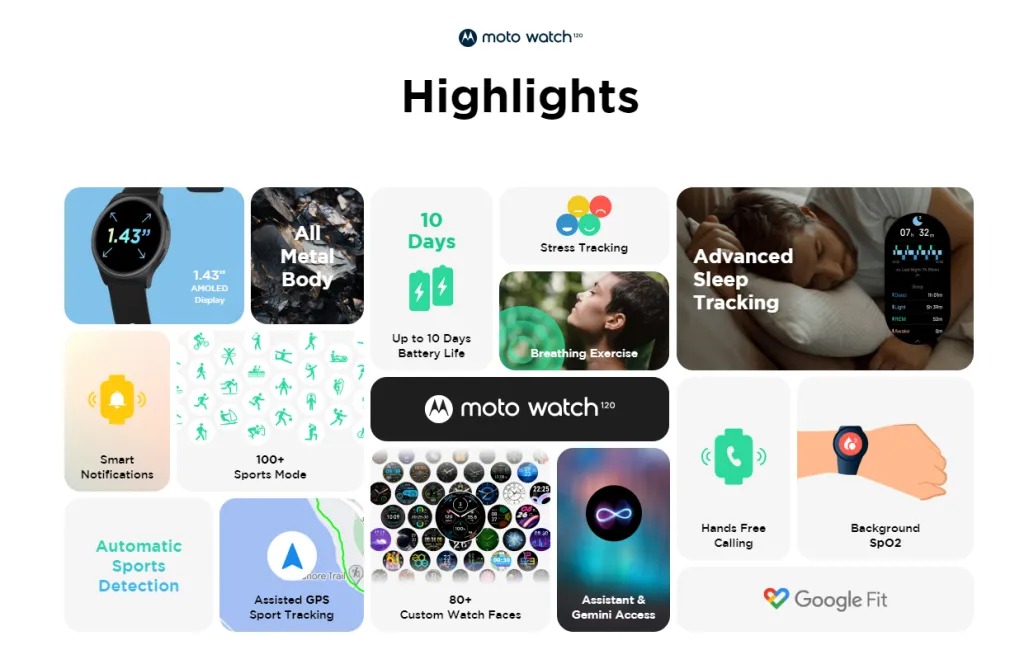
    The Moto Watch 120 is a brand-new, compact smartwatch from Motorola. Following the release of the Moto Watch 40 about six months ago, the company has refreshed its array of smartwatches with this new model.

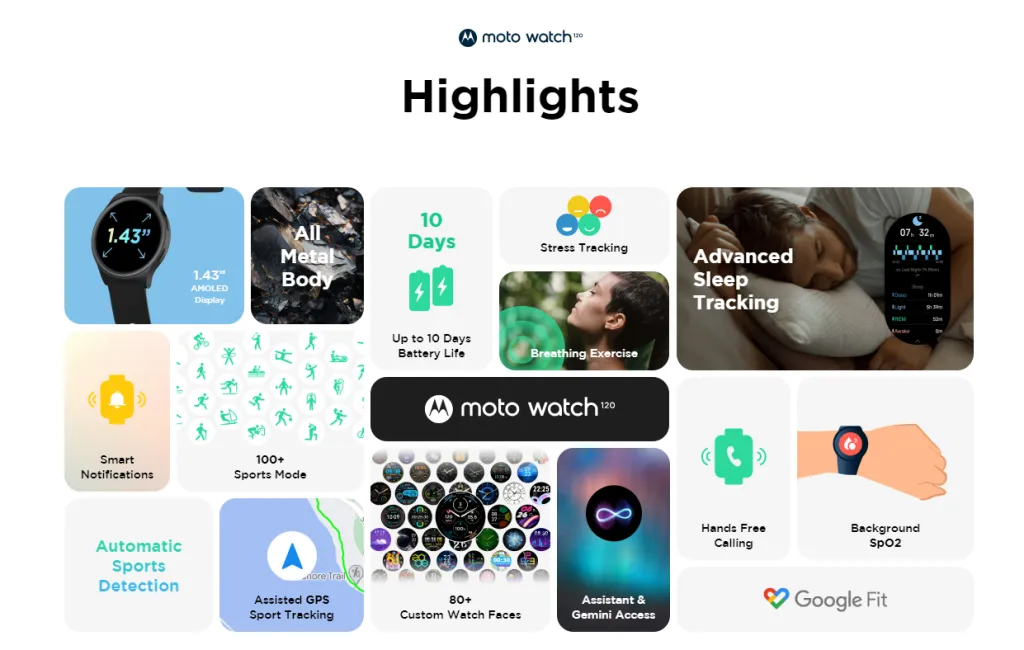
    Advanced sleep tracking, stress tracking, smart notifications, more than 100 sports modes, more than 80 customizable watch faces, hands-free calling, and a 10-day battery life are just a few of this smartwatch’s advantages. It has sensors for SpO2, HRM, and accelerometer for tracking health.
    Screenshot 2024 08 14 142953

    Motorola Moto Watch 120

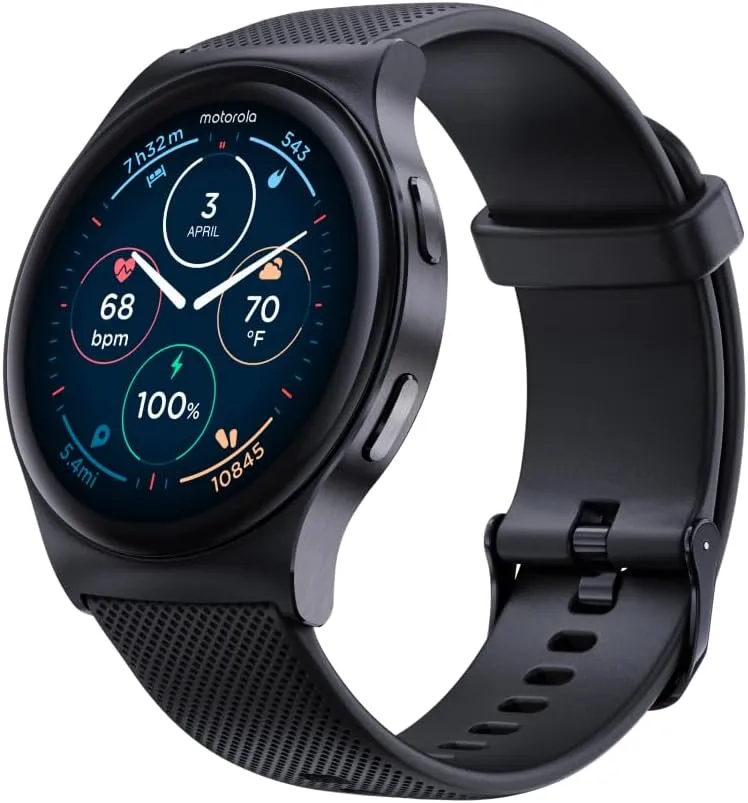
    Premium Smartwatch with AMOLED Display, 10-Day Battery, Heart Rate & SpO2 Tracking, Fitness & Health Monitoring, Compatible with Android and iPhone – Phantom Black

    Moto Watch 120

    Motorola claims that it can also monitor training zones and heart rate in real-time to improve workouts and maximum outcomes. Additionally, the smart notification feature allows you to watch and discreetly receive crucial alerts without ever having to reach for your phone.

    Moto Watch 120

    Motorola Moto Watch 120 – Premium Smartwatch for Men with AMOLED Display, 10-Day Battery, Heart Rate & SpO2 Tracking, Fitness & Health Monitoring, Compatible with Android and iPhone
    Motorola Moto Watch
    $129See It

    Specifications:

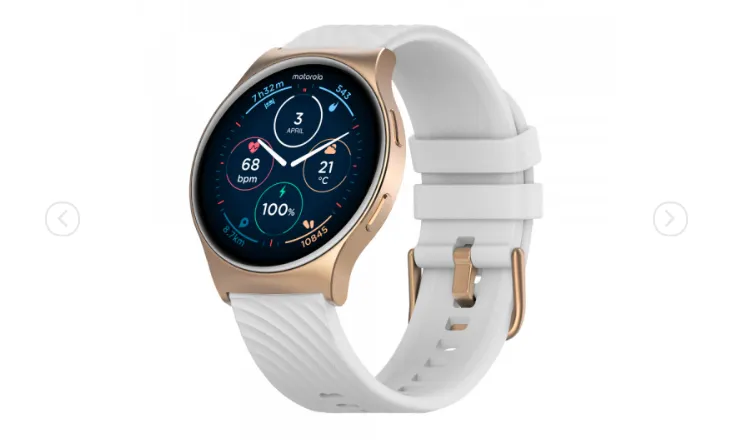
    The Moto Watch 120 has a metal (zinc alloy) casing and a 1.43″ circular AMOLED display. It has Bluetooth 5.3 support and is powered by Moto Watch OS. There are three colors available for this watch: Rose Gold, Glacier Silver, and Phantom Black.

    In relation to battery life, the 300 mAh battery that powers the Moto Watch 120 is capable of “Quick Charging.” However, the precise charging time for this watch was not disclosed by the manufacturer.

    The body is 50.6 x 44.6 x 11 mm and is IP68 dust and water resistant. It is notable for weighing 55g. To put things in perspective, the company’s last watch, the Moto Watch 40, weighed just 26g and had an IP67 dust and water resistance rating. The Watch 120 has a 22mm wide strap that weighs about 175g.
    Moto Watch 120 highlights functionalities

    Speaking of other functions, the watch’s wrist-based controls allow users to effortlessly skip tracks, adjust volume, and manage music playback. Users who have inadvertently misplaced their phone can also utilize their watch to locate it by making it ring. The feature functions even while the phone is in silent mode, which is a plus.

    Pricing and availability:

    The product is listed on the company’s website with a price tag of $129.99 and a link that redirects users to Amazon, where it’s available for purchase for the same price.
  • What is the Enhanced Edition of Xiaomi HyperOS?

    What is the Enhanced Edition of Xiaomi HyperOS?

    Xiaomi revealed the HyperOS Enhanced Edition beta version of the operating system, which will act as a testing ground for many system-level improvements and core experience optimizations. The new HyperOS Enhanced Edition is a separate subset of Xiaomi’s HyperOS operating system that will now act as a testbed for novel technical solutions at the kernel level, or innovations that are eventually incorporated into Xiaomi’s core operating system following extensive testing and improvement.

    The main goal with HyperOS Enhanced is to release a HyperOS based on Android 15.

    hyperos

    Primary Features of Xiaomi HyperOS Enhanced Edition Beta

    • Optimized Core Experience: HyperOS Enhanced puts much effort into refining system performance and optimizing user experience to perfect the bottom level of technical aspects in an operating system.
    • Android 15 Based: The Enhanced Edition will be sitting on Android 15 and serve as a bridge towards the adaptation of the upgraded version before the full changeover to HyperOS 2.0. Just like how some devices last year received MIUI 14.1, which was based on Android 14, here Xiaomi is doing exactly the same thing with Enhanced Edition.
    • Hardware Compatibility: The Beta release is targeted at working on a narrow range of devices only:
      • Xiaomi 14
      • Redmi K60 Extreme Edition
      • Xiaomi Pad 6S Pro 12.4

    Overview of Beta Recruitment and Registration Process

    The Xiaomi HyperOS Enhanced Edition beta recruitment period is set to begin on September 13, 2024, and end on September 17, 2024. To join up in vain, open the Xiaomi Community App, navigate to the “Experience Enhanced Beta” section, and then follow the prompts on the screen. By the end of September 2024, eligible customers will receive a notification with instructions on how to install the beta update.

    By working together, developers and tech enthusiasts will be able to contribute to the improvement of the Xiaomi HyperOS by increasing its performance and user experience. The Xiaomi HyperOS Enhanced Edition is not a beta; rather, it is more of a test drive for a future Xiaomi operating system, giving users a firsthand look at what is in store long before HyperOS 2.0 is released. This beta discusses one of the main tenets of Xiaomi’s approach to incorporating community feedback into its main software releases.

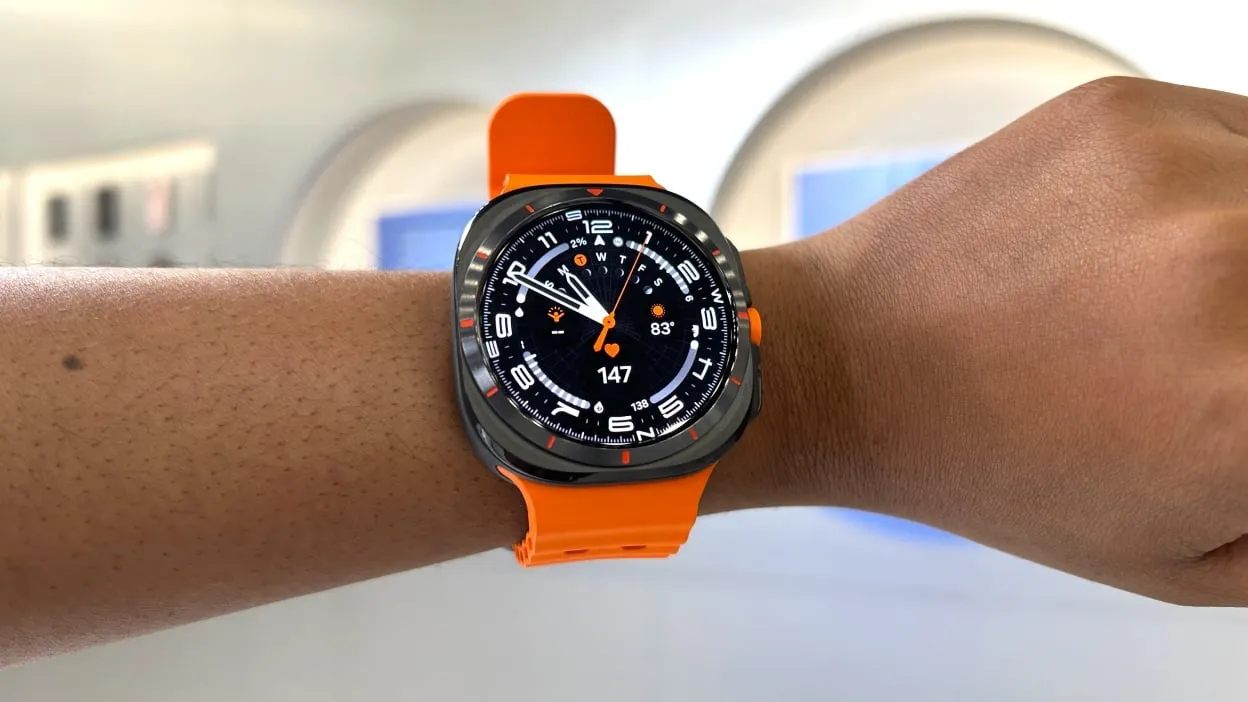
  • #deal Amazon Offers Samsung’s New Galaxy Watch Ultra for the Lowest Price Ever

    #deal Amazon Offers Samsung’s New Galaxy Watch Ultra for the Lowest Price Ever

    In recent years, smartwatches have gotten more and more popular. While some models are relatively inexpensive, there are also some amazing high-end possibilities. It is usually a good idea to stick with Samsung if you are searching for one of the top Android smartwatches.

    One of their newest products, the Samsung Galaxy Watch Ultra, is currently $50 off on Amazon, making it the biggest cash reduction to date. It is currently available for $600. Walmart is also matching the offer.

    Watch Ultra

    After testing the Galaxy Watch Ultra, one of our experts spoke about how many practical functions it had, such as gesture navigation for menu navigation and sleep apnea diagnosis. This indicates that it is among the simplest smartwatches to use to date. In fact, some of the most difficult-to-use features can even be facilitated by using your fist to choose an option.

    It is also jam-packed with features for tracking both your overall health and your exercises, which makes it a fantastic option for anyone who enjoys tracking data in addition to keeping an eye on their activities. It is robust and has a good battery life. If you are not looking to trade in your Galaxy Watch, this is unquestionably one of the greatest offers on the market right now.

  • This weekend’s free Android and iOS Apps

    This weekend’s free Android and iOS Apps

    Plenty of new smartphones are released each week, drawing interest from tech enthusiasts. Remember, though, that a smartphone’s real worth is found in its apps. Where can we locate the very greatest ones, is the question.

    You need not worry, though, as we have hand-picked a selection of excellent free apps and games that are only found on the Google Play Store and Apple App Store. These applications, which are often paid for, are now free to download, so do not miss out!

    android and ios apps

    Download and install any apps you find that you would want to have but do not require right now. It would be seen as “purchased,” and even if you immediately remove it from your smartphone, it will always remain in your app library.

    Android apps and games that are free for a limited time

    Android apps for productivity and lifestyle

    • Premium Camera ($2.99): A flexible camera app that offers more than just filters, but various functions to boot.
    • Relaxing Tangle Pro ($0.49): This app aims to help you relax as you interact with different images.
    • Speed Camera Radar Pro ($26.99): For those with a heavy right foot, this app might help save you from collecting unwanted speeding tickets.

    Free Android games

    • Rogue Hearts ($0.99): Time to explore dungeons and conquer all whom stand before you, gaining upgrades in skill and equipment along the way.
    • Zombie Age 2 Premium Shooter ($0.99): You need all your wits about you to survive the zombie apocalypse, making the most of your resources.
    • Food Fever Premium Restaurant ($0.99): Ever wondered how it is like to run a restaurant? Keeping customers happy is tough, making this game challenging yet fun.
    • Stickman Legends ($1.99): A side-scrolling action game where you continue to battle over-the-top enemies and huge bosses.
    • Heroes Infinity Premium ($0.49): An action RPG that sees you control your party and make the most of the situation as you encounter different foes.
    samsung fe

    iOS apps that are free for a short time

    iOS apps for productivity and lifestyle

    • Metadata ($0.99): An app that lets professionals view metadata of photos taken.
    • AppSecret ($1.99): This app offers an array of lock functions to secure important data on your handset.
    • Safety Photo+Video Pro ($3.99): Another app to secure your most private files behind a vault to prevent prying eyes from viewing them.
    • mySymptoms Food Diary ($7.99): A food and symptom tracker that helps you monitor your health better.

    Free games for the iPhone and iPad

    • Kingdom Rush: Tower Defense ($5.99): Hordes of enemies are waiting at your doorstep, and there seems to be no end to them. Will your strategic placement of defenses work?
    • My City: Hospital ($3.99): A way to expose your little ones to the day-to-day running of a hospital.
    • Rescue the Enchanter ($3.99): A point-and-click puzzle game that requires you to search for the enchanter.
    • Tap It and Jump It ($4.99): A game to kill time, where it tests your reflexes and sense of timing.
    • Cuppy Ball ($0.99): Your objective is to get the ball into the cup, but first, you need to visualize a line where the ball won’t end up destroyed!

    We advise you to review the app’s details in the Play Store or App Store before downloading any of the listed apps. This is significant as a few of these free apps can offer unique features or drawbacks of their own.

    Within the constantly changing world of mobile applications, there are a few dishonest ones that use sly methods to make money off of collecting and sharing your personal data. But worry not, readers who are tech aware—we have some priceless suggestions to assist you strengthen the protection of your priceless data.

    We implore you to be cautious when giving permissions to the programs you download. After all, why would an alarm clock require access to your contacts or camera? And why on earth would a flashlight app need to know your precise location? You can successfully protect your private information from prying eyes by being selective about which permissions to provide.

    Therefore, feel free to explore the wide selection of free app downloads for Android and iOS devices, knowing that your data is safe and secure.

    This article was tipped by lead generation agencies

  • YouTube will end Premium subscriptions obtained through false locations.

    YouTube will end Premium subscriptions obtained through false locations.

    Your membership may be terminated if you purchased a Premium in a nation where it was less expensive via a virtual private network (VPN). As previously reported by Android Police, a number of users of this method have reported experiencing automatic cancellation of their subscriptions over the past few days.

    Using a VPN to shift your location to a nation where Premium subscription is available for less money is the workaround. For instance, ad-free access to videos, YouTube Music, and offline downloads is available for $13.99 a month in the US with Premium, but it only costs $1.05 per month (869 ARS) in Argentina. However, it appears that YouTube is now taking harsh measures against users who do not genuinely reside in these nations.

    A representative of the company, Paul Pennington, told The Verge that the firm had “tools in place” to track down its customers’ locations. According to Pennington, “We are requesting members to adjust their billing information to their current country of residence in instances where the signup country does not match where the user is viewing YouTube.” However, he does not mention if YouTube has begun to automatically terminate subscriptions using the fictitious locations.

    youtube premium

    It is not surprising to see YouTube pursuing less expensive memberships, considering the platform has already begun to tighten down on ad blockers.

  • Temporary free apps and games on apps stores

    Temporary free apps and games on apps stores

    If there is nothing new on your phone, do you find yourself staring at it out of sheer boredom?Have you used every app on your phone or tablet? If so, there is no need to worry—we have a fantastic collection of premium programs that are now offered at no cost in the Google Play Store and the Apple App Store.

    You could question, how is this possible? For a restricted period, a few kind developers have decided to give away their paid applications for free. Thus, do not wait around because these freebies could go before you know it.

    As a tech publication, we make it our mission to provide you with affordable game and software recommendations that respect your privacy. It is important to note that some of these apps can provide in-app purchases and contain advertisements. Hey, who does not enjoy a good deal? So feel free to browse these free options; you might find your next favorite app!

    Download and install any apps you find that you would want to have but do not require right now. It will remain in your app library indefinitely and be regarded as “purchased” even if you immediately remove it from your smartphone.

    Android apps and games that are free for a limited time

    Android apps for productivity and lifestyle

    • Scan Text From Image English ($1.49): Here’s an interesting app, where you can extract English text from any image, as long as it is legible enough. While not 100% accurate, it is still better than slowly typing it out.
    • Datamosh: Datamoshing & Glitch ($1.49): Are you interested in churning out creative artwork by mixing up data within an image? Go dystopian with this app!
    • Passport Photo ID ($4.99): Snap photos of your mug for passport use instead of going to a photo studio.
    • Bright LED Flashlight Pro ($2.99): This flashlight comes with a twist, there is a built-in compass as well so you know where you’re going in the dark.
    • Touch Lock ($0.99): Disable the phone’s touch screen while you are busy consuming media like videos and music to prevent accidental interruptions.

    Free Android games

    • Speed Math ($1.49): Want to keep your brain constantly tickled and active? This game will bombard you with math problems.
    • Trivia Master – Quiz Games ($4.49). Think you are a walking encyclopedia? Give your trivia skills a try with this game.
    • Block Blast ($1.49): If you have fond memories of Arkanoid, then you will surely be able to take to this game like a duck to water.
    • Spelling Master ($3.99): There is no harm in brushing up your vocabulary with solid spelling capabilities, so why not let this game help you out?
    • Crisis of the Middle Ages ($0.99): A turn-based RPG that is chock-full of hilarious conversations that will surely keep you engrossed throughout your adventure.

    iOS apps that are free for a short time

    iOS apps for productivity and lifestyle

    • RCam – Manual Camera ($0.29): If you want more control over your camera app, why not give this a go?
    • RBrowser ($0.59): A unique browser for those who want to take the path less traveled, where you can even record what’s going on!
    • D3: Dot Lock Notes ($0.99): If you are someone who stores all your passwords in a single document and wants to keep that document safe from prying eyes, use this app!
    • NINU ($0.99): Do you travel overseas often? If you do, download this app as it stores the emergency numbers of various countries across different continents.

    Free games for the iPhone and iPad

    • Rally Stars ($3.99): Tackle challenging dirt tracks around the world without having to worry about car insurance premiums…
    • Tap Dot Tap ($0.29): Test your reaction with this game. Are you the quickest to tap the screen?
    • Tap It and Jump It ($4.99): A pointless game that is perfect for killing time, where you need to jump from one platform to the next. 
    • Vigil RPG ($2.00): An old-school text-based RPG with extremely simple graphics, but you know what they say, it is the story that matters. 
    • Red Conquest! ($0.99): A RTS title that is set in an open space environment, where you go up against enemy forces with just one objective – to eliminate them all!

    We advise you to review the app’s details in the Play Store or App Store before downloading any of the listed apps. This is significant as a few of these free apps can offer unique features or drawbacks of their own.

    Within the intriguing world of mobile applications, there are a few sly ones that use devious methods to make money by gathering and sharing your personal data. But fear not, folks; we have some priceless tips to help you protect your priceless information.

    First and foremost, we advise you to be cautious while giving apps rights. Why, after all, should a simple alarm clock need to have access to your contacts or camera? Furthermore, what basis does a flashlight app have to be aware of your precise location? You can efficiently keep prying eyes away from your personal information by granting permissions carefully.

  • Temporary free apps for IOS and Android

    Temporary free apps for IOS and Android

    We now have a fantastic selection of paid apps that are free to download from the Google Play Store and the Apple App Store. You could question, how is this possible? For a restricted period, a few kind developers have decided to give away their paid applications for free. Thus, do not wait around because these freebies could go before you know it.

    It is important to note that some of these apps can provide in-app purchases and contain advertisements. Well, who does not enjoy a good deal? So feel free to browse these free options; you might find your next favorite app!

    Download and install any apps you find that you would want to have but do not require right now. It will remain in your app library indefinitely and be regarded as “purchased” even if you immediately remove it from your smartphone.

    Android apps and games that are free for a limited time

    Android apps for productivity and lifestyle

    • QR/Barcode Scanner Pro ($5.99): If you are looking for an alternative QR code scanner, this app might be the right fit. 
    • Identify Dog Breeds ($0.99): Love hanging out at the park and admiring all those dogs that walk by? Why not identify their breeds with this app?
    • Battery Charging Animations ($0.99): Add some flair into your smartphone whenever you charge it.
    • 3D Earth Pro Local Forecast ($34.99): Find out what the weather is like with this app that features some great graphics.

    Free Android games

    • Missile Dude ($1.99): Be a baron of destruction as you trade weapons, hoping to be the king of the hill.
    • Final Castle Defence ($0.99). With hordes of enemies knocking on your castle’s door, it is up to you to prevent them from entering.
    • Kingdom War Premium TD Offline ($0.99): A tower defense game where you not only have regular towers to keep your castle safe but also heroes to aid you.
    • WindWings ($1.99): A shoot ’em-up set in space, where the hopes of an entire galaxy rest on your shoulders. 
    • Jewels Planet ($2.99): A match-3 game with jewels in the picture. Does this look and sound familiar?

    iOS apps that are free for a short time

    iOS apps for productivity and lifestyle

    • DayCost Pro ($2.99): Keep track of your expenses with this personal finance app.
    • Planimeter ($2.99): Do you get a kick out of measuring maps and distances between places? This app does so.
    • Calculator Easy HD ($0.99): This is no mere calculator, but also offers a live voice calculator option with key sounds for that added layer of authenticity.
    • Face Story Pro ($2.99): Have some fun with videos that allow you to morph your face into somebody else’s.
    • PXL Mosaic Art ($3.99): Transform any photo into mosaic art that will let you see things from a different perspective.

    Free games for the iPhone and iPad

    • Word Wings: Relaxing Word Game ($0.99): Imagine Tetris, but with letters that drop from above.
    • 2 Players 1 Device ($0.29): Want to keep two quibbling kids quiet with a single device? How about using this app that holds plenty of 2-player games that can be played on a single phone?
    • Light’Em Up Puzzle ($0.99): This is a puzzle game where you need to light up all the bulbs within the circuit with carefully placed batteries.
    • Blue Attack! ($1.99): It is a battle between blue and red forces, where you can make upgrades to earn an edge in battle.
    • Knight & Dragon ($0.99): A hack-and-slash offline RPG that rolls back the years.

    We advise you to review the app’s details in the Play Store or App Store before downloading any of the listed apps. This is significant as a few of these free apps can offer unique features or drawbacks of their own.

  • Mastering DNS for Blocking Pesky Ads

    Mastering DNS for Blocking Pesky Ads

    The internet is now a vital component of our daily routine. But pesky ads could make browsing irritating. These ads vary from pop-ups to autoplay videos, interfering with our web use and posing hazards including malware and phishing. The good news is that there’s a fix: ad blocking using DNS.

    Understanding DNS

    • What is DNS?
      • DNS, or Domain Name System, serves like an online phone book. It changes domain names into IP addresses, so instead of dealing with complicated numbers, you can use easy-to-remember names.
    • How DNS Works in Simple Terms
      • When you enter a web address into your browser, your device sends a request to a DNS server. The server then finds the matching IP address. Once it has the IP address, it connects your device to the server for that webpage and allows it to load.
    • DNS Role in Website Access
      • If DNS did not exist, using the internet would be as tough as wandering around a foreign country without any guides. Simply put, DNS guarantees smooth communication between gadgets and web servers, and forms a vital part of the internet infrastructure.

    Problems Caused by Ads 

    • Kinds of Annoying Ads
      • Ads can disrupt our browsing in many forms, such as popups, banners, and autoplay videos, making concentration on content challenging.
    • Negative Impacts of Annoying Ads on User Experience
      • In addition to being disruptive, annoying ads might slow down the web page loading speed, use excessive data, and divert your attention from what you really want to watch.
    • Potential Dangers of Clicking on Certain Ads
      • When you click on ads, you might unintentionally download malware or become a victim of phishing scams. These potential dangers highlight why it’s crucial to minimize ad encounters.

    How DNS Can Block Ads

    • What is DNS-based Ad Blocking?
      • DNS-based ad blocking means using DNS servers that filter out ad domains. This stops ads from being loaded on website pages.
    • How It Is Different From Regular Ad Blockers
      • Regular ad blocker software or extensions work in your browser, but DNS-based blocking works at the network level. This makes it applicable across all gadgets connected to that network.
    • Perks of Using DNS for Ads Blocking
      • DNS-based ad blocking comes with various pros, like fast browsing speeds, device performance improvement, and thorough blocking of ads on all devices, such as smartphones and IoTs.

    Setting Up DNS-Based Ad Blocking

    • Choosing a DNS-Based Ad Blocking Service or Software
      • Choosing a DNS-based ad blocking service or software can be a game-changer for your browsing experience. By configuring your devices to use ad blocking DNS, you can enjoy a cleaner and more secure online environment.
    • A Detailed Guide to Adjusting DNS Settings
      • The way you adjust DNS settings might vary according to your device and its OS. Generally, it involves going into your network settings, adding in the DNS server addresses given by your ad blocking service, and saving the changes made.
    • Troubleshooting Regular Problems While Setting Up
      • When facing setup issues like connection issues or DNS error messages, check the problem solving guides given by your ad blocking service or ask for help in online forums and communities.

    Boost Privacy with a VPN

    If you want additional privacy and security while surfing the web, consider a VPN (Virtual Private Network) like Windscribe VPN. VPN services encrypt your internet connection and cover your IP address, which stops outsiders from tracing your online activities. Using a DNS-based ad blocker improves your browsing, but pairing it with a VPN gives you more thorough protection from online risks and privacy breaches.

    Alternatives and Considerations

    • Different Ways to Block Ads
      • In addition to DNS-based ad blocking, there are alternative methods such as browser extensions and host file modifications. Explore these options to find the best solution for your needs.
    • Possible Downsides of DNS-Based Ad Blocking
      • DNS-based ad blocking has many advantages, but there may be some negatives, such as unintentionally blocking acceptable content or causing privacy worries. Keep these factors in mind when setting up ad blocking systems.
    • Tips for Improving Ad Blocking
      • To better ad blocking without risking performance or safety, keep your adblocking software updated, mark trusted sites as safe, and think about supporting content creators in other ways like subscriptions or donations.

    To sum up, DNS-based ad blocking is a potent tool to block irritating advertisements and improve internet surfing functions. With the knowledge of DNS operations and the application of ad blockade, you can again gain power over your web experience for a neater, safer digital space.

    Experience the benefits of DNS-based ad blocking firsthand and notice the improvement in your browsing habits.

  • Best Cloning Software for SSD | Stepwise Guide

    Best Cloning Software for SSD | Stepwise Guide

    Introduction

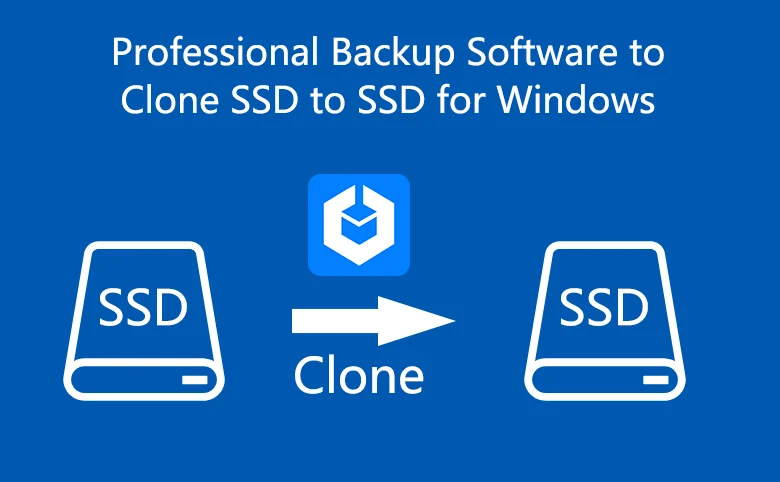
    Copying an SSD (solid-state drive) has become pretty common among folks who want to move all their data, operating system, and preferences to a new drive quickly. This post dives into why people clone SSDs and offers one best disk clone software for Windows users.

    Why Clone an SSD?

    Cloning an SSD brings several benefits compared to manual data transfer or OS reinstallation. It’s a time and effort saver, copying all data and settings from the source SSD to the target one. Whether you’re upgrading, replacing a faulty drive, or seeking more storage space, cloning streamlines the process while safeguarding data integrity. Specifically:

    • Efficiently manage your original hard drive.
    • Create a backup of important files.
    • Helpful for booting your computer in case of accidents or from a secondary hard drive.
    • Upgrade to a new SSD for improved performance or increased storage capacity.

    What’s the best SSD cloning software?

    Since there’s no built-in cloning software offered by Windows, you need to select a well-functioning cloning tool. AOMEI Backupper, a software designed for Windows systems backup and clone, support OS like Windows 11/10/8.1/8/7/Vista/XP, stands out as a top choice for SSD cloning software.  Some great features are presented as below:

    • Disk Clone: Easily clone entire hard drives, including all volumes. Whether you’re migrating from an HDD to a smaller SSD or upgrading to a larger SSD, this feature has you covered.
    • Partition Clone: Copy selected partitions, such as NTFS drives, with ease.
    • Intelligent Clone: By default, it only copies used sectors, making it efficient for cloning larger drives to smaller ones.
    • SSD Alignment: Improves performance and extends the lifespan of your destination SSD.
    • VSS Technology: Runs the cloning process in the background, allowing you to continue using your computer without interruption.
    • Sector by Sector Clone: This function enables you to clone all sectors, whether used or not, making an exact copy of the source disk. You can activate this feature if you need an identical replica of the source disk.
    • Compatibility: AOMEI Backupper Standard works seamlessly with all Crucial SSD models, such as Crucial MX100, Crucial MX200, Crucial MX500, Crucial BX500, M500 Series, and also supports other popular brands like WD SSD, Samsung SSD, and SanDisk SSD.

    Apart from extraordinary cloning functions, this pretty tool offers full backup and recovery solutions, and enables users share data with its wonderful syncing options.

    Stepwise guide on cloning SSD to another drive

    Now I will show you how to create a step-by-step guide on cloning SSD to another drive like HDD or another SSD. Before you start, please make some preparations:

    • Ensure your old SSD and new drive are properly connected to your computer. If you have only one drive bay, use a USB-to-SATA adapter.
    • Make sure there’s enough space in the destination disk to store the data or the cloning process will fail.
    • Remember that the target disk will be overwritten during cloning, so back up any important files if needed.
    • Download and install the free SSD migration software.

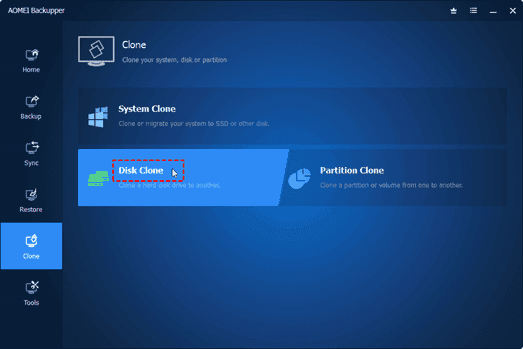
    Step 1. Now launch AOMEI Backupper on your computer. Click on the Clone button and select Disk Clone in the next window.

    Picture1

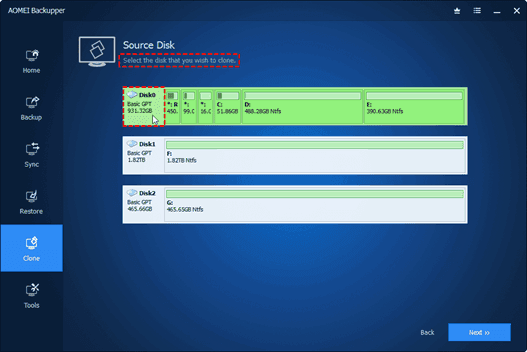
    Step 2. Choose the original SSD  as the source disk and then select the new drive as the destination disk.

    Picture2 1

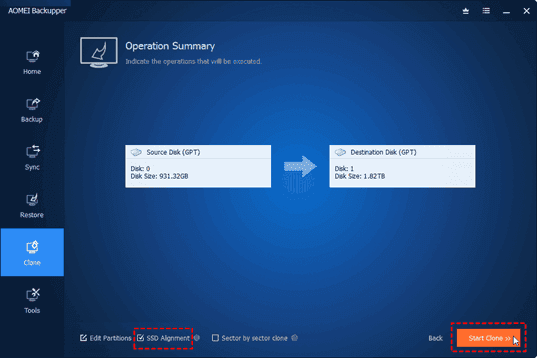
    Step 3. Optimize the performance of the destination SSD by checking the SSD Alignment option if needed.

    Picture3 1

    Step 4. Click on Start Clone to initiate the SSD  cloning process.

    Step 5. When the cloning process ended, click on the Finish icon to end the whole cloning process.

    Note: If you want to clone every sector, including unused sectors, tick the Sector By Sector Clone option. Additionally, if you’re upgrading to a larger SSD, you can use the Edit Partitions option to avoid unallocated space after cloning.

    Conclusion

    In conclusion, cloning an SSD provides a convenient way to transfer data, operating systems, and settings to a new drive, saving time and effort compared to manual reinstallation. Before starting the cloning process, ensure both the source and target SSDs are connected, verify sufficient disk space, and choose reliable cloning software.

    Among the available options, AOMEI Backupper stands out as the best cloning software due to its user-friendly interface, advanced cloning options, data integrity and security measures, and additional backup features.Now you can try this sofwtare yourself!

  • Full Introduction: Best Online Computer Backup Service

    Full Introduction: Best Online Computer Backup Service

    Are you interested in protecting your computer data by creating an online computer backup? Opting for an online backup solution ensures that your backed-up data is securely stored in the provider’s data center, offering protection against local accidents and disasters. Additionally, once you’ve made online backup for your computer data, you’ll have the freedom to access, download, and modify your data from any device.

    What Makes Online Computer Backup the Preferred Choice?

    Many users, like yourself, are increasingly opting for PC online backup. Let’s delve into the advantages of this backup solution:

    • Local data loss prevention: Local accidents such as system crashes, virus attacks, natural disasters, and equipment failures can result in data loss. However, creating an online computer backup ensures the safety of your data on the cloud.
    • Cost-effectiveness: Unlike traditional backup methods, online computer backup services often offer free cloud storage. If you require additional backup space, you can easily upgrade your cloud storage service according to your needs.
    • Enhanced data accessibility: Rather than carrying around a physical storage device, an online computer backup allows you to access your computer data from any device with a stable internet connection.
    • Simple data recovery: Online computer backup services maintain multiple versions of your backed-up data, enabling you to restore it to any previous version effortlessly.
    • Streamlined backup tasks: Online computer backup typically offers advanced features and settings to simplify and optimize your backup process.

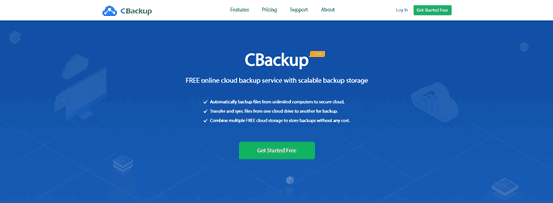
    Discover the Best Online Computer Backup Service: CBackup

    Are you faced with the dilemma of selecting a reliable online computer backup service for your computer data? With numerous options available in the market, comparing different aspects can be time-consuming. Do not worry, as we introduce you to the ultimate online backup service: CBackup.

    CBackup is from a professional company specializing in global data security for many years. CBackup employs OAuth to effectively protect your account and login information. Furthermore, the utilization of 256-bit AES Encryption guarantees the safety of your important computer data during upload and transfer tasks.

    Regardless of the operating system you use, you can access CBackup from its official web page. If you’re using a Windows operating system like Windows 11, 10, 8.1, 8, 7, or XP, you can download and install the CBackup desktop client directly on your computer, facilitating the creation of an online computer backup.

    With CBackup, you can create backup tasks for your entire computer, or select certain files and folders from computer to back up.

    Picture2

    CBackup offers a wide array of free backup and sync features. Here’s a brief overview of some of them that can help safeguard your computer data:

    • Backup PC to public cloud: The backup feature lies at the core of CBackup. You can easily back up your computer data to many common cloud drives such as Google Drive, OneDrive, and Dropbox.
    • Backup PC to CBackup Cloud: In addition to public cloud drives, CBackup also provides the option to use CBackup Cloud. Upon signing up for a new account, you receive 10GB of free cloud storage in CBackup Cloud.
    • Combine cloud storage: A standout feature of CBackup, it allows you to merge multiple cloud drive accounts into a single combined cloud, granting you unlimited cloud backup space. You can select accounts from the same platform or different cloud drives.
    • Sync PC to public cloud: CBackup enables you to sync your PC data with public cloud drives, offering this feature for free.
    • Cloud to cloud backup or sync: Aside from transferring data from local storage to the cloud, CBackup facilitates seamless data transfer between different cloud drive accounts using the cloud to cloud backup or cloud to cloud transfer feature.

    Step-by-Step Tutorial: Creating an Online Computer Backup

    If you’re eager to utilize the CBackup desktop application for creating an online computer backup, refer to the simple tutorial provided below:

    Start by downloading and installing the CBackup desktop app from the official website. Sign up for a new account and open the CBackup desktop application to log in.

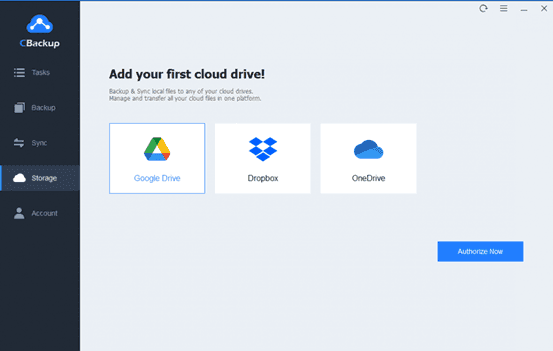
    1. On the left-hand side, click on the Storage tab, choose a public cloud, and click “Authorize Now” to add it.

    Picture3

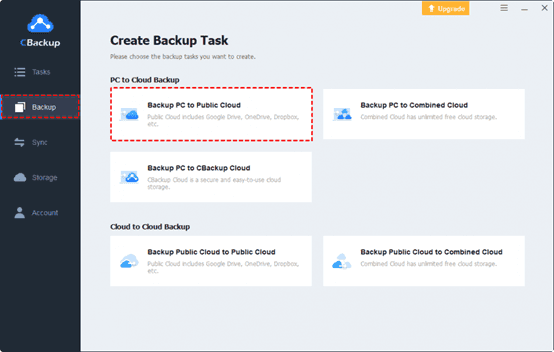
    2. Press Backup and select “Backup PC to Public Cloud” in turn.

    Picture4

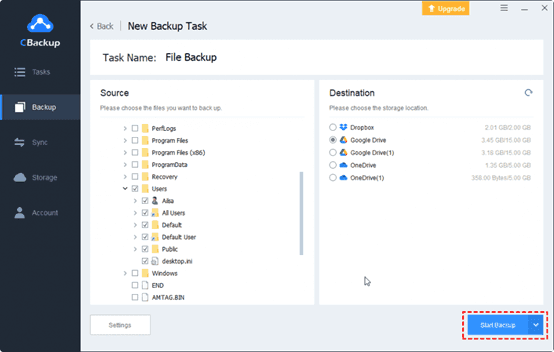
    3. Choose any data from your computer or the entire computer as the backup source. Then, select the cloud drive account you have added to CBackup as the backup destination.

    Finally, click the “Start Backup” button to swiftly back up your PC data to the online cloud.

    Picture5

    In Conclusion

    That concludes our discussion on the best backup software for computers, along with a step-by-step guideline. With CBackup, you can explore a range of additional free features to enhance the convenience of your online computer backup.