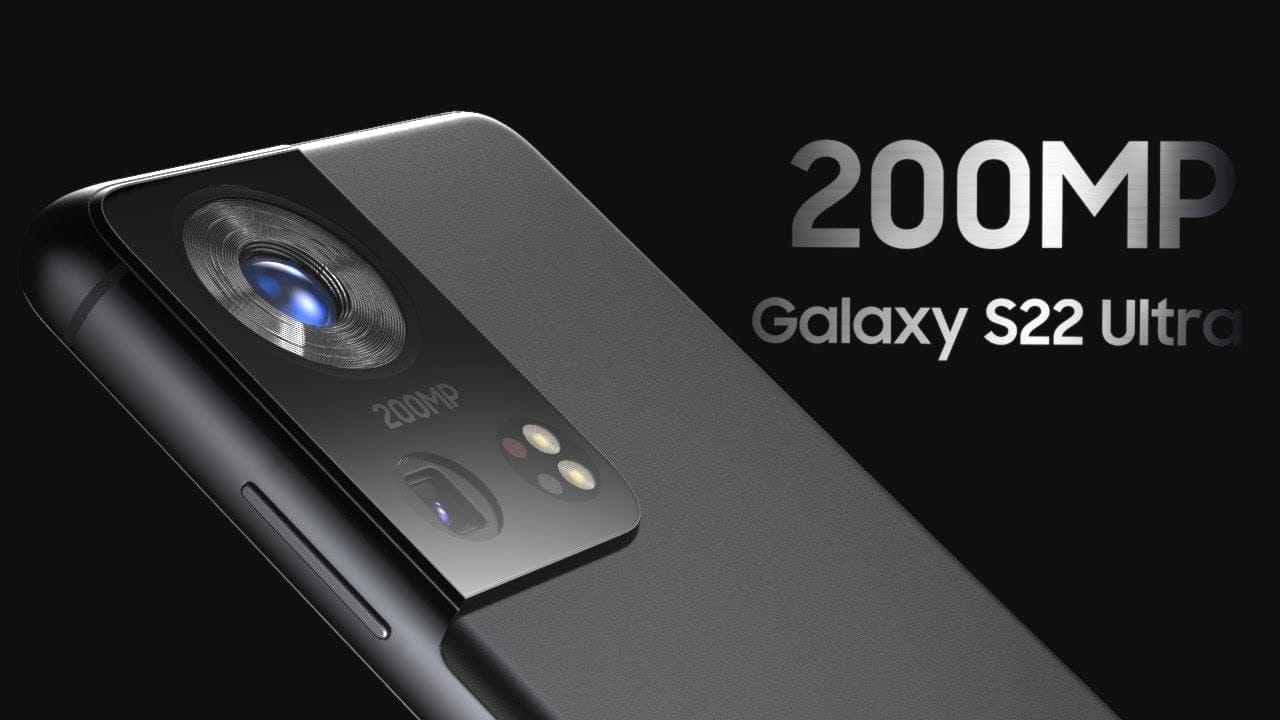
Although the Galaxy S22 may not be released for another eight months, various features and rumors about the forthcoming flagship devices have already begun to circulate online. The Galaxy S22 Ultra has now been rendered by fans, revealing a gorgeous design and a large camera sensor on the back.
Leaks & Rumors
LetsGoDigital’s renders of the Galaxy S22 Ultra demonstrate how Samsung could use a larger quad-camera array on the back and slim down the bezels surrounding the screen even more. Since speculations of an under-display selfie camera for the Galaxy S22 Ultra have been debunked, these renders depict a Super AMOLED Infinity-O display with ultra-thin bezels and rounded edges. There’s also support for the S Pen, but no special silo for it.
Another noteworthy feature visible in these Galaxy S22 Ultra mockups is an active cooling fan to keep the Exynos 2200’s temperature under control even during intensive workloads like gaming. Having said that, I believe Samsung’s flagship phones will use more passive cooling solutions. After all, when things get hot and heavy, no one wants to hear that internal fan whirling away. However, we do not believe that feature will be included in the Galaxy S22 Ultra. On the bottom, there is a USB Type-C port but no 3.5mm headphone jack. The overall design appears to be based on the Galaxy S21 Ultra, but with a larger camera and thinner bezels. The phone’s renders reveal five different colors: black, blue, green, red, and white.
Potential Camera
There have been reports that Samsung may collaborate with Olympus on the camera for its upcoming Galaxy flagships, and this render reflects that. A large 200MP Olympus camera sensor, an ultrawide camera, a telephoto camera, a continuous zoom periscope camera, and laser autofocus appear to be on the back.
Unlike the Galaxy S21 Ultra, which has three identical-looking camera lenses and two smaller sensors, this prototype goes all-in with a single large camera lens in the center. This lens is 200MP and contains Olympus branding, which has been speculated for the S22 Ultra.
This concept, like the Galaxy S21 Ultra, has four additional sensors. Our best guess is that they’re the dual telephoto lenses, as well as an ultrawide camera lens and a laser autofocus sensor, that we’re hoping to see return. It’s unclear why these four sensors are all the same size, especially since this wasn’t the case on the S21 Ultra.
The continuous use of the big camera bump is obvious here. While having extra space for camera components is understandable, the fact that these bumps appear to be getting larger and larger is not a trend we’d like to see continue.
Hit or Miss? While these renders claim to be based on leaks and rumors, they aren’t official photos, so they don’t reveal anything about the Galaxy S22 Ultra or how it will seem when it releases next year. However, we can be sure of one thing that this premium device will be able to carry out complex tasks such as SMS transfer with ease. We still have a long way to go until we see some official-looking photos of the phone, so we’ll have to wait and see what Samsung has planned for early next year.
After the Magisk method is published, the root process is simple to compare with conventional methods. Yet it’s got its limits. We can’t use custom ROMs unless we have some custom recovery enabled. So, even after users have access to root, they prefer the TWRP method when it is released. Samsung Galaxy M31 comes with upper mid-range specs and can handle all of the apps. But if you need root access, you can use the following method to root your Samsung Galaxy M31 Android 10. Since we use custom recovery in this phase, you can install any necessary custom ROMs on your mobile device.
Compare with standard other root methods, this method has additional steps. So, You should care a little bit when you do the process. Since it doesn’t use a custom recovery, You can’t install custom ROMs. But, It is enough to run most of the root apps.
After root, you lose the official alerts. You need to update your smartphone manually. So, you should know why you need to do this before continuing with the process. If you are a frequent user, you can try some alternatives that do not require root for your function. If you are a frequent user and developer of root apps, you can follow the guide below to get root on your smartphone.
Root and Install TWRP on Samsung Galaxy M31 Android 10 One UI 2.0, 2.5 (SM-M315F)
Thanks to the developer- afaneh92 for the Root method and topjohnwu – this genius is the one who discovered and maintained Magisk. Samsung Galaxy M31 variants come with a flexible bootloader in some regions. It means that the smartphone can be easily rooted. The device can also accept installing TWRP recovery or any other custom recovery file/app. Don’t try with Snapdragon US Variants like Verizon devices. They come with a locked Bootloader.
But In the below method, we are going to Root this device by using Magisk. You can install Official TWRP using the official app when it is released. TWRP recovery is a custom recovery file that must be installed on your devices because you can root them successfully. This article explained the easiest method to follow and install Magisk on Samsung Galaxy M31. However, the tool required for rooting this device is the Magisk App.
Once available, you can flash TWRP. With the support of TWRP Recovery, you can easily flash Custom ROMs to your Samsung Galaxy M31. Before sharing a tutorial, you may want to know that you can easily install any root apps with Magisk on your computer. Does that sound complicated? Relax; everything will be briefly explained in the bullets.
Things to check out for;
Check your device model number.
You should Backup your current files and data- Full Data Loss Process (save them on external storage).
Install Latest Magisk Manager.
Make sure your device battery is above 50%
You cannot use Samsung Pay, Secured folder, and some official apps from Samsung.
You can’t update your firmware; to get new firmware, you must follow the below steps with the latest firmware.
Read the full tutorial before the process.
Unlock Bootloader
Enable USB Debugging Mode and OEM Unlock on your mobile. To do this, go to settings >>> about >>> Tap on the “Build Number” 7-10 times consistently to enable “Developer Options,” then go to the “Developer Options” and enable USB Debugging Mode and OEM Unlock. There is no complicated process in the Samsung Galaxy M31.
Switch off your device. Enter into Download Mode-> Volume Down+ Volume Up and Connect your mobile with PC using USB Cable. When the Download mode warning screen Appears, Press the Volume Up button to unlock Bootloader.
The above process will wipe your user data. After Setup your device, Please recheck the OEM Unlock in the settings. Sometimes It Will Lock Again.
Download Multi disabler.zip and Magisk.zip files (Don’t download .apk file) copy them on your Pendrive With OTG Cable. You can refer to the uses of OTG. (Or, you can prefer an external SD Card).
You can use Phone Info to know your firmware version.
Prepare patched boot image file
Download 7Zip-ZS, LZ4, and Install both on your PC. Extract the files in downloaded firmware using 7Zip-ZS. You will get four files. Click on the AP File and Extract again. You will get some data along with the boot.img.lz4.
Copy the boot.img.lz4 and Vbmeta.img.lz4 to LZ4 Installed folder. Convert the lz4 file to a .img file by dragging the .img file to the lz4 application file. You have to drag the file to that application. The script will automatically convert the file to .img format. After the conversion, Copy the boot — img file to your mobile. Leave Vbmeta in the PC folder.
Download Magisk Manager (Download Latest version) or Magisk canary and Install it on your mobile. Open Installed Magisk and Select Install in Magisk; it will ask For a zip file and Patch Boot Image File. Select the Boot Image file.
Navigate to your copied boot image file and patch the file.
Wait for the process to complete, in the end, you will get a magisk patched .img file. Rename this file into the boot.img.
Now copy boot. img and Vbmeta. img files to your PC. We already leave the Vbmeta. img file on PC. Drag those files into the downloaded TWRP.tar file. Now you can see there are three files within the TWRP.tar file. Don’t extract the data. The three files contain a single .tar file that should be flashed using ODIN.
Flash TWRP.tar with ODIN
Connect your USB cable with your PC. Switch off your device. Then, enter into Download mode. To do this, press and hold Volume Down+ Volume Up Buttons and Connect Your Mobile To PC via USB Cable; after Samsung Logo Appear, Release all keys.
Press the Volume Up button to continue when you see the warning message.
Now, connect the Samsung Galaxy M31 mobile to the computer via USB cable.
Launch the Odin app on your computer. If the device is detected by this app (Odin), it will show you a message that reads – added!!!
However, if the device is not correctly connected to the PC, you won’t see this message. So, you have to check the USB cable if it is reasonable and reconnect the device.
After connecting the Samsung device, click on the PDA/PA/AP button to browse/search and get the TWRP from where you saved it on your PC. Also, navigate to “options” and Un-tick the Auto-Reboot.
Click on “Start”
Once the file is loaded into the device, reboot your device.
Now you have just Installed the TWRP on your Samsung Galaxy M31. We installed TWRP. Don’t turn on your mobile.
Immediately, move to Magisk Installation steps.
Press the Volume Down+Power button to exit Download mode and quickly press Volume Up+ Volume Down+ Power Button to boot into Recovery mode.
Install Magisk on your Samsung Galaxy M31 with TWRP
Now you are in TWRP Recovery Mode.
Select Wipe->Advance Wipe->Select Cache Data. You can also take complete backup using TWRP. It will help you when something goes wrong.
Return to Home of TWRP select Install.
Select Multi disabler.zip.
Return to Home of TWRP select Install.
Select Magisk.zip.
You should Install them One by One. Don’t add more zips feature in TWRP. After the Installation, Reboot Your Mobile.
You can also install Magisk.apk in your Mobile Applications. Multi disabler avoids the Encryption issue after rooting. You can check your root status using Root Checker.
If you didn’t find Magisk in App Drawer, you should Install the Magisk app again.
The leaks are coming thick and fast, with Samsung expected to launch the Galaxy S21 in about a month. A new leak comes along as soon as we think we know everything about these phones, providing us with even more information. But while we’ve seen a lot of renders, it’s been much harder to come across imagery of real hardware. With the release of a hands-on first experience video featuring the Galaxy S21+, now that’s changing in a major way, and we’re all losing our minds.
Although the bottom corners of the phone are hidden behind some tape, this is still our best look yet at the front of the S21+. Samsung has somehow managed to shrink the bezels even further than the S20, and it looks as though they are almost completely symmetrical.
The ending on the back panel is something else to remember. Samsung has been making phones with ultra-glossy backs that gather fingerprints like there’s no tomorrow for years now. The Note20 Ultra changed things, but it was unclear whether the S21 would suit. The system with a matte finish seemed to display previous renders, but it was difficult to tell with any certainty. Thanks to this video, we can now be confident that for this color at least, the S21 leaves the glossy finish behind.
Samsung Galaxy S21+ #leak
The filmmaker talks briefly about the images taken by the phone, reporting that colors such as blue and green do not look very normal. As Samsung is notorious for over-saturating images, that’s no surprise, but anyone hoping to change that here will be disappointed.
Although no numbers are given, the reviewer says he is more than happy with battery life, stating that the phone easily lasts a full day even with heavy video calling. This is likely helped by the S21+ getting a 4,800mAh battery, 300mAh larger than its predecessor.
Finally, a Geekbench test was passed on the handset, and this is where we were able to confirm that this is the S21+. Although the video refers to this phone as an S21, model number SM-G996U refers directly to the S21+, and the Snapdragon 888 is possibly a T-Mobile model.
The S21+ scored 1115 for single-core performance and 3326 for multi-core. The S20+ only scored 830 and 3087, respectively, for comparison. That’s a good upgrade, especially when you think that this is probably unfinished software that needs to be optimized before release. Let’s hope that the Exynos 2100 will equal its counterpart from Qualcomm.
Thick camera bump, a flat screen, and will be launched in January 2021
If you’re eagerly waiting for Samsung’s 2021 flagship to get your hands on it, new reports have revealed a few details about it, showing the future design and release date of the handset. The actual Galaxy S21 will look different as this information is not official, but this leak still sheds some light on what to expect early next year.
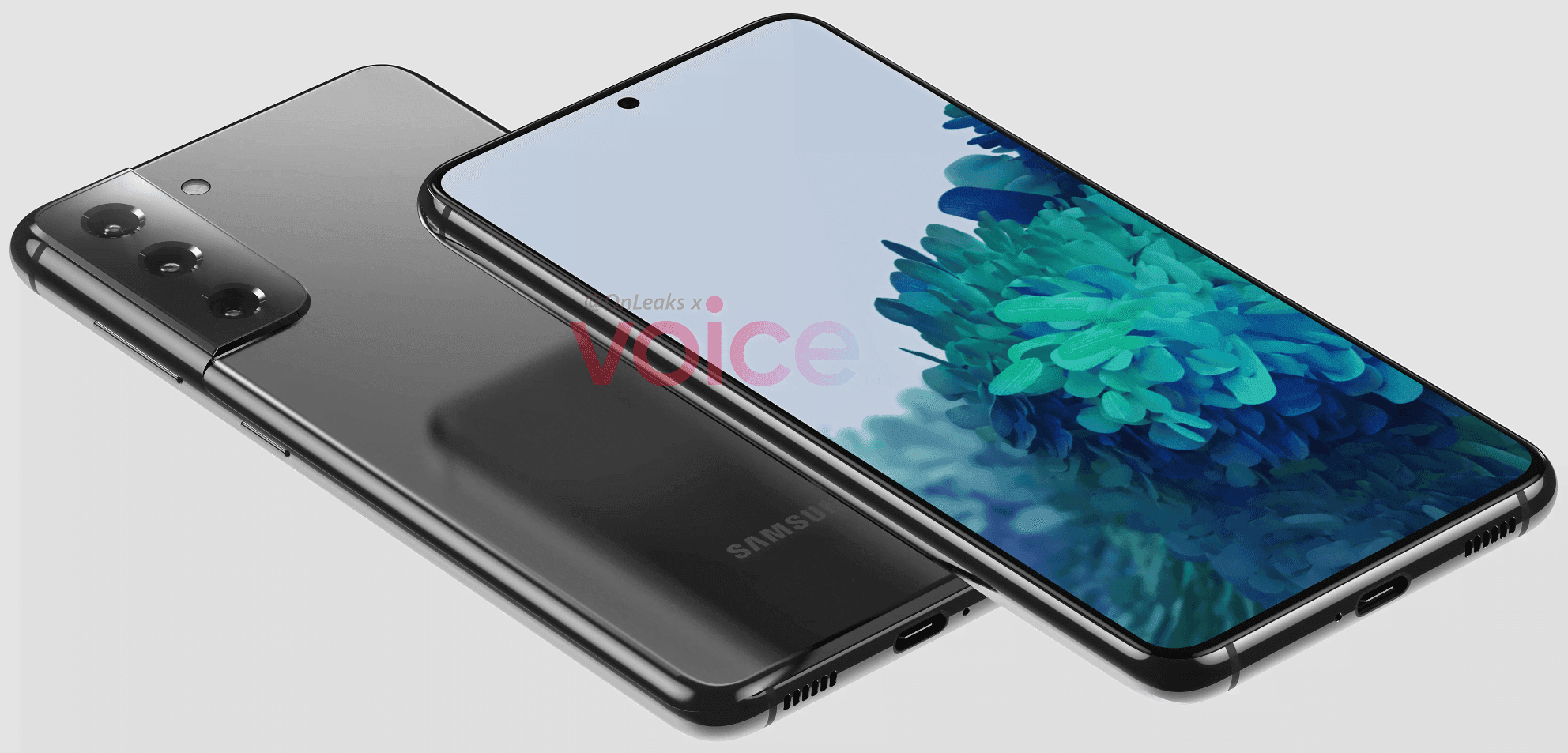
The front of the phone has not changed much compared to its predecessor, based on the pictures, with the future smartphone looking very similar to the S20, including its punch-hole to house the selfie camera at the center of the screen. However, with a new camera configuration that tends to stretch from the frame, the back has been raised, producing a comparatively thick hump, measured at 1.1 mm. However, the number of shooters remained the same, with three rear cameras, at least on the ‘ordinary’ S21. The computer should have a flat 6.2-inch display and weigh around 151.7 x 71.2 x 7.9 mm, according to Steve Hemmerstoffer (@OnLeaks).
More importantly, reports say that the phone may be launched in January 2021, which is much earlier than normal. While only the design of the S21 has emerged so far, it is still expected that the company will launch three devices, including “Plus” and “Ultra” versions.
There’s a lot that remains unknown about Samsung’s future flagship, including its battery size and details specs. Its name is also unconfirmed so far, as we’re unsure whether it will be called the Galaxy S21 or S30. We’ll keep you posted as we learn more about the company’s upcoming lineup.
As mentioned above, Samsung is very likely to announce an S21 Ultra, alongside the “regular” model. The higher-end device has just leaked, revealing further details about the upcoming lineup.
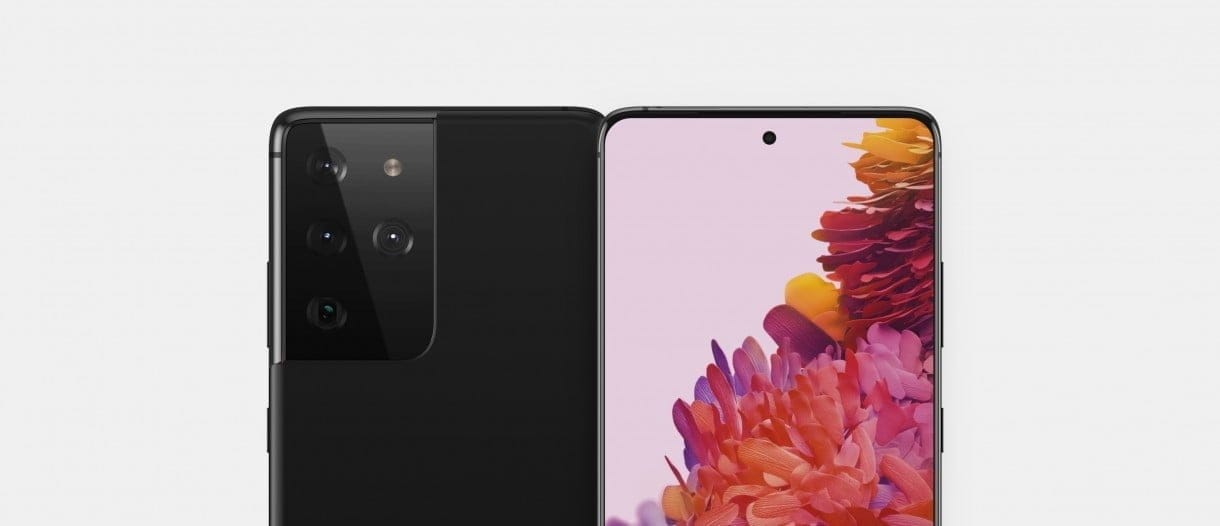
The images show the S21 Ultra should come with a curved display, measuring between 6.7 and 6.9-inches. The larger display means the phone would also be bigger than the S21, measuring approximately 165.1 x 75.6 x 8.9mm.
On the rear side of the handset, with a humongous 1.9mm-thick camera module bulging from its back, the biggest difference in design is. The latter houses four sensors, together with the LED light, which, interestingly, does not form part of the “standard” S21 camera setup.
Thank you to the Three Movers Mobile App for the helpful tips and guidance. Your insights have been incredibly valuable in simplifying the moving process and helping users stay organized every step of the way. From planning and packing to coordinating logistics, the app offers practical tools and expert advice that make a real difference. We appreciate your commitment to making moves smoother and more manageable for everyone.