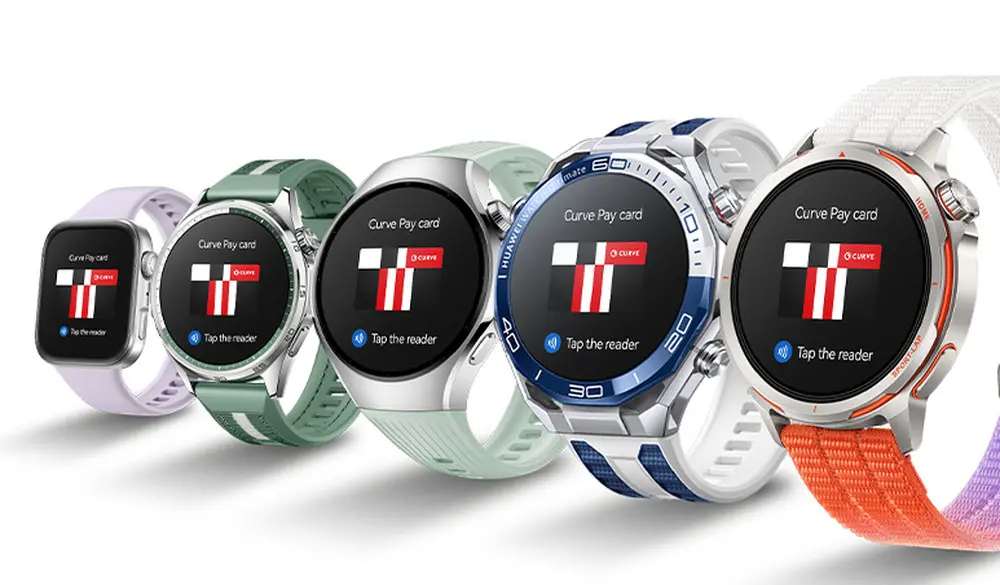
Curve Pay is available in Europe for the Huawei Watch Ultimate 2, the Huawei Watch GT 6, and a number of other Huawei smartwatches, significantly enhancing the contactless payment experience.
In the past, Quicko was the only contactless payment method available in Europe for smartwatches like the Huawei Watch GT 6. But as compared to Google Pay and Apple Pay, this approach has a lot of drawbacks. On the one hand, Quicko is not accepted in many retail chains, and credit needs to be topped up beforehand rather than just using a debit or credit card.
With the introduction of Curve Pay to Huawei smartwatches, Huawei is finally making amends. Like Apple Pay, Curve Pay lets you store numerous cards and use the NFC chip in your timepiece to make contactless purchases with them. Curve Pay is compatible with any bank account and permits cash withdrawals at an ATM, according to the vendor. The following Huawei smartwatches are compatible with Curve Pay:
Huawei Watch GT Runner 2
Huawei Watch Ultimate 2
Huawei Watch GT 6
Huawei Watch GT 5
Huawei Watch 5
Huawei Watch Fit 4
The Curve Pay app must be downloaded from Google Play, the Apple App Store, or the Huawei AppGallery in order to utilize the service. Instead of constantly switching to the smartphone app, stored payment methods can be chosen directly on the smartwatch via an integrated smart wallet once the app has been loaded, configured, and connected to the smartwatch. Curve Pay is free to use, but you may purchase different subscriptions if you want features like more cashback or bigger limits for free payments overseas.
A new Android-based spyware that leverages NFC technology to make illegal ATM cash withdrawals and empty victims’ bank accounts was examined by the Polish Computer Emergency Response Team (CERT Polska).
Researchers discovered that the software, known as NGate, allows attackers to use banking information stolen from victims’ phones to withdraw money from ATMs (Automated Teller Machines, or cash machines) without actually taking the cards.
NFC is a wireless technology that enables close-quarters communication between gadgets like terminals, cellphones, and payment cards. Therefore, rather of stealing your bank card, the attackers use a mobile phone infected with the NGate virus to record NFC (Near Field Communication) activities and send that transaction data to ATM equipment. Instead of being relayed just via radio, the stolen data in NGate’s situation is transmitted over the network to the attackers’ servers.
There are several “flavors” of NFC. Some generate a static code, like the card that opens the door to my apartment complex. I can use a gadget like my “Flipper Zero” to open the door by just copying that type of signal. However, dynamic codes are used by sophisticated contactless payment cards, such as your Visa or Mastercard debit and credit cards. Your card’s chip creates a unique, one-time code (commonly referred to as a cryptogram or token) each time you use the NFC. This code is unique and cannot be reused.
That’s why the NGate malware is more advanced. It does more than just pick up a signal from your card. The victim must be duped into entering their PIN and completing a tap-to-pay or card-verification activity after the phone has been compromised. When that occurs, the app records every piece of information required for an NFC transaction, including the card number, new one-time codes, and other information created at that same moment.
All of the NFC data, including the PIN, is then immediately sent to the attacker’s handset via the virus. The attacker uses the codes right away to mimic your card at an ATM because they are newly produced and only valid for a brief period of time. The accomplice at the ATM displays the collected data using a card-emulating device, such as a phone, smartwatch, or bespoke hardware.
However, as you may guess, social engineering and preparation are necessary to be prepared at an ATM when the data arrives.
Attackers must first infect the victim’s device with malware. They usually send prospective victims phishing emails or SMS messages. They frequently try to create anxiety or urgency by claiming that there is a technical or security problem with their bank account. Occasionally, they make a follow-up call while posing as representatives of the bank. These calls or texts instruct victims to download a phony “banking” app from an unofficial source, like a direct link rather than Google Play.
After installation, the software requests permissions and guides users through fictitious “card verification” procedures. While an accomplice waits at an ATM to cash out, the objective is to persuade victims to act swiftly and trustingly.
Stay safe:
NGate only functions when your phone is compromised and you are duped into entering your PIN and starting a tap-to-pay action on the phony banking app. Therefore, the greatest defense against this infection is to protect your phone and be on the lookout for social engineering:
Stick to trusted sources. Download apps only from Google Play, Apple’s App Store, or the official provider. Your bank will never ask you to use another source.
Protect your devices. Use an up-to-date real-time anti-malware solution like Malwarebytes for Android, which already detects this malware.
Do not engage with unsolicited callers. If someone claims to be from your bank, tell them you’ll call them back at the number you have on file.
Ignore suspicious texts. Do not respond to or act upon unsolicited messages, no matter how harmless or urgent they seem.
Malwarebytes Mobile Security
Malwarebytes is an anti-malware software for Windows, macOS, ChromeOS, Android, and iOS that finds and removes malware.
Malwarebytes for Android detects these banking Trojans as Android/Trojan.Spy.NGate.C; Android/Trojan.Agent.SIB01022b454eH140; Android/Trojan.Agent.SIB01c84b1237H62; Android/Trojan.Spy.Generic.AUR9552b53bH2756 and Android/Trojan.Banker.AURf26adb59C19.
Cybercriminals have created a brand-new technique called “Ghost Tap,” which transmits NFC card information to money mules all around the world, to profit from stolen credit card information connected to mobile payment systems like Apple Pay and Google Pay.
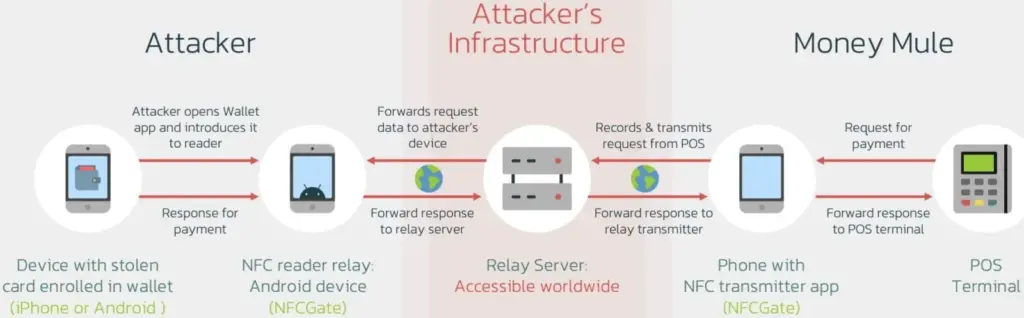
The strategy expands on techniques used by mobile viruses such as NGate, which were reported by ESET in August and involved using payment card Near Field Communication (NFC) signals. Ghost Tap employs money mules at several remote places connecting with Point of Sale (PoS) terminals, is more obfuscated and difficult to detect, and does not require the victim’s mobile or card. It also does not require constant victim interchange.
Ghost Tap was found by mobile security company Threat Fabric, which cautions about the growing potential and adoption of the novel method. Threat Fabric told Droid Tools that it has recently observed an increase in the use of Ghost Tap in the field.
An overview of Ghost Tap and a comparison with NGate
The attack starts by stealing payment card information and intercepting the one-time passwords (OTP) required to register for a virtual wallet on Google Pay and Apple Pay. Payment card information can be stolen via phishing websites, keylogging, or banking malware that shows overlays that seem like digital payment apps.
Malware that tracks text messages or social engineering are two ways that OTPs can be stolen. Previously, NGate-based assaults required the use of specialist software to mislead the victim into scanning their card via the NFC mechanism on their device.
Payment card information is still transmitted using the NFCGate tool. But in the interim, a relay server is set up to transmit the information to a vast network of money mules while hiding their true locations. Using the NFC chip on their cellphone, the mules then make large-scale, multi-location retail purchases, making it challenging to identify the main attacker or map the fraud network.
Threat actors were restricted to making minor contactless payments and ATM withdrawals during the NGate attacks, which jeopardized their identity and occasionally resulted in arrests.
The threat actors have stopped making ATM withdrawals as a result of the new Ghost Taps operation. Rather, they merely carry out cash outs at the time of sale and distribute them around a vast global network of mules. This just endangers the mules by obscuring the path to the primary perpetrators of the nefarious conduct.
Defending Against Ghost Tap
Threat Fabric cautions that because the transactions seem authentic and take place across several locations, the new strategy is difficult for financial institutions to identify and halt.
The researchers claim that although many banks’ anti-fraud systems identify purchases made in odd places, as when visiting another nation, the many tiny payments might evade these detections.
“The new tactic for cash-outs poses a challenge for financial organisations: the ability of cybercriminals to scale the fraudulent offline purchases, making multiple small payments in different places, might not trigger the anti-fraud mechanisms and might allow cybercriminals to successfully buy goods that can be further re-sold (like gift cards),” explains ThreatFabric.
If the attack is used widely, the total amount lost might be substantial even though all of these tiny transactions seem to have originated from the same device (connected to the same Apple Pay or Google Pay account). The mules switched their handsets to “airplane mode,” which still permits the NFC system to operate normally, in order to avoid being tracked.
Banks may only prevent Ghost Tap by flagging transactions made using the same card at locations that are physically impossible to visit in between charges. For instance, carrying out a fraudulent transaction in Cyprus 10 minutes after completing one in New York.
From the standpoint of the customer, keeping an eye out for fraudulent transactions and promptly reporting them to your bank is essential for freezing the card and reducing losses.
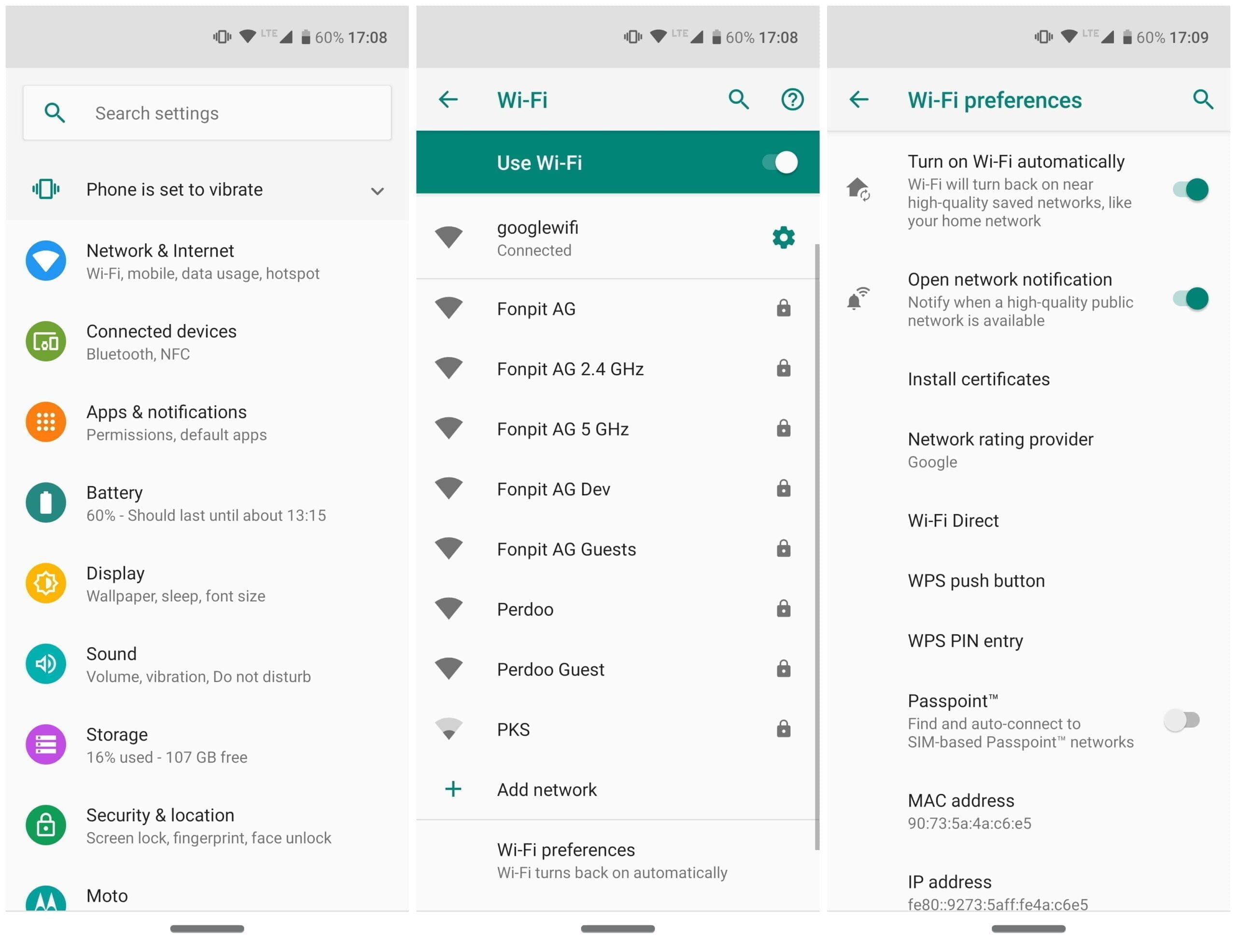
On our Android smartphones, the list of settings and features is very comprehensive and most of them either just pass by unnoticed when we see them, or we happily ignore them. One of those was Wi-Fi Direct, but we will clarify to you what it is and why you should use it. Click here to set it up.
What is Wi-Fi Direct?
When anyone discusses Wi-Fi most people would think about browsing the internet instantly, but there is more to it than just that. Wi-Fi Direct is a certificate issued by the Wi-Fi Alliance of more than 600 members, including Apple, LG, Intel , Microsoft and Dell. These days a range of devices are compliant with Wi-Fi Direct – most notably smartphones , laptops and digital cameras. One of the first smartphones to have this feature was the Samsung Galaxy S (launched in 2010), and as for Android 4.0 Ice Cream Sandwich, all Android smartphones have this feature included native.
Wi-Fi Direct can be regarded as a kind of second-generation Wi-Fi, as it allows compatible devices that do not have their own internet connection to create a connection between them (hotspots, modems or routers). You can create a wireless network between multiple devices, thanks to Wi-Fi Direct. Additionally, in conjunction with Miracast, you can use Wi-Fi Direct to screen on another device with a monitor. Wi-Fi Direct’s newest generation is also compliant with NFC.
Wi-Fi Direct settings
Why should you use Wi-Fi Direct?
As already mentioned, Wi-Fi direct allows devices to connect to one that does without their own internet connection. In the case of Android smartphones and tablets, you can connect them and pass files easily without the cable hassle. So, is Wi-Fi Direct just a glorified Bluetooth version? Oh , yeah, yes and no. The benefit of using Wi-Fi Direct over Bluetooth is that the range and upload rates of Wi-Fi are considerably greater than those of Bluetooth. So in short-use Wi-Fi Direct to send files from one device to another, if you want a better way.
Set up Wi-Fi Direct
Each Android smartphone that uses Android 4.0 and above has Wi-Fi Direct features (some very rare exceptions are available). Although the user interfaces of the systems can differ, setting up this functionality for all devices is relatively easy and standardized. At the moment, Wi-Fi Direct does not allow file transfers natively, so you will need to install a third-party plugin. We suggest “Send Wherever”
Unlike with Bluetooth, there is no button or anything that you need to tap to turn Wi-Fi Direct on. Wi-Fi Direct is enabled the moment you have a stable internet connection. This doesn’t mean that Wi-Fi Direct is on all the time. Your smartphone only starts scanning for nearby devices to connect to when you tap on the Wi-Fi Direct tab.
Important: You also need to turn on Wi-Fi direct on your laptop, television, printer, or whichever device you are connecting to as well as having activated it on your smartphone using the steps above.