Tag: meta

  • WhatsApp warning: A simple trick compromised 3.5 billion accounts

    WhatsApp warning: A simple trick compromised 3.5 billion accounts

    There may be hidden risks to billions of WhatsApp accounts. According to a recent analysis, there are major security flaws in the privacy of the communications that hackers might take advantage of.

    With merely their phone number, finding someone on WhatsApp is very simple for many users, and the frequency of searches appears to be limitless. However, according to a recent analysis, this has turned into a significant security flaw that leaves 3.5 billion users of the messaging program vulnerable to assault.

    Big WhatsApp security risk

    Through a study carried out between December 2024 and April 2025, security researchers at the University of Vienna in Austria found the vulnerability. The primary cause of the problem is WhatsApp’s long-standing built-in capability for locating and adding contacts.

    In theory, the app will display whether a number has an account if you add it and then search it up. Additionally, anyone with an active phone number is able to send messages to public accounts and view the profile.

    WhatsApp warning

    A program known as “libphonegen,” which creates combinations of account numbers from other nations that may be registered on WhatsApp, was used by the team to carry out this procedure.

    They were able to produce 63 billion possible accounts and 100 million numbers each hour in their study. 3.5 billion accounts were taken out of those. Of these, 29% had written profiles with sensitive information including political and religious affiliations and links to other social media accounts, while 57% had their profile images made public.

    The vulnerability Is alarming

    The results show how this WhatsApp security vulnerability could be exploited by malevolent parties, including fraudsters and attackers. For example, the encryption in the messaging app is weakened since public and identification keys are reusable rather than unique. Attackers might intercept and decrypt messages if security was compromised.

    The identical WhatsApp vulnerability was discovered in 2017, but Meta has not been able to fix the flaw.

    Following the discoveries, Meta was contacted by the security research group. The company verified that it implemented system modifications in October that restrict the number of account searches that may be done within the app.

    How to protect yourself

    Users with public profiles, however, are still vulnerable because others can still read their profile images and text. Making their WhatsApp profile private is advised for those who are worried about security and privacy.

    Additionally, Meta has added new security and privacy features. A monthly message cap and automatically muting calls and messages from strangers are two of these that are presently being testing.

  • Google Scam Detector will be integrated in social apps

    Google Scam Detector will be integrated in social apps

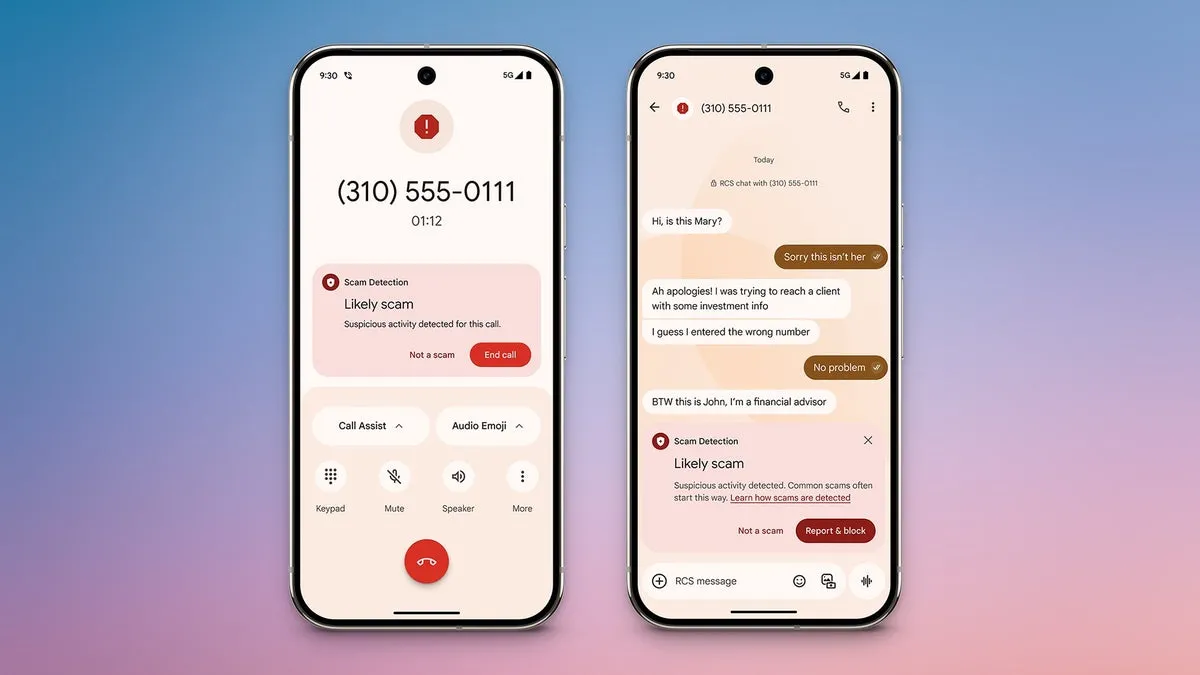
    Hardware and software are not the only things that are changing. The sophistication of cyberthreats such as phishing and frauds is also increasing. Google just unveiled a potent AI-powered scam detection tool for Android that provides real-time notifications while making calls and sending messages. It looks like the business is now extending this tool to third-party messaging applications.

    Gemini powers Android scam detection, which starts as soon as a danger is detected. Before answering a call or even in the middle of a conversation, it notifies users. Despite its great effectiveness, the tool’s present functionality is restricted to native Android Phone and Messages apps.

    google scam detector

    This exposes consumers to attacks on WhatsApp, Facebook Messenger, and Telegram, among other channels where scams are equally prevalent. Thankfully, it appears like Google foresaw this gap early on.

    Meta Apps will soon get Google’s Scam Detection

    The most recent Android System Intelligence update for the Pixel 10 indicates that Google is attempting to expand scam detection beyond Messages to other messaging apps, according to Android Authority.

    Evidence of this enlargement can be discovered in code strings included in the update and in the Security and Privacy section of the tool’s settings.

    It is anticipated that the feature’s settings would include a new toggle called “Message frauds.” “Get alerts about possible frauds in notifications of chat messages from supported apps,” the description says, implying third-party platform support. Millions of users might be able to avoid scammers before they even open a questionable mail thanks to this.

    <string name="notification_adjustment_justification">May contain harmful contents</string>
    <string name="notification_scam_likely_text">Likely scam</string>
    <string name="scam_warning_description">Scam Detection found suspicious activity in this message</string>
    <string name="scam_warning_guidelines_header">Protect yourself against scams:</string>
    <string name="scam_warning_header">Likely scam</string>
    <string name="not_a_scam_button_text">Not a scam</string>
    <string name="snackbar_text">Scam Detection paused for this chat</string>

    Subsequent research reveals that the program may indicate questionable information or behavior by scanning messages within apps. In addition to having the option to completely or per-app disable the feature, users will be able to verify whether a message is a hoax. Users now have more control, particularly if they use a certain chat service a lot.

    Which Apps Are Going to include Google Scam Detection?

    According to reports, this feature will work with a number of apps, including Verizon Messages, Instagram, Facebook Messenger, Signal, WhatsApp, KakaoTalk, Line, and Twitter (X). After the feature is formally launched, more apps will probably be included.

    Although the release date for this feature is yet unknown, it is something to keep a close eye on. Tools like these are becoming indispensable as AI-powered scams and more sophisticated attack techniques proliferate.

    Starting with the Pixel 10 and later variants, we anticipate the feature to make its debut on Pixel devices. It should ideally spread to Android smartphones other than Google’s own.

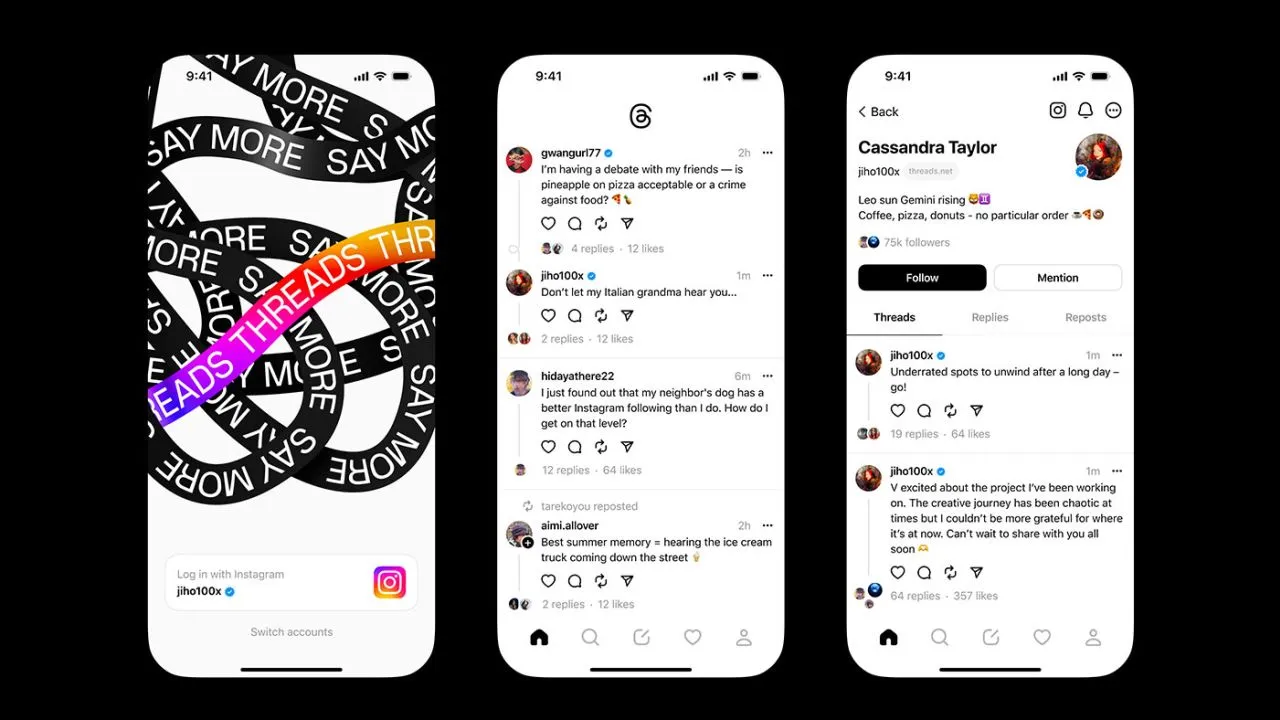
  • Threads app, goodbye privacy

    Threads app, goodbye privacy

    Think again if you believed that your data on Threads is private.

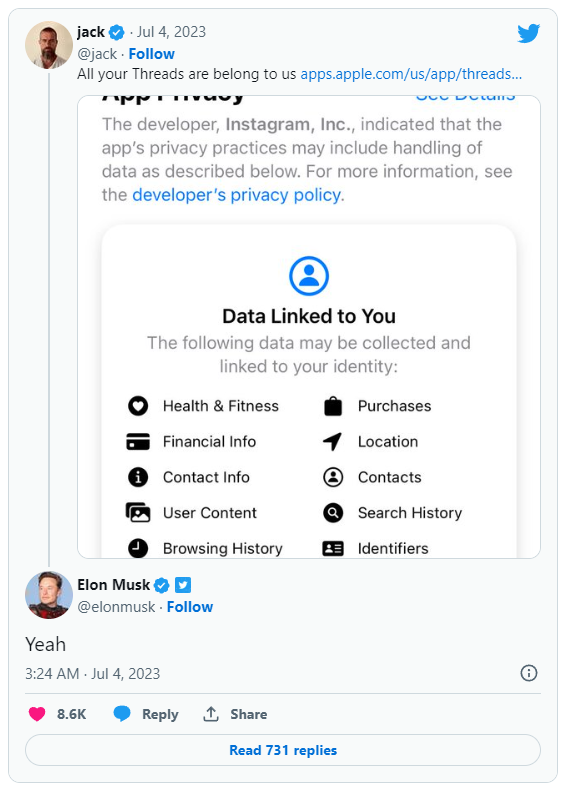
    All of the methods that Threads is following you and using your data are listed in the App Privacy section of the Threads App Store website. The list is very, very long, reader.

    Thursday saw the launch of Threads, Meta’s answer to Twitter, and it appears that in its first seven hours of operation, it attracted more than 10 million users.

    Click the “See Details” link in the App Privacy section of the App Store page for a comprehensive overview of the possible data collection and usage practices for Threads (opens in a new tab). But, the gist is this: Nearly all of your personal information is being gathered by Threads, including information about your transactions, finances, location, contact details, search history, and browsing habits.

    threads

    Jack Dorsey, a co-founder of Twitter, became aware of this and tweeted about the Threads App Privacy section. Elon Musk, the company’s current owner, simply said, “Yeah.”

    It doesn’t come as big surprise. The amount and breadth of data that Threads collects is similar to its sister app, Instagram(opens in a new tab) (both Threads and Instagram are owned by Meta, which also owns Facebook).

    Twitter and other significant social media platforms gather user data as well in order to provide advertisements from outside businesses more effectively. A comparable, albeit slightly condensed, overview of all the ways in which Twitter uses the data of its users can be found on its App Privacy(opens in a new tab) page.

    Even still, it’s upsetting to have to give a Twitter clone access to vast amounts of your personal information. Another Twitter competitor, Jack Dorsey’s BlueSky, which is now invite-only, claims to be looking into ways to make money without being as dependent on third parties as its rivals.

  • Messenger is wasting your phone’s battery running background tests – I knew it!

    Messenger is wasting your phone’s battery running background tests – I knew it!

    One of the most widely used messaging services is Facebook Messenger, but its parent company, Meta, has a spotty history of protecting users’ interests. The social media behemoth has recently been the target of multiple security breaches and is infamously linked to the Cambridge Analytica affair. The fact that a former data scientist for the firm believes Messenger can intentionally drain your smartphone’s battery in the sake of feature testing, potentially placing you in danger, is concerning because it shows that user interests continue to be Meta’s secondary concern.

    Data scientist George Hayward, 33, filed a lawsuit against his former employer in Manhattan Federal Court after being fired in November, terminating his three-year employment with Meta (via Android Authority). According to Hayward’s lawsuit, the business let him go because he refused to participate in negative testing, which is the technique of deliberately supplying false data to an app to ensure that it will work when users use it inappropriately.

    Messenger

    Hayward disagreed with negative testing, but not because of the method Meta used to conduct it. The battery life of a Messenger user’s phone would suffer when the business remotely initiated negative testing on that user’s device. The majority of people keep a close eye on their phone’s battery level throughout the day, but in the event of an extreme depletion, they can find themselves in a situation where they are unable to contact family or emergency services.

    According to Hayward, who spoke with the New York Post, the true risk comes from users not being aware of Meta’s negative testing procedures. But that’s not all; according to reports, Meta also gives staff members manuals on how to conduct considerate negative tests that use examples from actual research. This appears to suggest that Meta runs these tests frequently and would perhaps assign larger teams to the job. Sadly, Hayward continues, discussing the appropriateness of the procedures with superiors didn’t go over well; he hinted that refusing to submit to the tests would result in his termination.

    Hayward made certain claims, but Meta hasn’t responded to them. The lawsuit has subsequently been dropped. If the required arbitration attempts between the two parties are failed, it may go on.

    If you’re worried about Messenger’s negative testing in the interim, you can go to its Program Info page on your Android phone, pick “Battery,” and then select “Restricted,” to stop the app from operating in the background. However, be aware that this could cause delayed message alerts. Reviewing the privacy settings on your phone and looking for more battery-saving techniques may be a preferable course of action.

  • New ways to flag content that you don’t like on Instagram

    New ways to flag content that you don’t like on Instagram

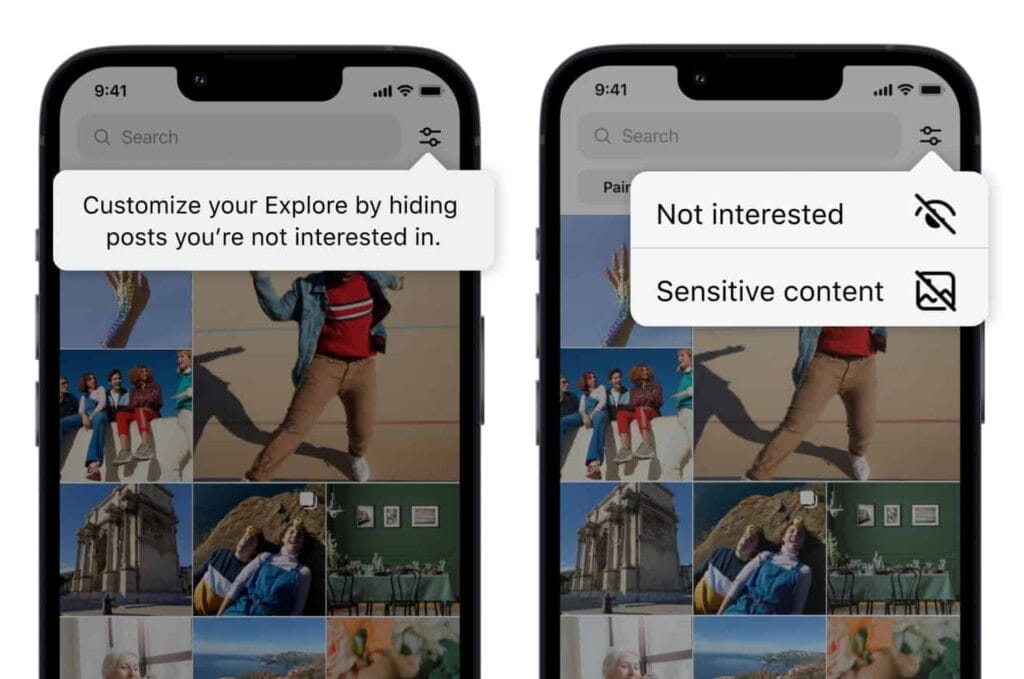
    Users now have more options for managing what they view on Instagram. You can now personalize your Instagram feed with a few of the new features the business has introduced. First off, it is a test of the feature that lets you designate several postings as “uninterested.” In the Explore page, you can choose whatever posts you want to flag for the app at once. The chosen posts are instantly removed from your feed. Additionally, you won’t see any more such content in the future. You may presently only do that for individual postings on the Meta-owned platform. Multiple posts cannot be flagged at once.

    You must tap the new Filter option in the Explore tab, which is located next to the search box, in order to flag multiple posts on Instagram. There are two choices there: Sensitive Content and Not Interested. Decide between the two options, then indicate on the posts. Tap Done to finish the activity at this point. Compared to the present implementation, which calls for you to first open a post, tap on the three-dot menu, and then choose Not Interested, this is far more convenient. For each piece of content you want to filter out, you must repeat these steps.

    instagram not interested content

    Instagram adds new ways to filter content as it becomes more like TikTok

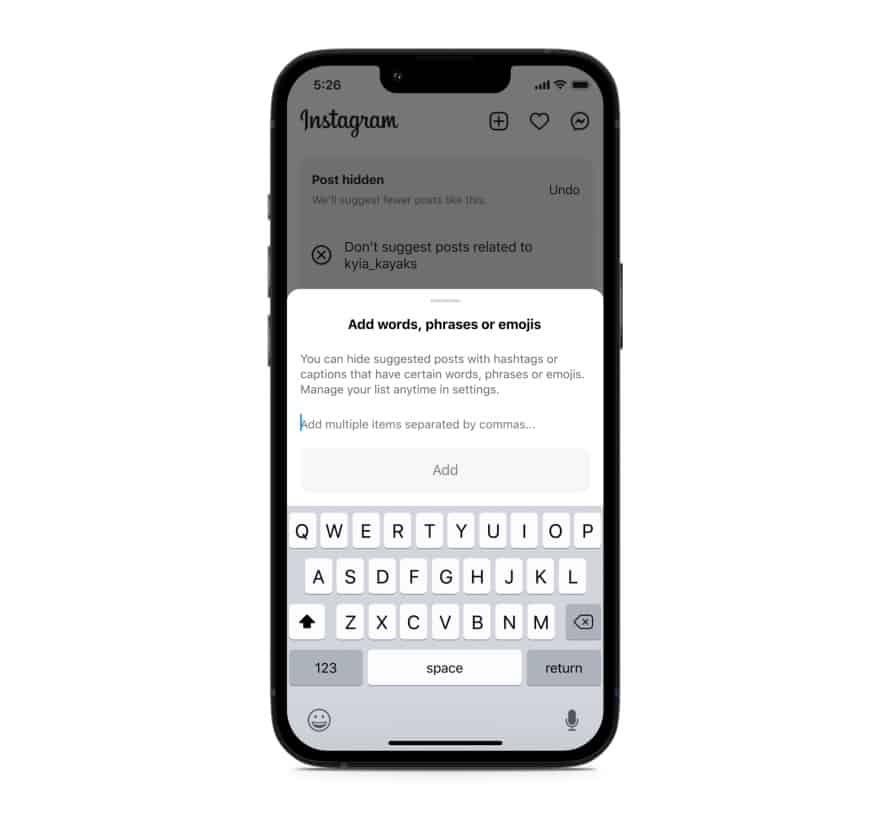
    Instagram will also soon start testing the ability to filter out content based on keywords. You can create a list of words, phrases, and emojis that will trigger this filter. The app will look for those keywords in a post’s caption or hashtags and remove all related posts from your feed. “Whether you’re seeing something that’s not relevant, or have moved on from something you used to like, you can use this feature to stop seeing content that’s not interesting to you,” Meta said in a blog post. TikTok already offers similar keyword-based filtering of posts.

    Instagram started out as a photo-sharing app before later adding video functionality. However, it currently favors short videos akin to TikTok over everything else. Reels is the name of the TikTok-inspired feature that is quickly dominating the site. Users now frequently hide material from their friends and relatives by seeing more Reels from accounts they don’t follow. The CEO of Meta, Mark Zuckerberg, has asserted that interest-based recommended content will dominate Instagram, despite widespread opposition to this notion.

    Instagram is expanding its selection of filters to make sure users don’t see things they don’t want to. In addition to the current options for switching between your Favorites and Following feeds, these two new capabilities will be available soon. You can already designate specific topics as Not Interested, and you can choose to snooze suggested content for 30 days. Additionally, Instagram has modified its filters for delicate content.

    Instagram keyword filter content feed