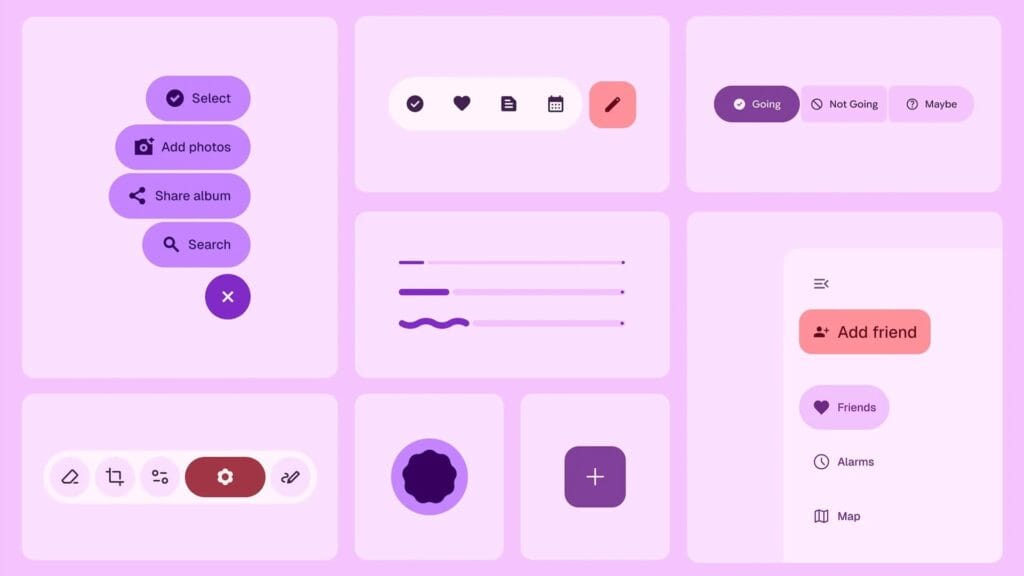
Android 16 wasn’t expected to be a huge event, but Material 3 Expressive altered that and made many excited about the upcoming Android release. Google is making the required adjustments to truly streamline the experience overall, in addition to giving you the option to personalize the appearance and feel of your device.
The Google Phone app is one area that is receiving a lot of unexpected attention. Late last month, Google said that it will be making modifications to the Phone app, and now it is beginning to push out those changes to users. This UI update is presently only available to beta users, so it won’t be available to everyone this time around, according to 9to5Google.
Google Phone app redesign with Material 3 Expressive
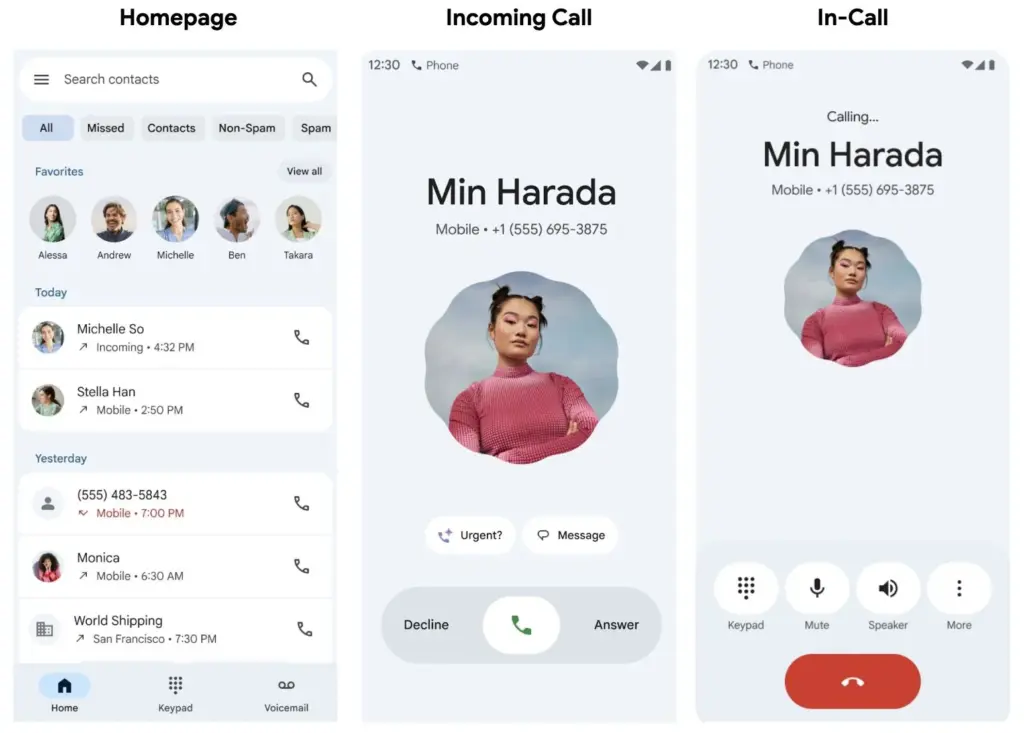
Going ahead, beta users should anticipate a much more straightforward interface with only three menu options—Home, Keypad, and Voicemail—to select from on the bottom bar. The Home page now has a plethora of data, including recent calls and preferred contacts, further deepening the alterations. You can manually make calls or view some recommended contacts by going to the Keypad area. Additionally, any voicemails you may have will be stored in the Voicemail section, as you might anticipate. Users should now have access to the gesture controls in addition to the previously mentioned features.
You may now accept and reject calls with a simple tap or horizontal swipe thanks to the recent update. It’s a lovely addition that gives the user interface a more contemporary feel, even though it’s not a significant improvement. With Material 3 Expressive touches appearing on numerous other well-known Google apps, additional modifications will undoubtedly emerge over the year.
Even though the modifications are gradual, more areas of Android and other Google apps are gradually incorporating them. We’ll have to wait and see how far Google takes this. With the Pixel 10 expected to be released in a few months, hopefully there will be more intriguing additions to this.
Stay connected with the latest from Droid Tools—follow us on X @droid_tools, like our page on Facebook, check out our updates on Instagram, and follow us on Google News for real-time news, device tips, and mobile tech insights.
Google Messages is starting to implement a Material 3 Expressive overhaul of just the conversation interface, following Gmail for certain users and Photos.
Placing the message thread in a container with rounded corners at the top makes the app bar its own (darker) layer, which is the primary alteration to the conversation screen.
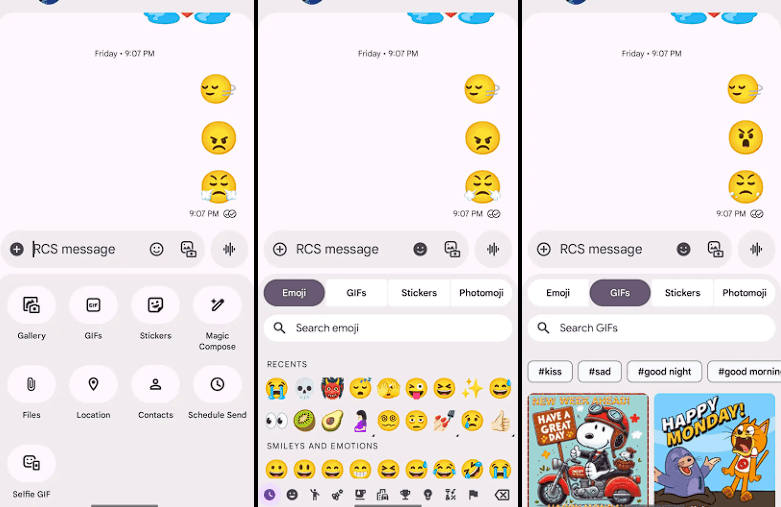
The Gallery, GIFs, Stickers, and other items are arranged in pill-shaped containers rather than circles in the “plus” menu, which is a distinct container. The wallpaper it uses is identical to that of the app bar. Additionally, Google eliminated the vibrant symbols and reduced the grid’s density.
The linked button group used to transition between Emoji, GIFs, Stickers, and Photomoji (which was the first item in the current design) is visible when you access the emoji menu. The current tab you are reading is a pill, and the entire thing is a circular container. Moving the search bar down one line eliminates back-to-back text fields, which is a welcome modification.
As of right now, we have one report of this going live with Google Messages beta version 20250528_00_RC00, namely the Samsung version. We examined other devices today, and we don’t notice it.
The home page, search, settings, and other areas of the app have not been changed today. It appears like Material 3 Expressive in Google Messages will be implemented gradually. In the meantime, the software usually takes a long time to go from beta or initial release to general release.
Stay connected with the latest from Droid Tools—follow us on X @droid_tools, like our page on Facebook, check out our updates on Instagram, and follow us on Google News for real-time news, device tips, and mobile tech insights.
One of the main topics of discussion with Android 16 is the release of Material 3 Expressive, which not only improves the user experience of the system but also guarantees that Google apps use the same design language, improving consistency. Later in the year, those system-level design modifications are anticipated, but it appears Google is eager to begin implementing Android 16’s app designs.
Over the past few weeks, the Mountain View tech behemoth has been seen previewing Material 3 Expressive in the Phone app and, more lately, in Calendar, Photos, Files, and Meet. If Gmail is your main email app on your Android phone, it’s time to see if you have the Material 3 Expressive design upgrade installed. However, there is no information regarding when Android 16’s design will be available for these apps.
How Material 3 Expressive design is changing Gmail?
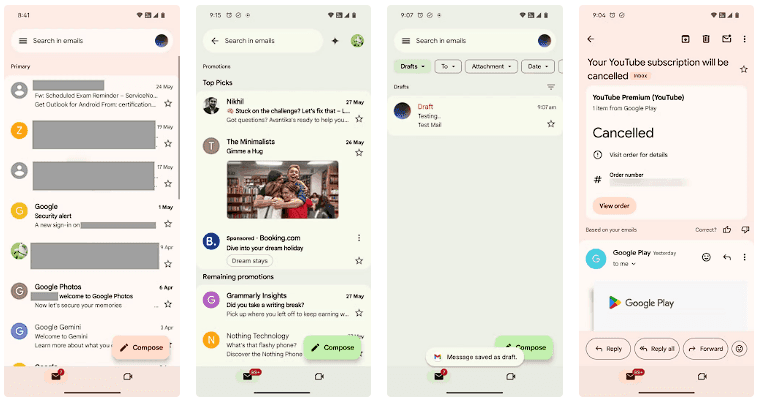
The Gmail app version 2025.05.11 is implementing Android 16’s design language, which was initially noticed by SparkRadar on Telegram. This brings significant modifications to the program’s general look (via Android Authority). The new card-based user interface for the email list is the first significant change you’ll notice when you launch the app.
Emails and the landing page’s search box were previously shown in a single-sheet format. With the Material 3 Expressive redesign, the email screens also had the same card-based user interface as the landing page.
On the landing page, the “Compose” FAB is still located on the right, but now has a thicker typeface and a solid-filled pencil image. The search bar has seen a minor alteration as well. The profile symbol in the search bar is no longer present in the updated user interface. As an alternative, the search bar’s size has been lowered to create space for the profile symbol next to it.
Additionally, we can see that the Meet and Email symbols have grown in size, and the bottom bar has slightly expanded. Additionally, Gmail now has a pill-shaped button animation for its swipe motions, which gives the interface a lively personality.
Although the Material 3 Expressive design update is visually appealing, not all Gmail users can currently access it. The reason for this is that a server-side update is being used to roll it out. Additionally, it may take a few more days to make this adjustment available to everyone, as Gmail is one of the Google apps with over 10 billion installations on the Google Play Store.
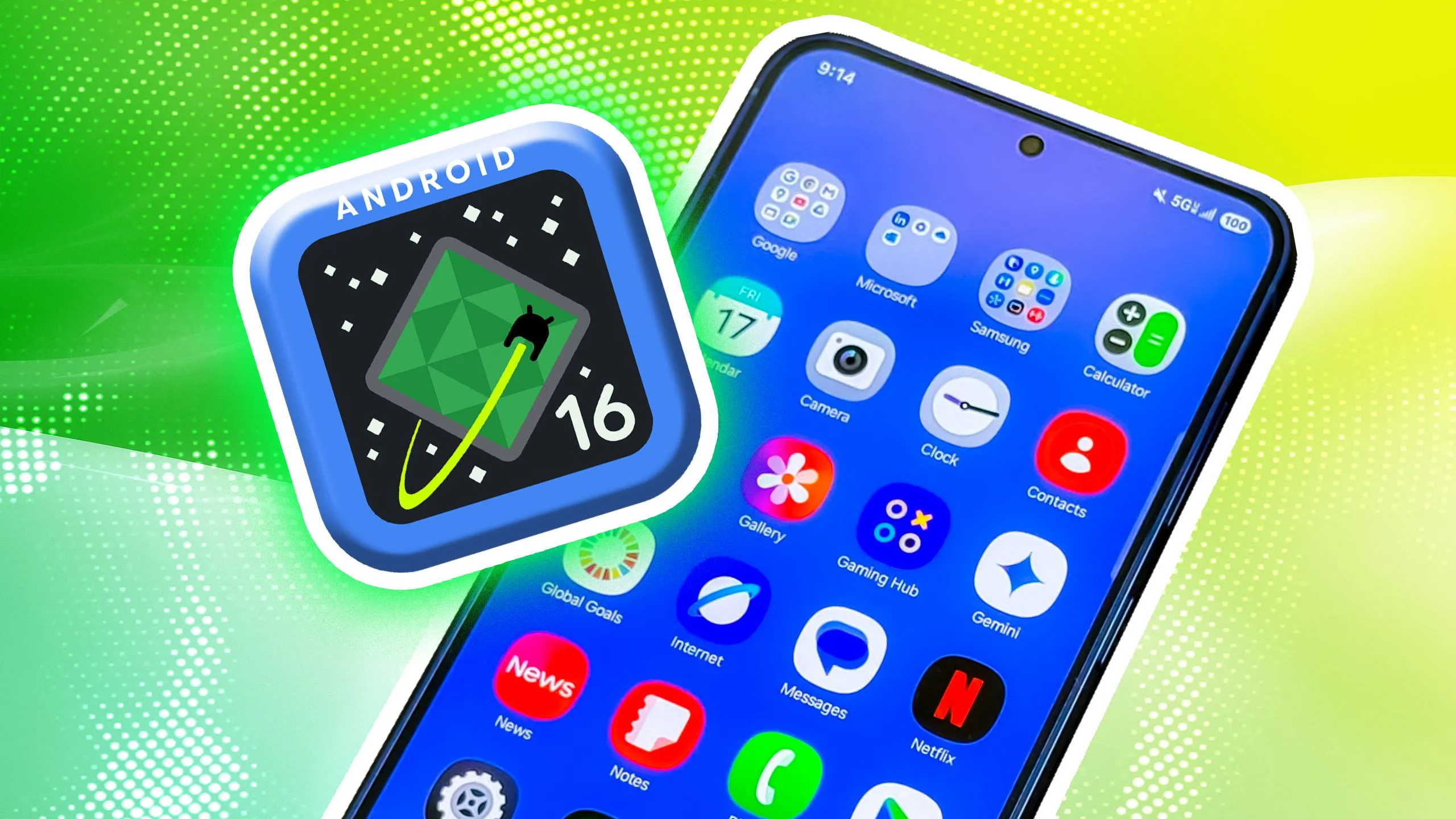
Android 16 offers a lot of innovations that I’m eager to test out on my Android phone, including Material 3 Expressive, a redesigned Quick Settings menu, and Live Updates. It seems like one of the biggest Android updates in a long time.
There weren’t many obvious adjustments that would have excited me. Prior to Google revealing new features at The Android Show: I/O Edition on May 13, Android 16 was looking like a really dull update.
New Quick Settings panel
With each significant Android update, Google alters the Quick Settings panel almost like a ritual. That tendency will continue with Android 16, and I’m looking forward to the modifications Google has planned. Resizable toggles are being added. Additionally, one-click Bluetooth and Wi-Fi toggles are returning.
The tiles have a new appearance and take considerably less room than they did previously, which is another obvious alteration. Extending the Quick Settings panel will provide a depth effect by blurring the background, similar to what is seen on some Chinese Android skins.
Google appears to have drawn inspiration from the updated Control Center for Android 16 Quick Settings panel in iOS 18. It seems to be a significant improvement in usability.
The June release of Android 16 will not have the updated Quick Settings panel. It will come later in the year instead.
Material 3 Expressive
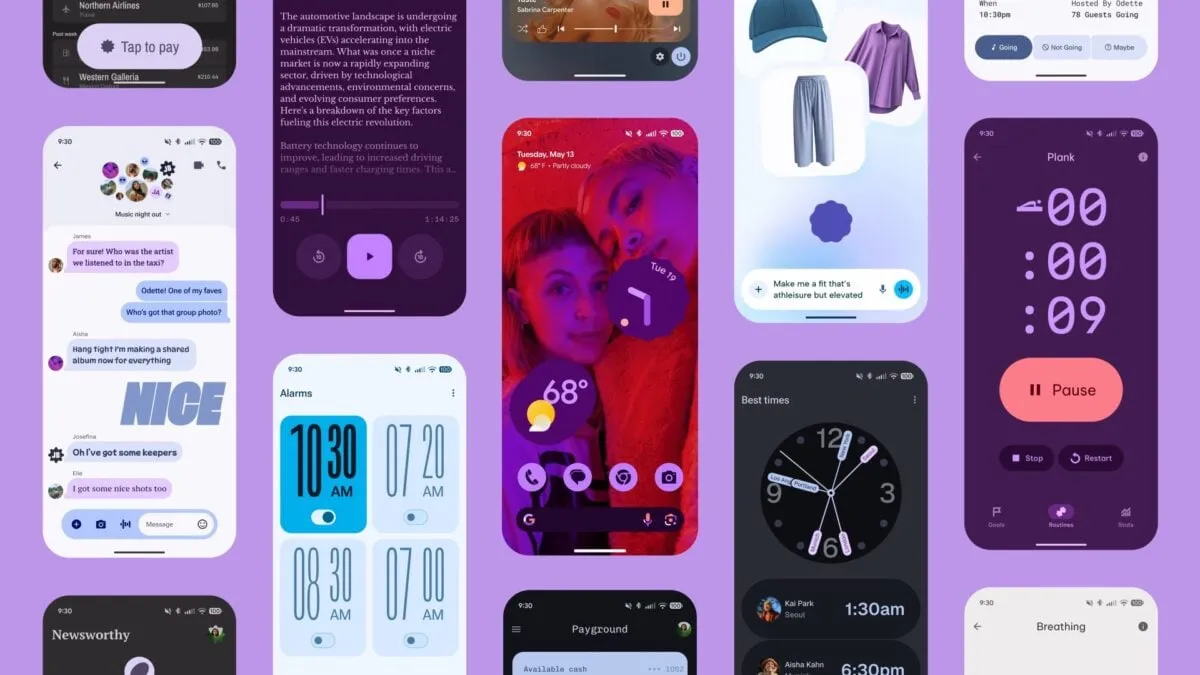
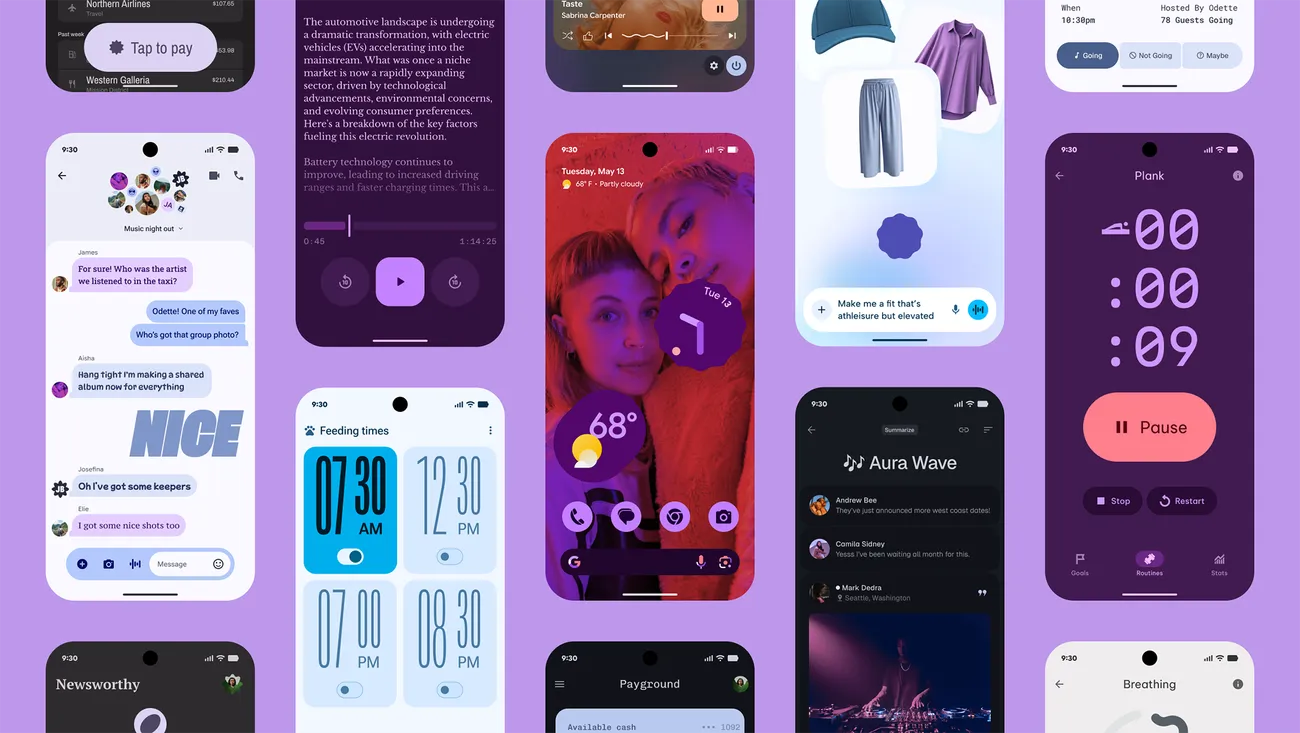
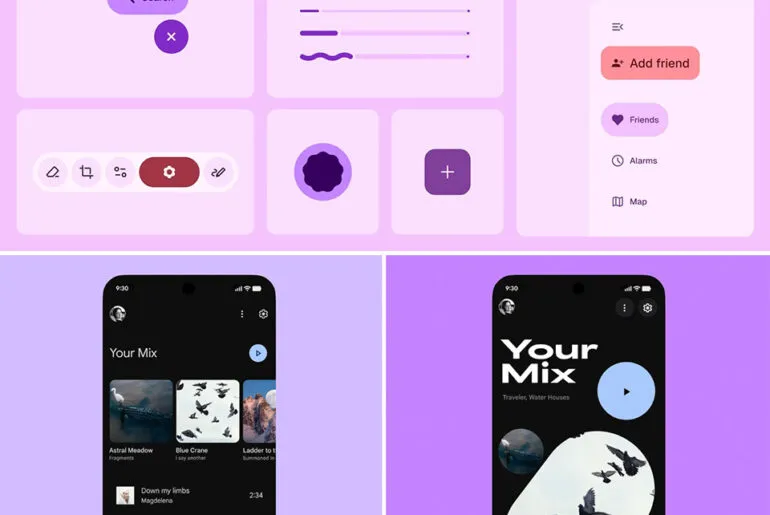
Google’s latest phone and tablet design language, Material 3 Expressive, makes its debut with Android 16. It is also among the OS’s most significant user-facing modifications. It doesn’t significantly alter the appearance. Rather, it expands upon Material Design 3 by including bolder fonts, larger buttons, slick and lively animations, and more.
The timing of Material 3 Expressive is perfect. The current look felt outdated because Google introduced Material look 3 with Android 13 four years ago. Additionally, it maintains familiarity while bringing about the appropriate enhancements. Rather than droning on about Material 3 Expressive, I’ll let this Google GIF speak by itself:
This polish is present throughout Android 16, particularly when switching the system volume or closing apps from the recent apps menu. It also features smooth animations and haptic feedback. Android 16 will upgrade the dynamic color themes in addition to Material 3 Expressive, allowing apps to use additional colors from your wallpaper.
One of the main Android 16 improvements that I am most looking forward to is Material 3 Expressive, which looks good based on what Google has demonstrated. The one sour note? When Android 16 is first made available to the public in June, Material 3 Expressive will not be included. It will come later in the year instead.
Live Updates
Apps for food delivery have permeated our daily lives. Uber, Grubhub, and other food delivery apps provide real-time, urgent notifications, unlike other apps. The same is true of sports apps. Instead of launching the app, you would prefer to get real-time information in the notification shade on your phone.
Even while Android’s notification panel is more capable than iOS’s, it has trouble efficiently delivering real-time updates. With Live Activities, Apple nailed this, making it simple to monitor real-time food delivery status and sports scores.
Google’s Android 16 will have a feature called Live Updates, which is modeled after iOS. It will show the status of your meal delivery in real time on the notification shade or the lock screen of your phone. When you use Always-On Display, the status is displayed. Additionally, Google’s approach enhances the Live Update notification with helpful Call, Message, and Tip buttons.
It’s time-consuming and annoying because I have to open the meal delivery app all the time to see how it’s doing. A feature akin to the iPhone’s Live Activities was added to the skins of Android manufacturers such as OnePlus and Oppo, although the execution is unreliable and glitchy. Google should address these problems with an official solution.
Ultra HDR support for HEIC images
I use my phone to shoot a lot of photos. I have my phone’s camera app set to save JPEGs in the space-efficient HEIC format because they take up a lot of storage. The catch is that images saved in the HEIC format are not compatible with Ultra HDR on Android. I therefore use JPEG for my photos, which uses up all of my 2TB of Google One storage.
This will be altered with Android 16’s addition of Ultra HDR capability for HEIC photos. Additionally, Google is developing UltraHDR support for AVIF files, which should be available soon.
With Android 14, Google debuted Ultra HDR. It enables images to have improved color and a wider dynamic range. These enhancements are provided without any compatibility problems. On devices with SDR screens, Ultra HDR JPEG images immediately revert to the SDR gain map. Google mandated Ultra HDR support for phones with performance class 15 starting with Android 15.
Let’s hope Google upgrades the Pixel Camera app to enable saving shots in HEIC by default rather than JPEG, because Android 16 now supports Ultra HDR for HEIC files.
Advanced Protection mode
Google has strengthened Android’s security over the past few years by adding a number of features. However, there is still opportunity for improvement. In addition, I believe that Android’s security features fall short of those of the iPhone.
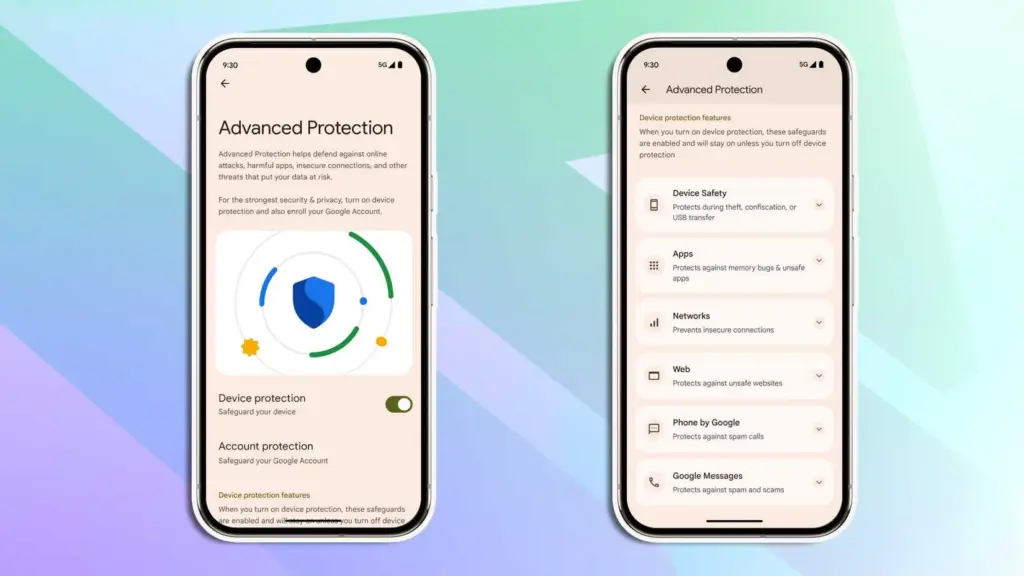
Google is making a significant effort to address issue with Android 16. Major security-related settings will be consolidated under a new Advanced Protection mode. To activate offline device locating or Theft Detection, you won’t need to go far into your phone’s settings menu.
With a single Advanced Protection toggle, you can enable all available security measures in Android across several categories. The list is as follows:
Intrusion Logging
Theft Detection Lock
Offline Device Lock
Inactivity Reboot
USB Protection
Google Play Protect
Unknown App Protection
Memory Tagging Extension
Android Safe Browsing
Chrome Safe Browsing
Javascript Protection
Unsafe Link Protection
Spam and Scam Protection (Google Messages)
Spam and Scam Protection (Phone by Google)
Called ID & Spam
Automatic Call Screening
2G Network Protection
Disable Auto-Reconnect to Insecure Networks
Numerous security mechanisms are dispersed across the operating system. For instance, the Google Play Protection option is located under Security & Privacy, whereas the Caller ID & Spam protection settings are located in the Phone app settings.
With Android 16, a new security feature called Intrusion Logging generates and preserves a device activity record for study after a compromise. It is safe but easily accessible because it is kept in the cloud and is end-to-end encrypted.
Another new security feature in Android 16 is Inactivity Reboot, which will restart your phone automatically after 72 hours of inactivity and lock-up. This will guarantee that no user data may be viewed until the device is opened by entering the password or PIN.
I won’t gain much from Android 16’s Advanced Protection Mode. I only activate these functions when I’m on the road. Nevertheless, it’s a useful innovation that will make Android more secure.
Despite being a feature-rich version, Android 16 will not ship with all the new goodies in June and still lacks several long-awaited additions. Rather, Google will make more significant improvements later in the year, most likely in conjunction with a quarterly platform release and the Pixel 10 family. Additionally, some improvements may not be available for non-Pixel phones because the manufacturer may choose not to incorporate them into their skin.If you want the latest Droid Tools news, follow us on X @droid_tools and like our page on Facebook to stay updated.
With Gemini mostly overshadowing the two-day developer conference, Google I/O 2025 is now gone. On the other hand, the release of Android 16 QPR1 Beta, which incorporates the previously introduced Material 3 Expressive design language, is a more noteworthy advancement for certain aficionados. What’s new in this version and how to access the beta are explained here.
After the stable Android 16 Beta program, the first Quarterly Platform Release is the Android 16 QPR1. Despite being more stable than previous betas, it is still intended for developers and testers because of flaws and other problems. Similarly, this release represents a sneak peek at the upcoming Pixel Feature Drop, which is anticipated to happen next month.
Google’s new design language, Material 3 Expressive design, or M3E, which incorporates bolder and more playful elements, is now available in the Android 16 QPR1 Beta. Wear OS 6 for wearables will also use the M3 Expressive design.
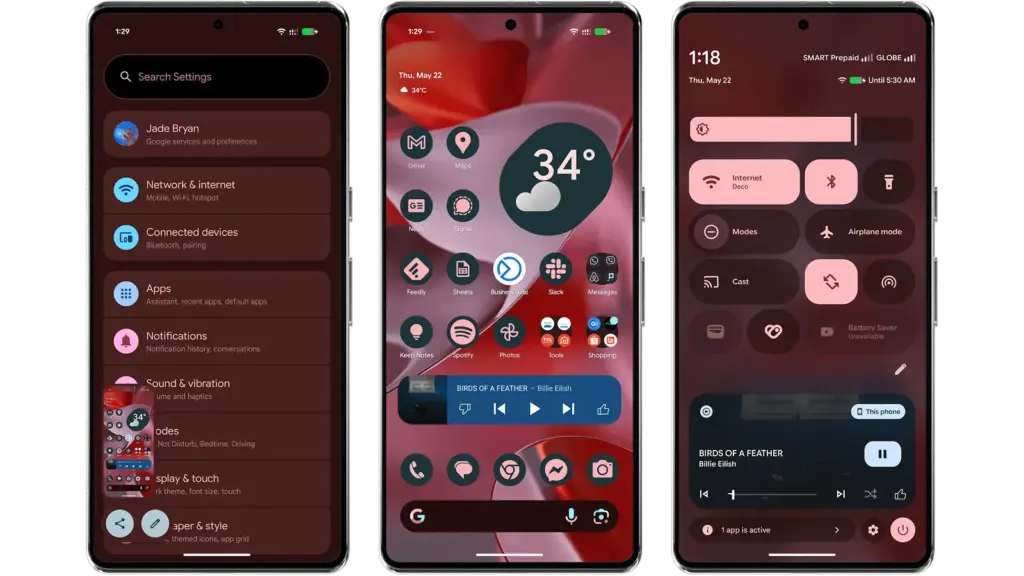
To experience M3 Expressive, I set up the Android 16 QPR1 Beta on my Pixel 9 Pro XL (review). The wallpaper and quick settings are two examples of UI elements and sections where the modifications are instantly apparent. Additionally, some features, including personalized icons on the Pixel Launcher, are not yet enabled.
Material 3 Expressive design landed in Android 16 QPR
A notable modification to the home screen is the addition of a complete row of additional space for widgets and apps. This is because the “At a Glance” widget, which was formerly located at the top of the home screen, has decreased.
The battery, cellular, and Wi-Fi system icons have also been added to the status bar. In the meantime, each component of the system settings has more themed glyph icons.
The most significant changes are in the fast settings panel, which now uses shortcuts and widgets in a more vibrant and effervescent manner, along with new animations that Google calls “springy.” Additionally, there are additional customization options for scaling and positioning toggles and icons, which enables users to employ 1×1 icons to fit more elements.
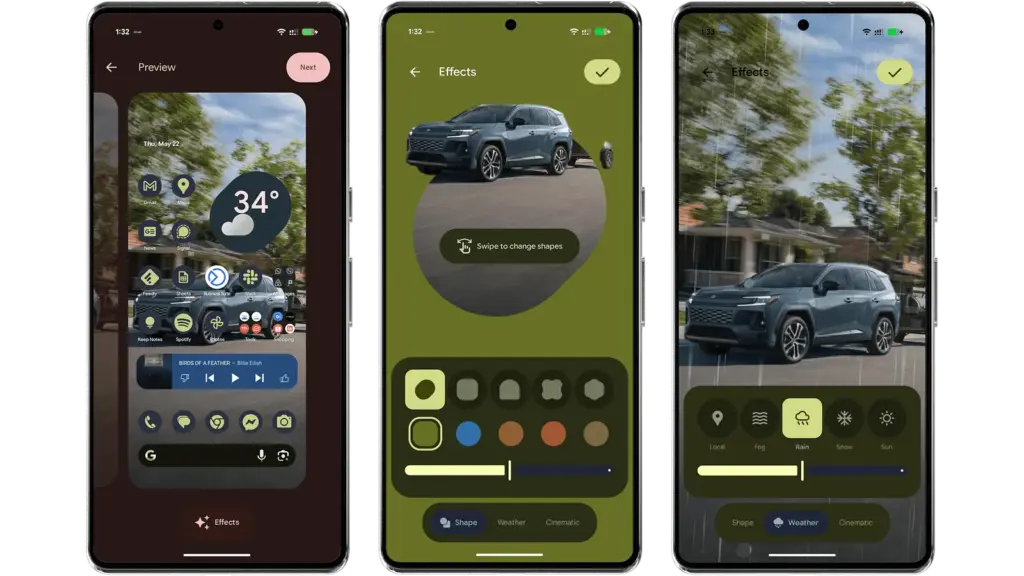
Android 16 provides additional settings and effects for custom images, which will appeal to those who like personalizing their home screen and lock screen. AI-powered weather effects and the ability to overlay colors with shapes are now available. A cinematic effect is an additional choice, but my device was still unable to use it after trying.
More apps will come with Material 3 Expressive
It is anticipated that Google would add more M3 Expressive elements to its services and applications, such as Google Photos and Keep.
Manufacturers of skinned Android versions, like Samsung’s One UI, are now primarily responsible for implementing the Material 3 Expressive design. Many of these changes and new features should be maintained for those that provide stock and near-stock Android experiences.
All of these updates, along with perhaps other improvements and optimizations not included in the first Android 16 QPR version, will be included in the June Pixel Feature Drop if you’re patient enough.
The Android 16 QPR1 Beta update is available via the beta program for Pixel 6 all the way to Pixel 9 series.
Pixel 6, Pixel 6 Pro, and Pixel 6a
Pixel 7, Pixel 7 Pro, and Pixel 7a
Pixel 8, Pixel 8 Pro, and Pixel 8a
Pixel 9, Pixel 9 Pro, Pixel 9 Pro XL, Pixel 9 Pro Fold, and Pixel 9a
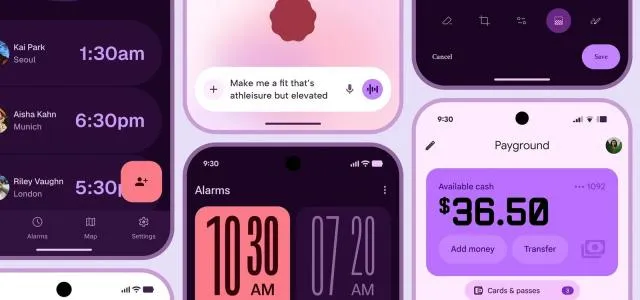
Google recently unintentionally unveiled Material 3 Expressive, their upcoming major Android overhaul. The business calls the upgrade the “most researched” one to yet, aiming to make its UI more aesthetically pleasing and user-friendly, in a since-deleted blog post that 9to5Google saw.
An archival copy of the removed webpage is available on the Wayback Machine and 9to5.Some of the photographs that Google did not save have been made public.
Google claims to have created Material 3 Expressive following 46 design and research iterations with more than 18,000 participants, as detailed in the post.The design makes a product “more useable” by utilizing color, shape, size, and motion. Later this month, it will also have a separate session at Google I/O.
Google’s research included examining how participants responded to various looks, where they concentrated their attention within a design, and how quickly they grasped an interface. For example, “which progress indicator made the waiting time feel faster” and “how big a button may be for good gains in tap time without overwhelming other objects” were examined by the company as separate components.
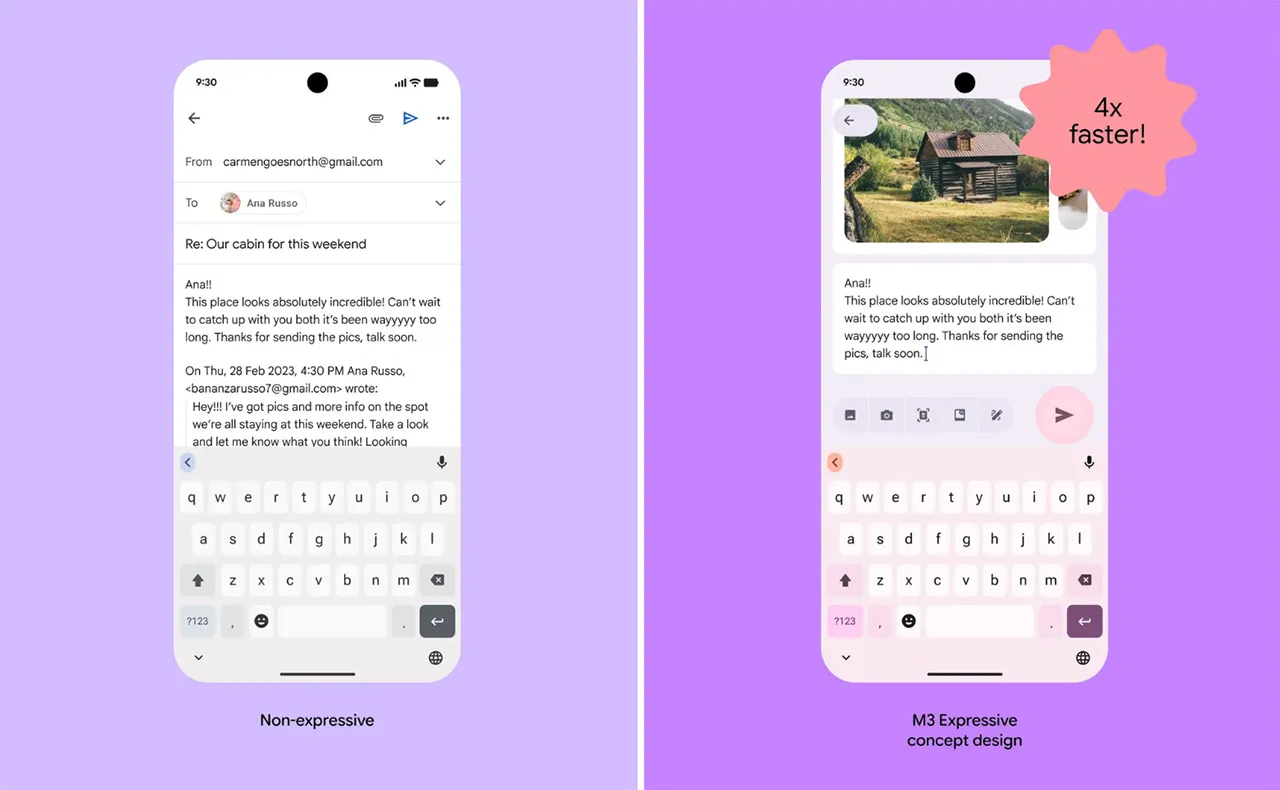
When compared to the previous Material 3 design, Google claims that its Material 3 Expressive design made it up to four times faster for users to locate important items inside the interface. Material 3 Expressive “seems to level the playing field for users of all ages,” according to the report, since the design made it easier for individuals over 45 to recognize interface elements just as quickly as younger users.
Reports over the last few days indicate that Google intends to implement improvements to Android’s user interface, such as updated fast settings menu, a new clock font, and revised status bar icons (such the battery icon). Changes to the Google Clock app have also been revealed by other leaks.