Tag: instagram

  • There is a solution for Instagram’s battery drain on Android devices

    There is a solution for Instagram’s battery drain on Android devices

    Have you noticed that the battery life of your Android smartphone has been declining more quickly than usual lately? The offender might have been found.

    Reddit users on Android have been claiming that the Instagram app is to blame for the significant power drain they have been observing in recent weeks. When compared to other apps, Meta’s social media app seemed to be using a lot more battery life than it should given how frequently it is used.

    Using a Samsung Galaxy A53, one Redditor observed that 49 minutes of WhatsApp screen time utilized just 2.4% of their battery capacity, compared to 12.4% for 54 minutes of Instagram screen time.

    instagram abttery drain on samsung

    Now, Google has reportedly intervened to validate the suspicions of many. A Google community manager named Instagram as the source of battery drain on Android devices in an advisory article titled “Battery drain on Android devices” that was posted on the Android support website. The manager advised Android users to update their Instagram app right away.

    How to fix the Instagram battery drain

    As of this writing, the most recent version of the app (build 382.0.0.49.84) seems to fix the problem, so it’s definitely worth making sure you’ve downloaded it if you’ve been seeing your smartphone draining its battery more quickly than usual.

    There are, of course, several additional methods to prolong the life of your battery. These include using Dark Mode or Power Saving, as well as putting unwanted apps to sleep (click to Settings > Battery > Background Usage Limits).

    Check out our instructions below to keep your Android phone running as long as possible if you’re still experiencing power issues after the update (or if you don’t even use Instagram).

    Stay connected with the latest from Droid Tools—follow us on X @droid_tools, like our page on Facebook, check out our updates on Instagram, and follow us on Google News for real-time news, device tips, and mobile tech insights.
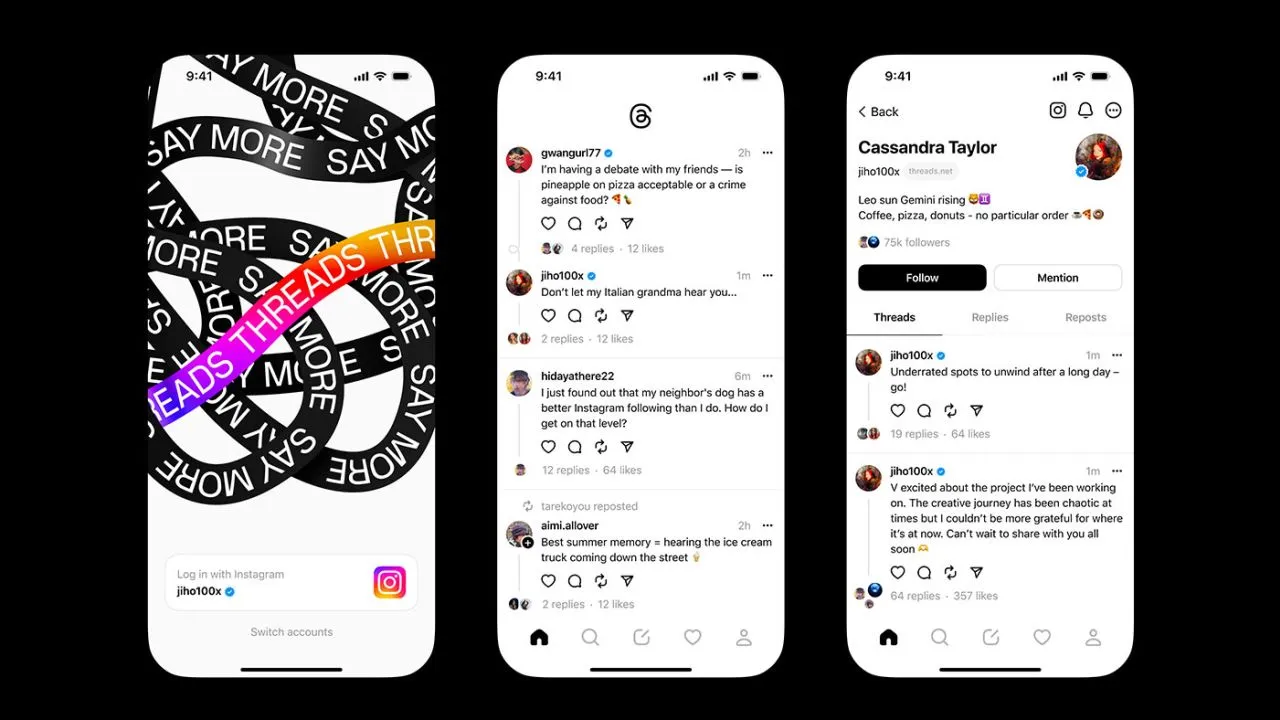
  • Threads app, goodbye privacy

    Threads app, goodbye privacy

    Think again if you believed that your data on Threads is private.

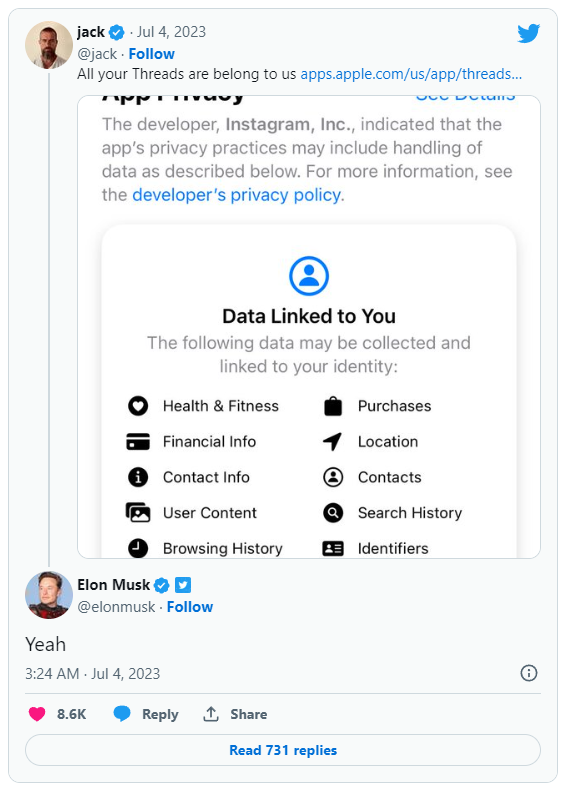
    All of the methods that Threads is following you and using your data are listed in the App Privacy section of the Threads App Store website. The list is very, very long, reader.

    Thursday saw the launch of Threads, Meta’s answer to Twitter, and it appears that in its first seven hours of operation, it attracted more than 10 million users.

    Click the “See Details” link in the App Privacy section of the App Store page for a comprehensive overview of the possible data collection and usage practices for Threads (opens in a new tab). But, the gist is this: Nearly all of your personal information is being gathered by Threads, including information about your transactions, finances, location, contact details, search history, and browsing habits.

    threads

    Jack Dorsey, a co-founder of Twitter, became aware of this and tweeted about the Threads App Privacy section. Elon Musk, the company’s current owner, simply said, “Yeah.”

    It doesn’t come as big surprise. The amount and breadth of data that Threads collects is similar to its sister app, Instagram(opens in a new tab) (both Threads and Instagram are owned by Meta, which also owns Facebook).

    Twitter and other significant social media platforms gather user data as well in order to provide advertisements from outside businesses more effectively. A comparable, albeit slightly condensed, overview of all the ways in which Twitter uses the data of its users can be found on its App Privacy(opens in a new tab) page.

    Even still, it’s upsetting to have to give a Twitter clone access to vast amounts of your personal information. Another Twitter competitor, Jack Dorsey’s BlueSky, which is now invite-only, claims to be looking into ways to make money without being as dependent on third parties as its rivals.

  • New ways to flag content that you don’t like on Instagram

    New ways to flag content that you don’t like on Instagram

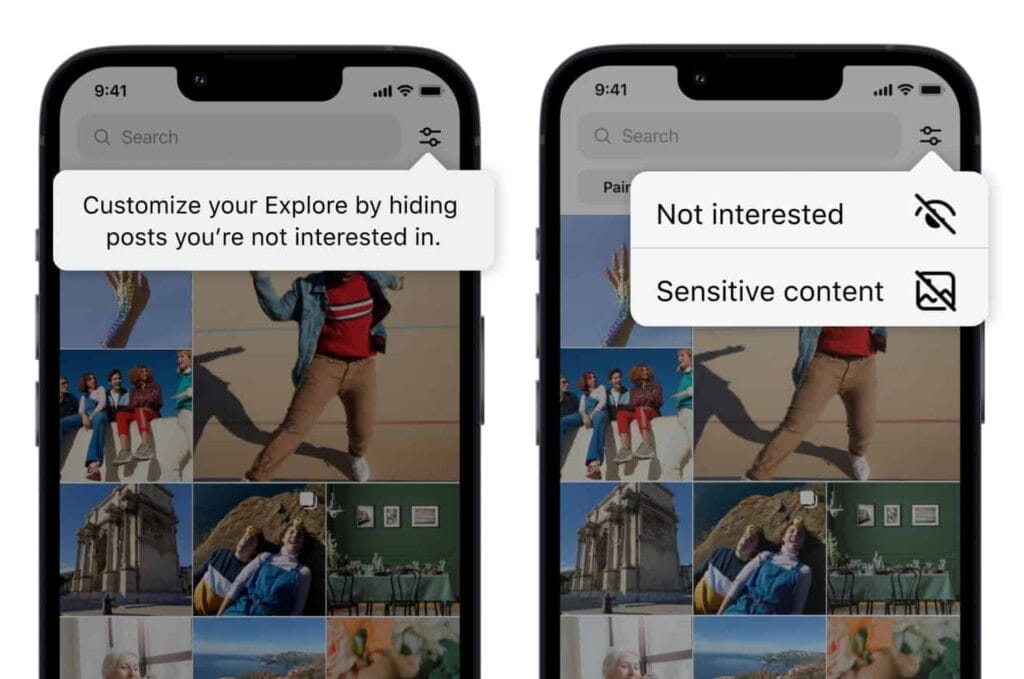
    Users now have more options for managing what they view on Instagram. You can now personalize your Instagram feed with a few of the new features the business has introduced. First off, it is a test of the feature that lets you designate several postings as “uninterested.” In the Explore page, you can choose whatever posts you want to flag for the app at once. The chosen posts are instantly removed from your feed. Additionally, you won’t see any more such content in the future. You may presently only do that for individual postings on the Meta-owned platform. Multiple posts cannot be flagged at once.

    You must tap the new Filter option in the Explore tab, which is located next to the search box, in order to flag multiple posts on Instagram. There are two choices there: Sensitive Content and Not Interested. Decide between the two options, then indicate on the posts. Tap Done to finish the activity at this point. Compared to the present implementation, which calls for you to first open a post, tap on the three-dot menu, and then choose Not Interested, this is far more convenient. For each piece of content you want to filter out, you must repeat these steps.

    instagram not interested content

    Instagram adds new ways to filter content as it becomes more like TikTok

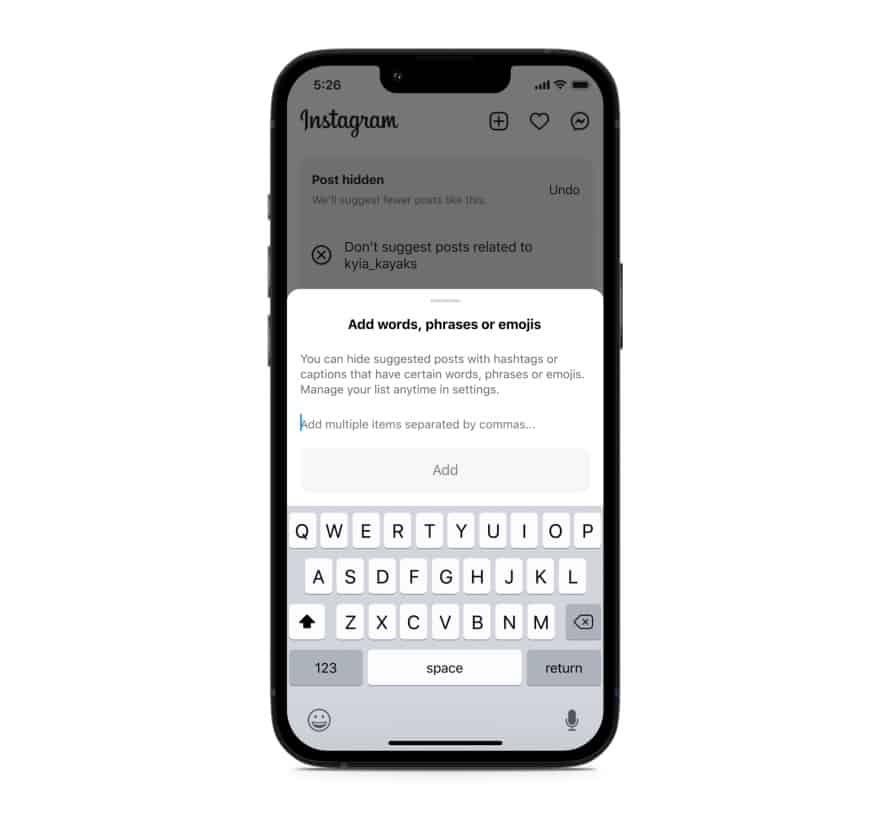
    Instagram will also soon start testing the ability to filter out content based on keywords. You can create a list of words, phrases, and emojis that will trigger this filter. The app will look for those keywords in a post’s caption or hashtags and remove all related posts from your feed. “Whether you’re seeing something that’s not relevant, or have moved on from something you used to like, you can use this feature to stop seeing content that’s not interesting to you,” Meta said in a blog post. TikTok already offers similar keyword-based filtering of posts.

    Instagram started out as a photo-sharing app before later adding video functionality. However, it currently favors short videos akin to TikTok over everything else. Reels is the name of the TikTok-inspired feature that is quickly dominating the site. Users now frequently hide material from their friends and relatives by seeing more Reels from accounts they don’t follow. The CEO of Meta, Mark Zuckerberg, has asserted that interest-based recommended content will dominate Instagram, despite widespread opposition to this notion.

    Instagram is expanding its selection of filters to make sure users don’t see things they don’t want to. In addition to the current options for switching between your Favorites and Following feeds, these two new capabilities will be available soon. You can already designate specific topics as Not Interested, and you can choose to snooze suggested content for 30 days. Additionally, Instagram has modified its filters for delicate content.

    Instagram keyword filter content feed
  • DMs on Instagram get better on last update

    DMs on Instagram get better on last update

    Meta is delivering a plethora of new capabilities for Instagram, after major messaging enhancements for WhatsApp and Messanger. The new features will make it easy to share content and respond to conversations from anywhere.

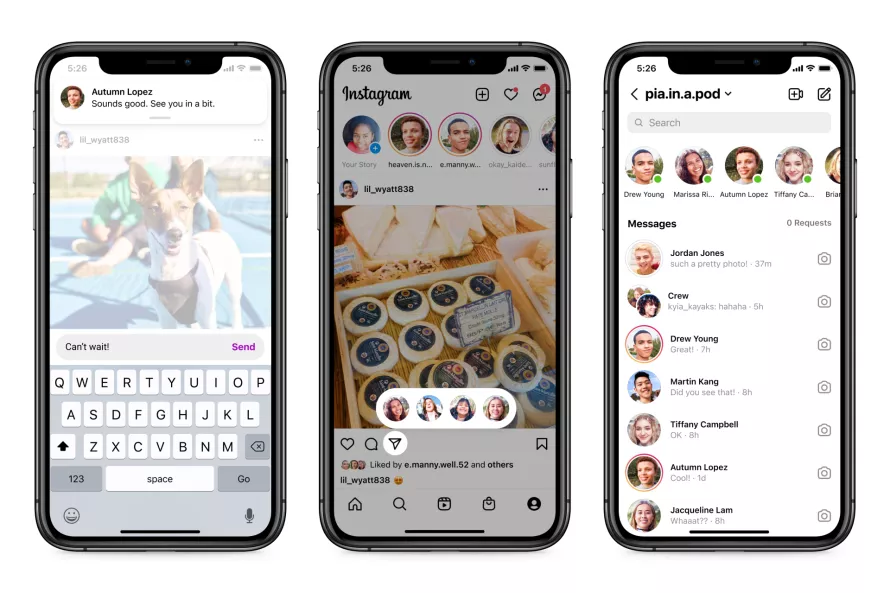
    The option to respond to fresh messages while browsing Instagram DMs is a welcome addition. Instead of disrupting your surfing activity, users will receive a new in-app notice that will allow them to respond quickly without having to go to the inbox.

    Additionally, you may now share a post more quickly by hitting and holding the “send” button when you locate one you wish to share. This will bring up a list of “your closest friends” with whom you may instantly share the post — all while continuing to browse. If you’re in your inbox, Meta is showing how a row at the top of your inbox — similar to Messenger — will show you who is online and accessible to speak.

    In addition, Meta is bringing a new function to Instagram that was previously only available on Messenger. Silent messages allow you to communicate your friends without causing them to receive a notification, which is very useful if you’re sending a message late at night or simply don’t want to bother them.

    instagram dm

    In a nod to Messenger, Instagram is also adding a new lo-fi chat style and the ability to post votes in group messaging.

    Thanks to integrations with some of the top music streaming services like Spotify, Amazon Music, and Apple Music, users will soon be able to share previews of their favorite tunes. Users will be able to listen to up to 30 seconds of a song immediately in the chat, which could be useful for music discovery.

    These enhancements come only one day after Meta revealed a raft of improvements to WhatsApp’s voice messaging feature, demonstrating that the firm is on a roll with new features to improve its messaging apps. Instagram’s new features are now being rolled out in “certain countries,” with intentions to expand them globally in the near future.

    These enhancements come only one day after Meta revealed a raft of improvements to WhatsApp’s voice messaging feature, demonstrating that the firm is on a roll with new features to improve its messaging apps. Instagram’s new features are now being rolled out in “certain countries,” with intentions to expand them globally in the near future.