Tag: chat

  • Mobile app for ChatGPT is now available for free.

    Mobile app for ChatGPT is now available for free.

    The first mobile application, called “OpenAI ChatGPT” on the Apple App Store, has now been released, as the US company OpenAI stated over the weekend on its own portal. The AI bot is currently free and only has a few features.

    ChatGPT for the Apple devices only for now

    Real enthusiasm has grown around the subject of AI bots during the last several days and weeks. The development of artificial intelligence (AI) is sparked by projects like “TruthGPT,” “Google Bard,” and OpenAI with “ChatGPT.” Others struggle to move growth forward quickly enough, while some are already fueling the flames of the end of the world.

    Sam Altman, the creator of ChatGPT, issues a risk alert and requests government regulation. On the other hand, the American business itself released the initial mobile application with “OpenAI ChatGPT” for free download in the Apple App Store over the weekend.

    chatGPT openai

    While the AI-supported chatbot is already available in the US as a desktop application in version 4.0, the mobile version, which for the time being is only available in the US and only for iOS from version 16.1, represents a premiere in the steady race. However, as the company announced, an implementation for Android is already in the works and a “soon” release is planned. Other countries are also expected to follow shortly.

    A chat can be begun on an Apple iPhone and continued later on a desktop browser thanks to the cross-platform functionality of the iOS mobile application. The inclusion of “Whisper,” an open-source neural speech recognition program based on 680,000 hours of multilingual and multitasking observed data, inside the ChatGPT mobile app provides another benefit.

    Although ChatGPT for iOS is in theory free, the “ChatGPT Plus” version requires a US$19.99 monthly membership. Initial information indicates that the Plus version includes features from ChatGPT 4.0. Those who want to utilize communications more extensively most likely will also need to pay. The “early access to features and faster response times” for Plus subscribers is another benefit.

  • Telegram Premium – coming in June 2022

    Telegram Premium – coming in June 2022

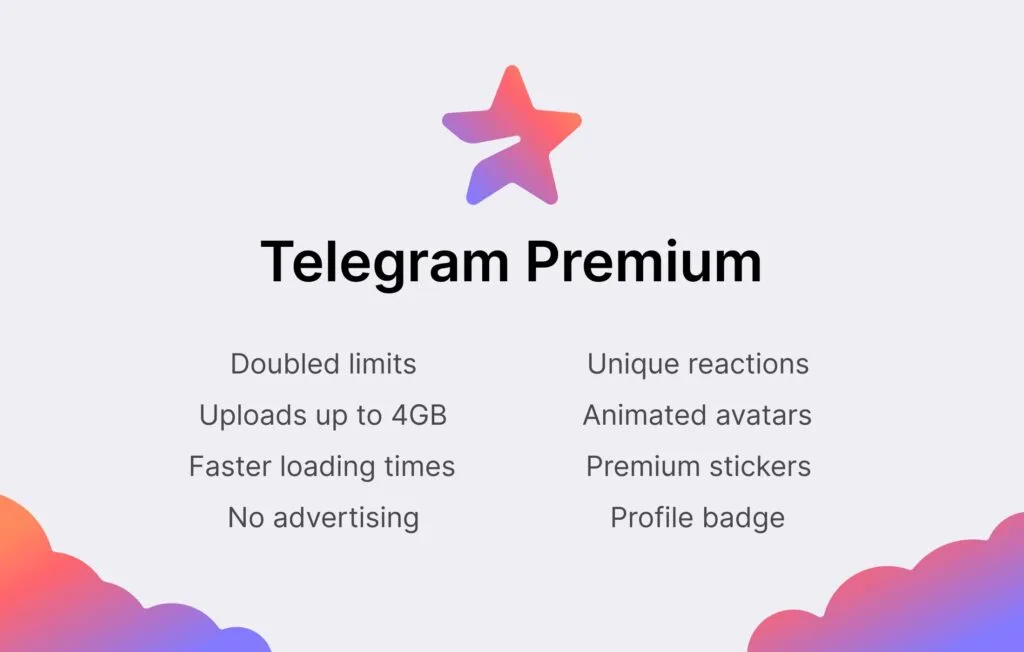
    Telegram‘s founder Pavel Durov has disclosed that the company plans to add a premium membership service to its already remarkable feature set.

    Telegram is a popular chat app that prioritizes privacy and security. It competes with WhatsApp and Signal in the same market, but it stands out for the sheer variety of functions it offers and its generous usage restrictions. According to Durov, the corporation intends to increase its capabilities and limitations even more, but at a cost.

    telegram premium

    The most difficult part of adding new services and increasing use limits, according to Durov, is figuring out how to do so without driving up infrastructure costs. With a paid subscription service, the revenues collected will assist the company cover its costs while also limiting the demand for enhanced usage restrictions to only those consumers who are ready to pay for the premium service.

    The app’s existing functions will stay free, and the business expects to continue adding new capabilities to the free service, which is good news for customers. Some of the work that goes into the subscription edition will help all users.

    Moreover, even users who don’t subscribe to Telegram Premium will be able to enjoy some of its benefits: for example, they will be able to view extra-large documents, media, and stickers sent by Premium users, or tap to add Premium reactions already pinned to a message to react in the same way” Durov explains.

    Durov says Telegram Premium will arrive in June 2022. Pricing was not divulged.

  • WhatsApp make it easier to start chats with unsaved numbers

    WhatsApp make it easier to start chats with unsaved numbers

    WhatsApp is the most popular messaging software in the world, offering a variety of services in addition to regular text chats. However, you can’t quickly start a chat with numbers that aren’t recorded in your contacts list.

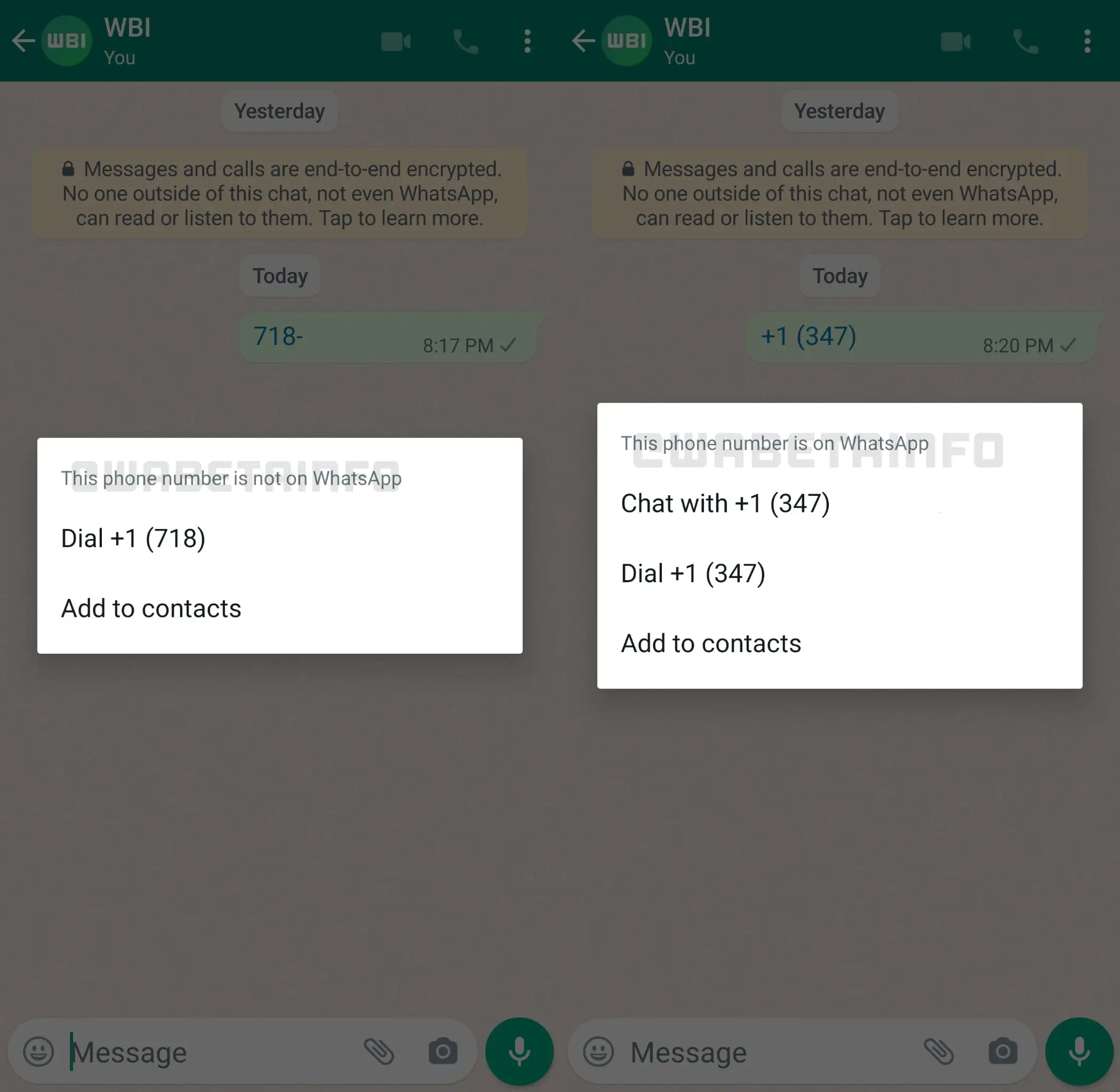
    Fortunately, frequent leaker WABetaInfo has dug through Android beta software version 2.22.8.11 and discovered that the firm is working on a remedy. Taping on an unsaved phone number in a chat bubble now opens an in-app menu that lets you chat with the person if they’re on WhatsApp.

    You may also call them or store their number to your contact list using the in-app options. We’ve confirmed that the menu is visible in the beta version we’re using. Take a look at the image below.

    whatsapp

    This is a significant departure from previous conduct. Currently, touching an unsaved number in a chat thread opens the dialer app on your Android phone instead.

    However, this approach isn’t ideal because it requires someone to either send you the number or for you to send the unsaved number to another contact. So, ideally, additional work will be done in this area to improve message delivery to unsaved contacts.

    There are several workarounds, however, such as using WhatsApp’s short links system. You can take a look at the various solutions for chatting with an unsaved number at the link.

  • Customize chat list gestures in Telegram

    Customize chat list gestures in Telegram

    They’re useful for triaging messages and reminders that you don’t want or need to focus on, whether they’re used for navigating the operating system as implemented in Android 10 or for quickly performing tasks in apps like Gmail or Twitter. Swipe gestures are also useful if you, like me, choose to use your phone with one hand. That’s why I was ecstatic when Telegram revealed that users could now customize the swipe gestures available on the messages home screen. If you want to see what choices are open to you and learn how to customize Telegram chat list swipe movements, keep reading!

    Customize chat list swipe gestures in Telegram

    1. Open the Telegram app.
    2. Tap on the settings menu in the top left corner (three lines).
    3. Tap on Settings.
    4. Tap on Chat Settings.
    5. Scroll down until you see the Chat list swipe gesture options.
    6. Scroll through the options including Archive, Mute, Delete, Pin, and Read.
    7. Tap to select your preference, and then go back to the app’s home screen.

    Now when you go back and swipe on a chat, the new swipe behavior should be reflected.