Tag: android 12

  • How to flash Android 12 Developer Preview

    How to flash Android 12 Developer Preview

    Android 12 Developer Preview 1 is here, but it’s not exactly easy to get. Because this first Android 12 version is meant for developers, Google isn’t just making it an opt-in process like later beta versions will be. But, if you’re willing to take the risk (and not get upset if and when things go wrong), here’s where to get it.

    Google’s developer site has been updated today with a whole host of Android 12-related details, and among them are a pair of download pages for full factory images and sideloadable OTA files. In the future, installing Android 12 will be a snap: Just register for the Android Beta Program. But right now, that program is closed, so the only way to install this preview is manually by using those files.

    Although you can unlock your bootloader and flash the complete factory picture, we don’t recommend it because it’s a hassle, potentially dangerous, can break SafetyNet attestation, and needs wiping your phone. Consider sideloading the OTA file for your computer instead, which does not require an unlocked bootloader and does not necessitate a scrub. However, if you aren’t prepared, you may need to do some preliminary work.

    Google’s stock OTA images site has instructions for the process, and the same details apply to these preview releases.

    If you are unfamiliar with the method, you can study a comprehensive walkthrough for your computer platform before attempting it on your own. Installing the required software and drivers is a simpler process on some operating systems than on others.

    Prerequisites:

    1. A computer (PC, macOS, or Linux). Or, if you’re exceptionally adventurous: Another phone with USB OTG functionality.
    2. A supported phone to install Android 12 on: Pixel 3 series, Pixel 3a series, Pixel 4 series, Pixel 4a series, or Pixel 5.
    3. A known good cable to connect #1 to #2.

    The easy way

    Google has made DP1 available with the Android Flash Tool, which makes the process pretty simple and linear, with no tools to install. Just fire up the site at the link below, plug in, and follow the instructions:

    This is our recommended route. However, as a backup, you can also install it manually.

    The older way

    android 12
    1. Install the Android SDK tools (i.e., ADB) and USB drivers (if you’re using Windows).
    2. Download the Developer Preview OTA image for your device.
    3. Connect your phone to your computer.
    4. Reboot into recovery (via ADB/USB debugging or the key combination) and enter sideloading mode. Power+volume up opens the Recovery menu, scroll via the volume keys to “apply update from ADB,” and select it with a tap of the power button.
      1. Check that and prior steps worked by entering “adb devices” (no quotes) in a shell or command prompt. If ADB is installed and your phone is in the correct mode, you should see an identifier for your phone and a “sideload” state reported.
    5. Flash the OTA via a shell or command prompt, using “adb sideload your_file_name_here.zip” with no quotes, where the filename is the name of the OTA image you downloaded earlier. On some platforms, you’ll need to precede adb commands with “./” for them to work correctly.
    6. Stare anxiously at your phone while it slowly installs.
    7. Reboot when done.

    Once you have the preview installed, future Android 12 updates and releases will be delivered like any other normal system update, without requiring that you hit all these steps again, and your phone will automatically end up in the beta track later.
  • Android 12 DP2 a bug-fixing update

    Android 12 DP2 a bug-fixing update

    android 12

    Android 12 DP2 just picked up its second bug-fixing update, bumping things numerically to DP2.2. This latest release includes a lot more fixes than DP2.1 did, including a fix for video encoding issues that I ran into, a crash tied to the Bluetooth section of Settings, disappearing widgets, and a failure to save Wi-Fi passwords, among others.

    Android 12 Developer Preview 2.2 (April 2021)
    
    If you’re already running a Developer Preview build, you will automatically receive an over-the-air (OTA) update to Developer Preview 2.2.
    
    This minor update to Android 12 Developer Preview 2 includes the following fixes:
    
    -Fixed an issue that sometimes caused the Settings app to crash when a user tried to access Bluetooth settings. (Issue #180962266)
    -Fixed an issue that caused widgets to be removed from the home screen after a user installed an OTA update.
    -Fixed an issue that caused notifications to be sent about low Bluetooth call quality even when call quality was currently unaffected.
    -Fixed an issue that caused WiFi network passwords to not be saved in some cases.
    -Fixed an issue that caused the notification shade to be activated when typing on the on-screen keyboard.
    -Fixed an issue with Codec 2.0 that could cause apps to crash on some devices.
    -Fixed an issue that could cause videos to be encoded incorrectly when shared.
    -Android 12 Developer Preview 2.1 (March 2021)
    
    This minor update to Android 12 Developer Preview 2 updates WebView to fix an issue that caused some apps to crash.-

    Some say that a problem with gesture navigation that was supposed to be resolved in a previous release remains in DP2.1, but no note was made of whether or not another patch for that issue is included in this release. It’s also likely that some unnamed changes slipped into this update — that happens from time to time, so we’ll keep an eye out.

    The update is already rolling out via the traditional means for those that have installed a prior Android 12 Developer Preview. Compatible phones remain the same: The Pixel 3 series, 3a series, 4 series, 4a series, and Pixel 5. OTA images are also available for manual sideloading/deconstruction if you prefer to install it yourself.

    If you’re doing it for the first time, we still recommend you wait until the Android Beta Program starts, but we have instructions here if you’re willing to assume the risks.

  • Android 12:  Rumors, Leaks, News & Features

    Android 12: Rumors, Leaks, News & Features

    People are eagerly waiting for the Android 12 update especially since the release of a plethora of promising rumors and leaks. Most of what we know has been leaked but some of the information is gathered from the public source code which appeared before the Developer Preview. In light of the upcoming release, we have gathered every detail we could find regarding the Android 12 update and compiled them for you in this article.

    The Desert Name

    Since 2009, a trend can be observed in the naming of each software update. Every major release ever since has been named after a dessert that starts with a successive letter of the alphabet. In 2009 it was Cupcake then Donut then Froyo then Gingerbread and so on. However, this was not the case with Android 10, it seems that publicly Google had abandoned the practice of naming its software updates after deserts but internally the tradition still carried on. Hence Android 11 was “Red Velvet Cake” and Android 12 is reported as “Snow Cone”.

    Design Mockups

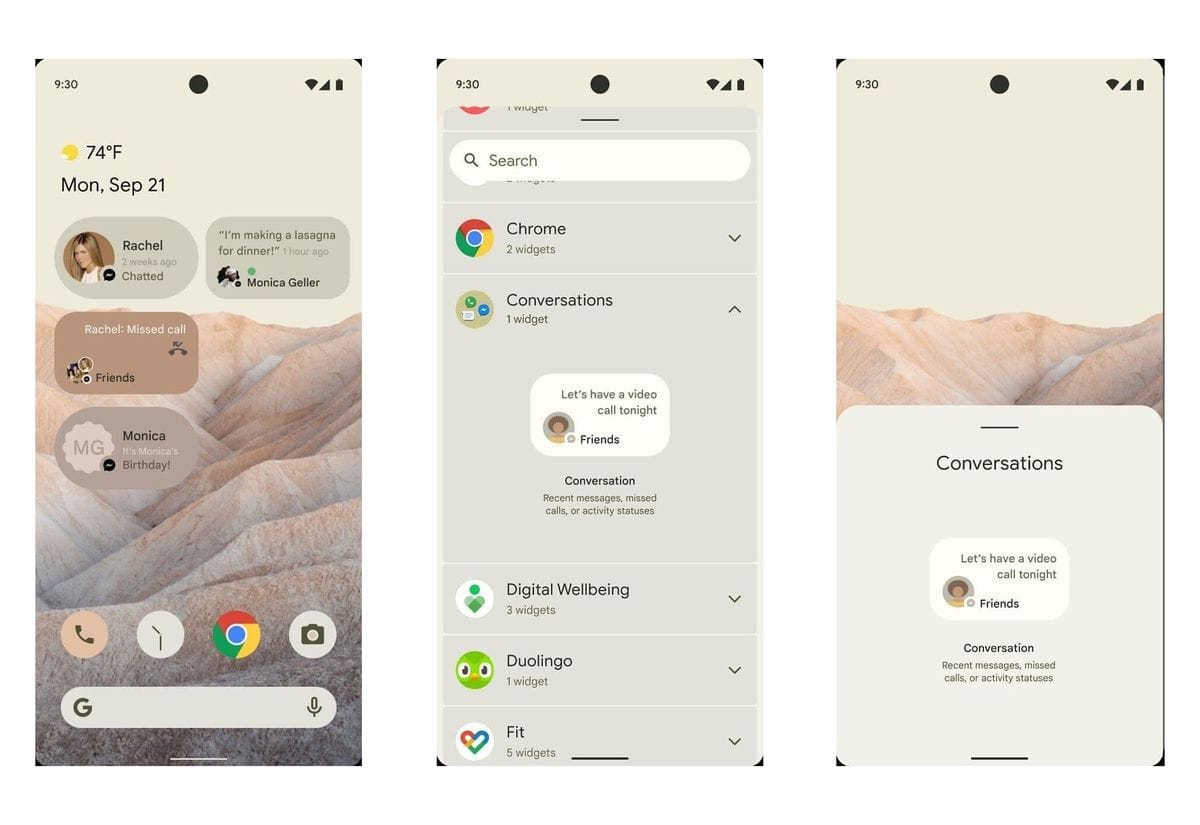
    The leaked mockups reveal a comprehensive design, it is worth noting that the actual design could be quite different since the mockups are just providing a visual aid to the leaks. The following images are not screenshots but render from artists of what the design could be.

    Android 12 Beta 4 1200x1200 cropped

    Themes

    After looking at the mockups, it can be observed that Google is going in a different direction with the themes. You can’t find the usually black and white colorways instead a primary color described as “Sand” can be observed. This change in color schemes could be due to an in-depth theming system that is set to debut.  This feature will allow you to customize your theme by choosing from a selected number of primary colors.

    Material NEXT

    The following sets of features are referred to as, “Material NEXT”. It was reported by XDA that there will be various smaller tweaks to the overall interface including notification cards with much rounder corners, new shapes and spacing for quick settings tiles, and more. There may be more features that are under the Material NEXT tag or this could simply point towards the updates to the use of Material Design by Android’s built-in apps and UI.

    New Widgets

    The release of Android 12 could bring, “Conversations Widgets”, which will appear on the home screen. These widgets seem to display missed calls or messages by someone who you haven’t talked to in your while. There are no further details on its functionality but this feature aligns with Google’s aim which is making users more involved in the operating systems.

    One-handed mode

    This feature is directly aimed at those owners who use a foldable device or taller devices. Android 12 will be introducing a native one-handed mode that will decrease your phone’s screen vertically. This will make it easier to use the device with one hand, however, only the height will decrease not the width. 

    Privacy developments

    It seems Google is ready to follow Apple’s stance on privacy, with Android 12 there might be a variety of movements to aid in privacy protection. Reportedly, a feature is in development that will allow users to know if an app is using or has used your camera or microphone recently. Additionally, it has been leaked that Android 12’s Settings app will get a revamped Privacy page where you can outright disable your phone’s camera, microphone, and location sensors.

    Scrolling Screenshots

    This feature is neither a rumor nor a leak, Google confirmed in 2019 that it was working on Scrolling Screenshots. Basically, your phone takes a screenshot, scrolls down, takes another, and stitches the two (or more) together.

    Picture-in-picture upgrades

    When Android 11 was introduced users could resize their floating picture-in-picture window by simply grabbing onto the corner and dragging. According to recent reports, users will now be able to resize with precision or double-tapped to quickly jump to maximum size. There might even be a way for users to “hide” the window so they can see more of their currently active app.

    App Pairs

    App Pairs is another feature that is being introduced due to the usage of foldable phones. This is a split-screen that allows users to operate two different tasks as one in recent apps view hence you will be able to switch from a pair of apps to another single app.

    Game Mode

    This feature will be a massive hit among gamers. There is a rumor that Android 12 may introduce a “game mode” option. As of now, it is called, “GameManager”, which is listed as a “service to manage game-related features.” No specific details have been released hence we are pretty much in the dark about this one.

    Brightness Control

    Android 12 will bring a “Reduce Brightness” tile in the quick settings. This seems to be an accessibility feature aimed at those with visual impairments.

    Apps Hibernation

    Premium flagship phones rarely have a storage issue but not everyone can afford the pricey devices with massive storage. To save storage space, Android 12 could introduce a way for apps to be “hibernated” when they aren’t being actively used. Again, the details on this are a bit vague.

    Third-party app store

    Last year Google assured Android app developers that it was considering their feedbacks and would make it easier to use a third-party app store. This is one of the features that Goggle has been hush-hush about but it is a fair compromise between Google and developers. This will also protect the user’s from malicious malware. 

    What’s next?

    There is no definite release date by Google as of now but it is expected sooner rather than later. This set of features indicate that Google is trying to make its operating system more user-friendly. It is allowing the user to customize and personalize their devices. Additionally, it seems Google agrees with Apple’s privacy policies, to limit data sharing,  which have been the center of controversy ever since its announcement. Many details reading these features are unknown and most of them are just sheer speculation. We’ll have to wait for the build and see how accurate our guesses were based upon the leaks.