Interestingly, Google released the brand latest Android 11 late last night. Interestingly, the latest Android 11 is available for non-pixel smartphones this time too. OnePlus published the developer preview of Oxygen OS 11 for the OnePlus 8 series a few months ago. The brand has launched the beta public which means that everyone owning the system will install the latest update.
The new UI will get both Oxygen OS 11 features as well as Android 11 features. Most of you remember that the Oxygen OS 11 is almost similar to the OneUI 2.1.
As reported, both the OnePlus 8 and the OnePlus 8 Pro are available for the new update. Those who are eager to try the latest UI will download and install the same with minor glitches. Follow our manual to install the latest Oxygen OS 11 in your system.
How to install Oxygen OS 11 (Android 11) in your device!
Oxygen OS allows you guys to download and install locally. There are some custom UI’s which doesn’t allow the same. We might have to navigate to recovery for doing the update. But, as said updating OnePlus devices manually isn’t a huge task.
Download the public-beta file from OnePlus community or by following the below links
Once the file is downloaded, move the same to the internal storage.
Now, navigate to Settings, and tap on System.
Once you reach, click on System Update, and select the “Settings” icon from the top right.
After this, click on “Local upgrade”, and choose the file which you have downloaded earlier.
Now, tap on install, and your device will be upgraded to the latest Android 11
Do check out the “About Phone” page for verifying the update.
As of now, no users reported any major bugs after installing the new Oxygen OS 11 on top of Android 11. What we can understand from here is that, you can this as a daily driver. Do let us know if you have any doubts on the same.
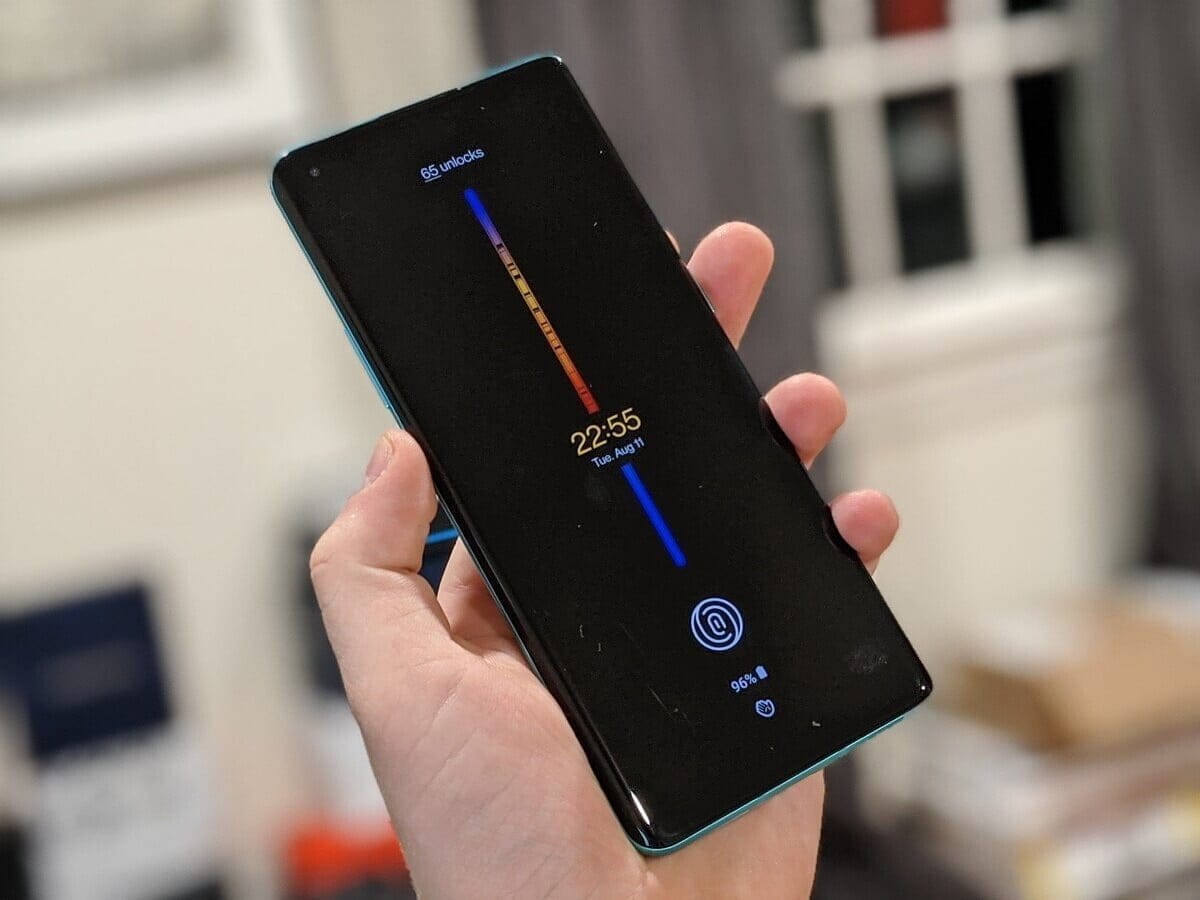
On August 10th, OnePlus will launch its latest 11-based OxygenOS 11. The first screenshots of the new version have been posted, which will feature significant improvements to the interface and new functionality. OxygenOS 11 has a OneUI-like look and has a rather convenient one-handed interface.
OxygenOS, which has a pure Android design in general until this time, will have a much more original design with the new version. OnePlus will open the closed test version to the community members with its event on August 10. The company invites its “most technically-inclined” community members to try the release. “Then once we’ve squashed most of the big bugs and improved over stability, we’ll release a full open beta to let even more of you try it out,” OnePlus CEO Pete Lau said.
AOD
Settings
Contacts
Weather
OxygenOS is also based on new features in Android. So in OxyegenOS 11 you can see all of the features of Android 11. It is not known on which devices a closed trial will be held on 10 August. This will probably be released for OnePlus 8 and 8 Pro, backed by Android 11 Beta.
Native screen recording: Google has been toying around with adding a built-in screen recorder to Android, and Android 11 pretty much confirms the feature will launch this year. You could use the screen recorder in the first Android 11 preview but it is much more refined in DP2. In the second beta, capturing device audio is now supported, all but assuring us that the stable release will include this long-awaited feature.
Increase touch sensitivity: Those who use screen protectors will love this feature. Google added an “increase touch sensitivity” option to the settings menu that lets you, well, increase the sensitivity of your touchscreen. If you use a screen protector, this should result in fewer missed taps and scrolls.
Notification History: Android doesn’t make it easy for you to see previously dismissed notifications, with Android 10’s Notification Log basically hidden for users. Android 11 DP1 hinted at a Notification History option and DP2 basically confirmed it. The new feature looks like it will be pretty useful.
Auto revoke app permissions: Android 11 DP3 has introduced a new option to automatically revoke permissions such as camera, location, and more, from apps that haven’t been used for a while. This new setting can be turned on if you think you’re not going to be actively using an app after a few months. You can read more about it here.
Easter egg: What would a new version of Android be without the traditional Easter egg? The third beta finally brought us the latest secret addition to the operating system. You can see it in full action here.
Exposure Notification API: Google and Apple worked together in a rare form of solidarity to create the Exposure Notification API. This system allows official health organizations to make contact tracing applications to help stem the spread of COVID-19. In Android 11, the Exposure Notification API is incorporated and turned on automatically.
Updated or revamped features
Revamped power menu: Android 11 will have a wildly revamped power menu that gives you quick access to smart home controls, your Google Wallet cards, and (obviously) power options.
Update: This new feature was slightly refined in the latest Android 11 beta 2. Check out the subtle differences here.
Screenshot markup interface tweaks: If you take a screenshot on your Android phone, there’s a native way for you to mark it up with notes or scribbles. However, there’s no way to delete the screenshot from that interface. That will change in Android 11.
Revamped overview menu, screenshot shortcuts: In Android 11 Developer Preview 3, Google revamped the overview menu (recent apps screen) to show larger cards as well as two new screenshot shortcuts. However, it also removed the ability to access the app drawer from the overview menu.
New text selection mode in overview menu: In the fourth Android 11 Developer Preview, Google added a “Select” button to the overview menu. Tapping it allows you to quickly select text inside an app and paste it into another app.
Undoing recently cleared apps: Speaking of the revamped overview menu, you can now also undo an accidentally cleared app by quickly swiping down on the screen.
Update: With the fourth Android 11 Developer Preview, Google removed the ability to undo recently cleared apps in the multitasking menu.
Media players now head to quick settings: If you’re listening to music on your phone, you’re used to finding a media player in your notification shade. In Android 11, the player will move to the quick settings area and get a few more tools, including the ability to easily pick an output device. If you are playing two forms of media at once (music and a podcast, for example), you’ll be able to swipe the notification to swap between the different players.
Ability to dismiss persistent app notifications: If you’ve ever used Android, you’ve probably run into a persistent notification (one that you can’t easily swipe away). In Android 11 Developer Preview 3, Google lets you clear all notifications. Don’t worry — you can quickly bring persistent notifications back if you swiped them away by accident.
Update: This feature was removed in Android 11 Developer Preview 4.
More granular back gesture tweaking: The back gesture can be a little frustrating at times, as you perform a similar gesture to activate hamburger menus. Fortunately, Android 11 has two sliders to let you control the sensitivity of the back gesture — one for the left side of the screen and one for the right. This is a welcome change from the single sensitivity slider in Android 10.
Airplane mode doesn’t kill Bluetooth: Previously, turning on airplane mode would also kill Bluetooth on your phone, which doesn’t make much sense. People who use airplane mode might have Bluetooth headphones connected, resulting in having to turn on Bluetooth again. In Android 11, Bluetooth stays on when airplane mode is activated.
Pixel Themes gets clock tweaks: In the Pixel theming section of Settings, you will likely be able to customize how your clock looks on the AOD and lock screen. However, in the first beta, there is only one clock option available.
Update: This feature was removed in the second beta release.
New Motion Sense option for Pixel 4: We’ve been complaining for a few months that Google seems to be neglecting Motion Sense on the Pixel 4. In Android 11, the company is adding a new way to control your phone without touching it. In Android 11, you can tap the air above the phone to pause your music.
Pixel 4 Face Unlock will require you to open your eyes: Speaking of the Pixel 4, it looks like Android 11 will offer users the ability to require their eyes be open for Face Unlock to work. This might make unlocks less efficient, but it will certainly make your phone more secure.
App pinning in the share menu: Android used to let you pin your most frequently used apps to the share sheet, but that option was removed in Android 10. Now it’s back and there will even be a little pin icon next to the apps you’ve pinned so you know what’s up.
Enhanced notification shade conversations: When you get a text, you can see the most recent message in your notification shade under a new Conversations tab. Not only will you be able to see more of the thread but you’ll also have richer ways to compose messages, including a way to send picture messages right from the notification. Notifications will also look a lot more organized thanks to a revamp of how they look.
Upgraded Voice Access capabilities: Previously, Android’s Voice Access labeled all the actions on the screen with a number, allowing you to call out the number to perform said action. Now, Android 11 can read what’s on your screen and let you say the action instead, being a rather cool accessibility upgrade. An example shown by The Verge‘s Dieter Bohn includes saying “Instagram” to launch the app rather than saying the corresponding number.
Google could make A / B partitions mandatory to make Seamless Updates a regular feature for all on all future Android 11 apps. An XDA developer found a commit entitled “Require Virtual A / B on R launches” on AOSP Gerrit. Yifan Hong, a Google Project Treble engineer, submitted the commit.
The commit updates the Vendor Test Suite (VTS), which is a check to see if the Android smartphone is compliant with Project Treble. In this particular case, the test tests whether or not the Android 11 app supports partition A / B.
How do A/B Seamless Updates work?
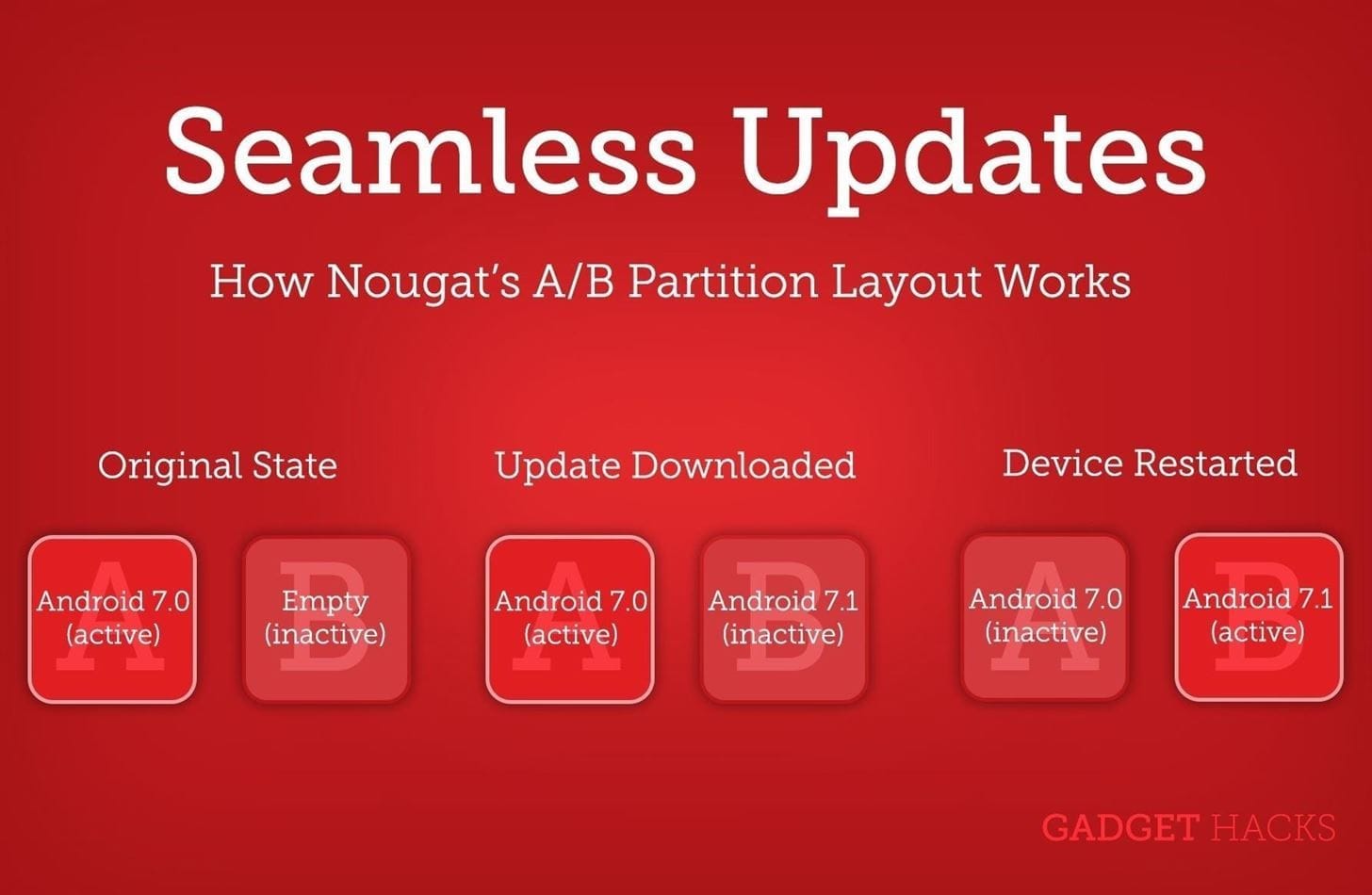
The A / B partitioning system applies to duplicated partitions on the Android computer for those who don’t know. It helps OEMs to install the OTA updates that are not being used on the inactive partition.
The best benefit of this is “Seamless Updates,” in which users don’t have to wait until the update is activated on the disabled spot, as it occurs in the background. The system switches to the patched slot when it reboots, and follows the same procedure in the previously active slot when a new update comes in.
The advantage of the A / B partition system is that it helps prevent the effects of having a defective update enabled. This is because it only affects the inactive position. Even, to ensure smooth rollback, no modifications are made to the existing partition.
The only downside is that there would be more room for OEMs to reserve for the A / B partition system. This might not be a problem as smartphones nowadays generally have ample internal storage
As XDA notes, Google is yet to merge the commit, which means the mandatory “Seamless Updates” may or may not arrive with Android 11. But if it does, the change will undoubtedly be welcomed by the Android community.
Even though the first developer preview of Android 11 is finally here a bit earlier than the normal March update. For now, the Android 11 DP1 supports only Google Pixel devices, including Pixel 2, 3, 3a and 4.
The newest version of Android contains a range of new features focusing on privacy and protection, including enhanced support for 5 G and foldable smartphones.
Since the Android developer preview came early, users did need to install the build too early, particularly since most features are developer-focused.
On top of that, unlike previous versions of Android, the Android 11 DP1 is not available on an OTA update; instead, users will need to manually flash the Android 11 OS image.
ADB and Fastboot tools installed on the PC (Here is the tutorial)
USB Debugging turned on
Download the supported OTA file
The official Over – The-Air (OTA) update is available for download from here. Make sure the Android 11 build is downloaded for your specific Google Pixel app.
Sadly, early Android 11 research does not support the first Google Pixel. Although its official support has expired for a long time, Google could be getting generous and sending it to the final upgrade.
Boot into Recovery Mode
Power off the device. Now, hold the Power button and volume down button to get to the Bootloader page. Here, use the volume buttons to choose Recovery mode in the menu and hit the power button.
On the next screen, hold down the Power button and Volume simultaneously for about a second to enter the recovery menu. Here, look out for “Apply update from ADB sideload”, and hit the power button to enter.
Sideload Android 11 on your device
Open Command Prompt on your PC, type the command adb devices . Now, enter adb sideload file name.zip Select Reboot now from the Android recovery menu once the installation is complete.
SONY DSC
Again, this is an early Android 11 build; so expect lots of bugs and crashes. Google’s beta program will get underway early, so you can also wait for it to develop a more stable Android 11. In fact, it’ll be much simpler to install.
Google released the Android 11’s first ever prototype, albeit a bit earlier than anticipated. Nevertheless, the newest iteration of Android contains many impressive features, including visual updates, user enhancing add-ons, and support for new innovations such as Foldables and 5G. Until we explore Android 11’s best features, let’s talk about the Android 11 release date and when it’ll land on your Android device, if any.
Android 11 release date
It’s too early to say when Google officially rolls Android 11 out. We can still predict the release date month of Android 11 based on what we have.
Google has released a roadmap for the introduction of Android 11 2020, like last year. Google will release the next version of Android in Q3 2020 according to the official schedule.
We should predict the final release of Android 11 in August, due to Google having deviated from he Android 10 release schedule by a month.
In March, Google rolled out Android 10 DP1, and in September, the final version. Like I said, Andr id 11’s Developer Preview came in too early, meaning the final version would be released sooner han normal.
Android 11 supported devices
Android11 is still in the process of first public release, hence Google’s release program; few Andrid devices that are allowed to check the new version of Android may be weeks away.
In the future we’ll learn more about the apps that are sponsored. Google Pixel owners can now check out the newest update to Android 11. Here is a list:
Google Pixel 2/2XL
Google Pixel 3/3XL
Google Pixel 4/4XL
The features:
Dark Theme Scheduling
Google rolled out the dark mode around the device in Android 10. The new Android update brings a minor, but important, upgrade to the best features of Android.
Google rolled out the dark mode around the device in Android 10. The new Android update brings a minor, but important, upgrade to the best features of Android.
The Android 11 feature is currently being rolled out via the Pixel function drop to Google Pixel owners.
Screen Recorder
Currently, a native Android screen recorder has been in the pipeline for over a year. The function first came up in one of the Android 10 developer previews; however, it was published by Google before the final version.
It seems the in house screen recorder is actually ready now, not “now,” but in the final edition, hopefully, it will be. Actually, in the Android 11 DP1, users can toggle it from the notification shade, and that is it.
There are no external settings to alter address. In fact, the screen-recorder lacks the ability to standardly capture audio.
Share Menu Pin
Since the start the Android share menu has been problematic, particularly the changing categories whenever we reopen the menu. Google, however, fixed the issue in Android 11 with the pin-app option.
Users can pin up to four applications into the Android Sharing Menu in the new Android update. The function first appeared in the developer build for Android 10, but Google dropped it down for the final version. Ideally, the Sharing Menu option for Pin apps is here to stay with Android 11.
Dedicated conversation section
The latest “dedicated talk area” in the notification shade is one of the most useful features of Android 11.
App updates are a mess, in all honesty. Many are obtrusive and fill in the shade of the message, requiring users to make extra efforts to locate the appropriate ones.
Google addresses the problem by highlighting notification-shaded conversations. Android 11 features a new area for chat that appears right at the top of the tray for notifications. That makes a total of three Android notification sections — Conversations, Normal, and Silent.
Multi-colored Quick Settings Tiles
The multicolored icons in the Fast Settings region are a big visual improvement that users will expect in the final Android 11 update.
The new version of Android allows users to add different color codes to each icon in fast environment. Google, of course, does not want users to go overboard; therefore, it only provides the four colors— red, blue, yellow and green.
For now, coloring Fast Settings icons includes running a variety of ADB commands, so we’ll just leave a how – to post, assuming the Android 11 Developer Preview isn’t run by everyone.
“Bubbles”
Bubbles is a feature of Android 10 that Google didn’t introduce in the new update. The alternative is still hiding in Developer’s shadows.
Google will roll-out the app on Android 11 at full-throttle though. Developers were already told to include the feature’s API in the Android apps.
Bubbles allow multitasking and communicating with applications without the need to close the current program. Think of it as Facebook messenger chat heads — This Android 10 feature allows you to reduce any device into a tiny circle that floats above all other devices on your phone.
Google is also adding 12 new modules that will be updated through the Google Play Store instead of a full OS update. Google claims Android 11 devices will be able to hold “verifiable identification documents, such as ISO 18013-5 compliant Mobile Driving Licenses.”
Android 11 is still in early development. Therefore, Android fans should expect a sudden drop or addition of new features. We will keep updating this post as more information comes in.