Tag: theme

  • Android 13 DP1 has dynamic icon theming for third-party apps

    Android 13 DP1 has dynamic icon theming for third-party apps

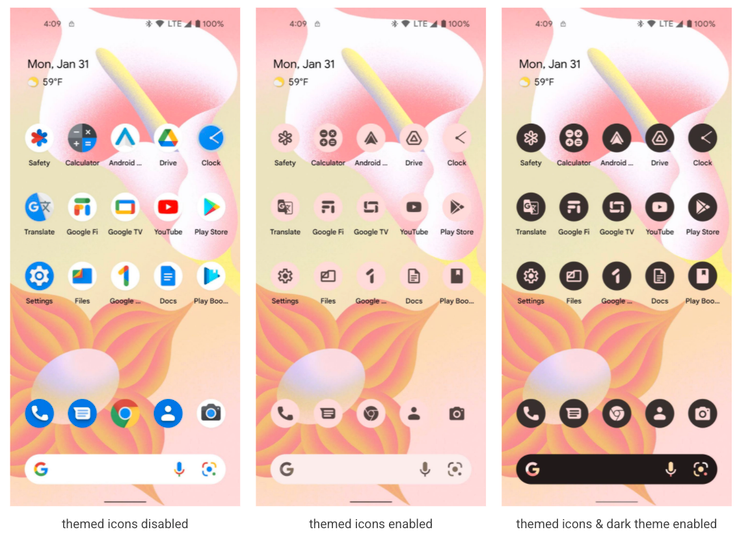
    Material UI will go beyond the Pixel family, according to Google, but that doesn’t mean it will stop changing and growing in new ways. In Android 12 Beta 3, an experiment extends the dynamic theming system’s reach to home screen icons, but only for Google’s own apps. Third-party apps can now build their own theming-friendly icons in Android 13, so you can have the two-tone icon packs you’ve always wanted without having to install a custom launcher.

    Themed app icons, like all of the other ways Material You may decorate an app, take on the color of your backdrop. This will either style the icon’s background or the icon itself, depending on whether you’re in light or dark mode.

    Themed icons are an opt-in feature, so no one will be forced to use them if they don’t like the look. To enable dynamically themed icons, long-press a vacant place on the home screen, select Wallpaper & style, and then scroll down to the Themed icons toggle.
    android 13 icons color

    Google is urging app developers to add support for themed icons. The requirements are fairly simple, requiring a new monochromatic vector icon — probably just a mask of the original app icon or reusing a notification icon — and a couple tiny changes to the launcher’s adaptive icon XML and the app manifest.

    There is no automated re-styling of app icons in the first developer preview, and there is currently no sign that it will ever be. As a result, programs that don’t support themed icons appear in full color, which detracts from the overall appearance. Of course, this is only the initial developer preview, and Google’s apps are the only ones with themed icon support, at least until the Play Store enables apps that use the Tirimasu SDK.

    Many apps will undoubtedly make the necessary adjustments in due time, but it’s unlikely that every app developer will prioritize this, particularly those who wait a long time between updates or resist boosting the target SDK for other reasons.

    In the meantime, you’ll probably either want to leave themed icons turned off, or go to the trouble of keeping non-themed icons out of your home screen.
  • Themes are coming to MIUI 13

    Themes are coming to MIUI 13

    Many of us have wanted the customization layers to merge with Android 12 since it was announced and the new mechanism for customizing mobiles with that version was released. The first to add it to One UI 4 in its own unique way was Samsung, and the next to do so will be Xiaomi, according to a leak shared on Twitter by user Mishaal Rahman.

    This has discovered within the Android internal code that the so-called Monet themes, which are hallmark of the purest version of Android, will also be in the Chinese manufacturer’s popular layer.

    A very important change, which gives more personality to Xiaomi brand mobiles, which with the themes already gave us a thousand and one possible style configurations. The colors are based on the wallpaper, but we can also choose our favorite combination of tones.

    The color arrives at Xiaomi

    Because of the photographs supplied by Xiaomi ui, we currently know how they operate and how they will behave on the Xiaomi’s smartphones, but it shouldn’t be long before we see additional circumstances where the adaptive colors of Android 12 reach Xiaomi smartphones. The feature is included in MIUI 13 version 22.1.17, which is currently only available in China.

    This option will be available to everyone in the future, albeit we will have to wait because it will not be included in the first global editions of MIUI 13. The program will be released later, allowing us to customize the appearance of our Android phone as if it were a Google Pixel.

    colores temas android 12 xiaomi miui 12 1

    The images show how the new Android 12 widgets, as well as Google Chrome tabs and even system components, adapt to the selected hue. All Google applications are expected to accept this shift, and we will gradually learn how other areas of the Xiaomi, Redmi, and Poco terminals will follow suit.

    For the time being, devices running Android 12 in its stock form can apply Monet themes to the icons and control panel, which is not possible with MIUI 13. However, we do not give up hope that they will arrive following this first application.

    What will happen to the themes?

    Until now, the best way to change the look of our Xiaomi device was to use MIUI’s themes app. We may find many other style combinations there, which we can customize to our liking on the smartphone by changing the icons, colors, and shapes. The incorporation of this new Android function raises a lot of questions about what will happen with this benefit.

    In recent months, the app has stopped integrating as many options in Europe, and some notable themes have been left alone in China.

    This could be the first step for Xiaomi to become more pure, at least for Spain and other countries, where stock Android is preferred and other systems that are visually much more complex are less popular.