Tag: firmware

  • 4 free tools to get latest updates on your Samsung Galaxy devices

    4 free tools to get latest updates on your Samsung Galaxy devices

    If you’ve ever tried looking for firmware to install on your Samsung Galaxy smartphone or tablet, it might be pretty annoying. While companies like Google, OnePlus, and Xiaomi provide download links on their websites, Samsung has yet to provide an official firmware download portal. That’s one of the reasons why there are so many Samsung firmware download sites out there. These sites scrap Samsung’s FUS (Firmware Update Server) for the latest firmware releases and categorize them by model number, carrier/region, and OS version. However, many of these services use a “freemium” model that throttles the base-tier download speed.

    Fortunately, there is no shortage of community-developed tools to directly download a new software update for a compatible Galaxy device. We’ve talked about two such tools — SamFirm and Frija — many times in the past. Samloader is another open-source, cross-platform alternative. While I personally think that downloading Samsung firmware using one of these utilities is simple enough, some may still find them inadequate to meet their needs. If you do, then here are a few more solutions that make it even easier to grab official Samsung firmware packages for your device.

    1. SamFirm_Reborn

    samsung update tool

    Created by XDA Recognized Developer Ivan_Meler, SamFirm_Reborn is a reincarnation of the original SamFirm tool. The developer decompiled the legacy application and patched the codebase to make it compatible with Samsung’s server-side changes. SamFirm_Reborn is open source and it does offer a handy command-line interface besides the familiar GUI.

    Download SamFirm_Reborn

    2. SamFirm-continued and SamFwTool

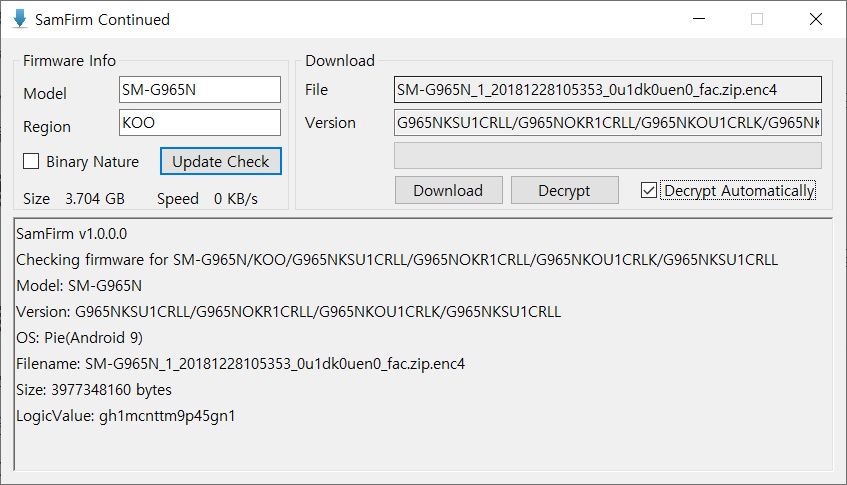
    SamFirm Continued
    SamFwTool

    SamFirm-continued started its journey as yet another open-source fork of the legacy SamFirm, but the maintainer abandoned the project a few months ago. Later on, XDA Member Tungtata picked up the baton and created SamFwTool. One of the highlights of SamFwTool is the auto-detection feature. Just connect your phone in MTP mode and press “Auto detect” to identify your device model and region code.

    Download SamFwTool

    3. SamFirm.js

    The whole Samsung firmware downloading saga is now on a different level, as XDA Recognized Developer jesec has presented SamFirm.js, a streaming downloader, decryptor, and extractor coded in JavaScript. With SamFirm.js as the backend, you should be able to construct a web app to fetch stock Samsung firmware packages. The project is a collaboration between developers jesec and LuK1337.

    Download SamFirm.js

    4. SamFetch

    In case you’re looking for a web API variant of the Samloader project, you should try out SamFetch. XDA Member YusufCihan reimplemented the functions from Samloader’s code as web routes in order to expose a simplified REST API to download Samsung firmware.
    Download SamFetch

  • Nokia X Manager – firmware tool

    Nokia X Manager – firmware tool

    Are you a customer of Nokia? If so, here’s another Nokia product with your Nokia environment being illuminated. The Nokia brand has developed and released yet another fantastic app that supports all Nokia users, and the unique application is the Nokia X Manager update (all versions).

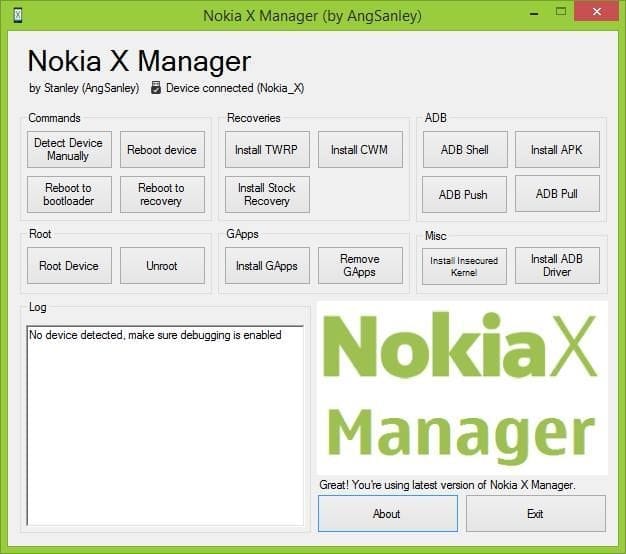
    Nokia X Manager is a small, compact program that lets users perform several tasks on their Nokia X smartphones. You will discover a lot of information about this if you go ahead and read this write-up. The write-up includes information such as all Nokia X models, the new and oldest edition and its functionality.

    nokia x manager
    Nokia x manager

    Nokia X Manger features

    1. Available Commands: The Nokia X Manager was made or created with a button based ADB commands that are made for restarting the device, detecting the tool automatically and manually, rebooting the recovery and rebooting the Bootloader.

    2. Install Recovery: With its features, it will be easier for users to install TWRP or CWM on their Nokia XL Smartphones or Nokia X Smartphones. With the Nokia X Manager, you can easily install the stock recovery on your computer.

    3. ADB Commands: Utilizing the characters, the users can introduce adb shell commands, do ADB pull or ADB push commands as well as install all kinds of the app on their computers.

    4. Speedy Rooting: With the Nokia X Manager, users are allowed to unroot or root their Nokia XL or Nokia X Smartphone in just one tap on the screen. Only by connecting the tool to the computer. Immediately the tool gets notified by the Nokia X Manager, tap on the button meant for rooting to get the device rooted.

    5. Install Gapps: With the means, you can freely install the Gapps, which means Google apps, on your Nokia XL Smartphone or Nokia X Smartphone. You have to make sure your tool is rooted first, to install or uninstall the Google apps.

  • Sony Xperia firmware tool – download

    Sony Xperia firmware tool – download

    Xperifirm Tool is a tiny yet efficient tool that enables users to update firmware for all forms of Sony Xperia tablets, smartphones or other gadgets. When you read on, it will be really useful, because you will discover lots of stuff about the Xperia download device. You’ll hear about the new version of the Xperifirm Tool including the latest update.

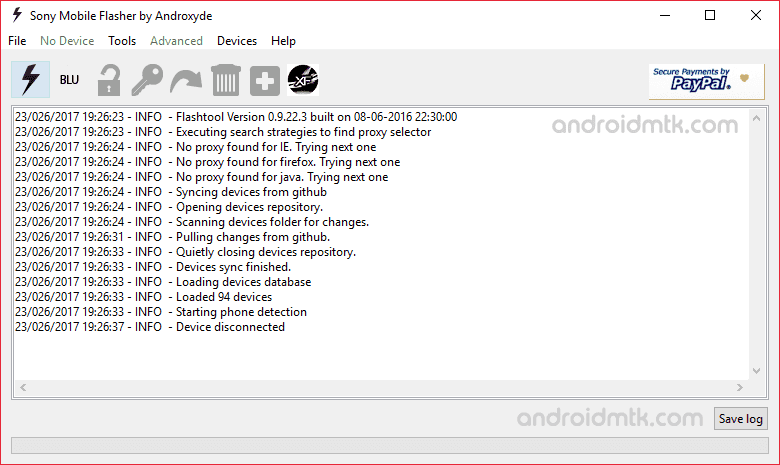
    sony xperia firware tool

    1. Tiny portable device: It is very lovely to know that Xperifirm is made as a little mobile app. You don’t have to install the application on your computer before using it; all you have to do is launch the device and get ready to make use of the tool.
     
    2. Download firmware: With the application (Xperifirm) you will freely download the stock firmware for all your Sony Xperia gadgets, not excluding the previous and latest version of it.
     
    3. Downloading alternatives: The application (Xperifirm) allows users to alter the settings of the download. You are free to choose the location where you want the firmware to be downloaded and can as well ask questions like “where should I download my firmware” or “where firmware should be downloaded.”
     
    4. Downloading utilizing proxy: Once you have this app, you will have free entry to the proxy. Xperifirm lets its users use proxy any Xperia firmware downloading. Just make sure that the proxy is set correctly, and then you enter the proxy information once you are done with the details voila! You are set to download firmware from the proxy.

  • How to flash Samsung firmware

    How to flash Samsung firmware

    Requirements:

    Steps:

    1. Download and extract Odin3.
    2. Install Samsung USB Driver. (skip this step if you already installed it).
    3. PowerOff your Samsung Smartphone.
    4. Press and hold the next 3 keys (power key+home key+volume down key) to boot into the download mode.
    5. press volume up key to skip warning and continue.
    6. Connect your phone to your PC and run Odin3. (Image 1)
    7. Odin will detect your phone, now click (AP Button) and choose TAR.MD5 file.(the file you downloaded and extracted it). (Image 2)
    8. Click start to begin flashing your device.
    9. When Green Pass Message seem Please disconnect your device from PC (Remove USB Cable), your device will restart. (Image 3)