Tag: expressive

  • Phone app getting the new Material 3 Expressive

    Phone app getting the new Material 3 Expressive

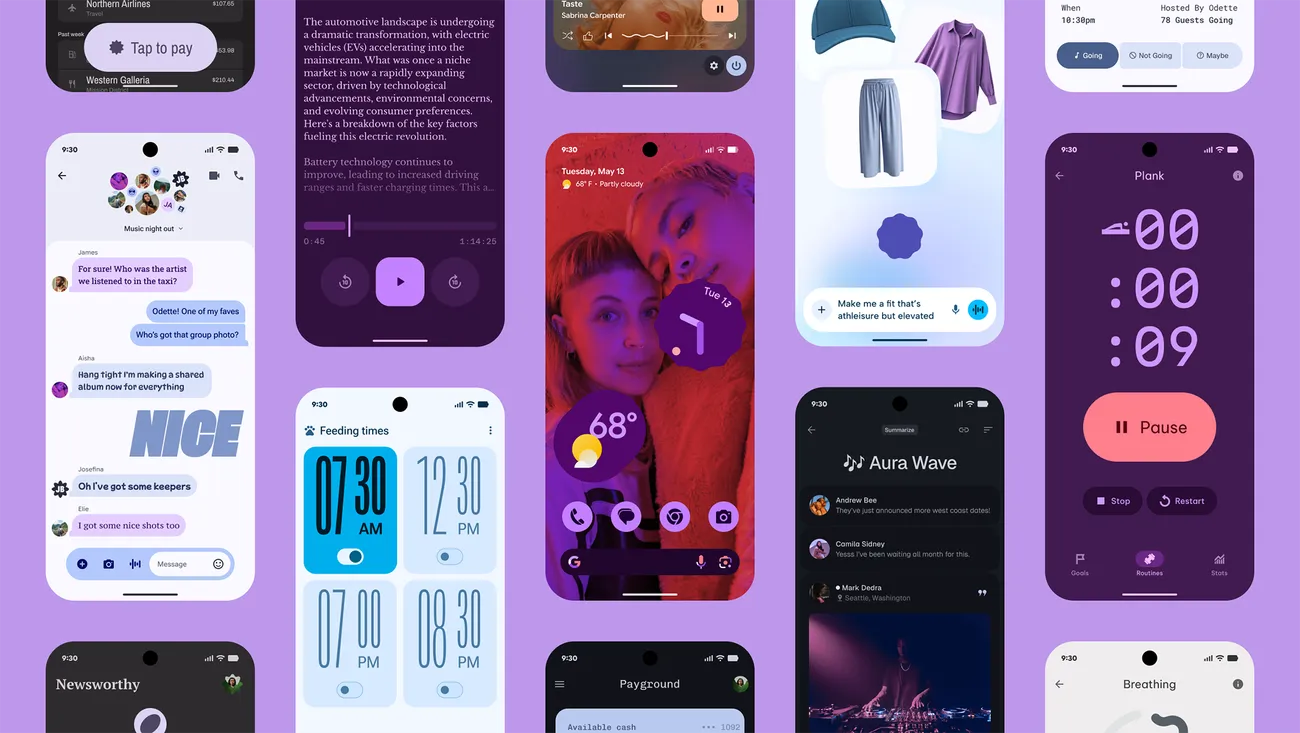
    Android 16 wasn’t expected to be a huge event, but Material 3 Expressive altered that and made many excited about the upcoming Android release. Google is making the required adjustments to truly streamline the experience overall, in addition to giving you the option to personalize the appearance and feel of your device.

    The Google Phone app is one area that is receiving a lot of unexpected attention. Late last month, Google said that it will be making modifications to the Phone app, and now it is beginning to push out those changes to users. This UI update is presently only available to beta users, so it won’t be available to everyone this time around, according to 9to5Google.

    Google Phone app redesign with Material 3 Expressive
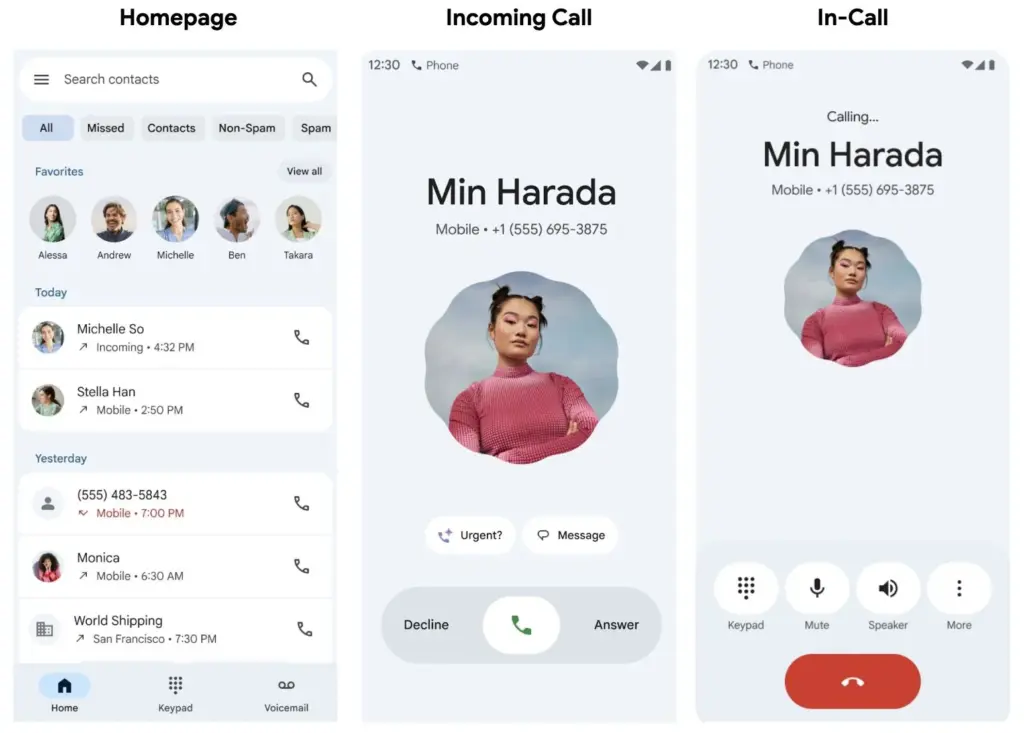
    google phone app redesign with Material 3 Expressive

    Going ahead, beta users should anticipate a much more straightforward interface with only three menu options—Home, Keypad, and Voicemail—to select from on the bottom bar. The Home page now has a plethora of data, including recent calls and preferred contacts, further deepening the alterations. You can manually make calls or view some recommended contacts by going to the Keypad area. Additionally, any voicemails you may have will be stored in the Voicemail section, as you might anticipate. Users should now have access to the gesture controls in addition to the previously mentioned features.

    You may now accept and reject calls with a simple tap or horizontal swipe thanks to the recent update. It’s a lovely addition that gives the user interface a more contemporary feel, even though it’s not a significant improvement. With Material 3 Expressive touches appearing on numerous other well-known Google apps, additional modifications will undoubtedly emerge over the year.

    Even though the modifications are gradual, more areas of Android and other Google apps are gradually incorporating them. We’ll have to wait and see how far Google takes this. With the Pixel 10 expected to be released in a few months, hopefully there will be more intriguing additions to this.

    Stay connected with the latest from Droid Tools—follow us on X @droid_tools, like our page on Facebook, check out our updates on Instagram, and follow us on Google News for real-time news, device tips, and mobile tech insights.
  • Google starts rolling out Material 3 Expressive to Messages app

    Google starts rolling out Material 3 Expressive to Messages app

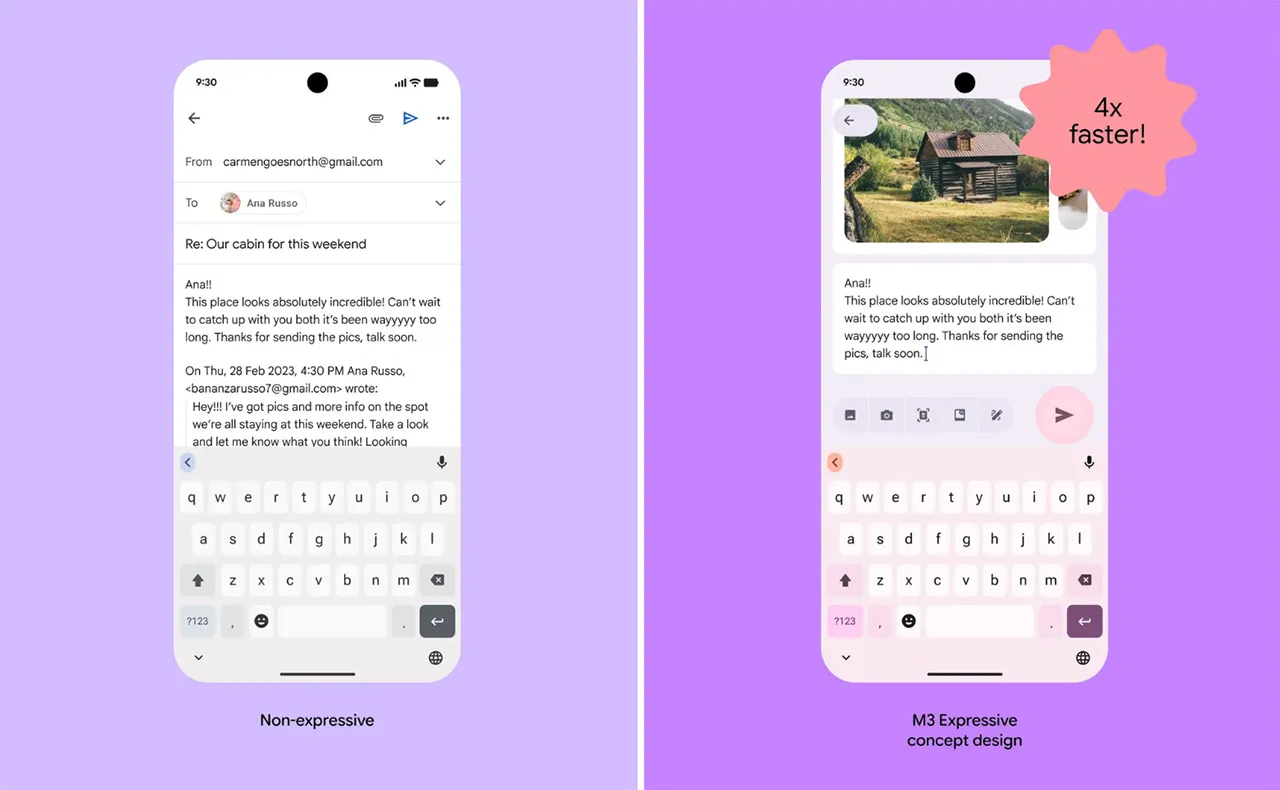
    Google Messages is starting to implement a Material 3 Expressive overhaul of just the conversation interface, following Gmail for certain users and Photos.

    Placing the message thread in a container with rounded corners at the top makes the app bar its own (darker) layer, which is the primary alteration to the conversation screen.

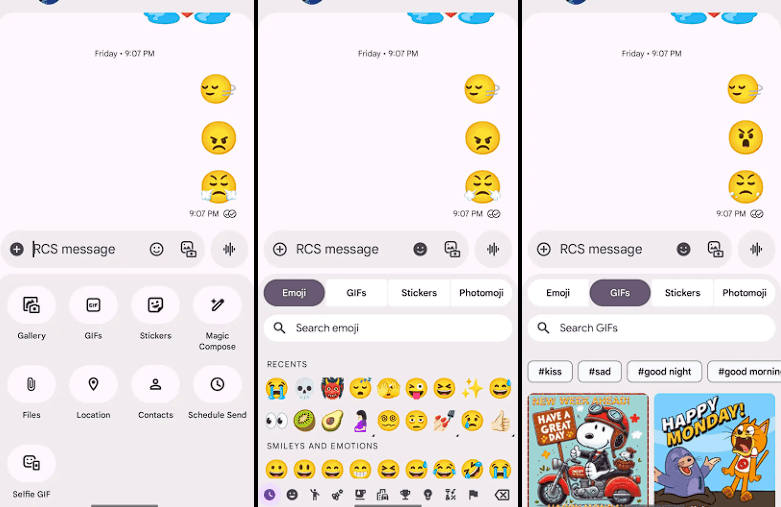
    The Gallery, GIFs, Stickers, and other items are arranged in pill-shaped containers rather than circles in the “plus” menu, which is a distinct container. The wallpaper it uses is identical to that of the app bar. Additionally, Google eliminated the vibrant symbols and reduced the grid’s density.

    The linked button group used to transition between Emoji, GIFs, Stickers, and Photomoji (which was the first item in the current design) is visible when you access the emoji menu. The current tab you are reading is a pill, and the entire thing is a circular container. Moving the search bar down one line eliminates back-to-back text fields, which is a welcome modification.

    Material 3 Expressive Messeges app

    As of right now, we have one report of this going live with Google Messages beta version 20250528_00_RC00, namely the Samsung version. We examined other devices today, and we don’t notice it.

    The home page, search, settings, and other areas of the app have not been changed today. It appears like Material 3 Expressive in Google Messages will be implemented gradually. In the meantime, the software usually takes a long time to go from beta or initial release to general release.

    Stay connected with the latest from Droid Tools—follow us on X @droid_tools, like our page on Facebook, check out our updates on Instagram, and follow us on Google News for real-time news, device tips, and mobile tech insights.
  • Gmail is already getting Material 3 Expressive design

    Gmail is already getting Material 3 Expressive design

    One of the main topics of discussion with Android 16 is the release of Material 3 Expressive, which not only improves the user experience of the system but also guarantees that Google apps use the same design language, improving consistency. Later in the year, those system-level design modifications are anticipated, but it appears Google is eager to begin implementing Android 16’s app designs.

    Over the past few weeks, the Mountain View tech behemoth has been seen previewing Material 3 Expressive in the Phone app and, more lately, in Calendar, Photos, Files, and Meet. If Gmail is your main email app on your Android phone, it’s time to see if you have the Material 3 Expressive design upgrade installed. However, there is no information regarding when Android 16’s design will be available for these apps.

    How Material 3 Expressive design is changing Gmail?

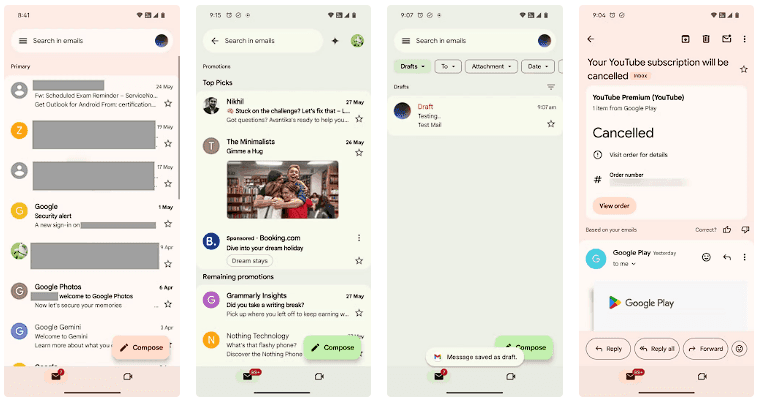
    The Gmail app version 2025.05.11 is implementing Android 16’s design language, which was initially noticed by SparkRadar on Telegram. This brings significant modifications to the program’s general look (via Android Authority). The new card-based user interface for the email list is the first significant change you’ll notice when you launch the app.

    Material 3 Expressive design Gmail

    Emails and the landing page’s search box were previously shown in a single-sheet format. With the Material 3 Expressive redesign, the email screens also had the same card-based user interface as the landing page.

    On the landing page, the “Compose” FAB is still located on the right, but now has a thicker typeface and a solid-filled pencil image. The search bar has seen a minor alteration as well. The profile symbol in the search bar is no longer present in the updated user interface. As an alternative, the search bar’s size has been lowered to create space for the profile symbol next to it.

    Additionally, we can see that the Meet and Email symbols have grown in size, and the bottom bar has slightly expanded. Additionally, Gmail now has a pill-shaped button animation for its swipe motions, which gives the interface a lively personality.

    Although the Material 3 Expressive design update is visually appealing, not all Gmail users can currently access it. The reason for this is that a server-side update is being used to roll it out. Additionally, it may take a few more days to make this adjustment available to everyone, as Gmail is one of the Google apps with over 10 billion installations on the Google Play Store.

  • Big UI change in Android 16 Beta QPR

    Big UI change in Android 16 Beta QPR

    With Gemini mostly overshadowing the two-day developer conference, Google I/O 2025 is now gone. On the other hand, the release of Android 16 QPR1 Beta, which incorporates the previously introduced Material 3 Expressive design language, is a more noteworthy advancement for certain aficionados. What’s new in this version and how to access the beta are explained here.

    After the stable Android 16 Beta program, the first Quarterly Platform Release is the Android 16 QPR1. Despite being more stable than previous betas, it is still intended for developers and testers because of flaws and other problems. Similarly, this release represents a sneak peek at the upcoming Pixel Feature Drop, which is anticipated to happen next month.

    Google’s new design language, Material 3 Expressive design, or M3E, which incorporates bolder and more playful elements, is now available in the Android 16 QPR1 Beta. Wear OS 6 for wearables will also use the M3 Expressive design.

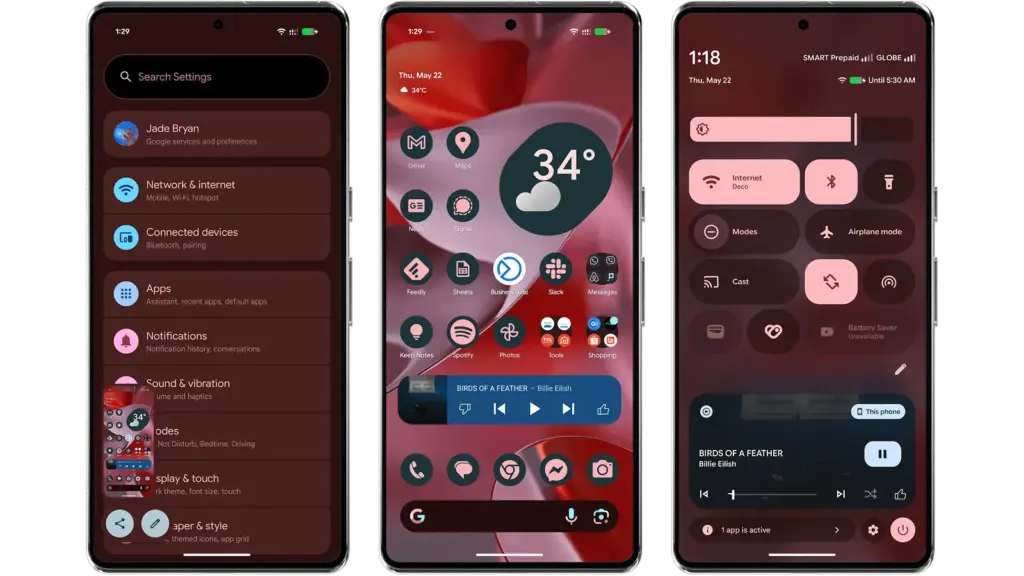
    To experience M3 Expressive, I set up the Android 16 QPR1 Beta on my Pixel 9 Pro XL (review). The wallpaper and quick settings are two examples of UI elements and sections where the modifications are instantly apparent. Additionally, some features, including personalized icons on the Pixel Launcher, are not yet enabled.

    Android 16 QPR1 Beta with Materi

    Material 3 Expressive design landed in Android 16 QPR

    A notable modification to the home screen is the addition of a complete row of additional space for widgets and apps. This is because the “At a Glance” widget, which was formerly located at the top of the home screen, has decreased.

    The battery, cellular, and Wi-Fi system icons have also been added to the status bar. In the meantime, each component of the system settings has more themed glyph icons.

    The most significant changes are in the fast settings panel, which now uses shortcuts and widgets in a more vibrant and effervescent manner, along with new animations that Google calls “springy.” Additionally, there are additional customization options for scaling and positioning toggles and icons, which enables users to employ 1×1 icons to fit more elements.

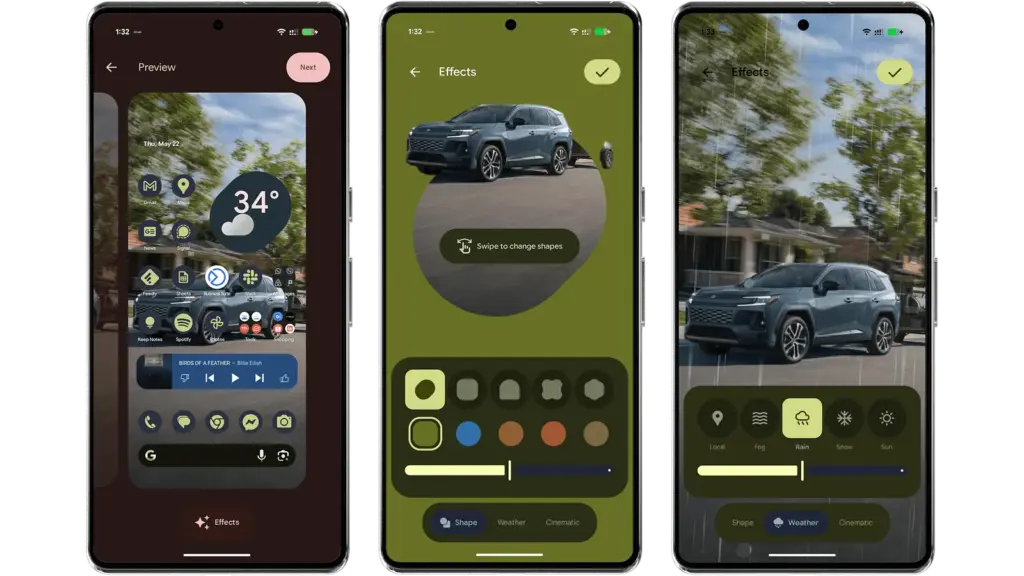
    Android 16 provides additional settings and effects for custom images, which will appeal to those who like personalizing their home screen and lock screen. AI-powered weather effects and the ability to overlay colors with shapes are now available. A cinematic effect is an additional choice, but my device was still unable to use it after trying.

    android 16 qpr changes

    More apps will come with Material 3 Expressive

    It is anticipated that Google would add more M3 Expressive elements to its services and applications, such as Google Photos and Keep.

    Manufacturers of skinned Android versions, like Samsung’s One UI, are now primarily responsible for implementing the Material 3 Expressive design. Many of these changes and new features should be maintained for those that provide stock and near-stock Android experiences.

    All of these updates, along with perhaps other improvements and optimizations not included in the first Android 16 QPR version, will be included in the June Pixel Feature Drop if you’re patient enough.

    The Android 16 QPR1 Beta update is available via the beta program for Pixel 6 all the way to Pixel 9 series.

    • Pixel 6, Pixel 6 Pro, and Pixel 6a
    • Pixel 7, Pixel 7 Pro, and Pixel 7a
    • Pixel 8, Pixel 8 Pro, and Pixel 8a
    • Pixel 9, Pixel 9 Pro, Pixel 9 Pro XL, Pixel 9 Pro Fold, and Pixel 9a
    • Pixel Fold
    • Pixel Tablet