Tag: download

  • Smart Downloads feature teased on Youtube for Android

    Smart Downloads feature teased on Youtube for Android

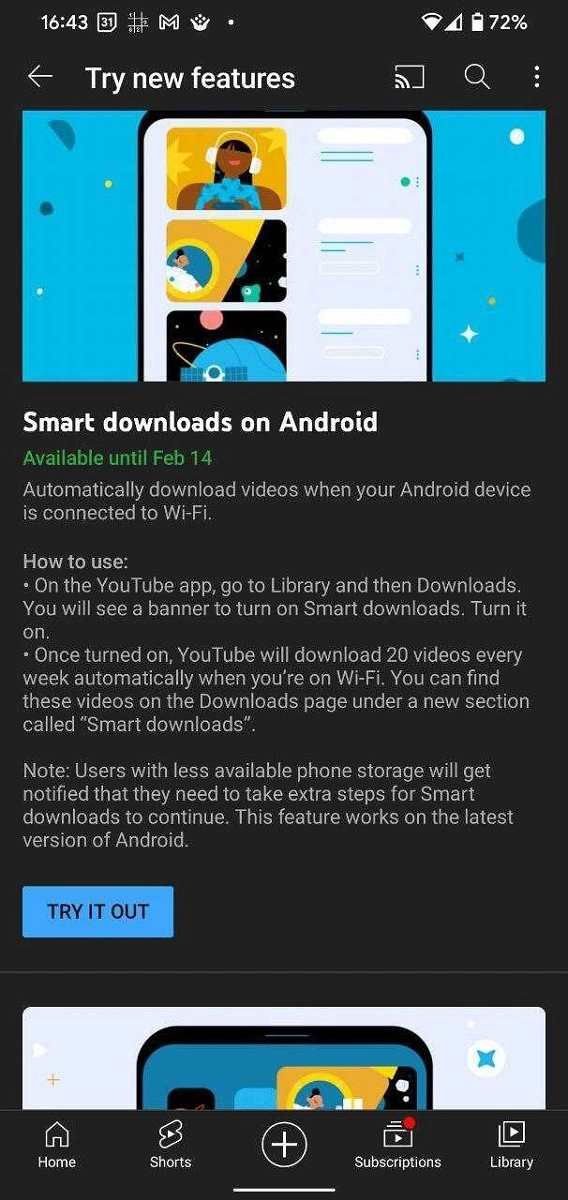
    If you use YouTube Music, you’re probably aware of the app’s Smart Downloads feature. It’s essentially a feature that saves mobile data by downloading some tunes offline anytime you’re connected to Wi-Fi. On the video side of things, the YouTube app for Android is experimenting with something similar. The YouTube app’s Smart Downloads feature will download a handful of videos for you every week based on an algorithm for recommended videos.

    Some Android users in Europe have gotten a reminder on their devices to try out the new Smart Downloads function, according to 9to5Google. When you sign up to try it, the YouTube app will automatically download a collection of 20 videos per week while connected to a Wi-Fi network. The videos will be tailored for you based on an algorithm that analyzes your viewing history as well as the types of material you consume on the platform. The downloaded videos, along with any other videos you’ve manually downloaded in the app, will be added to your offline playlist.

    While many individuals may find the feature unneeded, it can be useful for those who have limited mobile data and wish to view material while commuting or who do not have frequent access to an internet connection. Users with limited storage on their devices will be warned before any downloads take place, allowing them to take appropriate action to free up space. Only the most recent version of Android, Android 12, currently supports this functionality.

    Smart Downloads is currently available only for a few people to try out and only in specific regions. It’s also available only for YouTube Premium subscribers and users who receive the prompt can enroll to try the feature till 14 February. If you are one of the chosen ones, you should see a banner when you open the YouTube app or you can try heading to Settings > Try new features to see if you can find the option there.
  • Download Magisk v23.0 And Magisk Manager

    Download Magisk v23.0 And Magisk Manager

    nexus2cee Magisk Generic Hero

    Magisk v23.0

    Magisk is a fantastic tool for advanced Android users. It is a one-of-a-kind systemless interface designed by XDA Senior Recognized Developer topjohnwu that can be used for much more than simply rooting your devices. The interface allows users to tinker with system settings without actually changing the system files.

    Another reason for Magisk’s popularity is the possibility of circumventing Google’s SafetyNet, which prevents certain apps from running on rooted devices. The most recent Magisk update is Magisk version 23.0, which includes several bug fixes for root access.

    The developer announced the new update on Twitter today, saying the focus is primarily on stability improvements. In case you’re using the Magisk app solely for SafetyNet attestation checking and you’ve found the functionality broken during the last few weeks, then you’ll be happy to know that this release addresses the issue as well.

    Full changelog for Magisk v23.0:

    • [App] Update snet extension. This fixes SafetyNet API errors.
    • [App] Fix a bug in the stub app that causes APK installation to fail
    • [App] Hide annoying errors in logs when hidden as stub
    • [App] Fix issues when patching ODIN tar files when the app is hidden
    • [General] Remove all pre Android 5.0 support
    • [General] Update BusyBox to use proper libc
    • [General] Fix C++ undefined behaviors
    • [General] Several sepolicy.rule copy/installation fixes
    • [MagiskPolicy] Remove unnecessary sepolicy rules
    • [MagiskHide] Update package and process name validation logic
    • [MagiskHide] Some changes that prevents zygote deadlock

    One important thing to note that with this release, Magisk has finally stopped supporting Android versions older than Android 5.0 Lollipop. If you still have a device running Android KitKat or Jelly Bean and want to root it using Magisk, you have to stick with the legacy builds.

  • Download Magisk v22.0

    Download Magisk v22.0

    Magisk doesn’t need to be introduced to the world of Android custom ROMs, so we’ll spare you some time. Topjohnwu has announced today that Magisk is being updated to version 22.0. The need and desire for root-level access to Android devices has helped Magisk to stay on top of the list for a number of years as one of the most dynamic and creative root solutions. The new update only goes to show that the above is real.

    In the past few weeks, we have seen a couple of updates from topjohnwu in various forms, ranging from the merger of the Magisk Manager app with the Magisk installer ZIP to news regarding compatibility with Samsung’s latest flagship Galaxy S21 series. Earlier today, all the updates, technical chats, and discussions finally took the shape of a major update via stable channel. Version 22.0 formally marks the end of a separate Magisk Manager companion app, as the Magisk APK — simply referred to as the Magisk app from now on — can act as both a typical Android installation package and as a flashable ZIP file recognized by TWRP.

    v22.0 changelog:

    • [General] Magisk and Magisk Manager is now merged into the same package!
    • [App] The term “Magisk Manager” is no longer used elsewhere. We refer it as the Magisk app.
    • [App] Support hiding the Magisk app with advanced technique (stub APK loading) on Android 5.0+ (it used to be 9.0+)
    • [App] Disallow re-packaging the app on devices lower than Android 5.0
    • [App] Detect and warn about multiple invalid states and provide instructions on how to resolve it
    • [MagiskHide] Fix a bug when stopping MagiskHide does not take effect
    • [MagiskBoot] Fix bug when unpacking lz4_lg compressed boot images
    • [MagiskInit] Support Galaxy S21 series
    • [MagiskSU] Fix incorrect APEX paths that caused libsqlite.so fail to load
  • 4 free tools to get latest updates on your Samsung Galaxy devices

    4 free tools to get latest updates on your Samsung Galaxy devices

    If you’ve ever tried looking for firmware to install on your Samsung Galaxy smartphone or tablet, it might be pretty annoying. While companies like Google, OnePlus, and Xiaomi provide download links on their websites, Samsung has yet to provide an official firmware download portal. That’s one of the reasons why there are so many Samsung firmware download sites out there. These sites scrap Samsung’s FUS (Firmware Update Server) for the latest firmware releases and categorize them by model number, carrier/region, and OS version. However, many of these services use a “freemium” model that throttles the base-tier download speed.

    Fortunately, there is no shortage of community-developed tools to directly download a new software update for a compatible Galaxy device. We’ve talked about two such tools — SamFirm and Frija — many times in the past. Samloader is another open-source, cross-platform alternative. While I personally think that downloading Samsung firmware using one of these utilities is simple enough, some may still find them inadequate to meet their needs. If you do, then here are a few more solutions that make it even easier to grab official Samsung firmware packages for your device.

    1. SamFirm_Reborn

    samsung update tool

    Created by XDA Recognized Developer Ivan_Meler, SamFirm_Reborn is a reincarnation of the original SamFirm tool. The developer decompiled the legacy application and patched the codebase to make it compatible with Samsung’s server-side changes. SamFirm_Reborn is open source and it does offer a handy command-line interface besides the familiar GUI.

    Download SamFirm_Reborn

    2. SamFirm-continued and SamFwTool

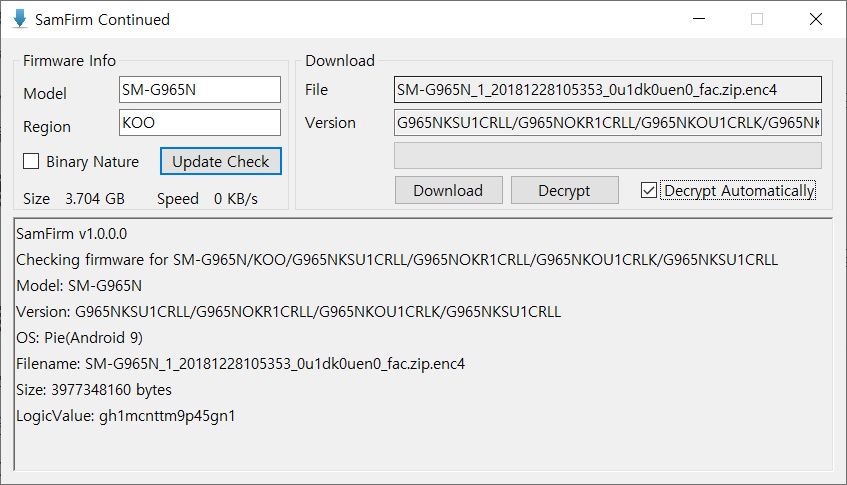
    SamFirm Continued
    SamFwTool

    SamFirm-continued started its journey as yet another open-source fork of the legacy SamFirm, but the maintainer abandoned the project a few months ago. Later on, XDA Member Tungtata picked up the baton and created SamFwTool. One of the highlights of SamFwTool is the auto-detection feature. Just connect your phone in MTP mode and press “Auto detect” to identify your device model and region code.

    Download SamFwTool

    3. SamFirm.js

    The whole Samsung firmware downloading saga is now on a different level, as XDA Recognized Developer jesec has presented SamFirm.js, a streaming downloader, decryptor, and extractor coded in JavaScript. With SamFirm.js as the backend, you should be able to construct a web app to fetch stock Samsung firmware packages. The project is a collaboration between developers jesec and LuK1337.

    Download SamFirm.js

    4. SamFetch

    In case you’re looking for a web API variant of the Samloader project, you should try out SamFetch. XDA Member YusufCihan reimplemented the functions from Samloader’s code as web routes in order to expose a simplified REST API to download Samsung firmware.

    Download SamFetch

  • Google Camera 7.6 available for Pixel 4, 3, 2 devices

    Google Camera 7.6 available for Pixel 4, 3, 2 devices

    Google Camera download

    Google has just launched two new Pixel 5 and 4a 5 G smartphones. The two phones have just launched with intriguing specifications for hardware and software. Although the Pixel 5 is not the flagship phone with the highest hardware configuration, the Snapdragon 700 SoC series still supports 5G. As for the applications, out of the box, both the devices feature Android 11 and some exclusive Pixel apps and services such as the camera app. The stock of older Pixel 4 (XL), 3 (XL), 2 (XL) and 4a and 3a cameras have all been updated to the new Google v7.6 APK camera.

    Sadly, Google has not mentioned what’s new in the latest version of the camera, including v7.6.

    The Play Store listing only mentions the age-old changelog of dual exposure controls to adjust brightness and HDR of your photo, added Astrophotography feature to Night Sight mode for the Pixel 3, 3a, and 4. Top Shot photos feature with touch and hold on the shutter button to capture. Here is the complete changelog from the Play Store listing:

    •  Added dual exposure controls to adjust brightness and HDR of your photo (Pixel 4).
    • Added Astrophotography to Night Sight to allow you take a picture of the Milky Way with one tap (Pixel 3, 3a, and 4).
    • Added Frequent Faces to help you capture Top Shot photos where the people you photograph most are smiling and not blinking (Pixel 4).
    • Added Touch and hold on the shutter button to capture Top Shot photos in the default camera mode (Pixel 2, 3, 3a, and 4).
     camera
    google camera

    We do, however, have a list of features from previous versions of the Pixel camera, such as the Gcam 7.5. “Audio zoom” allows you to capture audio / sound from the microphone in a particular direction with a motion blur effect that provides DSLR-like quality for images of moving objects. The flash intensity allows you to change the flash intensity at will. The video sharing feature now also applies to videos. In Google camera 7.6, we should expect all these features as well.

    On the other hand, Pixel 5 and 4a 5G feature new Google Camera 8.0 out of the box. This camera update didn’t come to the older Pixel series yet. However, you can still install it using our Gcam 8.0 post from here alongside your original camera app. You can expect some of Google camera 8.0 features into the Gcam 7.6 as well. Check out all the Pixel 5 and 4a camera features here.

    Moreover, previous Google Camera 7.4 enables 8X camera zoom for video recording on the current flagships Pixel 4 and 4XL. It also brings a new toggle for changing resolution while video recording in the dropdown menu on the viewfinder. Later, Google released a newer stable Google Camera 7.4.200 APK as well.

    Download Google Camera 7.6 APK

    Here is the latest Google Camera 7.6.008.327100377 original APK available for download for older Pixel series phones including Pixel 4 (XL), Pixel 3 (XL), 2 (XL), OG Pixel 1 (XL). So if you have an older Pixel device and do not see the newest update on the Play Store, then download the APK and simply install it as a normal app. It will only support Android 11 or later.

    APK download

  • Download and install Kali NetHunter on any Android device

    Download and install Kali NetHunter on any Android device

    Kali NetHunter Rom

    The Kali NetHunter is an Android ROM overlay that provides a robust Mobile Penetration Testing Framework. A custom kernel, a Kali Linux chroot, and an associated Android application are included in the overlay, making it easier to communicate with different security tools and attacks.

    • 802.11 Wireless Injection and AP mode support with multiple supported USB wifi cards.
    • Capable of running USB HID Keyboard attacks, much like the Teensy device is able to do.
    • Supports BadUSB MITM attacks. Plug in your Nethunter to a victim PC, and have your traffic relayed though it.
    • Contains a full Kali Linux toolset, with many tools available via a simple menu system.
    • USB Y-cable support in the Nethunter kernel – use your OTG cable while still charging your Nexus device!
    • Software Defined Radio support. Use Kali Nethunter with your HackRF to explore the wireless radio space.

    The power of NetHunter does not stop there, however. We’ve introduced some awesome features that are both powerful and special into the NetHunter OS. From pre-programmed HID Keyboard (Teensy) attacks to BadUSB Man In The Center attacks, to one-click configurations of MANA Evil Access Point, access to the Aggressive Protection Exploit Database … And yes, with a range of supported USB NICs, NetHunter natively supports wireless 802.11 frame injection.

    Kali NetHunter is a popular Android ROM penetration testing platform that is open source. The developers behind the ROM made it, along with older OnePlus phones and some older Samsung Galaxy phones, to work on Google’s older Nexus smartphones.

    Kali NetHunter

    Prepare your phone

    It must be rooted in a software like SuperSu before you download and install Kali NetHunter on your Android computer. You will need to have the BusyBox app from the Google Play Store enabled. You should also have plenty of usable free storage on your Android computer. Lastly, custom ROMs such as CM12. It is also a good thing to have CM12.1 and CM13 ready to go, but they are not completely important.

    Install Kali NetHunter

    Once your phone is prepared, go to the Offensive Security website and download the Kali NetHunter ROM version that corresponds to your Android version on your device.

    • DOWNLOAD KALI NETHUNTER
    • Once that’s done, you should extract the Zip file. Then go to /data/app and install the apps present in that folder one by one.
    • Then open up your preferred root explorer app, and go to /data/data/com.offsec.nethunter/files/scripts.
    • Copy all the files and paste into /system/bin (Note: If you don’t see the folder or content in files/scripts, open NetHunter app and then close it and check again)
    • Open the Nethunter App and Go to the Kali Chroot Manager and install the “Minimal Chroot”. You can also select “Full Chroot” but this is not recommended.
    • Open Terminal Emulator or nh-terminal and choose “KALI”. This will open up Kali shell. You may be prompted to allow root permission.
    • Run the following commands in the terminal one by one: apt-get update, apt-get upgrade, apt-get dist-upgrade, apt-get install kali-linux-nethunter

    How To Install

    -Download the ROM and GApps of your choice

    -Make a full wipe (system, data, cache, dalvik)

    -Flash Firmware -Flash Rom

    -Flash GAPPS package

    -And at last Reboot! Clean Flash is always recommended!

    NetHunter downloads

    List Of Kali Nethunter Zips By Device And Kernel

    MT6572 Downloads

    MT6797 Downloads

    MT6735 Downloads

    MT6577 Downloads

    MT6580 Downloads

    MT6582 Downloads

    MT6589 Downloads

    MT6592 Downloads

    MT6752 Downloads

    MT6753 Downloads

    MT6755 Downloads

    MT6795 Downloads

    MT6782 Downloads

    MT6737 Downloads

    Nougat (Safe One)

    Redmi note 4:-Download

    Gapps:-Download

    Oneplus & Nexus Phones:-Download

  • Best gaming Android Rom – Corvus OS

    Best gaming Android Rom – Corvus OS

    Corvus operating system is fantastic ROM with many customizations. First, Dirty Unicorns inspired it (thanks to Alex Cruz), but then we picked many other features too. Our goals are a secure, feature ROM that many devices will enjoy. We ‘re not going to say Corvus is better than others but we’re still trying to give you the best.

    Next level customisation

    If you thought that the best customizable ROM ever available for Android was CyanogenMod, then you’re in for a treat. Havoc-OS will bring customisation to the next level. When it comes to customisation the custom ROM is a beast. Quick something you can alter on your mobile. This is customisable if it exists.

    Battery Saving

    Nearly all phones have a battery saver feature that will automatically be disabled if the battery drops below 15-20 per cent or you can even turn it on manually. But at Havoc, you get to do that with multiple features. One such feature is ‘Sensor block per packet.’ You can then turn it on manually. What this feature does is that it effectively blocks access to certain sensors on your phone for certain applications, and saves power. Another feature is ‘Alarm blocker’ which prevents you from waking up your phone when you receive notifications from certain apps. Sometimes using these power saving tools, you can get a huge increase in screen-on times.

    Quick Settings

    Quick settings can be accessed by pulling the notification shade further down. Most Android skins allow you some basic quick settings including Wi-Fi, Bluetooth, Mobile data toggles, etc. Havoc-OS, on the other hand, can offer you multiple quick setting toggles, and even some features that wouldn’t previously exist on your device like screen recording (which can be accessed from the quick settings).

    Youtube video

    Latest changelog – Corvus ROM

    * Gaming Mode v2 -Now with roblox support-
    * Fixes for QS detailed view
    * Advanced location enabled
    * Added support for Pixel stand
    * Updated some boost framework stuff
    * Adding cutout force full screen
    * Shishu Launcher Free with a premium upgrade added
    * Added LiveDisplay
    * Force powersave on system apps
    * New intro for new devices
    * Moving net indicator to expanded statusbar header
    * Fixes for Q clock strings
    * Long screenshot
    * Internal Audio recording
    * New launcher quickspace stuff: Adding now playing -even though it's not fully compatible-, Personality (taken from lawnchair) and a new UI, more minimalistic
    * Fixed the inverted navbar layout
    * People actually fell off thinking that Shishu Launcher Premium was a thing, so we reverted that joke on our changelog
    * Switched to Lineage Fingerprint on Display code
    * Added support for sliders for OP devices
    * Added some goofy stuff: like The Drill and Developer mode insulter
    * Updated our APNs
    * Fixed dialer dark numbers on numpad
    * Misc fixes
    * Removed Roblox as system app

    Corvus features

    Statusbar:
    Statusbar clock customizations
    Network Traffic Activity
    Hiding Statusbar on lockscreen
    VoLTE Icon customizations
    
    Quick settings:
    Togglable blur behind QS
    Hide gradient behind QS
    New tiles
    OP Screen Recorder Tile
    
    Themes:
    Awesome wallpaper
    Pixel Theme Picker
    Good minimalistic bootanimation
    
    Hardware Buttons:
    Power Menu Customizations
    Disabled Annoying Emergency button in power menu
    
    Navigation:
    Navigation bar layour invertion
    Togglable hide pill in full gesturl nav mode
    
    Gestures:
    3-finger screenshot gesture
    
    Screenshot:
    Extended screenshot feature from OOS
    
    Settings:
    Added package name to installed app details
    Maintainer and device codename strings
    
    Miscellaneous:
    Regular OTA Updates
    Moved battery icon to QS header
    
    
    Much More As Source keeps updating So HArd to keep all updated.

    How to install Corvus OS?

    • Must have Unlock Bootloader
    • Must-Have Custom Recovery
    • Download Rom.zip (Link Below )
    • Go to your Recovery
    • Wipe Data System Cache Dalvik
    • Install ROM
    • Install Gapps
    • Reboot – 1st boot takes around 5-10 minutes.
    • Enjoy

    Downloads

    RealmeX2< 6 hours ago0
     oneplus32020-06-29200
     phoenix2020-06-261,594
     beryllium2020-06-243,880
     santoni2020-06-241,055
     riva2020-06-22313
     ysl2020-06-22364
     tissot2020-06-22517
     wayne2020-06-22226
     jasmine_sprout2020-06-21250
     violet2020-06-211,178
     vince2020-06-20762
     onclite2020-06-20172
     RMX18012020-06-20125
     lavender2020-06-204,876
     mido2020-06-201,551
     X00T2020-06-201,618
     ginkgo2020-06-19832
     land2020-06-19205
     enchilada2020-06-1956
     platina2020-06-18180
     whyred2020-06-132,140
     raphael2020-06-09151
     tulip2020-05-17261
  • Install GCam 7.3 on any Android device

    Install GCam 7.3 on any Android device

    One of the wonders of Android devices is the Google Phone. It is Google Pixel smartphones ‘ holy grail. After all, while other companies rely on multiple-cameras to produce high quality images, powerful software supports Google Pixels. This technology has blessed pixel smartphones making them some of the best smartphones in the photography industry. They have official support for advanced features such as portrait and astrophotography mode. Recently Google rolled out the Google Camera App v7.3 with several new features and enhancements. The group is strong and now all Android smartphones have Gcam 7.3 app.

    Gcam?

    In short, Gcam is a plugin aimed at bringing the Google Camera app to multiple smartphones and ensuring all features work with them. There are several variations of Gcam. Some are intended for multiple Android devices, while others are specifically designed for a single smartphone. Multiple developers are working on Gcam and we have today an active community of users using the Mod.

    gcam

    Gcam 7.3 features:

    • Automatic DND mode while using video-recording.
    • Re-arranged settings UI.
    • 24FPS video recording.
    • Exposure controls to adjust brightness and HDR of your photo.
    • Astrophotography implemented to Night Sight.
    • Received Frequent Faces to help you capture Top Shot photos.
    • Touch and Hold shortcut in the shutter button to capture Top Shot photos.

    How to install Gcam 7.3 on your device:

    1. Download the APK provided (It’s a beta build, so might carry some bugs) (Click Save As)
    2. Select and Install it ( You’ll be prompted with the request for allowing app installation from external sources, don’t worry the app is safe).
    3. Open the Google Camera once the icon appears in your launcher
    4. Done!
    5. For older versions of Android, you can try and download Gcam 7.2, 7.1 or any mod that is compatible with your version.
  • Download Magisk – latest official

    Download Magisk – latest official

    Installing Magisk will give you ROOT, a super powerful Systemless Interface, Magisk Modules support, and hide from tons of integrity tests like SafetyNet!

    Download Magisk

    Downloads

    Magisk features:

    • Open Source:
      100% open source and easy to build on all Google supported platforms.
    • Magic Mount:
      Modify system (vendor) without tampering the partitions.
    • MagiskSU:
      Unleash your device’s root access.
    • MagiskHide:
      Hide Magisk from detections: Google SafetyNet, enterprise / bank system integrity checks, game tamper checks.
    • Resetprop:
      Modify or delete any system properties, including read-only props.
    • Online Module Repo:
      Install Magisk Modules from the community driven Magisk Module Repo.