
Tag: colors

  • Google Messages Prepares a Feature Samsung Users Have Been Waiting For

    Google Messages Prepares a Feature Samsung Users Have Been Waiting For

    Samsung recently established a clear schedule for discontinuing Samsung Messages, establishing Google Messages as the default messaging software on Galaxy phones.

    While this is ultimately a welcome shift, the fact that Samsung Messages no longer supports RCS has left some longstanding users wanting the customisation tools they were accustomed to.

    It appears that Google has taken note and is working on adding some fun features that Samsung Messages users will recognize.

    Currently, the only way to modify RCS chats in Google Messages is to use the “Change colors” option from the three-dot menu. This option allows you to alter the backdrop and chat bubble colors simultaneously, but that’s all the personalization you can do in individual or group chats.

    In comparison, Samsung Messages supports more advanced customization, such as the option to color and decorate chat rooms using photographs from your phone’s gallery. Using Theme Park (via Samsung’s Good Lock module) provides even more customization options, such as altering bubble colors, modifying contrast, applying wallpaper-based themes, and more.
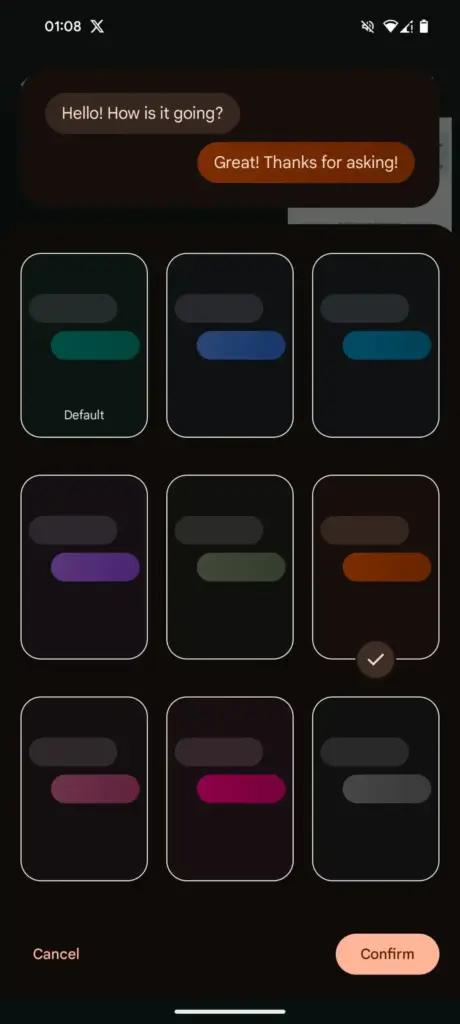
    Google Messages Prepares a Feature Samsung Users Have Been Waiting For

    As Samsung app is being phased out, customers who rely on custom theme packs have begun to express dissatisfaction with Google Messages‘ lack of customisation choices. Google appears to have been paying heed, since a new customisation option for its messaging app is now under development.

    More customization coming for Google Messages

    In the most recent beta release of Google (messages.android_20260410_02_RC00.phone.openbeta_dynamic), we discovered many additional lines pointing to extended theme controls within the app.

    <string name="custom_theme_add_photos">Upload photo</string>
    <string name="custom_theme_your_photos">Your photos</string>
    <string name="custom_theme_preview">Theme Preview</string>
    <string name="custom_theme_title">Theme UI</string>
    <string name="custom_theme_custom">Custom</string>
    <string name="custom_theme_backgrounds">Backgrounds</string>
    <string name="custom_theme_bubble_color">Bubble Color</string>
    <string name="custom_theme_apply">Apply</string>

    The new strings indicate that Google is planning a full “Custom” theme section, where users may be able to change backdrop patterns, bubble colors, and, most importantly, upload their own photographs to use as chat wallpapers. References to “Upload photo” and “Your photographs” definitely suggest a Google photographs integration, although options such as “Theme Preview” and “Apply” indicate a more involved customization experience.

    There are also talks of separate areas for backgrounds and bubble colors, implying that users could mix and match aspects rather than relying on pre-set themes.

    If this option becomes available, it would be a significant step toward allowing users greater choice over how their chats appear, which has been glaringly absent from the app thus far.
  • Themes are coming to MIUI 13

    Themes are coming to MIUI 13

    Many of us have wanted the customization layers to merge with Android 12 since it was announced and the new mechanism for customizing mobiles with that version was released. The first to add it to One UI 4 in its own unique way was Samsung, and the next to do so will be Xiaomi, according to a leak shared on Twitter by user Mishaal Rahman.

    This has discovered within the Android internal code that the so-called Monet themes, which are hallmark of the purest version of Android, will also be in the Chinese manufacturer’s popular layer.

    A very important change, which gives more personality to Xiaomi brand mobiles, which with the themes already gave us a thousand and one possible style configurations. The colors are based on the wallpaper, but we can also choose our favorite combination of tones.

    The color arrives at Xiaomi

    Because of the photographs supplied by Xiaomi ui, we currently know how they operate and how they will behave on the Xiaomi’s smartphones, but it shouldn’t be long before we see additional circumstances where the adaptive colors of Android 12 reach Xiaomi smartphones. The feature is included in MIUI 13 version 22.1.17, which is currently only available in China.

    This option will be available to everyone in the future, albeit we will have to wait because it will not be included in the first global editions of MIUI 13. The program will be released later, allowing us to customize the appearance of our Android phone as if it were a Google Pixel.

    colores temas android 12 xiaomi miui 12 1

    The images show how the new Android 12 widgets, as well as Google Chrome tabs and even system components, adapt to the selected hue. All Google applications are expected to accept this shift, and we will gradually learn how other areas of the Xiaomi, Redmi, and Poco terminals will follow suit.

    For the time being, devices running Android 12 in its stock form can apply Monet themes to the icons and control panel, which is not possible with MIUI 13. However, we do not give up hope that they will arrive following this first application.

    What will happen to the themes?

    Until now, the best way to change the look of our Xiaomi device was to use MIUI’s themes app. We may find many other style combinations there, which we can customize to our liking on the smartphone by changing the icons, colors, and shapes. The incorporation of this new Android function raises a lot of questions about what will happen with this benefit.

    In recent months, the app has stopped integrating as many options in Europe, and some notable themes have been left alone in China.

    This could be the first step for Xiaomi to become more pure, at least for Spain and other countries, where stock Android is preferred and other systems that are visually much more complex are less popular.