Tag: alternative

  • The best YouTube Vanced alternatives

    The best YouTube Vanced alternatives

    Without a doubt, YouTube Vanced was one of the greatest technologies in recent memory. It provided the same functionality as YouTube but without the annoying commercials, frequent UI changes, and dubious improvements like the elimination of the hate counter. In addition to resolving all of these problems, Vanced also introduced new features that completely altered how you consume material.

    One of the best features that Vanced offered was and is the SponsorBlock API. You could watch videos for far shorter periods of time because it essentially skipped all sponsor portions and self-promotions. Additionally, Vanced included a full AMOLED black theme that was very popular. Unfortunately, a Google notice forced Vanced to stop doing business.

    While there aren’t any options that are as smooth and flawless as YouTube Vanced, there are a few that let you watch without ads and even let you download movies to your phone. Therefore, unwind as you read about some of the top YouTube Vanced options you ought to employ in 2022.

    Best YouTube Vanced Alternatives in 2022

    1. LibreTube

    vanced alternative

    Kicking the list off, we have LibreTube, which is a beautiful YouTube client that provides an ad-free video-watching experience. The app allows you to customize playback controls and is completely open-source, meaning features can be added to it quite easily in the long run. The only downside for now is the fact that LibreTube is still in beta and is missing a lot of features, including the option to sign into a Google account. That said, the app is fast, fluid, and works as advertised.

    2. NewPipe

    ezgif.com gif maker 3 1

    NewPipe is a solid alternative to YouTube Vanced. It does not depend on any of the Google Frameworks to function and is instead based on another API that doesn’t require you to have a Google account to enjoy watching videos ad-free. The app has a simple interface with not much going on. While you can import your subscription feed from an existing Google account, you still cannot simply sign into one using the app. NewPipe also lets you download videos in a slew of different quality options.

    3. SkyTube

    SkyTube is similar to NewPipe in a lot of ways, and we only really recommend one over the other if you’re facing troubles using either of them. Just like NewPipe, SkyTube doesn’t run on top of YouTube’s API and thus allows for a seamless ad-free video-watching experience. You can import your subscriptions to avoid starting from scratch, although the app doesn’t have support for logging into a Google account as of yet.

    4. Kiwi Browser with Extensions

    kiwi browser

    If you really miss the great SponsorBlock integration that YouTube Vanced had in store, we have got a workaround! Kiwi Browser is a chromium-based web browser available on the Play Store that you can use to watch videos on YouTube using the mobile website. While this might seem obvious, you can install extensions such as an adblocker and SponsorBlock to enjoy an experience similar to that of YouTube Vanced. The only downside to using this method is the rather clumsy and unintuitive interface of the YouTube web app.

    5. YouTube Premium

    ezgif.com gif maker 4 1

    As much as we hate to admit it, the best video-watching experience is offered by YouTube itself. While it still lacks features like SponsorBlock and the dislike counter, there is no denying that the official YouTube app will provide you with the smoothest and fastest experience while consuming content. YouTube Premium gets rid of all the ads for you, unlocks Premium content, and allows you to watch videos in the picture-in-picture (PIP) mode. YouTube Premium has pretty attractive pricing with its family plan, so you might want to check that out.

    Conclusion

    We hope our article on some of the best YouTube Vanced alternatives provided you with some much-needed insight. If you have suggestions for Vanced alternatives other than what we’ve mentioned, do let the other readers know in the comments below! If you have any queries regarding the article, feel free to contact us, we’d be happy to help!
  • The Galaxy S22+ alternative – OPPO Find X5 Pro

    The Galaxy S22+ alternative – OPPO Find X5 Pro

    In 2022, we’ve already seen a lot of fantastic phones. The Galaxy S22+ is a terrific all-around phone, while the S22 Ultra marks the return of the Note series and the S21 FE establishes a new benchmark for budget flagships.

    This year, Samsung fired the initial shot, but Chinese makers aren’t far behind. I’m excited to watch what OPPO does this year; the brand’s Find and Reno series have seen a 50 percent year-over-year rise in sales in the previous 12 months, and it’s gaining traction in major western markets like the UK.

    With this year’s Find X5 Pro, OPPO hopes to continue that trend. The phone, which is aimed squarely at the Galaxy S22+, is now available in global markets. It has a similar look to the Find X3 Pro from last year, but it has a number of intriguing new features under the hood, including OPPO’s in-house image NPU, the MariSilicon X. There’s also a Hasselblad connection, improved internals, and new charging technology that supports up to 80W wired and 50W wireless charging.

    oppo find x5 pro

    Does the Find X5 Pro have what it takes to compete with Samsung’s best? With the Galaxy S22+ giving a solid overall package, does the Find X5 Pro have what it takes to go up against the best? Let’s have a look.

    Release

    The Find X5 Pro was announced at Mobile World Congress on February 24, and it is now available for pre-order in the UK, with sales beginning on March 24. Here’s a breakdown of when the Find X5 Pro will be available worldwide:

    • Spain/Switzerland/Belgium/Netherland: March 14
    • Italy: March 17
    • Germany/Portugal: March 21
    • France/UK: March 24
    • Australia: April 7
    • New Zealand: March 31/April 7
    oppo find x5 pro

    The Find X5 Pro will be available in Asia-Pacific, the Middle East, and Africa after April, according to OPPO. The Find X5 Pro, like other OPPO phones, will not be available in North America.

    The Find X5 Pro comes in only one configuration, with 12GB of RAM and 256GB of storage, and costs £1,049 ($1,365) in the UK. There are several freebies available if you pre-order: the Enco X wireless earphones (which are great), an OPPO Watch Free smartwatch, a 50W AirVOOC wireless charging stand, and a Kevlar Aramid Case. The pre-purchase freebies are worth £373 ($485), so if you’re interested in the Find X5 Pro, you’d better place your order by March 23.

    OPPO also offers a normal Find X5 model with an FHD+ 120Hz AMOLED screen, Snapdragon 888 processor, identical cameras to the Find X5 Pro, and both wired and wireless charging options of 80W and 30W. This model, which costs £749 ($975), includes a glass back and 8GB of RAM with 256GB of UFS 3.1 storage.

    The camera bump on the Find X3 Pro blended smoothly into the chassis last year, and OPPO is continuing that trend with the Find X5 Pro.

    This year, the impact is a touch stronger, which makes the phone stand out even more than normal among the glass-and-metal designs that now dominate this category.

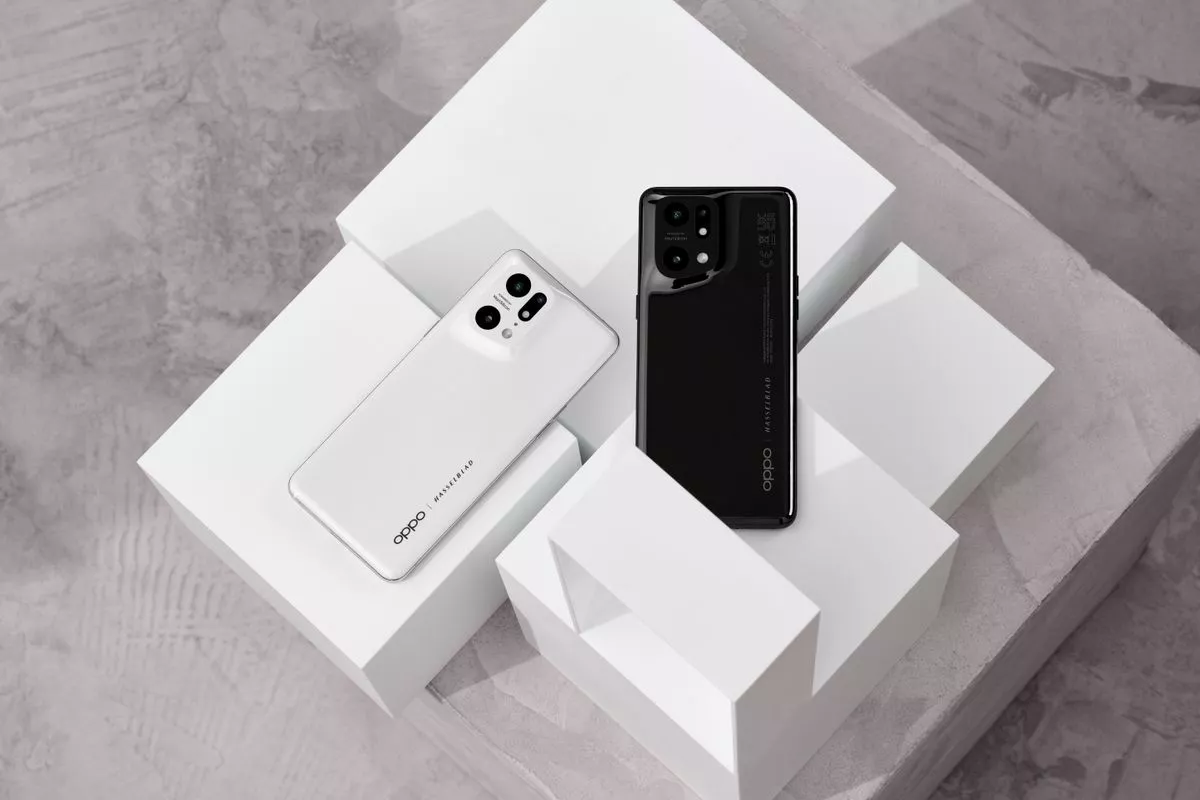
    Overall, the Find X5 Pro gets a lot right in terms of design. The ceramic back is fabulous and it is more resistant to tumbles, the phone feels great to hold and use, and although it is heavy, it is well-balanced. This may just be my favorite phone design of 2022, and that white color option in particular looks very distinctive.

    Performance

    It wouldn’t be right for a flagship to arrive in 2022 without Qualcomm’s latest chipset, thus the Find X5 Pro is powered by Qualcomm’s 4nm Snapdragon 8 Gen 1 processor. There’s also a larger multi-tier cooling system to guarantee the phone doesn’t overheat during gaming sessions, and I didn’t notice any thermal concerns during my week with the phone.

    There’s not a lot to say about the Snapdragon 8 Gen 1 processor. It performs admirably in almost every situation, and I don’t see that changing for at least a few years. The Find X5 Pro breezes through day-to-day work with ease, and the technology on offer is overkill for most use cases.

    In terms of memory and storage, the Find X5 Pro comes in a single 12GB/256GB combination, which I like because OPPO now includes 256GB of storage as standard on its mid-range and high-end handsets. Although there is no microSD card port, the internal storage should be sufficient for most people.

    Another feature I like is the haptic engine; the Find X5 Pro has a vibration motor that delivers excellent feedback. And like everything else about the phone, it is inherently customizable — you can adjust the vibration intensity and pattern of feedback from the settings. OPPO did a brilliant job here, and I want the same motor to make its way to the OnePlus 10 Pro and other BBK offshoots of the Find X5 Pro.

    When it comes to connectivity, you’ll find Wi-Fi 6E, Bluetooth 5.2, NFC, AptX HD audio codec, and global 5G bands with a 360-degree antenna design. While the Find X5 Pro isn’t launching in North America, it has the requisite Sub-6 5G bands for the region. Here’s the breakdown of all the 5G bands: n1/2/3/5/7/8/12/13/18/20/25/26/28/38/40/41/66/77/78/79.

    And finally, the Find X5 Pro includes IP68 dust and water resistance, giving it the ability to withstand the elements. You’re getting all the hardware features you could want in a flagship, and the Find X5 Pro holds its own against the best Android phones.

  • Alternatives to Gmail on Android – open-source alternatives

    Alternatives to Gmail on Android – open-source alternatives

    There are many reasons you may want to use an open source alternative to an application like Gmail. Security, security and promoting open source growth are top of the list, but the simple fact is that at the end of the day, an app like Gmail needs to produce revenue for Google to make the service worth providing. It must also serve a vastly diverse user base with tons of email needs and expectations you may not have, where a simpler, more stripped-down email experience would do the same. Below are a range of fully free and open source Gmail alternatives for Android.

    All of these apps are simply clients for external email services, like Gmail and Outlook, so you won’t improve your privacy by simply using one of these apps instead of Gmail for Android. However, these apps do offer features like email tracking blockers, and they may work on devices without Google Play Services.

    FairMail

    fair mail

    FairMail is a new email app that arrived earlier this year on the Play Store. It’s a pretty powerful email program, built by Marcel Bokhorst, the NetGuard firewall developer. It allows limitless synced accounts, a single inbox, the threading of messages and more. This also functions similarly to Gmail, archiving a document by a swipe to the left. Here are some pleasant privacy features to remember in FairEmail ‘s work. By default, messages are viewed in a ‘protected view,’ which excludes files, external images and other potentially useful elements to monitor you. For instance, services that monitor when you open a specific message do not function with safe view on.

    FairEmail also supports OpenPGP signing, and doesn’t have any built-in advertisements or analytics.

    If you end up liking FairMail, you can unlock an optional version of Pro for a $5.99 in-app purchase. Pro provides advanced notification settings, snoozing, scheduled sending, response templates, biometric support, a unified home screen widget in the inbox, and much more.

    The only downside to FairMail is that it adds a persistent notification for syncing, but you can simply mute the ‘Service’ notification channel in the Android settings to hide it, and it will continue to work (or at least, it worked for me). Also, Exchange servers aren’t supported, only IMAP and POP3.

    K-9 Mail

    K-9 Mail is the classic open-source email app for Android. Although there hasn’t been a major update in a while, it’s still the top choice for many people, especially since it supports Microsoft Exchange servers (2003/2007 with WebDAV). K-9 Mail also serves as the base for many other email apps.

    k9 mail

    K-9 Mail has all the features you ‘d expect from a mail application, such as multi-account support, search function, multi-folder sync, flagging, signatures, OpenPGP encryption, etc. The gui leaves a lot to be desired — in a long time, I haven’t seen a Holo version — but it’s workable. In fairness, version 5.0 with overhauled UI is currently under development.

    Unless you need something that only K-9 Mail offers, I ‘d probably go with FairMail instead, because that app has a more modern design. It is nevertheless always nice to have more options.